Lifecycle Email Marketing in 2026: Stop Polishing Copy, Start Segmenting Users


Lifecycle email marketing has a targeting problem, and the gap shows up in growth metrics before appearing in anyone’s inbox. Automated emails drive 37% of sales despite accounting for just 2% of email volume, generating $2.87 per email compared to $0.18 on scheduled campaigns. Lifecycle email marketing used to mean simply scheduling a handful of emails after signup and hoping the timing worked out in your favor. That worked when most SaaS products only had one plan, persona, and path to activation.
In the era of complex products and pricing models, segmentation is the lever most teams aren’t pulling. Proper targeting has a greater impact than multiple subject line A/B tests combined, which is why deciding who sees an email is more important than simply writing it better. This guide will help you segment email recipients properly, tailor your approach to each lifecycle stage, and combine email with in-app messaging to ensure you reach users wherever they are.

The lifecycle email problem isn’t copy
Stronger subject lines and sharper copy aren’t always the right lever to pull when emails aren’t yielding the ROI you expected. Many lifecycle marketing problems originate long before you draft the first email and need to be addressed before the campaign can perform at a worthwhile level.
Start upstream of the subject line
The industry conversation around lifecycle email marketing obsesses over subject lines, calls to action, and paragraph length but none of that matters if the wrong person is the one opening the email. Message testing on subject lines can easily boost open rates by half a pip, only for the underlying send list to stay just as broad and untargeted as ever. That type of optimization theater isn’t lifecycle marketing and won’t move the needle beyond marginal vanity gains.
In reality, most SaaS lifecycle programs break upstream at the point where someone decided a single sequence could serve every new signup to the product. A free trial user who hasn’t returned for their second session and a power user who hits their usage limit every week don’t belong in the same segment because their usage (or lack thereof) of the product is completely different. Fixing that disparity takes actual targeting rather than more polished email copy.
One sequence for everyone is your most expensive email mistake
Having one sequence for every user is the most expensive lifecycle email marketing mistake a SaaS company can make. Nobody unsubscribes over a mistimed feature spotlight. I like to think of it as an invisible tax, with every mismatched email sent to the wrong person training that user to ignore the next one (even if it would’ve been relevant to them). When a 5% improvement in customer retention can increase profitability by 25% to 95%, training your mailing list to ignore lifecycle emails will put a long-term drag on your churn rate and revenue growth rate.
Segmenting by behavior, intent, and plan tier
It’s clear that proper user segmentation is paramount for lifecycle email marketing, but which criteria should you be using to target specific audiences? The sections below will show you how to combine behavioral data, user intent, and plan tiers to build unique segments!
Product behavior as the primary signal
Product behavior is the strongest signal available for lifecycle email marketing because it’s objective and can’t be faked. Users can skip a survey question about their goals, but they can’t hide instances where they try a feature three times before giving up on it, or whether they’ve logged in daily for the past two weeks. As such, behavioral signals are the most empirical data available to lifecycle email marketers.
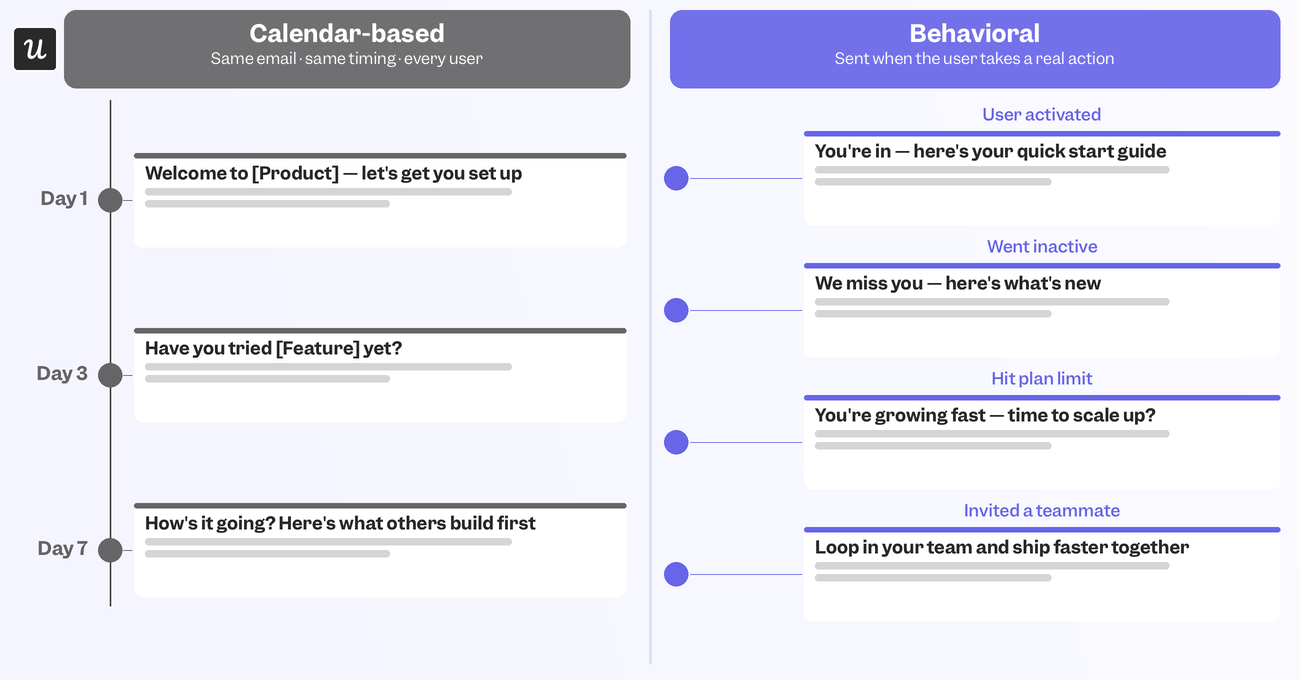
Behavioral triggers outperform calendar-based sends by 3 to 5x on click-through rates because they reach users at exactly the right moment when their message is most relevant. Activation milestones, inactivity periods, usage limits, and teammate invitations are all key signals that should be capitalized on so that the emails you send reflect how the customer is using your SaaS product. This will make email sequences feel tailored to them instead of a boilerplate broadcast sent to everyone at the same time.
Adding intent and plan tier to the mix
Behavior tells you what someone already did, while user intent and plan tier can tell you what they might do next. A user on a free plan who hits a usage wall needs to receive an upgrade email to take them from freemium to premium. The same behavior from someone already on your highest subscription tier should get a different message if there’s nothing left to upsell. Behavioral triggers without plan context end up sending the wrong offers to the wrong users or upselling someone on an add-on they’re already paying for.
The four segments to build first
Most teams don’t need a dozen different segments when these core four can cover most of your bases:
- Unactivated: Signed up, never reached the core action that predicts retention.
- Activated, not yet paying: Reached the aha moment, still on trial or free tier.
- Active and paying: Using the product regularly, on a paid plan.
- At risk: Usage or logins have dropped from their own established baseline – the clearest input to churn prediction.
Build one branching sequence per segment before attempting anything more granular, as it’s better to have four segments that you’re confident are accurate than a dozen guesses.
How segmentation changes each lifecycle stage
Even if you get the segmentation right, audience targeting isn’t a static undertaking that you can set and forget. You’ll still need to adapt your emails and tracking as users move through different lifecycle stages.
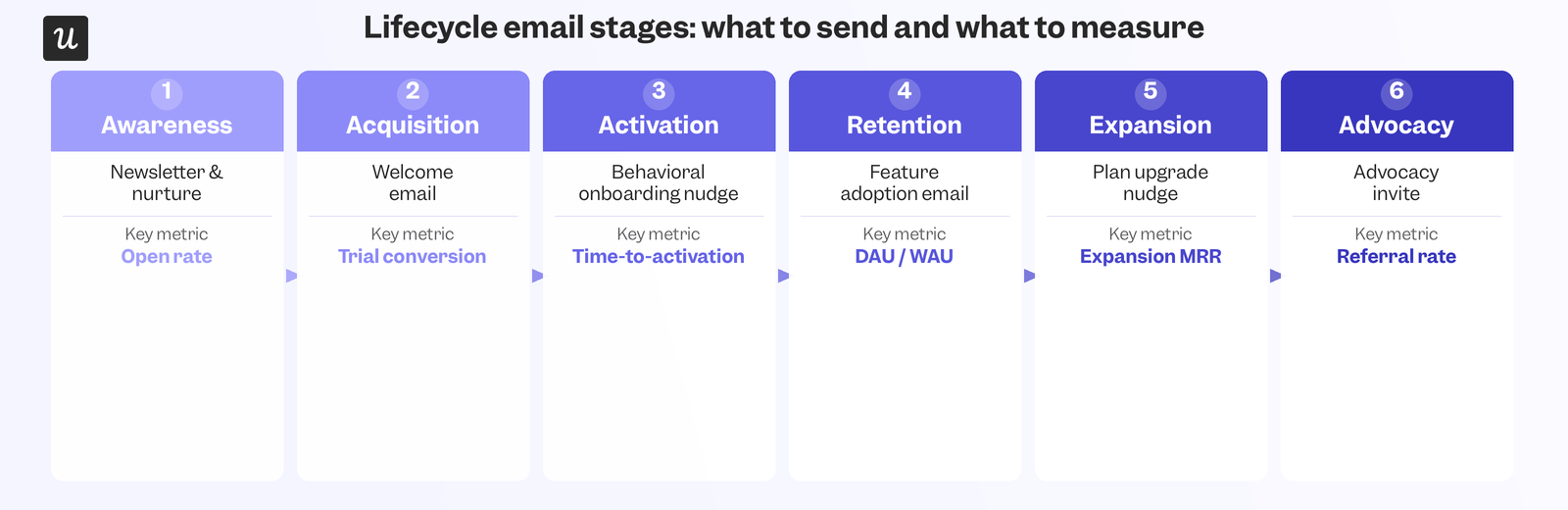
Branch your onboarding sequence at activation
Onboarding is where blended lifecycle email sequences are most costly. A user onboarding sequence that’s still sending “get started” emails to someone who already activated on day one tells users you aren’t paying attention.
Users who have already reached their activation point should be able to skip to more advanced lifecycle emails that showcase high-value features they haven’t tried yet or highlight the benefits of upgrading to the next plan. On the other hand, those who lag behind the average activation timeline and still haven’t had their ‘Aha!’ moment after the first week should receive emails that nudge and guide them to reduce their time to value before it’s too late and they churn.
Trial conversion emails built around what users already did
The average trial-to-paid conversion rate in SaaS is 8%, with 20% of products seeing a conversion rate below 2.5% while the top 23% have a conversion rate above 25%. Closing that gap requires sending relevant emails to the right users at the right time during their trial period. An activated trial user should get a compelling summary of what they’ve accomplished and what they’d lose if they don’t continue using the product as a paying customer. An unactivated trial user needs an even more direct nudge toward the one action that will get them to convert, instead of a vague “one week left in your trial” email.
Reach at-risk users before they decide to leave
By the time someone cancels their subscription, it’s often too late to win them back. The churn prevention window comes 30 to 60 days earlier, when product usage first drops below baseline. On the other hand, involuntary churn deserves its own sequence because those users are churning due to failed payments rather than by choice. This accounts for up to 40% of total churn and can cost SaaS companies up to 12% of their MRR on failed payments.
A three-email pre-dunning sequence starting 14 days before card expiration recovers 30% to 50% of at-risk subscriptions before involuntary churn occurs, making it a high-priority sequence to tackle.
Time expansion emails to usage milestones, not renewal dates
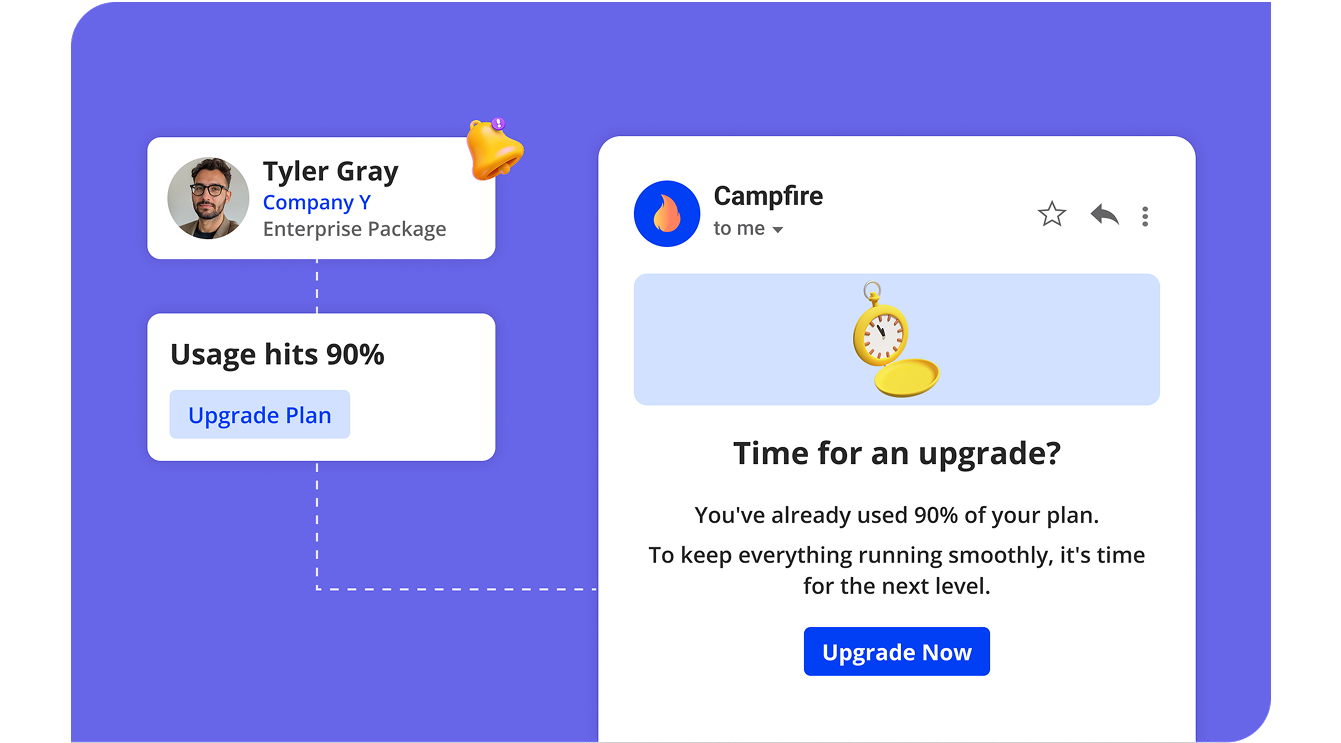
Expansion emails that are triggered by usage limit alerts will convert better than an identical offer sent 30 days before renewal because you’re reaching customers at their point of constraint. “You’re at 90% of your seat limit” is a more urgent and compelling argument than “your plan renews next month. The same is true for team signals, as a user who just invited three teammates is telling you that collaborative use is increasing within your product, making it the perfect moment to surface (or even upsell) features built for teams.
In-app messaging and lifecycle email are stronger together
Most people look at in-app messaging and lifecycle emails like they’re two separate channels, when they actually produce the best results when used in tandem as part of omnichannel customer engagement.
Each channel reaches users where the other can’t
In-app messaging reaches customers while they’re actively using the product, which is something email can never do. At best, an email with behavioral triggers will reach someone as soon as they exit the product to check their inbox, but it can’t appear within the product itself the way an in-app message can.
Abrar Abutouq, one of our product managers, saw the value of combining the two when Userpilot’s own email feature launched and the funnel showed a sharp drop-off rate at domain verification:
“Within a few hours, I just created a targeting tooltip and showed it to users and highlighted the correct steps for them to make it clear what to do next. That helped a lot on reducing friction and supporting users in real time without involving our dev team.”
The email had already done its job of getting the user into the product, but the tooltip did what the email couldn’t by catching users on the exact step they were getting stuck on. Both channels worked together to close that gap by pulling people in and then moving them forward when they encountered a friction point.
Coordinating both without duplicating the message
Coordination means deciding which channel leads the charge instead of sending identical messages simultaneously.
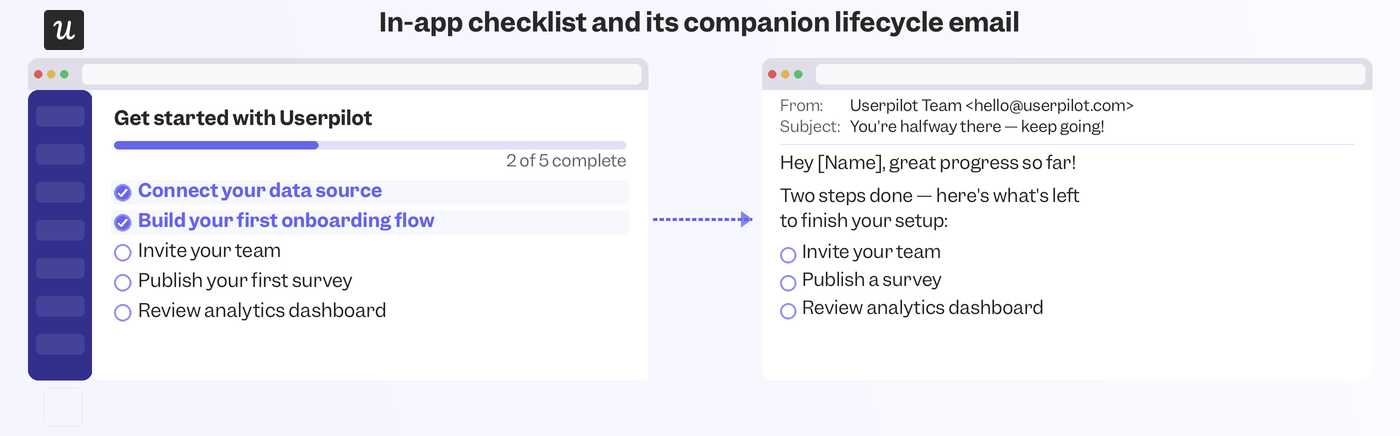
The general rule of thumb is to use email for anything that benefits from a moment of reflection outside the product. Monthly usage summaries, trial end reminders, and churn surveys all fall into this category. Meanwhile, in-app messaging should take priority on anything that needs to land inside a specific workflow. Checklists or tooltips tied to the screen someone is already on have the greatest effect because they appear within the context of what the user is currently doing. When both channels reference the same event, they should pick up where the other left off rather than repeat the same words verbatim.
A product-update email that ends with “see what’s new” should send users straight into an in-app walkthrough instead of showing them a modal with the exact same bullet list they just read in their inbox.
Deliverability is a discipline, not a checkbox
Deliverability is an often overlooked aspect of lifecycle email marketing, but separating transactional and email marketing or executing re-engagement campaigns as your last line of defense are still worthwhile undertakings.
Separate transactional and marketing emails before you scale
Sending transactional and marketing emails from the same domain is a common pitfall that can catch lifecycle marketers by surprise. A spike in customer marketing send volume during a promotion period can impact deliverability rates on critical messages like password reset emails. By the time you notice deliverability rates have dropped, dozens of users might have already canceled their subscription because they couldn’t get back into the product. This is why keeping a dedicated subdomain for lifecycle marketing separate from where you send receipts, password resets, and security alerts is crucial. It’s a one-time setup that prevents much more painful cleanups later.
Re-engagement campaigns are list hygiene, not a last resort
Re-engagement campaigns recover users who would otherwise churn quietly because they forgot the product existed. That recovery rate alone justifies running the sequence, but the lesser-known secondary benefit matters just as much. Suppressing contacts who don’t respond to a re-engagement attempt protects the sender reputation of every other email you send, making list hygiene an investment in the deliverability of your entire lifecycle email marketing program.
Hardik Shah, Founder of Scale Growth Digital, offers the best summary of the thesis we’ve been building towards:
“SaaS email isn’t marketing email. It’s product email that happens to live in the inbox. The best SaaS email programs are triggered by what users do inside the product, not by a marketing calendar. If your email platform isn’t connected to your product usage data, you’re flying blind.”
Turn segmentation into your lifecycle email operating system
A lifecycle email program built around segmentation compounds, not because any single email is a masterpiece but because the right person receives the right messages at the right times. Most programs still think a welcome email, generic feature list, and trial expiration reminder are all you need to send to every user. In reality, a system where no two users with meaningfully different behavior ever receive the same email again will be far more effective at converting users, retaining customers, and expanding accounts.
If you want to see what advanced segmentation and user behavioral analytics look like in practice, book a Userpilot demo so we can show you how to combine in-app messaging with email beats across every stage of the lifecycle!
About the author