AI User Onboarding: 6 Ways to Use AI Across Your Flow (and Where Not To)



Most of the teams I talk to already run onboarding on behavioral logic: a welcome checklist, tooltips triggered by events, and a product tour on first login. Fundamentally, that logic still works, and AI user onboarding doesn’t replace it. Trigger conditions, user attributes, and product usage remain the inputs that decide when and where an experience should appear.
What AI changes is how much you can do with those inputs. Used well, it can generate and refine onboarding content, personalize paths for each user, interpret signals that are too messy for rules, and suggest the next best action.
Based on my experience implementing AI user onboarding at Userpilot, here is where AI actually improves onboarding, where it adds nothing, and how to layer it in without over-automating.
Executive Summary
- Where AI helps most: The biggest returns come at signup, in the first few sessions, and during ongoing adoption.
- Six ways to use it: Personalize paths and catch friction, generate flows and copy from your data, localize content, run proactive agents, analyze sentiment, and orchestrate journeys with agentic AI and MCP.
- What AI won’t fix: An onboarding flow that isn’t the reason users leave. AI has to solve a specific problem to move a metric.
- Keep humans on: Enterprise relationships, serious escalations, complex product guidance, and high-liability moments.
- How to implement it: Fix the structure first, build your data foundation, define success, test one step at a time, and keep a human in the review loop.

Why AI user onboarding matters now
While researching our 2025 SaaS metrics benchmark report, I found that the average activation rate across SaaS companies is 37.5%. Most signups still drop off before the product delivers real value.
That isn’t a new problem. A 2022 survey of more than 500 SaaS products by Lenny Rachitsky and Yuriy Timen found an average activation rate of 36%, with a median of 30%. Two independent datasets, three years apart, both land in the mid-30s.
Years of investment in onboarding tooling have not moved that number, so it’s fair to ask what will. I don’t think the answer is throwing out the behavioral triggers, segments, and user properties that power your current flows. Those inputs already make onboarding responsive to what users do.
The answer is using AI where rules run out. Rules can decide when to show a tooltip, but they can’t write better copy for it, translate it into eleven languages, read the session replays behind a drop-off, or weigh five signals at once to pick a next step. AI can, and with agentic systems it can increasingly act on what it finds.
Why adding AI doesn’t automatically improve onboarding
AI in onboarding is not valuable simply because it is AI. If you look at lists of great onboarding experiences, you’ll notice that some use AI and some don’t.
The founder of Drumbeats, a developer tool that monitors scheduled server tasks, shared a cautionary tale on Reddit. His team replaced a docs-heavy onboarding setup with an AI flow, aiming to boost activation and retention rates. Users who found the feature liked it, but churn didn’t move at all.
The sharpest diagnosis in the thread came from a commenter who pointed out that onboarding was never why those users were leaving:
“You just helped them get to the ‘I’m leaving’ moment faster. It’s like putting a better welcome mat on a house with a leaky roof.”
So that’s the test I’d apply to every idea in this article. Name the specific onboarding problem the AI is solving and the metric it should move. If you can’t name either, you’re adding AI for its own sake. That said, at Userpilot we’ve been investing in AI user onboarding tools because there are genuinely impactful use cases. You just need to know where to look.
Where in the onboarding journey does AI make the biggest difference?
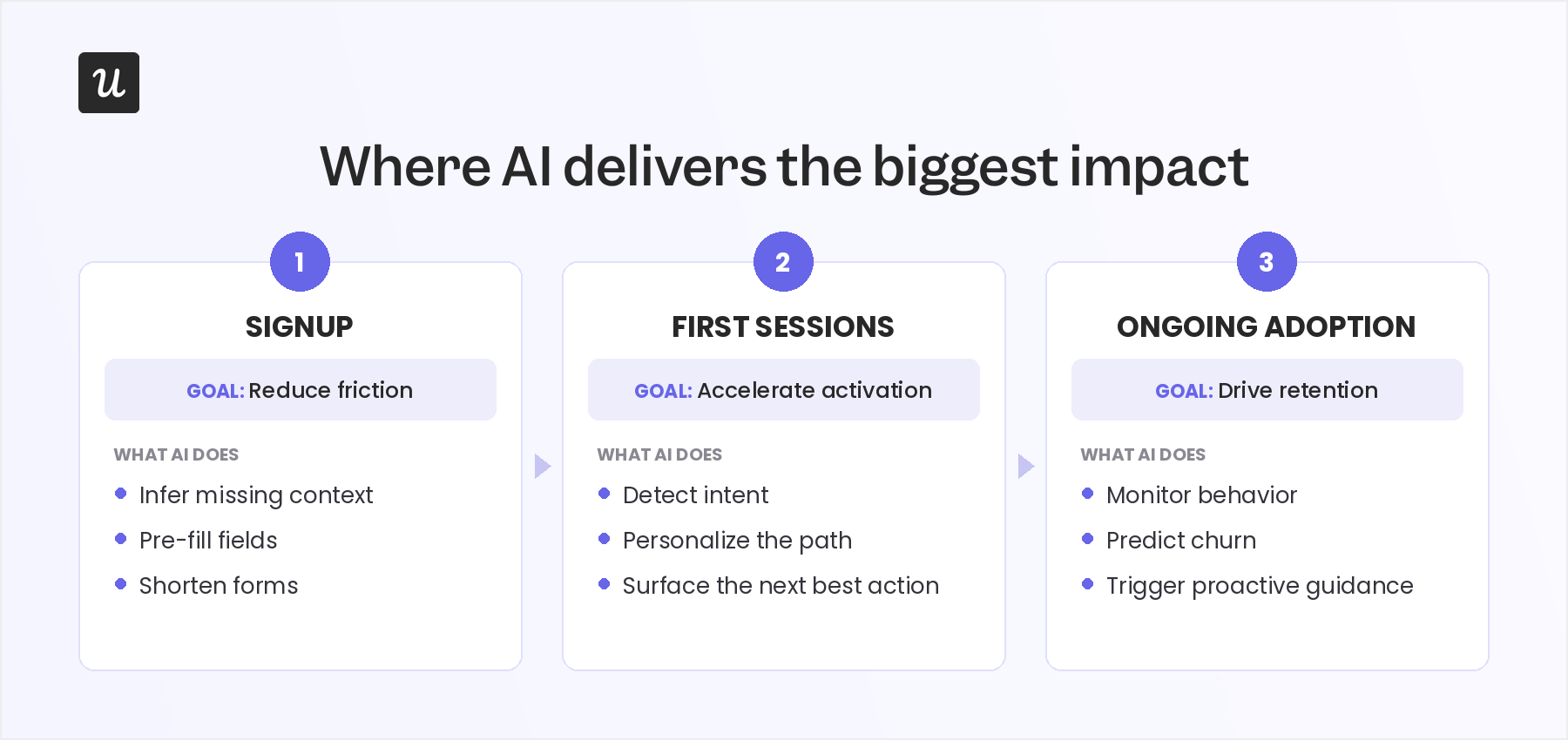
Not every stage of onboarding benefits equally from AI. The highest-return moments usually fall into three areas: signup, the first few sessions, and ongoing adoption.
At signup, AI can reduce friction by using context such as email domain, referring URL, and account metadata to infer missing information instead of asking users to fill every field manually. That gives teams richer data without turning the signup form into a barrier.
During the first few sessions, AI helps users avoid the generic tour built for the average account. A product manager, a support rep, and a founder should not all see the same path, and AI can start separating those journeys by combining role, behavior, and intent signals.
In the ongoing adoption phase, AI supports the work most CS teams cannot sustain manually at scale: monitoring feature adoption, spotting users who stall, and sending proactive nudges when behavior suggests they need help.
Six ways to use AI across your onboarding flow
1. Personalize onboarding paths and catch friction early
Personalization starts with data, and early in onboarding that data is thin: a few profile fields and a user’s first clicks. AI makes those early signals more useful by combining them with user behavior analysis from similar accounts to predict what each person is trying to accomplish.
Instead of sending every signup through the same checklist, AI can recommend different paths based on role, company size, survey responses, and live behavior. Your trigger conditions still decide when and where an experience appears. AI helps decide what that experience should contain for this particular user.
The same analysis works in reverse to catch friction. Start with funnel analysis to find the steps where users drop off, then dig into what those users have in common, such as their role, feature path, or support history.
This is the job Userpilot’s AI agent Lia is built for. Lia analyzes session replays, drop-off patterns, and behavioral signals across your product, then flags users showing risky patterns. After that, she can recommend the guidance to add or alert the right teammate before those users stall.
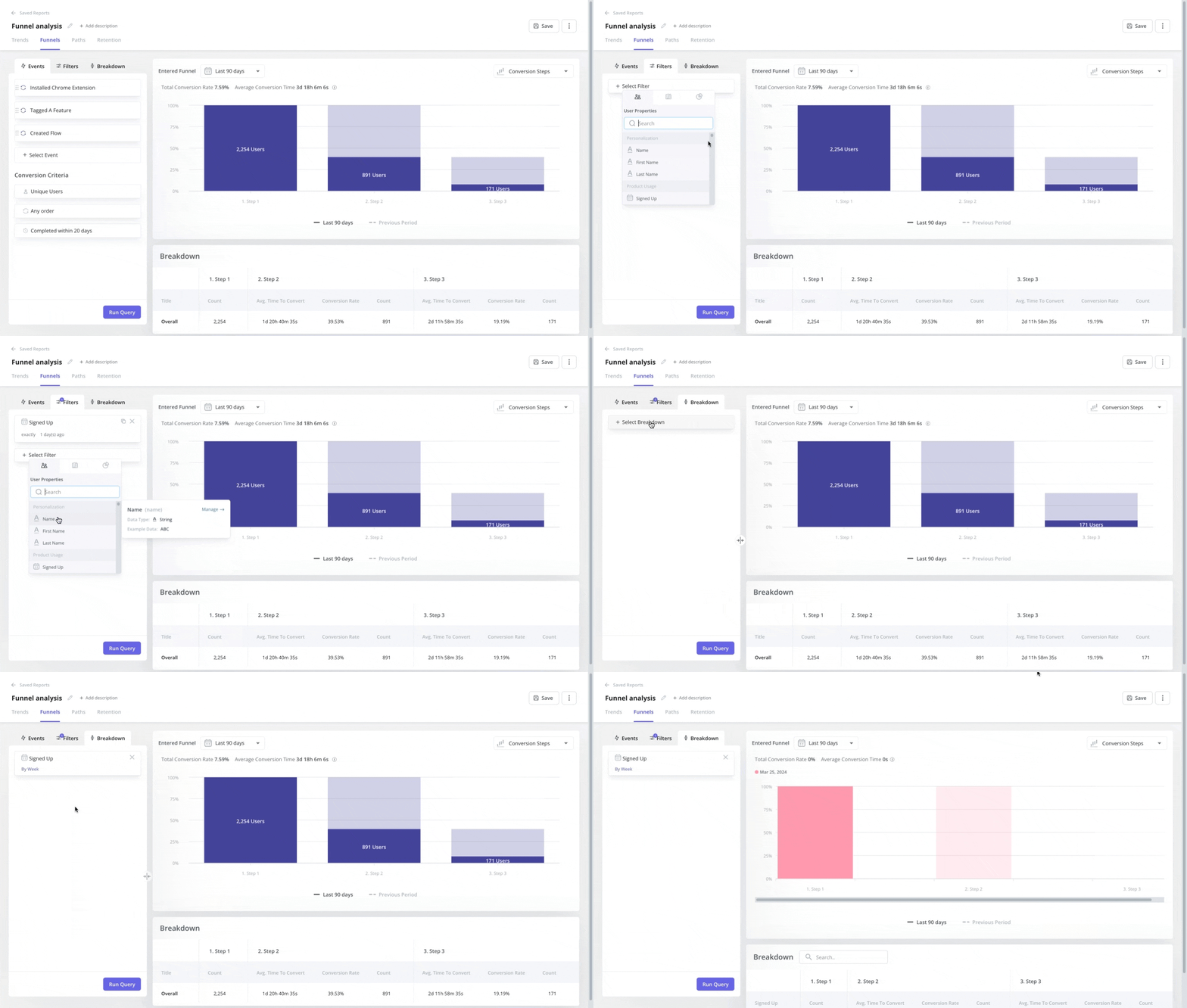 Funnel analysis in Userpilot.
2. Generate onboarding flows and copy from your existing data
Your onboarding flow lives and dies by its copy, and increasingly by how fast you can ship a new flow at all. AI now helps with both.
At the flow level, you can describe the outcome you want and have AI build the experience from your existing user data. Lia turns an insight into a deliverable directly, generating in-app flows, checklists, and surveys around the goals you set instead of leaving you with a blank canvas.
At the copy level, Userpilot’s AI assistant works inside any text block in a modal, tooltip, or banner. She can write new copy from a prompt, shorten or reframe what’s there, fix grammar, and produce variants to test against each other.
The mistake I see teams make is using these tools to invent flows from nothing. AI generation works best when it starts from something real: an observed drop-off, a pattern in user feedback, a segment that keeps getting stuck. Generate from evidence, then review before you publish.
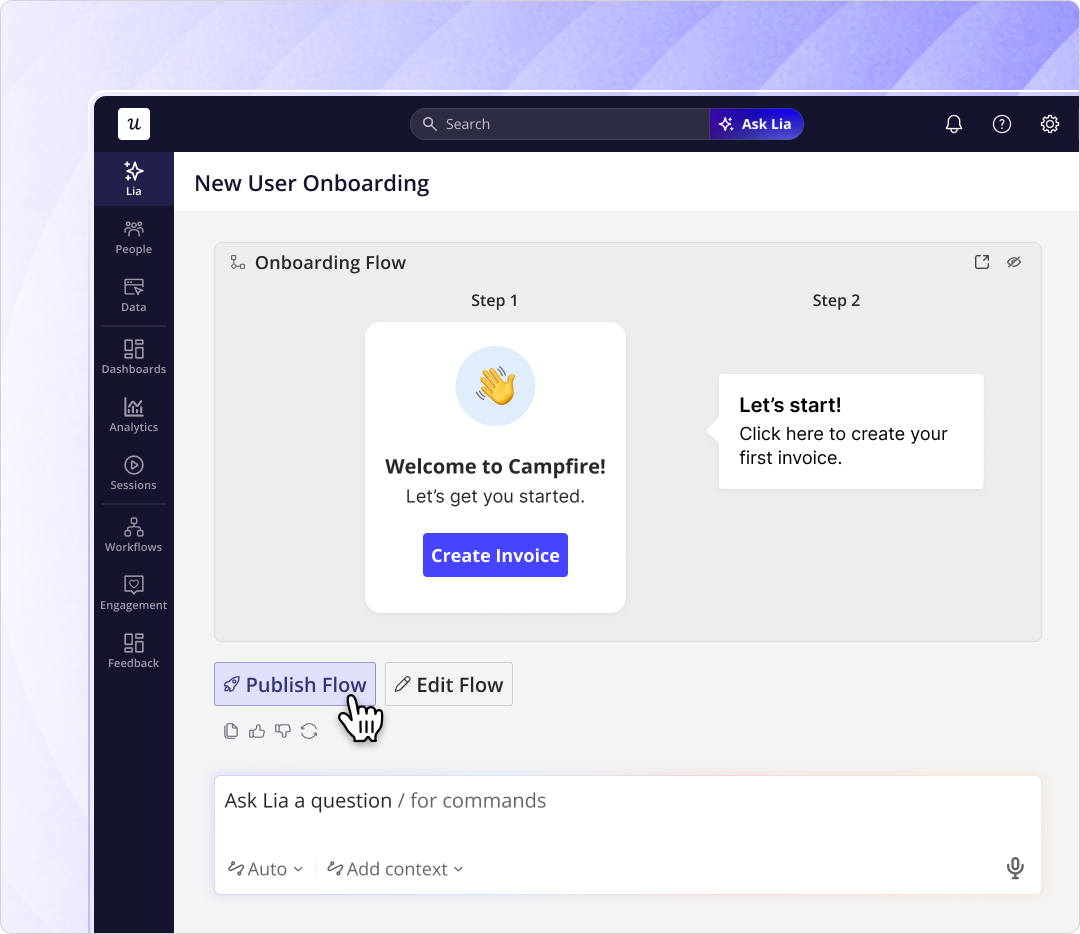 Lia builds onboarding flows in Userpilot.
3. Localize your onboarding for global users
CSA Research found that 65% of users prefer content in their native language, even when they’re fluent in English. That preference shows up in activation rates when you segment by country, because users reading onboarding in a second language carry a higher cognitive load.
AI has quietly made this one of the easiest wins in onboarding. Userpilot’s AI assistant can generate and adapt your in-app content in multiple languages, so you can localize the onboarding experience without manual exports or a third-party translation tool.
Localization is more than word-for-word translation, though. Have a native speaker review the output where you can, as tone and idiom carry the experience as much as accuracy does.
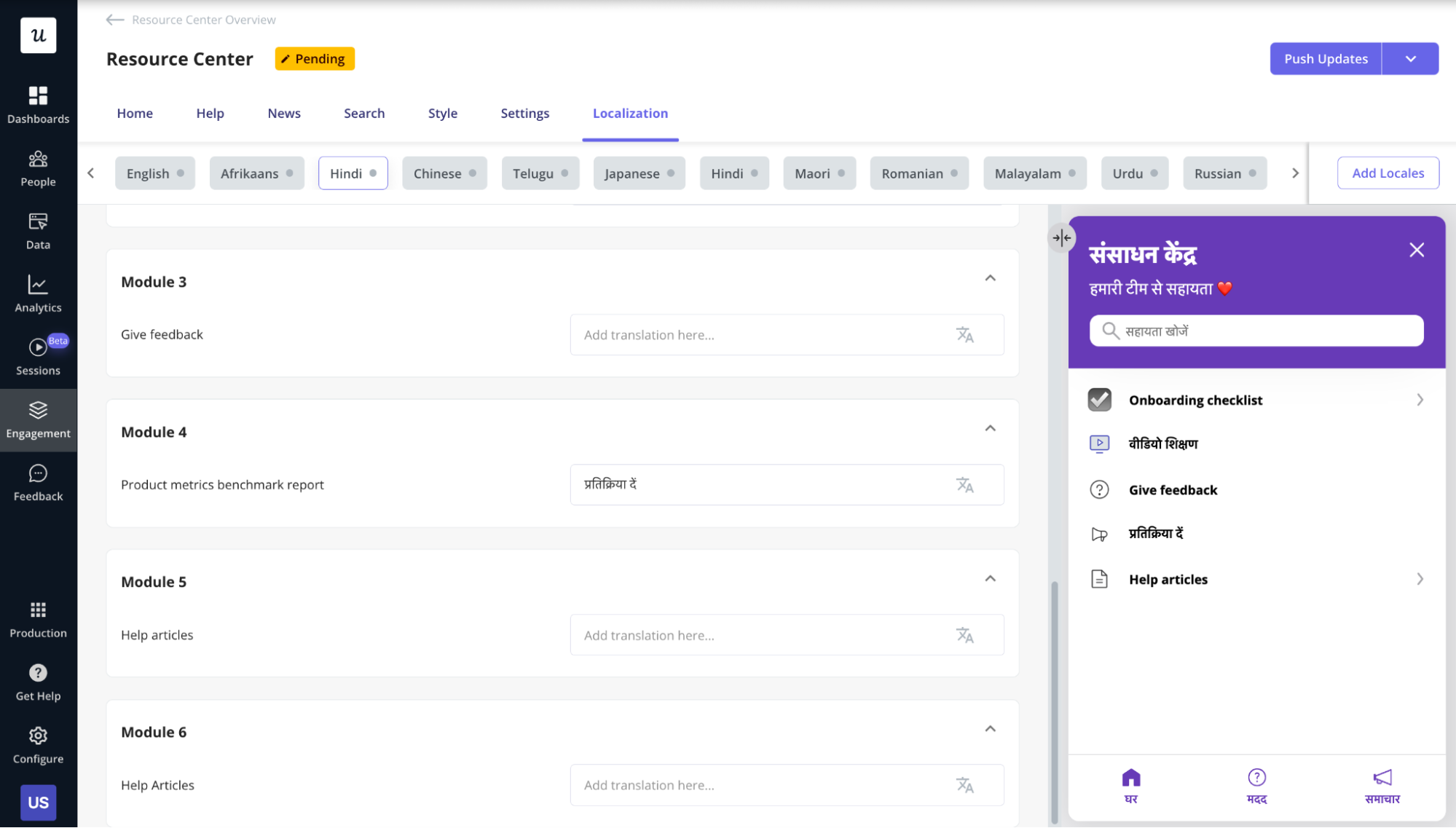 A localized resource center built in Userpilot.
4. Move from reactive chatbots to proactive AI agents
Most teams introduced chatbots into onboarding as a reactive support layer: the bot answers questions after users ask. That’s useful, but it isn’t where AI moves onboarding metrics. The stronger pattern is an agent that already has product context and acts on it.
Wes Bush, founder of ProductLed, recently signed up for more than 100 SaaS products and cataloged the best AI onboarding he found. Each standout feeds AI real context instead of adding a chat window: Relay.app configures your workspace from your LinkedIn profile, Zapier’s copilot builds a workflow from your stated outcome, and Figma suggests the specific feature you need when your behavior shows you’re stuck.
His conclusion is that onboarding is shifting from teaching users your interface to teaching AI what the user wants to do.
Fair warning: this takes more effort than dropping a chatbot onto your product. An agent is only as good as the data pipeline behind it, and the Drumbeats team found their AI setup worked well with stronger models and broke with weaker ones. Budget for the integration and testing work, not just the feature.
Inside Userpilot, this is the model Lia follows. Rather than waiting for a user to open a chat window, she monitors behavioral signals and can surface relevant guidance, or alert a success manager, when a user hits a milestone, shows friction, or needs a human.
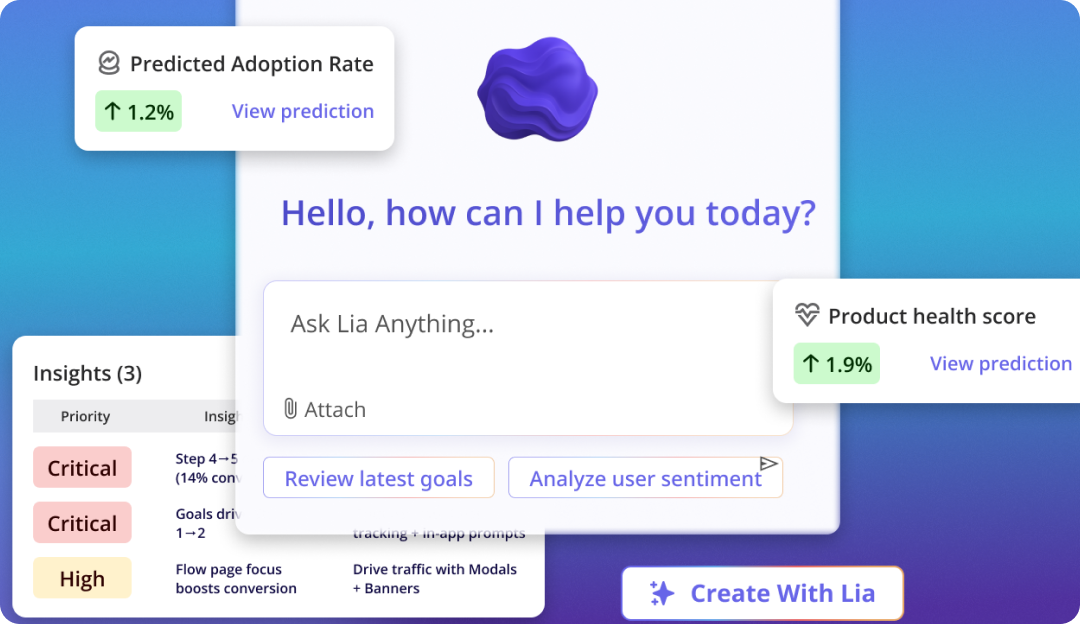 Lia responding to a user in-product.
5. Analyze sentiment at scale to find what surveys miss
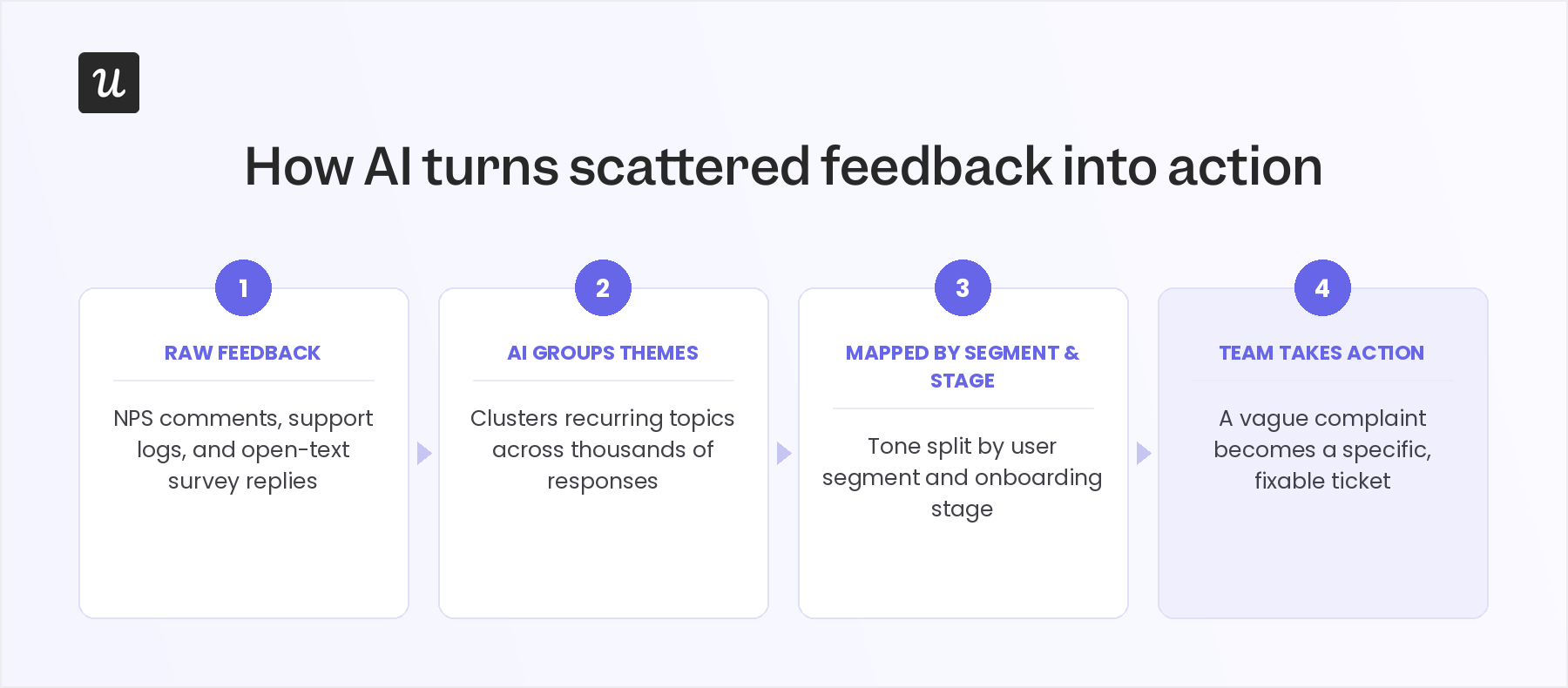
Not every problem surfaces in quantitative metrics. The real insight is often buried in NPS comment fields, support chat logs, or open-text responses to onboarding surveys. AI sentiment analysis makes those qualitative signals usable at scale, identifying recurring themes, emotional tone by segment, and the specific friction points users are putting into words.
In my experience, the useful applications are segment-level. Not just “users are frustrated,” but “enterprise users in the healthcare segment are frustrated specifically with the integration setup step, and the sentiment started declining after the March update.” That level of specificity turns a qualitative signal into an actionable ticket.
6. Orchestrate multi-step onboarding with agentic AI and an MCP
Agentic orchestration is the most advanced layer of AI user onboarding. Instead of firing a preset trigger, the system works toward a goal, such as getting a user to activation, and decides the next step and channel based on what the user just did.
Here’s a simple example. A rule-based flow might send a reminder if a user doesn’t complete step 4 within 24 hours. An agentic system would notice the user paused during setup, weigh their recent behavior, and choose between an in-app guide, a help article, a follow-up email, or a CSM alert.
Yazan Sehwail, Userpilot’s CEO, describes how this changes the team’s job:
“You’re no longer operating. The AI is operating. You’re just basically evaluating and monitoring the agent workflow.”
None of this works without context, though. An agent that can’t see what users actually do in your product falls back on generic advice, which is exactly the “being AI for marketing purposes” trap a commenter in the Drumbeats thread warned about.
That context is what Model Context Protocol (MCP) provides. MCP gives agents direct access to the systems holding your product data, so their decisions come from real behavior instead of generic prompts.
Userpilot’s MCP server exists for exactly this. Connect an internal agent workflow or a third-party agent platform to it, and your agents can explore your product usage metrics, look up users and companies, and create segments, reports, and surveys from that context.
What you still shouldn’t automate
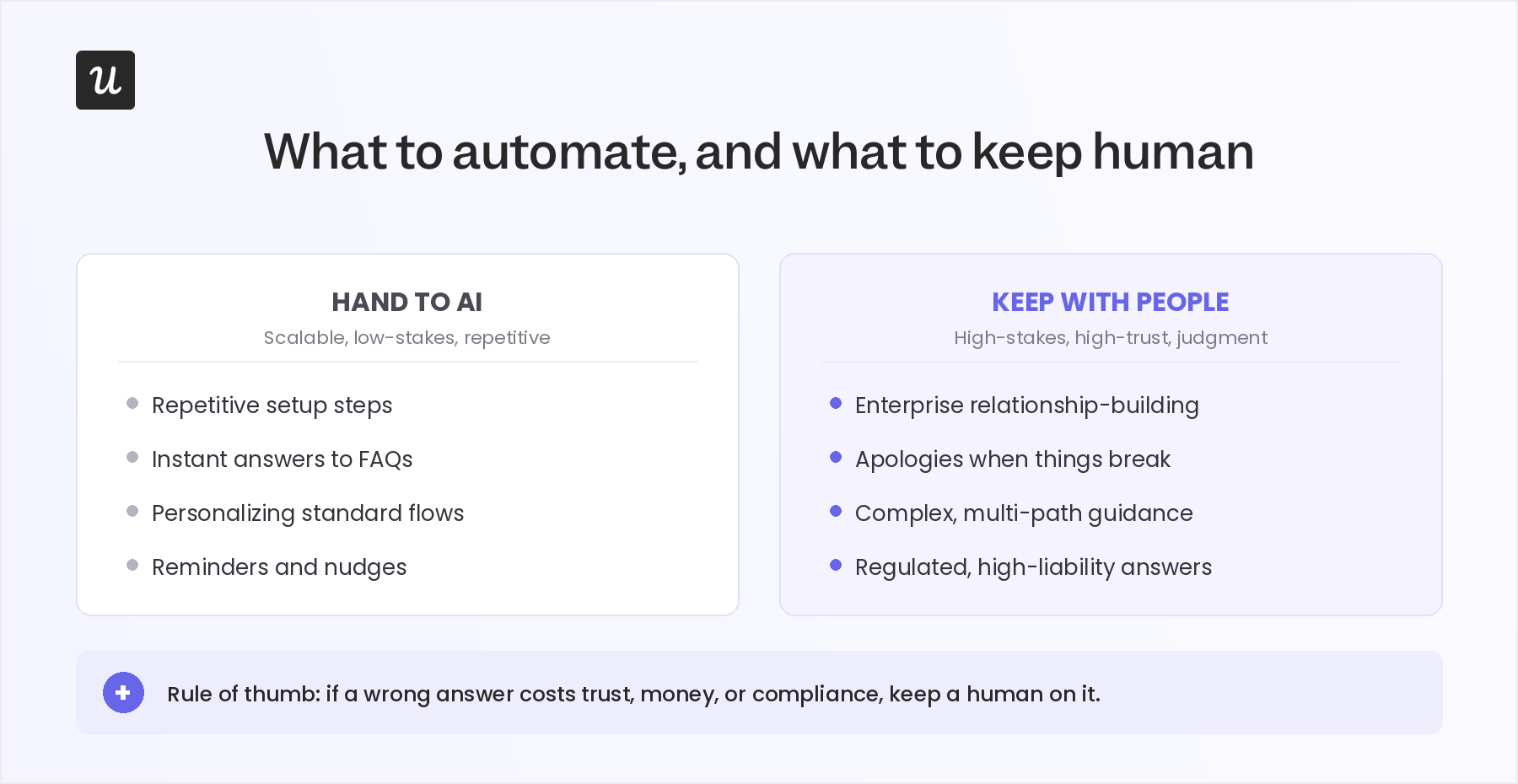
The fact that AI can now do more in onboarding doesn’t mean it should do everything. The highest-impact onboarding strategies combine AI with human judgment, using each where it adds the most value.
Here are four situations where people should stay in the loop:
- High-touch enterprise onboarding: If users are paying five or six figures, they don’t want to feel handed off to a machine. They expect a relationship, a named person, and someone who understands their business context. AI can support the process, but the early trust-building in enterprise deals should still belong to people.
- Apologies and escalations: If onboarding breaks at a critical moment, an AI-generated apology usually reads exactly like one, and users notice. Bring in a real person for serious failures, especially in the first few days of a new account when trust is still fragile.
- Complex, multi-path products: If your product has a steep learning curve or 10+ distinct use cases, a single AI-generated flow won’t cover the range of user needs. The better approach is to segment users well first, then layer in live demos or tailored sessions where the complexity warrants it.
- High-liability onboarding moments: In healthcare, financial services, legal, and other regulated contexts, a wrong onboarding answer can create risk for the user and the company. Keep AI on the scalable, low-risk touchpoints, while people handle the moments where accuracy, accountability, and judgment matter most.
How to implement AI in your onboarding flow
Most failed AI onboarding projects share the same root cause: the team added AI on top of a flow that was already broken. AI amplifies whatever is there, so the broken version just fails faster.
Here’s the order of operations I’d follow instead.
Fix the structure before you add AI
Map your current flow against where users actually drop off, and fix the obvious structural problems first. If your welcome survey asks eight questions or your checklist points at a feature nobody needs, no model fixes that.
Also confirm onboarding is actually your problem. If churned users leave for reasons unrelated to setup, improving setup with AI just polishes the wrong thing.
Build your data foundation with feature tagging
AI-driven product personalization is only as good as the data feeding it. If your user properties are incomplete, your event naming is inconsistent, or your segments overlap, fix that before layering AI on top. Otherwise, AI will treat “Growth Hacker” and “growth hacker” as different people and personalize accordingly.
Feature tagging is the fastest way to build this foundation without engineering time. By tagging buttons, inputs, and key interactions in Userpilot as named events, you give AI clear signals about which actions lead to activation and which features drive genuine long-term retention.
The tricky part is that nothing obviously breaks when data is messy. A model trained on inconsistent inputs still produces confident recommendations. Spend a week auditing your event taxonomy and user properties before rolling anything out, and you’ll get more value than any amount of prompt tuning later.
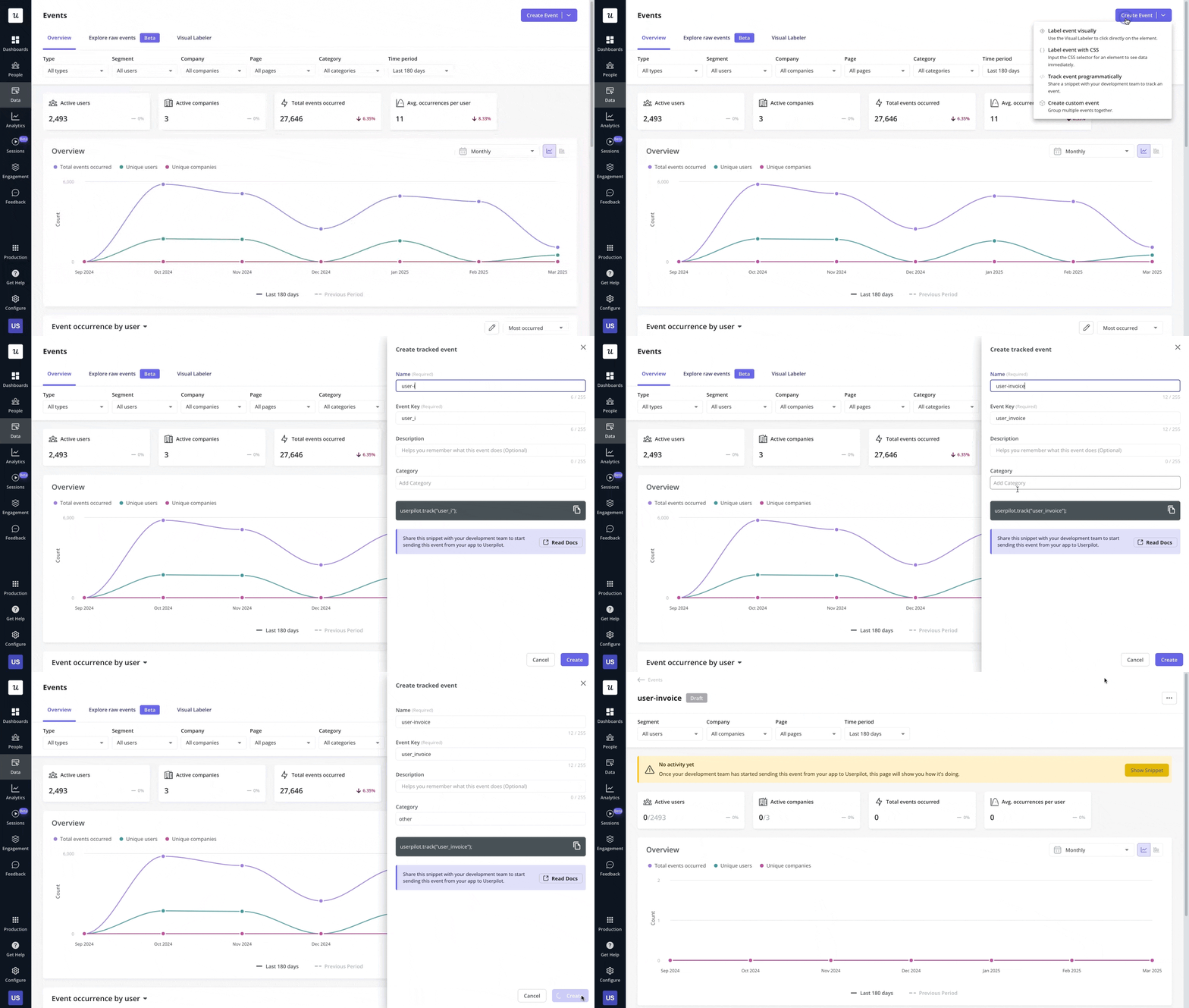 Tagging custom events in Userpilot.
Define what success looks like before you deploy
“AI-powered onboarding” is not a metric. Activation rate, time to value, and first-week support ticket volume are. Pick the one that matters most for your product, set a target, and write it down before launch so you’re not tempted to move the goalposts afterward.
A single primary metric also protects you from ending up with an AI feature users like that changes nothing. Liked and effective are different outcomes, and only the metric tells them apart.
Test one step at a time, not the whole flow
Replacing your entire onboarding with an AI-personalized version and measuring outcomes three months later tells you almost nothing. Pick the step with the highest drop-off rate, run an A/B test on that step, and build from what you learn.
Duolingo applies the same discipline to its AI personalization engine, Birdbrain. As Duolingo’s engineering team puts it, “The only way we can really understand the impact that a new model will have on language learning is to A/B test against a large number of users.” Every meaningful AI change to your onboarding deserves the same treatment.
Keep a human in the review loop
Treat AI recommendations as experiments to validate, not instructions to follow. I’ve seen AI suggest onboarding steps that looked promising, but made the experience worse for a specific segment because the model was optimizing for the wrong goal.
AI optimizes for whatever you measure, not necessarily what you want to achieve. Review its output regularly against your primary goal, whether that’s activation, time to value, or retention, so you catch misaligned suggestions before they reach every new user.
Be transparent with users about what’s personalized
Users who understand why they’re seeing a particular flow are more likely to engage than users who feel the product is guessing at random. A simple line like “we’ve tailored this to your role” goes further than most teams expect.
Transparency also lowers the cost of getting personalization wrong. If the system misreads someone, a visible “based on your role” cue gives them an obvious way to correct course instead of deciding the product is not for them.
Build AI onboarding that actually moves your activation rate
In nearly all cases, your onboarding logic doesn’t need replacing. The triggers, segments, and behavioral conditions you run today are still the right inputs. AI user onboarding is the layer that puts them to better use: sharper content and earlier intervention when users struggle.
With Userpilot, you can layer AI into the onboarding work you already do by:
- Personalizing onboarding paths with your existing behavioral data.
- Generating flows and in-app copy with Lia and the AI assistant.
- Catching friction and drop-off before users ask for help.
- Connecting AI agents to real product context through the MCP server.
Get a Userpilot demo and see what your activation rate looks like when your onboarding responds to what each user actually needs.
FAQ
How much user data do you need before AI onboarding is worth it?
It depends on which part you mean. Behavioral personalization that learns from patterns needs a real history of signups and sessions to be reliable, so very early or low-traffic products end up with shaky, overconfident segments if they lean on it too soon.
The lighter layer works from day one, though: AI-assisted copy, translation, and in-app answers add value without a large dataset while you build that history up.
Is it safe to run AI on your onboarding and user data?
It can be, but where the data goes matters more than whether you use AI at all.
The real risk is piping customer records or personal data into general-purpose models that might retain or train on them. Keep AI onboarding on tools that isolate your data and meet standards like SOC 2 and GDPR, and take extra care in regulated spaces where onboarding touches sensitive information.
Does AI onboarding work for enterprise and high-touch B2B, or only self-serve products?
Both, though the role changes with deal size.
A high-volume self-serve product can let AI drive most of the flow, since the cost of any single misstep is low. In enterprise deals, AI is better suited to preparing the humans, briefing a CSM before a call, or drafting a tailored plan, so the person keeps the relationship, and AI just makes them faster.
About the author