SaaS Localization Strategy: Why Translation Is The Easy Part
SaaS localization is often treated as a translation project. The interface is translated, but users still encounter friction elsewhere in the experience. Pricing is displayed in the wrong currency, payment methods feel unfamiliar, onboarding flows don’t match local expectations, and support content reflects a different market context.
These issues are easy to overlook because they don’t appear to be localization problems. They show up as lower conversion rates, onboarding drop-offs, support requests, and churn.
The challenge is that language is only one layer of localization. Creating a product that feels native to users in a new market requires decisions across pricing, payments, onboarding, customer support, feature delivery, and cultural adaptation.
This guide breaks down the six layers of SaaS localization, provides examples from companies implementing them at scale, and explains how AI is changing localization workflows in 2026.
The six types of SaaS localization (and what most teams miss about each)
Each localization type operates independently, and many SaaS teams address one or two. However, most companies would benefit from addressing all types and treating them as part of the same project. Let’s see how to do that.
Linguistic localization
Linguistic localization is where every SaaS localization process starts, and where most teams discover they have an engineering problem before they have a translation problem. If your product has hardcoded strings baked into the UI code rather than stored in external resource files, no translation vendor can help until your engineers externalize them first.
Once strings are extracted into JSON, PO, or XLIFF files, the UI layout challenges begin in parallel. German text averages 30% longer than English, which means buttons, tooltips, and modal copy that fit cleanly in English will overflow in German. Arabic and Hebrew use right-to-left scripts, which require RTL layout support at the UI framework level.
A flexible UI design that can accommodate 30-40% text expansion in either direction is a standard i18n requirement for any software product targeting global markets. Plan for it at the design stage, not after translation exposes the problem.
Price localization
Price localization affects conversion long before users reach checkout. When SaaS companies show pricing in only one currency, international users need to calculate exchange rates and evaluate costs on their own.
One way companies reduce that friction is by displaying prices in local currencies. Stripe supports localized pricing and allows businesses to present prices in more than 135 currencies based on customer location. It also supports manually defined prices for different currencies when companies want more control over regional pricing. This gives users a clearer understanding of what they will pay before reaching checkout.
That matters because buyers increasingly expect localized pricing experiences. Cleverbridge’s Friction Report found that 96% of software buyers expect prices in their local currency, while only 31% of sellers prioritize localization at checkout.
For teams expanding internationally, local currency support is often one of the simplest ways to reduce friction during the buying process.
Payment system localization
Payment localization affects conversion at the final stage of the buying journey. A SaaS product can have translated onboarding, localized pricing, and region-specific messaging, yet friction during checkout can still prevent users from completing a purchase.
That friction often comes from differences in regional payment behavior. In Brazil, PIX is one of the country’s most widely used digital payment systems. In China, online transactions commonly happen through Alipay and WeChat Pay. Many European markets also rely heavily on bank transfer systems and digital wallets rather than traditional credit cards.
Because payment habits vary so widely, checkout flows built around a single payment model do not always translate well across markets. Research cited in Paddle’s localization guide found checkout conversion increasing from 4.3% to 6.5% after adding local payment methods. Baymard’s research also found that 11% of shoppers abandoned checkout because they did not see a suitable payment option available.
For SaaS companies expanding internationally, payment localization helps remove friction at the exact point where users are ready to pay.
Cultural adaptation
Cultural adaptation is one of the hardest parts of SaaS localization because it goes beyond translation. Interface choices, tone, imagery, and communication style can all shape how users perceive a product in different markets.
Slack discussed this challenge in its engineering post about localizing the product into multiple languages. The team adjusted tone and formality separately for each market instead of translating English copy word for word. Japanese required a more formal writing style, while French and German needed different levels of warmth and directness to sound natural to local users.
Those differences extend beyond text. Visual elements such as colors, gestures, clothing, and social imagery can also carry different cultural meanings across regions. Something that feels neutral in one market may feel confusing or out of place in another.
Because of that, localization reviews should include both copy and visual assets from the beginning of the process.
Feature localization
This is the part that no translation vendor can handle. It requires understanding what users in the target market expect a product in your category to do. Users in different markets have different workflows, different competitive reference points, and different expectations of what a complete product looks like.
Joanna Drabent, CEO and co-founder of Prowly, experienced this directly. Prowly launched first in Poland as a PR software platform. Polish customers never asked for media databases. When Drabent expanded to the US, she found that US customers considered a built-in media database a basic expectation because that’s what their domestic competitors offered.
The product that worked perfectly in one market was perceived as incomplete in the other, not because of language or design, but because of feature expectations baked in by incumbents.
This kind of gap rarely shows up in user interviews before launch. It surfaces as churn and support tickets from users who feel like something obvious is missing. The practical mitigation is continuous customer discovery in the target market before and after entry, with a specific focus on what local competitors offer that you don’t.
In-app experience localization
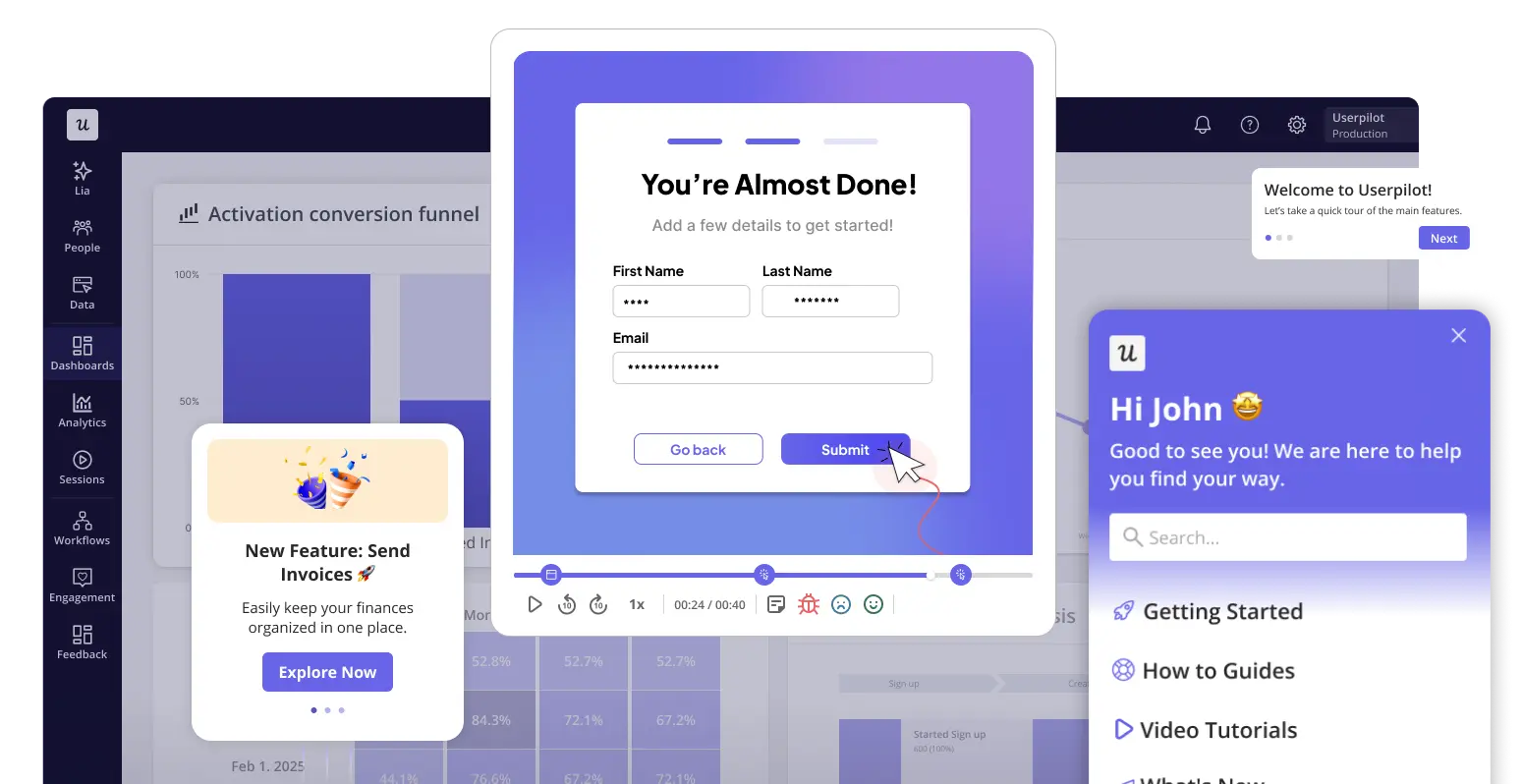
Localizing the product UI isn’t the same as localizing the in-app experience. A user might navigate a translated interface and still encounter onboarding flows, tooltips, checklists, and resource center content entirely in English. Those elements are usually built in a separate tool and never make it into the translation workflow.
The gap is common: a product with a translated interface that still shows English onboarding tooltips, English checklists, and English resource center content. Users notice this immediately. It signals that the localization stopped at the surface layer.
This is where Userpilot fits into a localization strategy. The AI localization engine comes pre-loaded with 32 languages and automatically translates modals, tooltips, checklists, and resource center content. Additional languages can be added via CSV upload, and mobile slideout content is also localizable. It sits alongside your TMS rather than replacing it, and handles the behavioral in-app layer while the TMS handles product strings and marketing content.
Four SaaS companies that built localization as infrastructure
The companies below treated localization as a product decision rather than a translation project. Each one illustrates a different aspect of what global-scale localization actually requires from infrastructure and engineering workflow to in-app experience and engagement tooling.
Canva: Launch broadly, assess as you go
Canva is one of the best-known examples of SaaS localization at scale. The platform supports more than 100 languages, and around 60% of users use the product in a language other than English.
What stands out is Canva’s expansion strategy. Michael Levot, Canva’s Head of Localization, described it as “reverse prioritization.” Instead of fully localizing a few markets before launch, Canva expanded broadly first and then increased localization efforts in markets showing strong organic growth.
That strategy worked because Canva already had strong acquisition channels and payment infrastructure in place. Without those systems, broad expansion can create inconsistent user experiences across markets.
Canva also keeps localization closely tied to product design. Localization teams work with designers and use translation memory systems and localized glossaries to maintain a consistent brand voice across languages
Slack: Localization built into every release cycle
Slack expanded beyond English in 2017 by adding French, German, Japanese, and Spanish. Instead of translating the product after launch, the company built localization directly into its development workflow. Product strings were routed through a localization pipeline as part of the feature release process, which allowed new updates to ship across languages more consistently. Slack now supports 12 languages.
The company also adapted tone and formality for each language so the product would feel natural to local users. The Japanese used a more formal style, while the Germans required more direct language. Spanish also needed regional variation across different markets.
Because localization was part of the release cycle from the beginning, Slack could continue to expand the product without creating gaps between the English experience and other language experiences.
Pipedrive: Localization as engineering infrastructure
Pipedrive translates millions of words each year across 24 languages. With hundreds of developers regularly contributing new product strings, the company treats localization as part of its engineering infrastructure rather than a separate project.
To manage that scale, Pipedrive integrated its translation management system, Crowdin, directly into the CI/CD pipeline. When developers add new strings, they automatically move into the translation workflow without manual file exports or extra coordination between teams.
Pipedrive also uses a mixed localization model. The company keeps in-house translators for high-volume markets such as German and Portuguese, while working with external language service providers for other languages. That allows the internal team to focus on quality review, glossary management, and language consistency in priority markets.
Because the process is automated, product updates can move across languages much faster. New features released in English can be localized and shipped in other supported languages within days, rather than weeks.
Smoobu: Localizing the onboarding experience
Smoobu’s user base spans multiple countries and ten languages, which made onboarding consistency a growing challenge. Instead of limiting localization to the product interface, the team localized the onboarding experience itself so users could learn the product in their preferred language.
Using Userpilot, Smoobu created localized onboarding flows and guidance for different audiences. That allowed the team to guide users through key setup steps without forcing them to switch between languages as they learned the product.
The impact showed up in business results. After testing and optimizing onboarding experiences, Smoobu increased conversions in the French market by 17%.
The lesson is that localization does not stop at the product UI. Users form their first impressions during onboarding, and a translated interface paired with English-language guidance can still create friction. Localizing the in-app experience helps close that gap.
How to implement a SaaS localization strategy: a 2026 playbook
Now that you know what good localization looks like, let’s see how to implement it step by step.
Step 1: Find where you already have traction
SaaS localization research should start with your existing product data. Look at where signups are already coming from, which languages appear in support tickets, and which international trial users convert despite having no localized experience. Those patterns usually reveal markets where demand already exists.
That matters because successful expansion rarely starts with dozens of markets at once. Cleverbridge’s Friction Report found that 60% of software companies sell into fewer than 10 countries, while only 4% reach more than 100 markets. Most companies grow internationally by expanding gradually rather than localizing everything at once.
Once you identify strong signals, focus on two or three markets first. Localizing language alone is rarely enough. Pricing, payment methods, onboarding, and cultural expectations also shape how users experience the product.
In practice, a fully localized experience in a few markets usually performs better than partial localization spread across many regions.
Step 2: Do the i18n work before anything else
Internationalization (i18n) is the technical foundation behind SaaS localization. Without it, translating the product becomes slower, more expensive, and harder to maintain as the product grows.
The work usually includes moving UI text into separate resource files, supporting UTF-8 character encoding, preparing layouts for text expansion, and enabling right-to-left support for languages such as Arabic and Hebrew. It also means handling dates, currencies, time zones, and number formats in ways that work across regions.
Skipping this groundwork often creates problems later in the process. Crowdin’s analysis found that retrofitting internationalization after development can increase localization costs by three to five times because engineering teams need to rebuild parts of the product that were not designed for multiple languages.
That is why i18n work should happen before translation begins. Running an i18n audit early helps teams identify hardcoded strings, layout limitations, and formatting issues before localization expands across multiple markets.
Step 3: Choose your first markets with signal, not ambition
Once the product is i18n-ready, the next step is deciding where to localize first. For most SaaS companies, that decision should come from product data rather than broad expansion goals.
The strongest signals usually already exist inside the business. Look at signup volume by country, trial-to-paid conversion rates, support ticket languages, and markets where users are already adopting the product without localized marketing. Those patterns often show where localization can strengthen existing demand instead of trying to create demand from scratch.
After identifying those signals, focus on two or three markets first. That means localizing more than just the language layer. Pricing, payment methods, onboarding, support content, and cultural expectations also affect how users experience the product.
For most SaaS teams, a focused and fully localized launch performs better than expanding quickly across too many regions at once. Early churn usually reveals whether a market has long-term potential, so the quality of the user experience matters more than the number of countries added.
Step 4: Build the tooling and team stack
Scaling localization usually requires a mix of automation and human review. Machine translation helps teams move faster and handle larger volumes of content, while human reviewers handle tone, accuracy, and market-specific nuances. DeepL’s industry report found that 98% of SaaS companies use machine translation, and nearly all combine it with human review.
To support that workflow, most SaaS companies rely on a translation management system (TMS). Platforms such as Crowdin, Lokalise, and Phrase manage product strings and marketing content through automated workflows connected to the development pipeline. When new strings are added to the product, they automatically enter translation instead of relying on manual file exports.
That setup handles the product layer, but SaaS localization also extends into the in-app experience users interact with every day. Onboarding flows, tooltips, checklists, and support prompts are often managed separately from the core product interface. Userpilot’s AI localization engine supports 32 languages and localizes modals, tooltips, checklists, and resource center content. Teams can also add languages through CSV uploads, including for mobile slideouts.
The two layers address different content types without overlap. Your TMS manages the engineering-side strings and bulk marketing translation. Userpilot manages the behavioral layer: the in-app guidance users see during onboarding, feature adoption, and support moments. Both need to be part of the localization strategy, because leaving the in-app layer in English while the product is translated creates a fragmented experience that breaks the sense of a native product.
Step 5: Localize the full user journey
A SaaS localization strategy cannot stop at the product interface. Users experience a product through the entire journey, from the first ad click to onboarding, support, and renewal emails. When only parts of that journey are localized, the experience starts to feel inconsistent.
These gaps often appear between teams. Marketing may localize landing pages while onboarding stays in English. The product may support multiple languages, but the pricing page still shows US dollars and limited payment options.
That is why each touchpoint needs its own localization review. Ads and landing pages should use local-language copy and search terms that match how users actually search in that market. Onboarding flows, emails, help documentation, and support content also need localization rather than direct carryover in English.
Customer support is one of the most overlooked areas. Translated FAQs help, but they do not replace support interactions in the user’s language. In high-priority markets, localized support often requires native-speaking representatives who understand local communication styles and customer expectations.
Step 6: Test with a beta cohort from the target market before launch
Many SaaS localization issues appear only after real users interact with the product. Payment flows may technically work, but fail for local card types. Pricing may show the correct currency but use unfamiliar formatting. Onboarding copy may be grammatically correct while still sounding unnatural to native speakers.
Testing with a small beta cohort from the target market helps catch these problems before launch. Even a group of 20 to 30 users can uncover issues that internal testing often misses.
The review should focus on the full user journey. That includes pricing and checkout flows, onboarding in the target language, and any culturally sensitive UI elements such as imagery, colors, or wording choices.
Localization testing should also continue after launch. As new features ship, teams need a process for reviewing translated flows and in-app experiences before updates reach international users. Without that review layer, English elements gradually reappear across the product and create a fragmented experience for global users.
AI and localization in 2026
AI-assisted localization is now part of the standard SaaS workflow. Machine translation helps teams handle large volumes of content quickly, while human reviewers maintain accuracy, tone, and market-specific nuance in customer-facing content.
The shift has also changed how localization fits into product development. Platforms such as Crowdin and Lokalise integrate directly with GitHub and GitLab workflows, which allows new product strings to move into translation automatically as code is merged. Tools such as Lingo.dev and Tolgee are also pushing toward near-real-time localization workflows so translated versions of new features can be released much faster.
Even with those advances, AI translation still has limits. Technical terminology, legal copy, and product-specific language often require human review because small translation errors can change the meaning or create confusion for users.
That is why glossaries, term bases, and human reviewers still play a central role in SaaS localization. AI helps teams scale translation volume, but quality control still depends on human judgment.
Localization is a product strategy
SaaS companies that scale globally usually treat localization as part of product strategy. Expanding into new markets requires decisions about pricing, payments, onboarding, support, and feature expectations, as well as language localization.
Many companies run into problems because they stop at translation. The interface may support multiple languages, but pricing still feels unfamiliar, payment methods are limited, or onboarding flows remain partially untranslated. Over time, those gaps create friction that affects conversion, adoption, and retention.
The in-app experience is often where that friction becomes most visible. Users learn the product through onboarding flows, tooltips, checklists, and help content, so these touchpoints need to be localized alongside the core product experience.
If you want to see how localized in-app experiences work in practice, book a Userpilot demo and explore how the platform adapts onboarding and guidance flows for different markets and use cases.