Is Your Product Analytics Broken? How to Actually Act on the Data You Collect


You can gather all the user feedback or behavioral data you want or even generate tons of Google Analytics reports. Despite all these efforts, you’re probably still not acting on product analytics correctly. At least that’s what Kevin O’Sullivan, Head of Product Design at Userpilot, has to say — and for good reason.
Kevin has almost a decade of experience working at some of the world’s most innovative software companies. He’s passionate about creating beautiful yet simple solutions to complex problems, aiming to empower all users to self-serve.
Now, we get to pick his brain about everything product analytics related, exploring topics like:
- Why is product analytics broken?
- Why actionable product analytics are important.
- How to start acting on product analytics the right way?
Why product analytics fails
The ongoing process of tracking analytics is riddled with errors and roadblocks that prevent teams from making informed decisions. There are three main culprits as to why:
- Inefficiency: Companies might use many product analytics tools to track monthly active users. This causes siloed data and integration issues. Next, the analytics setup depends on engineers, which disrupts their workflow. It also draws out the process by requiring time-consuming agreement on needs and strict protocols, like QA reviews.
- Prone to errors: All the complications and need for alignment from above make mistakes more likely in the analytics process. Additionally, product managers and designers mostly want to implement product analytics themselves. However, this increases the likelihood of errors, leading to missing data and misinterpretations.
- Inaction: Despite collecting user behavior data and building detailed reports, teams struggle to take meaningful action. Often due to analysis paralysis, overwhelming amounts of information, or a lack of clear insights that drive product decisions. Plus, in the absence of technical expertise to diagnose issues, incorrect tracking also leads to misinterpretations and misguided improvements.
Why actionable product analytics matters
Sure, your chosen product analytics software or approach might be wrong. But why bother fixing it? Let’s look at a great analogy to understand the answer and better explain “actionable” product analytics.
Think about Apu, the ever-diligent Kwik-E-Mart owner. He makes product decisions every day: what stock to order, how to arrange his shelves, and even which Squishee flavors to promote.
He observes his customers, he knows their habits (who buys Duff Beer on Fridays?), and he adjusts his store accordingly.
But imagine if Apu had access to real product analytics. Imagine if he could track:
- Peak shopping times: Instead of just knowing that kids flock to the Kwik-E-Mart after school, Apu could pinpoint the exact hour and minute when Squishee sales hit their peak. This would allow him to optimize staffing levels and ensure he never runs out of those sugary delights.
- Popular product combinations: Apu might observe that customers often buy Duff Beer and Lard Lad Donuts together, but with product analytics, he could quantify this relationship. He could then strategically place donuts near the beer fridge to encourage impulse purchases and boost sales.
- Customer behavior: Apu could go beyond simple sales data and analyze how customers move through his store. He could identify which aisles get the most traffic, how long people linger at the magazine rack, and whether those “Try our new Krusty-O’s!” signs actually work.
These are just a few ways acting on product analytics can empower Apu, optimizing decision-making, and enabling smarter resource management. Consider what this means for you. With the right tools, your product team can move beyond blind experimentation and make impactful decisions that drive growth.
How to get started with actionable analytics
So, if you’ve been doing product analytics wrong, what’s the “correct” way? Kevin has a few tips covering everything important.
Choose analytics tools that minimize engineering involvement
When companies hear words like “data” and “analytics,” they immediately hand off that job to engineering teams. However, when it comes to product analytics, engineering teams should not be in charge of setting up analytics.
Instead, the product team needs to retain ownership. From implementing a product analytics tool to compiling the quantitative and qualitative data in a consumable format.
That’s only possible if you opt for no-code and self-service analytics tools, like Userpilot, in the first place. Such tools enable faster setup and iteration, so you can adjust tracking as product needs evolve without waiting on engineers.
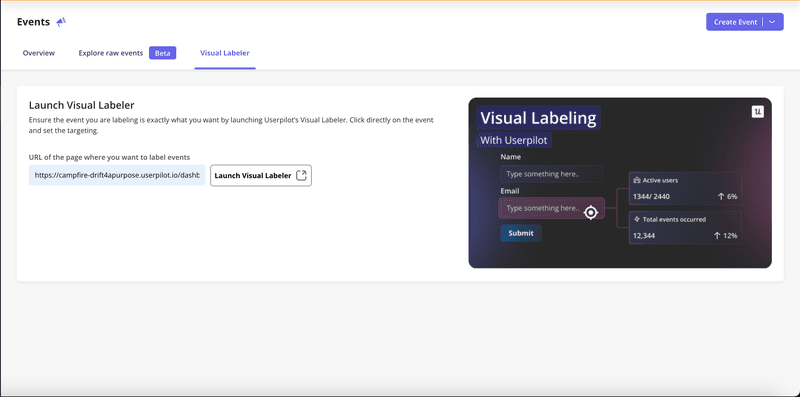
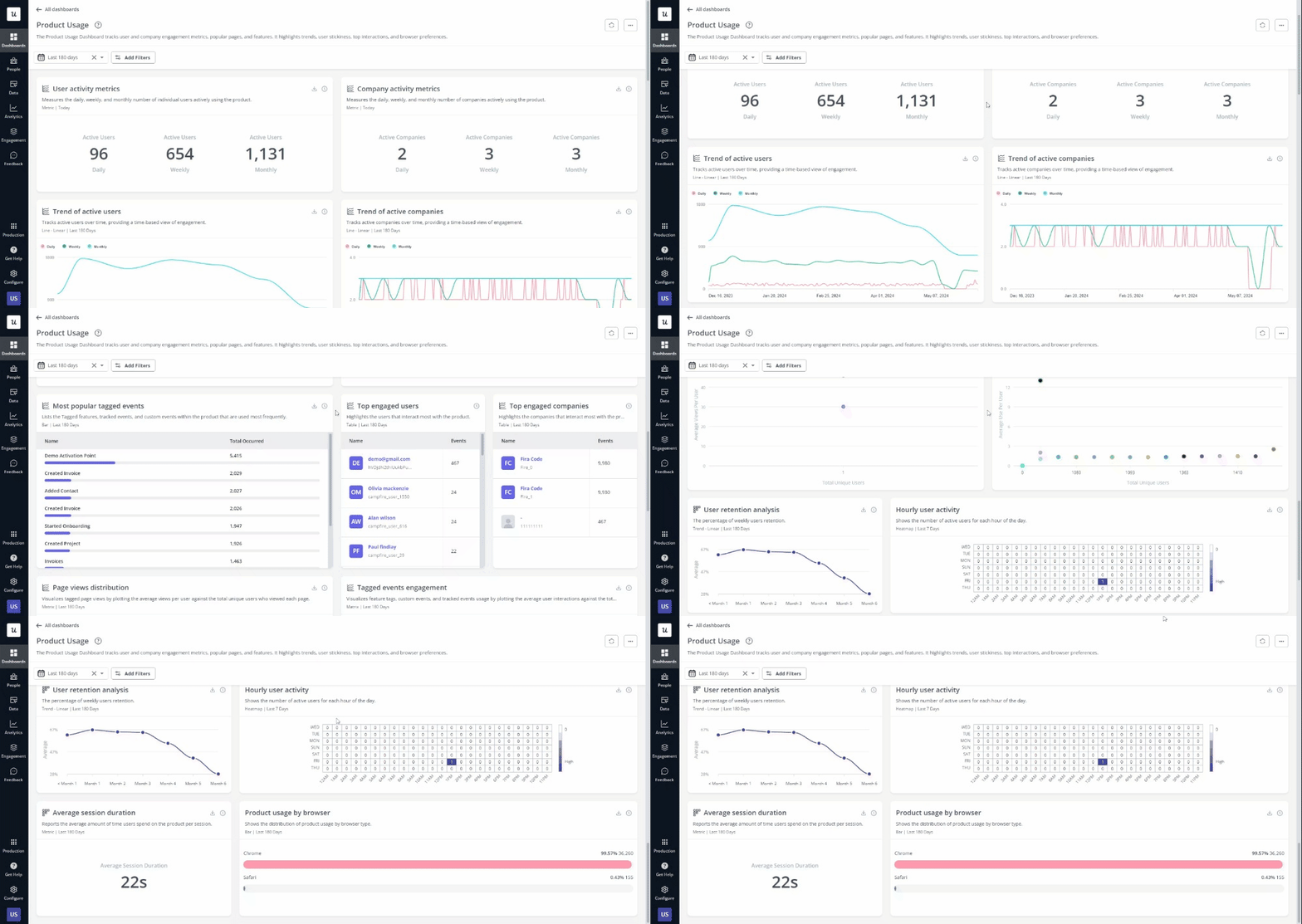
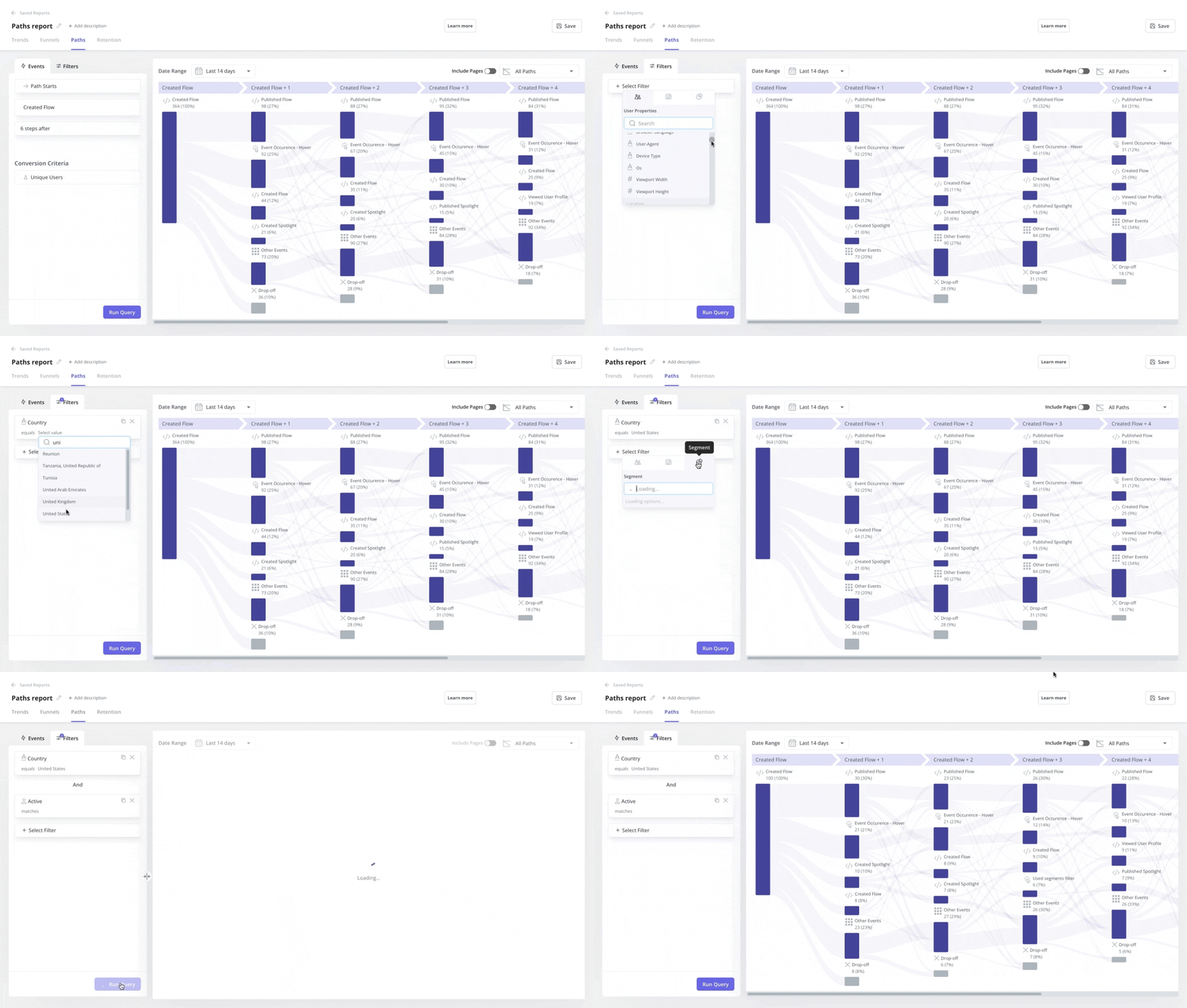
Alternatively, though, you may be curious about popular low-code product analytics tools like Mixpanel or Amplitude. But even these tools require technical setup, making them less ideal for teams with limited technical knowledge and resources.
So, in the end, you’re left with entirely no-code product analytics software again. That is, if you want product teams to define events, track metrics, and build reports all on their own.
Know what you’re looking for before you start looking
Dashboards have been a fad in the SaaS sphere for a while now. If you can think of any user behavior, trend, or metric to track, just build a new dashboard for it!
But soon enough, there comes a point where it’s just one dashboard too many. And the concept of diminishing returns sets in. This means no additional analytics offers any tangible insights and only leads to wasted effort.
Basically, you’ll have an analytics dashboard but no idea what it’s for.
So, before diving straight into analytics, define what metrics are actionable and aligned with your business goals. The metrics you pick will depend on your company’s size, stage, and industry, and may change as the organization matures.
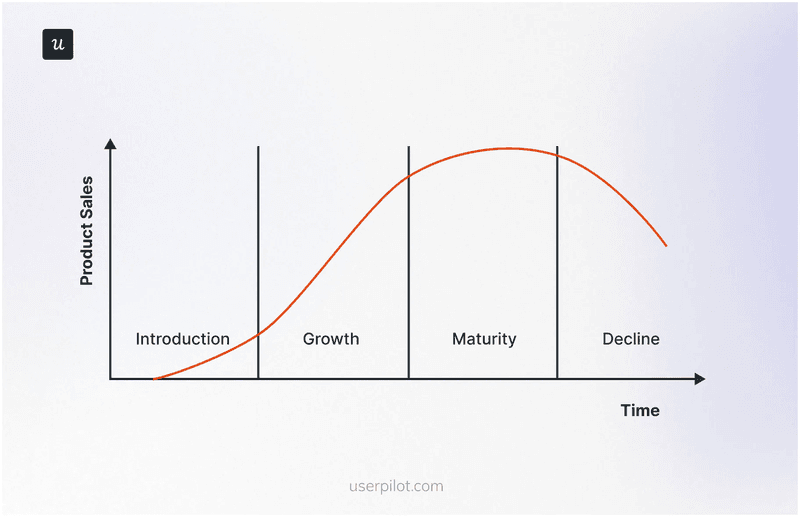
For example, you could track metrics based on product lifecycle stages. Each stage will require you to ask different questions, such as:
- Introduction: Is there a product-market fit?
- Growth: How do we scale?
- Maturity: How do we become profitable?
- Decline: How do we maintain user interest to retain customers?
Adopt a revenue-focused approach to product analytics
Product analytics shouldn’t be treated as a side project the product team runs to check off a box and figure out something trivial like how many users clicked a CTA button. Instead, the entire organization needs to view it as a core function that informs product decisions and measures success.
To make this happen, it’s good practice to tie product usage with financial performance. This demonstrates the value of your analytics efforts clearly while ensuring that product strategy is aligned with overall business goals.
For example, the organization’s goal may be to improve revenue. So your product team could choose to look at refining acquisition, retention, or expansion efforts.
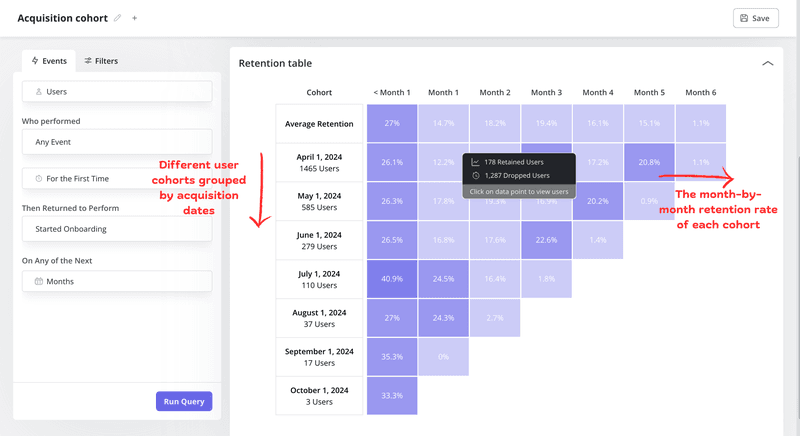
If you pick customer retention, you could perform cohort analysis, comparing retention rates for different cohorts. Then further examine the difference to uncover what specific feature users interact with causes increased stickiness in one cohort.
Such insight could help prioritize the development of similar functionality to drive retention in other cohorts as well.
Build a data-driven culture
Building a truly data-driven culture means integrating analytics into every part of your product decision-making process, not just creating dashboards.
It starts with ensuring alignment across the organization. So everyone from the product to the marketing team understands the core features, user journey, and steps that lead to key value moments.
Next, start small by tracking simple events and focusing on clear, actionable paths linked to core features. This clarity makes sure everyone understands why you’re collecting the data and how it ties back to improving the product.
However, it’s important to recognize that a data-driven culture readily welcomes both the wins and losses that data reveals. While celebrating successes is important, the losses often provide the most valuable insights. They help uncover where things go wrong while identifying improvement opportunities.
Conclusion
We’ve covered that acting on product analytics requires focusing on actionable insights, choosing the right tools, and aligning tracked metrics with business goals.
But there’s one last change that’s essential for prioritizing analytics at an organizational level: building trust in the data. This means that data alone should inform decisions as opposed to gut feelings, leading to better, more continuous product optimization.
Want to improve your data-driven decision-making by better acting on product analytics? Get a Userpilot Demo and see how the no-code solution can help you unlock deeper insights into user behavior and product usage data.
About the author