I recently went through the process of researching Appcues.
I wanted to know what the Appcues demo booking process looked like, what happens on the call, and whether the tool lives up to the hype. If you are considering Appcues for your SaaS onboarding needs, you are probably wondering the same thing.
Here is exactly how you book an Appcues demo, what you can expect during the sales cycle, and the critical questions you need to ask before you sign a contract.
But first, what is Appcues?
Appcues is a no-code product adoption platform that helps teams turn key moments into meaningful in-app experiences.
You can use Appcues to build onboarding flows, modals, checklists, and tooltips that guide new users at the right time based on their behavior or lifecycle stage.
Its intuitive drag-and-drop builder makes it easy to launch flows quickly, while detailed analytics track engagement and product usage. Teams also use Appcues to segment the right users and trigger in-app messages that drive activation and retention.

How to book an Appcues demo?
The path to an Appcues demo is straightforward, but it is designed to filter you. They want to know if you are a qualified lead before they spend time on you.
Here is the standard flow:
- You land on their homepage.
- Click “Book a Demo” or “Get Started.”
- Fill out a form with your work email.

Submitting the form doesn’t always lead you directly to the demo scheduling page.
Depending on your company size and email domain, you might enter a qualification queue. Most of the time, if your company size doesn’t match their criteria, you’ll be redirected to a self-guided tour or free trial instead.

If you look like a high-value prospect, a sales development representative (SDR) will reach out to schedule a discovery call.

Replace a Fragmented Appcues Setup with One Powerful Userpilot Dashboard

What to expect during the demo?
Unlike a generic product tour, the Appcues demo is designed to address your unique goals and challenges.
- Customized experience: The Appcues demo is built around your team and focuses on how it can help with your specific use cases, such as user onboarding, feature adoption, or conversion.
- Goal alignment: The Appcues team will align your goals with proven experience strategies to show how their tool can help you achieve outcomes like adoption, expansion, and retention.
- Platform overview: You will see how to use the no-code builder, target specific user segments, and measure performance without engineering support.

What happens after the Appcues demo?
Eventually, the conversation turns to money. Appcues is generally considered a premium solution. It is not the cheapest option on the market.
They typically have three tiers:
- Essentials: Starts around $300/month for 1,000 MAUs (billed annually). You’ll get basic onboarding flows, modals, and checklists, but advanced features like NPS surveys, flow targeting, or multiple team seats are usually restricted.
- Growth: Begins at $750/month. It unlocks access for more users, offers stronger analytics, and supports integrations to track product usage across key features and paths.
- Enterprise: Custom pricing with security add-ons (SSO, advanced roles), premium support, and higher limits.

According to Vendr’s marketplace data, actual Appcues pricing often looks different after negotiations. For example:
- Appcues Grow: $13K–$55K/year, depending on team size and add-ons.
- Appcues Enterprise: Typically around $21K/year for 1 user.
So while tiers give you a rough idea, actual pricing depends on usage, features, and the number of users. That’s why during the demo, it’s worth asking questions like: “Is the feature you just showed me included in the Essentials plan, or is it only available in Growth or Enterprise?”
It’s the best way to ensure you’re evaluating Appcues based on what your team needs.

Is there any alternative to booking an Appcues demo?
You might be asking, “Can’t I just explore it myself instead of booking a start demo?”
Appcues does offer a 14-day free trial, but it’s not a full replacement for the demo experience. You get a limited sandbox environment to test basic onboarding flows, play with the drag-and-drop builder, and personalize content for new users.
Once the trial ends, you can install the SDK to extend access for another 14 days or select a paid plan.

You can install their Chrome extension and play with the builder on your site, but many advanced features remain locked until you upgrade.
If you want to see the full power of their enterprise features, like advanced user segmentation or Salesforce integrations, you have to talk to sales. There is no way around it.
Make the switch to Userpilot!
If you’ve outgrown Appcues, the gap usually shows up in insight, not execution. Userpilot is built for teams that need answers:
- When something breaks in the user journey, Userpilot helps you find out why. You can analyze funnels and paths to spot friction, then pair that data with session replays to see exactly where users struggle and what causes drop-offs.
- When you want insights without analytics overhead, Userpilot keeps everything in one place. You can compare adoption trends across segments, track feature usage over time, and measure impact directly, without exporting data or relying on a separate product analytics tool.
- When users need help beyond onboarding, Userpilot supports multiple in-app education formats. Tooltips, walkthroughs, banners, checklists, and a resource center let you support different contexts and learning styles, not just first-time use.
- And when feedback needs to go deeper, Userpilot lets you run standalone, targeted surveys without tying research to a specific flow. That means better insight, at the right moment, across the entire lifecycle.
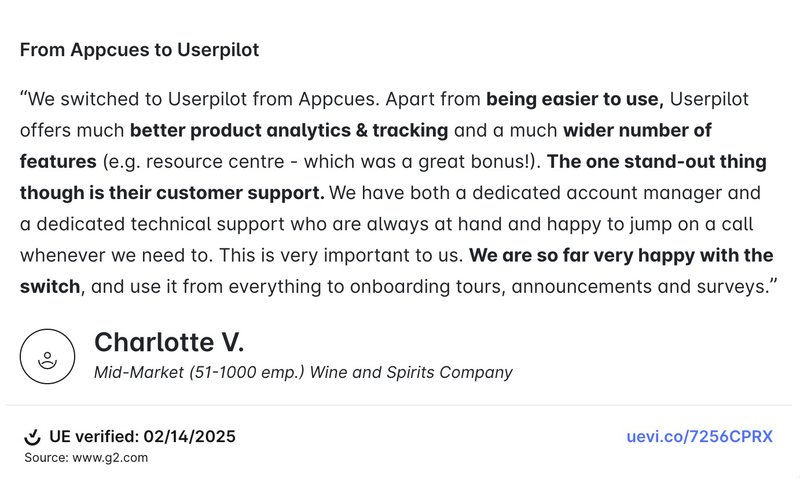
Here’s what one of our happy customers had to say after making the switch:
Skip the Appcues Demo Qualification Hurdles and Start Your Userpilot Trial Now
Userpilot strives to provide accurate information to help businesses determine the best solution for their particular needs. Due to the dynamic nature of the industry, the features offered by Userpilot and others often change over time. The statements made in this article are accurate to the best of Userpilot’s knowledge as of its publication/most recent update on January 22, 2026.
About the author