Price Increase Announcements in 2026: What Actually Keeps Customers from Leaving


Price increase announcements, much like product updates, come around more often than they used to. In fact, Growth Unhinged tracked over 1,800 pricing changes across the top 500 SaaS companies in 2025 alone. That’s an average of 3.6 changes per company within the span of a single year. Your customers are getting more and more of these emails with the same vague justifications for why the price of their subscription has gone up yet again.
Price increase announcements in 2026 succeed or fail on whether the customer sees the value expand before they see the cost increase. Getting the order backwards gives price-sensitive customers a reason to switch platforms. I wanted to write something more useful than another generic pricing-announcement checklist, so this piece covers the three decisions you need to make before drafting anything and value-based framing that will help you retain users even when raising prices.

Why price increase announcements fail
Most price increase announcements fail because they lead with cost-justification language instead of customer outcomes. Cost-justification framing that cites inflation, infrastructure, or headcount tells the customer why you need the increase, not why they should pay it. Customers don’t renew at a higher price simply because the costs on your end went up. This is where the account health side of customer success comes in. James Mitchinson, Userpilot’s Head of Customer Success, has noticed that the loudest signal in churn prediction is the one you don’t hear:
“If a customer is logging a lot of tickets, that looks like a churn risk. But an even bigger indicator of churn risk is when a customer who used to submit tickets suddenly goes quiet.”
The same pattern shows up around price increase announcements. Customers who email to complain about the new cost are at least still engaged enough to negotiate, but those who read the email and say nothing could be quietly evaluating alternatives. These are the users who show up in your churn calculations a few months down the line. Leading with why the price increase is happening (instead of what’s changed for the customer) and treating every segment the same (without personalized messaging) are both pitfalls that could cause these announcements to fail.
Three decisions to make before you write anything
Before a single word gets drafted, three decisions need to be locked internally because no amount of copy revisions can fix a misguided underlying decision.
Whether to grandfather existing customers, and for how long
Grandfathering existing customers at their current subscription cost for a fixed window is the single highest-leverage decision to make. Patrick Campbell, Founder of ProfitWell, recommends using grandfather discounting:
“We’ve made all these improvements to the product, we’ve been really delivering on value, so your price is going to go up to X, but it’s not going to go all the way up to X for 12 or 6 months down the road.”
The argument is that price tapering works better than a hard cutoff because it gives customers more time to acclimate to the new pricing instead of having to digest the full increase all at once.
How much notice does your customer base actually need
Advance notice should scale with contract type rather than follow a single company-wide policy. Annual customers need to hear about increases at least 60 days ahead of time (but ideally 90 days or more) so they have time to prepare for the larger renewal on the way. In contrast, monthly customers can get by on 30 days’ notice because each charge is smaller than those on a yearly plan. Follow up with both monthly and annual subscribers about a week before the effective date to ensure they haven’t forgotten about your previous email and get caught off guard by the increase.
Why end users and decision makers need different messages
The end users of your SaaS product and decision makers approving its renewal are two different people who don’t share an inbox, so you should tailor your messages to each of them. The end user wants reassurance that the product can still do what they need it to, while the decision maker is looking for a clear price and a strong argument for why they should pay it. For high-value accounts and customers getting a rate hike of 50% or greater, consider picking up the phone to treat this as a high-touch interaction rather than just another automated email.
A realistic cadence: How to sequence the announcement
When you send a price increase announcement (and how often) is just as important as what it says, exactly like any other launch messages you schedule. The cadence below gives B2B customers enough runway to have budget conversations.
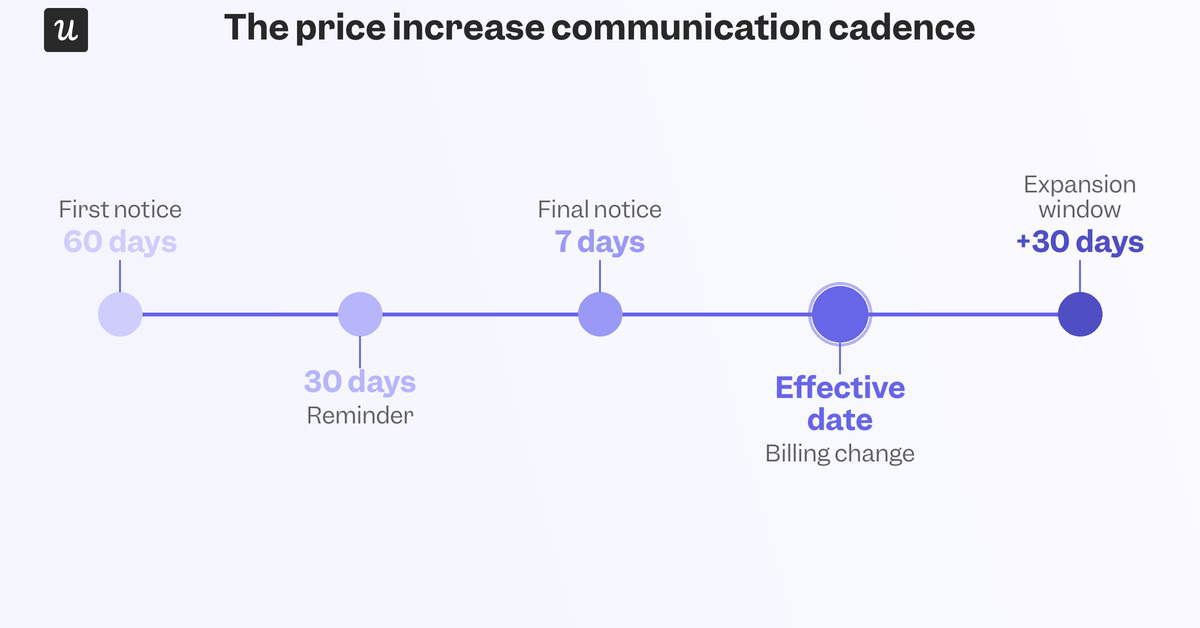
The job isn’t done on the effective date because every 30-day window following a price change are when expansion conversations land best, as customers are already re-evaluating product value.
Framing the message around value, not cost
The highest-impact edit to any price increase announcement is swapping the justification. Cost-based framing explains why the increase is necessary for you as a vendor. Value-based framing explains what the customer is now getting that they couldn’t before.
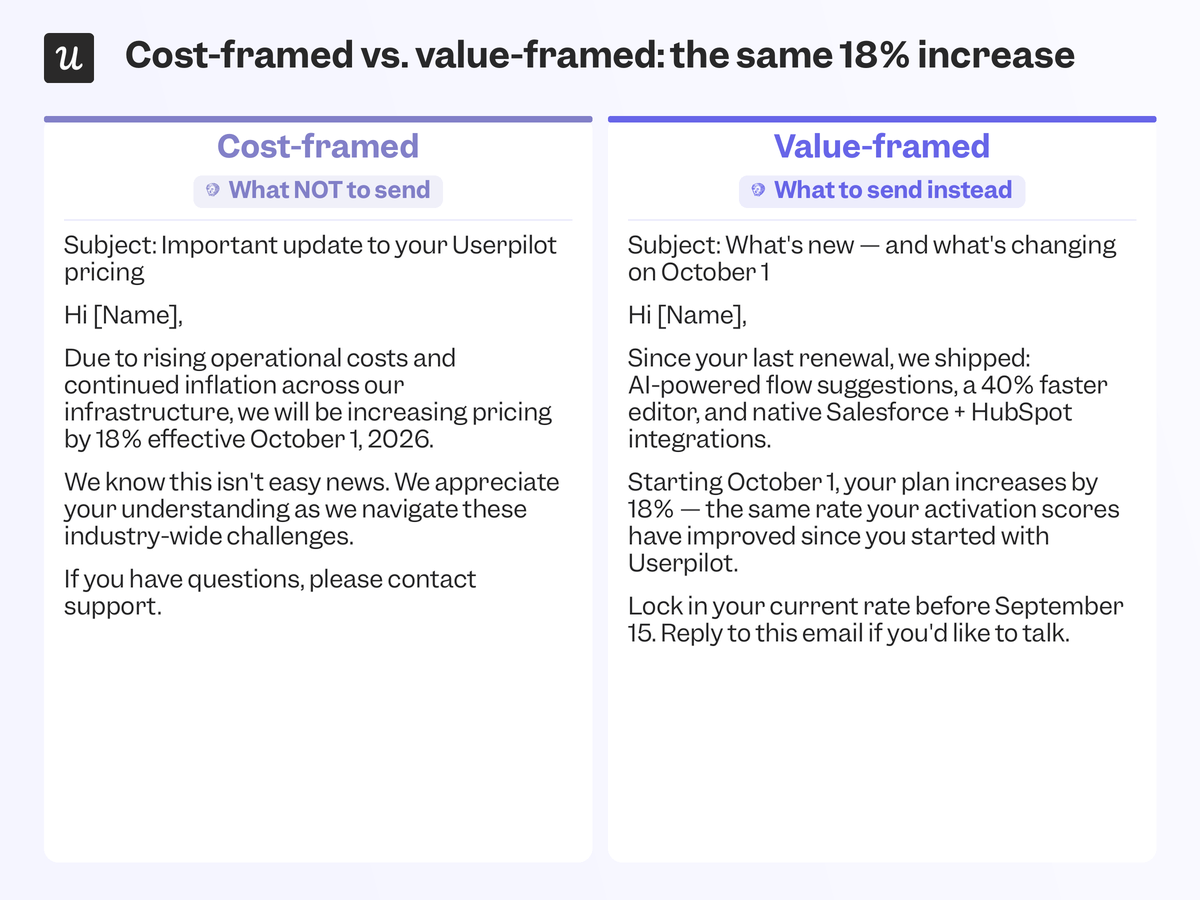
A complete announcement needs five things, and most drafts are missing at least two:
- What’s changing.
- When it takes effect.
- Why it’s happening (in one sentence).
- What it means (for this customer’s plan specifically).
- Where to ask questions.
Notice that “why” only gets one sentence because the explanation for the increase should be the shortest part of the email, not the longest.
Why in-app belongs next to email
Relying on email alone creates a communication gap because billing-related subject lines have lower open rates than other campaign types. In contrast, an in-app notice can reach customers inside the product they already use, closing the gap that unread emails open. Userpilot’s in-app messaging lets you add custom triggers so that only user segments who are actually affected by the price increase see the announcement.
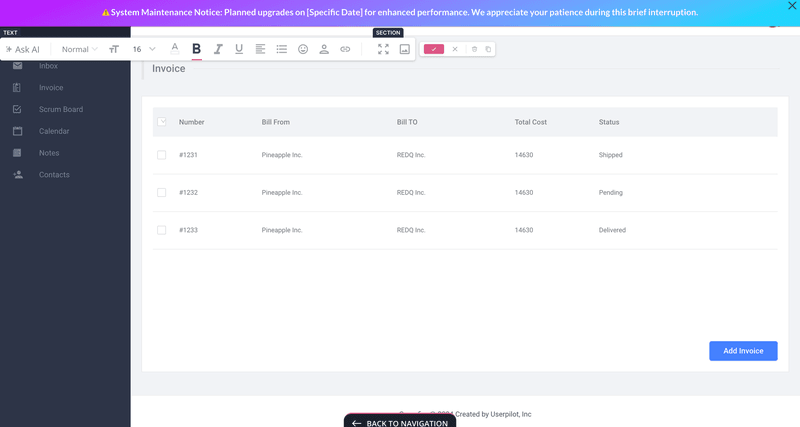
Userpilot’s mobile app experience also lets you announce price increases through slideouts or push notifications so that even the busiest users see it while they’re on the go.
Why well-handled price increases are a brand signal
A company that never raises prices doesn’t automatically earn user loyalty. Conversely, it could signal that the vendor has stopped investing in the product and is happy to rest on their laurels.
For instance, Notion increased the cost of its Business tier from $15 to $20 per user per month when it added Notion AI as a core feature rather than selling it as a separate add-on. Slack and Loom made similar moves, bundling AI add-ons into their base pricing and raising the sticker price for that tier. A price increase announcement that’s clear, proactive, and tied to product investment reads very differently than a price stagnation or surprise line items.
Getting the messaging right is as much a customer marketing job as a billing one, because pricing announcements are ultimately just another touchpoint in the relationship. Justifiable price increases are built on evidence and roadmaps, not by slapping a bigger number on the same product. If users have already experienced more value before the increase goes into effect, the renewal decision will be a foregone conclusion by the time their next invoice rolls around.
Where this leaves you
A price increase announcement isn’t the end of a conversation with a customer, just one data point in a much longer relationship that shapes customer retention for the weeks and months that follow. Handle it with the same care as your other customer retention strategies, like an onboarding flow or a renewal call, to get most customers to stick around. On the other hand, treating it as a one-off billing notice could lead to users quiet quitting your product while waiting to cancel their subscription.
If you want to send personalized in-app price increase announcements, get a Userpilot demo and we’ll show you how to segment these messages without writing a single line of code!
FAQ
How do I announce an increase in price?
Use a multi-channel approach, including email, in-app messages, and blog posts. Be transparent, provide clear explanations, and give advance notice.
How do you write an increase in price?
Start with a polite greeting, explain the reason for the increase, detail the changes, offer support, and express gratitude for their continued business.
How do you say prices will increase?
Be direct but empathetic. For example, “We are adjusting our pricing to reflect the increased value and features we’ve added to our product.”
How to communicate an actual price increase?
Communicate through multiple channels, segment your audience, justify the increase with added value, and remain open to customer feedback.
About the author