What is Intercom? Do You Need it in 2026?



When ChatGPT launched in November 2022, Eoghan McCabe had just returned as Intercom’s CEO and had to answer a question: What is Intercom in an AI-first world? Because if chatbots could replace support agents, companies wouldn’t need help desks. They wouldn’t need the software anymore.
His answer was to rebuild Intercom around Fin, its AI agent powered by Anthropic’s Claude, and move away from traditional ticketing toward automated resolution.
That transformation is a big part of why 30,000+ companies, including Atlassian, Amazon, and Anthropic, still choose Intercom in a crowded market. The platform resolves support tickets autonomously, routes complex ones to human agents with full context, and handles conversations across every channel from a single inbox.
However, as a SaaS team focused on product growth, is Intercom enough for incorporating customer feedback? Or can you improve customer engagement better with a dedicated in-app support solution?
Let’s look at how Intercom works in 2026, who uses it, and what real users say.

What is Intercom?
Intercom is an AI-first customer service platform that combines a next-generation helpdesk with Fin, its AI agent, in a single connected system. Its key features include live chat, omnichannel support, automated messaging, ticket resolution, and a self-serve help center; all from one inbox shared by both AI and human agents.
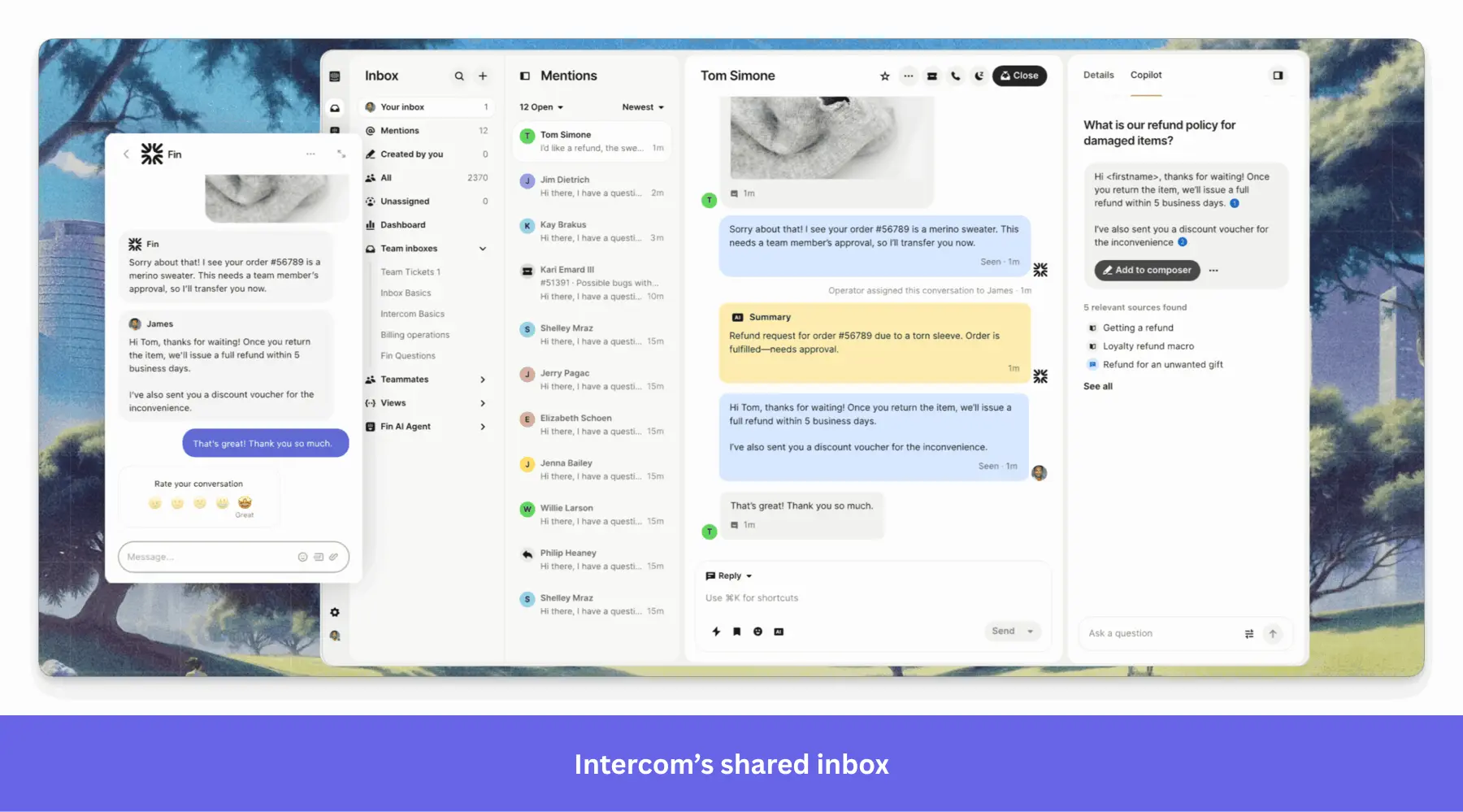
Intercom has moved away from traditional ticketing toward automated responses and instant AI resolution, with human agents stepping in only when Fin can’t resolve the issue. According to Intercom’s homepage, Fin resolves 66% of customer questions on average, with that figure increasing by 1% each month as the system learns.
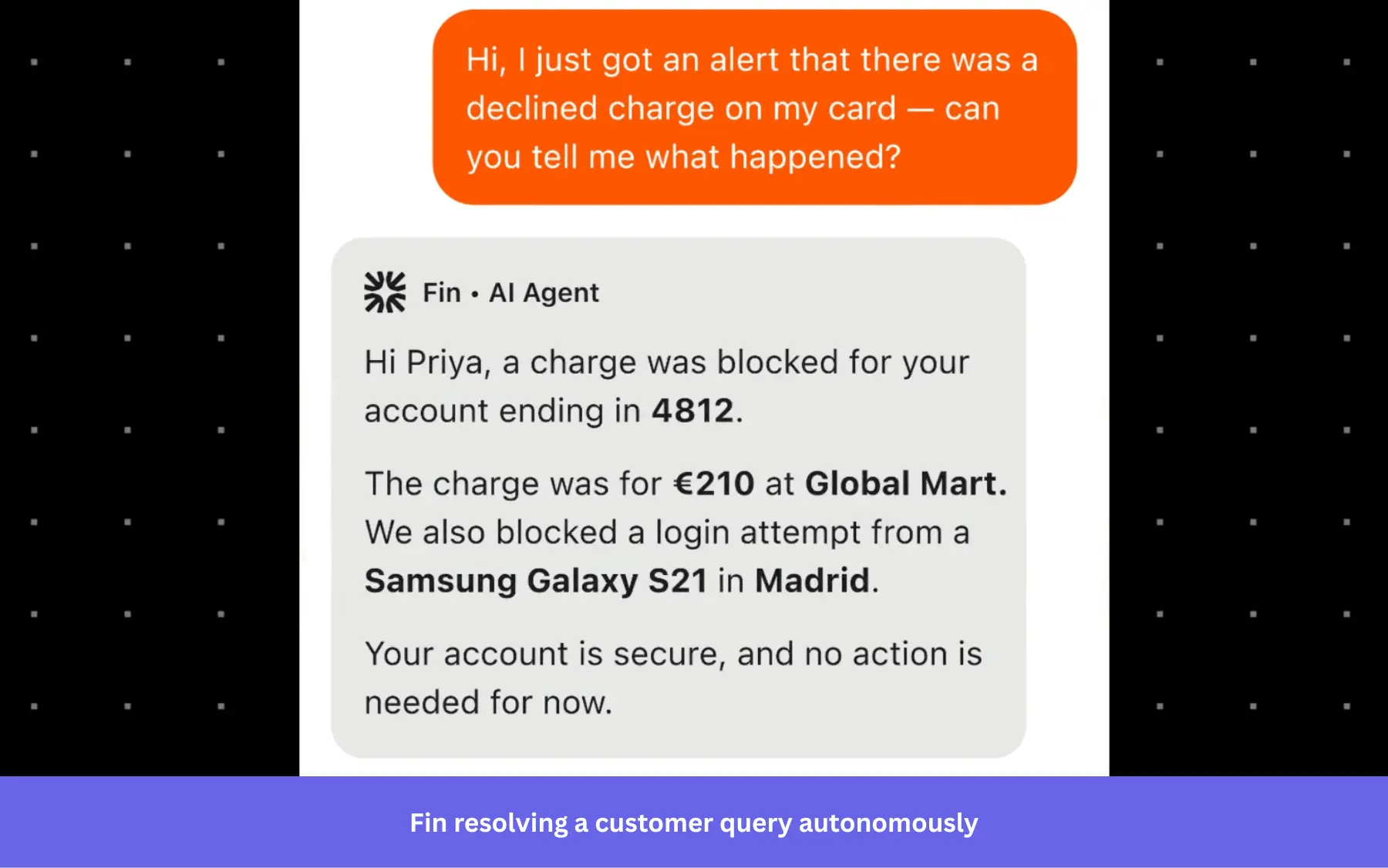
Intercom has evolved how it measures Fin’s success, shifting from resolutions to outcomes. A resolution meant Fin handled the conversation end-to-end with no human involvement. An outcome counts when Fin completes the action it was configured to perform, even if that means gathering context, taking action, and then handing off to a human agent.
Who uses Intercom?
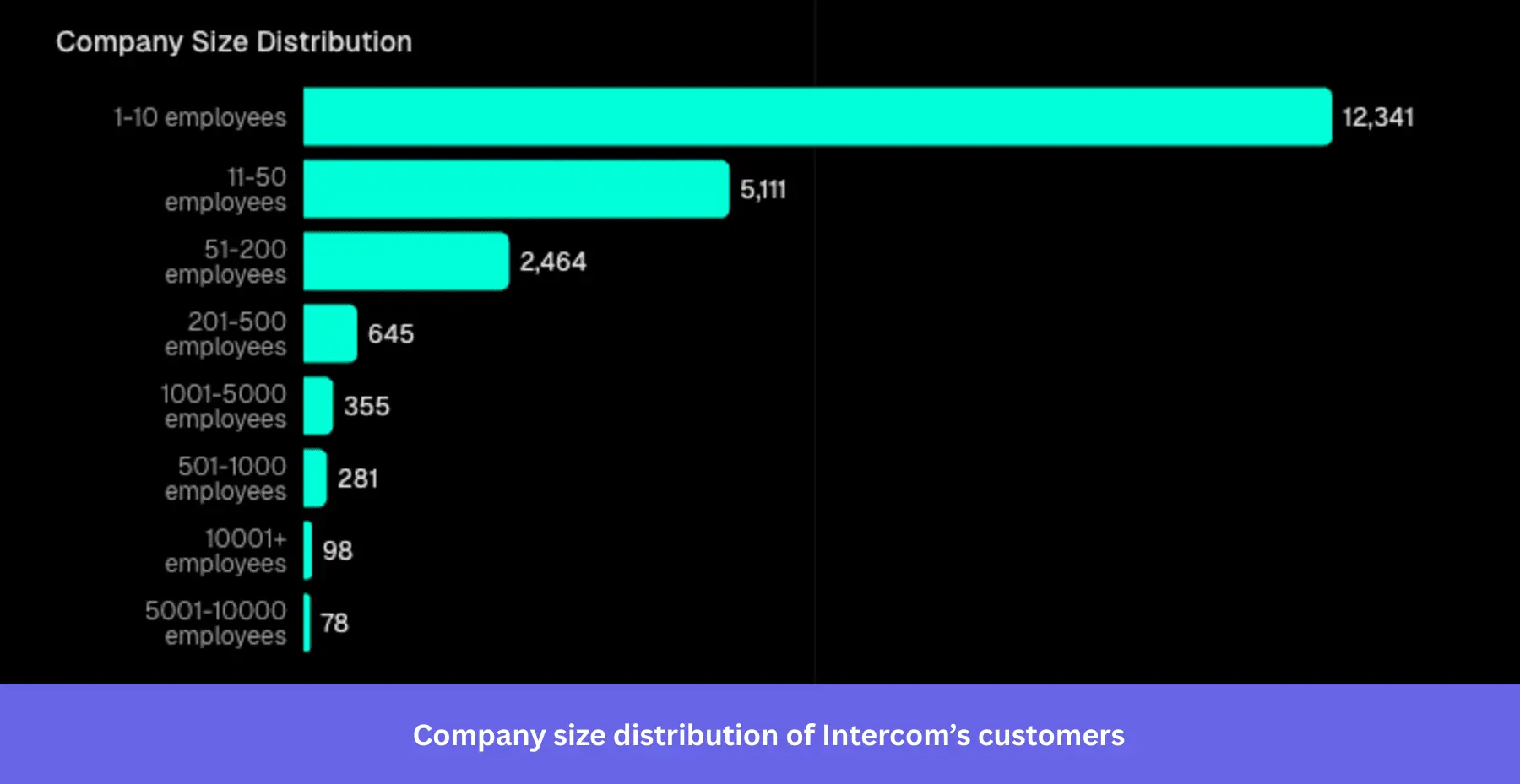
Based on TechnologyChecker’s analysis of 21,754 companies, 57.7% of Intercom customers have 1–10 employees, and 77.87% are companies founded after 2010. So, despite enterprise logos like PwC, Adobe, Atlassian, Amazon, and Anthropic in its customer list, the typical Intercom customer is a small, digital-native SaaS team.
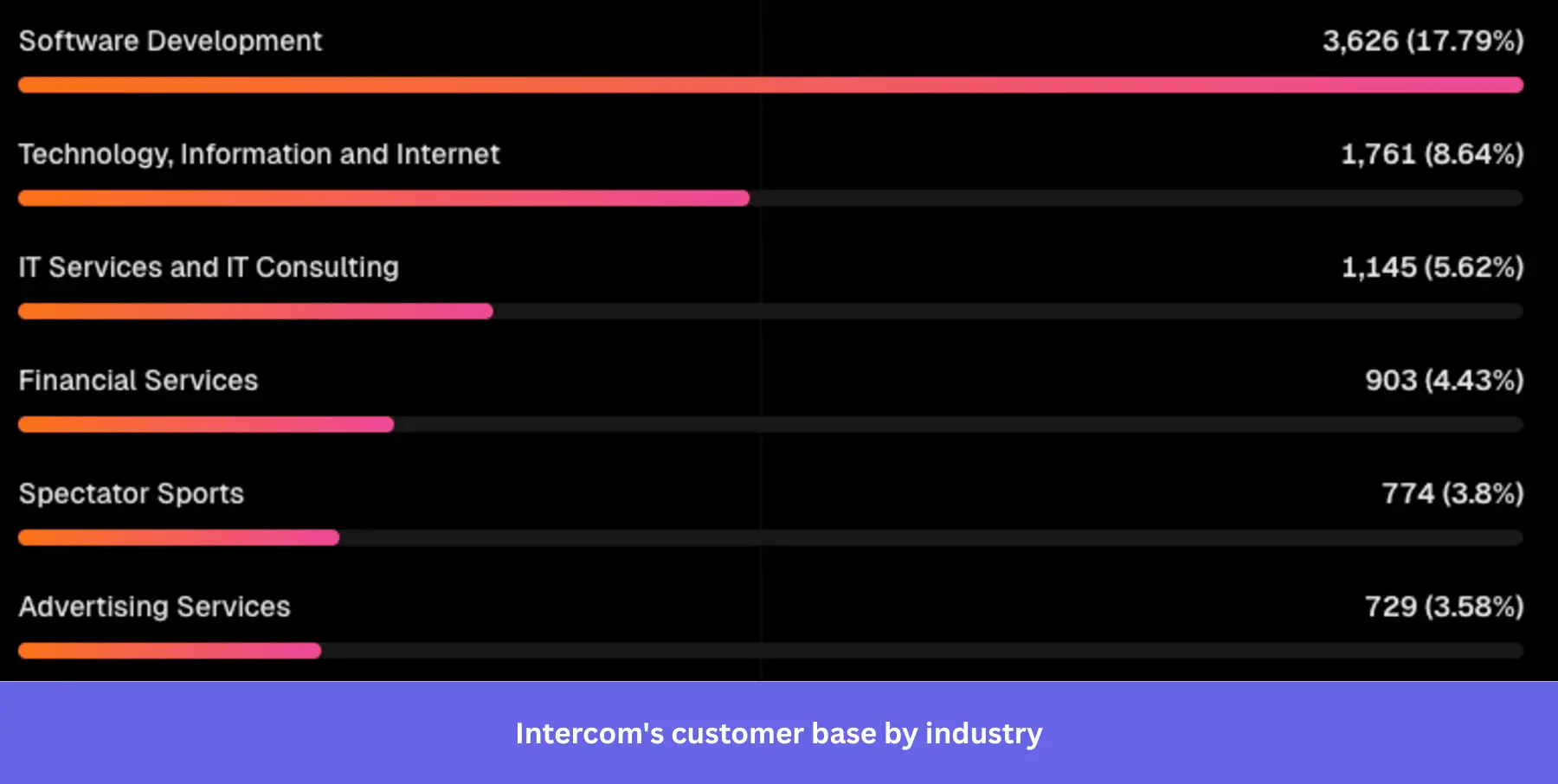
The industry breakdown shows that software development leads at 17.79%, and when you combine tech-adjacent verticals, over 32% of Intercom’s customer base is in software and technology.
How much does Intercom cost?
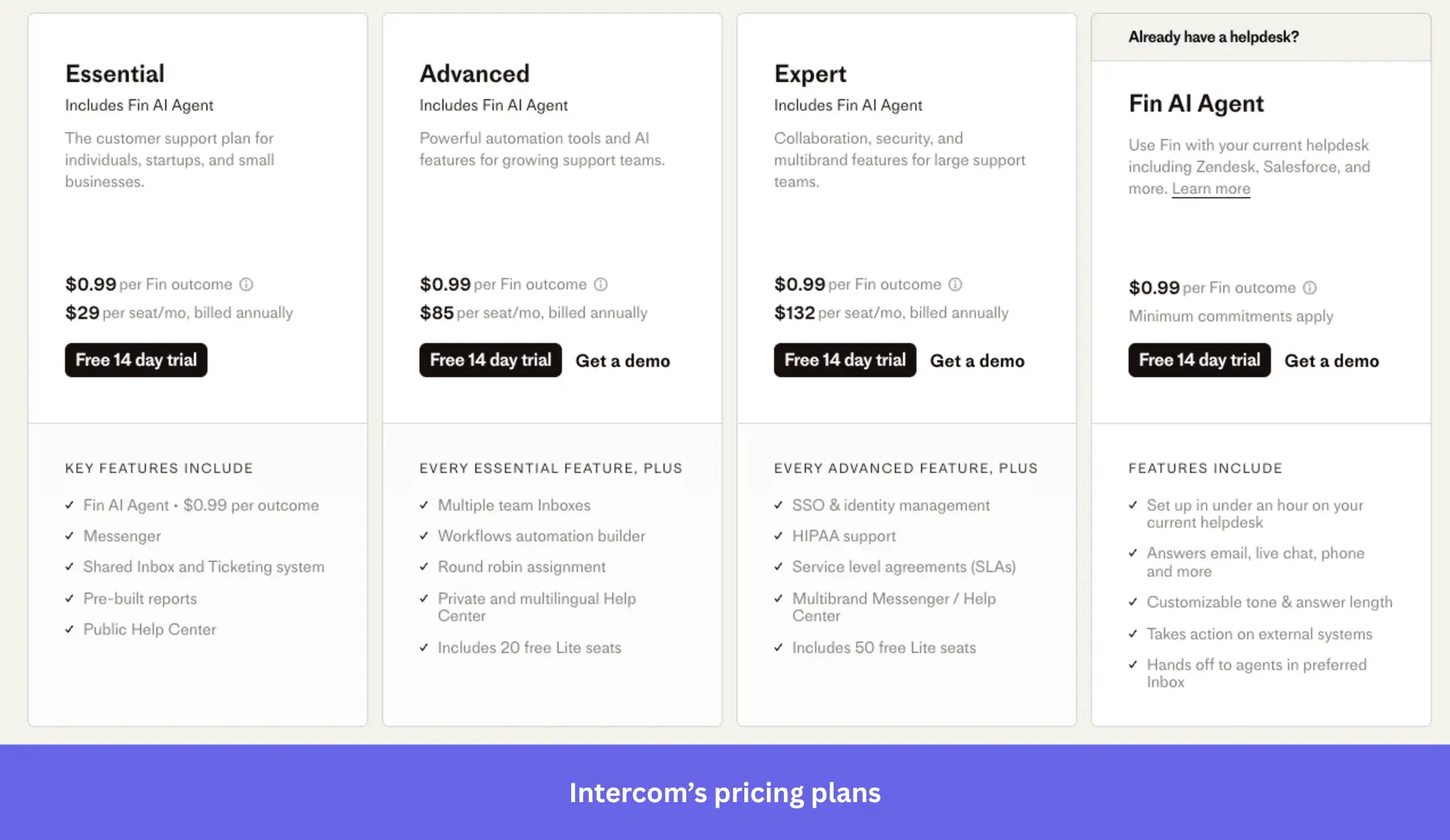
Intercom uses a subscription model with per-seat pricing and extra charges for certain add-ons. Align your subscription with your SaaS pricing models and company size. Intercom offers three plans to cater to all business needs:
- Start with the Essential plan ($39 per seat/month, billed annually): Deploy the basic live chat widgets and outbound messaging for seamless communication, shared inbox, ticketing system, pre-built reports, and a public help center for your startup.
- Scale with the Advanced plan ($99 per seat/month, billed annually): Introduce 20 Lite (limited) seats, multiple team inboxes, workflow automation builder, round robin assignment, and private and multilingual help center as your team grows.
- Customize with the Expert plan ($139 per seat/month, billed annually): For large enterprises that want secure single sign-on (SSO), identity management, HIPAA support, service-level agreements (SLAs), 50 Lite seats, and multibrand Messenger and help center.
Fin AI is not included in your seat price, though all three plans include access to it for $0.99 per outcome. The quality of your center content (help articles, FAQs, and documentation) directly affects how accurately Fin responds.
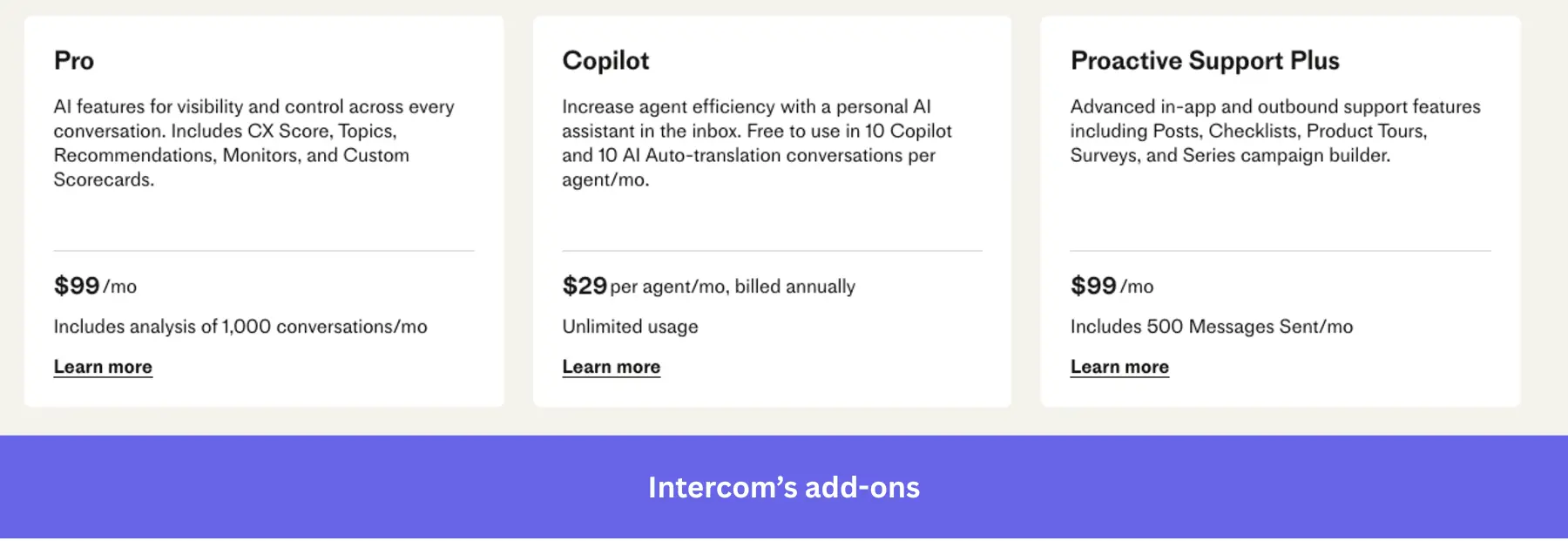
Before you choose a plan, consider these add-ons, which aren’t included in the seat cost:
- Copilot: $29/agent/month (billed annually) for unlimited usage. Each plan includes limited free usage (10 Copilot conversations per agent/month).
- Pro: $99/month for AI-powered conversation intelligence. It covers CX scoring, topic analysis, performance recommendations, and custom scorecards across up to 1,000 conversations per month.
- Proactive Support Plus: $99/month add-on that unlocks product tours, surveys, targeted messages, and mobile carousels. It’s limited to 500 messages per month.
Avoid hidden costs: Calculate your expected deflection volume because your bill will scale significantly as your AI usage and support operations grow. Intercom offers a cost calculator and an ROI calculator to estimate your bill based on factors such as team size, Fin outcomes, and expected support volume.
Let’s say you handle 2,000 support conversations a month with 3 support agents earning $60,000 per year each. If Fin resolves 67% of conversations, it would handle about 1,340 conversations monthly. At $0.99 per outcome, that’s about $1,327 per month in Fin usage alone.
What do real users say about Intercom?
Intercom is a popular product with thousands of reviews on G2 (rated 4.5/5 by 3,000+ users). Common themes include a very positive experience with its interface and live chat, while the complaints are mostly about pricing and the learning curve.
The pros:
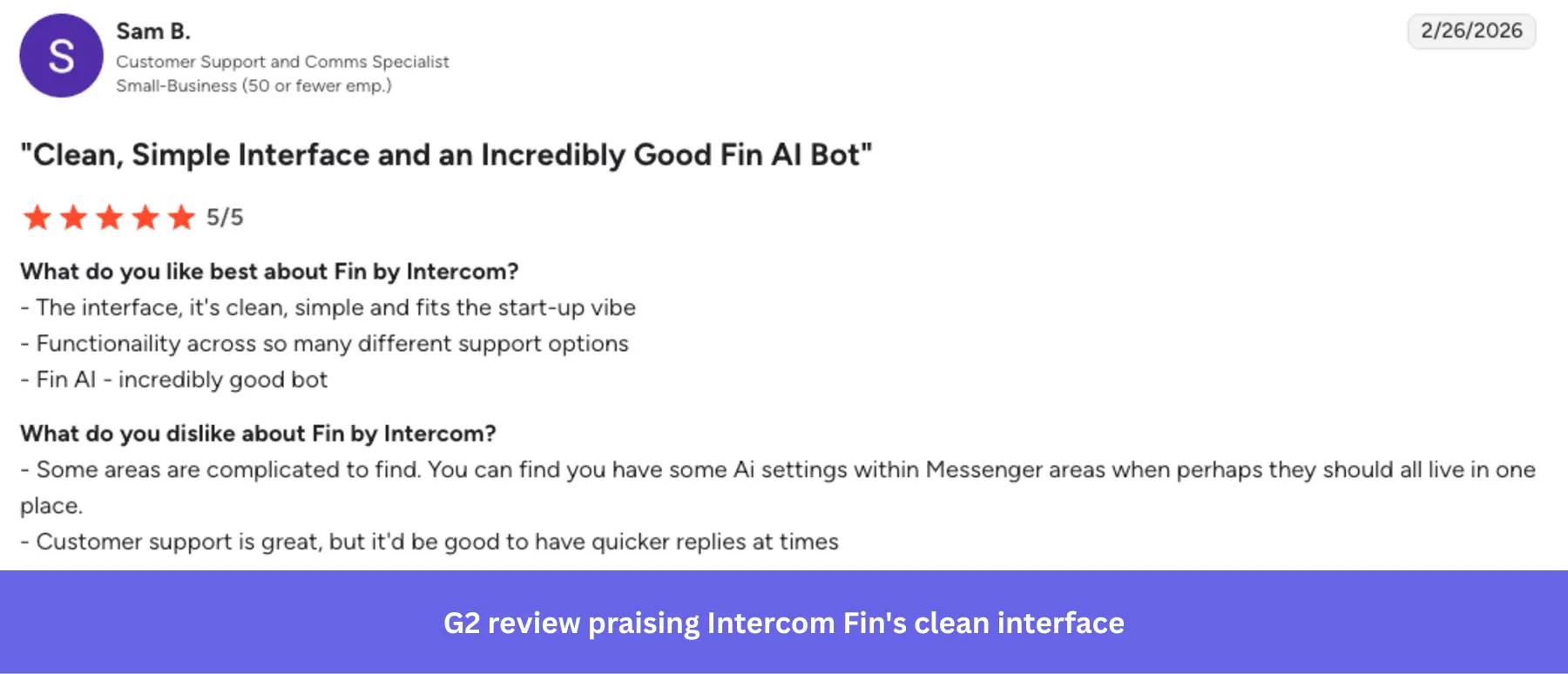
- Clean, intuitive interface for support workflows: Fin gets value fast on straightforward queries. As one reviewer puts it: “The interface, it’s clean, simple and fits the start-up vibe.”
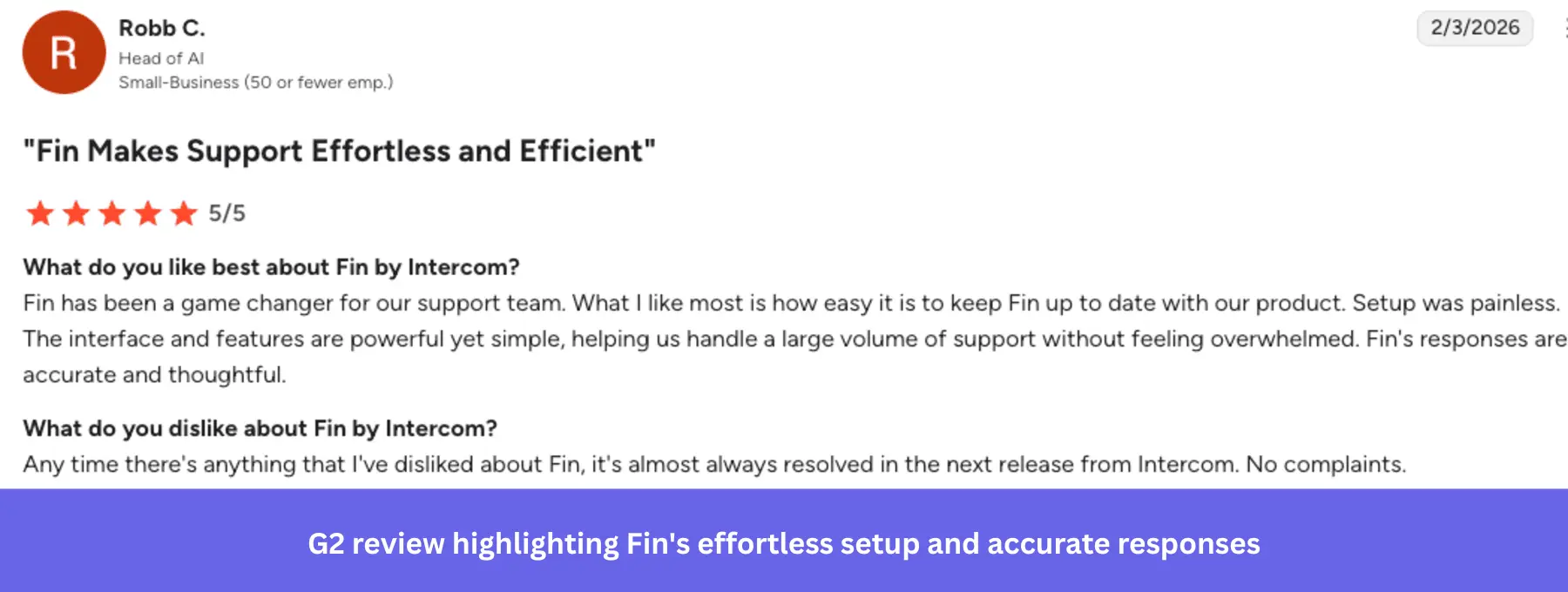
- Easy setup, powerful at scale: Fin is quick to configure and stays up to date as your product evolves. This user reported: “What I like most is how easy it is to keep Fin up to date with our product. Setup was painless.”
The cons:
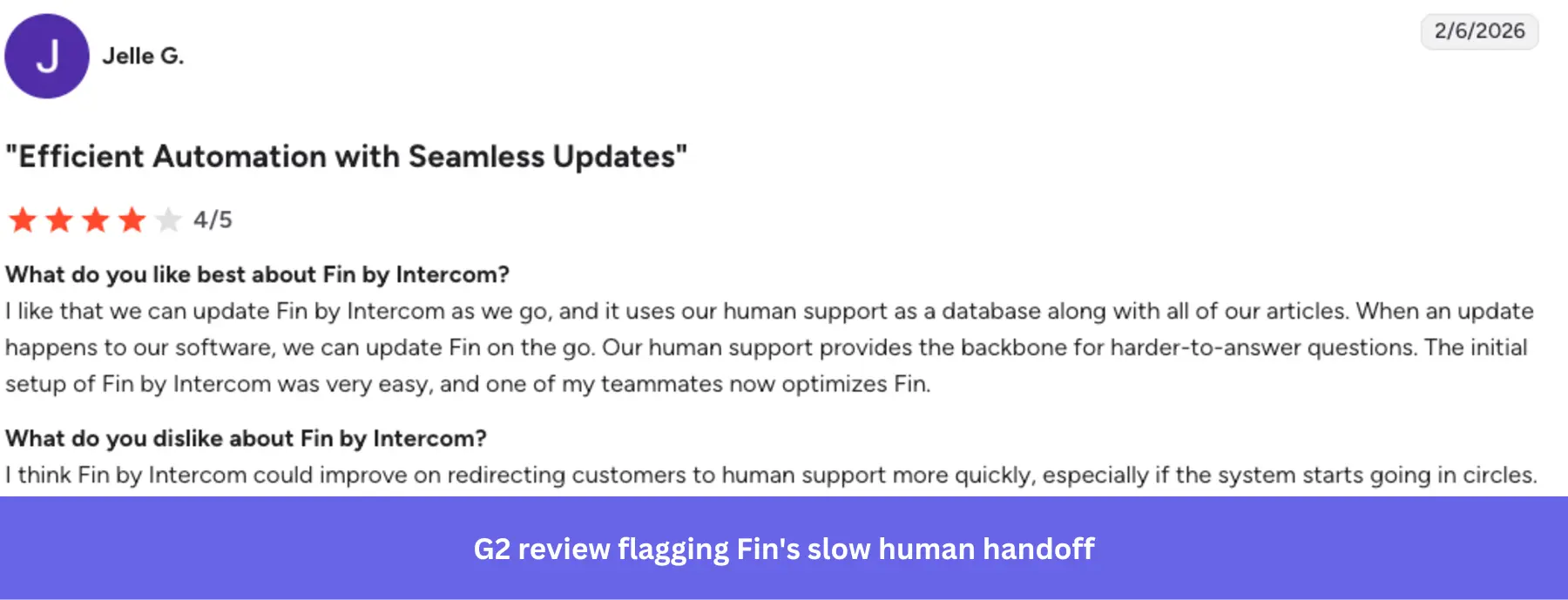
- Slow human agent handoff: Fin can struggle with complex queries and sometimes escalates too late. As one user notes: “I think Fin by Intercom could improve on redirecting customers to human support more quickly…”
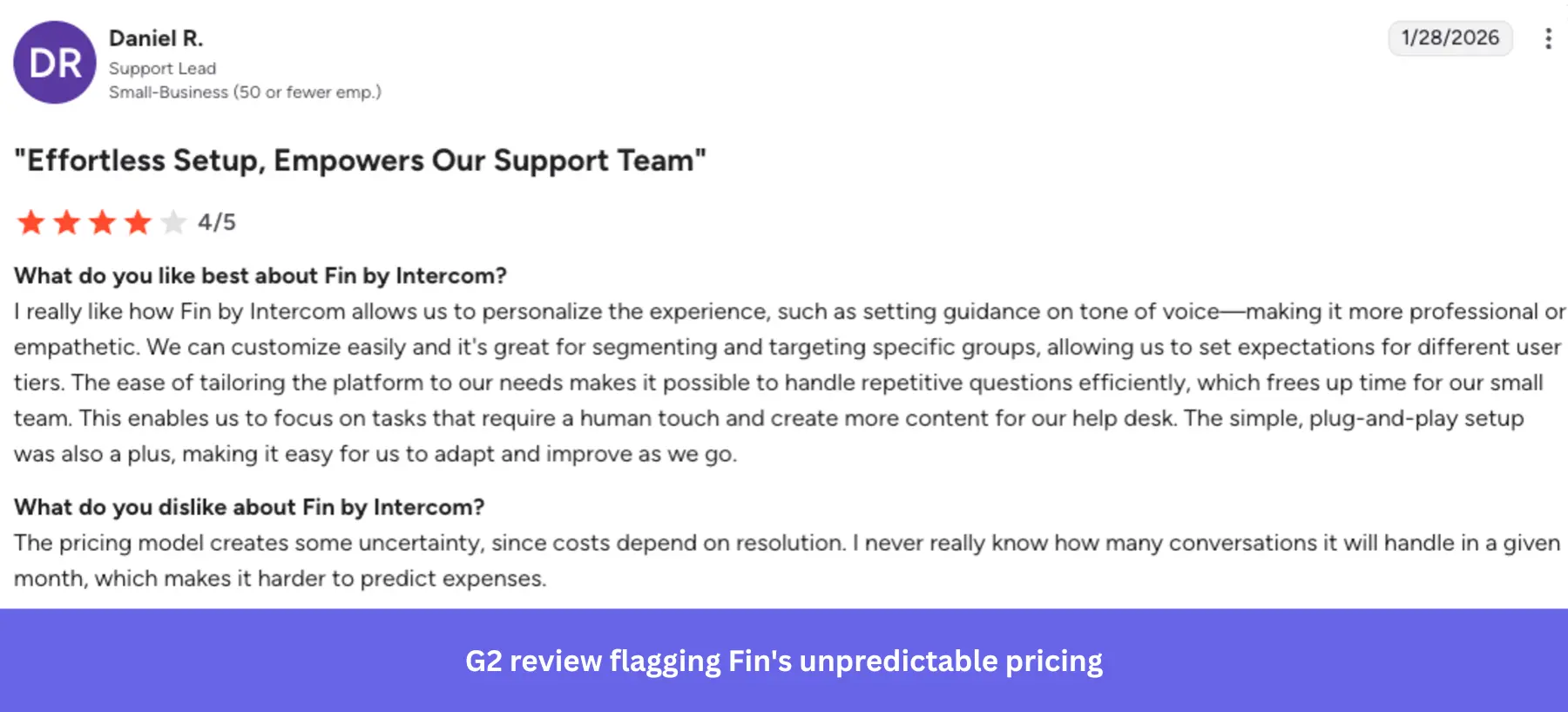
- Unpredictable pricing model: The per-outcome model works at low volumes but becomes hard to budget at scale. One reviewer put it plainly: “I never really know how many conversations it will handle in a given month, which makes it harder to predict expenses.”
A key factor: Intercom excels at reactive support, clearing ticket queues, deflecting repetitive queries, and helping support teams work more efficiently. But if you’re expecting it to onboard new customers, drive activation, or uncover behavioral insights, you’re asking a support tool to do a product growth tool’s job.
Where does Intercom sit in your tech stack?
From TechnologyChecker’s analysis, we see that Intercom customers most commonly pair it with Google Analytics (83.75%) for web tracking and HubSpot (18.87%) for marketing automation. These are teams that aren’t satisfied with traffic dashboards and actively try to understand user behavior at a deeper level.
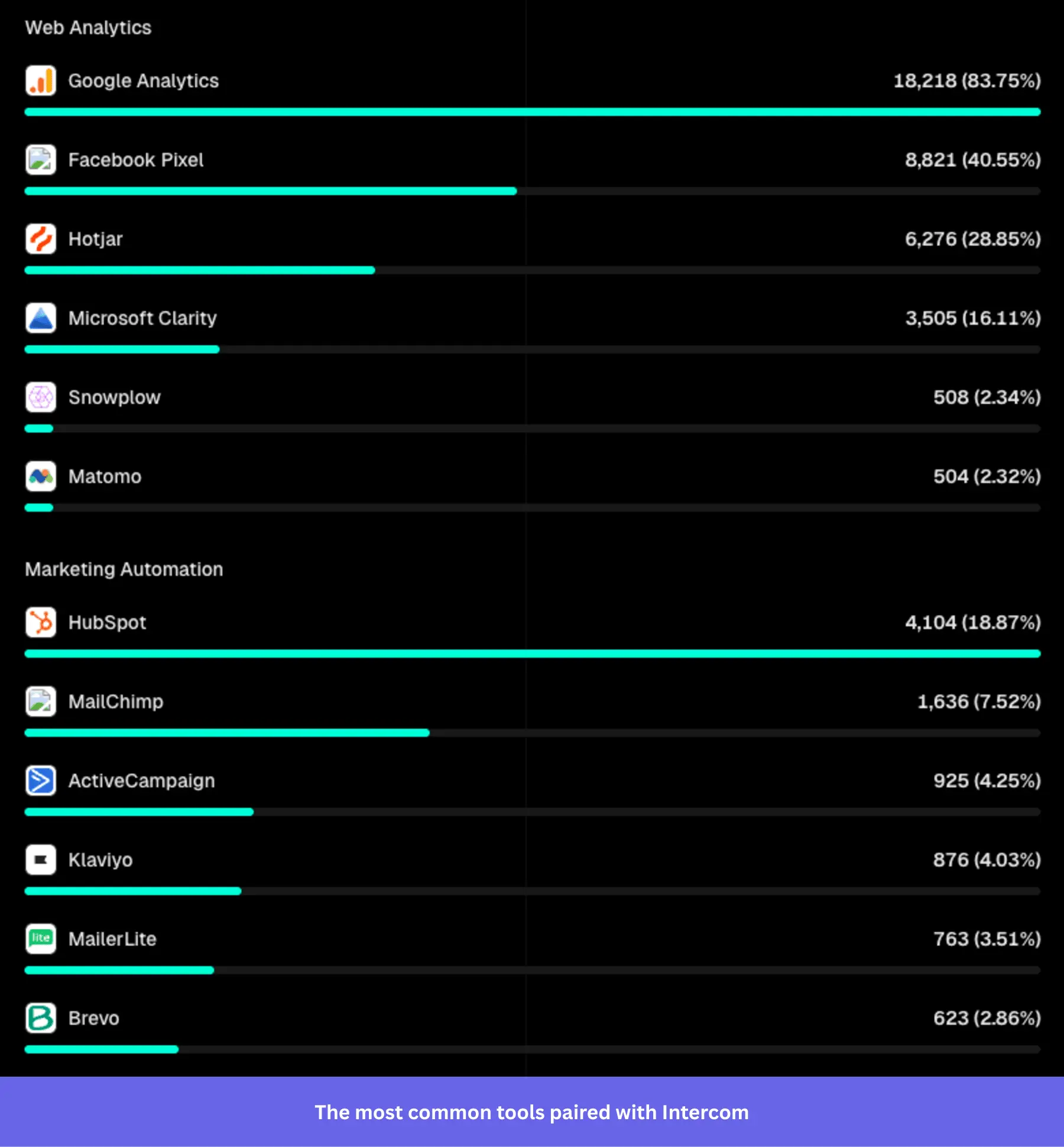
The most prevalent patterns for integrating Intercom with your existing stack reflect that:
- Salesforce and HubSpot: Sync customer data directly into the chat console via the Salesforce integration so agents get a 360° view of account tier, renewal date, and past customer interactions without leaving the inbox.
- Zendesk: Keep Intercom as your front-end live chat layer, then route technically complex issues into Zendesk’s ticketing backend.
- Slack: Push conversation alerts directly to Slack so engineers or founders can jump into high-priority calls and chats immediately.
The Hotjar overlap with Intercom is 28.85%, meaning session replay and UX research are already part of many teams’ workflows. But Hotjar tells you where users get stuck, GA4 tells you where they drop off, and HubSpot tells you where they came from.
But none of them tell you what to do about it inside the product, and Intercom doesn’t fill that gap either.
What is the difference between Userpilot and Intercom?
Intercom is built for reactive support; Userpilot is built for proactive growth. In most cases, they’re complementary. Here’s how the two tools compare across the areas that matter most to product teams:
|
Intercom |
Userpilot |
|
| Primary job | Resolve customer support tickets | Drive feature adoption and onboarding |
| AI focus | Fin: Deflects and resolves support queries | Lia: Identifies behavioral patterns and automates growth playbooks |
| Analytics | Support metrics: CSAT, response times, outcomes, user interactions | Product analytics: Funnels, retention cohorts, feature usage |
| In-app experiences | Basic tooltips, banners, product tours (via paid add-on) | No-code walkthroughs, checklists, modals with behavioral targeting |
| Pricing model | Per seat + per AI outcome | Per monthly active users |
I suggest reading this detailed breakdown of Userpilot vs. Intercom to see which combination fits your exact growth stage.
Why you should use them together: The Userpilot + Intercom integration sends Userpilot event data directly to Intercom, so you can see a user’s in-app activity within Intercom. You can also embed the Intercom messenger and help center articles directly inside Userpilot’s resource center. This helps users find answers and submit support tickets without ever leaving your product.
From Intercom to Userpilot: How Talana enhanced customer onboarding
Talana is an HR software company offering eight products that help companies manage payroll, recruitment, benefits, and workplace communications. As their customer base grew, manual onboarding stopped being viable: they needed a self-serve solution that could scale and communicate with users contextually inside the product.
Their first choice was Intercom.
The challenge: Talana’s product has a complex URL structure that changes dynamically depending on the customer and company using it. Intercom couldn’t accommodate that.
As María Ignacia Videla, Head of Communication and Content at Talana, put it:
“In Talana, we have a lot of pages, URLs, and they all change depending on the customer and the company. And this was something that Intercom was not able to offer.”
This meant they couldn’t build onboarding flows, checklists, or walkthroughs that would work reliably across their entire user base. On top of that, Intercom’s pricing, based on content viewers rather than a fixed rate, became increasingly hard to predict as Talana’s user base grew.
The solution: Talana switched to Userpilot to implement checklists, interactive walkthroughs, tooltips, banners, and modals that guide users through onboarding.
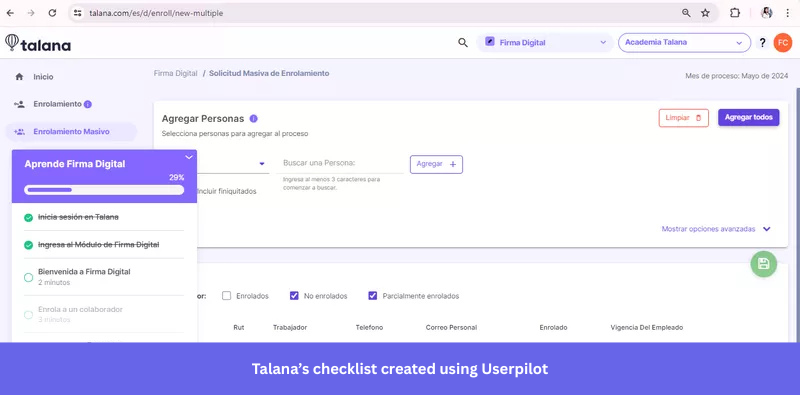
They also built a resource center to improve visibility of self-serve support and started tracking key metrics, including monthly active users (MAUs) and net promoter score (NPS), through Userpilot’s analytics dashboards.
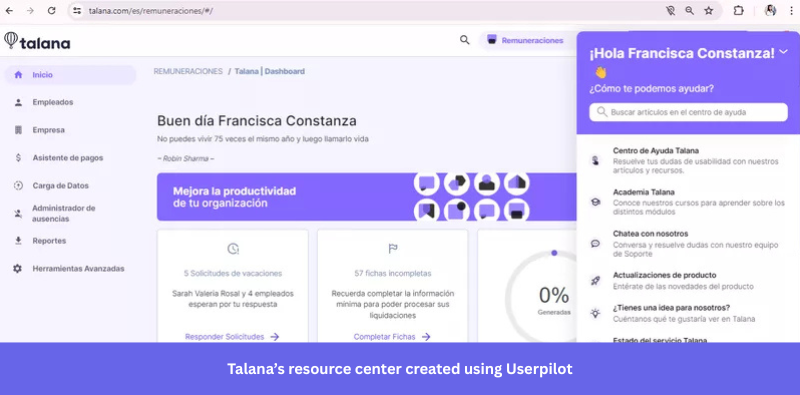
The results: 35.6% of users engaged with Talana’s modals and banners, and 31% engaged with tooltips. Their help center, previously underused, saw a significant jump in engagement once embedded inside the resource center, giving users a single place to find answers without contacting support.
“We were able to do some great things in Intercom, but not as great as Userpilot in terms of the onboarding process. Regarding the in-app communications, I would say the impact is incredible.” — María Ignacia Videla, Head of Communication and Content at Talana
Talana’s results show what’s possible when onboarding, in-app communication, and support work together. If you want to take that further without building manual playbooks, we‘re building Lia, an AI agent for product growth that automatically surfaces patterns in your user data, analyzes survey responses, and creates personalized flows to build customer loyalty. It can follow playbooks for customer success and onboarding to automate entire processes: Join the waitlist here.

Are you using the right tool for the right job?
Intercom is excellent at what it was built for. But if you’re using Intercom to personalize customer experiences or build behavioral segments, you’re asking a support tool to do a product growth tool’s job.
If you’re evaluating your stack honestly, here’s how to think about it:
- Use Intercom for support: Inboxes across multiple channels, live chat, and Fin’s AI-driven ticket deflection are where Intercom earns its place in the stack. It remains the strongest option for keeping support queues manageable without scaling headcount.
- Recognize the limitations: Intercom’s native product adoption features, such as tooltips, product tours, and checklists, are rigid. They lack the no-code customization required to deliver personalized experiences at the level of complex onboarding demands.
- Deploy a hybrid approach: Pair Intercom for support with a dedicated product growth platform like Userpilot for onboarding and granular segmentation for personalization. You get flow logic and conditional branching without writing code, and behavioral targeting that Intercom’s segmentation simply can’t match.
Userpilot strives to provide accurate information to help businesses determine the best solution
for their particular needs. Due to the dynamic nature of the industry, the features offered by
Userpilot and others often change over time. The statements made in this article are accurate
to the best of Userpilot’s knowledge as of its publication/most recent update on April 2, 2026.
FAQ
What is Intercom in CRM?
Intercom is not a CRM, but it can integrate with one to create a more unified communication system. While a CRM like Salesforce manages the full customer relationship, implementing Intercom allows you to manage real-time conversations and support interactions. Teams typically use this messaging platform alongside a CRM rather than in place of one to ensure effective communication throughout the buyer journey.
What kind of platform is Intercom?
Intercom is an AI-first customer service platform that scales from small businesses to global enterprises. The Intercom system combines a helpdesk, omnichannel support, an AI agent (Fin), and proactive engagement tools into a single platform. By utilizing these advanced features, support teams can manage customer inquiries at scale, improving the overall effectiveness of their support operations and enhancing the overall customer experience.
Is Intercom like Salesforce?
No, Intercom isn’t directly like Salesforce. Salesforce is a CRM primarily for managing sales pipelines, customer accounts, and revenue operations. On the other hand, Intercom focuses on customer support and engagement. Teams often use both: Salesforce for the commercial relationship, and Intercom for the support layer.
Who competes with Intercom?
Intercom’s closest competitors in the customer service and live chat space are Zendesk, Freshdesk, and Drift. For AI-specific functionality, it competes with Tidio and Freshchat. If we consider product adoption and onboarding features specifically, other solutions like Userpilot, Pendo, and Appcues address use cases that Intercom only partially covers.
About the author