7 SaaS AI Tools I’d Use to Build a Connected GTM Workflow


A connected go-to-market (GTM) stack spots intent, generates pipeline, boosts adoption, and measures revenue impact while reducing manual handoffs. But simply adding SaaS AI tools to do each won’t make your strategy better.
The real goal is to decide and execute without the manual grind, so your team can drive better results faster. Sometimes, all you need is a lean, purpose-built stack of AI-powered tools to do that. For my workflow, seven was the sweet spot.
Below, I break down what each tool does and how they can help you build a high-impact GTM engine.
Executive summary
- The workflow starts with Common Room, which identifies accounts showing buying intent.
- Clay then enriches and researches those accounts. It provides the context needed to know who to target and why. Unify turns that context into a targeted outbound sequence.
- Then, Gong captures and analyzes the conversations that follow. Once a prospect engages, Mutiny uses the deal context to create personalized buyer content.
- After signup, Userpilot takes over the product-led part of the workflow. It uses product behavior to drive activation, adoption, retention, and expansion while sending relevant product signals back to sales and the CRM.
- Finally, HockeyStack connects the dots across the stack. It measures which signals, channels, and GTM plays actually contribute to pipeline and revenue.
My shortlist of SaaS AI tools for a connected GTM strategy
| Tool | Tool category | Core AI capabilities | Job to be done | Possible alternatives |
|---|---|---|---|---|
| Common Room | Signal/intent platform | Predictive intent scoring across scattered buyer signals | Surface accounts showing buying intent | 6sense, Koala |
| Clay | Data enrichment & research | AI research agents that enrich and cross-reference account data | Build targeted, enriched prospect lists | Apollo.io, ZoomInfo |
| Unify | Outbound orchestration | AI-triggered sequencing based on enriched signals | Automate targeted outbound plays | Outreach, Warmly |
| Gong | Revenue/conversation intelligence | Call and conversation analysis, deal risk signals | Capture and analyze sales conversations | Chorus, Clari Copilot (formerly Wingman) |
| Mutiny | AI content personalization | Personalized deal/website content generation from account context | Create personalized deal content | Intellimize, Unbounce |
| Userpilot | Product-led growth/in-app engagement | AI agent (Lia) for behavioral analysis, correlation, and segmentation | Drive product adoption and expansion | Pendo, Appcues |
| HockeyStack | GTM attribution & measurement | AI-driven multi-touch attribution across channels and plays | Measure what actually drives pipeline and revenue | Dreamdata, Adobe Marketo Measure (formerly Bizible) |

1. Common Room for turning scattered buyer signals into account intelligence
Common Room pulls signals from multiple sources, such as first-party data (e.g., website activity), second-party data (e.g., social and community signals), and third-party data (e.g., research behavior and custom events). It then connects those signals to the people and accounts behind them.
This gives your reps a clear picture of which accounts are showing buying intent, so they can prioritize their outreach.
How Common Room fits into your GTM workflow
- Know when a target account is ready to buy: Native integrations track data points from 50+ sources, such as LinkedIn and pricing page visits or increased research about your solution. Meanwhile, RoomieAI Capture actively hunts for custom signals like competitor intel and hiring patterns.
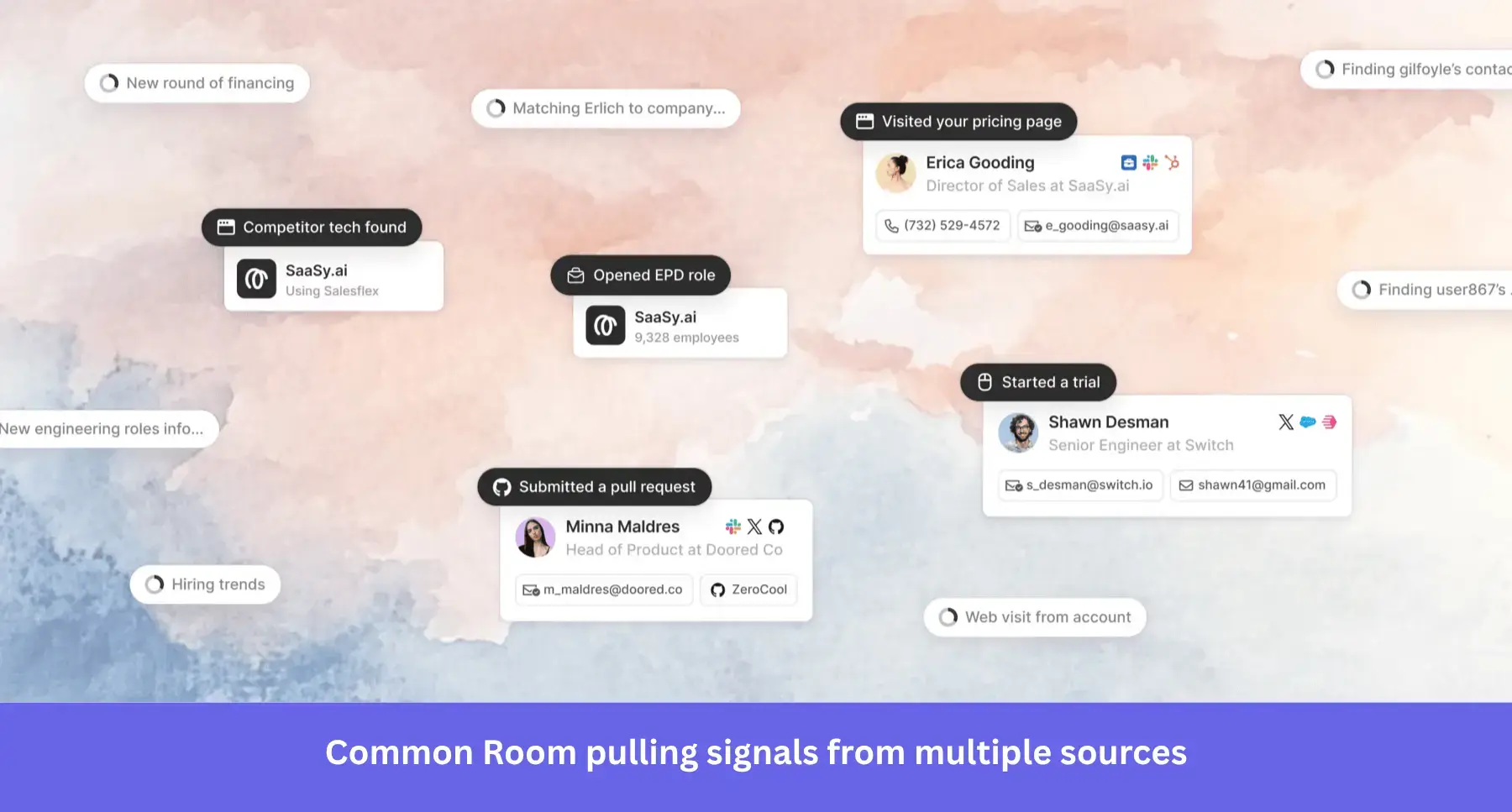
- Reach the right buyer: Person360™, part of Common Room’s predictive analytics engine, maps all known activity to a person-level profile. Then its agentic waterfall enrichment fills in details like verified emails, phones, titles, and work history.
- Run signal-based plays at the right moment: You can also stack signals to create segments such as “power users who just changed jobs”. So when a hot lead is added to a segment, your sales team gets notified and takes action accordingly.
Pricing
Common Room’s entry-level Essential plan starts at $2,500/month (billed annually). It includes five seats, up to 100,000 contacts, and 5,000 RoomieAI research credits. That’s more than enough horsepower to track down your highest-intent accounts.
What users say about Common Room
Most reviewers on G2 praise Common Room for its effective and time-saving lead generation capabilities. However, some find its complex navigation and analytics UI challenging.
If you’re looking for an alternative, 6sense is largely ideal for enterprises with more heavy-duty use cases.
For smaller or early-stage startups, Common Room’s pricing can be expensive. RB2B is a more affordable and user-friendly option. It has a generous free tier, with paid plans starting at $79/month.
2. Clay for researching and enriching accounts before you act
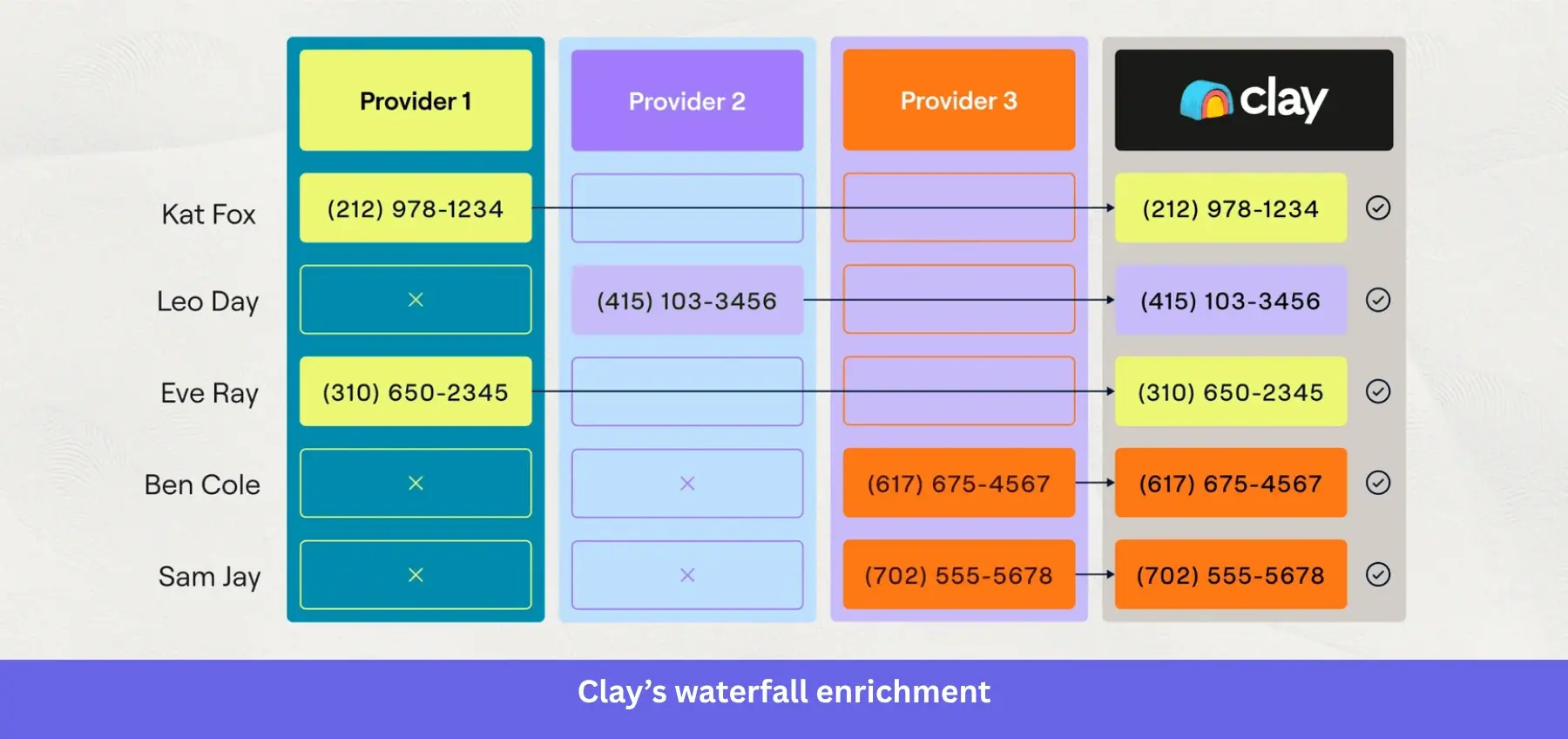
While Common Room has an enrichment layer, I prefer Clay. It vets accounts using real data from 150+ providers (such as Prospeo, Hunter, Apollo, and Lusha) with AI-powered web research.
This maximum data coverage builds a viable list of prospects your sales team can instantly connect with and turn into happy customers.
How Clay fits into your GTM workflow
- Build a more complete account profile: Waterfall enrichment lets you access providers in a single workflow, so you don’t have to pay for individual databases with low match rates. Its sequential method ensures you find work and even personal emails to qualify leads further.
- Uncover context databases don’t capture: Clay’s AI research agents take over where waterfall enrichment stops. They dig into company websites, LinkedIn, and other publicly available sources of unstructured data for deeper behavioral insights.
- Give sales context they can act on: Clay pushes enriched records downstream into outreach tools and CRMs like HubSpot. So instead of handing sales a basic profile, you pass along the research and signals they need for the next GTM step.
Pricing
Clay has a free plan, but paid plans start at $185/month for Launch. I’d recommend Growth at $495/month for this workflow. It comes with CRM auto-sync, HTTP API access, web intent, and advanced automation.
What users say about Clay
Clay’s flexibility is also its bane. G2-verified users find many of its tools and settings confusing. One user, Eiad A., says there’s a learning curve, especially for advanced stacks like multi-step enrichment waterfalls.
For alternatives, try Apollo if you want a more straightforward prospecting workflow. On the other hand, ZoomInfo is for you if you like Clay but want deeper B2B company and contact data.
3. Unify for converting GTM signals into repeatable outbound plays
Unify brings together first-party, third-party, and AI-discovered intent signals. Those signals trigger different automated plays, such as warm outbound and champion tracking.
While plays generate pipeline in the background, growth marketers or sales reps can focus on high-value tasks and only step in when a deal is actionable.
How Unify fits into your GTM workflow
- Turn buying signals into outbound actions: Build Plays triggered by website visits, LinkedIn engagements, job changes, or CRM updates. Each Play chains the appropriate actions together, like finding prospects, qualifying them with AI, enrolling them in an email sequence, and syncing the data to your CRM.
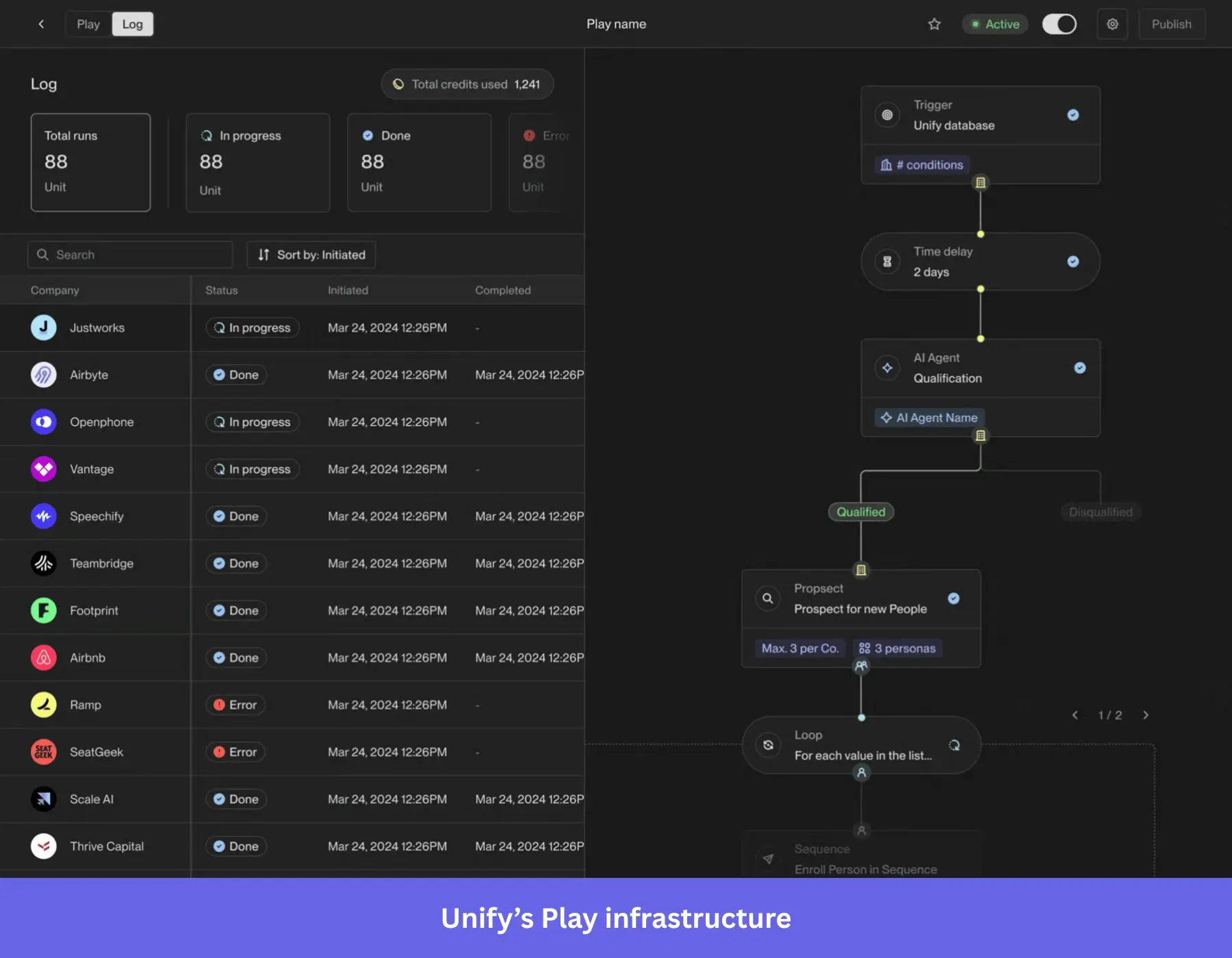
- Tailor outreach to the recipient’s context: Let AI build personalized content or tasks for your multichannel sequences (e.g., automatic emails or phone calls). This way, your outreach reflects what prompted accounts to enter your workflow.
- Keep signal-driven outreach connected to your CRM: Sync live data with HubSpot and Salesforce. This ensures all outbound activity flows back into the shared GTM data spine, protecting pipeline attribution and team alignment.
Pricing
Unify’s pricing ranges from free to $20/seat/month for Base and $60/seat/month for Pro. The Base plan is a good place to start because it includes AI copywriting and more advanced signals.
What users say about Unify
While users value its automation capabilities, Unify’s UI can also limit effective usage. Some G2 reviews mention occasional glitches and bugs that come with each update.
Not for you? Check out Outreach instead, which has a more established sales-engagement environment for managing sequences. But if you’d rather focus on turning signals from high-intent website visitors into outbound actions, Warmly is a better choice.
4. Gong for translating sales conversations into revenue intelligence
Gong captures and analyzes sales calls, emails, and meetings (in multiple languages), turning them into structured insights. It picks up where Unify leaves off by showing what happens after the outbound message.
Using the structured insights, your reps can spot risks, understand buyer intent, and continuously improve future sales plays.
How Gong’s AI suite fits into your GTM workflow
- Surface actionable insights from conversations: Gong’s AI Tracker detects objections or product feedback in calls. Then, the AI Data Extractor pulls specific information from conversations into structured fields (e.g., those found in your account pages or CRM dashboard).
- Spot at-risk open deals before they become lost opportunities: With AI Deal Monitor, you can track subtle changes in account behavior. This allows you to course-correct and save the deal before it’s too late.
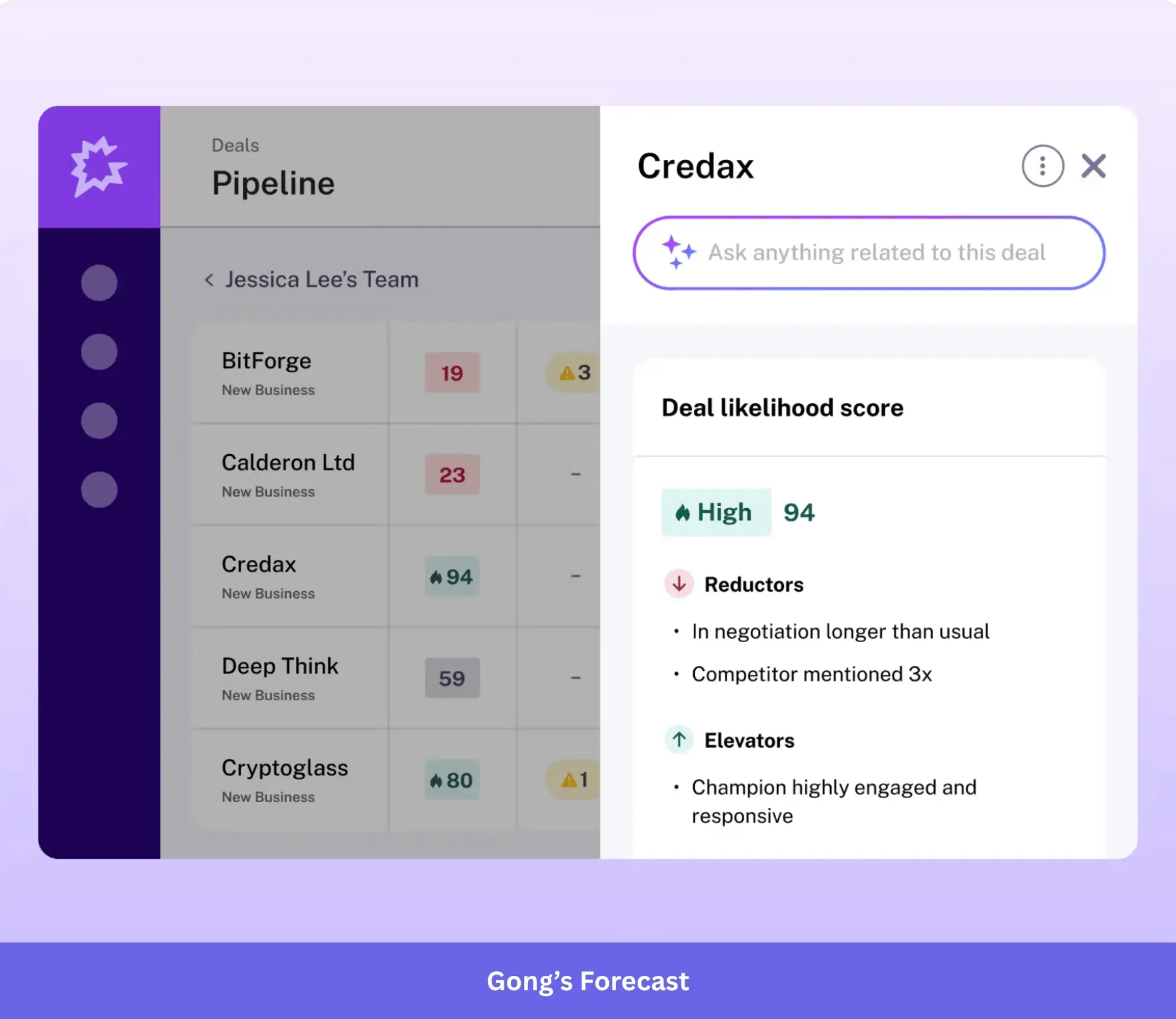
- Turn winning conversations into repeatable sales plays: Business admins can use AI Theme Spotter to see patterns like common sales objections and customer response to pricing changes. Say, after discovering how top reps overcome ROI objections, they can prompt the AI Builder to create a playbook with exact scripts and real call examples.
Pricing
Gong doesn’t list pricing publicly, so you’ll need to request a quote. But according to Vendr data from 1,136 purchases, the average contract value is $55,000/year.
What users say about Gong
Despite Gong’s popularity, it has recurring accuracy and processing issues. One G2 user says, “When you read back some of the conversations, the transcript is a little off.’’ Another adds that transcription lags up to an hour post-call.
What are your other options? Clari Copilot provides instant insights and live battle cards during calls. If you prefer an easier-to-use alternative to both, go for Chorus.
5. Mutiny for shaping deal context into personalized buyer content
Mutiny transforms account context into on-brand, customer-facing content. Its AI agent platform enables GTM teams to automatically generate these personalized assets based on who your buyer is, what they care about, and where they are in the buying journey.
This way, prospects see messaging that matches their needs and are more likely to convert.
How Mutiny fits into your GTM workflow
- Increase the volume of deal-ready content: Ask Mutiny’s AI agent to build deal rooms, pitch decks, pricing proposals, and 1:1 ABM pages that help close deals. All you need to do is feed it context from your CRM, Gong calls, or emails.
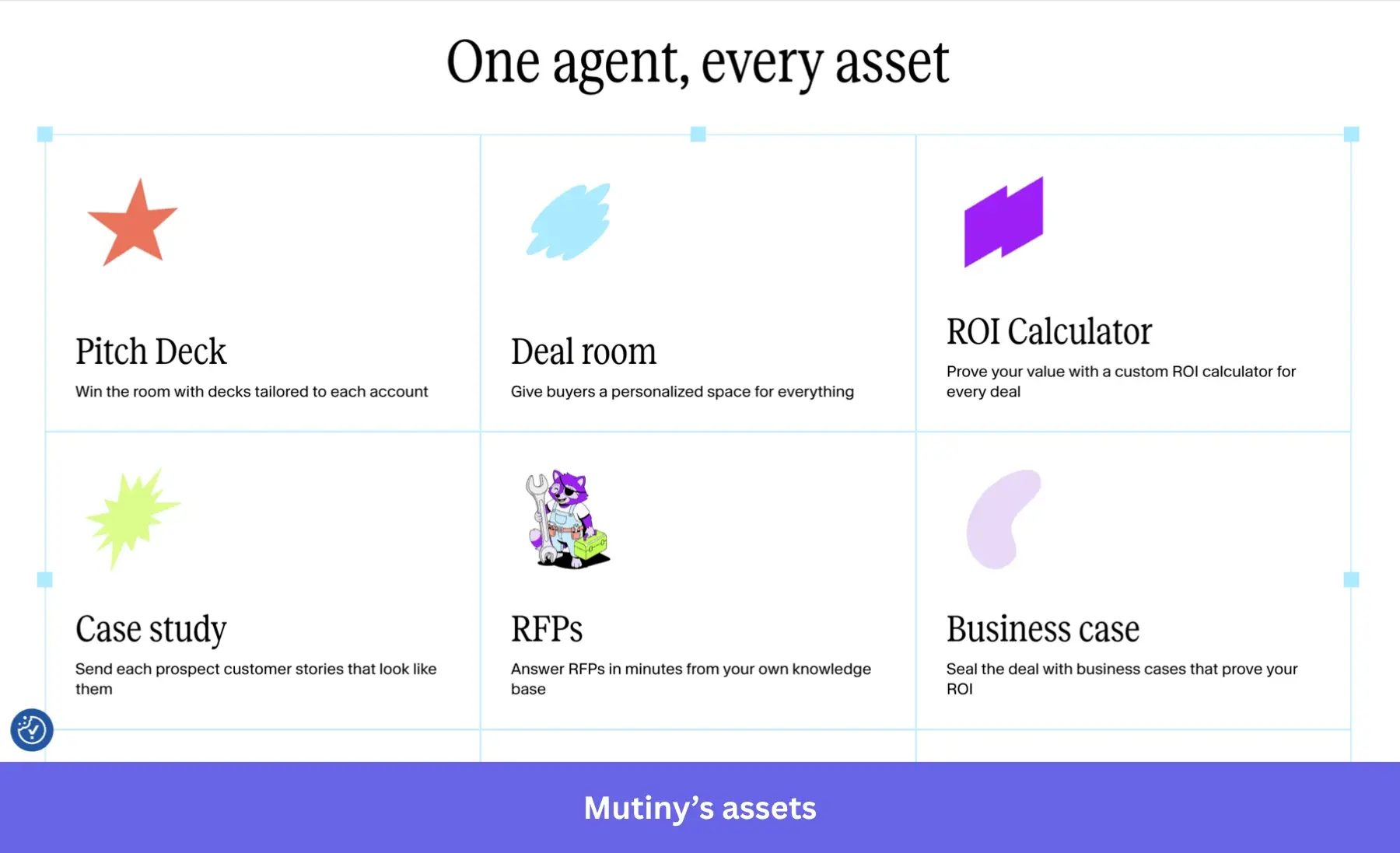
- Keep the momentum alive: Automate repetitive parts of your marketing and sales workflow, such as meeting preps and follow-ups. This helps you respond or ship out materials to the right prospects at the right time.
- Know which assets are making an impact: Dig into analytics to see whether target accounts are engaging with your content. Visit details and session replays let you visualize what’s resonating, so you can focus on what matters to buyers in the next call or email.
Pricing
Mutiny has a free plan, and its paid plans start at $50/month (50 credits, i.e., $1 per credit) for the Business plan. But for our use case (website personalization and ABM workflow), you’ll need the Enterprise tier (starting at $40,000/year).
What users say about Mutiny
While Mutiny has commendable natural language processing capabilities, the content can be better. A user shares via G2 that the output isn’t as sharp when generating long texts.
Besides, the pricing is on the high side, especially for enterprises.
A couple of alternatives: If you only need website experimentation and optimization rather than a broader ABM personalization workflow, use Intellimize.
Unbounce is a more affordable Mutiny alternative. Its landing-page plans start at $29/month, with A/B testing from $149/month and AI traffic optimization at $249/month.
6. Userpilot for turning product behavior into activation, adoption, and expansion
Once you’ve won a deal or convinced someone to sign up, the focus shifts to activation.
Userpilot connects your product usage, feedback, in-app guidance, and account data to show you what happens next. Accelerating time-to-value is just the start. Over time, your team can build retention and spot expansion opportunities based on real-world behavior.
How Userpilot fits into your GTM workflow
- Understand what’s happening in your product: Using plain-language prompts, you can ask Lia, Userpilot’s AI, to reveal key findings about your product. For example, you’ll get answers to questions like: which behaviors correlate with activation? Where do users drop off? Or which accounts show declining engagement?
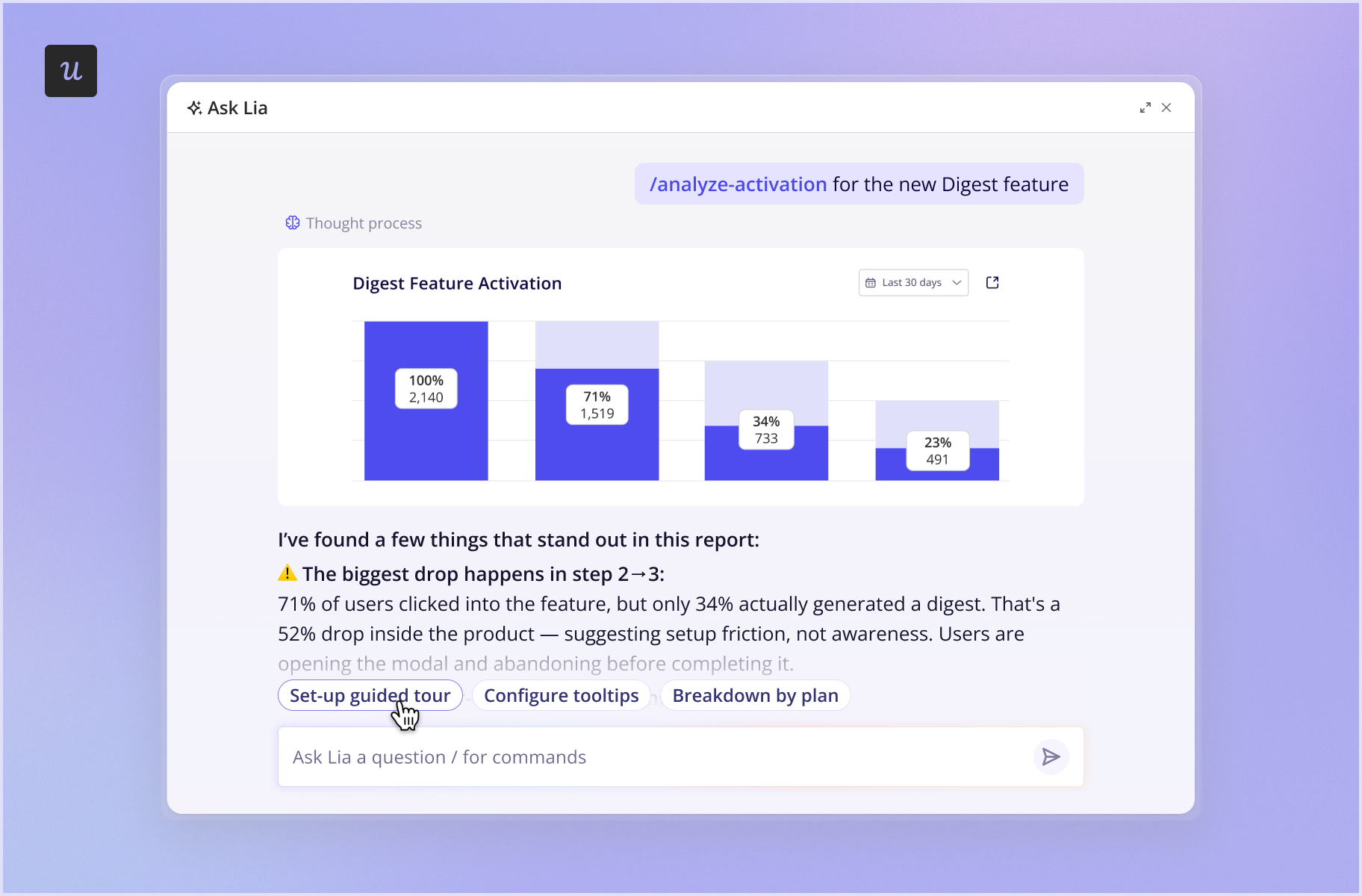
- Turn product insights into targeted actions: Lia can build segments, reports, and dashboards from insights. It can also immediately draft a short in-app survey asking users why they canceled, which you review and publish. This helps your team target a segment before they churn.
- Discover sales and expansion opportunities: Userpilot integrates with HubSpot and Salesforce, allowing you to send labeled events into your CRM. Besides enriching your records, our platform gives sales and customer support teams a unified view of user behavior for actions like account expansion or intervention.
- Bridge the gap between user behavior and revenue: Instead of waiting on data analysts, your marketing, sales, and support teams can mine customer insights for their retention or upsell campaigns. Yazan Sehwail, Userpilot’s CEO, explains how Userpilot’s MCP makes this happen:
Using session replay, NPS data, survey data, and product usage data, you’re able to get your answer (in AI tools such as ChatGPT, Claude, or Copilot) without having to go to Userpilot, without having to pull data and upload it to someone.
Pricing
Userpilot’s pricing starts at $299/month for Starter. But I’d recommend the Growth plan ($849/month) for this workflow. This adds connected product analytics, session replays, event autocapture, and 3-year data retention on top of segmentation and AI-led analysis.
What users say about Userpilot
Userpilot is our product, so this section sticks to what reviewers say on G2. Users praise how much they can customize with our no-code builder. Many also appreciate our ability to provide actionable insights through behavioral data analysis, enhancing product adoption.
The main criticism is that new users find our extensive features overwhelming at first.
Kontentino overcame this by identifying the issue first. Once they knew that they needed to replace their boring product tour with an interactive walkthrough, they easily fixed it within Userpilot. And this increased their activation by 10% within the first month of deployment.
How main alternatives compare: Appcues works if you mainly need quick-to-launch onboarding flows and already have an existing analytics tool to integrate with. They’ve recently rolled out analytics capabilities, but lack autocapture and built-in session replays.
Meanwhile, Pendo is an option for large organizations with a budget for a broader analytics suite. Third-party reports put median spend at roughly $49,000-$54,000 per year.
7. HockeyStack for mapping GTM activity into pipeline attribution
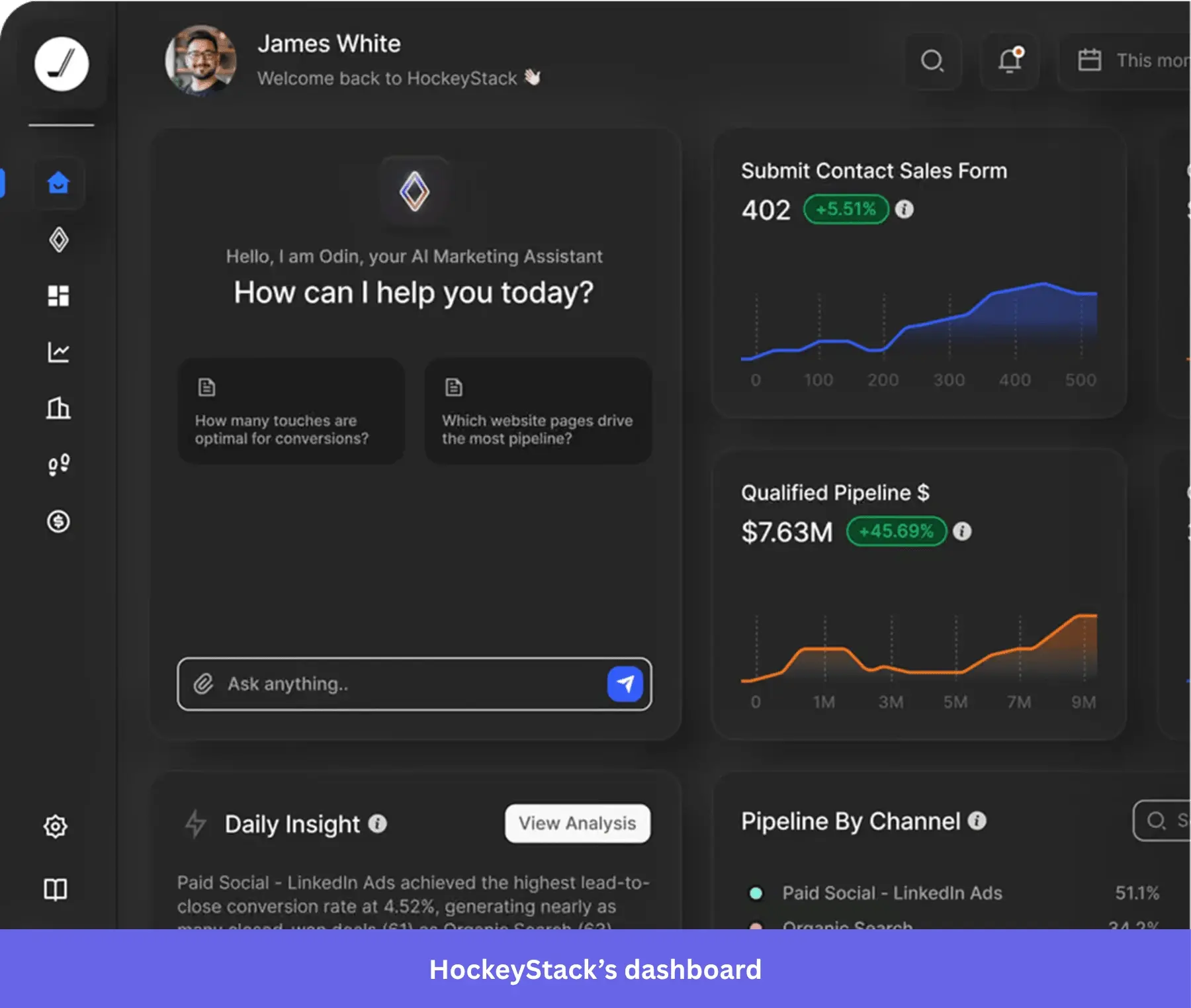
HockeyStack brings marketing and sales data together, giving you an overview of each account’s journey.
As the measurement layer, it also confirms if your signals, outbound plays, conversations, personalized content, and product activity actually contributed to revenue. This lets you see which GTM plays to scale or stop.
How HockeyStack fits into your GTM workflow
- Connect the GTM data scattered across your stack: With Atlas, the platform manages data from your GTM sources in one place. It can pull signals directly from Gong via native integration, while ingesting data from tools like Userpilot via webhooks and custom APIs. This means you can tie each touchpoint back to an opportunity.
- Compare how different GTM plays contribute to revenue: HockeyStack supports attribution models like custom lookback windows and custom weighting. Use these to compare the impact of different channels and plays on pipeline and revenue, rather than relying on a single attribution model.
- Turn attribution into GTM decisions: With AI-powered recommendations and account insights, your reps can move past reactive questions like “Which activities influenced revenue?”. Instead, they get a proactive roadmap showing exactly which accounts or plays to execute next.
Pricing
HockeyStack has no public listing for its plan tiers, so you have to request a quote. Vendr, however, puts its annual contract value at around $30,000/year based on 33 purchases.
What users say about HockeyStack
While excellent at connecting data to revenue, HockeyStack requires significant time to master. Collective reviews highlight challenging dashboard creation and confusing product design as friction points.
Two alternatives: Get Dreamdata if you want a dedicated B2B attribution platform with a more focused attribution workflow. Adobe Marketo Measure is for you if you seek flexible attribution. Its modeling supports first-touch, lead-creation, U-shaped, W-shaped, full-path, and custom models, plus AI/ML-based attribution recommendations.
Do you need all seven SaaS AI tools for building your GTM stack?
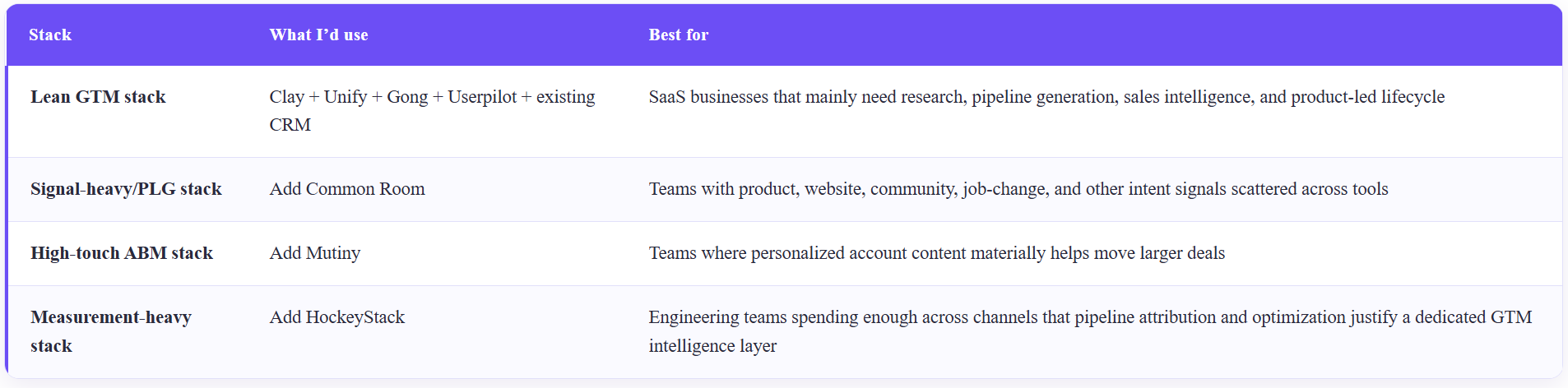
No. Start with four tools (five if you add your existing CRM) if you’re building your GTM workflow from scratch. They cover the core GTM loop spanning research and enrichment, outbound, sales intelligence, and product-led lifecycle.
My primary list: Clay, Unify, Gong, Userpilot, and your existing CRM.
You can add other layers after, depending on the complexity of your GTM motions. Use this table as a guide:
Go from product insight to action with Userpilot’s AI agent Lia!
A connected GTM stack removes the time-consuming handoffs humans get from fragmented tools. In an afternoon, AI capabilities can surface even the most sensitive customer data (with compliance baked in, of course). But more importantly, they turn that data into the next action.
This is where Userpilot’s AI agent, Lia, fits into the workflow. First, it investigates what’s happening in your product. Once it finds an activation or retention problem, it suggests next steps and drafts the in-app fix. (Building those fixes automatically is coming soon 🚀.)
So if your SaaS product behavior is still idle in dashboards while your GTM teams rely on separate data, put Userpilot and Lia to work on it.
Book a demo now to see how it works!
FAQ
Which SaaS AI tool or software is best for GTM?
No single tool covers the whole stack, so find one that matches your GTM bottleneck. For example, choose Clay for research and enrichment, Unify for signal-based outbound, Gong for conversation intelligence, and Userpilot for product adoption and expansion.
How do I choose the right AI-powered SaaS tools for my GTM stack?
Start with the biggest gap in your GTM funnel. Then check whether the tool syncs with your CRM, can run without engineering help, and meets your security requirements.
If your sales and product are disconnected, you can pair Gong with Userpilot so conversation insights and product behavior sit side by side.
How does product data contribute to a SaaS business' GTM?
Userpilot, for example, turns product behavior into signals for activation, expansion, retention, or sales. Those signals can trigger targeted lifecycle actions or flow into your CRM. AI agent Lia goes further by drafting the actions so you can build them directly in your product.
How much does a connected GTM stack cost?
Going by a lean core stack of Clay Growth, Unify, Gong, and Userpilot Growth, you’ll spend roughly $71,000/year. Actual costs depend on how many seats you buy for Unify and whether you sign annual contracts. Plus, it matters how far you can negotiate Gong’s quote-based pricing.
Do I need a CRM to connect SaaS GTM tools?
Yes. A CRM like HubSpot or Salesforce acts as the shared data layer for enriched records, outbound activity, product events, and business impact. Without a CRM, signals stay stuck in individual tools, and an attribution platform has nothing to attribute revenue against.
About the author