How to Write Good Survey Questions (And 80+ You Can Use Today)



Good survey questions are the foundation of any research project. Ask the wrong ones, and you collect data that confirms what you already think. Ask the right ones, and you get the kind of honest feedback and actionable insights that shape product development, improve customer journeys, and reduce churn.
This article covers everything you need: what makes a good survey question, the core principles behind effective surveys, and common mistakes to avoid. And a library of 80+ survey question examples organized by category, including NPS, CSAT, CES, and employee engagement, so you can start collecting valuable feedback today.
What makes a survey question good vs. bad?
When users see a survey pop up on their screen, they make two quick judgments: whether it looks fast, and whether they understand what you want from them. Questions that confuse respondents or feel heavy send them straight to the exit.
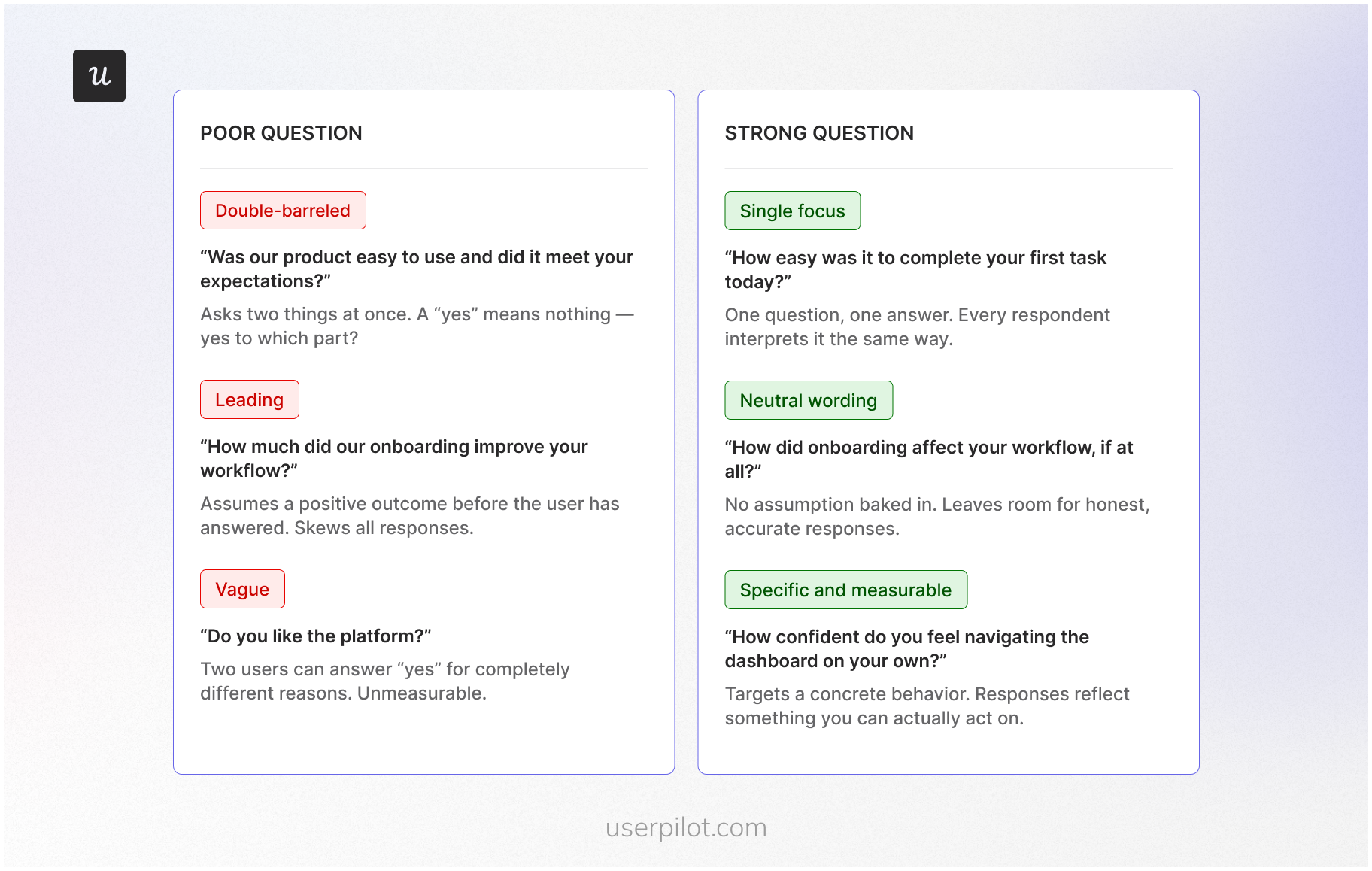
When crafting survey questions, the goal is to clear both hurdles before respondents finish reading the first line.
- Single focus: One question, one topic. Double-barreled questions (“How satisfied are you with our onboarding and documentation?”) force respondents to average two separate judgments into one answer. If you spot “and” or “or” connecting two different ideas in one stem, split them into separate questions.
- Neutral, unbiased wording: Leading questions, loaded phrasing, and biased questions tell respondents what a “reasonable” answer looks like before they’ve formed one. Remove persuasive context, one-sided framing, and loaded adjectives. A simple test: can the respondent comfortably choose any option without feeling judged?
- Clear and specific language: Vague terms produce vague answers. Replace quantifiers like “regularly” or “recently” with concrete timeframes. Ask a colleague to paraphrase your question. If their version differs from yours, rewrite it.
- Appropriate question type for your goal: Using the wrong format gives you answers that look structured but don’t address what you actually asked. Open-ended questions surface discovery; closed-ended questions produce data you can measure and trend; rating scale questions capture the intensity of sentiment.
- No assumptions about the respondent: Some questions quietly assume a behavior or knowledge level. “How many days did you work last week?” assumes the respondent worked at all. Add a gateway question and use skip logic to route respondents appropriately.
- Actionable answer options: Every answer option should map to a decision or next step. Avoid giving respondents the same response options across questions where the scale doesn’t fit. Rating scales should cover the full range, avoid overlap, and use consistent endpoints.
- Brevity: Longer question text increases cognitive load. Respondents rush through or abandon surveys when questions feel heavy. Use the fewest words that preserve the meaning.
What mistakes to avoid when writing survey questions?
Before you write a single question, know which mistakes distort data the most. These mistakes often come up across every survey type.
- Leading questions: If your wording signals a preferred answer, “How much did you enjoy the new onboarding?” you’re pushing respondents toward agreement before they’ve formed an opinion. Neutralize the phrasing before sending surveys to your list.
- Double negatives: If you write “Don’t you disagree with…” you’re confusing respondents and making your data unreliable. Rewrite as a direct, positive statement.
- Jargon and undefined acronyms: When you use technical terms without context, you create interpretation gaps. Use plain language or define the term inside the question itself.
- Assuming a behavior: If you ask, “How many times did you use the feature this week?” you’re assuming they used it at all. Add a gateway question first and use skip logic to route respondents appropriately.
- Unrealistic recall periods: If you ask respondents to remember something from six months ago, you’re collecting guesses. Shorten the window or anchor it to a specific date.
- Unbalanced scales: If you give more positive options than negative ones, you’re skewing responses before anyone reads the question. This is especially common in agree-disagree scales. Use balanced alternatives with a clear midpoint.
- Response option problems cover two failure modes: Non-exhaustive or overlapping choices force respondents to pick something inaccurate; make options mutually exclusive and exhaustive. Check-all-that-apply lists cause respondents to stop evaluating after the first few options; forced-choice formats produce more accurate endorsements.
- Ignoring question order: Earlier questions create context that shapes how respondents answer later ones. Place general questions before specific ones on the same topic.
- Survey length: The longer your survey runs, the harder it is to keep respondents engaged through to the final question. Drop-off is highest on mobile devices, where the threshold for quitting is lower.
What are the different types of survey questions?
Each type of survey question produces a different kind of data. The format you choose shapes the answers you get before a single respondent reads the question.
Unfortunately the interactive widget isn’t directly copyable as a table. Here it is as a markdown table you can copy:
| Question type | Data type | Best for | Pro | Con | SaaS example |
|---|---|---|---|---|---|
| Open-ended | Qualitative | Discovery, voice-of-customer language | Surfaces unexpected issues and real user language | Requires coding; higher response burden | “What almost stopped you from completing setup?” |
| Closed-ended | Quantitative | Classification, segmentation | Easy to analyze; comparable across respondents | Can be biased if answer options are incomplete | “What is your primary role? (Admin / IC / Manager)” |
| Multiple choice | Quantitative | Understanding preferences and priorities | Quick to complete; produces clean categorical data | Limits respondents to predefined answers only | “Which feature do you use most?” |
| Multiple answer | Quantitative | Capturing overlapping behaviors | Reflects multiple realities in one question | Respondents stop evaluating early; can under-capture | “Which integrations do you currently use?” |
| Rating scale | Mixed | Measuring intensity or satisfaction | Easy to benchmark over time; supports CSAT and NPS | Scale design affects interpretation | “Rate your onboarding experience: 1–10” |
| Likert scale | Mixed | Attitudes and opinions on specific topics | Familiar format; fast to complete | Acquiescence bias risk; depends on statement quality | “I can complete my core task without help.” |
| Yes / No | Quantitative | Gate questions, eligibility, routing | Simple; enables skip logic and segmentation | No nuance or intensity captured | “Did you contact support in the last 30 days?” |
How to write good survey questions?
Most teams treat question writing as the last step. It should be the first thing you think about carefully, because by the time a respondent sees your question, they are already doing cognitive work you cannot see.
Every respondent moves through the same four stages: they read the question and try to understand it, search their memory for relevant information, form a judgment, and then translate that judgment into one of your answer options.
A question that creates friction at any stage produces distorted data. The distortion is invisible in your results. You just get numbers that look clean and mean something slightly different from what you intended.
Most of that friction comes from three places.
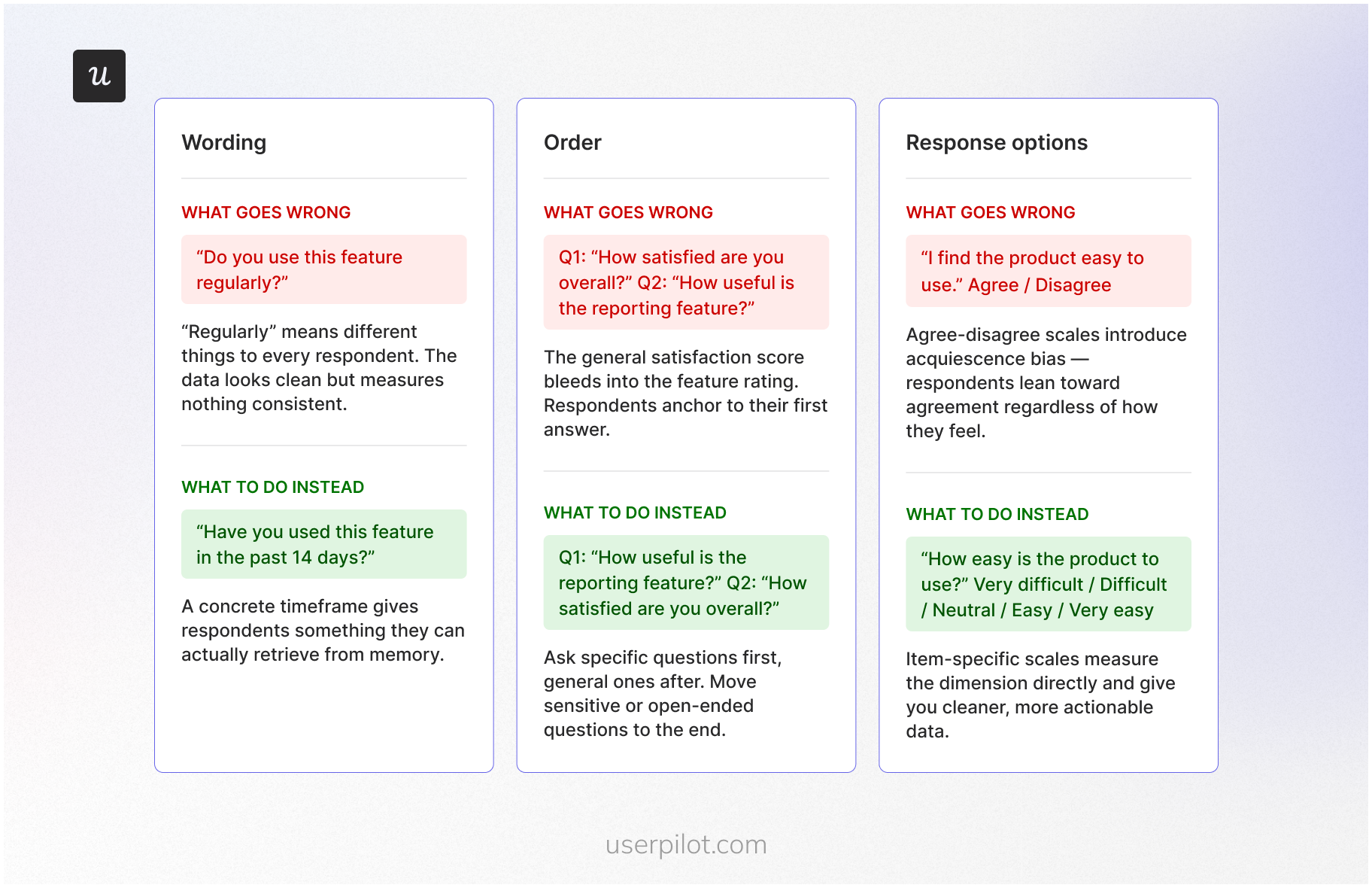
Wording
The fastest way to lose a respondent at the comprehension stage is vague language. Words like “often”, “regularly”, and “recently” feel specific when you write them. To your respondents, they mean whatever fits their own frame of reference. One person’s “recently” is yesterday. Another’s is three months ago.
When you replace vague quantifiers with concrete timeframes, “in the past 14 days” instead of “recently”, you give respondents something they can actually retrieve from memory rather than estimate.
Order
Even well-worded questions fail when they appear in the wrong sequence. Respondents do not answer each question in isolation. They answer it in the context of everything they have already read. A general satisfaction question placed before a specific feature question pulls the feature rating toward the overall score.
Place general questions before specific ones on the same topic, and move sensitive or open-ended questions toward the end, after the respondent is already comfortable and engaged.
Response options
By the time a respondent reaches the response mapping stage, your answer options determine what they can actually tell you. Agree-disagree formats introduce acquiescence bias, where respondents lean toward agreement regardless of how they actually feel.
Item-specific scales, “Very dissatisfied” through “Very satisfied”, measure the underlying dimension directly and give you cleaner data. Whatever scale you use, make sure the options cover the full range without overlap and run in a consistent direction across every question in the survey.
How many questions should a survey have?
Most product managers land on a number by feel. Ten sounds reasonable. Five feels too short. Twenty feels like too much. None of that intuition accounts for what actually determines whether respondents finish your survey and give you usable answers.
Length isn’t really about item count. It’s about burden: how long it takes, how hard the questions are to answer, and whether you’re asking the same thing twice in different words. A 5-question survey built around a complex recall task can exhaust respondents faster than a 15-question pulse check.
The data backs this up. SurveyMonkey puts a 10-question survey at around 5 minutes end-to-end and recommends staying under 10 minutes to keep respondents engaged through to the final question.
Use this as your baseline when sending surveys:
- Micro-surveys (in-app, intercepts): 1-3 questions. Your respondent is mid-task. One objective, nothing more.
- Post-interaction surveys (after support or feature use): 3-7 questions. Lead with one metric question (CSAT or CES), add one or two diagnostics, and close with an optional open-ended.
- Relationship surveys (quarterly customer pulse): 8-15 questions. Keep completion under 10 minutes for maximum engagement.
- Long-form research (pricing, concept testing): You can go longer, but only if you give respondents a reason to finish. Without a clear incentive, the answers you get in the final block are the least reliable ones in your dataset.
80+ Good survey questions to ask users (categorized)
Now, let’s go over good question examples you can adopt for your next survey. I’ll cover demographic, market research, and customer satisfaction survey questions, among others.
Market research survey questions
Market research questions help you learn more about your customer base. The goal of this survey is to help you sell more to both existing and potential customers by better understanding their needs and decision drivers.
Here are some key questions you can ask:
Pricing value perception questions
Pricing research often involves complex sensitivity analysis to determine your market rate (which we cover in our market research survey guide). However, for your day-to-day product feedback, you should focus on how users perceive the value they receive relative to what they pay.
Understanding value perception helps you identify if a specific segment feels overcharged or if there is an opportunity for a targeted upgrade.
Key questions to ask existing users:
- How well do you understand our current pricing model? (rating scale)
- How would you rate the product’s value for money based on the features you use? (rating scale)
- Does our current [Plan Name] meet all your team’s requirements? (Yes/No)
- How satisfied are you with the value provided by your current subscription? (rating scale)
- If we introduced a higher tier with [Feature X], how likely would you be to consider an upgrade? (multiple choice)
Demographic survey questions
- What is your age group? (multiple choice)
- What is your current employment status? (multiple choice)
- Which industry do you work in? (multiple choice)
- What is your highest level of education? (multiple choice)
- Where are you located? (open-ended)
Product development survey questions
Product development questions help you gauge customer interest in new features and improvements.
Here are some ideas:
- How likely are you to use [Feature X] if we added it? (rating scale)
- What’s the most frustrating part of using our product? (open-ended)
- What feature do you wish we offered but currently do not? (open-ended)
- How satisfied are you with the current features? (rating scale)
- How would you improve [Feature Y]? (open-ended)
User persona and jobs-to-be-done (JTBD) questions
While buyer persona questions focus on the purchasing process (and are covered in our market research guide), user persona questions help you understand your current users’ needs and how they interact with your product.
You can ask these questions in your welcome survey to learn about your new users’ background, their specific “job-to-be-done,” and how they plan to achieve success within your app.
User persona survey questions:
- What is your current employment status or role?
- What will you be using the product mainly for?
- Which ‘job’ are you primarily ‘hiring’ our product to do for you?
- What do you want to achieve with our app in your first week?
- Will you be using this product alone or as part of a team?
- Have you used a similar product before, or is this your first time?
- Are you moving from another tool? If so, which one?
User journey experience survey questions
User journey experience questions help you understand how users feel at various touchpoints in their relationship with your product.
Whether they are new users or long-term paying customers, these surveys provide insights that can improve onboarding, engagement, and overall user satisfaction.
These questions include:
New or trial experience survey questions
For new or trial users, these questions focus on the first impression of your product and how well the onboarding process works:
- How easy was it to get started with our product? (rating scale)
- Did you encounter any issues during onboarding? (Yes/No)
- What feature did you use first, and why? (open-ended)
- Do you feel the product can help you achieve your goals? (Yes/No)
- For which use cases are you using the product? (multiple-choice)
Paying customer experience questions
Paying customers may have different needs than trial users, and these questions can help you identify areas to improve their product experience.
- How satisfied are you with the product’s performance? (rating scale)
- How easy is it to use the product on a daily basis? (rating scale)
- How would you rate the overall value for money? (rating scale)
- What additional features would make the product even better? (open-ended)
- What feature is the most valuable to you? (multiple-choice)
Cancellation and churn survey questions
Understanding why customers leave is crucial for improving retention. These questions target users who have canceled their subscriptions or are at risk of churn.
- What is the main reason you decided to cancel? (open-ended)
- Did you encounter any issues that led to your decision? (Yes/No)
- Is there anything we could have done to retain your business? (open-ended)
- Would you consider using our product again in the future? (Yes/No)
- For what reasons did you decide to cancel? (multiple-choice)
Overall user satisfaction questions
These general questions help gauge user satisfaction across different stages of the user journey.
- How satisfied are you with your overall experience? (rating scale)
- Would you recommend our product to a colleague or friend? (Yes/No)
- How likely are you to renew your subscription? (rating scale)
- What do you like most about our product? (open-ended)
- How satisfied are you with the X feature? (rating scale)
Product experience survey questions
The questions below surface where your product earns trust and where it loses it, grounding development and retention decisions in what users actually experience.
Overall product satisfaction questions
These questions measure how satisfied users are with your product as a whole, allowing you to understand the general sentiment among your customers.
- How would you rate your overall satisfaction with the product? (rating scale)
- How likely are you to recommend this product to others? (rating scale)
- What is the one feature you find most valuable? (open-ended)
- How does our product compare to other tools you’ve used? (open-ended)
- How would you feel if you had to stop using our product?
- How satisfied are you with the performance/stability of our product? (scale)
New feature release survey questions
Whenever you release a new feature, it’s essential to gather honest feedback to assess its reception and usability.
This can include:
- How was your experience with [new feature]? (open-ended)
- How easy was it to use the new feature? (rating scale)
- Did the new feature meet your expectations? (Yes/No)
- How important is this feature for your overall experience? (rating scale)
- What would you improve in the new feature? (open-ended)
- What issues have you encountered in the new feature? (open-ended)
Regular product interaction questions
These questions focus on the specific experiences users have while interacting with your product regularly.
- How easy is it to use our product for daily tasks? (rating scale)
- Are there any features you find difficult to use? (Yes/No)
- Is there anything about the product that frustrates you? (open-ended)
- How would you describe your overall experience with our product? (open-ended)
- How does this design make you feel? (multiple choice + text field)
- How easy was it to complete task x? (scale)
Issue reporting survey questions
When issues arise, understanding the nature of the problem and how it affects the user experience is key to improving your product.
- Have you experienced any bugs or technical issues? (Yes/No)
- What issue caused the most frustration? (open-ended)
- How satisfied are you with the resolution process? (rating scale)
- Is there anything we could do to improve issue resolution? (open-ended)
- We are looking to solve [problem x]. How would solving this problem with our product be helpful to you? (open-ended)
Customer service experience questions
Customer service survey questions help you determine how satisfied customers are with your support. This survey should follow right after a customer interacts with a customer representative/support channel.
Some of these questions include:
Support quality survey questions
These questions evaluate how well your support team meets customer needs and resolves their issues.
- Was the support representative able to resolve your issue? (Yes/No)
- How satisfied are you with the support you received? (rating scale)
- How quickly was your issue resolved? (rating scale)
- Did the support team provide helpful information? (Yes/No)
- How can we improve your support experience? (open-ended)
- Were your expectations met during the support interaction? (Yes/No)
Service experience survey questions
Service experience questions focus on the overall interaction customers have with your service team.
- How would you rate your recent customer service experience? (rating scale)
- Was our team friendly and professional? (Yes/No)
- Did you have to reach out multiple times to resolve your issue? (Yes/No)
- How satisfied are you with the communication during your support request? (rating scale)
- Which channel did you use to reach our support team? (multiple-choice)
- How likely are you to contact support again if needed? (rating scale)
Customer service team improvement questions
These questions help identify areas where your support team can enhance its performance and provide better service.
- Was the support representative able to resolve the issue? (Yes/No)
- Are you satisfied with the help our support team provided? (rating scale)
- Please rate your recent customer support interaction. (scale)
- What could our support team have done better to assist you? (open-ended)
- How can we make the support process more efficient? (open-ended)
NPS survey questions
NPS surveys measure loyalty and likelihood to recommend. Run them after a user has had enough time to form a real opinion about your product, not on day one.
- On a scale of 0–10, how likely are you to recommend [Product] to a friend or colleague?
- What is the primary reason for your score? (open-ended)
- What is the one improvement that would most increase your score? (open-ended)
- Which part of your experience influenced your score most? (Product / Support / Pricing / Reliability / Other)
- In the past 30 days, did you recommend [Product] to anyone? (Yes/No)
- What would a “10 out of 10” experience look like for you? (open-ended)
- What, if anything, almost made you give a lower score? (open-ended)
CSAT survey questions
CSAT measures satisfaction with a specific interaction or touchpoint. Trigger these immediately after the experience while it is still fresh.
- How satisfied were you with your experience today? (1–5)
- How satisfied were you with [onboarding / feature / support interaction]? (1–5)
- How well did the experience meet your expectations? (Much worse than expected / Much better than expected)
- What, if anything, prevented you from rating this higher? (open-ended)
- How satisfied are you with the speed of [Task/Feature]? (1–5)
- How satisfied are you with the clarity of the instructions provided? (1–5)
- What is one thing we could do to improve this experience? (open-ended)
CES survey questions
CES measures how much effort a user had to put in to complete a task or get an issue resolved. Low effort correlates strongly with retention.
- How easy was it to complete [Task] today? (1–7)
- How easy was it to find the information you needed? (1–7)
- How easy was it to resolve your issue? (1–7)
- What part of the process required the most effort? (open-ended)
- What, if anything, caused extra steps or repetition? (open-ended)
- How many attempts did it take to complete the task? (1 / 2 / 3 or more)
- What would have made this process easier? (open-ended)
Employee engagement survey questions
Employee engagement surveys measure how connected, motivated, and satisfied your team members are with their work and workplace. These work best as quarterly pulse surveys, kept short.
- How satisfied are you with your current role? (rating scale)
- Do you feel your work is valued by your team? (Yes/No)
- How likely are you to recommend this company as a place to work? (0–10)
- What is the biggest barrier to doing your best work right now? (open-ended)
- How well does leadership communicate company goals and direction? (rating scale)
- Do you have the tools and resources you need to do your job effectively? (Yes/No)
- What is one thing the company could do to improve your experience at work? (open-ended)
- How supported do you feel in your professional development? (rating scale)
- In the past 30 days, have you felt motivated to go above and beyond in your role? (Yes/No)
- How would you describe the overall culture of the team? (open-ended)
Good questions need the right moment
Writing better survey questions gets you better data. But the other half of the equation is where and when those questions appear. A well-written question buried in an email three days after the moment it’s relevant will still underperform.
Userpilot lets you trigger in-app surveys after a user completes onboarding, hits a feature for the first time, or runs into friction mid-task. You get the question in front of the right person, in the right context, without asking them to leave the product to respond. Book a demo to see how Userpilot triggers in-app surveys at the right moment, without pulling users out of the product.
FAQ
What is a good survey question?
A good survey question is a clear, single-focus prompt that survey respondents can interpret consistently and provide accurate answers to. If two people read the same question and understand it differently, the data you collect is measuring two different things at once.
Survey methodologists call this measurement error: the gap between what you intend to measure and what the survey actually records. Userpilot lets you build and trigger these surveys inside your product. Responses come from users in the moment, not days later when the memory has faded.
What are leading or double-barreled questions?
A leading question nudges respondents toward a particular answer through loaded or biased wording. A double-barreled question asks about two things at once. Both corrupt your survey responses before anyone has finished reading. The fix for double-barreled questions is always the same: split them into separate questions.
How do you avoid survey bias?
Use neutral wording, balanced response options, and avoid sensitive questions that put social pressure on respondents. Question order matters too. Earlier questions in a survey questionnaire create a context that shapes how people read later ones. Research suggests running a small pilot before sending at scale catches most bias issues early. Cognitive interviewing, where you ask a small group to explain how they interpreted each question, is the most reliable part of that iterative process.
When should I use open vs. closed-ended questions?
Closed-ended questions produce quantitative data that is easy to analyze and compare across your target audience. Open-ended questions capture the “why” behind the numbers and surface detailed insights you wouldn’t think to ask about directly. Most surveys benefit from combining both: a closed-ended question for the signal, an optional open-ended follow-up for the context. The additional comments field at the end of a survey often captures the most honest customer sentiment of all.
How long should a survey be?
Long enough to get actionable data, short enough that respondents finish it. Research consistently shows that completion drops significantly beyond 12 minutes, and 9 minutes on mobile. Keep the survey questionnaire focused on one goal, cut any questions where the answer won’t change a decision, and you’ll rarely need more than 10 questions for most use cases.
About the author