What Is User Testing in 2026? A Post-AI Outlook for PLG Teams


In 2026, user testing (and by extension, the whole post-AI user research landscape) has a problem with synthetic research. Some companies are selling “user research without users,” and everyone is wondering if real users still matter.
In fact, according to Maze’s 2025 Future of UX Research report, roughly half of researchers expect synthetic users to be one of the biggest UX trends of 2026.
The appeal of synthetic users makes perfect sense. It may seem like a solution to obstacles that teams have been facing with user testing, such as slow/expensive recruitment, non-actionable research insights that lead to no meaningful decisions, and a hidden ROI. But in reality, synthetic users just give teams a cheaper way to ignore their problems.
So instead of writing another generic “what is user testing” guide, I’m going to:
- Define what user testing actually means in 2026.
- Explain the most relevant types of user testing.
- Share a practical user testing process that leads to meaningful decisions.

What is user testing actually in 2026?
User testing is the practice of making participant users perform specific tasks within a product, with a “researcher” observing behaviors and listening to feedback. The goal is to collect the evidence that user behavior analysis runs on: what they clicked, what they skipped, where they got stuck, and what they said in their own words.
Note: Although user testing and usability testing are often used interchangeably, they’re not always the same — the same confusion applies to usability vs user experience. Usability testing is a subset of user testing that focuses on how easy it is to navigate an interface to complete a task. In this article, I’ll refer to user testing as any test that involves invited participants, a product, and a moderator/researcher.
How do synthetic users fit into user testing?
A synthetic user is an AI-generated user profile. You specify a target audience and a research goal, and an LLM spins up a fake persona that produces a “transcript” of what that persona would supposedly say. Synthetic Users, the most visible vendor in the space, advertises the product on its homepage as “User research. Without the users.”
That tagline is the heart of the 2026 debate. Hugo Alves, the company’s cofounder, has publicly said the product is not designed to replace real research, but doing it may seem tempting for teams strapped for resources.
Maria Rosala and Kate Moran of Nielsen Norman Group put the technology through three studies they had already run with real participants. The conclusion was direct:
“Synthetic user responses for many research activities are too shallow to be useful. Real people care about some things more than others. Synthetic users seem to care about everything. This is not helpful for feature prioritization or persona creation.”
The January 2026 issue of ACM Interactions went further, framing synthetic personas as a category mistake: “AI-generated research undermines UX research.” The author’s argument is that a synthetic persona is a generalization drawn from other generalizations. Each layer dilutes the signal until nothing distinctive is left.
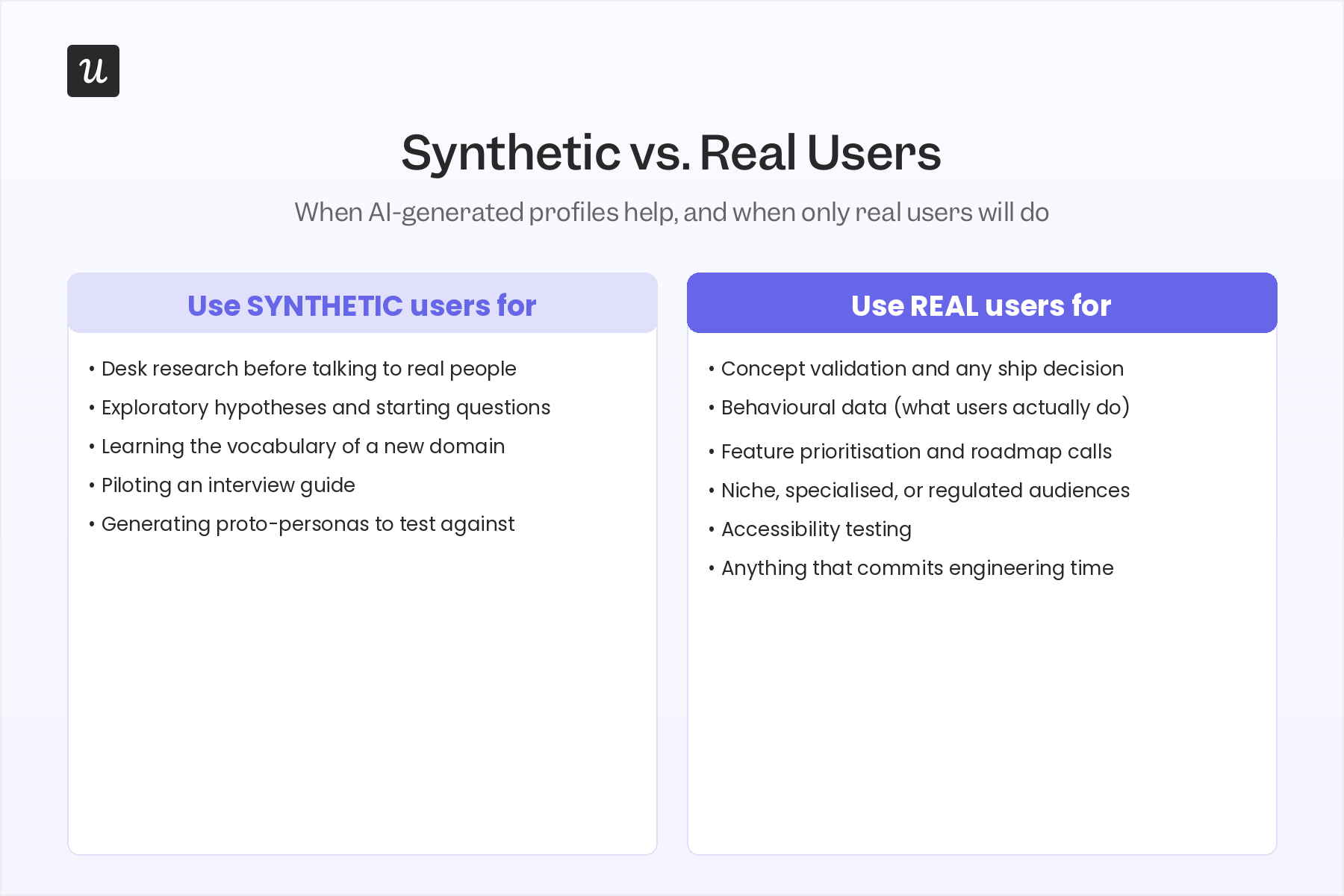
None of this means AI has no role in user testing. You might use synthetic users for desk research, generating a starting list of topics for an exploratory study, or learning the basic vocabulary of an unfamiliar industry before you build real user persona examples. NN/G’s recommends “treating the data as hypotheses that need testing.”
Types of user testing that actually help your product
Another reason why I doubt synthetic users will drive most user tests is that there are many different types of user testing, and not all of them can be replicated by machines.
Can we do eye-tracking on robots? Measure rage clicks or mouse hovers on a UI element? When you dive into how researchers perform user tests, the idea of testing with synthetic users becomes even more baffling.
These are the types of user testing where synthetic users have no business participating:
Usability testing
In usability tests, you ask participants to complete a specific task with your product and observe what elements are confusing.
This test is best to minimize friction in your navigation UX and make sure users can complete their JTBDs with ease. These tests can be moderated or unmoderated, employing multiple methods such as:
- 5-Second tests: The user is shown an image of a design for a brief period (about 5 seconds), after which they’re asked what they recall about the design.
- Card sorting: It asks the user to sort labeled cards (e.g., features like edit invoices, analytics, etc) into categories to determine the most intuitive structure for a page.
- Tree testing: Users are given a task and a hierarchical menu structure (no UI, just the tree). Then, they must select how they’d navigate through the tree to complete the task.
- First-click tests: The user sees a screen and is asked where they’d first click to complete a task.
- Cognitive walkthrough. A method where a researcher (or sometimes a user) walks through a task step by step, showing every assumption the design is making about what the user knows.
Accessibility testing
Tests if users with assistive technologies, low vision, motor, or cognitive differences can complete the same tasks. It’s best to do it before any major release, regulatory review, or new core flow.
It’s usually moderated with assistive-tech users. It involves automated audits paired with human review, screen-reader walkthroughs, and contrast-and-keyboard-only testing.
Concept testing
A concept test validates whether an early-stage idea can actually solve a user’s problem, which is the core product discovery question. It’s best when you have an idea but no high-fidelity design yet, and you want to know if the idea solves a real problem.
It might require moderation and often involves sketch reviews, wireframe walkthroughs, direct interviews, or preference tests across early concepts.
Formative or comparative testing
Compares the performance of two or three designs (they could be all yours or from a competitor). It’s best when you want to test one or multiple prototypes and need a defensible reason to pick one.
They can be moderated or unmoderated, and it often involves preference tests (where users choose their favorite design), eye-tracking, and A/B tests run with multivariate testing tools.
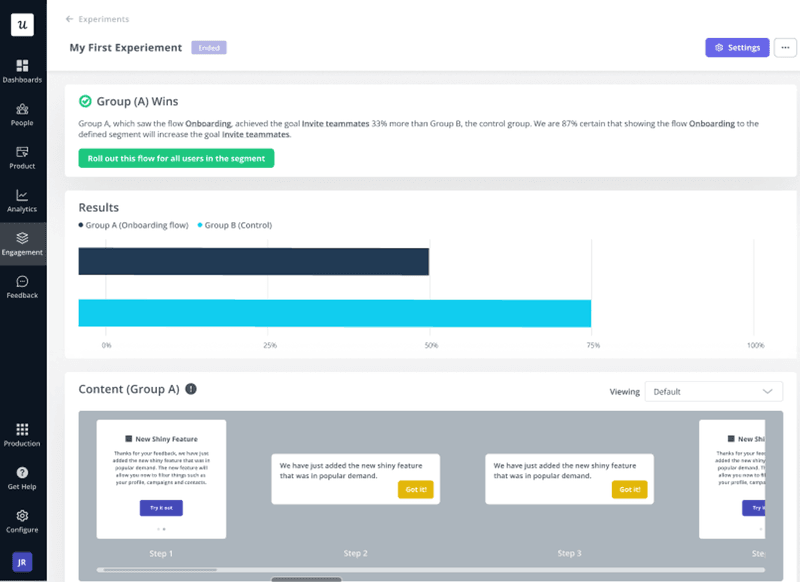
💡 Pro tip: Userpilot lets you A/B test different UX patterns (i.e., tooltips, modals, onboarding sequences, etc) to see which one leads to more activations, conversions, or adoption.
Beta testing
Tests how near-finished products hold up in real-world conditions before launch. It’s best when the product is feature-complete, and you only need a real-world test before making it public.
Although they’re more impersonal (usually unmoderated), they must involve real customers. You can analyze the results via session recordings, post-launch surveys (NPS, CSAT, CES), bug reports, etc.
How to run meaningful user testing without synthetic data
The reason synthetic users are appealing for user research is that they seem like a solution to the common obstacles:
- Lack of clear action after a user test.
- The time of recruiting participants.
- High costs of quality user research.
- No obvious ROI.
Many teams abstain from conducting real testing because of these reasons. And while synthetic users are cheap and fast, they’re no replacement for real participants.
So to make it easier, I’m going to share a user testing process that’s actionable and can be adjusted to your budget:
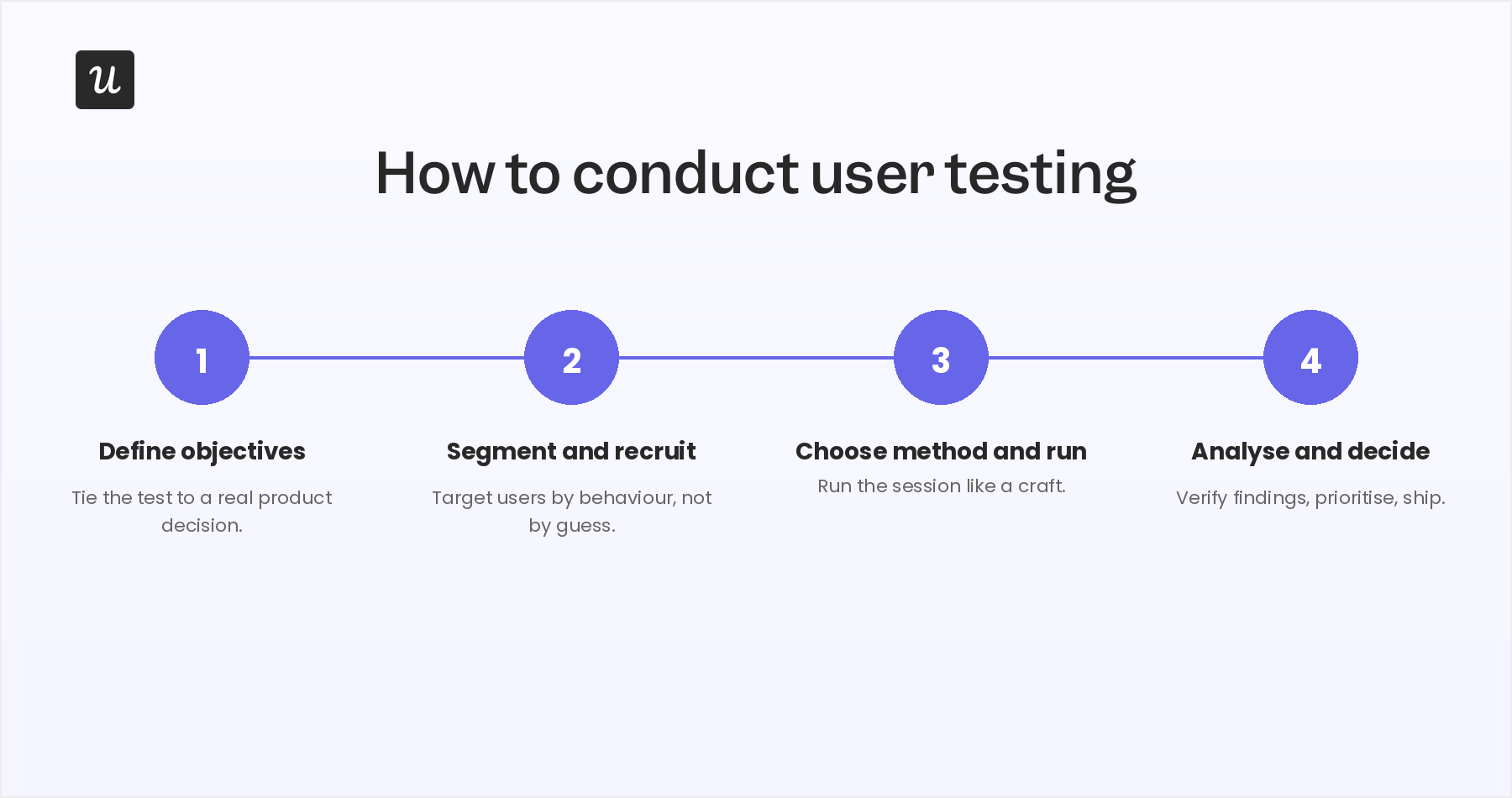
Stage 1: Define the goal of your research
The most common reason user testing fails to change anything is that the test was never tied to a clear decision in the first place. The research brings a lot of insights, but the overwhelming data volumes lead to analysis paralysis.
The solution to this is to define the purpose of the test. Is it a product feature analysis to decide whether to keep a low-usage feature or sunset it? To test the rebranded UI before publishing? Whatever your goal is, it will let you design the test around it and measure the right data so your team can focus on next actions.
Thanks to having a clear goal, Amal Al-Khatib, one of our product designers, ran three usability sessions to see if we should’ve prioritized an approval-system feature:
“We discovered the solution wasn’t right, and we completely staged the solution at what we were thinking. We deprioritized that feature and worked on another one, and you can see it now in the product: notifications, signals, and the alert system. All of that was part of the solution.”
Stage 2: Segment and recruit your participants
Recruiting the right participants has always been the slowest, most expensive part of user testing. Plus, the wrong participants give you wrong-fit data, so you have to choose your target very carefully.
Kevin O’Sullivan (our Head of Product Design) described recruitment as “incredibly labor-intensive” before Userpilot.
“You would have to have identified an area in the product that you wanted to investigate, then reach out to users. Have they or have they not used that feature? You might also spend time chasing down a participant that really isn’t going to give you rich feedback. They may not have heavily used the feature before.”
So if you work at a B2B SaaS company, here’s what I recommend for cheaper and less time-consuming recruiting:
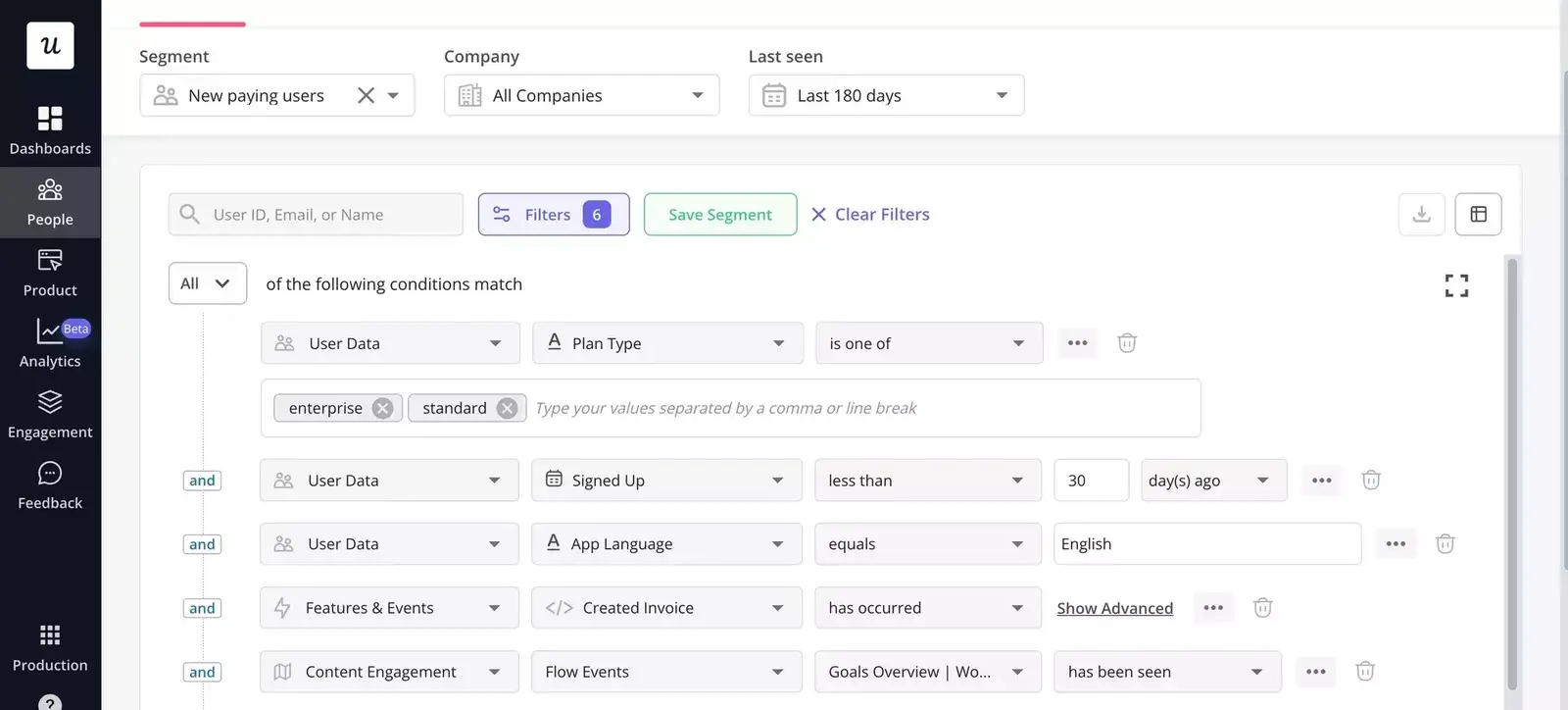
- Segment first: Build a segment based on the behavioral conditions that match your objective. For example, users who tried the feature in the last 30 days or on a specific plan.
- IInvite in-product: Trigger a microsurvey to the segment at a moment of relevance (right after they use the feature, right after they hit the bug, right after they cancel). Response rates on in-app invites are dramatically higher than email cold outreach.
- Exclude prior participants: Use smart conditions to filter out anyone who took your last three studies. You don’t want the same eight power users in every round.
- Screen with one question. Add a single screening question to the in-app survey (“Have you used [feature] in the last week?”). Two questions double your drop-off. One usually catches the wrong-fit cases.
- Schedule inside the tool: Link directly from the survey to a Calendly or scheduling page tied to the researcher’s calendar. Every step the user has to take outside the product is a chance to lose them.
For us, in-app surveys make recruitment much easier. If we want to test a feature that 14% of accounts use, I can just survey those 14% inside the product at the moment they use it. Amal, for instance, also runs this loop weekly and also uses Userpilot to exclude former participants: “If someone already participated in another survey or in another round of usability testing, we would exclude them, so we won’t be nagging or bothering them so much with our requests.”
How many participants are enough?
Jakob Nielsen (co-founder of the NN/G) argued in the year 2000 that only five users surface roughly 85% of usability issues in a single round.
However, Laura Faulkner’s “Beyond the Magic Number Five” clarified that the 85% figure averages across runs. A single run of five users might catch 55% of issues, or 100%, depending on the draw. If your decision is high-stakes (a checkout flow redesign, an accessibility audit), five isn’t enough. Faulkner’s data suggested that ten participants catches 95% of issues on average, and twenty catches 98%.
In conclusion:
- Aim for five participants for fast, iterative usability rounds during early design.
- 10 participants for any test that will inform a feature ship-decision or replace an existing flow.
- 15 to 20 for high-stakes work: accessibility, regulated industries, checkout, onboarding redesigns, anything affecting revenue or user retention directly.
Stage 3: Run the test
That’s the state that generates the majority of user testing costs: participant incentives, researcher hours, software usage, reporting, equipment, etc. AI can help mitigate some of these with auto-transcription, AI-assisted feedback analysis, or auto-generated draft reports, saving you some hours of work.
Another factor is how you choose to conduct your test and the methods you’ll use. If your goal is clear and you’re targeting the right audience, you’ll be able to adjust the testing process around it.
Here’s the checklist that should be done before, during, and after every session.
Before the session:
- Define your metrics in advance: Could be task success rate, time on task, number of errors, task-level satisfaction (often a 1-to-5 post-task rating).
- Write clear instructions: Prepare a script with everything the user needs to know.
- Pre-test the prototype yourself: Twenty minutes before the session, open the prototype on the same browser the participant will use to make sure it doesn’t break.
- Send a confirmation 24 hours and 1 hour before the session: No-show rates will drop with a 1-hour reminder.
During the session:
- Encourage think-aloud, but don’t enforce it: Some participants narrate naturally, others don’t. If your participant goes quiet, ask “what are you thinking right now?” once per minute of silence.
- Don’t answer questions during the task: If a participant asks, “Should I click this?” encourage them to find it themselves. Answering would skew the data.
- Note timestamps for moments you’ll want to revisit: A 3-second note (“0:14:20 hovered on toggle, looked back at instructions”) saves twenty minutes of replay-scrubbing later.
- Watch for body language: For example, hesitation before clicking, a small head tilt, or a fingertip raised toward the screen and then withdrawn.
- Don’t break for the participant: If they say, “I can’t figure this out,” resist the urge to help. Twenty more seconds of trying may show the actual confusion.
The debrief:
- Run a 5-minute debrief immediately: Ask one to three open feedback questions:”What was the most frustrating part?”, “If you could change one thing, what would it be?”, “Would you use this in your actual workflow?”
- Send a thank-you within 24 hours: Either a small incentive (credit, gift card, tool credits) or a personal note from the researcher.
Stage 4: Collect data, analyze with AI, decide with humans
Once the tests are finished and you’ve collected the data, it’s time to start analyzing. This is where you identify recurring themes, usability issues, and any areas for improvement.
Although I can’t tell you what to analyze for your business, here’s a checklist of tasks for processing and analyzing your test results (with and without AI):
- Auto-transcribe every session: Most modern recording tools do this in real time.
- Cluster sessions by behavior: Session replay grouped by drop-off point, by user segment, or by event sequence tells you which moments mattered most. Kevin’s framing on this is the right one:
“Session replay is the perfect tool. It’s a blend of a qualitative method (watching sessions) at a quantitative scale (every single user that’s ever interacted with the feature). So you can spot patterns rather than zone in on one session and let that influence you.”
- Draft a thematic synthesis with AI: Feed transcripts, session replay notes, and survey responses into an AI synthesis pass. You’ll get common themes, challenges, and narratives.
- Verify every quote: Every quote in the AI synthesis must be checked against the actual transcript.
- Triangulate qualitative with quantitative: Qualitative findings (what users said) paired with quantitative behavioral data (what users actually did) is more credible than either alone. For instance, while conversion funnel analysis tells you where drop-off happens, session replay tells you why, and the survey validates the hypothesis with the user’s own words.
- Look for broader patterns, not isolated cases: One user struggling with a button doesn’t make a usability issue. Group findings by frequency and identify the behavior patterns before you write any recommendations.
- Prioritize usability issues by severity, frequency, and impact: Score each finding on a three-dimensional rubric (how bad it is, how often it happens, what it costs when it does), then sort. The fixes that most improve usability go to the top of the product roadmap.
- Tie the findings back to the decision: Refer back to your goal. Did the data support it? Reject it? Force a different question? Write the answer in one sentence and share it with your team to start a conversation.
Important note: I highly recommend fact-checking every process you automate with AI. As an anecdote, Katie Kelly (our UX researcher) used Claude for survey analytics on a batch of responses recently, organized the output into a Notion table, and then caught some hallucinations.
“I realized that there were one or two answers that were hallucinated by the AI. So I had to go back in and delete them and make sure they weren’t present in the counts. The tool can be amazing, but it’s not perfect at the moment, so I had to manually check the counts at the end just to make sure it wasn’t going to corrupt the data.”
In short, AI hallucinates often enough that every output needs a verification step before it becomes a finding. That’s why there are parts of research Katie would never hand off:
“If I’m doing the interview with the user, I know how the user interacts with it. I can pick up on tone. I can pick up on body language. I can pick up on smaller behaviors that happen within the interview, that can give me a bit more of an indication of frustration levels or emotional state or curiosity.”
The bottom line: Real users still win, AI just makes them easier to find
For user testing, real users are still the only reliable source of behavioral insights. And although synthetic data is only useful for desk research and exploratory hypotheses, AI can automate parts of the research workflow that were always painful (recruitment, transcription, synthesis, reporting),
This means user research is faster, cheaper, and more rigorous than it has ever been. Just not the way synthetic users’ vendors promise.
If you want to aid your user tests with one platform, Userpilot lets you do it without coding. It offers behavioral segmentation for recruitment, in-app surveys for invitation, session replay for analysis, and AI agents for synthesis. Book a demo and our team will walk you through it!
About the author