According to the 2026 State of Performance Marketing Report, 87% of B2B teams deal with unreliable intent signals, and only 26% ever turn into real opportunities.
The problem is simple. Prospects research, compare products, and discuss internally long before they request a demo or fill a form. Marketing sees one signal, sales sees another, and product usage sits in a silo.
That’s the gap B2B intent data is meant to close. Product managers collaborate with GTM teams using first-party and third-party signals to target the right accounts at the right time.
In this guide, I’ll break down how teams put intent data to work and the five B2B intent data providers you can rely on.
Try Userpilot Now
See Why 1,000+ Teams Choose Userpilot
TL;DR: A simple way to think about B2B intent data
B2B intent data shows which accounts are actively evaluating solutions and when they’re ready to buy.
- Start with product usage (first-party data): Track feature adoption, usage limits, team activity, and trial behavior to see who is getting value, ready to convert, or at risk of churn.
- Add comparison research (second-party data): Monitor review sites and partner platforms to understand which buyers are actively evaluating your product versus competitors.
- Layer third-party data for scale: Use external content engagement and web activity to identify early interest and broader market trends. Treat these as directional signals, not definitive intent.
How teams put it into action:
- Respond immediately to first-party actions with personalized messages, in-app prompts, or sales notifications.
- Use second- and third-party signals to expand coverage, prioritize accounts, and spot early-stage opportunities.
- Continuously refine which signals predict real engagement and conversions.
Start with first-party behavior, add second-party comparison data for timing, and use third-party intent for scale. For example, a trial user creating projects in your product, visiting pricing, and reading a competitor’s report shows active evaluation worth prioritizing for outreach.
What is B2B intent data?
B2B intent data is behavioral data that shows when a prospect is actively evaluating or moving toward buying a solution. In practice, it focuses on what buyers do rather than who they are.
I’ve seen teams rely heavily on role, company size, or industry to decide who to target. That information helps with fit, but it stays largely static and doesn’t change as buying behavior changes.
By contrast, intent data reflects real-time actions that signal interest, evaluation, or readiness to buy, such as:
- Repeated visits to pricing, security, or integration pages signal purchase validation.
- Spikes in product usage analytics during a free trial, especially around core or gated features.
- Active comparison research on review platforms while shortlisting vendors.
These aren’t vanity actions. They reflect real buying motion and signal when a team is evaluating solutions, not just exploring ideas.
For example, a SaaS account that hits a usage limit, explores advanced features, and then checks pricing is showing intent in a way a job title or company size never could.
That’s what intent data does differently. It shows you when a buyer is interested, what they are looking at, and where they might run into challenges as they review solutions.

Turn Your Product Usage into Revenue Using B2B Intent Data with Userpilot

The 3 kinds of intent data for SaaS teams
SaaS teams rely on three tiers to spot who’s actively evaluating and when:
1. First-party intent data (The gold standard)
First-party intent data comes from behavior inside your product or on your website. Unlike external signals, this data is deterministic.
Since this data comes directly from real product behavior, teams can trust it and personalize responses with full context. That’s why first-party intent data is considered the gold standard.
For instance, you can capture this behavior using visual event labeling in Userpilot. Instead of writing custom tracking code, label UI elements directly in the product to track clicks, flows, and feature usage.
Teams that benefit most include:
- PLG sales: Prioritize outreach to users who are most likely to convert.
- Lifecycle marketing: Deliver contextual messaging and personalized onboarding.
- Customer success: Detect early churn signals and re-engage proactively.
Other intent signals often arrive with delays or in aggregated form. When intent appears inside the product, teams can act immediately. No waiting. No guessing.
2. Second-party intent data (The comparison shopper)
Second-party intent data comes from trusted platforms that already have buyer attention. Think review sites, comparison platforms, or partner ecosystems where prospects actively weigh their options.
I treat this signal as a clear marker of the consideration stage that goes beyond basic traffic metrics, reflecting deliberate comparison behavior.
Buyers, exactly 82% of them, already have a product in mind when shortlisting, and 70% actually buy it, says the State of Prospecting 2025 report.
They’re comparing features, checking alternatives, and figuring out who makes the shortlist. They may not be on your site yet, but they’re clearly shopping in your aisle.
For example, if a prospect compares you to your biggest rival on G2, they are in the “consideration” phase.
What this B2B intent data doesn’t give you is the full story. Second-party intent data comes with a few natural blind spots:
- Partial visibility: Captures intent on external platforms, not in-product actions.
- Delayed context: Data may arrive with a lag and reflect interactions external to your product.
- Limited depth: Signals intent but not the urgency with which the buyer needs a solution.
Therefore, in my experience, second-party intent works best alongside first-party data.
When PMs combine comparison signals with in-product engagement, they get a fuller picture of readiness. GTM teams can time outreach and tailor engagement with much greater precision.
3. Third-party intent data (The wide net)
Third-party intent data tracks buyer activity outside your product. Providers link content consumption, whitepaper downloads, and engagement trends to accounts using machine learning, inferring which accounts might be researching solutions like yours.
Think of it this way: a radar for the dark funnel, spotting prospects before they engage with your product.
Because of that, third-party intent works well for coverage and scale. You can identify market trends, surface accounts that would otherwise stay invisible, and detect interest before competitors do. For GTM teams, this means spotting early interest, testing ideas, and planning campaigns strategically.
But there are trade-offs:
- Accuracy varies: Reading an article doesn’t guarantee buying intent.
- Timing can lag: Signals may appear after aggregation instead of in real time.
- Limited depth: Shows interest, but not urgency or internal decision context.
Despite these limits, I don’t treat third-party intent as meaningless signals. When combined with first- and second-party data, it helps teams separate top-of-funnel activity from buying signals and prioritize accounts.
How the three types of B2B intent data compare + when to use each
Each type of B2B intent data serves a different purpose. The table below shows when to use each one:
| Intent data type | Where the signal comes from | Best used for | Best fit for SaaS teams |
|---|---|---|---|
| First-party | Your product & website | Confirming real buying motion and timing | PLG sales, lifecycle marketing, customer success |
| Second-party | Review sites & comparison platforms (e.g., G2, TrustRadius) | Identifying competitive evaluators | Sales, competitive GTM teams |
| Third-party | External content and web activity | Top-of-funnel awareness & early targeting | Demand gen, market expansion teams |
The top 5 B2B intent data providers
The list below is shaped by what I’ve seen work in real GTM and product-led workflows, patterns from sales calls, internal usage data, and platforms that stand out on review sites.
1. Userpilot
G2 rating: 4.6/5
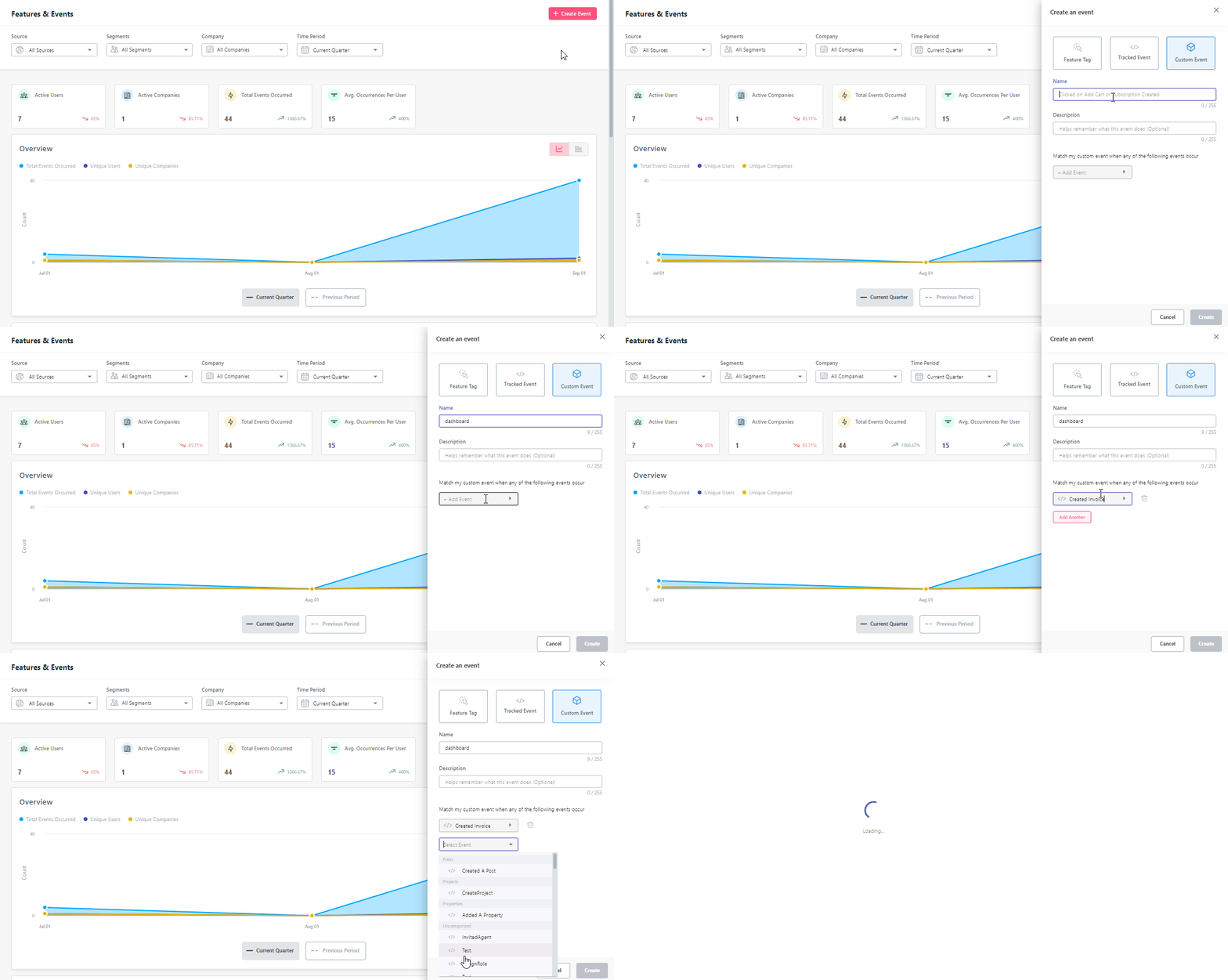
Userpilot is a no-code product growth platform that helps SaaS teams turn in-product behavior into action. It enables product managers to trigger contextual in-app experiences based on real user behavior, driving adoption and retention without engineering effort.
The platform autocaptures first-party product behavior. It tracks feature usage, onboarding completion, usage limits, and workflow patterns. This data shows which users are ready to convert, expand, or may churn. Teams can act immediately using segmentation-based insights and in-product guidance.
Pros:
- Deep behavior analytics: Visualizes user flows, path analysis, funnels, and cohort trends to connect product usage with intent signals.
- Contextual in‑product actioning: Combines user segmentation and usage trends with in-app experiences and resource center content, allowing teams to act on intent data ASAP!
Cons:
- Focused on in-product intent: Teams needing off-site or market-wide intent signals will require additional tools.
- Web-first platform: Best suited for web-based SaaS products.
Who is Userpilot best for?
Userpilot is ideal for teams that want to act on real product behavior. PMs build contextual onboarding, marketers trigger behavior-driven campaigns, and Customer Success teams detect churn or expansion signals, all without relying on engineering.
For example, set up a HubSpot integration to auto-create sales tasks when a user hits an “activation” milestone, such as completing onboarding, inviting teammates, or using a core feature for the first time.
Userpilot pricing:
- Starter: $299/month (2,000 MAUs, in-app engagement, basic analytics, NPS surveys)
- Growth: Custom pricing (advanced analytics, session replay, retroactive event capture, in-app surveys)
- Enterprise: Custom pricing (all Growth features + bulk data handling, custom roles, SOC 2 compliance, enterprise support)
2. Bombora
G2 rating: 4.4/5
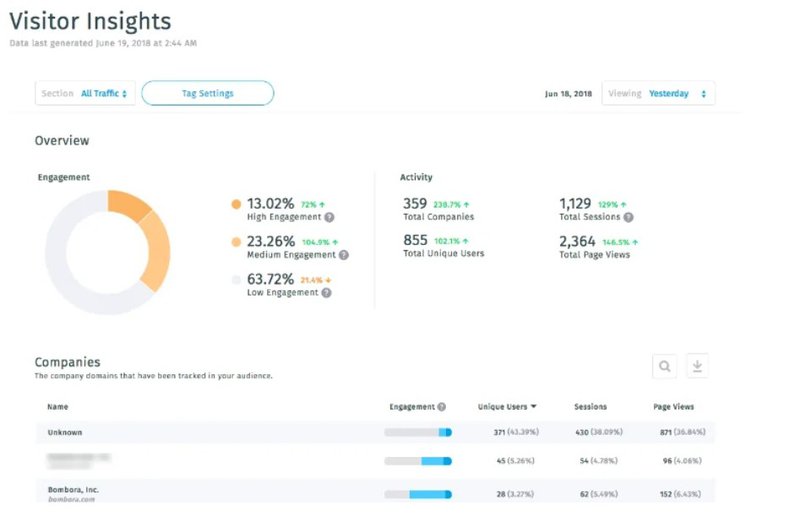
Bombora is one of the original players in third‑party B2B intent data, built on a massive cooperative of over 5,000 B2B publishers and industry sites. It tracks content research across the web to reveal which companies are exploring solutions like yours, surfacing early dark-funnel signals.
Bombora collects third-party signals from thousands of B2B websites. It highlights account-level content consumption, topic interest, and research spikes via Bombora’s Company Surge.
Pros:
- Data-driven ABM orchestration: Integrates directly with ABM and marketing platforms to activate intent signals in real campaigns and outreach
- Privacy-compliant insights: Bombora only shares aggregated, consented signals, ensuring compliance while giving actionable data at scale.
Cons:
- Content and filtering gaps: Drill-downs and filtering can feel less precise, making it hard to extract precise surge insights.
- Limited contact detail: Shows which companies are active, but not which individuals, so GTM teams need extra steps to target contacts.
Who is Bombora best for?
Bombora works best for marketers and RevOps teams focused on early-stage account identification. Teams looking to track competitive research and spot emerging market trends will benefit most from its third-party intent coverage.
Bombora pricing:
Bombora’s pricing isn’t public. Plans are customized based on the size of your target market, the number of accounts tracked, and the features needed.
3. 6sense
G2 rating: 4.2/5
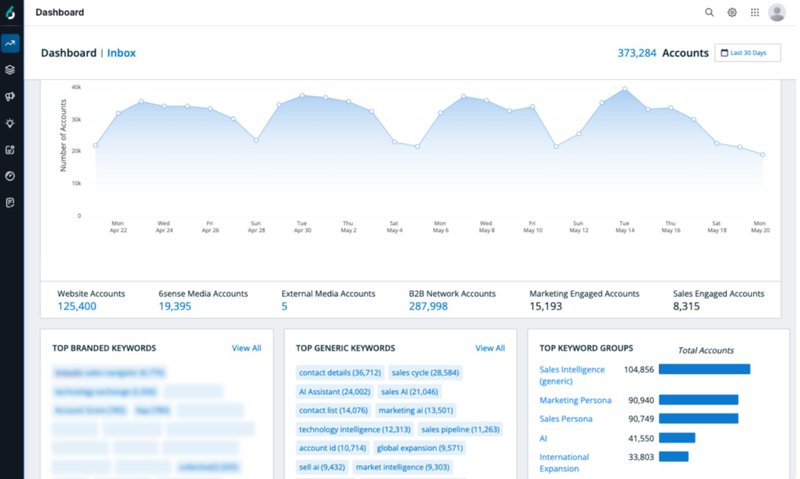
6sense is a revenue AI and account engagement platform that helps GTM teams uncover buyer intent across the entire account lifecycle. It combines predictive analytics, AI‑driven insights, and engagement tracking to identify accounts actively researching solutions like yours.
6sense combines predictive analytics with multi-channel engagement data. It tracks account research activity and classifies it into awareness, consideration, or decision stages. GTM teams can use these insights to reach the right accounts at the optimal time.
Pros:
- Predictive intent scoring: 6sense combines first‑party behavior, third‑party intent sources, and historical conversion patterns to generate AI‑driven scores that identify prospects.
- Centralized intent ecosystem: Integrates internal and partner intent signals for a unified view of account behavior.
Cons:
- Setup and complexity: Configuring predictive models and integrating with CRMs takes time.
- Account-level focus: Shows company behavior and buying stages, not individual decision makers.
Who is 6Sense best for?
6sense suits organizations with long, multi-stakeholder buying cycles. Sales, marketing, and RevOps teams gain layered insights into which accounts are actively researching solutions. This enables precise timing, better alignment, and more effective multi-channel engagement.
6sense pricing:
6sense pricing is custom and quote-based, determined by factors like feature set, account volume, and the complexity of predictive analytics.
4. ZoomInfo
G2 rating: 4.5/5
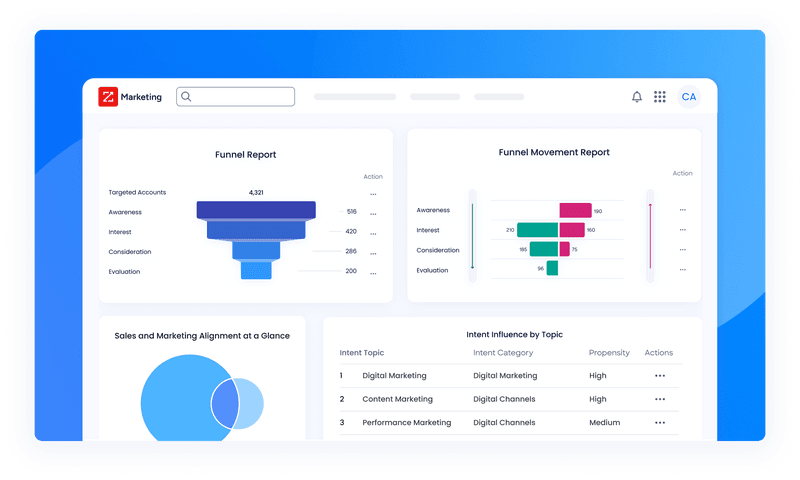
ZoomInfo is a go-to-market (GTM) intelligence platform that blends B2B intent signals with rich company and contact data.
ZoomInfo links intent signals with firmographics and contact data. The tool identifies which accounts are actively researching solutions and the topics they care about most. Teams can focus outreach on high-value accounts with the strongest buying signals.
Pros:
- Customizable intent prioritization: Filters intent by firmographics such as industry, company size, and geography to match signals with your ICP more precisely.
- CRM integration: Syncs intent signals directly with Salesforce, HubSpot, and other CRMs to trigger automated outreach workflows.
Cons:
- Intent add‑ons cost extra: Accessing ZoomInfo’s intent modules requires higher-tier plans or additional investments beyond the base subscription.
- Regional gaps: Intent coverage is stronger in North America and Europe, so global insights may be limited in some markets.
Who is ZoomInfo best for:
ZoomInfo is best for teams prioritizing targeted outreach and pipeline management. Forecasting, multi-touch campaigns, and account-level prioritization become simpler with cross-source intent linked to firmographic and contact data.
ZoomInfo pricing:
Pricing is custom and billed annually.
5. G2
G2 rating: 4.6/5
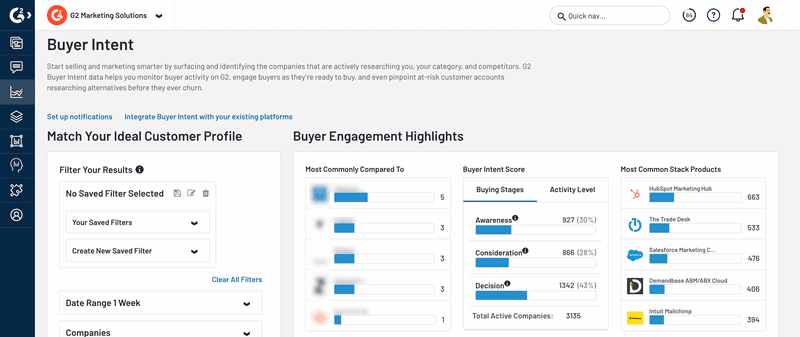
G2 is a B2B software review platform where millions of buyers research, compare, and evaluate software products. Its Buyer Intent solution captures account-level engagement and comparison activity, providing teams with signals of in-market interest.
G2 monitors behavior on its review platform, showing which accounts visit your product page, compare alternatives, or explore the broader category. These signals help teams understand which prospects are in the consideration phase and ready for engagement.
Pros:
- Broad market coverage: Tracks activity across 100 million B2B buyers to surface opportunities that might otherwise remain hidden.
- Verified buyer signals: Data is drawn from real software research behavior on G2’s platform, not inferred from third‑party tracking.
Cons:
- Signal volume varies: Because it focuses on product research behavior, some categories or niche solutions may show lower intent traffic.
- Company‑level visibility: Signals point to active accounts, but you still need internal context to identify the best contacts.
Who is G2 best for:
G2 is a fit for Product, Sales, and Marketing teams that want to understand active product comparisons and category-level interest. Teams can uncover which accounts are in the consideration phase, turn live research into actionable outreach, and refine demand generation and product strategies.
G2 pricing:
- Free: Basic vendor listing and limited features.
- Starter: $2,999/year, adds analytics, insights, and reporting.
- Professional: Custom pricing, more advanced analytics, and integrations.
- Enterprise: Custom pricing, full features, API access, and premium support.
How can sales and marketing teams operationalize B2B intent data?
Step 1: Start with first-party product behavior
First-party intent shows how people behave once they’ve signed up. Rather than relying on stated preferences, it captures what users actually do inside the product. That distinction matters because product behavior signals real interest as it happens.
Instead of treating all logins the same, look for actions that signal value, friction, or readiness to go further. For example:
- Feature adoption: A user repeatedly uses a core featureor explores an advanced capability. That’s a strong “this is clicking” signal.
- Usage limits: Someone hits a usage cap, export limit, or paywall. This often means they’ve outgrown the current plan.
- Team activity: Inviting teammates, creating shared workspaces, or assigning roles usually signals serious intent; people don’t loop others in casually.
- Upgrade curiosity: Multiple visits to pricing, billing, or plan comparison pages from the same account.
- Drop-offs: A sudden decline in usage, fewer active users, or abandoned workflows can signal risk just as clearly as growth signals opportunity.
The rule here is simple: Stop tracking when users logged in. Start tracking “why” they logged in.
Step 2: Translate intent signals into clear GTM actions
Intent data only matters if it changes what you do next. Otherwise, it is just interesting trivia sitting on a dashboard.
The fix is simple. Every meaningful signal needs a predefined response.
💡 Pro tip: Move beyond MQLs and focus on Product Qualified Leads (PQLs). A buyer who explores pricing, compares on G2, and uses core features shows clearer intent than someone who only downloads a whitepaper.
Ask one blunt question for each signal: If this happens, what should we do immediately?
Here’s how that looks in practice:
- A trial account invites two teammates within the first week
- Trigger a short in-app message explaining how teams get value faster, and alert sales that the account is collaborating.
- A user hits a feature limit twice in three days
- Show a contextual upgrade prompt inside the product instead of sending a generic upsell email later.
- An account visits pricing after heavy core feature usage
- Create a sales task with the exact context of what they used.
The goal is not more automation. The goal is quick decisions at the moment intent shows up. You decide the response once, then let the system run.
Step 3: Align sales and marketing around the same intent signals
Marketing flags an account as hot because they consumed content. Sales ignores it because the product shows no real usage. Meanwhile, the product sees friction but has no way to influence outreach. Three views of intent data, zero coordination.
Instead of asking “Is this account high intent?”, collectively agree on what qualifies as buyer intent data at each stage and what evidence is required. Product usage data becomes the anchor here because it is deterministic.
A simple way to do this is to define thresholds together:
- What combination of first-party usage and second-party signals qualifies as a Product Qualified Lead (PQL)?
- When does third-party intent stay in awareness versus trigger outbound?
- What usage drop-offs count as exit intent that should trigger re-engagement campaigns?
Alignment starts when teams agree on value-based events. A login is not intent. A “Project Created” or “Core Feature Used” is. Defining tracked events together creates a shared language across the funnel.
Step 4: Personalize outreach using intent context
Generic outreach isn’t just ineffective, it’s brand suicide. What cuts through is contextual relevance, delivered at the moment intent is shown.
Forrester’s 2023 survey shows that over 25 % of data teams lose more than $5 million every year, with 7 % losing over $25 million, all because of bad data.
This is where first-party intent data changes how outreach feels. For example:
- A free trial user who used a core feature daily doesn’t need a “What is our product?” email. They need help accelerating value.
- An account that visited pricing after onboarding isn’t “just browsing.” That’s decision-stage intent, and the outreach should reflect that.
- A user comparing you to competitors on G2 is already in consideration. Your message should address differentiation.
- If a high-value account visits pricing, use a native tooltip to offer a demo link immediately. Capture demand while it is hot.
Good intent-driven personalization answers one quiet question the buyer is already asking: “Can you help me right now?”
That might look like:
- A contextual upsell message when a user reaches a usage threshold.
- A sales email referencing a recently activated feature.
- A CSM check-in triggered by a sudden drop in usage or teammate removal.
None of this feels salesy because it’s not speculative. It’s grounded in deterministic behavior, not assumptions.
Step 5: Layer second- and third-party intent data for scale
First-party signals only exist once someone is already on your site or inside your product. The mistake teams make is treating external intent as a replacement for product signals.
But they should consider second- and third-party intent data.
- Second-party intent data (like G2 or TrustRadius) shows comparison behavior. If an account is viewing your product alongside competitors, they’re in the consideration phase.
- Third-party intent data (like Bombora or ZoomInfo) captures content consumption patterns across the web. It helps you spot accounts researching your category before they appear in your pipeline.
These signals aren’t purchase guarantees. They’re early-warning indicators that interest is forming.
A sensible way to use it is when you need to:
- Discover new in-market accounts that haven’t engaged with you yet.
- Expand beyond inbound and product-led motion.
- Prioritize which ICP accounts deserve attention right now.
Step 6: Review and refine intent signals over time
What looks like high intent today might become meaningless tomorrow. New features, pricing tiers, packaging shifts, or onboarding changes often create new “Aha!” moments and invalidate old ones.
Teams should routinely review:
- Which first-party behaviors correlate with trial conversion, expansion, or renewal?
- Which external intent signals actually lead to product engagement?
- What combination of first-, second-, and third-party signals sales involvement?
The strongest teams treat intent like a feedback loop. They test signals, remove weak ones, double down on strong predictors, and keep refining based on real outcomes.
A note on ethical data collection
The strongest intent signals come from first-party, consent-based behavior inside your product. When teams are clear about how data is collected and used, and avoid over-reliance on opaque sources, intent data stays both useful and trustworthy.
Userpilot supports this approach by acting on in-product signals through built-in monitoring and analytics, while meeting established privacy standards like GDPR, SOC 2 Type II, and HIPAA.
This keeps your intent data accurate, actionable, and ethical, while respecting your users.
Putting your B2B intent data to work
One thing I’ve learned watching GTM teams struggle with intent data is this: the problem isn’t lack of signals, it’s fragmentation.
Start tracking first-party intent signals inside your product. Watch how real users behave, where they get value, and where they stall. Once teams align around those signals, intent stops being a buzzword and starts becoming a practical way to prioritize, personalize, and grow.
If you want a simple place to begin, Userpilot’s quickstart guide shows how to start capturing and acting on first-party product intent without heavy engineering or guesswork.
When intent is clear, decisions get easier. Book your free Userpilot demo today!
Stop Guessing and Close More Deals using B2B Intent Data in Userpilot
FAQ
What is an example of intent data?
- First-party: A user enables a core integration (Slack, CRM, data source).
- Second-party: A buyer downloads a competitor comparison report or pricing guide from a trusted partner or marketplace.
- Third-party: An account engages with webinar content, podcasts, or long-form guides related to your problem space across external B2B sites.
What are the three main types of B2B sales?
- Transactional sales: High-intent signals indicate when buyers are already comparing options, so teams can step in at the decision stage.
- Consultative/solution selling: Intent data reveals problems and priorities, helping tailor sales conversations to real needs.
- Account-based selling (ABS): Account-level intent highlights which target accounts are actively researching, so teams engage at the right time.
How to collect intent data?
- Track first-party signals: Monitor product usage, feature adoption, and key milestones.
- Use second-party sources: Leverage review and comparison platforms to spot active evaluators.
- Layer third-party data: Add external intent data to discover early-stage interest and new accounts.
About the author