How to Use Behavioral Email Marketing to Retain Customers


I’ve spent years driving growth as a product manager, and I can testify that behavioral email marketing works. A 2024 report found that behavior-triggered marketing emails generate 10x more revenue than generic emails. The reason for its effectiveness isn’t far-fetched.
Behavioral email marketing triggers emails based on what users do (or don’t do) in your product. It involves monitoring in-app behaviors, such as when someone hits a milestone, abandons an onboarding flow, or submits a form, so you can send emails that are relevant to users’ current context or need.
Behavioral emails feel more like a helpful nudge than an interruption. Consequently, they’re more likely to increase engagement.
In this article, I share real-world examples of this approach and how you can use it to improve customer retention.
What’s your primary goal with behavioral email marketing?
How are you currently triggering emails?
What is your primary role?
You’re ready to master behavioral email marketing.
See how Userpilot can help you send the right message at the right time, based on what users actually do in your product.
Benefits of behavioral email marketing
Here are some advantages I’ve gotten from using behavioral email marketing to engage my customers:
Create a more personalized approach
Personalization means tailoring each marketing message to what your users do. By speaking directly to their needs, we cut through inbox noise and make every email feel relevant.
For example, we see that a user spent time on our pricing page, but didn’t upgrade or contact sales. Sending an email that breaks down our plans further with a comparative analysis of each one’s benefits can encourage them to purchase.
Aid users at each stage of the customer lifecycle
Organizing your behavioral email workflows around your customers’ lifecycle stages helps you decide the best emails to send without guessing.
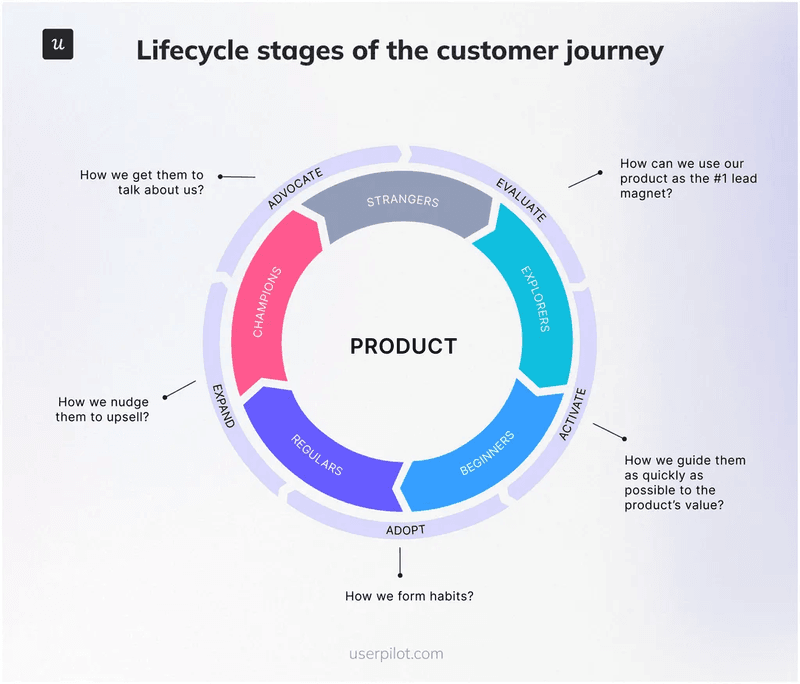
Typically, we implement it like this:
- When someone signs up, they receive a welcome email.
- When they hit their first milestone, they get an onboarding checklist.
- If they stall at a key step for three days, they receive a “Need help?” nudge.
Mapping your email strategy around lifecycle stages also drives customer loyalty because users always know the next step to take as they engage with your product. And it pays off because automated email workflows generate 30× higher returns than one-off campaigns.
Improve retention based on real data
Analyzing user actions and behavioral data helps us identify who’s at risk of churning. And such insights provide information about emails to send that’ll keep them engaged.
Let’s say I discover a set of users who haven’t logged in for a week. I’ll set up an email sequence that offers a quick tip guide and a reminder of our key features to re-engage them.
By acting on real customer data instead of assumptions, you’ll plug leaks in your user base and build long-term loyalty.
Predict future behavior
Behavior-based marketing enables us to assess users’ actions today to anticipate what they’ll need tomorrow, and send the most relevant email before they even ask. This proactive approach improves the effectiveness of our engagement strategies.
For example, a group of users repeatedly visits our API docs, but never completes the integration. We assume that they’ve hit a bottleneck and send them a “Get up and running” email with a step-by-step integration guide.

Implement a Behavioral Email Marketing Strategy with Userpilot

Behavioral email examples
These are some of my best picks of behavioral email examples from relevant campaigns by top brands.
Welcome emails
Welcome emails are the first message your users see, and they set the tone for every interaction that follows. We use them as part of our omnichannel customer engagement because the same personalization in-app or on our website carries over to email.
Automatically trigger these emails immediately after someone signs up for a trial, and personalize them based on name, JTBDs, and position.
Welcome email example from Userpilot
In our welcome email, we greet new trial users in a friendly tone, highlight a “25% activation → 34% MRR” statistic, and outline the next step: installing the Chrome extension. So, you aren’t guessing and know everything to continue your user journey.
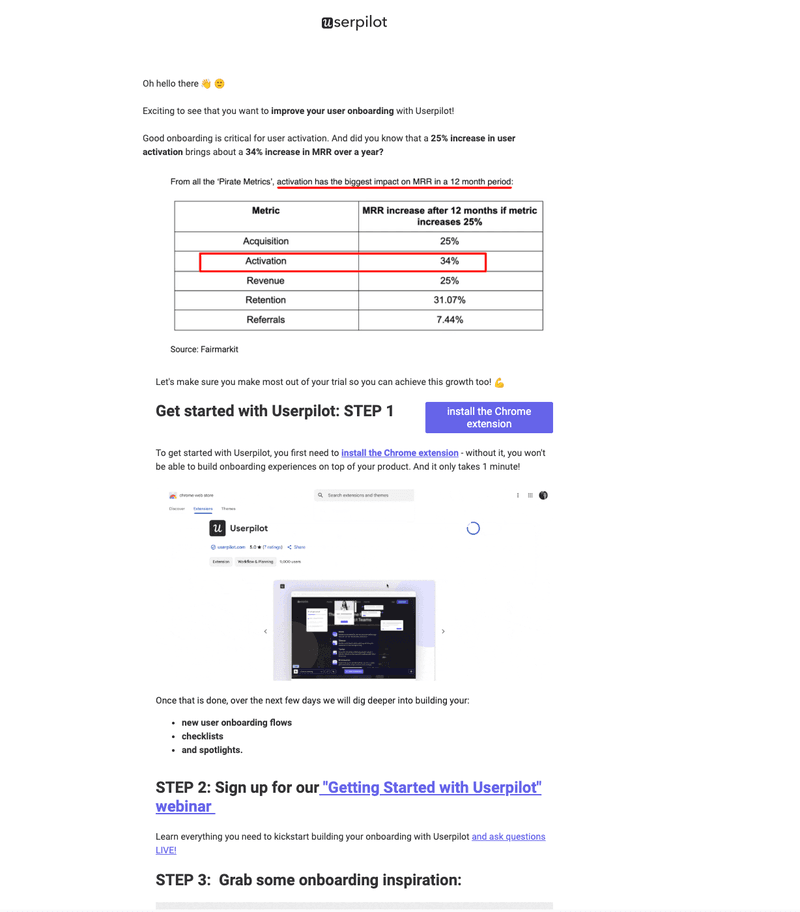
Our welcome email example:
- Is highly relevant to the trial use case.
- Emphasizes the importance of user onboarding and encourages users to continue.
- States the next steps clearly.
Onboarding emails
These emails teach users about your product’s value and help you activate them. Onboarding emails are reminders and guiding messages that enable customers to reach the ‘Aha!’ moment faster.
A typical trigger we use to automate such emails is when a user completes a step in our onboarding flow, like finishing their account setup.
Onboarding email example from Along
In Along’s onboarding email, a progress bar indicates that you’ve completed creating your account. Then, it shows you that the next step is to add your class and students. There’s also a CTA to go back to the app and continue your progress, and even a link on how to use the product.
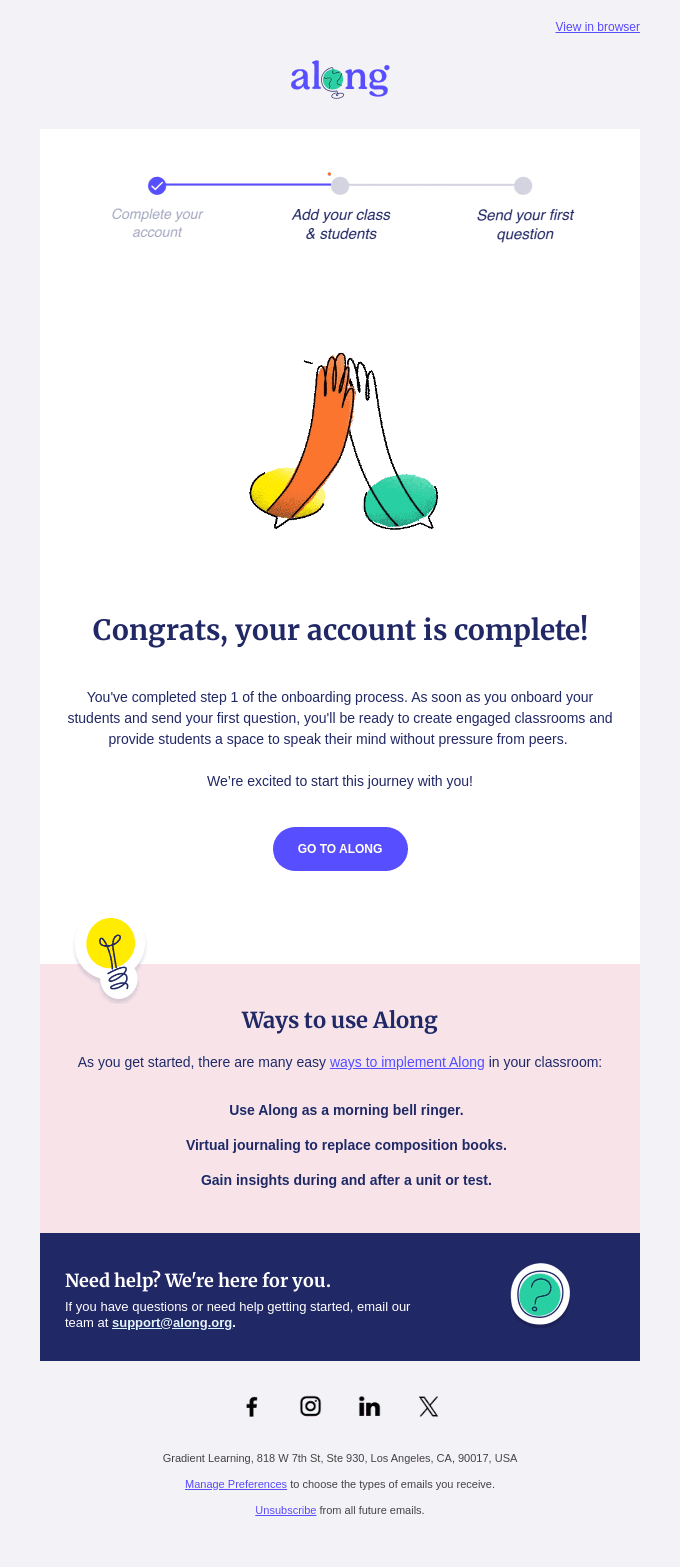
I like this example because it:
- Is triggered immediately after the first step is complete.
- Provides clear guidance on next steps.
- Has a straightforward CTA.
Activation nudges
Activation nudges are timed reminders that pull customers back into your product when they are away for a while. Set the trigger for when a user hasn’t taken a key action.
For example, if a user hasn’t created a project in five days. Immediately send a “Need help?” in-app message. If there’s still no activity after 24 hours, they get a friendly “We miss you” email. Finally, a push notification 48 hours later nudges them one more time.
Activation nudge example from Asana
In Asana’s email, the subject line “Get up to speed” speaks directly to inactive users. The body highlights a 2x speed increase, saying the product is better now. In addition to the animation and “Try it Now,” all these elements nudge customers to engage in an experience they’ve missed.
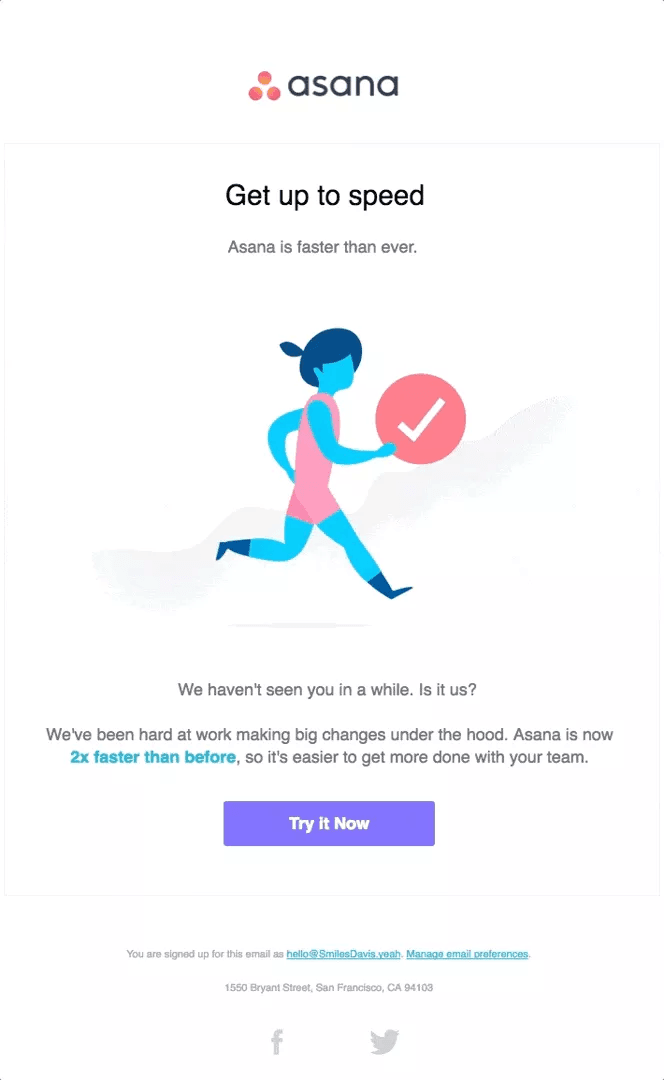
This email is an excellent example because it:
- Triggers after some time of inactivity.
- Offers immediate, tangible value (faster performance) to reawaken interest.
- Has a straightforward, action-oriented CTA.
Feedback follow-up emails
These emails enable us to respond to customers based on their feedback and provide an opportunity to learn. For example, a trigger can be low NPS scores.
In this case, trigger these messages when a user rates you below 5, so you can ask them why. Getting these details and offering help enables you to uncover pain points, makes users feel heard, and gives you roadmap insights to improve customer experience.
You can also set behavioral triggers based on high feedback from NPS surveys via promoters, and encourage them to review or give testimonials.
Feedback follow-up email example from Deliveroo
Deliveroo’s example has a simple greeting and a short NPS survey to get feedback easily.
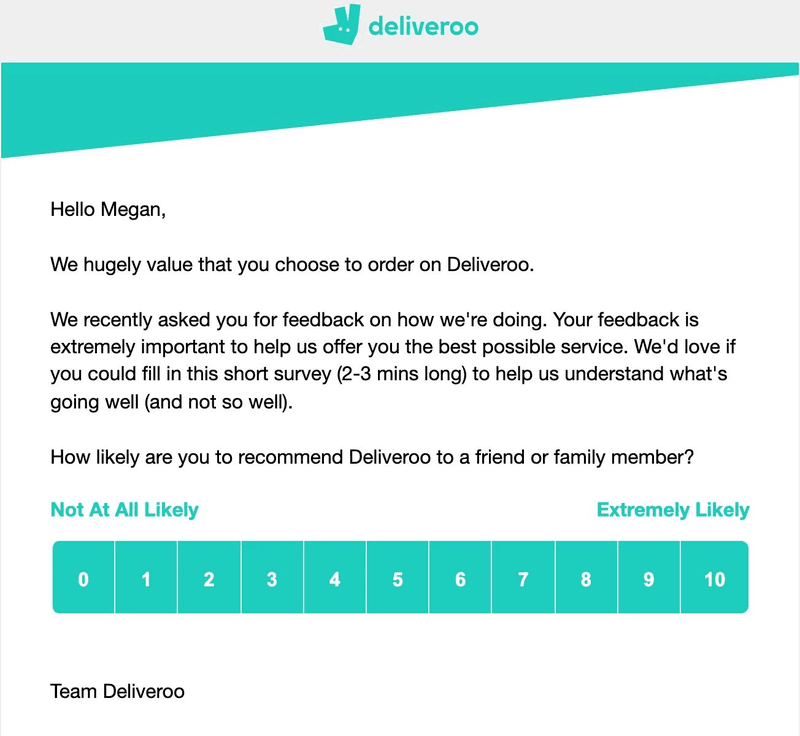
I like this example because it:
- Personalizes based on name.
- Keeps the survey short to minimize effort.
- Reinforces that feedback drives better service.
Struggle alerts for support
Struggle alerts for support emails let us catch users when they’re stuck, so we don’t have to wait for tickets or calls before resolving issues. This way, we can offer help during complex setup steps by proactively checking in with accounts that show low engagement.
Typical triggers we use here are error events or sudden drops in usage. For example, if our logs show repeated failures saving an analytics dashboard, an email lands in the customer’s inbox offering a quick knowledge-base link or a 10-minute troubleshooting call. This real-time check-in reduces frustration and boosts satisfaction.
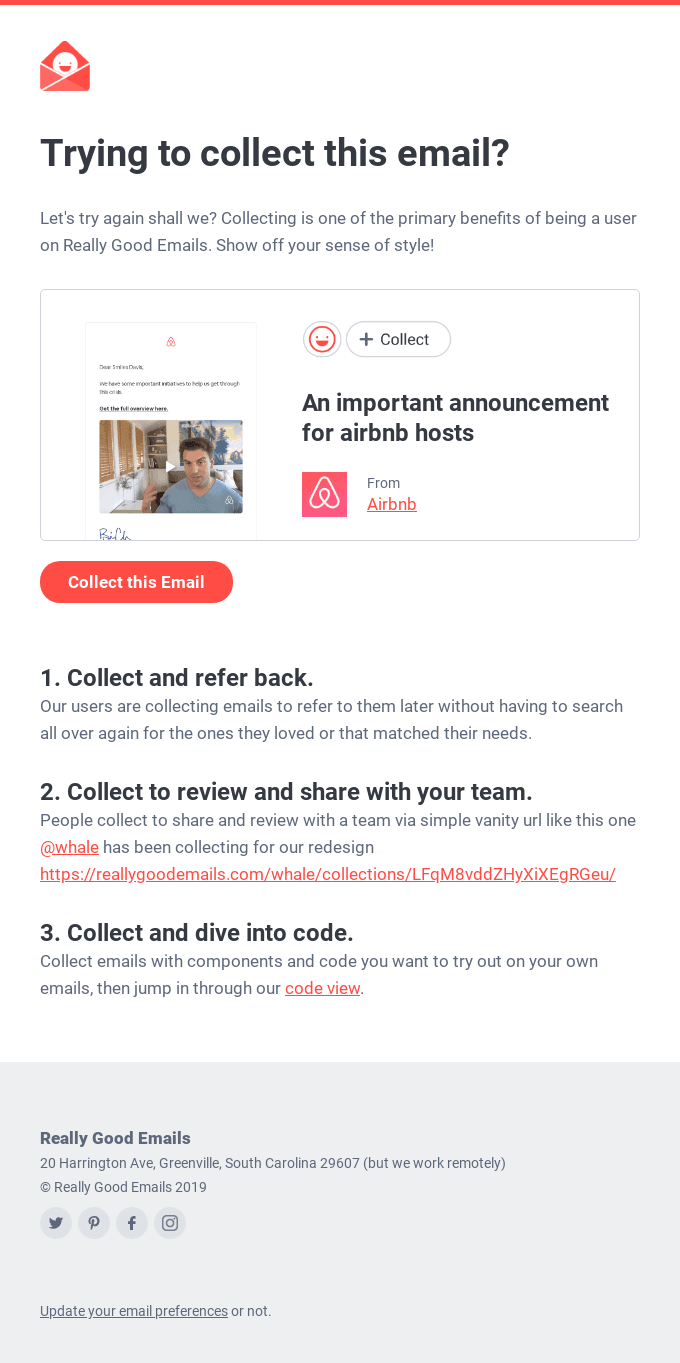
Support email example from Really Good Emails
In this example, we see a playful “Trying to collect this email?” message complete with a one-click “Collect” button.
I like this example because it:
- Pinpoints the exact action the user failed to complete and offers to fix it.
- Has a friendly tone and visuals that reduce friction to invite the user back.
- Lays out three simple ways to move forward immediately.
New feature announcements
These emails highlight your latest features. However, it’s better to send them based on behavior data so you never overwhelm new users who haven’t used the essential features yet.
A trigger can be when users complete a core action or interact with your product for the first time in-app. By waiting until they’ve demonstrated interest, the feature announcement email lands when they’re ready to learn more. This approach gives customers context, drives product adoption, and prevents confusion. In fact, customer engagement emails like this deliver the highest ROI for nearly 1 in 5 marketers.
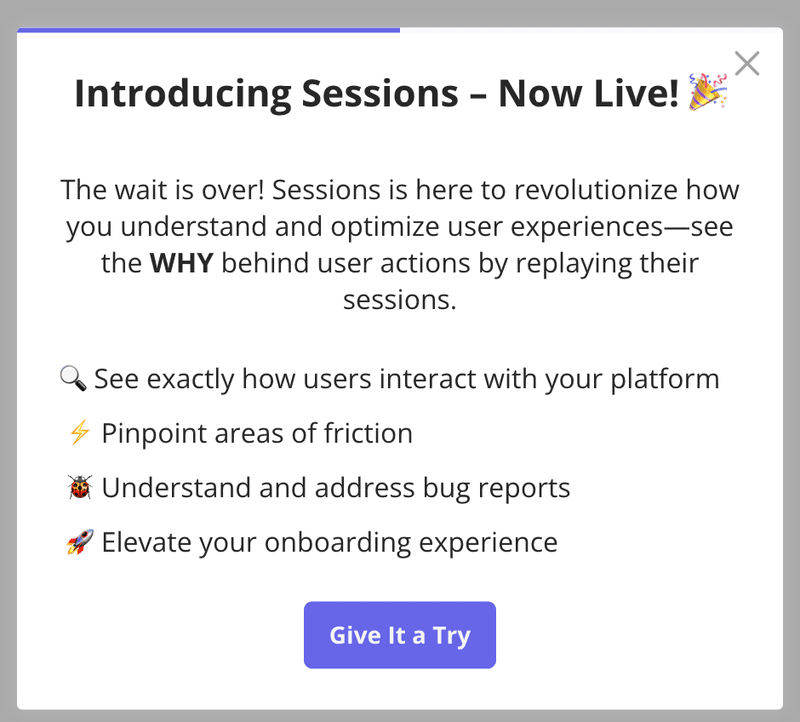
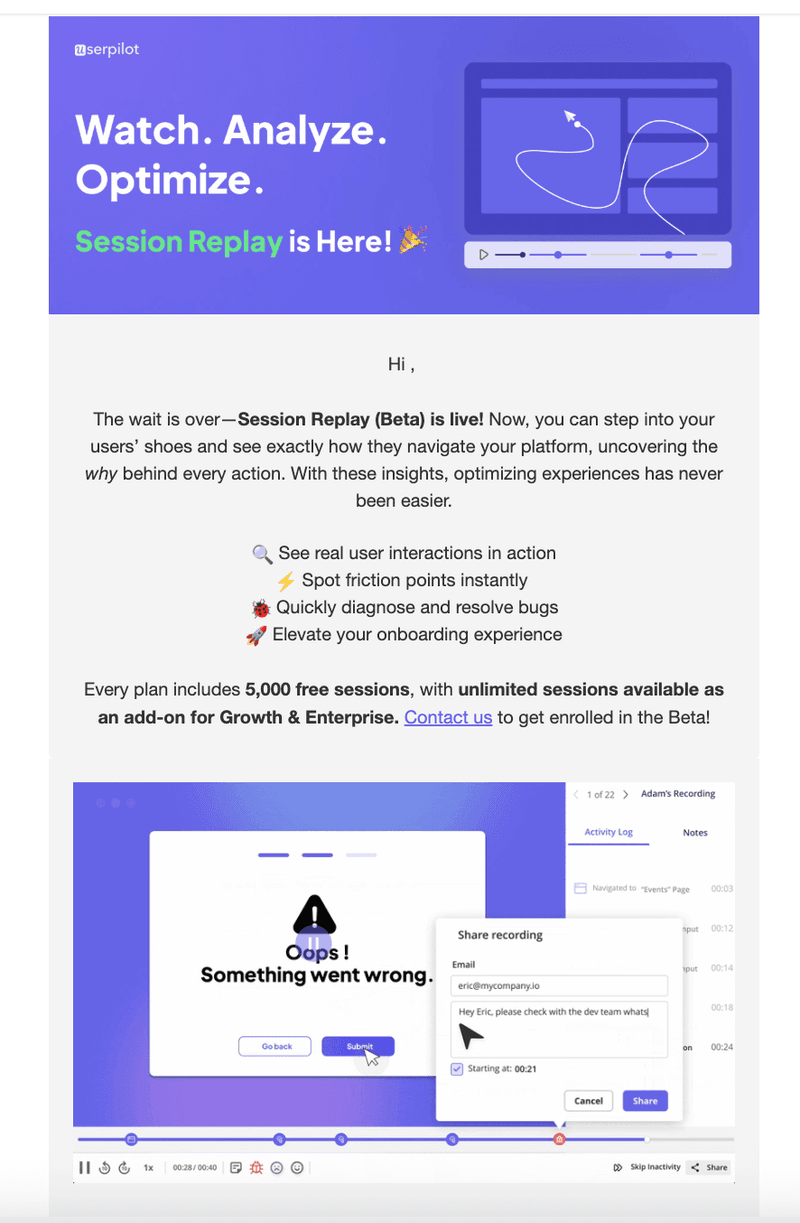
New feature announcement example from Userpilot
In this new feature announcement email, we highlight our session replay function with a celebratory banner, followed by a bulleted list of its benefits, and a “Contact us” CTA. My favourite element is the embedded video that lets you experience the feature.
Here’s why this is a great example of behavioral email marketing:
- It highlights benefits (spot friction, diagnose bugs, elevate onboarding).
- It pairs visuals with concise copy, making new functionalities obvious at a glance.
- The copy ends with a visible next step so users know exactly how to get started.
- It features a short demo video that lets users know what to expect.
Upsell emails
Sending upsell emails based on behavioral data enables us to prompt customers to upgrade when it’s most relevant. A typical trigger is when an account reaches 80% of its seat or usage limits.
In each email, I recommend highlighting the metric users hit (whether it’s seats filled or API calls used) and showcasing the next tier’s features that solve their current limits. That way, users see immediate value in upgrading instead of getting generic promos. Such timely, behavior-driven nudges drive higher conversion rates.
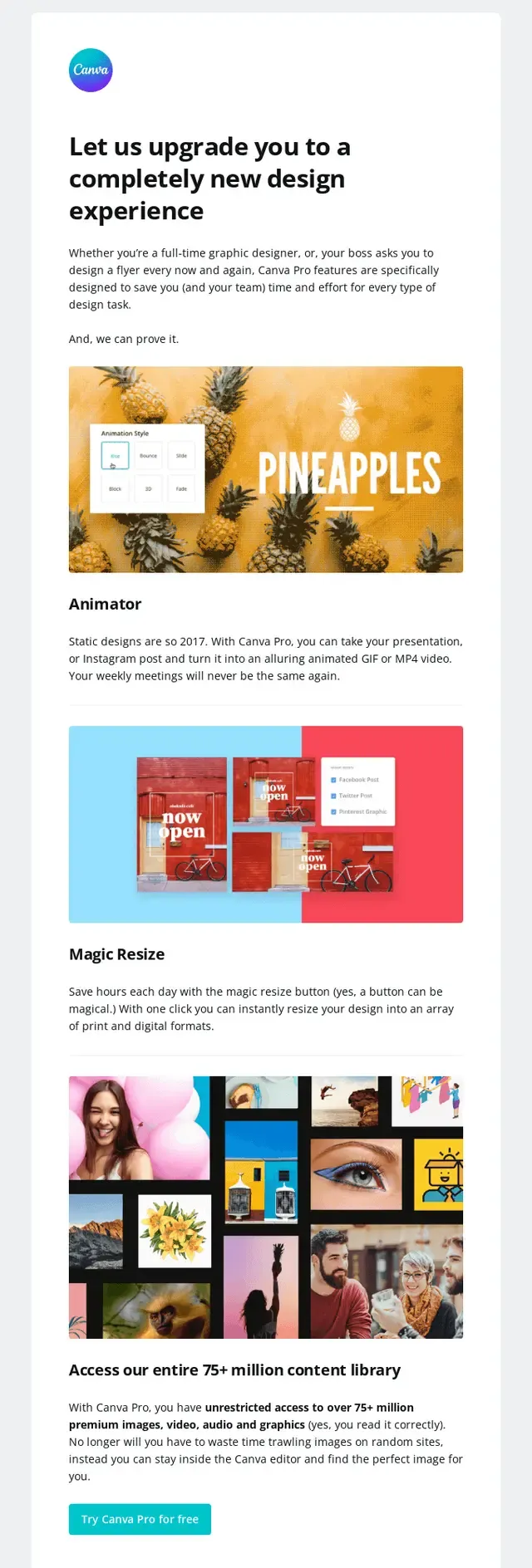
Upsell email example from Canva
In Canva’s email, the headline “Let us upgrade you to a completely new design experience” speaks directly to users. The email provides brief descriptions of three Pro features and highlights their benefits. Then, it ends with a clear “Try Canva Pro for free” button.
It’s a good example as it:
- Ties each feature’s benefit to real design challenges users face.
- Closes with a single low-friction CTA to start a free trial.
How and why to implement a behavioral email marketing strategy with Userpilot
Our tool, Userpilot, is a no-code product growth platform for product, design, marketing, and support teams to build, automate, and measure behavioral email marketing campaigns within the app. It combines segmentation, triggers, templates, and analytics in one place so you can act on real user behavior, not guesswork.
Key Userpilot features for behavioral email marketing include:
- Behavioral segmentation: Define segments based on user actions so each email lands with the right audience.
- Trigger-based workflows: Set automated triggers for events that send emails at the right moment.
- Email drag-and-drop builder: Choose and customize on-brand templates inside Userpilot so you never have to switch tools or wrestle with HTML.
- Dynamic attribute personalization: Auto-insert dynamic content (name, plan type, last action) into each message, making every email feel custom.
- Omnichannel automations: Coordinate email alongside in-app tooltips and push notifications for a consistent user experience.
- Analytics & insights: Track open rates, clicks, and conversions in real time, then you can tweak subject lines, timing, or content based on actual results.
If you’re ready to turn customer behavior into your best retention engine, book a free demo and see how easily you can launch fully automated, data-driven email marketing campaigns.
Unlock Powerful Behavioral Email Marketing Strategies with Userpilot
FAQ
What is behavioral email marketing?
Behavioral email marketing involves sending messages based on real user actions, such as signing up, visiting specific pages, or completing a tutorial. By triggering emails on those behaviors, we deliver timely, relevant content that increases engagement and retention.
What is an example of behavioral marketing?
If someone drops off during a product walkthrough, we send an automated “Pick up where you left off” email featuring the last step they took, and the next one. That personalized content often re-engages them so they resume and complete their flow.
What are the four types of email marketing?
In my experience, the four main categories of email marketing include:
- Newsletter emails: Regular updates and insights.
- Promotional emails: Special offers and discounts.
- Behavioral emails: Triggered by specific user actions.
- Transactional emails: Order confirmations, receipts, and notifications.
What are the 4 P’s of email marketing?
The four P’s of email marketing are:
- Product: The content or offer we’re promoting.
- Price: The incentive or deal we present.
- Place: Time and channel where the email lands.
- Promotion: The call-to-action that drives users to the next step.
About the author