Reasons for Customer Churn: How to Identify Them Early and Mistakes to Avoid


Finding the reasons for customer churn is relatively straightforward. Check your exit surveys, renewal notes, or support tickets.
The problem, however, is that these methods are reactive. By the time they tell you why a customer left, the customer has already gone, and you need to spot churn much earlier in 2026 because:
- Renewal cycles are shorter, and AI agents are generating more of your customers’ product activity.
- Customers can go from healthy to gone within a single billing cycle.
Early warning signals, like declines in feature adoption or product engagement, are what to watch instead. But there’s a challenge: these warning signs often hide behind healthy-looking dashboards and surface-level activity metrics.
In this article, I’ll show you how to identify them and avoid the mistakes that might stop you from acting before it’s too late.

What are the three root causes behind almost every churn reason?
There are several reasons why customers churn, from “too expensive,” “missing a feature,” and “support took too long” to “a champion left.” Underneath all of them, though, sit three themes.
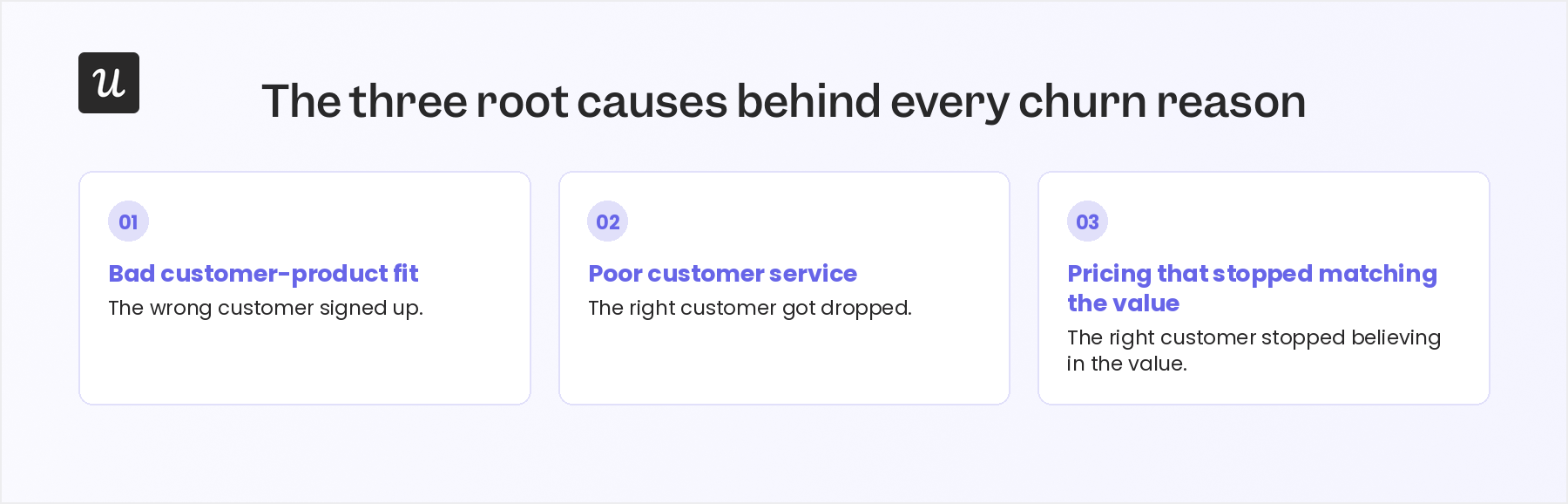
Bad customer-product fit
A bad customer-product fit means a product doesn’t align well with customers’ needs or workflows. It happens when a product’s marketing, sales, or onboarding processes attract users who aren’t the right fit for that product’s use cases.
These two examples show how this plays out:
- A SaaS tool is designed for advanced data analytics. However, it attracts beginner users who find it complex and lacking user-friendly guidance, and then leave.
- A project management tool is built for software teams, but it targets solo freelancers through broad productivity messaging. The freelancer logs in, explores a few features, and leaves because the product feels unnecessarily complex.
In both cases, customer expectations don’t align with product capabilities, which leads to dissatisfaction and, ultimately, churn.
To prevent this:
- Define your ideal customer profile clearly.
- Design your onboarding process and marketing campaigns to attract customers who align with the product’s core use cases.
- Use segmentation to personalize onboarding and messaging based on user needs.
Poor customer service
When customers encounter issues in your product and don’t receive helpful, responsive support, they get frustrated and eventually churn.
Imagine a user finds your product useful, but then runs into an authentication error when trying to integrate with Slack. When they contact support, they get late, generic responses. That user will switch to an alternative tool instead of troubleshooting further, and beyond the technical issue, failing to address the frustration early erodes their trust in your product.
To prevent this:
- Pair responsive support with in-app guidance and self-service resources.
- Do proactive outreach when customers repeatedly struggle with the same workflow.
- Invest in training support and customer success teams to resolve issues efficiently and empathetically.
- Set up a feedback loop for customers to share their service experiences, then use that feedback to improve the customer experience and communicate it to your user base.
Pricing that stopped matching the value
As customer goals evolve, they may stop using key features or feel they’re paying for more than they need.
For context, say a product analytics platform that an enterprise adopted. Two years later, the company only uses basic dashboards but still pays for enterprise features like advanced permissions and custom reports.
Without pricing for different segments or a downgrade option, that customer will cancel. They might even switch to an alternative they believe offers the same value at a more affordable rate.
To prevent this:
- Increase the perceived value of your product rather than reducing its price, and reinforce that after onboarding.
- Offer different pricing models to make your product accessible to various customer segments.
- Track feature adoption by pricing tier and review usage before renewals.
Now that you know the root causes, how do you flag the specific one affecting an account before it churns?
How do you actually identify which root cause is hitting you before it’s too late?
Identifying reasons for customer churn early means watching different signals than the ones most churn reports lead with. Here’s what that looks like in practice:
Watch feature adoption and usage decay, not just login counts
A login count tells you an account is active, not whether the user continues to get value from your product. That’s why I recommend also watching for declining feature adoption or meaningful usage.
I’ve experienced this firsthand with one of our accounts at Userpilot. Product usage slowed down weeks before renewal while there were still a lot of logins, and that mismatch is what made me spot the problem early and talk to the executive stakeholder. Without it, they would likely have gone looking for another vendor instead.
This pattern, high login and low usage, usually points to one of two root causes:
- The customer may never have been a good fit for the product, or
- They may no longer see enough value to justify staying.
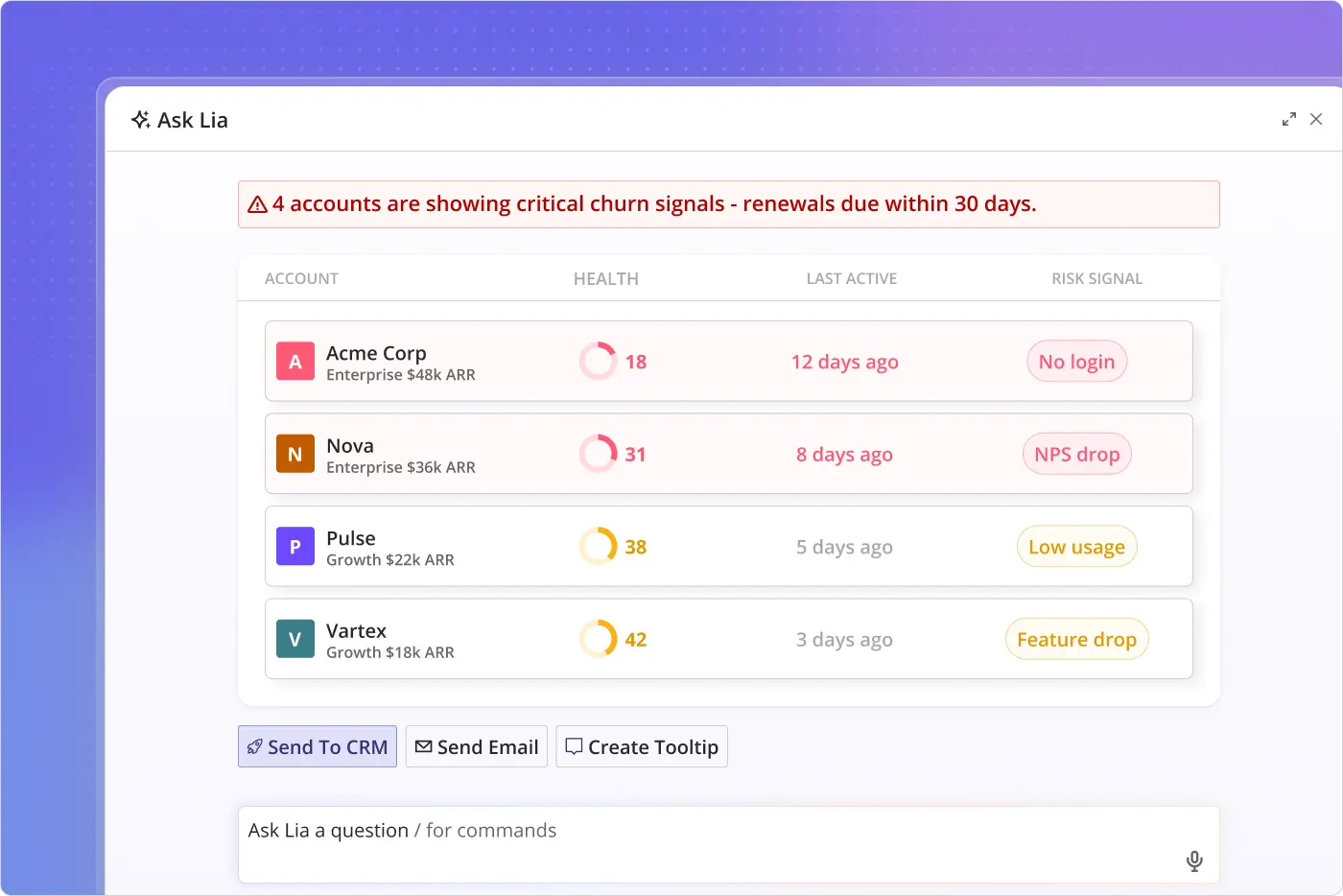
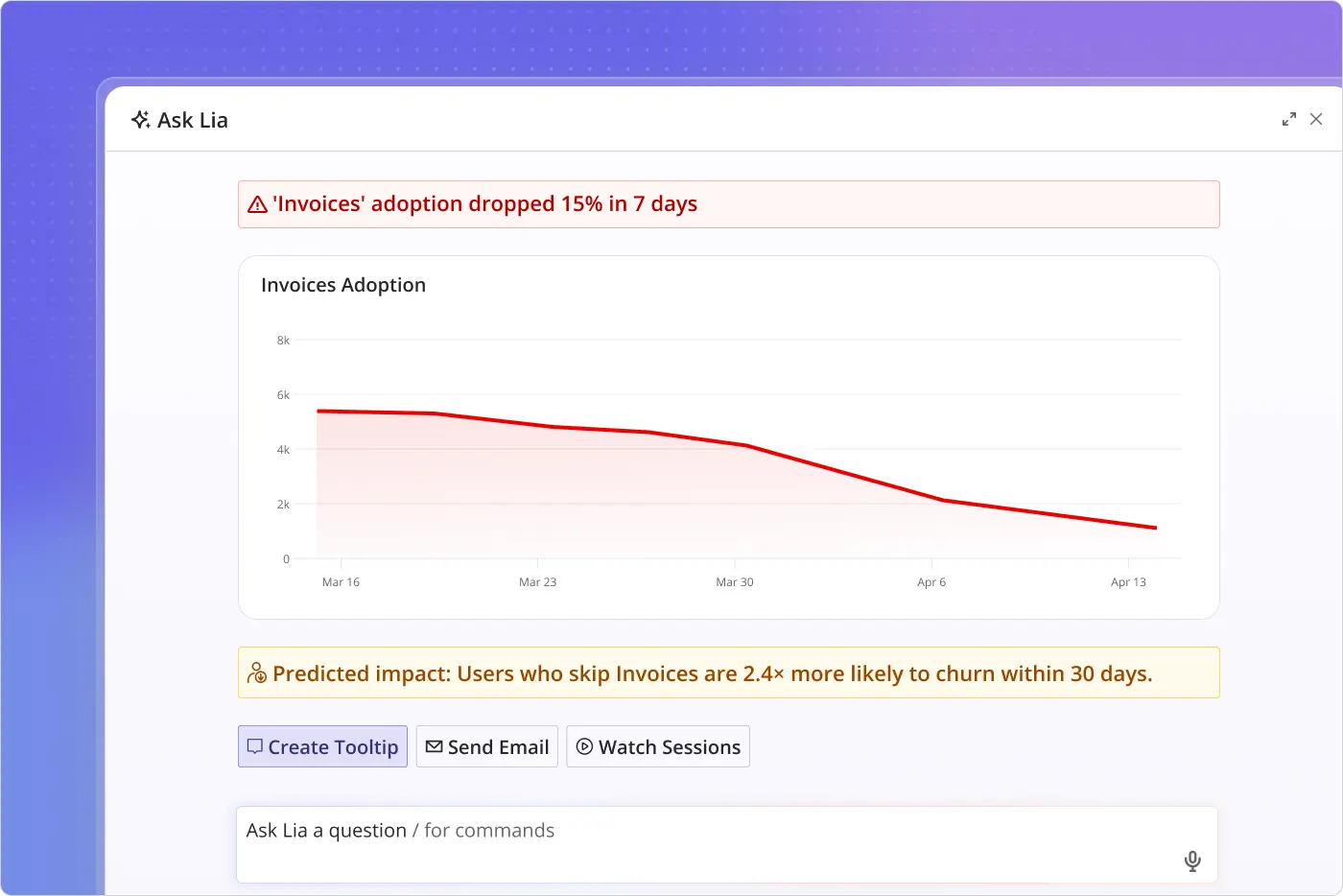
The best way to catch this early is to monitor feature adoption and usage trends over time instead of relying on login counts alone. Lia, Userpilot’s AI agent, helps here. It tracks behavioral changes across accounts continuously, so if there’s a decline at any point, it flags it and suggests a fix, which helps you intervene before the account churns.
Track sentiment signals as leading indicators
The absence of complaints isn’t always a good sign. I’ve learned to be just as curious about customers who suddenly stop raising issues as the ones who contact support every week. Sometimes they haven’t become happier; they’ve stopped expecting the product to improve and started evaluating alternatives.
The same applies to NPS. A score by itself tells you whether sentiment changed, but the comments behind that score tell you why.
So, tag qualitative feedback by theme, using tags such as onboarding, missing functionality, support experience, or pricing, and watch for the same complaint appearing across multiple accounts before it shows up as churn. This is how you identify poor customer service when customers repeatedly mention unresolved issues or a frustrating support experience. It can also uncover pricing issues when feedback shifts from “this product is useful” to “it isn’t worth what we’re paying anymore.”
Tracking themes instead of scores gives you enough time to address underlying issues before customers decide to leave, and Userpilot makes that easier. It lets you combine NPS responses, in-app surveys, and other customer feedback channels into a single view. Lia then groups the recurring themes automatically across that combined view, which makes it easier to spot emerging churn patterns and act before they spread across more accounts.
Talk to at-risk customers directly
Dashboards and health scores tell you which accounts need attention. They can’t replace speaking directly with customers once you’ve identified who’s at risk.
And when you do reach out, start the conversation with a specific observation rather than a generic check-in.
- Generic: How are things going?
- Specific: I noticed your team stopped using the reporting workflow two weeks ago. What changed?
That gives customers something concrete to respond to and often surfaces the issue much faster. They may reveal that the product no longer fits their workflow (bad customer-product fit), that repeated support issues have damaged their trust (poor customer service), or that the value they’re getting no longer justifies the price (pricing that stopped matching the value).
Combine signals into one view instead of cross-referencing several reports
A single metric, whether product usage or feedback, won’t tell you why customers churn on its own.
Take product usage, as an example. It only shows what customers are doing. Same as feedback; it stops at explaining how they feel. You need all the signals together to identify the real root cause before customers leave, and PayPal’s churn team proves the point.
Matt Lerner, a former PayPal growth leader, has told the story in detail. His team first ruled out “good churn”: closed accounts, one-off users, and merchants removed for policy violations. Then came the detail that actually narrowed the problem.
In Lerner’s words:
“PayPal’s B2B revenue is quite concentrated: 90% of revenue comes from 10% of their merchants. So, we focused on revenue churn rather than account churn. That narrowed the problem considerably to maybe a couple hundred merchants per year.”
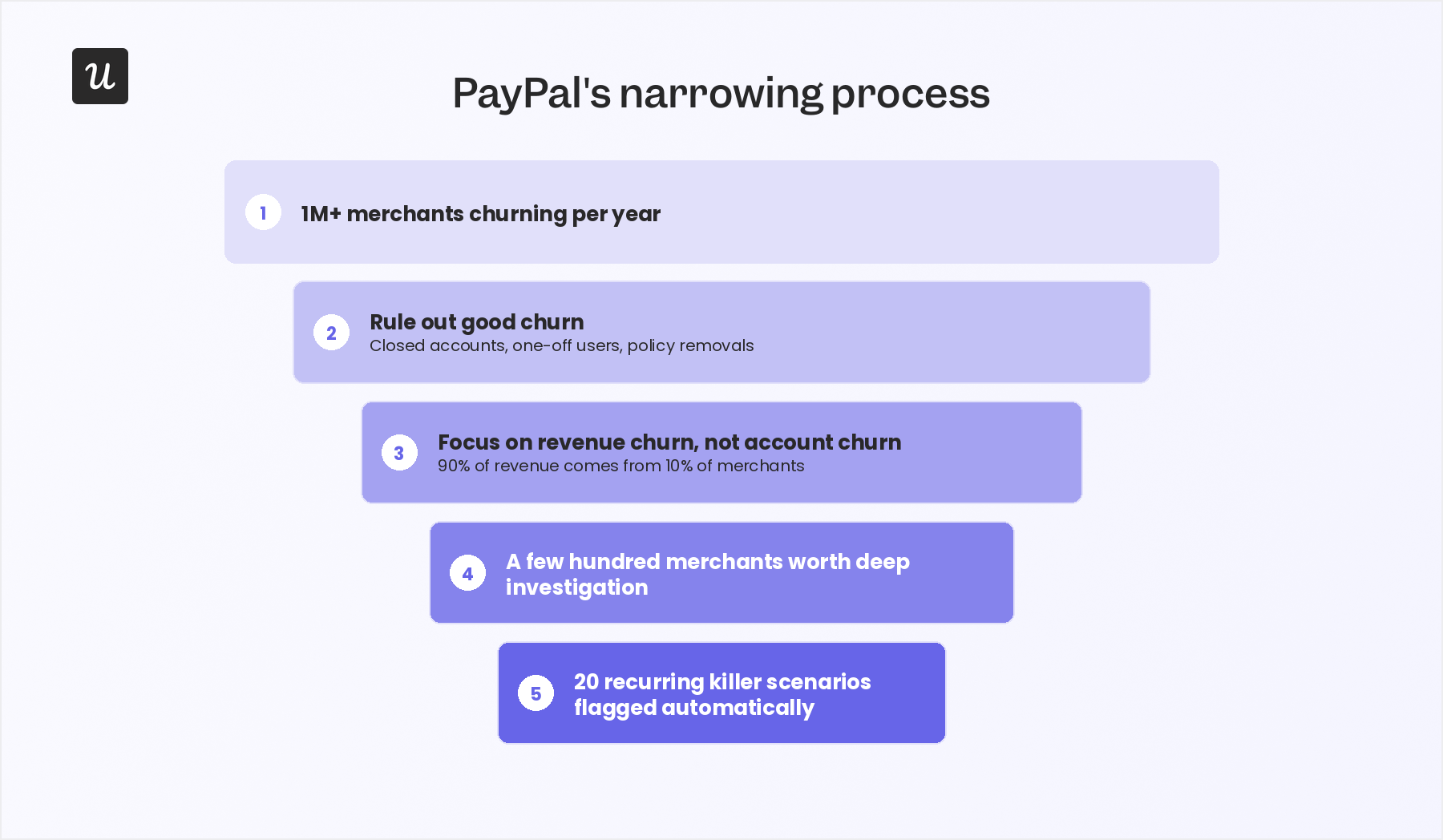
From there, his team looked only at large merchants who’d been with PayPal more than three months and transacted regularly. A diligent intern then spent months reconstructing each of their histories, logging into every internal system, including risk, compliance, and customer service, to see where the team had gone wrong, and grouped the findings into about twenty “killer” scenarios worth flagging automatically.
The same principle applies to SaaS teams. Narrowing several signals into a single view makes it much easier to see which accounts are actually at risk, and this is where Lia is most useful.
Lia removes the need to cross-reference usage reports, NPS exports, and support ticket counts manually for thousands of accounts. It surfaces a compound churn-risk warning that already reflects all three, so the first hour of the week goes to the accounts that actually need it.
What mistakes wreck churn analysis even when you’re tracking the right signals?
These three mistakes are common:
Mistaking seasonal changes for churn signals
Some products naturally slow down every January while customers reset budgets or every August when key users are on vacation. Treating those predictable dips as churn signals makes you chase healthy accounts while ignoring genuinely at-risk customers.
To avoid this:
- Compare customer churn rates year over year (YoY). This separates seasonal fluctuations from actual retention problems.
- Review churn and product usage trends across multiple years. This helps you identify recurring patterns tied to holidays, product launches, pricing changes, or other predictable events.
- Plan proactive engagement for expected slow periods, and prioritize behavioral signals that point to genuine churn risk.
Focusing on account churn instead of business impact
Many teams treat every churned account equally. In reality, losing one enterprise customer can have a much bigger business impact than losing dozens of small accounts.
For example, a company might lose thirty self-serve accounts with little effect on revenue, then lose two enterprise customers and miss its quarterly revenue target. Likewise, churn among freemium users may have far less impact than churn among paying customers.
To avoid this:
- Measure MRR or revenue churn alongside customer churn to understand the financial impact of customer loss.
- Segment churn by customer value, pricing tier, or strategic importance, not just by account count.
- Prioritize reducing churn where it has the biggest impact on revenue, customer lifetime value, or other business-critical goals.
Using the same churn criteria for every customer
Applying the same churn metric or health score to every customer ignores the fact that different segments use your product differently. An enterprise customer logging in twice a week may be getting everything they need. A self-serve customer with the same login pattern may have already disengaged.
To avoid this:
- Define churn criteria separately for each customer segment. Use factors like product usage, lifecycle stage, or account type.
- Analyze churn reasons within each segment instead of treating all customer churn as one problem.
- Tailor your churn prevention strategy to each group. For example, offer budget-friendly plans for smaller businesses and provide dedicated support for enterprise customers.
So, what should change about how you investigate churn?
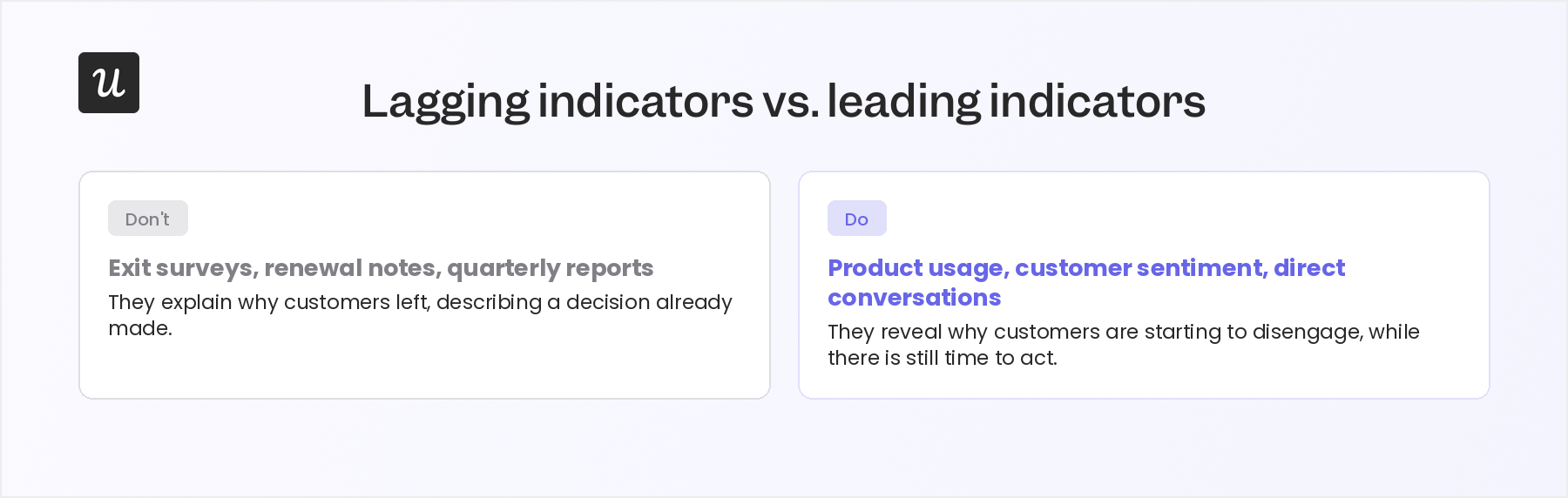
Investigate churn before it shows up as a cancellation. This starts with your approach:
- Don’t: Exit surveys, renewal notes, and quarterly reports. They explain why customers left, but they’re describing a decision that’s already been made.
- Do: Product usage, customer sentiment, and direct conversations. They reveal why customers are starting to disengage, while there’s still time to change the outcome.
Then use that approach to answer three questions: is the customer a poor fit for your product? Have repeated support issues eroded their trust? Or has the value they receive stopped justifying the price?
You can simplify this process with Userpilot. Use it to combine product usage, customer feedback, and account context in one place, and Lia will flag at-risk customers, point out likely reasons, and suggest recovery actions for your team to review.
If you’d like to see how all that works with your own customer data, book a Userpilot demo and we’ll walk through it together.
About the author