Types of Customer Support in 2026: Channels, Categories, and How to Prioritize the Right Mix


Customer support in SaaS is hitting a new expectation floor in 2026. Zendesk’s CX Trends report found that 74% of consumers now expect support available 24/7, and 88% expect faster response times than they did a year ago. That’s a permanent reset of what “acceptable” looks like, and most support operations built just a couple of years ago were not designed to meet it.
The instinctive fix is to simply “add more”. More agents, more channels, more automation. In practice, most teams that go down that path end up with operations that are simultaneously more expensive and less satisfying for customers. The high-touch layer goes up first because it’s visible, the self-service foundation never gets built, and AI gets deployed on interactions where customers needed a human. What actually drives this pattern is organizing strategy around availability rather than sequencing: which types of support to build first, which to automate, and which to protect for human agents.
Get that sequence wrong, and every new investment actually makes the operation harder to run without even solving the underlying problem.
Most articles on this topic make it harder to navigate because they treat two fundamentally different decisions as if they’re the same: channel choice (email vs. live chat vs. phone), which is about customer preference + interaction context, and category choice (proactive prevention vs. reactive resolution) which is about complexity, stakes, and automation viability. Mixing them together in a single numbered list produces a random menu rather than a coherent or actionable strategy.
As the Head of Customer Success at Userpilot, I’ve watched SaaS teams get this prioritization wrong in both directions and wanted to write something more useful than another generic listicle which is why this guide:
- Separates channels from categories so you can make both decisions with the right criteria.
- Introduces a priority hierarchy for the four support categories that determines build order and automation boundary.
- Maps each channel to the support categories it delivers best.
- Gives you a prioritization matrix for deciding where your next investment should go.

Two critical decisions you need to make
Most customer support guides conflate two fundamentally different decisions by presenting them in the same flat list. Choosing between email and live chat involves different logic than choosing between proactive prevention and reactive resolution. These aren’t comparable choices, and a framework that treats them as equivalent leads teams toward the wrong investments.
Channels are about access (where customers find help and what interaction format they prefer): A younger SaaS audience skews toward in-app or live chat, while enterprise buyers expect phone hotlines and dedicated CSMs. Channel choice is driven by customer satisfaction benchmarks, customer expectations, and your product’s complexity.
Categories are about ownership and automation viability: Proactive support anticipates problems before they become customer inquiries. Self-service equips customers to resolve issues without a human agent. AI-deflected support routes high-volume, clearly scoped queries to AI before they reach a live agent. High-touch human support covers the interactions where relationship quality directly affects revenue. Category choice determines who, or what, delivers the support and whether automation is viable at all.
This means you only need to make two (very important) decisions:
- Channel decision (email, phone, social media, live chat, in-app, community): Where do customers find help, and in what format?
- Category decision (proactive, self-service, AI-deflected, high-touch human): What kind of support is needed, and should a human or AI deliver it?
Most support strategies fail not because teams chose the wrong channels, but because they never made the category decision clearly. This leads them down the wrong path, automating the wrong interactions, and keeping humans on work that didn’t require them. A customer service strategy organized purely around channels will layer in new options without ever answering which interactions require humans and which don’t. Organizing around both dimensions answers both questions and determines the order in which to build.
Four support categories (ranked by priority)
The four categories aren’t equally valuable and don’t carry equal urgency. Teams that build Tier 4 before Tiers 1 and 2 pay more to support customers than they need to. As such, it’s crucial to have a priority hierarchy, from highest return to highest cost.
Tier 1: Proactive support, build first, automate fully
Proactive customer support is prevention-first. Rather than waiting for a user to hit a problem and open a ticket, it runs user behavior analysis, identifies friction before it becomes a complaint, and surfaces guidance at the moment it’s needed. It’s the highest-return category in the stack because it eliminates support interactions before they exist.
The automation viability here is high. AI can watch behavioral signals across your entire customer base simultaneously, trigger contextual guidance at the first sign of confusion, and use churn prediction to surface at-risk accounts to your CS team before the customer decides they have a problem. No human team can monitor every user session in real time the way automation can. A common mistake is treating proactive support as a nice-to-have and building the visible reactive layer first.
Every in-app guidance flow you build at Tier 1 is a support ticket that never gets created, which is the difference between teams constantly firefighting and one that can handle the complex work that requires human judgment.
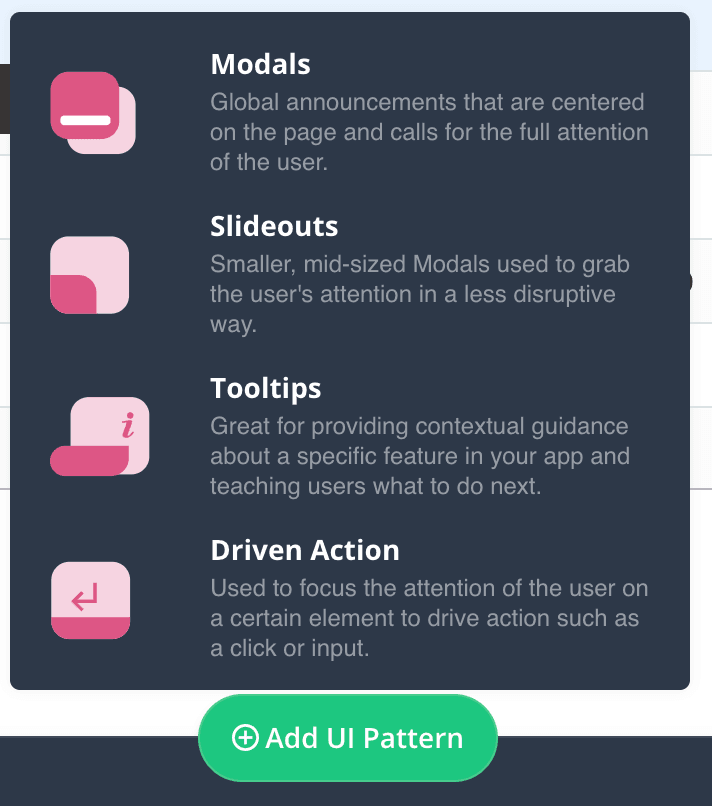
Userpilot fits naturally into Tier 1 through behavioral triggers, contextual tooltips, in-app walkthroughs, and user onboarding checklists. These UI patterns flesh out the infrastructure that catches confusion before it becomes a ticket. Lia, Userpilot’s AI agent, goes a step further by identifying accounts showing early churn signals and surfaces them to your CS team before the customer ever contacts support. Proactive support at its most leveraged when the problem gets solved without the customer knowing there was one.
Tier 2: Self-service, build second, automate the structure
Self-service support is the foundation that everything else sits on. According to Harvard Business Review, 81% of customers attempt self-service before contacting support. If your knowledge base doesn’t answer the question, those customers don’t disappear. They open tickets, call in, or churn quietly.
Unlike Tier 1, the automation dynamic here is structural rather than behavioral. AI-powered search, dynamic content suggestions, and in-app resource centers can surface the right answer without a human. Content accuracy, though, still requires human investment to stay reliable. A knowledge base full of outdated articles produces worse outcomes than no knowledge base at all. Customers trust it and act on whatever it says. Even a single frequently asked question answered incorrectly generates more support contacts than if the article didn’t exist.
In-app self-service has a specific advantage over external knowledge bases for SaaS: it meets customers at the point of confusion, in the location where they’re already working. An external help center requires leaving the product, searching, interpreting, and (hopefully) returning. In-app resource centers with contextual search remove all four of those steps. Userpilot’s in-app resource center handles the delivery layer. AI-powered search surfaces the right article without the user having to browse, while content engagement data shows you exactly where self-service breaks down.
For tasks that can’t be answered with static text, an interactive walkthrough guides users through the steps inside the product itself. The result is a self-service layer that improves over time because you can see what it’s failing to answer.
Tier 3: AI-deflected support, build third, with guardrails
AI-deflected support is where chatbots and agentic AI intercept high-volume, clearly scoped customer queries before they reach a human agent. In 2026, this tier has expanded considerably, with leading AI support platforms now resolving 70% of tickets autonomously, according to WifiTalents. This includes handling billing questions, password resets, feature how-tos, and navigation help.
The critical distinction in this tier is between deflection and suppression. Deflection is when the customer gets their answer without involving a human. Suppression is what happens when the AI can’t help, and there’s no visible escalation path, so the customer abandons the interaction instead. These outcomes look similar in your ticket metrics but produce opposite effects on user retention. When deflection works, costs fall and satisfaction holds. Suppression just hides demand while your retention number deteriorates quietly behind it.
Teams that deploy AI deflection without first building Tier 2 get suppression. The fix is almost always upstream by building out more complete self-service content for the AI to retrieve accurate answers from and ensure a cleaner handoff to human agents for queries outside its scope. If you’re seeing low resolution rates and high repeat contacts in your AI support channel, Tier 2 content gaps are the likely culprit.
Tier 4: High-touch human support, build last, protect always
High-touch customer support covers the interactions where relationship quality directly affects ARR: complex implementations, enterprise renewals, customer churn escalations, and any situation where the customer’s outcome depends on a human who understands their specific context. It’s the most expensive support category, and the one most SaaS teams build first because it’s the most visible need. Building Tier 4 before Tiers 1, 2, and 3 is the most common prioritization mistake I see in SaaS.
Every resource invested in high-touch support before the automatable categories are built is more expensive than it needs to be.
Your best people end up answering questions that self-service or AI could have handled, which leaves them with less capacity for the work that actually requires their judgment. AI’s role in Tier 4 is preparation, not replacement. Account health summaries, usage analytics, risk signals, and feature adoption metrics give your CSM the context they need before a renewal or escalation conversation starts. AI preparation means the customer gets a human who arrives informed, which is the difference between a reactive call and a proactive one.
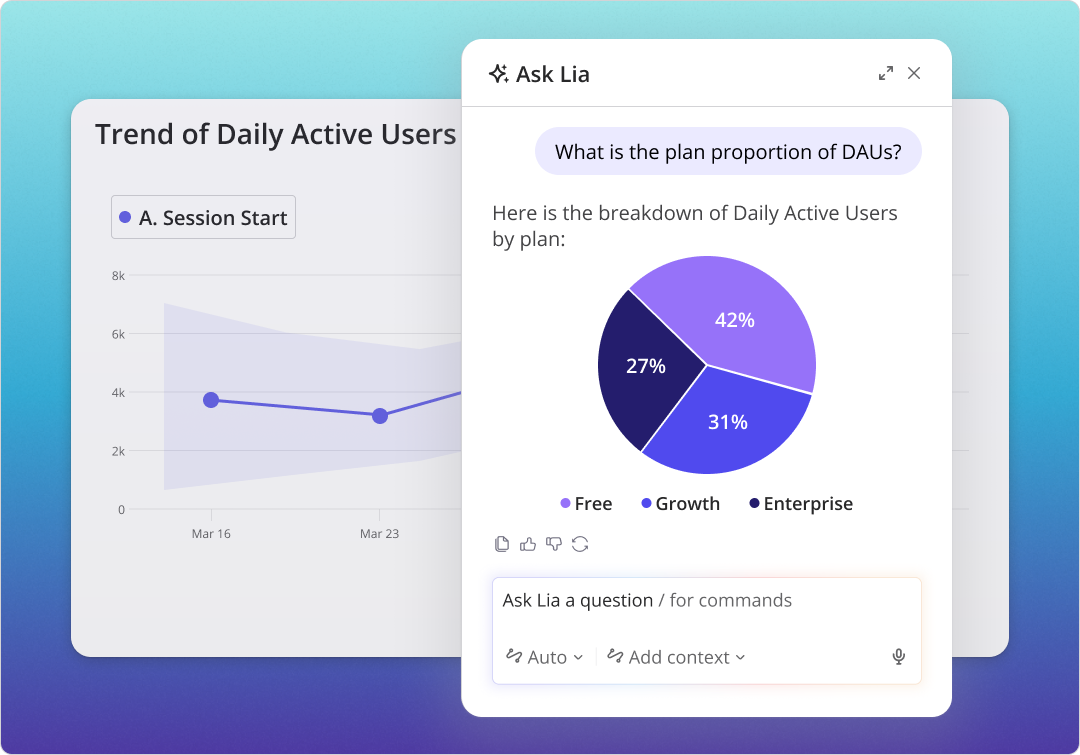
During high-touch conversations, your CS team shouldn’t be flying blind. Lia surfaces real-time account health data mid-call, so the rep knows exactly what the customer has and hasn’t done in the product before the conversation starts. Pair that with product usage metrics for renewal briefings or churn risk signals flagged in advance, and your team now walks into every high-stakes conversation with context instead of guesswork.
Customer service channels
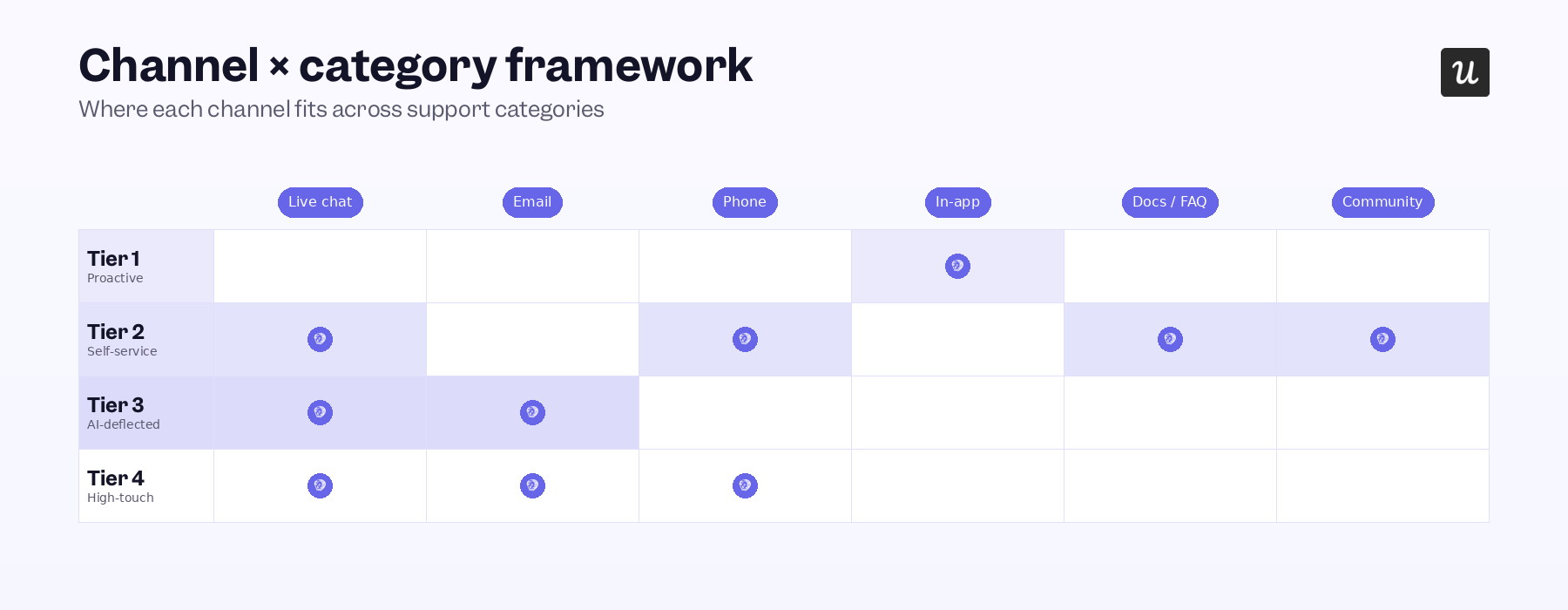
With the four categories clear, the channel question becomes more tractable. Each channel has natural strengths and isn’t equally good at delivering every support category. What follows maps each major customer service channel to the categories it serves best for its updated role in 2026.
Email support
Email support remains the backbone of most SaaS support operations, with approximately 90% of B2B organizations using it as a primary customer service channel. Triage, sentiment detection, priority routing, and suggested responses now all happen before a human agent opens the message. The practical effect: support teams spend less time sorting and more time resolving. For Tier 3 queries, a full response can be drafted by AI and routed for human review before sending, cutting response time without removing oversight.
Email threads in Tier 4 provide the documented record that complex enterprise relationships require: a trail of what was agreed, committed, and communicated. The channel’s weaknesses are structural and unchanged. Response times are slower than live chat or phone, and back-and-forth threads on complex issues accumulate quickly. For queries that need immediate resolution or visual demonstration, route customers to live chat or in-app support instead.
Phone support (IVR)
Phone support and interactive voice response (IVR) remain central to Tier 4 support in SaaS, particularly for enterprise segments where customers expect direct human contact. AI-powered call routing has improved this tier through real-time customer histories, account tier context, and issue type all being used to route calls before a human picks up, which reduces wait times while preventing misrouting. IVR handles Tier 3 well. Automated menus resolve billing questions, basic account information, and common troubleshooting without involving a human agent, which keeps your team available for the interactions that require one.
Menus deeper than three levels consistently frustrate customers and push them toward abandonment rather than resolution. While the phone channel doesn’t integrate directly with Userpilot, teams using it will still benefit from the upstream data that matters most. Product health metrics surfaced to your CSM before a renewal call transform a reactive interaction into a proactive one that is likely to yield better outcomes. These real-time metrics provide enough context to ensure your human agents are always one step ahead instead of struggling to catch up.
Social media support
Social media has become a Tier 3 customer service channel by default. Customers use it for high-volume, lower-complexity queries and public complaints, all while expecting fast responses. Omnichannel support platforms now pull social messages into a unified inbox alongside chat and email, with AI handling sentiment sorting and suggested response drafts to keep response times consistent across channels. The structural advantage is that public responses to complaints build customer trust and transparency at a scale that private channels can’t match.
A well-handled complaint on a public thread becomes a positive signal for every potential customer who sees it.
The structural disadvantage is equal and opposite, as any negative interactions that are handled poorly compound faster on social media than in any other channel. Keep Tier 4 interactions out of this channel as the format isn’t suited to the complexity, and the cost of a public misstep is too high to risk. Our prioritization matrix at the end of this guide will show you how to weigh these decisions by considering both the customer stakes at play and automation viability for a particular support type.
Live chat support
Chatbot-first triage handles Tier 3 by intercepting high-volume simple queries before a human agent sees them. For Tier 4, live chat with a human agent provides real-time resolution without requiring a phone call. This is likely why live chat satisfaction rates average 73%, compared to 61% for email and just 44% for phone support. This customer journey touchpoint reduces friction because customers can get help without leaving the product or picking up the phone.
Agents can also handle multiple chat threads simultaneously, making live chat more cost-effective than phone for medium-complexity queries. The caveat: scripted responses or clearly automated replies erode that advantage quickly, and customers who feel they’re talking to a bot when they expected a human lose confidence in the channel. If live chat volume is high in categories like “how do I” or “where is this feature,” that’s a signal your Tier 2 self-service content has gaps.
Customer friction that surfaces in live chat is almost always friction that proactive or self-service support should have caught first.
In-app support
In-app support is the most under-deployed channel in SaaS and the one with the highest return per dollar invested. Tiers 1, 2, and 3 all live here. Every proactive tooltip, self-service guide, and AI-deflected query that happens inside your product is a support interaction that never required the customer to leave what they were doing, switch contexts, or wait for a human response.
The advantage over external channels is context. When a user gets confused at step 3 of an in-app onboarding flow, a feature activation tooltip triggered by that specific behavior arrives at the exact moment and location of confusion. An external help center article on the same topic arrives after the customer has already decided they have a problem, requires them to leave the product, and asks them to translate general guidance into their specific situation.
Userpilot’s in-app support stack includes behavioral triggers, interactive walkthroughs, an AI-powered Resource Center with conversational search, and Lia for natural language queries. You can also embed a video for tasks that require visual demonstration. Content engagement analytics in Userpilot show exactly which resources customers use and where they drop off, so gaps can be closed without guessing.
Community and forums
Community support is a Tier 2 channel that compounds over time as a self-service and SEO asset. Building a space where customers answer each other’s questions, share knowledge, and surface novel use cases creates a resource that grows with your user base rather than staying static.
The compound effect is the genuine advantage. A knowledge base article requires ongoing maintenance and represents one person’s understanding of a problem. Community threads where experienced users debate the best approach to deliver information density that a single-authored article rarely matches, surfacing perspectives your support team wouldn’t have thought to document. The primary constraint is response latency. Communities are asynchronous, and a user who’s stuck right now won’t wait hours for a reply.
Community works best as a supplementary self-service resource for users in exploration mode rather than crisis mode, so be sure to route urgent queries to Tier 3 AI deflection or live chat first.
Omnichannel customer support
Omnichannel customer engagement is the integration layer that prevents customers from having to repeat their history when they switch between channels.. A customer who emailed last week and opens a live chat today should have that context immediately available to the agent. Without it, every channel switch is a new conversation, and your customer data sits in silos. In 2026, omnichannel needs to span customer service channels that didn’t exist five years ago: in-app, mobile, social, and AI-native interfaces all need to feed into a unified view of the customer’s history and current state.
A B2B customer experience that treats these touchpoints as isolated interactions produces inconsistency at every handoff. The digitization of customer experience can help connect these interactions, but the investment required to maintain a consistent customer experience across all channels is no joke. For most growth-stage SaaS teams, the practical path is incremental, where you start with the two or three channels that carry the highest volume, connect them into a shared customer view, and expand from there. Full omnichannel maturity is a destination that you can work towards rather than a hard pre-launch requirement.
Building the right customer support mix with prioritization
With the four categories understood and each channel mapped, the remaining question is where to invest next. Most SaaS support teams are constrained by limited headcount, limited budget, and a backlog of needs that all feel equally urgent. The prioritization matrix cuts through that backlog by giving every investment decision two clear axes.
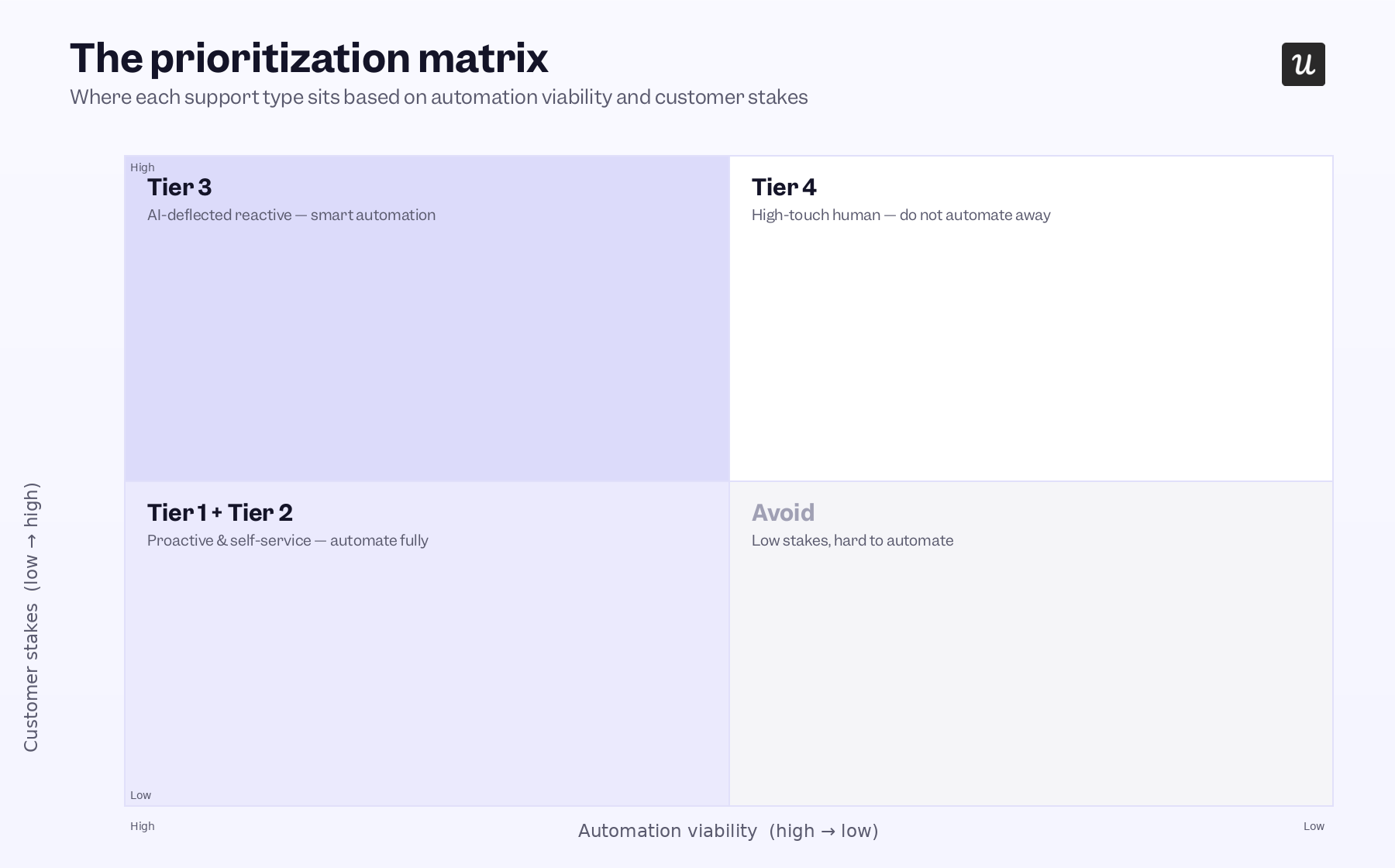
The Y axis measures customer stakes (how directly this interaction type affects the customer’s outcome, satisfaction, and the company’s revenue) while automation viability (how reliably AI or self-service can resolve this category without a human. runs along the X axis.
Those two dimensions produce four quadrants that map directly to the four tiers:
- High automation viability, lower stakes: Tiers 1 and 2. Build and automate these first. This is where the highest volume of support requests lives, and AI handles it well. Every hour invested here reduces the volume reaching Tiers 3 and 4.
- High automation viability, medium stakes: Tier 3. Deploy AI with guardrails: clear escalation paths, transparent handoffs, human review on edge cases. Track resolution rate, not just deflection rate. The two metrics measure very different things.
- Low automation viability, high stakes: Tier 4. Protect these interactions for human agents. AI’s job here is to prepare the human, not to replace them.
-
If you haven’t built Tiers 1 and 2, every resource you invest in Tier 4 is more expensive than it needs to be. And if you automate Tier 4 interactions (enterprise renewals, churn escalations, complex troubleshooting for high-ARR accounts), the savings you see today will show up in your cohort retention analysis six months later.
Run every new support investment through this matrix: which tier does it belong to, and does the investment strengthen that tier or skip over the foundations below it? A scalable customer support operation is built from the bottom up. The teams that meet customer expectations in 2026 built the automatable tiers first, protected the human-essential tier, and ended up with a support operation that is better at satisfying customers while being more sustainable for the business to run.
Support operations that actually scale
Most SaaS teams frame their customer support problem as a resourcing problem: not enough agents, not enough channels, not enough automation. The teams that are actually meeting the expectations of today’s customers have figured out that it’s a sequencing problem. They built the automatable tiers first, kept humans for the interactions that require them, and ended up with support that is more satisfying for customers and more sustainable to operate.
The framework here (separating channel decisions from category decisions, building the four tiers in priority order, using the matrix to evaluate each new investment) is not a one-time restructuring project. It’s the lens every support decision should go through as your product and customer base grow. If you’re building out Tier 1 proactive support and Tier 2 self-service, Userpilot is built for exactly that. Book a demo so we can show you how in-app behavioral triggers, the resource center, and AI agent Lia map to your specific support categories and customer service strategy.
About the author