Userpilot vs Intercom: Which Platform Is Better for Product-Led Growth?



For product-led growth (PLG) companies, a strict Userpilot vs Intercom comparison is a false dichotomy. Although both platforms can implement in-app support and guidance, their approaches differ wildly.
Userpilot focuses more on proactive, in-app support that lets you offer help before users ask for it. This happens throughout the product experience, with analytics and AI agents turning behavioral insights into interactions.
Intercom, originally built around reactive support, boasts a thorough help desk and AI tools that allow you to close tickets with fewer resources. Proactive support features sit on top of this conversational stack.
Successful PLG motions optimize for both approaches. But Userpilot has more interconnected tools and integrations that enable product adoption and retention at scale. I’ll show you the key differences between us and Intercom in this context, and then we’ll consider whether you need a path where they combine.
Executive summary
- Proactive vs reactive support: Userpilot enables proactive, self-serve support to prevent friction, while Intercom resolves common issues through AI-powered conversations and ticketing.
- Product and support analytics: Tracking deep product usage through funnels and paths is possible with Userpilot. With Intercom, the focus shifts to customer service performance metrics.
- Userpilot as a unified product growth platform: PLG teams optimize the entire product experience, from onboarding and engagement to retention, without switching between tools.
- No surprise costs down the line: Userpilot is MAU-based, compared to Intercom’s hard-to-predict pricing model (combined seat pricing and usage-based charges). Vendr estimates Userpilot’s median annual cost at $18,000 vs Intercom’s $36,577.

What are the key differences between Userpilot and Intercom?
Userpilot combines agentic analytics, in-app engagement, and user feedback to improve product adoption. Intercom is primarily a customer support hub offering live chat, omnichannel support, and AI workflows, with proactive messaging as an add-on.
Both come from distinct product categories. So, to make a fair comparison, we must look at the PLG use cases where their features overlap. Here’s an overview:
| PLG use case | Userpilot | Intercom | PLG metric |
|---|---|---|---|
| In-app support |
|
|
Customer retention |
| In-app guidance |
|
|
Product adoption |
| Analytics & setup |
|
|
Product adoption |
| User feedback collection |
|
|
Adoption and retention |
Userpilot vs Intercom for in-app support
At Userpilot, we treat frictionless user experience as part of support. To make this happen, you can make self-service content accessible through an in-app Resource Center. This helps users resolve common issues on their own without waiting on an agent, who can then handle high-impact support tickets.
In contrast, Intercom relies on fast communication to deliver support. You can build an in-app live chat where users can talk to Fin, its AI agent, to resolve tickets without human intervention. Fin can escalate issues to support reps when needed.
How Userpilot handles in-app support
When you need to serve unlimited users simultaneously, our proactive support works better than 1:1 support conversations.
Start by weaving the following capabilities into your product experience:
- Contextual guidance: Trigger relevant in-app guides (e.g., tooltips, walkthroughs, hotspots) when users are stuck, adapting to their behavior.
- Self-serve support: Build an in-app resource center that looks native and allows users to search knowledge base content inside your app.
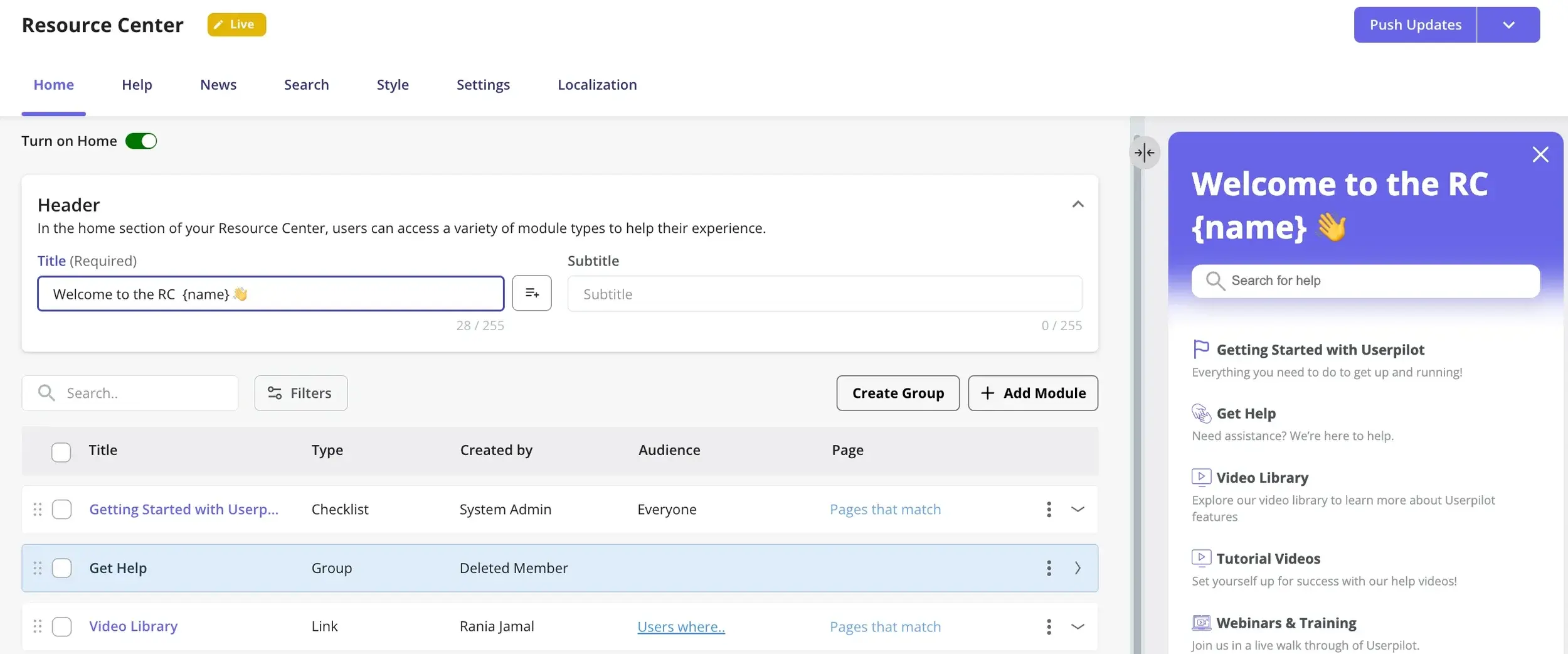
- Targeted support articles: Personalize the resource center to show articles that are relevant to the user’s current page or previous activity. For instance, Osano’s CEO Arlo Gilbert said they improved overall UX by implementing this on their complex data privacy platform:
When showing 90% of the questions that people ask on this page, we’ve seen a reduction in tickets and chat requests by 25%. This helped us reduce support costs and provide a better experience for the end-user because they can self-serve and ask the questions right then.
How Intercom handles in-app support
Intercom comes in when you need to connect a conversation to a trackable support ticket. Every ticket serves as a file that provides context for support teams (customer-related) and product or engineering teams (software-related).
Layered on top of this ticketing system is Intercom’s proactive support:
- Proactive guidance: Launch in-app guides like banners, tooltips, and checklists before users ask a question.
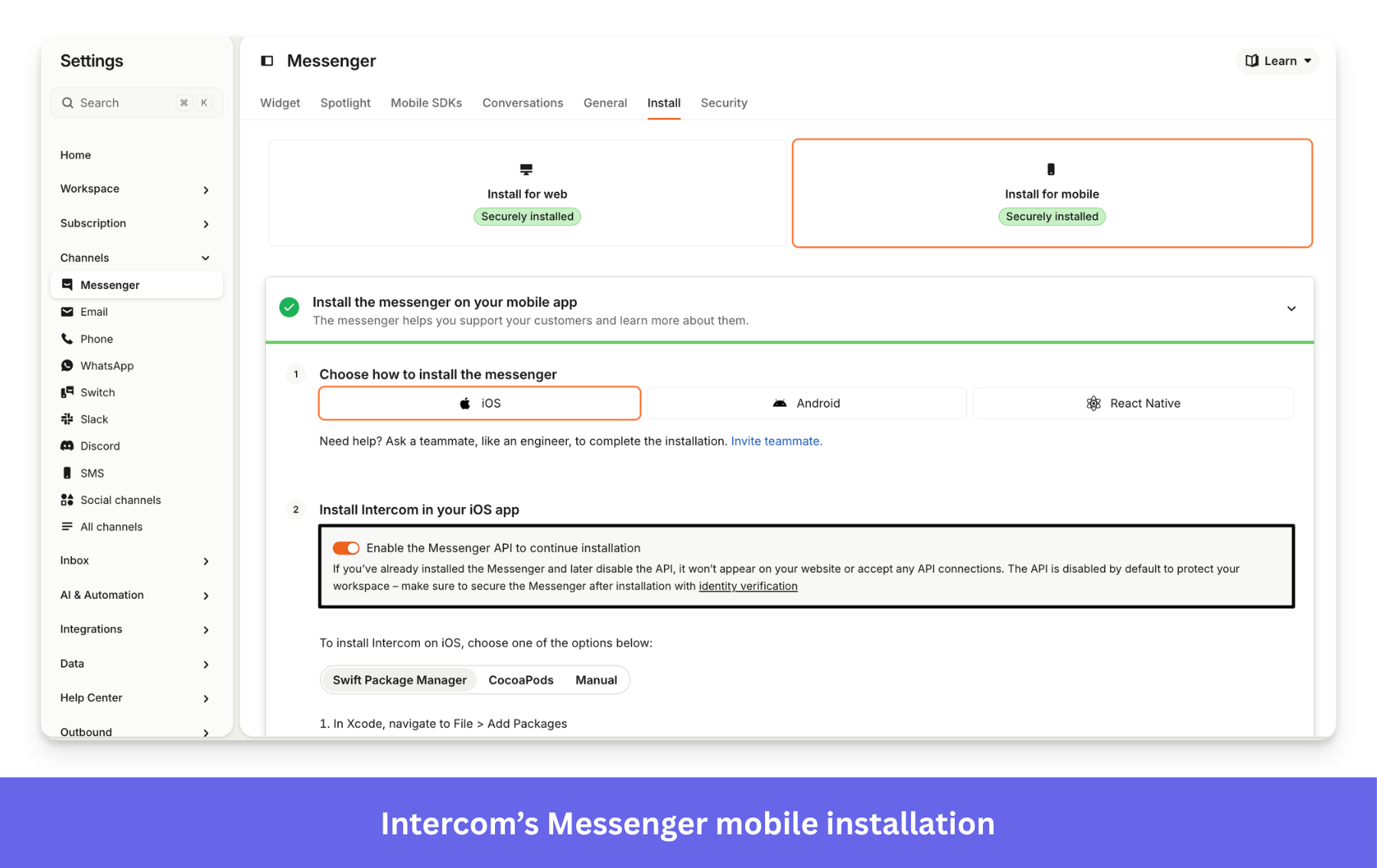
- In-app, AI-powered live chat (Messenger): Give users access to the live chat 24/7 without opening another tab. With Fin AI, this tool can resolve issues on its own. This way, humans are brought into the loop only when Fin fails to resolve the ticket.
- Knowledge base: Host your knowledge base inside your web or mobile app via Messenger, so users can self-serve.
🚀 Pro tip: Let Userpilot’s rich behavioral UI and automated self-serve options absorb your support volume. Then use the Userpilot-Intercom integration to embed live chat in Resource Center for high-impact conversations only, such as enterprise users, to keep support costs down.
Userpilot vs Intercom for in-app guidance
Just as Userpilot isn’t a substitute for a help desk, Intercom can’t replace a dedicated product adoption platform.
Compared to Intercom’s in-app product tours with audience-based targeting, Userpilot’s engagement layer is more sophisticated. It can trigger personalized guidance based on user behavior, includes more UI patterns, tracks in-app events without technical instrumentation, and requires no coding skills to implement.
This is key to product adoption because if users get stuck or fail to adopt a core feature, they might churn silently without ever reaching out for help.
How Userpilot handles in-app guidance and product adoption
With our in-app engagement tools, you can design onboarding experiences or feature discovery flows that appeal to your users.
Here are a few ways to guide users to action with Userpilot:
- No-code builder: Creating flows doesn’t require any technical skills. Plus, more UI patterns mean more ways to influence user behavior, e.g., hotspots and interactive walkthroughs that prompt users to click and engage with specific elements.
- Behavioral segmentation: Beyond grouping users by CRM data, profiles, or support interactions, you can segment them by behavior. This allows you to trigger guides when users fail to activate, feel stuck, or show churn signals.
- Personalization: Using user, company, and behavioral data, you can tailor onboarding to each user’s context, like their job or lifecycle stage.
- Product analytics integration: With engagement and product analytics under one roof, you can find flow interaction data in your analytics reports. It’s then easier to correlate flow performance with funnels and other metrics (no need to stitch product adoption software together with a separate analytics tool).
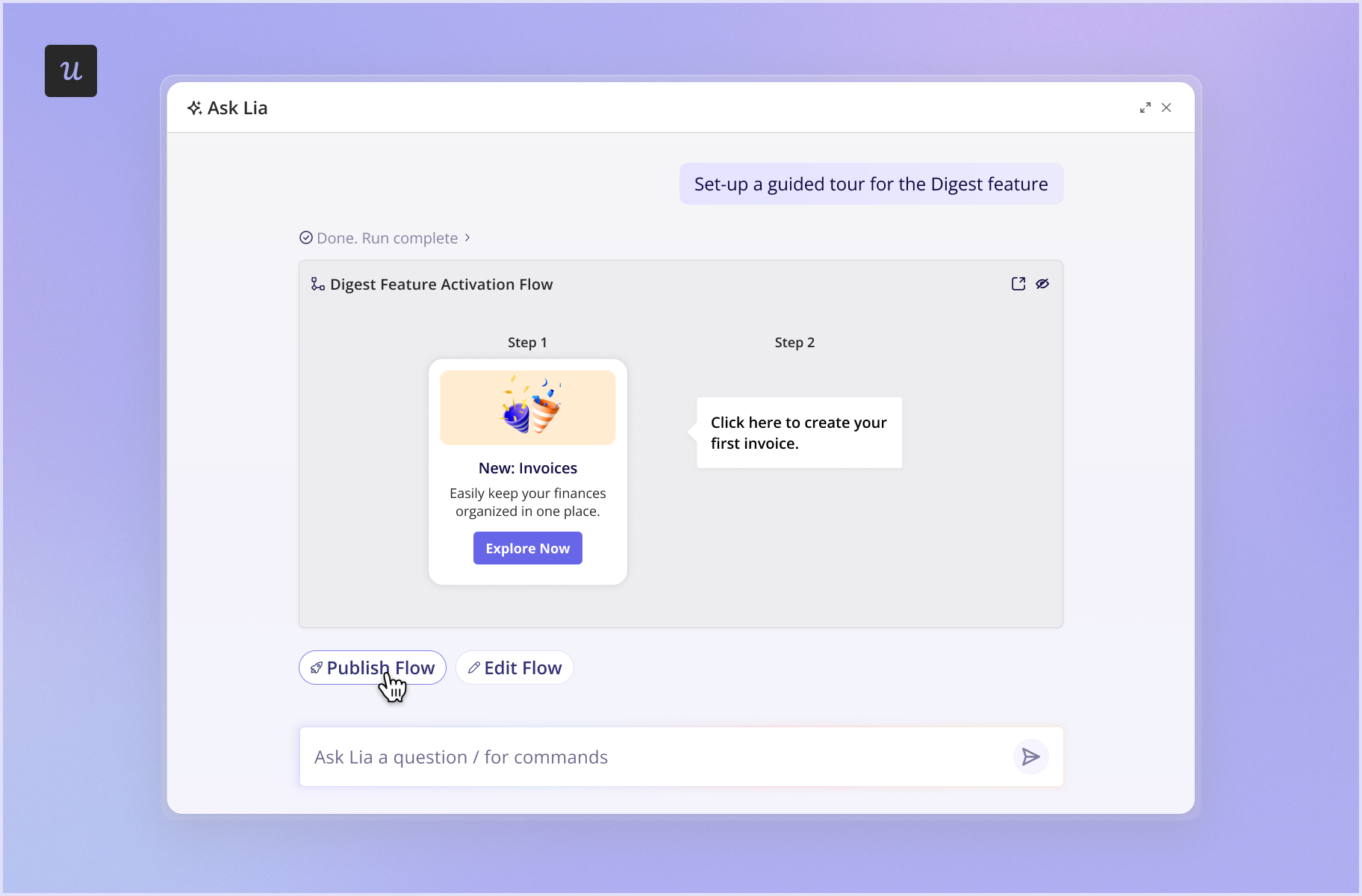
For example, you can trigger a tooltip if a user fails to complete a task in a core feature. What’s more, Lia, Userpilot’s AI agent, can surface users experiencing silent friction, suggest a fix, and draft the flow accordingly.
How Intercom handles in-app guidance depth
Intercom’s advanced in-app guidance capabilities are only available through its Proactive Support Plus add-on. You need a core plan subscription to purchase this add-on.
For those who want to bundle support and targeted messages, Intercom offers:
- In-app guidance: Create outbound messages across your product, including product tours, mobile carousels, surveys, and onboarding checklists. However, for these to work, you must enable the chat widget called Messenger in your application.
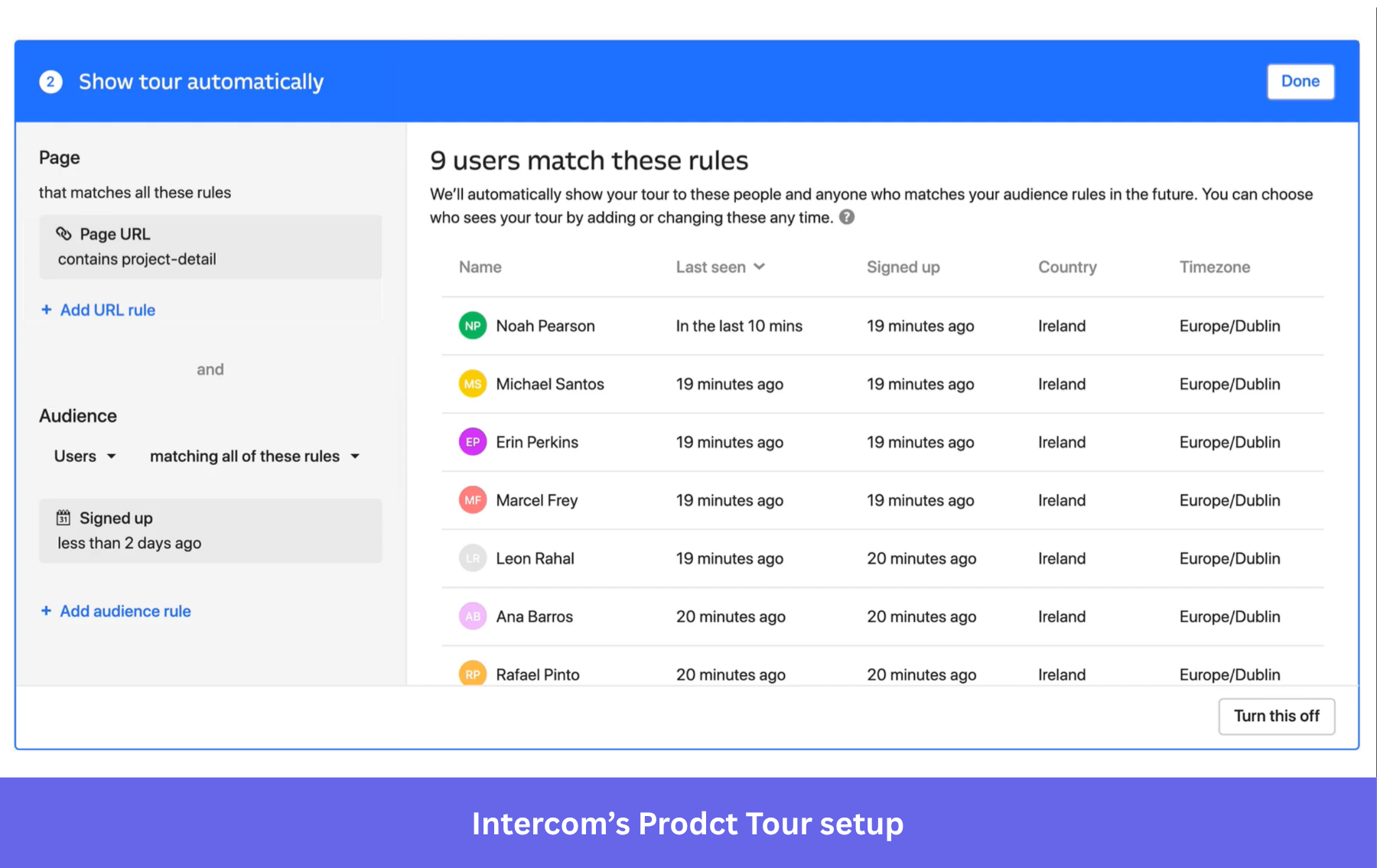
- Audience-based targeting: Intercom can use customer data from internal and external sources like your support team and CRM. This way, you can deliver specific onboarding guides, for example, during users’ first sessions with your product.
- Personalization: Although not as advanced as Userpilot, Intercom can also personalize guides based on the user’s profile and their in-app events (which require technical setup).
While the Proactive Support Plus add-on can deploy no-contact engagement, it won’t detect issues like users dropping off or core feature usage declining over time. It does very little to identify and fix in-app friction.
Also, if you’re managing a complex product with many pages and dynamic URLs, Intercom’s add-on might not work for you. Take it from the Talana team, who switched to Userpilot after building onboarding flows that fell short of serving their customers’ employees. According to María Ignacia Videla, Talana’s Head of Communication and Content:
In Talana, we have a lot of pages, URLs, and they all change depending on the customer and the company. And this was something that Intercom was not able to offer.
Userpilot vs Intercom in analytics depth and setup effort
Product teams rely primarily on Userpilot’s analytics to improve the user experience and support roadmap decisions.
Meanwhile, Intercom analytics tracks metrics across the entire support platform, including customer service interactions, response times, and completion rates. So it’s also more appropriate for support teams that use it as a help desk, too.
Here, it matters to understand your needs and the questions you want answered. For instance, if you’re optimizing activation rates, you want to track the metric itself, understand the why behind drop-offs, and implement decisions that can move the metric up.
Userpilot’s key features for analytics
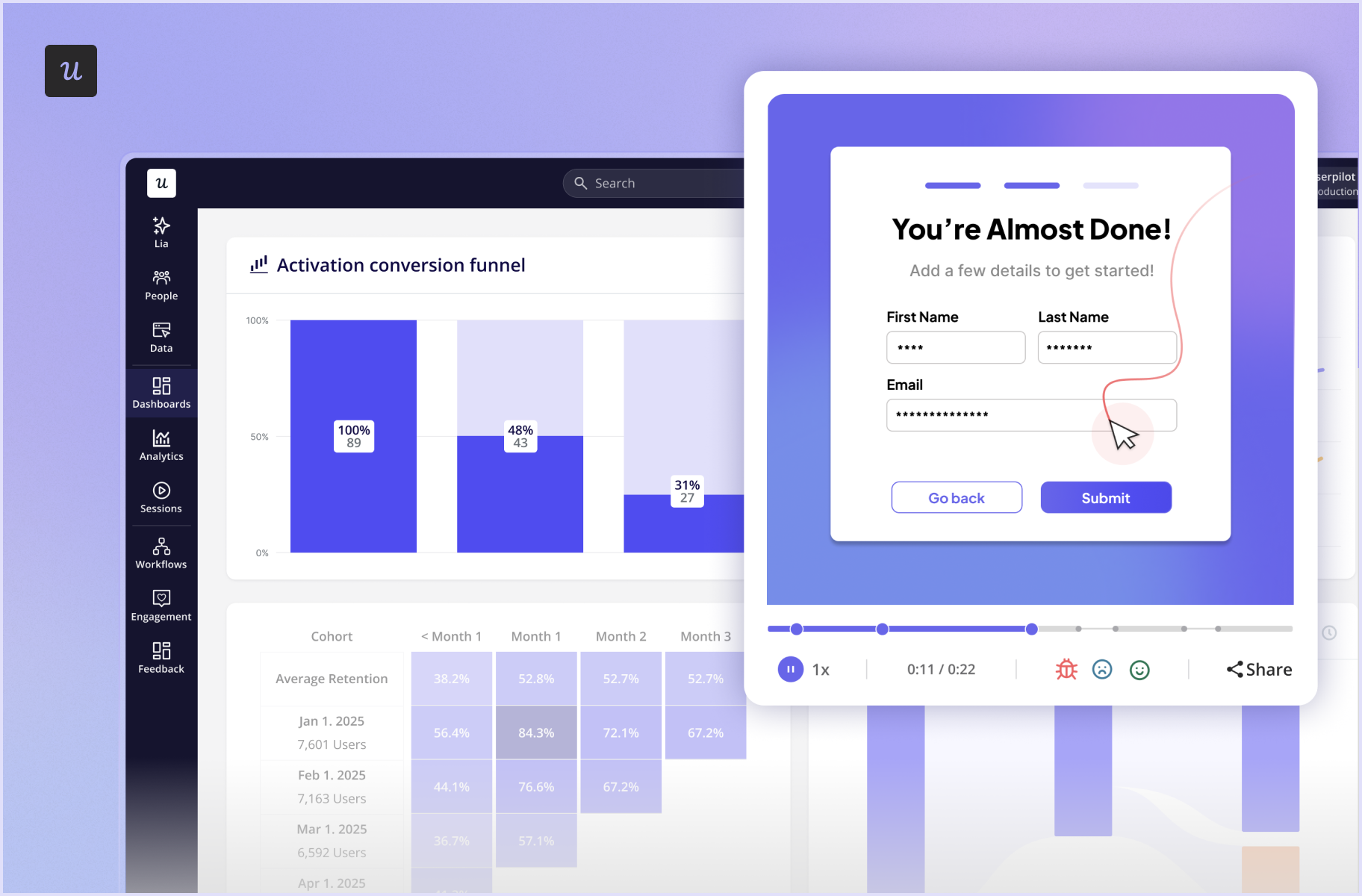
Our connected tools allow you to spot a problem in analytics, confirm it visually in a replay, and then deploy a fix (like a tooltip or flow) in the same system. Lia can also run this whole loop by itself. It can even generate content you can use instantly.
Informed by real behavioral evidence rather than guesswork, your team can then confidently make roadmap decisions and onboarding improvements.
This is how we collect and process product data:
- Autocaptured events: Userpilot’s autocapture tracks users’ clicks, text inputs, and form submissions automatically with little technical setup (just install the SDK). This enables you to visualize how users interact with your guides right from day 1.
- Actionable behavioral reports: Tools like funnel charts, path analysis, and session replays help you identify where users experience friction. You can then act on it, such as building in-app guidance or prioritizing a UI redesign.
- Consolidated analytics for product growth: Since Userpilot combines analytics with segmentation, feedback, and engagement, the entire loop happens within a single platform. Put these all together and shorten your time to action, just like how the team at Attention Insight did. After uncovering friction points at key activation steps, they quickly introduced in-app experiences like dedicated flows and resource center.
After boosting activation to +47%, Chief Marketing Officer Darius Jokubaitis had this to say:
Userpilot offered us the most content creation possibilities combined with the most extensive analytics for an affordable price.
🚀 Pro tip: Bring product context, including behavioral signals, into the AI tools your teams use via the Userpilot MCP. If you’ve built agents, you can also ask whether your target users are discovering, engaging with, and finding value from them with Agent Analytics.
How Intercom handles analytics and setup
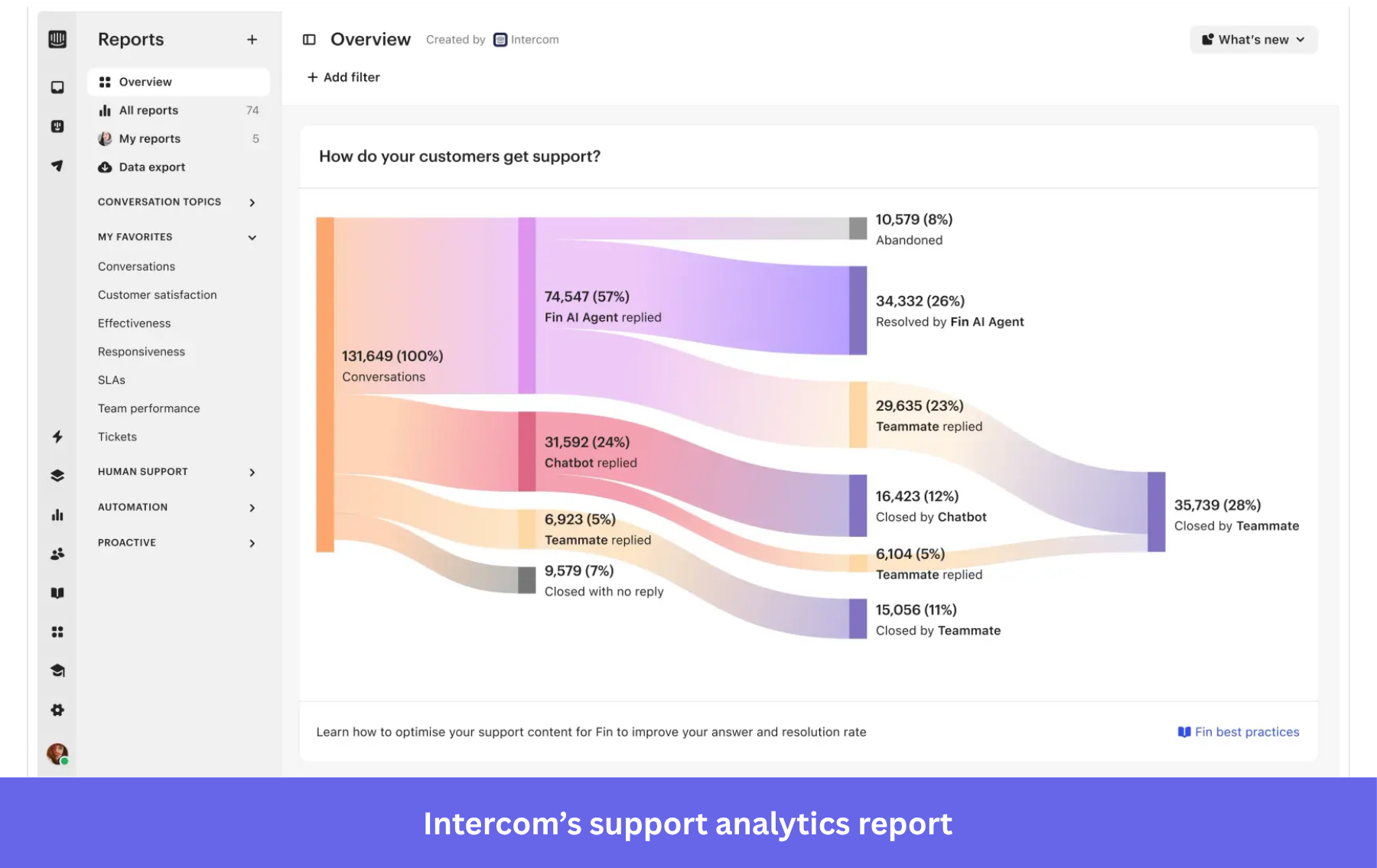
If you want a holistic support overview, Intercom analytics has you covered. It includes AI and human support in one report.
Here’s how Intercom does this:
- Reporting for customer service performance: Lets you create reports for different support processes. It offers templates to track tickets, conversations, calls, Copilot, Fin AI, SLAs, and support metrics, so you can uncover trends and solve customer pain points.
- Custom event tracking: Although not as specific as Userpilot’s, Intercom’s custom events enable you to track activities such as feature usage or subscription changes. It requires connecting to a JavaScript API, so you’d probably need a developer’s help.
- Support-focused analytics: Reporting and analytics can pinpoint opportunities to reduce costs or improve team performance. However, it’s not designed to inform roadmap decisions or drive product growth.
Now, Intercom has an inherent limitation for PLG teams. Say you want to improve activation rates with product tours. At best, you can track tour performance, identify a segment with low completion rates, and survey them for feedback. You might also correlate completion rates with tickets and analyze the tickets associated with the activation process.
Userpilot vs Intercom for user feedback collection
Both platforms allow you to create and send surveys to collect user feedback. Userpilot’s advantage is that it correlates survey results with in-app behavior, leading to better PLG-centered decisions.
For instance, teams shipping more features than ever with AI agents may not have enough time to talk with users. A feedback system that automatically sends micro surveys and measures user sentiment is a major improvement to the feedback loop.
How Userpilot handles user feedback collection
Our tools turn user feedback into product decisions faster. These are the features that allow you to collect actionable feedback:
- Omnichannel surveys: Send custom or pre-built surveys through your web app, mobile, and email. Multiple channels increase your chances of getting a response from inactive users.
- Behavior-based advanced targeting: Deliver in-context surveys based on in-app events, advanced segmentation, and past behaviors. This lets you collect feedback related to the product experience, such as a feature the user just used, a customer service interaction, or a new UI update.
- Advanced NPS dashboard: Run NPS surveys and use the data to determine your next step. With Userpilot, you can see individual responses and tag respondents based on their score, then target them (e.g., offer dedicated support to detractors or ask promoters for a review).
- Feedback connected to product analytics: Rest assured that feedback data is inherently integrated with product usage data and behavioral reports. This lets you watch session replays of users who responded negatively to a feature and spot friction points, helping you improve the product’s UI.
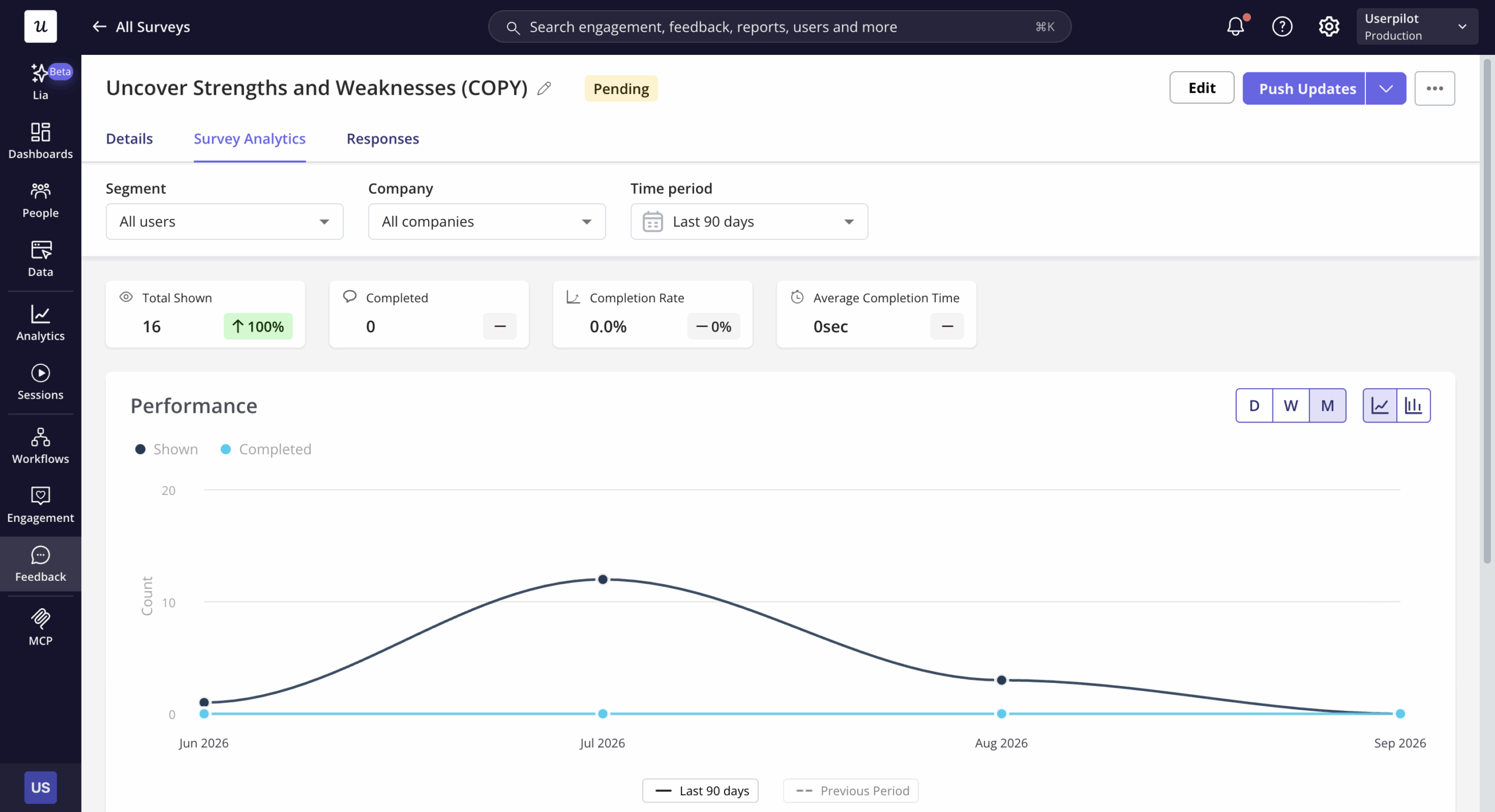
- AI-powered sentiment analysis: Lia, Userpilot’s AI agent, can read and analyze all survey responses to surface how users feel and what themes are driving sentiment. It then recommends follow-up action based on its analysis.
How Intercom handles user feedback collection
Intercom’s feedback capabilities are simple yet require more setup. They also focus on support, sharing surveys via customer conversations.
This is what collecting feedback on the platform entails:
- Shareable surveys: Sent via outbound workflows. Choose the format (short or long), question type, placement, rules, and visual customization. You can trigger these surveys in-app (web or mobile), via embeds/links, or in the inbox (via customer conversations).
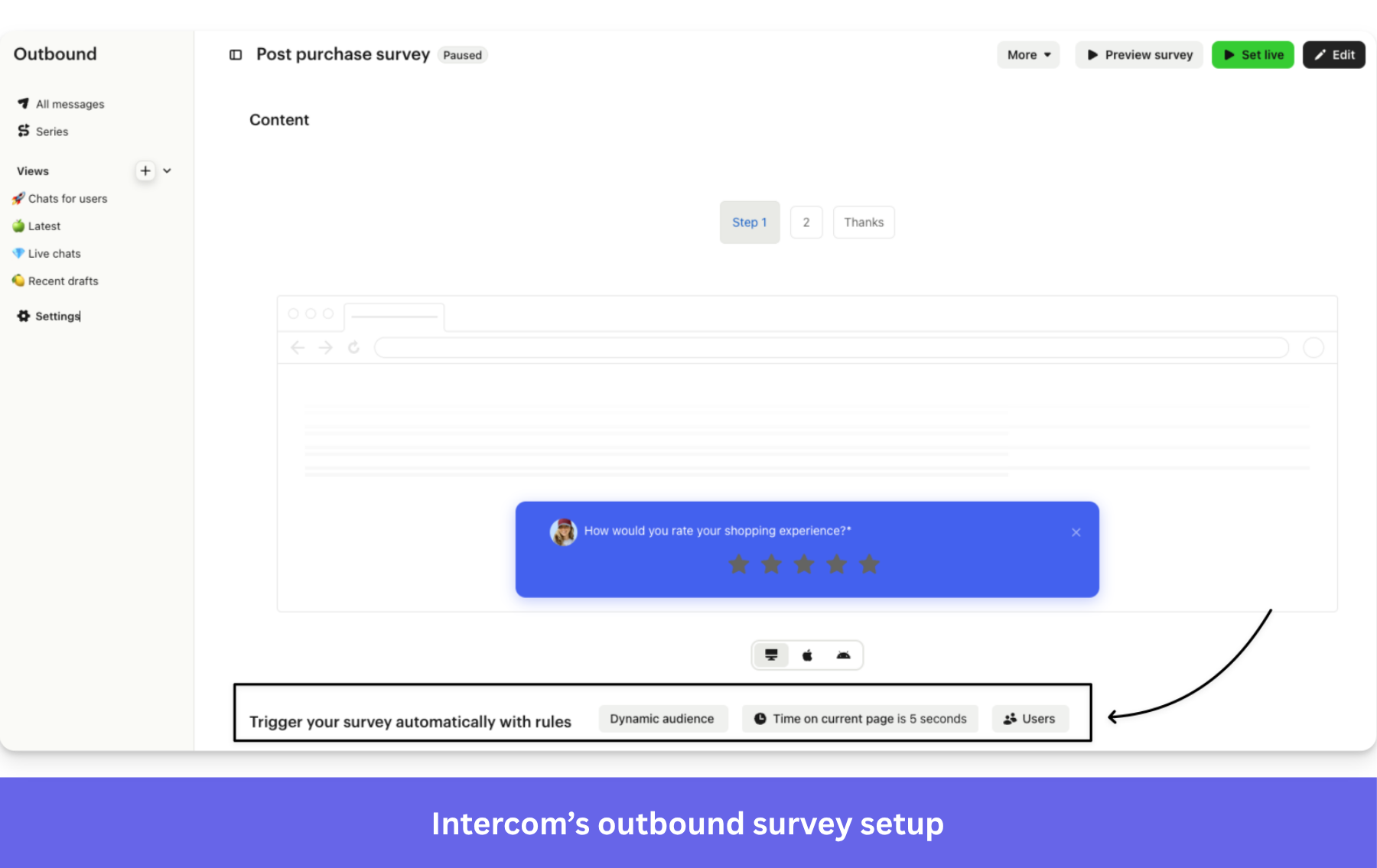
- Survey targeting: In the rules section, define the conditions that will trigger a survey. You can add rules based on audience properties and custom events. For web apps, you can fully customize triggering conditions by code via the JavaScript API.
- Feedback follow-ups: Intercom can store user responses as attributes (e.g., tag a negative NPS response as a “detractor”). And just like Userpilot, you can use these attributes to deliver targeted guidance, offer proactive support to users, or personalize Messenger conversations.
- Feedback reports: Much simpler, with charts visualizing the responses. Integration with its other analytics capabilities is nil, so you can’t even connect feedback with support metrics. There’s also no way to track responses at the individual level.
How much do Userpilot and Intercom cost?
Userpilot offers predictable pricing starting at $299/mo for the Starter plan and $849/mo for the Growth plan. It scales with monthly active users (MAUs), so it only gets more expensive as your product grows.
In contrast, Intercom combines seat pricing and usage-based charges. On top of base seat costs, you face variable monthly fees driven by Fin AI ($0.99 per outcome) and Proactive Support Plus add-ons (total volume of messages sent).
Based on actual buyer data, Vendr puts Intercom’s median annual cost at $36,577 vs Userpilot’s $18,000.
| Factor | Userpilot | Intercom |
|---|---|---|
| Starting price | $299/mo (Starter) | $29 per seat/mo (Essential) |
| Primary scaling metric | Monthly Active Users (MAUs) | Seats and usage volume |
| In-app flow creation | Unlimited (included in all plans) | Paid Proactive Support Plus add-on (scales with message volume) |
| AI automation cost | Included in platform capabilities, with credit-based pricing for AI Agent Lia | $0.99 per outcome (Fin AI) |
| Best for | Scaling product teams and enterprises | Enterprises with support-led priorities |
Choose Userpilot over Intercom if…
- Growth depends on adoption: Guide users to activation and feature adoption and help them get unstuck before they open a ticket.
- Your product is complex: Many pages, dynamic URLs, and enterprise use cases call for behavioral targeting.
- Your team is less technical: In-app engagement, product analytics, and feedback tools work without code.
- You want a consolidated PLG platform: Spot friction, confirm it in a replay, and fix it in one platform.
Choose Intercom over Userpilot if…
- You mainly need a help desk: You want a shared inbox, live chat, tickets, and Fin AI resolving conversations before they reach your human agents. Plus run the basics with a product engagement tool.
- Your product is simple: Users can reach value without contextual guidance or heavily personalized onboarding.
- Support metrics matter more than product metrics: Response times, resolution rates, and team performance are the numbers you need to improve most.
Ready to choose the right platform for your team?
To be fair, these two platforms fall into different product categories. Userpilot is tailor-made for product growth and adoption, which makes it a better fit for PLG teams. Intercom is primarily a help desk, with Proactive Support Plus as an optional add-on for those who only need the basics.
So if you ask me, I believe running both provides better value, especially for retention. Their integration allows you to send Userpilot usage data to Intercom’s profiles, so agents see what each user has done in your product.
It also lets you add an Intercom-hosted knowledge base and Messenger inside Userpilot’s resource center. The latter’s behavioral segments and flows catch users showing churn signals.
If your company already uses Intercom for support but finds its product tours lackluster, I sincerely invite you to book a Userpilot demo with us. It’s free, and you’ll see how you can better increase product adoption and retention with it!
Disclaimer: Userpilot strives to provide accurate information to help businesses determine the best solution for their particular needs. Due to the dynamic nature of the industry, the features offered by Userpilot and others often change over time. The statements made in this article are accurate to the best of Userpilot’s knowledge as of its publication/most recent update on October 5, 2026.
About the author