Introducing Userpilot MCP: Give AI Tools Keys to Your Product Data


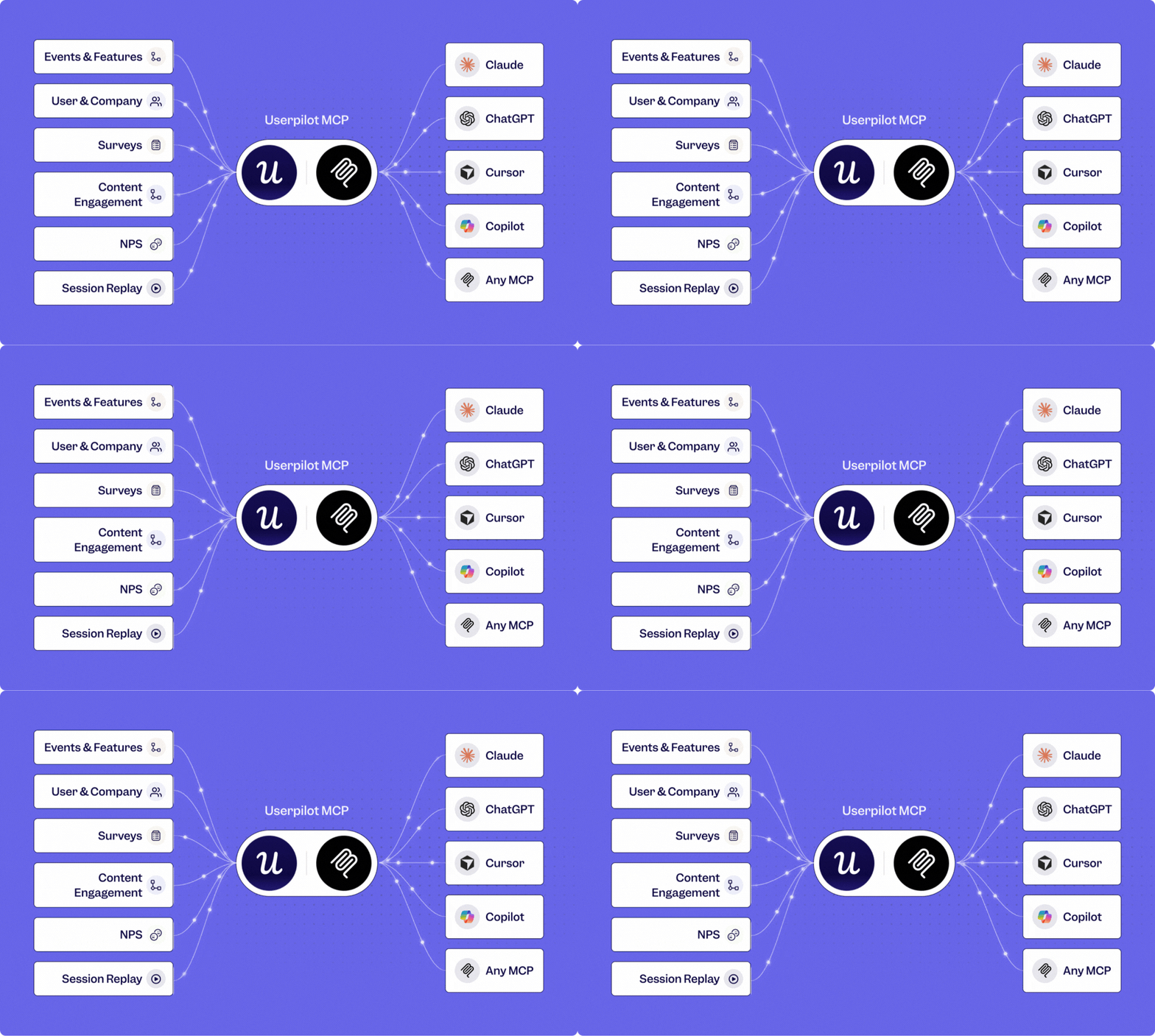
Userpilot MCP brings all your product data into one connected brain for AI. That includes usage data, user and company profiles, surveys, NPS responses, and session replay context.
Instead of analyzing each source separately, AI can connect the dots between them. It can correlate what users do with who they are and what they tell you, surfacing patterns that would otherwise take several reports and a lot of manual analysis to uncover.
It then makes that context available inside the AI tools your team already uses, whether that’s Claude, Cursor, or Copilot. Ask a question in the tool you already have open, and the answer comes back with the relevant context.
With Userpilot MCP, anyone with the right access can ask the question themselves and turn the answer into a report, dashboard, segment, or survey from a single prompt, within the permissions they already have in Userpilot.
What problem does Userpilot MCP help you solve?
Userpilot MCP solves an access problem where product insight sits behind a small group of people who know how to build the report, and everyone else has to go through them to get an answer.
It connects your Userpilot data to the AI tools where you already work, so you can ask questions in plain language and let the AI find the relevant data, run the analysis, and return the answer with context.
Almost no product team tells us they need more data. The complaint we hear runs the other way: that there is too much of it and no fast way through. Someone has to dig through raw events, build the report, and then get the finding in front of the one who needs it.
Every one of those steps can be a potential bottleneck. Natalia, who leads product marketing at Userpilot, put the daily reality of it plainly during our August session:
If you’re not data savvy as me, a product marketer, it also means that you need to constantly nag your product managers or data analysts to give you the answers that you desperately need in this moment.
That describes the reality us the non-technical people have to face every day. Asking a PM to drop what they are doing and pull a number carries a social cost, and people pay it only when the question feels important enough to justify the interruption.
Why does a server matter more than another chat window?
Because a chat window is a place you go, and a server is something your other tools can call. Every product tool has an AI assistant now, and each one adds another tab to check. MCP works the other way around, exposing Userpilot as infrastructure that any agent can reach into.
Yazan, our CEO, described the direction during the session:
This is part of a larger attempt at making more of Userpilot available as a headless infrastructure.
Headless means Userpilot still handles the tracking, storage, and analysis. The difference is that you no longer need to open Userpilot to use that infrastructure.
Your agent can pull product data into the work already happening elsewhere, like adding usage context to a Jira ticket or account activity to a renewal workflow.
The connection also works both ways. Your agent can create reports, dashboards, segments, or surveys in Userpilot, or simply return the answer inside Claude when you do not need anything saved.
What can you do with Userpilot MCP today?
Today, Userpilot MCP can help you set up product tracking, analyze behavior, build reports and dashboards, create segments, and draft surveys directly from your AI tool.
More importantly, these actions can build on one another. You can move from collecting data to finding an insight and acting on it without rebuilding context at every step.
Install and instrument without booking time with engineering
You can use a coding agent to install the Userpilot SDK directly into your application, instead of handing the setup off to engineering.
Once installed, Userpilot can start identifying users and companies while collecting raw events and page activity. In our experience, this whole setup process went from a fresh account to incoming product data in under ten minutes.
That removes much of the coordination normally required before you can start working with product data.
Ask a question and get a saved report
You can ask product questions in plain language instead of manually configuring an analytics report.
For example, you could ask how often a feature was used over the past six months and how many unique users adopted it.
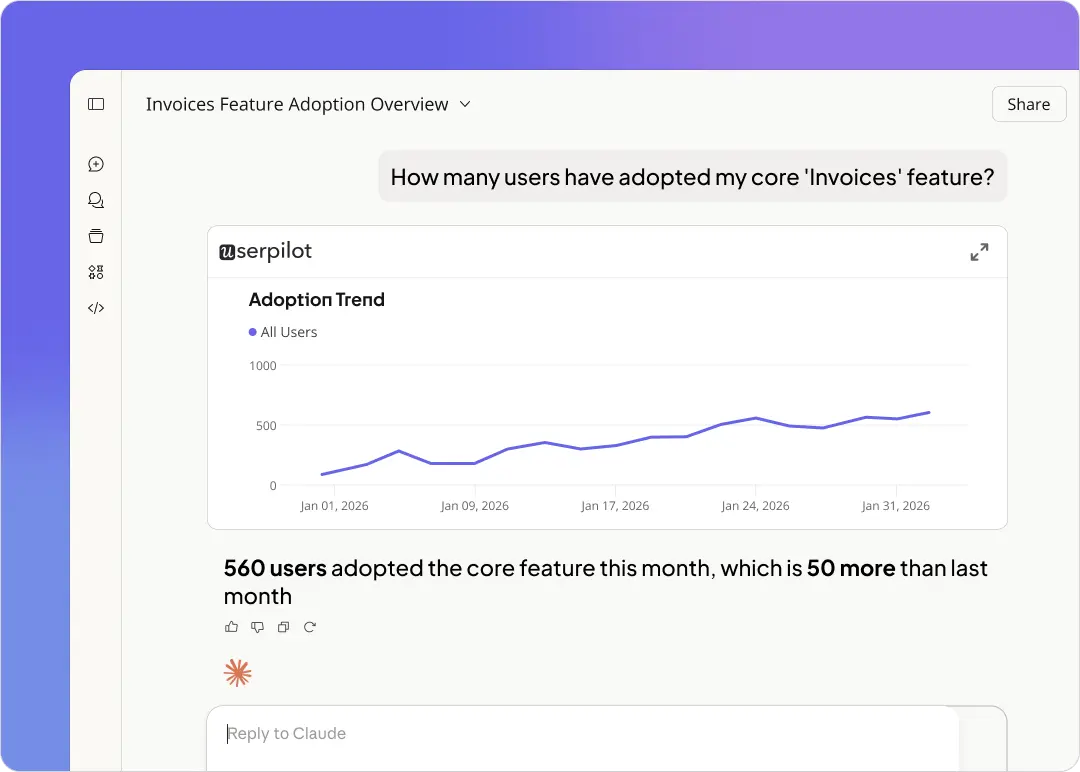
MCP can find the relevant event, run the analysis, save the report in Userpilot, and return the findings directly in your AI conversation.
So you get the answer immediately while keeping the underlying report available for deeper analysis or sharing later.
Turn an analysis into a dashboard
When one report is not enough, you can ask MCP to expand the analysis and organize the results into a dashboard.
It can create the supporting reports, assemble them into one view, and add context around what the dashboard shows.
And when your request is ambiguous, it can ask for clarification instead of making assumptions about the analysis you want.
Move from quantitative to qualitative research
You can also turn what you discover in your product data into a research workflow.
For example, after identifying users who recently adopted a feature, you can ask MCP to create that group as a segment and draft a survey specifically for them.
That lets you move from what users did to why they did it without manually recreating the audience or starting a separate research process.
The result is a continuous workflow from product behavior to analysis, segmentation, and feedback collection.
How does Userpilot MCP work under the hood?
We didn’t want to give an AI agent unrestricted access to Userpilot and hope it figured out the right way to use everything. Instead, we broke the platform into smaller tools, each designed to do a specific job reliably.
Think of it like onboarding a new colleague. You give them clear responsibilities first, see how they handle them, correct mistakes, then gradually expand their scope.
That same thinking shaped how we built Userpilot MCP.
On top of those tools, we added 15 built-in skills based on the most common jobs teams already use Userpilot for. A skill might analyze activation, investigate feature adoption, or pull together several pieces of data needed to answer a broader product question.
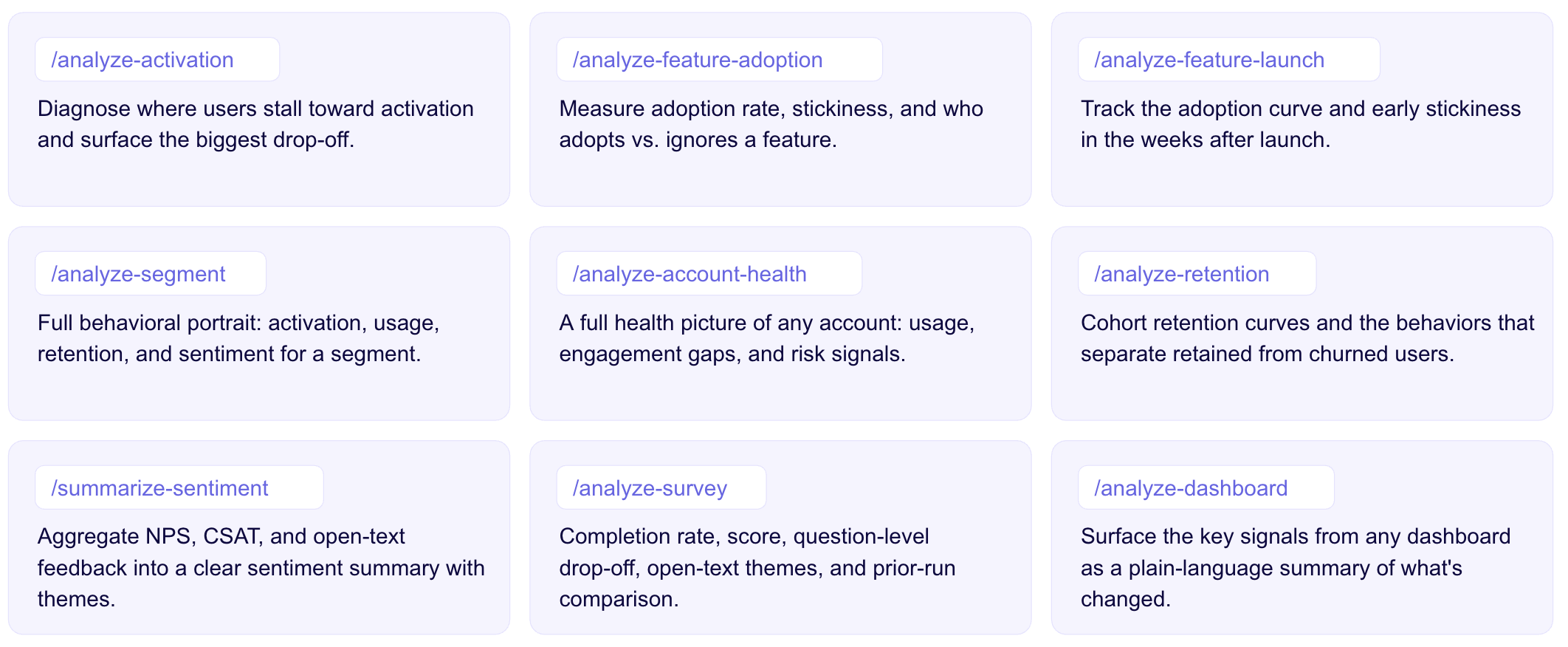
And you don’t need to tell MCP which skill to use.
If you ask, “What’s our activation rate?”, it can understand the intent and automatically choose the right workflow behind the scenes. You don’t have to become good at prompt engineering to get a reliable answer from your product data.
Two people can ask the same question differently and still get an analysis based on the same underlying approach.
Skills also do more than trigger a single tool. They can combine several Userpilot tools to complete the whole job your question requires.
| If you want to understand… | You could ask… |
|---|---|
| Activation | “Where are new users dropping before activation?” |
| Feature adoption | “Which customer segments use this feature most?” |
| Retention | “Do users who adopt this feature retain better?” |
| User segments | “Who used this feature in the last 30 days?” |
| Feedback | “What are users saying about this part of the product?” |
So when you ask Userpilot MCP a question, you’re not starting from a blank prompt every time. You’re giving the AI access to workflows we’ve already shaped around the product questions teams ask most often.
Who can use Userpilot MCP?
Userpilot MCP is available on every Userpilot plan at no extra cost.
Each person connects it once using their own Userpilot account, and MCP follows the permissions already assigned to that user. That means product, customer success, marketing, engineering, and other teams can all work from the same product data without getting broader access than they already have inside Userpilot.
What’s next for Userpilot?
MCP is one piece of a much bigger shift we’re making at Userpilot. We’re building Userpilot for an era where both people and AI agents use software.
For example, a user might fail because the interface is confusing or an onboarding step breaks. An agent can fail for similar reasons, except the problem might sit in a tool description, schema, permission, instruction, or handoff.
We want Userpilot to understand both.
For MCP, that means going beyond querying existing data. The next step is more continuous instrumentation, including automatically labeling raw events, keeping that instrumentation up to date as your product evolves, and eventually allowing external agents to create more of what you can build in Userpilot today.
At the same time, Lia gives you that intelligence inside Userpilot. She can analyze what is happening across your product, identify where a journey breaks down, and help you define the next action.
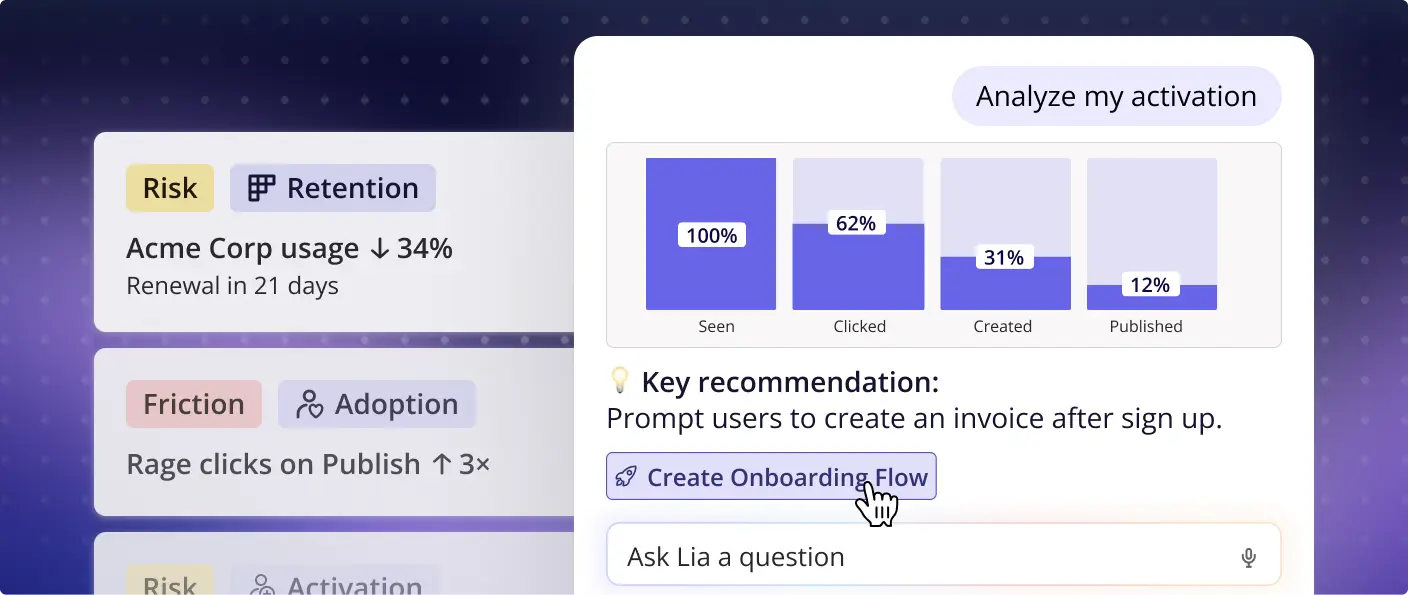
And as agents become another way customers interact with software, Agent Analytics gives you visibility into their side of the journey too. You can see what people are asking agents to do, where they succeed, where they fail, and how that behavior connects to adoption and business outcomes.
Want to see how this works with your own product data?
Book a Userpilot demo, and we’ll show you how MCP, Lia, and Agent Analytics can help you understand where users and agents get stuck, then turn those insights into action.
FAQ
Does it need access to my codebase to label events?
No. The SDK already captures raw clicks, page views, text inputs, and form submissions. The agent reads that raw data plus the CSS selectors and HTML structure, then names events with a readable convention and asks you to confirm.
What about dynamic selectors breaking?
AI-assisted selector choice is already live, dropping dynamic selectors into an exclusion list. Adaptive re-labeling is on the roadmap.
Will auto-labeling create thousands of junk events?
Only meaningful interactions get labeled. Dead clicks, error clicks, and console errors are handled by session replay, which is a separate feature.
Is there a cap on events?
No limit on labeled or tracked events beyond fair usage. Backend events are tracked by your coding agent through Userpilot’s track functions.
Can I restrict PII or specific fields?
MCP inherits the permissions of the individual user who authorized it. You connect as a user, not as an org. Agent-level authentication is planned.
With everyone able to create content, how do we avoid chaos?
Keep publish permission with one owner per team and route requests through them. This is how Userpilot’s own team handles it. Auto-generated AI insights will flag when too many pieces of content are live at once.
Can it build walkthroughs and flows?
Coming to MCP and arriving sooner through Lia.
Can it tell me which flows conflict on a page?
Yes. MCP has access to every flow, active or not, which pages it runs on, which segment it targets, and how it performs.
About the author