Digital Adoption Platforms in 2026: Why Most Teams Pick the Wrong One


A product-led team building self-serve onboarding and the IT department of enterprise companies rolling out software to 5,000 employees both need digital adoption platforms, but they are searching for fundamentally different tools. Despite this, most vendor comparisons treat them as the same buyer when they have irreconcilable differences in their purchase criteria. In fact, the International Data Corporation projects that 80% of G1000 organizations will use a digital adoption platform by 2027 in order to address technical skill shortages.
This means that a lot of first-time buyers are about to make this decision cold, running the risk of choosing the wrong platform for their digital adoption needs. Most of the mistakes I see occur before the evaluation process even begins, when the buyer hasn’t decided whether they’re solving user adoption or employee onboarding yet. This guide will walk you through how to choose digital adoption platforms by use case and compare the top ten providers in this space to help you make an informed decision on which solution is right for your needs.

How to choose a digital adoption platform by use case, not feature list
Most digital adoption platform evaluations fail because buyers compare features between tools that were designed to solve different problems. A SaaS team driving product-led growth has nothing in common with an enterprise learning and development team, with no shared definition of “good” between the two use cases. Trying to compare both with a single measuring stick is how teams get stuck in a multi-year contract with the wrong platform.
I’ve watched this play out from both sides, first as QA lead evaluating internal training tools, now as a PM buying and building product adoption software.
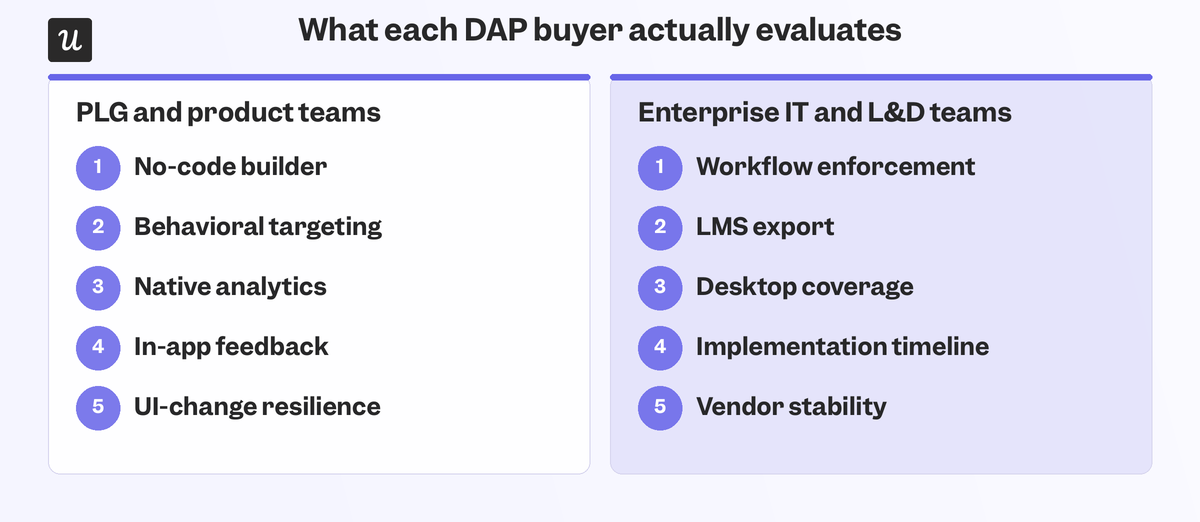
The solution is to separate the criteria for PLG/product teams driving user adoption inside SaaS products:
- Can you build multiple UI patterns, tooltips, modals, checklists, and banners without writing code?
- Can you target experiences by user behavior, lifecycle stage, and custom user segments, not just URLs or user IDs?
- Does native analytics cover activation funnels, feature usage, and drop-offs, or do you need a separate product analytics tool?
- Can you collect in-app feedback while the experience is still fresh in the user’s mind?
- How does the tool handle UI changes and UX redesigns?
From the criteria for enterprise IT/L&D teams investing in employee-facing digital adoption:
- Does the tool enforce workflow steps, not just suggest them (especially if compliance prevents certain steps from being skipped)?
- Does it output SCORM files for LMS integration, so training content plugs into the tech stack infrastructure that your L&D team already runs?
- Does it work across both desktop apps and browser tabs to ensure cross-platform continuity?
- What does implementation actually look like timeline-wise (days, weeks, or months)?
- Is the vendor stable or established enough to bet a multi-year rollout on?
None of these questions are about features. They’re about whether the platform can survive contact with IT departments, compliance teams, and change-management cycles.
Digital adoption platforms I’d shortlist
Of the 10 digital adoption platforms below, six of them are built for SaaS product adoption while the remaining four are aimed at large-scale employee training for internal software. This segmented approach offers far more actionable curation than ranking all of them on a single scale when they serve very different customers with widely varying use cases.
| Tool | Use Case | Features | Pricing |
|---|---|---|---|
| Userpilot | Product growth and cross-platform adoption | No-code builder, precise targeting, flow analytics, mobile support, session replays | $299/month (2,000 MAUs) |
| Userflow | User onboarding on web applications | Drag-and-drop builder, in-app surveys, AI assistant, Resource Center | $240/month (3,000 MAUs) |
| Hopscotch | Affordable no-code adoption for startups | Tooltips, banners, custom styling, Segment integration, basic analytics | $99/month (3,000 MAUs) |
| Pendo | Data-driven adoption decisions | Retroactive analytics, segmentation, roadmap tools, session replays | Custom (free up to 500 MAUs but up to $150,056/year beyond that) |
| ProductFruits | AI-assisted onboarding | Checklists, tooltips, Life Ring widget, feedback widget, AI assistant | $149/month (1,500 MAUs) |
| HelpHero | Budget-friendly, full features at every tier | Tours, checklists, hotspots, A/B testing | $55/month (1,000 MAUs) |
| WalkMe | Enterprise-wide training with strict compliance | Smart WalkThrus, role-based guidance, enterprise analytics | Custom, enterprise-level contracts |
| Whatfix | Scalable employee enablement and change management | AI field validations, multilingual support, Self-Help widget | Quote-based |
| Apty | Process compliance and AI-powered internal adoption | GenAI support assistant, process analytics, cross-platform enforcement | $9,500 per app, billed annually |
| ClickLearn | Content automation for complex enterprise systems | Record once, publish in 7 formats, SCORM-ready output | Custom pricing |
1. Userpilot for driving digital adoption across web and mobile products
While you may think I’m biased, the reason I’m putting Userpilot first for mid-market and enterprise product teams is that it’s the only tool on this list that bundles in-app guidance, native analytics, and feedback collection in a single platform without an enterprise price tag. Starting at just $299/month, you get the tools to put your product adoption strategy into action without having to stitch three tools together.
Userpilot lets you build tooltips, modals, checklists, and announcement banners without writing a single line of code then target those in-app flows by page, behavior, or segment.
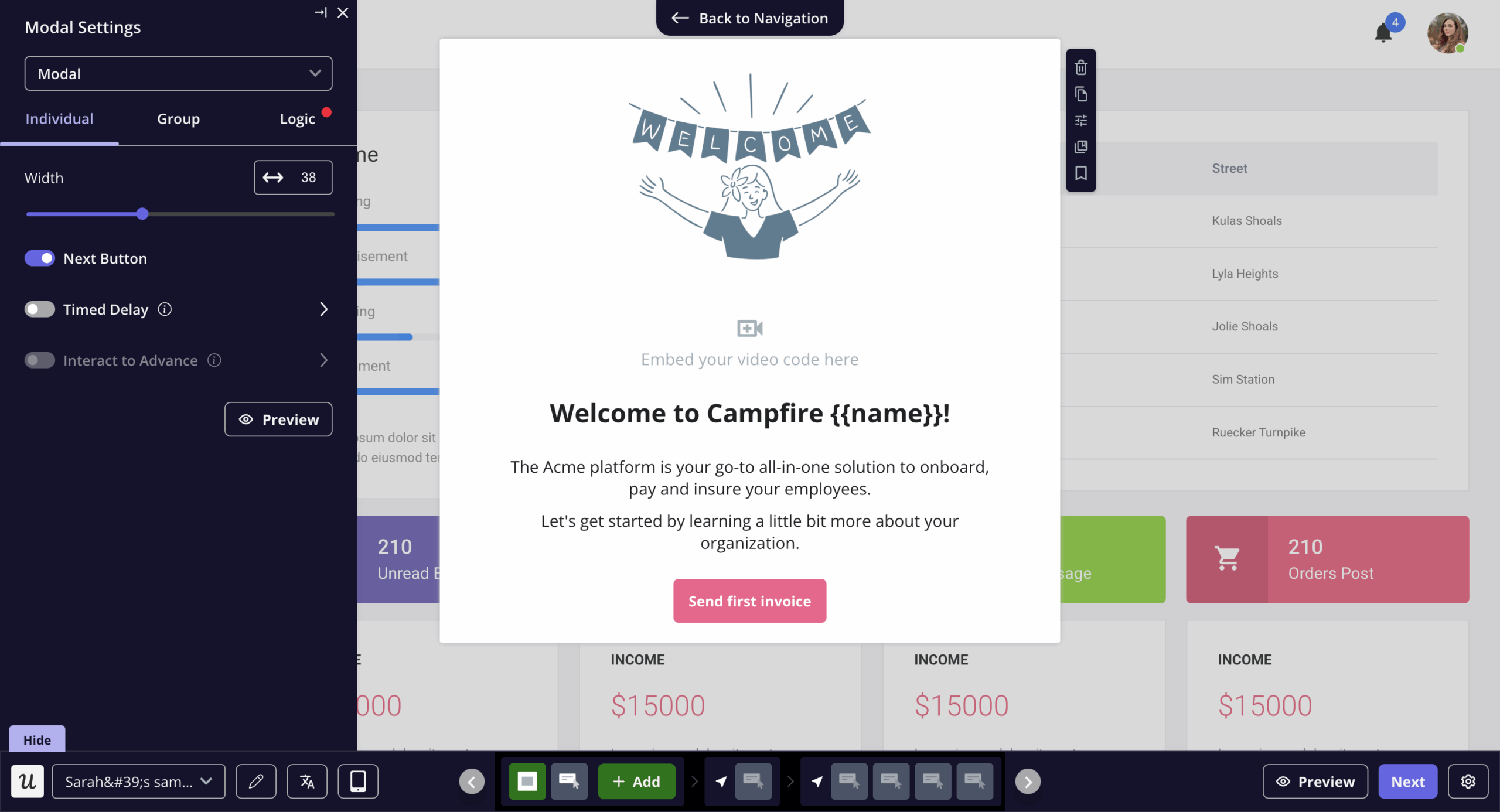
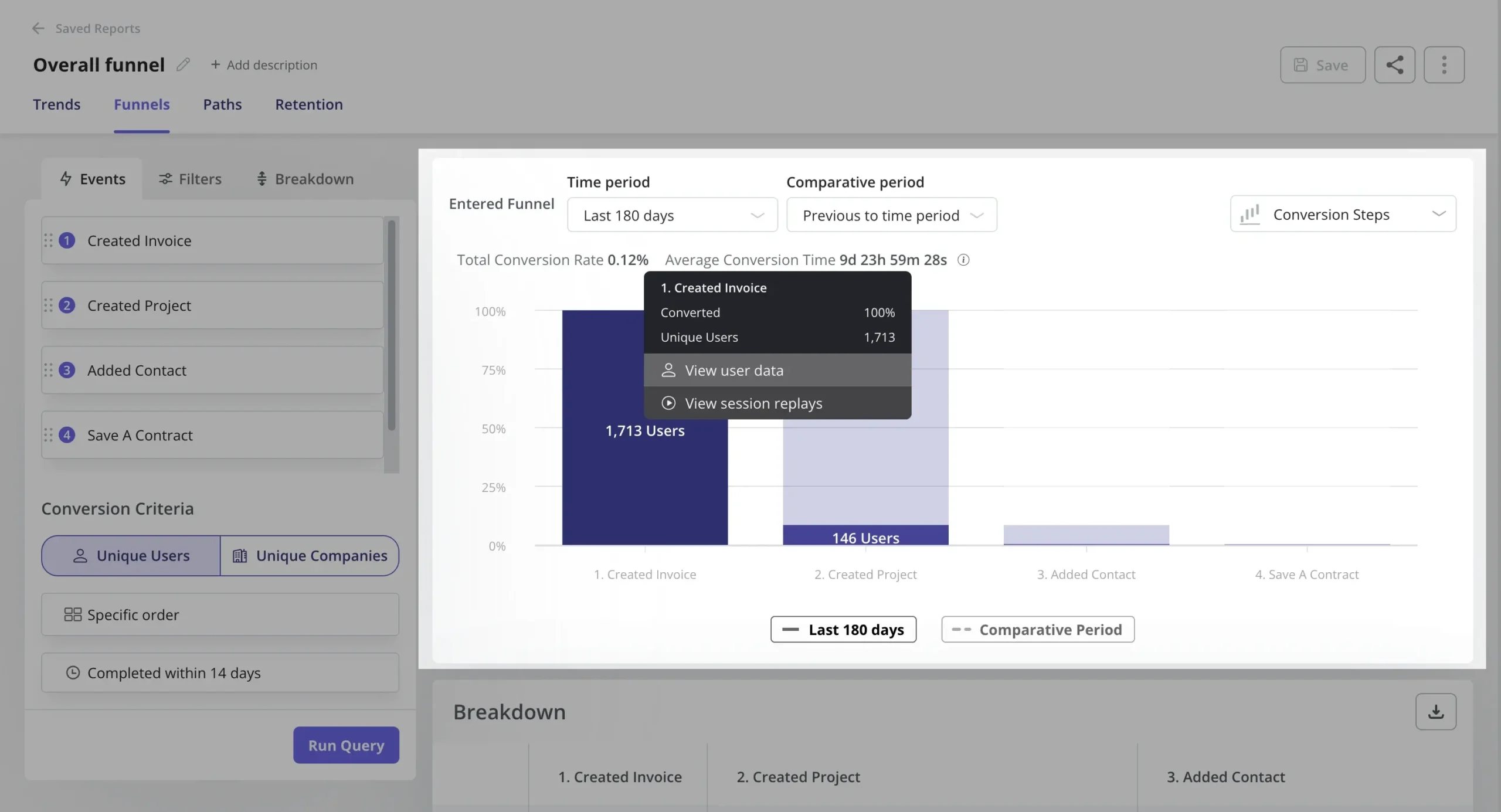
You can then build adoption funnels to see whether your personalized onboarding flows are having the desired effect on specific segments.
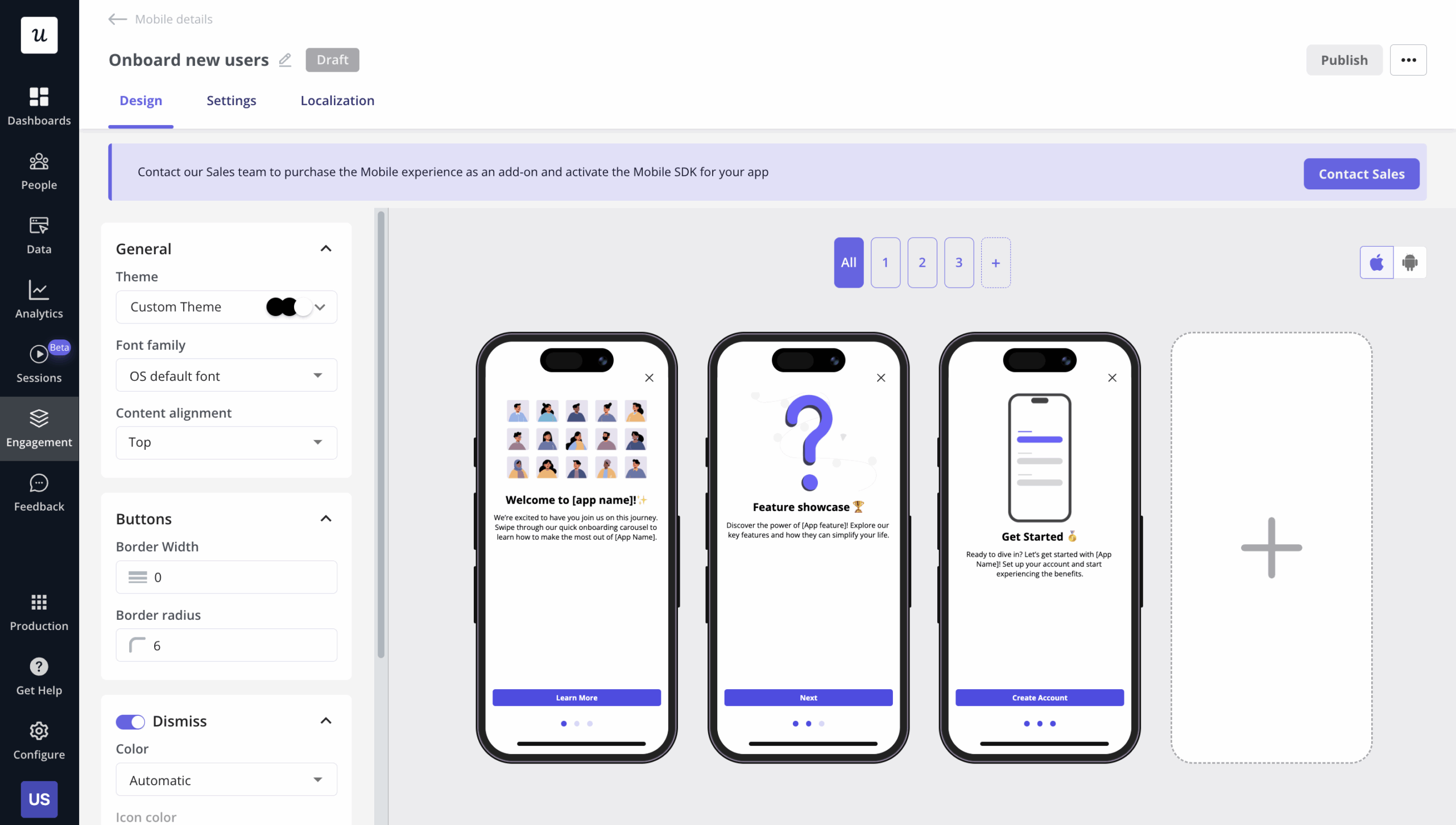
Mobile gets its own patterns with carousels, slideouts, and push notifications, along with granular mobile app metrics.
Our customer Dasha Frantz, Product Designer at Smoobu, explained why Smoobu recommends our digital adoption platform to others:
“I’d definitely recommend Userpilot. It allows us the flexibility to move fast, experiment, and really understand what users need. It’s helped us speed up processes and create a smoother user experience.”
2. Userflow if you only need web app onboarding
Userflow fits small-to-mid-sized SaaS teams that want codeless onboarding without the time or cost needed for an enterprise platform. Starting at $240/month for up to 3,000 MAUs, it covers onboarding flows, checklists, product tours, and light surveys. User segmentation lets you define audiences by user properties or custom events and then trigger guides in real time based on user behavior. Where it falls short is in its knowledge content and AI-built flows.
Userflow customer Marcus noted the limitation in his G2 review:
“We can only point Userflow at our public facing HubSpot knowledge base articles, but we do have articles behind the login, and so that is something that’s not working too good for us at the moment.”
Another area where Userflow differs from its competitors is in its kanban-style visual builder that lets you visualize each step within a customer onboarding process.
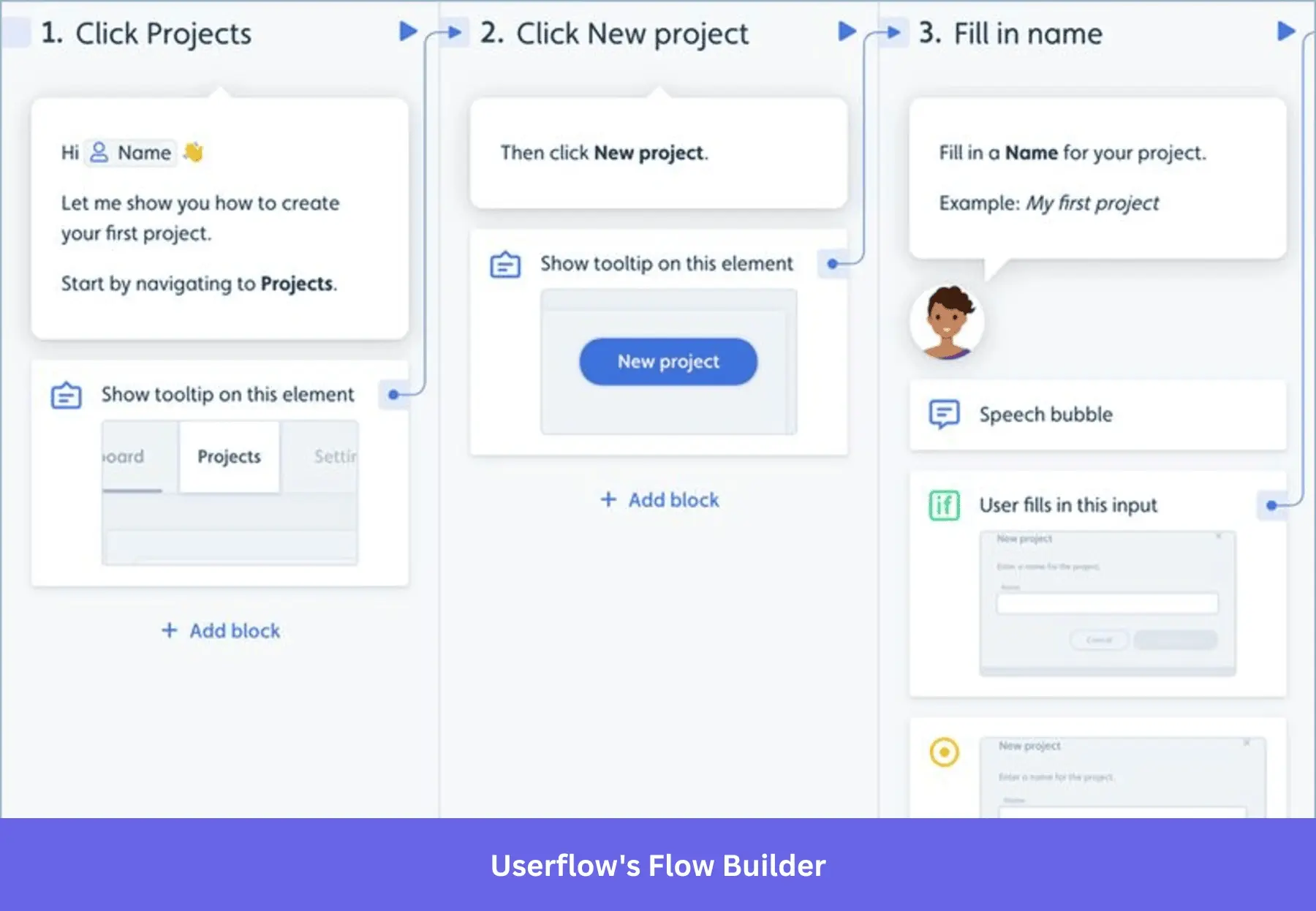
This isn’t necessarily better or worse than the visual editors of its competitors, but it does provide a unique way of building flows that feels more like a flow chart with a clear sequence of consecutive steps being triggered.
3. Hopscotch for an affordable starting point
Hopscotch has a reasonable starting price for startups that need tooltips and walkthroughs without a steep learning curve, starting at an affordable $99/month for up to 3,000 MAUs. It also reaches beyond user onboarding with roadmap features and feedback collection.
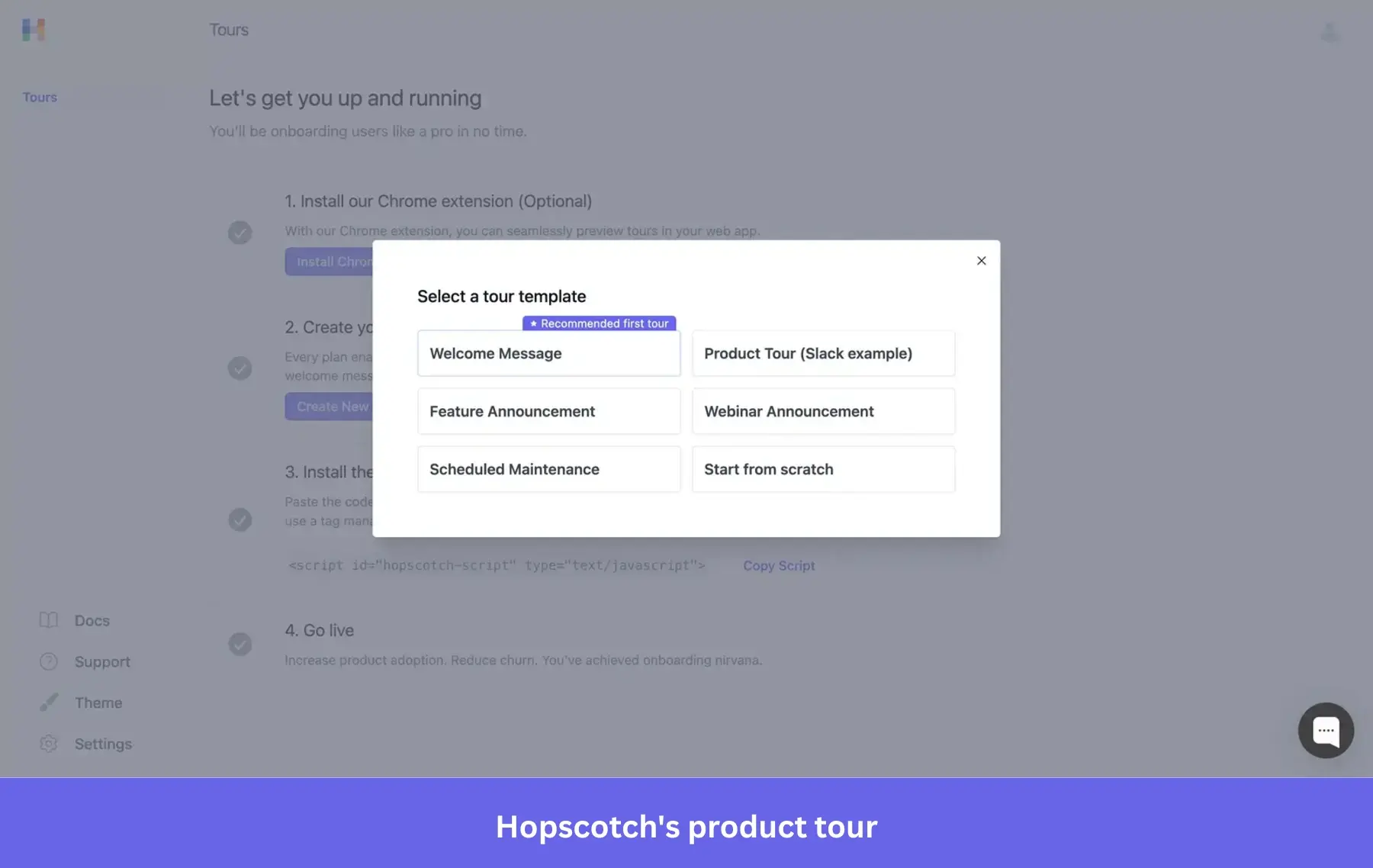
Codeless targeting is limited to active date, browser language, and URLs, with anything more advanced requiring engineering support. Most reviewers echo the same complaints about Hopscotch’s tour editor slowing down on long flows and analytics that should’ve gone deeper.
4. Pendo for data-driven adoption decisions
Pendo is built for teams that want a single platform for analytics and guidance, willing to pay extra for that cross-functional depth. The product is free for up to 500 MAU. It is best to budget for Pendo pricing like an enterprise line item rather than a SaaS subscription rather than a SaaS subscription. It has an extensive feature set with tooltips, lightbox modals, banners, conditional branching, and a built-in NPS module.

However, its breadth of features comes with the tradeoff of increasing setup time and learning curve, as Pendo customer Darshan noted in his review:
“Some reports can feel a bit complex to set up, and some deeper analysis takes time to learn. More flexibility and simpler reporting would make it easier to use day to day. The initial setup was fairly straightforward, but getting most value out of advanced features took some time and learning.”
This setup complexity hurdle is compounded by the cost of actually using the product, as noted by Pendo customer Bharath:
“The pricing is a bit expensive. Also, the interface and initial setup process overwhelming at first, with a steeper learning curve compared with simpler alternatives.”
5. ProductFruits for AI-assisted onboarding
ProductFruits pairs onboarding flows with AI-powered support elements, aimed at startups and SMBs that want to scale guidance without building everything from scratch. All plans ship the full feature set, meaning the main difference between the $149/month Starter tier and higher plans is usage limits.
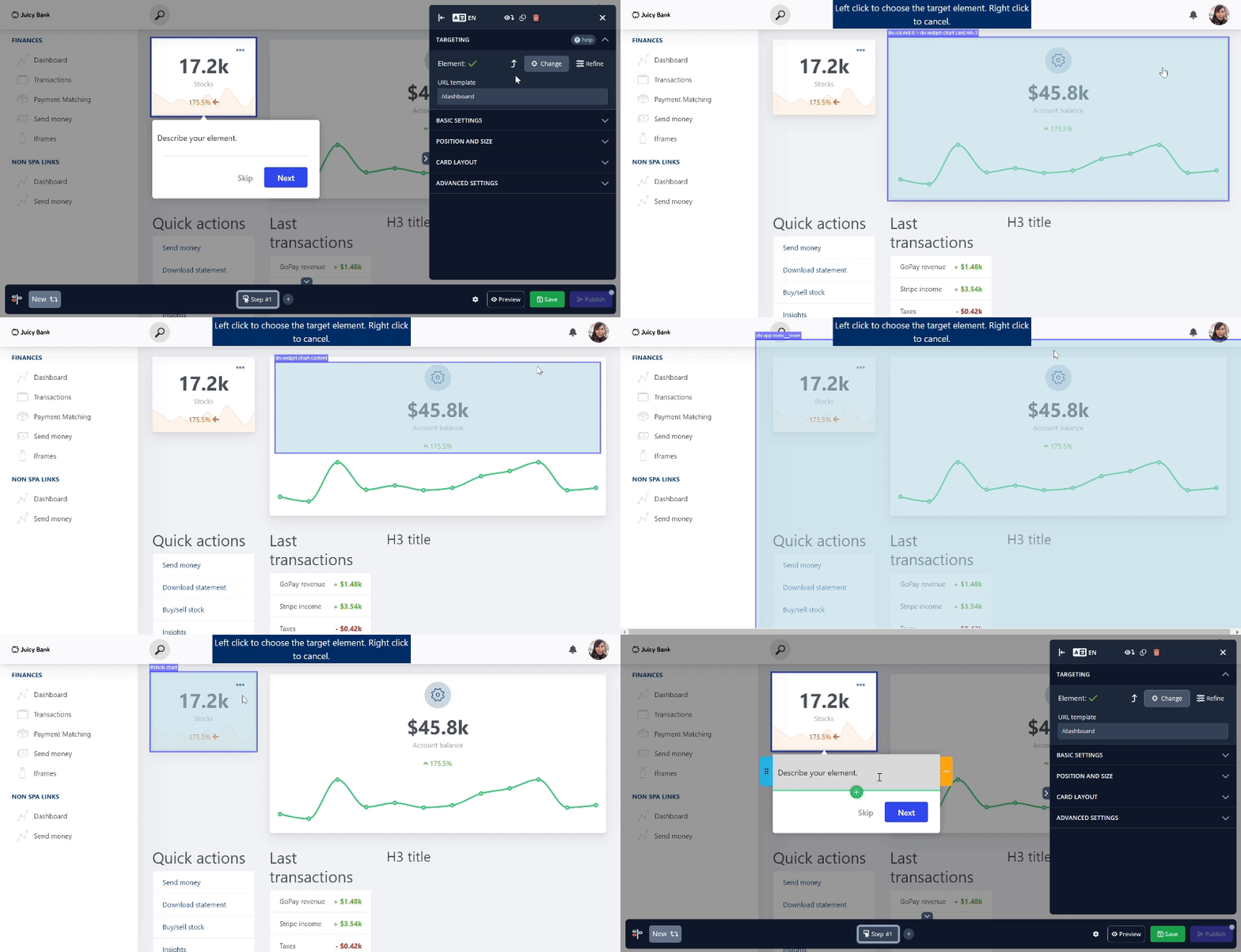
The standout feature is ProductFruits’ “Life Ring” help center widget that centralizes knowledge base search, feedback, live chat, and tour replays in one place. The editor itself is simpler than other platforms, which could be good or bad depending on your use case.
ProductFruits customer Sven criticized the tour builder and lack of cross-platform compatibility:
“Tours and hints are sometimes hard to create and to position in a way that it works for both, desktop and mobile.”
6. HelpHero for budget-friendly pricing
HelpHero offers unlimited tours, checklists, hotspots, and targeting on every plan despite starting at just $55/month for up to 1,000 MAUs. However, that price scales up to $299/month at 20,000 MAUs. Nothing is gated behind a higher tier, which means you’ll get the same feature set whether you have hundreds or thousands of users.
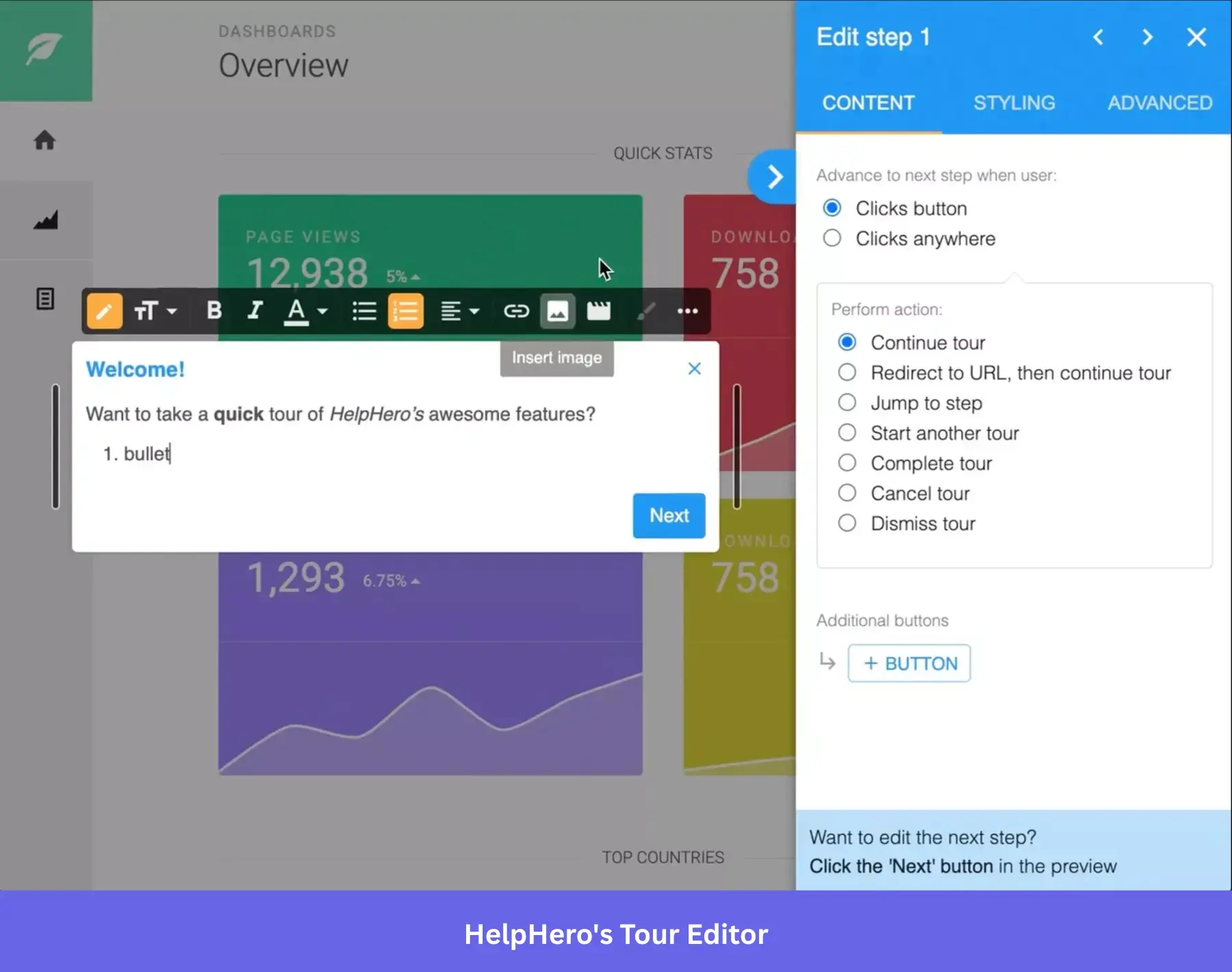
Targeting requires adding a “Funnel” condition layer before building the guide itself, which works fine for early-stage startups but lacks the same behavioral depth as the other tools we’ve covered so far.
HelpHero customer Daniel complained about the steep price increases and subpar native styling capabilities:
Although it’s still the cheapest solution I have found for this, it has doubled their fees since I started to use it. Tours’ window styling isn’t the coolest, although you can use your own CSS styles to improve it.”
7. WalkMe for enterprise-wide rollouts
WalkMe is an enterprise-ready adoption platform, especially since SAP’s $1.5 billion acquisition deepened its integration into that existing ecosystem. It’s built for large organizations rolling out CRMs, ERPs, HR systems, and custom enterprise software. However, WalkMe pricing (multi-year, custom-quoted, and enterprise-level) will be out of reach for most mid-sized customers.
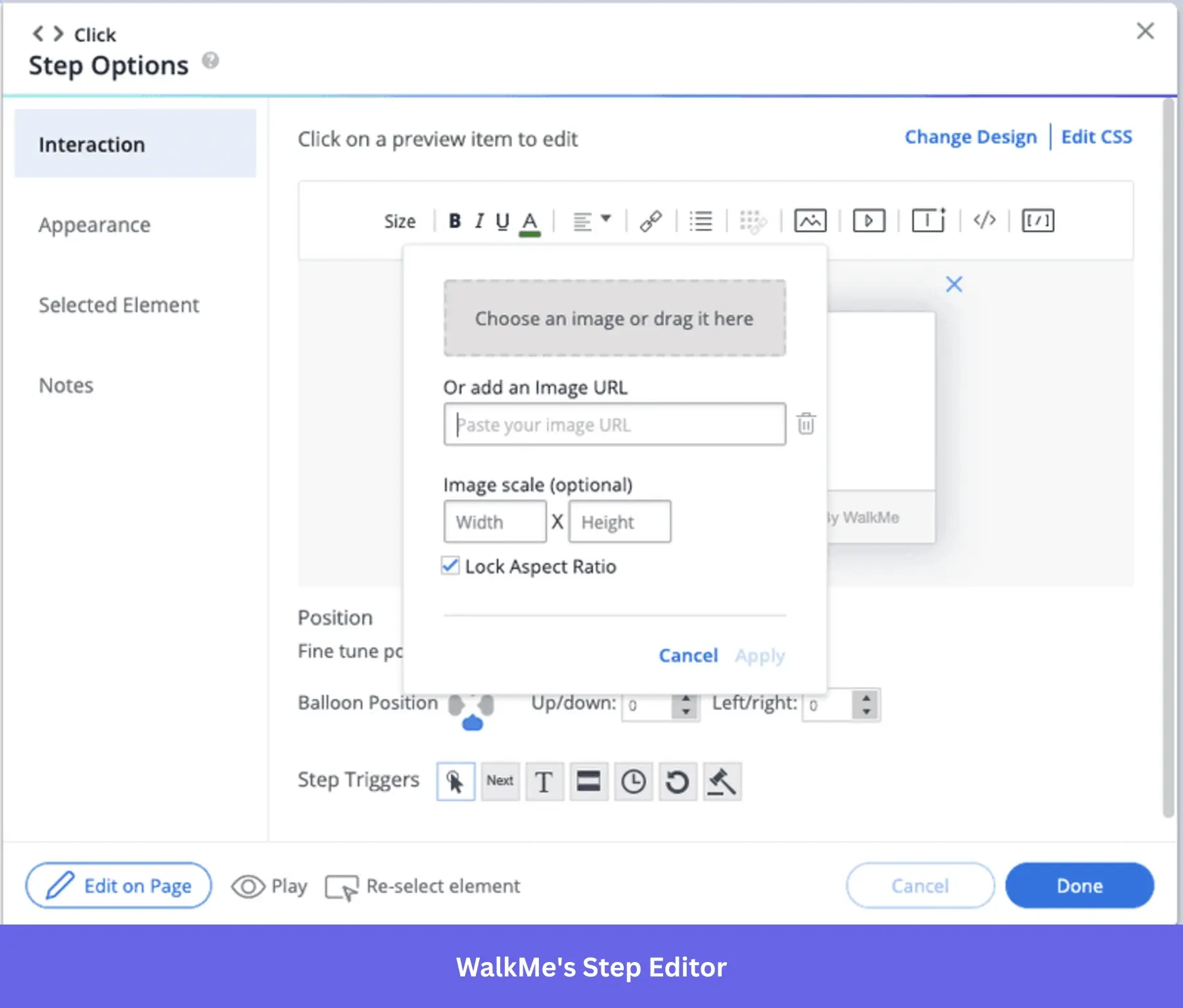
Smart WalkThrus can lock down critical steps to ensure employees follow business processes, while Shuttles link users straight to the action they need to accomplish. The tradeoff for enterprise-grade complexity is that both setup and flow creation take much longer in WalkMe than its competitors.
WalkMe customer Jitendra noted the time-consuming nature of configuring and using the platform:
“One thing I’ve noticed with WalkMe is that setting up guidance can take longer than expected, especially for complex workflows. The interface for creating or editing walkthroughs can feel a bit clunky at times, which slows things down. It would also be great to have more options to customize prompts and messages so they fit our branding better.”
8. Whatfix for urgent enterprise implementations
Whatfix targets the same enterprise customers as WalkMe, but positions itself as more implementation-friendly alternative. Whatfix pricing still uses premium, quote-based pricing but many teams find it more flexible to set up.
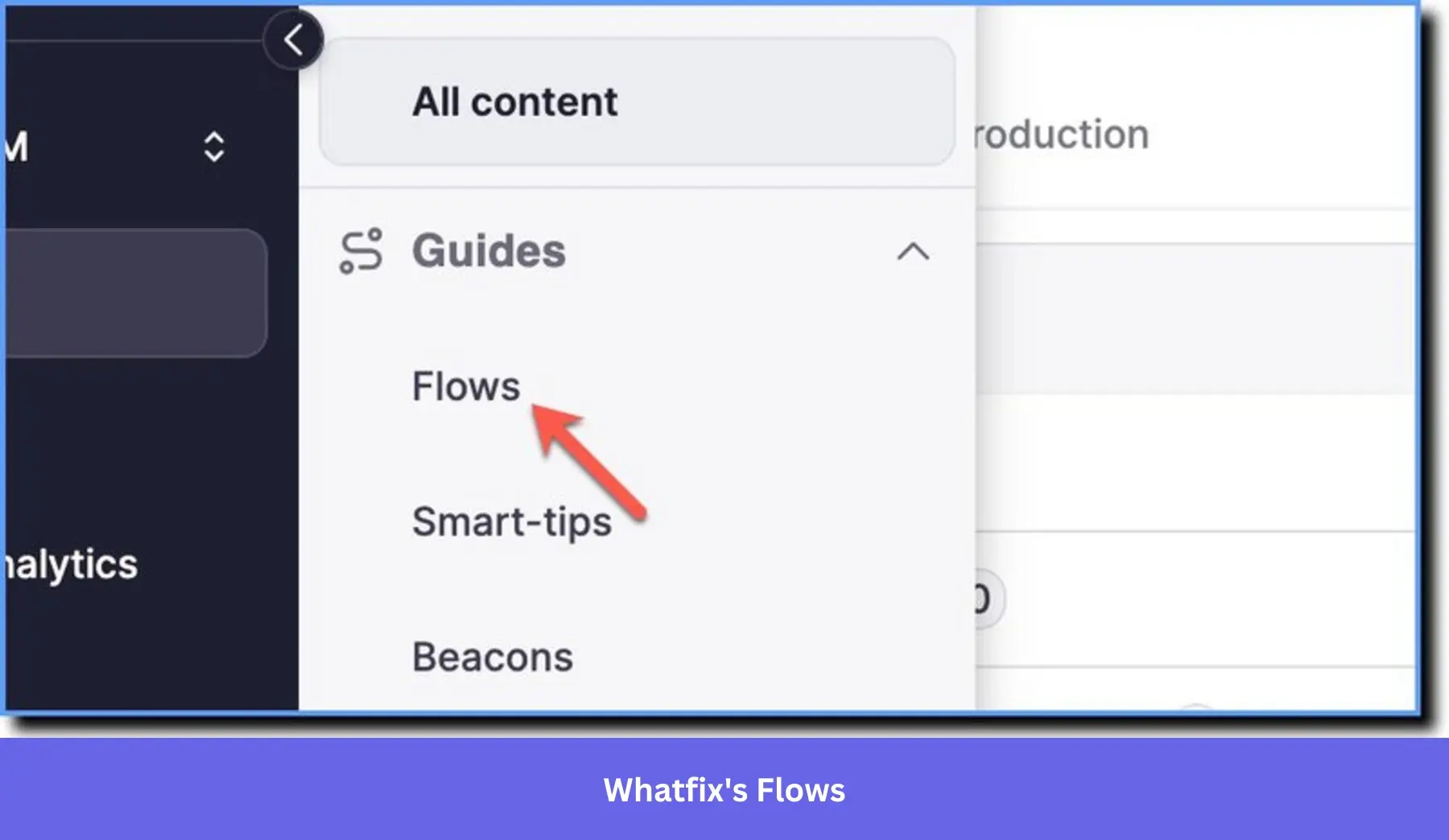
In-app flows, tooltips, and checklists guide users through complex workflows while ScreenSense AI identifies UI elements to automate repetitive tasks. Whatfix also supports 50+ languages for global rollouts and can repurpose content into PDFs, videos, or SCORM packages.
Whatfix customer Kate still noted some growing pains when updating, troubleshooting, or using specific features on the platform.
“The software update process felt a little nebulous the first time around, since it wasn’t included as part of the structured training. Role Tag behavior and troubleshooting could also be better defined in the Content. The functionality is outlined, but there isn’t much guidance around real-world use cases.”
9. Apty for AI-powered process compliance
Apty is built for environments that need high adoption, clean data, and compliant processes. It leans harder into AI than any other digital adoption platform we’ve covered so far. Its AI assistant, Apty OneX, delivers dynamic real-time support while Apty Monitor and Pulse track friction points and product usage. Pricing starts at $9,500 per app and is billed annually.
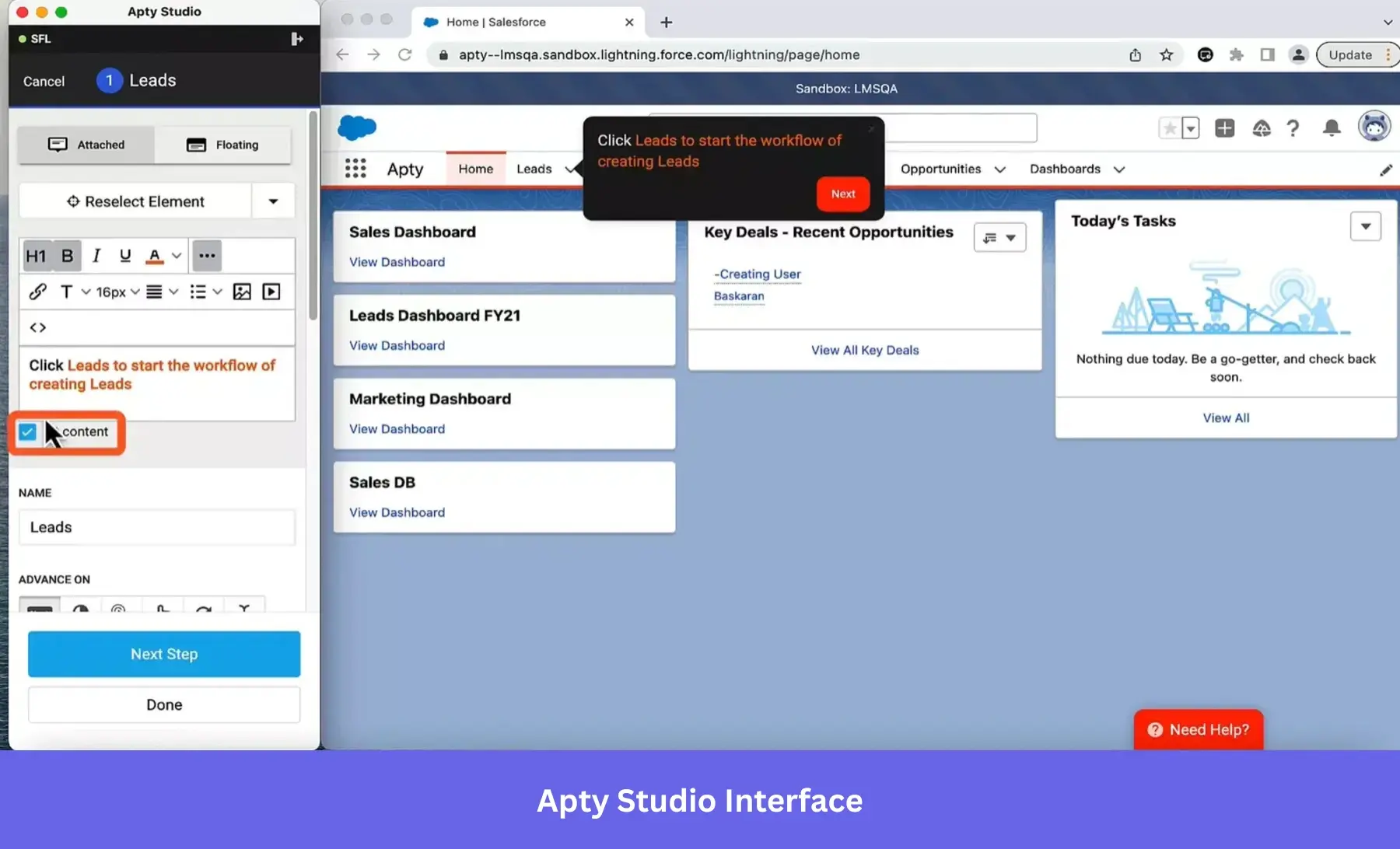
This makes Apty an effective solution to layer on top of existing tools like Salesforce to get the most out of your tech stack. The catch shows up when you try to scale your Apty implementation up and expand the scope of processes it handles.
The management overhead that its complexity brings was one of the challenges cited by Apty customer Dylan:
“For sites with a ton of complexity or bespoke web solutions on their site, Apty can have a hard time identifying the right elements to attach to. It sometimes is also a bit challenging to use for larger processes, both from the administration/maintenance perspective and initial implementation.”
10. ClickLearn for content automation at scale
ClickLearn solves the narrower problem of keeping training documentation up to date across systems like SAP, Oracle, and Microsoft Dynamics. It lets you record a workflow once, then publishes into multiple formats. There are seven supported formats including in-app guides, simulations, Word docs, PDFs, and SCORM-ready test scripts (which can each be translated into 45+ different languages).
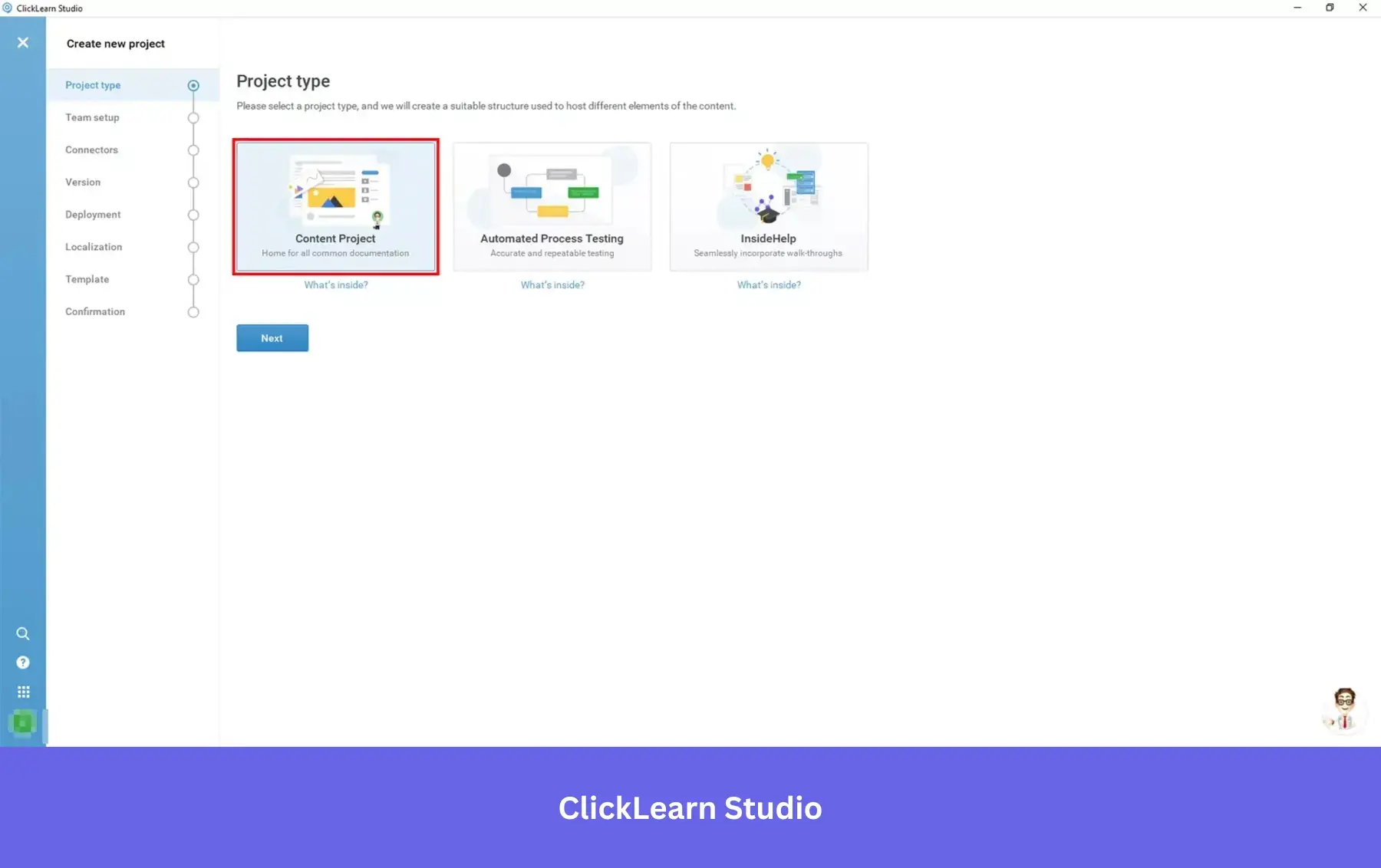
ClickLearn isn’t primarily an in-app overlay tool in the same way WalkMe or Whatfix are, but it’s a good choice for keeping training materials current after every system update (rather than delivering interactive walkthroughs).
Ironically, the chief complaint of ClickLearn customer Penny was that the product itself didn’t have enough training materials available for its users:
“The only thing I would say here is that it would be great if there were more support videos available as we prefer to self-service where possible”
Match the platform to the problem, not the other way around
PLG teams shipping product-led onboarding need no-code flow building, behavioral segmentation, native analytics, and pricing that scales with MAU, not expensive enterprise overlays priced for a multinational deployment. Conversely, an enterprise IT team deploying internal tools to thousands of employees needs workflow enforcement, LMS integration, compliance depth, and hands-on implementation support rather than lightweight user onboarding tools at a budget-friendly price point.
Clarifying which problem you’re trying to solve will make the rest of the evaluation process feel obvious instead of obtuse. Book a demo to see how Userpilot directly connects behavioral user data to in-app guidance logic to help you build adaptive experiences based on what users do in the product, not what you assume they’ll do.
About the author