Pendo Product Tours: What They Do and Don’t in 2026


Pendo Product Tours used to be linear, and I’ve built enough in-app guides to know what that feels like. The linear product tour was a string of tooltips you clicked through once, in a fixed order, with no way off the rails. But that’s changed.
Now, Pendo’s Visual Design Studio has conditional branching, a real step map, and an AI layer that drafts a tour from a prompt. It sounds good, but most of these features sit behind Guides Pro, Pendo’s name for a paid-tier feature set. This distinction matters because it’ll help you decide whether you get the flexible, paid version or a more limited, free one.
In this article, I’ll cover how to build a product tour in Pendo, what you can do once it’s live, what it costs, and its limitations.
How do you build product tours in Pendo?
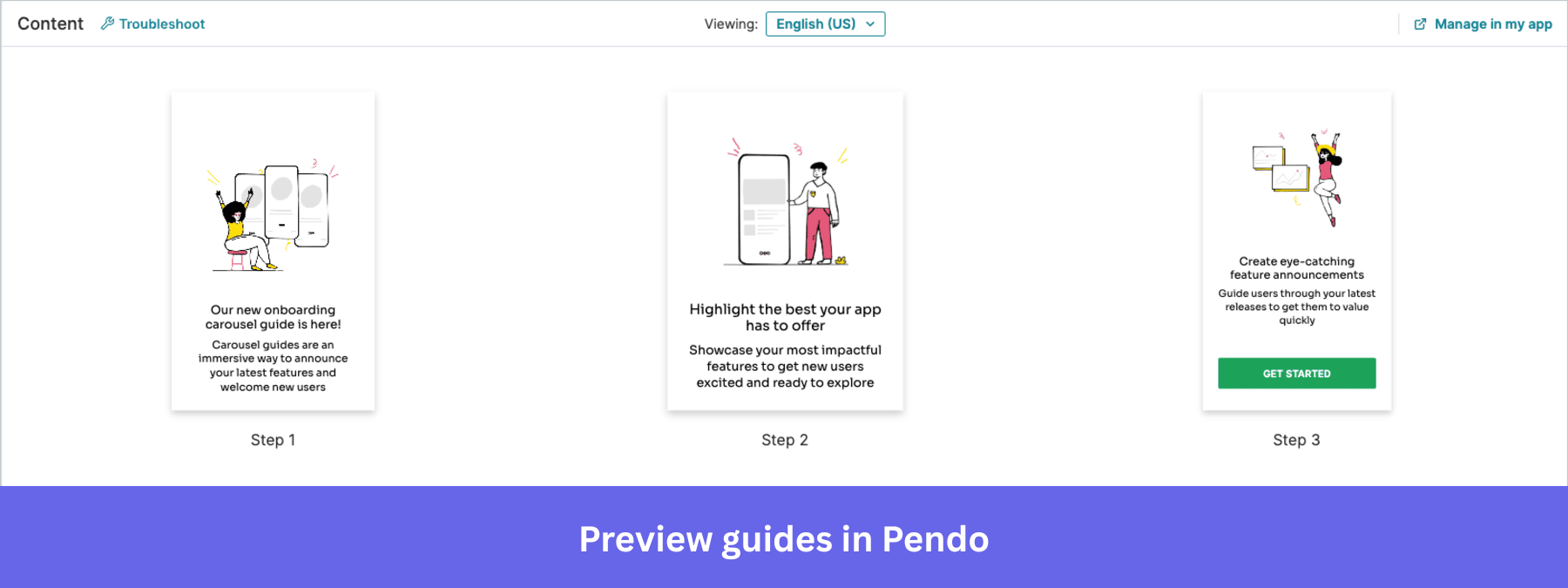
Building a Pendo Product Tour comes down to the building blocks you drag and drop into a guide, the user-friendly editor you use to build it, and the AI layer that can draft the first version for you.
The building blocks
Pendo’s guides are divided into overlay guides that sit on top of your product and embedded guides that sit inside the page itself. Embedded guides only ship on Guides Pro, so you can only use that functionality on paid plans. The free plan only gets you overlays.
Inside the overlay family, there are four shapes:
- Lightbox: A full-screen modal that takes over the page, best for an announcement you want a user to see before they do anything else.
- Banner: A slim strip pinned to the top or bottom of the screen, good for a lower-urgency message that doesn’t need to block the page.
- Tooltip: A small pop-up anchored to a specific element, used to explain what that one part of the UI does.
- Badge activation: Picture a small purple tooltip, or whatever color matches your brand, anchored to the one interactive element you want users to focus on. A badge is the icon that opens when a user clicks it, and if that sounds like a hotspot, that’s because it behaves like one.
Any of these four shapes can launch automatically when a user logs in or after a specific action, or remain available on demand for users to find later. This flexibility makes the building blocks feel less like a fixed script.
You can also build polls for open text, yes/no, number scale, or multiple choice. Polls are Pendo’s version of qualitative microsurveys, so you can connect direct user feedback to the events you already track and add a bit more engagement than a walkthrough alone. However, you’ll lose the response history if you edit a published poll’s question. To avoid that, duplicate the guide instead of editing it live.
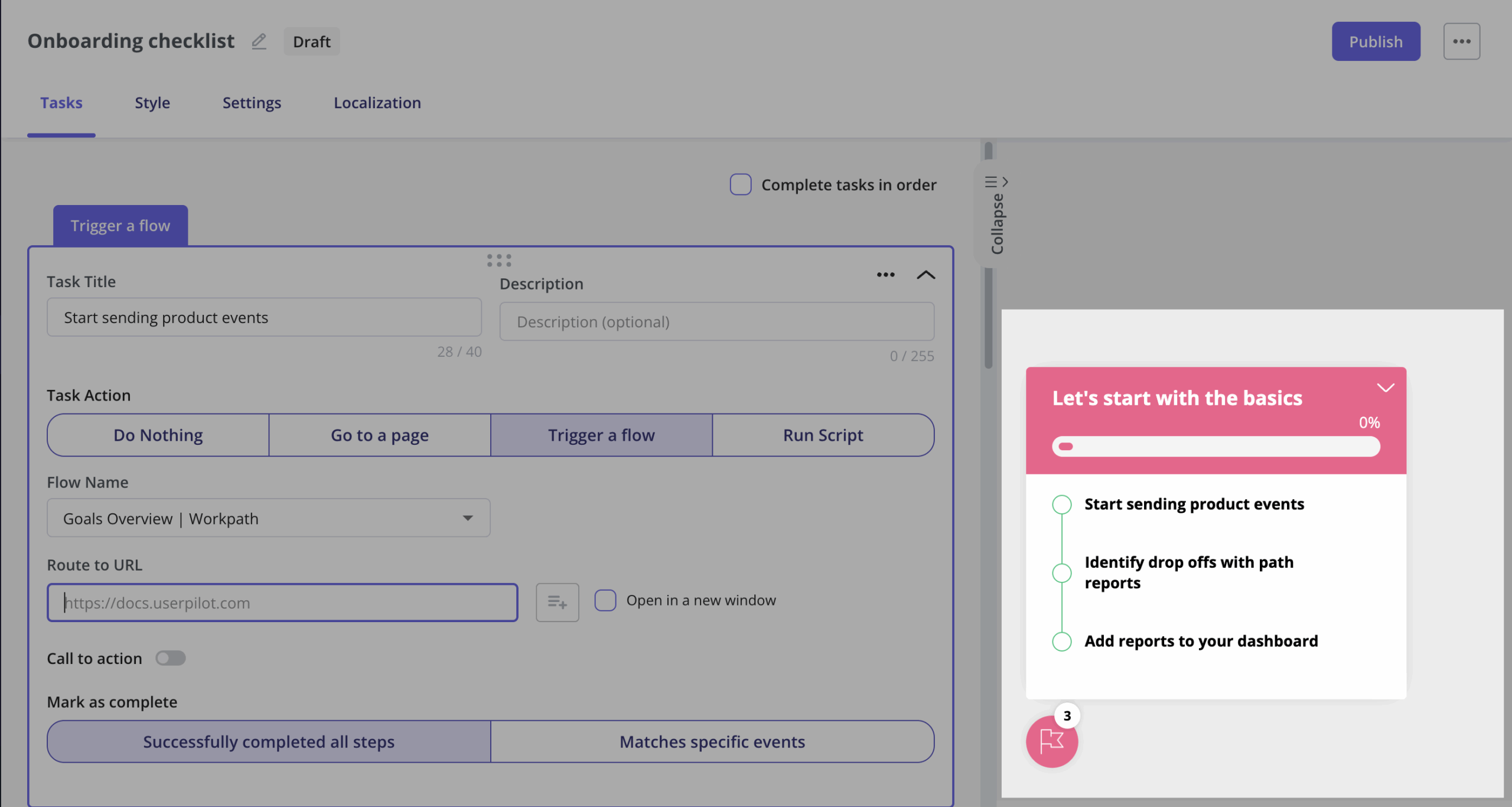
If you want to build user onboarding checklists, use Pendo’s task lists. They string together a sequence of guides and display it as a checklist to provide a clear sign of progress for new and end users who would otherwise find product onboarding complicated. This feature is available only in Guides Pro and requires Pendo’s web SDK.
💡 Did you know?
Not every builder treats checklists as a premium unlock. In Userpilot, onboarding checklists are a core part of the in-app engagement builder, so you can ship a step-by-step activation checklist without paying for a higher tier or wiring up an extra SDK.
The authoring layer
You can use all the building blocks with Pendo’s Visual Design Studio. There’s also a lighter option for small fixes, like swapping a line of copy, changing a button label, or adjusting a single step, without opening the full Studio.
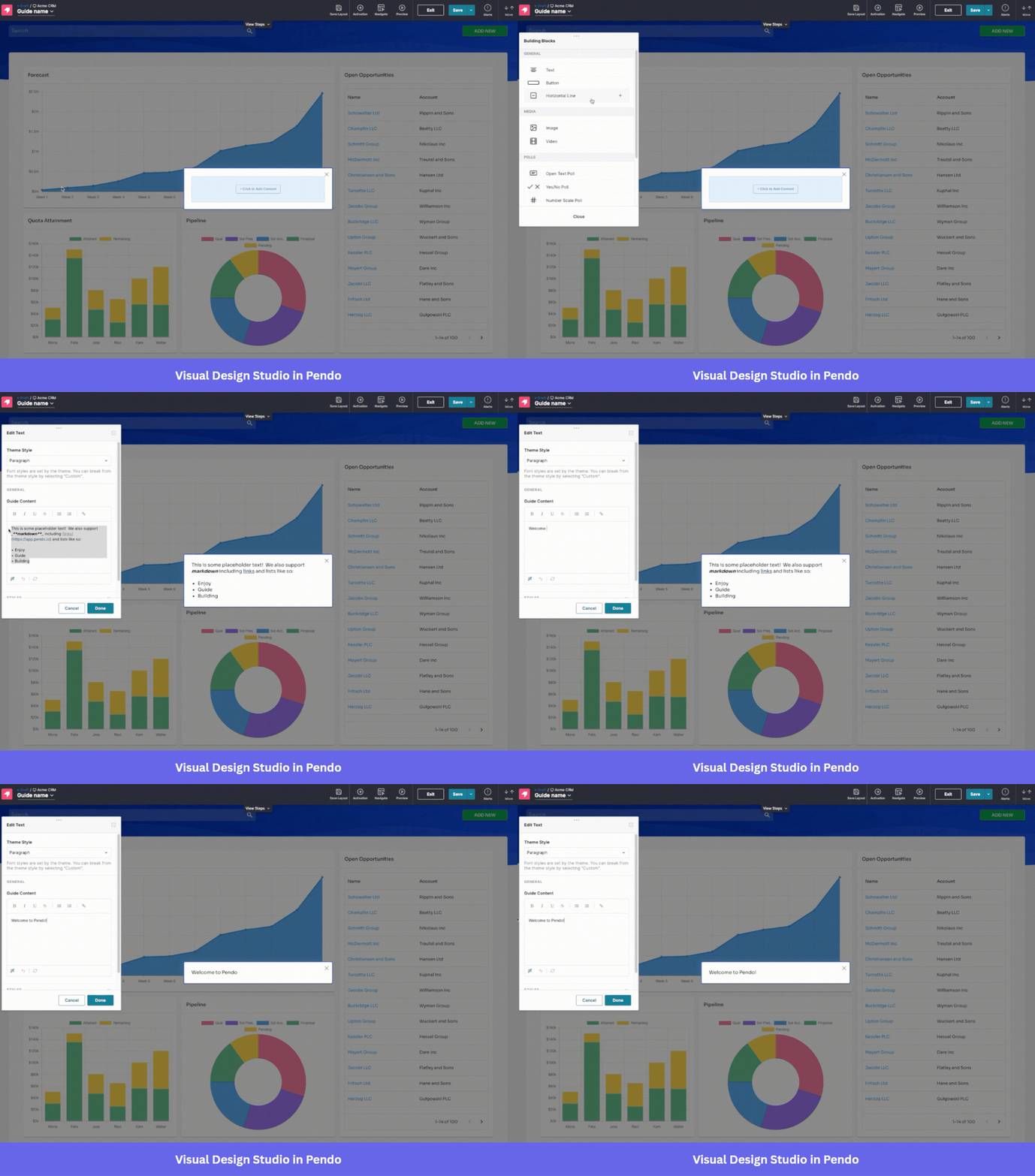
You can use the “Edit in Pendo” button on a guide’s details page to open a simplified editor for quick changes to text, buttons, or steps. With this approach, you don’t have to load the full Studio for something that small, and it helps you edit a guide without opening it inside the application.
2026 AI guide creation
Pendo’s conversational AI guide creator, still in beta, allows you to describe a guide in a prompt. Then, the AI drafts the structure, the steps, and even an early version of a walkthrough or announcement copy. From there, you can tell it to switch types, add or remove steps, or adjust tone and length, and the result still opens in Visual Design Studio for you to finish manually.
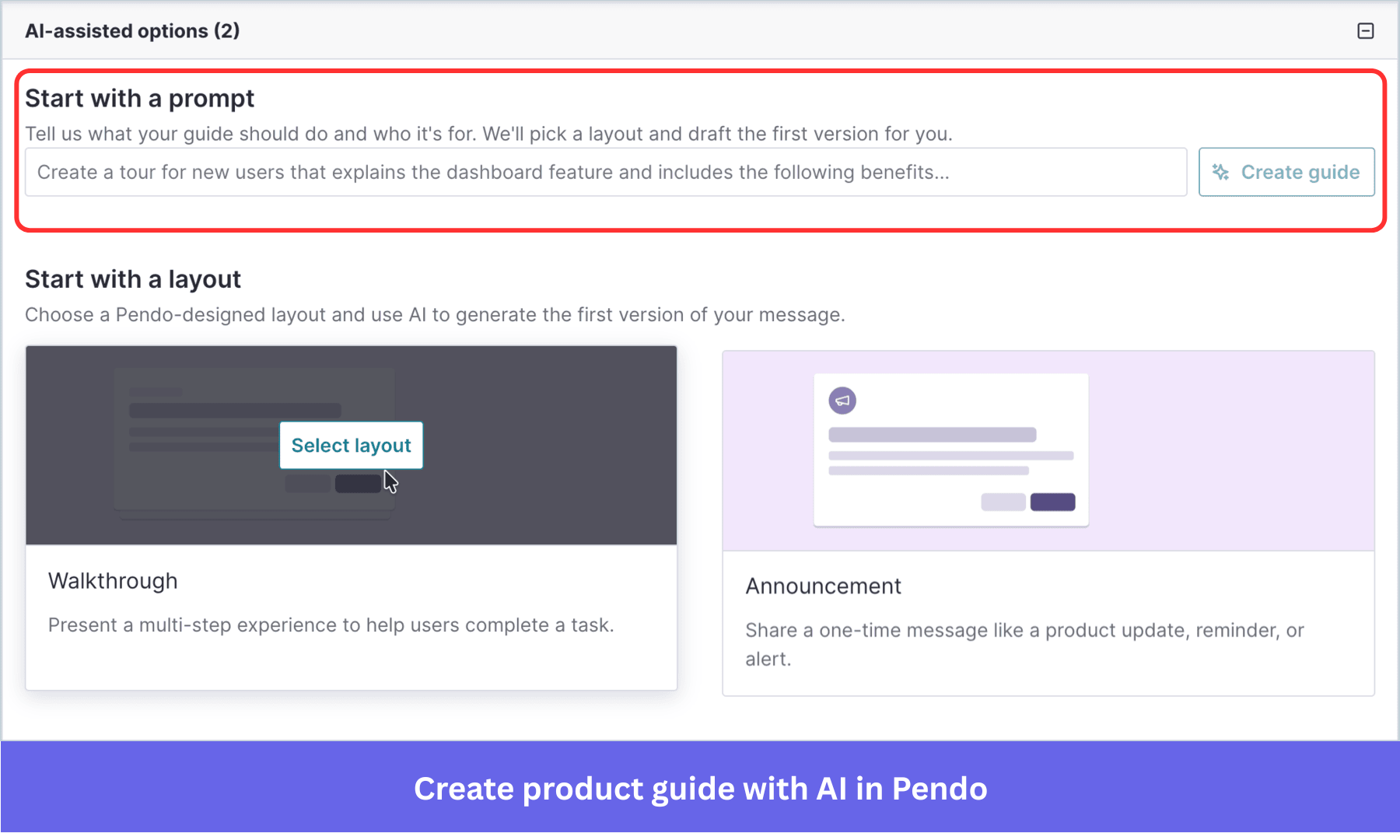
This feature is gated to Guides Pro, like nearly everything else genuinely new in this builder. Pendo will let you draft a guide instantly for free, but you’d need to pay to ship the advanced version.
What use cases does Pendo’s guide system support?
After you’ve built a product tour in Pendo, the next thing to consider is where it can run. Pendo’s guide system may not read user behavior and product usage well enough to drive real user engagement.
Onboarding people differently based on their role
With segmentation, a Pendo tour changes based on who’s viewing it.
Say you’re rolling out a new reporting feature: admins, who configure the report settings, get a walkthrough of the setup screen, while viewers, who only read the reports, get a shorter tour focused on the export button instead.
You can nest up to five segments deep based on the events you track, but you can’t do compound nesting. So, if your targeting logic needs both AND and OR conditions stacked together, you’ll hit a wall before you hit the five-segment limit.
Adapting a tour to what a user’s already done
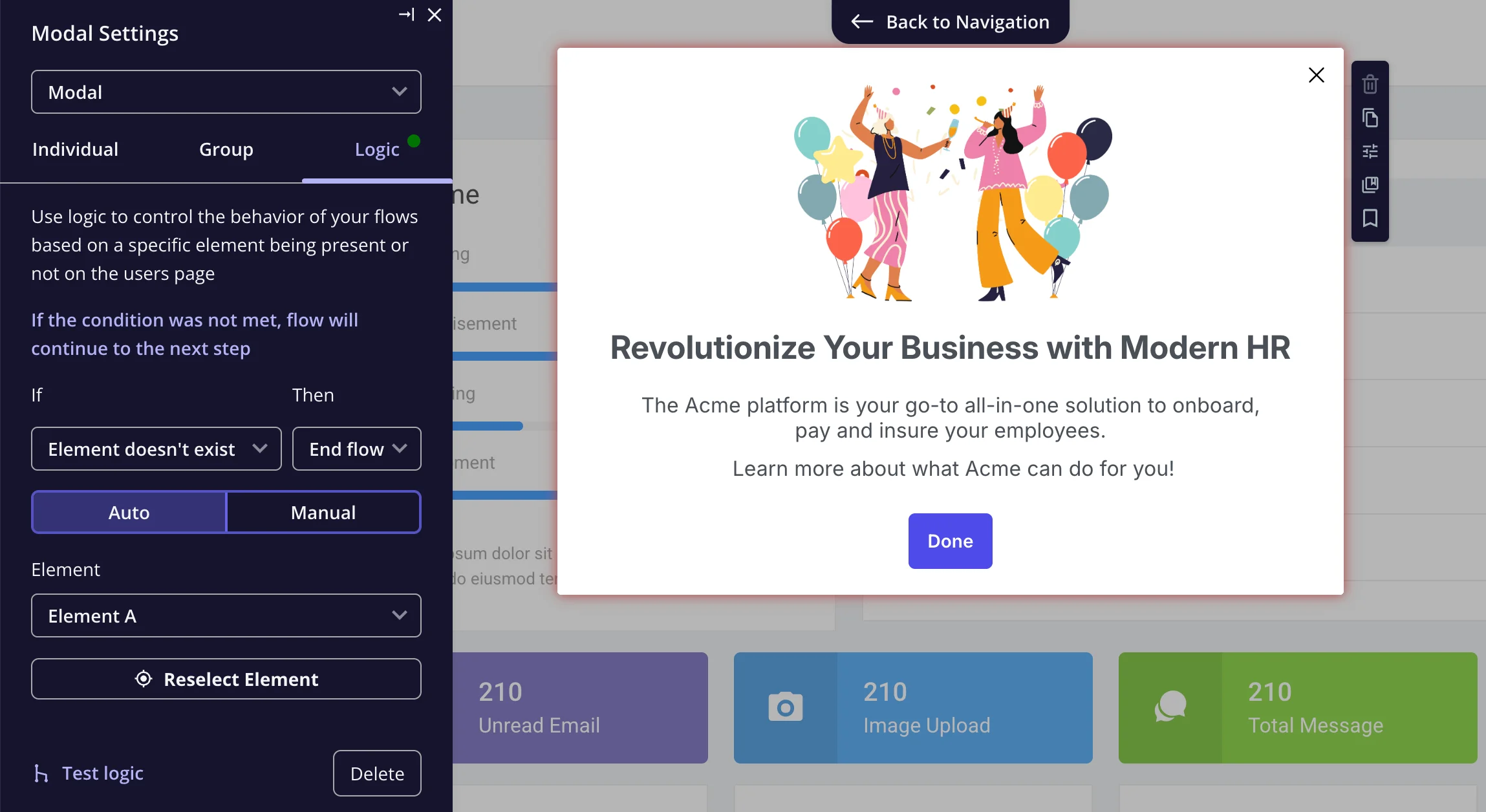
Guides Pro adds conditional branching, so a guide can route a visitor down a different sequence of steps depending on whether a tagged feature or element is present.
This is a behavior-driven trigger because the tour connects to what a user has already done, rather than running the same script for everyone. Visual Design Studio shows the routing as a step map, a visual layout of every fork, return path, and endpoint in the guide.
💡 Did you know?
If you’d rather not gate branching behind a paid bundle, this is one place alternatives diverge. Userpilot’s Flow Logic sits inside the standard flow builder, where you attach a condition to a step and route or skip users based on what they clicked, without a separate Pro upgrade.
Running tours across more than one product
Pendo can extend a single guide across multiple apps on a shared account, which matters if your product is more than one product under the hood. A segment’s size on the Segments page may differ from the number of visitors eligible for a specific guide because eligibility counts only people who have activity in that guide’s app.
For cross-app guides, both apps need a shared second-level domain, matching permissions, and a matching visitor ID schema. Plus, you can’t add a cross-app guide to a Resource Center or mix install-script guides with browser-extension guides.
Onboarding inside a mobile app
Mobile guides cover carousels, tooltips, and pop-ups. They work, but with a timing problem that native web guides don’t have. There’s a lag of a few hundred milliseconds to a few seconds before a mobile onboarding guide appears, limiting the ability to reach users instantly. If a user navigates to another page before the time lag expires, the guide never appears.
What guides won’t do
Pendo Guides is an in-app messaging system. When you want a tour to continue into an email, you’re outside Guides and into Orchestrate (Pendo’s separate journey tool for cross-channel campaigns). In other words, you can show a guide while a user is inside your product, but if you want to follow up by email a day later, you’d need Orchestrate to send it.
💡 Did you know?
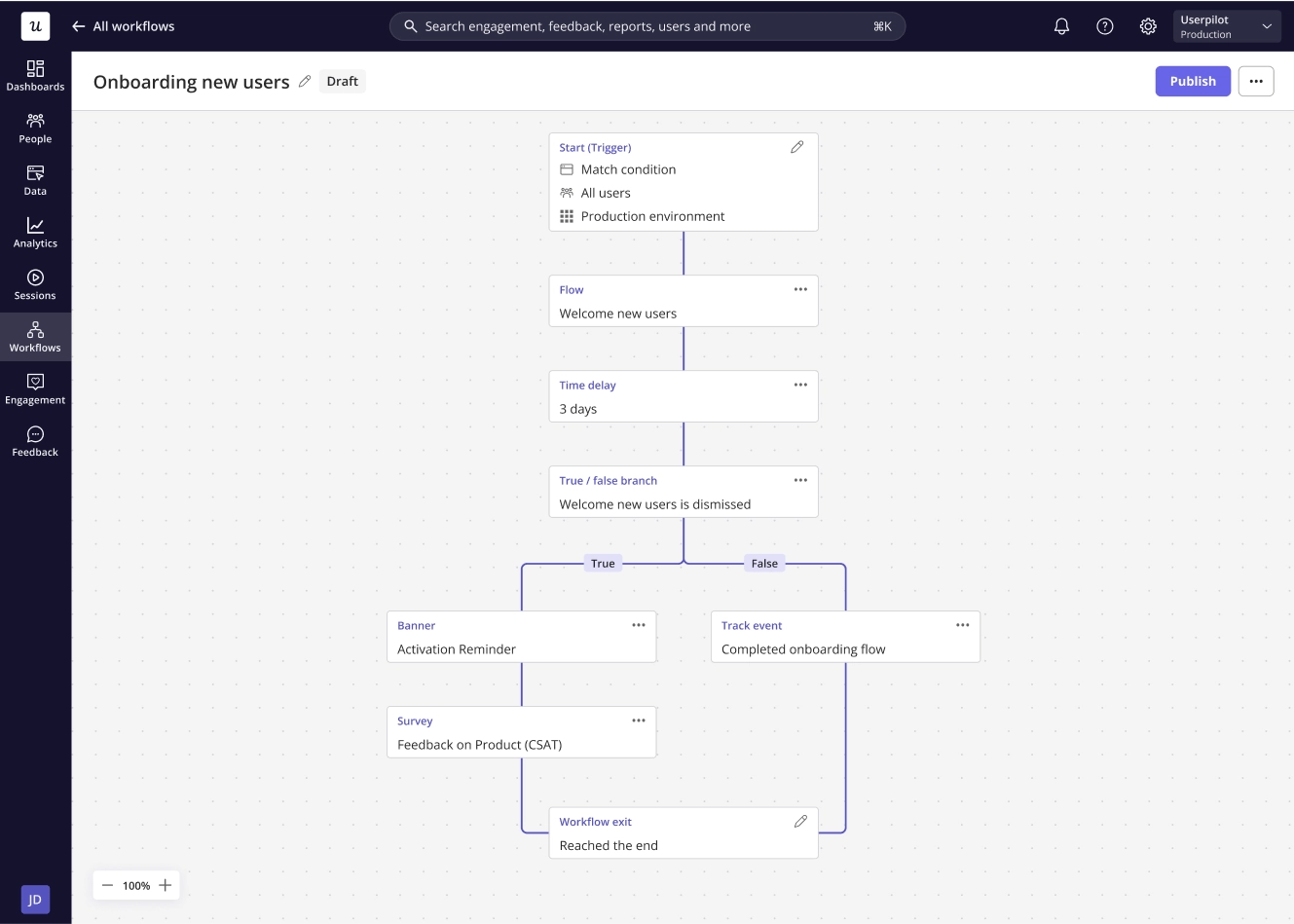
This split between in-app and cross-channel is not universal. Userpilot folds flows, emails, and time delays into a single workflow builder, so a day-later email follow-up becomes another step in the same journey rather than a handoff to a separate product.
What’s the pricing for these use cases?
Most of what makes Pendo’s guide builder interesting lives behind the Guides Pro gate.
What’s gated behind Guides Pro?
In addition to the features I’ve mentioned earlier (embedded guides, task lists, cross-app guides, branching, and AI guide creation), Guides Pro also includes:
- A/B testing on guides: Test a guide against no guide, or one guide against another, on a shared conversion goal.
- Custom code in the designer: Add your own CSS or JavaScript to a guide to style or add behavior that the building blocks alone can’t cover.
- Guide edit history: See and roll back previous versions of a guide instead of redoing changes from scratch.
- Dashboard widgets: Surface a guide’s performance directly on a Pendo dashboard instead of digging into the Metrics tab.
What does Pendo cost overall?
Pendo pricing isn’t published for Base, Core, or Ultimate; anything beyond Free is a custom quote based on monthly active users and the modules you enable. The Free plan caps at 500 MAUs; once you exceed that limit, you can’t create new guides, in-app NPS surveys, or segments until you upgrade.
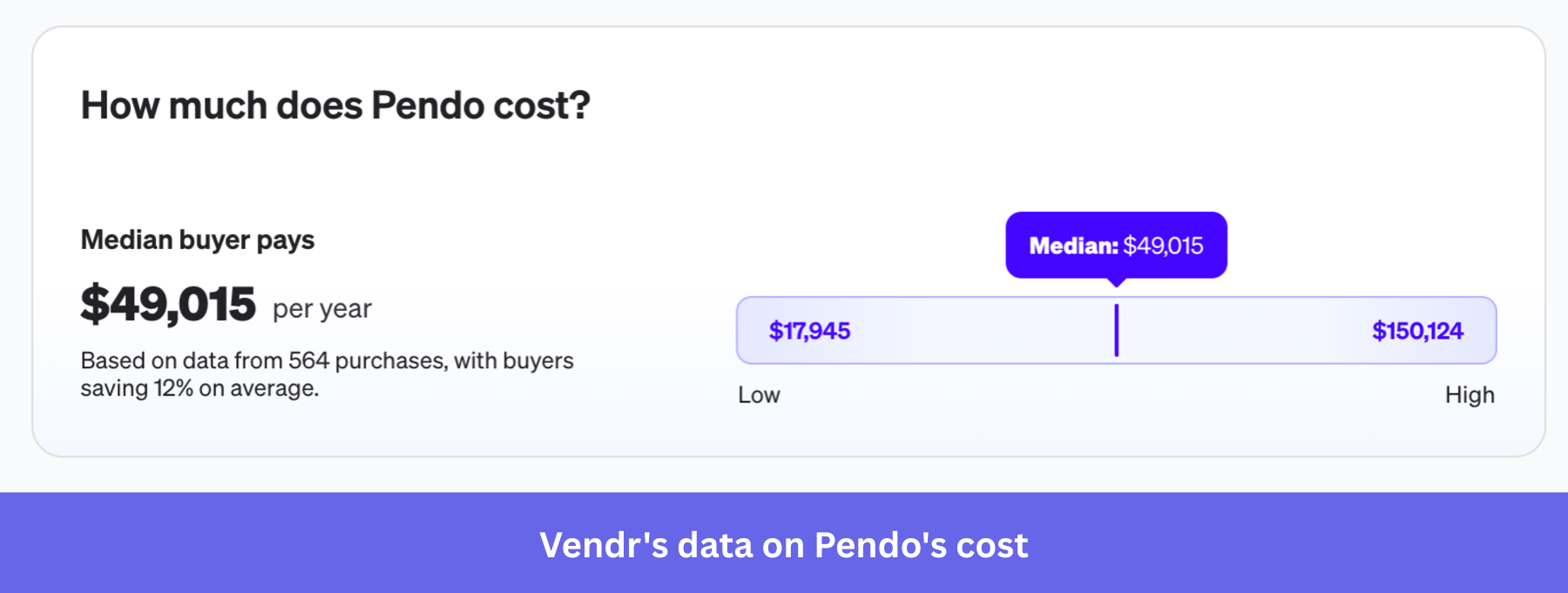
Vendr’s buyer data puts the median annual Pendo contract near $49,015, with deals ranging from $17,945 to $150,124. This tells you Guides Pro is realistically a five-figure-and-up commitment once you’re past the free tier.
What are the limitations of Pendo Product Tours?
Here’s what Pendo’s guide builder costs you in engagement and value once you’re running it at scale.
Can you tell if a tour is working?
Engagement metrics, like user retention and feature adoption rates, are supposed to be the clearest signal of how well a tour performs. Pendo’s Metrics tab gives you guide views, time on guide, poll responses, and a “Visitors per Guide Step,” which is the number you should watch. Guide views only count from step one of a tour, so later-step views never make it into the headline total, and that quietly inflates how good a guide looks if all you check is the top number.
I’d push back on the idea that Pendo tracks a clean completion rate toward some kind of Aha moment. What it tracks is Visitors per Guide Step, a drop-off proxy you have to read step by step. Pendo also has an Effectiveness tab that compares a guide against the account-wide average, which is the closest thing to a real benchmark the tool offers.
💡 Did you know?
This is the clearest line between Pendo’s guide metrics and what some alternatives report by default. Userpilot shows a flat completed count and completion rate, average time to complete, per-step drop-off, and goal completion on the same screen, so you read engagement directly instead of reconstructing it from a step-by-step proxy.
Combined with product analytics elsewhere in Pendo, you can analyze that drop-off rate to spot where users are stalling and build an interactive walkthrough that targets the bottleneck. Pendo already has the building blocks for that workflow. Whether the analytics make it easy to act on is a separate question, and the reviews suggest it isn’t always the case.
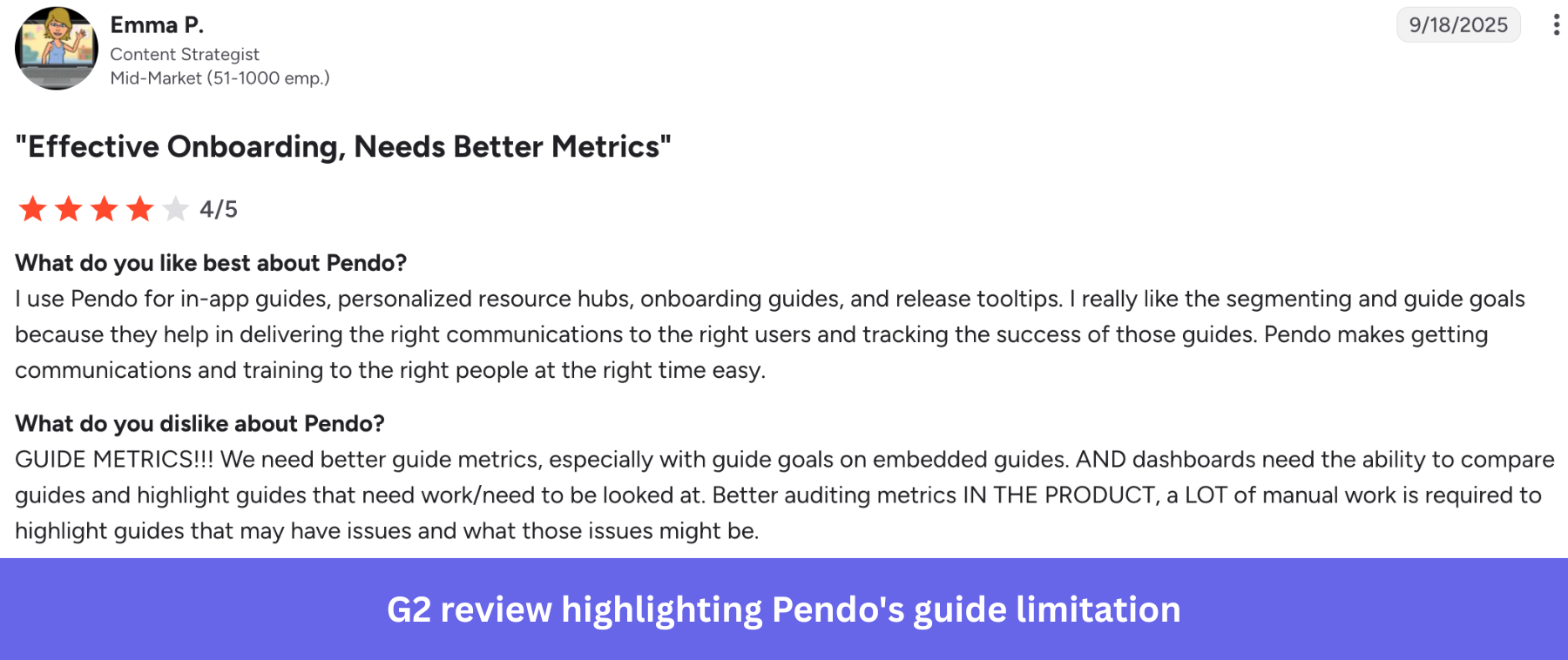
There’s a gap between what teams want and what they get. According to this reviewer, they need better guide metrics and dashboards that can compare guides:
Governance and reliability at scale
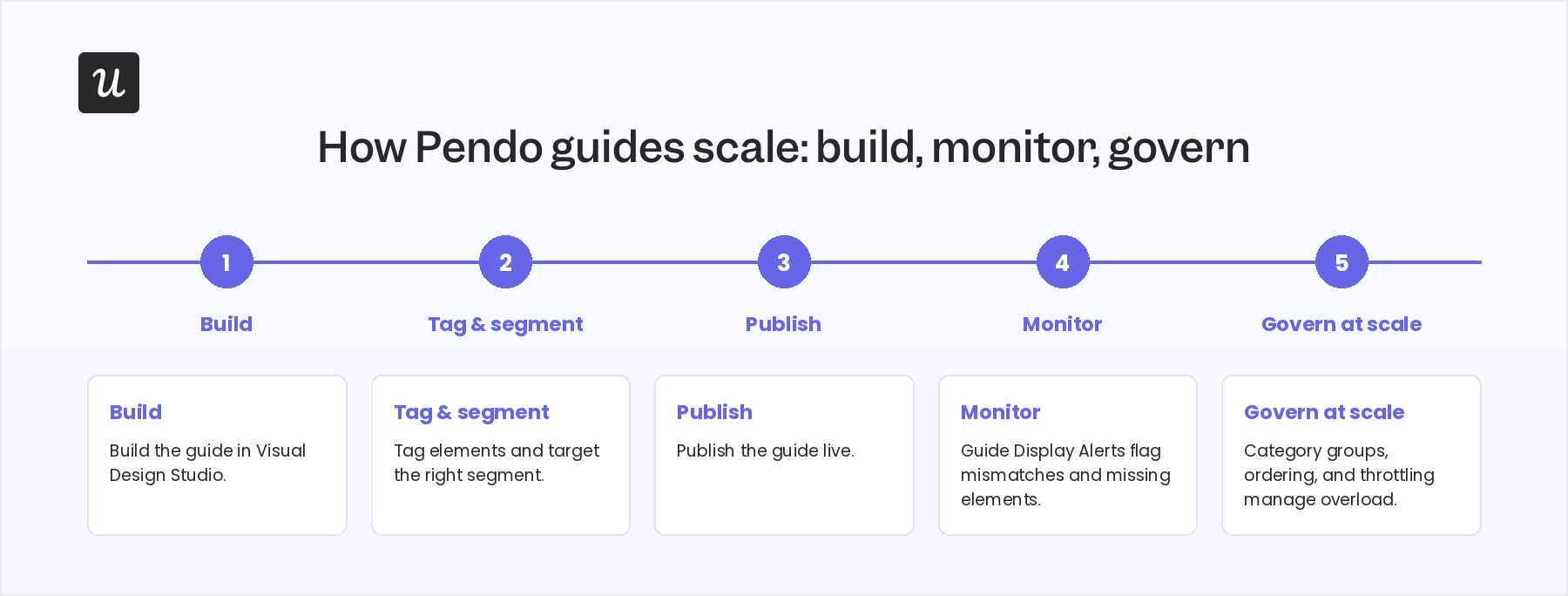
Pendo’s Custom Category Groups offers a way to organize categories across a large guide portfolio instead of scrolling through a flat list, alongside guide ordering and throttling to reduce overload. However, you can’t throttle through cross-app guides, which is a gap if your overload problem happens to live in them specifically.
There’s also the issue of reliability. Pendo logs Guide Display Alerts for page mismatches, missing elements, and other failures. Also, guides stop showing when:
- The target element isn’t visible.
- The targeting rule is wrong.
- The page or iframe doesn’t match.
- An ad blocker gets in the way.
Pendo Product Tours, or a better alternative?
Pendo’s Product Tours have flexible building blocks, conditional branching, and an AI layer that’s more than a marketing label.
However, it means you have to buy the paid plans for nearly every feature, a governance tax once your guide count climbs past a few dozen, and an analytics layer that rewards people who already know what they’re looking for. Together, it’s an operating cost for any product team that isn’t already deep into Pendo’s ecosystem.
If you want the building-block flexibility without the same paid-tier gate on basics like onboarding checklists or branching-adjacent targeting, that’s the gap Userpilot was built to close. Book a demo if you’d prefer to start with a product tour guide builder that lets you run a real onboarding flow with less effort than three rounds of upgrades demand.
Disclaimer: Userpilot strives to provide accurate information to help businesses determine the best solution for their particular needs. Due to the dynamic nature of the industry, the features offered by Userpilot and others often change over time. The statements made in this article are accurate to the best of Userpilot’s knowledge as of its publication/most recent update on June 24, 2026.
FAQ
Can you build Pendo tours without Guides Pro?
Yes, but only the basic layer. Overlay guides like lightboxes, banners, and tooltips are available on Pendo’s free plan. Branching, embedded guides, task lists, cross-app guides, A/B testing, and AI guide creation all require a paid tier because they are part of the Guides Pro bundle.
Do Pendo guides work across multiple apps?
They can, through cross-app guides, but only on Guides Pro and only when both apps share a second-level domain and a matching visitor ID schema. Eligibility counts differently from a segment’s size, and a guide’s eligible-visitor count can read differently because eligibility only counts activity within that specific app.
How is a Pendo Resource Center different from a guide?
A Resource Center is an always-on hub where a user can return to re-trigger an onboarding module or search for help on their own schedule. A guide runs inside it, like a task list with a progress bar, so the Resource Center is the container, and the guide is the content.
Is there a free way to try Pendo's guide builder?
Pendo Free supports up to 500 monthly active users and includes basic guides and NPS. It’s separate from Pendo’s full-platform trial. Once you pass 500 MAUs on Free, you can’t create new guides, surveys, or segments until you upgrade. Getting onboarding right during that free window matters because, if you’re confident about it, you may consider trying a paid plan.
About the author