Ever slice your user base by job title or company size and still miss the mark? You’re not alone; nearly half of marketers say effective audience segmentation is a major challenge.
I saw this firsthand during a recent user research project. Two users with the same job title, company size, and industry. So on paper, they look identical.
But in their demo calls and onboarding surveys, the differences jumped out. One was eager to automate everything and ditch meetings. The other wanted more control, more check-ins, more human touchpoints. If we had treated them as one persona, the experience would’ve failed both.
That’s why we need psychographic segmentation, which helps us group customers by mindset. In this article, I’ll share 8 real-world psychographic segmentation examples you can learn from.
What is psychographic segmentation?
Psychographic segmentation is the method of dividing your user base according to psychological traits. These traits include personality, values, attitudes, interests, and lifestyles.
Unlike demographic data, which tells you facts (age, location, job title), or behavioral data, which tells you actions (logged in, clicked a button), psychographic data tells you about motivation.
Think of it this way:
- Demographics: The user is a CTO at a startup.
- Behavioral: The user exported a report three times last week.
- Psychographic: The user values data transparency to build trust with investors.
When you understand your target audience’s motivations, you can build a product experience that resonates on a deeper level. You stop building for a job title and start building for a mindset.
5 Core psychographic segmentation variables
When I conduct user research, I don’t just ask random questions about feelings. I look for five specific variables.
They include:
1. Personality traits
Personality dictates how users interact with your product. Is your user impulsive or analytical? Are they introverted or extroverted?
For example, I often see a split between “Innovators” and “Conservatives” in the SaaS industry. Innovators want to try your beta features. They tolerate bugs if it means they get the latest innovation. Conservatives want stability. If you change the UI, they get frustrated.
Therefore, if you identify a segment of “Innovators,” you can target them with new feature announcements. For the “Conservatives,” you focus on reliability and uptime in your messaging.
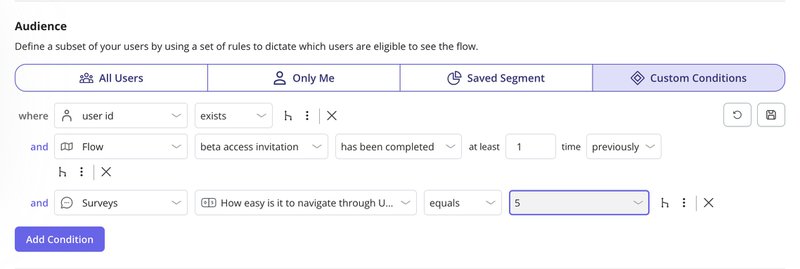
In the example below, we’re narrowing in on a segment of innovators. These users have:
- Completed the beta access invitation flow.
- Rated the product 5/5 on a UX evaluation survey, indicating confidence in navigating the interface.
This combination of behavioral and psychographic data tells you they’re not only willing to explore but are comfortable doing so.
Using Userpilot, you can group such users based on personality traits, survey scores, and completed flows. It allows you to create highly relevant in-app experiences.
For example, you could follow up with users using an in-app survey to collect psychographic data on how they perceived the recent update.
2. Lifestyle
Lifestyle segmentation looks at how your users prioritize their time and energy. This is a typical psychographic segmentation example in B2B.
Consider the “Hustle Culture” founder versus the “9-to-5” manager. The founder checks analytics at 2 AM. They value speed and mobile access. The manager logs off at 5 PM. They value collaboration tools that work asynchronously so they don’t get pinged at dinner.
I once worked on a project where we realized a huge chunk of our target audience identified as “Digital Nomads.” We shifted our marketing strategy and product positioning to emphasize offline mode and lightweight mobile features. Engagement in that psychographic segment doubled.
3. Social status
This isn’t just about how much money someone makes (that’s demographic data). It’s about where they perceive themselves in the hierarchy and what they value as a result.
In the software world, this often translates to distinct customer segments like “Enterprise Power Users” and “Bootstrapped Startups”.
The Enterprise user might value security certifications and dedicated support. They want to feel like a VIP. The Bootstrapper values community and DIY resources. They wear their scrappiness as a badge of honor.
This also relates to where they sit in their organization’s hierarchy and, more importantly, where they want to sit.
A junior user might use your tool to impress their boss (aspirational status). A VP might use your tool to maintain control and oversight. Your product messaging and targeted marketing strategies need to speak to that status.
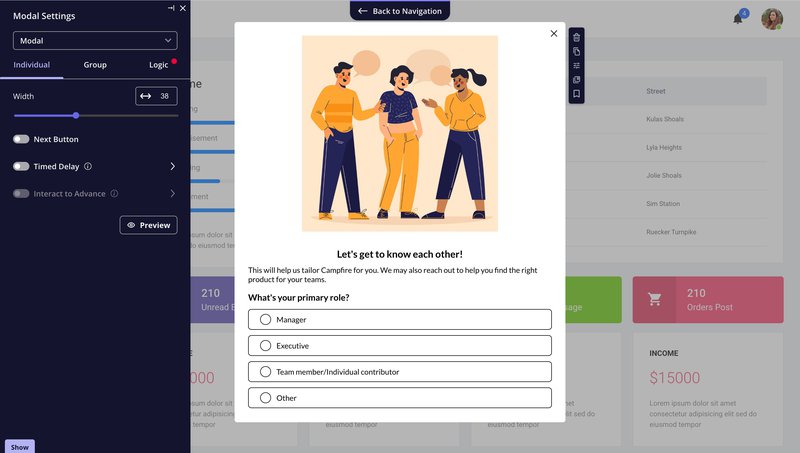
You can surface this kind of psychographic segmentation data early using welcome surveys in Userpilot. Ask about a user’s role or team size, as shown above. It helps you identify psychographic attributes like aspiration, authority, and influence without ever needing to ask directly.
4. Activities, Interests, and Opinions (AIO)
This variable is often called AIO. It covers what users do (Activities), what they get excited about (Interests), and what they believe (Opinions).
- Activities: Does the user spend their day coding, managing people, or selling? A salesperson needs a CRM that reduces data entry. A developer needs a tool that integrates with GitHub.
- Interests: Are they interested in AI? Data privacy? Minimalist design?
- Opinions: Do they believe software should be open-source? Do they think remote work is the future?
In most cases, their opinions on industry trends will dictate which features they value. For example, if they strongly believe AI is the future, they will likely be early adopters of your AI features.
You can understand these psychographic characteristics by comparing what users say with what they do. Userpilot gives you both. You can use surveys to collect psychographic segmentation data and pair that information with behavioral data from product analytics.
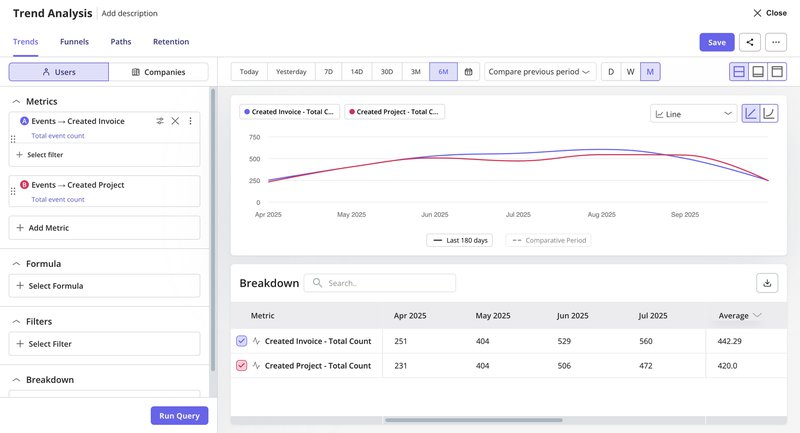
For example, you can compare feature adoption trends across core features over time and break down the data by segments.
If one group consistently engages with automation features and another sticks to project creation, you gain clearer psychographic insights about what each group values.
This combination helps you support each customer segment with experiences that match their activities and interests.
5. Attitudes
Attitudes are tough to change, so you need to align with them. This refers to the user’s worldview regarding your specific industry.
For example, does the user value privacy over convenience? Do they value speed over accuracy?
If one psychographic segment values privacy, your marketing messages should emphasize compliance and security. If another group cares more about speed, highlight fast onboarding and quick feature access in your personalized marketing strategies.
Understanding user attitudes helps you create marketing campaigns and better position features for each group.
6 Psychographic segmentation examples
I’ve found that reading about psychographic segmentation or frameworks isn’t enough. What helps is seeing how real companies implement them.
So here are my six curated psychographic segmentation examples across different industries.
1. Weekdone: Segmenting by user needs and values
When I talk about psychographic segmentation, Weekdone is one of the clearest examples I think about. Their core idea was simple, which was to segment leads by expected product value.
That’s a psychographic lens because it focuses on mindset and primary need.
Here’s how they did it. During registration, they asked new signups about their main use case and used those answers to route people into two parallel products. OKR-focused leads stayed in the main Weekdone product.
Meanwhile, those interested in engagement, planning, or team productivity were sent into a lighter tool that later became Team Compass. It came with separate landing pages and email funnels built around that need.
The outcome is surprisingly great. They report no drop in total sales-qualified leads after launching this split, which is huge for an experiment like this.
To me, that signals they protected their OKR revenue engine while finally giving “non-OKR” visitors a product story that makes sense for them. It’s a good reminder that many “bad leads” are really misaligned use cases waiting for the right path.
2. Evernote: Onboarding by user intent
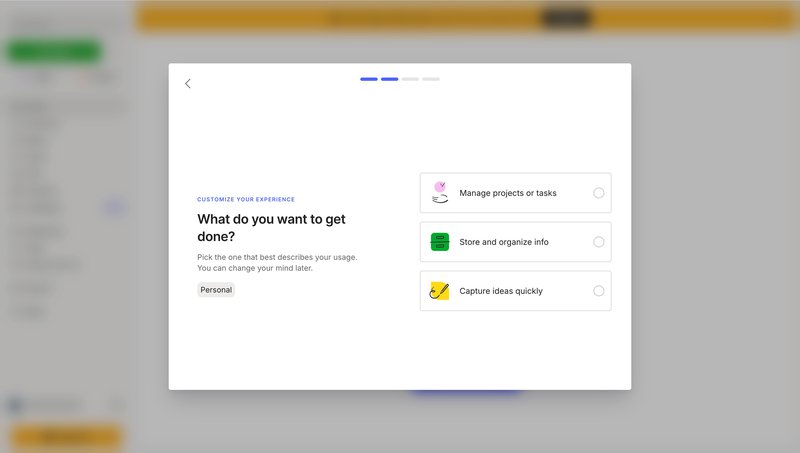
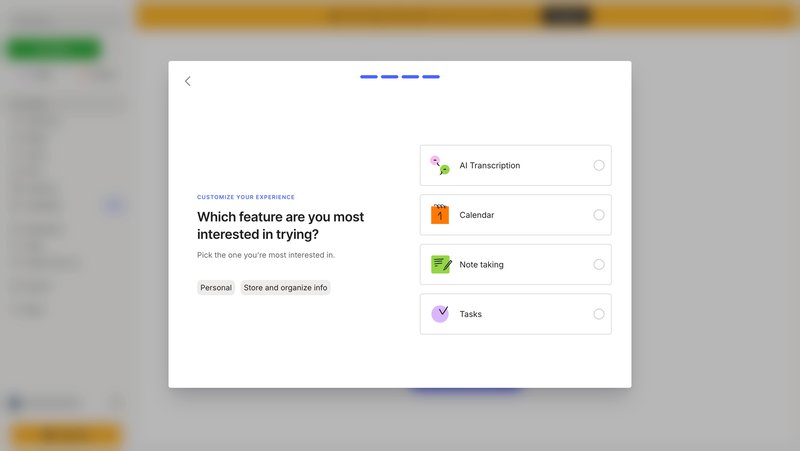
What I like about Evernote’s onboarding is how it collects meaningful data without overwhelming the user.
Instead of asking for demographic segmentation details, it asks what you want to accomplish, whether it’s capturing ideas, managing projects, or organizing information.
These options reflect clear psychographic segmentation variables, tied to the user’s mindset and motivation.
Each selection helps Evernote understand what the person is looking for in the product.
Someone who selects “Note-taking” or “AI Transcription” is likely focused on speed and simplicity. Someone else choosing “Tasks” or “Project management” might be goal-driven or process-oriented.
Based on this input, Evernote can adjust what features it highlights next without needing long explanations or tutorials.
I find this helpful because it gets users into momentum faster. Plus, you’re responding to what they’ve already said. It also creates a clearer pathway to shape marketing messages later, since you already know what each group values most.
3. Duolingo: Tapping into motivation levels
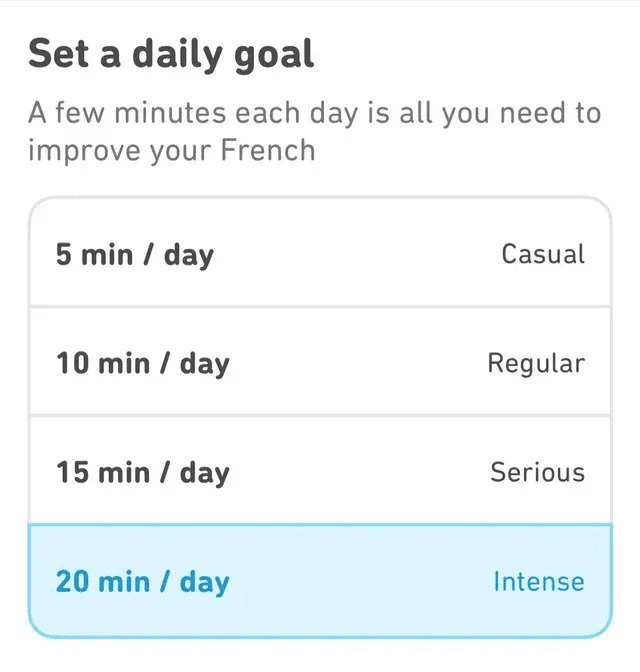
One of the most interesting uses of psychographic segmentation I’ve seen is in Duolingo’s goal-setting screen.
Right at the beginning, users are asked how much time they want to commit daily, ranging from 5 minutes to 20+ minutes. That single choice gives the team a signal about motivation, attitude, and learning intent.
This type of data isn’t something you can pull from click behavior alone. It reflects the user’s internal commitment. An example of psychographic segmentation variables shaping the flow.
Someone who picks the “Intensive” goal likely sees language learning as a priority. A “Casual” user might just be exploring. Duolingo then uses this input to pace the experience: challenges, reminders, and content types all shift depending on how the person frames their goal.
Personally, I think this works because it respects the user’s intent. And that one input creates psychographic segments that influence everything from streak design to re-engagement nudges.
4. Headspace: Personalizing by meditation goal
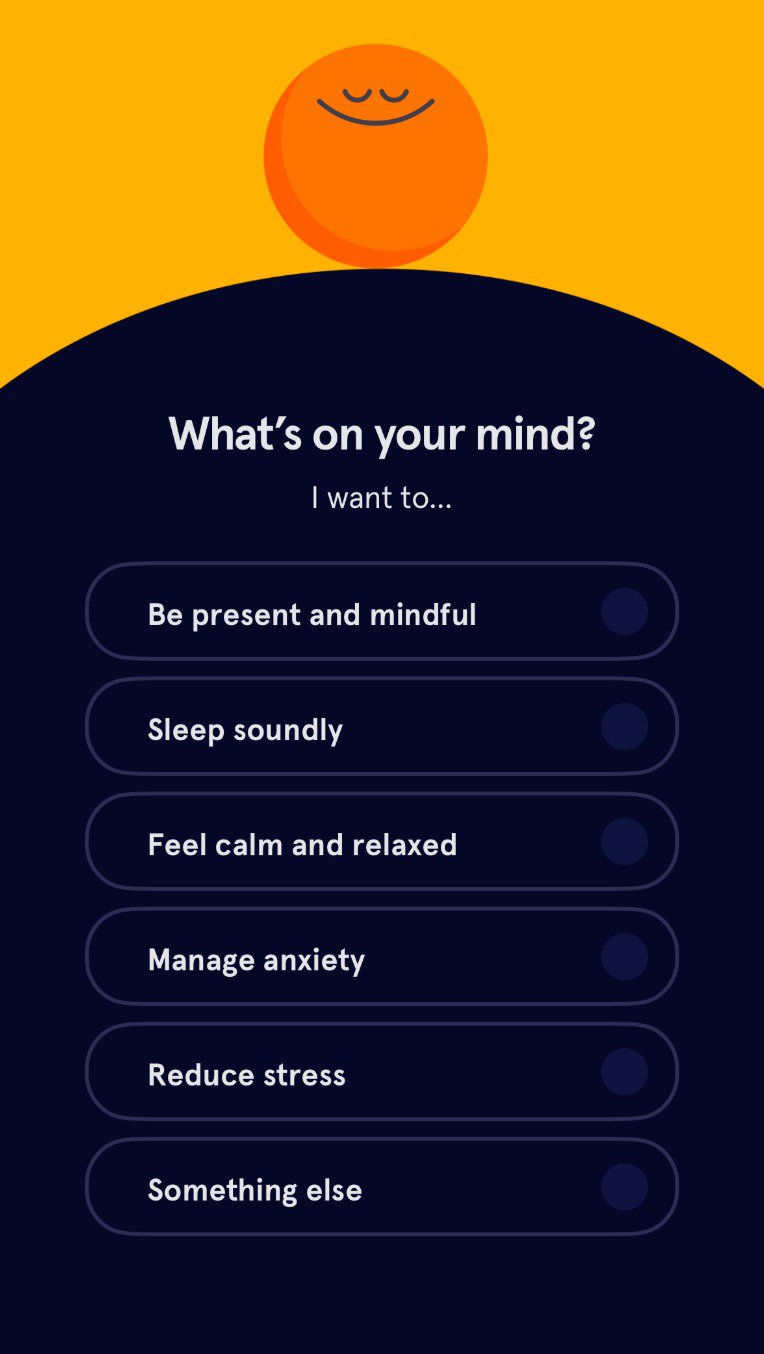
I liked how Headspace made intent the starting point and not the product tour. When new users sign up, they’re asked why they want to meditate.
The options are focused, and this single question serves as the entry point for analyzing psychographic data tied to real-life emotional goals.
Each choice represents more than a feature preference. It signals a user’s mindset, which Headspace uses to sort people into distinct psychographic segments.
Someone seeking calm might need short meditations that ease anxiety. Another person, focused on mental clarity, might respond better to structured programs.
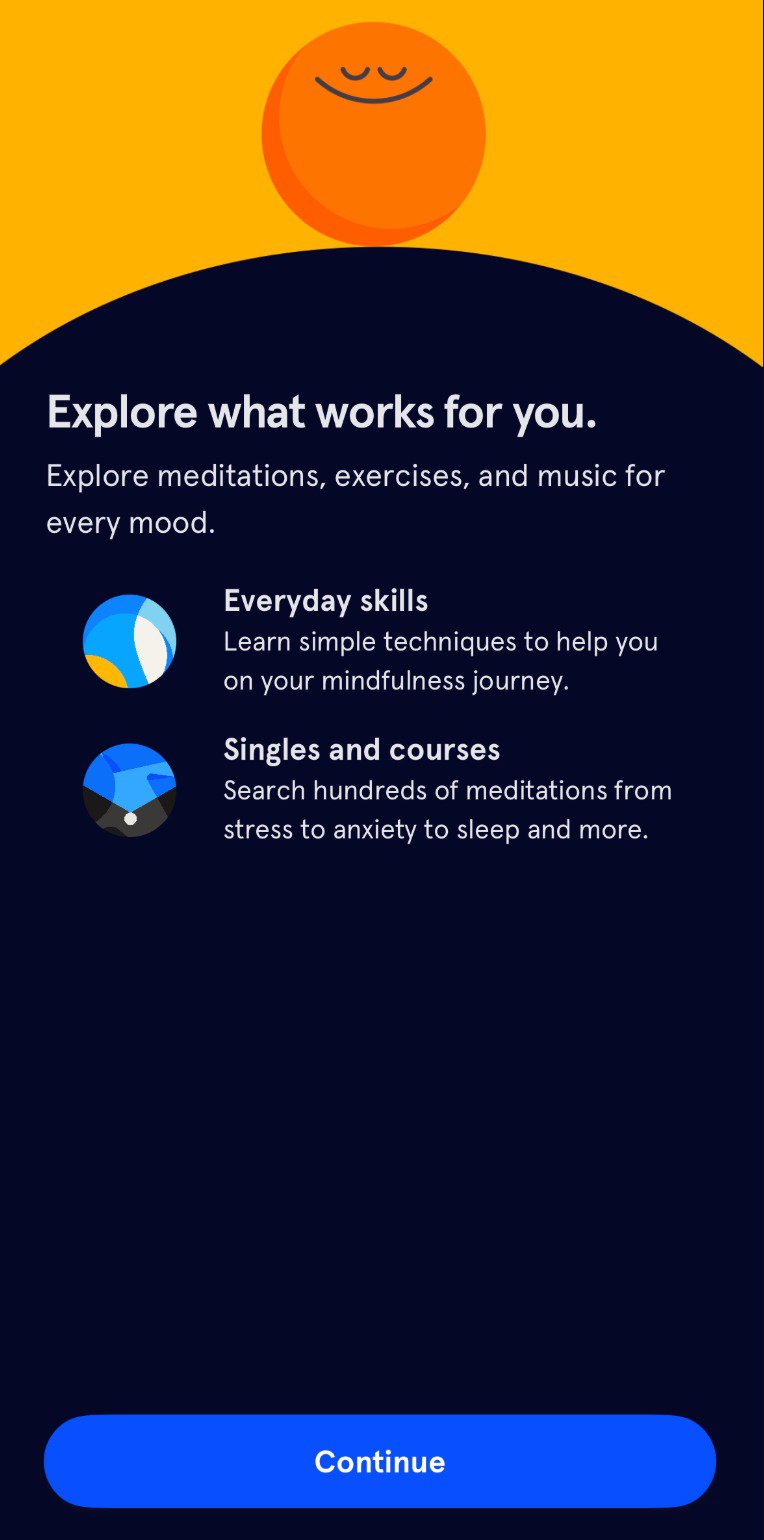
The onboarding flow adapts accordingly, helping users settle into a routine that feels relevant.
It also reduces friction later. Users don’t have to dig through content to find something that fits.
For teams building onboarding flows, this is a reminder. You don’t need complex logic if you’re asking the right question upfront. A single piece of psychographic data can shape both habit formation and long-term retention.
5. Calm: Goal-oriented content personalization
Too many onboarding flows default to feature tours. Calm does the opposite. It starts by asking about the user’s wellness goal, whether that’s better sleep, less anxiety, or a general sense of happiness. This quick prompt gives the team a way to collect psychographic data that maps to personal challenges rather than surface-level intent.
Each response directly informs the app’s structure from the first session onward.
If someone chooses sleep, the home screen highlights sleep stories and nighttime meditations. If the goal is anxiety relief, Calm pushes breathing exercises and daily calming routines.
These decisions create immediate relevance without requiring long setup flows or complex branching logic.
What I appreciated here is how the product uses a single signal to shape both user flow and emotional tone. This is something that product teams can apply without reinventing their onboarding. When that first choice connects to real content and a calming experience, users are more likely to stay and explore.
6. Spotify: Segmenting by lifestyle and mood
Spotify’s personalization goes beyond taste in music. The platform taps into mood, timing, and activity context to shape how it surfaces content.
I liked how it picks up on patterns, whether someone plays upbeat tracks in the morning or lo-fi beats at night. And then uses those subtle cues to shape the homepage experience.
This kind of psychographic segmentation in marketing goes deeper than genre preferences. It reflects how music fits into the listener’s life.
Someone who listens to nostalgic tracks on weekends might be emotionally wired differently from someone who dives into new releases every Friday. Spotify treats those behaviors as signals for market segmentation, creating dynamic experiences like “Mood Booster” or “Afternoon Chill” based on inferred mindset.
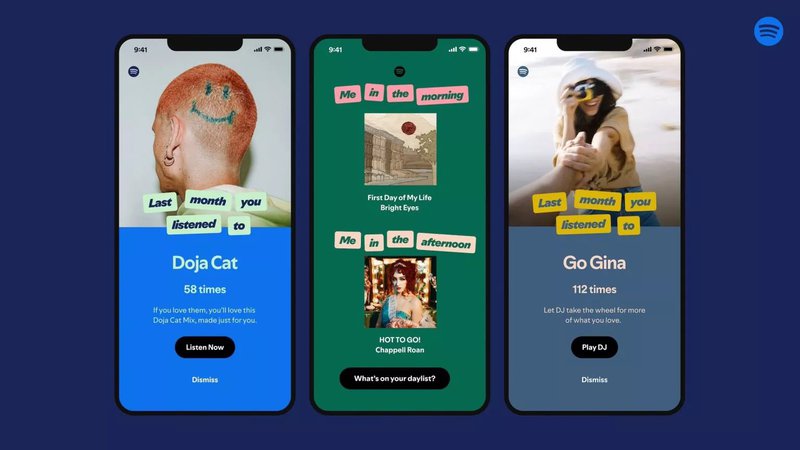
That’s why personalized marketing campaigns like Spotify Wrapped work so well. They tap into identity, and I think that’s what makes them feel memorable instead of manufactured.
How to collect psychographic segmentation data
You might be thinking, “Lisa, I can’t exactly give my users a Rorschach test.”
And you don’t need to. You can gather psychographic segmentation data with tools you already use. The real work lies in asking focused questions at the right moment, so you capture psychographic insights while the context is fresh.
In-app microsurveys
This is my favorite method. Short, contextually triggered surveys while the user is in the product yield the highest response rates. You can use microsurveys to ask one or two questions about a user’s goals or preferences.
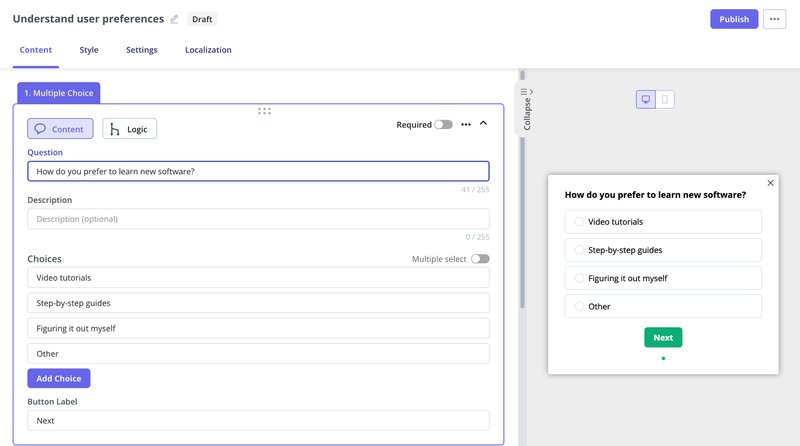
Even a single question during onboarding can reveal a lot about how someone thinks. “How do you prefer to learn new software?” gives you a quick read on a user’s learning style, which is part of their psychographic information. Someone picking “step-by-step guides” likely needs structure, while others might prefer to explore things solo.
If you’re using a platform like Userpilot, this gets even easier. You can trigger a survey based on the user’s lifecycle stage, pipe the response into their profile, and then show different flows based on what they selected.
It’s one of the simplest ways of implementing psychographic segmentation without making it feel like a survey.
User interviews
Quantitative data tells you what, but qualitative data tells you why. I conduct user research interviews regularly to dig into the “why.”
When I talk to a user who churned, I don’t just ask about features; I ask about their day, their work pressures, and what keeps them up at night. That is where you find the psychographic gold.
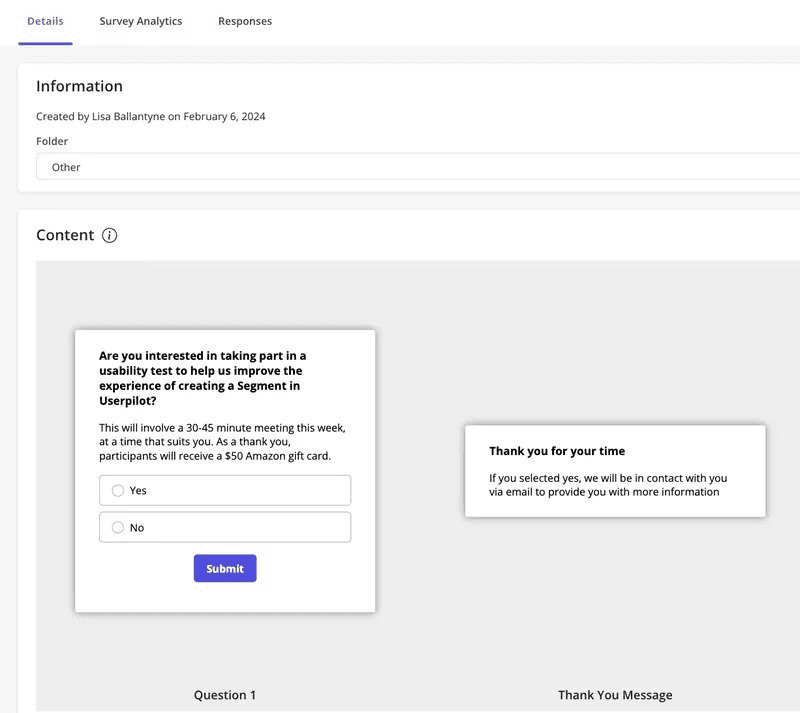
Recruiting these users used to be slow. I’d send emails, wait days, and still barely hear back. So I switched tactics. Using Userpilot, I created a short in-app survey and showed it only to users who had interacted with our segmentation feature. That way, I was collecting psychographic information from a potential customer at the right moment.
Within three days, I had 19 customer interviews scheduled, nearly four times what I expected. Because I wasn’t guessing who to invite.
I was grouping customers based on recent behavior, then asking for feedback while their experience was still fresh. This sped up everything from discovery interviews to usability testing and gave us a clearer path to understand buyer behavior.
Sales and support feedback
Your sales and customer success teams talk to users every day. They know which users are frustrated, which ones are excited about new features, and which ones have doubts. These emotional cues can give you valuable psychographic insights.
Instead of letting these moments slip by, set up a tagging system inside your CRM.
For example, with Userpilot’s two-way integration with HubSpot, you can sync user properties both ways. If a customer success rep notices a user is hesitant about a feature, that note can be synced to Userpilot. You can then trigger an in-app message or follow-up survey based on that sentiment.
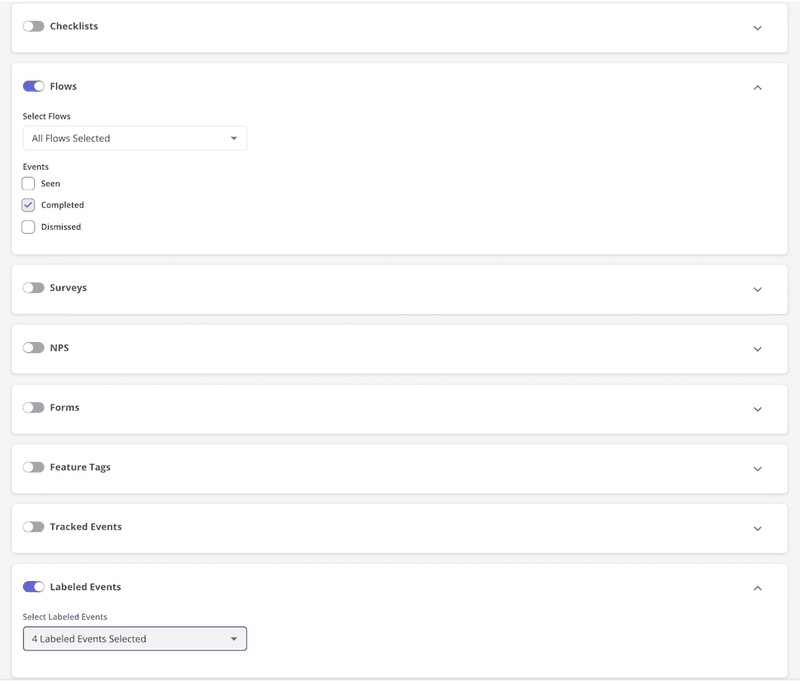
On the other side, when users complete onboarding steps or leave low NPS scores, that data flows into HubSpot. Sales teams can view product usage activity and identify behavioral patterns to guide conversations. This way, you’re tracking attitude and behavior together.
This combination helps you group prospective customers based on how they think. Over time, it becomes easier to build distinct customer segments and create targeted marketing campaigns that speak to the user’s mindset.
Pros and cons of using psychographic segmentation
I find psychographic segmentation most helpful when the goal is to connect with a target audience on a deeper level.
If you’re building buyer personas for lifestyle-based products or planning targeted marketing that taps into emotion, it provides context that behavioral segmentation alone can’t.
Why psychographic segmentation works:
- It lets you group current and prospective customers by shared emotional drivers, which supports building meaningful buyer personas.
- You can discover patterns in activities, interests, and opinions that predict long-term consumer behavior like brand loyalty or churn.
- It’s a strong complement to behavioral segmentation, especially when you’re trying to understand why users act a certain way.
That said, I wouldn’t rely on psychographics alone, especially in performance-heavy funnels or products that solve a direct, urgent problem. It’s also tricky when access to first-party psychographic information is limited.
Where psychographic segmentation can fall short:
- It’s harder to scale without proper data collection systems, like in-app surveys or regular focus groups.
- Without pairing it with transactional data or clear usage trends, segments can feel vague and hard to activate.
- It’s less effective for products with short buying cycles, where behavioral segmentation and direct triggers work faster.
Improve how you build psychographic segments!
If you’ve tried slicing users by what they do and still can’t explain the churn, the hesitation, or the early drop-offs, it’s time to leverage psychographic segmentation.
But most teams overthink it. You don’t need massive focus groups or 40-slide personas. Just a few in-product surveys, smarter tagging, and the willingness to ask why are enough.
That’s why we built Userpilot to support both behavioral and psychographic segmentation, so product, growth, and CS teams can understand users more fully and act in real time.
If you’re ready to build smarter flows rooted in real user psychology, book a demo and see how Userpilot helps.
About the author