User Feedback in 2026: Why It’s 10x Harder and What Really Works

User feedback has gotten harder in 2026, and I learned that the hard way.
When I joined Userpilot from Microsoft, my first project was user testing — running sessions to identify usability issues with our customer segmentation feature. I did what every researcher does: emailed a list, asked for fifteen minutes, and offered a small thank-you. Then I waited. Crickets.
At Microsoft, with millions of B2C users on tap, this never happened. A small voucher would fill a panel in an afternoon. In B2B, the executives I needed had inboxes already buried under cold pitches and meeting requests. My email was just more noise.
So I tried something different. I built an in-app survey in our product and triggered it only for users who had already used the segmentation feature. Three days later, 19 people had signed up for a usability test. I had been hoping for five. Same product, same users, same researcher. A completely different result.
That experience frames everything I think about user feedback, and it is the argument this entire post is making: user feedback is a targeting problem dressed up as a collection problem. The hardest part has never been collecting feedback. It is identifying the right person, in the right place, at the right moment. In 2026, with AI agents quietly absorbing the work your users used to do, the targeting problem is also about to get a lot weirder. Netlify already reports that 80% of their daily signups are agents. We are not at that ratio yet. The trendline is the same one every B2B SaaS team is on.
I wanted to write something more useful than another generic post on this topic. So this guide does four things:
- Explains why “getting user feedback” is the wrong way to frame the problem.
- Walks through the consensus playbook and the line where it starts to break.
- Compares the tools that earn their seat in 2026, with verified 2026 pricing and an honest limitation on each row.
- Introduces the framework we use at Userpilot for the two streams through which user feedback now arrives: human signals and agent signals.
Why is getting user feedback “10x harder than building the product”?
That phrase comes up in every product community I am in. It is the OP question on Reddit threads about user feedback every quarter.
Every few months, there’s another thread from someone saying they cannot get users to respond to surveys, interviews, emails, basically anything. I think the reason the conversation never goes away is that most people are trying to solve the wrong problem.
The problem usually is not the collection. It is targeting.
A lot of teams assume they have a “feedback problem” when what they actually have is a context problem. They are asking the wrong people, in the wrong place, about something those users barely remember doing.
I’ve made this mistake myself. I’ve sent surveys that got a miserable 0.4% response rate. Same product, same quarter, I’ve also sent surveys that hit 36%. The difference was not the tool or even the survey itself. The first one was broad and generic, sent out like a mass broadcast. The second one went to users who had taken a very specific action just a couple of days earlier, so the experience was still fresh in their minds.
That is why I think people overfocus on channels. Yes, channels matter. Refiner’s 2025 benchmark showed mobile in-app surveys averaging a 36% response rate compared to email’s 15%. But I do not think the takeaway is simply “use in-app surveys.” The real advantage is that in-app makes good targeting easier. You can reach people while they are already in the product, right after they have done the thing you want feedback on.
So whenever I see someone asking why nobody is responding, my first thought usually is not “you need a better tool.” It is: who did you ask, when did you ask them, and did they have any reason to care at that moment?
Two contexts, two different versions of the same problem
I also think people lump together two completely different situations when they talk about feedback collection, which is why so much advice on this topic feels disconnected from reality.
- The first group is scaling B2B SaaS teams. You already have users, product activity, and multiple touchpoints. Your issue is not access to people. It is figuring out how to get a useful signal out of all the noise. That means better targeting, better timing, and asking questions tied to behavior. If you are in this group, the rest of this post is probably relevant to you.
- The second group is solo founders and pre-PMF startups. I have to say that most “survey tactics” are not going to help much here because the issue is that nobody cares enough yet. You do not have enough users or enough behavioral context for targeting to even work properly. At that stage, the better move is just finding a handful of people who genuinely have the problem you are trying to solve, getting on calls with them, and listening carefully to how they describe it in their own words. The tooling only comes after that.
If you are in the first group, though, then what improves feedback collection is usually the same thing that improves targeting. That is where I want to go next.
What does the consensus playbook look like, and where does it start to break?
Read enough product threads on this topic, and the advice converges on a single list of six points. Read each one carefully, and you will notice something: they are all targeting tactics. They are dressed up as collection tactics because that is how the question gets asked, but the work each one does is the targeting work.
- Target specifically. Stop broadcasting. The most-repeated piece of advice, and the most central. Find the segment that just experienced the thing you want to learn about, and ask only them. Five sharp user interviews with the right people beat a thousand-row survey with the wrong ones. This is the lesson my crickets-inbox taught me, expensively.
- Watch before you ask. Targeting your own attention to where users struggle, before you ask them anything. Session replay and behavior analytics catch user interactions that users themselves cannot articulate. Users will tell you the dashboard is great. The recording will show them rage-clicking through three filters trying to find what they need. Believe the recording.
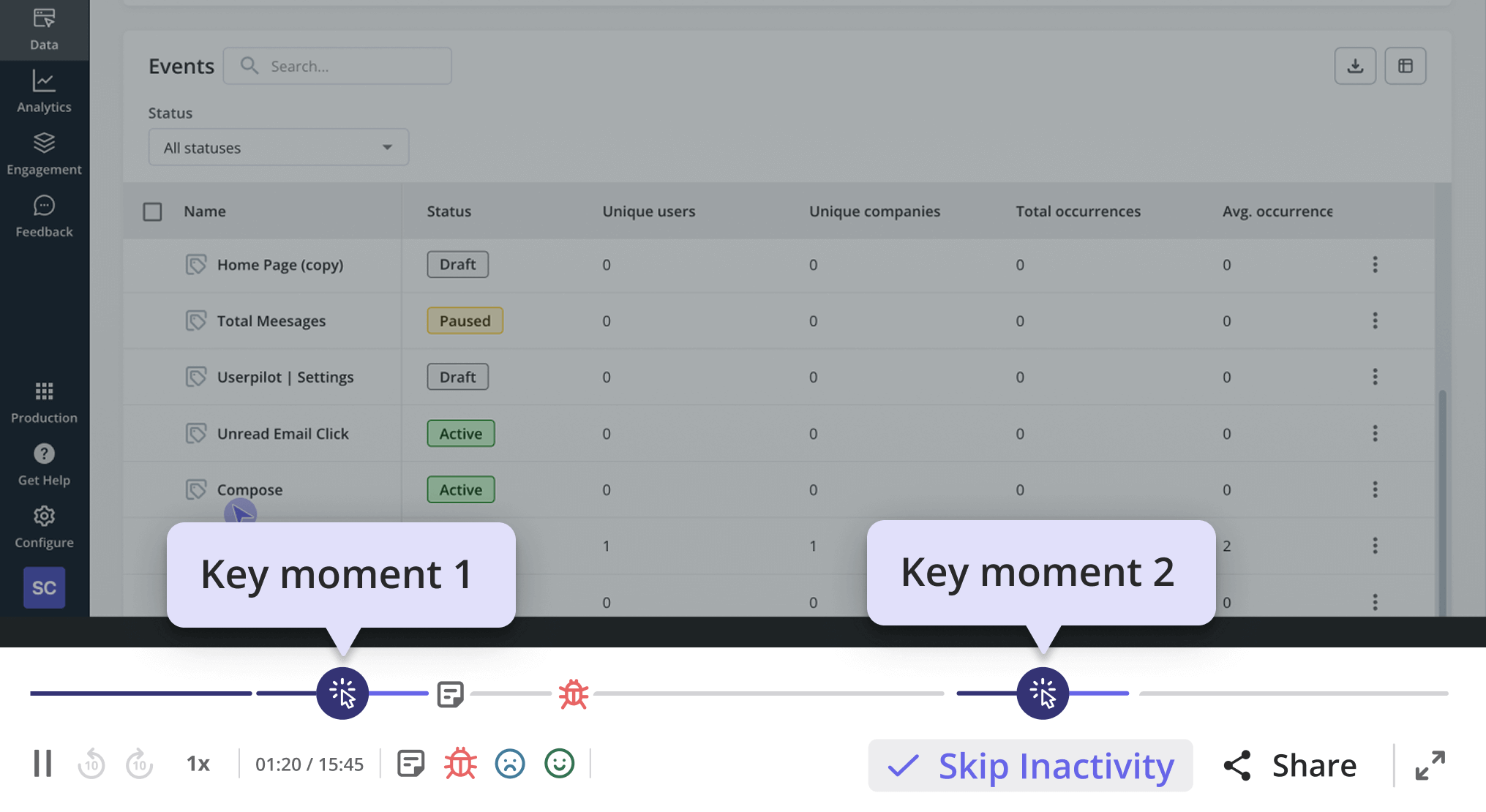
- Ask specific, scoped questions tied to a recent action. Targeting the question at a specific moment in the user’s experience. For example, “How was your onboarding?” is typically too broad since it doesn’t tie to any specific action. But “Tell me about the last time you tried to invite a teammate. What happened?” can provide actionable insights because it’s asking users about a really specific touchpoint.
- One owner, weekly triage. Targeting the response data at the one person responsible for acting on it. Twelve feedback channels with no synthesis ritual are twelve places for insight to die. Thirty minutes a week beats a dashboard nobody reads.
- Close the loop publicly. Targeting the people who already gave you feedback so they keep giving it. If you do not close the loop, response rates halve the next time you ask. CYBERBIZ, an e-commerce platform we work with, did this after redesigning their admin panel. They ran a quick in-app survey to measure customer satisfaction after the redesign, routed negative responses into the backlog for follow-up, and used the results to drive the next round of changes to the customer experience.
- Charge money where you can. Targeting an audience that has skin in the game. Paid users will tell you what is broken because they want it fixed. Free users will not, because there is nothing in it for them.
That is the playbook. Every line of it is about asking the right person. It works because of that.
But it’s worth knowing that these tactics don’t work for either pre-PMF founders or agent-heavy accounts. I already explained the reasons for the first case. And for the second case, it’s simply because Agents do not fill out NPS, they do not sit for interviews, and their “feedback” is what they retry, what they abandon, what they fail at silently. That is a different targeting problem, and we will come back to it.
💡 Read related guides: Are in-app surveys still effective in 2026? and Active vs. passive customer feedback: when to use each.
Which user feedback tools earn their seat in 2026?
The category page for this query is usually a 25-tool listicle. I am not going to do that. After several years of evaluating customer feedback tools for our internal program and for the customer teams I support, my short list of the best feedback tools that earn their seat is shorter than most readers expect. The rest of the market is variations on the same six themes at a worse price.
Here is the comparison, ours included, with verified 2026 pricing and an honest limitation on every row. Where vendors do not publish list prices, I have linked to Vendr, which aggregates negotiated B2B deal data.
| Tool | Positioning | Pricing (2026) | Best for | Honest limitation |
|---|---|---|---|---|
| Userpilot | In-app surveys, behavior-triggered, sitting on the same segment and product analytics data you already use for user engagement and customer interactions. | Starter $299/mo (up to 2,000 MAU). Growth $799/mo. Enterprise custom. Pricing page. | Asking the right in-product segment at the right moment without writing a separate analytics integration. | Built for products with active users. Will not find your first ten. |
| Qualtrics | Enterprise XM platform — large-scale survey programs, AI analysis with hallucination guardrails, and compliance features. | Quote-only. Entry deployments mid-five-figures per year. A full enterprise commonly six to seven figures. Vendr breakdown. | Structured VoC programs at enterprise scale. | Heavy. Pricing rules out most sub-Series-B SaaS. |
| UserTesting | Recruited a panel of real participants for moderated and unmoderated usability tests on video. | Credit-based. SMB customers average around $36K/year, and enterprise around $148K/year. Vendr breakdown. | Pre-launch validation and redesigns, where you need to see human behavior you cannot fake. | Panel testers skew professional. The sentiment they share is polite. Trust what they do, not what they say. |
| Dovetail | Research repository with AI summarization for qualitative interviews, transcripts, and notes. | Free tier. Professional from ~$39 per editor per month, annual. Enterprise custom. Pricing page. | Teams running enough interviews that the synthesis layer is now the bottleneck. | Only earns its seat after you have already run interviews. It will not generate the interviews for you. |
| Hotjar | Heatmaps, session replay, microsurveys, and on-page feedback widgets — sold as three modular products (Observe, Ask, Engage). | Free tier. Observe Plus $32/mo, Business $80/mo, Scale $171/mo. Ask priced separately ($48–$128/mo paid tiers). Pricing page. | The “watch first, then ask” play — diagnosing where users get stuck and pairing it with a contextual microsurvey. | Strong for behavior, weaker for structured survey programs. Use it for the why, not the what. |
| Canny | Public feedback boards with voting. Feature-request management for product teams. | Free up to 25 tracked users. Core $228/yr. Pro $948/yr. Business $5K–$10K+/yr (per-tracked-user since May 2025). Pricing page. | Letting users surface and rank requests without DM-chasing. | The per-tracked-user pricing gets expensive fast at scale. Teams with over 1,000 engaged users land on Business. |
One thing you’ll probably notice is that most of the “AI feedback analysis” tools that exploded in 2024 are not really on this list. That is not because they are useless. Some of them are genuinely helpful, especially for smaller teams trying to save time or avoid hiring dedicated research ops too early. They can absolutely help with analyzing user feedback at scale: summarizing responses faster, clustering themes, surfacing valuable feedback that might otherwise get lost, and reducing a lot of the manual work.
But at least from what I’ve seen so far, the quality of the insight still depends heavily on the quality of the targeting underneath it. AI can help process feedback, but it cannot fully fix poorly scoped questions, weak timing, or asking the wrong segment in the first place. Most of the tradeoffs just move somewhere else.
That is why I think teams should be careful not to evaluate these tools purely on automation promises or how much headcount they seem to replace. The right tool depends on the stage your team is at, how much feedback volume you handle, and how closely you still need humans involved in the interpretation layer.
What does user feedback look like when half your users are AI agents?
This is the part of the discussion nobody is writing about, and it is the part that is about to matter most. It is also where the targeting argument breaks in a new direction.
Until now, every targeting question has assumed a person on the other end. A person who reads an email, opens a survey, and sits for a call. Agents undo that assumption. They do not interact with your user interface the way humans do, and they are a new class of users with no traditional way to ask them anything.
The size of the shift is bigger than most product teams realize. GitHub Copilot generates 46% of new code in repositories where it is enabled. Deloitte’s 2026 prediction is that 70% of large enterprises will have agentic workflows in production by year-end. Datadog’s state of AI engineering report describes the pattern bluntly: “usage is ubiquitous, depth is shallow.” The reason depth looks shallow is that the depth metrics were built to count clicks. Agents do not click.
So my suggestion is a second stream of feedback that targets agent activity rather than human activity. Same goal — ask the right party at the right moment — different mechanism, because the party in question does not have an inbox.
- Human signals: NPS, CSAT, CES, churn surveys, feature feedback, behavior data, session replay, qualitative interviews. Familiar territory. Still works for humans.
- Agent signals: task completion rate, retry patterns, MCP usage logs, agent failure modes, satisfaction-with-output ratings from the human supervising the agent. The stuff almost no guide on this topic talks about. The only place to read most of it right now is your event taxonomy.
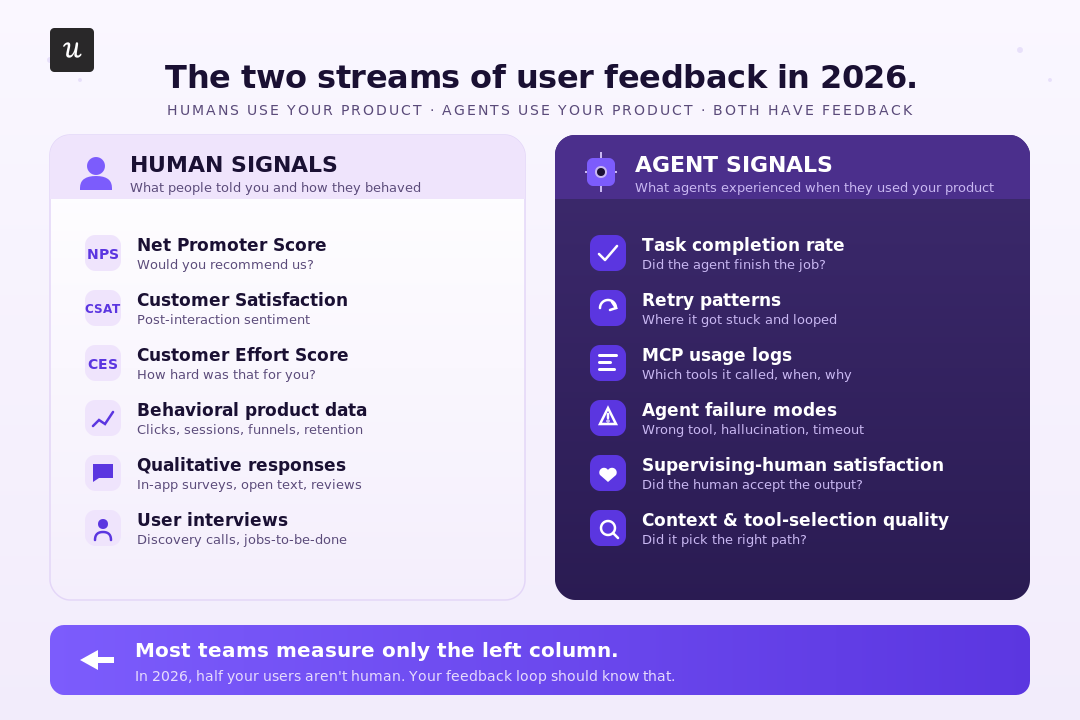
The metrics built around the human stream are about to mislead you in agent-heavy accounts. DAU drops because agents replaced the click-through behavior. Feature adoption looks flat or declining because the human delegated the work.
I’d recommend that you do a few things:
- Add a task-completion event on every key workflow.
- Segment your sessions so agent traffic is flagged separately from human traffic.
- Run a small “did this agent do what you asked?” survey to the supervising human.
Take this survey in ChatGPT, for example.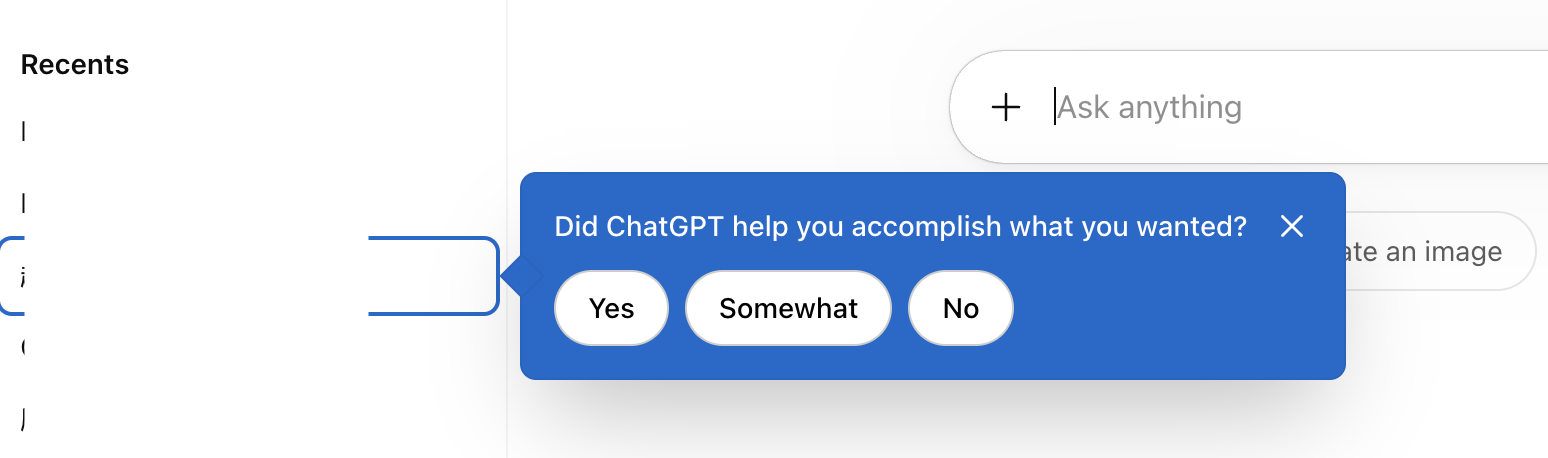
How do you triage user feedback signals coming from everywhere at once?
The targeting problem also lives at the analysis layer. The instinct when feedback volume explodes across multiple channels is to centralize it, tag it, and look at a dashboard. That works for a quarter. Then the tags get stale, the dashboard gets ignored, and the team drifts back to anecdotal decisions, only now with a software bill.
The pattern that holds, at our scale and at every team I have watched do this well, is a three-step diagnostic frame. Funnel, then replay, then survey. Each layer targets a different question about the same problem.
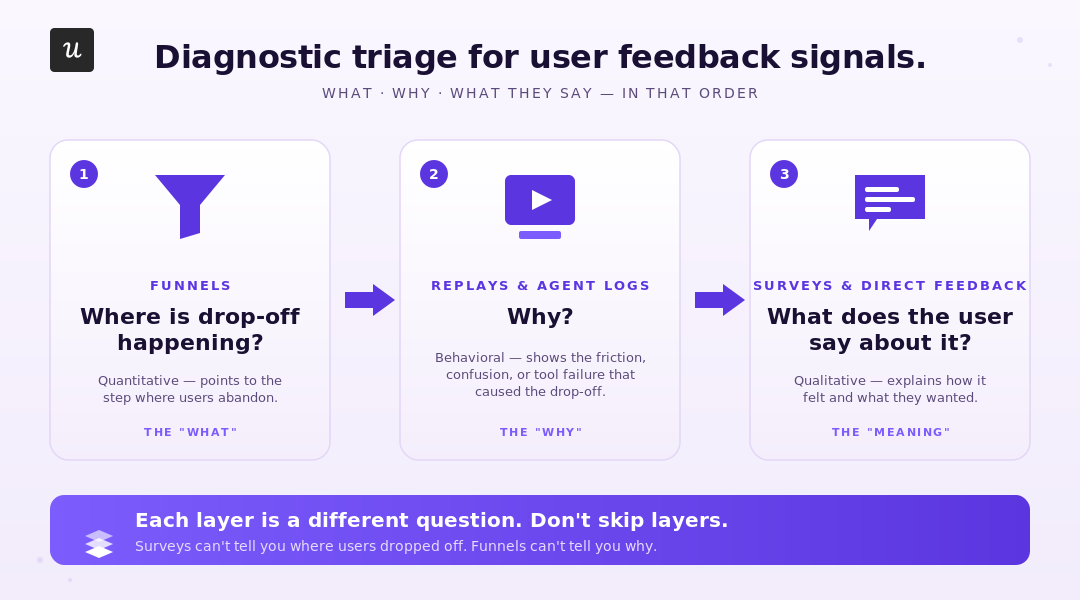
Funnels tell you where users (or agents) drop off. They do not tell you why or what pain points sit behind that drop-off. Session replay (or, for the agent stream, the conversation logs) tells you why by showing the behavior. Surveys close the loop by getting the user’s stated reason for the behavior, which the replay already showed you.
Running surveys without the funnel and replay layers underneath is what creates the “we have 4,000 responses and no idea what to do” problem. The survey cannot tell you what to fix unless you already know where to look.
Zoezi, a wellness-industry platform we work with, makes the same point without using the same words. Before Userpilot, their feedback came from one or two large customers who happened to be vocal. As their UX researcher, Isa Olsson put it,
“we had a big silent majority that didn’t really get to share their insights, or we didn’t know what they were doing in the product.”
The behavior data targeted the silent majority for them. Once they could read the page tabs and see which features were used, they had customer insights and shifted resources to the parts of the product earning attention. The triage layer was what changed their priorities.
That triage frame is also how we run feedback at Userpilot internally. Which brings me to the question I get asked most.
What user feedback program do we actually run at Userpilot internally?
The honest answer, with no marketing varnish: shorter than people expect.
James Mitchinson, our Head of Customer Success, runs the program. When I asked him for the list, he sent four lines:
- NPS, on a scheduled cadence to identified users — the way we measure customer loyalty over time.
- Product feedback, available passively through the resource center inside our product.
- Pre-renewal survey, sent to specific customers in the window before their contract decision.
- Post-implementation survey, sent to specific customers shortly after they finish customer onboarding.
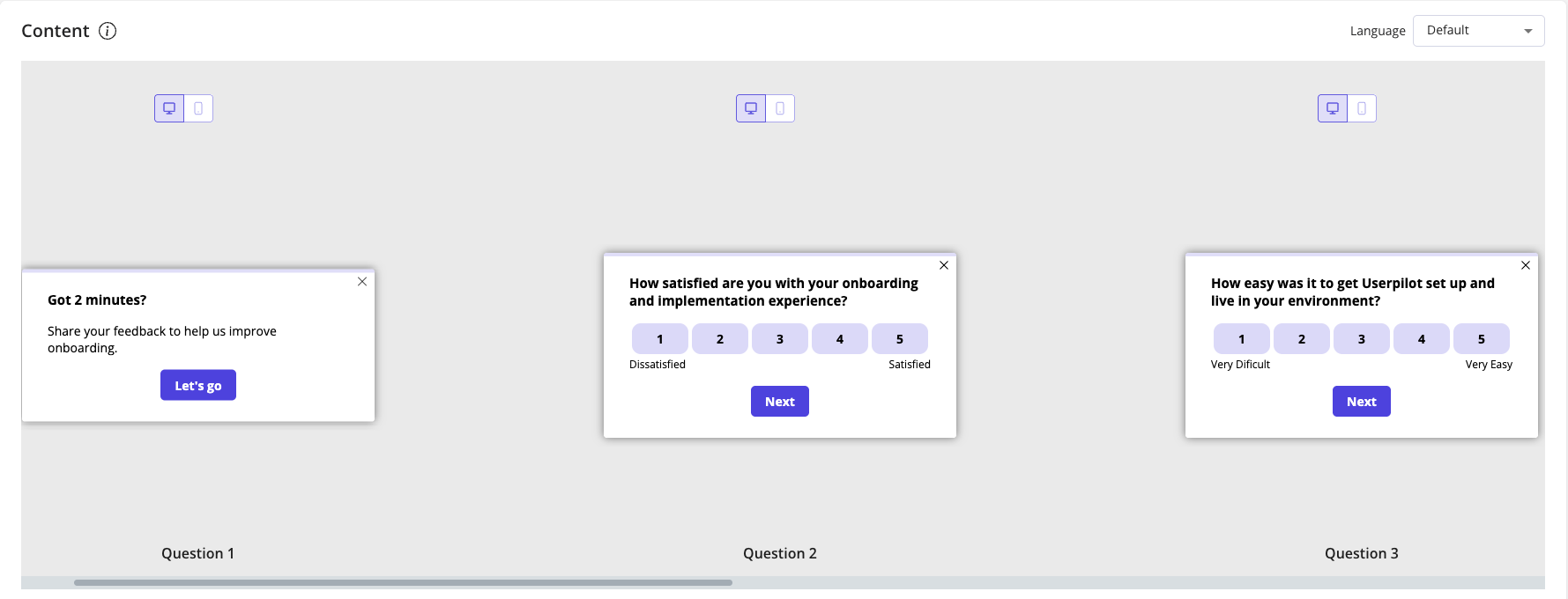
Four surveys. Each one has a defined target, a defined trigger, and a defined action plan for the responses. We do not run a generic “tell us what you think” pulse to the whole user base. We do not blast new feature feedback to every account. We do not have a Tuesday CSAT.
The thing that makes this work is not the number of surveys. It is the same targeting argument running through the whole post. Each of those four surveys is aimed at a precise subset of users defined by their in-product behavior and segment data. NPS does not go to free trial users on day one. Post-implementation does not go to people who skipped onboarding. Pre-renewal does not go to brand-new accounts.
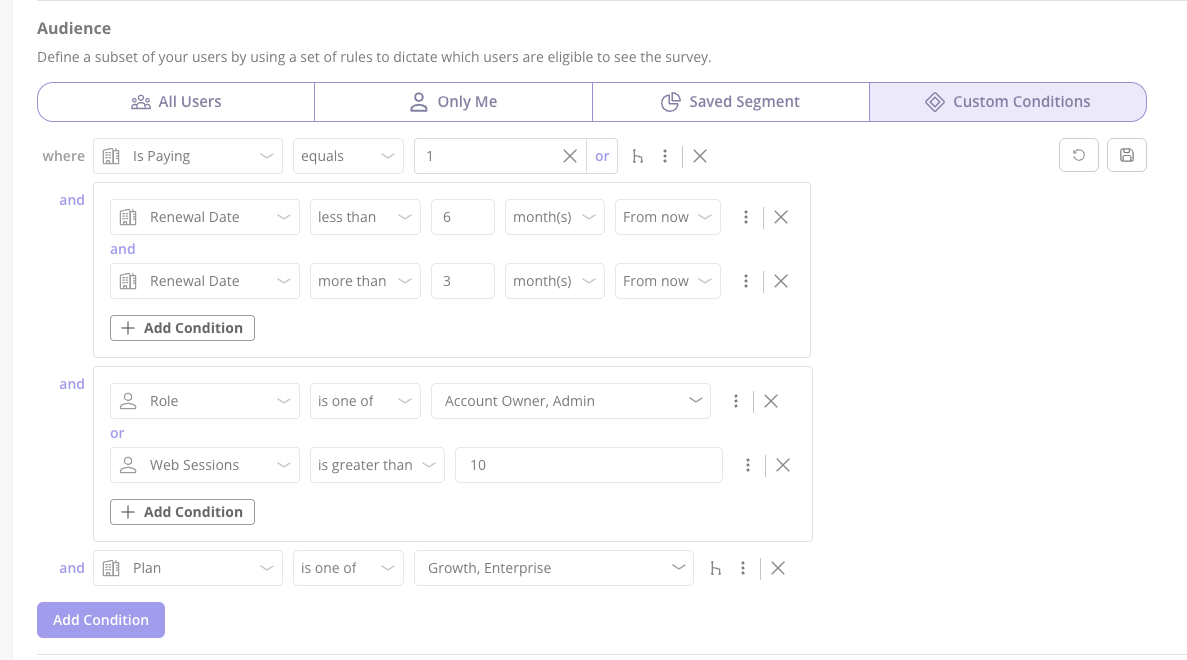
This is, conveniently, the thing the Userpilot product is built to do. Because the behavioral signals, the segment data, and the in-app delivery surface live in one place, identifying the right subset of users for a survey is a filter, not a research project. It is the same reason my own usability-test recruitment problem disappeared the moment I started triggering invites in-app to users who had touched the feature.
The honest caveat, again: this program only works because Userpilot, the company, has users. If you are pre-PMF without an active product, the four-survey structure is the wrong starting point. Go talk to five people first.
The other reason I trust this approach is that I have watched it work outside the building. Unolo, a field service management platform we work with, was running a 3% month-on-month churn rate when they switched from trying to collect customer feedback through email and support chat to in-app NPS. Subhash Yadav, their Product Marketer, described the change cleanly:
“I started using NPS, which gave us feedback almost instantly. This helped us get in touch with customers more quickly and understand their concerns with the product, which, in turn, helped us reduce our churn rate.”
Negative responses went straight to their CS team, who contacted those customers the same day. Their churn dropped by half a point to a full point. The completion rate on the survey was 44%.
None of those results is about the elegance of the survey design. It is about who got the survey, when, and what happened to the response.
Where is user feedback heading after this?
Two shifts are landing in 2026, and both extend the targeting argument into new territory.
The first is the two-stream model becoming the default. Agent signals are currently a separate problem nobody owns. Within twelve months, I expect most product analytics tools to add a first-class agent-versus-human session distinction, and most survey tools to start asking the supervising human what the agent did wrong.
The second is what is coming from us. Lia, Userpilot’s AI agent, ships a first version of analytics in Q2 2026. Surveys and broader capabilities for gathering user feedback at scale follow on the same roadmap. It clusters responses, surfaces themes, flags the next question worth asking based on actual user needs, and starts to do the synthesis work that is currently a weekly ritual for one person on the team.
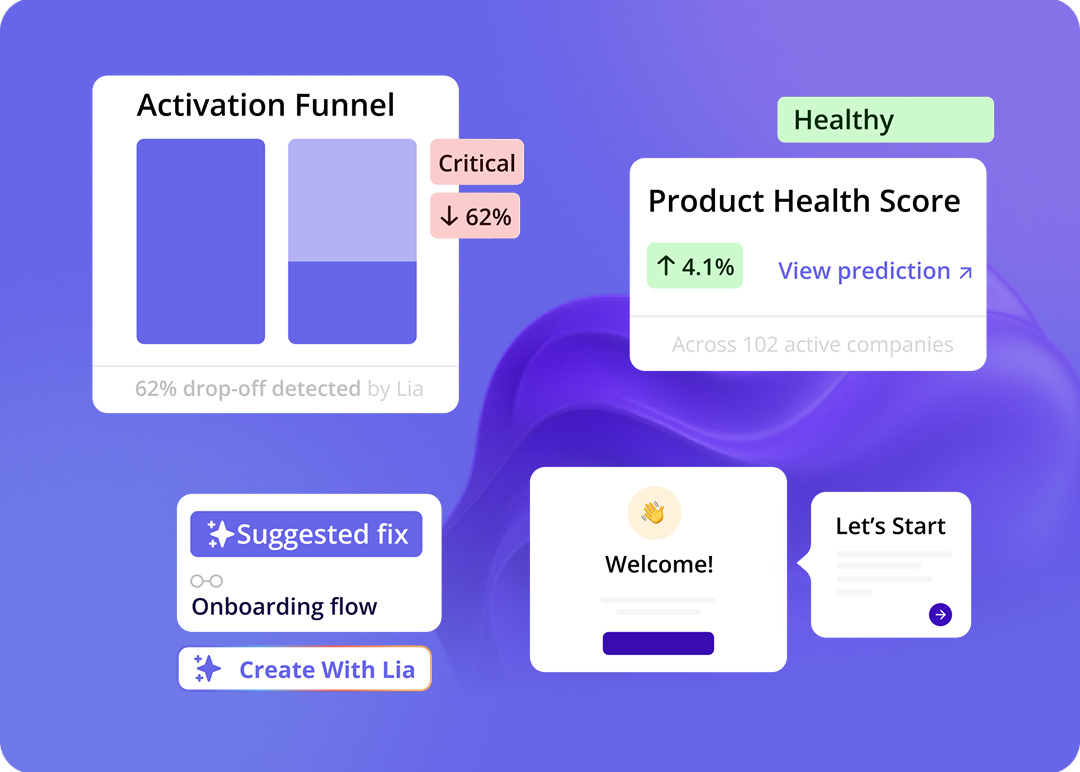
If you want to have a first look at what is coming at Userpilot, book a demo!
Neither shift changes the core argument this post has been making the whole way through. User feedback is a targeting problem. Tools, AI summaries, and surveys all matter, but they only matter to the extent they help you get the right question to the right party at the right moment. Agents make targeting harder. AI makes synthesis cheaper. The work is the same.
If you have not run a survey since the last NPS conversation hit your team’s all-hands, this is a good week to look at who you are asking, when, and whether anyone is acting on what comes back.
💡 Read related guides:
Are in-app surveys still effective in 2026? · Product analytics in 2026: the agentic-era reframe. · Active vs. passive customer feedback. · Churn surveys for SaaS. · How I 4x’d usability test response rates with Userpilot.
FAQ
How do I get users to actually respond to my feedback surveys?
Stop asking “what do you think?” Ask a specific question tied to a recent action. Trigger the survey inside the product while the experience is fresh, not days later by email. Target a behavioral segment, not your whole user base. Most of the response-rate lift you have ever read about comes from those three moves; almost none of it comes from the wording of the question itself.
Should I charge for the product to get better feedback?
Charging works because paid users have something at stake. It also filters out the wrong audience early. If you cannot get a sentence of feedback from free users, the issue is not pricing. It is that you are targeting the wrong people. Paid users will give you sharper feedback. A paywall will not fix a fit problem.
How do I prioritize feature requests from user feedback?
Score by frequency, business impact, and strategic fit, in that order. Tag every request with the user’s segment and account value. A request from three enterprise accounts beats a request from thirty free trial users. A formal prioritization framework earns its weight once you cross 100 requests a quarter.
Do AI summaries replace user research?
No. AI tagging and clustering make synthesis cheaper, which means you can run more interviews and still keep up with the analysis. The interview is still the most valuable thirty minutes of your week. The summary is what you do after the interviews, not instead of them.
When should I collect user feedback?
Start collecting feedback at specific moments tied to user behavior, not on a generic cadence. Most user feedback collection mistakes come from a generic schedule with no behavioral trigger. The moments worth aiming for: post-activation, after a key task, after a churn signal, after a feature launch to people who actually used the new feature. Do not ask the moment someone signs up. They have not done anything yet. A churn survey triggered on cancel is your last chance to learn why someone is leaving and should always be in the program.
About the author