Low-Friction Product Feedback Forms for Better Response Rates (+Examples)


A product feedback form is a short survey, usually shown in-app, that asks users about your product and guides your product decisions.
But collecting user feedback is getting more complicated, and I’ve learned that you need to earn it. Your users are tired of constantly rating a ride, a coffee, a delivery, or a hotel stay before logging in to your product. Response rates are collapsing because all feedback forms are now competing for attention.
In my experience, a product feedback form earns its response when it asks the right question, to the right user, at the right moment, and leads to meaningful decisions. So instead of writing another generic template roundup, here is what I’ll cover:
- The data on why gathering feedback is harder now.
- The feedback collection strategies that no longer fit.
- The feedback forms worth using in 2026.
- Best practices for building feedback forms without coding.

Why product feedback forms need less friction
Users are receiving more feedback requests than ever, so generic surveys are easier to ignore. The problem is not that people have stopped giving feedback altogether. They are less willing to complete forms that arrive at the wrong moment, ask too much, or give them no clear reason to respond.
In-app feedback still performs relatively well because it can appear while the experience is fresh. Refiner’s 2025 benchmark found an average response rate of 27.52% across 1,382 in-app surveys. But placing a form inside the product is not enough on its own.
To earn a response, every product feedback form should have a specific purpose, such as:
- Understanding why users abandon a feature or workflow.
- Identifying friction points at a specific point in the journey.
- Learning why an account is canceling.
- Collecting information for onboarding and personalization.
- Validating a product or roadmap decision.
- Finding satisfied users to approach for a review or referral.
That also means moving away from broad, high-friction approaches such as quarterly product NPS blasts, long email questionnaires, surveys shown before users have enough experience to answer, and feedback forms with no clear owner or follow-up process. The better approach is to ask one relevant question, show it to the right user immediately after the related experience, and only collect feedback your team is prepared to act on. The examples below show what that looks like in practice.
10 Product feedback form examples for specific product decisions
One thing we regularly tell customers during Userpilot implementation sessions is to start with the decision, not the survey type.
Instead of deciding that you need an NPS or CSAT survey, first ask what you need to learn and what you will do with the response. From there, you can choose the right audience, trigger, question format, and follow-up process.
These are the ten product feedback forms I find most useful across the customer journey:
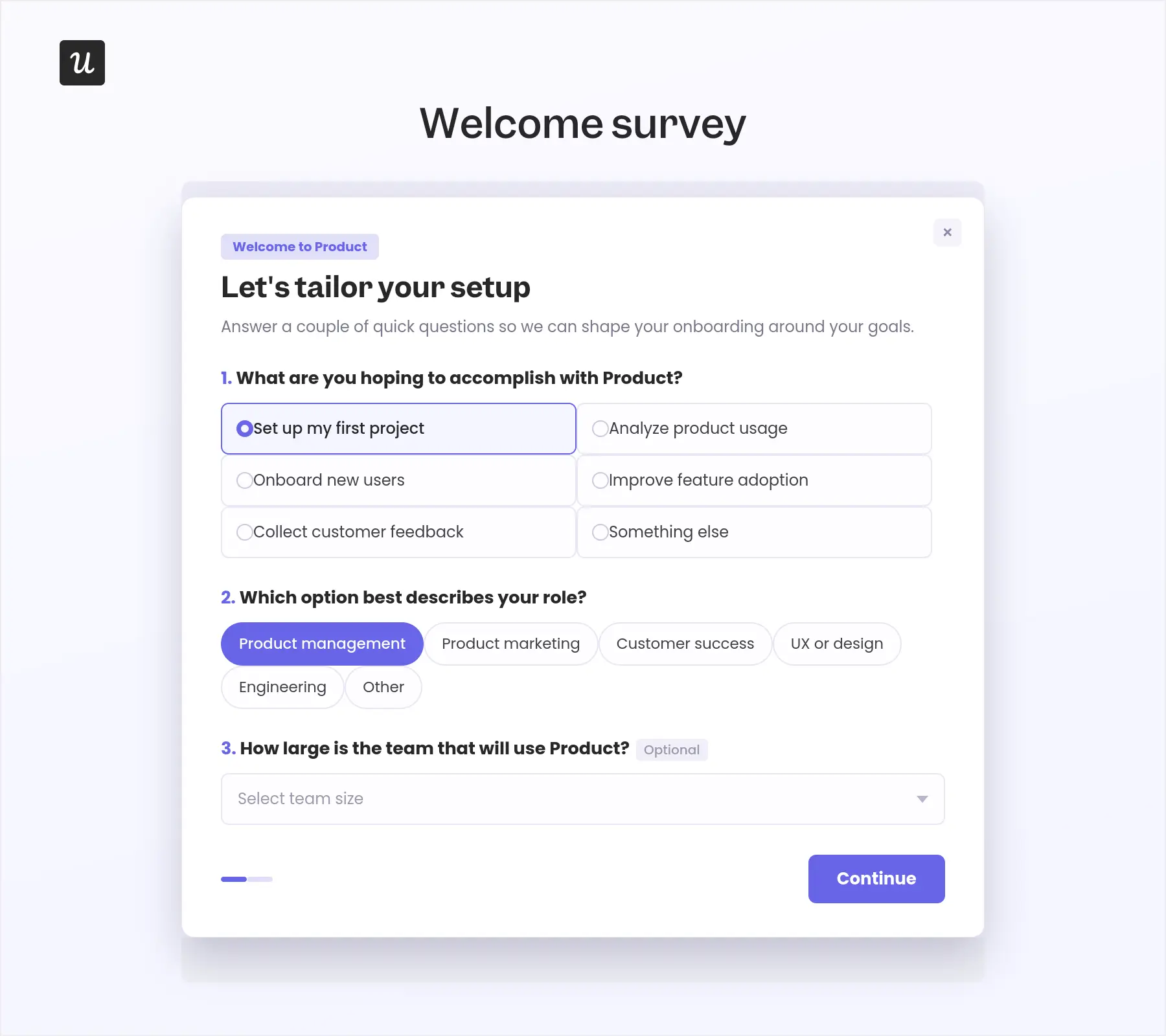
1. Goals and use-case form
I usually recommend starting the feedback process during product onboarding, but only when the answers will change the experience that follows. A goals and use-case form (also called welcome surveys) should help you understand what the user wants to accomplish and then use that information to personalize their onboarding. It should not feel like a user research questionnaire that users must complete before reaching the product.
- Goal: Segment users and tailor onboarding around their role and intended outcome.
- Trigger: Show it during signup or immediately before the first onboarding flow.
- Question count: Two required multiple-choice questions and one optional question.
You can use data collected from this survey to change the onboarding checklist, recommend relevant templates, and highlight the features connected to the user’s goal. Otherwise, you are asking for information without giving the user anything in return.
Example questions:
- What are you hoping to accomplish with [Product]?
- Set up my first project
- Analyze product usage
- Onboard new users
- Improve feature adoption
- Collect customer feedback
- Something else
- Which option best describes your role?
- Product management
- Product marketing
- Customer success
- UX or design
- Engineering
- Other
- Optional: How large is the team that will use [Product]?
2. Activation drop-off form
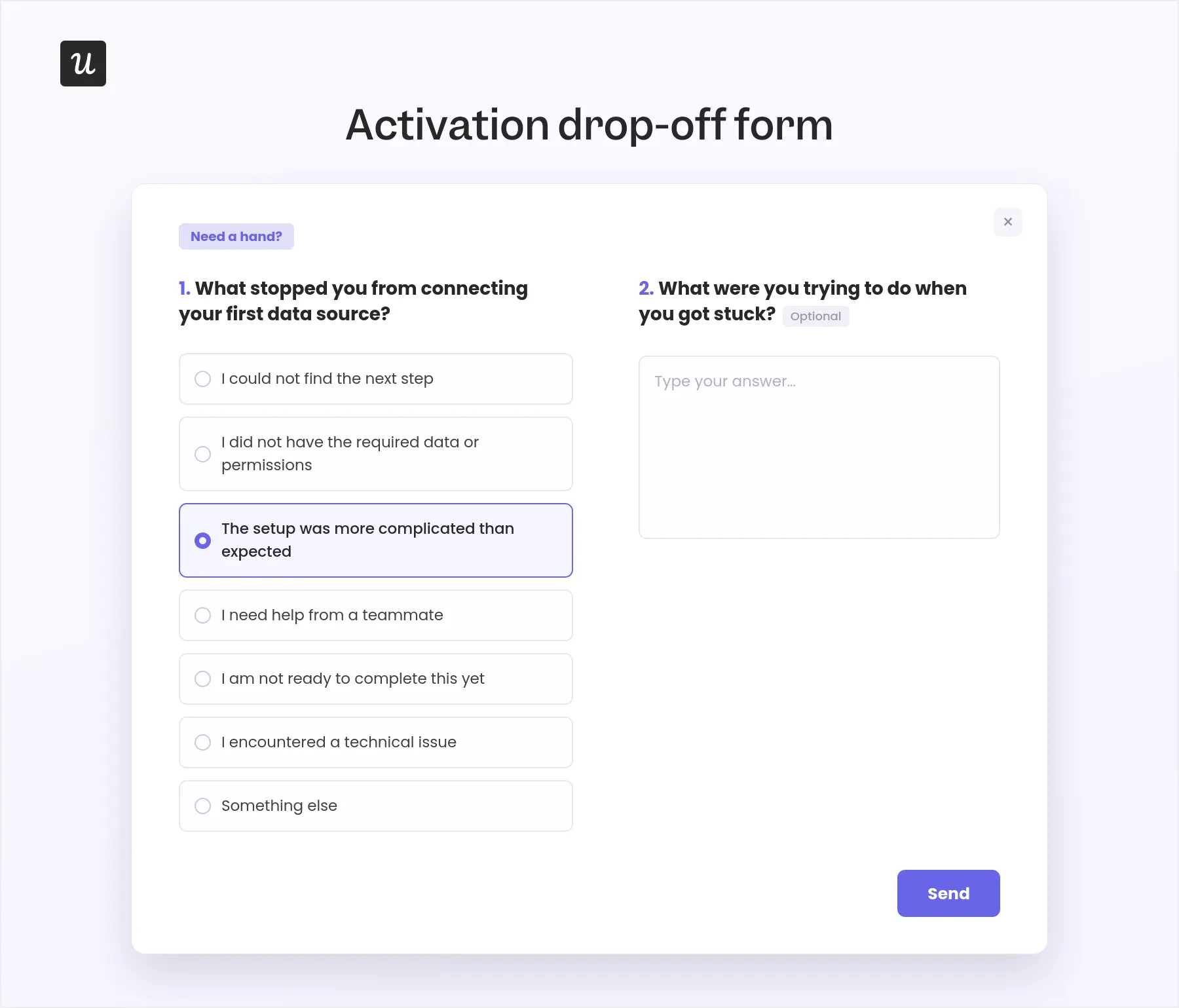
I often use this when spotting a drop-off that even session replays can’t tell me the reasons. I would not trigger it the first time someone leaves a page. People get interrupted. Instead, wait until the behavior shows a genuine pattern, such as returning to the same step several times or repeatedly encountering an error.
- Goal: Identify the blocker preventing users from reaching activation.
- Trigger: Show it after the user abandons the same activation step twice, repeatedly encounters an error, or returns without completing the workflow.
- Question count: One multiple-choice question and one optional text field.
The response should determine the next action. A technical problem can go to support, a missing permission can trigger setup guidance, and a repeated usability complaint can become evidence for redesigning the step.
Example questions:
- What stopped you from completing [activation task]?
- I could not find the next step
- I did not have the required data or permissions
- The setup was more complicated than expected
- I need help from a teammate
- I am not ready to complete this yet
- I encountered a technical issue
- Something else
- Optional: What were you trying to do when you got stuck?
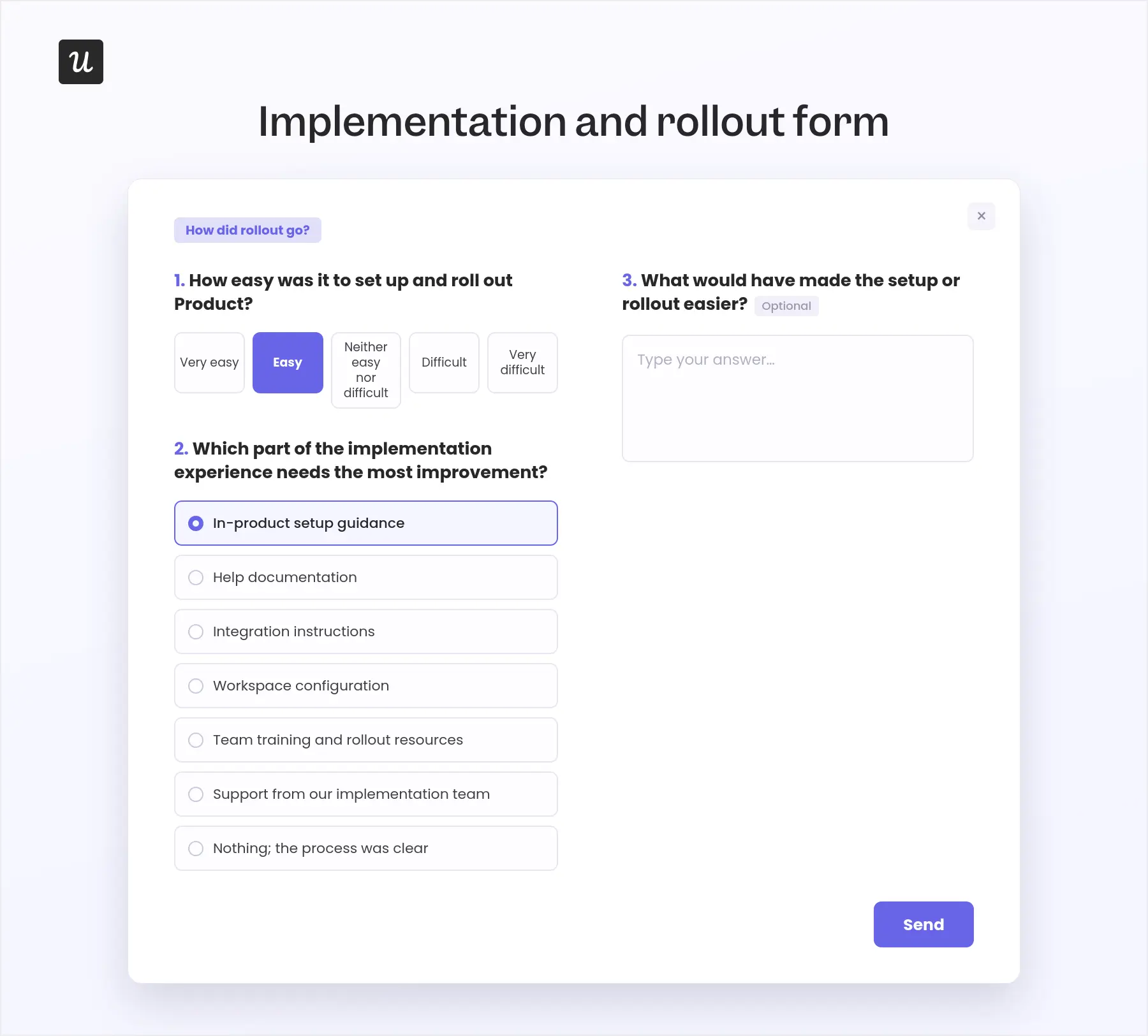
3. Implementation and rollout evaluation form
Once an account completes implementation or launches the product to its team, I use this form to evaluate how well we supported the process.
- Goal: Identify gaps in the setup experience, implementation guidance, documentation, and product design.
- Trigger: Show it after the account completes setup, launches to its first group of users, or reaches the end of a guided implementation program.
- Question count: Two required questions and one optional follow-up.
I would compare these answers with implementation time, setup completion, support tickets, and early team adoption. That helps separate documentation gaps from product-design problems and shows where additional guidance or resources would have the greatest impact.
Example questions:
- How easy was it to set up and roll out [Product]?
- Very easy
- Easy
- Neither easy nor difficult
- Difficult
- Very difficult
- Which part of the implementation experience needs the most improvement?
- In-product setup guidance
- Help documentation
- Integration instructions
- Workspace configuration
- Team training and rollout resources
- Support from our implementation team
- Nothing; the process was clear
- Optional: What would have made the setup or rollout easier?
4. Feature effort form
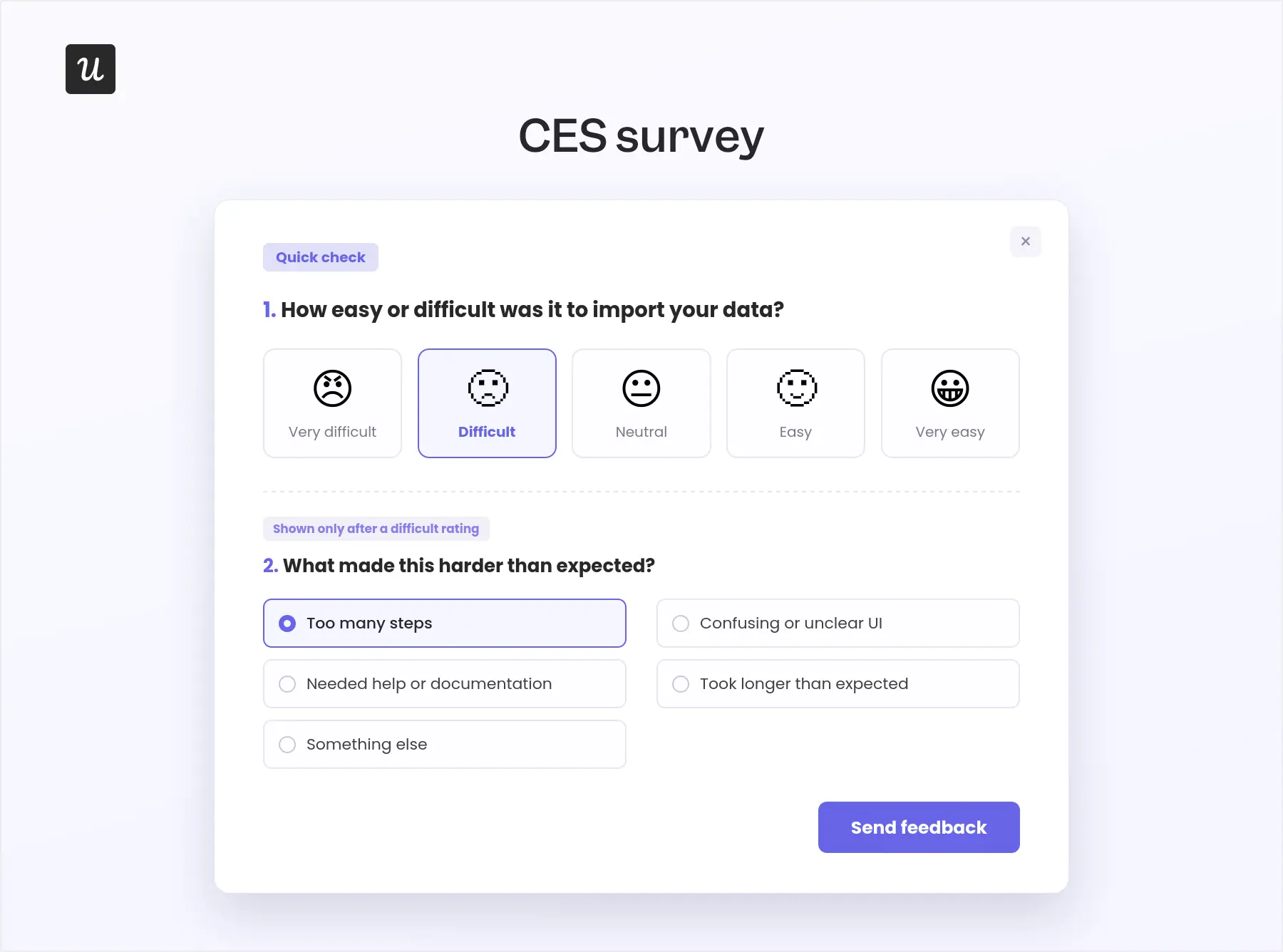
A feature can work exactly as designed and still require too much effort. When I want to understand that difference, I use a feature effort form immediately after the user completes the task.
- Goal: Find workflows that require too many steps, too much knowledge, or unnecessary support.
- Trigger: Show it after the user completes a specific action, such as importing data, creating a report, or configuring an integration.
- Question count: One rating question and one conditional follow-up.
I would then compare the scores across segments and review the lowest ratings alongside session replays. That gives you both sides of the problem: what users found difficult and what they actually did during the workflow.
Example questions:
- How easy or difficult was it to [complete the task]? Use a five-point scale from “Very difficult” to “Very easy.”
- Show after a difficult rating: What made this harder than expected?
5. Feature satisfaction form
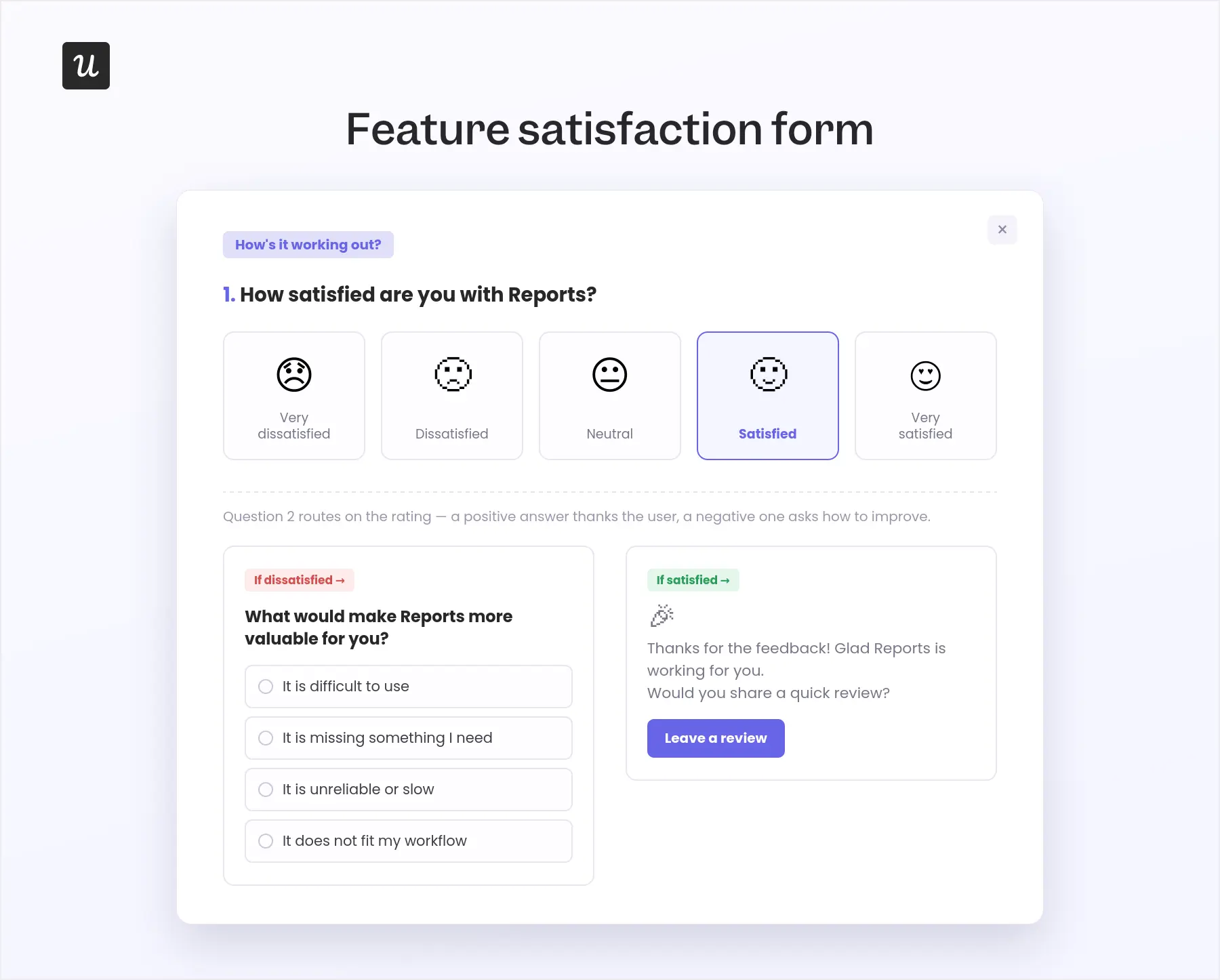
Effort and satisfaction are not the same thing. A feature may be easy to use but not useful, or valuable enough that users tolerate some complexity.
For that reason, I only ask about satisfaction after the user has tried the feature enough times to judge the outcome, not immediately after the first click.
- Goal: Understand whether the feature delivers the value users expected.
- Trigger: Show it after the user completes the feature’s core action two or three times.
- Question count: One satisfaction rating and one optional follow-up.
The responses can help you decide whether the feature needs product improvements, clearer positioning, better onboarding, or simply more visibility among the right users.
Example questions:
- How satisfied are you with [Feature]? Use a five-point scale with clearly labeled options.
- Branched follow-up question.
6. Unmet-need and feature-request form
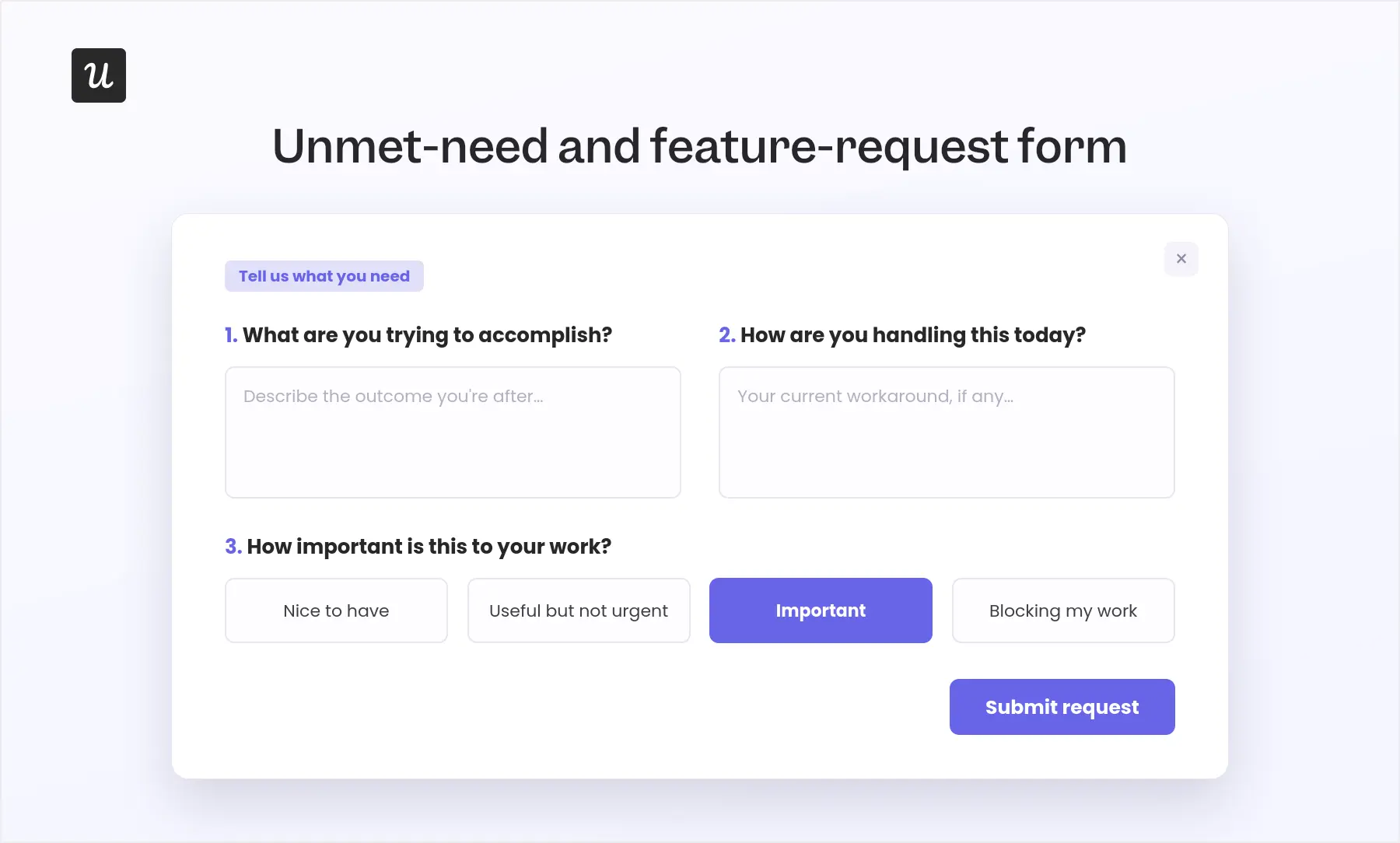
I treat feature requests as the starting point of product discovery, so the first layer should be an always-on, passive feedback widget that lets any user submit an idea when the need arises. This helps you capture requests in context instead of relying on users to remember them during a scheduled survey.
- Goal: Capture recurring feature requests and identify potential unmet needs.
- Audience: All active users.
- Trigger: Keep it permanently available in the resource center, help menu, or relevant product area.
- Question count: Two required questions and one optional follow-up.
These responses help you see which requests recur, which customer segments raise them, and how strongly they affect users. But they rarely provide enough context to decide what to build.
Example feature-request questions:
- What would you like to be able to do in [Product]?
- How important is this to your work?
- Nice to have
- Useful but not urgent
- Important
- Blocking my work
- Optional: How are you handling this today?
For requests worth exploring, I would follow up with selected users who have already agreed to participate in research, such as customer champions, beta testers, or members of a product advisory group.
- Goal: Understand the underlying job, current workaround, and severity of the unmet need.
- Audience: Users who submitted a relevant request and opted into further research.
- Trigger: Send it when several requests point to the same problem or the product team begins discovery in that area.
- Question count: Three short questions with an optional interview invitation.
When reviewing the responses, I group them by the underlying problem rather than the feature name. Different requests may describe different solutions to the same unmet need, which gives the product team a stronger basis for discovery and prioritization.
Example unmet-need questions:
- What are you trying to accomplish that is difficult or impossible in [Product] today?
- How do you currently complete this task?
- What happens when you cannot complete it?
- Optional: Would you be open to discussing this with our product team?
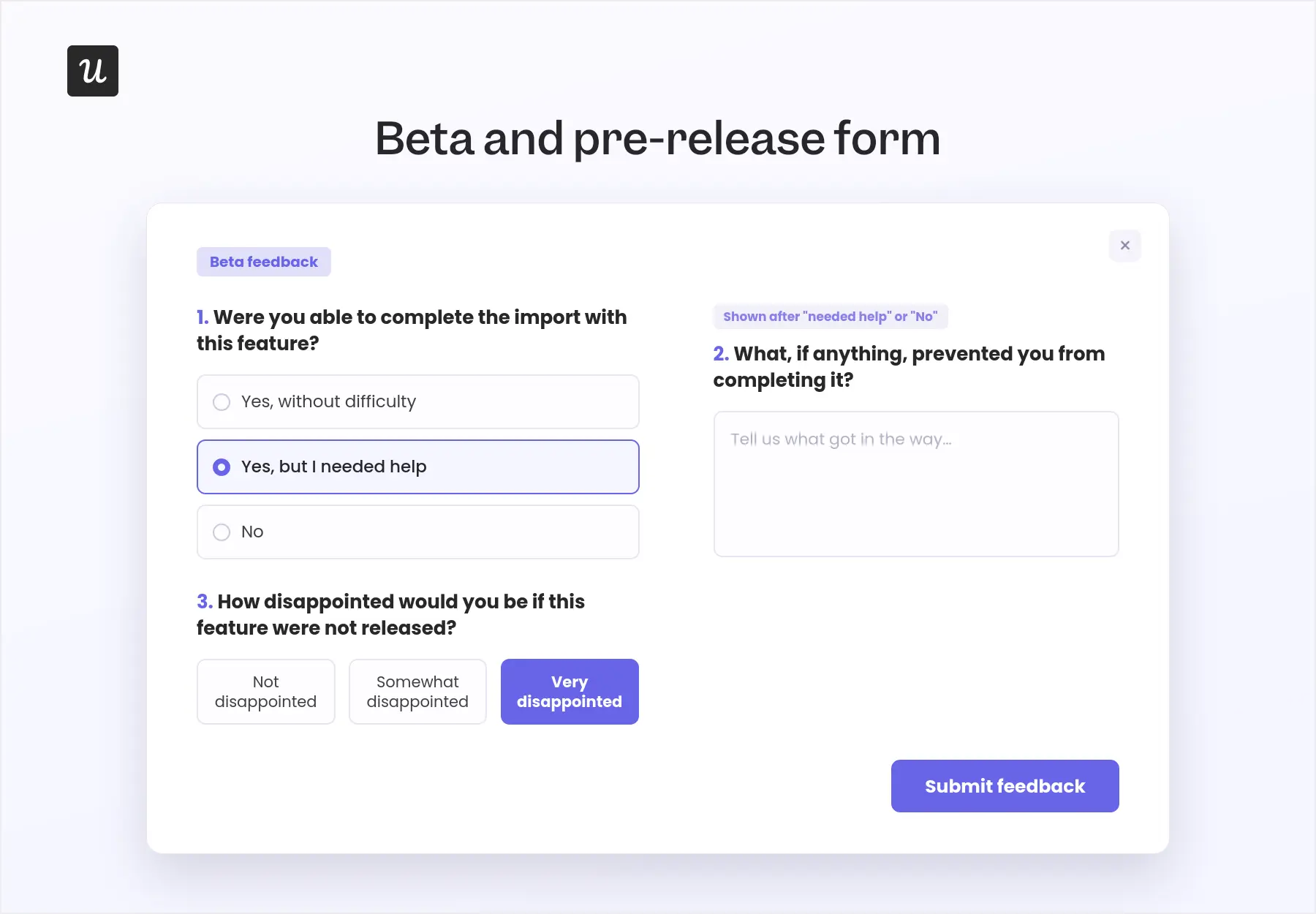
7. Beta and pre-release form
Beta feedback forms should help you decide whether a feature is ready to ship, not simply collect reactions from users who are excited to try something new.
That means asking whether users could complete the intended task, what prevented them from doing so, and how much they would miss the feature if it disappeared.
- Goal: Assess usefulness, usability, reliability, and release readiness.
- Trigger: Show it after beta participants complete or attempt the target workflow.
- Question count: Two required questions and one conditional follow-up.
I would combine these responses with actual feature usage and error data. Positive comments are encouraging, but they should not outweigh evidence that users cannot complete the core workflow.
Example questions:
- Were you able to complete [target task] with this feature?
- Yes, without difficulty
- Yes, but I needed help
- No
- What, if anything, prevented you from completing it?
- How disappointed would you be if this feature were not released? Use a scale from “Not disappointed” to “Very disappointed.”
8. Renewal-risk form
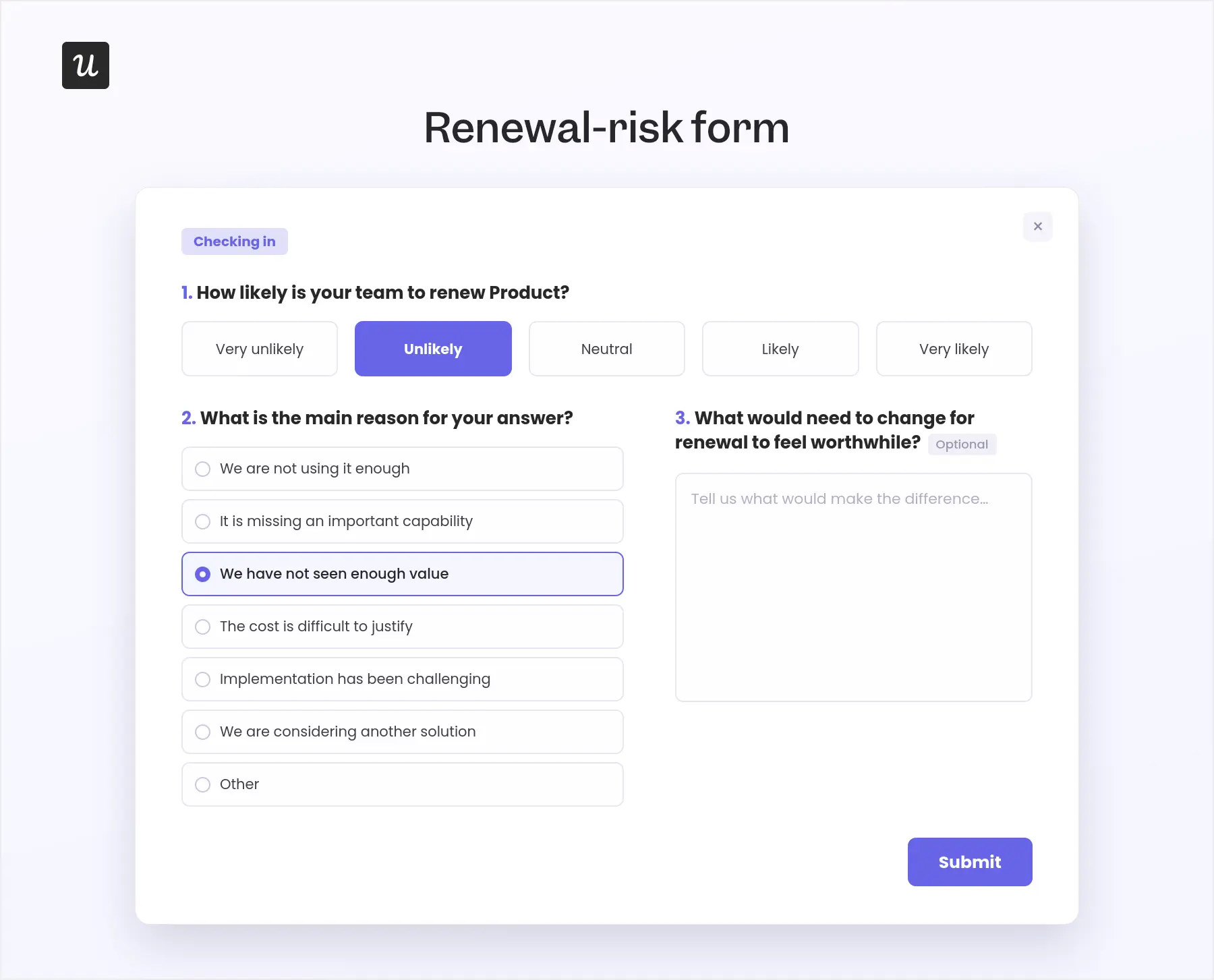
By the time a customer clicks cancel, your options are limited. A renewal-risk form gives you a chance to understand the problem earlier, while there is still time to address it.
I would not trigger this form based on the renewal date alone. It becomes much more useful when timing is combined with signals such as declining usage, unresolved support issues, incomplete rollout, or a low satisfaction score.
- Goal: Identify renewal blockers early enough for the appropriate team to respond.
- Trigger: Show it 30 to 60 days before renewal when the account also displays a meaningful risk signal.
- Question count: Two required questions and one optional follow-up.
The important part is routing the answer quickly. The account may need training, a product workaround, implementation support, or a commercial conversation. A form that sits unread until the renewal date has already failed.
Example questions:
- How likely is your team to renew [Product]? Use a five-point scale from “Very unlikely” to “Very likely.”
- What is the main reason for your answer?
- We are not using it enough
- It is missing an important capability
- We have not seen enough value
- The cost is difficult to justify
- Implementation has been challenging
- We are considering another solution
- Other
- Optional: What would need to change for renewal to feel worthwhile?
9. Advocacy and referral form
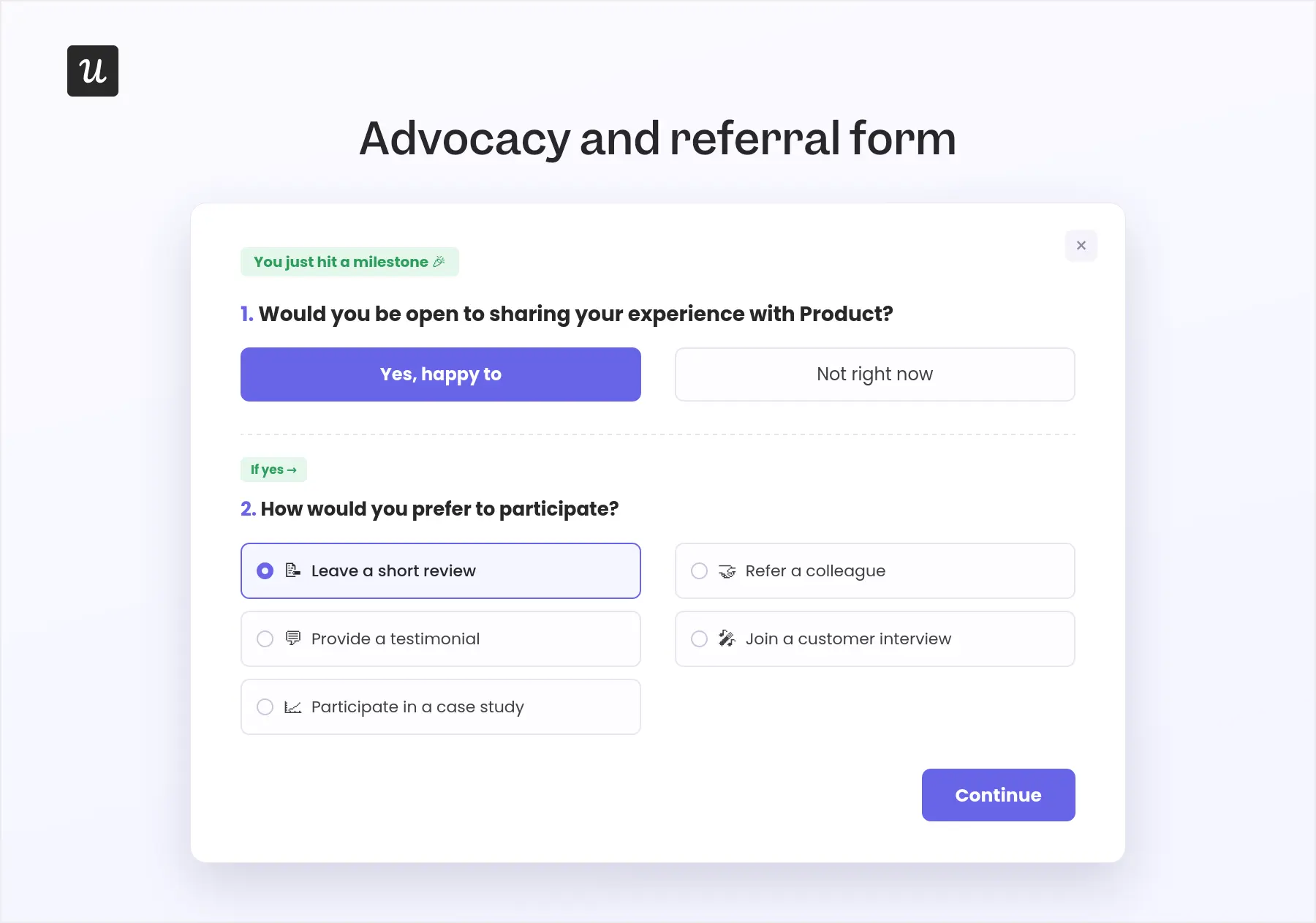
I would never show an advocacy request simply because a user has been subscribed for a certain number of days. The best moment is immediately after they experience clear value or give you a strong satisfaction signal.
- Goal: Turn positive product outcomes into relevant reviews, referrals, testimonials, or customer stories.
- Trigger: Show it after a high satisfaction score, repeated successful usage, a major milestone, or a positive support resolution.
- Question count: One initial question with one branched follow-up.
The request should match the relationship. Someone who has just completed their first successful workflow may be ready to leave a short review, while a long-term customer with measurable results may be a better fit for a case study.
Example questions:
- Would you be open to sharing your experience with [Product]?
- If yes: How would you prefer to participate?
- Leave a short review
- Refer a colleague
- Provide a testimonial
- Join a customer interview
- Participate in a case study
10. Cancellation and downgrade form
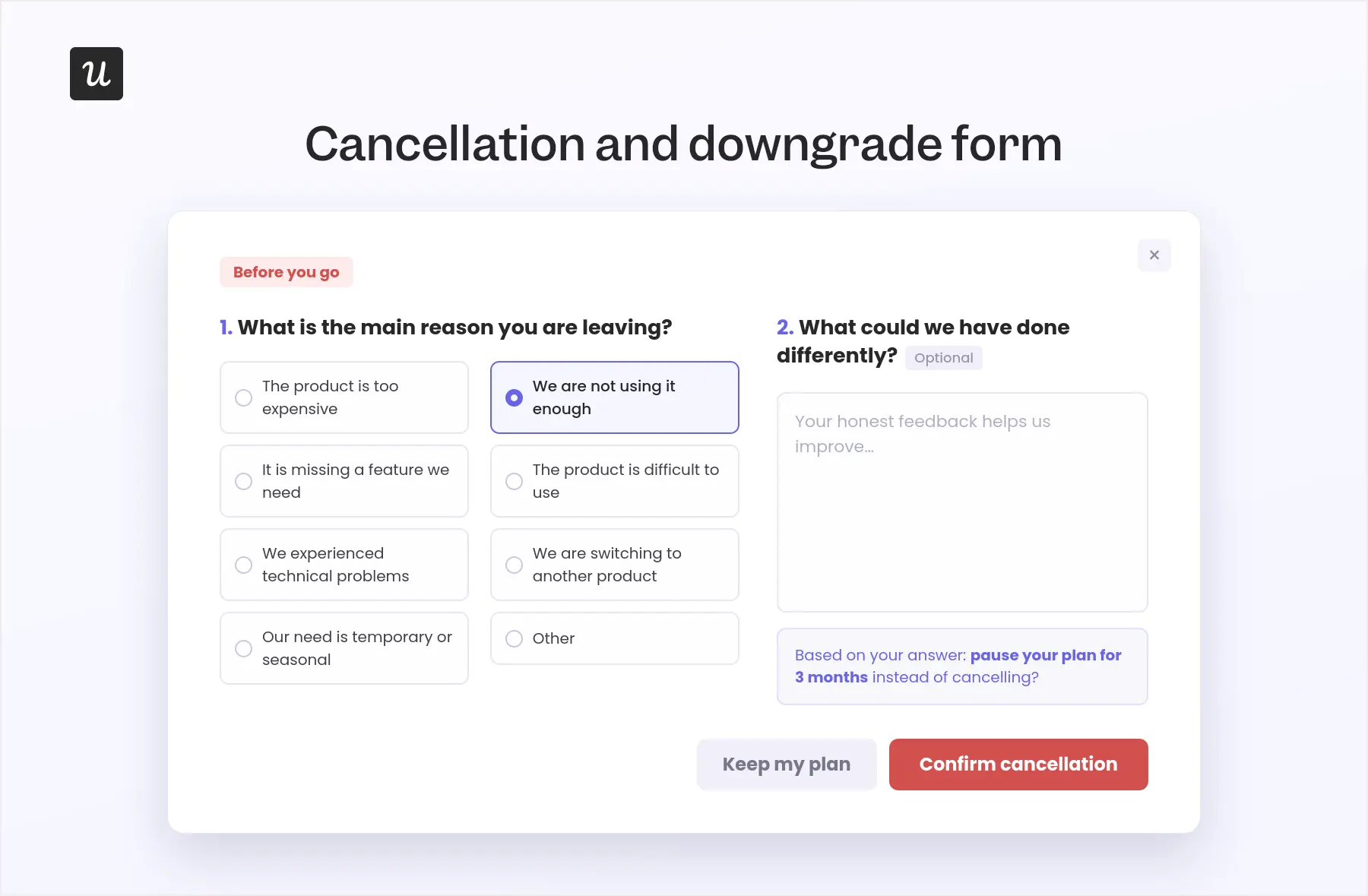
A cancellation form should help you understand why the customer is leaving without turning the cancellation process into an obstacle course.
This is another point we emphasize with customers: collect the information you need, present a genuinely relevant alternative where appropriate, and then let the user leave.
- Goal: Understand customer churn, address recoverable problems, and improve the experience for future customers.
- Trigger: Show it after the user selects “Cancel” or “Downgrade,” before the final confirmation.
- Question count: One required multiple-choice question and one optional text field.
You can use conditional responses to offer a pause for seasonal users, relevant guidance for low adoption, or support for technical problems. But if the customer still wants to cancel, the form should not make that decision harder.
Example questions:
- What is the main reason you are leaving?
- The product is too expensive
- We are not using it enough
- It is missing a feature we need
- The product is difficult to use
- We experienced technical problems
- We are switching to another product
- Our need is temporary or seasonal
- Other
- Optional: What could we have done differently?
Product feedback form best practices that minimize friction
The point of collecting feedback is acting on it, yet almost none of it is even analyzed. According to Zonka Feedback’s own AI in Feedback Analytics research, 93% of customer feedback never gets analyzed at all, and 87% of teams still analyze feedback manually.
This means teams are collecting so much feedback and annoying users with their surveys, just to never use that data.
So, to avoid collecting useless survey responses, here are some user feedback best practices that will help you make them more actionable:
- Choose the question type based on the data you need: For example, rating scales and multiple-choice questions give you quantitative data you can trend, while open-ended questions allow users to provide more subjective feedback.
- Trigger on behavioral data: It’s best to trigger surveys right after a key action. Users are more likely to respond here since the experience is still accurate and fresh.
- Target specific segments: A user who hasn’t completed onboarding yet can’t give you useful feedback on advanced features. Thus, define user segmentation rules before writing the first question, and make sure it’s relevant to their experience.
- Make the follow-up optional: Adding an open-ended follow-up question helps you get more qualitative feedback. But make it entirely optional and easy to skip, as disrupting the user’s experience to get an answer will only reduce feedback quality and response rates.
- Kill bad questions before they ship: Leading questions (“How happy were you?”), double-barreled questions (“Was onboarding fast and helpful?”), loaded questions (“What do you love most?”), and jargon-heavy questions all corrupt the data at the source. Ask neutral, single-topic, clear, and concise questions that users can easily answer.
- Close the feedback loop: Thank users for their feedback and communicate with them when you’ve implemented changes based on it (release notes, in-app announcements, a thank-you screen that names the fix). This will make them feel heard and increase their trust.
- Leverage AI where you can: Although AI isn’t perfect, it’s still pretty good for summarizing large bodies of data, spotting problems you’d otherwise never see, and suggesting strategies for closing the loop.
💡 Where AI helps your feedback process in Userpilot
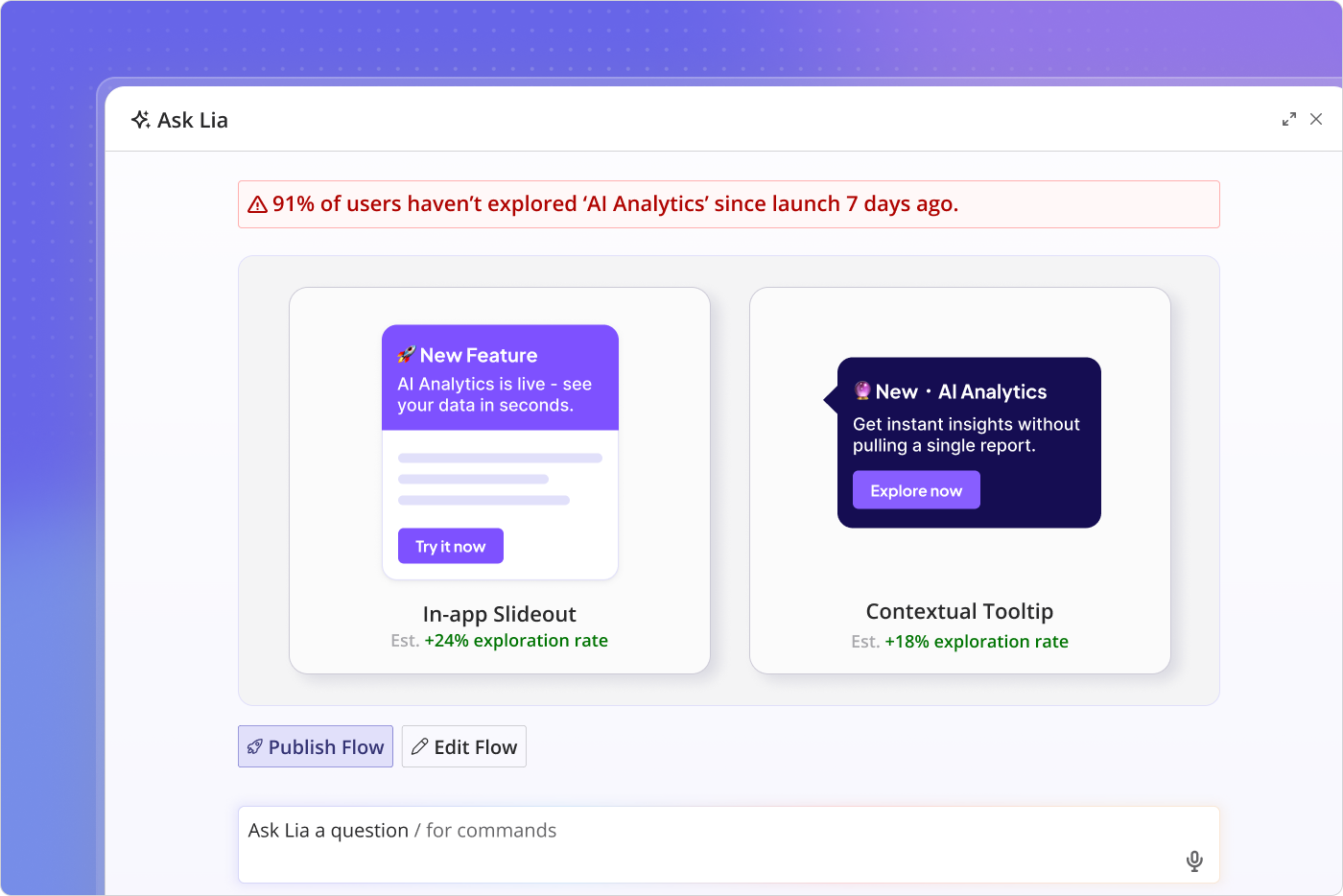
AI can’t replace human judgment when you’re analyzing feedback, but it can take a lot of the manual work off your plate. In Userpilot, Lia (our AI agent) reads survey responses alongside product usage, so an open-ended complaint about a feature arrives already connected to the behavioral data showing who else struggles with it.
That connection matters more as teams ship faster, as Yazan Sehwail (our CEO) puts it:
“As producing and building features become a lot cheaper, instead of every quarter, you’re releasing one or two features, now you’re releasing 7, 8, 9. It becomes even harder for product teams to manually have to track each one and understand usage for each one.”
So instead of building a manual report for every release, Lia tracks how each feature performs and flags where users are struggling, letting you act while the feedback still matters.
Make every response lead to a product decision!
A product feedback form is only worth interrupting users for when the response leads somewhere. The faster you can connect what a user says with what they did in the product, the easier it becomes to identify the real issue and decide what to change.
Userpilot lets you trigger feedback forms from specific user behaviors, analyze responses alongside product analytics and usage data, and use Lia to surface recurring patterns before they go stale.
Book a demo to see how you can move from collecting feedback to acting on it in one place.
About the author