What Is a Product Roadmap? An Effective Guide for 2026


If you’ve ever tried to manage product decisions without a roadmap, you already know how quickly everything slips into scattered requests, shifting priorities, and last-minute debates. A clear product roadmap fixes that.
A product roadmap provides your team with a shared strategic direction, helps you explain why certain work takes priority, and keeps the product moving toward a future you can stand behind.
In this guide, I’ll break down what a product roadmap is, why it matters, the core elements of a successful product roadmap, and the steps for creating one that teams actually rely on. By the end, you’ll have a simple, practical process you can apply when planning product launches or improving your existing solution.
What is a product roadmap?
A product roadmap is a shared source of truth that explains the strategic vision, direction, priorities, and expected progress of a product over time.
Many people confuse roadmaps with project plans and backlogs, but each serves a distinct purpose:
- A product roadmap communicates the reason for the work and the main priorities. It highlights outcomes and themes rather than individual tasks.
- The project plan explains how and when the work will happen. It covers resources, sequencing, and delivery timing.
- Backlog holds user stories and technical tasks that support the work outlined in the roadmap.
Why every product needs a product roadmap
Product roadmaps are my first stop when I want to cut through scattered requests or bring structure to decisions that feel rushed. Here are the three reasons I rely on them so often:
- A roadmap keeps cross-functional priorities in check: Departments often move toward different goals. Sales wants features that close deals, Support pushes for fixes that reduce ticket volume, and Marketing looks for additions that create a strong story. Without a roadmap, these requests collide and place the product team in a constant state of reaction. A clear plan keeps everyone on the same page and shifts discussions from urgent requests to steady choices about how each idea fits into the direction already set.
- Developers need visibility beyond the next sprint: I’ve found that engineers produce better systems when they understand the long arc of the product. With this context missing, they’ll naturally choose shortcuts that keep the sprint moving but create heavy debt later. For example, a team might add a quick patch to support a new field in a database because it works for the current feature, only to discover a few months later that the product will require a larger reporting module. This will then add unnecessary extra work that could have been avoided if the longer view had been clear from the start.
- A shared direction builds trust without fixed dates: Customers and investors want to understand where the product is heading, but strict date commitments rarely hold once priorities or market trends shift. A roadmap lets you share direction without locking yourself into exact timelines or single features. This gives you the room to adjust when one approach is no longer feasible. If the roadmap states that you plan to strengthen reporting before the end of a quarter, the team is free to explore the best way to reach that outcome. If the plan instead promises one specific solution and that path fails, you’re left either forcing an inferior fix or weakening user trust by walking back a commitment.
Build a product roadmap that drives growth and team alignment
What is a product roadmap to you right now?
A roadmap is more than a schedule—it’s a strategic vision. Defining its purpose helps you move from reacting to requests to leading with direction.
Who is your primary audience for this roadmap?
The format you choose—whether it’s Now-Next-Later or a Feature Roadmap—depends on who needs to see the expected progress the most.
What is your biggest roadmapping challenge?
Ruthless prioritization is the heart of a successful roadmap. Identifying what holds you back helps you choose the right planning framework.
Ready to build a roadmap that actually works?
Don’t let your roadmap become a static document. Userpilot helps you anchor every roadmap item to real user problems by combining product analytics with in-app feedback. Measure adoption for everything you ship and iterate faster without writing code.
Types of product roadmaps
Product roadmaps take different shapes depending on your goals, the maturity of the product, and how you plan to communicate upcoming work. Let’s discuss five of the most common roadmap types used across SaaS teams and why each one matters.
1. Strategy roadmap
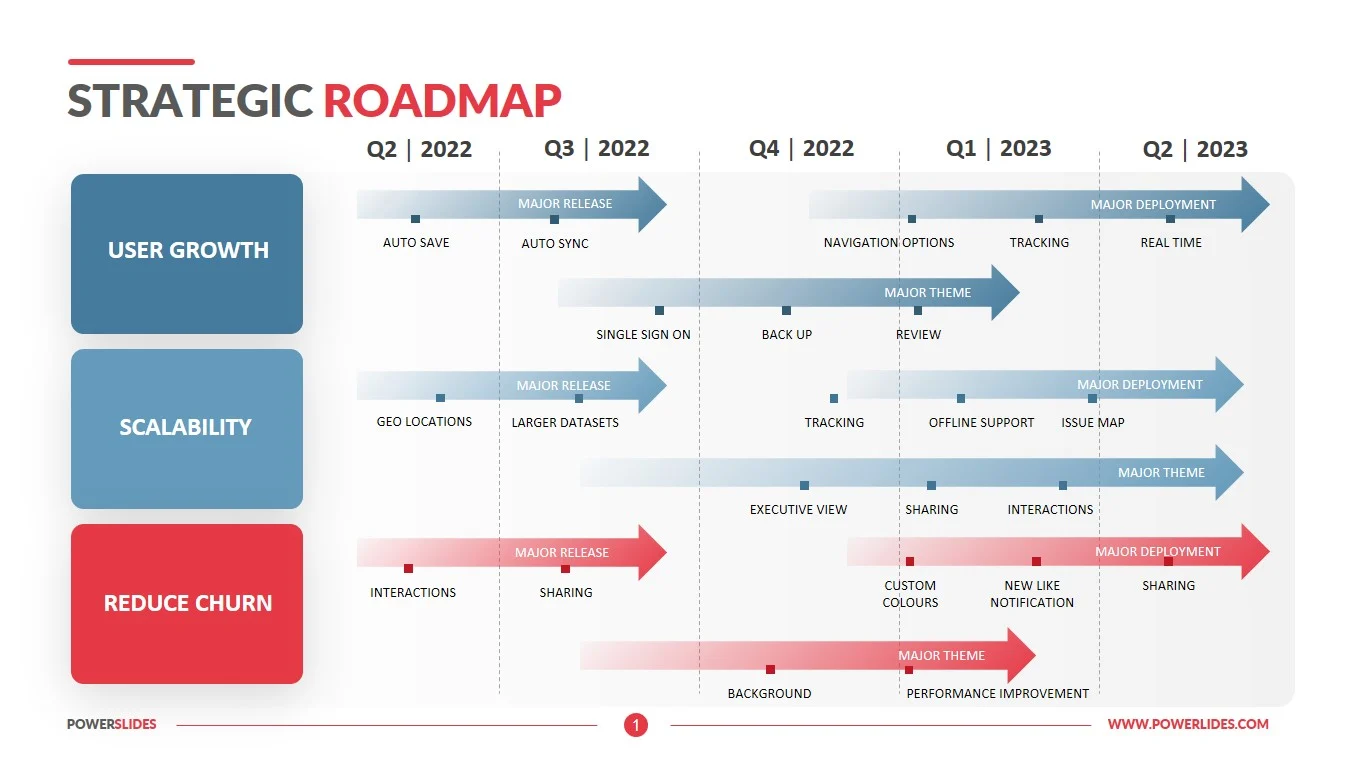
A strategy roadmap gives a wide view of where the product is heading and why that direction makes sense for the business and your overall product strategy. It focuses on long-range goals, major themes, and the reasoning behind them, making your strategic vision clear to key stakeholders, product managers, and every team involved.
Imagine you work on a SaaS analytics tool that has grown quickly but now struggles with retention. A strategic roadmap might include themes such as strengthening onboarding, improving data freshness, and expanding the automation layer. Each theme carries a short explanation of why it matters and what long-term advantage it creates. None of this needs release dates or detailed tasks. The value comes from showing the direction the company intends to pursue and how each choice supports the broader vision.
2. Outcome-based roadmap
This roadmap focuses on the problems you want to solve rather than the specific features you plan to build.
Using the same SaaS analytics tool example, imagine your team wants to reduce churn among new customers. Instead of listing features such as “new onboarding tutorial” or “dashboard redesign,” an outcome roadmap might state outcomes like “increase first week activation” or “raise the number of users who complete their first report.”
This format works well when you want to avoid locking the team into specific features too early, keeping them focused solely on the business outcomes you want to drive. It also helps stakeholders understand why certain work comes first.

3. Now-next-later roadmap
If you struggle with stakeholders who fixate on dates, the now-next-later roadmap is the calmest way to keep everyone focused on priority instead of timing. It removes the timeline grid entirely, and groups planned work into three broad buckets:
- Now: Work already in progress or about to begin. These tasks are well understood, validated, and ready for active development efforts.
- Next: Work that’s coming soon. It’s important, but still being shaped or waiting for the right dependencies, staffing, or user research.
- Later: Work on the horizon. These ideas typically require further exploration or depend on the success of earlier initiatives. They’re worth watching, but not ready for active planning.

Let’s discuss a practical example using the same analytics product scenario.
Suppose your team is beginning to serve larger enterprise customers who expect stronger product performance and richer insight sharing. In the now bucket, the team might focus on stabilizing query speeds and improving data freshness because those performance issues already appear in customer feedback.
In the next bucket, the team could work on expanding scheduled report automation, since this unlocks value for larger accounts but depends on performance improvements landing first. In the later bucket, the team might include early exploration of workspace-level collaboration, which would help entire departments share and comment on insights, but only makes sense once the product handles heavier workloads reliably.
4. Feature roadmap
A feature roadmap outlines the specific features your team plans to deliver and groups them by release window or development stage. It’s more detailed than the earlier formats and works well when you need to show exactly what’s coming soon, especially when teams are preparing for execution or when key stakeholders want a clear picture of near-term work.
This roadmap can stand on its own or follow the structures you’ve already introduced. Remember how your team hypothetically placed performance improvements in the now bucket of the now-next-later roadmap? A feature roadmap can break that broad goal into concrete deliverables.

For example, stabilizing query speeds might translate into features such as a new caching layer for large datasets, a more efficient query engine, and an in-product indicator that shows users when data has fully refreshed. Each feature would sit in a release window, such as Q2 or Early Q3, so the development team, design, support, and marketing can prepare their work and keep the product development process running smoothly.
5. Release roadmap
A release roadmap outlines what each release contains and when it’s expected to ship. It’s the most time anchored of all the formats and is often used when multiple teams need to coordinate their work around a shared delivery point.
Building on the same analytics product example, your team has already defined the performance improvements in the now bucket and broken them into features such as a caching layer and a more efficient query engine.
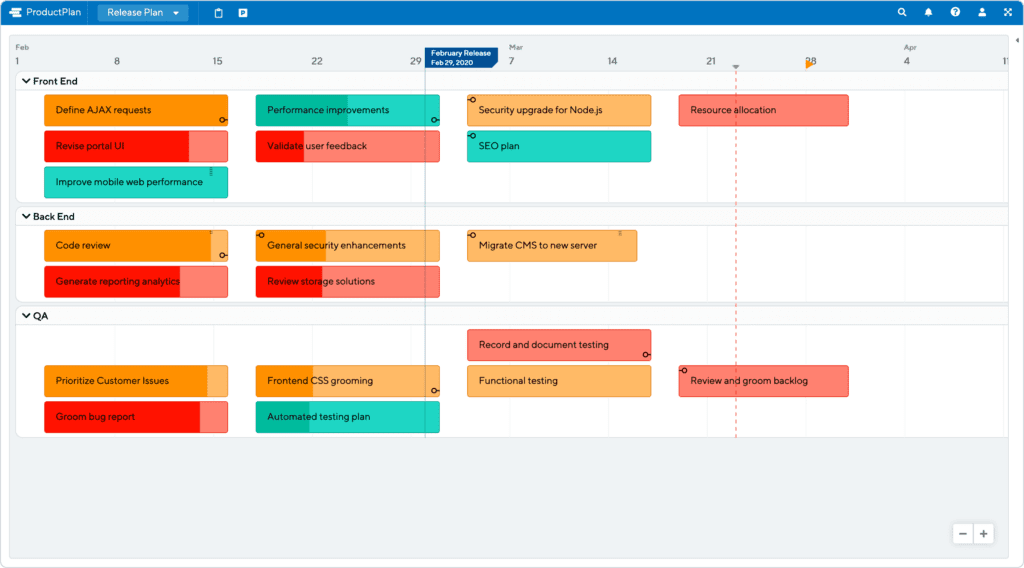
A release roadmap takes those features and places them into specific release groups. For instance, the first release might focus on the new caching system along with minor stability fixes, while the next release introduces the updated query engine and the refreshed data status indicator. Each release would have a targeted window, such as “June release” or “Mid Q3 release,” so every team knows when preparation should begin and what to expect.
💡Note: I’ve seen release plans fall apart when teams force dates too early, so I only rely on this format when discovery is complete and the work is stable enough to anchor real commitments.
Core elements of a successful roadmap
Regardless of the format you choose, every effective roadmap requires a few core elements to work. Let’s look at the essentials to prioritize before you begin drafting or refining your roadmap.
- Product vision: Begin each roadmapping session with your product vision in mind so the team stays anchored to the long-term direction. If your vision is to become the most reliable analytics platform for mid-market teams, every roadmap item should support reliability, clarity, or scale.
- Strategy and goals: Link each theme or initiative to a clear strategic goal so the work supports your broader product strategy. If the goal is to improve retention, call out the metric you expect to influence, such as activation rate or query completion rate.
- Themes: Group related pieces of work under themes to help stakeholders see the larger problem you’re solving. Instead of listing a single feature like a new login option, create a theme, such as reducing sign-up friction, so the team can explore several solutions within the same focus area and choose the one that delivers the most user value.
- Initiatives: Translate each theme into concrete projects that move the work forward. For example, a theme around improving performance might turn into initiatives such as redesigning the query engine or upgrading your caching system. These are broad enough for discovery but specific enough to guide planning.
- Timeframes: Use time horizons to show sequence without turning the roadmap into a schedule. Buckets like Q2, Q3, or now-next-later indicate what comes first without forcing exact dates that the team can’t commit to yet.
- Status markers: Add clear indicators so anyone reading the roadmap can track progress, understand what’s moving, and see when the team hits key milestones.
- Product roadmap software: Use a dedicated strategic planning tool to keep the plan clear, accessible, and easy to update. Most platforms include ready-made product roadmap templates that help you structure ideas quickly, along with built-in communication tools that make it easier to collaborate with cross-functional teams. Good software also keeps everyone aligned on your core business goals, prevents an outdated roadmap from circulating when plans change, and lets you turn your ideas into either an external or internal roadmap with minimal effort.
How to create effective product roadmaps in four steps
In this section, I’ll walk you through the four-step process I rely on when creating roadmaps that stay clear, practical, and easy for teams to use.
Step 1: Define the destination
I always start a new roadmap by grounding the team in a clear product vision and strategic direction. Before any themes or initiatives take shape, I spell out the problem we want to solve, the users we’re solving it for, and the long-term change we expect our work to deliver.
A simple way to do this is to ask one question at the start of every roadmapping session: If we execute this roadmap well, what becomes possible for our users that isn’t possible today? For example, with the analytics product we’ve used throughout this article, the vision might focus on delivering faster, more reliable insights for mid-market teams that struggle with slow reporting tools. Once that vision is clear, it becomes much easier to evaluate whether a theme or initiative actually moves the product in the right direction.
This step may feel basic, but I’ve learned that skipping it leads to scattered decisions and roadmaps that try to solve too many unrelated problems at once.
Step 2: Gather quantitative and qualitative inputs
Once your vision is clear, the next step is to collect the evidence that guides your choices. In this stage, focus on four core activities:
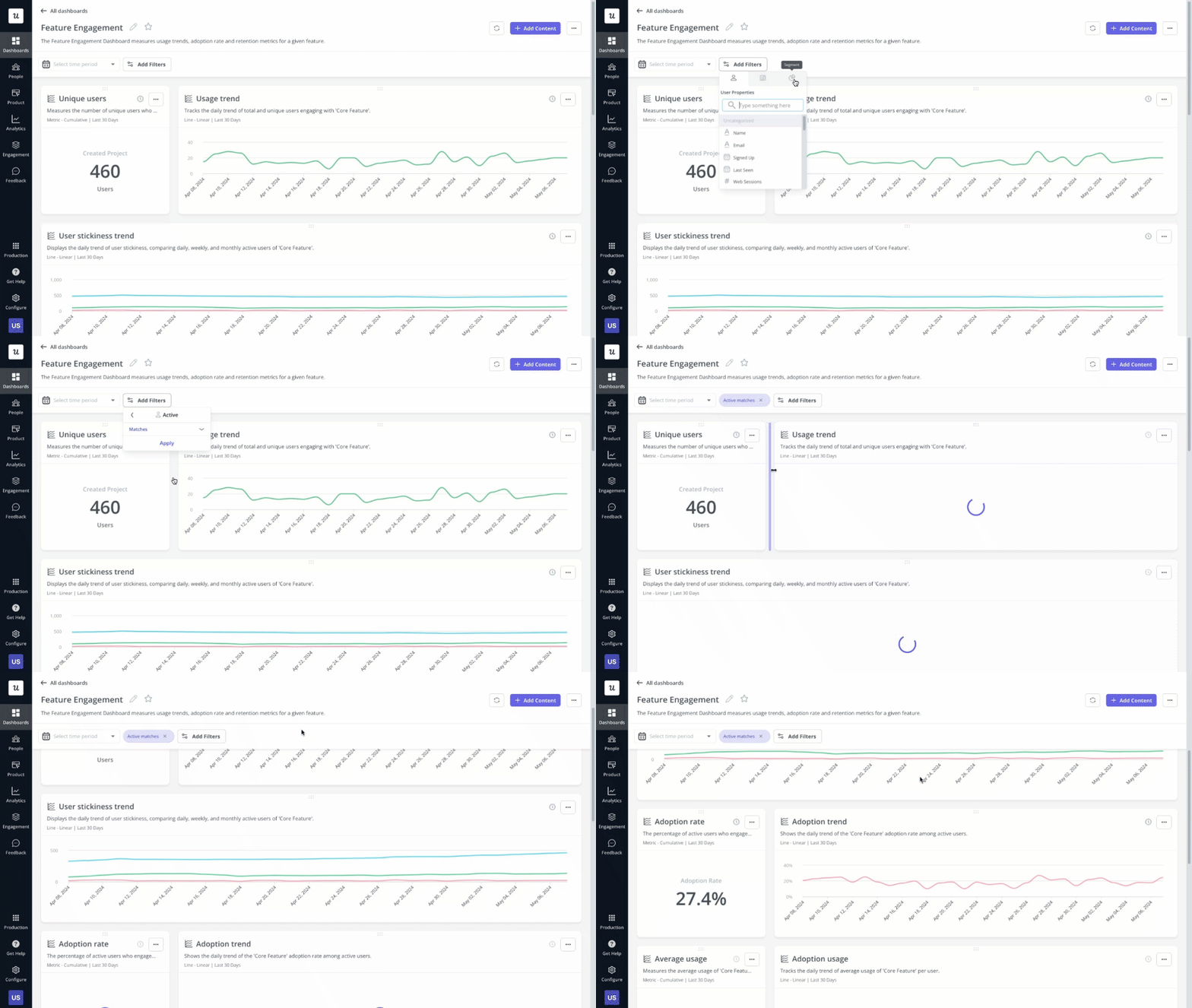
- Study product analytics: Analyze how people move through key workflows and identify where they slow down or drop off. Check activation rates, time to first value, funnel completion patterns, and any steps where users routinely abandon the process.
- Review customer feedback: Read comments from surveys, interviews, and support conversations to understand the reasons behind the behavior you see in the data. Speed up this process with no-code survey tools and AI-powered survey analysis that lets you gather and interpret user insights quickly.
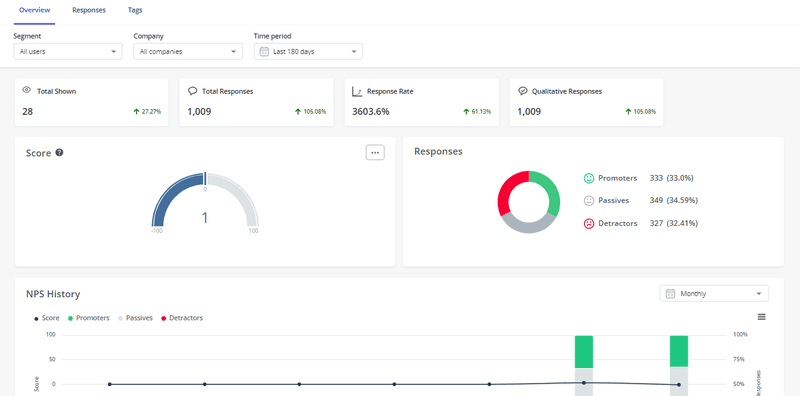
- Collect internal input: Meet with Sales and Customer Success to understand what blocks deals, what drives churn, and which problems surface repeatedly in customer conversations.
- Map competitor expectations: Scan competing products to see which capabilities users now consider standard. If rivals offer instant reporting or more flexible analytics dashboards, those expectations often shape how users judge your product’s strengths and weaknesses.
Step 3: Prioritize features ruthlessly
At this stage, you’ll likely have more ideas than your team can deliver, which is normal. The goal isn’t to capture everything but to narrow the list to the work that carries the greatest impact and supports your strategic objectives. Here’s how:
- Rank opportunities with a clear framework: Use a simple scoring system to compare ideas side by side. RICE is my go-to prioritization framework because it forces you to consider reach, impact, confidence, and effort before making a call. This helps prevent decisions driven by intuition or the loudest internal voice.
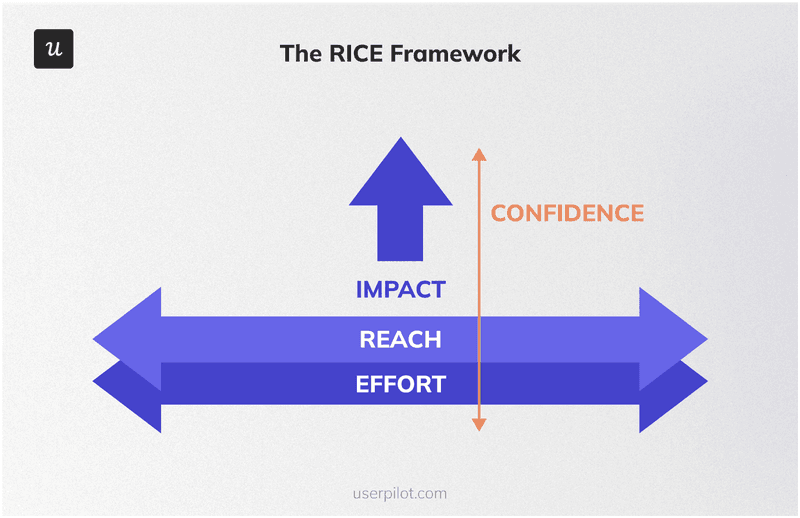
- Sort initiatives by importance: Group items into ‘must-have,’ ‘should-have,’ ‘could-have,’ and ‘wo n’t-have’ buckets to understand what truly moves the product toward its goals. This step is helpful when shaping release plans or deciding what to push to a later cycle.
- Separate essentials from enhancements: Identify which ideas address core user problems and which ideas only add polish. For the analytics product example, improving query speed would qualify as essential, while adding a new chart type might fall into an enhancement category unless user feedback proves otherwise.
- Validate feasibility with your development team: Check that the work you’re prioritizing aligns with engineering capacity, technical constraints, and cross-functional timelines. This ensures the roadmap reflects what the team can realistically deliver, not a wishlist of best-case assumptions.
Step 4: Visualize the roadmap and sync with your teams
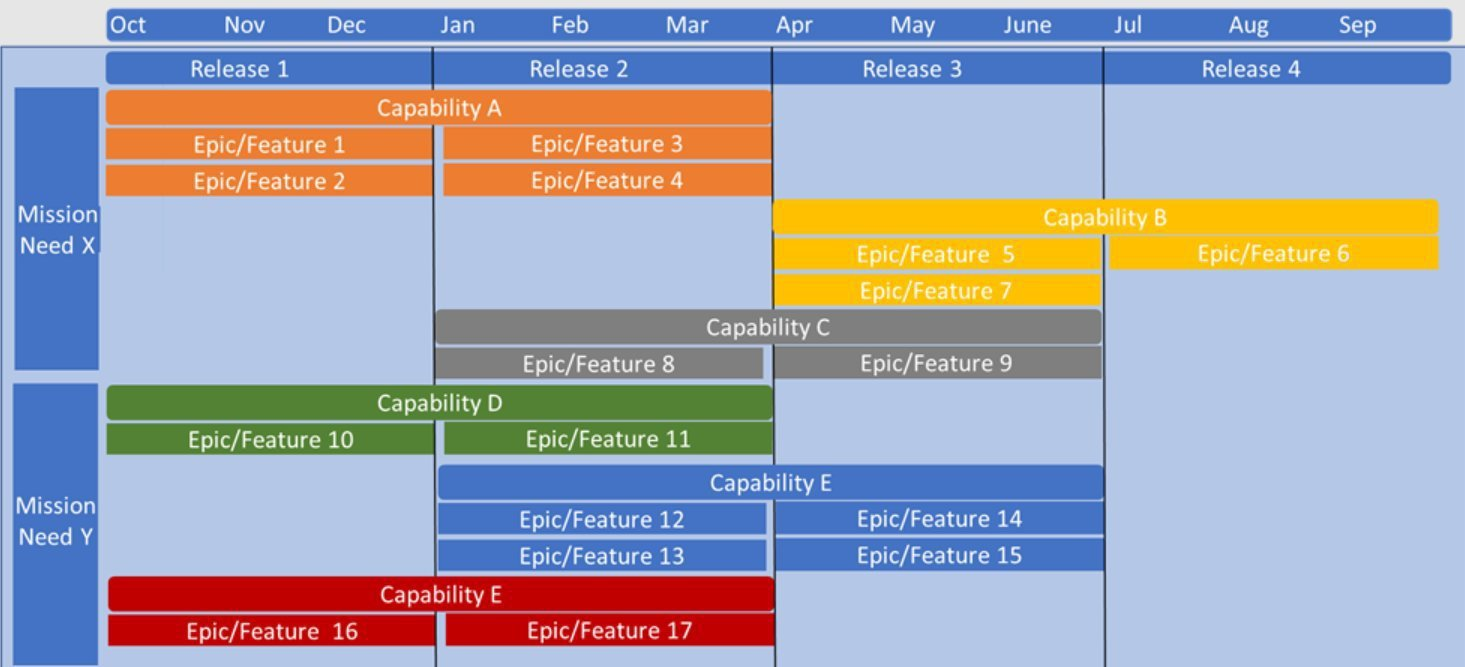
Once your priorities are clear, the next step is to turn the plan into a high-level visual summary that your teams can understand at a glance. A written list or spreadsheet can capture the thinking, but a visual format makes the work easier to follow and easier to communicate. I aim for a layout that shows themes, initiatives, and timeframes in a way that anyone can scan without explanation.
The format you choose should match the type of roadmap you’re creating and support the development strategy behind it. A now-next-later roadmap works well as a simple board. A feature or release roadmap benefits from a timeline-style view so teams can see when major pieces of work are expected to land. What matters is clarity. Stakeholders shouldn’t struggle to understand what comes first or how the work connects to the strategic goals you defined earlier, especially when the development process depends on steady sequencing.
Share the visual roadmap with the teams who rely on it and involve key stakeholders early so everyone stays on the same page. Then:
- Align with your development team on feasibility and sequencing.
- Confirm with design that the upcoming work has enough discovery time.
- Bring in support, product marketing, and sales so they can prepare their plans.
Roadmapping best practices for SaaS teams
Trust me, after years of creating roadmaps, I’ve made my fair share of avoidable mistakes. Here are five best practices to help you create roadmaps that stay realistic and easy to act on:
- Anchor roadmap items to real user problems: Make sure every theme or initiative is backed by evidence. Avoid adding work because it’s exciting, trendy, or requested by a single loud voice. A roadmap built on unvalidated ideas creates waste and unnecessary user churn.
- Focus on outcomes instead of outputs: Tie each roadmap item to the user behavior or strategic objectives you want to drive. Instead of listing a feature such as dark mode, define the outcome, such as increasing engagement during evening hours.
- Include the work you plan to retire: Review product usage data regularly and call out features or workflows that no longer provide value. Adding new work without sunsetting old ones that no longer serve you leads to bloated products and technical debt.
- Make trade-offs visible when new requests appear: When a request arrives from an executive or another team, show the impact on current priorities instead of rejecting the idea outright. Clear comparisons help stakeholders understand what must shift to take on the new work.
- Keep the roadmap lean enough to act on: Limit the number of major initiatives in each timeframe so the team stays focused and your development efforts remain manageable and effective. Overstuffed roadmaps slow development and make it harder to spot what actually matters.
Make smarter product decisions
Product roadmaps act as a compass for agile teams, and the strongest ones are built on clear vision and thoughtful prioritization. Whether you’re shaping long-term strategy, defining outcomes, or planning releases, the goal is always the same: give your team a direction they can trust and a plan they can act on.
Userpilot can help. It combines product analytics, in-app surveys, and user feedback tools into one platform, allowing you to track user behavior, gather customer insights, and measure adoption without writing a single line of code. Ready to see it in action? Book a demo today.
About the author