How to Reduce Support Ticket Volume: The Prevention-First Playbook for SaaS Teams in 2026


Most teams treating high support ticket volume as a support operations problem are solving the wrong thing. What I’ve seen across hundreds of SaaS customer support conversations at Userpilot: the teams that actually cut ticket volumes treat them as product quality signals. A spike is your product telling you something broke, confused your users, or was never explained properly.
There’s also an automation layer worth addressing: AI-powered deflection now handles 45-70% of incoming queries for teams that implement it well. Freshworks’ 2025 benchmark found AI tools cut average first response times by 55%. But layer AI on top of a leaky product and you’re just deflecting confused users toward a faster dead end.
This guide works through three layers in a specific order: prevention, self-service, then automation. Most teams do this in reverse, which is exactly why their ticket volumes keep climbing no matter how many chatbots they add.

Most support tickets shouldn’t exist
Before you start optimizing anything, I’d suggest a preparatory classification exercise.
Pull your last 100 tickets and sort them into three buckets:
- Product tickets: The user couldn’t figure out how to do something.
- Communication tickets: The user didn’t know about a change or update.
- Genuine support tickets: Something broke or the problem was too complex for self-service.
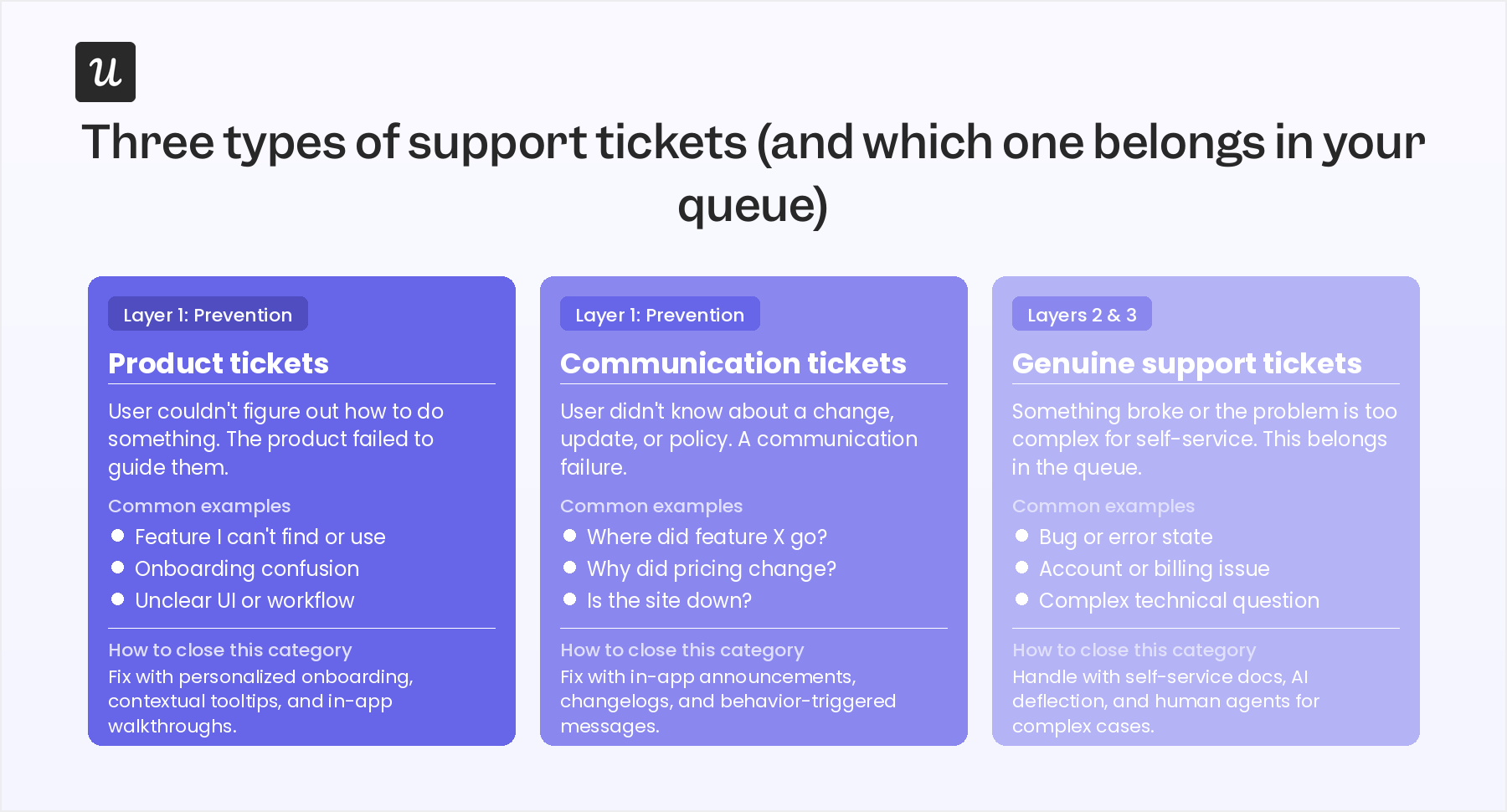
Most teams discover the first two categories account for more than half their total ticket volume.
The problem with that may not be obvious until you realize that SaaS support averages $18 to $35 per ticket when factoring in agent time, tooling, and overhead. For a team handling 10,000 tickets per month, that’s up to $350,000 a month in customer support costs, much of it spent answering questions the product should have been equipped to handle.
The three-layer framework in this guide maps directly to that classification.
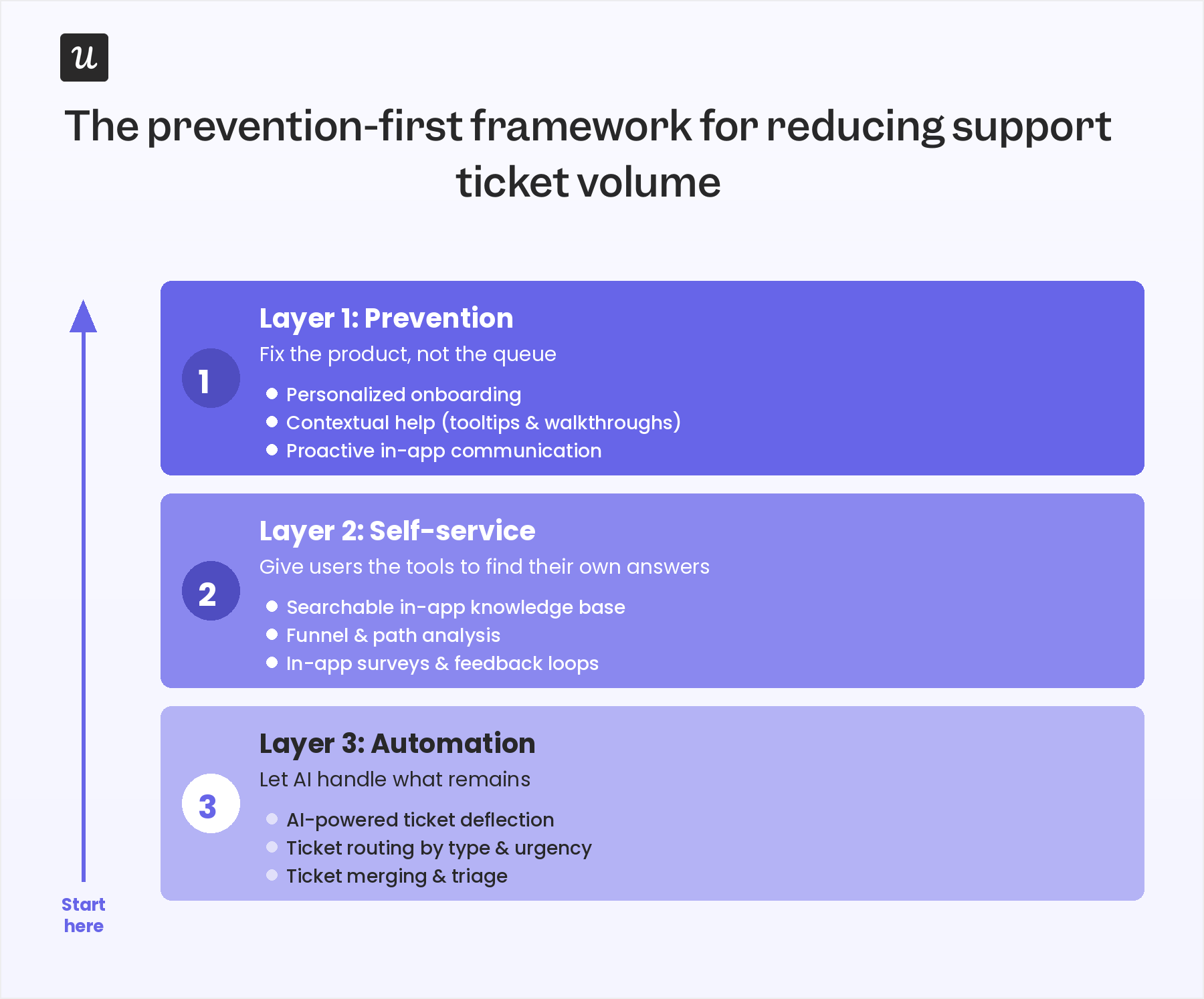
Prevention eliminates the product gaps and communication failures that generate the first two ticket types. Self-service infrastructure and AI automation handle the questions that constantly arise, but at a fraction of the cost of human agent interactions.
Layer 1: Prevention (fix the product, not the queue)
Prevention is the highest-impact layer because it eliminates the root cause of unnecessary tickets rather than managing them after they form. When I audit ticket data with Userpilot customers, the single biggest driver of preventable volume is poor onboarding: users who never reached their ‘Aha!’ moment become a slow drip of confusion-driven support requests. Fixing onboarding gaps typically leads to a meaningful drop in support ticket volume within 30 days.
Personalize onboarding before users get lost
Every user who logs into your product without reaching their first activation milestone is a future support ticket waiting to happen. A generic onboarding tour that covers every feature regardless of user role will fail the majority of your user base every time it runs. Personalized onboarding can segment users by their jobs-to-be-done at signup and route them to whichever features are most relevant to their specific use case. That’s how you prevent the confusion that generates your highest-volume ticket categories.
Welcome surveys are the key mechanism in this process. Ask users about their team role, use case, and primary goal before serving them a product tour. This knowledge empowers you to build onboarding flows that speak to what they actually need instead of using the same one-size-fits-all boilerplate for every new user. Teams that do this consistently tend to see their onboarding-related ticket categories shrink even before they’ve touched anything else in the support stack.
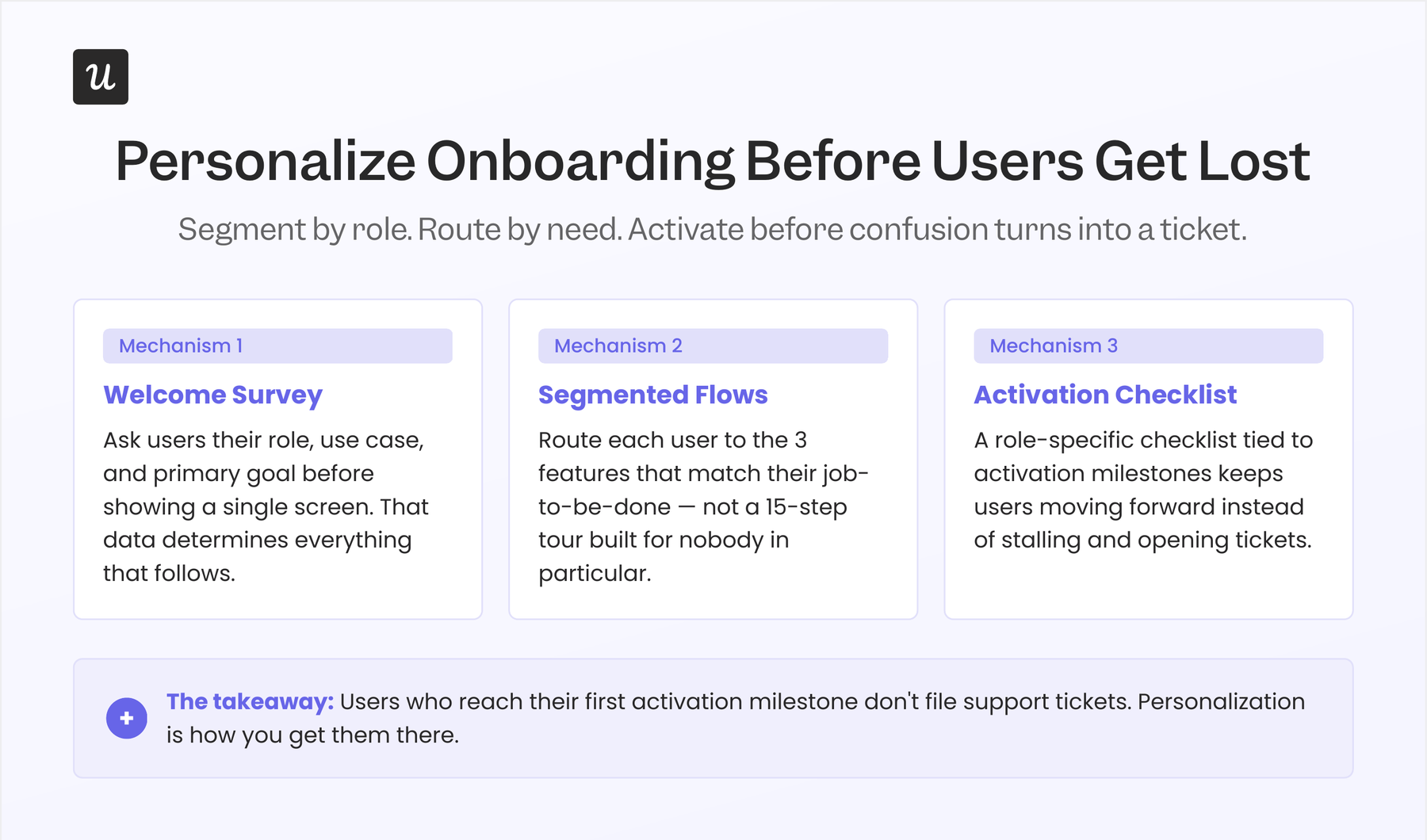
An onboarding checklist that guides users to activation events relevant to their role reduces the chance they’ll stall, get confused, and reach out to support. A product tour covering 15 features in sequence for every user produces the same confusion it’s supposed to solve. As a result, most users abandon it before they ever reach the features that would actually get them to experience your product’s value. Personalization at signup isn’t a nice-to-have; it’s the difference between users who activate versus users who generate endless tickets.
Put help where the confusion happens
The most common mistake I see in the first layer is building out a help center and then calling it a day. An external knowledge base that lives outside the product competes with the lowest-friction alternative: emailing support. In contrast, contextual help that appears directly next to the UI element the user is confused about is a readily available intervention that provides the information they need without asking them to go elsewhere.
Abrar Abutouq, one of our product managers, ran into exactly this problem when Userpilot first shipped its email feature. The activation funnel showed a sharp drop-off at the domain verification step, and rather than queuing an engineering ticket to redesign the flow, he built a targeted tooltip inside Userpilot. Over the next few days, the drop-off “magically” disappeared.
“Within a few hours, I just created a targeting modal and showed it to users and highlighted the correct steps for them to make it clear what to do next. That helped a lot on reducing friction and supporting users in real time without involving our dev team.”
— Abrar Abutouq, Product Manager, Userpilot
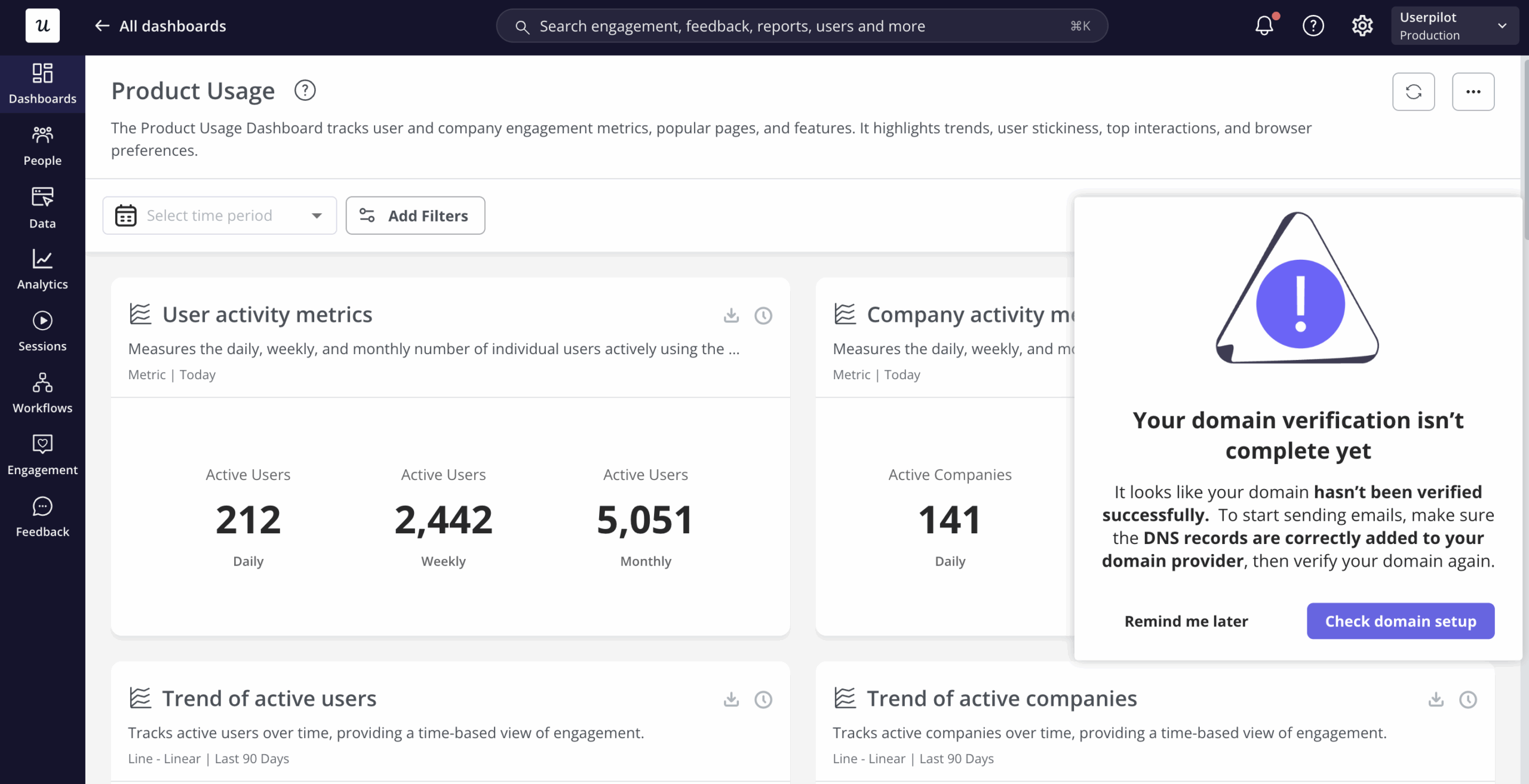
That’s what contextual help looks like in practice. It’s a specific answer delivered at the moment of confusion, before the user opens a ticket. Tooltips, hotspots, and inline app walkthroughs triggered by feature interaction are the primary tools for this first layer and can all be built in mere hours rather than full sprint cycles.
The key distinction to make is between friction and the value gap. Friction is when the feature is hard to use, whereas a value gap is when the user doesn’t understand why the feature matters or where it fits into their workflow. Both generate tickets but need different in-app communication. Friction calls for a step-by-step tooltip or walkthrough, while a value gap needs a modal that reframes the feature’s purpose.
Communicate changes before users notice them
A significant share of communication tickets comes from users who have discovered a change before anyone told them about it. Feature deprecations, pricing updates, scheduled maintenance, and workflow changes all generate ticket spikes when users encounter them without warning. In-app announcements delivered before the change lands eliminate this entire ticket category without requiring a single support interaction.
The proactive version extends further into behavior-based triggers. If your analytics show a user has hit a dead end in a critical flow across three sessions without completing the action, trigger an in-app message before they close the tab. This is proactive support applied at the product layer: resolving the problem before the user articulates it as a support request.
Announcement banners for planned downtime and in-app changelogs for feature updates are the two most effective formats here. Both can be built and targeted by a user segment without engineering involvement. The goal is simple: the user should know about a change before they discover it on their own and reach out to support to find out what happened.
Layer 2: Self-service (give users the tools to find their own answers)
Once prevention has closed the biggest product gaps, the self-service layer handles the questions that can’t be avoided. Self-service resolution costs $0.50 to $2.37 per issue, compared to $18 to $35 for a human agent interaction.
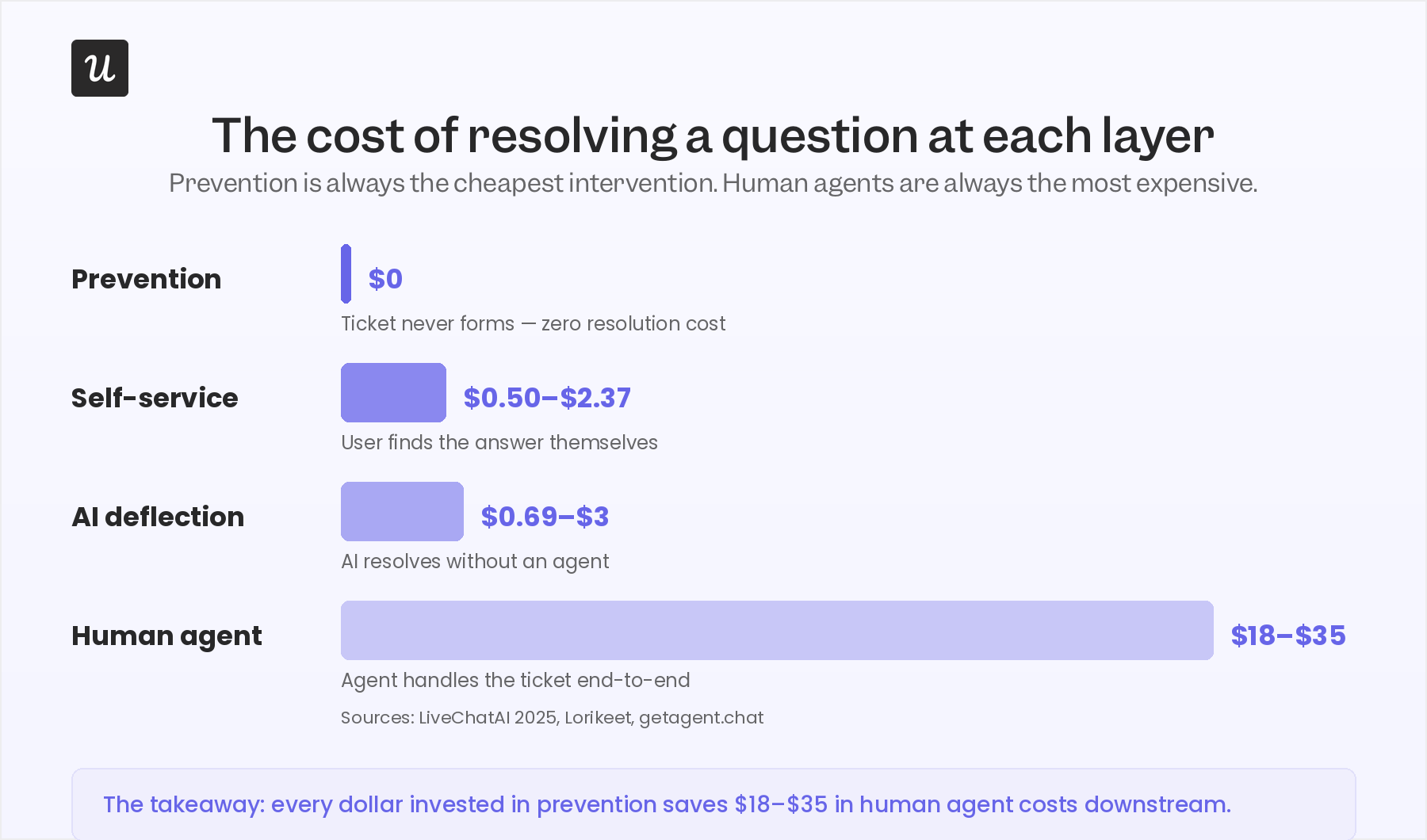
Channeling every question with a standard answer away from the support queue means agents can focus on the tickets that actually need a human, which not only cuts costs but also improves response times.
Build a knowledge base that users can actually find
Most SaaS teams I talk to already have a knowledge base, and yet most of them still field a high volume of tickets about topics it covers. The failure is almost always at a discovery level. Users run two or three searches, don’t find what they need, and submit a ticket instead of continuing their search. A searchable knowledge base is only as effective as its ability to surface the right answer before a user gives up.
An in-app resource center that users can access without leaving the product is meaningfully different from an external help site requiring a context switch. When the knowledge base is one click away inside the product, the path of least resistance shifts toward self-service. A separate URL requiring a tab switch puts you in competition with the user’s default move: just emailing support.
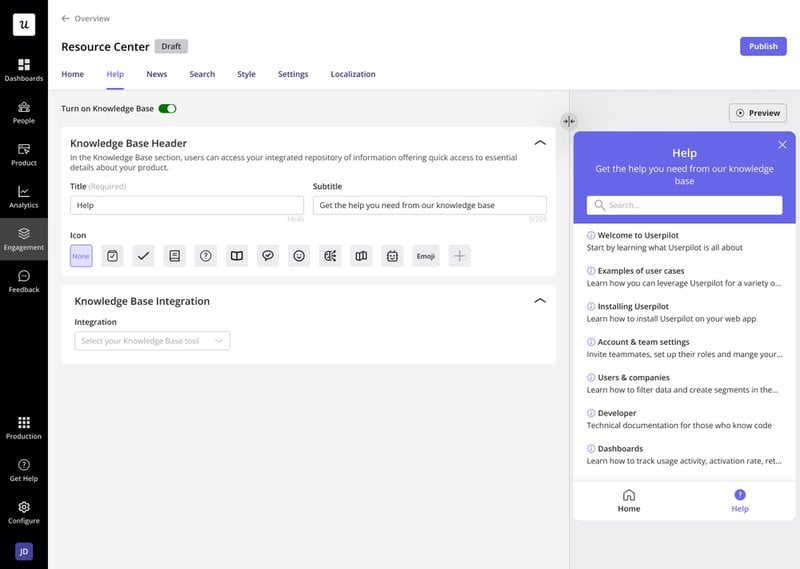
AI-powered search inside your help center raises the discoverability ceiling further. Natural-language queries that match articles the user wouldn’t have found through keyword search alone close the gap between “I searched and found nothing” and “I searched and got an instant answer.” Track which searches still result in ticket submissions after clicking an article, as those will be your highest-priority content gaps. Fixing them is a direct lever for your ticket deflection rate.
Use funnel and path analysis to find where users get stuck
Support ticket volume spikes don’t appear from nowhere. They correspond to specific points in users’ workflows where the product consistently fails to guide them forward. Funnel analysis that surfaces drop-off steps gives you a ranked list of product fixes and content gaps, each of which maps directly to a ticket category you can close.
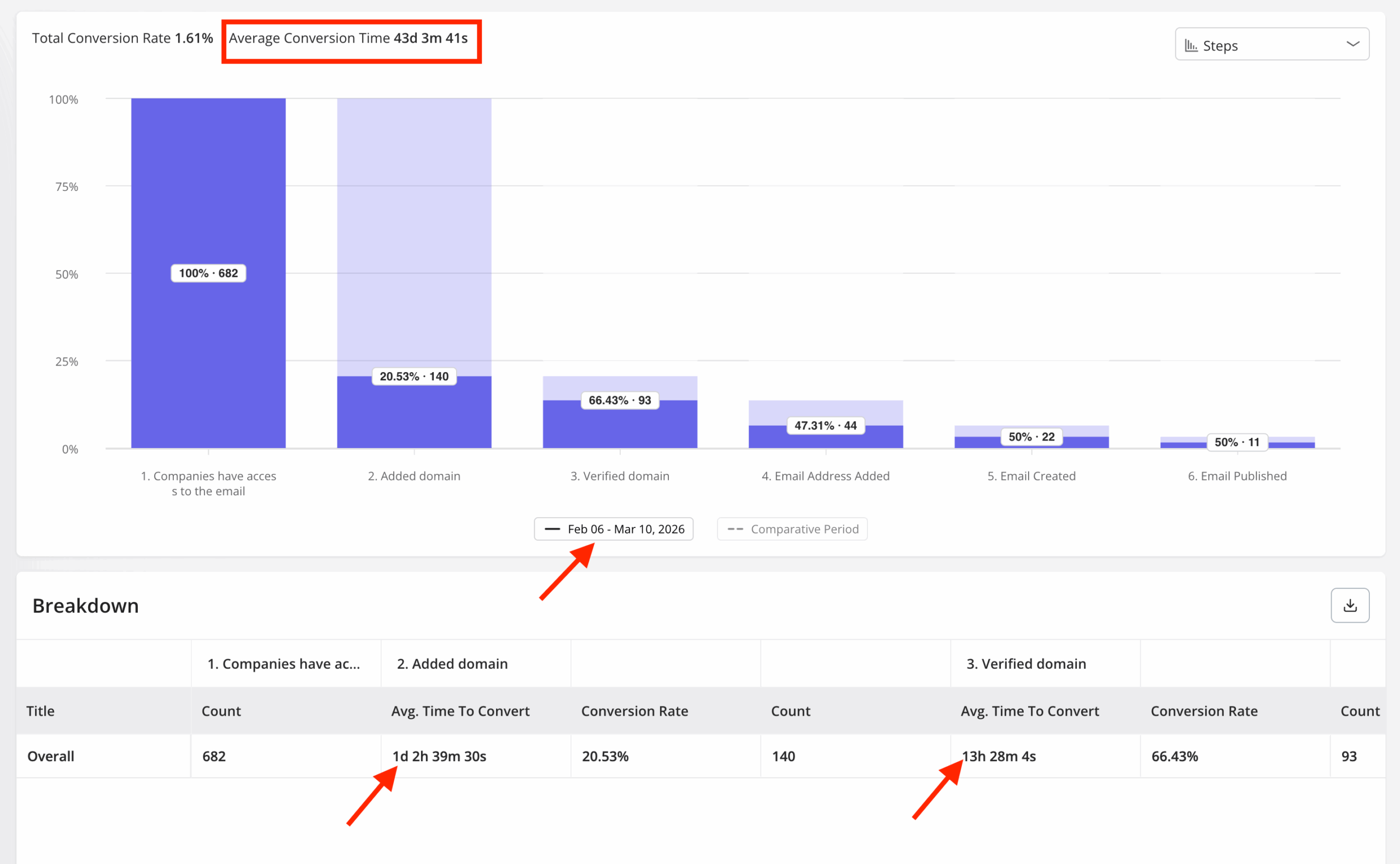
Path analysis extends this further: where funnel analysis shows where users stop, path analysis shows where they wander. The navigational dead ends that users reach before emailing support are visible in path data, and they’re fixable once you can see them. Both types of analysis should feed a short prioritization list, not a sprawling optimization backlog.
Build a ranked list of the top five friction points by ticket volume based on this analysis. The top two or three will almost always account for the bulk of your Layer 1 and Layer 2 ticket categories. Fix those first, re-measure after 30 days, then continue down the list.
Collect feedback to surface what your analytics can’t see
Quantitative data show where users drop off, but not why. In-app surveys placed at friction points collect the qualitative signal that turns a drop-off rate into a fixable problem by providing context. NPS follow-up questions, CES surveys after key actions, and microsurveys triggered when users hit error states are three formats worth implementing for this purpose.
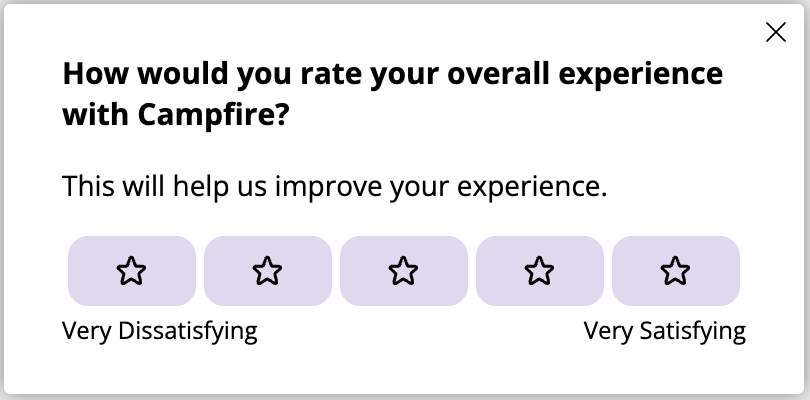
Closing the loop is where most teams fall short. When an in-app survey surfaces a product gap, fix it and then measure whether the relevant ticket category decreases over the following 30 days. That’s how you validate the fix worked rather than assuming it did.
Teams that skip the measurement step often address the same ticket category six months later because the fix merely silenced a symptom without addressing the root cause. Survey analytics tied to ticket categories create the feedback loop that helps first-layer improvements compound over time.
Layer 3: Automation (let AI handle the leftovers)
This third layer is where most teams start, and also consistently where they get disappointed. AI deflection rates vary enormously based on what’s already in place. Teams with solid prevention and self-service foundations see 50% to 70% deflection, while teams that deploy AI first without those foundations typically land in the much lower 20% to 30% range. That gap represents tens of thousands of dollars a month in tickets that AI is supposed to be handling but isn’t.
Yazan Sehwail, Userpilot’s CEO, notes that being able to ship features dramatically faster due to AI will always compound the support ticket problem if automation isn’t used to offset the increase:
“As producing and building features become a lot cheaper, instead of every quarter, you’re releasing one or two features, now you’re releasing 7, 8, 9. It becomes even harder for product teams to manually have to track each one and understand usage for each one.”
— Yazan Sehwail, CEO, Userpilot
The implication for support ticket volume is direct. More features + faster shipping = more points of confusion, surprise edge cases, and users encountering behavior they didn’t expect.
Automation becomes the only practical way to handle that volume at scale, but only after prevention and self-service have done their job.
What AI ticket deflection actually gets you (and what it doesn’t)
With the right implementation, the math is clear on just how much deflection can save companies. A mid-sized SaaS business handling 10,000 support tickets per month at even just $6 to $15 per ticket would spend $60,000 to $150,000 monthly on support. Achieve a 60% AI deflection and you’ll be eliminating 6,000 tickets per month, which saves you $36,000 to $90,000 monthly on operational costs. The savings are even larger if your resolution costs are closer to the aforementioned industry average of $18 to $35 for each ticket resolved by a human agent.
Most vendors conflate deflection with suppression, and the distinction matters more than most teams realize. Deflection means the user got a real answer and their problem is resolved. When AI can’t answer and the user gives up rather than escalating, that’s suppression. Suppression affects CSAT scores but doesn’t show up in ticket counts, which makes it easy to miss until it’s too late and customer churn has spiked.
AI deflection works cleanly on first-degree support requests like password resets, billing questions, feature how-tos, and basic navigation help. Complex or high-stakes tickets still need live agents. Scope the automation correctly from the start and you can avoid the failure mode of AI-powered support tools that confidently answer questions they don’t actually know the answer to.
The failure mode I see most often is teams deploying AI deflection before building out the knowledge base it needs to draw from. An AI agent that searches a thin or outdated help center will either hallucinate or deflect without resolving, which ends up being worse than having no AI at all because it actively erodes customer satisfaction before a human agent can get involved. Build out your self-service content layer first, only then can you add AI on top of it.
Ticket routing and triage as a cost lever
Routing is a cost-efficiency lever, not a volume lever, and it’s the most often misused mechanism. Sending simple tickets to junior agents and complex issues to the specialists best equipped to handle them reduces average handle time and cost per ticket. What routing can’t do is reduce the total number of tickets reaching your queue, which is why it belongs at the end of the implementation sequence rather than serving as a starting point.
That sequencing matters a lot for how you plan out your investments. Build out routing after prevention and self-service are in place. At that point, you’re routing a much smaller volume of tickets that actually require expert attention, and the efficiency gains from routing are realized without being negated by the sheer growth of ticket volume.
Ticket merging deserves a mention here, too. When the same user files multiple tickets about related issues, combining them into a single thread eliminates duplicate handling and gives your agent full context. Most CRM and help desk tools support this natively, so it just needs to be enforced as a standard practice rather than left to the discretion of individual agents.
Start with data, not tools
Every ticket your team resolves is a data point about a gap in your product or your communication. The teams that have actually cut their support ticket volumes treat ticket patterns as product roadmap input rather than just another queue to clear. Doing so leads to lower operational costs, better team morale, and users who get answers faster.
These three layers are the order of operations but most teams erroneously implement them in reverse. They buy a chatbot first, run it for a quarter, and discover their deflection rate is 25% instead of 60%. The root cause is almost always the product gaps that were never closed.
If you want to see how Userpilot handles the prevention and self-service layers specifically, the in-app support solution is a good place to start. It covers contextual help, resource centers, behavior-triggered messaging, and the analytics that track which ticket categories you’re actually closing. The result is a product that handles more questions on its own before looping in a human agent.
About the author