User Persona Examples in The LLMs Era: How to Build Them as Good Research Documents


Every guide I searched about user persona examples has the same definition, some interchangeable templates, a Spotify mock-up, and a CTA. None is answering the actual question product managers are asking right now, which is whether any of this still works.
You see, the shift around user personas has widened the gap between those who created fictional personas and the teams that used them as validated research documents. On one hand, synthetic users made it possible to quickly create fake personas that look “legit”. On the other hand, 69% of teammates are using AI for research projects, reporting faster turnarounds, better team efficiency, and more optimal workflows.
So I went and read the people who actually study how buyers make decisions: Adele Revella at the Buyer Persona Institute, Noz Urbina at Urbina Consulting, and the Market Research Institute International (MRII). Then, combined with our internal data and expertise (shoutout to Katie Kelly, our UX Researcher), I put together this guide on what user persona examples should look like in the era of LLMs and MCPs.

Why most user personas end up unused
The first user persona came from Alan Cooper, a software designer who started writing one-page descriptions of a fictional user to keep engineers from designing for themselves. The idea was to give the team a shared, specific person to think about, so that they stop designing for “everyone.”
However, three things tend to go wrong about this concept:
- The user persona stopped being researched and started being decorative: Teams often only do the minimum user analysis and research and base their personas on initial hypotheses, not actual users.
- The user persona drowned in demographics: E.g., age, location, marital status, net worth, etc. None of which tells you why someone will or won’t buy your B2B SaaS product. As Clayton Christensen (author of “Competing Against Luck“) says in his book about jobs theory: “I’m sixty-four years old. I’m six feet eight inches tall. My shoe size is sixteen. My wife and I have sent all our children off to college. I live in Boston and drive a Honda minivan. But these characteristics have not yet caused me to go out and buy the New York Times today.”
- The user persona stopped getting updated: Once printed and presented on a slide, the persona was set and forgotten. Then, after years of market shifts and changing behavior patterns, the persona keeps describing a customer that no longer exists.
Now, LLMs are making user research more confusing. A category of synthetic user tools markets itself as “user research without the users.” You feed in a brief and get back a bot that mimics what a real user would do. The Nielsen Norman Group, who actually tested these platforms, found that synthetic users “have a tendency to want to please” and “do not always model human behavior well.” Erika Hall, co-founder of Mule Design Studio and author of Just Enough Research, has been blunter on LinkedIn: “It is unethical, indefensible, and also unnecessary, to create a product or service or policy that affects other people, without having conversations with representatives of those populations.”
Despite this, AI is also making real research more accessible. According to the MRII AI in Focus 2025 report, 62% of market researchers say “most” or “some” of their team is now using AI, up from 39% the year before. The most common applications included literature reviews (53%), questionnaire development (50%), and learning new skills (36%). Plus, 85% report time savings as the biggest benefit.
Another change is that AI agents are now users. Anthropic’s MCP and the wave of agentic SaaS callers mean that a real percentage of your product’s traffic comes from models executing tasks on behalf of humans. That type of user has no demographics, nor goals in the human sense. But it has a job to do, success criteria, and failure modes, which means you now have to build for them too.
What a useful user persona looks like in 2026
The good news is that the user persona didn’t die. Just like a couple of years ago, good user personas should look more like a research document of your target audience than a slide page. It acts as a product discovery compass for the team so they know what pains they’re trying to solve.
Here’s what you should still include when creating user personas today:
- Role and responsibilities (instead of demographics): Beyond their role, demographics don’t belong in the user profile. Focus on three to five real responsibilities (the ones their performance review is graded against) that influence their buying decisions.
- Jobs-to-be-done: A clear definition of what users need to get done with your product. These must come from their words during interviews, not your assumptions.
- Pain points based on data points: For example, “users get stuck on domain verification” is too broad and not actionable. But “73% of users who add a domain don’t verify it within 7 days” is a data point with a clearer path to action. Ideally, you also want to pair these quantitative findings with qualitative data from interviews.
- Decision criteria and perceived barriers: What the users will evaluate you on (e.g., feature capacity, scale, SaaS pricing models, etc), and the reasons they’ll be skeptical of you (e.g., custom pricing only, lack of self-service, negative reviews, etc).
- Team collaboration: Who they hand off to or who hands off to them within your product team structure. For instance, PMs might depend on designers, who depend on researchers, who depend on CS, and so on.
- Adoption signals: The product behaviors that predict this persona will succeed (and renew). For example, events labeled in week 1, dashboards saved, session recordings watched at least once a week, etc.
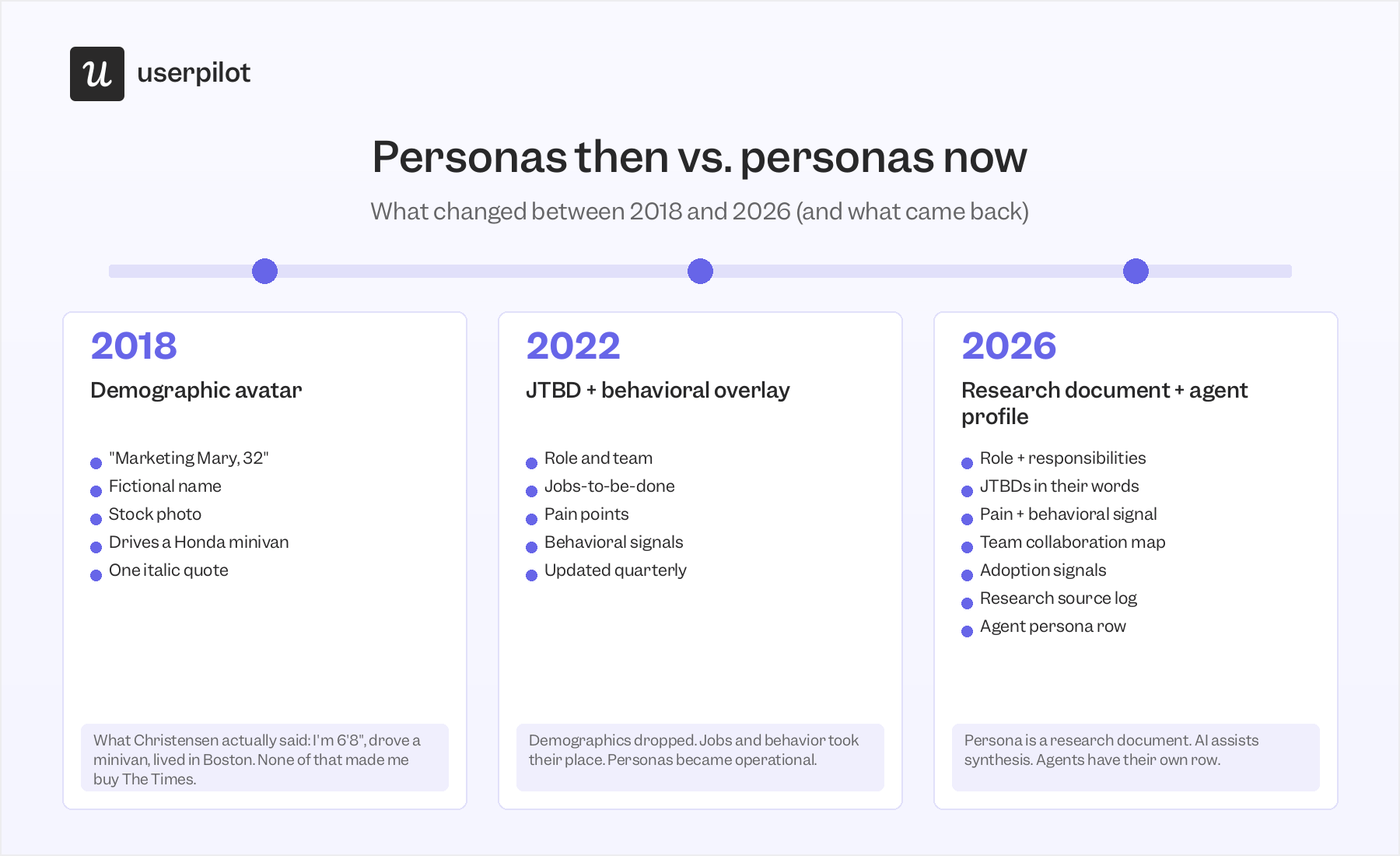
Five user persona examples worth learning from in 2026
A real user persona file will look like a research document rather than a Pinterest template. The user persona examples below are built from validated data, grounded in JTBDs rather than demographics, and made for collaboration.
The templates below meet some of these criteria. They all serve as a starting structure you can then expand into a multi-page research document. Let’s look into them:
1. The Userpilot “Product Lead” persona
This is a user persona example I built using Userpilot’s own product analytics data and internal experience. This persona reflects our B2B SaaS customer base and how their in-app behaviors predict renewals and expansion.
The Senior Product Manager:
- Role: Senior PM or Head of Product, leading a 4-8 person team inside a Series B-to-C B2B SaaS company.
- Reports to: VP Product or CPO. Works daily with one designer, one researcher, and two to three engineers.
- Responsibilities (3 max):
- Ship features that move retention or expansion.
- Run conversion funnel analysis on drop-offs before they show up in renewals.
- Prove the squad’s ROI to leadership every quarter.
- Jobs-to-be-done:
- “I need to know whether the feature we just shipped is being used, by whom, and whether they’re sticking with it.”
- “I need to validate an idea before we burn engineering time on it.”
- “I need to show the CPO that this team’s roadmap correlates with the revenue line.”
- Pain points:
- “Data is scattered across three tools.” Data point: Average user has 4+ open browser tabs (Mixpanel, Hotjar, Typeform, CRM) when investigating a drop-off.
- “I can see what users do, not why.” Data point: Users view funnel reports 3× more often than session replays.
- “Recruiting users for testing is painfully slow.” Data point: customers with active in-product survey recruitment hit 60-day feature-validation cycles. Those without it hit 6-month cycles.
- Team collaboration map: Hands off feature specs to designers and engineers. Receives behavioral data from researchers and CS. Reports up to VP Product.
- Adoption signals:
- Events labeled in the first 7 days.
- At least one custom dashboard saved by day 30.
- Session replay watched at least once per week.
- Survey deployed at least once per month.
- Accounts hitting three of these four in their first 90 days renew at 1.6× the rate of accounts hitting one or fewer.
- Success metrics: Feature adoption rate, time-to-value, user retention, and expansion revenue.
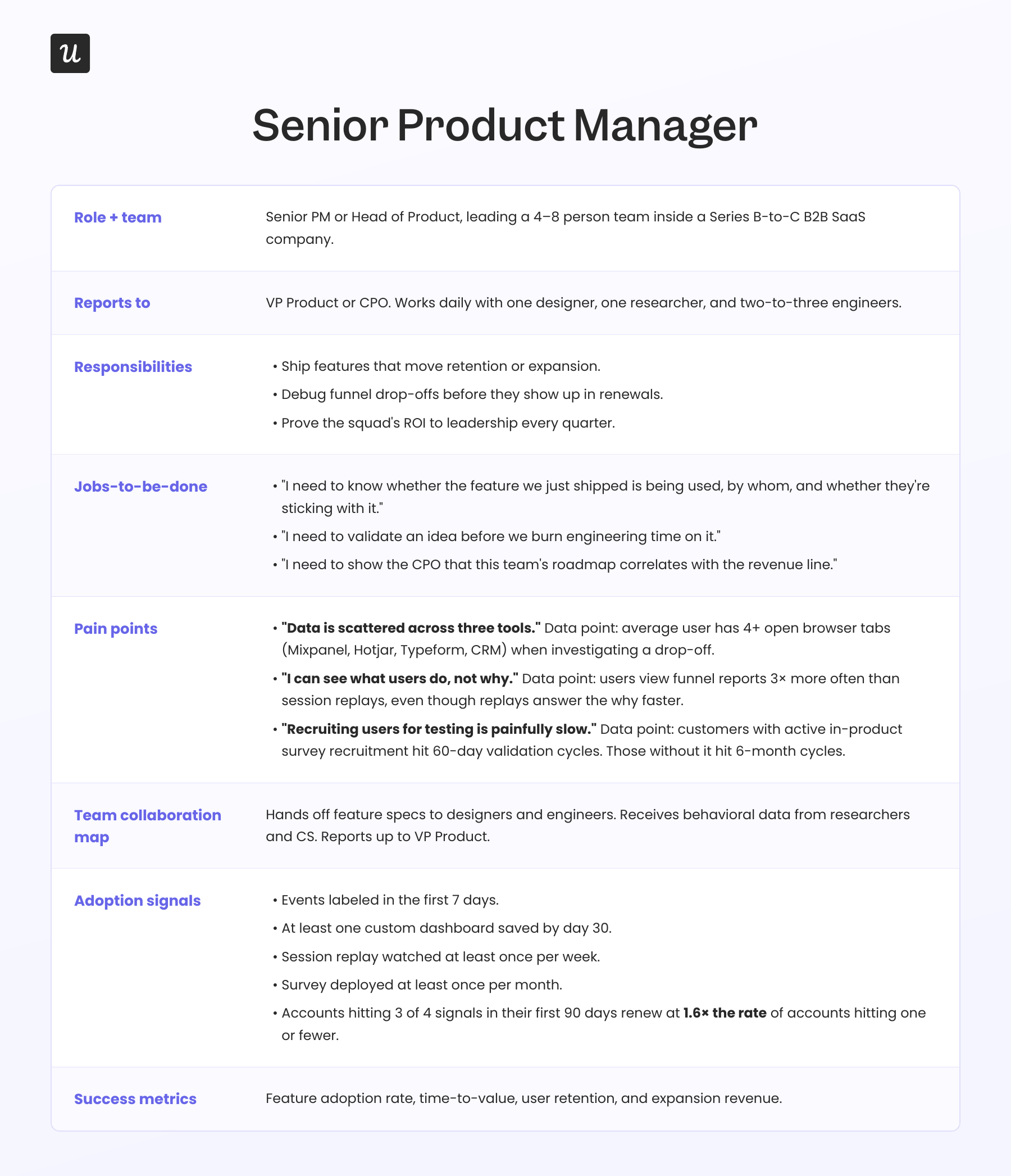
This persona is built from product data, not assumptions. Every pain point has data from behavioral analytics tools attached, the adoption signals are actionable, and the team collaboration map matches how decisions actually get made inside a B2B company.
That said, this persona only tells me how a Product Lead works once they’re already a customer. It doesn’t fully cover how they became one, which is where I’d pair it with a buying-decision persona for the same role.
2. The Buyer Persona Institute’s 5 Rings of Buying Insight
This example from the Buyer Persona Institute (BPI) is great for B2B sales. It follows Adele Revella’s framework, which breaks a buying decision into five categories:
- Priority initiatives (what triggered the search).
- Success factors (the outcomes the buyer expects).
- Perceived barriers (the reasons they’ll be skeptical).
- Decision criteria (the attributes they’ll compare you on).
- Buyer’s journey (who influences them and where).
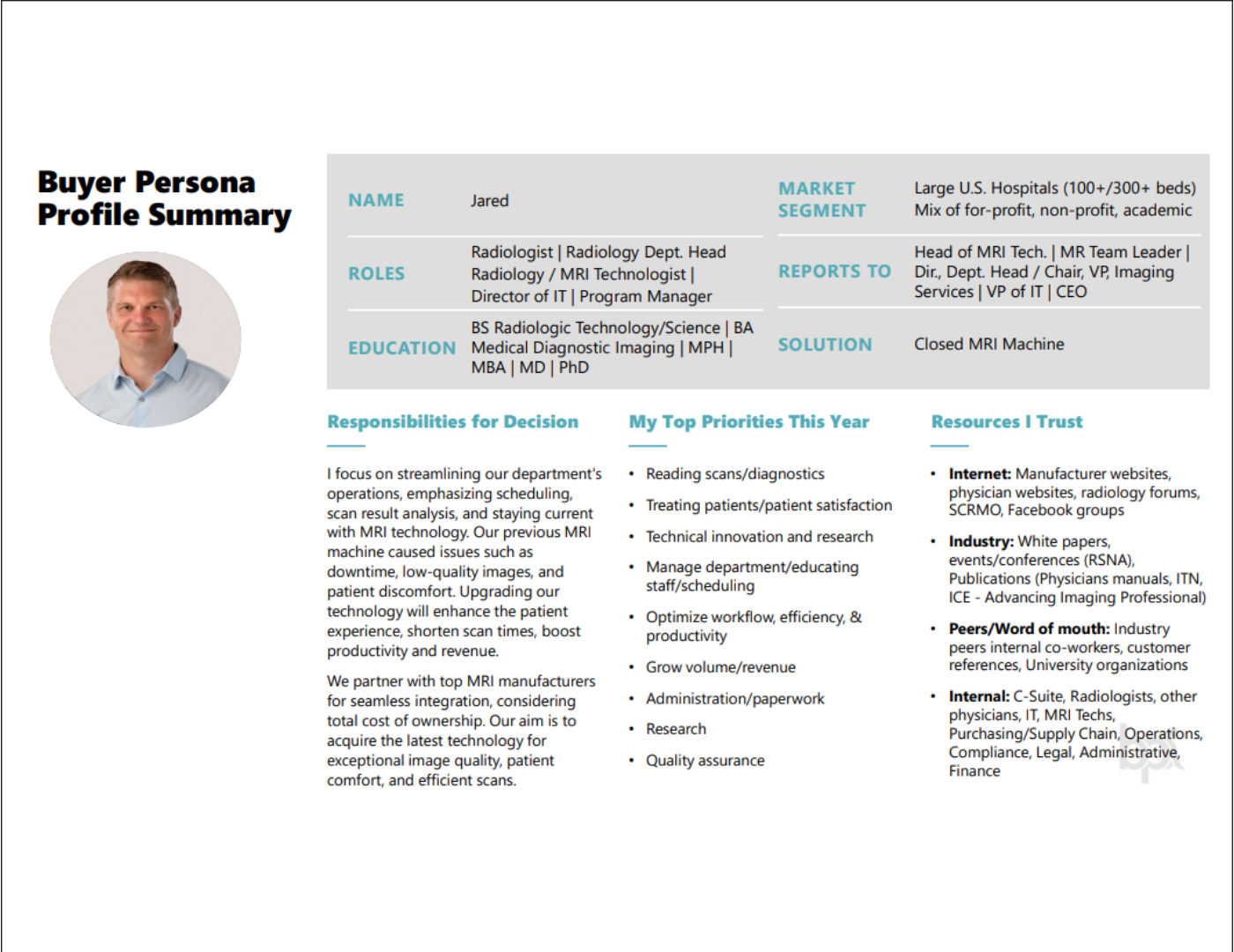
To replicate it, BPI publishes two complementary templates: the 5 Rings worksheet (where you log direct buyer quotes for each ring) and the Buyer Persona Profile (the structured output once the research is done). It’s recommended to use both files to build a buyer persona.
This type of persona is best for B2B decision-makers with multiple roles in the room and complex sales cycles. The framework forces you to interview real buyers and source every claim. However, it’s limited to sales and B2B buyers, not necessarily users in a SaaS environment.
3. Miro’s user persona workshop template
Miro’s persona template earns its place not because it produces a good persona but because it produces alignment before you build one. The template is divided into three blocks:
- Purpose: Why you’re building personas, what research you’ll need, and what success looks like.
- User persona: Role, motivations, goals, challenges, and values.
- Response: What’s still missing, what needs validation, and what are the next steps?
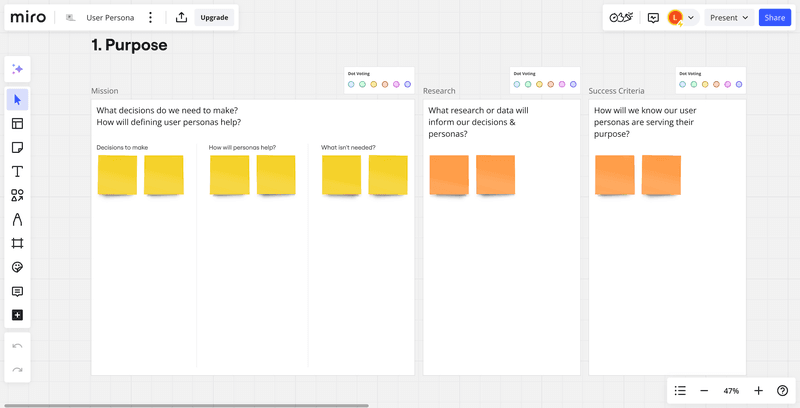
I like it because most teams fail at user personas long before they pick a template. Miro’s template forces you to ask why you’re making a persona in the first place, making it great for product communication across cross-functional teams that need shared alignment.
Still, the persona output itself is lightweight. You can treat this example as a first step for alignment before focusing on a research-heavy document.
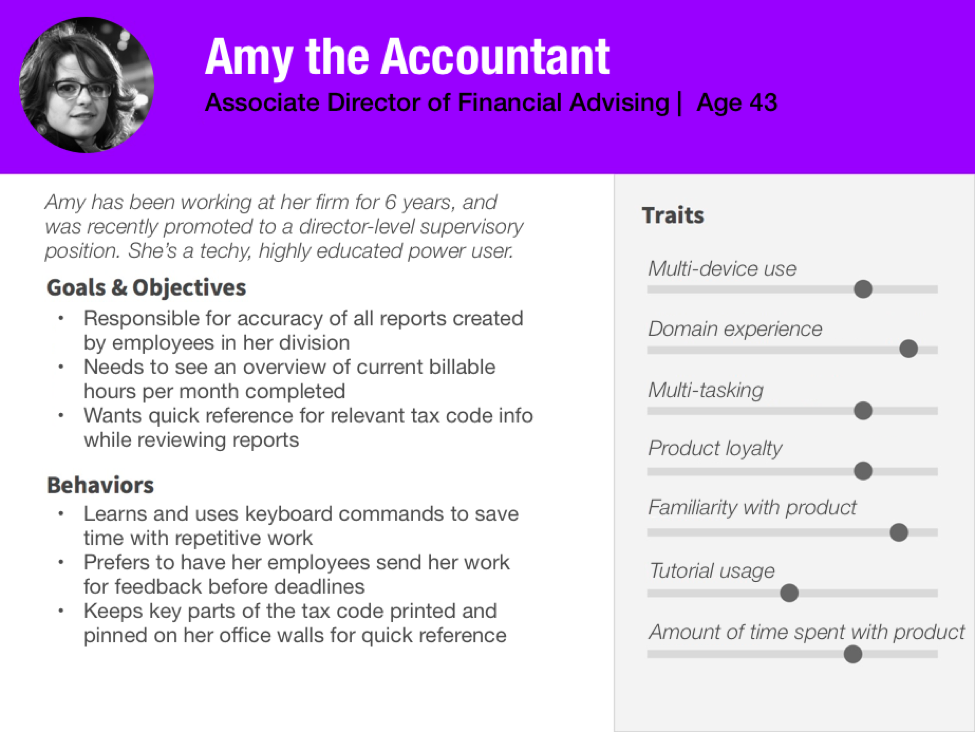
4. NN/Group’s accountant persona example
This NN group’s persona example, like the rest, goes beyond demographics and basic personalities. It dives deeper into attitudinal metrics, contextual, behavioral, and personal data that can guide product teams with their strategic decisions.
It breaks down the persona into four sections:
- Demographics (name, age, job): This information is only meant to build empathy and serve as a mnemonic device to make the persona more memorable (not to guide product decisions).
- Goals and objectives: It frames the desired outcomes of the persona, similar to jobs-to-be-done.
- Behaviors: Lists key behaviors from user behavior analysis that are relevant to the product and based on research data.
- Traits: Shows the personal characteristics of the persona in different levels, which are all important for building accounting software (e.g., multi-tasking ability, tutorial usage, time in product, etc).
This example is mostly for UX design teams who need to pay attention to usability details like navigation UX, technical experience, and what they’re familiar with.
5. The agent persona
A real percentage of product usage now comes from AI agents calling through MCP or other API surfaces. The agents are running tasks such as pulling reports, labeling events, drafting flows, or summarizing your product dashboard.
These callers don’t fit any traditional user persona shape. But they have a job to do, success criteria, and failure modes. If your product is built for humans only, it’s time to start considering the agent users.
What an agent persona looks like:
- Type: Claude (Sonnet 4.6), GPT, Gemini, or custom in-house model.
- Task it was hired for:
- “Pull this week’s funnel drop-offs and draft a Slack summary.”
- “Label every new event in the last 24 hours.”
- “Schedule a survey to fire after step 3 of onboarding.”
- How it accesses the product: MCP server, REST API, Chrome extension automation, or a wrapper a human built.
- Success criteria: Task completed, output accurate, latency under a human-acceptable threshold.
- Failure modes: Hallucinated event names. Dead-end loops on ambiguous data. Misinterpreting a user prompt and shipping the wrong action.
- Behavioral signals: Bulk operations, predictable timing patterns (cron-like), and short user-agent strings that don’t match a browser.
- What it needs from your product:
- Stable APIs.
- Predictable schemas.
- Verifiable outputs.
- Clear error messages that a model can parse and recover from.
Differentiating the agent signals will allow you to build your product so that users automating via MCPs won’t face any unexpected errors, and have a clearer view of real users.
How AI helps build user personas (without replacing research)
As mentioned, AI can make user persona research faster and more accessible. Here are some uses I’d recommend:
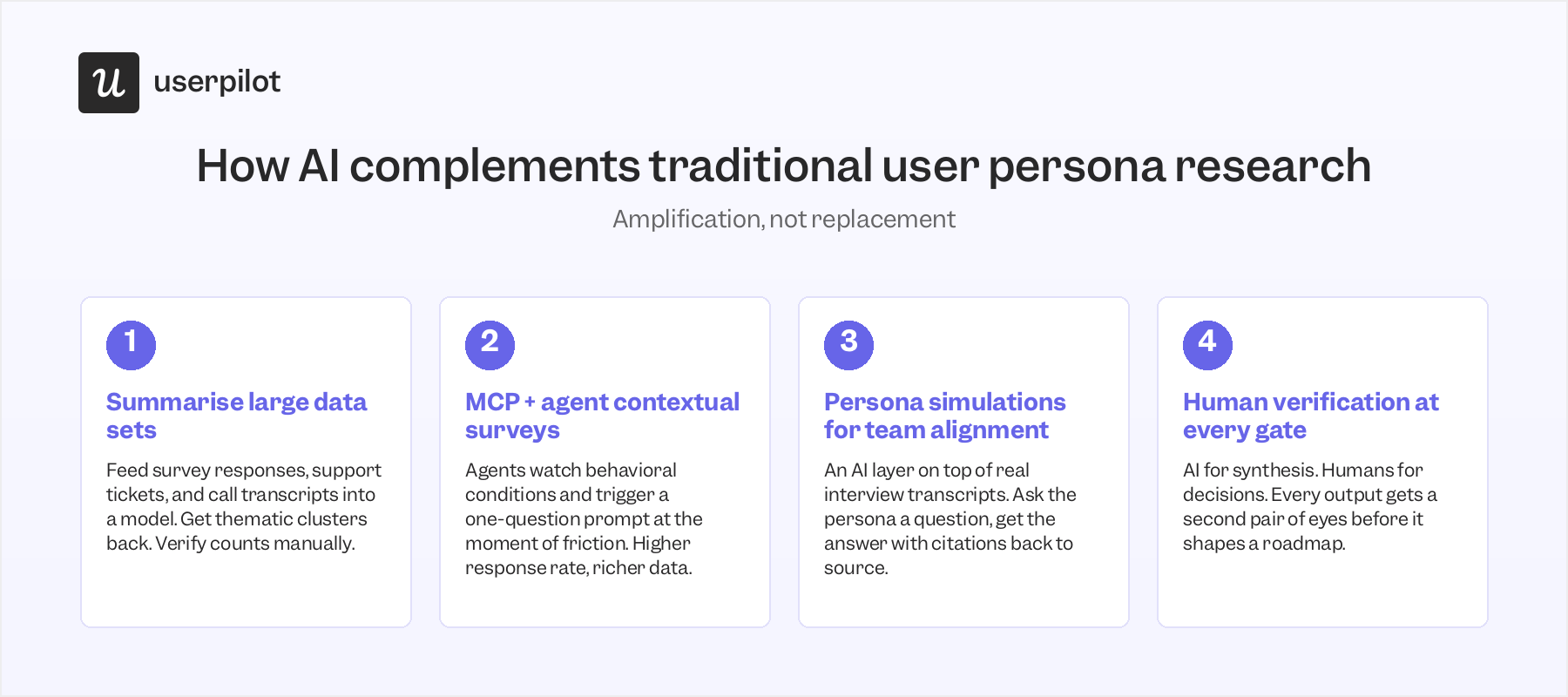
- Summarizing large bodies of qualitative data: Katie Kelly, our UX Researcher, told me she fed survey responses into Claude for feedback analysis, then asked it to set up a table in Notion, organizing the themes. The work that used to take her a day took an hour. However, she mentioned, “I realized that there was one or two answers that were hallucinated by the AI. So I had to go back in and delete them and make sure they weren’t present in the counts.” So even though you can do the same with survey responses, support tickets, or sales call transcripts, you must verify manually.
- MCP-powered AI agents that send contextual surveys: Instead of emailing a generic NPS survey six weeks after onboarding, an agent watches behavioral conditions and triggers a one-question prompt at the precise moment of friction. For this, our Userpilot’s AI agent (Lia) connects with our MCP server, so if a user gets stuck on the third step of email setup, the agent surfaces a microsurvey asking what’s confusing (no need to set up the survey in advance based on unforeseeable conditions).
- Persona simulations for aligning PMs, designers, and CS: A persona simulation, as Noz Urbina defines it, is “an AI layer over real user research data to make insights more accessible, referenceable, and interactive.” You ask the persona a question, and the simulation answers in the voice of the actual interview transcripts. Useful when you need to “chat” with your persona to find insights you wouldn’t find in a traditional persona otherwise.

How AI helps with persona research.
Note on synthetic data: Although synthetic users’ biases are the opposite of what a persona is supposed to do. I do think there are a few use cases for it. That is, when you have zero data, no budget to recruit a real user, and you need to generate hypotheses. Otherwise, it’s borderline unethical, unnecessary, and absolutely the wrong direction for UX professionals to go.
Why traditional user personas still matter in 2026
Despite the noise around synthetic users and persona simulations, the traditional user personas (when done well) are still necessary.
The reason is simple: The cost of prioritizing the wrong problems (or using marketing budget to target the wrong audience) doesn’t compare to the cost of conducting user interviews. Even if using fake users can be tempting, the hidden cost of taking shortcuts is hard to ignore.
If you’re struggling to create personas based on real users, Userpilot can help. We collect behavioral data, run contextual in-app surveys, replay sessions, and (with Lia, our AI agent) summarize the lot of it back to you with the source data still attached. Better user research feeds better personas, which feed a better user experience for the humans (and agents) using your product. So I highly recommend booking a Userpilot demo if you want to see what a persona document looks like when it’s connected to live product data.
FAQ
What is a user persona in 2026?
A user persona is a research document representing a real segment of your users or buyers, built from interviews, product analytics, surveys, and support data. The 2026 version drops demographics in favor of role, responsibilities, jobs-to-be-done, behavioral signals, and decision criteria. It’s a working document with a research source log, not a poster on a wall.
How is a user persona different from a synthetic user?
A traditional user persona is built from real research with real humans. A synthetic user is a profile generated by a large language model trained on generic internet data, with no real users underneath it. Synthetic users have been documented to give overly favorable, prioritization-blind feedback. Useful as a hypothesis generator when you have zero data. Dangerous as a basis for product decisions.
What should a B2B user persona include?
For B2B SaaS specifically: role and team, responsibilities, jobs-to-be-done quoted verbatim, pain points paired with the behavioral signal that proves them, decision criteria, perceived barriers, team collaboration map, adoption signals that predict renewal, success metrics the persona is judged on, and a research source log. Skip the demographics. Skip the personality traits dial. Skip the stock photo. The goal is detailed personas built from qualitative insights and quantitative data together, not glossy decks.
Do I need a persona for AI agents?
If your product is callable through an API, MCP server, or any agentic interface, yes. AI agents are now a measurable share of product usage in 2026. They have jobs to do, success criteria, and failure modes. Add a row to your persona library for non-human users: model type, task being executed, access pattern, success criteria, failure modes, and what the agent needs from your product (stable APIs, predictable schemas, parseable errors).
How many user personas should a B2B SaaS company have?
Most teams perform best with 3 to 5 documented personas covering their highest-value segments. SiriusDecisions found top-performing companies average 4.2 active personas. Start with 2 to 3, expand deliberately. Too many personas dilute focus. Too few makes messaging generic. Add a negative persona (the customers you actively shouldn’t target) if you have the research to support one.
What's the best template to use for a user persona?
For B2B buying decisions: the Buyer Persona Institute’s 5 Rings of Buying Insight. For cross-functional team alignment: Miro’s persona workshop template. For B2B SaaS product squads with behavioral data: the Userpilot persona template (the eight-field structure described above). For lightweight Lean validation: Strategyzer’s Persona Canvas. For UX research rigor: the Nielsen Norman Group format. For agile product teams: Roman Pichler’s template. None of them replace doing real research with real users.
What's the right process for creating user personas?
Five steps. First, identify your target audience and the user segments most relevant to your product or marketing strategy. Second, run user interviews (Adele Revella at the Buyer Persona Institute recommends 30 interviews at 30 minutes each as a starting point). Third, pull quantitative behavior patterns from product analytics, CRM data, and surveys to triangulate what users say with what they do. Fourth, apply a framework: the 5 Rings of Buying Insight for buying decisions, the eight-field Userpilot template for SaaS product usage, or the Roman Pichler template for agile teams. Fifth, document everything in a research-based profile with sources cited, and revisit it every six months. The point of creating user personas is to give the design process and the product team a shared understanding of who they’re building for, not to produce a poster.
About the author