
If you work on a product, growth, or UX team and improving user experience is part of your day-to-day job, chances are you’ve come across Contentsquare. It’s often mentioned in conversations about session replay, heatmaps, and product analytics, but that still leaves an important question unanswered. What is Contentsquare, really, and what does it actually help teams do once the dashboards are open?
In this article, I’ll walk through what Contentsquare offers beyond the surface-level descriptions, including its core features, pricing, pros and cons, and how it compares to other tools on the market.
What is Contentsquare, and who is it built for?
Contentsquare is a digital experience analytics platform that helps teams understand how people actually use websites and mobile apps, where they get stuck, and what prevents them from completing important actions.
Instead of focusing only on pageviews or engagement and conversion rates, it shows user clicks, scrolls, hesitations, and frustration signals, so teams can see not just what happened, but why it happened. This makes Contentsquare especially useful for organizations with complex digital journeys and multiple teams working on the same product or site.
Common user personas that use Contentsquare include:
| User persona | How they use Contentsquare |
|---|---|
| Product managers | Use journey and product analytics to understand how users move through key flows, identify where adoption drops off, and assess the impact of product changes on conversion, retention, and long-term behavior. |
| UX and product designers | Analyze heatmaps, session replays, and frustration signals to uncover usability issues, validate design decisions, and support research with evidence from real user interactions. |
| Growth and marketing teams | Evaluate landing page behavior, campaign traffic, and funnel performance to pinpoint friction in acquisition journeys and improve conversion rates across channels. |
| Digital analytics teams | Add qualitative context to traditional analytics by explaining why users behave the way they do, helping teams move from metrics to actionable insight. |
| Customer experience and support teams | Review real user sessions to troubleshoot issues faster, understand the context behind support tickets, and identify recurring experience problems that drive customer frustration. |
The platform is organized around four core areas: Experience analytics, product analytics, voice of customer and feedback intelligence, and AI-assisted analysis.
In the sections below, I’ll break down what Contentsquare offers in these areas and how teams typically use them in practice.
Contentsquare features for experience analytics
The experience analytics category is my favorite part of Contentsquare because it gets closest to what teams usually want but struggle to see, which is how real users behave when something feels confusing, slow, or broken.
Let’s go over its key features:
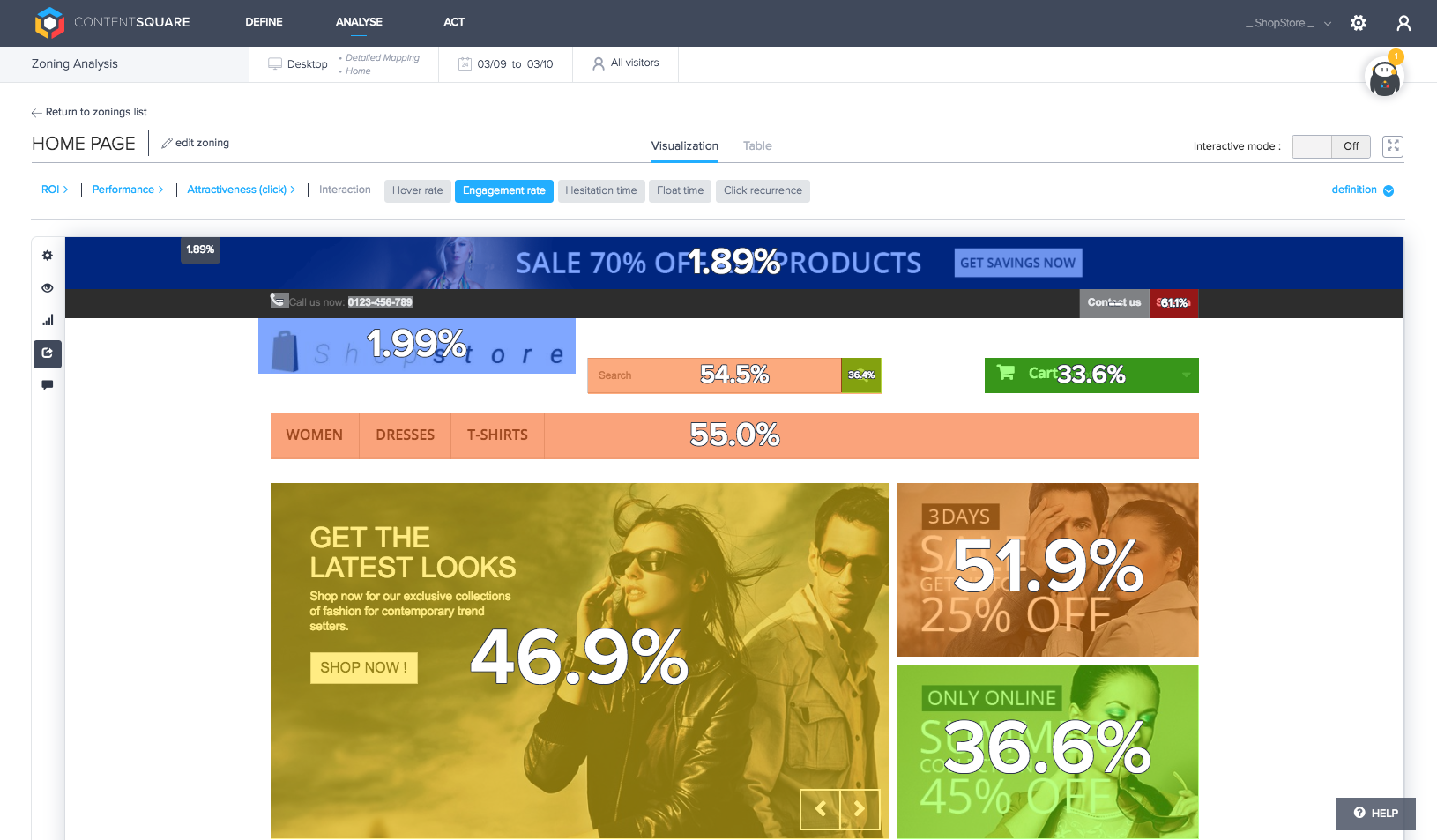
- Zone-based heatmap: Shows where users click, scroll, and focus their attention on a page, making it easier to see which elements attract interest and which are ignored or overlooked.
- Session replay: Lets you watch user sessions to understand confusion, hesitation, and unexpected behavior that often explains drops in conversion or task completion.
- Impact quantification: Connects experience issues to business outcomes, so you can estimate how much a usability problem is affecting conversions, revenue, or engagement.
- Frustration signals: Highlights patterns like rage clicks, dead clicks, and excessive scrolling that indicate when users are struggling, even if they do not abandon the session immediately.
Contentsquare features for product analytics
The product analytics category shifts the focus from what happens in a single session to how users behave over time. This is where Contentsquare becomes useful for answering longer-term questions about adoption, retention, and whether product changes actually improve the experience or quietly introduce new friction.
Here’s a breakdown of the key features:
- Event-based tracking: Tracks how users interact with specific features and actions, giving you a clear view of user activity patterns beyond individual page visits.
- Funnels: Shows where users progress smoothly through key flows and where they drop off, helping identify steps that block completion or adoption.
- Retention and cohort analysis: Groups users by behavior or time period to understand who comes back, who churns, and how user engagement changes over time.
- Cross-session and cross-device analysis: Connects behavior across multiple sessions and devices, making it easier to see how real usage unfolds beyond a single visit.

Contentsquare features for voice of customer and feedback intelligence
The voice of customer and feedback intelligence category adds important context to behavioral data by capturing what users say alongside what they do.
This layer helps you understand user intent, sentiment, and expectations, making it easier to interpret patterns seen in experience and product analytics and avoid guessing why users feel frustrated or satisfied.
Let’s go over the key features here:
- Contextual surveys and feedback collection: Collect direct input from users at key moments, such as after completing a task or encountering friction, while the experience is still fresh.
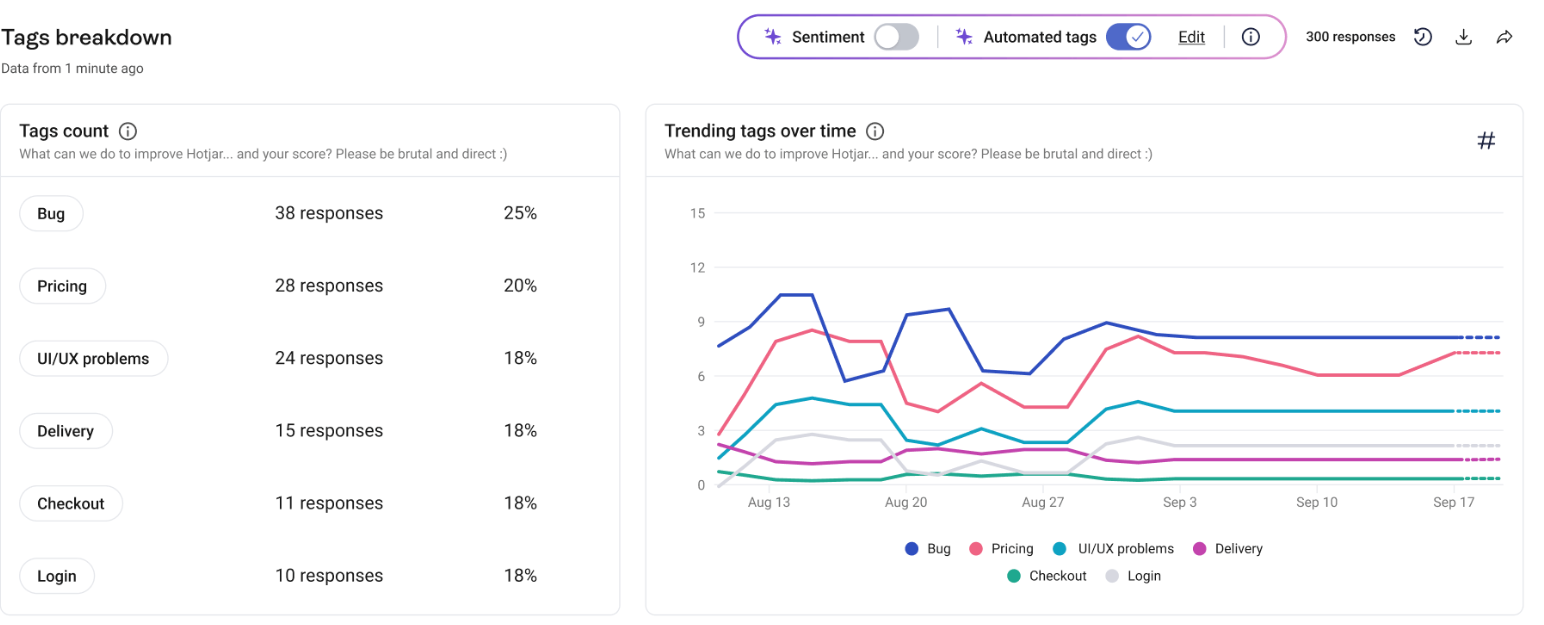
- Qualitative feedback tied to sessions: Link survey responses and comments to real user sessions, making it easier to understand the behavior that prompted specific feedback.
- Feedback segmentation: Group responses by behavior, journey stage, or outcome, so your team can spot patterns instead of treating feedback as isolated comments.
- Behavior and sentiment pairing: Combine what users say with what they actually did and validate assumptions or prioritize fixes based on both evidence and intent.
Contentsquare features for AI-assisted analysis
The AI-assisted analysis category is designed to reduce the time it takes to move from data to actionable insight. Instead of replacing human judgment, these capabilities help you surface patterns, spot anomalies, and prioritize what to investigate first.
Here’s a breakdown of Contentsquare’s AI features:
- Anomaly detection: Spot sudden changes in engagement, conversion, or behavior that may indicate a broken flow, performance regression, or unintended side effect of a new feature.
- Guided analysis through Sense Analyst: Follow step-by-step recommendations to explore data, ask better questions, and narrow in on the areas most likely to explain a change in user behavior.
- Faster prioritization of issues: Focus attention on experience problems that have the greatest impact on key metrics, rather than treating all anomalies as equally urgent.
- A/B testing assistance: Analyze test and campaign results more quickly by measuring behavioral and business impact, comparing variants, and segmenting results by device, platform, or user type to understand which version performs better and why.

Pros and cons of Contentsquare
Before committing to a platform like Contentsquare, it helps to understand where it excels and where it may fall short. After exploring the tool myself and reviewing feedback from teams that use it in production, I’ve outlined the most common strengths and trade-offs that come up in real-world use.
Pros
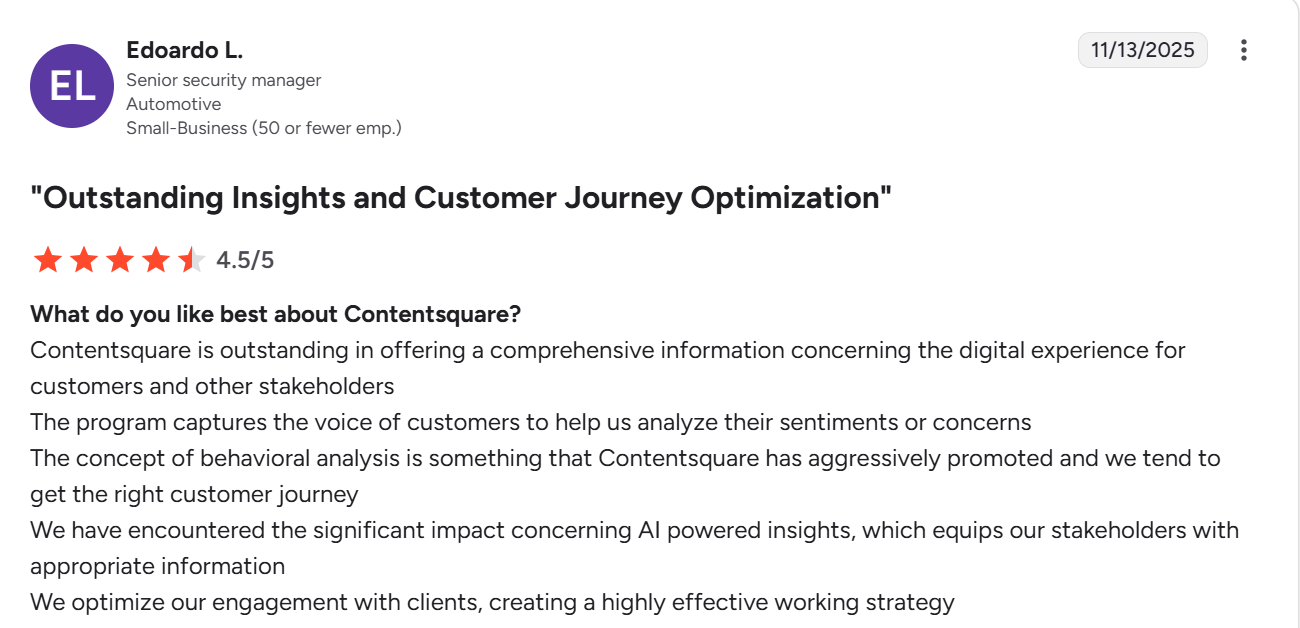
- Strong depth of behavioral data: Contentsquare captures detailed interaction data across pages and journeys, which allows teams to analyze past behavior retroactively. This makes it easier to investigate issues after the fact without waiting for new tracking to be implemented.
- Clear and intuitive visualizations: Visual tools like zone-based heatmaps and journey views make complex behavior patterns easier to understand and communicate, especially when sharing insights with non-technical stakeholders.

- Automated insight detection: Built-in machine learning helps surface unusual patterns and potential issues automatically, reducing the amount of manual analysis required to spot problems that may affect user experience or conversion.
Cons
- Learning curve and onboarding effort: Contentsquare is a powerful platform with a wide range of features, which means teams often need onboarding and training to use it effectively. Organizations typically rely on dedicated data analysts to drive insights, rather than expecting every stakeholder to self-serve immediately.
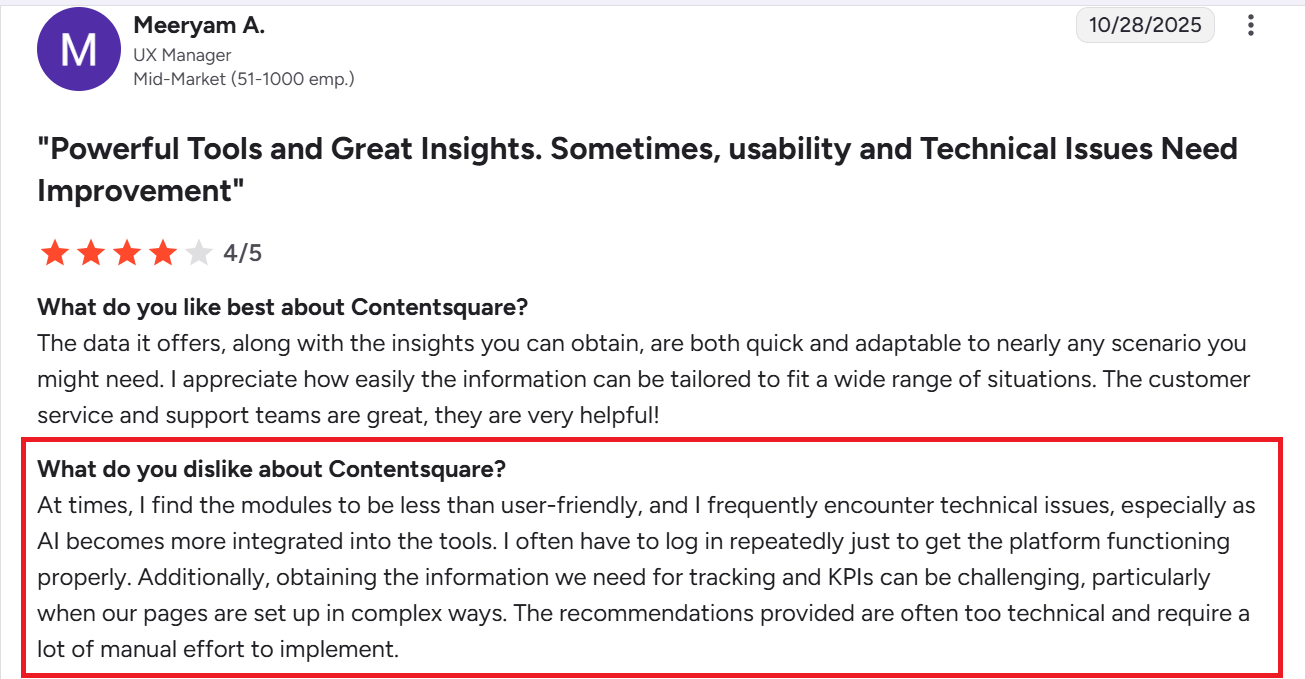
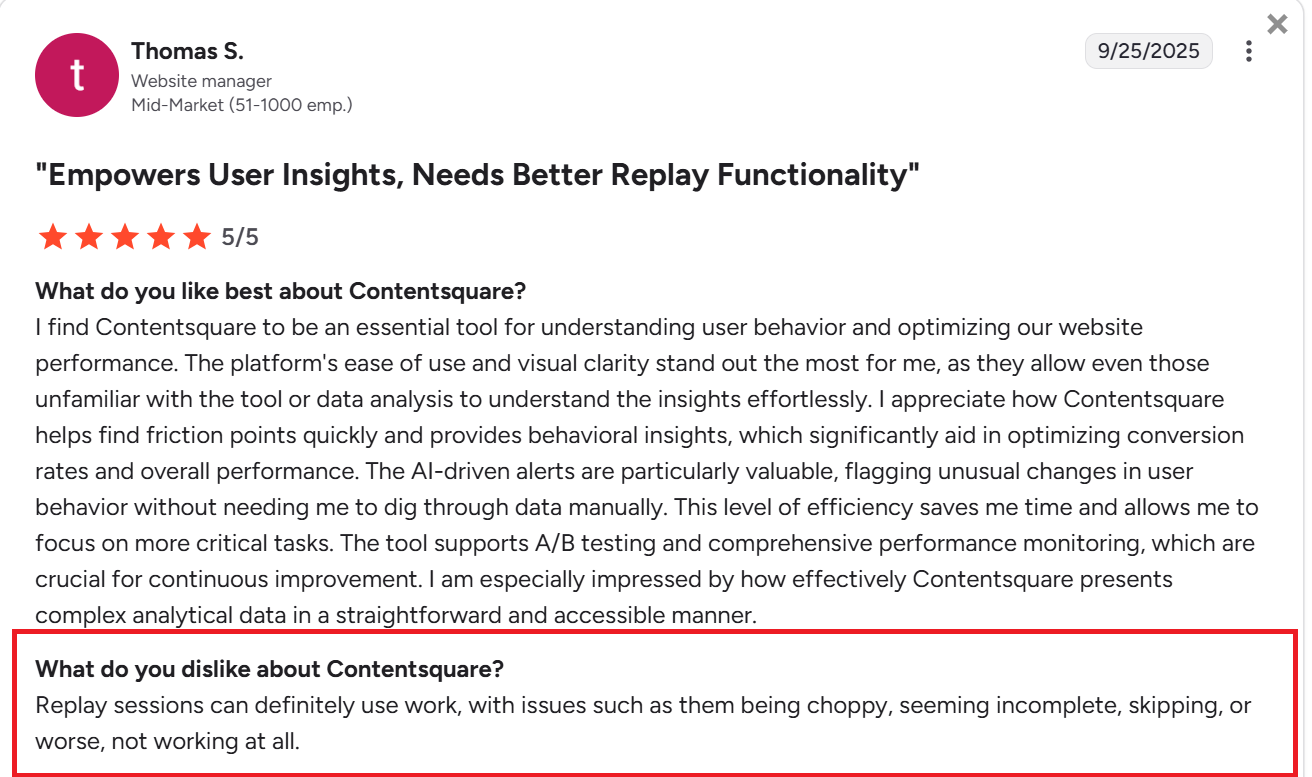
- Session replay reliability and performance: Some users report issues with the reliability of session replay, including choppy playback, incomplete recordings, skipped interactions, or sessions failing to load altogether. While this does not affect every implementation, it can limit the usefulness of replay when teams rely on it for detailed debugging or UX analysis.
- Insight-focused rather than action-oriented: Contentsquare excels at diagnosing experience issues, but unlike platforms like Userpilot, it doesn’t provide native tools to fix them directly within the product. You’ll have to pair it with design, engineering, experimentation, or in-app engagement tools to act on the insights it surfaces.
Contentsquare pricing and packaging overview
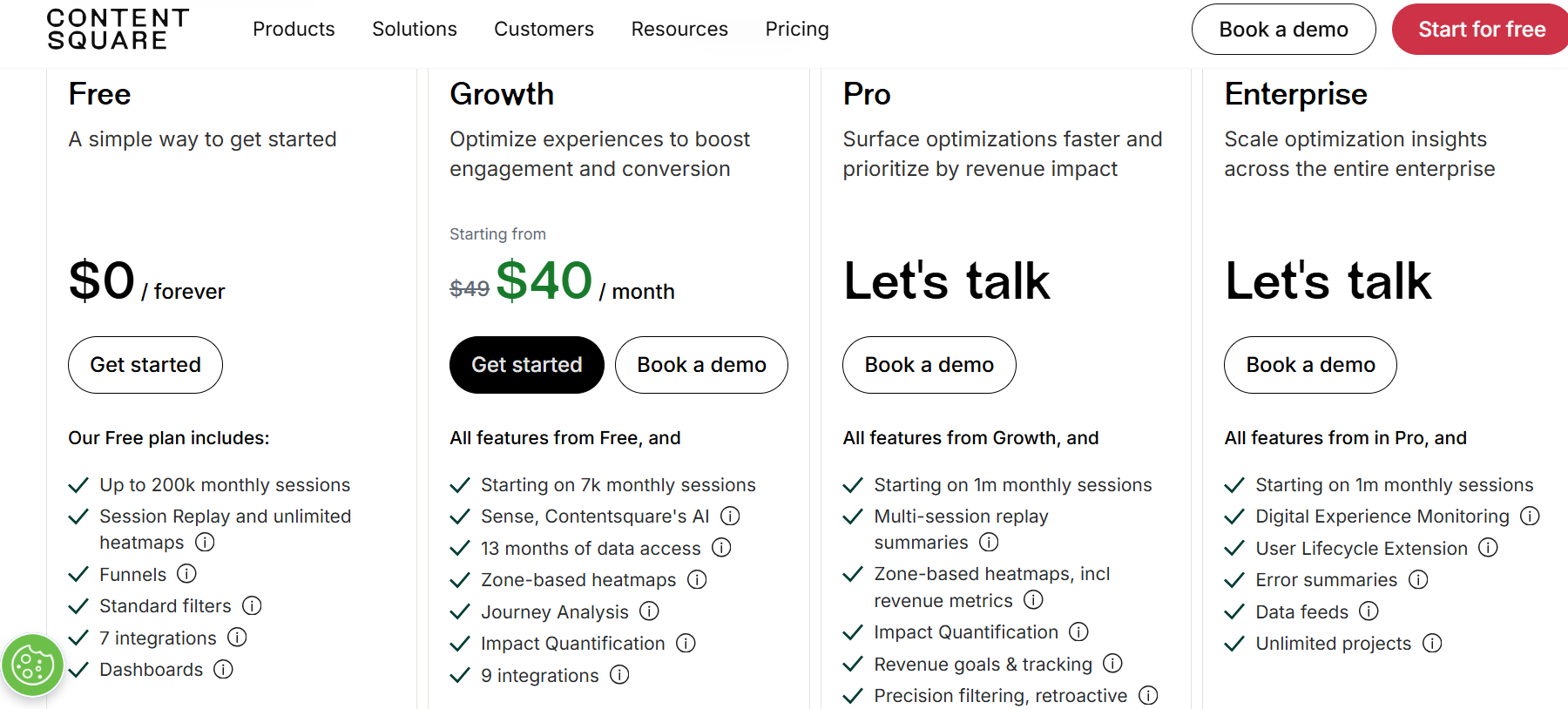
Contentsquare offers a mix of self-serve and sales-led plans, including a free tier, a fixed paid plan, and two higher-tier options designed for larger teams and enterprises.
- Free plan: This plan is for teams that want to get started with experience analytics without a financial commitment. It includes session replay, unlimited heatmaps, funnel analysis, dashboards, standard filters, and a capped number of monthly sessions, making it suitable for small sites or early exploration.
- Growth plan: Starts at $40 per month for lower usage levels and increases monthly session limits while adding features such as journey analysis, impact analysis, zone-based heatmaps, extended data access, and access to Contentsquare’s AI capabilities. It is best suited for teams actively optimizing key journeys and conversions without enterprise-scale requirements.
- Pro plan: Built for teams that need deeper analysis at a larger scale, and offered through sales-assisted pricing. It includes significantly higher session volumes, advanced replay summaries, revenue goals and tracking, precision filtering, and more robust tools for prioritizing optimization work.
- Enterprise plan: This is designed for large organizations with complex needs. It offers the highest session volumes, digital experience monitoring, error summaries, data feeds, lifecycle extensions, and enterprise-level governance, with pricing customized based on traffic volume and data requirements.
Contentsquare alternatives
Contentsquare is a strong fit if you need deep experience analytics, session replay, and enterprise-grade ways to diagnose friction across complex journeys. But if you’re looking for a tool that also lets you act on insights inside the product through in-app onboarding, announcements, surveys, and omnichannel engagement, or if you need a lighter, cheaper way to start with heatmaps and recordings, you might be better off with an alternative.
Here’s a table with some of the best options.
| Tool | Best for | Pros | Cons | Pricing |
|---|---|---|---|---|
| Userpilot | SaaS teams that want a platform that provides a deep understanding of user behavior and customer engagement, while also letting teams act on insights through in-app experiences across web and mobile apps. |
|
|
Starts at $299/month, billed annually. Custom pricing available for larger teams with specific needs |
| FullStory | Product and engineering teams that need deep visibility into individual user sessions and user interactions for debugging and experience analysis |
|
|
Custom pricing based on usage |
| Hotjar | Teams looking for a lightweight way to understand how users engage with websites and improve user experience |
|
|
Free plan available. The paid tiers start at $40/month |
| Quantum Metric | Enterprises that need digital experience analytics at scale to analyze customer journeys across multiple platforms |
|
|
Custom pricing based on traffic and requirements |
| Microsoft Clarity | Teams that want a free way to analyze user behavior and user interactions on websites |
|
|
Free |
When Userpilot is a better alternative to Contentsquare
Contentsquare stands out for teams that need detailed visibility into user behavior and the ability to diagnose friction across complex digital journeys.
For many SaaS product teams, though, insight is only the starting point. The real challenge is turning those insights into changes users actually experience. This is where Userpilot tends to be a better fit. By combining product analytics with in-app onboarding, messaging, surveys, and lifecycle engagement, Userpilot lets teams move directly from discovery to action without relying on separate tools or heavy engineering support.
If your focus is on improving adoption, reducing friction inside the product, and delivering targeted experiences based on real behavior, Userpilot offers a more hands-on, execution-oriented approach.
You can book a free demo to see how Userpilot works in practice and decide whether it aligns better with how your team builds and iterates on its product.
Userpilot strives to provide accurate information to help businesses determine the best solution for their particular needs. Due to the dynamic nature of the industry, the features offered by Userpilot and others often change over time. The statements made in this article are accurate to the best of Userpilot’s knowledge as of its publication/most recent update on December 28, 2025.
About the author