10 Best Self-Service Analytics Tools for 2026 Product Teams

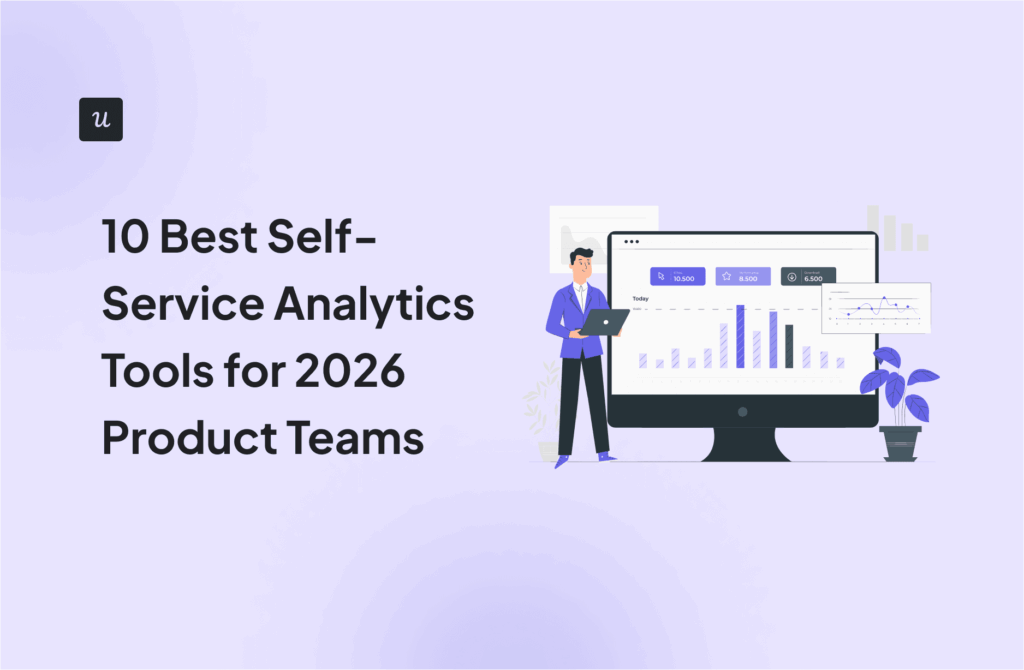

In our latest product analytics report, 33% of teams cited inconsistent tracking or missing events as their top issue, and another 24% said they have too much data with insufficient insights. Together, that means over half of product teams are struggling with data they can’t trust or data they can’t use fast enough.
This is exactly what self-service analytics tools are meant to fix.
In this guide, I’ll break down 10 of the best in the market. You’ll find options for behavioral analysis, visualization, governance, and automated data capture, along with guidance on rolling them out without creating data chaos or conflicting numbers across teams.
10 Best self-service analytics tools
Before diving into the list, what exactly are self-service analytics tools? In simple terms, they’re software products that let anyone on your team explore data, answer day-to-day questions, and find patterns without waiting for a data analyst to pull a report.
To build the list below, I focused on what SaaS product teams need most, then picked the top tools across different analytics use cases. I also kept the bar high for what counts as “self-service,” choosing tools that non-technical teams can use efficiently once the initial setup is done.
| Tool | G2 rating | Best for… | Starting price |
|---|---|---|---|
| Amplitude | 4.5/5 | Deep behavioral analytics across platforms | $49/mo |
| Tableau | 4.4/5 | Complex visual analytics & executive dashboards | $75/user/mo |
| Mixpanel | 4.6/5 | Product teams needing detailed user journey analytics | $0.28 per 1K events |
| Microsoft Power BI | 4.5/5 | Companies deeply entrenched in the Microsoft ecosystem | $14/user/mo |
| Holistics | 4.3/5 | Startups needing strict data governance while enabling self-service | $800/mo |
| Userpilot | 4.6/5 | SaaS teams looking to close the loop between analysis and action | $299/mo |
| ThoughtSpot | 4.4/5 | Search-driven self-serve insights for large organizations | $25/user/mo |
| Metabase | 4.4/5 | Open-source, quick dashboards for small teams | $100/mo |
| Looker | 4.4/5 | Governed semantic modeling for data teams | Custom pricing |
| Heap | 4.4/5 | Auto-captured event data with visual labeling | Custom pricing |
1. Amplitude (Best for digital analytics with basic engagement)
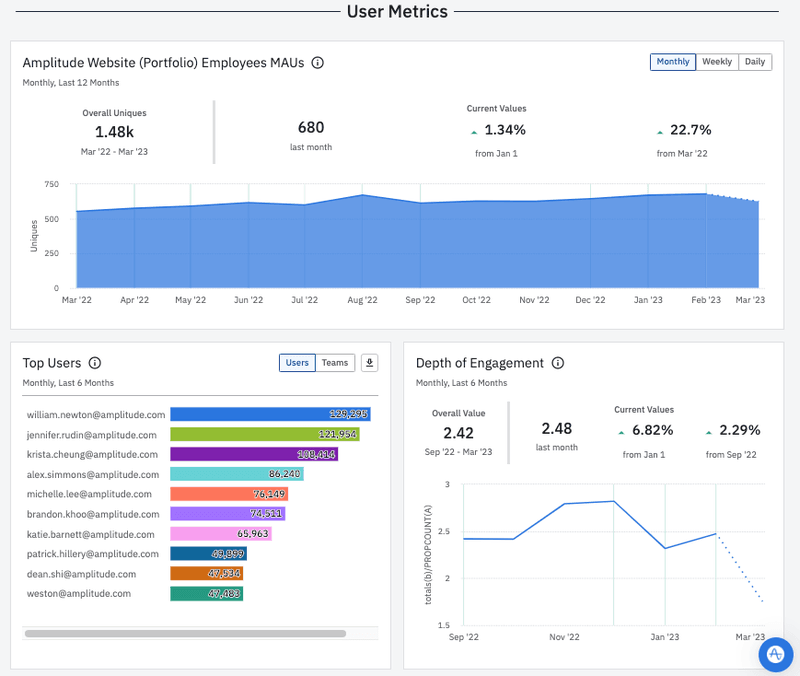
Amplitude offers strong behavioral reporting like funnels, cohorts, and journey analysis, helping teams pinpoint what drives conversion and long-term usage. It also includes basic engagement capabilities, so you can take limited action on insights without relying entirely on external tools.
Key features
- Cross-platform tracking: Track user behavior across web, mobile, and connected channels in a unified view.
- Dashboards and charts: Create custom dashboards and reports with interactive visualizations to surface patterns quickly.
Pros
- Strong funnel and retention analysis for understanding user behavior over time.
- Flexible reporting for sharing insights across teams.
- Powerful integrations and a large ecosystem.
Cons
- Steep learning curve, especially for less experienced users working with complex dashboards.
- Manual event tracking, since you need to define events before getting started.
- No true retroactive event tracking.
Best for
Product teams that want deep behavioral analytics across platforms, with light engagement capabilities built in.
Pricing
Amplitude offers a Free plan, with paid plans starting from $49/month on Plus (paid annually). Growth and Enterprise pricing are custom and available on request.
2. Tableau (Best for visual data exploration)
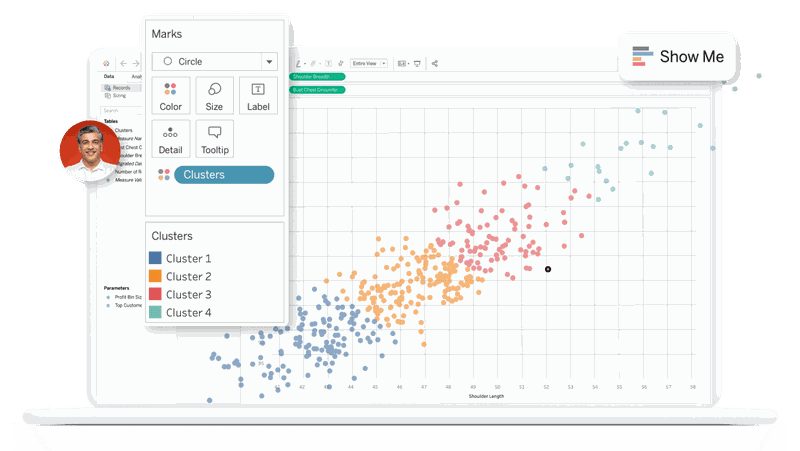
Tableau is the heavyweight champion of data visualization. If you have complex data spread across multiple sources and need to create stunning, board-ready visualizations, this is the tool for you.
Key features
- Visual analytics: Tableau’s drag-and-drop tools and interactive visualizations help you quickly explore data and spot meaningful patterns.
- AI-assisted analysis: The platform offers built-in AI features that surface automated insights and narrative summaries. It also connects easily to cloud data warehouses, making it easier to analyze large datasets without moving data around.
Pros
- Extremely powerful data visualization features.
- Strong data integration capabilities, connecting to almost any data source imaginable.
Cons
- The learning curve is steep. While it’s technically “self-service,” you often need a few weeks of training to really master the interface.
- It can be expensive for smaller teams.
Best for
Mid-to-large enterprises where visual storytelling with data is a priority.
Pricing
Tableau offers two main plans: Tableau Standard ($75/user/month) and Tableau Enterprise ($115/user/month). Its enterprise bundle is available on request.
3. Microsoft Power BI (Best for Microsoft ecosystems)
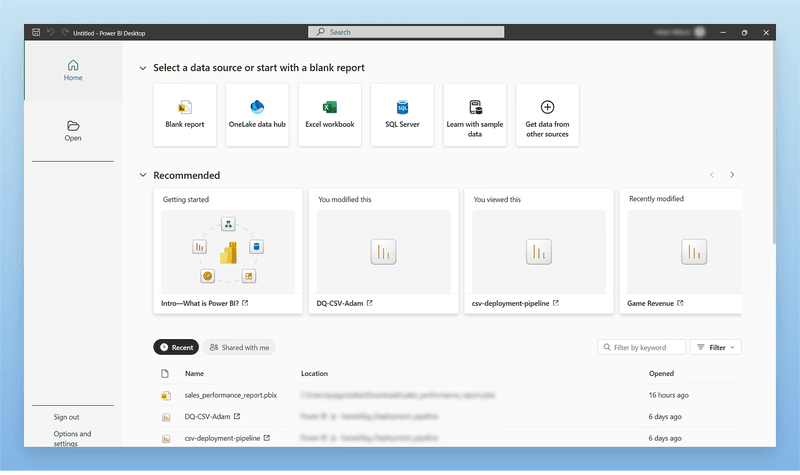
If your organization lives in Excel, Teams, and Azure, Power BI is the logical choice. It offers enterprise-grade analytics at a price point that’s hard to beat, especially if you already have a Microsoft 365 subscription.
Key features
- Natural language queries: The platform lets you ask questions in everyday language and get visual answers instantly.
- Interactive report exploration: Power BI’s drag-and-drop visuals, slicers, and filters let you dig into data and uncover insights on your own without writing formulas or scripts.
Pros
- Strong integration with Microsoft ecosystem tools like Teams, Azure, and SharePoint.
- Enterprise-grade data security and governance make it easier to scale analytics across teams.
- Very affordable starting price.
Cons
- The interface can feel cluttered and “corporate,” lacking the intuitive flow of modern SaaS tools.
- Sharing reports externally can be cumbersome without the right licensing.
Best for
Companies deeply entrenched in the Microsoft ecosystem looking for a budget-friendly enterprise solution.
Pricing
Power BI offers a free plan, with paid plans starting at $14/user/month.
4. Holistics (Best for code-based data governance)
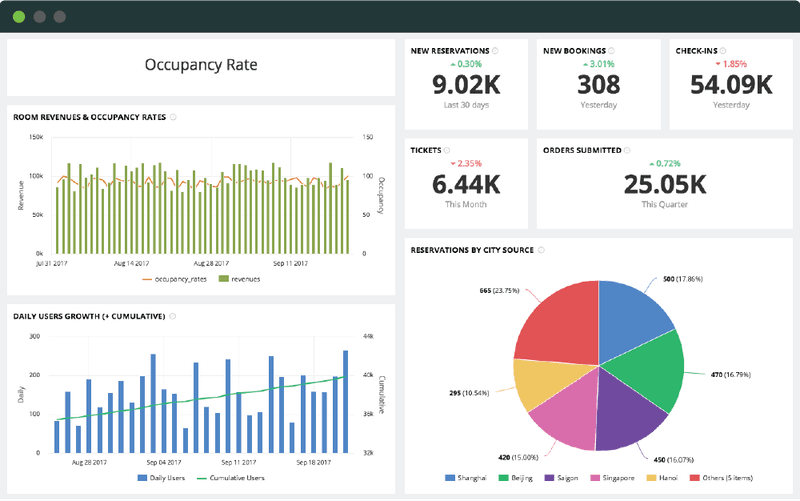
Holistics addresses the “single source of truth” problem through strong data governance and centralization. It leans heavily on the semantic layer, which means your data team defines what “Revenue” means once, and every report built by a marketer or sales rep uses that exact definition.
Key features
- Automated reporting and delivery: You can schedule reports and send them directly to Slack, email, or dashboards so teams get consistent insights without manual effort.
- Self-serve report builder: Holistics provides a simple interface for creating custom reports without writing SQL, with the option to switch into SQL when needed.
Pros
- Prevents data chaos by centralizing definitions.
- Very friendly for non-technical users once the data models are set up.
- Wide range of visualization options.
Cons
- It requires a SQL-savvy data team to set it up initially, so it’s not a plug-and-play option.
- No predictive analytics capabilities.
Best for
Growing startups and scale-ups that need to maintain strict data governance while enabling self-service.
Pricing
Holistics offers three plans: Entry ($800/month), Standard ($1,000/month), and Security Compliance Suite ($2,000/month).
5. Mixpanel (Best for comprehensive digital analytics)
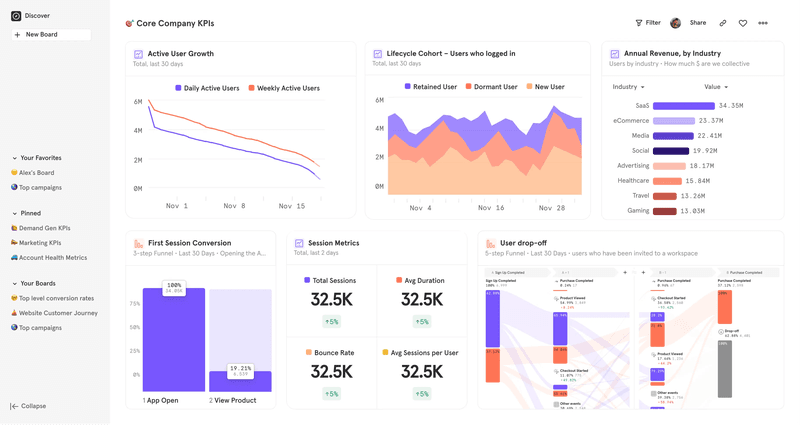
Mixpanel focuses strictly on the analytics side (rather than the engagement side). It’s fantastic for deep-diving into funnel analysis and understanding exactly how users move through your application.
Key features
- Advanced analytics: Dive into funnels, paths, retention, and cohort reports to understand how users move through your product and where they drop off.
- Fast event exploration: Query data across billions of events quickly and explore behavioral insights without long waits.
Pros
- Seamless exploration of user behavior without complex setup.
- Strong support for mobile and web event tracking.
- Robust analytics APIs and integrations with modern data stacks.
Cons
- While you can perform self-service data analysis with Mixpanel, you first need to manually set up the event tracking.
- No retroactive analysis. If an interaction wasn’t explicitly tagged in advance, that crucial data is lost forever.
- Mixpanel lacks engagement elements. It tells you what happened, but you need other tools to influence the behavior.
Best for
Product teams needing a self-service analytics platform that provides granular details on user flows and retention cohorts.
Pricing
Mixpanel provides a Free plan capped at 1M monthly events. Paid plans start at $0.28 per 1,000 events, with Enterprise pricing available on request.
6. Userpilot (Best for product growth & actionable insights)
I’m obviously biased here, but for good reason. Traditional business intelligence tools are great for staring at numbers, but Userpilot is built for acting on them. It’s designed specifically for product and marketing teams who need to understand user behavior and immediately influence it.
The platform is fully no-code, so after installation, non-technical team members can use it without relying on engineering. They can handle everything from event tracking and data analysis (with reports and pre-built or custom dashboards) to launching data-based engagement elements.

Key features
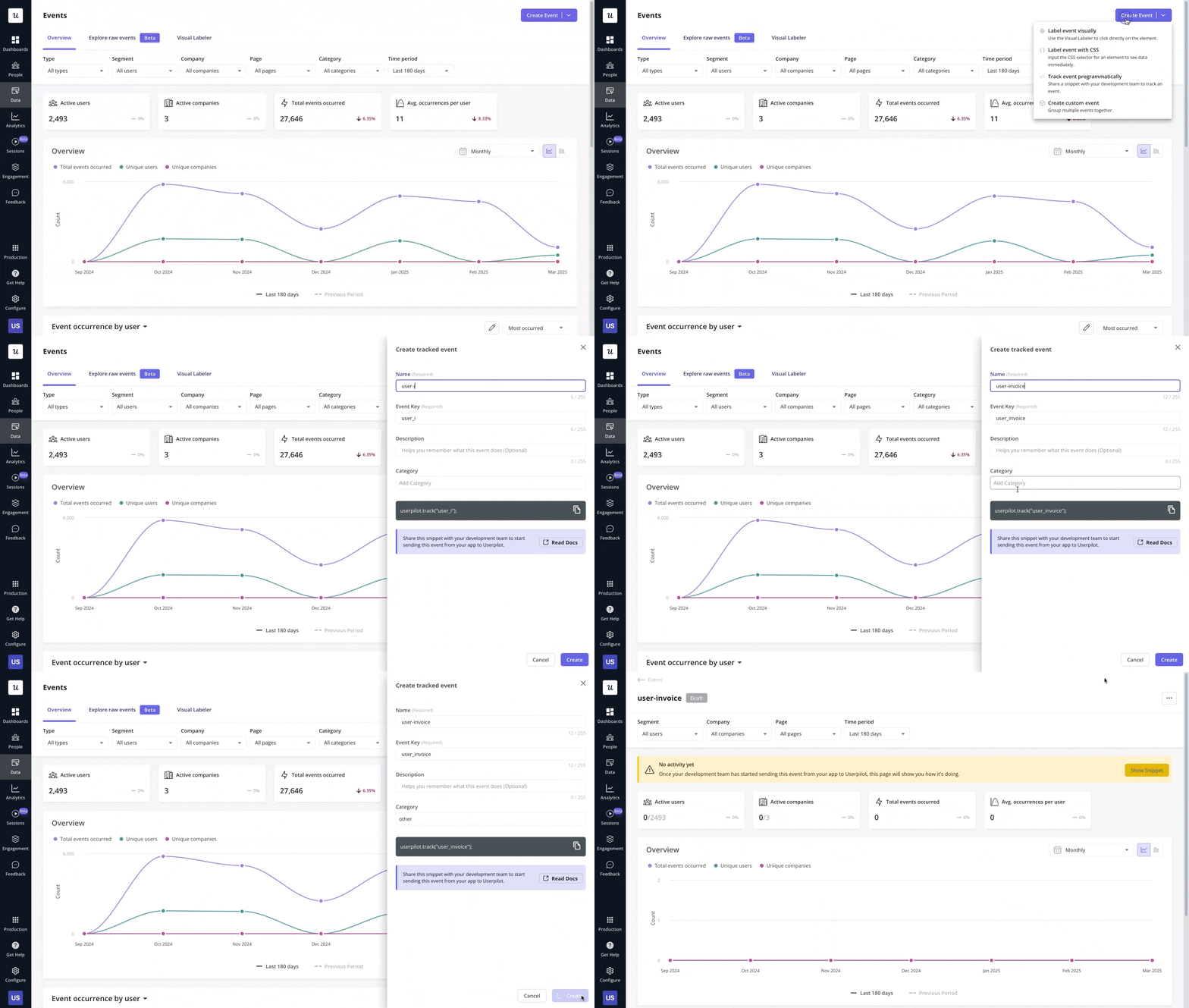
- No-code event tracking: Tag features and track interactions like clicks, hovers, and text inputs without asking a developer to install a script. This makes feature adoption tracking incredibly fast.
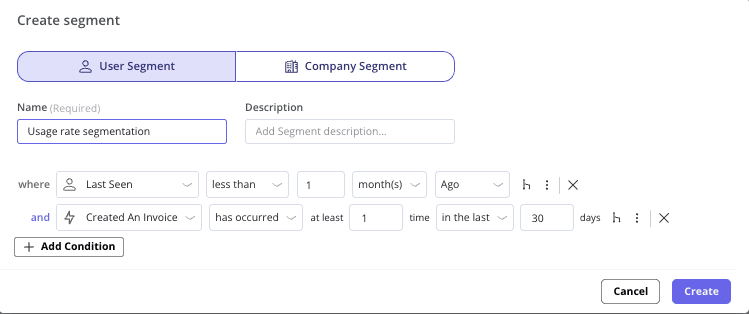
- Advanced segmentation: Slice data by user behavior, demographics, or survey responses. For example, you can quickly create a segment of “Users who signed up 7 days ago but haven’t invited a teammate.”
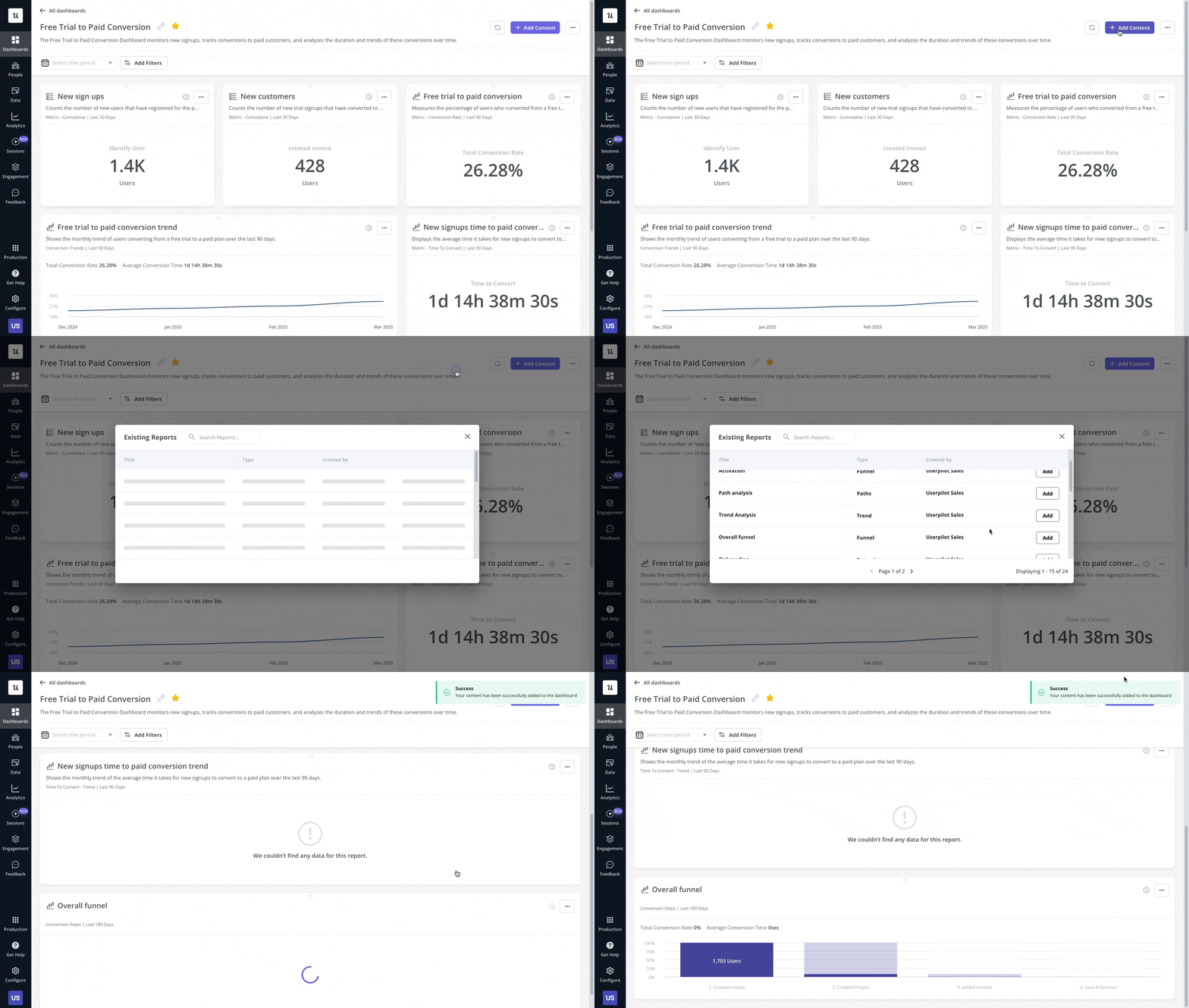
- Custom dashboards: Build dashboards that combine different data sources and channels, so you can spot trends, uncover correlations, and review session replays in one place.
- Built-in sentiment analysis: Userpilot integrates NPS analysis directly into the dashboard to help you correlate satisfaction scores with usage patterns. You can quickly spot which features power-promoters love, and which workflows are driving detractors away.
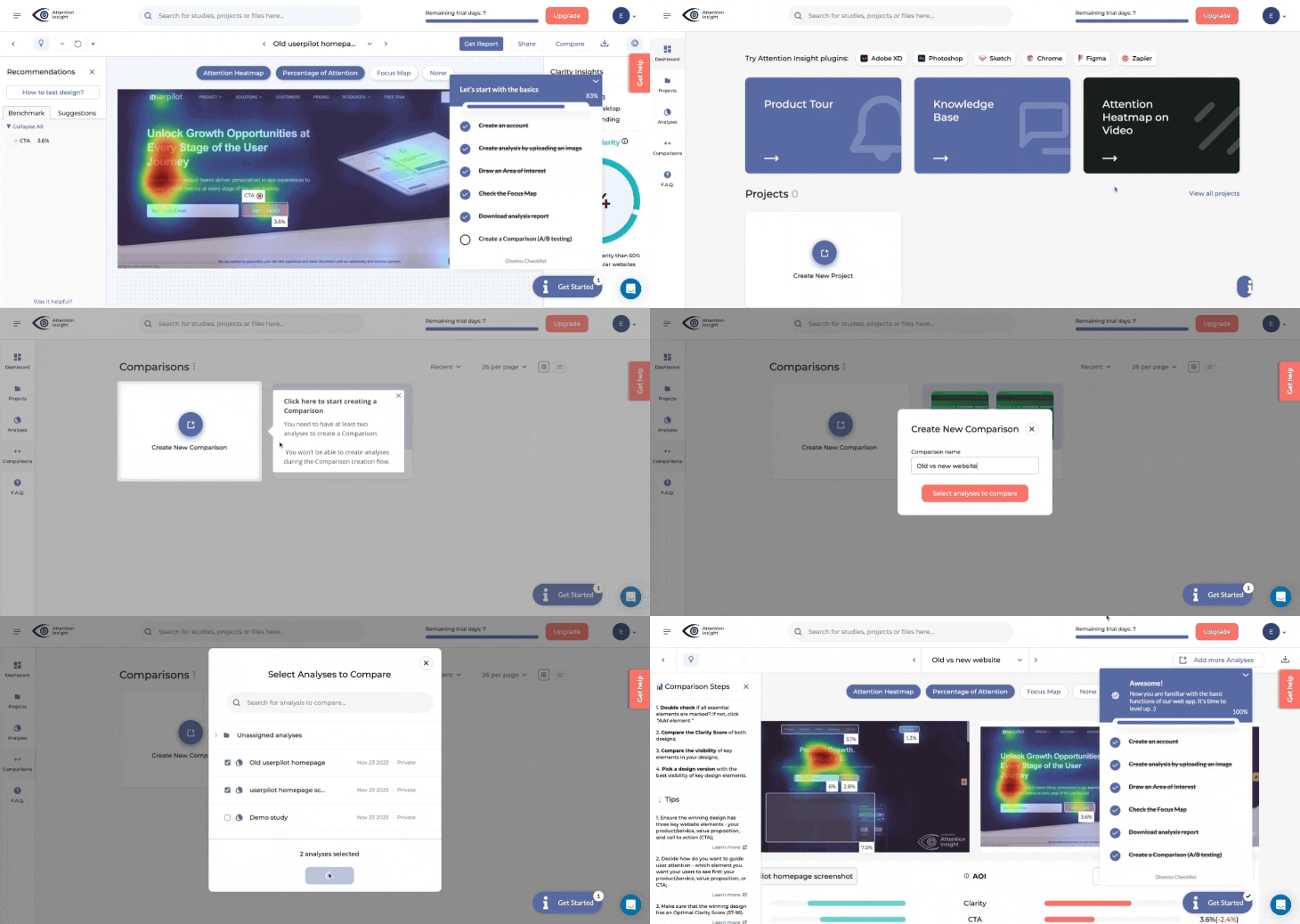
- Actionable flows: After spotting friction points in the analytics tab, you can quickly build in-app flows that fix them without switching tools. That’s what one of our clients, Attention Insight, did when they noticed trial users were dropping before completing two key activation steps, and within six months, they lifted activation from 47% to 69% while increasing engagement with a core feature from 12% to 22%.
- AI growth agent: With Userpilot’s Product Growth Agent (currently in beta), you can get trends and recommendations surfaced automatically, so you spend less time digging through reports and more time acting on what’s changing.
Pros
- All-in-one platform for analytics and in-app action.
- Built for SaaS product growth (not generic BI reporting), making adoption more straightforward for all team members.
- Easy for non-technical teams to use without an analytics background, which is a big plus for lean product teams.
Cons
- Pricing can be too steep for very small teams or early-stage startups.
Best for
SaaS product and marketing teams who need a self-service analytics platform that closes the loop between analysis and action.
Pricing
Userpilot offers three plans: Starter, Growth, and Enterprise, with pricing based on Monthly Active Users. Starter starts from $299/month (paid annually), while Growth and Enterprise are demo-based.
7. ThoughtSpot (Best for search-driven analytics)
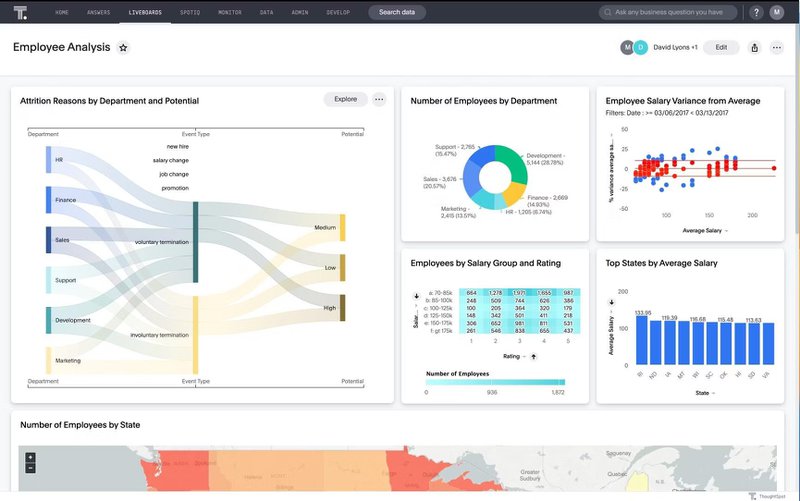
ThoughtSpot was one of the first players to go all-in on “search.” Their premise is simple: using analytics should be as easy as using Google. You type “Sales by region last quarter,” and it builds the chart for you.
Key features
- Interactive dashboards: Create and share interactive dashboards that let teams explore metrics and visualizations dynamically.
- Broad data connectivity: Connect to multiple data sources so teams can query across systems without central engineering support.
Pros
- The AI-driven search interface is genuinely impressive for non-technical users.
- “SpotIQ” automatically highlights anomalies and trends you didn’t ask for but should know about.
Cons
- Setup is complex. For the search to work, your data preparation needs to be solid, with clean and well-modeled datasets.
- It’s positioned as a premium product with a price tag to match.
Best for
Large organizations where executives need instant answers without emailing an analyst.
Pricing
ThoughtSpot offers three plans: Essentials (starting at $25/user/month billed annually), Pro (starting at $50/user/month billed annually), and Enterprise with custom pricing.
8. Metabase (Best open-source option)
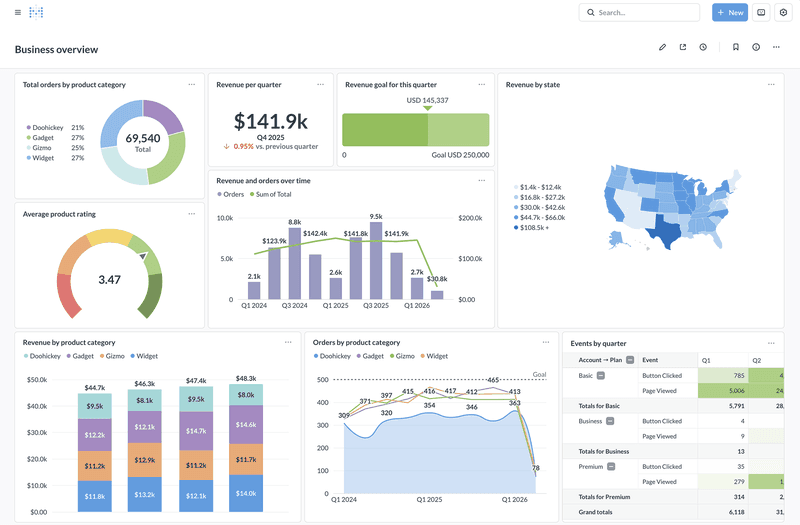
I love Metabase for its simplicity. It’s an open-source tool that sets up in five minutes. It offers a “Question” interface where you can click buttons to filter and group data without knowing SQL, but it also has a SQL editor for power users.
Key features
- Query builder: Easily create reports and build charts with point-and-click filters, groupings, and aggregations.
- Dashboards and sharing: Turn saved questions into dashboards, then share or embed them so teams can track key metrics and collaborate around the same source of truth.
Pros
- Open-source and free if you self-host.
- Extremely user-friendly interface.
- Great for embedded analytics, like adding charts inside your product or internal wiki.
Cons
- Struggles with performance on massive datasets compared to tools like Mixpanel or Tableau.
- Governance features are lighter than enterprise alternatives.
Best for
Early-stage startups and internal teams who need a quick, cheap, and effective self-service analytics platform.
Pricing
As mentioned, Metabase offers a free open-source plan. Paid plans start at $100/month on Starter and $575/month on Pro, while the Enterprise package begins at $20k/year.
9. Looker (Best for data modeling)
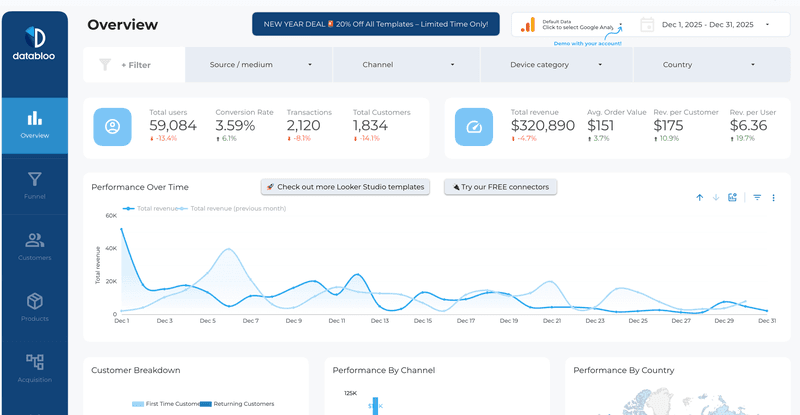
Now owned by Google, Looker is a powerhouse for modeling and visualizing data. It uses a proprietary language called LookML that allows data teams to build incredibly robust data models. For the end-user, this means a highly curated, trustworthy exploration experience.
Key features
- LookML semantic layer: Define metrics and business logic once, then reuse them across every dashboard and report to keep numbers consistent across teams.
- Governed self-serve exploration: Equip business users to explore curated data models safely and build reports without breaking definitions or relying on analysts for every question.
Pros
- Unmatched data governance capabilities.
- Integrates perfectly with the Google Cloud ecosystem (BigQuery).
- Highly customizable dashboards.
Cons
- Steep learning curve for the data team (learning LookML).
- It’s expensive and generally suited for larger enterprises.
Best for
Tech-forward companies with strong data engineering teams who want a scalable, governed self-service analytics solution.
Pricing
Looker uses custom pricing based on platform edition and user licensing.
10. Heap (Best for automated data capture)
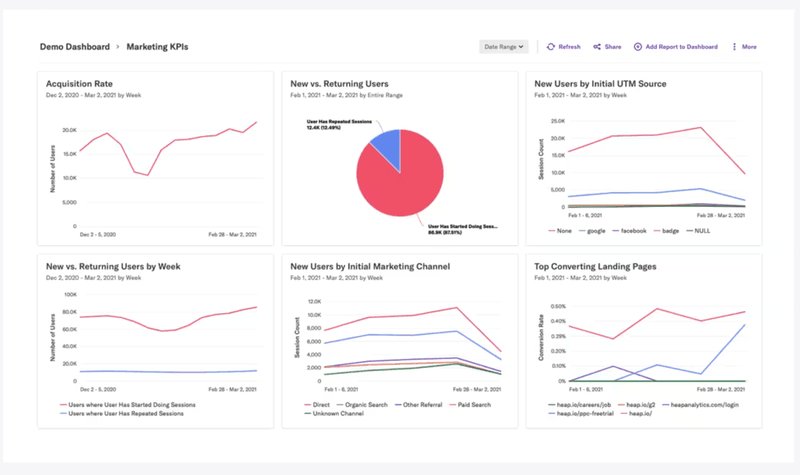
Heap’s main selling point is “autocapture.” It records every click, swipe, and form change automatically, even if you didn’t tell it to.
Key features
- Autocapture: Automatically records user interactions like clicks, taps, and form changes, so you don’t have to plan every event in advance.
- Visual event labeling: Define and organize events through a visual interface, making it easier to turn raw interaction data into usable reports without constant engineering support.
Pros
- You never have to worry about forgetting to track an event. If you decide today that you want to analyze a button your team shipped three months ago, the data is already there.
- Visual labeling makes it easier to organize events and build reports without constant engineering help.
Cons
- Heap’s auto-capture can be noisy. You end up with a lot of data junk if you aren’t careful with governance.
- It can get expensive quickly as your event volume scales.
Best for
Startups and agile teams that iterate fast and don’t want to be slowed down by implementation cycles.
Pricing
Heap offers four plans: Free, Growth, Pro, and Premier. Growth includes a free trial, while Pro and Premier are demo-based.
How to spot if a platform is really self-service?
Vendors apply the “self-service” label liberally to sell licenses. To ensure you purchase utility rather than marketing fluff, apply this simple filter.
The “red flag” checklist
If a tool claims to offer autonomy but requires these steps, it’s not truly self-service:
- Static dashboards: If you see a spike in churn but must email an analyst to ask why it happened because drill-down capabilities are missing, that’s wall decoration, not analytics. True business intelligence allows for dynamic exploration.
- Schema dependency: If tracking a new button requires submitting a ticket to engineering to update the data schema, you don’t have self-service. The tool should adapt to your product, not the other way around.
- Headcount scaling: True leverage comes from a small group of data experts managing infrastructure while the business team answers their own questions using intuitive visual interfaces. Avoid tools that demand technical expertise to perform basic functions.
The “green flag” checklist
Look for these indicators of genuine data democratization:
- Exploration over reporting: You must be able to click a drop-off point in a funnel, watch a session replay, and understand the context without technical help. This is the difference between knowing what happened and understanding why.
- No-code event tracking: Can a product manager tag a feature and start seeing data retroactively? If yes, it passes. The ability to label events via a visual overlay is the gold standard for non-technical teams.
- Minimal overhead: A truly self-service tool shouldn’t become another system your team has to babysit. After the initial setup, you should be able to trust the tracking, keep dashboards clean, and answer new questions without constant maintenance.
How to evaluate self-service analytics tools?
Over the years, I have tested dozens of platforms. Some promise the world but require a PhD to operate. Others are so simple that they offer no real depth. When I evaluate a tool for my stack, I look for four specific criteria that balance power with usability.
1. Accessibility for non-technical users
If team members have to learn SQL to use the tool, it won’t solve the problem with data silos or accessibility.
The best platforms use natural language processing (NLP) or intuitive drag-and-drop interfaces. I want to ask, “Show me active users by region,” and get a chart, not an error message.
2. Single source of truth
Nothing kills a meeting faster than two departments presenting different numbers for the same metric.
A good tool must have a strong semantic layer or centralized logic. This ensures that when I pull a report on Lifetime Value (LTV), it uses the exact same calculation as the finance team’s report.
3. Collaboration features
Data is useless in a silo.
I need to be able to share dashboards via Slack, embed reports into our internal wiki, or send automated email alerts when a metric dips. If I find a segment of disengaged users, I want to instantly share that list with the retention team.
4. Actionability
This is the most overlooked factor.
Most tools show you what happened. The best tools help you understand why and let you do something about it. More advanced platforms also layer in predictive analytics to help you forecast outcomes.
How to implement self-service tools without creating chaos?
Buying a tool is the easy part. The hard part is changing how your team works.
I have seen companies buy Tableau, only to have nobody use it because they didn’t trust the data. To avoid this, you need a strategy that includes people and processes, not just software.
1. Define your key metrics first
Before you give everyone access, you must agree on what you’re measuring.
What constitutes an “Active User”? How do we calculate revenue churn? Document these definitions in a data dictionary or within the tool’s semantic layer (like in Holistics or Looker). If you skip this, you’ll end up with the “failed state” where every department reports different numbers.
2. Start with a pilot team
Don’t roll out the tool to the entire company on day one. Pick a team that’s hungry for data, usually marketing or product, and get them to use it.
For example, when you adopt a tool like Userpilot, a good place to start is with the product team. Have them track user activation benchmarks, identify where new users get stuck, and test improvements quickly. Once you show impact in one workflow, it becomes much easier to roll the tool out to other teams.
3. Invest in data training
You can’t expect a content writer to intuitively understand cohort analysis.
Run workshops. Create “certified” dashboards that people can trust. Teach your team the difference between correlation and causation so they don’t make bad decisions based on good data.
4. Audit regularly
Self-service environments tend to get messy. Dashboards proliferate. Reports get duplicated.
Set a quarterly review to archive unused dashboards and update metric definitions. This keeps the environment clean and trustworthy.
Start with a self-service analytics platform today
The perfect analytics setup doesn’t exist. Your data will never be 100% clean. There will always be edge cases.
But the cost of waiting for perfection is higher than the cost of acting on imperfect data. The goal of self-service analytics is speed. It’s about enabling a product manager to wake up, check a custom dashboard, see a drop in feature adoption, and deploy a fix before lunch.
If you want to just see data, grab Tableau or Power BI. But if you want to fix the problems you see in the data, you need a tool that lets you intervene in real time. That’s where Userpilot comes in.
Ready to see it in action? Book a demo today.
FAQ
What is self-service analytics?
Self-service analytics is the ability for non-technical teams to independently access business data, answer product questions, and build reports or dashboards without relying on analysts, engineers, or SQL.
The goal is to reduce time-to-insight so teams can make faster decisions based on real user behavior.
What’s the difference between self-service and traditional BI tools?
Traditional BI tools are often built for structured reporting and executive dashboards, which can be powerful but slower to use for day-to-day product questions.
Self-service BI tools prioritize exploration, speed, and accessibility, so product teams can dig into funnels, retention, cohorts, and user paths without needing constant support.
Do self-service analytics tools replace data analysts?
No. They reduce the number of routine questions analysts have to answer, but they don’t replace deeper work like data modeling, governance, experimentation design, and advanced analysis.
The best setups use self-service tools to empower teams, while analysts focus on higher-impact problems.
About the author