
Chameleon cost looks straightforward at first glance: plans start at $279 per 1,000 MTUs per month. However, once teams scale beyond basic use cases, costs can climb past $15,000 for the same MTUs on the Growth plan.
That raises a few hard questions.
- What do most SaaS teams actually end up paying?
- What do you get at each pricing tier in practice?
- Is the value worth the long-term cost as your product scales?
In this guide, I break it all down, from the real cost of Chameleon to what drives pricing up and how to evaluate whether it makes sense for your product team.
What is Chameleon?
Chameleon is an in-app UX and onboarding platform that helps SaaS teams guide users inside their products. It does this through product tours, modals, tooltips, banners, and other in-app patterns designed to explain features and nudge users toward key actions.
In practice, teams use Chameleon to:
- Announce new features with banners, modals, and in-app messages.
- Onboard new users using guided tours and walkthroughs.
- Add contextual guidance via tooltips and UI hints across key workflows.
Built for technical SaaS teams, it primarily runs product-led growth motions. As such, it’s best suited for environments where developers can handle setup, styling, and ongoing maintenance.
How Chameleon pricing works
Chameleon’s pricing is based on Monthly Tracked Users (MTUs). These are the unique users in your product who are tracked by Chameleon in a given month.
I’ll break down exactly how MTUs are calculated shortly. But first, take a look at Chameleon’s four main pricing tiers:

And below is how they compare at a glance.
Chameleon pricing plans at a glance
| Plan | Who it’s for | Pricing model | Essentials included |
|---|---|---|---|
| Free | Teams exploring demos | Freemium | Limited to demos and HelpBar only |
| Startup | Early PLG teams | MTU-based (paid) | Core in-app tours and tooltips |
| Growth | Scaling SaaS products | Custom (higher MTUs) | Adds experiments, analytics, and controls |
| Enterprise | Large SaaS orgs | Custom | Security, permissions, and dedicated support |
💡 This structure means your costs scale directly with user volume, not just feature usage.
Now, let’s look at what actually counts as an MTU and how it’s calculated.
How is your Chameleon cost calculated?
Chameleon pricing is driven by Monthly Tracked Users (MTUs), but a few factors come into play.
- Any user who loads Chameleon counts: If a user sees a Chameleon-powered tour, tooltip, modal, banner, or experiment even once, they’re counted as a tracked user for that month.
- You’re billed on peak MTUs: Chameleon charges based on the highest MTU count reached during the billing period, not an average.
- MTUs reset monthly, but billing isn’t granular: Even if a user interacts briefly or only during onboarding, they still count as a full MTU for that month.
- Higher plans are quote-based: Beyond entry-level tiers, pricing is custom. In other words, costs scale with MTUs and can increase quickly.
💡 This structure means your costs scale directly with user volume, not just feature usage.
Now, let’s discuss exactly how MTU cost scales over time.
How Chameleon’s MTU pricing scales over time
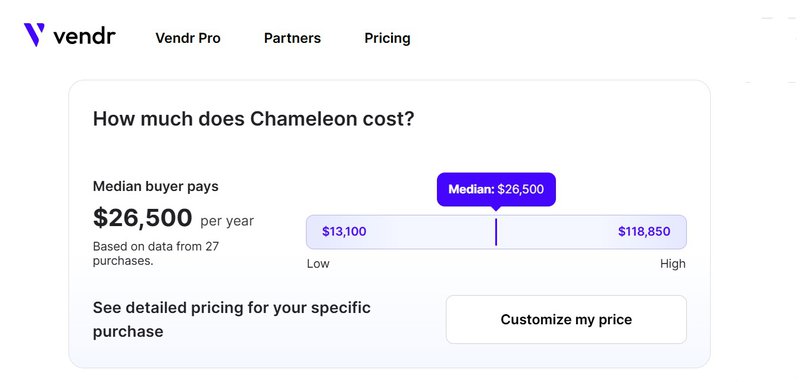
According to Vendr’s analysis of 27 Chameleon customers, the total annual cost can scale up to $118K per year. This is where MTU-based pricing catches teams off guard.
How?
As your product grows, every additional active user who sees Chameleon’s experience increases your bill, even if that interaction happens only once.
The key detail is peak MTUs, and this matters especially for SaaS teams with:
- Seasonal usage (e.g., end-of-quarter spikes).
- Rapid PLG growth from campaigns or virality.
- Feature launches that expose in-app guidance to a wider audience.
Because Chameleon bills on the highest MTU count in your billing cycle, even short-lived spikes can permanently push you into a higher tier for the month. Let’s use an example for clarity.
Example: A simple MTU cost scenario
Say you’re on a Startup plan capped at 2,000 MTUs.
- Week 1: You launch onboarding modals to 1,200 new users. That is 1,200 MTUs.
- Week 2: A Product Hunt spike brings in 1,100 more users who see a tooltip. That brings the total to 2,300 MTUs.
- Week 3–4: Traffic drops back to normal, but it doesn’t matter.
Because Chameleon bills on peak MTUs, you’re charged for 2,300 users, not the average. One spike is enough to move you into a higher pricing tier for the entire billing cycle, even if most users only interacted once.
Chameleon pricing plans: What do you really get at each tier?
Chameleon’s plans all start from the same foundation (in-product experiences). However, the capabilities grow significantly as you progress from Free to Startup, Growth, and finally Enterprise.
Here’s a closer look at what each plan includes:
Free
It includes:
- Publish unlimited interactive demos: You can create as many guided product walkthroughs as you want.
- Unlimited seats: Everyone on your team can access the Chameleon dashboard.
- Engagement tracking: Basic tracking of Demo interactions is included.
- HelpBar included: A searchable in-app resource center in your product.
- No in-product experiences, such as tours, tooltips, or advanced targeting. They are available on paid plans.
The Free plan gives you a feel for Chameleon. It runs interactive demos and contextual help, but doesn’t unlock the full set of in-product guidance tools needed for deeper onboarding and adoption flows.
Startup
It includes everything in the Free plan, plus:
- Publish live in-product experiences (tours, tooltips, modals, and launchers): This unlocks the core onboarding and engagement use cases that are not available on Free.
- Core targeting & analytics: This segments and analyzes who sees what, and runs up to 5 microsurveys to collect feedback directly in the product.
Inline embeddables (e.g., banners) and Launchers (e.g., checklists) are limited (5 and 1, respectively). Also, advanced controls (such as A/B testing, rate limiting, unlimited goal tracking, and more in-depth experimentation capabilities) are only available in Growth or higher plans.
Growth
It includes everything in the Startup plan, plus:
- Publish live in-product experiences: Unlimited Tours, Tooltips, Microsurveys, Launchers, and Interactive Demos across your user base.
- Advanced targeting & experimentation: Includes A/B testing, rate limiting, and goals tracking to refine experiences and control exposure.
- Multiple environments & segmentation: Environment display control and ability to target experiences based on location, segments, and behaviors.
- Priority support & team capabilities: Growth adds customer success support, up to 15 teammates, plus analytics to help optimize your campaigns.
Pricing is custom-based on MTUs and usage, and some enterprise-grade admin, localization, or contract flexibility is reserved for the Enterprise tier.
Enterprise
It includes everything in the Growth plan, plus:
- Publish live in-product experiences: Unlimited Tours, Tooltips, Microsurveys, Launchers, and Demos across segments and environments.
- Advanced targeting & multiple environments: Full segmentation, multi-environment support, localization, and custom domains for tailored product experiences at scale.
- Priority support & governance: Dedicated onboarding support from Chameleon experts, advanced roles/permissions, and granular account management for enterprise teams.
- Custom pricing based on MTUs and organizational needs: Quoted per usage and requirements, not a fixed public price.
Enterprise pricing and seat limits are custom-negotiated, so you’d need to engage with sales to secure a quote tailored to your usage and security needs.
3 Key takeaways for your budget
Before committing to any of Chameleon’s plans, check out these cost signals.
1. Mind the “growth gap”: The $15-18K/year jump
Access to capabilities like A/B testing, rate limiting, and expanded surveys doesn’t come as a small add-on. This means moving up to the Growth plan.
Here’s the cost implication:
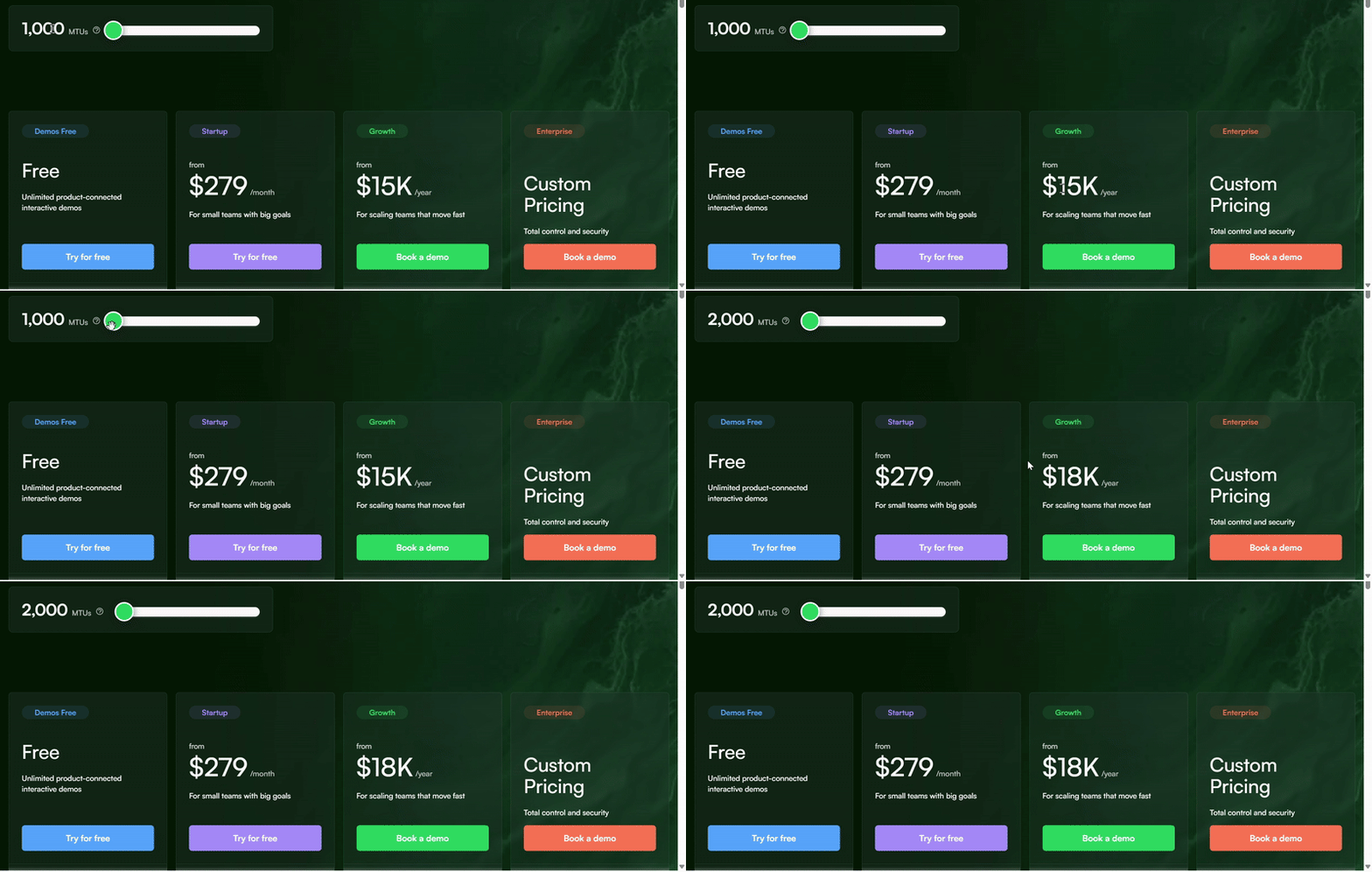
For 2000MTUs: Growth is $18,000/year, which translates to $1,500/month. That’s a steep jump from the Startup tier’s $279/month ($3000–3500/year baseline) just to unlock experimentation and optimization.
2. You might need to hire a developer anyway…
Chameleon appears no-code at first, but the real usage often requires technical support.
- According to a G2 user, customization (particularly pop-up style on brand) requires a developer.
- Another user on Capterra reports that advanced customization and specialized reports require in-house dev or IT skills.
In other words, the line between “no code” and “dev required” blurs, especially for in-depth targeting, integrations, or bespoke flows. So, factor developer time (or external help) into your budget beyond the subscription itself.
3. Your median annual spend can be higher than expected
When you look beyond listed pricing, the typical annual cost for Chameleon isn’t near the base tier. According to Vendr’s data (shared above), the median annual spend is $26,500. That’s far above the basic plan’s $3000–$3500/year starting point.
That wide range reflects how usage and MTU growth drive costs. As your tracked user base expands or you adopt advanced experiences and analytics, the annual bill can quickly exceed your budget.
What do real users say about how much Chameleon costs?
These real users highlight that the total cost of ownership depends on active user volume and MTU billing, not just the base plan price.
“Pricing might be a barrier for early-stage startups”
Tommy D, Project Manager, says:
…pricing might be a barrier for early-stage startups. It’s not outrageous, but once you start scaling usage across multiple environments or teams, costs can climb faster than expected.
My question is: when won’t you scale usage? You’d definitely need beyond basic onboarding. And that’s the point at which Chameleon’s cost increases rapidly with expanded usage.
“Beware! Predatory, sneaky pricing”
Chris, CEO of a US-based non-profit, reports:
Chameleon uses their code snippet to search out any user, that has ever been in your database and counts them in the monthly user count. We were charged for 5,000 users while still implementing in beta. Literally we had 2 people working on this and they charged us for 5,000. They simply point to a blog where they indicated that these users “might” login and so they have to plan for that. If you have a static user set then you won’t have any problem. But if you plan to use this like we did, to guide new users to determine if the software is for them, why would you pay for these users in perpetuity when they will never login again.
Whether once or always, Chameleon counts anyone ever in your database as an active user. Unfortunately, that inflates MTUs and costs unexpectedly.
Is Chameleon worth the cost for your team?
There’s no one-size-fits-all answer. Yes or no depends less on “what Chameleon can do” and more on “how your team is structured and how you plan to scale usage.” Nevertheless, below is a short, two-way guide to help you reach a decision.
When Chameleon is worth it
Chameleon makes sense:
- If you have complex UI patterns that require fine-grained control.
- You have highly technical teams who are comfortable working with code.
- You have heavy customization needs across multiple environments.
In these setups, the flexibility can justify the cost.
When Chameleon may be overkill
Chameleon can feel heavyweight in two cases:
- For small or lean product teams with limited engineering bandwidth.
- Teams that prioritize speed, experimentation, and iteration.
If you fall within any of the above categories, the MTU-based pricing and technical overhead may slow down your operations, just when you need to move fast.
Compare the value: Why Userpilot wins on ROI
When comparing ROI, the real difference shows up in pricing predictability and ownership. Here’s how Chameleon stacks up against Userpilot:
Transparent pricing vs. custom pricing
Userpilot publishes clear starting prices (Starter from $299/month) and explains how pricing scales with MAUs (5K for Growth), so teams can forecast spend before talking to sales.
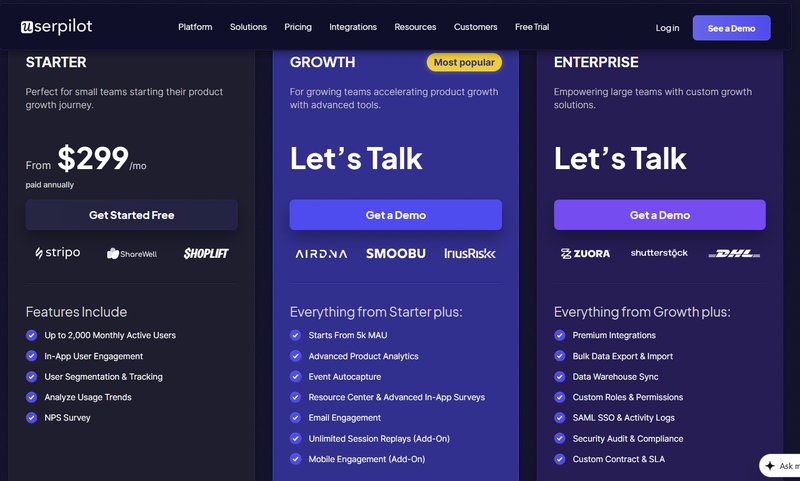
Chameleon, on the other hand, publicly lists only its entry tier. There’s no breakdown for Growth, and Enterprise pricing is quote-based. All these make long-term budgeting harder as usage grows.
Product-led ownership vs. engineering-led ownership
Userpilot is built for product and growth teams. Its no-code builder lets PMs and marketers launch onboarding flows, surveys, and analytics without relying on engineering, reducing hidden implementation costs.
By contrast, Chameleon reviews note that customization and advanced setups often require developer support, adding indirect costs beyond the subscription.
💡Why this matters for ROI
- Lower implementation overhead: Fewer engineering hours required
- More predictable pricing: Fewer surprises as usage scales
In a nutshell, Userpilot’s transparent pricing and product-led ownership model make the total cost of ownership easier to predict. And this is why it tends to deliver stronger ROI for lean and scaling SaaS teams.
To Chameleon or not to Chameleon?
Chameleon works, but only if you’re prepared for how its costs scale.
Pricing rises quickly as MTUs grow, and because billing is based on peak usage, even short-lived spikes can push you into higher tiers.
Add in quote-based plans and potential engineering overhead. And the total cost of ownership becomes even harder to predict over time. That doesn’t make Chameleon a bad tool. It’s powerful for highly technical teams with complex UI needs and the resources to manage it.
But if predictability is more essential to you, Userpilot is the safer option.
The transparent pricing, lower implementation overhead, and product-led ownership model make it easier to budget, iterate, and scale without surprises.
Book a demo now to test how Userpilot supports growth without the pricing guesswork!
Userpilot strives to provide accurate information to help businesses determine the best solution for their particular needs. Due to the dynamic nature of the industry, the features offered by Userpilot and others often change over time. The statements made in this article are accurate to the best of Userpilot’s knowledge as of its publication/most recent update on January 6, 2026.
FAQ
Is Chameleon Cloud free?
Chameleon’s core product offers a Free plan that lets you design interactive demos and basic in-app flows, but it’s limited. You can’t publish full in-product tours, tooltips, or advanced experiences without upgrading.
No fully free tier supports all features long-term. The free option is meant for initial evaluation before you move to a paid tier.
How much does Chameleon Creator cost?
Chameleon Creator (a different tool focused on e-learning content) isn’t part of the Chameleon in-product adoption platform pricing. Its pricing is separate and typically starts around $840/year for Solo users, with higher plans for teams and enterprise users.
Is Chameleon worth it for non-technical teams?
Chameleon can be useful for non-technical teams wanting to create in-app guidance, but real value often requires some technical setup and ongoing customization. Users report that customization isn’t always intuitive without help. For teams with limited engineering bandwidth, this adds hidden costs compared to tools designed to be truly no-code from the start.
Is Chameleon cheaper than Userpilot?
At first glance, Chameleon’s base plan starts slightly lower (e.g., $279/month for 2,000 MTUs) than Userpilot’s starter pricing ($299/month). However, because Chameleon’s pricing increases with peak MTUs and key features like A/B testing and advanced analytics sit in higher, quote-based plans, total annual spend can quickly exceed Userpilot.
About the author