Pendo vs. Userpilot in 2026: What You Pay For, and What You Don’t



I have sat in more renewal calls than I can count, and the moment that sticks with me is the look on a buyer’s face when they realize the number on the contract has nothing to do with how much value their team gets. That gap between what a tool costs and what it delivers is the entire reason a Pendo vs Userpilot comparison keeps coming up.
Pendo and Userpilot started in the same category. Both were built to help product teams understand user behavior and guide users without leaning on engineering for every change. Somewhere along the way, one of them built a pricing and packaging model that turns every new capability into its own negotiation.
In this article, I want us to look at the factors that determine whether a deal works in the long term: price, scalability, support, migration, and whether the features you need are included in the plan or billed as a separate line item. By the end, you should have a clearer sense of which product growth platform fits where your team is headed.

What Pendo is and who it’s for
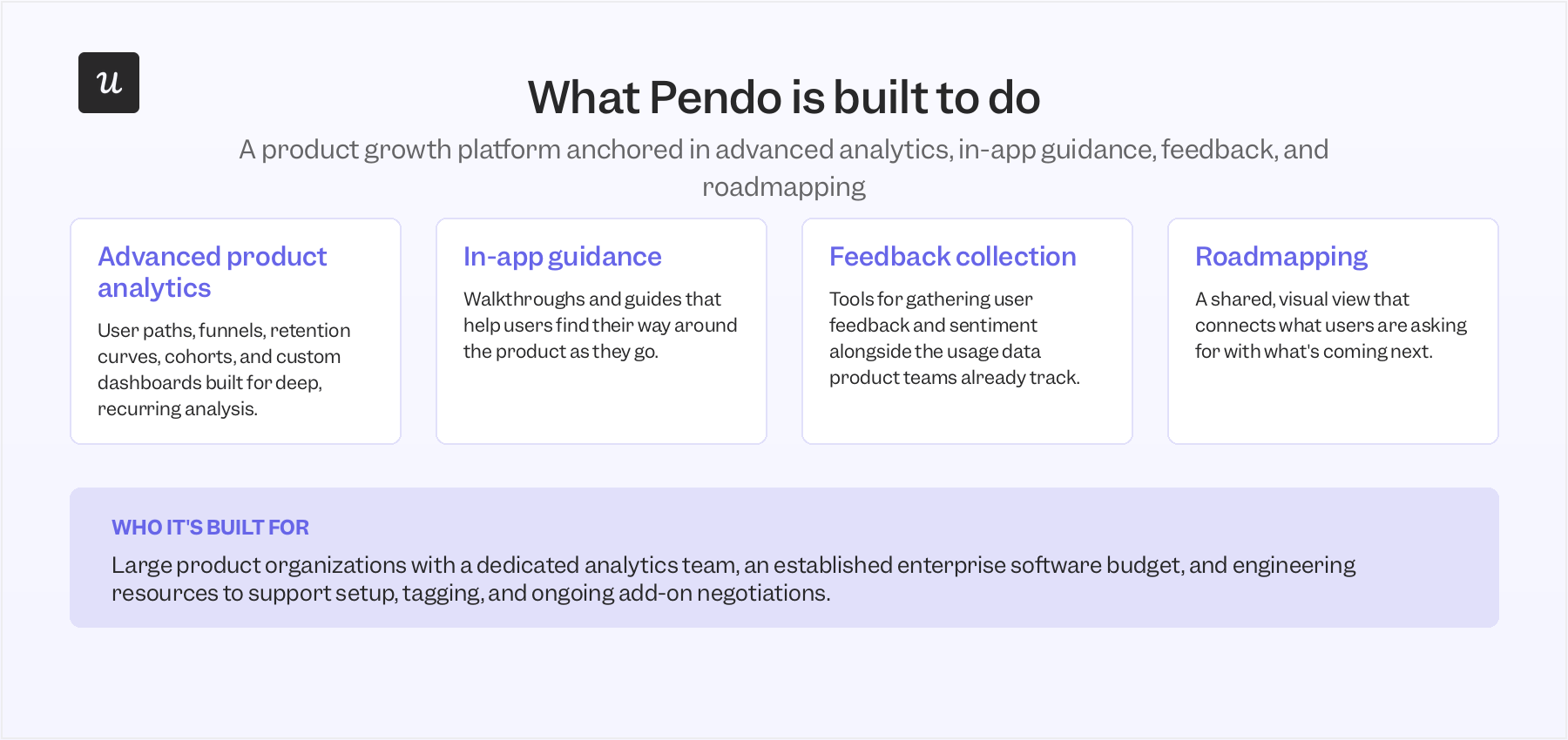
Pendo pairs advanced product analytics with in-app guidance, user feedback collection, and roadmapping, packaged for larger product organizations that want to understand user behavior at scale.
It’s a product growth platform designed around the idea that deep analytics and in-app experiences should live under one roof. For years, that combination made it a default answer whenever an enterprise asked which platform to standardize on for product discovery tools.
What Pendo does well
Pendo has a few capabilities that consistently come up as reasons large teams choose it:
- Advanced product analytics: Including user paths, funnels, retention curves, advanced segmentation, cohorts, path analysis, and custom dashboards built to drive data-informed decisions that boost feature adoption and retention.
- Session replay: Lets product teams watch how users navigate the product to spot friction points that visual reports alone don’t explain.
- Product roadmapping: Gives product and leadership a shared, visual view of what’s coming next, useful for cross-functional planning. [Image/source placeholder: Add screenshot or documentation link for Pendo roadmaps. Recommended source: official Pendo product docs.]
- Native integrations: These connect with business tools, including Salesforce, Slack, Intercom, Marketo, and Segment, and support data sync across a broader stack.
These strengths are best suited to organizations that already run a mature analytics practice and want a single product growth platform to anchor it. Getting full value out of that depth, though, usually means more setup work and a bigger budget than most mid-market teams expect.
How Pendo is structured
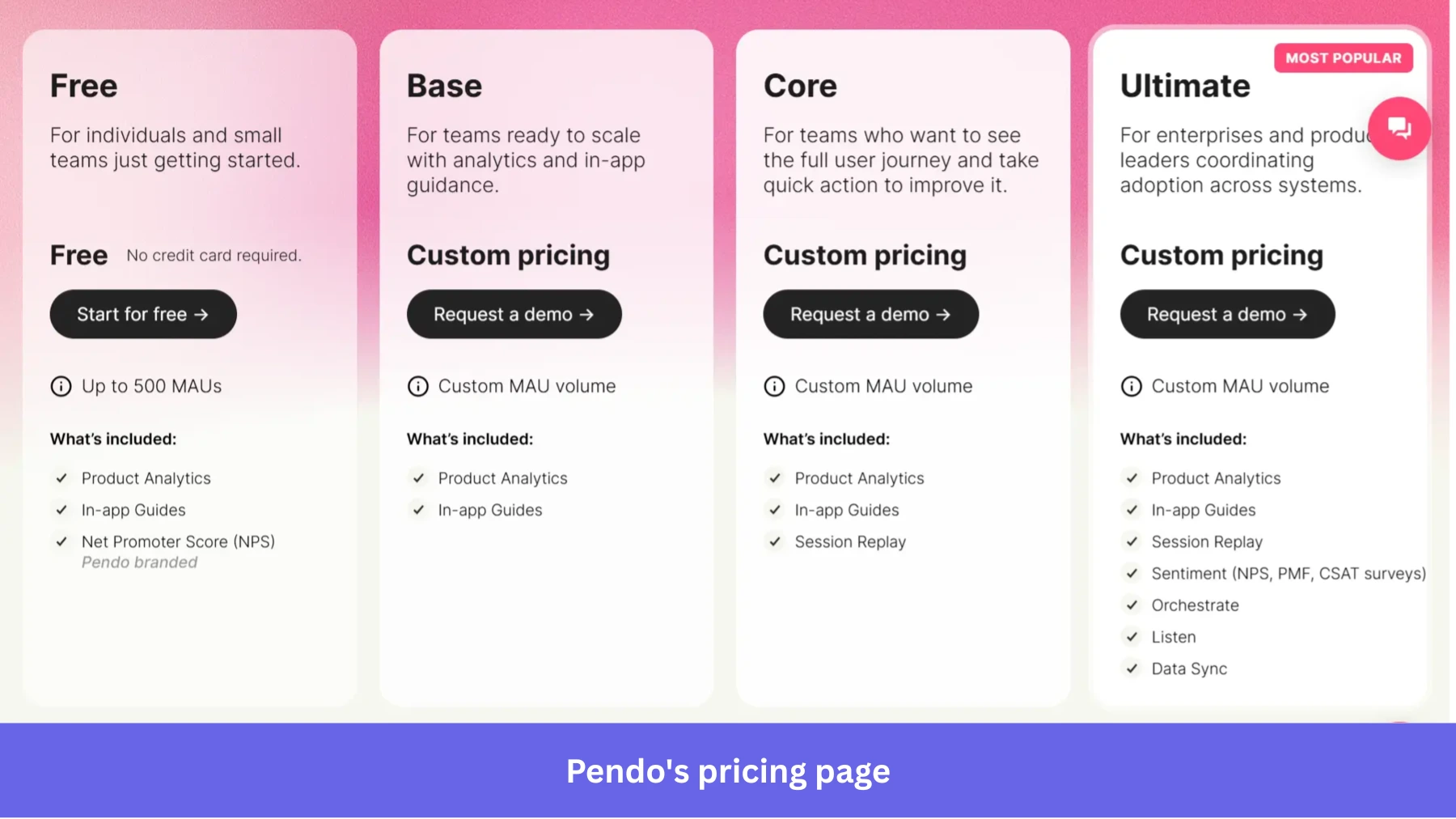
Pendo’s pricing is organized around Free, Base, Core, and Ultimate plans, but the paid tiers use custom pricing. The final quote depends on your MAU volume, the modules you select, and the contract scope.
Because of such opacity in pricing, I have done some research to see what existing customers appear to be paying.
For example, SpendHound’s 2026 benchmark, based on de-identified spend data from 144 Pendo customers, puts average annual Pendo spend at $54,757 for SMB accounts and $214,512 for enterprise accounts.
In other words, Pendo can be a strong fit for teams with mature product operations, but you should expect a sales-led pricing process rather than a simple self-serve plan.
Pendo’s pricing page also shows that some capabilities vary by plan or arrive only as add-ons. The following three come up most often in buyer conversations:
- Orchestrate: The add-on that covers advanced in-app messaging, workflow automation, and email, the pieces many teams need to actually engage users at the right moment in the user journey.
- Guides Pro: The add-on required for more flexible guide and onboarding module building, including richer in-app guides, branching logic, and brand customization beyond the basics.
- Session Replay: Included in Core and Ultimate, but it shows up as an add-on for Base, so buyers on lower tiers should confirm whether it’s part of their quote.
Pendo’s plans typically include only a single integration by default, which means most of the native integrations product teams actually want, the ones that keep data sync flowing into the rest of the stack, can turn into their own line items rather than something you simply switch on. It means the real cost of ownership surfaces only after signing.
Pendo’s AI
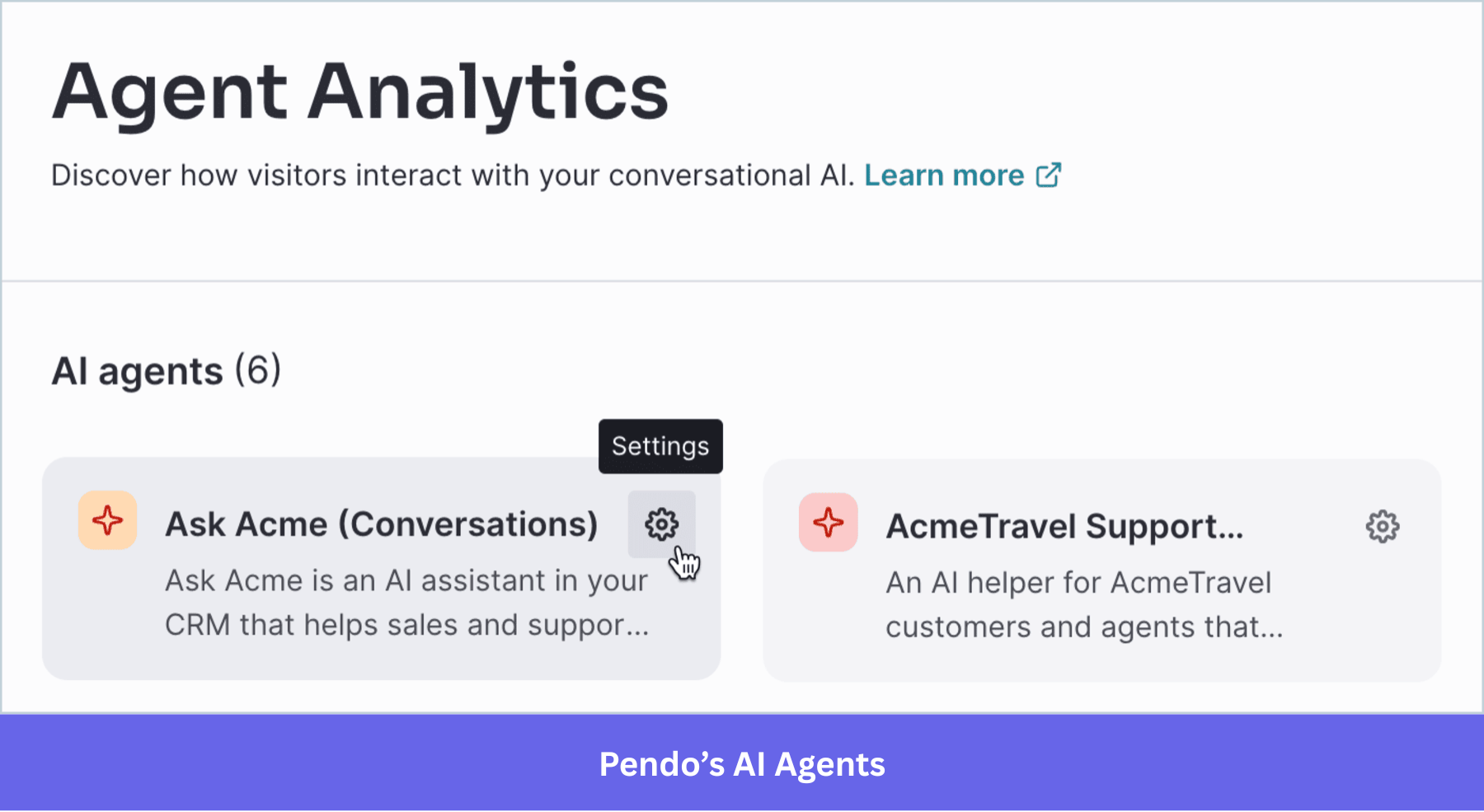
Pendo’s AI assistant, Leo, is currently in beta and is built to help teams query usage data, understand user sentiment, and surface insights without having to write custom reports from scratch. Leo can answer questions about product usage data, surface user feedback, and help build guides from a prompt. It’s accessible across every paid plan with no token limitations.
Who Pendo fits best
Pendo fits large product organizations with a dedicated analytics team, an established enterprise software budget, engineering resources to support setup and event tracking, and the internal capacity to manage ongoing add-on negotiations.
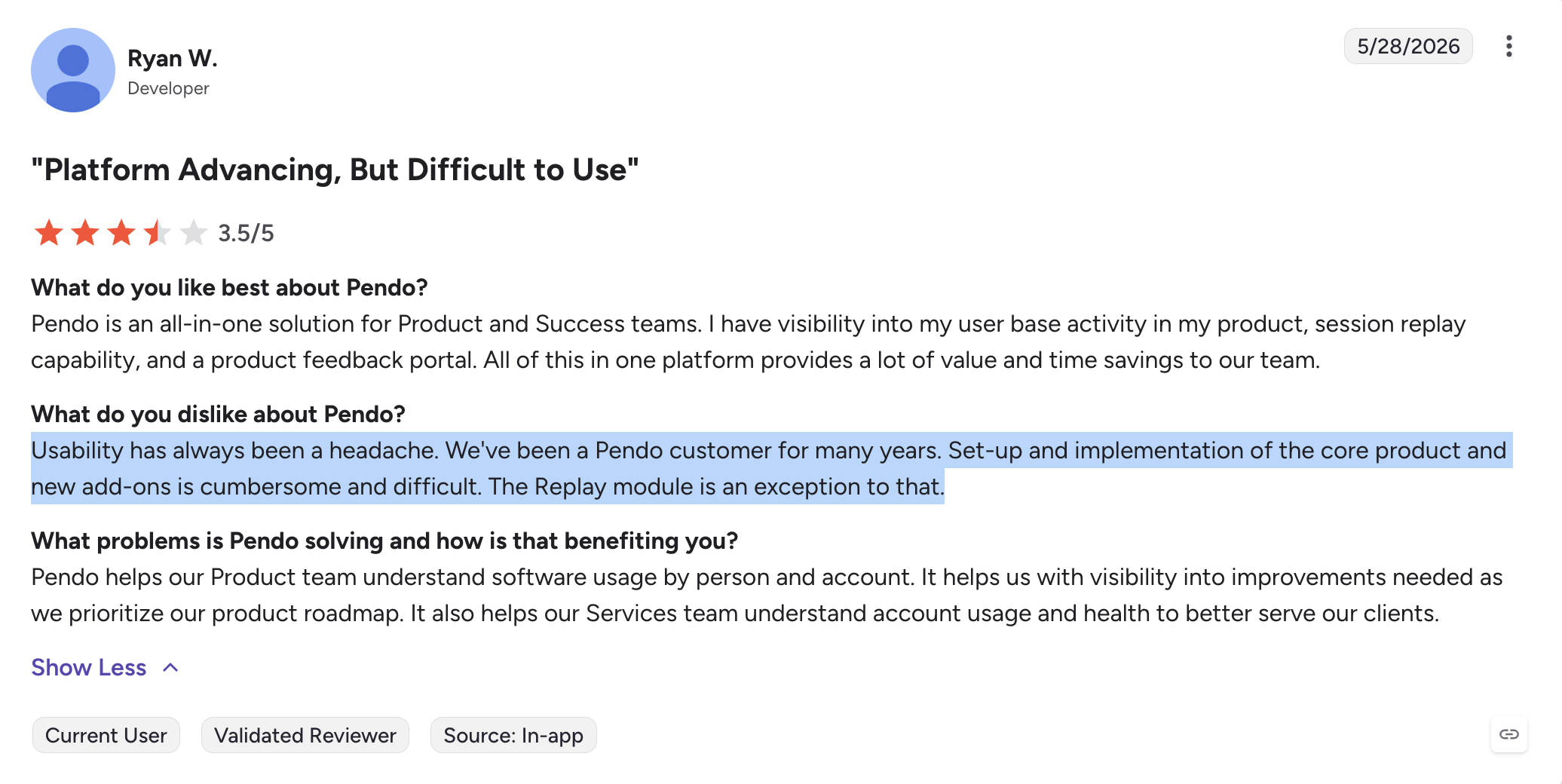
That’s a reasonable setup for some companies that need the deepest possible analytics tools and don’t mind the lift it takes to get there. However, it’s not the only option, and it’s worth knowing what the alternative looks like before you commit.
What Userpilot is and who it’s for
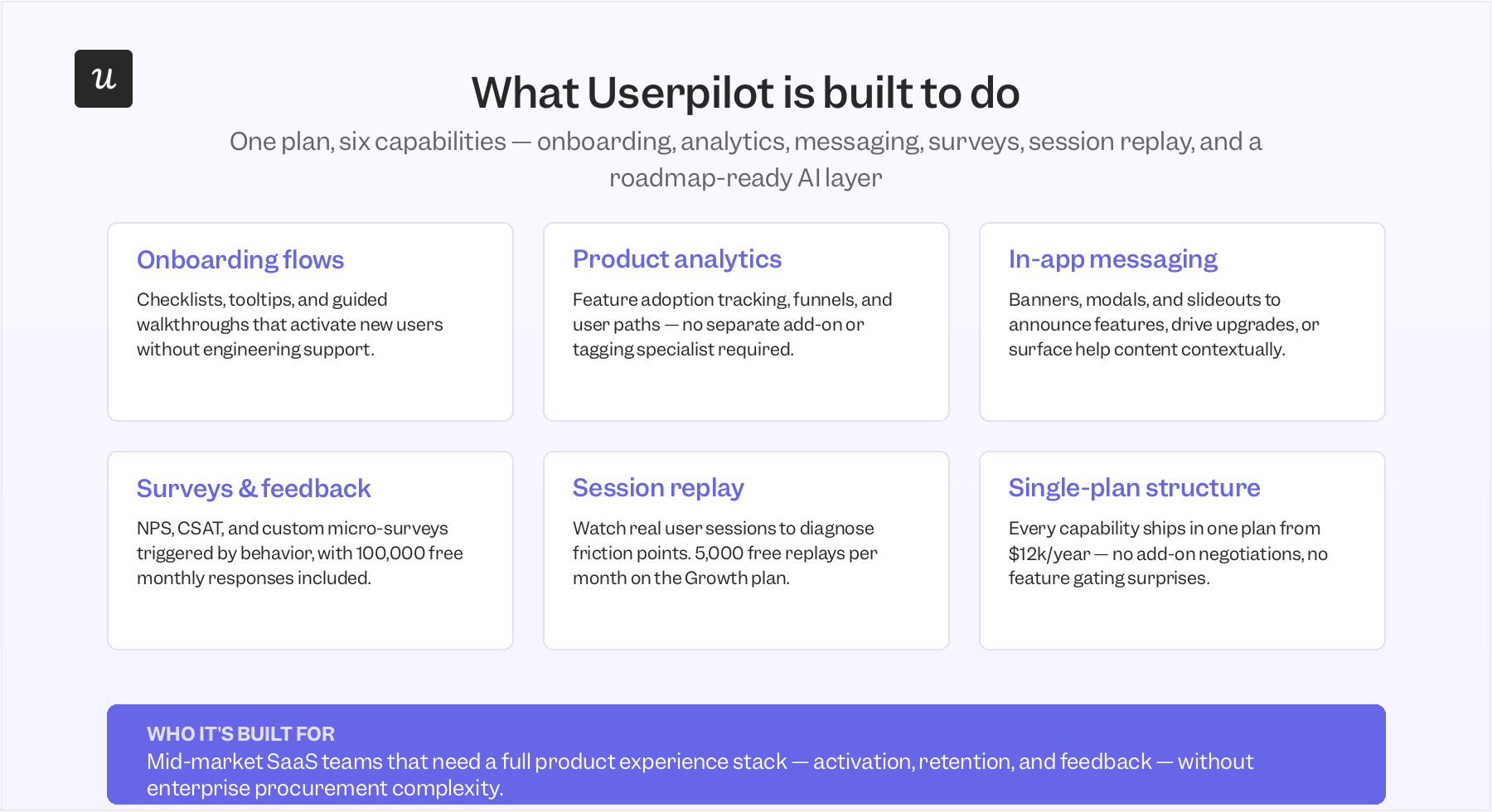
Userpilot was built around a simpler premise: product teams should be able to launch in-app experiences, collect feedback, and understand user behavior without waiting on engineering or paying extra for every new capability.
Onboarding flows, product analytics, in-app messaging, surveys, and session replay all live in one plan, which is a structurally different approach from a platform built around modular add-ons.
What Userpilot does well
The clearest strength is how quickly a non-technical team can launch onboarding flows and other in-app experiences:
- No-code, event-based triggering: Userpilot lets teams define custom events visually and launch onboarding flows without developer assistance, in stark contrast to Pendo’s reliance on engineering for setup and tools for event tracking.
- Granular user segmentation: Teams get instant access to filters such as account tier and signup date in every dashboard, with no need to touch code to build advanced segmentation or refine user segments on the fly.
- Connected feedback loop: Session replay, in-app surveys, and analytics sit in the same place as the tools used to act on them, so a team can spot user friction and ship a fix without switching platforms.
- Faster iteration: The shorter the gap between noticing how users interact with the product and changing it, the faster a team learns whether its idea was worth pursuing.
That loop, from noticing a problem to shipping a fix, is where most of the day-to-day value shows up for product teams. It’s more about the onboarding features and engagement tools a team opens every week to guide users toward activation.
How Userpilot is structured
Userpilot’s pricing is built around public, predictable tiers rather than a sales-led negotiation for every deal. The Starter plan begins at $299/month (billed annually) and covers up to 2,000 monthly active users, providing smaller teams with a clear self-serve entry point.
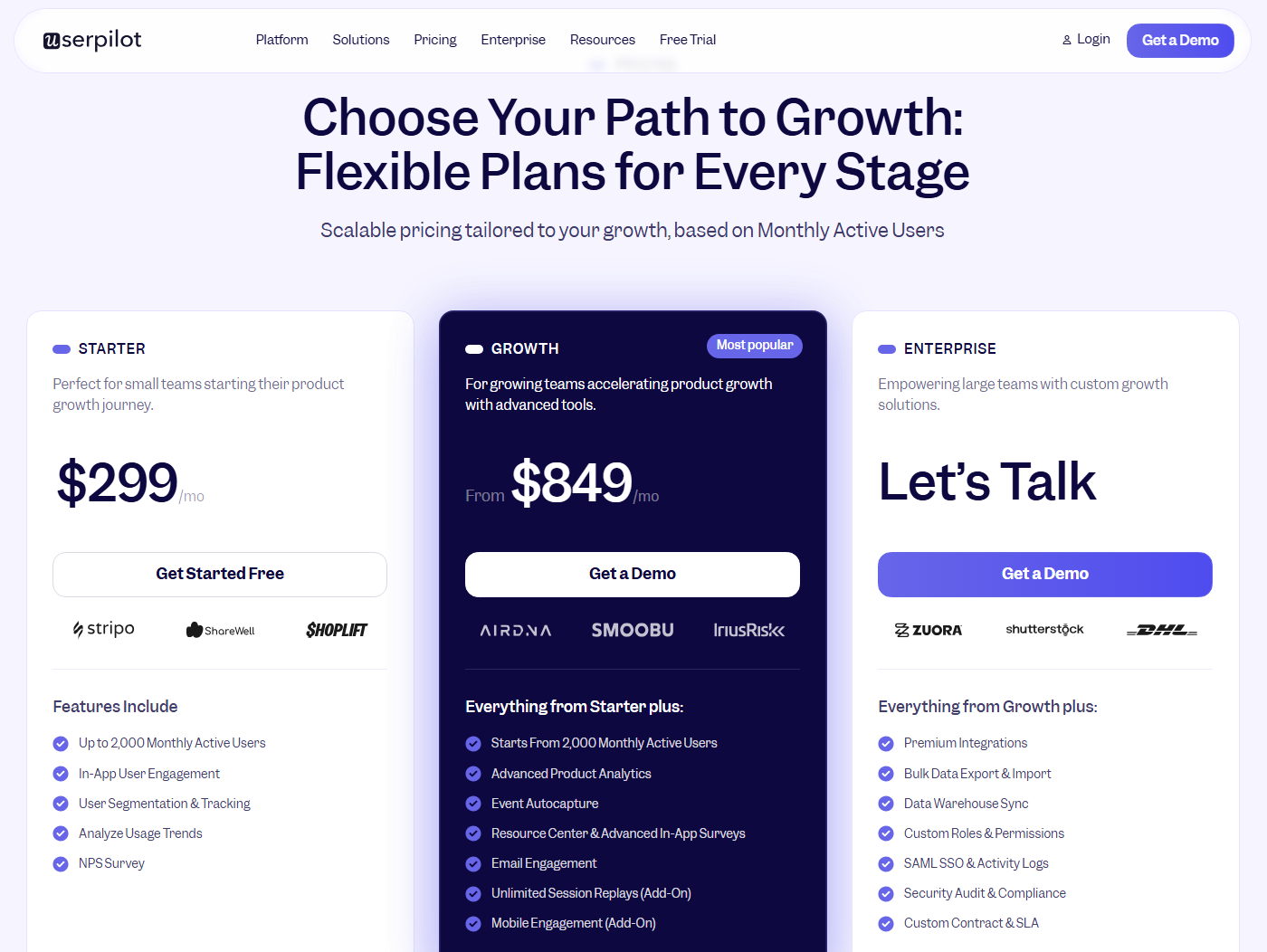
The Growth plan, the one most mid-market product teams land on, starts at $849/month (billed annually). Unlike Pendo’s add-on structure, Growth bundles the pieces teams usually end up paying extra for elsewhere directly into the plan: product analytics, in-app messaging, in-app surveys, in-app polls, in-app NPS surveys, workflows, and session replay, with no separate purchase required.
Userpilot’s AI agent Lia
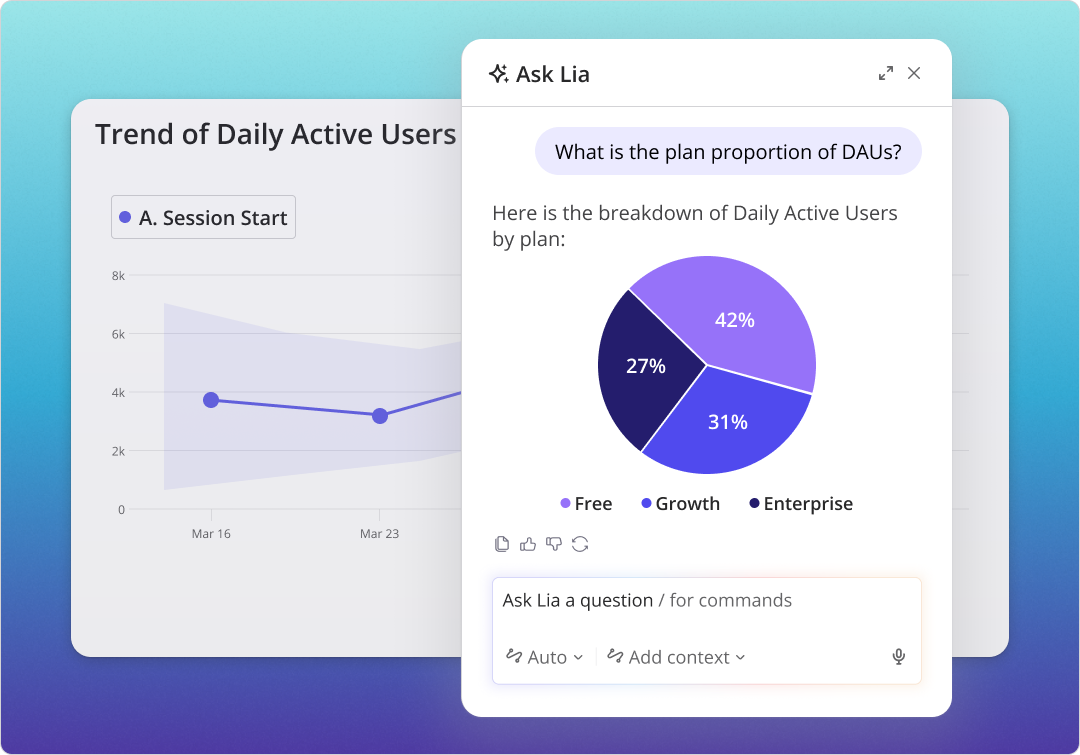
We are also releasing our own AI agent, Lia, at Userpilot. You can think of it as a product growth partner that turns your product data into insights, recommendations, and actions — without anyone on the team needing a data background or a dedicated analyst to make sense of it.
Here’s what Lia is built to do:
- Monitor retention, activation, monetization, and churn metrics continuously, and predict where each one is heading.
- Identify what’s pushing those metrics up or putting them at risk, without anyone having to dig through dashboards.
- Answer questions about user behavior, adoption, and feedback in plain language — no SQL, no filters.
- Summarize NPS responses, analyze survey results, and session replays on demand.
- Generate reports and analyses without anyone manually setting them up.
- Surface clear next-step recommendations for the retention, activation, and spot churn risks.
- Build and deploy the fix directly inside Userpilot — in-app guides, flows, tooltips, checklists, and resource centers, etc.
Who’s Userpilot’s ideal customer?
Userpilot works best for product, growth, and customer success teams that want to move quickly without routing every change through engineering and that want a predictable annual number to plan around.
It also fits companies that have outgrown a basic user onboarding tool but aren’t ready for the cost curve of an enterprise product growth platform. If speed, ease of use, and clear pricing matter more to your team than maximum customization depth, Userpilot delivers more practical, everyday value.
Comparing Userpilot vs Pendo: What matters for your decision
I’ve found that most Userpilot vs. Pendo comparisons focus too much on who has more features. In practice, that’s rarely what determines the decision.
The teams I’ve spoken with are usually trying to answer a different set of questions: Which platform is easier to manage? Which one delivers the capabilities we actually need? And are we paying for functionality we’ll realistically use?
Those are the questions I’ll focus on in the sections below.
Price and total cost of ownership
I won’t spend too much time on list prices because, frankly, that’s not how most teams buy either of these products.
What I can tell you is that when I speak to customers who’ve switched from Pendo to Userpilot, cost comes up surprisingly often. Not because they were looking for the cheapest tool on the market, but because they felt they were paying enterprise-level prices for functionality they could get elsewhere.
Looking at our migration data, teams moving from Pendo to Userpilot typically reduce contract value by about 40% while covering the same core use cases: onboarding, product adoption, user feedback, and product analytics.
Now, obviously, I work at Userpilot, so you shouldn’t take that claim at face value.
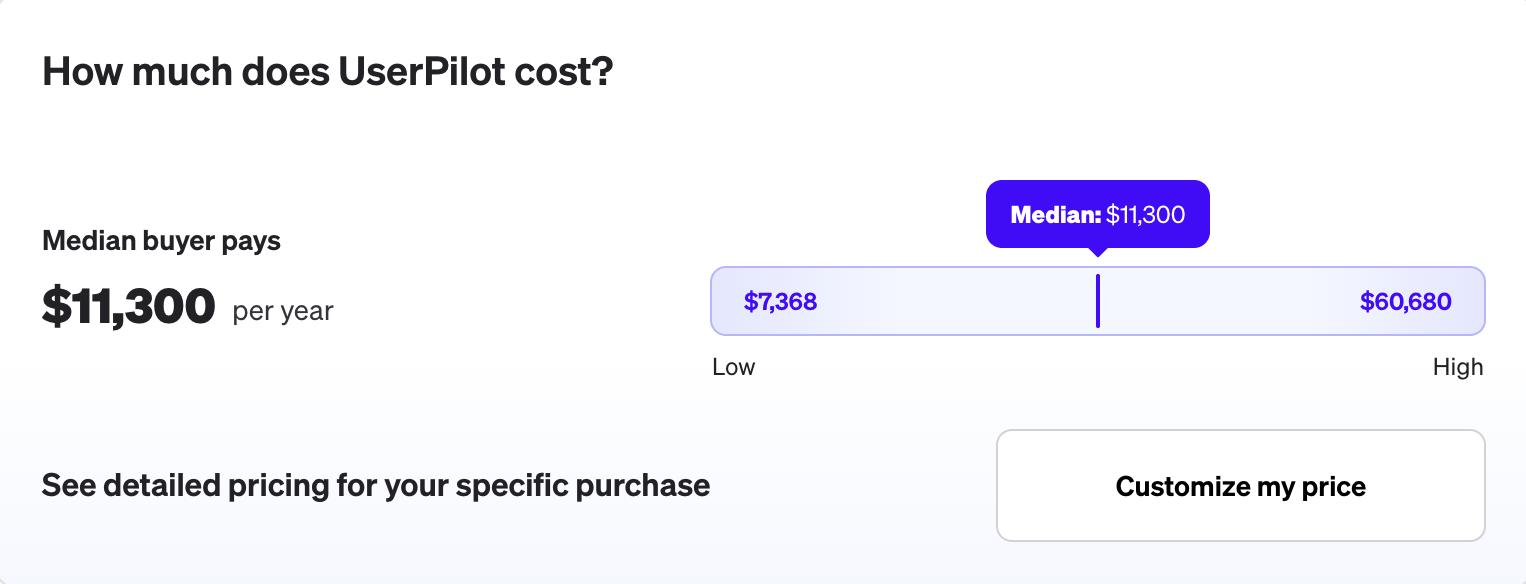
According to Vendr’s benchmark data, the median Userpilot customer pays around $11,300 per year.
For comparable deployments, Pendo contracts tend to land noticeably higher, with mid-market teams commonly paying $15,000–$35,000 annually and larger deployments climbing much further from there.
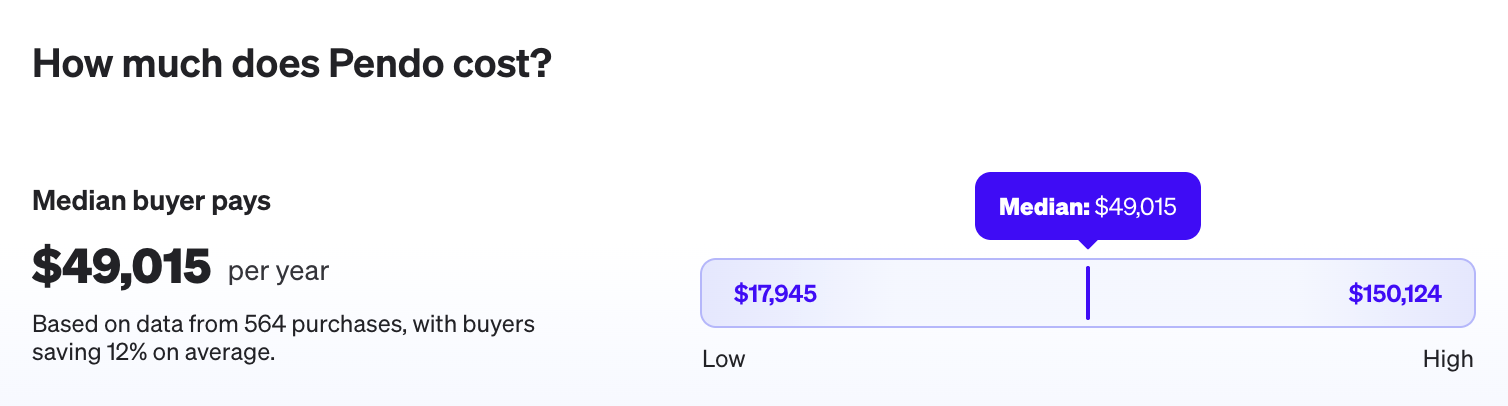
To me, that’s the more useful way to think about pricing. The question is whether you’re getting enough additional value from Pendo to justify the difference in contract cost.
Scalability and renewal predictability
When teams talk about scalability, they’re usually thinking about product capabilities. In my experience, the pricing model matters just as much.
Both Pendo and Userpilot price based on MAU volume, so your costs will increase as your product grows. The difference is how easy it is to predict those increases ahead of time.
With Pendo, pricing depends on both MAUs and the modules you purchase. That’s not necessarily a problem, but it does mean growth can affect your contract in more than one way. I’ve seen teams budget for user growth only to realize later that they also need additional functionality that sits in a separate module or plan tier.
Userpilot follows a similar MAU-based approach, but the pricing structure is generally simpler. Most teams start on Starter or Growth and expand from there, without needing to piece together multiple products along the way.
Regardless of which platform you’re considering, I’d recommend asking a simple question during the sales process: What happens at 10k, 25k, 50k, or 100k MAUs, and which add-ons or modules change in price as usage grows?
Feature access: What’s included vs what’s an add-on
One thing I’d pay close attention to during the buying process is how much of your use case is covered by the initial quote.
When I talk to teams evaluating Pendo, the conversation often starts with a base package and then expands as they realize they also need session replay, journey orchestration, additional integrations, or other functionality that sits outside the initial plan they’re considering.
There’s nothing inherently wrong with that model. Some teams prefer the flexibility of buying only what they need. The challenge is that it can make it harder to compare costs across vendors because two quotes that look similar on day one may end up covering very different sets of capabilities.
Userpilot takes a more bundled approach. The Growth plan includes the features most teams come to us for in the first place: product analytics, event autocapture, in-app messaging, onboarding flows, user surveys, resource centers, workflows, and session replay.
My advice is to build a list of the workflows you want to support over the next year and then map each one to the features included in your quote. That’s usually where the differences become much clearer than they do on a pricing page.
Support and migration
I’ve spoken with enough teams coming from Pendo to know that the concern usually isn’t whether they can rebuild their experiences in Userpilot. It’s how much work the switch is going to create for the team.
That’s why migration support is included with Userpilot rather than treated as a separate consulting project.
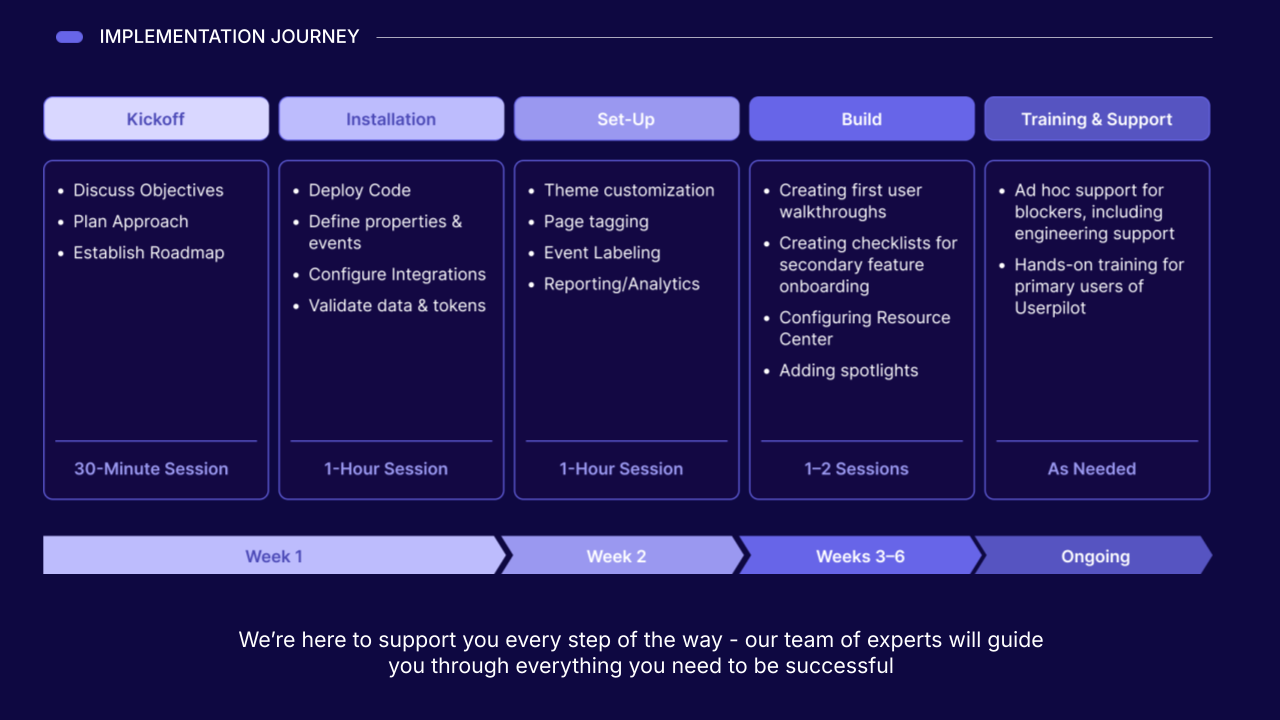
Our team handles onboarding in-house and stays involved well past launch, which is a different relationship than working through a tiered or partner-led support model. The setup itself runs on short, focused sessions rather than a long, open-ended rollout:
- Kickoff: About 30 minutes to align on goals and scope.
- Installation: Roughly an hour to get the platform connected to your product, including the data sync needed to start tracking custom events.
- Set-up: About an hour to configure the basics and define your first user segments.
- Build: Typically one to two sessions to launch your first onboarding flows and in-app guides.
Ease of use and time to value
Based on our internal data, it takes you longer to see ROI from Pendo than Userpilot.
If anything, Pendo is a very powerful platform. The challenge is that power doesn’t always translate into faster execution, especially when onboarding flows, surveys, and in-app experiences are owned by product managers, customer success teams, or product marketers rather than dedicated admins.
In our ex-Pendo survey, customers reported reaching ROI in an average of 2.0 months after switching. They also reported improvements in product decisions, user engagement score, onboarding effectiveness, and internal workflows.
That’s one reason I pay attention to time-to-value metrics when comparing platforms. They’re not a perfect measure of ease of use, but they’re often the closest thing we have to a real-world signal. Teams don’t see ROI in two months because they spent two months learning the product. They see ROI because they were able to start using it quickly enough to influence onboarding, adoption, and retention outcomes.
What ex-Pendo customers say when they switch to Userpilot
Numbers and feature lists only tell you so much. What I find more convincing is what happens when a team that already knew Pendo’s strengths and limitations decides to leave anyway, and then describes what actually changed in how they engage users day to day.
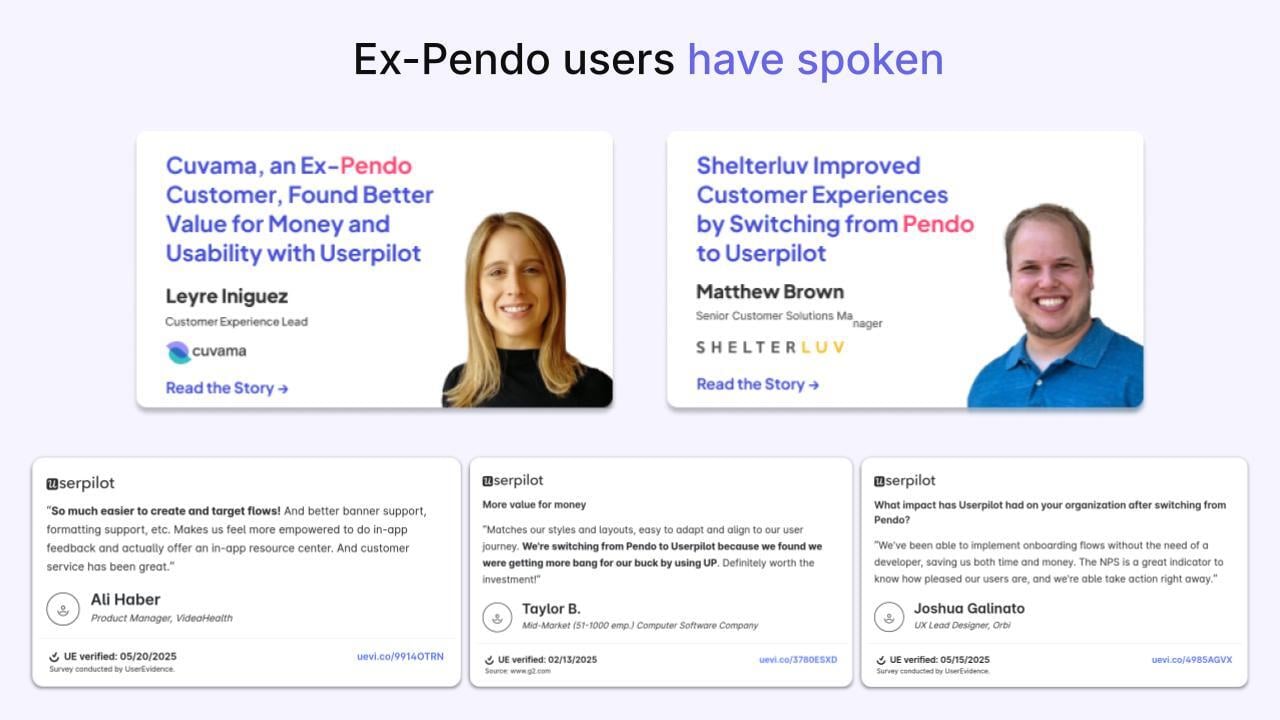
Leyre Iniguez of Cuvama has spoken publicly about switching from Pendo to Userpilot and finding a platform that matched the team’s pace without the overhead of managing a more complex system. Matthew Brown of Shelterluv described a similar shift, in which moving away from Pendo freed up time the team had been spending on platform management, rather than on building in-app experiences for their users. Both stories point to the same underlying shift: less time operating the tool, more time using it to drive user retention and feature adoption.
That same pattern shows up in independently collected switcher survey data:
- 56% said they made better product decisions after switching, with clearer visibility into how users navigate the product.
- 56% said that in-app user engagement and overall user experience improved.
- 44% said user onboarding experience became more effective.
- 33% said internal customer onboarding processes and workflows improved.
- 22% said user activation accelerated.
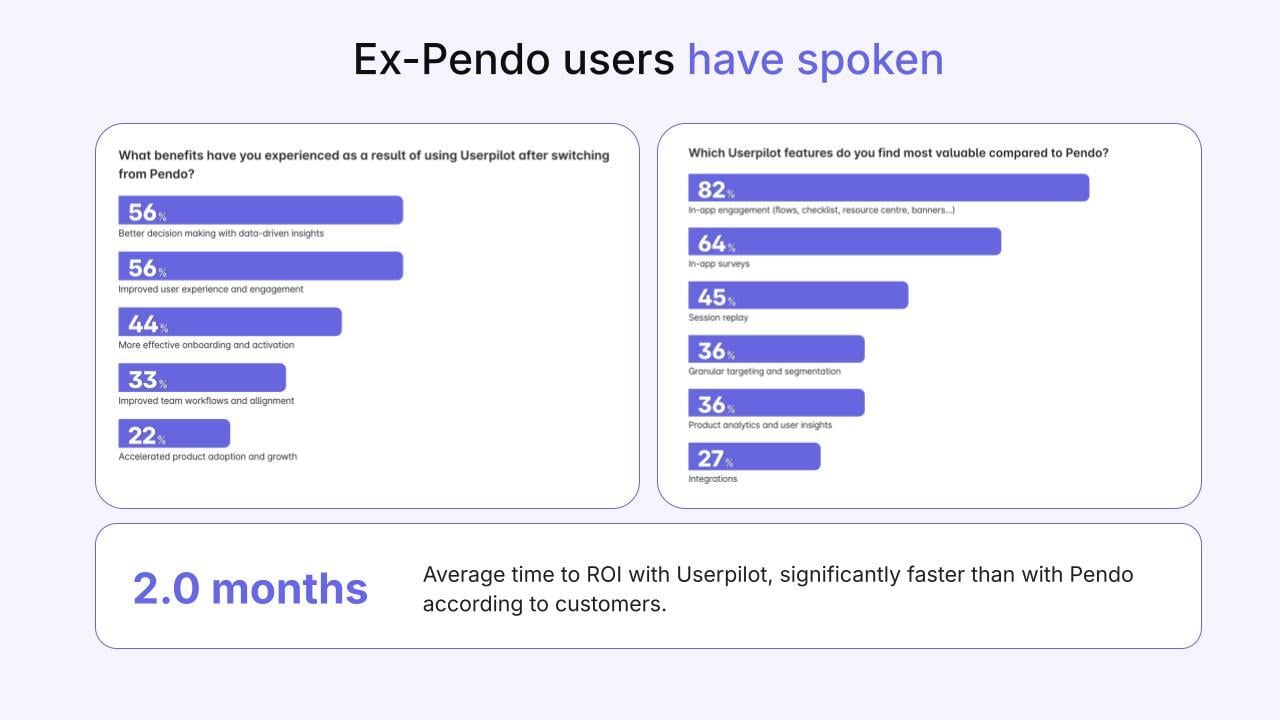
When asked which features delivered the most value after switching, 82% pointed to in-app user engagement tools, 64% to surveys, and 45% to session replay. These are the tools product teams reach for constantly to gather feedback and engage users, and the fact that switchers rank them this highly says something about how much friction they were dealing with before.
How to choose between Pendo and Userpilot
The right call depends on the size of your team, the maturity of your analytics practice, how your different users behave, and how much pricing transparency matters to whoever signs off on your software budget.
Choose Pendo if
You run a large, well-resourced product organization with a dedicated analytics function, an established enterprise software budget, engineering capacity for setup and manual tagging, and room to manage ongoing add-on negotiations. It’s a defensible path if deep product analytics tools and a broad enterprise platform matter more to you than predictable, transparent pricing, and you’re comfortable with a sales-led process for getting there.
Choose Userpilot if
Your priority is to act on user behavior quickly through onboarding flows, in-app guidance, surveys, segmentation, and product adoption campaigns. It’s the stronger fit when product, growth, or customer success teams need to build and iterate without sending every change through engineering. It’s also worth considering if you want a more adoption-focused alternative to Pendo‘s broader enterprise platform, with support and migration help built into the relationship rather than billed separately.
Try Userpilot for yourself
The best way to evaluate any of this is to see it running against your own product with your own users, rather than taking a vendor’s word for it or comparing dashboards as you might with Google Analytics or other analytics tools. Most teams that explore Userpilot start with one of three paths:
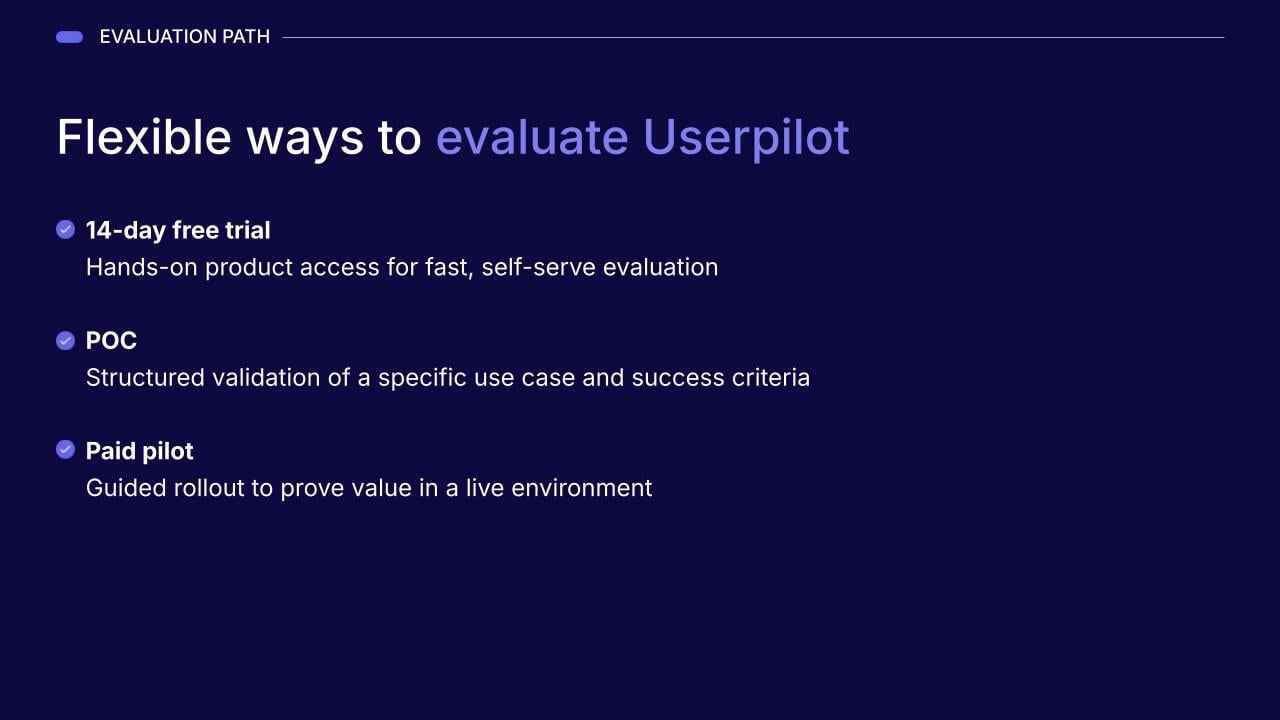
- 14-day free trial: The fastest way to get hands-on and see how quickly your team can build onboarding flows and other in-app experiences.
- Proof of concept: A focused way to test a specific use case against your own product usage and user segments before committing further.
- Paid pilot: A structured runway to validate the platform across a broader set of workflows with our team alongside you.
Whichever path you choose, you’ll get a real answer quickly, with full visibility into what it costs and what you’re getting for it. Book a demo and see for yourself how the numbers and the experience of guiding new users toward activation compare.
Disclaimer: Userpilot strives to provide accurate information to help businesses determine the best solution for their particular needs. Due to the dynamic nature of the industry, the features offered by Userpilot and others often change over time. The statements made in this article are accurate to the best of Userpilot’s knowledge as of its publication/most recent update on June 11, 2026.
About the author