Product Discovery 101 for SaaS: A Practical Guide to Validating Ideas


Many SaaS teams still ship features hastily. A hunch from leadership? Yes. A loud customer request? Yes. A competitor’s launch? Yes.
Validation with real customer data and market research? No.
These lapses add up:
Imagine a small team of five spending one sprint building an unused feature. At a conservative $100/hour/person, 6hours/day, that’s $42K wasted on a single miss. That’s even before QA, rollout, or ongoing support.
And it gets worse, unused features increase cognitive load and stall activation. According to our Benchmark Report, the median feature adoption rate is 16.5%. In other words, most features don’t actually impact users.
All of this waste is preventable with a product discovery. And in this article, I’ll show you how modern product teams do it, the techniques that work, and the common mistakes to avoid.
What is product discovery?
Product discovery is the process of identifying what to build next by validating real user problems and solutions before engineering work begins.

It focuses on answering one question: Is this worth building?
While there are overlaps with backlog grooming and feature voting, product discovery is fundamentally different.
- Backlog grooming vs. product discovery: Backlog grooming organizes and prioritizes known work. Product discovery questions whether that work should exist at all by validating the underlying problem.
- Feature voting vs. product discovery: Feature voting collects opinions. Product discovery uncovers evidence. Users may vote for ideas, but discovery tests whether those ideas actually solve meaningful problems.
In SaaS, the stakes are high. Every feature you ship has a cost, from engineering time and onboarding complexity to long-term maintenance. Build the wrong thing, and activation delays increase, leading to churn and ultimately allowing competitors to get more “mindshare.”
Product discovery exists to reduce those risks.
Why is successful product discovery important for SaaS teams?
One reason: It stops your team from building product features nobody uses.
To get there, discovery helps you understand user needs, validate ideas early, and prioritize work that drives actual value. This matters even more in SaaS, where monthly churn can reach 3–7% and every wrong bet compounds risk.
To prevent such risks, discovery forces you to ask the right questions:
- Why does this matter?
- Who benefits?
- How will we measure success?
This evidence-first mindset increases the chances of building features that truly resonate. And teams adopting it are seeing results.
Successful product discovery in real SaaS teams
| Company | Discovery approach | What they validated | Business value/outcome |
|---|---|---|---|
| Slack | Early interviews + beta testing | Internal communication pain points | Rapid adoption, $27B acquisition |
| Intercom | Continuous discovery (weekly calls + analytics) | High-impact operator workflows | Lower churn, scalable ARR growth |
| Notion | Community feedback + public roadmaps | Flexible, modular workspace demand | Unicorn status |
| Airtable | Public betas + user-created templates | No-code flexibility as a core value | 300K+ orgs, low churn |
| Linear | Fast feedback loops + user-prioritized issues | Speed and simplicity for developers | $10M ARR, high retention |
The said companies observed behavior, listened to users, tested assumptions, and iterated fast. That’s why they are successful.
You can achieve similar feats with Userpilot. It helps you:
- Collect discovery inputs continuously through in-app surveys, NPS, and micro-feedback.
- Observe real behavior with feature tagging, funnels, paths, and session replays.
- Validate ideas before building by testing flows, copy, and guidance with specific segments.
- Close the loop by tying discovery insights directly to activation, retention, and churn metrics.
Instead of discovery living in docs or one-off interviews, Userpilot makes it part of your product.
5 Effective product discovery techniques (+ examples)
These techniques are grounded in real SaaS teams’ workflows:
1. Talk to your customers
Structured conversations with real users uncover why they behave the way they do. But use short, focused interviews or follow-ups while at it. These help you move past vague opinions (“I like this”) and get to concrete struggles and context needed for a valuable product.
An example of this technique done right is The Room. Using Userpilot, they analyzed where users stalled during onboarding and then paired that data with follow-up feedback. They discovered that the issue wasn’t confusion about features and used that user insight to design more guided onboarding flows. This drove a 75% increase in key action completion within 10 days.
2. Dig into Jobs to Be Done (JTBD)
JTBD helps you understand why users “hire” your product. To get it done correctly, do this: use prompts like “Walk me through the last time you tried to do X.”
That way, you’d confirm what pushed users to find a solution, what almost stopped them, and what success looks like. Kontentino executed this technique to perfection.
Kontentino mapped out what different users were trying to accomplish (e.g., scheduling posts vs. analyzing performance) with Userpilot. Then, they created tailored walkthroughs in Userpilot to help users reach their core jobs faster, resulting in a 10% increase in user activation.
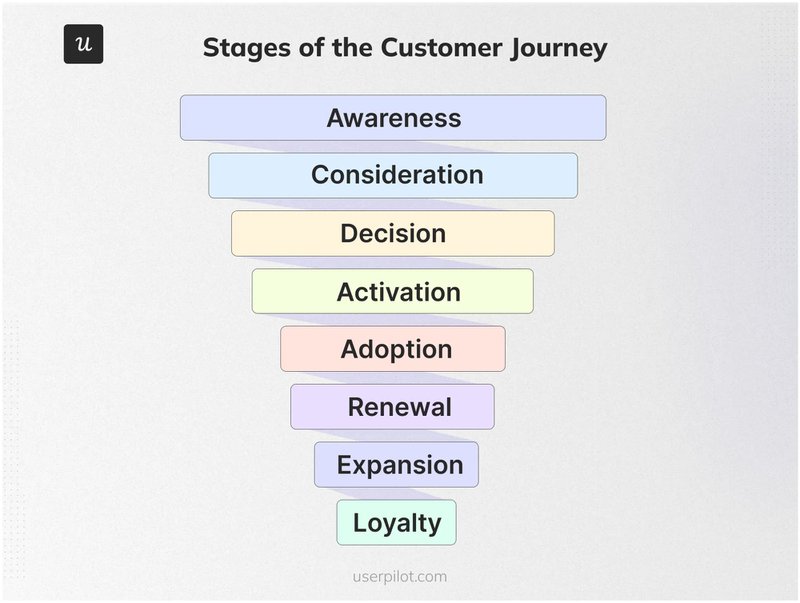
3. Map the customer journey
Customer journey mapping helps you see the product from the user’s point of view. Here’s how to implement it:
- Break the experience into clear slices: goals → actions → tasks → pain points.
- Then, look for where users get stuck, skip steps, or create workarounds to move forward.
Attention Insight used this technique effectively. With Userpilot, they mapped the free-trial journey and spotted drop-offs before users completed key actions, such as uploading a design and running their first analysis.
With the friction points fixed (via guided walkthroughs), users reach value faster, and activation increased by 47%.
4. Prototype ideas early and often
Prototypes help teams test ideas before writing code. And you don’t need to go overboard; simple wireframes or clickable mockups suffice. Use them to see whether users understand the flow and can complete the task, rather than debating whether they “like” the design.
An example of this technique done well is Sked Social. They tested different flows before rolling them out fully, observing how users moved through early checklist drafts built with Userpilot. Then, they refined the flow based on where users hesitated, launched a clearer experience, and tripled their conversions.
5. Run fake-door tests
Fake-door tests validate demand before you build. Here’s what that looks like:
- Add a button, CTA, or tab for a proposed feature.
- Track who clicks it.
- Then follow up with a quick micro-survey to understand what users expected.
All that helps you confirm whether your idea is worth pursuing.
Platformly used this technique to solve their complex onboarding. They deployed interactive elements, like checklist tasks and walkthrough triggers. Then, they iterated based on users’ behavior, which led to 40% onboarding completion rates.
Your 7-step product discovery process
Follow these steps to turn signals from user research into confident product decisions:
1. Pinpoint the problem area
Key focus: Start with a real problem, not a feature idea.
Product discovery works best when you zoom in on where users are struggling before deciding what to build. That struggle might show up as trial users dropping off, customers churning after onboarding, or repeated complaints about the same workflow.
For example, Spotify didn’t decide it needed “better playlists.” Through discovery, the team identified a real problem: “30 million songs, which would users actually love?” Pinpointing that problem led to one of Spotify’s most successful feature launches, Discover Weekly.
Do this:
- Review churn trends, drop-off points, NPS feedback, support tickets, and sales objections.
- Identify one high-impact area (e.g., trial activation or feature adoption).
- Write a single-sentence problem statement to anchor the discovery phase.
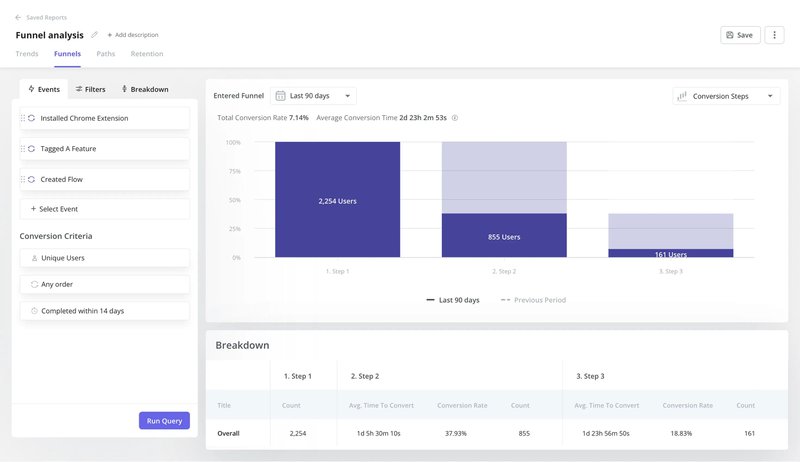
Userpilot can help here. Using its funnel analysis, you’ll confirm where users stall or bounce. Then, you can layer in session replays to see exactly where users hesitate or get stuck before committing to any solution.
2. Dig into quantitative data and customer stories
Key focus: Combine qualitative and quantitative insights, so you’re not guessing.
Data (e.g., usage metrics) shows you where users struggle, such as just before completing a key action. On the other hand, customer stories (through interviews or in-app feedback) explain why. Together, they confirm whether the problem you picked in Step 1 is the right one to solve.
For example, if trial users abandon setup halfway, user analytics can pinpoint the exact “where.” A quick follow-up question can then reveal whether the issue is confusion, missing context, or unclear value.
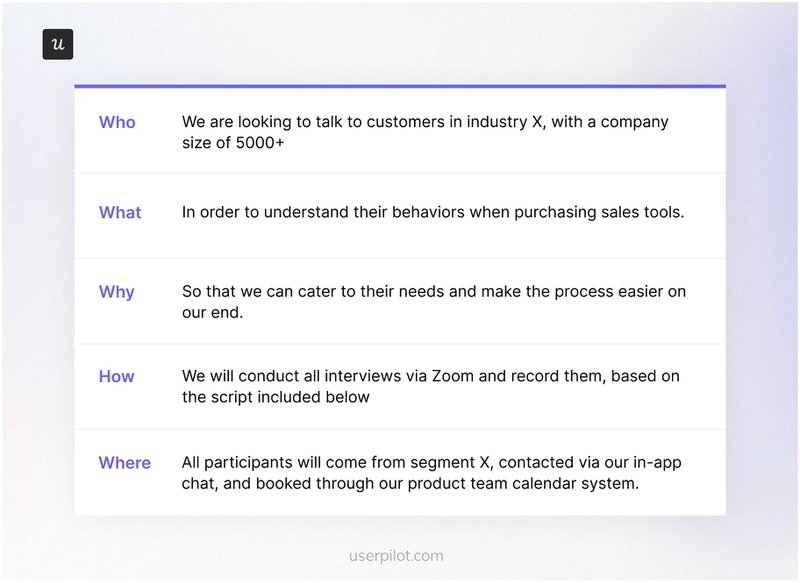
To do this well, answer the core 5 WH questions (who, what, why, how, and where):
Do this:
- Review funnels, feature usage, and drop-off points.
- Collect in-context customer feedback where they hesitate or exit.
- Pair metrics with short interviews or open-ended responses.
Userpilot makes the entire process straightforward. With it, you can trigger micro-surveys or “interview invites” inside the product at friction points. This way, you capture feedback while the experience is fresh and directly tied to a behavior.
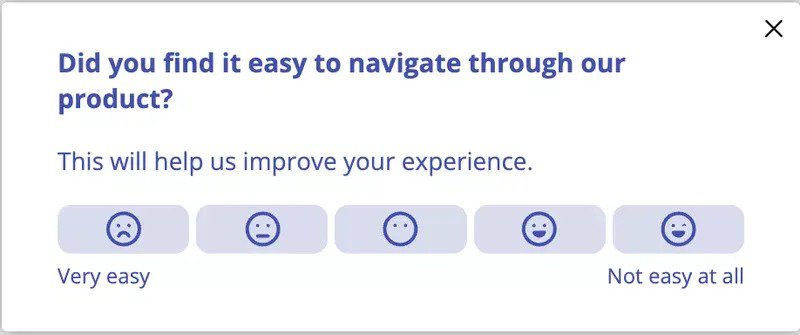
3. Map your riskiest assumptions
Key focus: Make your hidden bets visible.
Every product idea rests on assumptions. Some are harmless. Others quietly sink the entire initiative. Mapping assumptions helps you to surface what must be true for the solution to work, before you invest engineering time.
For example, a product team member might assume “users understand why this feature matters” while another thinks “this workflow fits how we already work.” If either is wrong, adoption stalls and churn follows. This step identifies and tests these risks early.
A simple way to do this is with an assumption map (to rank assumptions by impact and certainty):
| Assumption | Impact if wrong | Certainty |
|---|---|---|
| E.g., users know when to use this feature | High | Low |
| EXAMPLE |
Do this:
- List assumptions about user behavior, motivation, and context.
- Rank each by impact (low to high) and certainty (low to high).
- Prioritize testing high-impact, low-certainty assumptions first.
Userpilot can help here. Use it to test assumptions directly inside your product by segmenting users and triggering micro-surveys. That turns the assumption table from a planning exercise into real evidence that informs what you build next.
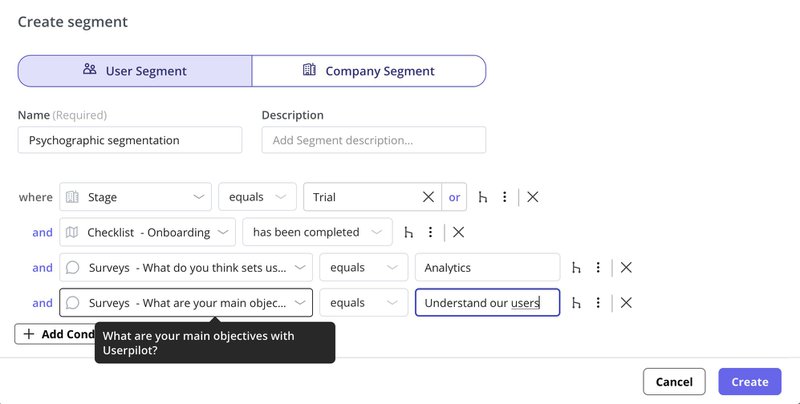
4. Turn insights into sharp problem statements
Key focus: Clearly define the user problem before proposing solutions.
After analyzing data and assumptions, translate what you’ve learned into a focused problem statement. This keeps your team from jumping straight to building features.
Look at Dropbox’s statement, for example. It’s not “need a better file-sharing tool,” but a sharper statement: “users repeatedly forgot USB drives or faced unreliable file syncing across devices without accessible cloud storage options.”
In short, a good problem statement names who is struggling, what they’re trying to do, and why it matters.
Do this:
- Write the problem in one sentence using who + goal + obstacle.
- Avoid feature language or proposed solutions.
- Validate the statement with at least one data point or user quote.
5. Co-create solution ideas with your team
Key focus: Generate options without over-investing in polish.
Once the problem is clear, gather design, engineering, and customer-facing teams to explore multiple ways to solve it. The goal here isn’t to find “the” perfect solution, but to surface options quickly.
For example, if users struggle to reach their first report, one idea might be a guided walkthrough, another a template, and a third a sample dataset. Exploring alternatives early prevents tunnel vision and costly rework later.
Do this:
- Run short ideation sessions with PM, design, and engineering.
- Sketch or outline 2–3 solution options per problem.
- Keep ideas low-fidelity and cheap to discard.
6. Test your ideas with low-lift experiments
Key focus: Validate direction before committing to a Minimum Viable Product (MVP).
Before writing tickets or locking the scope, test whether the idea actually changes user behavior. That’s what low-lift experiments are for. They help you answer “Will this work?” without months of build time.
For example, before building a new reporting feature, you might test a fake-door CTA or a guided walkthrough to see if users even try to reach that outcome.
Do this:
- Run fake-door tests, lightweight walkthroughs, or checklists.
- Measure step-to-step conversion and engagement, not opinions.
- Kill or refine ideas that don’t move key metrics.
Userpilot can help here. Use it to launch in-app experiments (like onboarding checklists or contextual tooltips). Then, track conversion between steps with custom analytics dashboards to validate impact quickly.
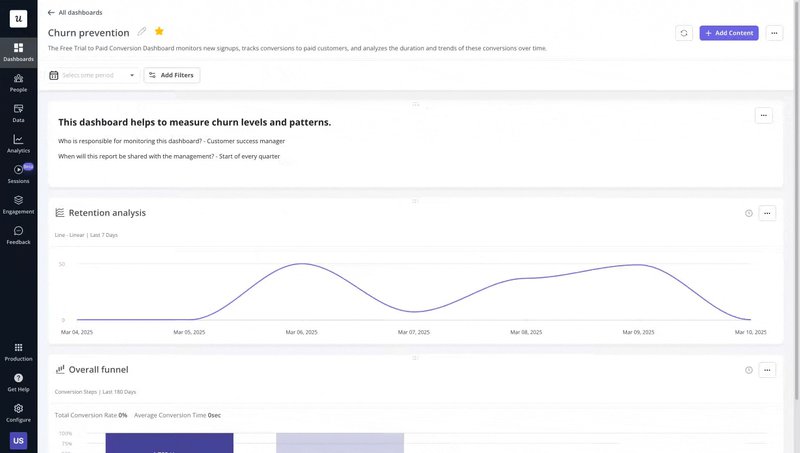
7. Commit, scope, and document the bet
Key focus: Turn learnings into a clear decision and next steps.
Product discovery only creates value when it ends in a decision. So, once experiments point to a winning direction, commit to it and clearly define what you will build and what you won’t.
For example, if testing shows that a guided setup increases activation, the “bet” might be a focused onboarding flow, not a full product redesign.
Do this:
- Decide whether to proceed, pivot, or drop the idea.
- Define success metrics and scope for the first release.
- Document assumptions, risks, and open questions.
Common product discovery mistakes (and how to avoid them)
SaaS product teams repeatedly make these mistakes during product discovery. I’ve included how to sidestep them, so you don’t repeat the same painful lessons.
Product discovery mistake #1: Jumping straight to solutions
This happens when you skip the problem and fall in love with a feature. Suddenly, the team is validating how to build something no one clearly asked for.
If it’s not you, it’s a business stakeholder saying, “We need a new dashboard.” Two sprints later, you’re polishing UI. Then, you realize users still don’t reach their first key action.
These rushed decisions help no one. Stop them early.
Do this instead:
- Pause and write the problem in one clear sentence before ideating.
- Validate the problem with real data and user feedback.
- Explore multiple solution paths before committing to one.
Product discovery mistake #2: Talking only to “happy” users
You keep interviewing power users because they’re easy to reach and pleasant to talk to. Meanwhile, users who churned or rage-clicked the import button never get a voice.
Of course, your discovery sounds great with lots of “Love the product!” However, activation stays flat, and churn increases.
The problem? Your focus. Happy users are already succeeding. The real blockers sit with users who have never reached value.
Do this instead:
- Proactively reach out to stalled, at-risk, and churned users.
- Prioritize conversations with people who struggled or hesitated.
- Watch where they get stuck to uncover where the product actually breaks.
Product discovery mistake #3: Running interviews like surveys
You turn interviews into a checklist of leading questions: “Do you like this feature?” “Would this solution help?” “Rate this from 1–10.”
Sure, users will politely agree, and you’d walk away with false confidence. As a result, your notes are full of high scores and vague approval. Yet once the feature ships, usage is low.
Your mistake: You validated opinions, not customer behavior or real problems!
Do this instead:
- Ask users to walk you through real moments.
- Use prompts like “Tell me about the last time you tried to do X” or “What happened right before you gave up?”
- Then listen for friction, workarounds, and hesitation, not compliments.
Product discovery mistake #4: Over-documenting the process
Discovery turns into a paperwork exercise. Endless Notion pages. Overly detailed decks. Perfectly formatted frameworks.
Meanwhile, engineers wait, momentum drops, and the team loses knowledge of the original problem. Yet… somehow, after all that effort, no one is closer to making a decision. Stop.
Do this instead:
- Document just enough to decide.
- Capture the problem, key assumptions, evidence, and the decision in one place.
- Move forward and accelerate delivery, as discovery should.
Product discovery mistake #5: Operating like a feature factory
You’re shipping constantly, but learning nothing. Now, discovery gets reduced to feeding a roadmap that rewards output, not outcomes.
Even worse, success is measured by “on time” and “on budget.” There is no regard for whether retention improved or users actually changed behavior.
If you nod in agreement to more than two of these, you’re officially running a feature factory. Discovery has broken down.
Do this instead:
- Reframe your roadmap around problems and outcomes, not features.
- Tie every initiative to a clear success metric (activation, retention, expansion).
- Involve engineering early so teams understand why they’re building, not just what.
Make learning your default mode
Product discovery works when learning, not shipping, becomes the default. Done right, you validate ideas earlier, reduce churn risk, and avoid wasting cycles on features nobody uses.
When you listen, test, and decide with evidence, the payoff is real:
- Spotify turned a discovery problem (too much choice) into Discover Weekly by testing recommendation signals before scaling.
- Slack validated internal communication pain through interviews and betas before becoming a daily habit for teams.
- Dropbox focused on one sharp problem (file access anywhere) and let discovery guide every early decision.
That’s the bar.
Userpilot helps you build this learning loop directly into your product. You have funnel analysis and session replays to spot friction, in‑app surveys to capture intent in the moment, segmentation to test customer needs’ assumptions, and contextual flows to validate potential solutions before you fully commit.
Book a demo now and make user-persona-based product decisions!
FAQ
What are NPD best practices?
New Product Development (NPD) starts with validated user problems, not feature ideas. And while at it, test assumptions early with lightweight experiments. Also, involve engineering and design from day one, and most importantly, measure product success by outcomes like activation or retention.
How long should product discovery take?
There’s no fixed timeline. An effective product development process can take days for small bets or weeks for bigger risks. The rule of thumb: spend just enough time to reduce the biggest uncertainty before committing engineering effort to the product discovery phases.
How to start product discovery?
Begin by identifying a clear problem area using data such as churn and drop-off metrics, plus valuable insights from support tickets. Then talk to users experiencing that problem, map assumptions, and test the riskiest one with a quick experiment.
Who owns product discovery?
Product discovery is led by the product manager, but it’s a product management team sport. Designers, engineers, customer success (and sometimes sales) contribute insights that shape product strategy.
What is product discovery vs. product delivery?
Product discovery means deciding what to build for your target audience. The goal here is fast learning, conducting user research, validating hypotheses, and killing bad ideas before they reach the backlog.
On the other hand, product delivery is the process of building it. The goal is shipping high-quality, scalable, usability tests, and reliable code. It focuses on the solution space.
What is the Opportunity Solution Tree (OST)?
Popularized by Teresa Torres, it is a non-linear, creative process that forces you to link every feature back to business value. Hence, you align with stakeholders and silence the “highest paid person’s opinion” (HiPPO) with logic.
About the author

![What are Release Notes? Definition, Best Practices & Examples [+ Release Note Template] cover](https://blog-static.userpilot.com/blog/wp-content/uploads/2026/02/what-are-release-notes-definition-best-practices-examples-release-note-template_1b727da8d60969c39acdb09f617eb616_2000-1024x670.png)