Your Guide to SaaS Welcome Surveys (Best Practices + Examples)

![Your Guide to SaaS Welcome Surveys (Best Practices + Examples]](https://blog-static.userpilot.com/blog/wp-content/uploads/2023/04/Your-Guide-to-SaaS-Welcome-Surveys-Best-Practices-Examples-1024x670.png)

A welcome survey is your first real conversation with the user; its core function is to help you capture valuable insights about who the user is and what they hired your software to do. From there, you can shape the onboarding experience based on their role, company size, and experience level.
But users rarely get that far. Hiver cites that nearly 40%–60% of free-trial users try the product once and never return, and only 2.7% remain active after 30 days. Most users never reach that ‘Aha!’ moment.
Poorly designed welcome surveys make this worse.
So, in this guide, I’ll break down how modern SaaS companies approach welcome survey design, with real examples of what works and how you can apply the same.

What is a welcome survey?
A welcome survey is a short questionnaire shown to new users immediately after they sign up for a SaaS product. Their primary purpose is to identify the user’s job-to-be-done (JTBD), personalize the onboarding flow, and segment users based on their intended use cases, enabling faster time to value.
A welcome survey helps you:
- Trigger a personalized user experience based on the user’s current role or use case.
- Prioritize product development strategy based on what users actually need.
- Feed CRM and lifecycle campaigns with first-party user data.
- Qualify and prioritize high-potential leads from the first login.
In real-world SaaS onboarding flows, these benefits translate into better lead qualification, lower churn through effective churn prevention, and faster activation
How Unolo used welcome surveys to qualify leads and reduce churn with Userpilot
Unolo, a field service management platform, was struggling with a month-on-month churn rate of 3%. Their existing feedback system relied on emails and chat support, both of which required user effort and consistently produced low response rates. Subhash Yadav, product marketer at Unolo, shared,

They needed a more efficient way to collect feedback directly inside the product.
To fix this, Unolo switched to Userpilot and built a multi-field welcome survey that appeared when new users logged in for the first time. By tracking qualitative responses, the team was able to identify and prioritize high-potential leads from day one, converting the right users into paying customers.
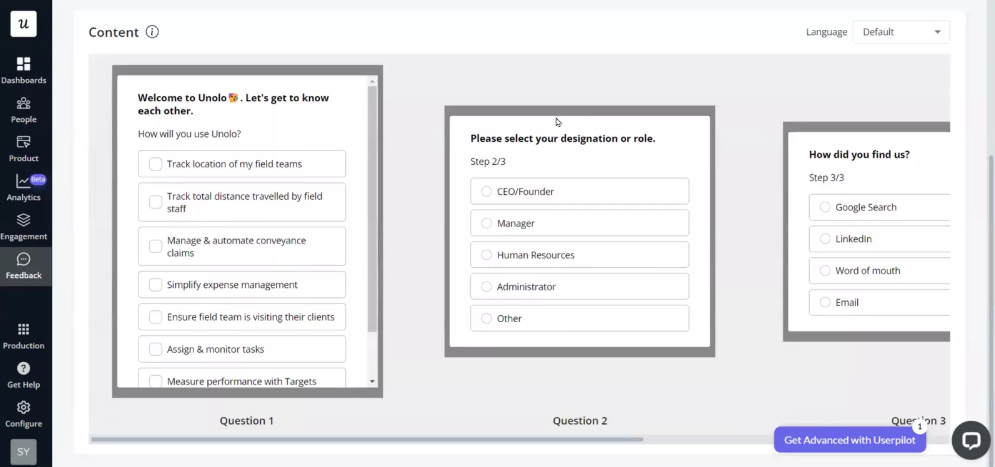
Alongside the welcome survey, they ran in-app NPS surveys, post-implementation surveys, and feature feedback surveys to track sentiment, identify users who need support, and measure feature adoption.
The results were significant. Unolo reduced churn by 0.5% to 1% and achieved a 44% survey completion rate, well above expectations.

Unolo’s approach is one example, but welcome surveys are designed differently depending on the product and what teams are trying to optimize.
7 Best examples of SaaS welcome surveys and what you can steal from them
To understand what strategies actually work, I signed up for some of the top SaaS products and went through their welcome surveys myself.
1. Canva uses the Jobs-To-Be-Done framework to create instant relevance
When I signed up for Canva, the welcome screen asked me: “What will you be using Canva for?”
The options were clearly framed around real use cases: personal projects, work and business, education, and nonprofit, each with a short description.
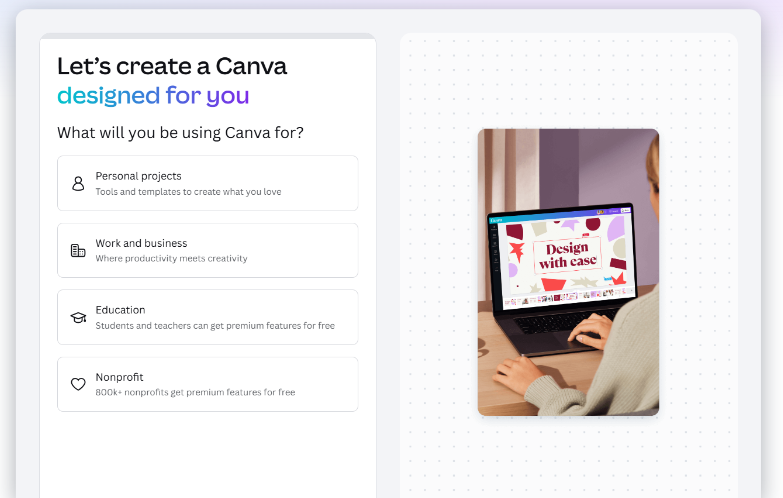
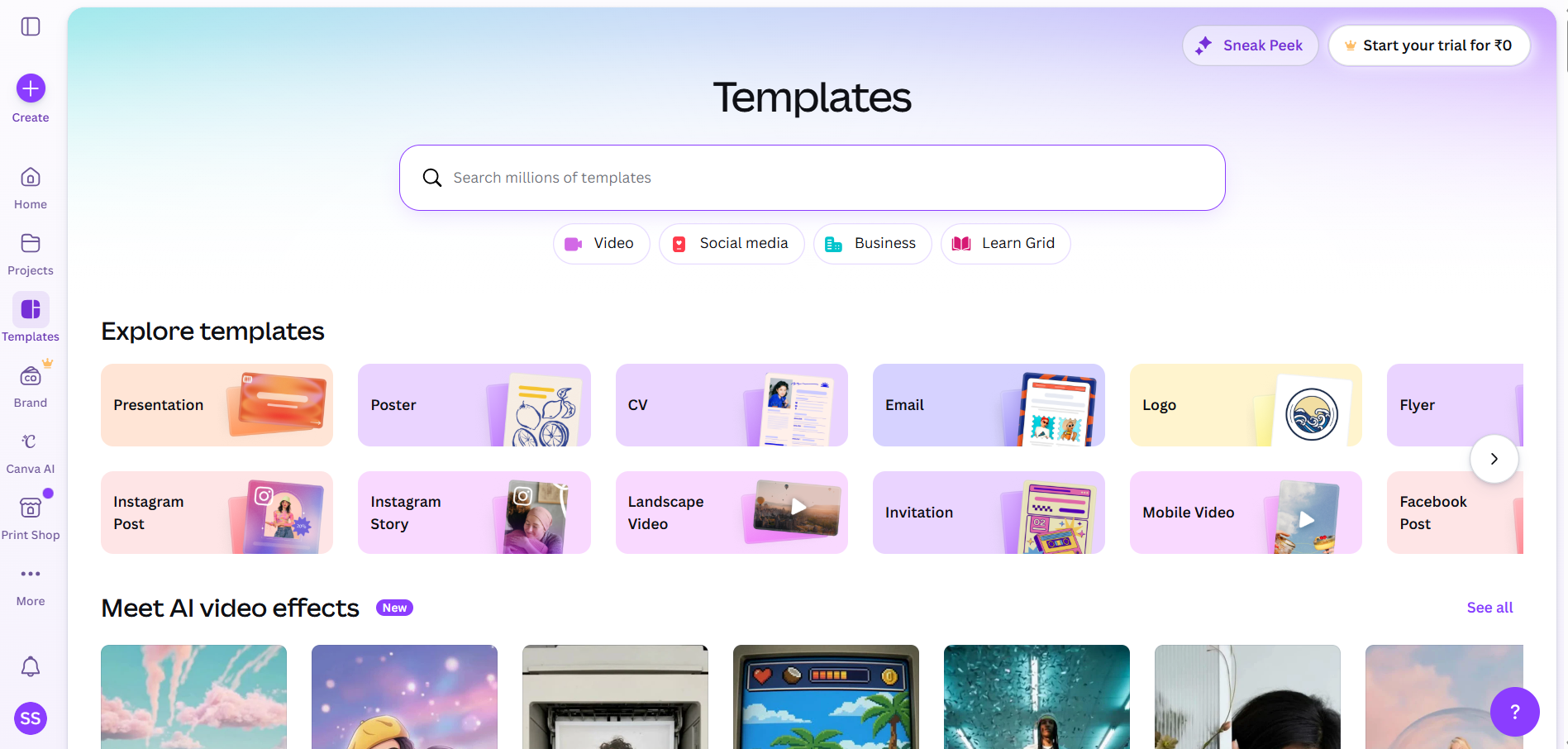
I chose “work and business,” and Canva took me straight to a template library tailored to that use case with millions of other options. It removed the “what do I do now?” moment and replaced it with something actionable.
What works here:
- For me, the survey reduces the cognitive load and accelerates time-to-value (TTV) since I can start creating immediately.
- The subtle use of micro-value propositions, like “Students and teachers can get premium features for free” and “800k+ nonprofits get premium features for free,” nudge users towards industry-specific promotions.
- Just one question facilitated real-time user segmentation, placing me in a business cohort and shaping the user onboarding experience from the start.
With Userpilot’s segments feature, you can replicate this customer segmentation strategy without code. Group users based on their data, in-app behavior, and events, and automatically route each segment to a tailored onboarding flow.
For example, a user who signs up to track feature adoption experiences a different flow than one who signs up to run A/B tests.
Key takeaway: According to Hick’s Law, decision time increases with every additional option. Start your welcome survey with a JTBD-focused question to determine user intent and limit options to specific use cases.
2. Airtable uses AI-led progressive onboarding to personalize user setup
I was greeted by Omni, its AI co-builder on the welcome page, which asked me focused, context-building questions that gradually shaped my setup.
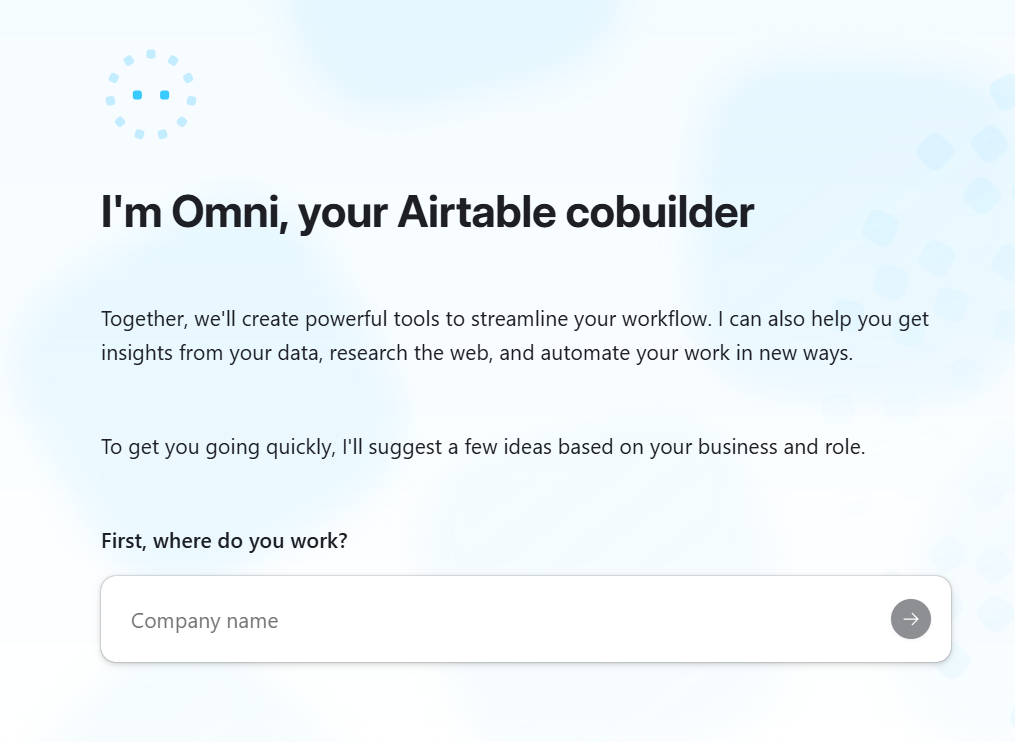
It started simple: “Where do you work?” then moved to “What industry is your company in?” and “Which team are you on?” After answering all three questions, I landed on a screen that had a fully written, role-specific use case description for a feature request management system.
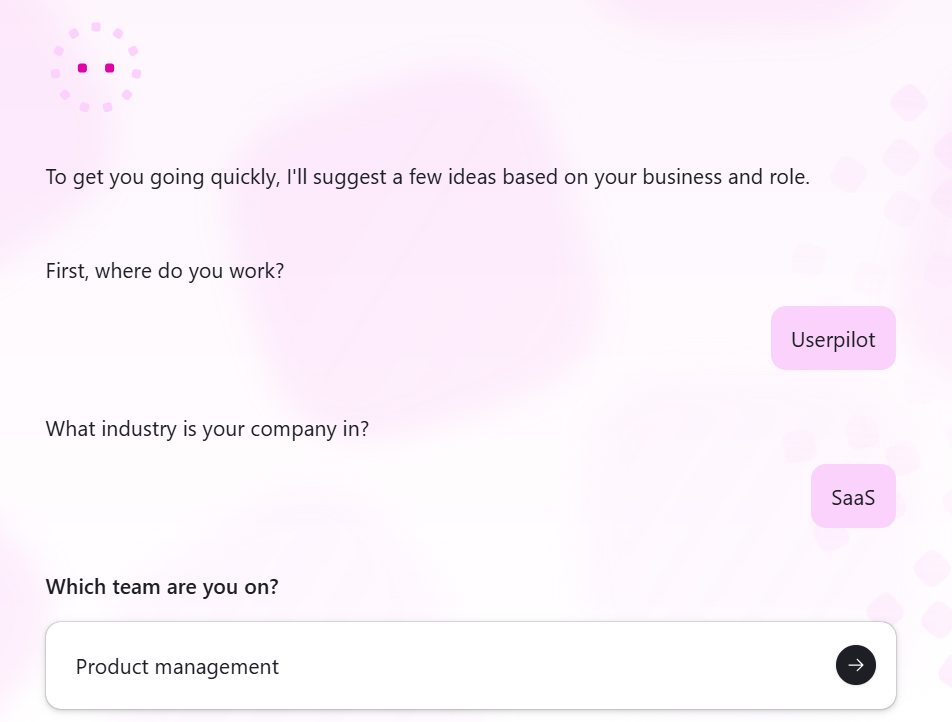
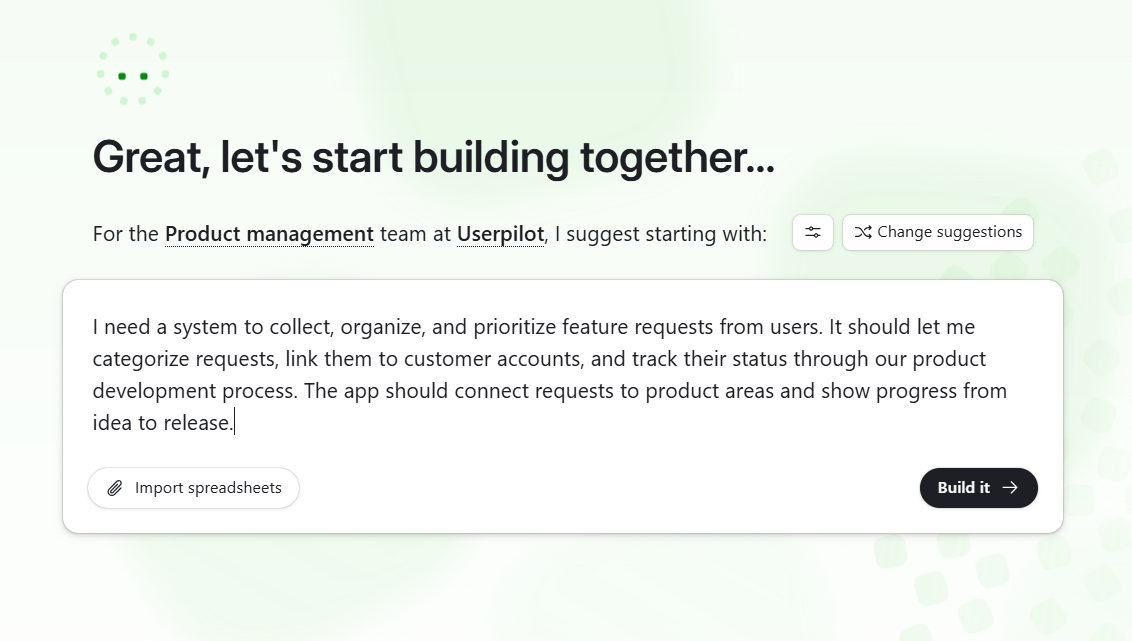
Three questions were all it took to generate a contextually relevant starting point using my exact company name, industry, and team.
What works here:
- Captures high-intent, high-signal data (company, industry, team) to understand my context early.
- Uses thoughtful responses for AI-driven personalization to generate a role-specific interface.
- Removes the blank-canvas problem by providing a structured, near-ready starting point.
Kontentino, a social media management tool, implemented this same short, focused welcome survey within its signup process using Userpilot.
Natália Kimličková, the then product marketer at Kontentino, came to Userpilot with three goals: increase product adoption, announce new feature releases in-app, and build their first user onboarding flow.
Kontentino leveraged Userpilot to build a guided interactive walkthrough with a tailored onboarding process. They created a welcome survey titled “Customize your Kontentino experience,” and asked three focused questions to understand new users and their goals.
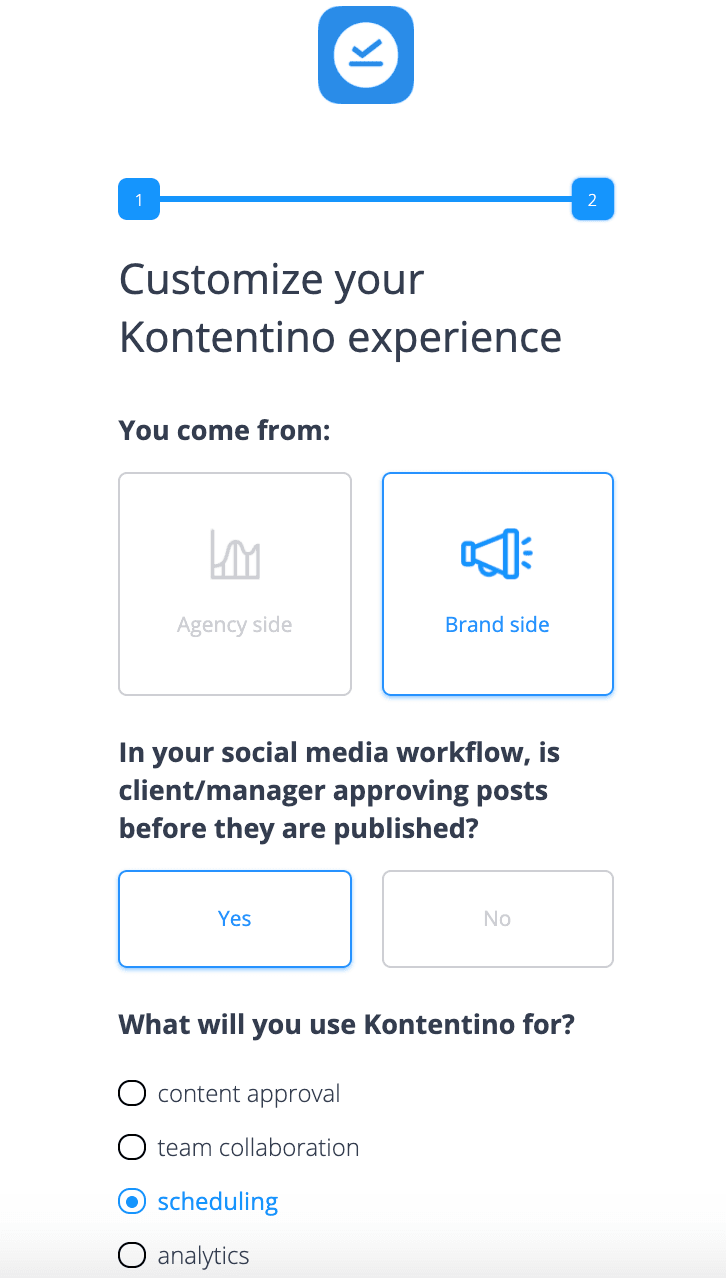
The survey responses allowed Kontentino to segment users and personalize the customer journey for specific user personas. Within the first month of implementation, Kontentino achieved a 10% increase in new user activation.
Key takeaway: Cialdini’s principle of commitment and consistency shows that each answer is a small commitment that increases user investment. Structure your welcome survey as a conversation, where each question builds on the last and leads users to a personalized starting point.
3. Miro reduces cognitive load through dynamic progressive disclosure
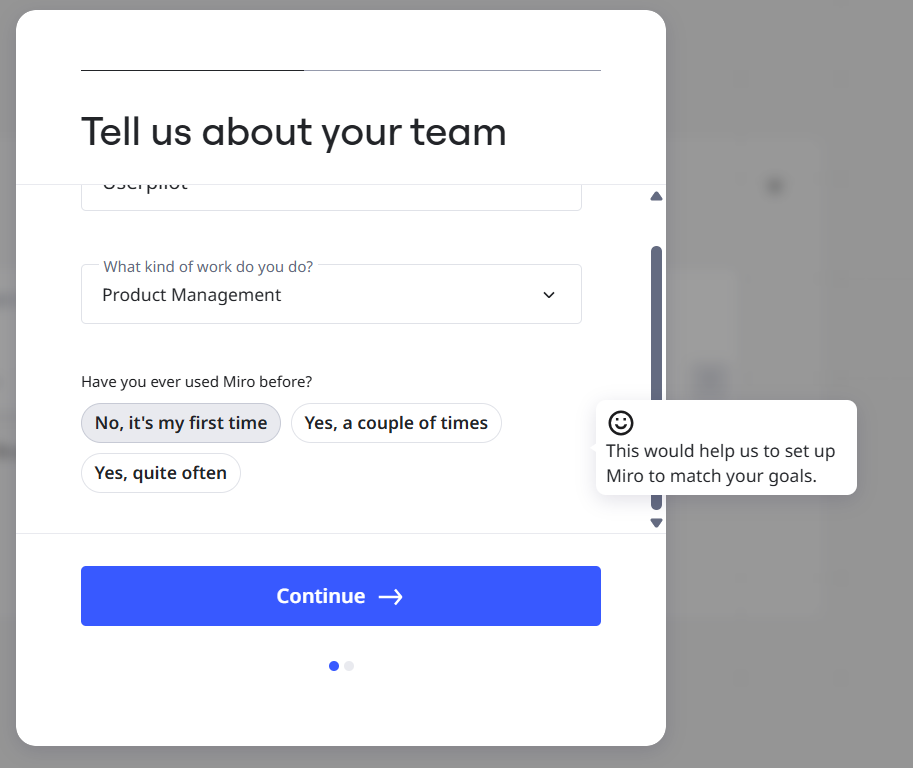
Miro’s survey starts with a simple prompt: “Tell us about your team.”
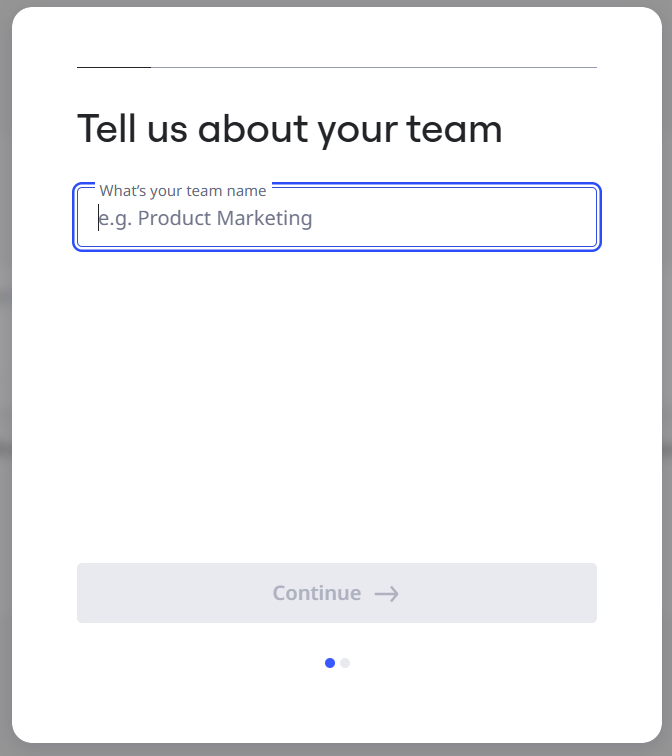
Once I answered it, new fields appeared dynamically within the same screen. What stood out was the inline guidance. Small tooltips like “This would help us to set up Miro to match your goals” appeared contextually, explaining why each input mattered without interrupting the flow.
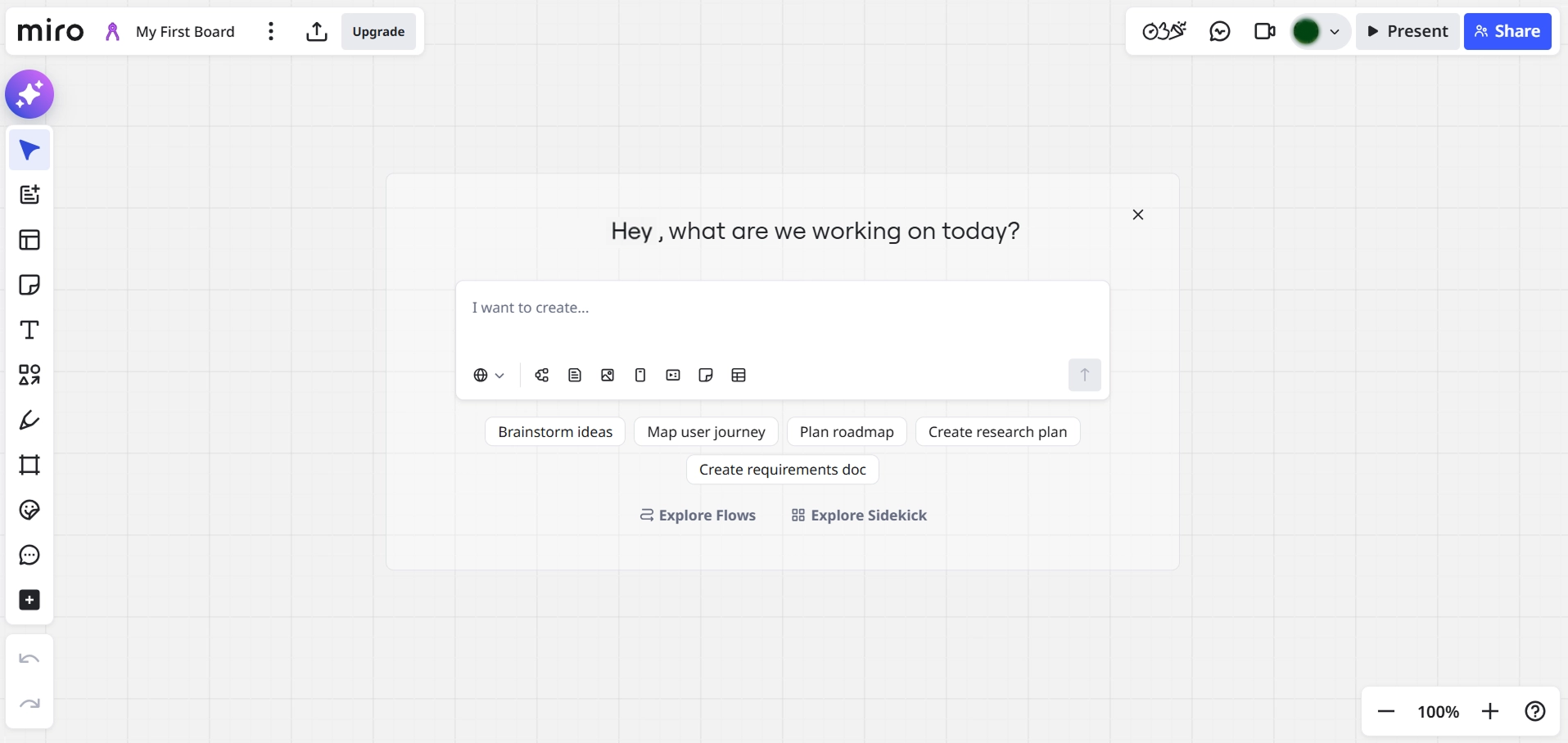
Miro’s dashboard opened as a blank canvas titled “My First Board.”
What works here:
- Progressive disclosure collects all data points within a single screen, reducing cognitive load and increasing completion rates.
- Contextual tooltips remove hesitation and build trust by making every question feel intentional.
- A two-dot progress indicator shows that users are making progress, triggering completion bias at each step.
What Miro achieves through progressive disclosure can be built in Userpilot’s survey builder using conditional logic. With Userpilot’s if-else logic, you can create surveys that adapt in real time, showing or skipping questions based on the user’s previous responses.
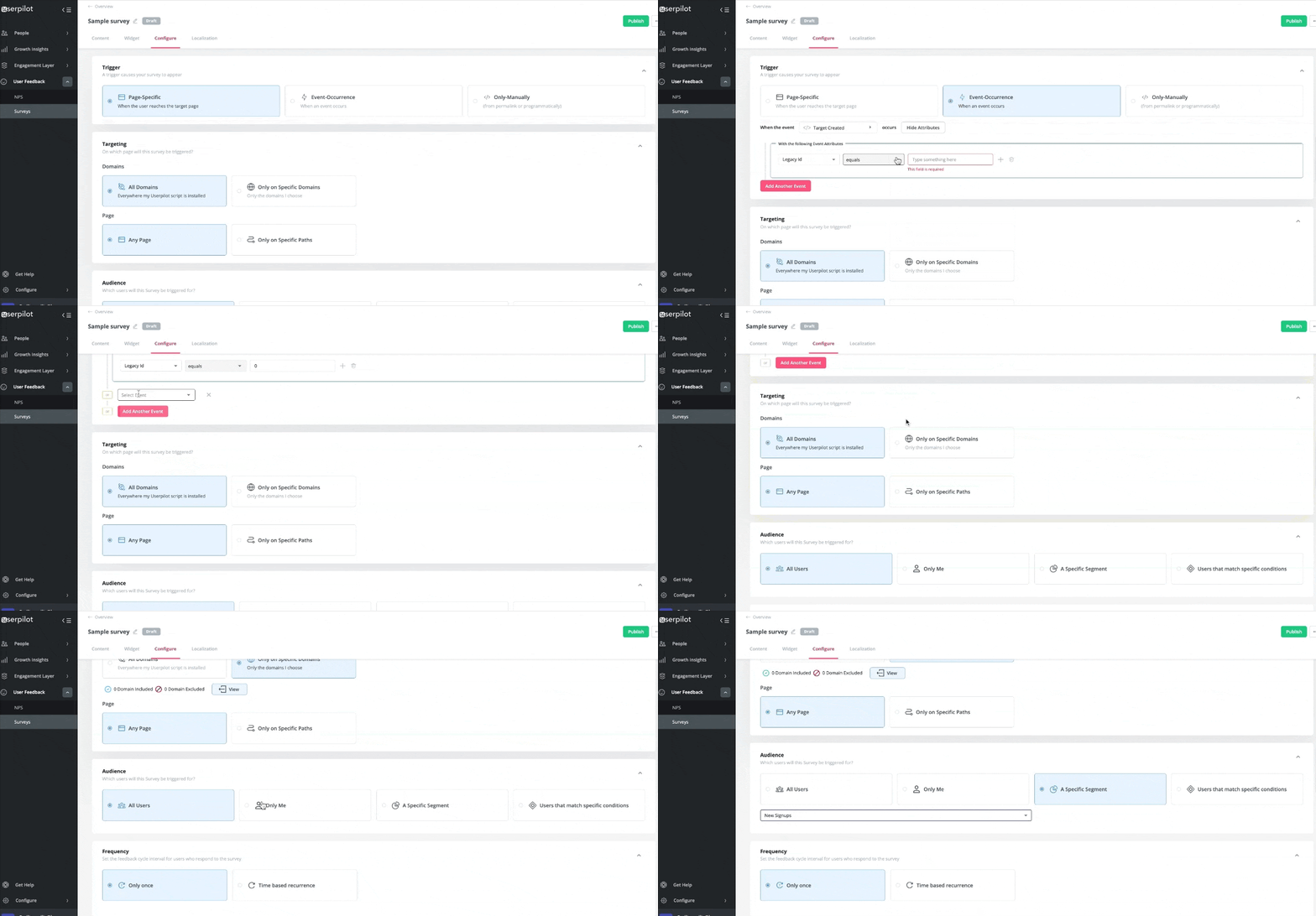
For example, a user who selects “Work” is shown a follow-up role question, while a user who selects “Personal” skips it entirely.
Key takeaway: Nielsen Norman Group found that progressive disclosure improves three of usability’s five components: learnability, efficiency of use, and error rate. Reveal questions one at a time instead of showing the full survey upfront.
4. Slack reduces time-to-value by instantly contextualizing the workspace
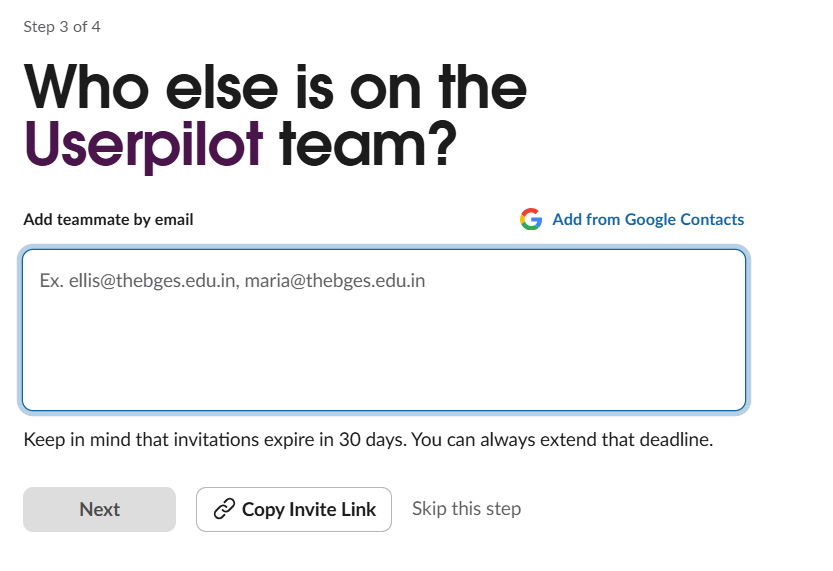
Slack uses a multi-step form to reduce time-to-value. There’s no intent question, no role selection, no use case picker. Instead, you get four steps: name your workspace, add your name, invite teammates, choose a plan, and you’re in.
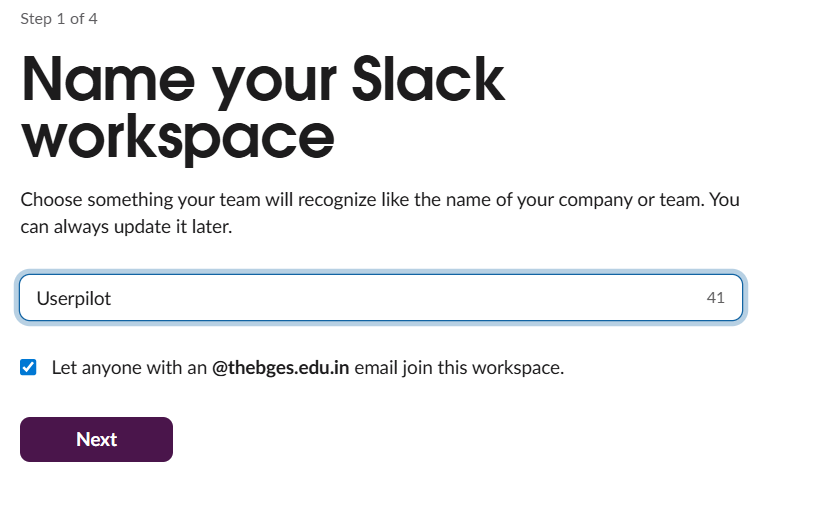
Every screen includes microcopy that explains why each input mattered, making it easier to move forward. Also, that single checkbox on step one handled segmentation, allowing anyone with a matching domain to join the workspace without a manual invite.
After completing the survey, I ended up in a workspace with starting points like “Run a project,” “Chat with your team,” or “Collaborate with external partners.”
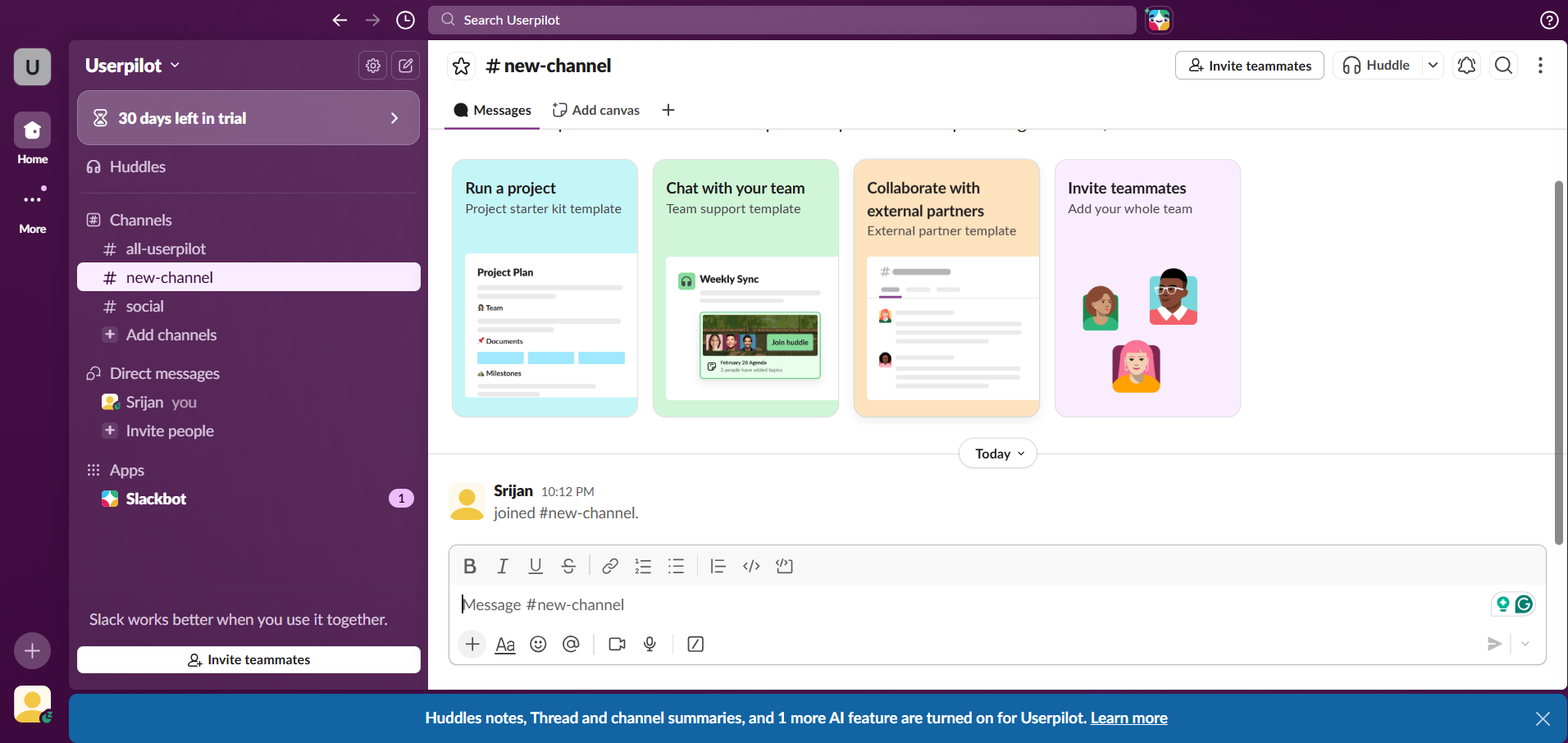
What works here:
- Email domain auto-discovery handles team segmentation automatically, without additional inputs.
- Workspace naming contextualizes the environment instantly, so the workspace itself reflects the team or company without extra questions.
- Embedding the teammate invite at step three turns collaboration into a setup action.
To optimize multi-step survey performance, Userpilot’s survey analytics helps you track completion trends and drop-offs across specific user segments to understand whether your survey length is helping or hurting activation.
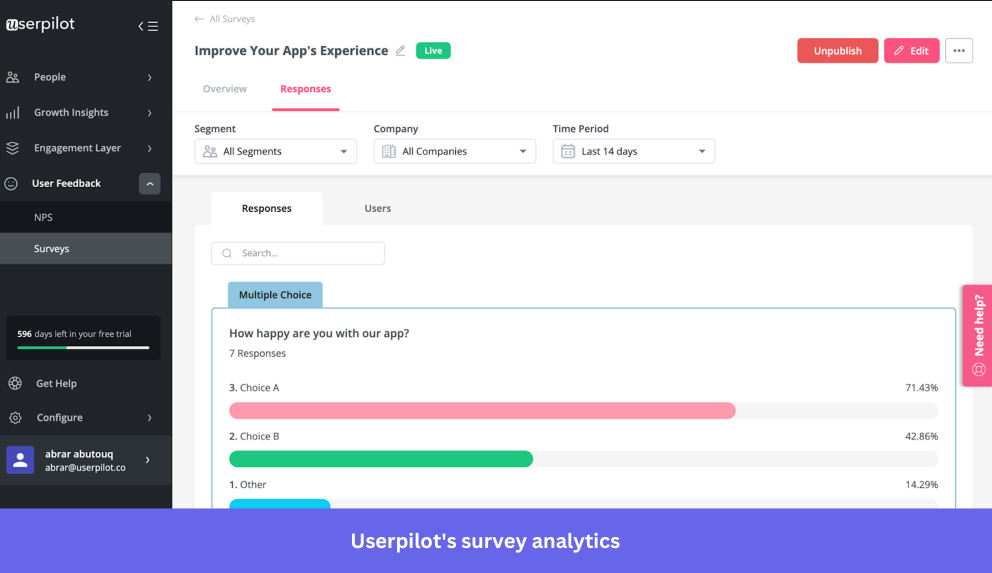
For example, if completion drops between step two and step three, you can use the analytics data to restructure the survey before it increases the churn rate.
Key takeaway: With 48% of users willing to spend just 1–5 minutes on a survey, focus only on the questions needed to contextualize the workspace.
5. Figma minimizes friction through role-specific scaffolding
From the beginning, it felt like I was already inside Figma.
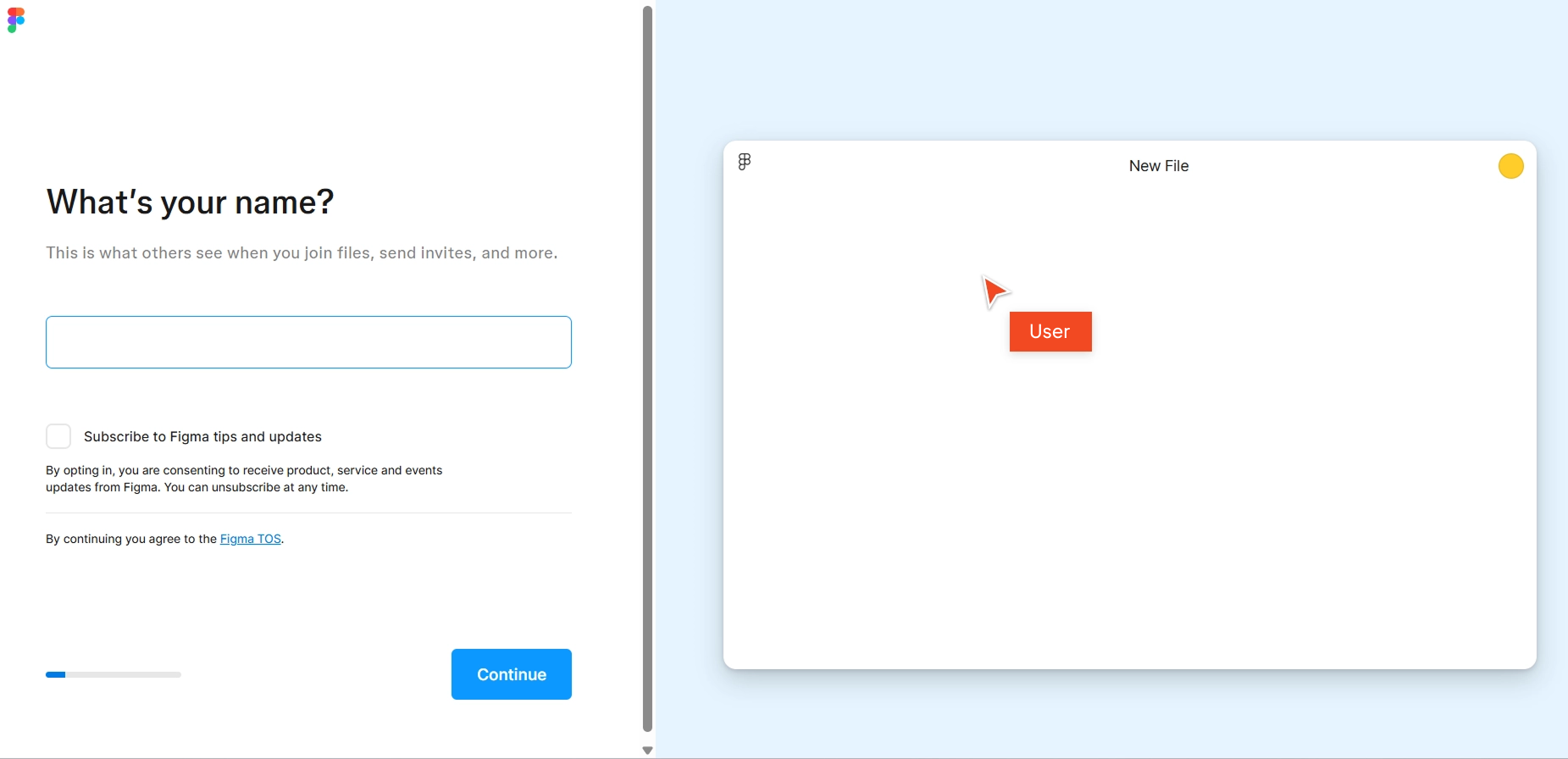
Instead of static questions, each step updated a live canvas on the right. For example, when I entered my name, it instantly appeared in the file title. When I selected “Work” and “Product management,” the canvas displayed flowchart-style diagrams relevant to my role.
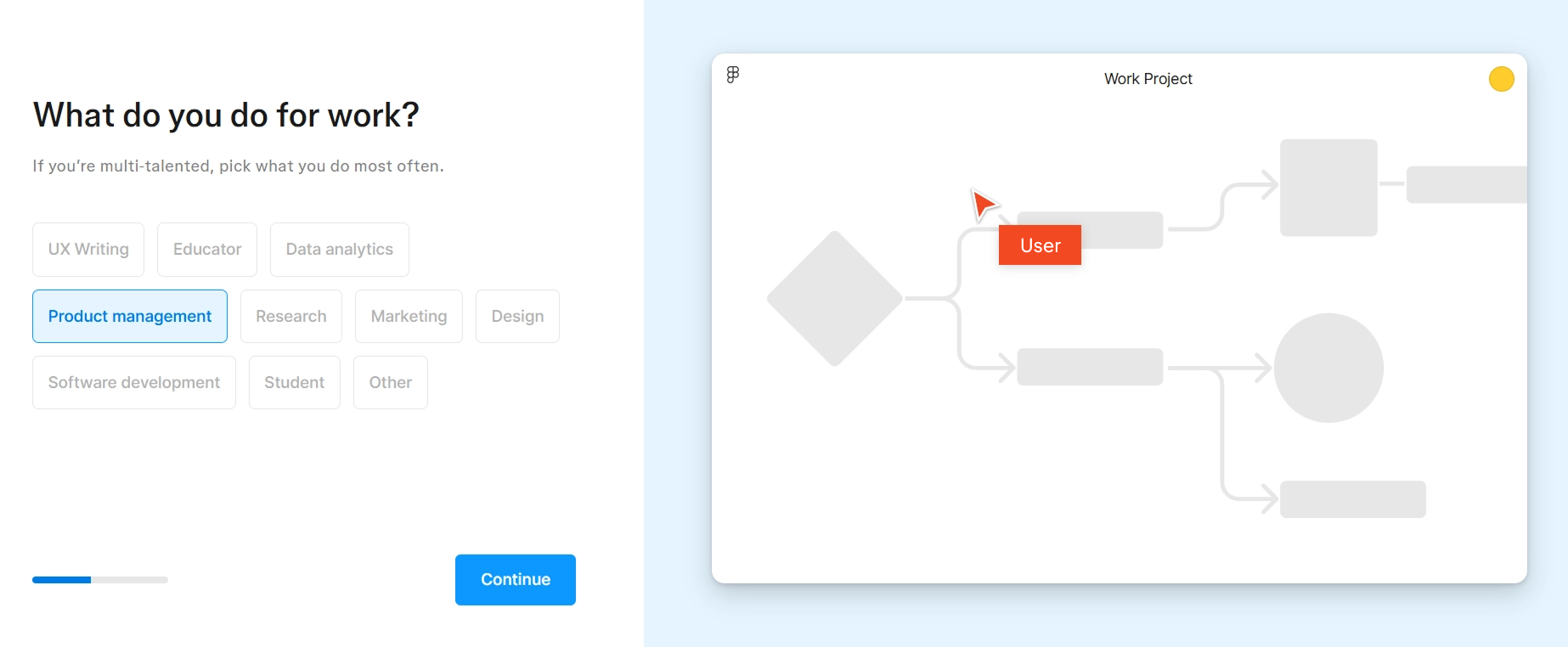
The final screen had three plan options: Starter, Professional, and Organization. Selecting “Starter” led me into a pre-built workspace with starter files, a team library, and an AI prompt to begin creating immediately.
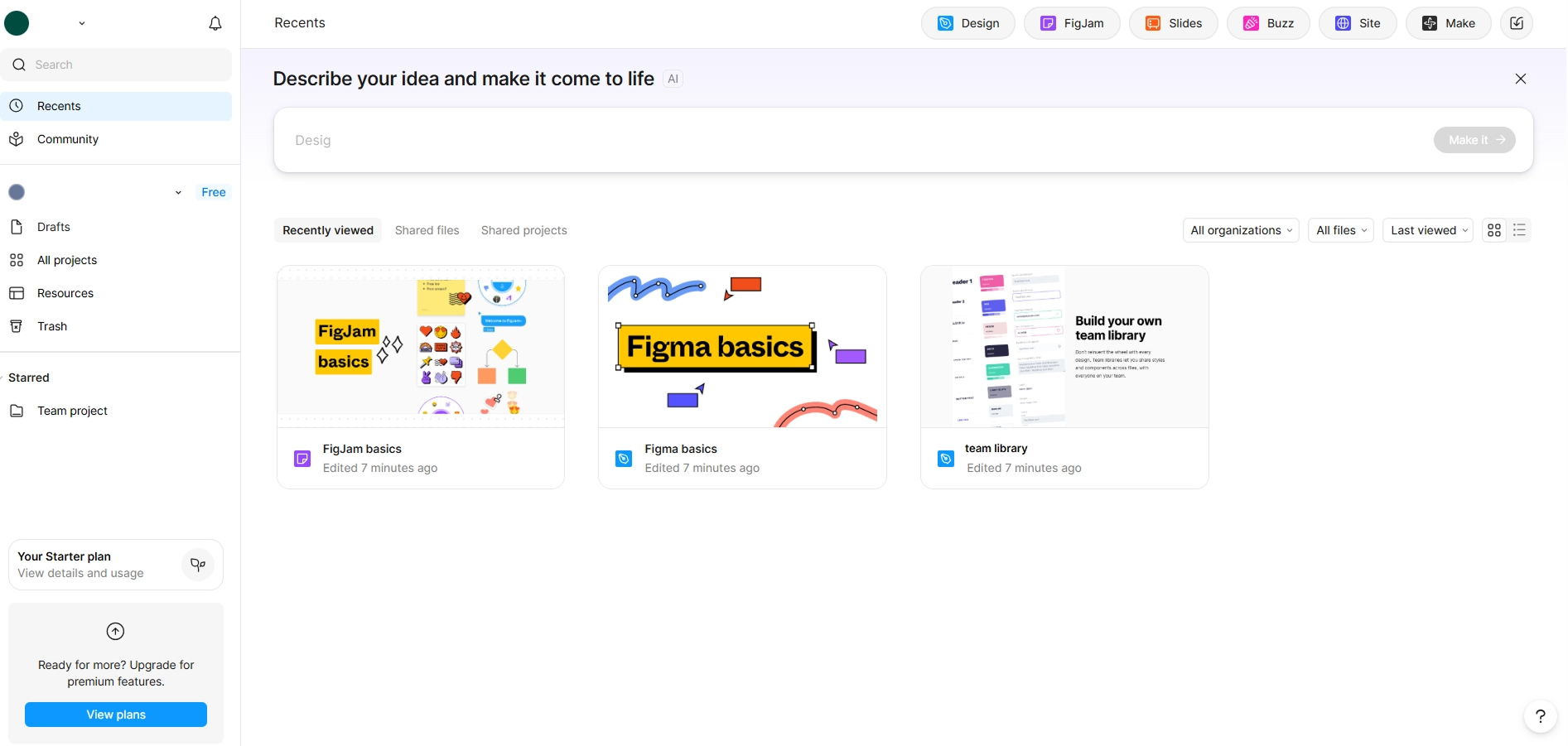
What works here:
- The live canvas preview updates with every answer, visualizing progress and reducing cognitive load.
- The progress bar at the bottom grows with each answer, triggering the Endowed Progress Effect.
- Multi-layered survey questions build role-specific context across intent, role, organization size, and experience, enabling real-time segmentation.
With Userpilot, you can turn these survey responses into segmented feature discovery. Target native tooltips at the individual level, so advanced features provide contextual help only to expert users. These tooltips appear on interaction with a specific feature, keeping the experience non-intrusive.
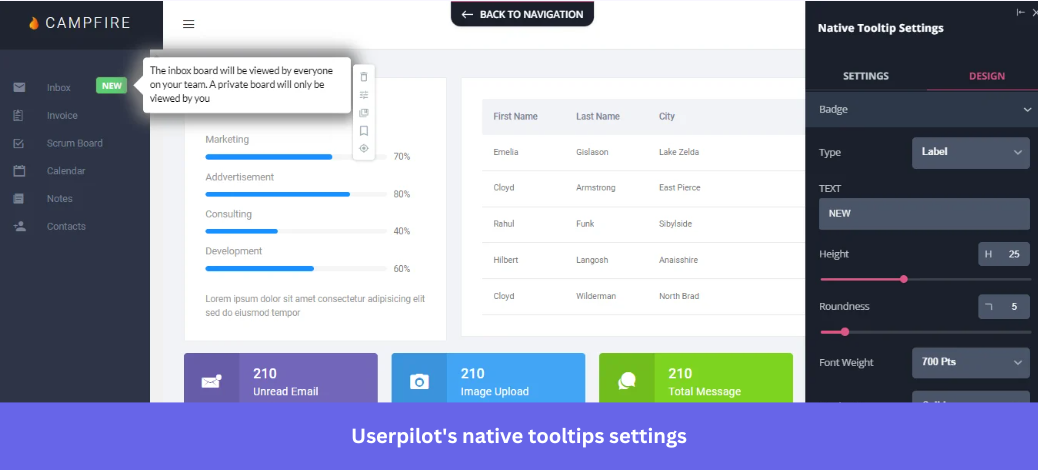
Key takeaway: Scaffolding theory says the right level of guidance should match the user’s existing knowledge and skills. Gather valuable insights about users’ experience in your welcome survey and adjust the onboarding depth accordingly.
6. Monday bridges the blank canvas problem through workflow-specific templates
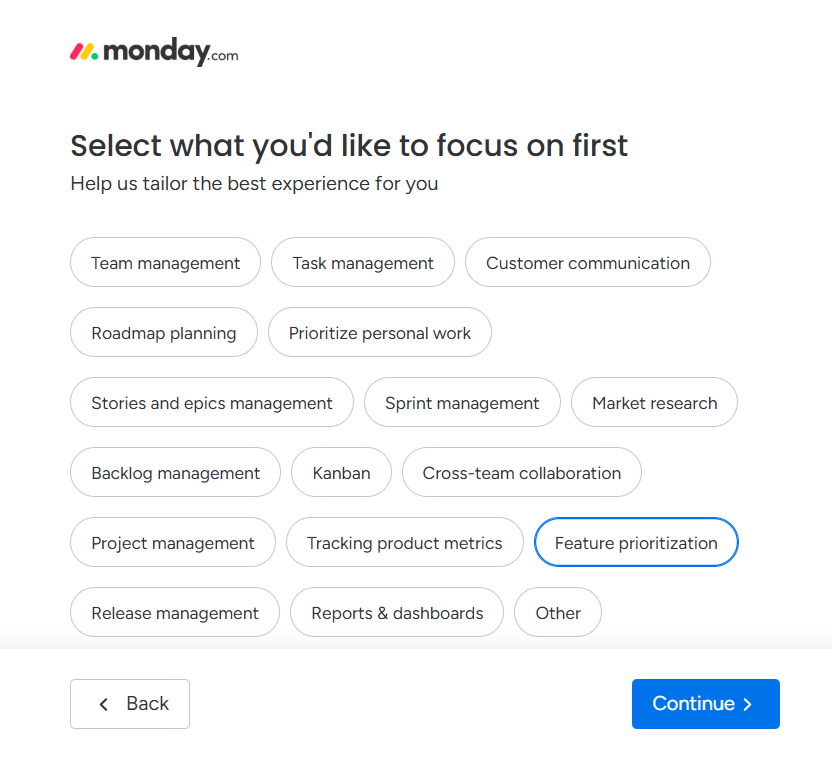
Monday’s welcome survey felt a bit long, but it shaped the setup around my use case. The first question focused on intent, then narrowed it down into specific workflows.
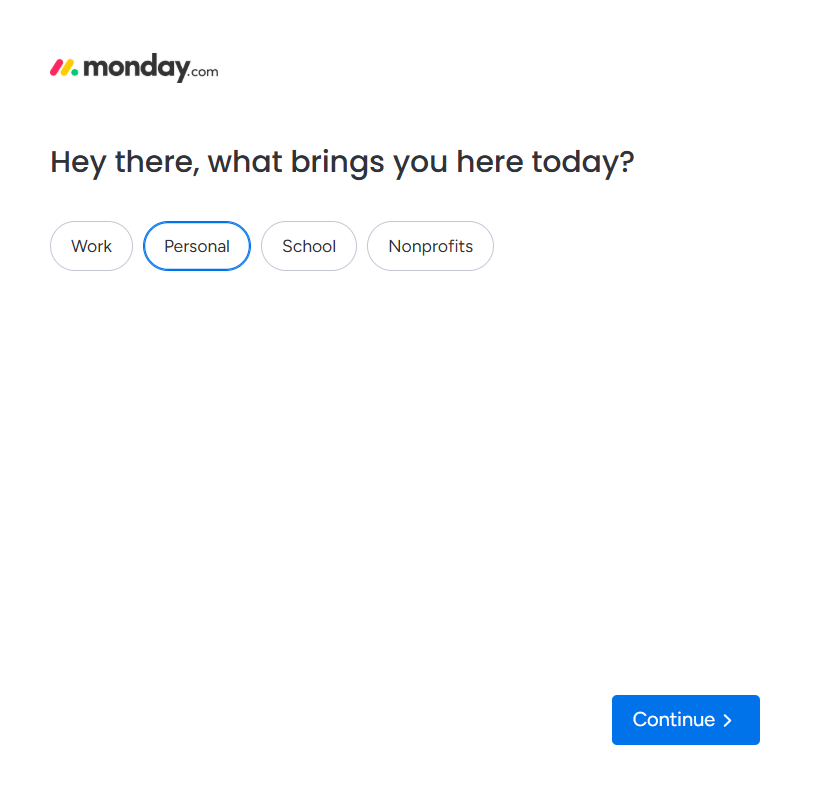
As I moved through the survey, I was guided through what I wanted to manage first, what I wanted to focus on, naming my board, selecting relevant columns, choosing a view layout, customizing dashboard widgets, and listing my projects.
Right after login, Monday had built a fully configured “Product roadmap” workspace with my tasks, selected columns, and even sample data, along with a ready-to-use dashboard.
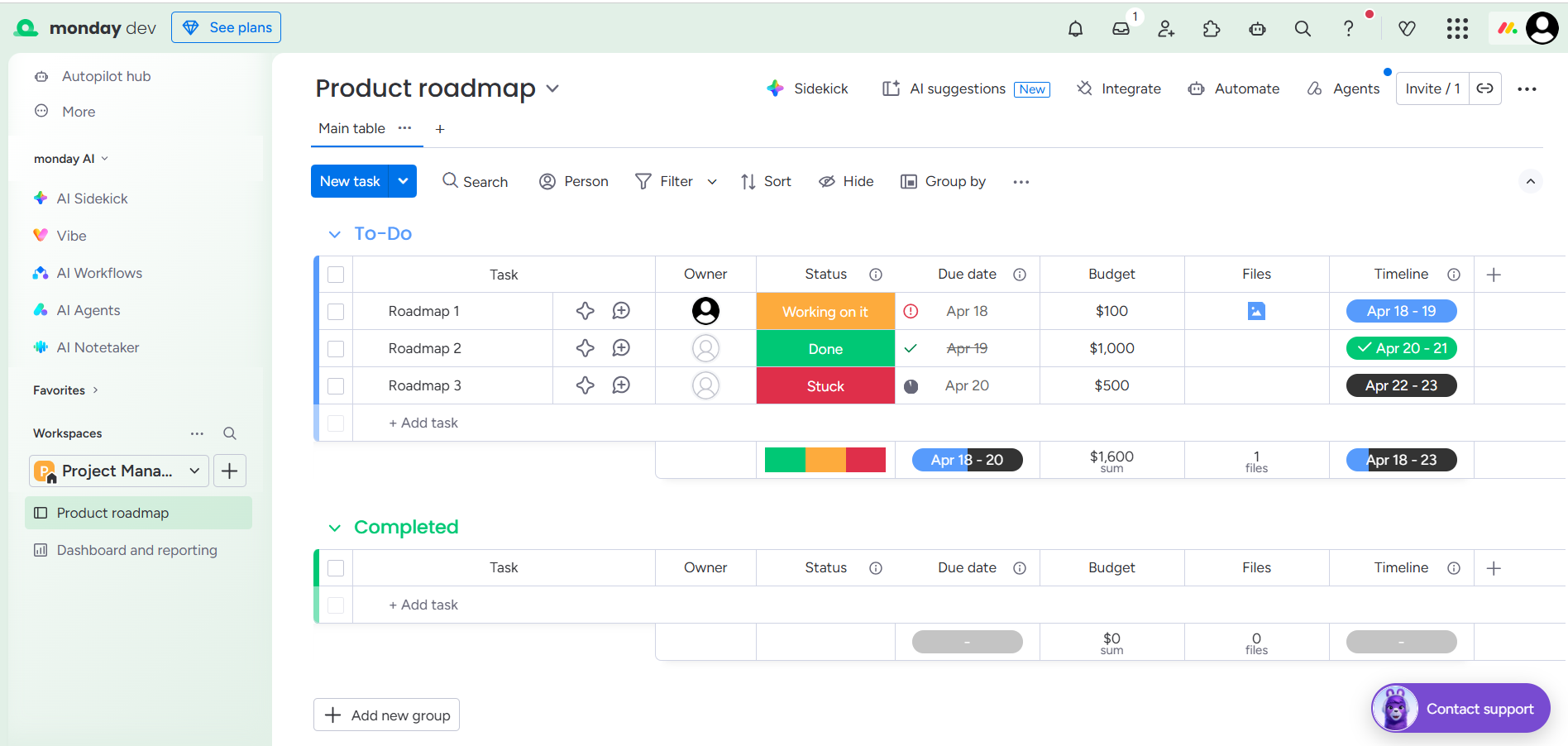
What works here:
- Collects granular inputs like columns, views, and project names to configure a usable workspace.
- Workflow-specific questions like focus area, column types, and view layout replace the blank canvas with a preconfigured board.
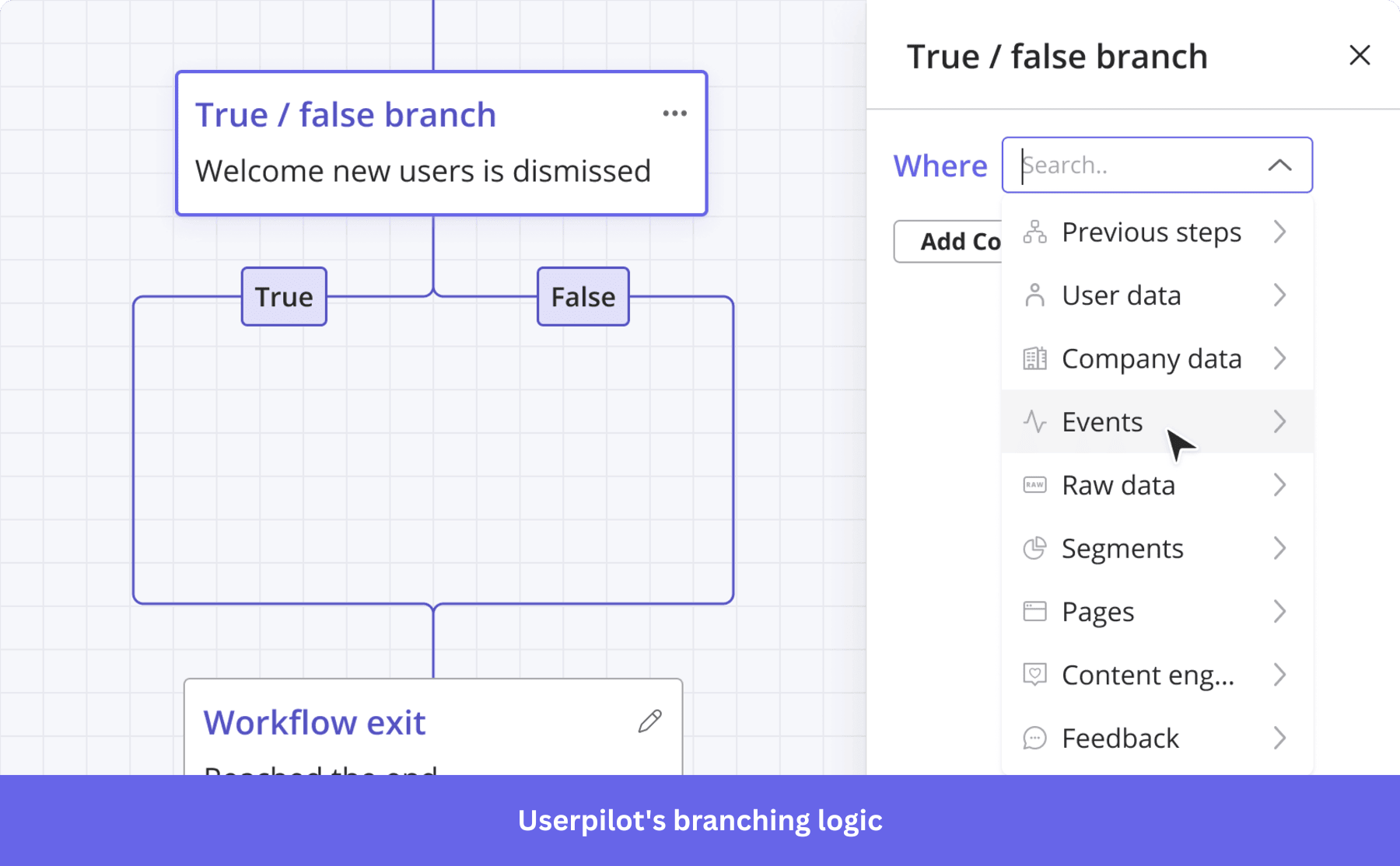
- Uses branching logic to adapt the flow in real time and avoid irrelevant questions.
Userpilot takes this further by turning survey responses into branching onboarding flows that adapt in real time to each user’s path. Here’s how:
- Flow logic: Builds adaptive welcome surveys where each step responds to the user’s previous interaction, so users see questions relevant to their use case.
- Workflows: Userpilot splits the onboarding journey into separate paths for each segment using true/false branching. Each branch triggers a different set of flows, checklists, and in-app experiences, all mapped on a single visual canvas.
Key takeaway: The blank canvas is the Paradox of Choice in visual form. You have infinite possibilities with no clear starting point. Ask the right questions to collect setup inputs upfront, ensuring users land in a workspace already configured for their use case.
7. Loom simplifies the “Aha!” moment through persona-based paths
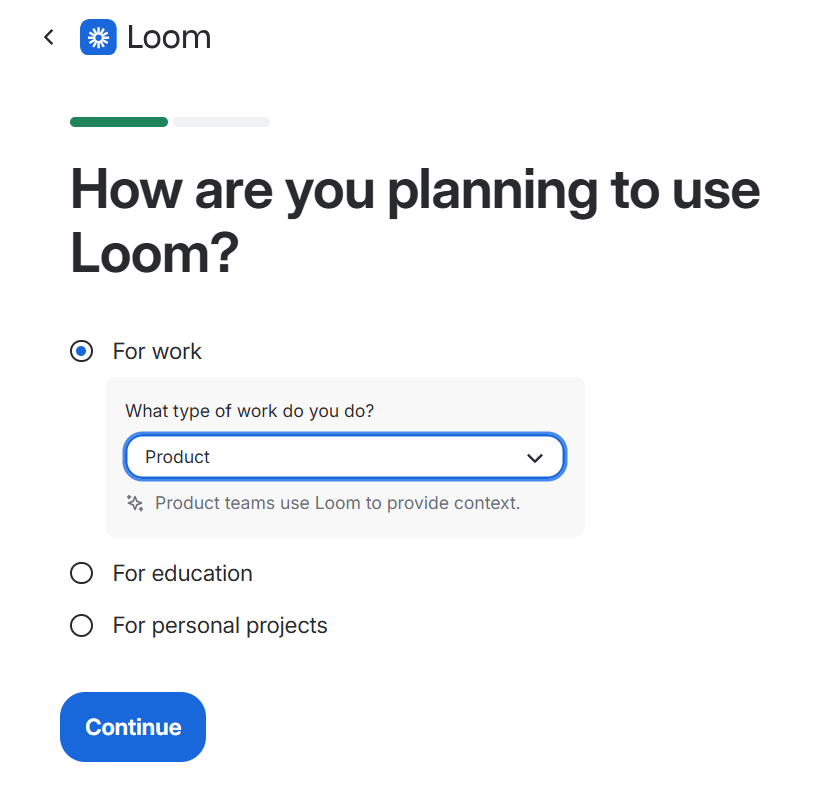
Loom keeps onboarding minimal by asking one core question upfront: “How are you planning to use Loom?”
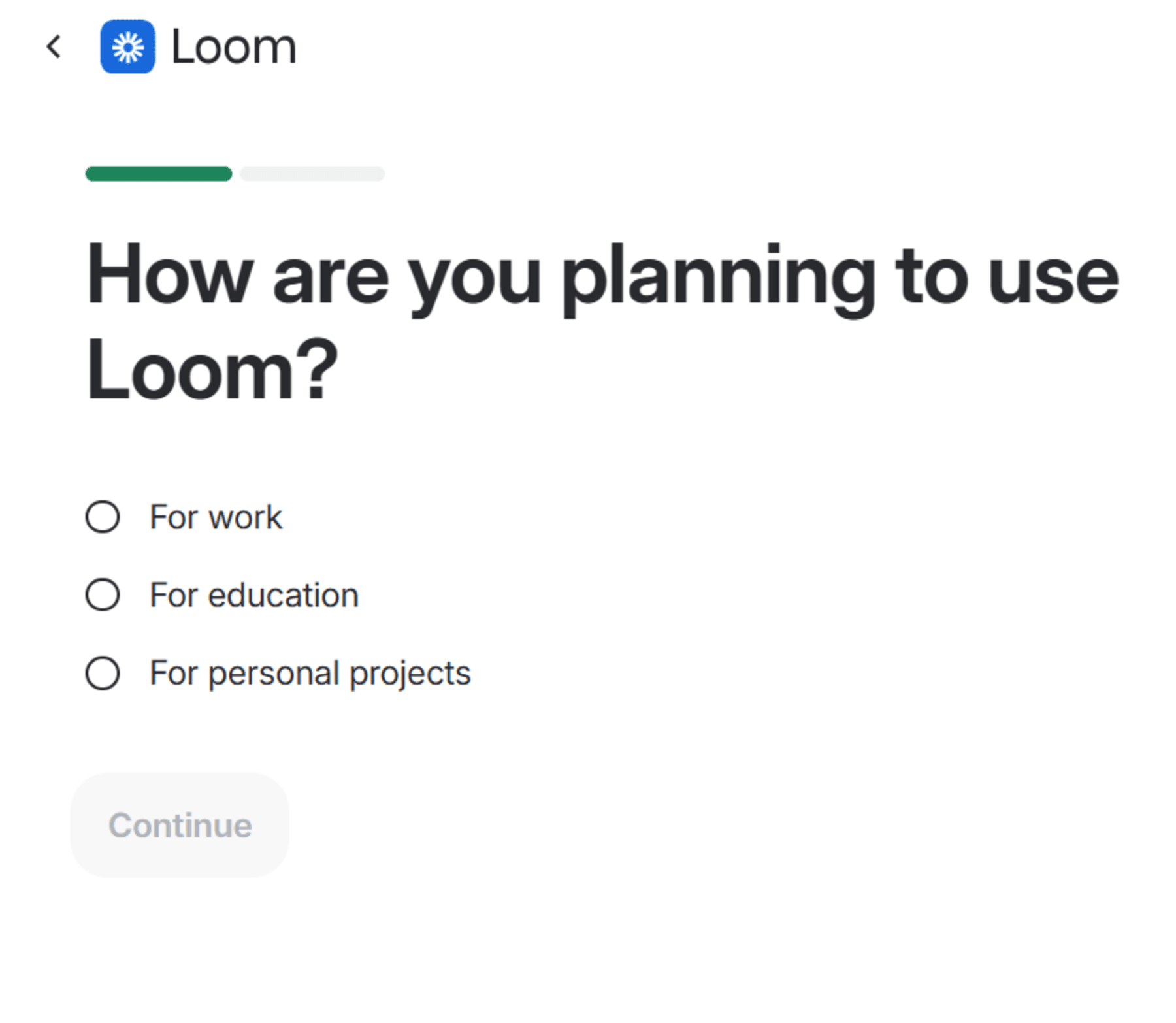
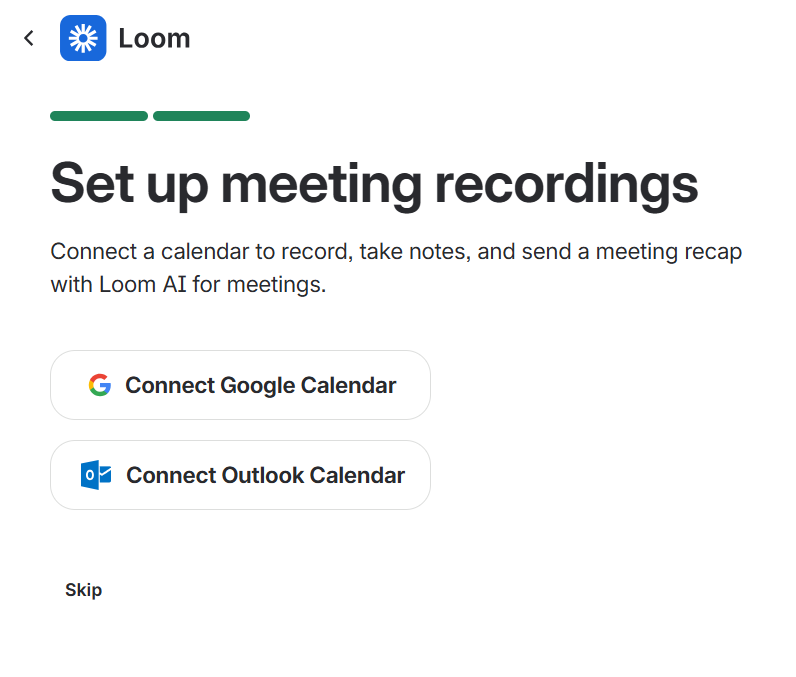
I selected “For work,” and instead of a long survey, Loom added one follow-up: “What type of work do you do?” with a simple dropdown. It also nudged me to connect my calendar for recordings, with the option to skip.
The dashboard had a clear CTA to “Record a meeting” and a small tooltip confirming setup was complete and pointing me to settings.
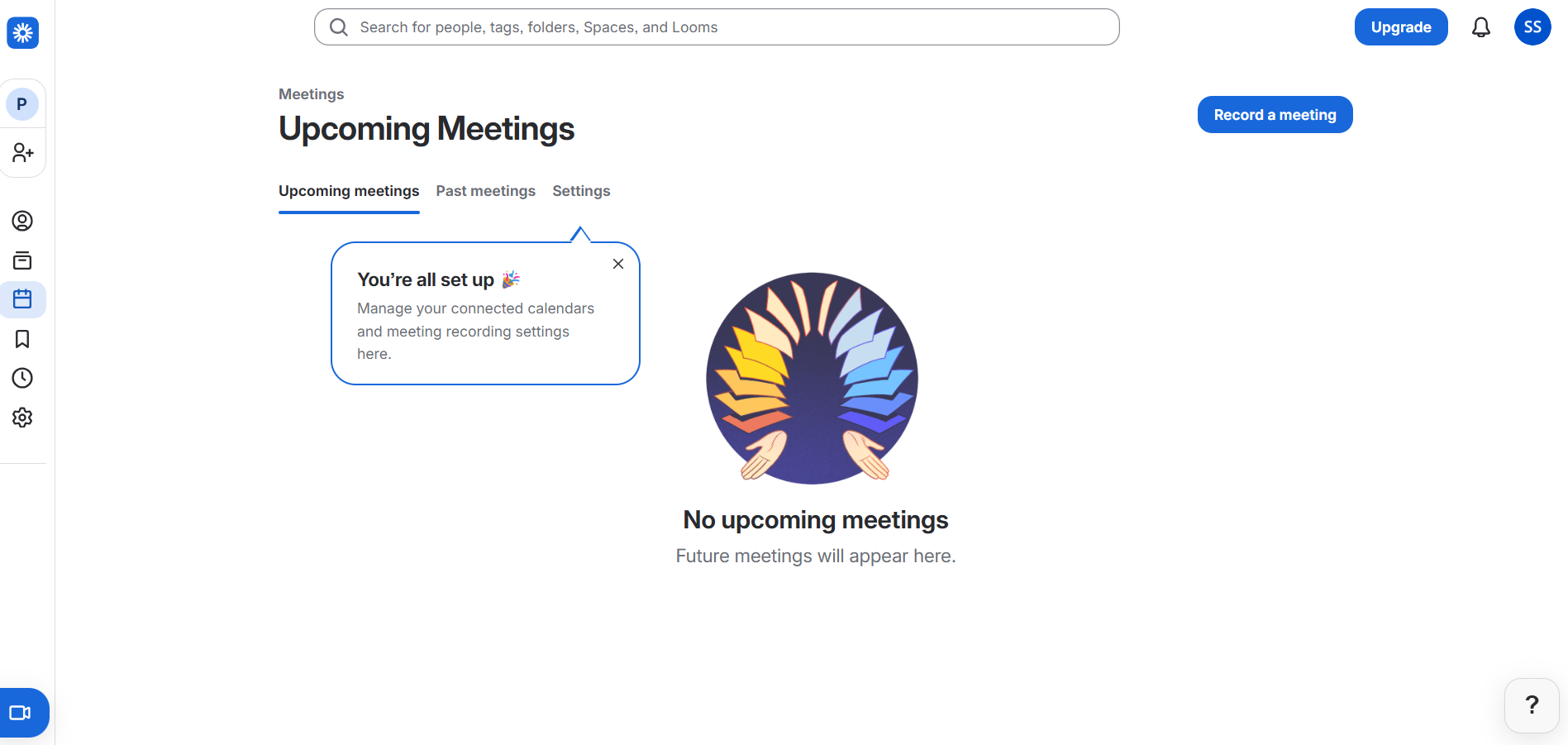
Loom survey exists purely to identify the user’s persona and remove every barrier between signup and the “Aha!” moment.
What works here:
- Inline conditional logic expands a sub-question within the same screen, avoiding an additional step and reducing drop-off risk.
- Framing the calendar connection as a setup action in step two pushes users closer to activation.
- Contextual microcopy like “Product teams use Loom to provide context” appears instantly after selection, signaling that the answer shapes what comes next.
Microcopy like this needs to be refined continuously. Use Userpilot’s AI-writing assistant to create and refine in-app microcopy for tooltips, modals, and banners.
Press space in any text box inside a tooltip, modal, or banner, type a prompt, and the AI generates the copy instantly. You can then shorten, extend, rewrite, or improve it without leaving the page and without relying on a content team.
Key takeaway: SaaStr reports that 90% or more of your customers need to activate in the shortest practical time. So, design a minimal, persona-based survey focused on the objective of reaching the aha! moment faster.
What’s new in welcome surveys? AI surveys
According to Maze’s 2026 Future of User Research report, 69% of research teams now use AI in their research projects, a 19% increase from the previous year.
In AI-led welcome surveys, this shows up as faster analysis, smarter follow-up questions, and automatic clustering of responses into themes and patterns. Here’s how it drives SaaS growth:
- Capture onboarding friction: AI surveys collect contextual feedback during early user interactions and adapt questions based on user behavior, helping teams identify blockers and fix drop-offs rate before they scale.
- Diagnose feature adoption: Userpilot’s 2025 Benchmark report shows that the average core feature adoption is just 24.5%. AI surveys reveal why users engage with certain features and ignore others, giving PMs clear input to refine product roadmaps.
- Identify churn drivers: AI surveys trigger exit surveys on cancellation or downgrade, clustering responses into themes to pinpoint the main causes of churn and surface the most recurring issues.
- Analyze sentiment in real time: AI-powered sentiment analysis detects emotional signals beyond NPS and CSAT scores, while real-time alerts enable customer success teams to act on negative feedback immediately.
You can bring all of this into action with Userpilot’s Product Growth Agent, Lia.
Lia detects onboarding drop-offs, monitors feature adoption, and analyzes survey feedback to surface patterns and recommend actions. Based on these insights, it can trigger targeted in-app experiences like tooltips, checklists, or onboarding flows.
Moreover, you can also control how much autonomy Lia has through three modes:
- In Observe mode, it surfaces insights and leaves decisions to you.
- In Copilot mode, it drafts solutions for your approval before anything goes live.
- In Autonomous mode, you set the goal, and Lia runs the full loop independently.
Note: Lia isn’t live yet, but you can join the waitlist to be among the first to try it.
Build a better first impression without the developer time
Whether it’s progressive disclosure, branching logic, or contextual microcopy, the goal of a welcome survey is always the same: reduce friction and guide users to their aha! moment ASAP.
But what works for one user segment may not work for another, and small changes in flow have a direct impact on completion and activation. A/B testing helps you identify which questions increase engagement, where users drop off, and how to refine the experience over time.
Userpilot supports this process by letting you build, test, and iterate on welcome surveys without deploying code. You can experiment with different survey paths, measure performance across segments, identify areas for improvement, and continuously refine how you guide users from signup to value.
If you want to test and refine your surveys, Userpilot’s free trial is a good place to start.
FAQ
What is an example of a survey welcome message?
A survey welcome message is the opening text that introduces the survey, sets expectations, and encourages the respondent to complete it. It communicates the survey’s purpose and builds a rapport with the respondent by clarifying data usage policy.
What are good survey question examples?
Good survey questions are clear, unbiased, and focused on one idea at a time. They use plain language, avoid leading the respondent toward a particular answer, and make it easy to respond honestly. Some example questions include:
- Use case: “What brings you here today?” (Options: improving productivity, increasing employee satisfaction, tracking expenses, just exploring).
- NPS: “How likely are you to recommend our product to a friend?” (0–10 scale).
- Company size: “How many people work at your company?” (Options: just me, 2–10, 11–50 or more).
- Experience level: “How familiar are you with employee experience tools?” (Options: beginner, I know the basics, expert).
- Multiple choice: “Which feature do you use most often?” (Options: dashboard, integrations, automations, other).
- Demographic: “What is your role at your company?” (Options: founder, product manager, developer, other).
What are the six main types of survey questions?
Although different survey frameworks group question types differently, these six are the ones most commonly used across industries:
- Open-ended: Invites users to respond in their own words without predefined options. Best for capturing qualitative insight and understanding the “why” behind user behavior.
- Example: “What made you sign up for [product] today?”
- Close-ended: Limits responses to a fixed set of options rather than free-form text, making them fast to complete and easy to analyze at scale.
- Example: “Which plan are you currently on?” (Free, Starter, Pro, Enterprise).
- Likert scale: Developed by Rensis Likert, it measures user sentiment by asking users to rate a statement on a five- or seven-point scale, typically ranging from “strongly disagree” to “strongly agree.”
- Example: “The product met my expectations.” (strongly disagree, disagree, neutral, agree, strongly agree).
- Rating scale: Asks respondents to assign a numeric score, most commonly on a 1–5 or 0–10 scale. They are the foundation of NPS, CSAT, and CES metrics.
- Example: “How likely are you to recommend [product] to a friend?” (0–10).
- Multiple choice: Asks respondents to select one or more answers from a predefined list. They are useful for segmentation by role, company size, or use case.
- Example: “How did you hear about us?” (Google search, social media, word of mouth, other).
- Dichotomous: A dichotomous question is a closed-ended survey question that offers only two mutually exclusive response options, making it ideal for simple, binary decisions.
- Example: “Do you currently use any project management tool?” (Yes/No).
About the author