User Activation for SaaS in 2026: Why Most Teams Stop at Setup


User activation for SaaS is supposed to be simple but in practice, I’ve spent years on the customer success side watching accounts with well-designed onboarding journeys still churn at rates that don’t add up. The most common culprit is only measuring activation when account setup is complete instead of when habits are formed. That was an easier mistake to ignore five years ago when products were simpler and shipping cycles were slower, but the bar for user activation has risen sharply since then.
There’s also a signal problem that CS teams see but product teams miss: high logins with zero outcomes. Accounts that stay active on the platform but never trigger the key activation events tied to actual value delivery are an early churn predictor that you can’t afford to ignore. By the time a customer tells you it’s not working, churn prevention is already a much harder conversation. Ignoring the gap between activity and adoption is one of the most expensive mistakes a SaaS company can make, so I wanted to write a user activation guide that reflects what actually happens at the account level.

What user activation in SaaS actually means
User activation in SaaS is the moment when a new user performs the key actions that let them experience the core value of your product for their specific use case. Most teams get the rough definition right but the problem is what they do next: operationalizing activation as the end of the setup phase rather than the beginning of a sustained habit.
Elena Verna, growth advisor and former SVP at Amplitude and SurveyMonkey, has the clearest framework I’ve seen on this. In her Substack newsletter, she defines the full activation journey as three distinct stages: setup, aha, and habit.
“Activation is taking a user from signing up to establishing a habit around your core value prop. In practice, product activation consists of 3 steps: setup, aha, and habit loop.”
— Elena Verna, growth advisor.
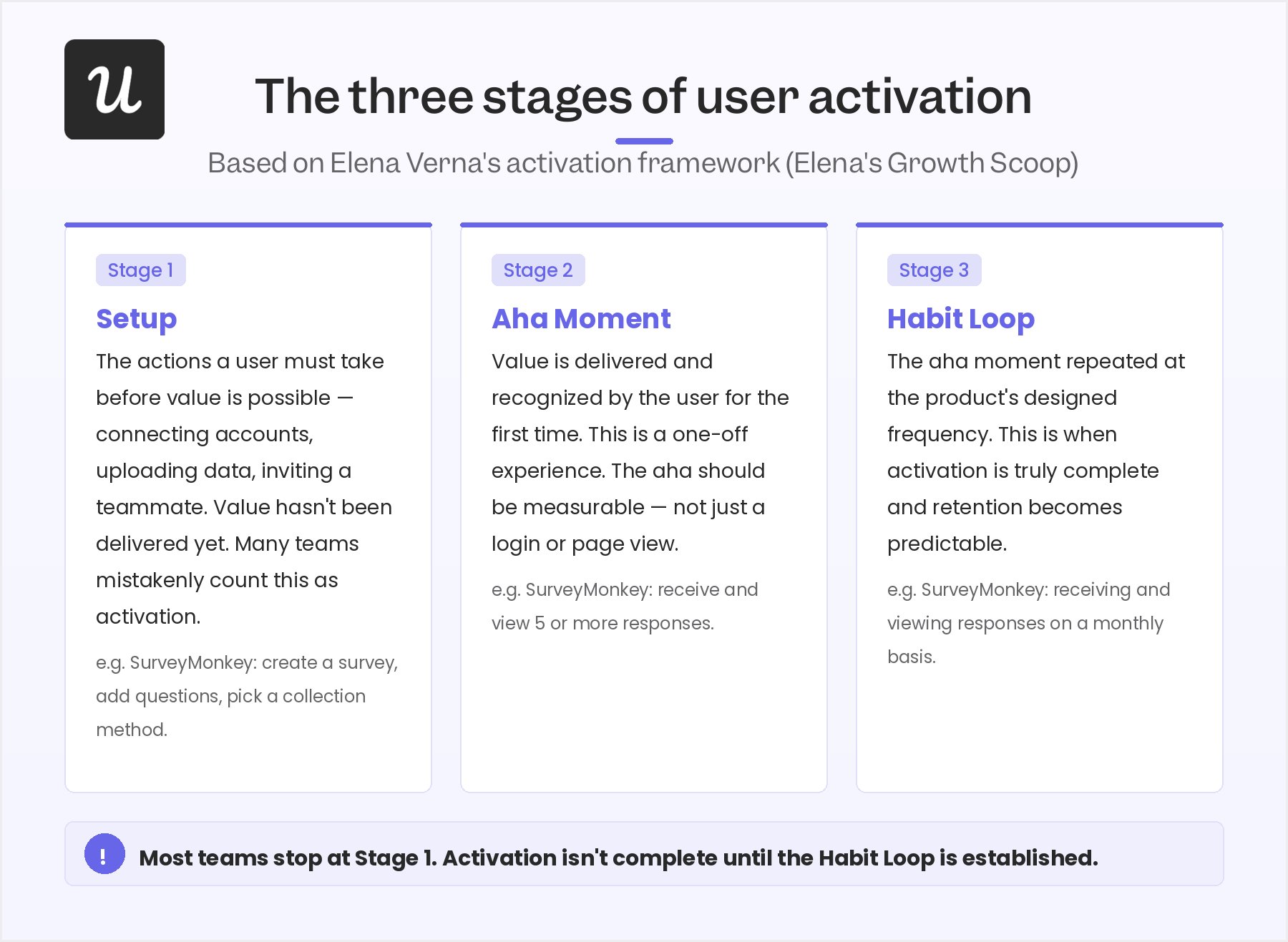
Setup is the actions a user must take before value is even possible, such as:
- Connecting accounts
- Inviting a teammate
- Uploading data
The ‘Aha! moment is when value is actually delivered, and the user experiences it directly.
Lastly, the habit loop is when a user has repeated that experience enough times to establish a behavioral pattern, at the frequency your product is designed around.
The most costly mistake that SaaS teams make is stopping measurement at stage one. I constantly see CS reviews where the activation milestone is set to “completed onboarding checklist” or “published first flow,” and the team celebrates when users hit that trigger. What they don’t see is whether or not those users actually came back and went on to form usage patterns that indicate real value.
How to define your activation point with a persona-first approach
Defining your user activation point is harder than it looks, and I say that not to discourage you but to set honest expectations. The user activation process will be operationalized differently not only for every product, but also within the same product for different user personas and use cases. There is no universal activation point for most SaaS products. When you’re starting without conversion data, the right approach is to begin with the jobs to be done framework for each of your user segments.
Map what each persona needs to accomplish, identify the minimum actions required to accomplish it, and use those as your candidate activation events. For a social media scheduling tool, for example, connecting accounts, creating a post, scheduling it, and publishing it might be the four core activation events for one persona but not for an agency user with a different use case entirely. When you have data, the approach flips: look at the users who converted from trial to paid and trace the in-app events they triggered. The path most converted users shared is your activation point for that cohort.
The more granular your user segmentation, the more accurately you can define and track activation for each group.
I’ll be honest about how complex this gets in practice. At Userpilot, our product has such a broad feature set that defining what an activated customer looks like has been genuinely difficult. As I’ve put it to our CS team: “Is it that the customer published a flow, or set up a dashboard, or launched the resource center, or watched a session replay?” There are a million different things you could look at. The answer is that you have to make a deliberate choice, commit to tracking a specific combination of activation events, and revisit it as your product evolves.
How to measure user activation rates: Formulas and benchmarks
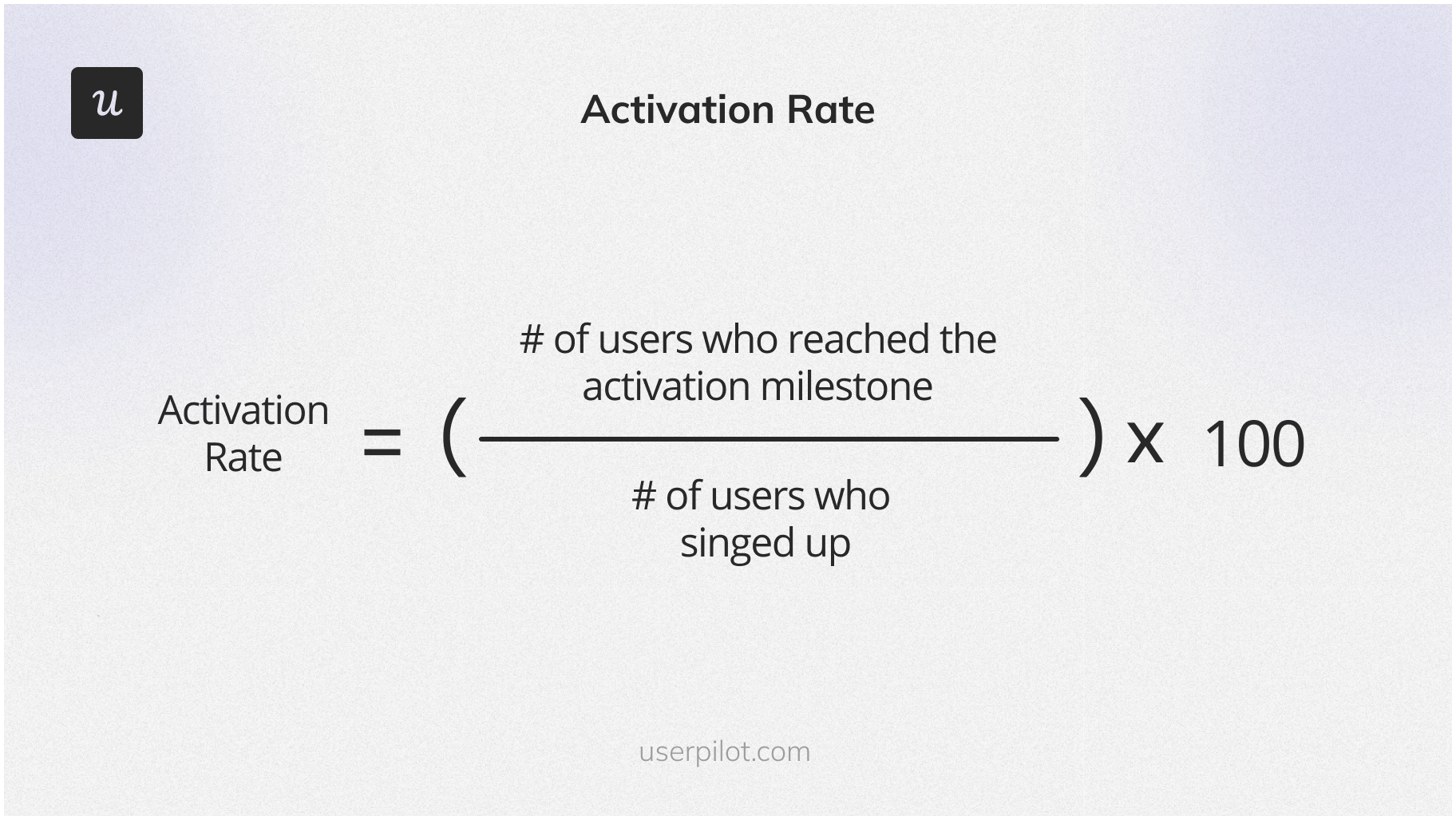
Measuring the user activation rate is the straightforward part of the process. Calculate the number of users who reached your defined activation point within a given time frame, divide by the total number of new signups in that same window, and multiply by 100.
When it comes to benchmarks, you can find the most useful data in our 2025 edition of the Userpilot SaaS Product Metrics Benchmark Report.
We tracked 62 companies and found an average activation rate of 37.5%. This means that almost two-thirds of users who sign up never reach the activation milestone. Of course, the number shifts by business model (with product-led companies at around 34.6% while sales-led companies are higher at 41.6%), and varies even more dramatically by industry where AI and ML products lead the charge at 54.8% (while FinTech sits lowest at 5%).
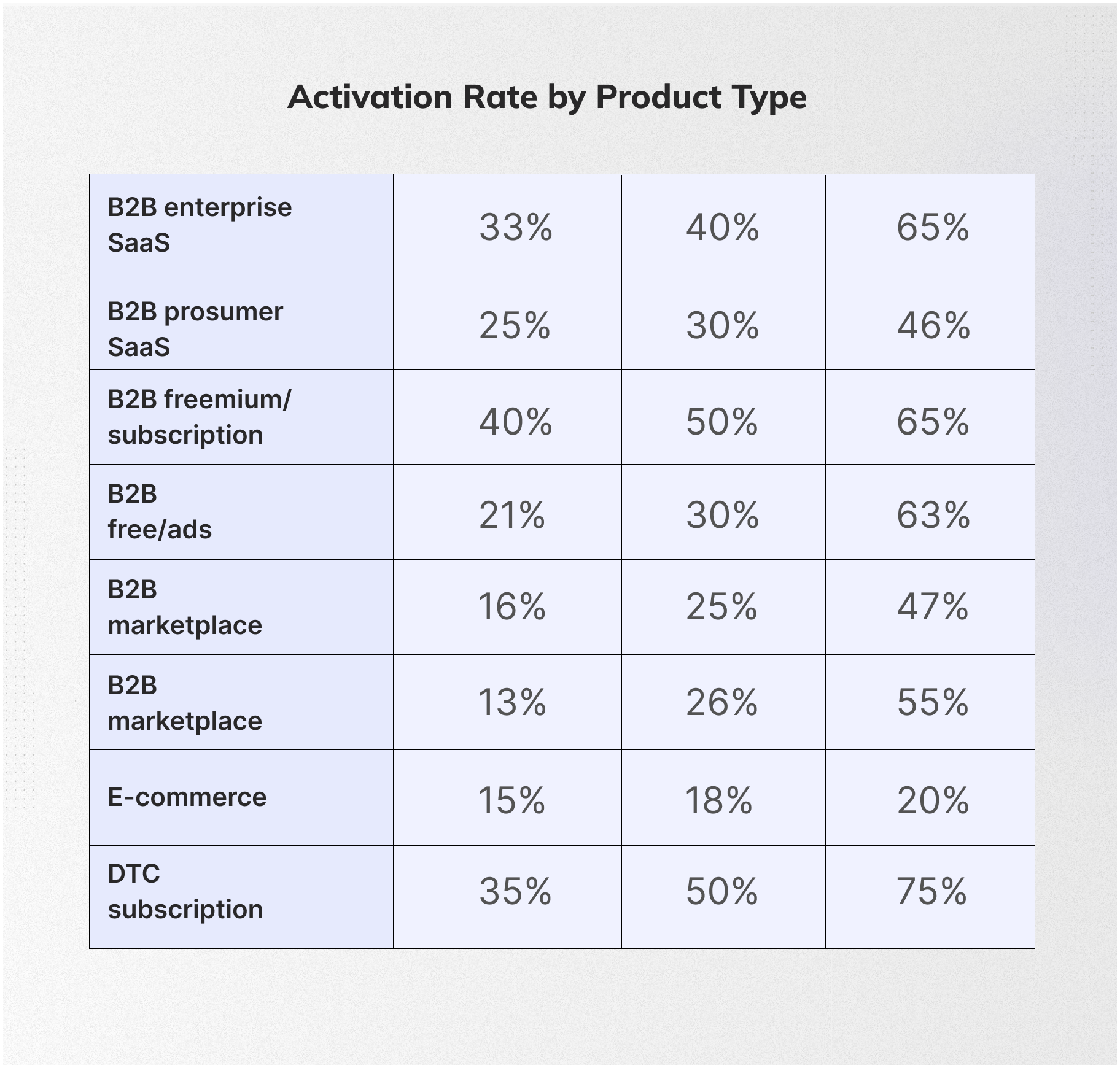
The problem with benchmarking user activation across companies is the same problem that makes the metric itself hard to define: everyone measures it differently. If you’re tracking “completed onboarding checklist” and a competitor is tracking “established weekly usage habit,” your 40% looks better, but their 25% probably predicts stronger retention. The number that matters most is your own trend over time, split by user segment. What I will stand behind as a meaningful cross-company number is the revenue impact figure. A 25% increase in your activation rate translates to a 34% increase in MRR over 12 months.
Among the Pirate Metrics, no other lever in the AARRR framework comes close to that multiplier, making activation the single place in your funnel where optimization focus pays off most.
8 Strategies to improve user activation in SaaS
The user activation strategies below are not ranked in order of universal impact because the right tactics depend heavily on your product and your user segments. What I’ll say is that the teams I’ve seen succeed with activation optimization almost never use just one of these in isolation. The real gains come from running several in combination, with behavioral data connecting each layer.
1. Use the sign-up page to showcase the product’s value
Your SaaS signup flow is the first activation opportunity you have with every new trial user, and most teams underuse it. The goal is not just to collect an email address and move someone into the product. It’s to set accurate expectations and, where possible, remove the empty state problem before the user even sees the dashboard.
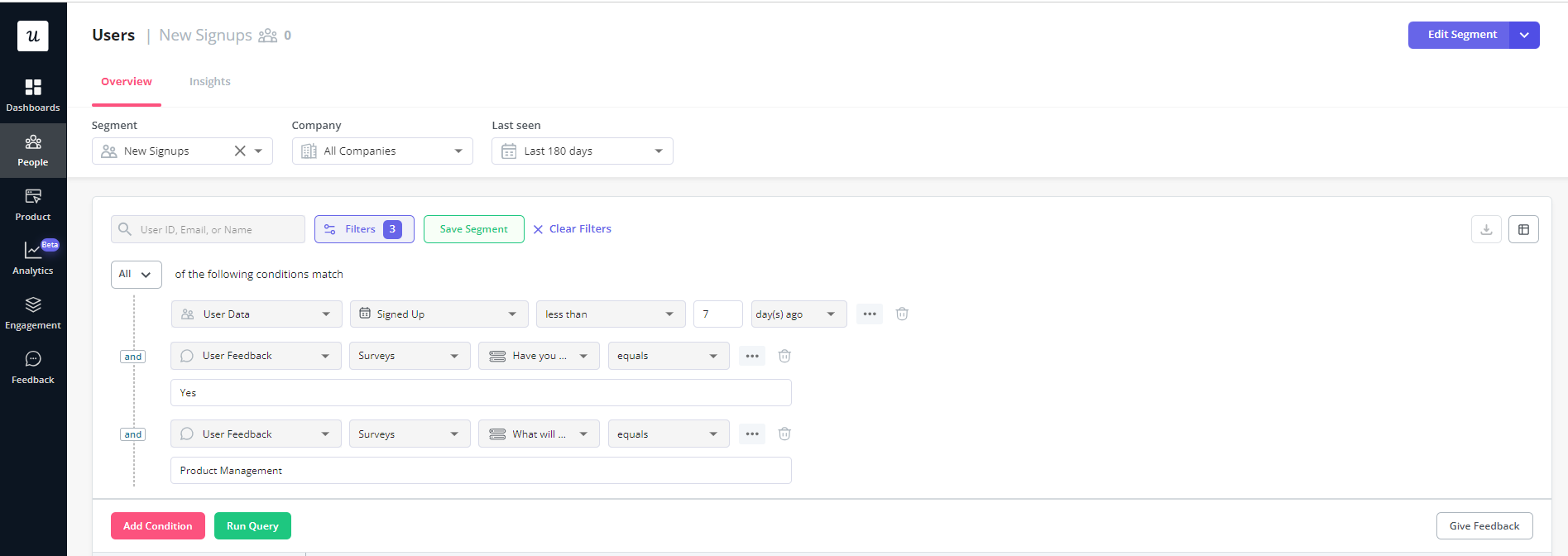
When you use the signup flow to collect data about the user’s job to be done and their role, you get two things at once: the ability to personalize their first in-app experience and a head start on understanding what activation should look like for their segment. Teams that reduce time to value by pre-filling templates or removing blank canvases consistently see higher activation rates in the early stages of the user journey.
2. Use welcome screens to personalize the user onboarding process
Contextual SaaS personalization means building branched experiences designed for specific user needs, not delivering the same tour to every new signup. A welcome screen is the natural first moment for that branching to happen.
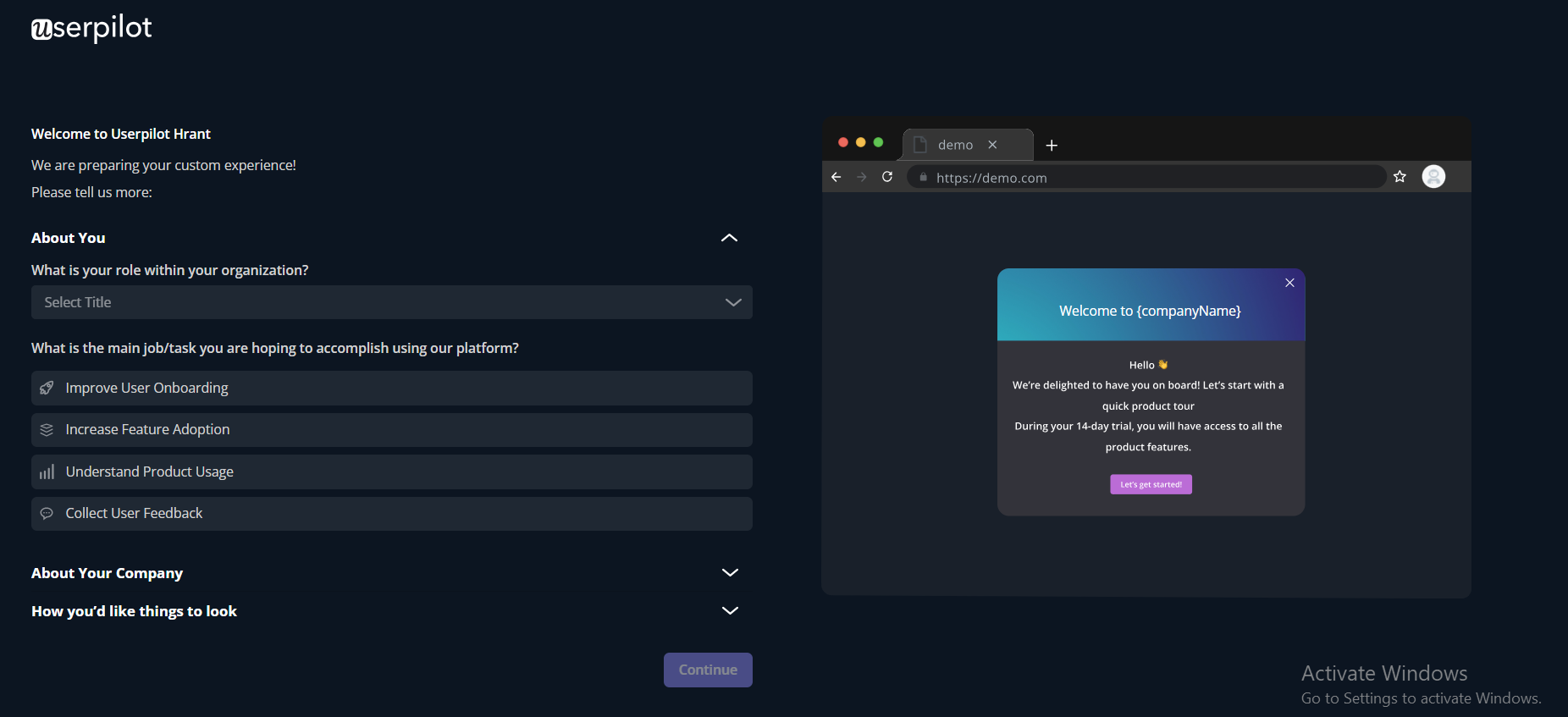
The data collected at the welcome screen determines which activation path the user enters. Done well, it also signals to new users that you understand there are different jobs to be done, which builds credibility before they’ve seen a feature. The resulting segmentation is what powers the targeted activation nudges later in the journey.
3. Use in-app checklists to drive users to the activation point
An in-app checklist is one of the most direct forms of in-app messaging for guiding new users toward your defined activation events. It makes the activation journey explicit: here are the steps, here’s where you are, here’s what’s left. The psychological effect of partial completion, seeing two out of four tasks checked off, is a meaningful motivator for finishing the rest.
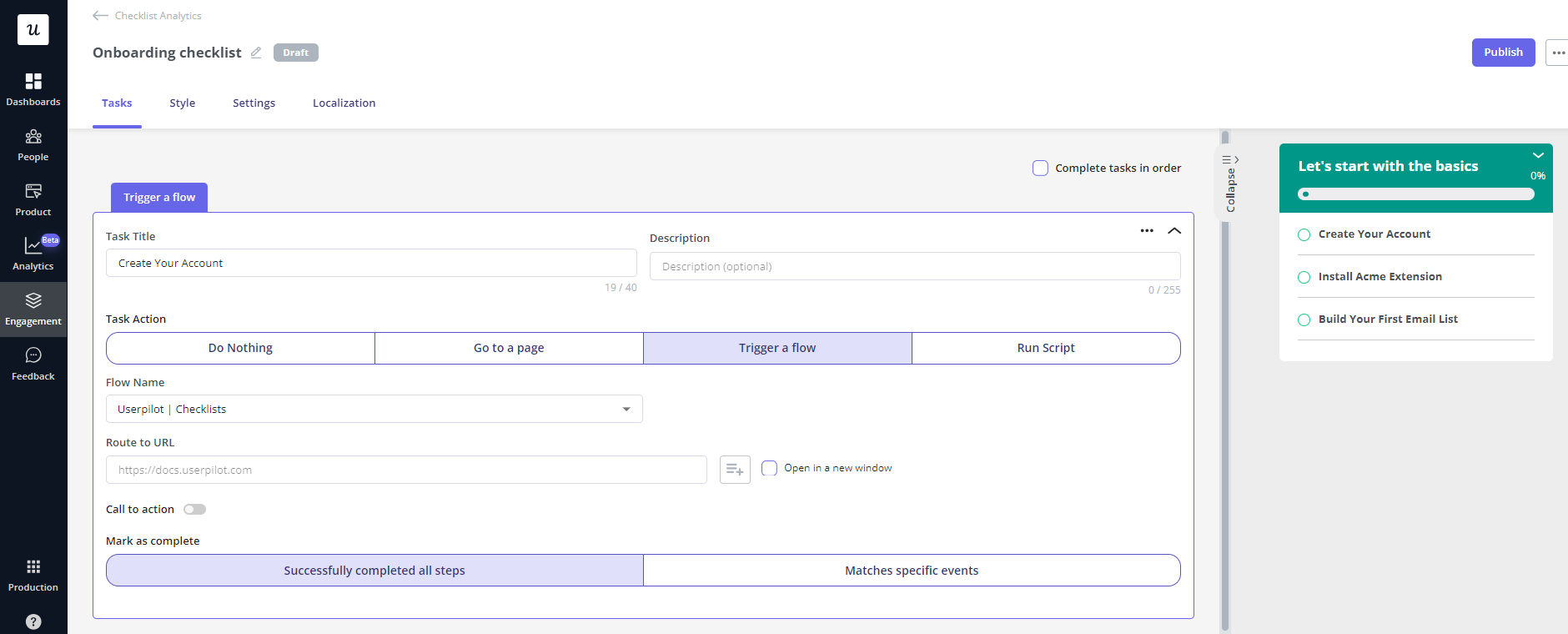
The checklist design matters as much as the content. Keep it to the minimum actions required for activation, not a comprehensive feature tour. Sked Social tripled their conversion rates using a four-task checklist with a progress bar and one pre-checked item, specifically because the short list didn’t overwhelm users who were still evaluating the product.
4. Use interactive walkthroughs to help users perform key actions
The case against traditional product tours is well established: they’re passive, they show users features at the wrong moment, and they overwhelm rather than guide. Interactive walkthroughs solve this by guiding users step by step through a specific action at the moment they’re trying to take that action in the activation funnel.
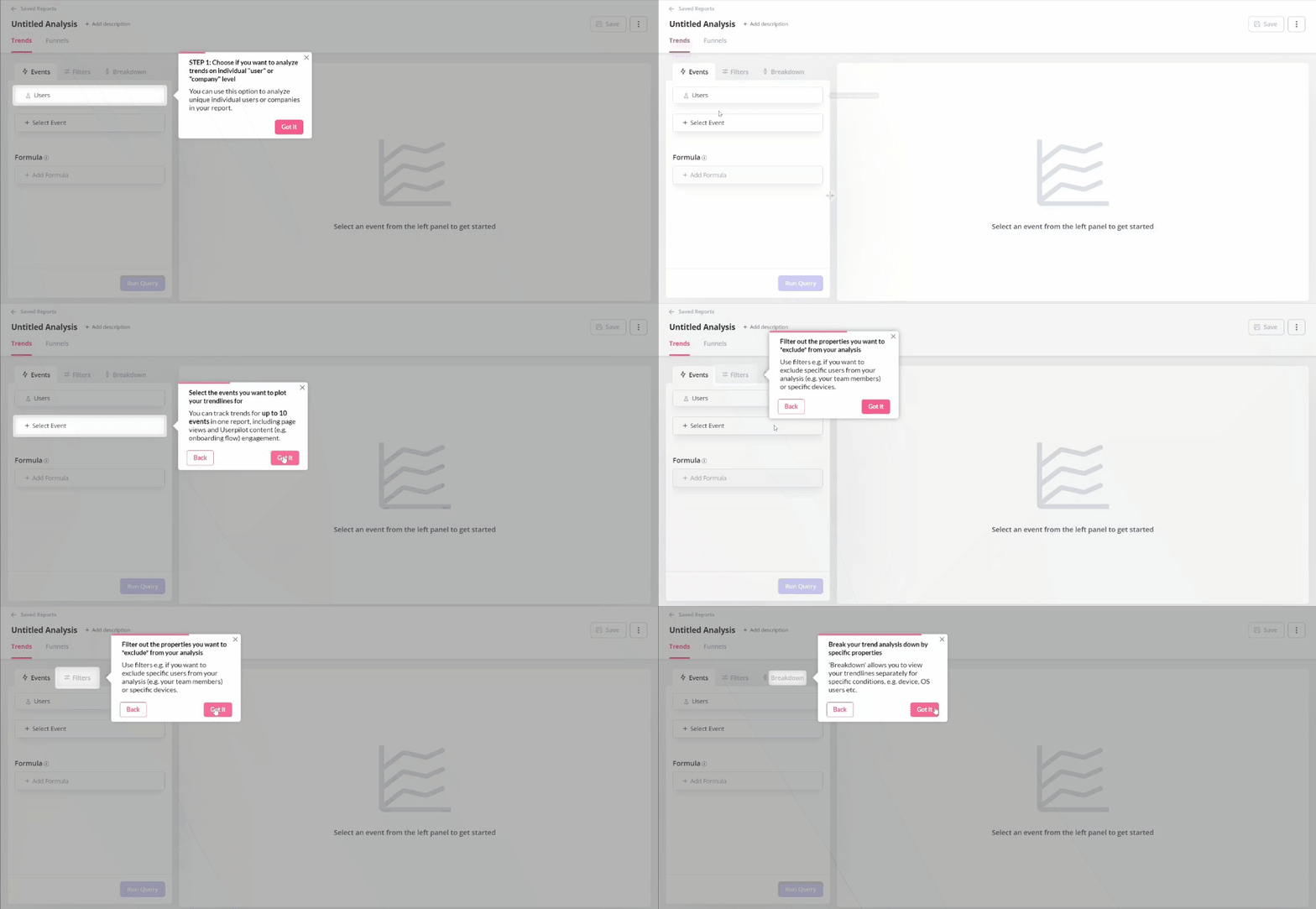
Attention Insight saw a 47% relative increase in users completing their core heatmap analysis after implementing interactive walkthroughs alongside an onboarding checklist, with a further 83% improvement in engagement with their key value-delivery feature. The gains didn’t come from showing users more guidance, but from showing the right users the right guidance at the right moment.
5. Use gamification elements to improve user engagement
Gamification in onboarding means introducing structured incentives, progress bars, badges, points, and milestone rewards to encourage users to complete the activation steps. These mechanisms work because they tap into the same completion-motivation loop that makes checklists effective, with visible reward signals added at each step.
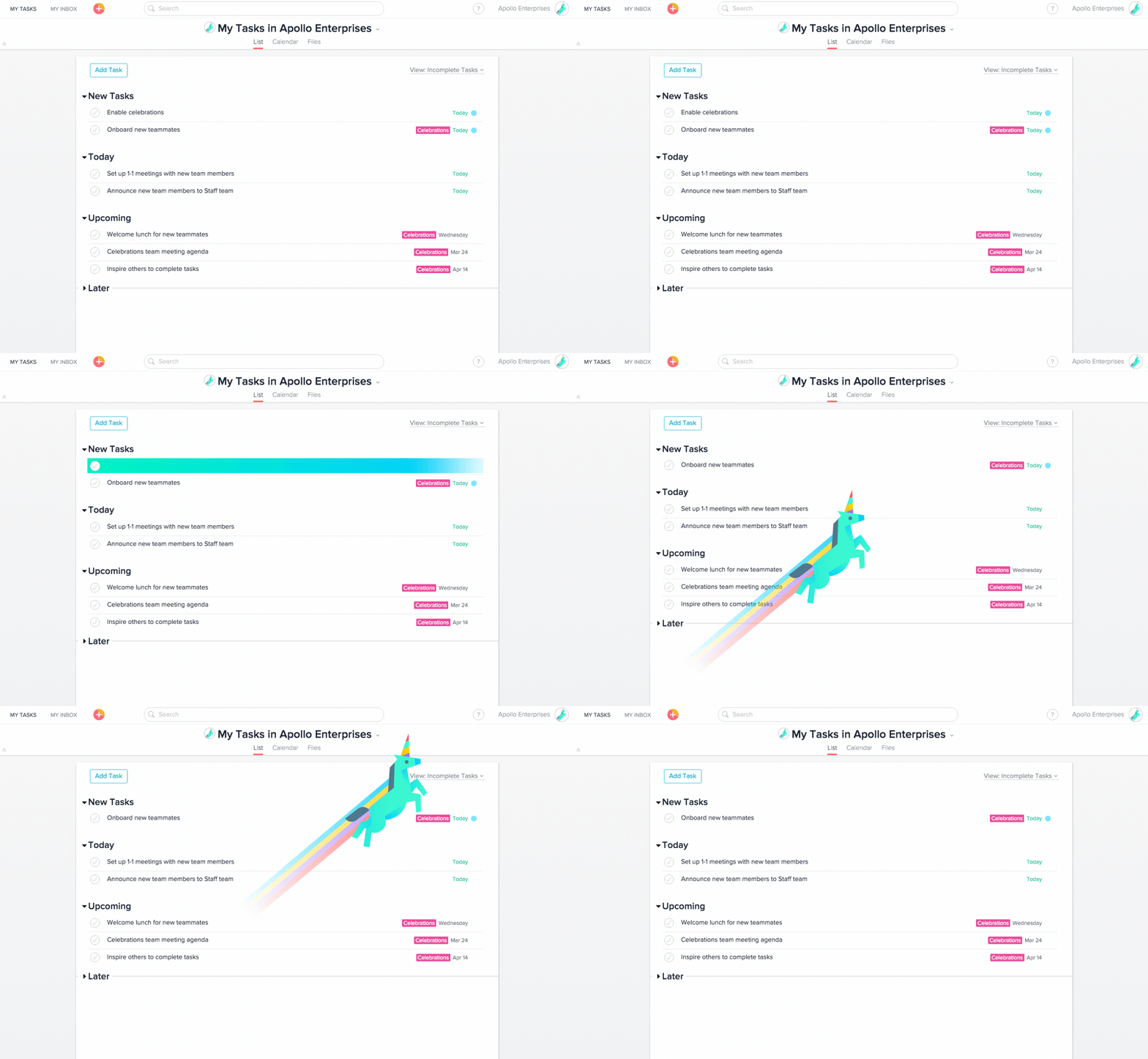
Be selective about where gamification fits. For products where the core value is serious, financial tools, or enterprise workflow software, overdoing the badges can feel mismatched for the use case. The goal is to reduce friction between a user’s intent and the completion of their first activation events, not to make your product feel like a full-fledged video game.
6. Offer in-app support to help users reach the activation point
An in-app resource center is the difference between a user who gets stuck and opens a support ticket and a user who gets stuck, finds the answer in 30 seconds, and continues through the activation journey without breaking stride. One principle I’ve come back to consistently is that if a user has to leave the app to find help, you’ve already created a break in momentum that costs you activation progress.
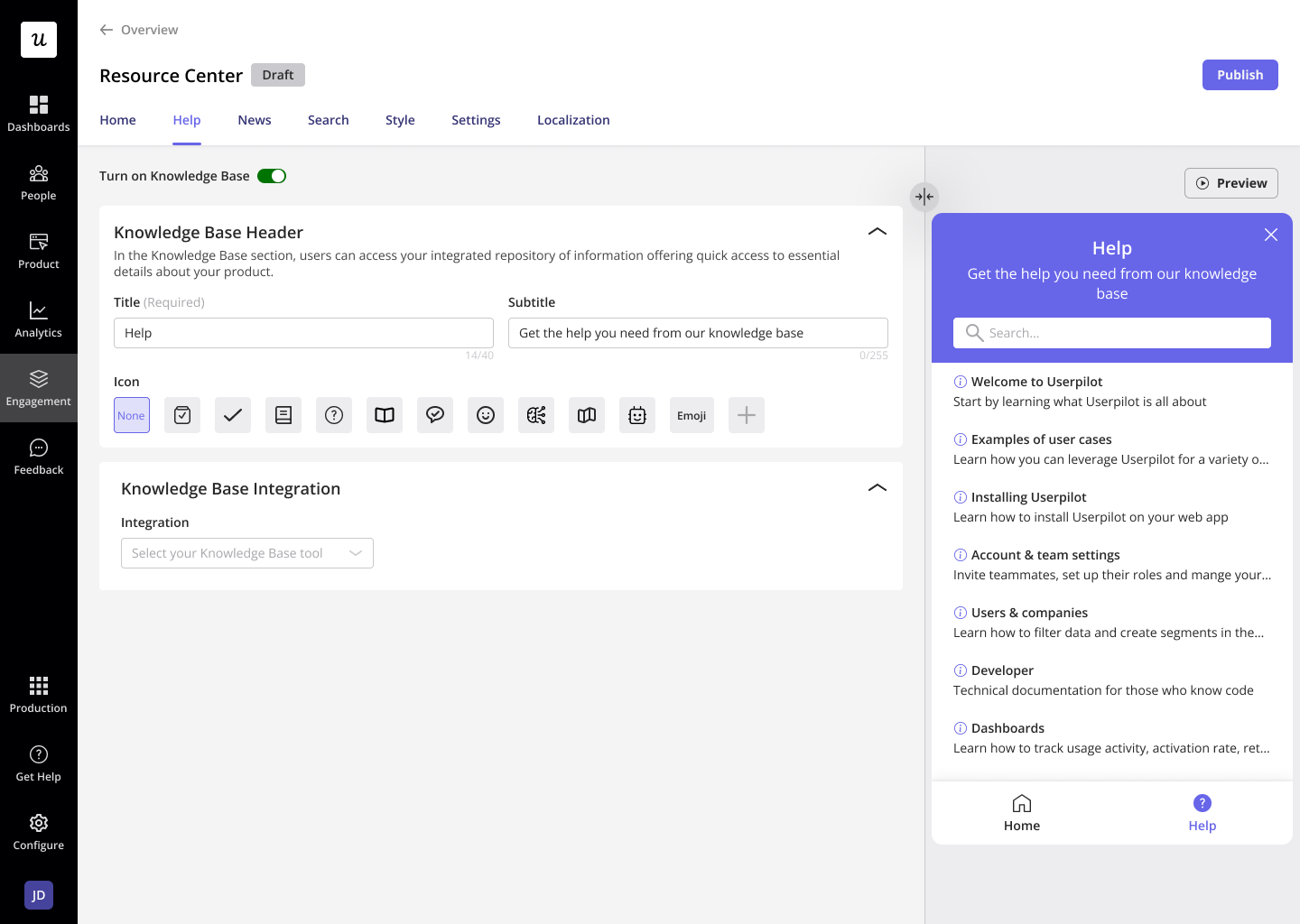
We use our own resource center at Userpilot for guidance on reporting, building the first flow, and setting up segments, and it’s consistently one of the highest-traffic in-app destinations for new accounts. Products that invest here early see meaningful ticket deflection, and more importantly, they stop losing users at the exact moments when self-serve support could have carried them through.
7. Collect user feedback to improve your activation rate over time
Activation optimization is an iterative process, and feedback from users who converted, as well as those who didn’t, is some of the most valuable data available for improving it. Triggering a short microsurvey after a user completes onboarding, or after a specific number of days in the product, surfaces the friction points your funnel data won’t show you.
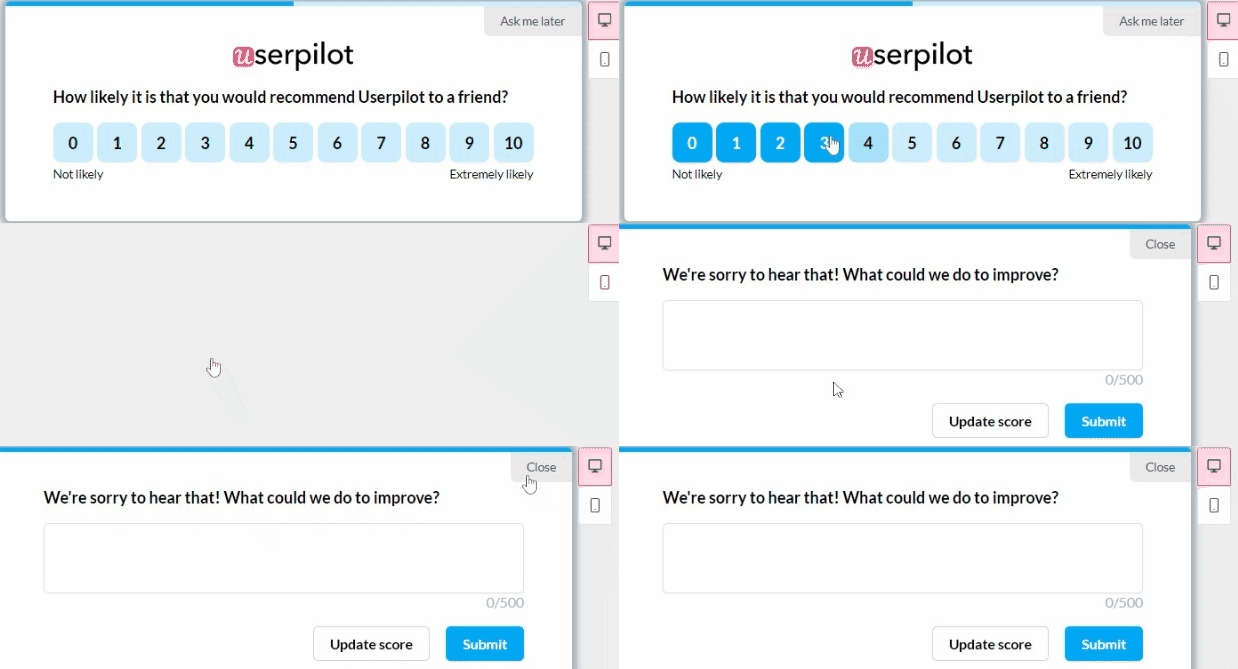
The goal is not just to run a survey for the sake of it, but to actively use qualitative feedback to validate or disprove what your activation events are telling you quantitatively. If your funnel shows a step has a 90% completion rate but users consistently report confusion around it, something is wrong with how you’ve defined or measured that stage of the journey. At the end of the day, feedback and behavioral data have to agree. Whenever they don’t, investigating why that disagreement exists is the fastest path to improvement.
8. Use email to bring back inactive users and increase activation
In-app engagement only works when users are inside the app. For trial users who signed up but haven’t returned, a contextual email sequence built for customer reactivation is the best tool for reconnecting them to the activation journey. A contextual email strategy works in parallel with your in-app activation work, keeping users informed and motivated through the evaluation period.
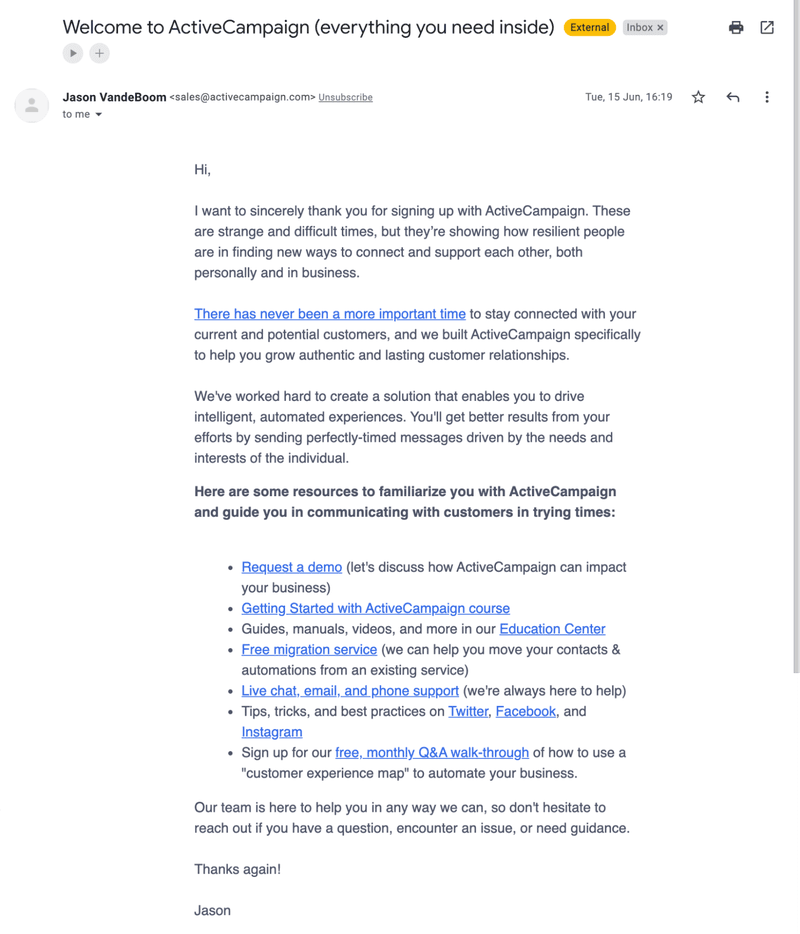
What makes the contextual approach work is the connection to behavioral data. Rather than sending time-based drip emails to everyone on day 1, day 3, and day 7, the most effective activation email sequences trigger based on what users have actually done in the product. A user who completed the first two checklist items but stalled on the third gets a different email than a user who hasn’t opened the product since signup.
Activation gains from real SaaS teams: What the data shows
The case studies below represent a range of products and activation approaches. I’ve condensed them into a table because the pattern that matters isn’t the specific numbers; it’s the consistent mechanics. Define one clear activation milestone, build in-app experiences that guide users toward it, and measure impact at the feature level rather than just the “activated or not” binary.
| Company | Activation challenge | Approach | Result |
|---|---|---|---|
| Attention Insight | Low engagement with core heatmap analysis feature | Interactive walkthroughs + onboarding checklist | 47% increase in users creating heatmap analyses; 83% increase in core feature engagement |
| The Room | New members not uploading CVs, the key activation point | Driven action UI pattern in onboarding flow | 75% increase in CV uploads within 10 days |
| ClearCalcs | New users not finding relevant calculators | Cohort analysis + segmented onboarding flows by role and use case | Improved activation rates across all identified user segments |
| Sked Social | Low trial-to-paid conversion rate | 4-task checklist with progress bar and tracked progress (one pre-checked item) | 3x higher conversion rate for checklist completers vs. non-completers |
| Kontentino | Users not connecting social media accounts or scheduling first posts | Interactive walkthrough + onboarding checklist targeting core activation events | 10% increase in new user activation within the first month |
| Getcraft | Profile completion stuck at 20% | Interactive walkthroughs + checklists via Userpilot + Segment integration | Profile completion doubled to 40%+; support inquiries significantly reduced |
Full implementation details are available in the individual case studies of each company that worked with Userpilot:
- Attention Insight case study: 47% increase with interactive walkthroughs
- The Room case study: 75% activation increase in 10 days
- ClearCalcs case study: cohort analysis and personalized onboarding
- Kontentino case study: 10% activation improvement in one month
- Getcraft case study: doubling activation with zero coding
User activation in the agentic era (when your users include AI agents)
User activation for SaaS in 2026 has a new layer that most activation frameworks haven’t caught up to: AI agents are now interacting with SaaS products as users in their own right. An agent doesn’t click a welcome screen, it doesn’t complete a checklist, and it won’t respond to a re-engagement email. But it can activate or fail to activate depending on whether it can successfully execute the tasks your product is designed to support. This matters for activation measurement because the behavioral signals that indicate activation for a human user, logins, checklist completions, and feature clicks, don’t map cleanly onto how an agent interacts with a product.
Wes Bush, founder of ProductLed, describes this as one of the defining challenges of PLG 2.0: the activation journey now runs on two parallel tracks, one for human users and one for AI agents acting on their behalf.
At Userpilot, we’ve built Agent Analytics to give teams visibility into the agent side of this picture. You can track what tasks agents are attempting, where they’re succeeding, where they’re stalling, and what satisfaction metrics look like across agent interactions. That data doesn’t replace human activation measurement; it sits alongside it, because the accounts most likely to expand and retain are the ones where both streams show healthy activation patterns.
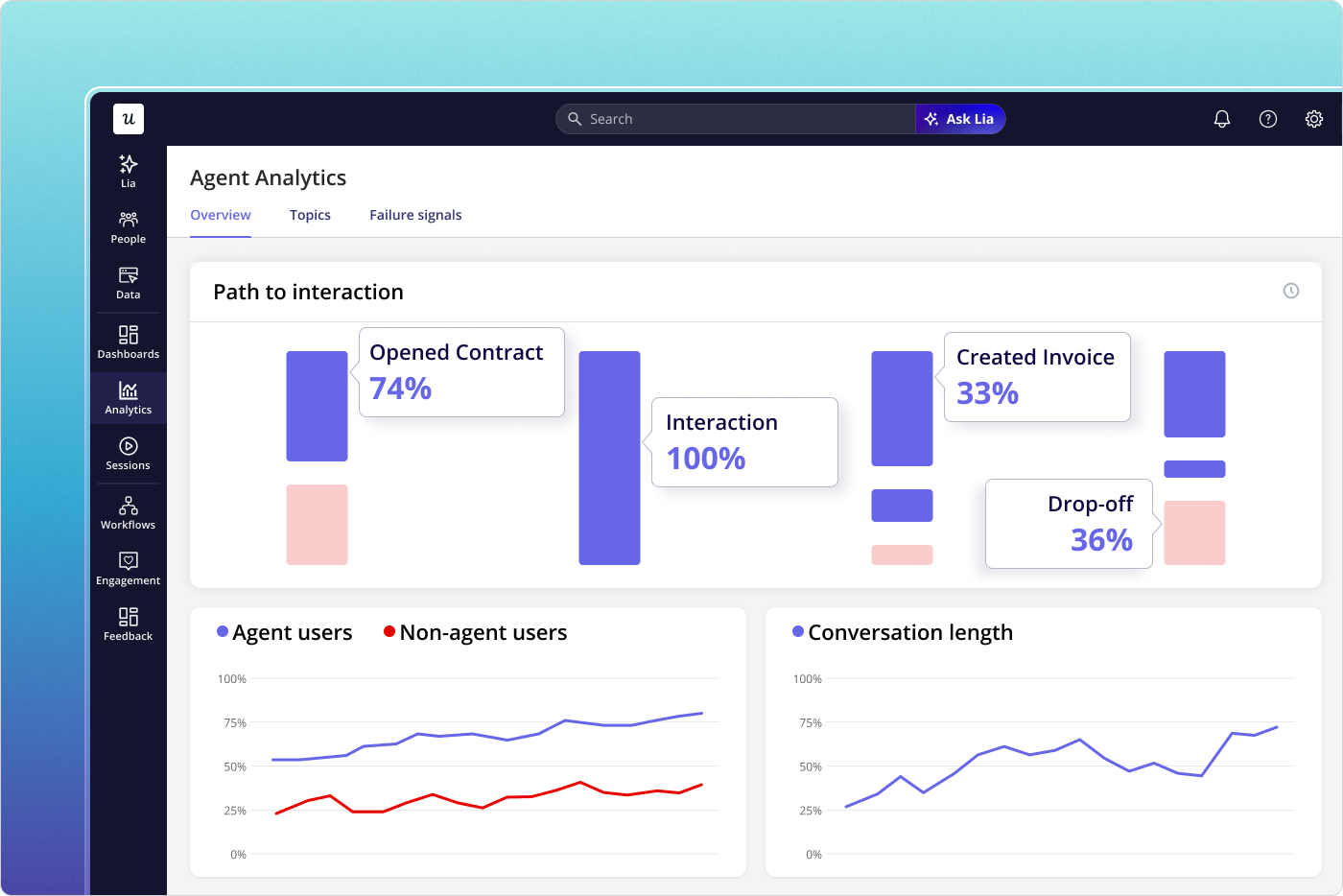
You don’t even need to build activation flows for agents manually. Lia, Userpilot’s AI agent, builds in-app onboarding experiences autonomously and monitors activation progress across both human and agent users. The same behavioral foundation you’ve built for human activation (milestone tracking, funnel analysis, and engagement signals) feed directly into Lia’s understanding of which accounts are healthy and which need attention before they signal it themselves.
Build your activation program like the account depends on it, because it does
User activation for SaaS is the highest-return investment area in product growth right now. The data clearly shows that a 25% improvement in activation produces a 34% increase in MRR over 12 months. Customer success evidence is equally clear that accounts who establish real activation habits are the ones that renew, expand, and refer. The teams that get this right in 2026 need to define activation throughout all three stages (setup, aha, and habit) then run behavioral data and qualitative feedback in parallel so they can watch for the logins-without-outcomes pattern before it becomes a churn conversation they can’t win.
If you want to see how Userpilot supports activation optimization across all of these layers, including in-app flows, behavioral analytics, and Lia’s AI-powered monitoring, the best next step is to book a demo with our team.
About the author