Amplitude Autocapture in 2026: What It Captures, Where It Breaks, and When To Switch


Every article I found when researching Amplitude autocapture told the same story: here’s what it captures, here are the pros and cons, here’s an alternative. Our own old version of this post was in that pile, too.
Automatically tracking user interactions is the part they all get right. Getting from a captured event to an actual campaign still requires developer time, a stale segment export, and usually a second tool. Most autocapture reviews don’t get that far.
Amplitude has added meaningfully since this post was first published (session replay, guides and surveys, and an AI layer), so some of the original criticisms no longer reflect Amplitude’s capabilities correctly.
So in this update, I’ll cover the data quality and cost tradeoffs that surface after a few months of using Amplitude’s autocapture. Plus, you’ll see the capability gap that drives most analytics-only stacks to add more tools.
What does Amplitude Autocapture capture?
As of Amplitude Browser SDK 2.10.0, autocapture ships as part of the SDK, eliminating the old plugin.
Most capture types are enabled automatically, but element interactions (the mechanism that powers click tracking and visual labeling) still require explicit configuration with elementInteractions: true.
On the web, the Amplitude Browser SDK captures the following events and properties automatically once installed:
- User downloads.
- Page URL enrichment, including previous-page tracking.
- Marketing attribution (UTM parameters, referrer, click IDs).
- Form interactions: text changes, radio button selections, form submissions.
- Sessions and page views, including tracking when a user navigates between pages.
- Clicks on interactive elements: buttons, links, form fields, dropdowns (requires elementInteractions: true).
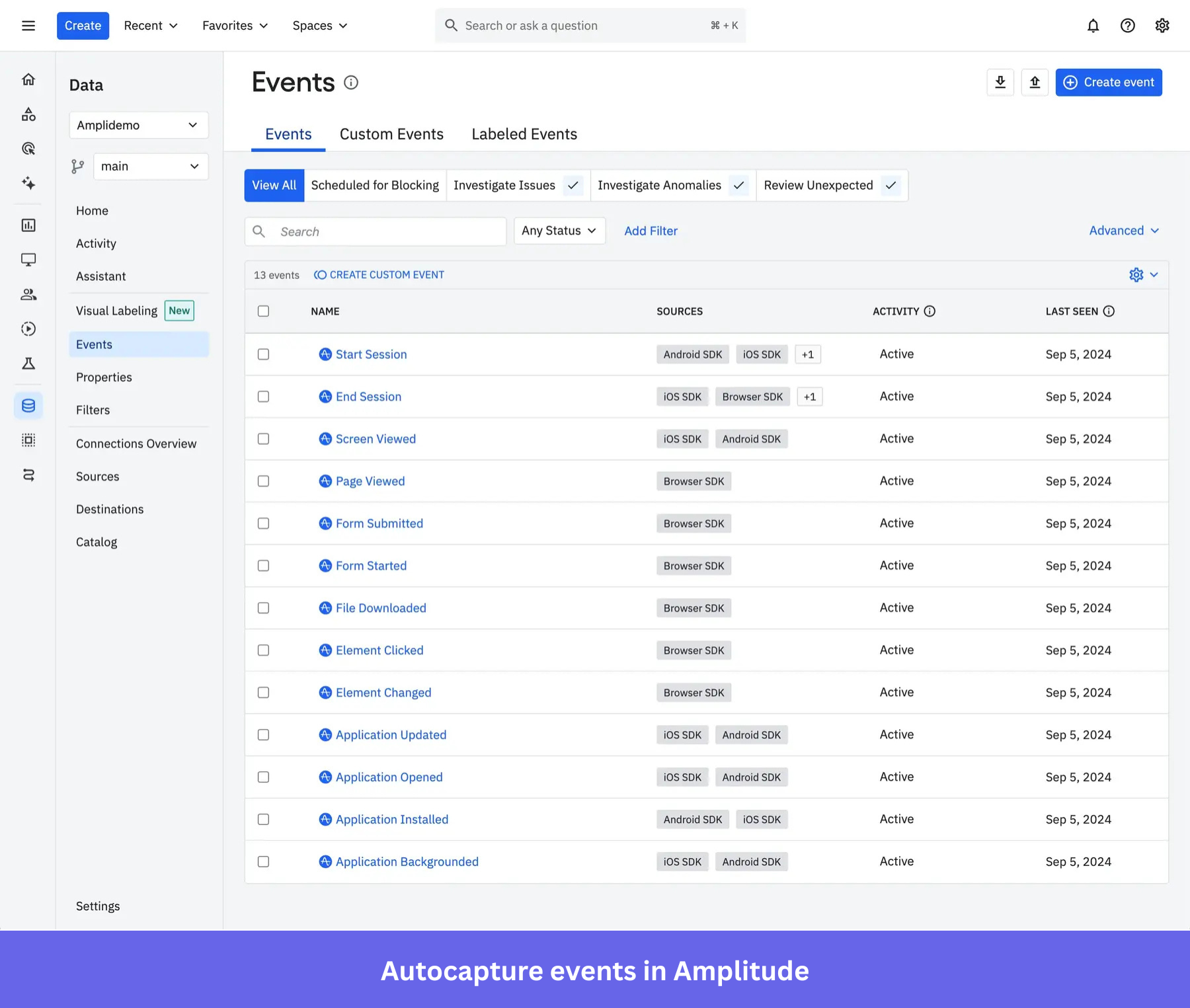
Adding the Amplitude Browser SDK is the essential step in setting up Amplitude tracking on the web. A single line of code starts the data capture process from that point forward. Amplitude’s Chrome extension is a debugging tool, not a required component of the autocapture setup.
For mobile, session tracking is enabled by default. Application lifecycle events (installs and upgrades), screen views, and other autocapture options require explicit configuration in the iOS Swift SDK or Android-Kotlin SDK.
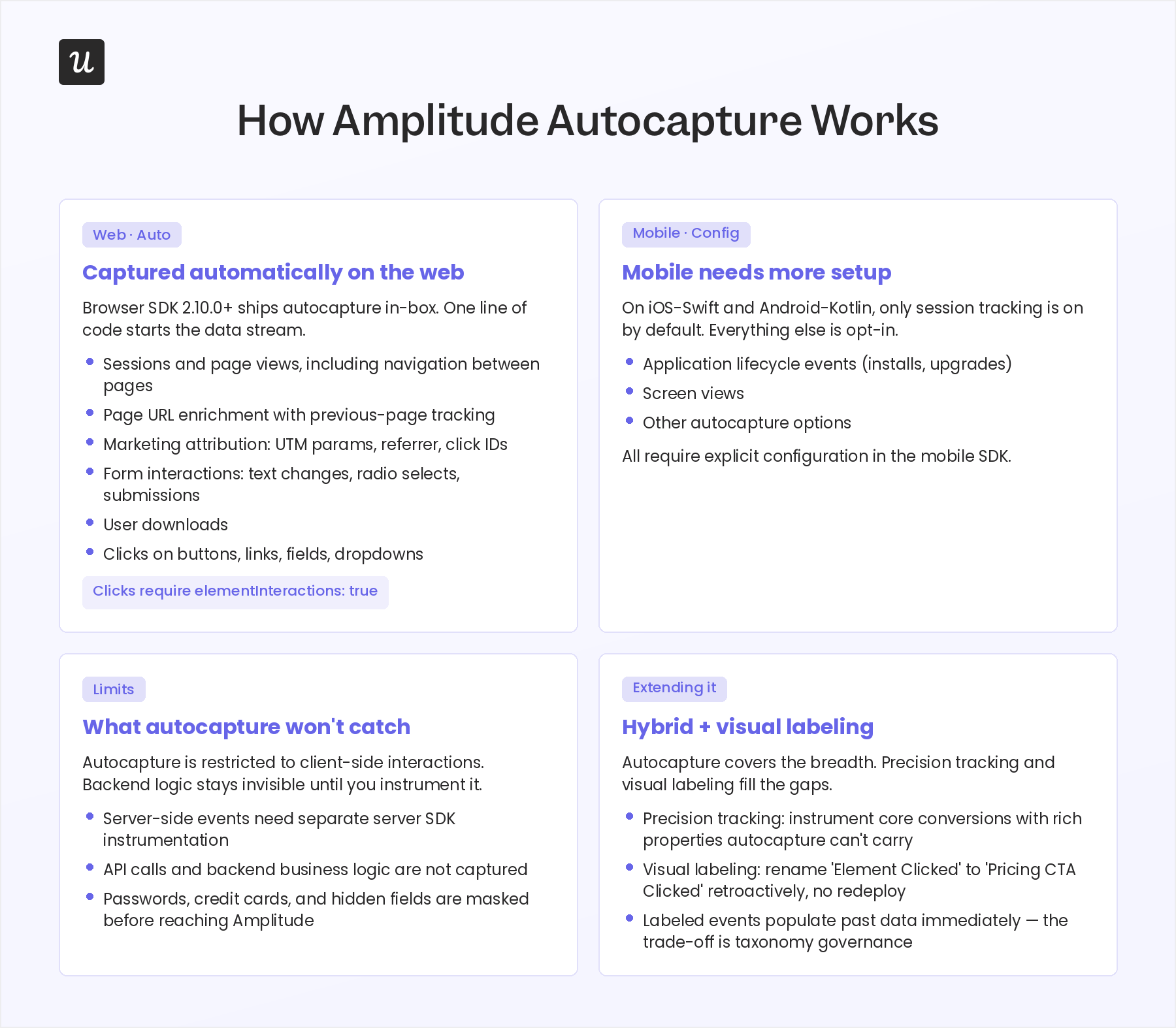
One important limit applies across both platforms: autocapture is restricted to client-side interactions. It does not capture server-side events, so any backend processing, API calls, or business logic running outside the browser or app requires separate instrumentation through Amplitude’s server-side SDKs. Amplitude’s autocapture also includes built-in safeguards to exclude sensitive information by default. Passwords, credit card numbers, and other end-user inputs in sensitive or hidden fields are masked before reaching Amplitude’s servers, which addresses a common concern for teams with strict security requirements.
For core conversion events (a purchase event, an activation milestone, a subscription upgrade), Amplitude recommends a hybrid approach that combines autocapture with precision tracking. Precision tracking lets you instrument specific events with additional metadata and additional context that generic autocapture entries like “Element Clicked” or “Element Changed” can’t carry. The two approaches are compatible, so you can use Autocapture to capture user interactions across the board and reserve manually tracked events for the actions that need richer properties.
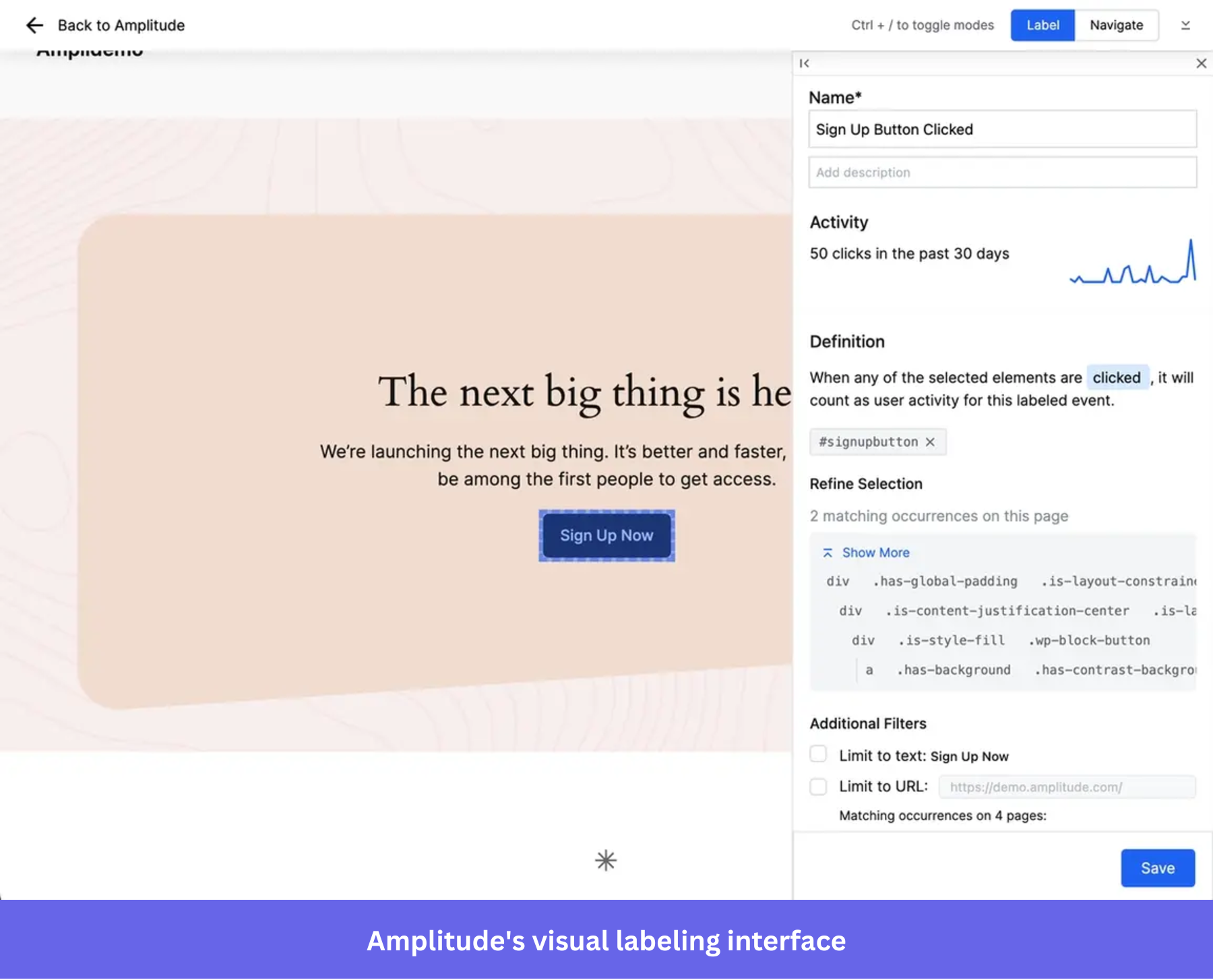
It also has a visual labeling feature, just like Userpilot Autocapture’s visual labeler. It lets anyone on the team browse the live site and quickly create events by retroactively labeling events, assigning meaningful names to captured clicks without redeployment. Instant insights from historical data are the practical payoff: labeled events populate past data immediately, so a marketing team or product manager can go from “Element Clicked” to “Pricing CTA Clicked” without waiting on a deploy cycle. The ongoing cost is taxonomy governance: someone has to own naming conventions, manage who can create labeled events, and update labels as the site’s structure or UI changes.
Amplitude autocapture pricing’s event volume trap
Amplitude’s pricing plans include:
- Starter (Free): 10K MTUs, up to 2M events/month, 1K session replays/month.
- Plus ($49/month, annual billing): Up to 300K MTUs or 25M events/month, 10K session replays/month.
- Growth and Enterprise: Custom pricing.
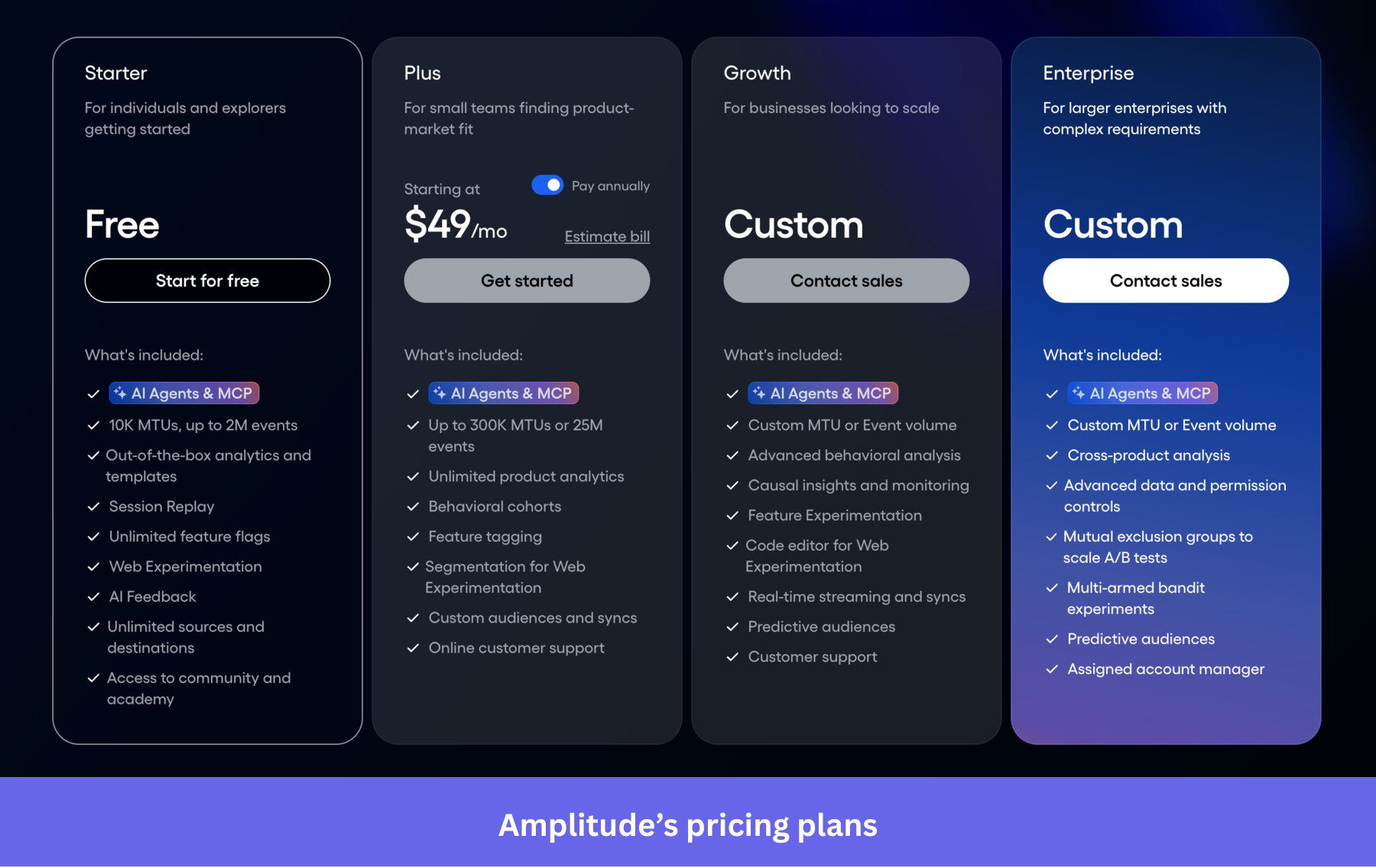
Amplitude charges on two dimensions: monthly tracked users (MTUs) and event volume. Every click, page view, and interaction adds to the count, which means costs can rise faster than many teams expect. On a SaaS product with an active UI, it’s entirely possible to hit the free plan’s 2M event limit before you’ve manually instrumented a single event.
The MTU side of the pricing is relatively straightforward. At $0.049 per MTU on an annual Plus plan, costs scale predictably as your user base grows.
Event volume is harder to forecast. The more aggressively you use Autocapture across a growing product, the faster you move toward custom Growth pricing. Amplitude gives teams several ways to control that volume, including:
- Selector allowlists that limit which elements are tracked.
- Page URL allowlists.
- Data masking.
- Remote configuration.
- Configurable network-tracking rules.
The tradeoff is that every control adds another layer of configuration. At some point, you’re spending time managing what autocapture should and shouldn’t collect, which starts to undermine the original promise of reducing implementation effort.
What Amplitude autocapture doesn’t do
Amplitude analytics still leads the platform, but it now also includes action-layer products, such as guides, surveys, and activation. Whether that’s enough depends on how much orchestration you want in a single stack.
Both the Starter and Plus plans cap you at one active guide. Running a single feature launch campaign typically involves at least three experiences: a tooltip, a checklist item, and a follow-up for non-engagers. Amplitude is also primarily a quantitative tool. Qualitative data from in-app surveys, open-ended feedback, and session-level context require additional products or integrations on top.
Most teams running Amplitude for analytics end up adding a separate engagement tool. That means two subscriptions, two data sources, and the taxonomy mismatch problem. If the downstream tool isn’t integrated, manual export may still be necessary. Amplitude offers cohort syncs, APIs, and event streaming to many destinations, so it’s worth checking whether your engagement tool supports a connection before assuming a manual handoff.
Let’s say that every time you needed to run a launch campaign, you had to ask a developer on the engineering team to pull the right segment and export it as a CSV. The segment would be stale from the moment it landed, and if a user changed plans between the export and the send, they would get the wrong message. This would happen across separate tools for email, in-app messaging, and session replay. Every campaign would start with a developer ticket, and every ticket would introduce enough delay that you’d avoid campaigns requiring complex segmentation because the process made it not worth it.
Amplitude vs. Userpilot: Which is right for your team
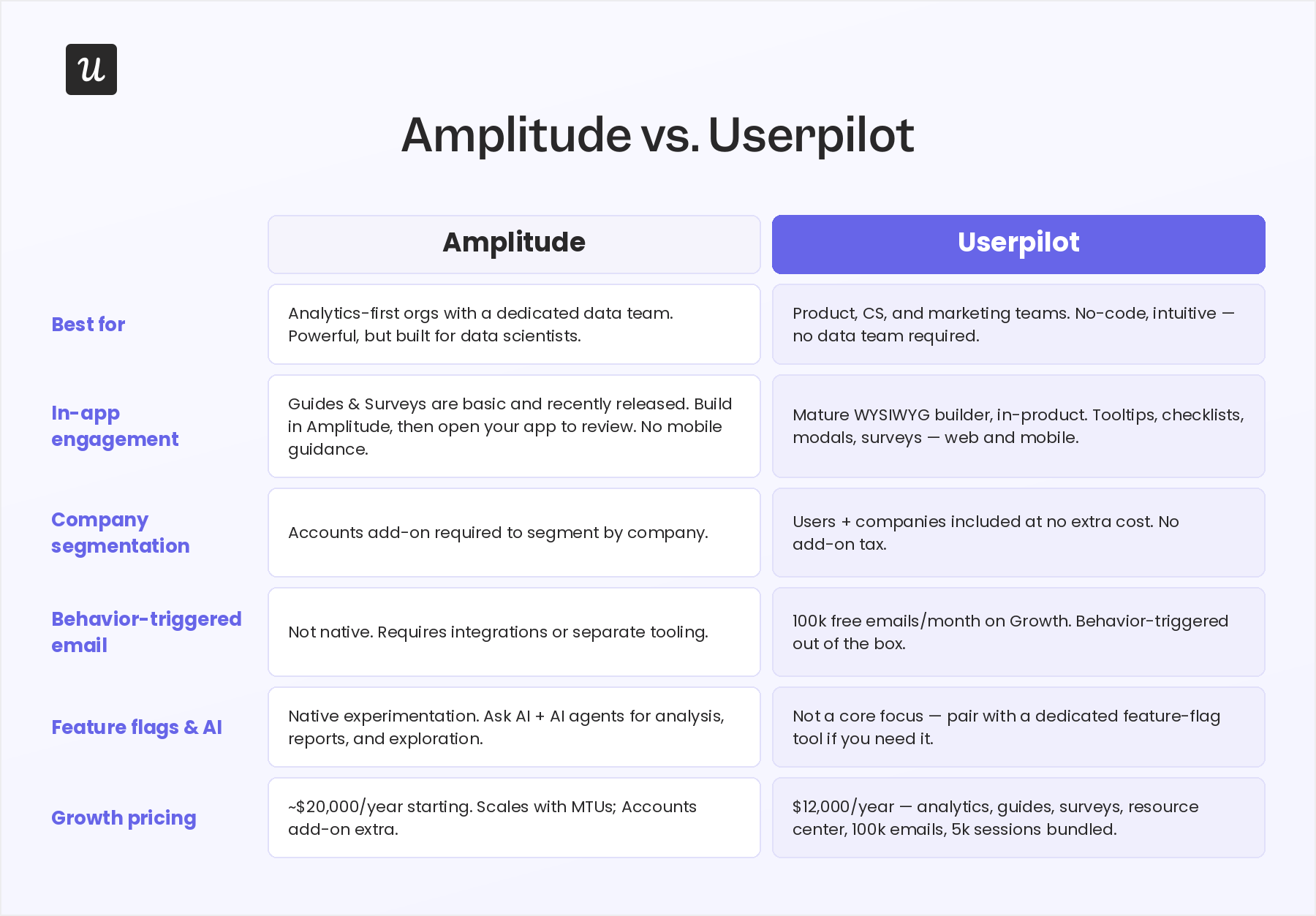
Amplitude makes the most sense when analytics depth is the main priority, and you have the team to support it. If the goal is to capture user interactions, gain insights from them, and then act on those insights inside the product without building a multi-tool stack, Userpilot is likely the better fit – here’s the full Userpilot vs Amplitude comparison.
Userpilot also offers autocapture capabilities and no-code event labeling. Event autocapture is in the Growth tier, so it’s worth checking Userpilot pricing for plan availability and default behavior before committing.
The meaningful difference, once you’re on the right plan, is what happens after the data comes in. Every segment you build feeds directly into in-app campaigns, email sequences via workflows, and session replay. There’s no export step, developer ticket, or stale CSV involved, so campaign execution is a scalable process rather than a series of one-off requests.
Userpilot uses MAU-based pricing instead of MTU plus event volume. Your bill doesn’t climb because Autocapture is generating more events. It grows when your active user base grows, which is the metric you actually want to be paying for. Also, instead of building a report from scratch to find the right segment for a launch, you can ask our AI agent, Lia, in plain language and get a working answer.
Amplitude is the right call when:
- You have a dedicated analytics engineer or data analyst who owns your event tracking taxonomy and data warehouse exports.
- You need advanced cohort analysis, multi-armed bandit experiments, or cross-product analytics at enterprise scale.
- Your analytics layer and engagement layer are intentionally separate, and the integration overhead is acceptable.
Userpilot is the right call when:
- You want pricing that scales with active users, not event volume.
- You’re a PMM or solo PM who needs to go from an analytics signal to a deployed campaign without involving engineering.
- You want one data source for analytics, in-app engagement, surveys, and session replay, with the segment you build working everywhere automatically.
Book a demo to see how Userpilot compares to Amplitude in your specific setup.
Userpilot strives to provide accurate information to help businesses determine the best solution
for their particular needs. Due to the dynamic nature of the industry, the features offered by
Userpilot and others often change over time. The statements made in this article are accurate
to the best of Userpilot’s knowledge as of its publication/most recent update on June 10,
2026.
About the author