Automated Personalized Emails: How to Scale Without Losing the Human Touch


Automated personalized emails are still treated like a contradiction, as if you have to choose between scale and personalization. In reality, using product usage data to inform your decisions and adapt messaging can quickly reconcile the two, taking them from oxymoron to symbiosis. With 376 billion emails going out each day, generic email blasts are a losing bet even before you ever hit send. In contrast, automated messages sent by the best teams convert at rates that manual campaigns can’t match, with 52% better open rates, 332% stronger click rates, and 2,361% higher conversion rates (that’s not a typo!).
The challenges of personalized automation have always been a lack of data, poor segmentation, and unwieldy tech stacks where tools don’t talk to each other. Most of that is no longer a hindrance due to technological advancements, which means the bottleneck has shifted from whether you can do it to how well you can do it. That’s why this guide is here to show you how to run automated personalized emails better than your competitors, giving you the edge both at scale and on a per-user basis.

The case for combining automation and personalization
The excuse I hear when teams skip proper personalization is that it doesn’t scale, with manual segmentation and one-off campaigns being the only way to personalize. The opposite is actually true since it’s manual personalization that doesn’t scale, while automated personalized emails exist precisely to solve the problem that manual implementations created. Customer expectations are a moving target, with Salesforce finding that 73% of customers expect a better personalized customer experience as technology advances. This means the bar keeps moving even as tools become easier to use.
Stefan Milicevic, Strategy Director at Underground Ecom, described where things are headed:
“AI will start recommending triggers, delays, and messaging angles after spotting trends and gaps in customer retention cycles. This will make it possible to work on customer retention at scale while maintaining a lot of the intimate, personal feeling between each customer and the brand.”
The promise isn’t personalization instead of scale, but personalization that gets sharper as it scales.
What makes personalization feel useful versus invasive
Once you accept that automated personalized emails are the way forward, the harder challenge is finding the tipping point where personalization goes from relevant to unsettling. The difference between visible and invisible personalization matters more than most marketing advice cares to admit. Invisible personalization uses user behavior analytics to decide what to send, without parroting that data back to the reader. The user just gets the message that happens to be right for them and are none the wiser. Visible personalization spells out what you know by saying “we noticed you viewed pricing three times this week,” which reads more like surveillance than relevance.
Mike Kumlin, Senior Marketing Technology Manager at ButcherBox, put it bluntly:
“Customers are getting more and more savvy. If you’re not authentic, they’ll see right through it.”
There’s a simple litmus test you can use by asking yourself if the user behavioral signal changes what you send or just proves you were watching. Basic personalization like name, role, and company is often invisible but also commonplace enough not to put users off when used visibly (e.g., when addressing them by name inside the product). Behavioral personalization like event analytics, lifecycle stage, and user engagement patterns are where teams need to be more careful about what they say out loud to avoid creeping their customers out.
Building the segments that make personalization possible at scale
Every automated personalized email starts with user segmentation, but segments are only as good as the data you’re tracking. When I build a segment within Userpilot, I’m able to reuse it when targeting in-app messages and sending emails without re-exporting anything (which matters more than you think when running multi-channel lifecycle campaigns). The inputs worth building segments around are team role, plan tier, company size, tracked events, pages viewed, content engagement, and survey responses to get a holistic data set for each segment.
None of this data analysis or feedback collection requires any code since Userpilot lets you track usage and embed in-app surveys through unified dashboards and visual editors.
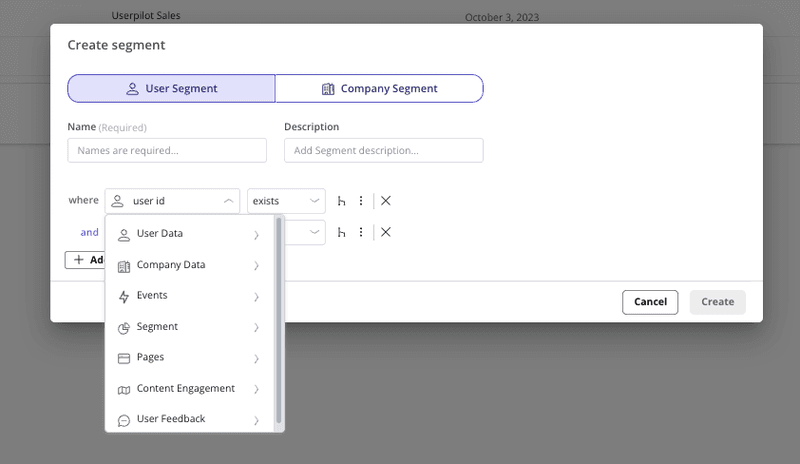
User persona data like role, industry, and jobs-to-be-done tell you who’s signed up but don’t reveal what those users have done since, which is far more important for retention. This is why you should layer personas on top of behavioral data rather than the other way around. Behavioral analysis is also what defines a user’s lifecycle stage, which is the foundation of user lifecycle management.
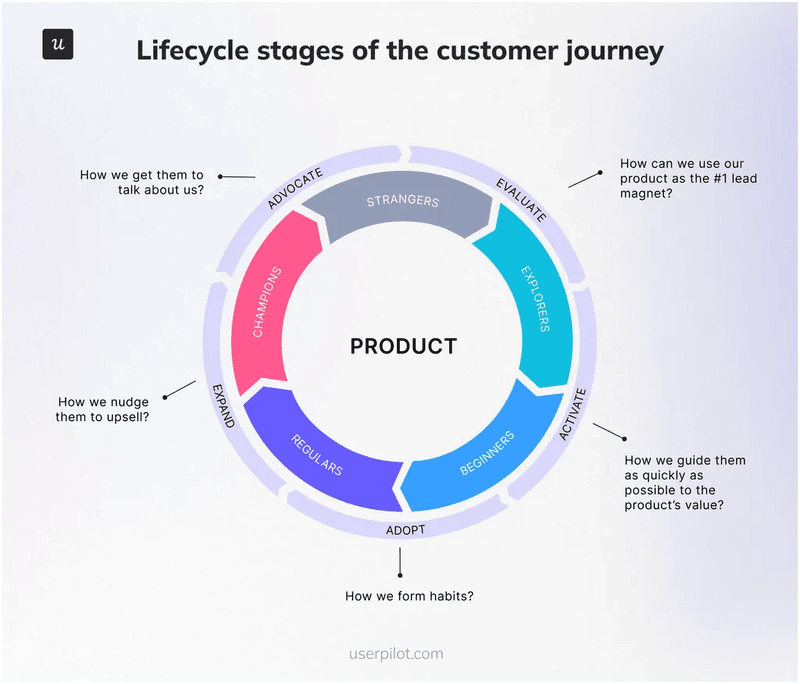
I group users into four buckets with explorers who have signed up but not activated yet, beginners who complete a core task but don’t use advanced features, regulars who log in weekly while using at least one advanced feature, and champions who use multiple advanced features on upgraded plan tiers.
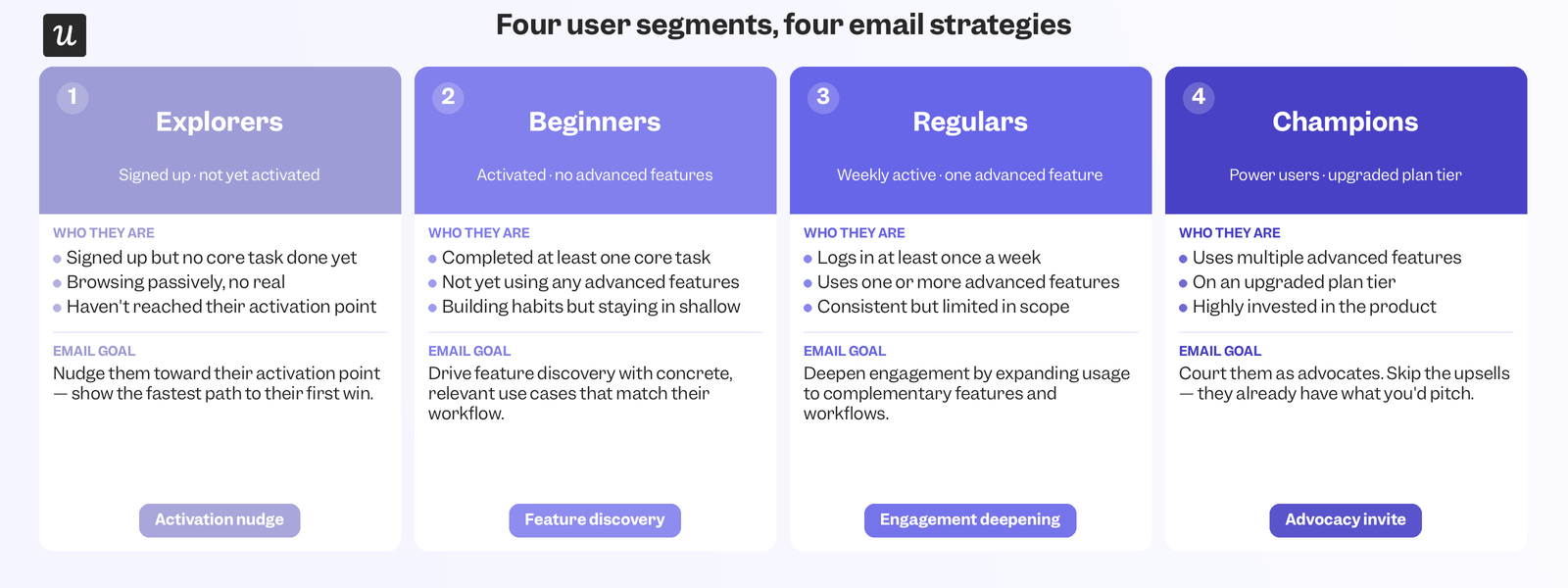
Each bucket needs to receive personalized emails since explorers need to be nudged towards their aha moment and activation point while champions should be courted as advocates instead of receiving upsells for feature add-ons that they’re already using. What that looks like in practice is creating a segment for beginners who have started onboarding but haven’t adopted a secondary feature yet.
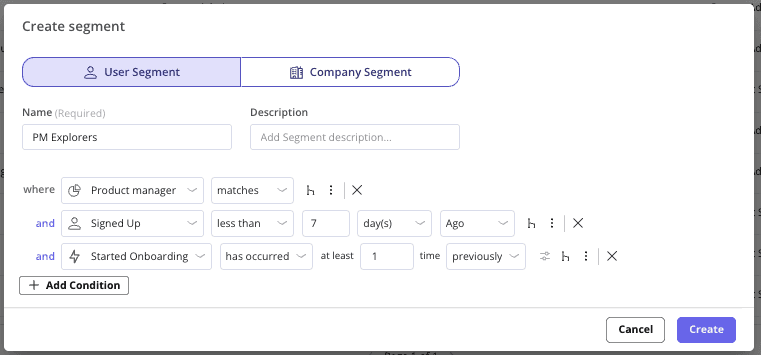
That beginner segment gets a different automated personalized email than a champion who’s already expanded to a higher plan or even referred others to your product, with segments updating on their own whenever a user’s behavior changes.
What to send, and when
Once the segments exist, it’s important that the actual emails you send out match the lifecycle stage (not just the user persona). This is where most automated personalized emails still feel generic because the sequences that product champions get look identical to what a first-week explorer would receive, defeating the point of segmentation.
Emails for explorers
Explorers need a faster time to value, not more information. A welcome email that greets the user by name and points to the single action that proves the product works beats a feature tour every time. Welcome emails also have the highest open rate of any lifecycle email at 83.6% on average. When you realize this is the email that the largest percentage of users will see, it’s clear why it’s worth getting right before anything else.
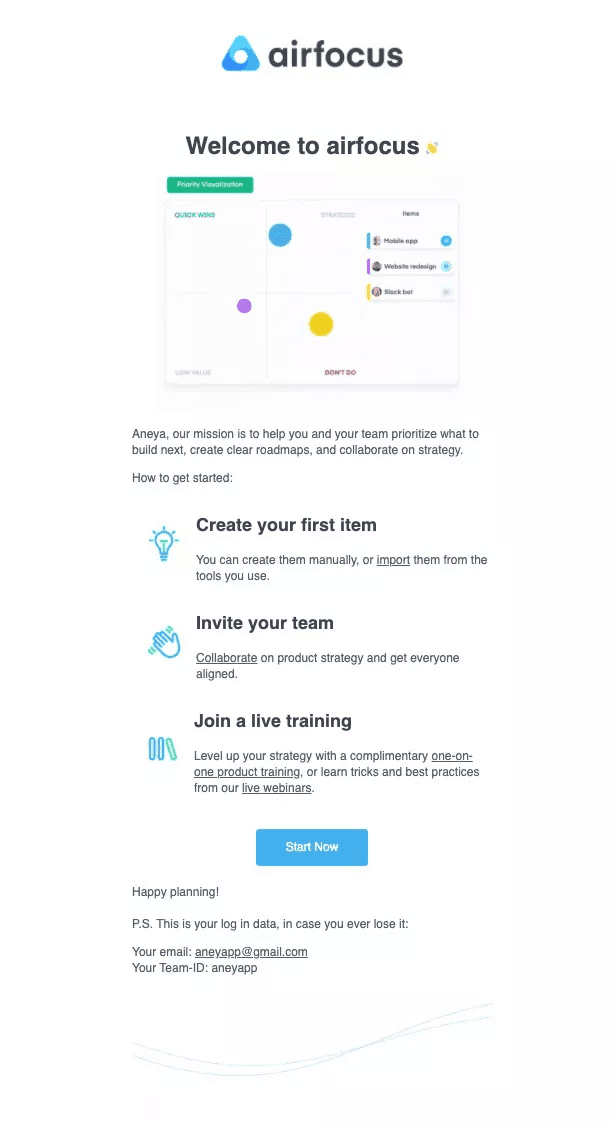
Beyond the welcome message, explorers should also get SaaS onboarding emails like a re-engagement nudge if they stall during onboarding and a mid-trial check-in that asks for feedback rather than just pushing for more usage. Both emails run off the same behavioral triggers already powering the segment.
Emails for beginners
Beginners have proven that the product works for them once. The next step is to drive feature adoption for a second feature before the habit fades. A secondary onboarding email that introduces one advanced feature that’s most relevant to their use case will do more than a generic “did you know” product tidbit.
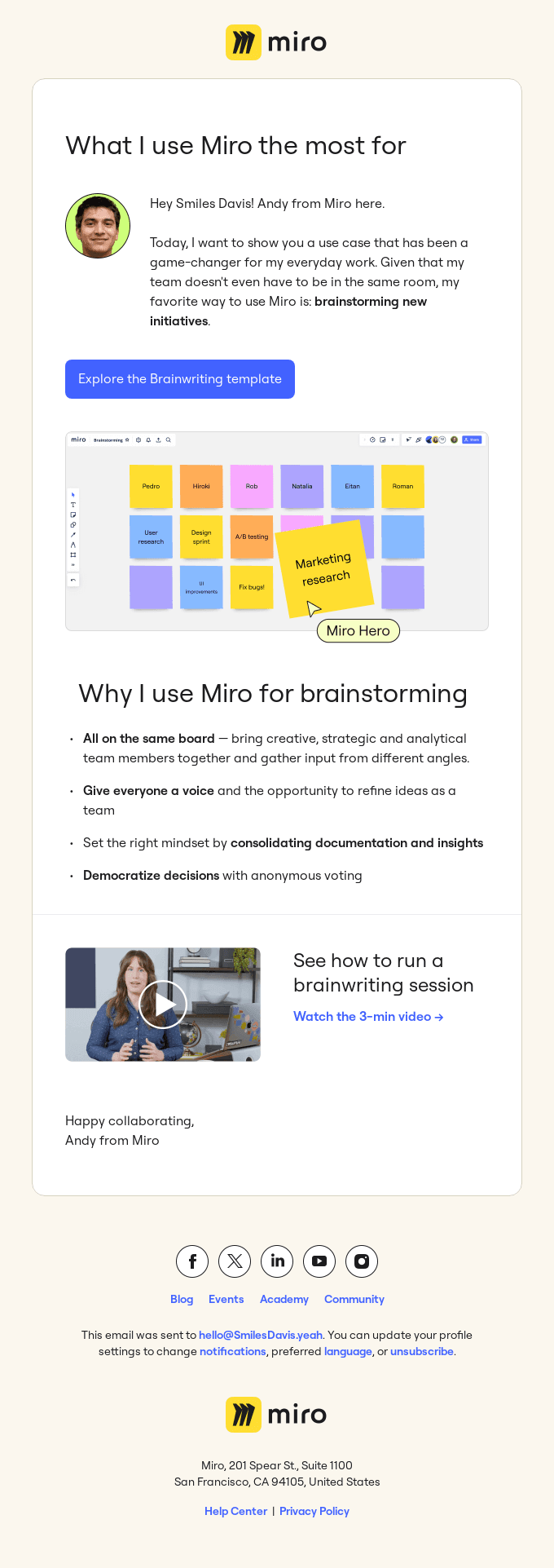
A celebratory or usage-review email built on product usage metrics works well at this stage too because showing someone how much they’ve already accomplished is a stronger nudge toward a second feature than telling them what they’re missing. Trial expiry reminders round out the beginner sequence and should be sent three to five days before their end date.
Emails for regulars
Regulars have formed product usage habits, but they’re missing a community around the product and any incentive to upgrade. A community-building email inviting them to a webinar or user group keeps them engaged without asking for anything in return, while a renewal or upsell email works best when triggered by a plan limitation they’ve just hit.
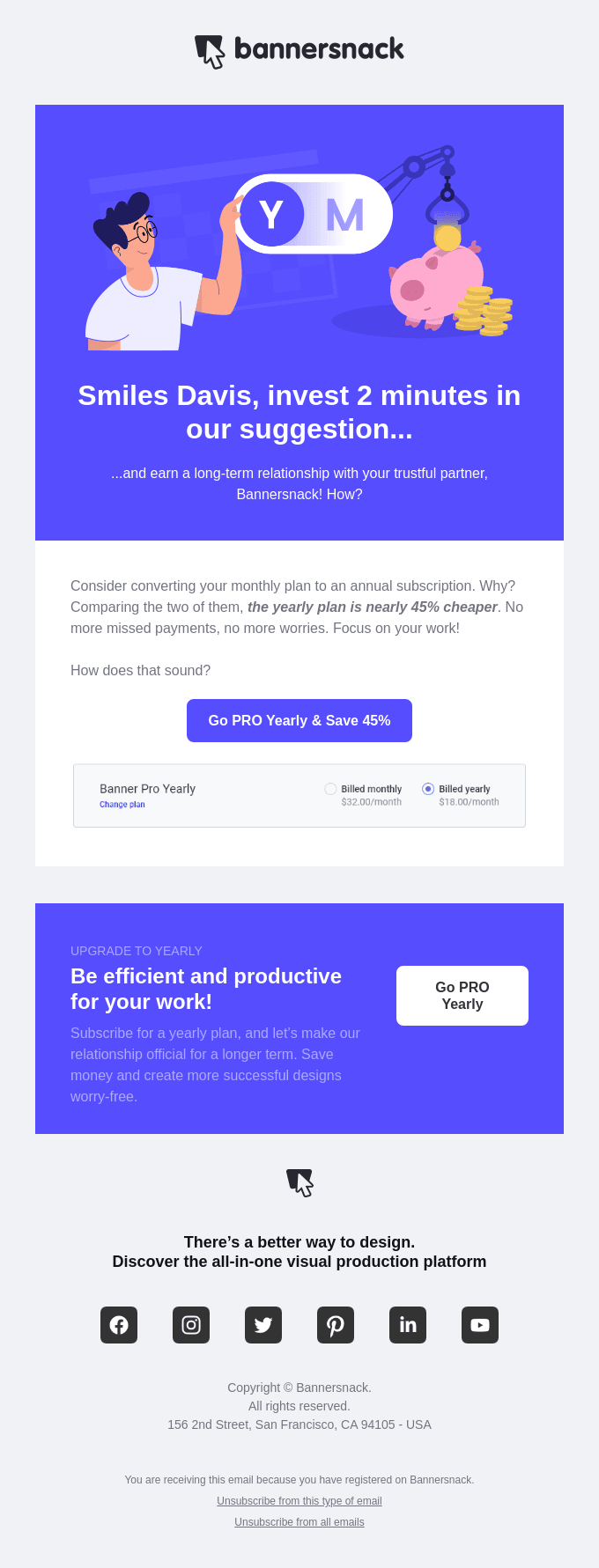
Upsell emails triggered by real usage signals convert far better than the same message with random timing, making this one of the highest-leverage automated personalized emails you can send out so long as the trigger is behavioral instead of calendar-based.
Emails for champions
Champions have already adopted advanced features, so the goal when emailing them shifts from activation to advocacy. A survey email asking what’s working best gives you valuable feedback from a power user, while a referral program email can turn that customer loyalty into revenue growth.
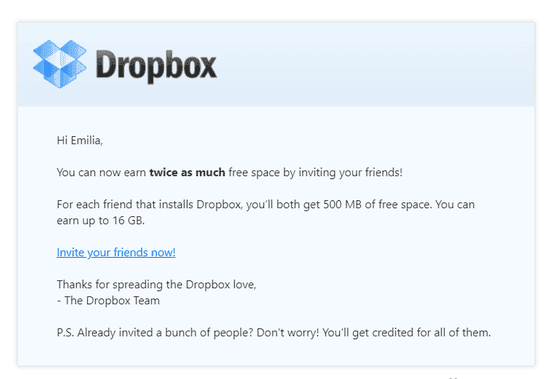
Special offer emails with early feature access or invitations to events also work at this stage precisely because it makes champions feel like they’ve been rewarded with exclusive benefits for consistently using the product on their core workflows.
What AI has actually changed here
Segmentation, lifecycle stages, and contextual emails were all possible before AI, just significantly more expensive or time-consuming. What AI changed isn’t the concept of automated personalized emails but the cost of doing the work needed to keep a message personal at scale. Dynamic content used to mean inserting a first name and a company field into a template, but it now means pulling recent behavioral signals from AI product analytics (e.g., feature usage, lifecycle stage, or session data) and generating copy that reads like someone actually reviewed their account before emailing them.
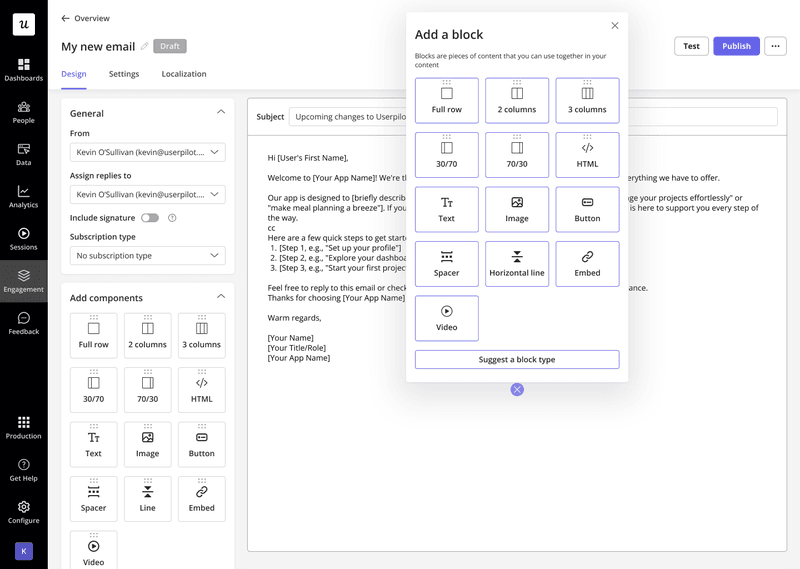
Joe Hsieh, Founder of Retention Commerce, described the power of AI for synthesizing context into messaging:
“AI systems will take the full context of a customer’s relationship with the brand and generate messaging that feels handcrafted for that individual. Every touchpoint will become a live conversation instead of a scheduled broadcast.”
For SaaS companies running a product-led growth strategy, the behavioral signals AI needs already live inside the product. That said, you should still add a real human signature to every automated email because a name and photo from the account’s actual customer success contact outperforms emails without a clear author.
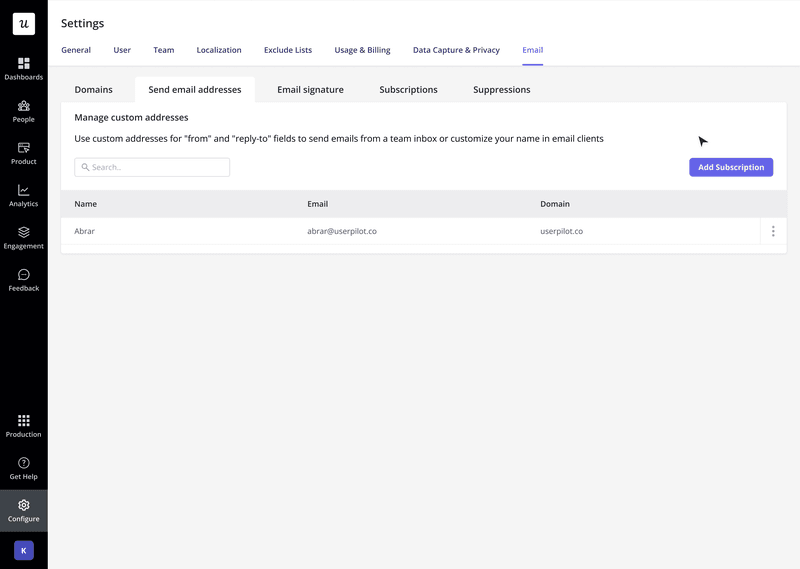
Getting the timing and delivery right
An automated personalized email sent within minutes of the behavioral trigger feels responsive and relevant, whereas the same email received just a couple of days later feels more like a scheduled broadcast sent to every user on a fixed schedule without any personalization in sight.
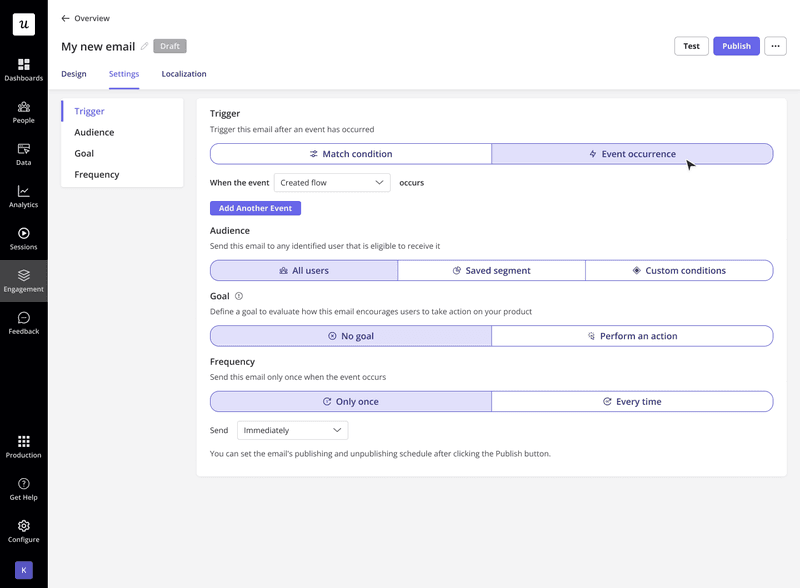
In Userpilot, four settings control which emails users receive and when:
- Triggers: In-app events or conditions (like trial end dates).
- Audience: All users, saved segments, or custom conditions.
- Goal: Success criteria for the campaign (which feeds analytics).
- Frequency: One-time versus recurring emails (with/without delay).
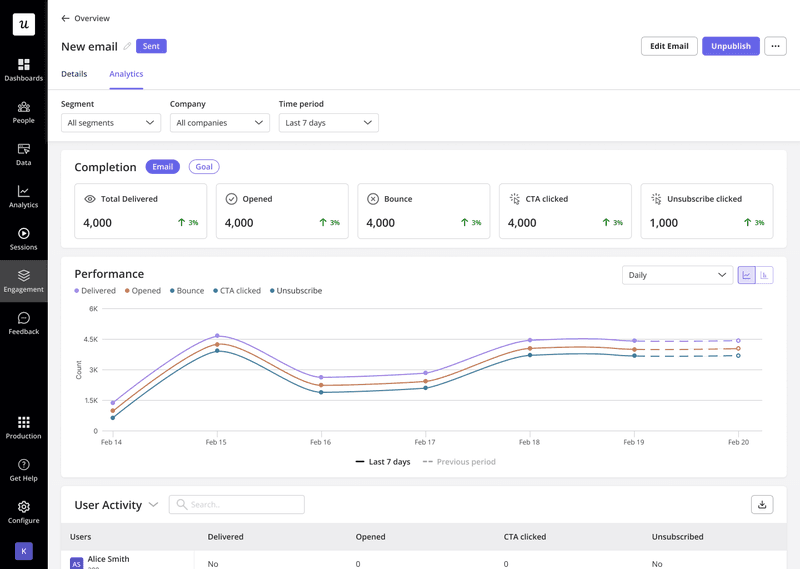
None of this optimization matters without proper customer engagement analytics to turn into a continuous loop of improvement. Userpilot’s email dashboard tracks delivered, opened, bounced, and clicked emails to tell you if the personalization is resonating with users.
Automation doesn’t make emails impersonal but poor targeting does
The teams struggling most with automated personalized emails aren’t stuck because they lack automation but because their automations are running without behavioral context. This results in a welcome email arriving a week late or product showcase emails recommending the exact feature a user churned over, quietly undermining your churn prevention. Building a system with lifecycle segmentation and behavioral triggers is what will close the gap between scalable sequences and personalized emails that are relevant to each user.
Userpilot unifies behavioral data, user segmentation, contextual emails, and in-app messaging in one place so the context that makes automations personalized is always connected to the communications layer that delivers it. To see how automated personalization can work for your product, book a demo so we can give you a peek into scalability that doesn’t sacrifice relevance!
FAQ
What is email automation?
Email automation is the practice of using software to automatically send relevant content based on user behavior or by time-based rules.
What is email personalization?
Personalization adapts the content, timing, and sender details of each email to the individual receiving it. Beyond adding the first name, effective personalization uses the right template, email subject line, language, and CTA based on a user’s attributes, lifecycle stage, or most recent product action.
Why are personalized emails important?
Because hyper-relevant emails drive more results. This can include higher CTRs, better customer experience, and even faster product adoption, and improved relationships.
What are the benefits of email marketing automation?
According to an Omnisend report, if you send automated personalized emails, you’ll outperform mass emails with:
- +52% better open rates
- +332% higher click rates
- +2361% better conversion rates
About the author