What is the Happy Path in UX and How to Design It?



Research keeps showing that customer satisfaction drives loyalty and retention, explaining as much as 80% of their variation. That begs a crucial question… what makes customers feel satisfied?
In UX design, it often comes down to the happy path: the fastest way for a user to achieve their goal in your product.
In this article, I’ll show you how to design an effective happy path. We’ll also look at the opposite, the unhappy path, so you can fix it before it costs you users and money.
What is a happy path?
The happy path refers to a user’s ideal journey to achieve their goals within your product. Sometimes known as the “happy flow,” it should guide users through the core journey while reducing TTV and removing any friction.
The definition of the happy path varies a bit depending on whether we focus on the UX or software development use case:
- In software development, the happy path is the ideal system flow where everything works as expected.
- In UX, which is the focus of this article, it goes a step further. It’s how a user moves smoothly from action to value with minimal effort. This explanation, citing a research paper, adds more context: “happy path is a user or customer journey that, at each step, makes the person feel happier.“
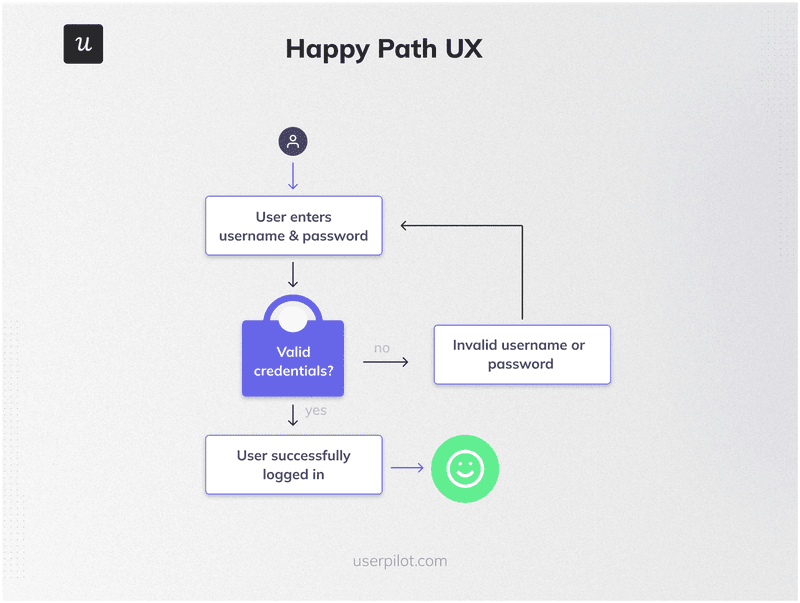
For example, the happy path for a user logging into your tool will look like this: open the website/app, enter credentials, get authenticated, and access the dashboard immediately.
Happy path vs. golden path vs. sad path vs. edge cases vs. error states
To clarify confusion, let’s also compare the happy path to a few other terms related to succesful user journeys you may have seen around:
The happy path is the ideal, error-free journey the user takes to achieve their goal. It involves completing specific tasks without errors.
The golden path, however, is the most engaging, rewarding, and efficient user flow. It is the path of most satisfaction, where the user doesn’t just complete tasks but also enjoys a delightful experience.
The sad path is a path where a user encounters errors, obstacles, and confusion. For example, a user tries to purchase an item online but receives a payment error message multiple times.
Edge cases are uncommon or unexpected scenarios that fall outside the typical flow, e.g., expired sessions or unusual inputs. They don’t happen often, but they still need handling.
Error states are the specific moments when the system fails or blocks progress, such as an invalid password or failed payment. These need clear messaging and recovery options.
All the paths are important for understanding and designing a comprehensive user experience. The happy path prioritizes efficiency, the golden path: user delight, and the sad path: recovery.
What is happy path testing?
Happy path testing is one of the earliest tests run on a product. It tests the product’s performance under perfect conditions (using carefully scripted inputs).
The happy path test, thus, determines if the product delivers the expected output, assuming the user does everything as expected. Until it does, there’s no point in testing more complex scenarios.
There are two main ways to do it:
- Automated testing: This uses scripts to simulate user actions and verify outcomes. It is best for testing core flows. For example, you can automate the test of a flow like “sign up, log in, create a project, and save” repeatedly and at scale.
- Manual testing: This involves users going through your product to spot issues that automation can’t catch. It is best for results that might vary depending on the tester. For example, a product manager signs up, completes onboarding, and looks for the shortest route to create a report.
What is unhappy path testing?
The opposite of happy path testing is unhappy path testing. It involves testing what happens when things go wrong.
For example, you could test what happens when a form fails to submit. Do users have to enter their data all over again? Or say users type a wrong password. Do they get a clear error and retry easily?
Although you simply can’t envisage all the ways a user can misuse your product, the goal of the test is to try as many wrong inputs and usage methods as possible and discover all the ways things can go wrong.
How to design a happy path user flow?
To identify and design the happy path user flow, businesses must analyze their users and processes and determine the best path for users to follow within their product.
Define your user personas
Which type of person is most likely to use your product? What goals will they hope to achieve with it? The answer to these questions will be key to your design process.
To answer these questions, you’ll need to define your user personas. Each persona should identify the user’s background, goals, needs, motivations, and behavior.
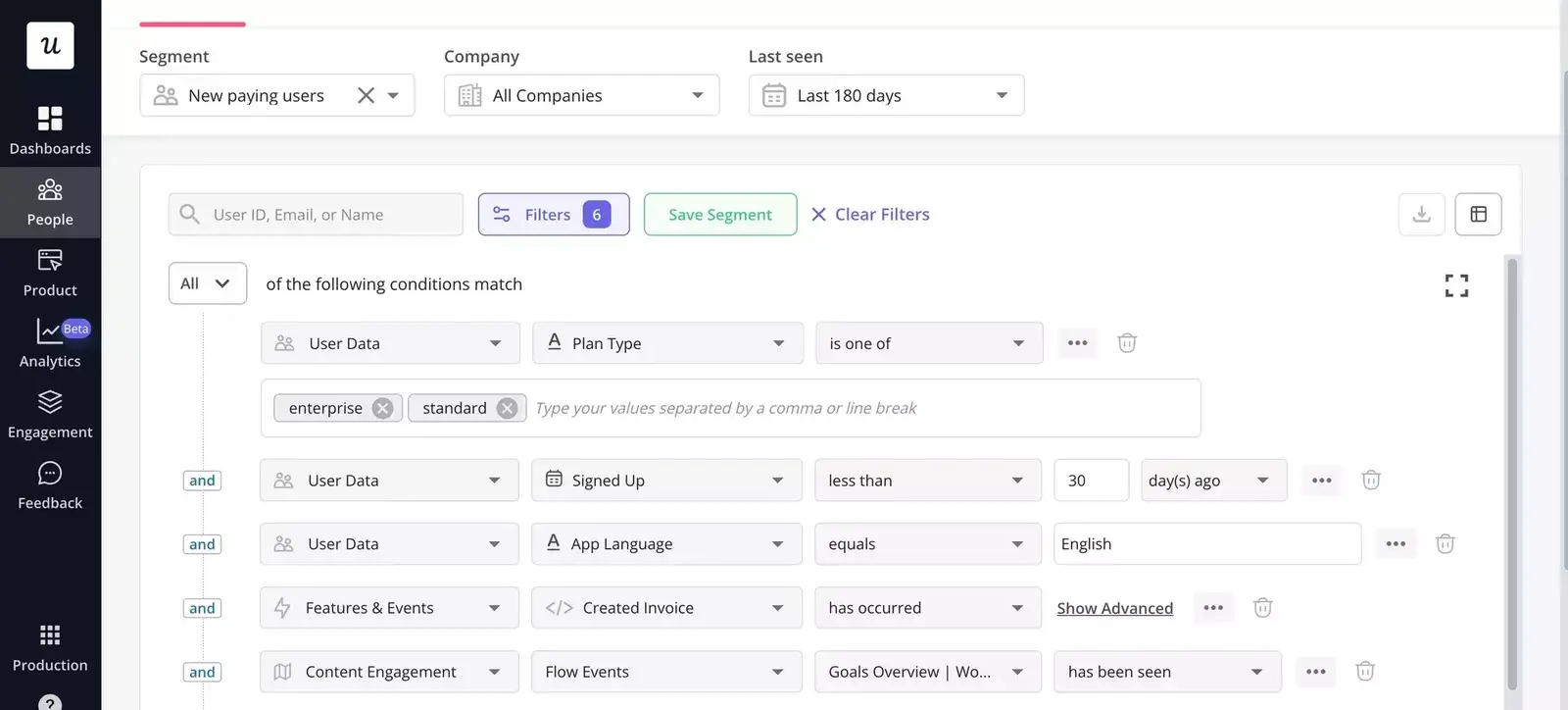
If you already have users, you can segment them based on their demographics and user behavior. Try to understand what each user group wants to achieve and the challenges that stand in their way.

Define the key user flows to focus on
Now that you know your users and their varying needs, it’s time to identify the flows that matter most to them. To do this, you need to identify the most common and important tasks users must complete.
For each task, visualize the different steps users go through within your product to achieve their objectives. This will enable you to see the already existing user flows within your product and how they’re interconnected.
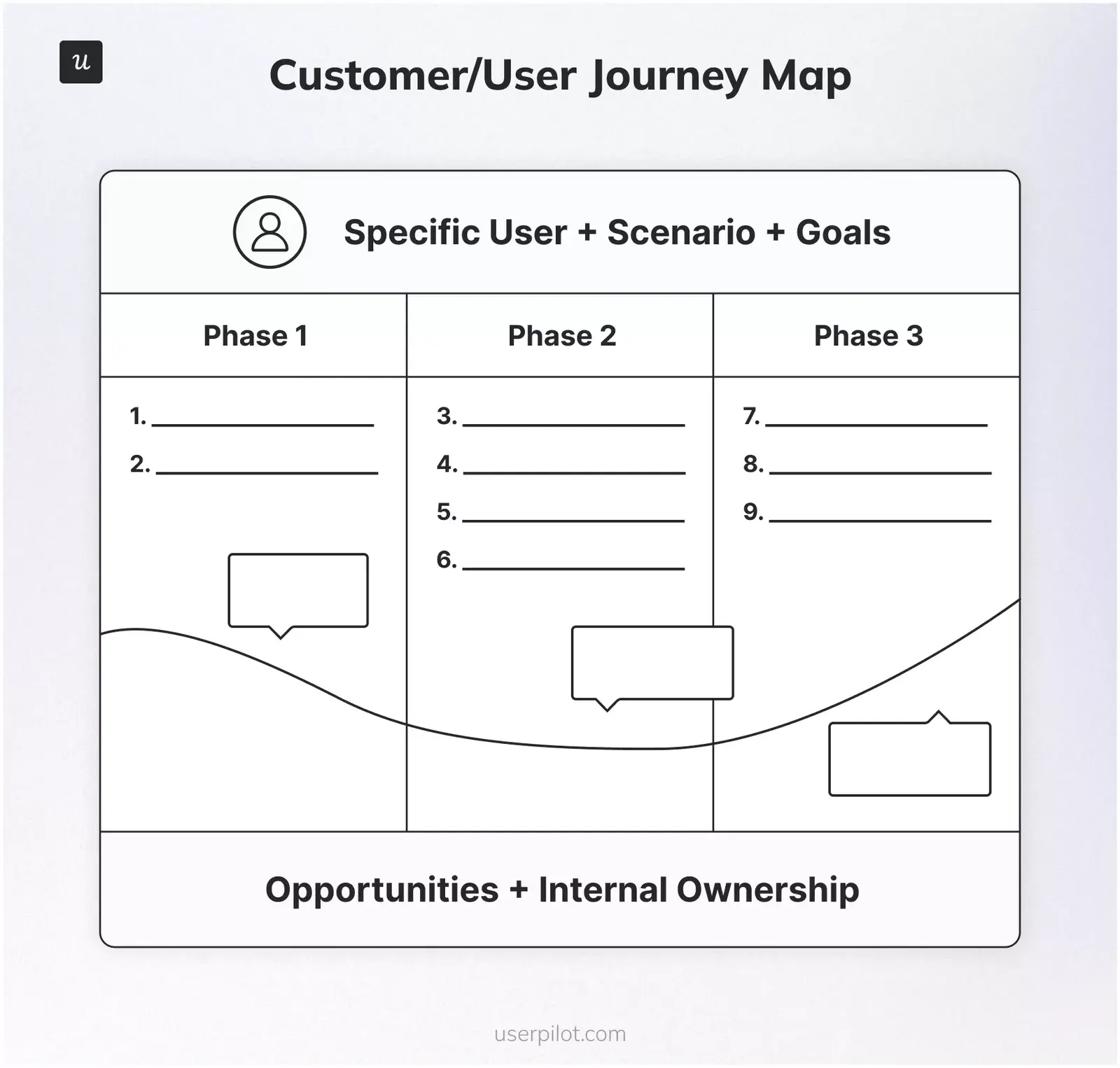
For example, a typical SaaS product has a signup flow that leads to the primary onboarding flow and activation flow before culminating in a feature flow.
To complete this step successfully, you need to identify the most frequently used flows that most impact the user experience and contribute to your stated business goals.
Map the happy path for each user flow
Now it’s time to finally define the happy paths for the user flows you identified above. Your goal here is simple: of all the paths a user can follow to complete a task, what is the most likely positive alternative?
Create a flowchart outlining each step in the journey. Then, minimize friction by eliminating unnecessary steps and potential exception paths or error points.
Consider all the ways you can turn the path into an intuitive user flow. For example, could you simplify the navigation to make it more intuitive? How about including helpful messages and offering suggestions?
By the end of this step, you should have a pathway that users can follow to satisfactorily complete their task without confusion or errors.
Analyze the user behavior of different segments
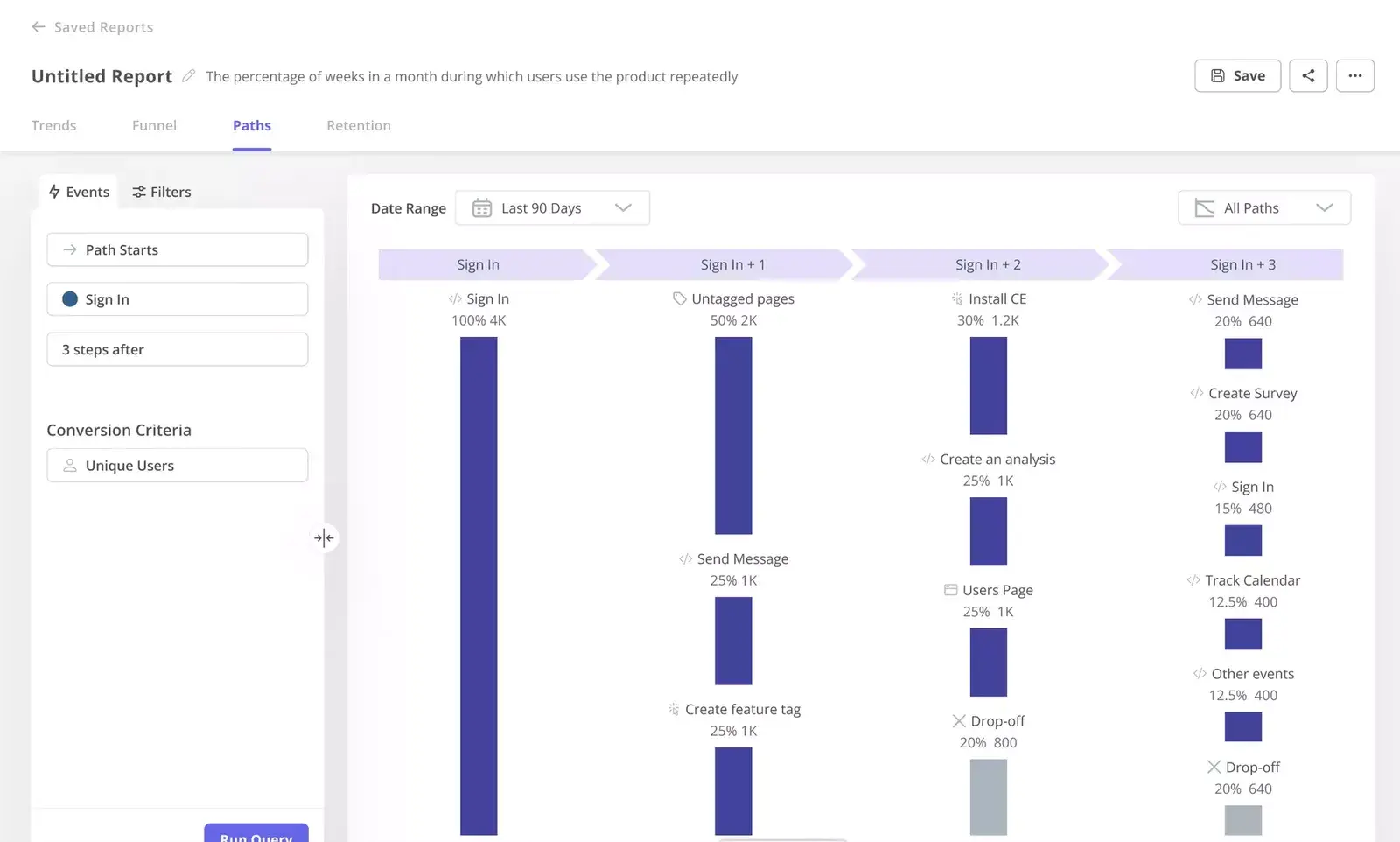
Once you’ve created the happy flow, it’s time to begin testing. Use analytics tools to track user interactions and understand how users navigate the happy path.
Go deeper to analyze interaction/ and pain points for different user groups. Does the flow work for every group? For each group, measure the time spent on tasks, task completion rates, etc.
Identify drop-off points where users abandon the flow and investigate why it happens. Dig deep to determine what each segment needs and how to improve their experience.
Pair your analysis with user feedback
Gather qualitative feedback to back up the quantitative data collected in the previous step. Conduct user interviews and surveys to encourage users to share their thoughts, feelings, and frustrations.
Compare both the analytics data and qualitative feedback to gain deeper insights and validate your findings. Identify the most impactful changes needed based on user needs and pain points.

How to steer users on the happy paths?
A little drop-off in key flows can lead to revenue loss. Let’s do the maths:
Take Buffer as an example. As of December 2025, they have 198,537 MAU and an ARPU of $27.91. With that, even a 1% churn from edge cases will add up to over $50K lost per month.
So, how can you steer users from that path onto the happy one?
1. Design clear interfaces
A clear user interface keeps users moving forward. It removes friction by using UX design principles and making actions obvious and consistent.
This means:
- Using specific actions like “Create report” or “Invite team,” rather than vague labels like “Continue” everywhere.
- Instead of placing primary actions in different spots on each page, keep them in the same position across the product.
This consistency reduces cognitive load, making users far more likely to stay on the happy path.
2. Implement in-app guidance to keep users on the happy flow
Even with a clear interface, users still need direction. This is where in-app guidance comes in handy. It shows users “what to do” and “how to do it,” at exactly “when they need to do it.”
For example, you can create an interactive onboarding flow to drive new user activation. Modals, tooltips, and other in-app elements will drive users’ attention to the right UX elements and explain them. Checklists will help break all the onboarding steps into chunks that are easy to follow and easy to return to at the user’s own pace.
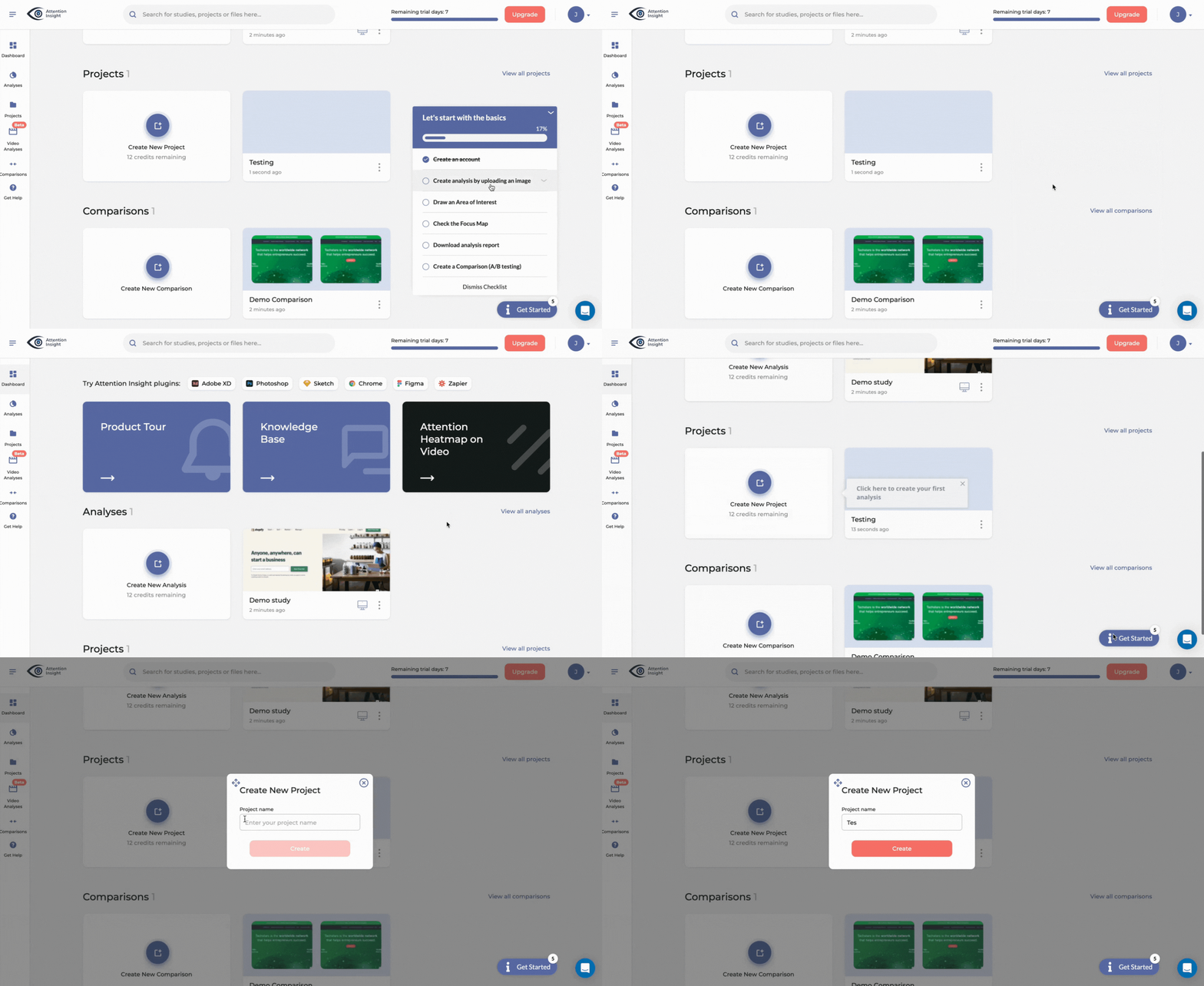
Ultimately, wrap up the flow with a resource center to ensure users don’t leave their tasks.
💡 Pro tip: In-app guidance works best when they are personalized. Trigger these experiences based on user segments and behavior, so each user sees what’s relevant to them.
3. Identify drop-offs in the user journey and fix them
Identify drop-off points, determine the cause, and fix them. For example, if users regularly skip a step in the process, removing that step or making it less confusing can improve the onboarding completion rate.
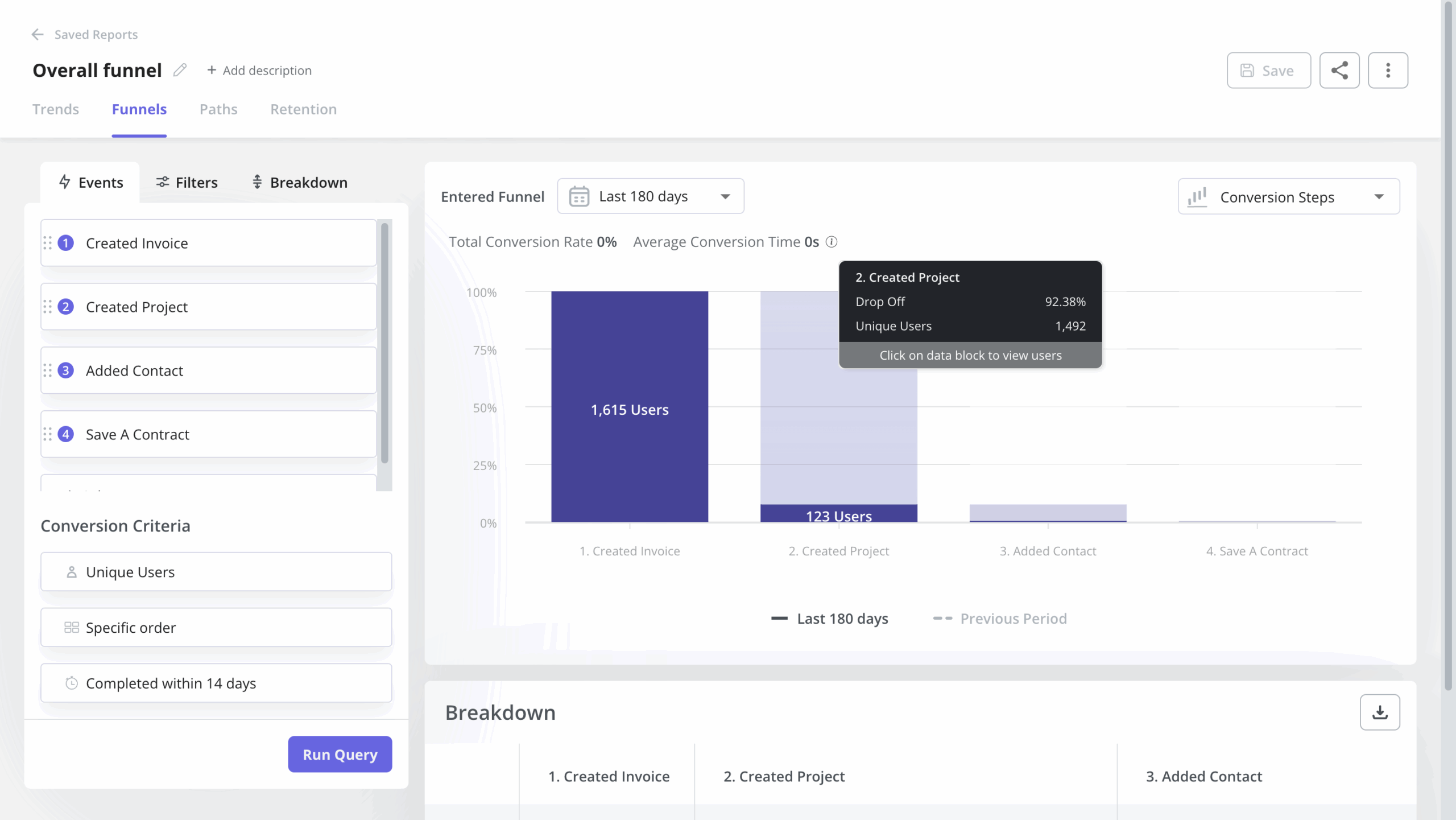
The first place to look is your funnel report. It reveals how users move through key steps and where they stop. If a large number drops off at one stage, that’s your signal.
From there, you can also zoom each path to identify the drop-off point and how to further optimize the path. For example, by tweaking a copy or simplifying it, you can make a step (and the journey) easier to complete.
4. Make it easy to ask for help and leave feedback
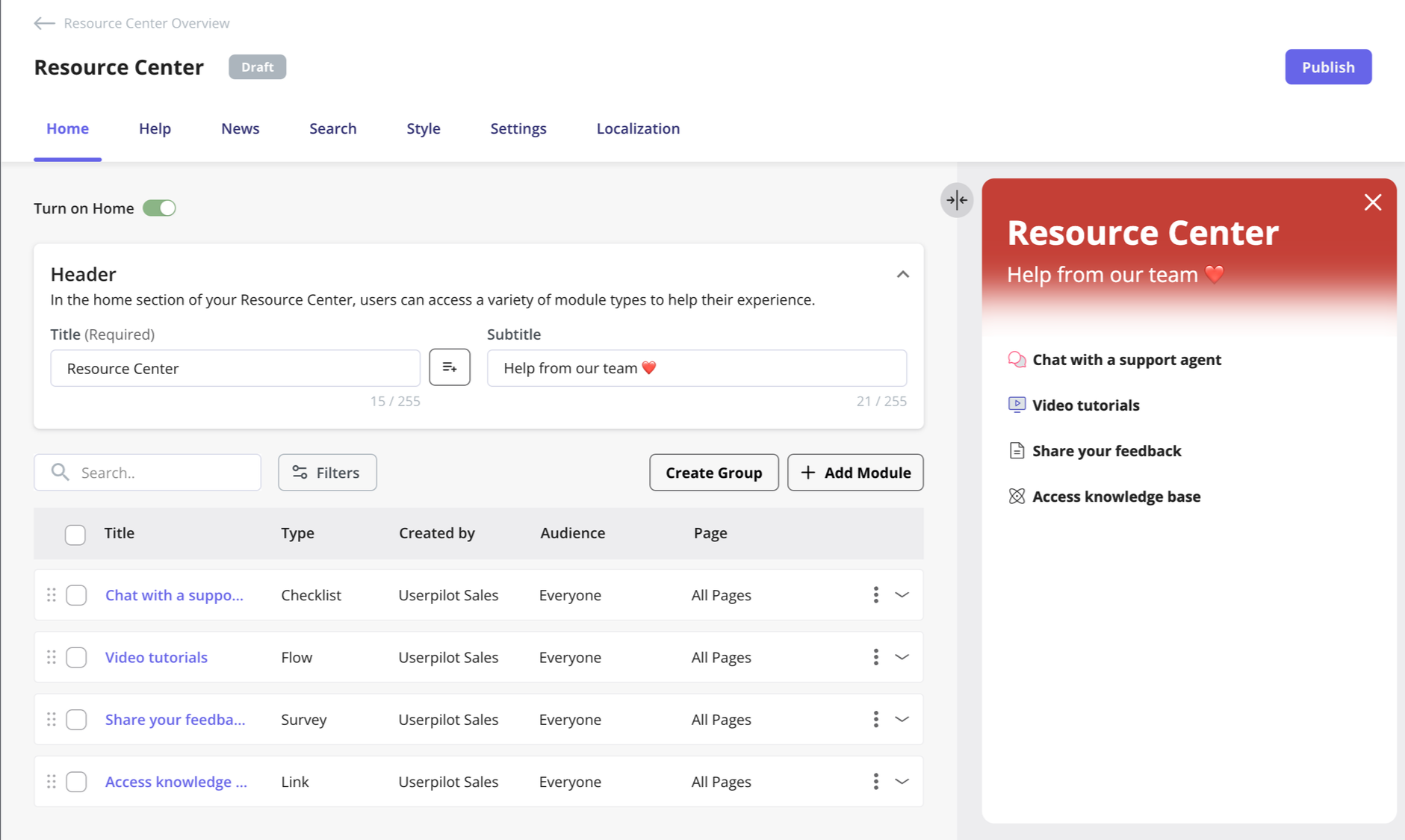
Even the best flows break sometimes, so make sure support is always available and easy to access. Common examples for this are chatbots and resource centers. They provide answers while keeping users in your product.
Your resource center should include a “contact support” option for quick help, a searchable help section for self-serve answers, and a feedback field to capture user input.
5. Keep testing and optimizing
Lastly, the best method for designing happy paths is engaging with users through testing. User testing confirms that your happy paths solve user needs while identifying better ways to create UIs. Constantly refine your happy path based on the feedback you collect and your analysis.
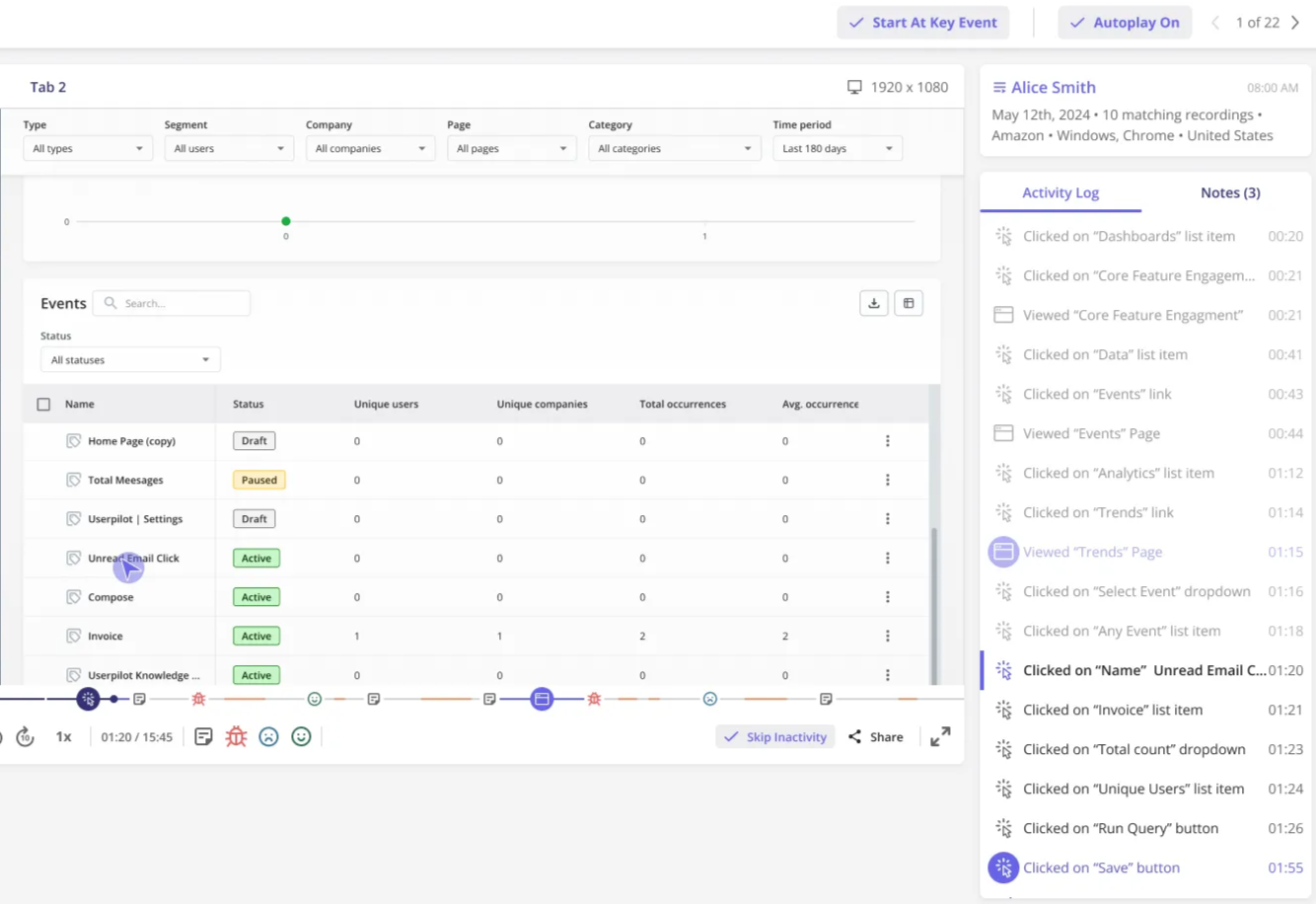
Also, keep monitoring how users move through your product. Analyze path and funnel reports, collect ongoing user feedback, watch session replays to spot friction, and run usability tests to validate improvements.
Best practices for testing happy paths
To ensure you’re testing your happy paths against all potential issues, combine these best practices:
Don’t stop at the happy path
A flow that works perfectly under ideal conditions can still fail in real use. That’s why you also need to test unhappy paths and edge cases.
For example, if a signup flow works smoothly but fails when a user enters an invalid email and there’s no recovery plan, you still lose them.
Iterate on happy path tests as the product grows
As you ship new features or update existing ones, the core user flow can change. To ensure the path remains effective, revisit and update your tests. For example, if onboarding changes, retest the full flow to ensure users can still reach value without friction.
Collaborate with users and stakeholders
A flow that looks good in design might still confuse users or be hard to implement. So, make sure all stakeholders (including both internal teams and the end users) collaborate on the app. This way, you ensure the product satisfies both user needs and company goals. Foster a culture of testing and interviewing.
Document your test results
Documenting results helps your team track issues and spot patterns over time. It also ensures nothing gets lost between testing and implementation.
To ensure consistency, however, make it simple.
- Record which flows passed or failed.
- Capture screenshots or recordings of any issues.
- Note unexpected behavior, even if the outcome was successful.
- Prioritize problems based on their impact on core functionality.
For example, a minor UI glitch can wait. But anything blocking users from completing a key task should be fixed immediately.
Happy path design case study: Liv-ex
Now let’s take a look at a real-life example of a company that improved the happy path through monitoring and testing.
Liv-ex, a platform where wine professionals buy and sell, includes many different features and pages that sometimes cause navigation issues.
With path reports, the Liv-ex team found that when using the search bar, one of the page’s core UX elements, the users would first go to search results and only then move to individual wine pages every single time, even when the feature allowed them to bypass the middle step. That stood in contrast with the original assumption with which the flow was designed.
Acting on these insights, the team cut out the “search results” step for specific queries, shortening time to value and improving the users’ search experience. The result was a happy path where wine professionals can find the right pages even more quickly.
The insights from user path analysis have provided the foundation to start a complete redesign of the exchange feature:
“Understanding how users move around has led to us ripping up the current designs and creating something brand new.”
Design happy paths for more positive user experiences
Keeping your customers on the happy or golden paths will ensure they derive value quickly from your product. To do that, though, requires conscious effort on your part.
It all boils down to three things:
- Remove friction with clear, intuitive interfaces.
- Guide users in real time with in-app prompts and onboarding flows.
- Continuously optimize by tracking behavior and fixing drop-offs.
This is where Userpilot helps.
With no coding, Usepilot lets you build in-app guidance (tooltips, checklists, flows), track user behavior (funnels, paths, retention), and collect feedback (surveys, NPS) all in one place. That means you can spot friction and fix it immediately, without relying on engineering.
Ready to get started? Get a demo to learn how to steer users to the happy path and keep them from getting lost in your tool!
FAQ
Why is designing and testing the happy path important?
Done well, the happy path is crucial because it:
- Confirms your product works for its main use case. And it does this by walking you through the exact steps a user takes to complete the core action, like signing up or making a purchase.
- Removes friction points in key actions like onboarding, helping users to complete tasks with the least possible effort. In the long run, this impacts user loyalty and retention.
- Saves you rework and money by validating core functionality early, before adding edge cases or advanced features.
- Creates a reliable baseline for quality by defining what a seamless experience looks like under normal conditions.
- Reduces business risk by ensuring the most important flows are stable and bug-free.
What are the common mistakes in designing a happy path?
- Designing for an ideal user and ignoring how actual users behave, such as rage clicks or getting confused.
- Assuming the happy path is the only path and not planning for users who take different routes.
- Making things too simple and hiding useful options or important information.
- Skipping user testing and assuming the flow is clear just because it works.
- Treating it as a one-time task instead of improving it over time.
About the author