What Is Chameleon Used For: Top Features and Use Cases



What is Chameleon best for? What are its best features for product-led growth, and are there any drawbacks you should be aware of before investing in it?
Well, I’ll answer these questions in this article. I’ll dive deep into Chameleon’s core features, navigate its pros and cons, and explore an alternative tool that might interest you.
What is Chameleon.io?
Chameleon is a product adoption platform. It enables SaaS teams to leverage user data to create beautiful product guidance, improve user onboarding, and drive product-led growth.
In addition, it empowers product teams to create and manage dynamic in-product experiences. This means you can build product tours that help, guide, and delight your users throughout their journey. All without coding!
What is Chameleon used for?
Chameleon can be used in multiple ways to grow your company, but we’ll be going into detail regarding the use cases below and their respective features:
- Product adoption.
- In-app communication.
- User feedback.
Chameleon’s main use case: Product adoption
Chameleon is a product adoption platform that helps SaaS teams transform users into advocates by easily implementing in-app experiences.
Its product adoption features include tours, interactive demos, in-app messages, launchers, and personalization options. Let’s explore them in detail:
Chameleon’s functionality for product adoption: User onboarding
Users’ first impression of your product is key. For this, Chameleon helps you create welcome tours that get users beyond their first “Aha!” moment.
Here are some of Chameleon’s onboarding tools:
- Onboarding guides: Guide users through key areas of your product (setting up their accounts, configuring preferences, exploring key features, etc) with different tours and launchers. This provides a visually engaging learning process and increases feature adoption.
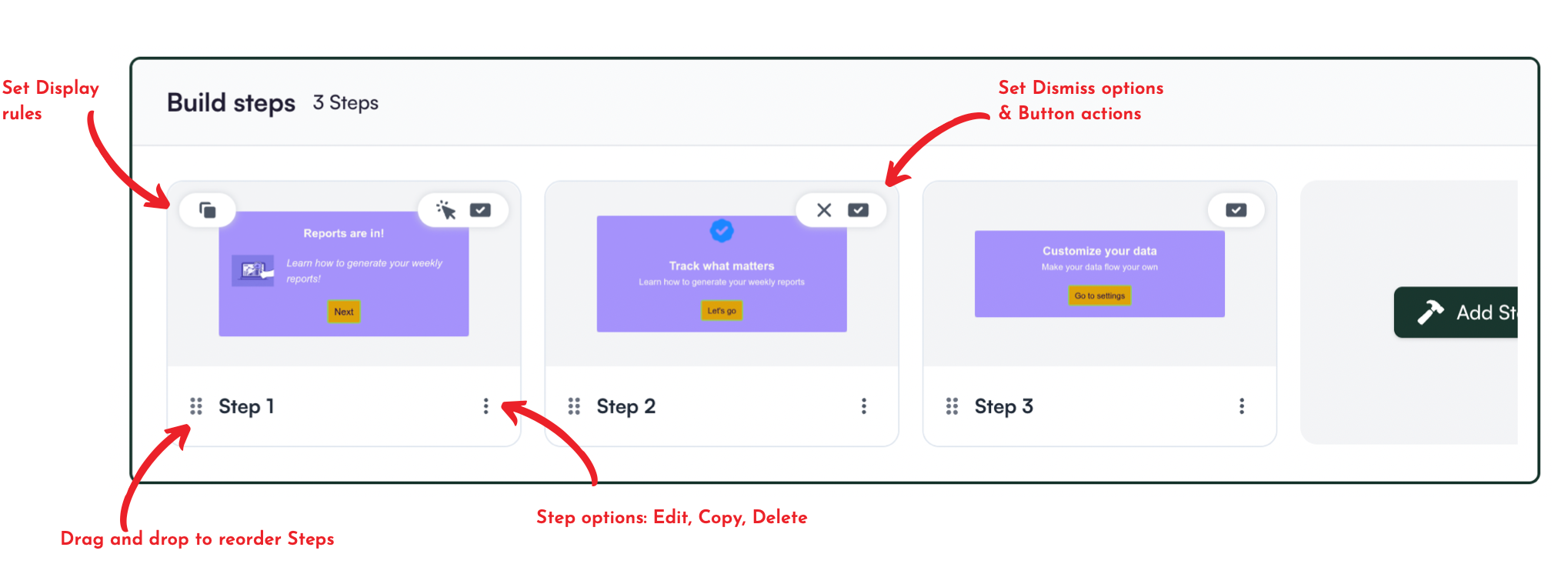
- Interactive demos: Chameleon’s standout feature is its interactive demos. They allow users and web visitors to have a taste of a core feature with an interactive UI, allowing them to experience its value early. You can place them anywhere, including your homepage, marketing emails, in-app modals, help center, and more.
- Launchers: Build onboarding checklists, including items like Loom videos and knowledge base articles to help users unlock more value.
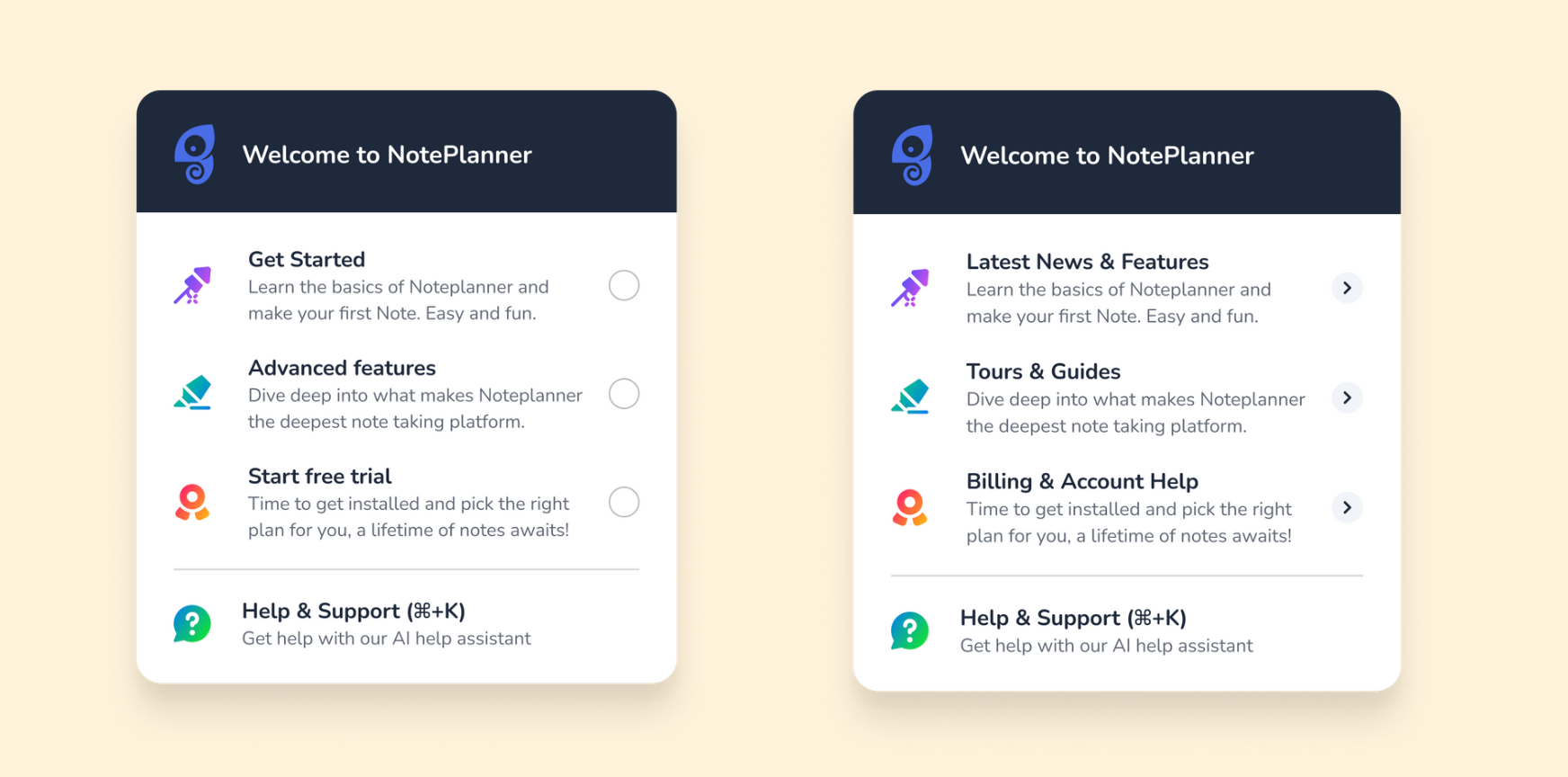
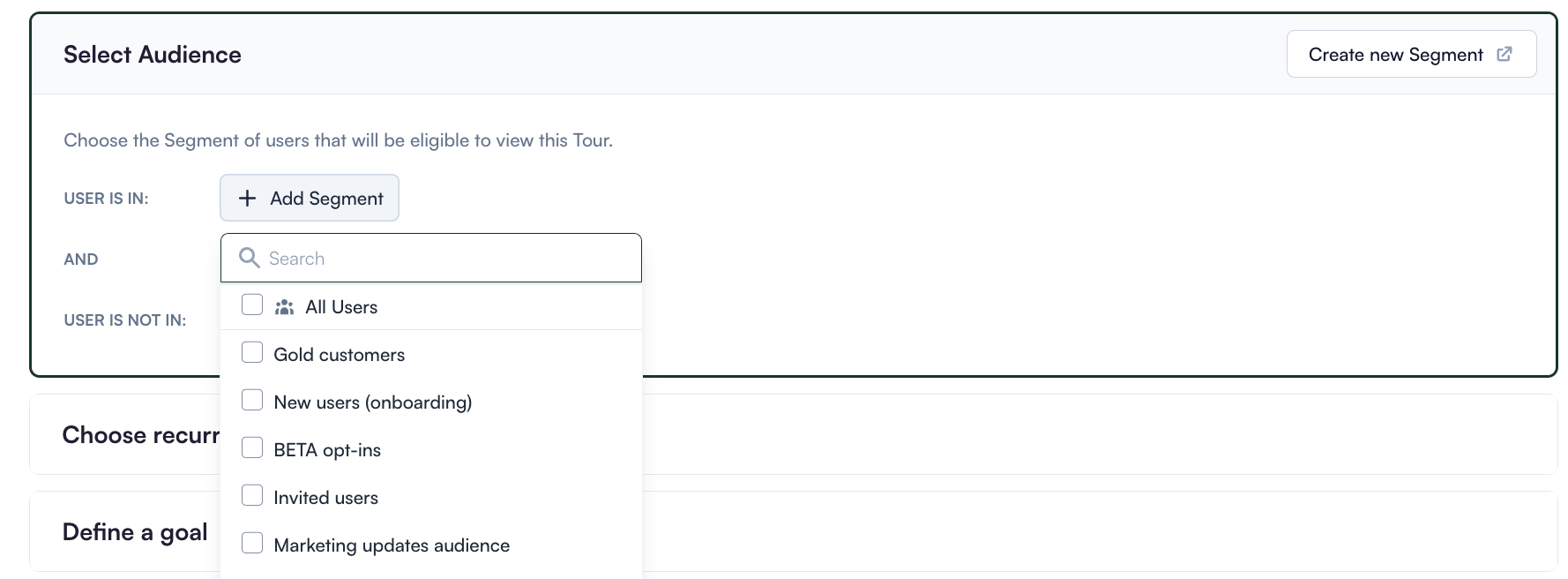
- Segmentation: You can use custom segments to target a sequence of your product tours to the right users. In short, you can create hyper-targeted onboarding flows based on your users’ needs.
- Customization options: It offers highly customizable styling, allowing you to create experiences that match your branding. Plus, you have control over where the onboarding flow appears, who sees it, and how users can interact with it.
Note: When you subscribe to the Starter plan, you get access to just one launcher, which is very limited for many onboarding use cases. However, you get unlimited access when you upgrade to the Growth plan ($12,000/year).
Chameleon’s functionality for product adoption: Contextual help
Chameleon is big on in-app guidance. Beyond onboarding, you can also leverage Chameleon to help users when they’re stuck, introduce secondary features, and improve overall user engagement.
Here is what you will get with Chameleon to drive in-app help:
- User segmentation: When users sign up, ask them for basic info about their roles and jobs-to-be-done. This enables you to create and trigger in-app guides targeted to specific users and highlight their specific pain points and solutions.
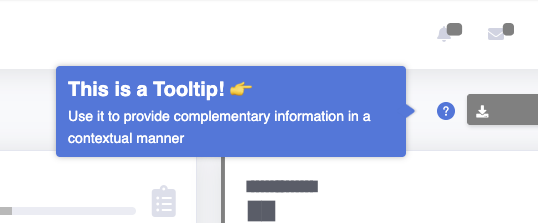
- Tooltips: Chameleon lets you implement in-app tooltips that offer contextual help when users encounter issues or uncertainties. They provide additional explanations and guide users toward taking specific actions. As a result, they lead users to discover the product value and quickly reach their “Aha!” moment.
- Modals: Modals are used to grab the user’s attention. For example, you can use modals in your in-app tutorials and anchor them to specific elements on the page. Or you can add a pop-up with an animated confetti effect to celebrate once the user successfully completes onboarding.
Chameleon’s main use case: In-app communication
In-app messages are timely, relevant, and contextual notifications your users see while interacting with your product or app. Common use cases are reducing friction, offering self-serve support, and getting relevant user feedback.
This is how Chameleon helps you communicate with users inside your app:
Chameleon’s functionality for in-app messaging: In-app resource center
Chameleon’s HelpBar offers a self-service resource center where users can access multiple tutorials, follow checklists, or contact support.
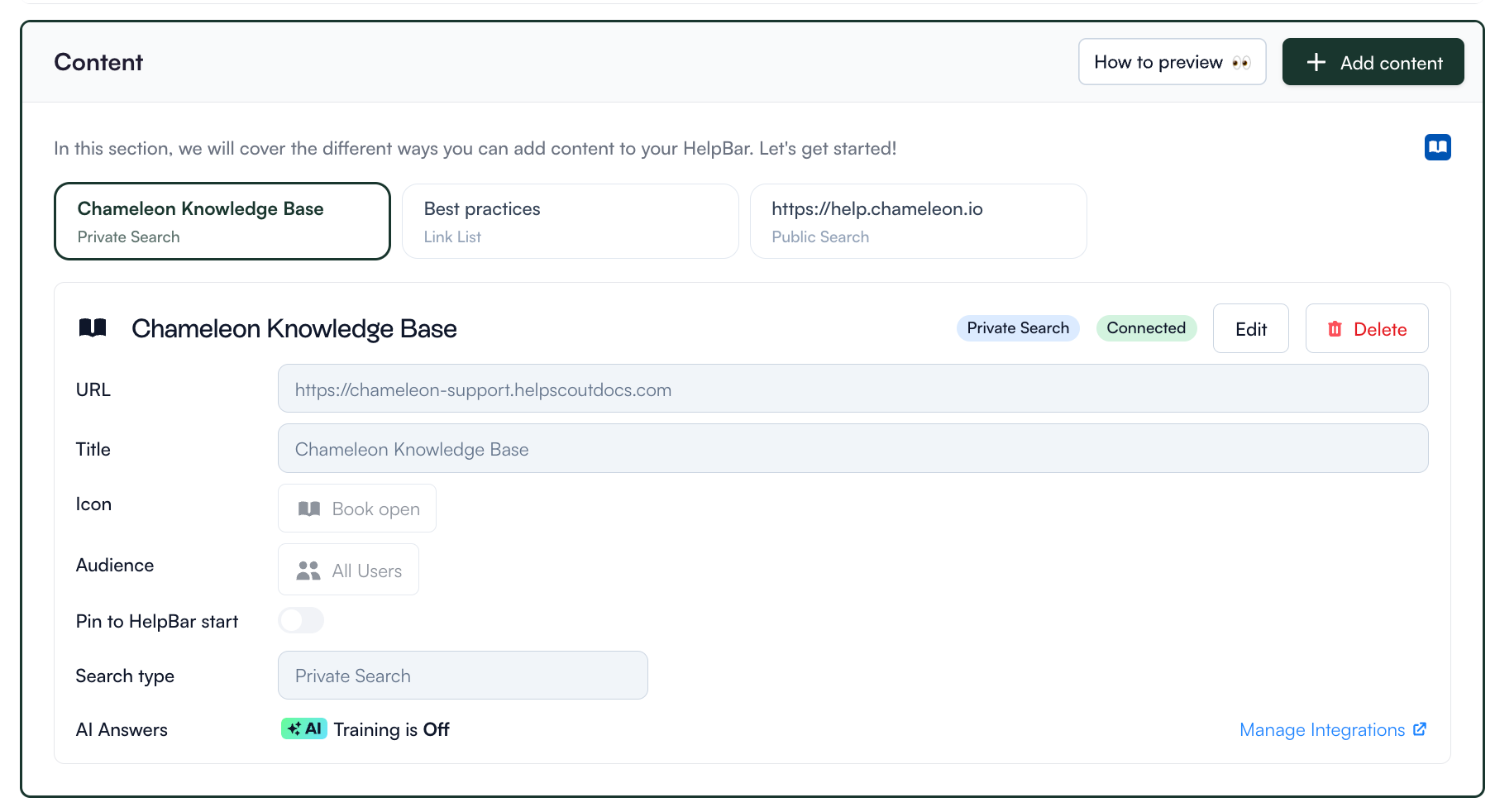
Also, with Chameleon’s Document360 integration, you can connect your help documentation to HelpBar so users can access it when they need answers.
Chameleon’s functionality for in-app messaging: In-app announcements
There are two features on Chameleon that help you add feature announcements to your app:
- Banners: They’re essential to put important messages about updates or new releases in front of users. In addition, you can announce downtimes, remind users to renew their subscriptions, or communicate account limits. This can lead to, for example, renewing their subscriptions to continue to enjoy your product.
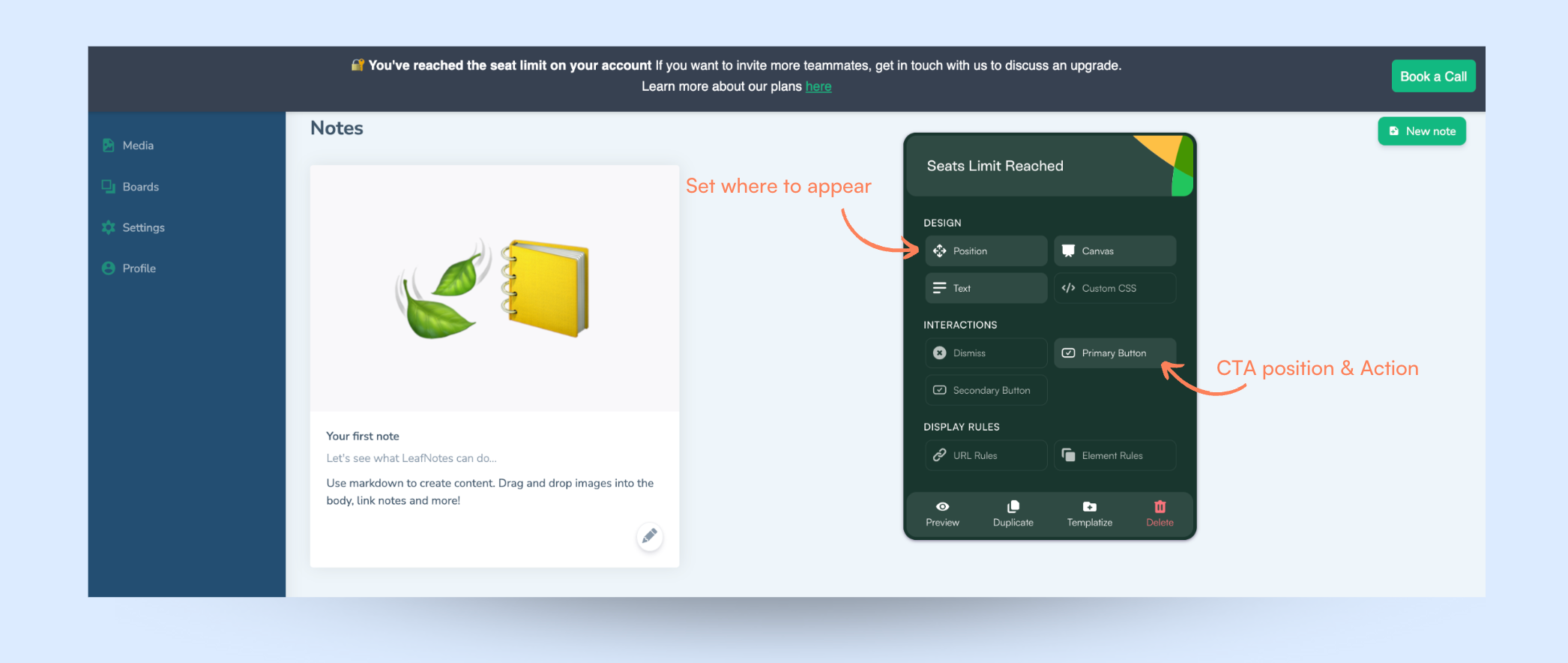
- Announcement tours: Announcement tours shine when you want to drive user awareness and product discovery. Announcement tours walk users through a new feature so they can start getting familiar with it and adopt it in their daily routines.
Chameleon’s main use case: User feedback
Here are some remarkable features of Chameleon for getting user feedback:
Chameleon’s functionality for user feedback: In-app surveys
With Chameleon, you can launch microsurveys based on user attributes such as plan type, role, or previous replies.
Here are the features Chameleon offers for in-app surveys:
- Microsurveys: Create various microsurveys (up to 5 on the Startup plan), including NPS, CSAT, CES, Opt-in, and custom feedback types. You can customize your surveys without coding, but you will need CSS for more advanced styling.
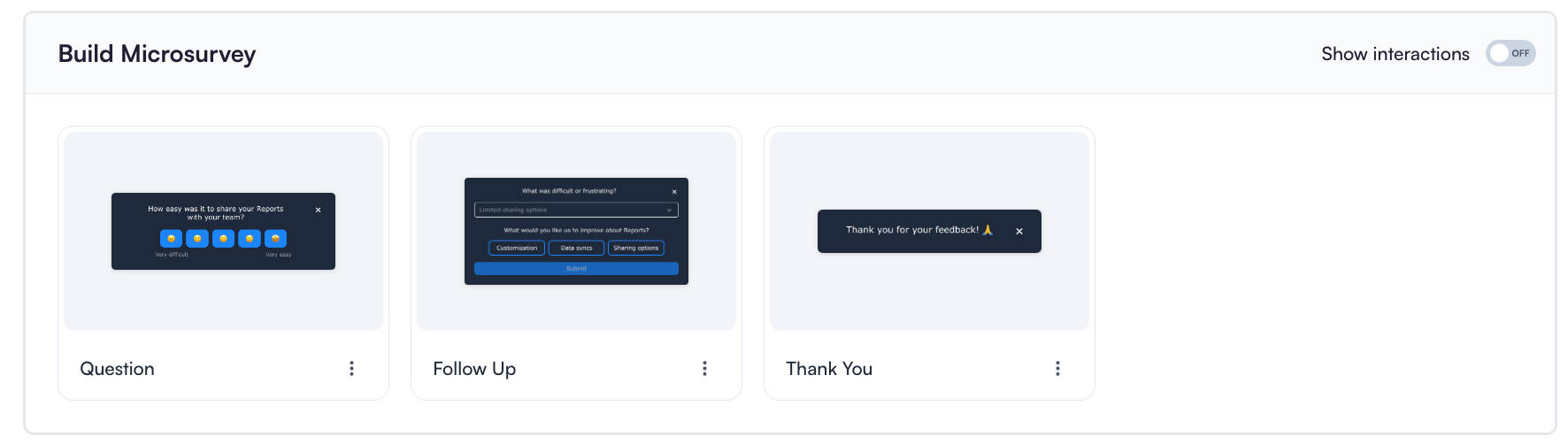
- Integration with your favorite tools: Use tools like Typeform to launch in-app microsurveys and get user feedback.
- Filters feature: Filter your surveys based on completion rate, date created, date last edited, tags, and more. This helps segment your surveys by the number of users and their interactions with the surveys.
- Trigger surveys based on user action: With this feature, you can easily direct your surveys to users who consistently take action. You can choose the survey frequency and repetition settings.
Chameleon’s functionality for user feedback: Survey analytics
The Experience Analytics tool provides insights into microsurveys, as well as other experiences (e.g., tours, launchers, etc.). It shows historical performance charts, Engagement Index over time, and per-experience analytics that can track completions and interactions across weeks.
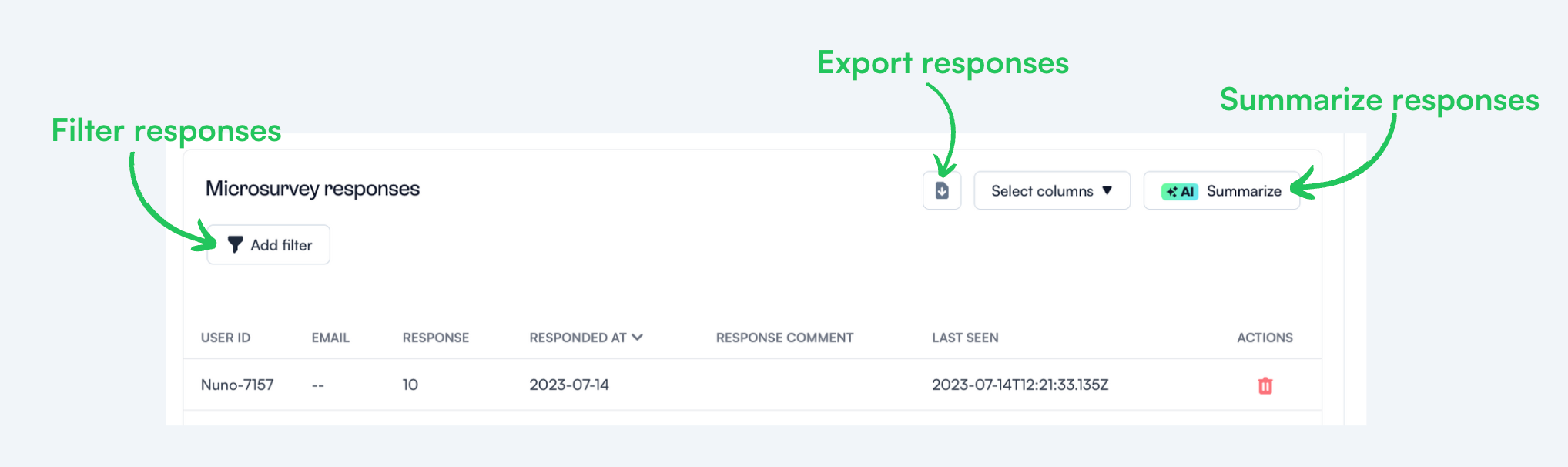
Additionally, the microsurveys analytics let you use the survey responses to track user sentiment, export data, and segment users based on survey outcomes.
How much does Chameleon cost?
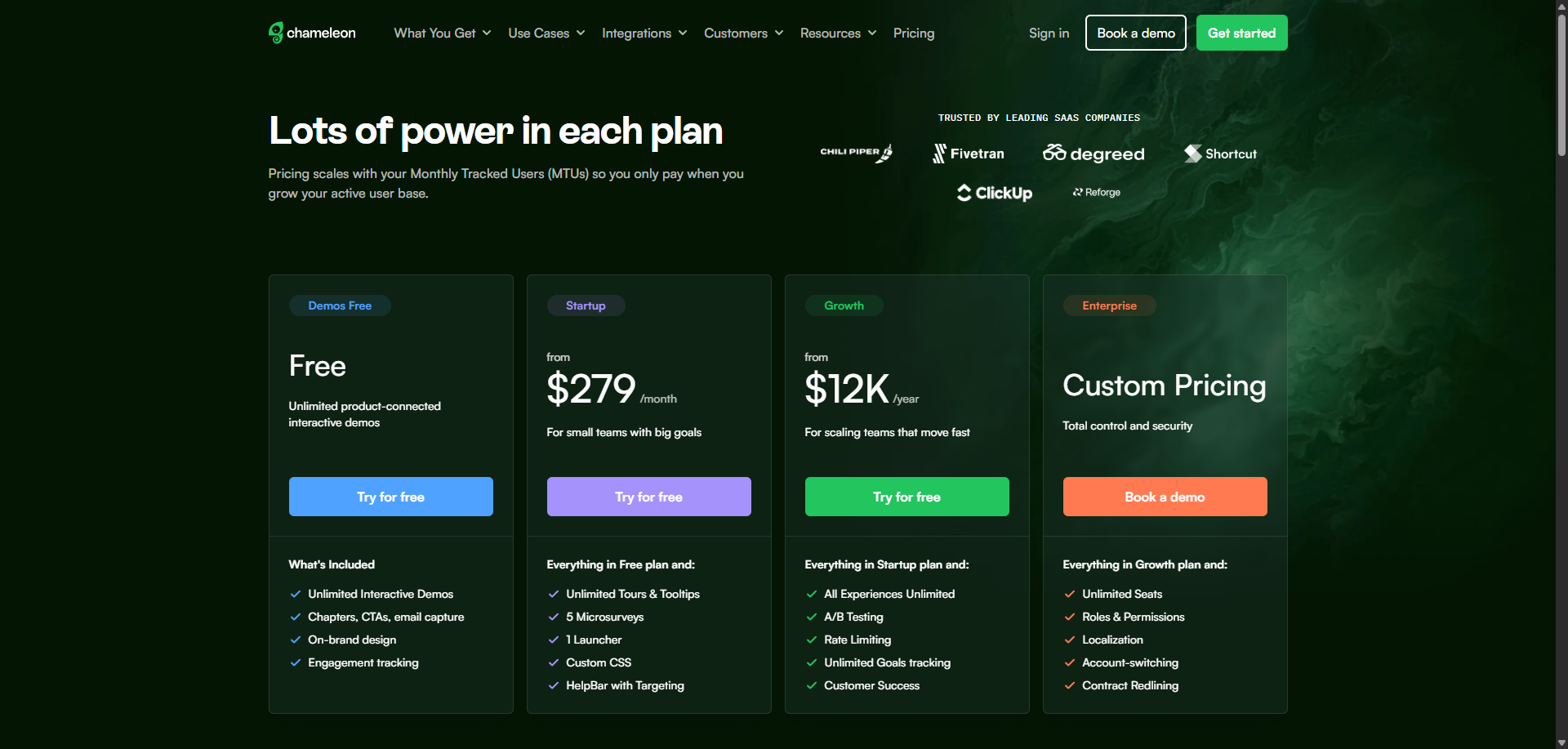
Chameleon’s pricing is based on your product’s monthly users. From the Startup plan (for small companies to get started and save) to the Growth and Enterprise plans (for larger organizations with advanced requirements), billed via invoice.
Here’s an overview of the pricing plans and features of each plan:
- Free plan: Includes unlimited demos with on-brand design, engagement tracking, and email captures. It’s only meant to create interactive demos.
- Startup plan: At $279/month. Includes unlimited tours and tooltips, 5 microsurveys, 1 Launcher, and Custom CSS.
- Growth plan: Starts at $12,000/year. Everything in the startup plan, plus unlimited microsurveys & launchers, A/B testing, and rate limiting, is available at bulk pricing, paid annually.
- Enterprise plan: Custom pricing. You get everything in the growth plan, multi-product account, user permissions, localizations, and SSO/enhanced security.
Benefits of using Chameleon
Chameleon is no doubt a powerful tool for scaling product adoption.
It works in a similar way to Userpilot and offers similar features: styling, analytics, templates, goals, A/B testing, and checklists.
Let’s look at the pros of using Chameleon:
- Intuitive no-code builder: Chameleon comes with an easy-to-use Chrome Extension builder.
- Engaging tour guides: Build interactive tours to onboard users, announce features, and create other customer in-product experiences without writing code.
- Good range of in-app messaging and UI patterns: Easy to create custom modals, slide-outs, tooltips, hotspots, launchers (checklists or resource hub), and more.
- Full two-way and deep analytics integrations: Chameleon fits into your stack and easily connects with your favorite tools to send data from Chameleon.
- Effective segmentation and targeting system: Leverage user data and experiences to structure effective product marketing messages for a specific target audience.
- Advanced A/B testing: Helps you improve the performance of in-app messages and define the ideal user experience with precise A/B testing.
- Rate limiting: You can reduce the number of user experiences one step at a time, with clarity over speed.
Drawbacks of using Chameleon
While Chameleon is a deep production adoption tool with an array of great features, there are still some downsides. Here are the main cons of the tool:
- Not entirely no-code: Early on, I stated that Chameleon can be used without code. But it is not a completely no-code tool. You’ll need the help of a technical-savvy employee in your team to sort out some build-up, as the learning curve is steeper.
- Hard-to-use interface: The new UI is a bit harder to use (a lot of clicking), and there can be minor bugs here and there.
- Pricey: The Startup plan is quite expensive for what it offers (just one launcher and no A/B testing or rate limiting). This means you need to go for the Growth plan, where you pay more to get access to unlimited features.
Why an alternative is needed for Chameleon?
Despite its strong performance when it comes to creating personalized and highly customized user experiences, Chameleon is not the most competitive tool when compared to similar products.
Here are three reasons why you might need to look elsewhere:
- You are on a budget: To get access to all the needed tools for proper onboarding and adoption, you need to pay for the higher plans that can get expensive.
- Requires CSS knowledge: Custom CSS works by targeting specific elements of Chameleon Experiences to change their styling. However, not everyone knows what CSS is about; you need to be technically savvy.
- Analytics are not advanced: Chameleon doesn’t pose of robust product analytics features like Userpilot does (e.g., funnel analysis, paths, user cohorts, etc.), only in-app experiences performance. You might want to consider another tool if you need accurate product and user analytics without paying for additional tools.
Userpilot: A better alternative to Chameleon
Considering the price you get for your money and the very intuitive nature of Userpilot, it’s fair to say that Userpilot has some advantages over Chameleon.
While both tools are very relevant to scaling product adoption of SaaS product teams, there are still differences between them.
Here are the advantages of Userpilot over Chameleon:
- More value for your money: Chameleon’s Startup plan also has limited features and might not be enough for interactive user onboarding and adoption for SaaS products. Userpilot offers great value for money compared to other similar tools on the market. Even the entry-level plan provides all the engagement features without any usage limit.
- Ease of use: Userpilot has an easy-to-understand UI and workflow compared to Chameleon. It is a no-code builder that comes with an easy-to-use Chrome Extension builder. The dev work required is minimal compared to Chameleon.
- Advanced product analytics: In contrast with Chameleon, Userpilot provides in-depth analytics on funnels, A/B testing, paths, feature adoption, etc.
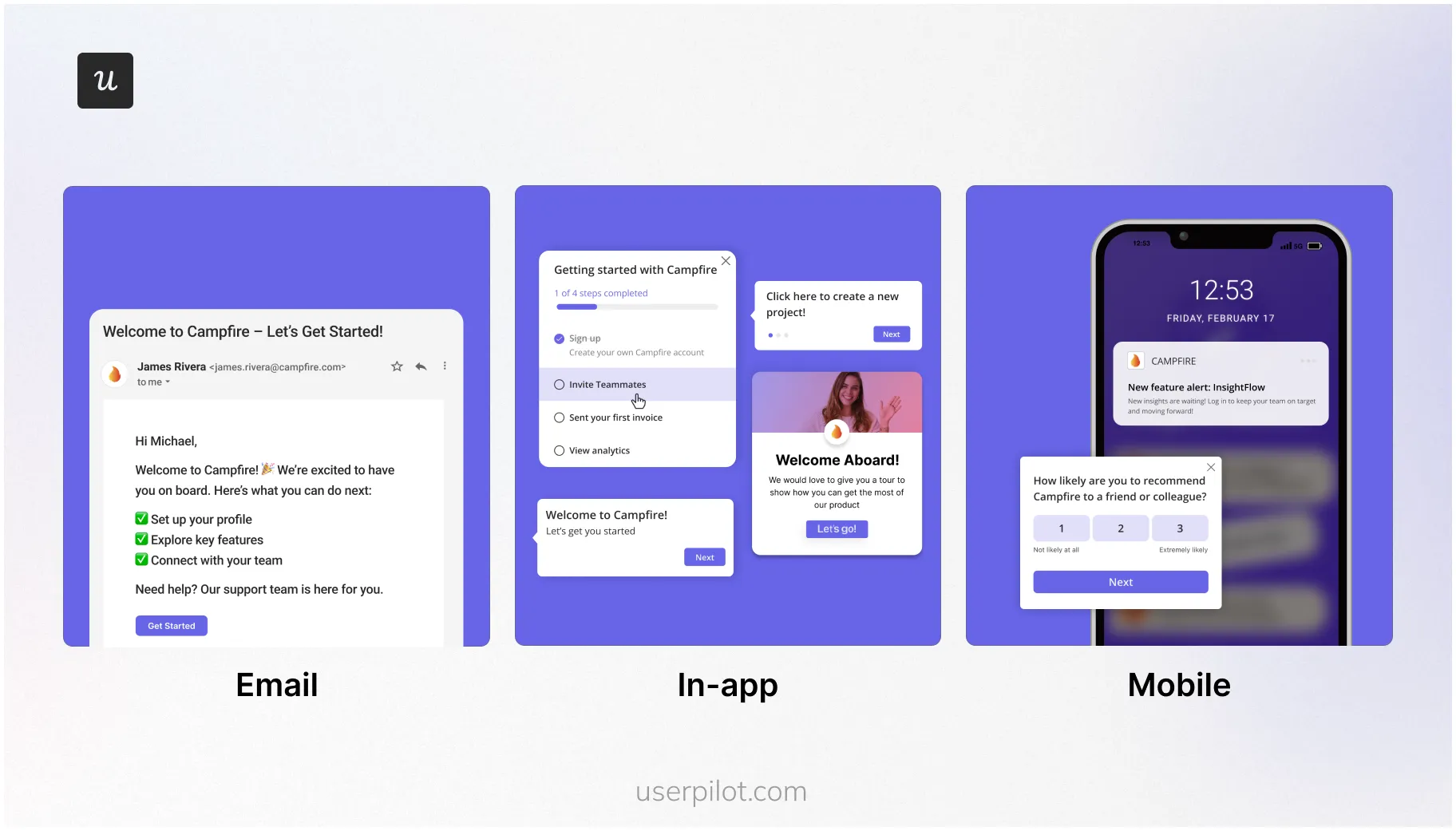
- Omnichannel messaging: Unlike Chameleon, Userpilot supports engagement features for mobile apps and email marketing. This means you can send a push notification to remind users about your product, send them an email to encourage them to try a new feature, and trigger an interactive walkthrough when they click the email’s CTA.
Userpilot for product adoption
Product adoption is when users become repeat users of your product. It covers the entire journey, spanning from the awareness stage through trial signup to full-on adoption. As a product growth platform, Userpilot has advanced analytics capabilities for tracking adoption over time.
Here are the Userpilot features that can help you measure and improve product adoption:
- Interactive walkthroughs: Userpilot can build native-like guides inside your app without any coding. These walkthroughs are interactive and can be personalized based on users’ in-app behaviors.
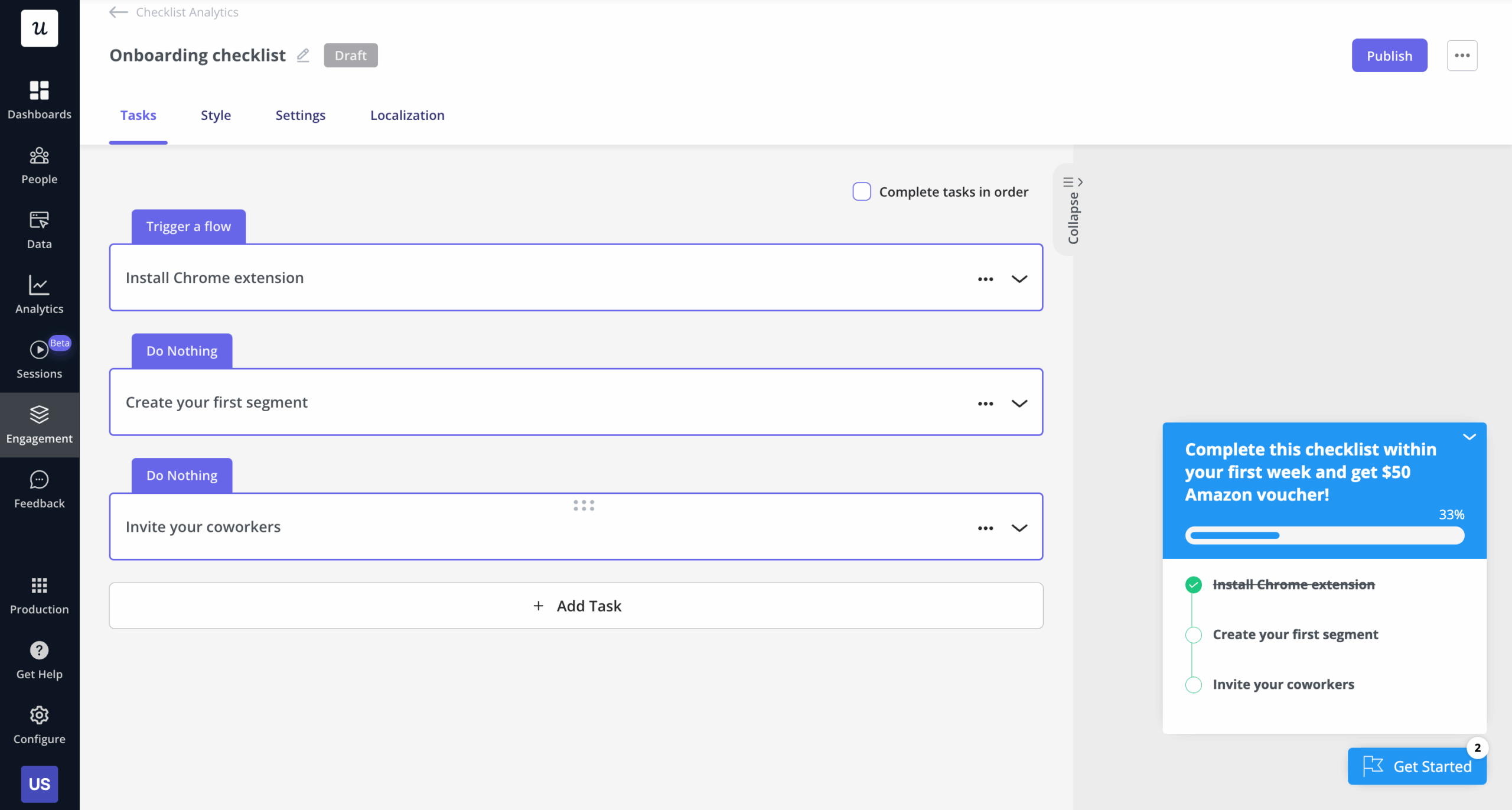
- Onboarding checklists: Create checklists that lead users to the activation stage (users can click on a task to trigger an interactive walkthrough). Unlike Chameleon, these can show up in the app without being behind a widget. Meaning users are less likely to miss it.
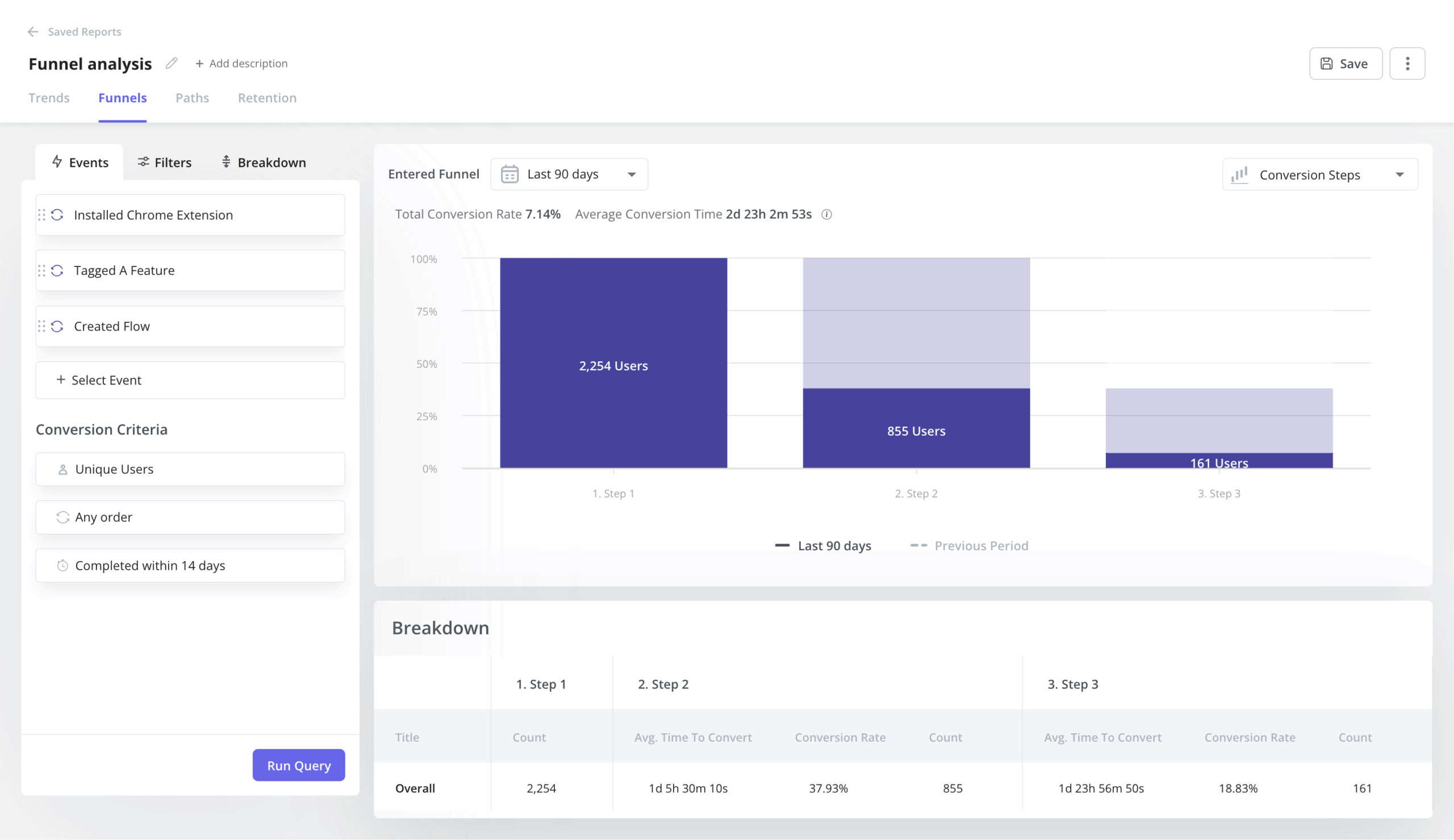
- Product analytics: It lets you create behavioral reports to analyze funnels, watch trends, observe user paths, and create retention cohorts to deeply understand how users interact with your product.
- Feature engagement: Userpilot lets you see how often a feature is used and by how many people. You’ll also be able to see the top 20 events for a certain time period or create custom events that group multiple features together for clearer insights.
Userpilot for in-app messaging
In-app messaging enables communication within your product to onboard new users or drive feature adoption among existing customers.
Here are a few ways you can send in-app messages using Userpilot:
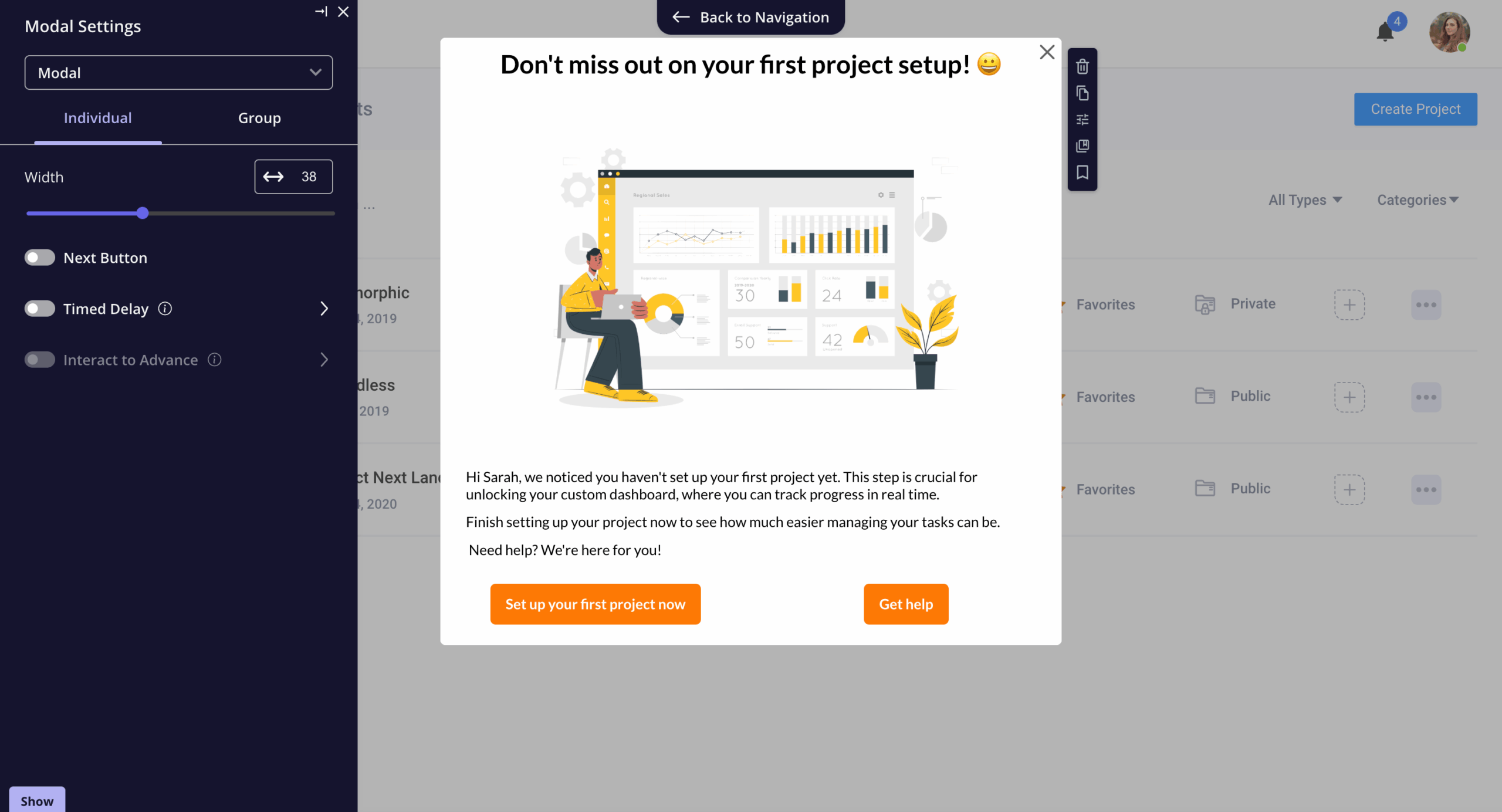
- Modals: Userpilot lets you use modals to send unmissable in-app messages to your users. Simply choose from one of the six templates or create a new modal from scratch. You’ll be able to use text, emojis, images, and videos to help your modals get the message across to users.
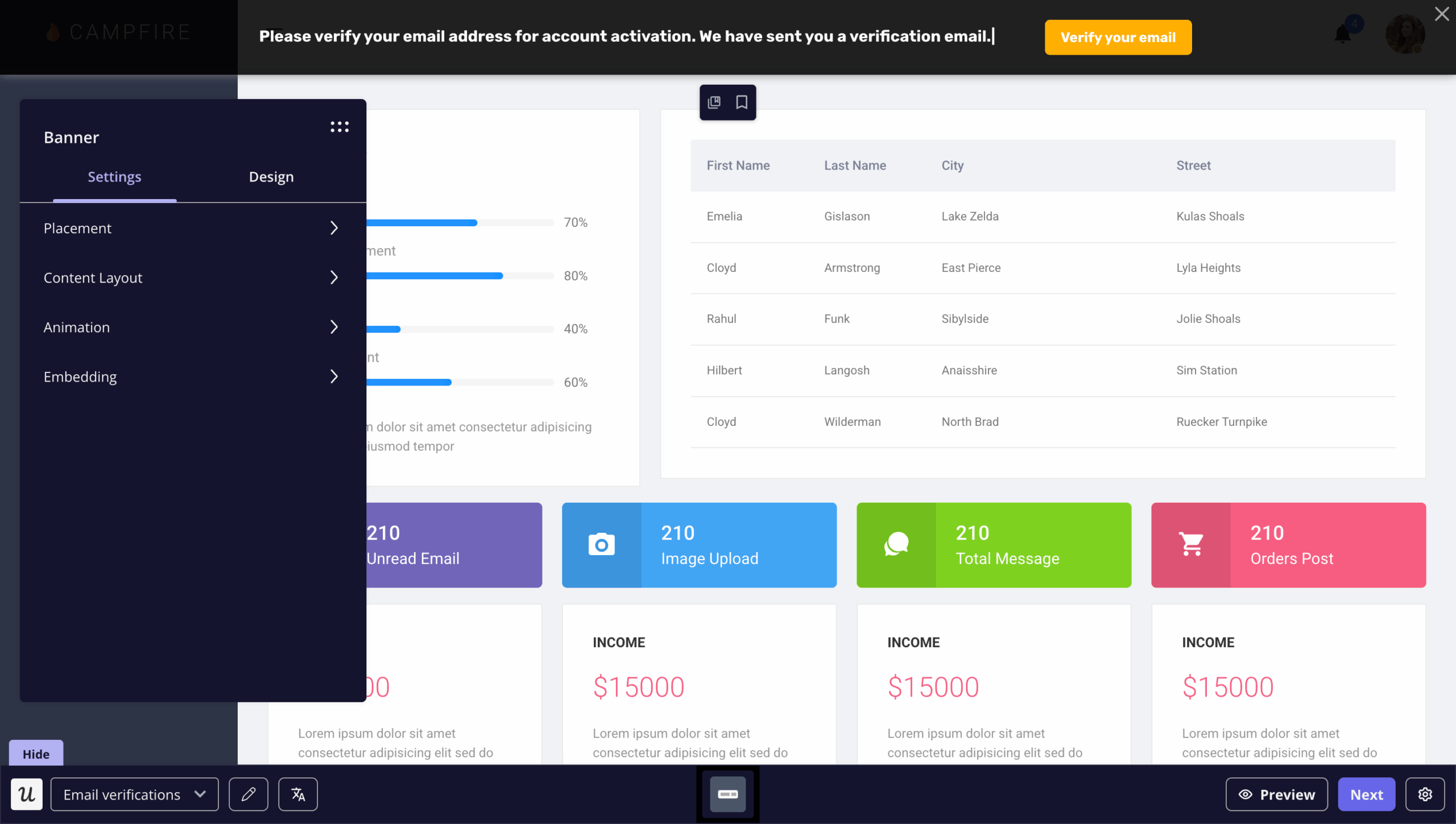
- Banners: Userpilot banners can be used to send in-app messages that are urgent but don’t need to take up the entire screen. You can also add blocks with text, emojis, images, videos, forms, custom JavaScript functions, and more to style banners to your liking.
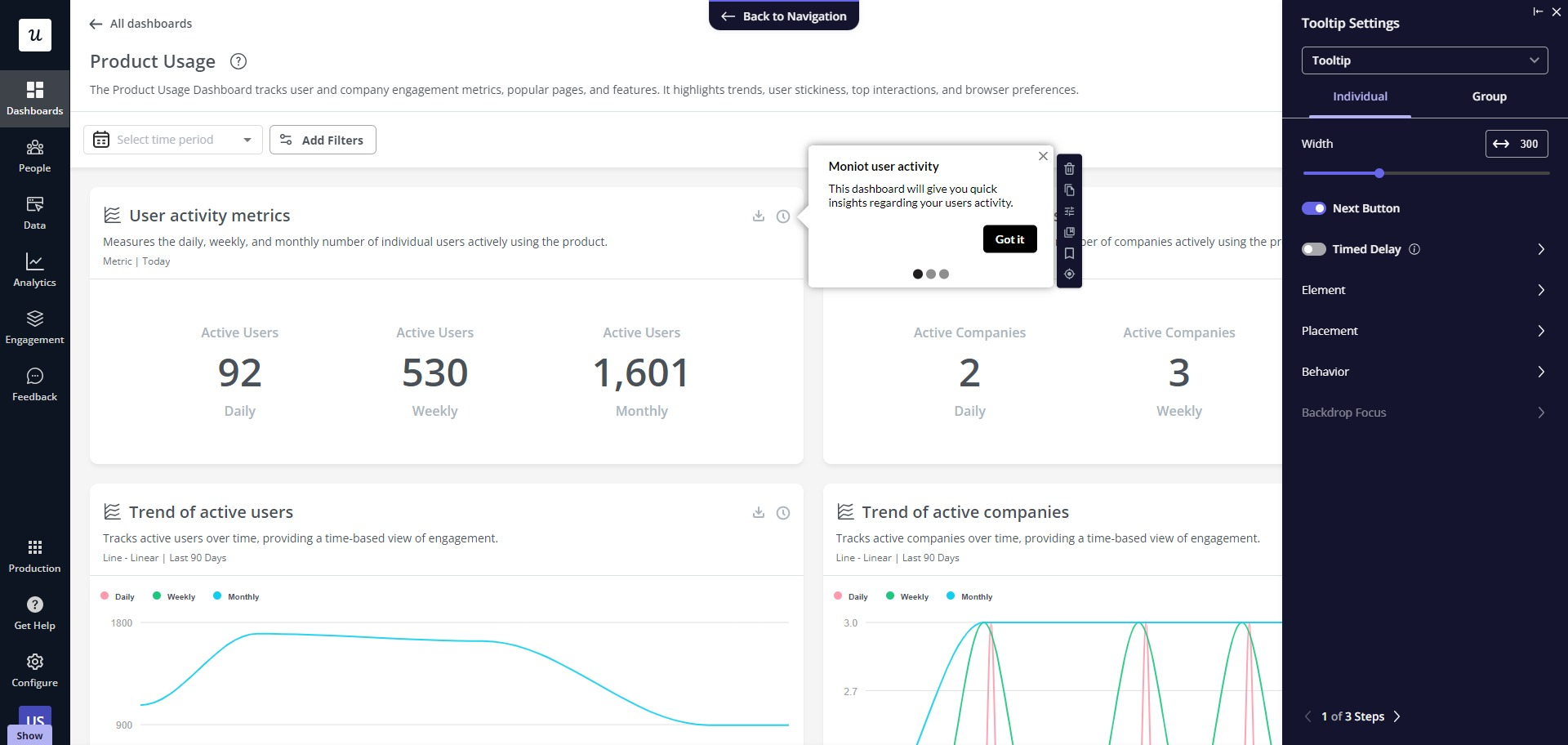
- Tooltips: You can set them up to appear when users hover over an element or click on an info icon. You’ll be able to adjust the height, shape, color, and placement to make them native-like.
Userpilot for user feedback
User feedback is necessary for listening to the Voice of the Customer (VoC) and making the right product decisions. Userpilot has a no-code survey builder, multiple templates to choose from, and advanced analytics for extracting insights.
Here are the Userpilot features you can use to collect customer feedback and analyze it:
- Survey builder: Userpilot’s survey builder lets you edit the content, update the widget’s style/placement, and set page-specific or event-specific triggers to ensure that users see the survey at the most contextual moment (all without writing a single line of code). You can also translate surveys into your audience’s native language.
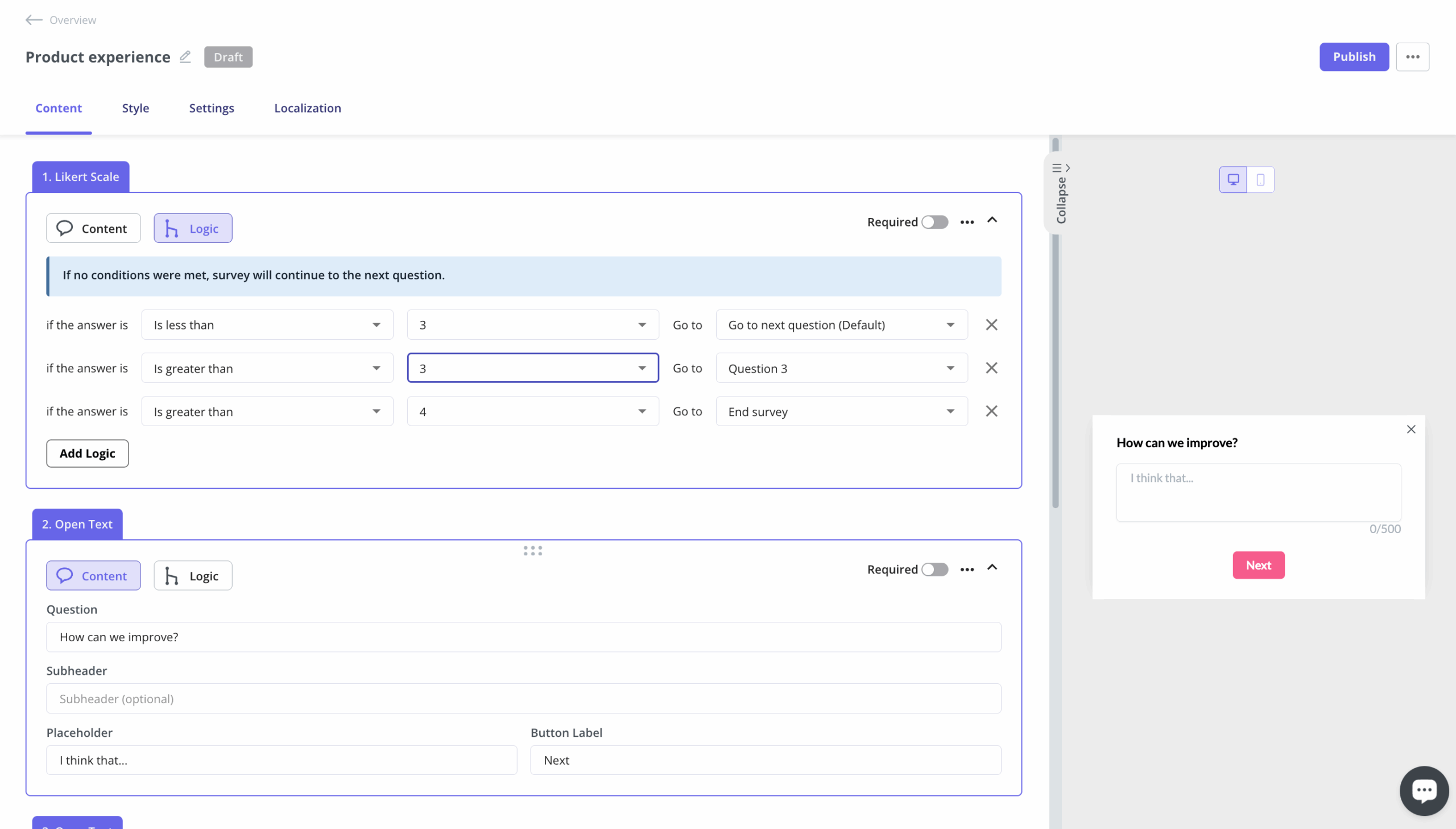
- Survey templates: There are dozens of survey templates to choose from with a wide array of different use cases. You can collect qualitative responses on how to improve the user/product experience or quantitative data for customer satisfaction benchmarking, such as CSAT and CES scores.
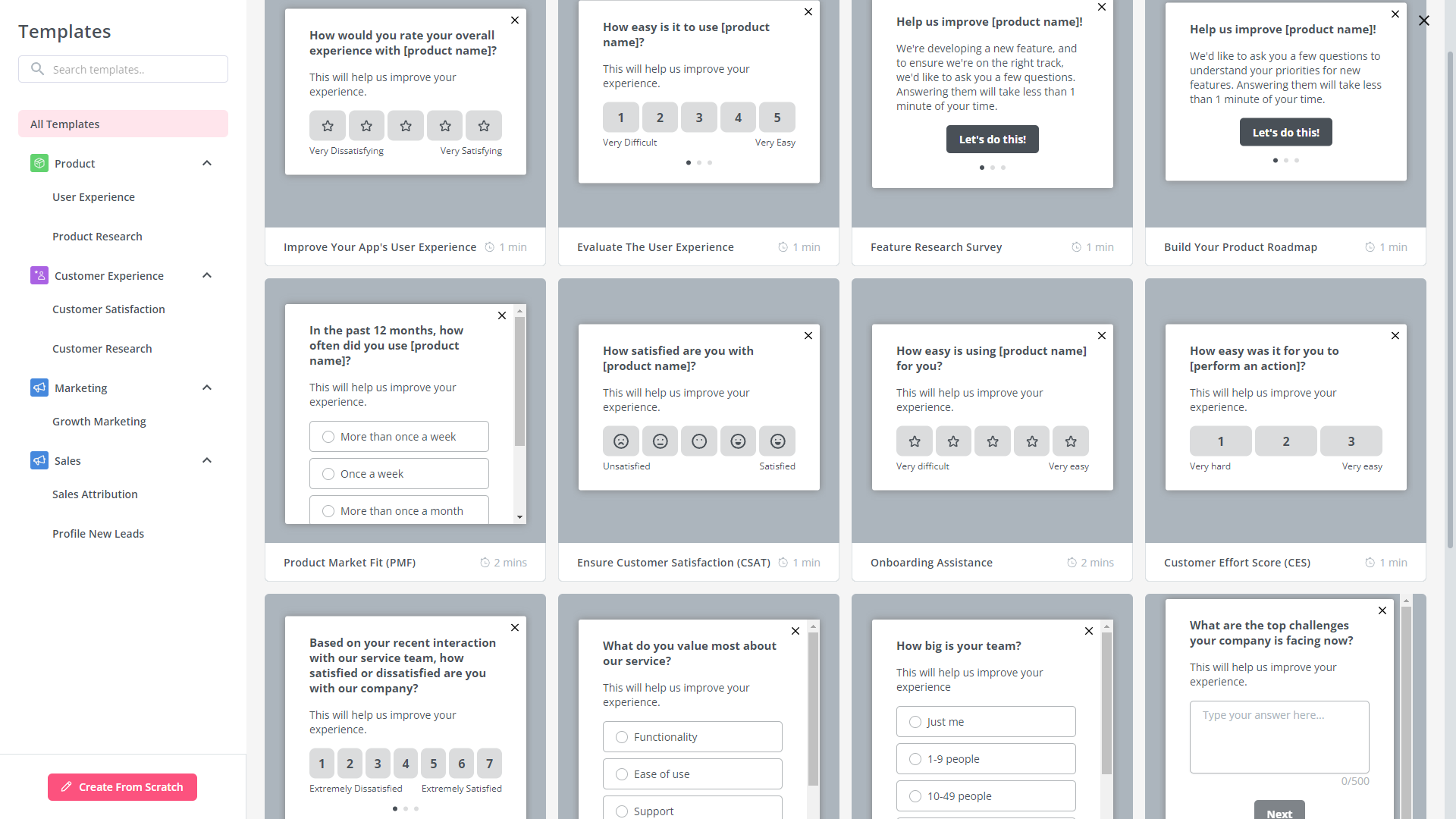
- Advanced analytics: Userpilot’s advanced survey analytics will show you what the most common responses were, what percentage of users selected a specific option, and display open-ended feedback about your product or specific features.
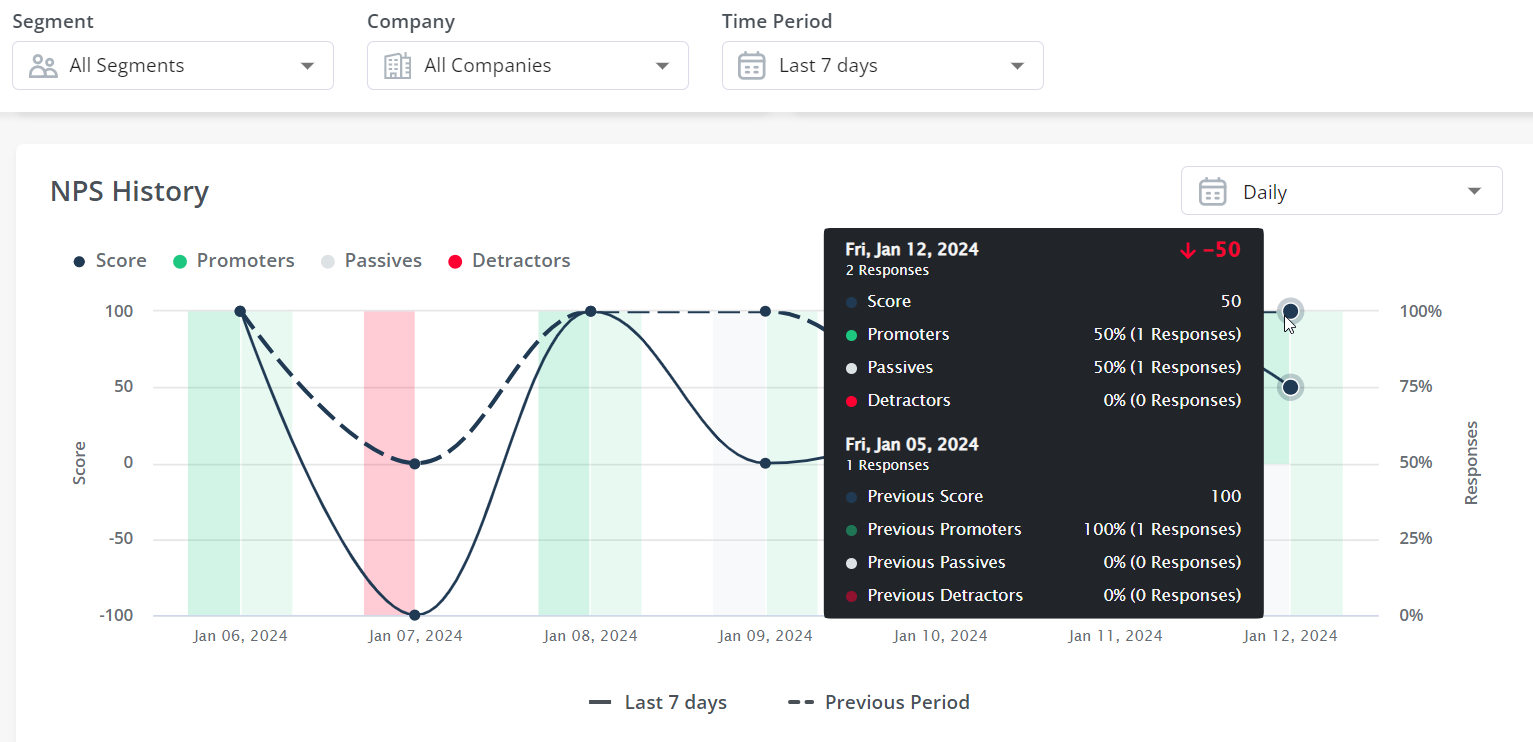
- NPS dashboard: Userpilot’s NPS dashboard compiles response data from all NPS surveys, so you don’t have to manually go into each survey and check its analytics. You’ll be able to view key metrics like response rates, total views, and NPS history, and sort all the data by different segments. You can also segment users based on their NPS follow-up responses.
How much does Userpilot cost?
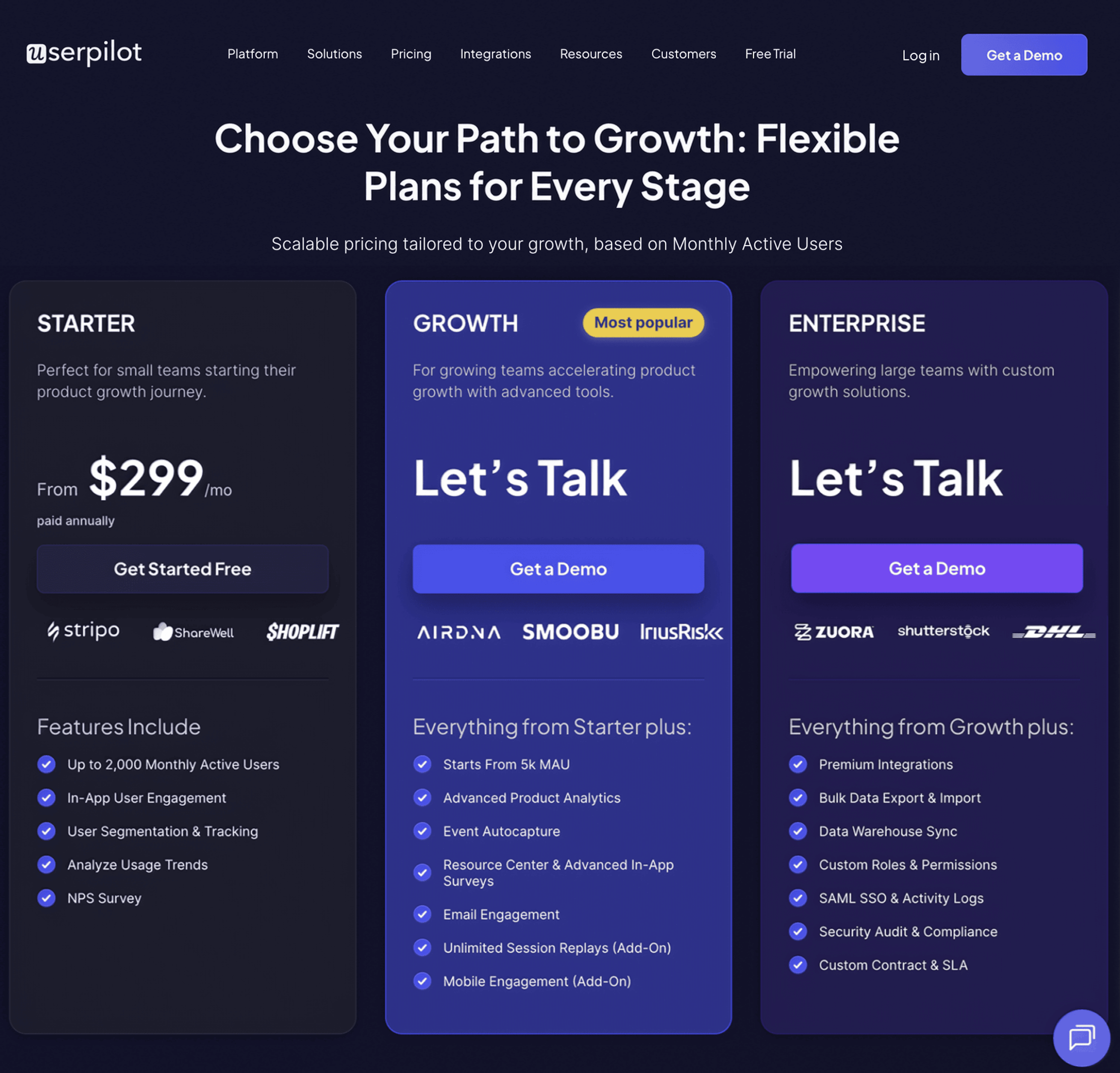
It offers three pricing tiers: Starter, Growth, and Enterprise, each tailored to different business needs and sizes.
- The Starter plan: Priced at $299 per month (billed annually). It’s designed for small teams or startups with up to 2,000 monthly active users. It includes in-app engagement tools such as walkthroughs, checklists, and banners, along with limited segmentation (up to 10 segments), essential analytics, NPS surveys, and email/live chat support.
- The Growth plan: Customized for growing teams needing more advanced product analytics and feedback mechanisms. It includes all Starter features and adds unlimited segmentation and tagging, retroactive event tracking, advanced analytics like funnels and retention, as well as various in-app surveys including PMF, CES, and CSAT. It also enables localized content, content throttling, and access to a self-service resource center. Add-ons include session replays and mobile support. This tier comes with a dedicated customer success manager, phone support, and domain customization.
- The Enterprise plan: is customized for large organizations with more complex needs. It includes everything in the Growth plan plus additional features such as premium integrations, custom roles and permissions, bulk data management, SAML 2.0 SSO, and activity logs. It also offers priority support with service-level agreements, security audits, and custom billing options. Pricing for this plan is provided upon request.
Benefits of using Userpilot
As a full-suite digital adoption platform, it has all the features you need to onboard users, track analytics, and gather feedback from customers. Here are a few pros of using Userpilot as your product growth solution:
- No-code builder: Its Chrome extension lets you build flows, add UI elements, and tag features without writing a single line of code.
- UI patterns: There are plenty of UI patterns to choose from when using Userpilot, such as hotspots, tooltips, banners, slideouts, modals, and more.
- Startup-friendly: Its entry-level plan gives you access to all available UI patterns so you can hit the ground running.
- Walkthroughs and flows: Build engaging interactive walkthroughs and personalized onboarding flows that target specific segments of your user base.
- Self-service support: Build an in-app resource center to help users solve problems, customize its appearance to align it with your brand, and insert various types of content (videos, flows, or chatbots) to keep your customers satisfied.
- A/B testing: Its built-in capabilities will help you split-test flows, iterate on the best-performing variants, and continually optimize based on user behavior.
- Feedback collection: It has built-in NPS surveys with its own unified analytics dashboard to help you retarget users. There are other survey types to choose from, and you can even create your own custom survey.
- Survey templates: There are dozens of survey templates to choose from so you can gather feedback on specific features or run customer satisfaction benchmarking surveys like CSAT and CES.
- Advanced analytics: Userpilot lets you analyze product usage data, monitor engagement on all in-app flows, and use the data to create user segments that are based on behaviors instead of demographics.
- Event tracking: Userpilot’s no-code event tracking lets you tag UI interactions (hovers, clicks, or form fills) and group them into a custom event that reflects feature usage.
- Third-party integrations: Userpilot has built-in integrations with tools like Amplitude, Mixpanel, Kissmetrics, Segment, Heap, HubSpot, Intercom, Google Analytics, and Google Tag Manager, so you can share data between all the solutions in your tech stack.
- Mobile: With Userpilot’s mobile SDK, you can create targeted onboarding flows using slideouts, carousels, and push notifications without writing extra code.
Drawbacks of using Userpilot
Of course, no tool is perfect, and there are a few cons to consider before choosing Userpilot as your user onboarding or product growth solution:
- Employee onboarding: Currently, it only supports in-app customer onboarding.
- Freemium plan: There’s no freemium Userpilot plan, so those bootstrapping their startup and need sub-$100 solutions should consider more affordable onboarding platforms like UserGuiding or Product Fruits.
Conclusion
While Chameleon offers impressive functionality, there are a few drawbacks that need to be considered before making the final decision.
If you’re looking for an alternative solution with superior functionality and greater value for money, then Userpilot is what you need. Book a demo to see it in action!
DISCLAIMER: Userpilot strives to provide accurate information to help businesses determine the best solution for their particular needs. Due to the dynamic nature of the industry, the features offered by Userpilot and others often change over time. The statements made in this article are accurate to the best of Userpilot’s knowledge as of its publication/most recent update on November 27, 2025.
About the author