PostHog vs Heap: A Product Marketer’s Perspective



After comparing PostHog vs. Heap in detail, I found that their biggest difference is their target market.
PostHog is explicitly designed for engineer-led teams where devs make the product decisions. Non-technical Product Marketing Managers (PMMs) can still explore data in it, but engineers own the product and are responsible for event tracking.
On the other hand, Heap offers self-service product analytics. Implementation is fast, and the auto-capture feature lets non-technical teams own the analytics.
So in this article, we’ll compare both products’ best use cases, strengths, drawbacks, and how Userpilot can fill their gap.
Executive summary
- What separates PostHog and Heap is whether engineers or non-technical teams like Product Managers (PMs), marketers, or Customer Success (CS) will run the analysis day to day.
- If engineers own the product, choose PostHog. It’s built for engineer-led teams, with multiple dev tools that sit in one place.
- If PMs or marketers own analytics, consider Heap. Autocapture lets them analyze product data without waiting on engineering. It’s also the natural pick if you already run Contentsquare.
- For non-technical teams that need to act fast, Userpilot is the best fit. It covers the same self-service analytics as Heap, with no-code in-app engagement on top.

PostHog vs Heap vs Userpilot at a glance
Here’s how PostHog, Heap, and Userpilot compare in 2026:
| Area | PostHog | Heap (by Contentsquare) | Userpilot |
|---|---|---|---|
| Built for | Engineers and technical product teams who want a developer-first stack | PMs and analysts who want answers without tracking every event manually | Product, growth and CS teams at companies who want to understand users and act in-app |
| Core positioning | Developer platform, now pitched as a “self-driving product” | Product analytics with retroactive data, now part of Contentsquare | Product growth platform: analytics, in-app engagement, and feedback |
| Setup time | Fast install, but getting value usually takes engineering time for events, flags, and warehouse setup | Fast: one snippet, then autocapture collects data retroactively | Fast: one snippet; content and events are built without code |
| Ease of use | Steeper learning curve for non-technical users. UI and SQL aimed at technical users | Easy to start, though defining events and charts takes basic analytics know-how | Built for non-technical teams with no-code builders and visual event labeling |
| In-app engagement | Surveys and email workflows; product tours retired in September 2026 | None native; guides through integrations | Flows, checklists, spotlights, banners, resource center, surveys, email, mobile |
| Analytics | Technically deep. Includes funnels, trends, paths, retention, lifecycle, revenue analysis, SQL, data warehouse, and more | Retroactive autocapture, funnels, journeys, retention, engagement analysis, account analytics (Pro and up) | Trends, funnels, paths, retention, company-level analytics, dashboards; autocapture, paths and retention |
| Session replay | ✅ Yes: 5,000 web and 2,500 mobile recordings free per month | ⚠️ Add-on (Pro and Premier) | ✅ Yes: 5,000 replays per month from Growth tier |
| Feature flags and experiments | ✅ Yes: native flags and A/B testing | ❌ No | ✅ A/B testing of in-app flows (not code-level flags) |
| Surveys and feedback | ✅ Yes: 1,500 responses free per month | ❌ Not native (offered through Contentsquare and Hotjar) | ✅ Yes: NPS on every plan; CSAT, CES and custom surveys on Growth |
| AI | PostHog AI, 500 free credits ($5) per month | Sense, Contentsquare’s AI (Growth and up) | Lia AI agent and MCP server on every plan, agent analytics on Growth and up |
| Warehouse and integrations | Built-in warehouse (1M rows free) and data pipelines | Heap Connect as a Pro add-on; warehouse integration included on Premier | Segment and other integrations on every plan; two-way HubSpot sync, Salesforce and warehouse Data Sync as Growth add-ons |
| Pricing | 1M events free per month, then usage-based | Free up to 10K sessions per month; paid plans by custom quote | Starter $299/mo; Growth from $849/mo; Enterprise custom |
| Best fit | Dev-led teams who want one technical platform and transparent usage pricing | Analytics-first teams who mainly need behavioral insight | Teams who want analytics, in-app engagement, and feedback in one no-code tool |
Choose PostHog if:
- Engineers own product and roadmap decisions: PostHog’s design philosophy centers on giving engineers access to deeper data and enabling them to build products with less bureaucracy.
- You want to consolidate multiple tools in one platform: PostHog bundles product analytics, session replay, feature flags, experiments, error tracking, and data querying in one platform.
- Your team needs debugging tools too: Replays include console logs, network requests, and stack traces, so an engineer can see exactly what broke and fix bugs quicker.
- There’s little budget for the engineering stack: PostHog offers a generous free plan, tracking up to 1 million events per month.
- Your product team has technical skills: PostHog has a steep learning curve, and engineers won’t be the only users of the platform. So I recommend having PMs and PMMs who are comfortable with SQL and learning complex tools to get the most value.
Choose Heap if:
- Data ownership goes to PMs or marketers: Unlike PostHog, Heap is meant to be accessible to non-technical teams thanks to its autocapture feature and self-service analytics.
- You need retroactive data frequently: If you can’t predict what events you’ll need in the future, Heap’s autocapture lets you analyze specific product interactions retroactively without planning them in advance.
- Your main goal is improving conversions and journeys: Heap heavily focuses on analyzing product experiences (i.e., how users navigate your product, what friction they encounter, etc.) with features like funnel reports, journey maps, and retention analysis.
- You’re already into (or plan to get into) Contentsquare’s ecosystem: Since Heap is owned by Contentsquare, it integrates seamlessly with its visual analytics tools.
What is PostHog and who is it for?
PostHog is an engineer-led analytics tool that empowers devs to build data-driven products without wasting time in stakeholder meetings. Beyond its deep analytics stack, the platform also supports web analytics, session replay, native feature flags, product experiments, surveys, error tracking, logs, a data warehouse, and even LLM observability.
This means engineers can use PostHog to, for example, debug features with session replays. This is because the recordings track console logs, network requests, stack traces, and web core vitals, which is what an engineer needs to reproduce a bug without asking the customer to explain it.
What does PostHog do well?
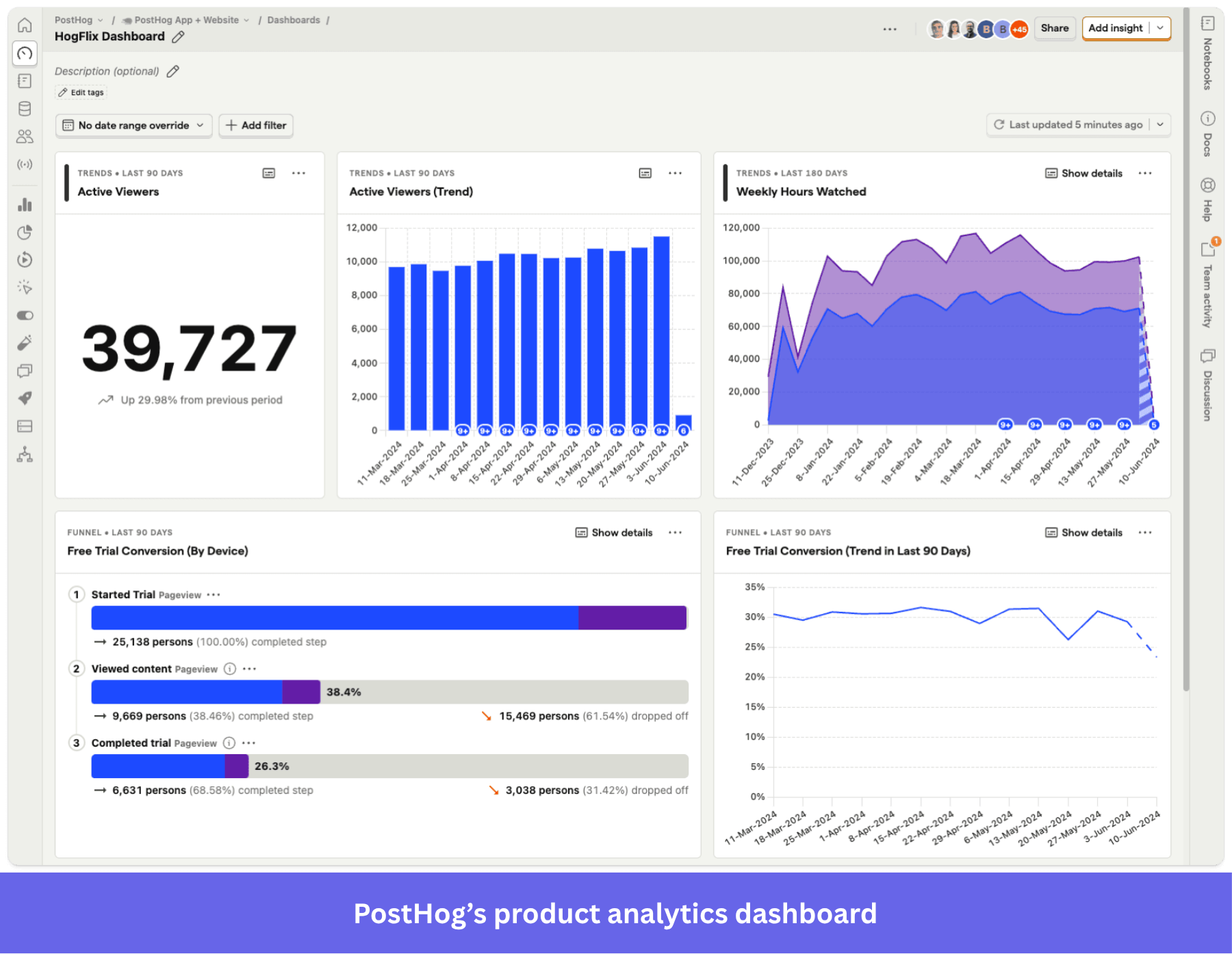
PostHog’s main strength is giving an engineering team a place to ship features, measure user behavior, debug, and improve product performance. An engineer can release a new feature behind a flag, watch how users behave, catch the errors it throws, and roll it back without switching tools.
In my opinion, here are the use cases where PostHog stands out:
- Debugging and error fixing: PostHog offers a complete stack of debugging tools, including error tracking (100,000 exceptions free a month), replays with technical context, and feature flags. It also offers “self-driving,” which connects an LLM to your codebase to monitor signals, spot deviations, prioritize issues by impact, and even open PRs (pull requests) to resolve them.
- Analyzing in-product behavior: PostHog’s analytics features have more technical depth than Heap’s. Beyond the usual behavioral reports (i.e., funnels, paths, retention, cohorts, etc.), the platform also includes an SQL editor, revenue as user property (to correlate specific behaviors with revenue), and lifecycle charts (to segment users based on their lifecycle stage).
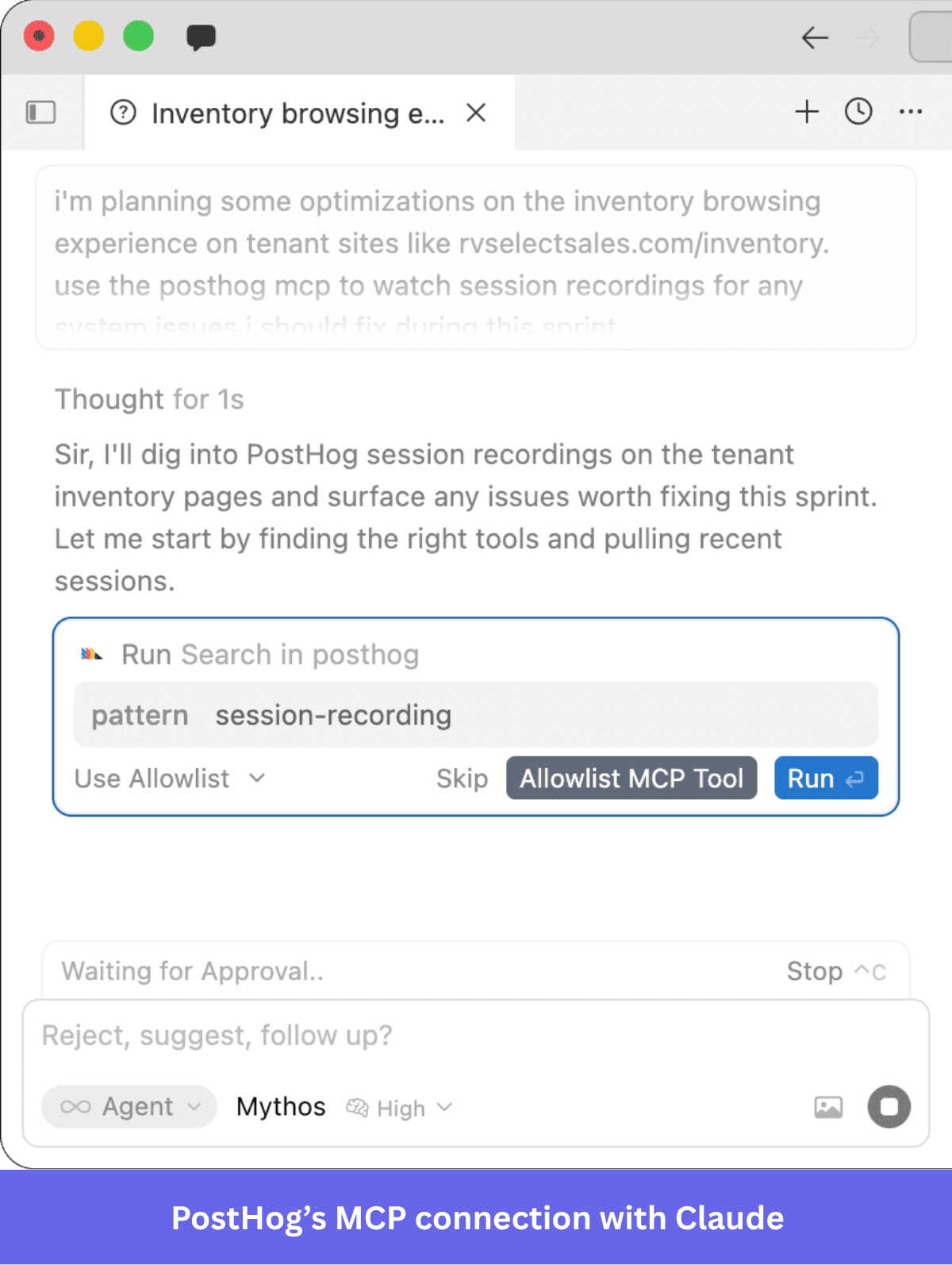
- Querying data with AI: PostHog AI answers questions about your product in natural language. It can query all your data, write SQL, create personalized dashboards, set up feature flags, and even set up in-app surveys. It also includes an MCP server, so your AI agents can access your product data.
- Complementing your dev stack: PostHog is a strong central platform for product engineers on limited budgets. There’s a data warehouse, data pipelines, AI observability (to track token usage, API latency, and traffic), and audit logs.
What is Heap (Contentsquare) and who is it for?
Heap is a product analytics tool that was acquired by Contentsquare in 2023, meaning it’s now a part of Contentsquare’s ecosystem along with Hotjar.
The tool is built for Product Led Growth (PLG) teams who need to self-serve analytics and spend less engineering time maintaining event taxonomy. Its auto-capture feature tracks user interactions across web and mobile apps, which you can analyze retroactively by yourself or with SenseAI (Contentsquare’s AI agent).
What does Heap do well?
Compared to PostHog, Heap’s advantage comes from its ability to analyze user behavior without involving engineers. Any PMM can find several months of usage data without planning it in advance.
This is where Heap stands out:
- Retroactive data and autocapture: Heap records many product interactions (clicks, taps, form submissions, page views, etc.) right after installation. Then, with the visual labeler, you can define any captured event and use it in charts immediately.
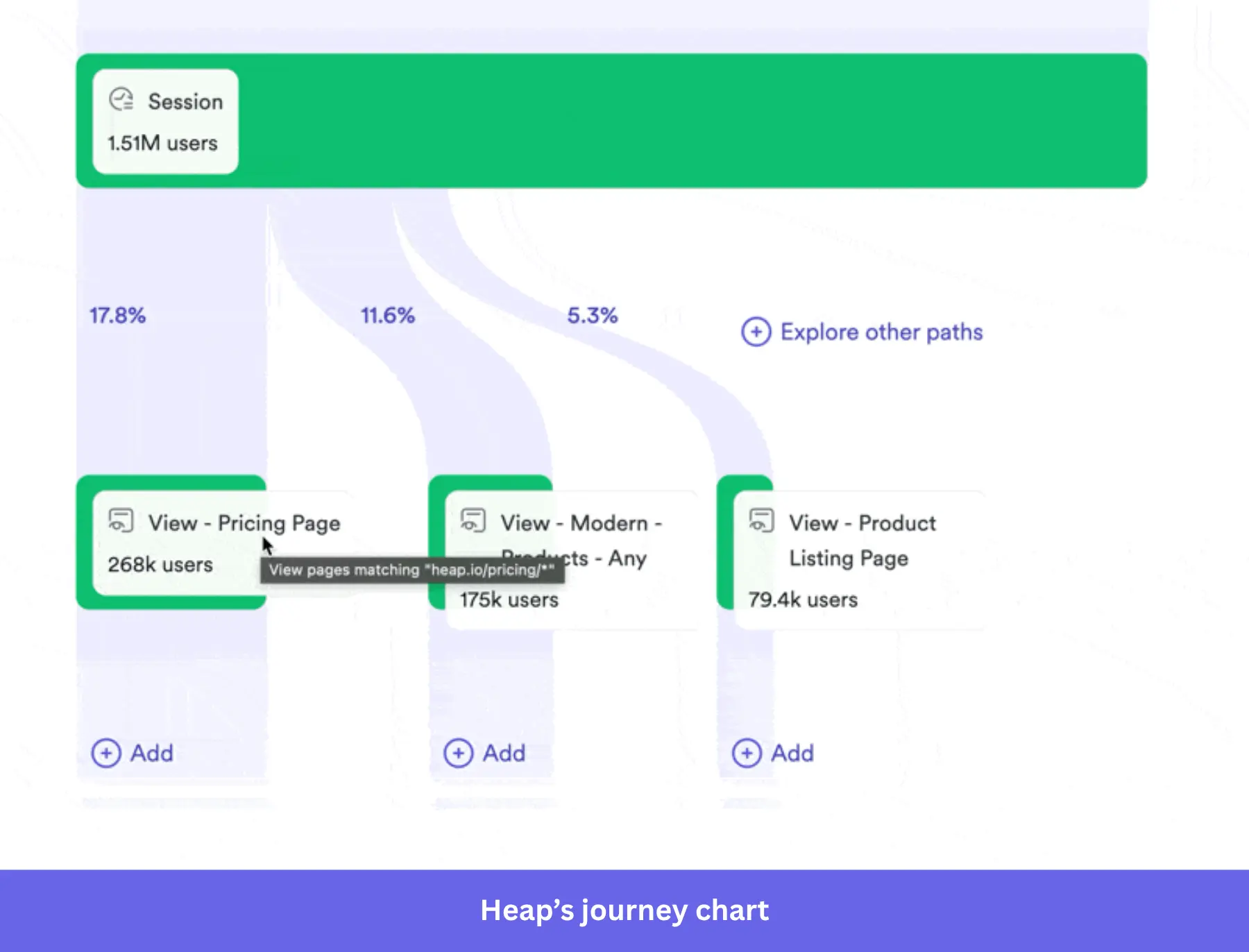
- Self-service behavioral analytics: Non-technical users can use classic product analytics tools like funnel charts, retention analysis, and journeys to analyze user behavior. It also offers unique tools like an engagement matrix (which shows event frequency in a scatter plot) and influence analysis (which measures what content or behaviors correlate with other behaviors, like activation, conversion, upgrading, etc.).
- UX analytics: Similar to PostHog, Heap offers heatmaps, session replays, error analysis, and rage click events to find friction in the product experience. Also, Heap Illuminate proactively analyzes sessions and custom events to identify friction points throughout the product journey.
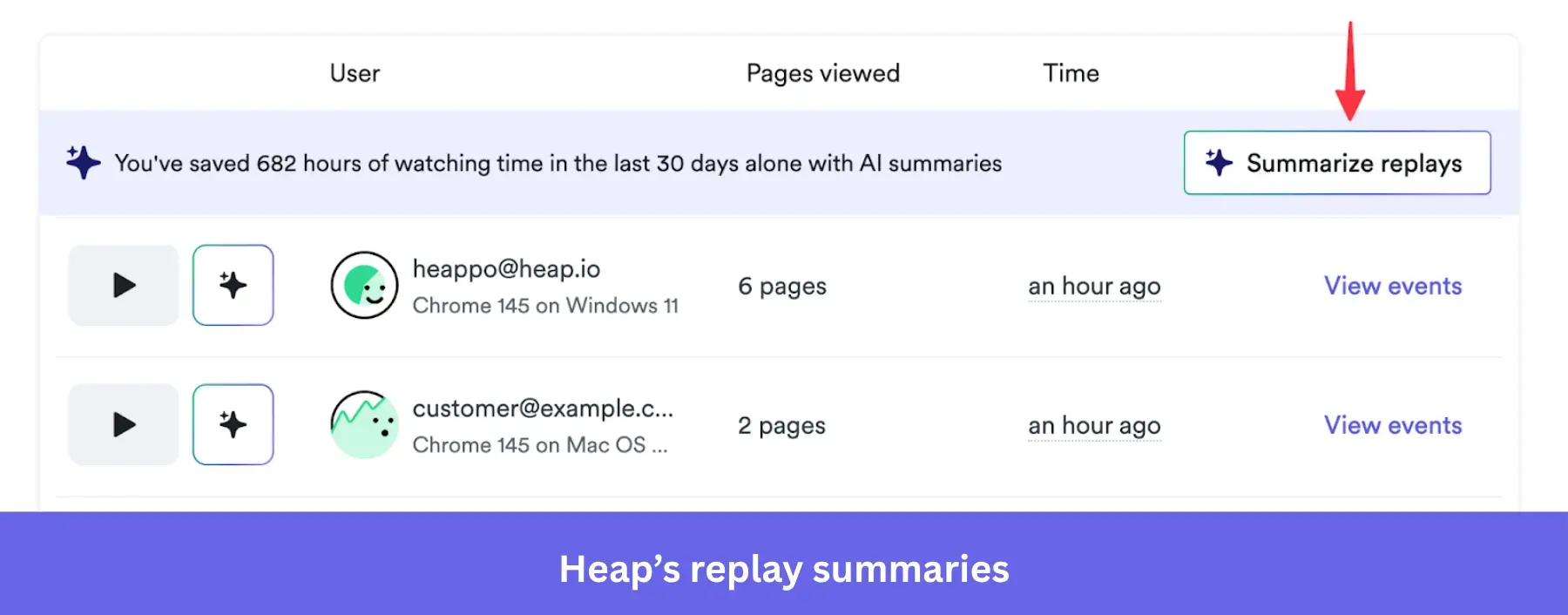
Where PostHog and Heap fall short
Both tools are built to show what users do in-app, but neither can implement in-app experiences like checklists, walkthroughs, or resource centers.
Heap connects to onboarding tools through integrations. Meanwhile, PostHog retired its product tours tool on September 26, 2026, leaving surveys and workflows as its only communication channels (sent via email, push messages, and Slack). This means you’ll always need to either ask devs to make product changes or find another tool for in-app engagement that can integrate with your analytics platform.
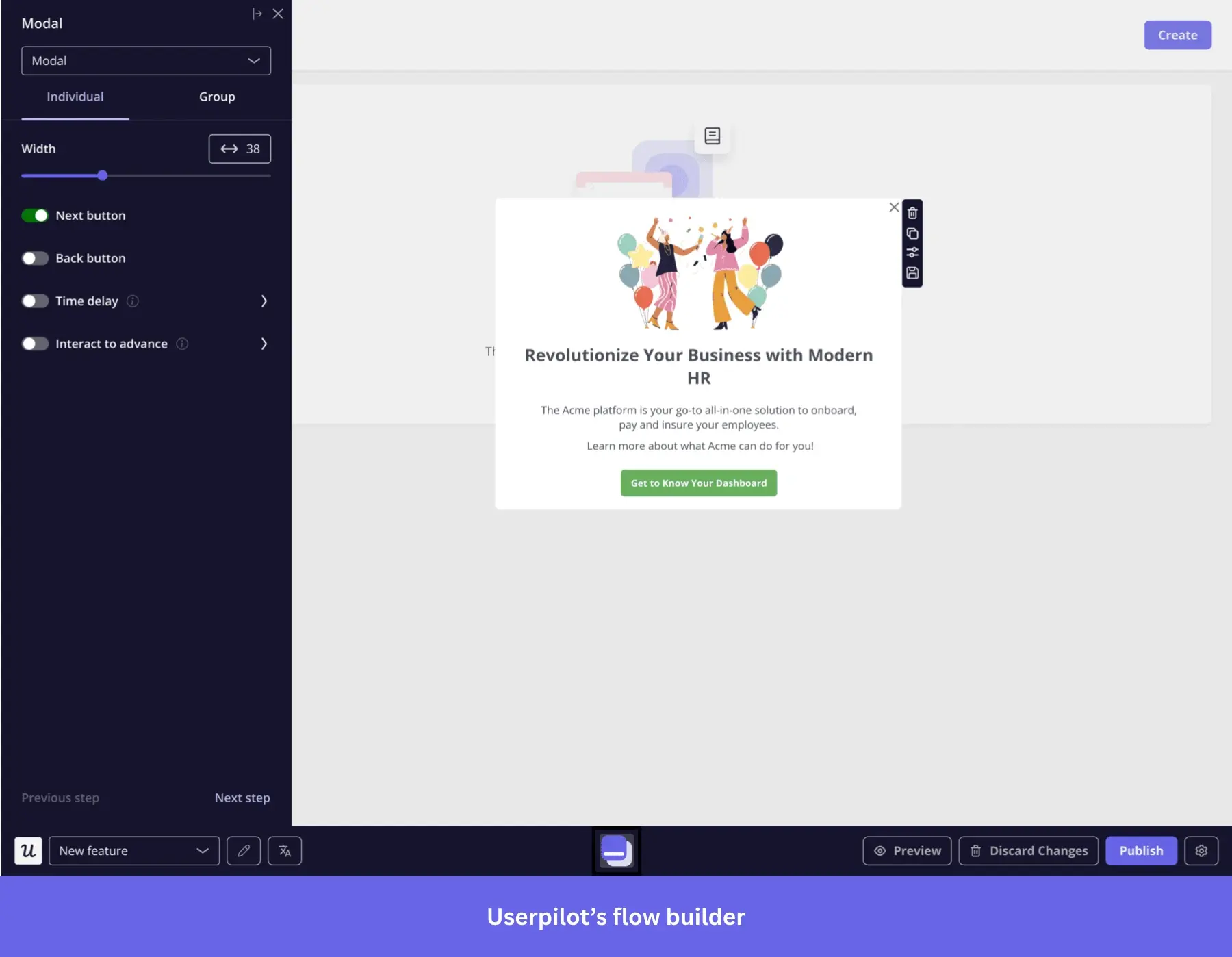
Userpilot solves this issue. It covers the same core analytics, like funnels, retention cohorts, company-level filtering, custom dashboards, and more. Like Heap, it supports autocapture, so labeling an event will also work retroactively.
But beyond analytics, Userpilot lets you improve the product experience with in-app guidance and self-service support. This way, your team can immediately address specific UX issues with a tooltip, or implement an entire onboarding flow without writing any code.
For instance, when our team saw users dropping off during email domain verification, Abrar Abutouq (our product manager) fixed it the same day:
“Within a few hours, I just created a targeted tooltip and showed it to users, highlighting the correct steps for them to make it clear what to do next. It helped a lot in reducing friction and supporting users in real time without involving our dev team.”
How PostHog, Heap, and Userpilot compare on cost
- PostHog cloud: Each product has a monthly free allowance (1M events, 5,000 web recordings, 1,500 survey responses), then you pay per usage (from $0.00005 per event and $0.005 per recording). Companies with small products will likely stay free, but enterprise or high-growth products with heavy usage will eventually have to pay monthly (which can be unpredictable unless you add a usage limit).
- Heap: The free plan covers up to 10,000 sessions a month, while all the paid plans are custom. As a reference, Vendr puts the median buyer at $41,220 a year.
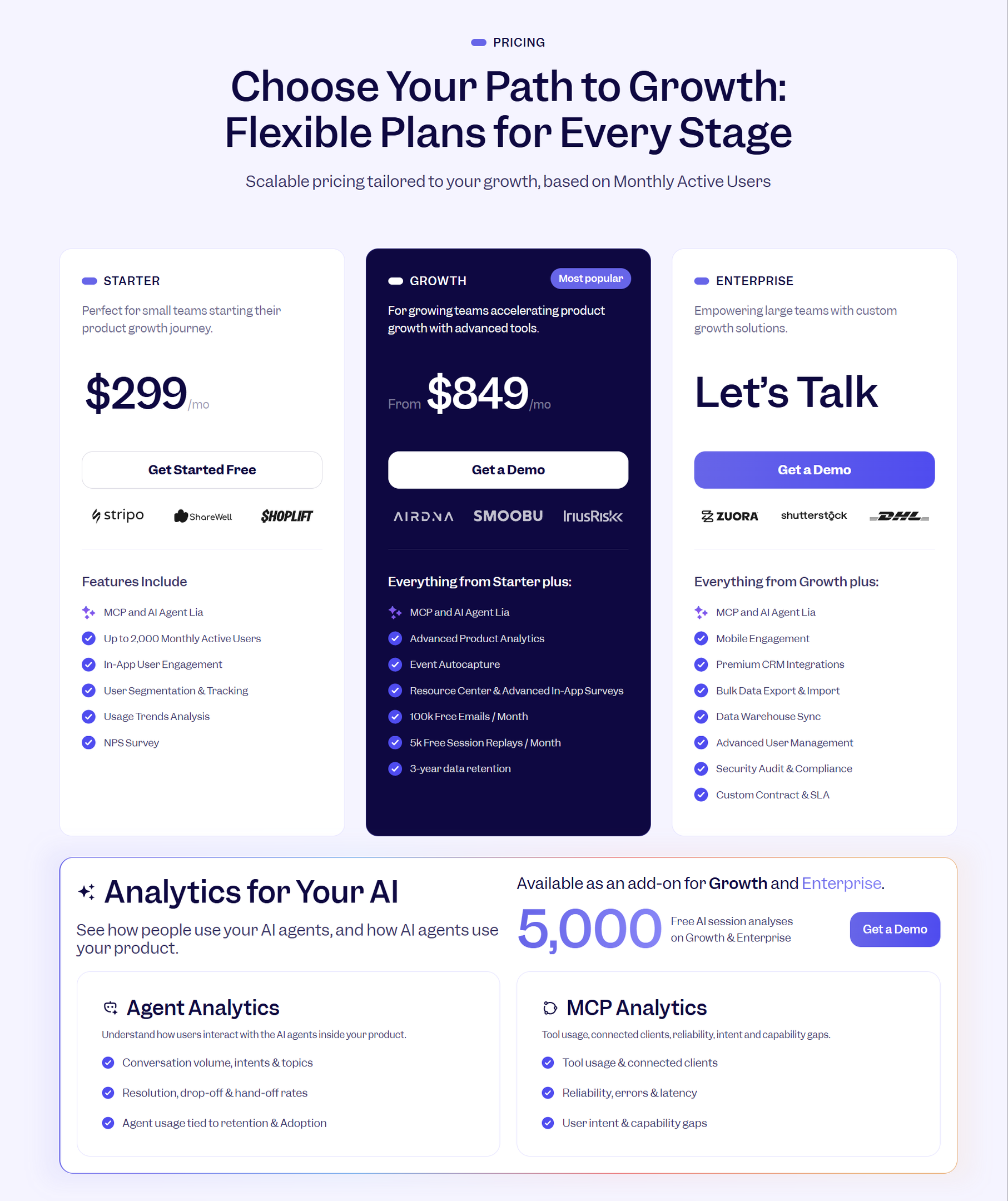
- Userpilot: Price is based on Monthly Active Users (MAUs). Starter is $299/mo (for up to 2,000 MAUs), Growth starts at $849/mo, and Enterprise is custom. This makes Userpilot more cost-effective than stitching multiple tools together, while also being predictable because of the MAU-based pricing.
Note: PostHog offers an open-source, self-hosting option. The company no longer maintains it, so you’ll be responsible for the infrastructure and keeping it up-to-date.
PostHog, Heap, or the better alternative?
If engineers own product decisions and will be the main analytics users, PostHog is the easy choice. It puts analytics, replay, flags, error tracking, and a warehouse in one place, with a generous free tier.
Heap suits analytics-first teams, especially ones already on Contentsquare or Hotjar.
However, if PMs, CSMs, or marketers own analytics and need to act fast on friction, I highly recommend choosing Userpilot. It offers very similar self-service analytics tools as Heap, except it comes with in-app engagement tools (e.g., checklists, tooltips, resource centers, email, etc.) that don’t require any coding skills
Book a Userpilot demo and our team will show you how to go from insight-to-action fast!
Disclaimer: Userpilot strives to provide accurate information to help businesses determine the best solution for their particular needs. Because the industry is dynamic, Userpilot and other platforms’ features often change over time. The statements made in this article are accurate to the best of Userpilot’s knowledge as of its publication/most recent update on October 19, 2026.
About the author