PostHog Analytics: 2026 Deep-Dive Review (+ Alternatives)


Traditionally, PostHog analytics features are intended for engineer-led teams who want to embed product analytics more intimately into the development process.
This doesn’t mean PostHog is just for engineers. It never was. Its recent releases (such as the MCP server and PostHog AI) make complex analyses more accessible for non-technical PMs. But the answers still depend on the events engineers instrument.
So for this post, I tested PostHog’s analytics tools to finally understand its niche. I’ll explain which teams would get the most value out of these tools, share my experience with them, and show you when you should look for an alternative.
Executive summary
- PostHog combines deep product analytics with web analytics, session replays, heatmaps, revenue analysis, cohort and account-level reporting, SQL, and AI-assisted tools.
- Its analytics tools include: advanced funnels, retention, paths, stickiness, lifecycle analysis, custom SQL, and the ability to connect quantitative behavior with qualitative evidence from session replays and Replay Vision.
- PostHog is best suited to engineer-led or technically capable PLG teams that want analytics embedded with development workflows. Non-technical PMs can still use it, but custom instrumentation and more complex analyses may require ongoing engineering support.
- PostHog pricing is usage-based with a generous free tier up to 1M events. This makes it attractive at lower volumes, although costs can become harder to predict as event volumes increase.
- Userpilot pairs product analytics with no-code in-app engagement, so product teams can find a drop-off and fix it in the same tool. It’s a stronger fit when product teams want to go from insight to action without relying on engineers, and customer success teams can use it too.

Who gets the most value from PostHog Analytics?
First of all, I believe PostHog is very clear about its target audience.
The founders themselves are engineers who criticize how product managers tend to add more bureaucracy to the development process. And although they do hire PMs at PostHog, their product and roadmap decisions are fully owned by engineers.
Basically, they’ve built PostHog for teams where engineers decide what to build, while PMs focus on measuring the right product metrics, researching the market, and providing engineers with the context they need to make better decisions.
So if, for example, you’re a PM investigating where users are dropping off, PostHog will provide deep funnel reports and session replays to validate your hypotheses. Then, instead of holding multiple meetings to make a decision, you just share it with engineers so they can review the technical specifications and ship a solution.
Note: If you’re a non-technical PM, you’d still need engineering help to instrument the required events properly, set up more complex dashboards, and even for querying data with SQL.
PostHog Analytics dashboards and features
To clarify, PostHog features aren’t exclusively for analytics. Its toolkit also includes feature flags, surveys, error tracking, workflows, data warehouse integration, etc.
So for this section, we’re going to focus exclusively on PostHog’s analytics tools, which include more than just product usage dashboards.
Here’s an overview of what I’m going to cover:
| Analytics area | What it helps teams understand | Key capabilities worth naming |
|---|---|---|
| Product analytics | What users do and how behavior changes | Trends, Funnels, Retention, Paths, Stickiness, Lifecycle, SQL |
| Web analytics | How visitors arrive and behave on the website | Visitors, pageviews, sessions, bounce rate, channels/UTMs, paths, conversions, Web Vitals |
| Revenue analysis | How commercial outcomes relate to user behavior | Revenue/event/person/group properties; commercial-data analysis |
| Behavioral analysis | What individual users did and where friction occurred | Session Replay, Heatmaps, Replay Vision |
| User and group analysis | How behavior varies by individual, cohort, company, or account | Persons, properties, cohorts, Group Analytics |
| AI-assisted analytics | How teams query, interpret, and monitor data with AI | PostHog AI, MCP, Replay Vision, Self-driving/ AI-assisted analysis |
Product analytics: Deep reports but instrumentation is on you
PostHog offers a wide range of product analytics features to understand user behavior, including feature usage, habits, journeys, and more.
Overall, here are all the product analytics tools that PostHog offers:
- Trends: This chart plots people, events, and properties. It helps you compare features, monitor metrics over time, aggregate event-property values, and reveal longer-term patterns. It’s the best tool for investigating how feature usage changes after a release or update.
- Funnels: Funnels quantify how users progress through a sequence of steps and are ideal for identifying potential drop-off causes in an activation journey. And besides showing step-by-step conversion, PostHog also includes filters, breakdowns, exclusions, flexible ordering, attribution options, path deviations, and correlation analysis across cohorts.
- Retention charts: This tool tracks how many users come back to your product after a period of time, and then compares different cohorts (or segments) to find patterns that lead to higher retention rates.
- Paths: Paths show the different journeys users take after or before a specific event. PostHog can branch from funnel steps into paths (both before and after a drop-off), which is useful for discovering detours that predefined funnels tend to miss.
- Stickiness: This metric measures how many times users perform a task over a specific time. The higher the metric, the more “sticky” a feature or a product is. PostHog lets you visualize the overall stickiness of your features and filter specific cohorts/periods (including individual users or accounts).
- Lifecycle: This chart groups users based on their lifecycle stage, including new, returning, resurrecting, and dormant users. PostHog lets you personalize the events that represent each stage, add filters, and define time ranges. It’s the best tool for evaluating if you should prioritize new user acquisition or focus on retaining/resurrecting existing ones.
- SQL insights: The ability to query data with SQL gives technical users a method to perform custom analyses when the other tools aren’t enough (it’s also why PostHog has a higher ceiling for teams with analytical/technical capacity).
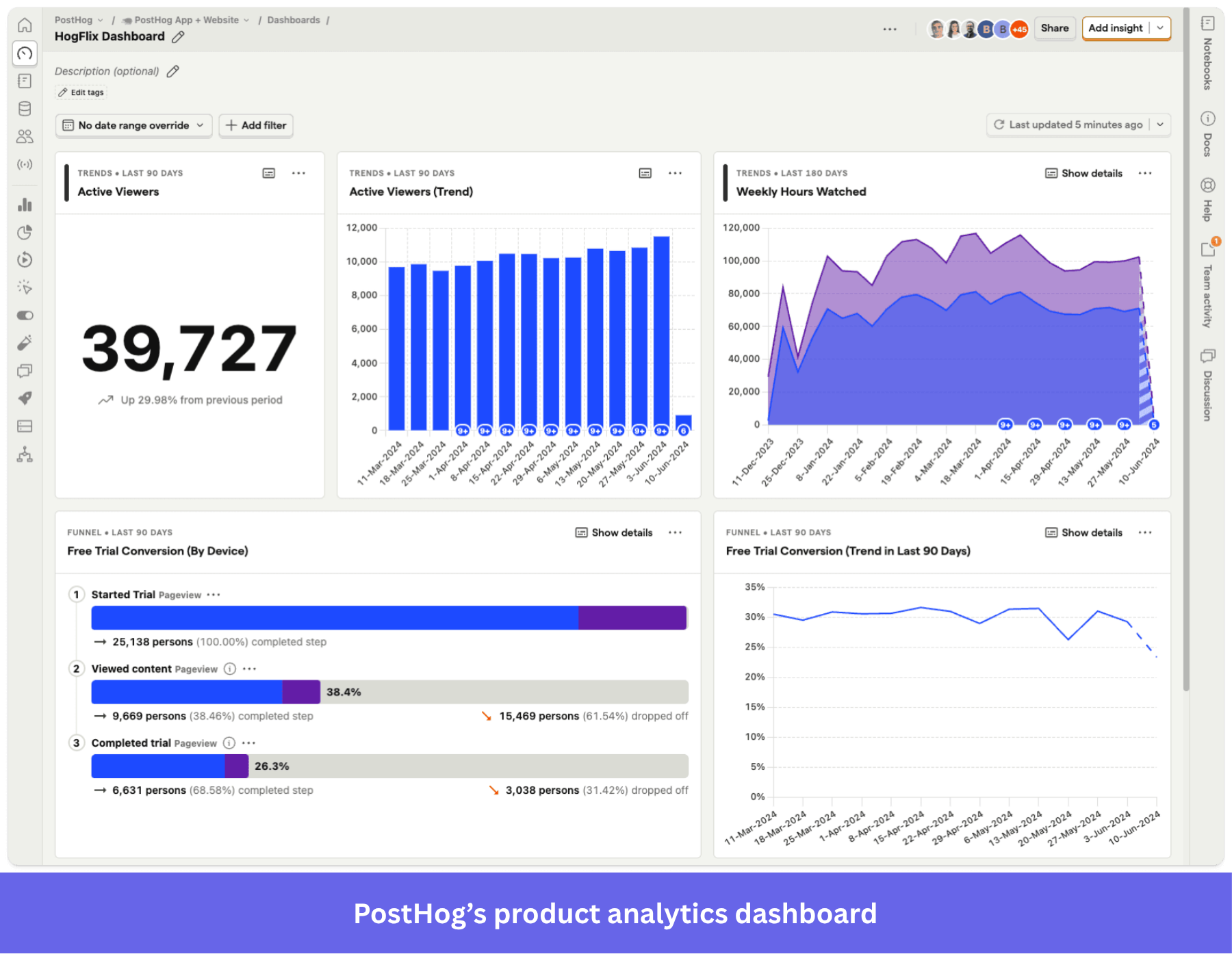
All PostHog’s reports can be added to customizable dashboards for your team. (image caption)
As for instrumenting event data, PostHog includes auto-capture. The moment you install it, it will start tracking raw data like clicks, page views, copy/pastes, dead clicks, and errors.
But to make the most of PostHog tools, you must engage with custom instrumentation. This adds a little more overhead, since your team needs to ensure the taxonomy is clean, with consistent naming conventions and no duplicate users.
In the end, this means engineers have to own the event tracking too. Therefore, if your company isn’t engineer-led, this can create significant overhead and pose a barrier for non-technical teams who need to track specific product interactions.
Web analytics: Prebuilt Google Analytics-style reporting
PostHog’s web analytics tools are prebuilt with all the essential metrics. They include:
- Core metrics: Similar to Google Analytics, with metrics like visitors, pageviews, sessions, bounce rates, and entry/exit paths.
- Traffic sources: Supports UTM parameters, channel attribution, ad campaigns (cost/click/impression data), and referral tracking.
- Web vitals: Lets you visualize First Contentful Paint (FCP), Largest Contentful Paint (LCP), Interaction to Next Paint (INP), and Cumulative Layout Shift (CLS), showing you the pages with good and poor scores.
- Advanced tools: Including performance metrics like scroll depth tracking, conversion goals, revenue tracking, and active hours. Plus audience filters like device type, browser, OS, location, screen size, and bot flagging.
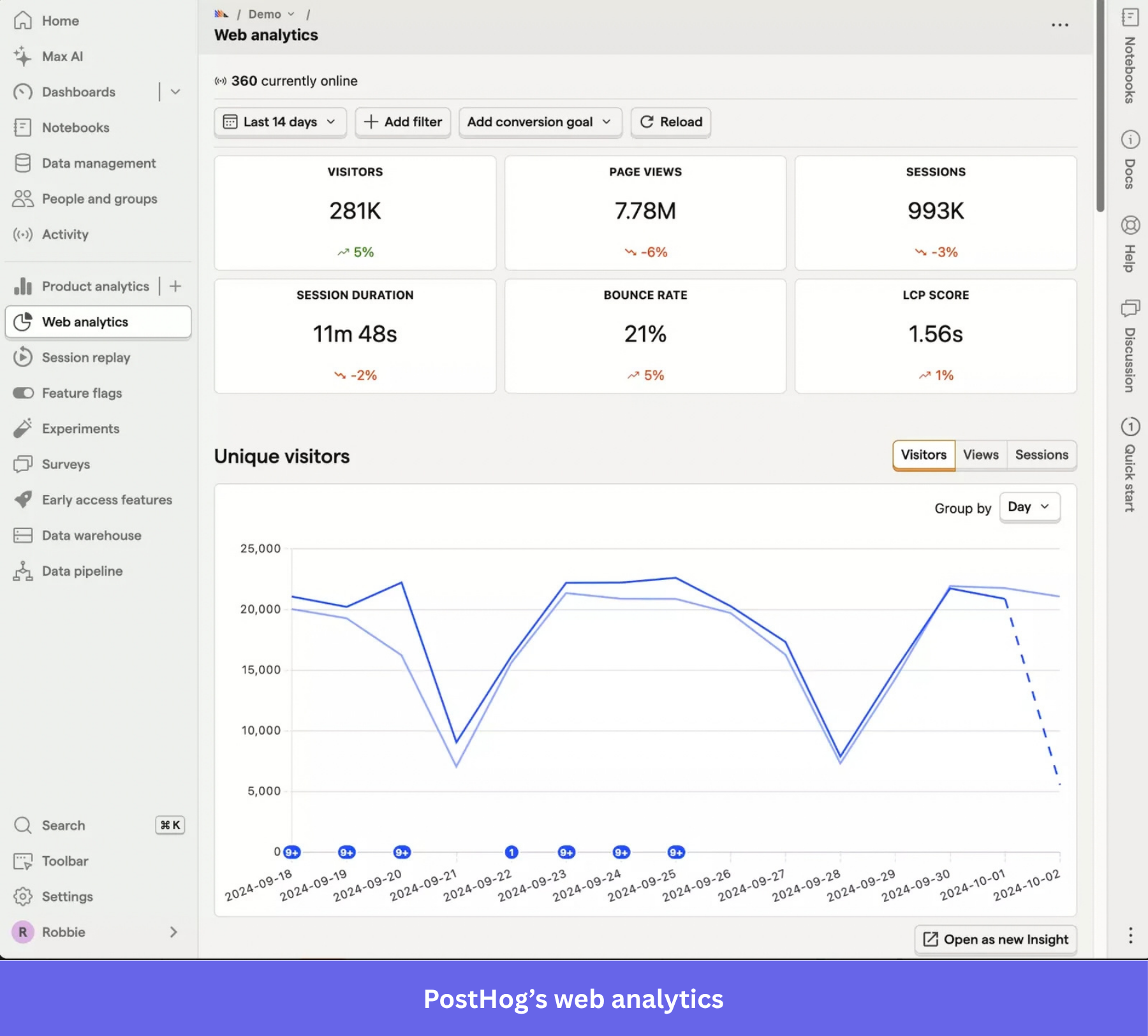
Additionally, since all PostHog analytics tools share the same event infrastructure, your team can connect web data to product behavior. For instance, you might discover that a landing page has an unusually high bounce rate, inspect recordings to find potential causes, and then examine how many new users from that page reach activation.
Revenue analysis: No dedicated dashboard, revenue lives as a property
PostHog used to include a dashboard for revenue metrics, but they were removed.
Now, revenue is attached as a property to individuals and groups, so you can include that data in other dashboards. PostHog processes revenue data from payment platforms or from revenue events, and you can then query it via product analytics, SQL, or PostHog AI.
You can break these down by product name, customer ID, country, coupon, etc. This way, if you want to track revenue expansion from upsell screens, all you need to do is connect revenue properties with customer IDs to start tracking it in your dashboards.
Behavioral analytics: Replays tied to funnel drop-offs
In addition to deep analytics, PostHog also supports a layer for qualitative insights, including Session Replay, Heatmaps, and Replay Vision.
This is how they work:
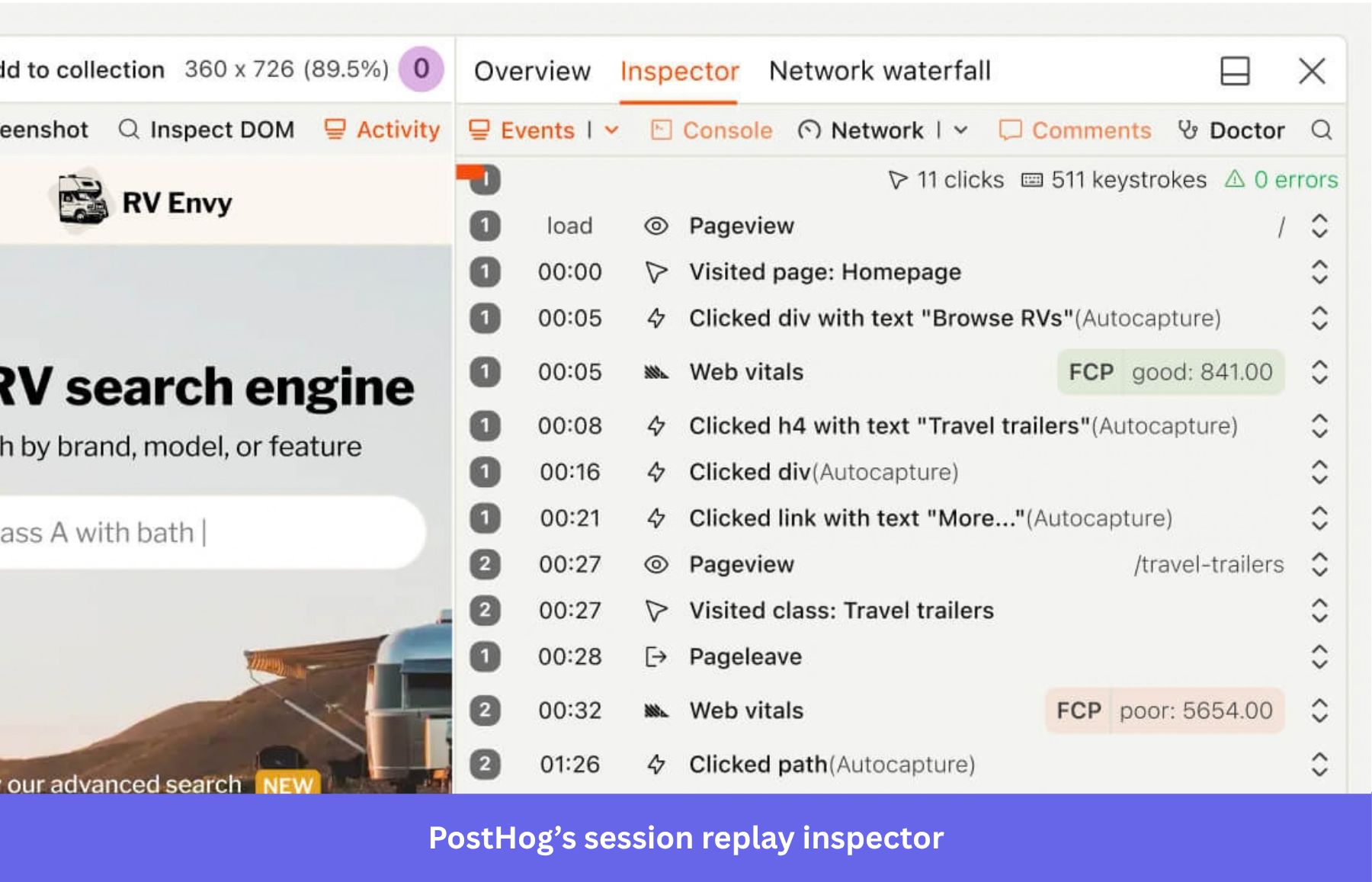
- Session replays: PostHog stores users’ sessions anonymously so you can watch how a drop-off event happened from the user’s POV. It includes an event timeline with properties, console logs/DOM explorer/network requests, and filters that let you skip the idle sections.
- Heatmaps: These maps show the parts of your product that have the highest mouse activity, letting you see if users are interacting with the important sections of your app. It includes scrollmaps, clickmaps, and the ability to turn an element on a clickmap into a trackable event.
- Replay Vision: This is one of PostHog’s AI tools that automatically scans session recordings to spot deeper insights. You give it a prompt, and it will catch dead ends, write summaries, calculate a frustration score, and tag sessions based on user intent or outcome.
These let you cross-reference quantitative friction signals (such as hard drop-offs and failures) with qualitative data that shows you exactly why the friction happened.
For example, let’s say you find that 35% of users abandon an activation funnel at “Connect integration”. You can open recordings for users who dropped at that step (or use Replay Vision to find and tag them), and then observe whether they encounter confusion, UI errors, bugs, or repeated navigation.
User, group, and cohort analysis: Account-level reporting
Rather than only tracking aggregate product usage for your general user base, PostHog’s “People” layer is capable of narrowing behavioral data for individual users, cohorts (i.e., segments), and groups (i.e., accounts/companies).
- Person profiles: These are created whenever you capture an “identified event” (i.e., an event that includes identifiable information like a user name or email). These profiles then start populating themselves with properties, so they can be filtered, feed cohorts, target feature flags/tests/surveys, preserve initial acquisition information, and be queried in SQL.
- Cohorts: Like in many tools, you can group users based on their profile’s properties or actions, then filter them inside your analytics, session replays, feature flags, etc. These can include enterprise admins, recently activated users, customers exposed to an experiment, or users who adopted a specific feature.
- Group analytics: It tracks events of whole organizations/accounts rather than individual users. This way, you can track adoption or revenue at the account level rather than analyze individual users.
These tools are necessary when, for instance, 55% of individual users have tried a collaboration feature, but only 20% of paying customer accounts have multiple employees using it. This is because, for B2B SaaS products, company-wide adoption is more important for preventing revenue churn than having a couple of power users per account.
AI-assisted analytics: Easier queries, still built for engineer-led teams
Like many companies, PostHog has been releasing AI products to assist your analytics and product development workflows.
But beyond including a chatbot, PostHog is trying to build AI features that help engineer-led teams further accelerate their building capacity.
Here’s what’s in PostHog’s AI repertoire right now:
- PostHog AI: This is PostHog’s AI agent that can query all your data, write SQL, create personalized dashboards, set up feature flags, and even send in-app surveys. You can talk to it in natural language, ask it to analyze product/web data, and even set up analytics events.
- MCP server: Like most analytics platforms, PostHog also includes MCP integration, so your AI agents in Codex or Cursor can access your product data as well.
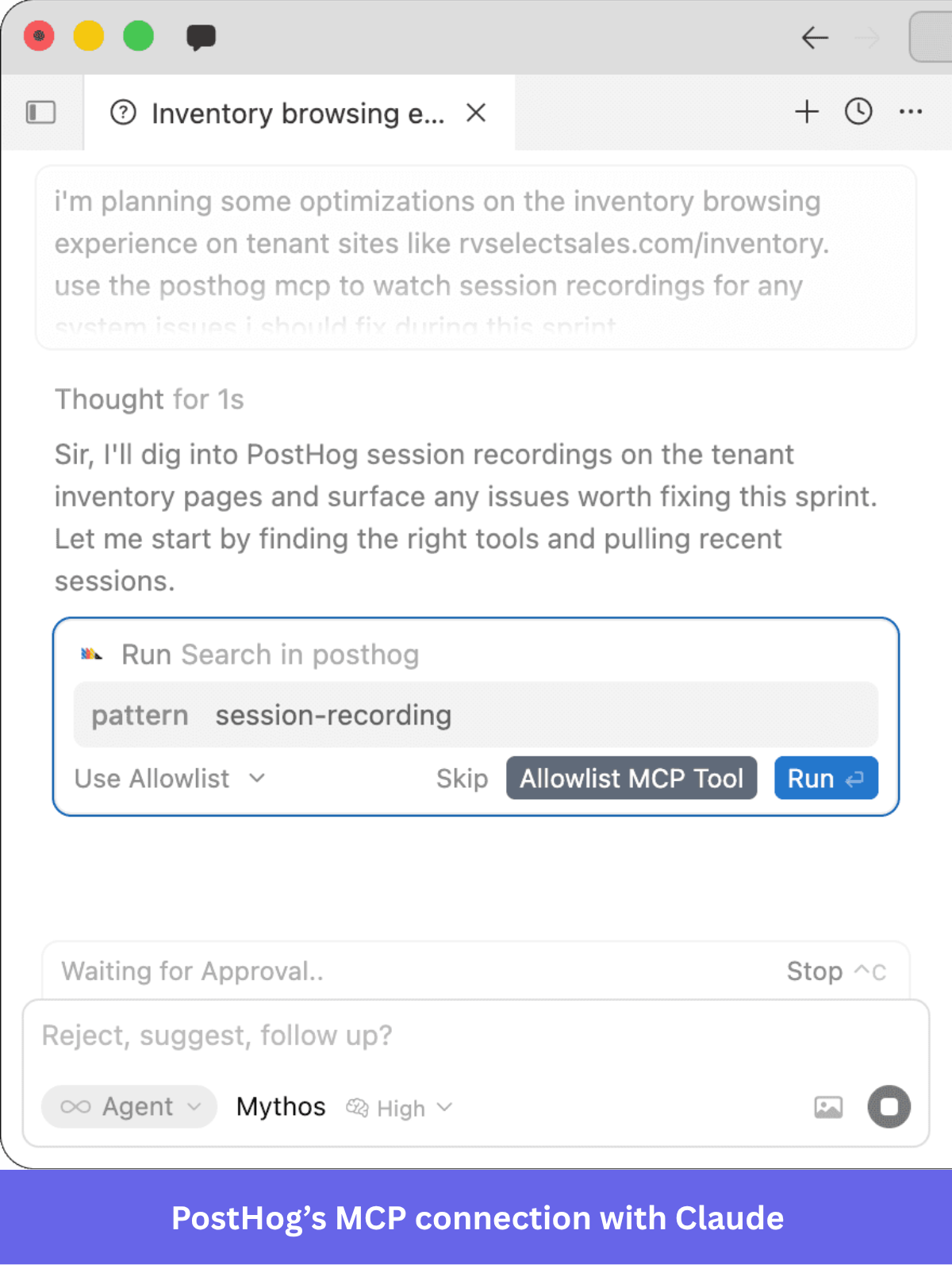
- AI Observability: If your product has an LLM-based tool (such as an AI agent), PostHog can monitor how users interact with the LLM, such as token usage, API latency, and traffic. It’s also designed to evaluate LLMs to minimize errors, costs, and hallucinations.
- Replay Vision: As I explained earlier, this tool watches session replays for you, creating summaries, tagging them, and automatically delivering actionable insights.
- Self-driving: PostHog’s most ambitious AI product is its “self-driving” feature. It connects to your codebase to monitor signals, identify deviations, create reports that prioritize issues by impact, and even open PRs (pull requests) to resolve them.
Note: Although some of these AI tools make PostHog much easier to use, the platform is still built mainly for engineer-led teams and requires a lot of technical setup in the back. Events will always need to be well maintained, and more complex dashboards or attribution models require technical literacy to build (you might no longer have to query with SQL, though!).
PostHog Analytics pricing: Generous free tier, hard to predict at scale
PostHog pricing follows a usage-based model rather than per-seat. Each feature has a unique “free limit” and a per-event price once the limit is exceeded.
This is how much PostHog costs according to the pricing page:
- Analytics: The first 1 million events per month are free. After that, it’s $0.000198 for identified events, and $0.00005 for anonymized user sessions (which starts diminishing after 2M events).
- Session replays: 5,000 session replays for free per month. After that, it’s $0.005 per recording and $0.01 per mobile recording.
- Replay Vision: 500 free observations per month. Then it’s $0.05 for each observation.
- PostHog AI: Includes 500 credits per month. Then it’s $0.01 for each credit.
If your product is small or has low usage, you might not have to pay for PostHog’s basic tools at all. But if you work with enterprise-grade products or high-usage products, you’ll find it hard to predict how much you’ll spend on analytics.
In Vendr, for instance, paid customers have reported spending between $20,000 and $71,561 per year, depending on usage. You could, however, set a limit to your tracked events so you don’t surpass your budget; just know you won’t be able to track everything in your product this way.
When should you look for an alternative to PostHog Analytics?
PostHog’s biggest strengths are also its worst downsides. The fact that it’s a developer-friendly platform with significant technical depth makes it a perfect fit for engineering-heavy companies. Yet it would also represent a significant burden on teams with limited technical resources.
So if you ask me, I think you should look for other solutions when:
- The product team works independently to maximize product adoption and activation: PostHog gives PMs self-serve analysis, but its overall product philosophy and design center on engineers.
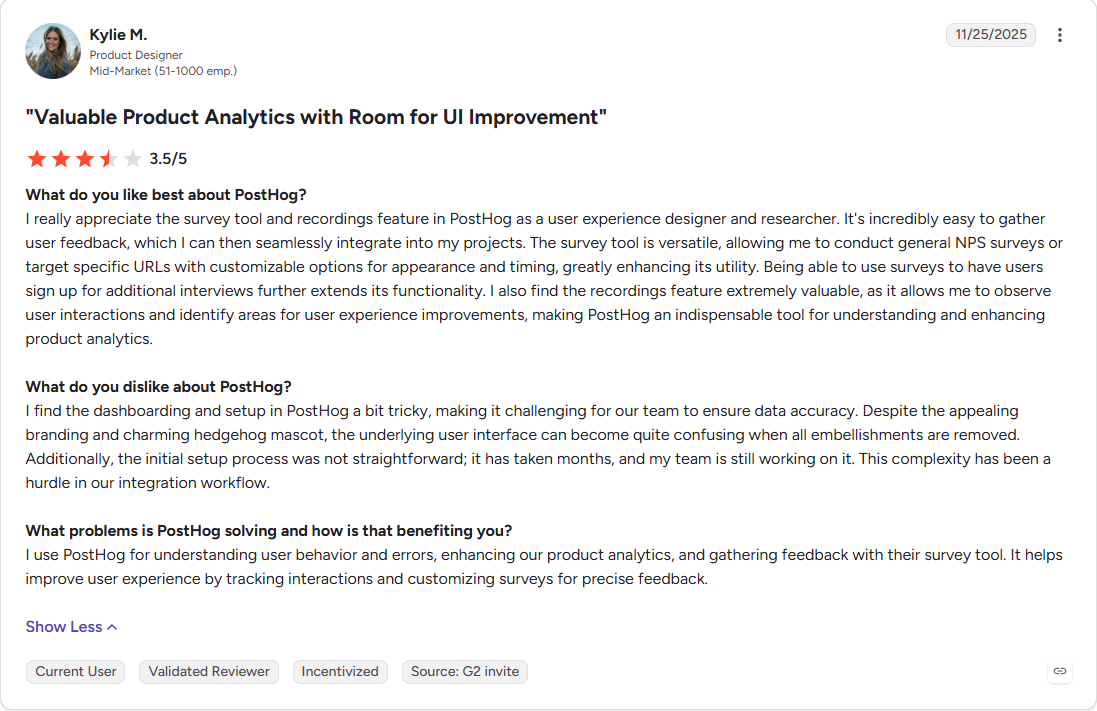
- Accessibility matters more than technical depth: PostHog supports SQL, sophisticated funnel logic, correlation, paths, groups, flags, replay, and many adjacent developer products. Some products require that level of depth, but if you don’t, then you’ll end up going through a wild learning curve and months of implementation just to use one side of PostHog, as some G2 reviewers have expressed:
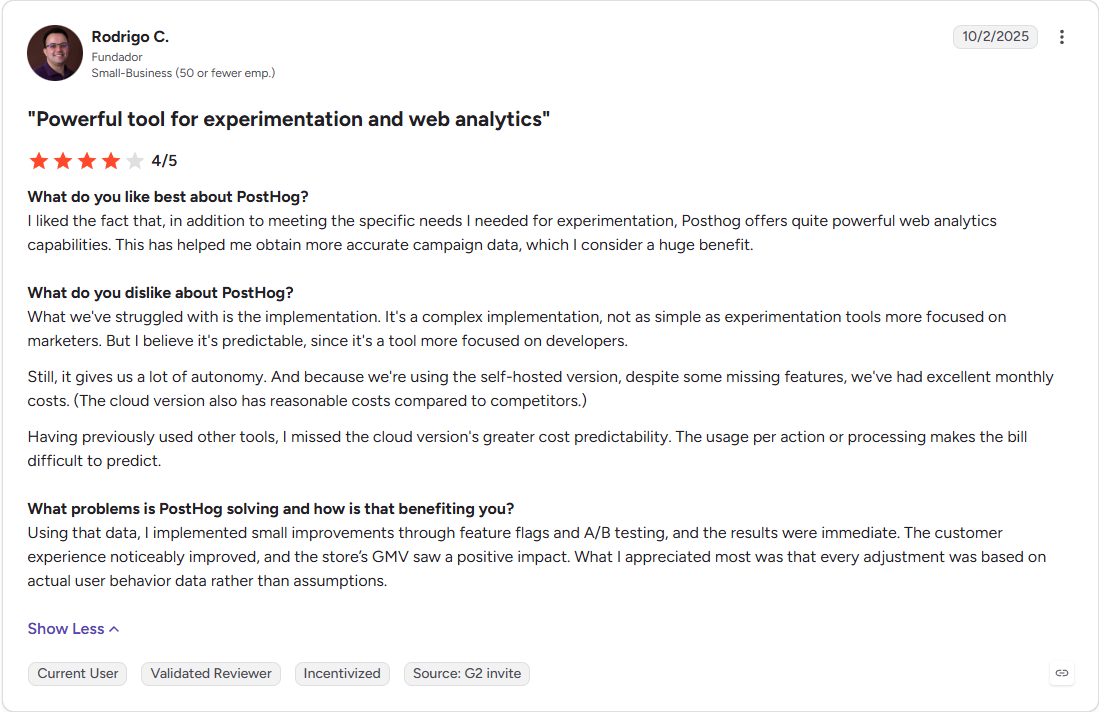
- You require predictable pricing and unlimited usage: PostHog’s usage model has an unusually generous free tier, but once you start being billed, prices can scale quickly and unpredictably (as G2 reviewers say). Plus, even if you limit the budget, it would also mean limited tracking (which can compromise some of your analyses).
Userpilot: An alternative to PostHog Analytics for product teams
While I believe PostHog is one of the best product analytics tools on the market, I think it has a very clear niche with engineer-heavy teams.
Here’s a deeper look at this Userpilot vs. PostHog comparison:
| Criteria | Userpilot | PostHog |
|---|---|---|
| Primary audience | Product teams wanting analytics integrated with no-code engagement tools. | Product engineers, growth engineers, and technically capable teams |
| Analytics depth | Funnels, trends, paths, retention/cohorts, segmentation, and replay. They’re optimized around practical adoption-related questions and fast intervention. | Broader analytical ceiling with funnels, trends, retention, paths, stickiness, lifecycle, SQL, correlations, groups, and deep engineering context. |
| Technical involvement | Ongoing analysis, event labeling, and engagement are deliberately built to reduce engineering dependency. | Autocapture lowers setup, but identity, custom events, backend data, and group semantics require engineering/data knowledge. |
| Behavioral analysis | Session Replay linked to funnel, plus frustration/error signals and behavioral segmentation. | Session Replay, Heatmaps, and Replay Vision. |
| Acting on insights | Can target users with flows, tooltips, checklists, surveys, and other in-app experiences right after finding an insight. | Acts through product development tools such as flags, experiments, surveys, workflows, and newer Self-driving functionality. No no-code onboarding or in-app messaging. |
| Engineering workflow | Best where product/growth wants to operate independently after base instrumentation. | Stronger when analytics should live next to code, flags, experiments, errors, logs, and developer agents. |
| AI assistance | Lia (Userpilot’s AI agent) doesn’t just analyze the data automatically, but also ideates in-app interventions and drafts in-app flows for you. There’s also an MCP connection and agent analytics. | PostHog AI/MCP for querying data, Replay Vision, AI Observability, and Self-driving to assist development. |
| Best fit depends on | Whether or not you need analytics to drive activation, adoption, engagement, and overall product growth. | Whether you need analytics embedded in product development, experimentation, and engineering workflows. |
| Pricing model | Tiered subscription based on plan/MAU, starting at $299/month for Starter and $849/month for Growth. | Usage-based; Product Analytics starts with 1M monthly events free and charges per event beyond the limit. |
In short, Userpilot is best for product teams that want to find a drop-off and fix it in the same tool without waiting on engineers. It gives product managers independence from engineers when it comes to improving onboarding and feature adoption.
Userpilot has trade-offs too. Pricing is based on monthly active users, so the bill grows as your user base does. And like most analytics tools, you still need to install the SDK and identify your users before any data comes in.
Userpilot has been no-code since day one. It offers no-code tools for implementing in-app UI prompts such as tooltips, walkthroughs, modals, checklists, and more. And our AI agent, Lia, can build these experiences for you directly.
For instance, Cleeng’s analytics showed a 92% drop in feature usage after a UI redesign. The team used Userpilot to investigate and found a discoverability/navigation problem. Then, with a targeted tooltip, they saw a 75% increase in page visits compared to the pre-redesign number.
In addition to this, our AI features are making this flow much smoother, including:
- Lia: This is Userpilot’s AI agent, and it goes beyond just answering questions like a chatbot. Besides analyzing the whole product, profiles, user feedback, and session logs, it can act on it. It recommends next actions, creates reports, and automatically builds in-app guides that only require approval.
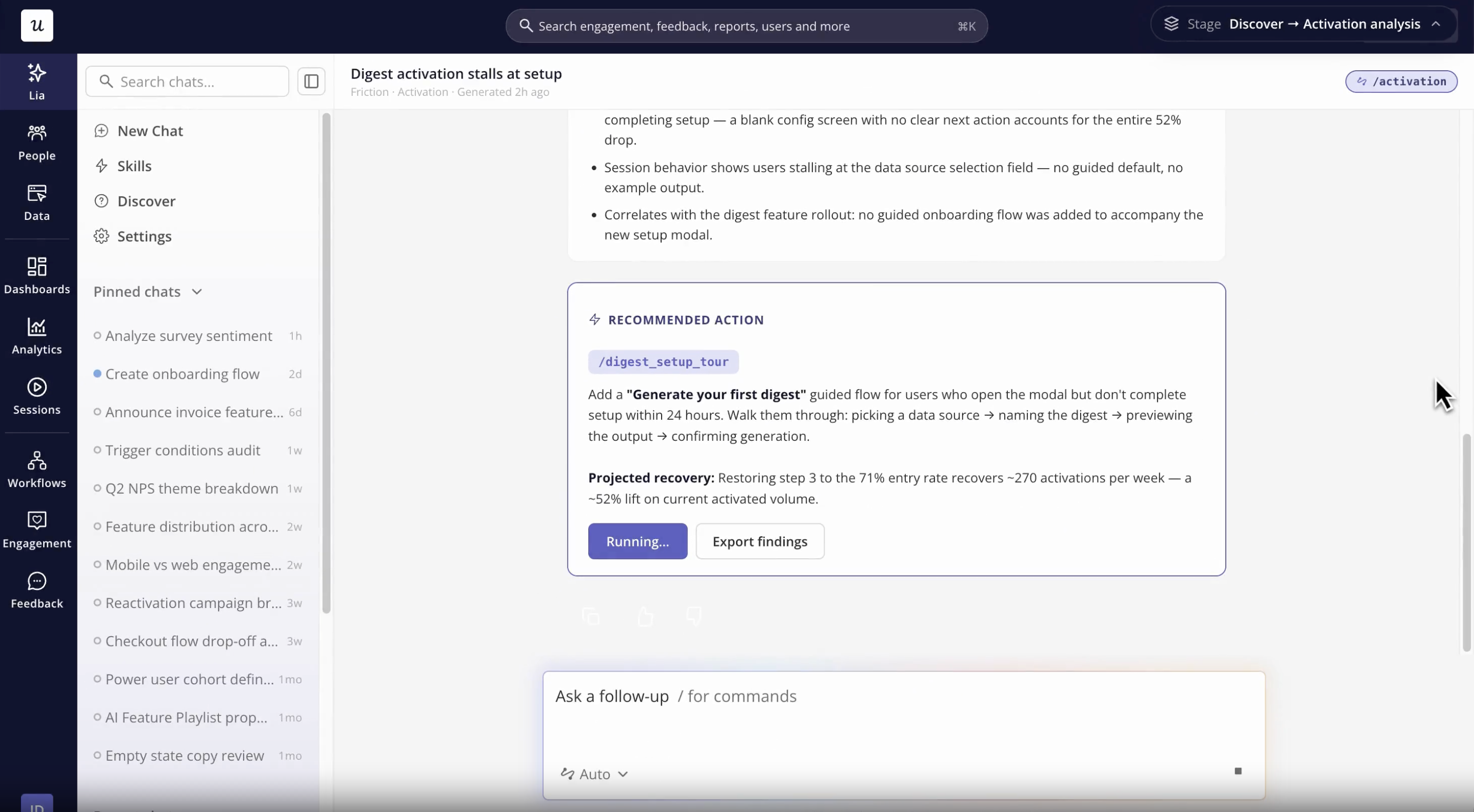
- Userpilot’s MCP: Lets your team query Userpilot data and create segments, reports, and dashboards from an AI tool.
- Agent analytics: If your product has its own AI agent, this shows how users interact with it. It also syncs data with Lia and the MCP server, so you can also query agent usage data in natural language if you want.
Go from PostHog insights to in-app action with Userpilot
PostHog’s product analytics tools are the most useful for teams that want analytics embedded in an engineering/product-development system. That is, with event analysis, replay, flags, experiments, technical observability, SQL, MCP, and increasingly autonomous investigation.
Userpilot, on the other hand, is best for product teams that, rather than looking at what users are doing, ask, “How can we help users reach value faster?”
And since analytics, in-app engagement, surveys, and session replay live in one platform, you don’t have to stitch tools together to go from insight to action.
So if your company doesn’t really fit PostHog’s engineer-heavy toolkit, book a Userpilot demo to see how its analytics tools can help you improve product adoption.
Disclaimer: Userpilot strives to provide accurate information to help businesses determine the best solution for their particular needs. Due to the dynamic nature of the industry, the features offered by Userpilot and others often change over time. The statements made in this article are accurate to the best of Userpilot’s knowledge as of its publication/most recent update on October 6, 2026.
FAQ
What is PostHog analytics?
PostHog is an event-based analytics product for analyzing how people use digital products, with tools including trends, funnels, retention, paths, stickiness, lifecycle analysis, and SQL.
Is PostHog free to use?
Yes. PostHog’s free plan includes the first 1 million events each month, with usage-based billing beyond that threshold. Other PostHog products have their own free tier limits.
Who uses PostHog?
PostHog is meant for Product Engineers, Product Managers, Growth Engineers, technical founders, and Support Engineers. Its culture and broader toolset make it especially attractive to teams that want analytics integrated with product development processes.
What is PostHog used for?
PostHog is for analyzing user interactions with a software product. This involves:
- Measuring feature usage.
- Monitoring trends.
- Finding funnel drop-off points.
- Analyzing retention and user paths.
- Investigating individual sessions.
- Comparing retention rates of cohorts/accounts.
Is PostHog an open-source analytics platform?
Yes, PostHog provides an open-source/self-hosted option. The code is MIT-licensed, but self-hosted deployment is officially unsupported, so you’ll need to build your own infrastructure to self-host PostHog.
What is the best open source alternative to PostHog for product analytics?
The closest open-source alternative for product analytics is OpenPanel. The platform describes itself as a “Mixpanel-like” analytics platform, offering event tracking, funnels, session replays, retention charts, web analytics, and more.
About the author