Pendo Agent Analytics Review: Use Cases, Pricing, and Limitations


Gartner predicts that 40% of enterprise apps will include task-specific AI agents by the end of 2026. It also expects over 40% of agentic AI projects to be canceled by the end of 2027, with unclear business value among the main reasons. Pendo Agent Analytics helps you determine whether your agent delivers that value, by showing whether your AI agents help users get their jobs done.
However, other agent analytics tools do just that. So to judge whether Pendo’s is worth it, you need to look past the marketing at how much engineering work setup takes, what you can learn without capturing full conversations, and whether your team can examine failures within your privacy and access policies.
I’ll work through these considerations in this review, then compare Pendo with Userpilot’s Agent Analytics to help you decide which fits your team.
Executive summary
- Best fit: Teams that already use Pendo and want to keep agent analysis within their existing platform.
- Setup: Full conversation capture requires developer involvement. You can track prompts without writing code, but that’s only available for browser extension apps.
- Pricing: Custom prompt-based pricing.
- Free allowance: 500 prompts per month.
- Dependencies: You need Pendo’s Session Replay to watch user sessions and its MCP server to generate fixes for failed agent interactions.
| What it measures | Agent usage, conversation topics, failures, frustration, retention, custom success metrics, and execution traces. |
| Capture modes | Prompts only for browser extension apps, or full conversations through code integration. |
| Agent types covered | Agents in web/mobile apps, browser extensions, backend services, CLI environments, and Salesforce Agentforce (beta). |
| Integration methods | Web SDK, server-side HTTP API, Python/TypeScript SDKs, or Apex SDK (beta). |
| Developer involvement | Required for full conversations; Python or TypeScript SDK needed for traces. |
| Connection to product data | Pendo lets you compare agent users with other users and see what they do before and after an agent interaction. You can anonymize visitor IDs for privacy, but this prevents you from linking agent activity to individual users’ behavior across your product. |
| Access to raw conversations | Subscription admins, relevant app admins, and users with the AI Agent Admin role, provided raw data is stored. |
| Privacy controls | Configurable sensitive-data redaction, visitor anonymization, and an option to delete raw content after processing. |
| Pricing model | Custom prompt-based pricing; available standalone or alongside a Pendo plan. |
| Free allowance | 500 visitor prompts per month per subscription without paid Agent Analytics. |
| Best fit | Teams with engineering support that want product behavior analysis alongside agent diagnostics. |

What can you do with Pendo Agent Analytics?
Pendo Agent Analytics helps you answer a simple question: is your conversational agent helping users accomplish what they came to do? It builds on Pendo’s core analytics, which we cover in our Pendo Analytics review, and adds a dedicated report for each agent.
That report is where every investigation starts. It brings together usage metrics and top use cases, with date, segment, and account filters to narrow the analysis
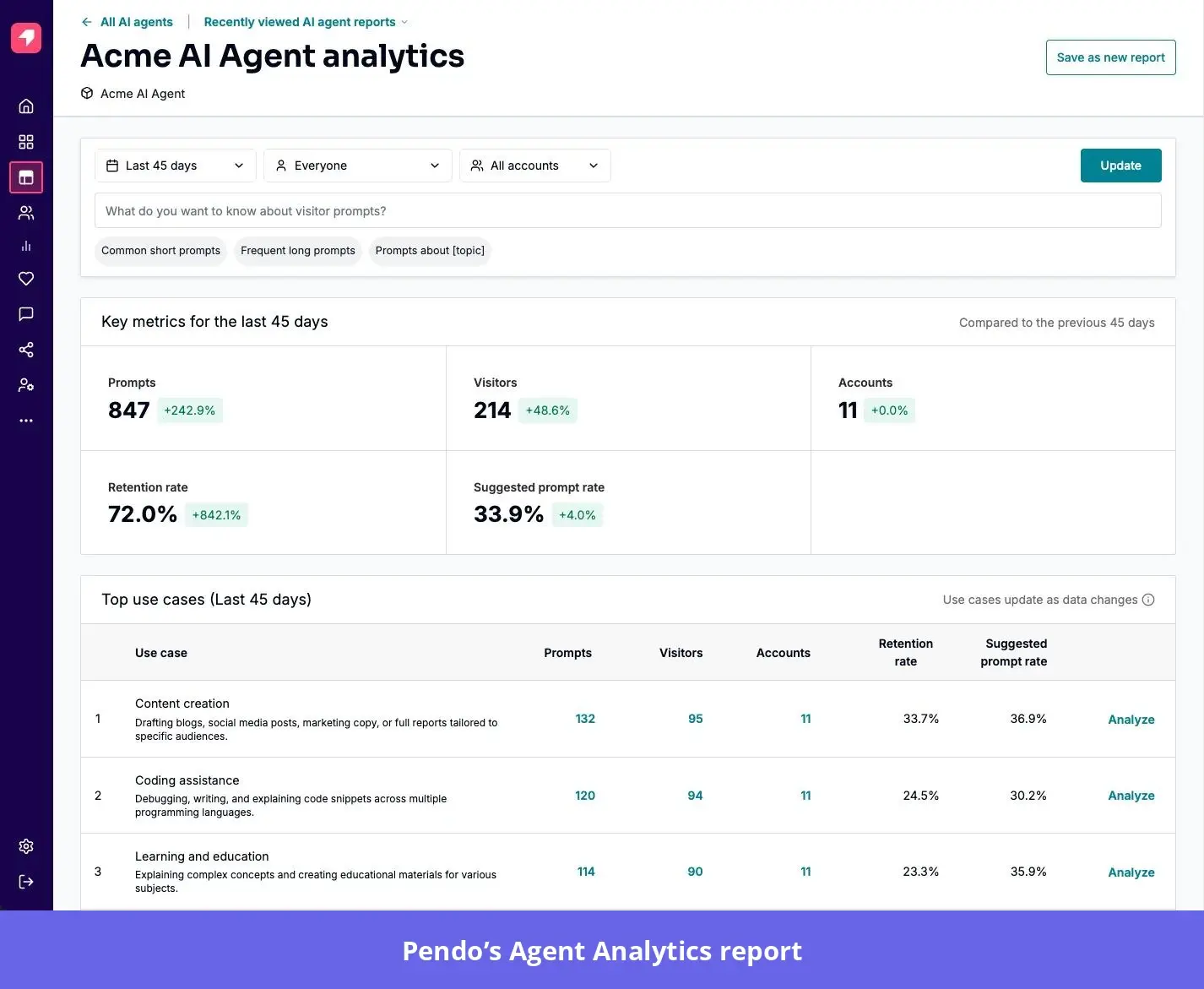
From there, Pendo gives you seven ways to dig deeper.
See how users interact with your agent through use case clustering
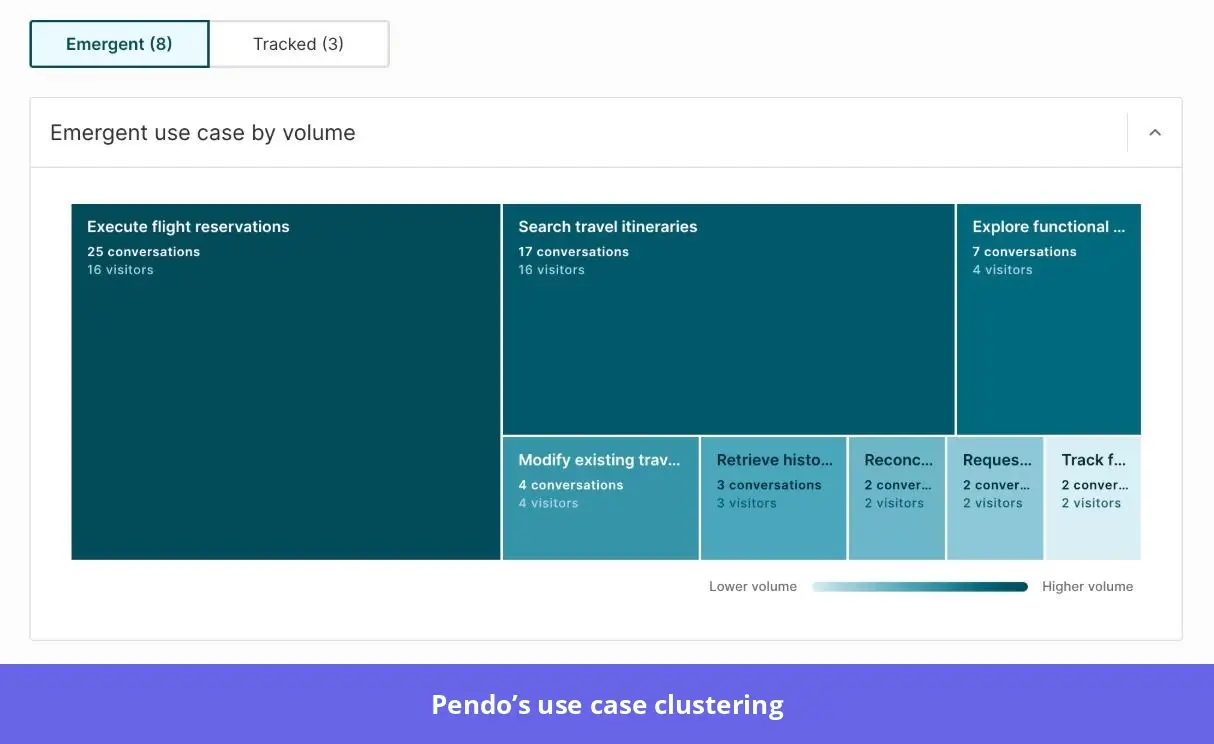
Pendo clusters user prompts with similar intents or meanings into themes in its Emergent use cases view to make analysis easier.
For example, if you’re a regular SaaS tool, your users interacting with the agentic layer in your billing section might have queries like “Where can I download my invoice?” or “How do I change the company name on my invoice?”
Pendo will group them under a theme like “Invoice requests.” Similarly, “How do I cancel?” and “Stop my subscription” could fall under “Subscription cancellation.”
The report has a level of detail slider that lets you dig into narrower requests within broader themes. Back to our billing example, if you want to check what kinds of invoice requests users make, you could use the detail slider and find things like downloading invoices or correcting invoice details.
To monitor a topic over time, Pendo requires you to create a tracked use case. How? Begin by defining the requests it should include. For example, to track invoice downloads, you can define it as “Requests to download or receive a copy of an invoice.”
Next, add example prompts to help Pendo recognize which requests belong there. Pendo lets you add up to ten examples. My recommendation is to vary how you phrase them as much as possible, while keeping them within your definition, so the tool is able to track more accurately.
One of the key advantages here is that recurring requests can help shape your agent capabilities. Say your users can already export invoices through the interface, but you keep seeing agent requests for invoice exports. That’s a sign that users may want to do this through the agent too. You can add it to your agent roadmap. Or, if you find that users simply don’t know where to export invoices, you can improve your in-app guidance to show them how.
It’s worth noting, though, that Pendo’s clustering works with prompts-only capture. Investigating how the agent responded requires developers to configure full conversation capture. You must also allow Pendo to store the conversation text, which may not align with your company’s privacy requirements.
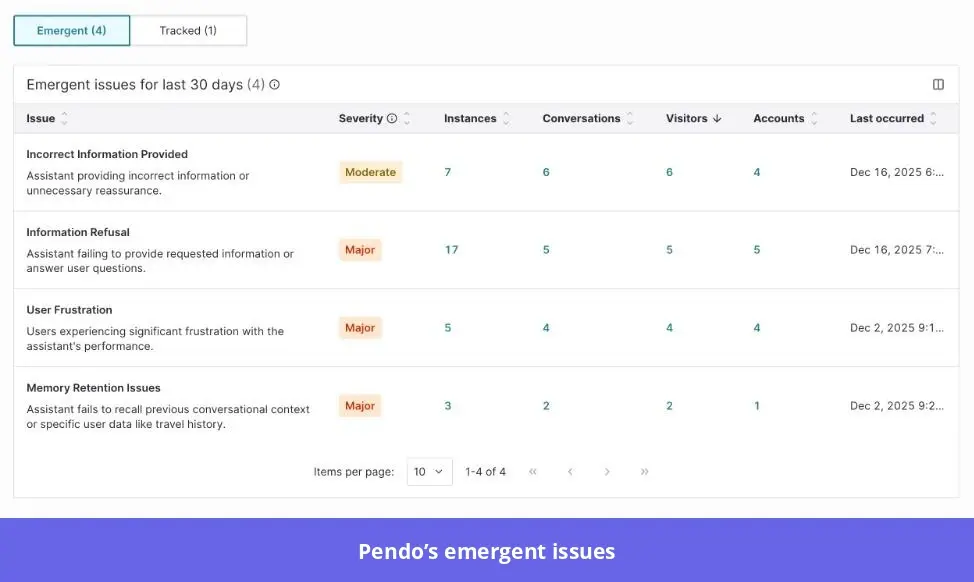
Catch failures and frustration with issues and rage prompts
After setting up Pendo’s Agent Analytics with full conversation capture, the next step is to examine the results.
Ideally, I’d suggest you give it a couple of days or weeks, depending on how often people use your agent, so you have enough data to analyze.
That said, Pendo shows you four quality metrics for catching failures and frustration. Each measures the percentage of conversations affected:
- Issue rate: Conversations with at least one detected issue.
- Rage prompt rate: Conversations showing user frustration, such as “that’s not what I asked,” alongside evidence the agent failed.
- Unsupported request rate: Conversations where the agent couldn’t fulfill the request.
- Error rate: Conversations containing technical failures, such as failed tool calls.
Of course, the fact that a conversation didn’t go as a user intended doesn’t automatically mean your agent isn’t working well. A few edge cases happen here and there. You should fix those, but what you should prioritize more are recurring issues, unless an isolated failure is serious enough to need immediate attention.
To distinguish recurring problems from isolated incidents, compare how many conversations an issue affects and whether its volume is growing.
Check its share of total conversations too, because rising usage can increase issue counts without worsening performance. And remember, you can always create a tracked issue for any problem you want to closely monitor.
Diagnose why a conversation failed with conversations and traces
Sometimes an agent gives an unhelpful answer because a tool it relies on failed. The conversation will show you what went wrong for the user, but you may need more detail to understand the cause.
Pendo lets you investigate both. Start with a recurring issue or use case, then open a matching conversation to inspect the exchange.
If your developers use Pendo’s Python or TypeScript SDK, you can also inspect traces: records of the operations behind a response. Each operation, called a span, shows timing and error details. For example, a failed invoice lookup could explain why the agent couldn’t answer a billing question.
If you want to see what users did around the exchange, you’d need to open the related session replay. This requires Pendo’s Session Replay tool, available as an add-on on the Base plan and included in Core and Ultimate.
Once you’ve identified the problem, Pendo’s Agent Repair can help you work out what to change. Run it through an AI tool connected to Pendo’s MCP server, and it will produce a fix brief with suggested changes and examples from the conversations to explain why.
Remember that your developers (or a coding agent with access to your codebase) still need to make and deploy the changes.
Measure agent adoption and retention with usage metrics
Pendo’s Adoption section shows how many people and accounts use your agent. Alongside those counts, you can check:
- Prompt volume: How often users interact with the agent.
- Conversation depth: The average number of user prompts per conversation.
- Agent retention: The percentage of visitors who submitted prompts in at least two different weeks within your selected date range.
I’d interpret retention against the agent’s purpose. For example, a daily work assistant should encourage repeat use, while a cancellation assistant may complete its job in one visit.
You can also define your own measures of success, such as the resolution rate and user satisfaction metrics shown below.
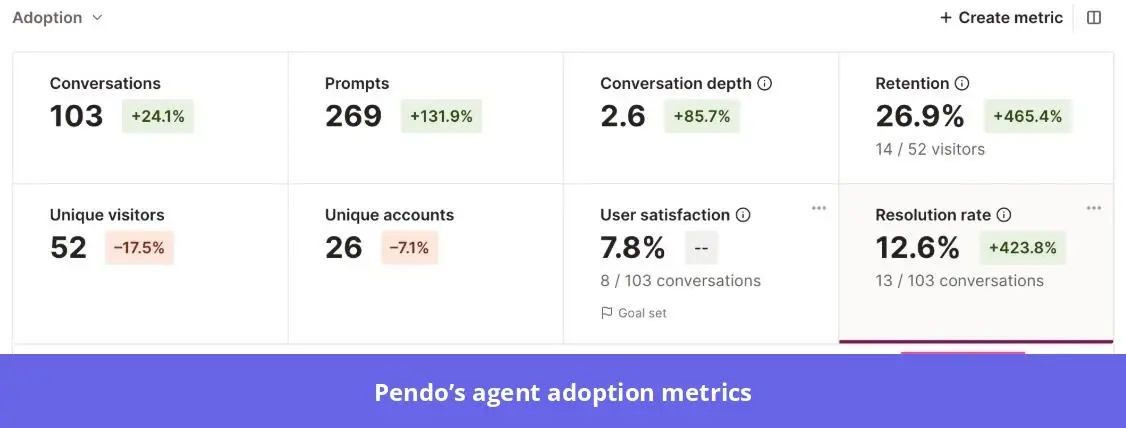
To create one, describe an outcome such as “the user confirmed their billing question was resolved.” Pendo will generate yes-or-no rules for you to review and edit. A conversation counts as successful if it meets any one rule, so each rule should be enough to confirm success on its own.
Important: These results update once a day. Conversations that start today won’t appear until tomorrow at the earliest, and Pendo needs the conversation to end before it can evaluate it.
Connect agent use to the rest of the product with paths and funnels
The whole idea of providing in-app agentic assistance is to help users understand and interact with your product better.
So, at some point, you’d want to check if those agentic interactions translate to completed tasks or ongoing product use. If they don’t, your AI agent may just be another shiny feature. Gartner’s research names unclear business value as one of the main reasons it expects so many agentic AI projects to be canceled by 2027. Pendo helps you investigate this by pairing agent use with path and funnel reports.
Start with a path report to explore what happens before or after an agent interaction. For example, users who repeatedly return to the same settings page after asking for help may still be struggling. After the path analysis, you can generate a funnel report to measure how many users reach the intended outcome and identify areas of high drop-off.
To assess user productivity, define the same task outcome for agent-assisted and traditional workflows, then compare completion rates and time to completion. You can also segment agent users to compare their product retention with non-users.
Test changes to the agent with experiments
After diagnosing user interactions with your agent, checking agent adoption, and seeing how that correlates with product usage, you’d develop several hypotheses of how to make things better. And most importantly, you now have data to inform your tests.
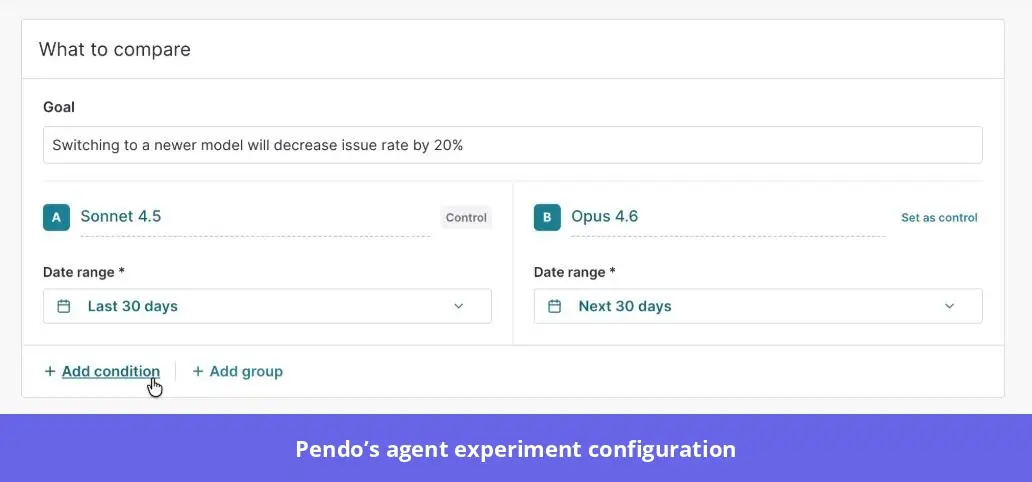
Pendo offers an experimentation tool you can use to do this. However, it only compares conversation data from different agent configurations. You still need to make the changes to your agent outside Pendo.
Begin by defining what you want to improve, then set up a control and up to 4 comparison groups.
Use conditions like model or tool usage to define which conversations belong in each group, and set the date ranges. Once that’s done, choose the metrics to track and start the experiment.
As the experiment runs, Pendo will display each group’s results alongside its percentage difference from the control. You’d also get an AI-generated summary when the experiment is completed.
I’d be careful with before-and-after comparisons here. For example, if an old model handled complex billing disputes and a new one mostly answered simple questions, a lower issue rate wouldn’t prove the new model was better. So, compare similar users asking similar questions, ideally over the same period.
Share insights across teams with digests and integrations
Time to share your findings with key stakeholders. What options does Pendo provide?
I found a few you can use, depending on how your team works:
- Slack digests: If your team already discusses product performance in Slack, you can send updates to a channel daily, weekly, or monthly. A subscription admin or AI Agent Admin needs to configure this after enabling the Slack integration.
- Saved reports: For findings you want colleagues to explore themselves, save the report with its filters and date range, then share it with others in your Pendo subscription.
- CSV exports: You can export the Prompts table and visitor or account lists if you need to work with the data outside Pendo.
Your team can also ask Pendo’s Leo questions about the findings, provided it’s enabled. And if some colleagues work in Claude or Cursor, they can query Agent Analytics data through Pendo’s MCP server.
Some findings may need engineering attention. For situations like that, use Pendo’s Create ticket option to copy the issue details, then paste them into Jira or Linear, so your developers have the context to investigate.
What are the limitations of Pendo Agent Analytics?
The main constraints are around data completeness and implementation. Before committing, check whether your team can capture the interactions you need and investigate them under your privacy requirements.
- The free allowance can leave gaps in your analysis: Without paid Agent Analytics, collection pauses after 500 visitor prompts and resumes the following month. A busy customer-facing agent can exhaust that allowance quickly.
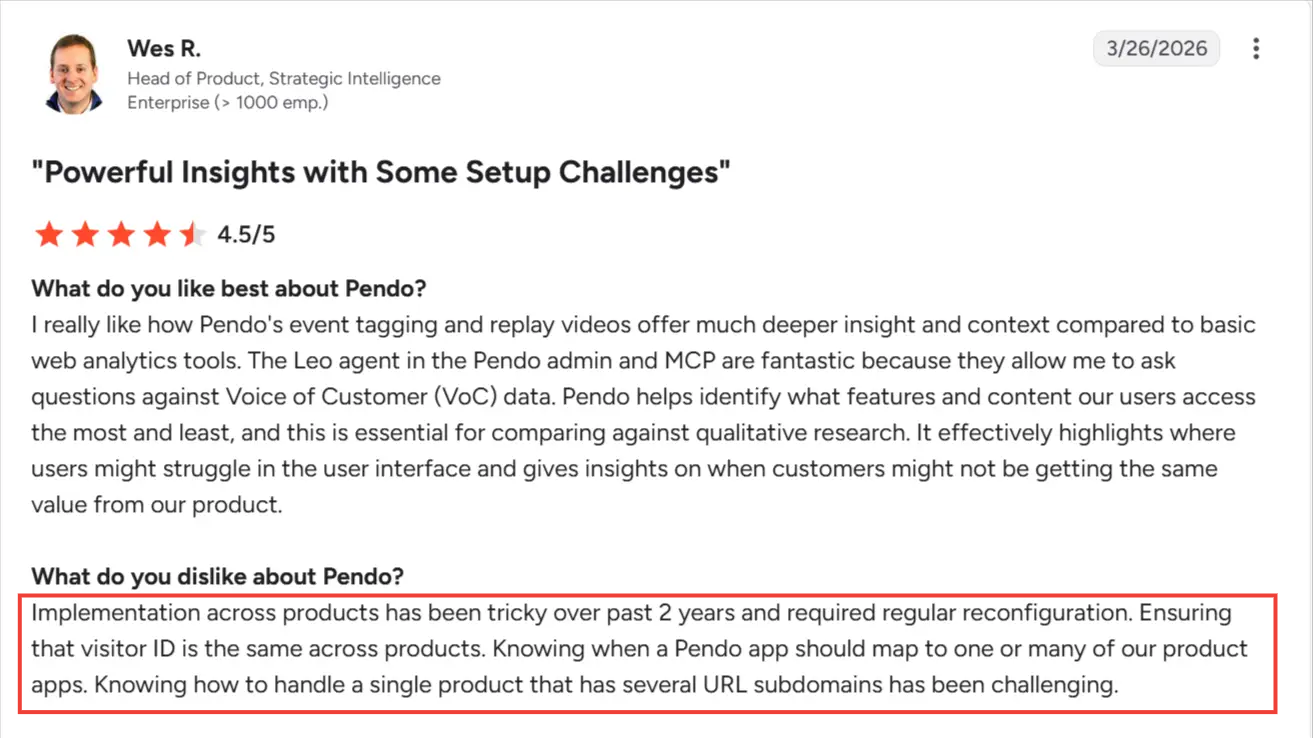
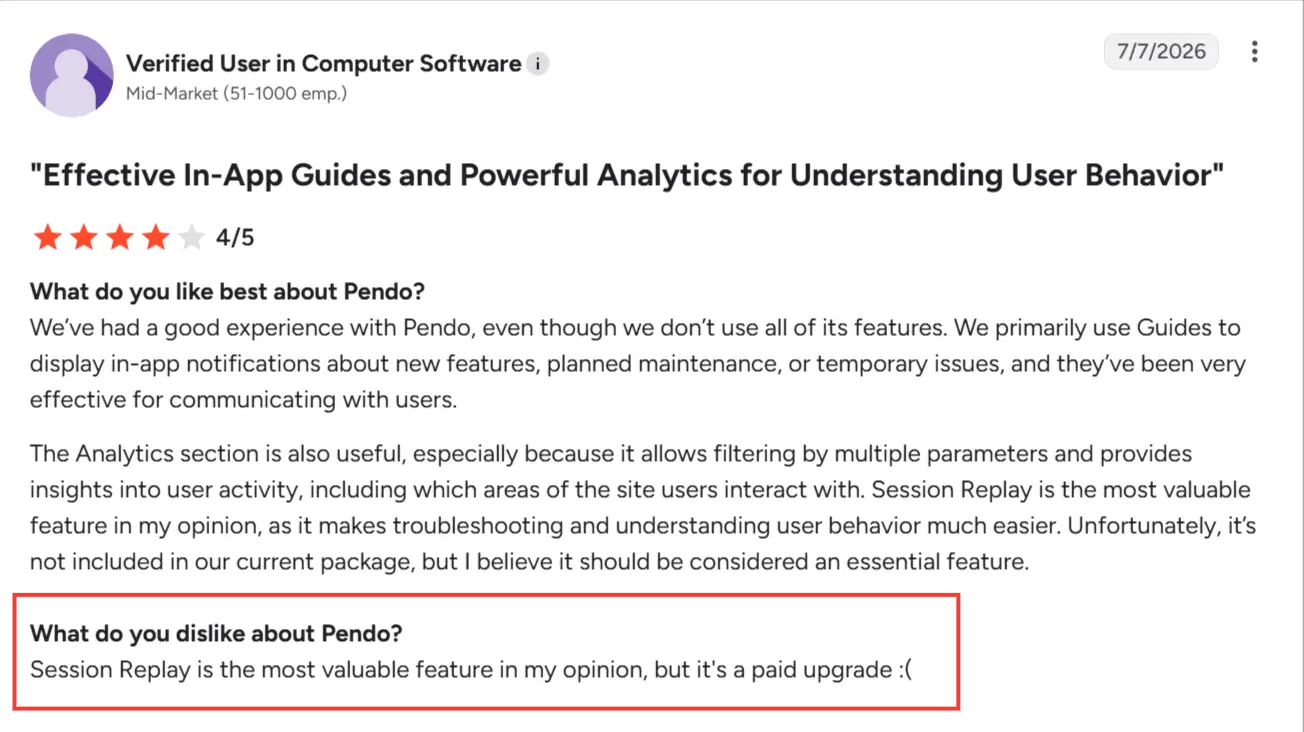
- Engineering support: If you want to capture full conversations, Pendo requires your developers to instrument prompts and responses and handle retries without duplicating records. Setup challenges can also extend beyond Agent Analytics. G2 reviewer Wes R. describes difficulties implementing Pendo across products, including keeping visitor IDs consistent and handling multiple subdomains.
- Some insights require additional modules: You’ll need Pendo’s Session Replay feature to watch what users did before, during, and after agent interactions. It’s included in the platform’s Core and Ultimate plans, but comes as a separate add-on on Base, so factor that into your budget if you’re considering that plan.
- You may not be able to track every agent: If you use a third-party agent, you need a way to capture its interactions through a supported browser setup or send them from the backend. If the vendor doesn’t give you that access, you may not be able to track it with Pendo. Also, traces require Pendo’s Python or TypeScript SDK. And if you’re planning to import older conversations, keep in mind that Pendo can’t process server-side conversation events more than seven days old.
- Your privacy settings affect what you can investigate: To read raw conversations, you need subscription admin, relevant app admin, or AI Agent Admin access. You can choose to delete conversation text after Pendo processes it, but that means you can only see the aggregate results, without opening the exchanges behind them. Similarly, anonymizing visitor IDs means you can’t connect agent interactions to individual users’ product behavior. You can’t change either choice after creating the agent, so check your team’s requirements before setting it up. You can edit redaction settings later, but don’t assume they’ll catch every piece of sensitive information.
- You need enough prompts for use case analysis: Pendo won’t show emergent use cases until there are at least 25 visitor prompts for your selected agent and filters. So, if you’re testing with a small group, you may need to wait before there’s anything to analyze. At the other end, if you’re analyzing more than 10,000 prompts or conversations, Pendo may use a sample instead of the full dataset.
- You can’t filter the whole dashboard in one go: Say you’re reviewing last month’s product performance and change the dashboard’s date range. Your Agent Analytics widgets won’t follow that change; they’ll keep the dates and filters saved in the original report. You’ll need to adjust those separately to compare agent performance with the rest of your product over the same period.
How much does Pendo Agent Analytics cost?
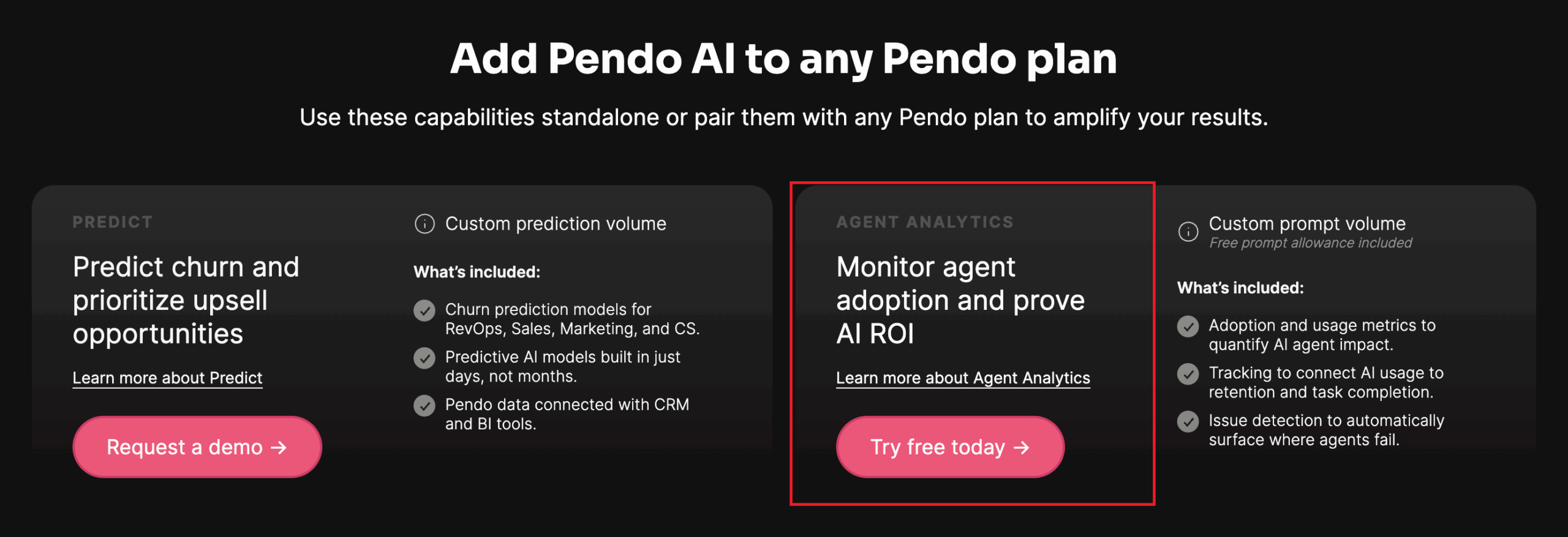
Pendo Agent Analytics uses custom prompt-based pricing and has no published dollar rate. You can purchase it as a standalone product or alongside a Pendo plan.
If you also need Pendo’s wider platform, its plans are Free, Base, Core, and Ultimate. The Pendo Free plan supports up to 500 monthly active users, while Base, Core, and Ultimate plans are tailored to your needs.
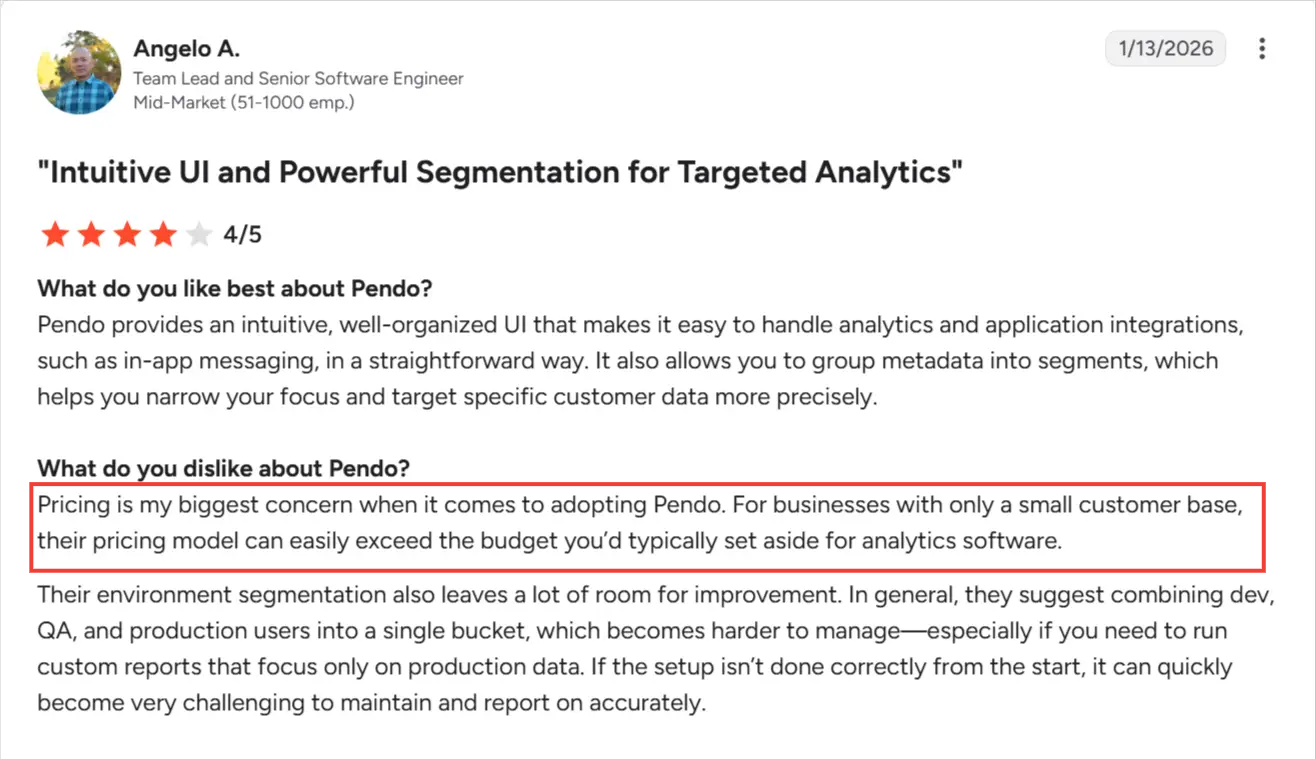
For wider platform budgeting, Vendr’s Pendo data reports a median annual contract of $48,500, with a range of $18,550–$150,832. These figures cover broader Pendo contracts and don’t establish a starting price for standalone Agent Analytics, but it’s worth mentioning that many users consider the platform expensive. For example, here’s what Angelo says on G2:
For your evaluation, request an itemized quote that separates Agent Analytics usage from any platform subscription or additional modules. Account for implementation time when comparing the total with alternatives.
What’s the best Pendo Agent Analytics alternative for product teams?
Userpilot is the stronger fit for product teams that want to see what users ask their agent and where it fails them, without a complex setup or a custom quote.
Our Growth plan starts at $849 per month and includes advanced product analytics alongside in-app engagement tools. Userpilot’s AI analytics add-on, available on Growth and Enterprise, bundles Agent Analytics with MCP Analytics and offers 5,000 free AI session analyses.
Comparatively, Pendo requires a custom quote for Agent Analytics, and its MCP Analytics is still listed as coming soon at the time of writing.
Its pricing also uses a different unit: individual visitor prompts. This means three user messages in a single exchange count as three Pendo prompts, whereas Userpilot groups them into a single conversation.
Price matters most when your team can use what they buy. Cuvama switched from Pendo to Userpilot after complex configuration limited its usage and made the cost difficult to justify. Leyre Iniguez, Customer Experience Lead, put it this way:
“Because Userpilot is easier to configure and to work with, I’m getting much more value than with Pendo.”
On the implementation side, both products need engineering support for full conversation tracking. With Userpilot already installed, developers can enable the agent module in the existing SDK and implement two methods: trackMessage for prompts and replies, and trackFeedback for user ratings.
Userpilot then groups similar requests and identifies topics that lead to frustration or unresolved conversations. That helps your product team decide where to improve the agent first.
For example, if users keep asking how to configure an integration and those conversations go unresolved, you can build a segment of those users, show them guidance inside the setup screen, and check whether more of them finish the setup.
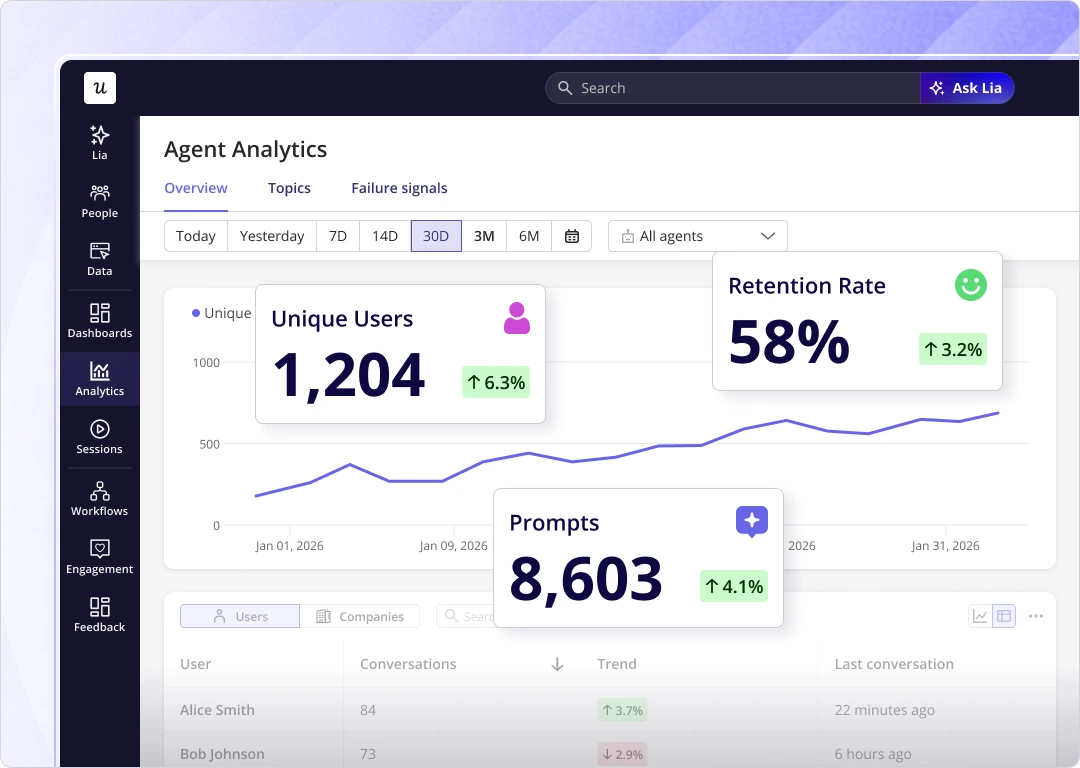
You can also track how many people use your agent and whether they return over time, alongside the rest of your product analytics, as shown below.
Userpilot is a strong fit when your priority is turning conversation patterns into product improvements within the platform you use to drive growth.
| Pendo Agent Analytics | Userpilot Agent Analytics | |
|---|---|---|
| Best for | Product analysis alongside detailed agent diagnostics | Agent experience analysis alongside broader product growth |
| What you pay for agent analytics | Custom prompt-based pricing; standalone or alongside Pendo | Add-on for Growth and Enterprise, bundled with MCP Analytics; Growth starts at $849/month |
| Volume before you pay more | 500 visitor prompts/month without a paid allowance | 5,000 free AI session conversations |
| Engineering effort | API or SDK integration; Python/TypeScript SDKs support traces | Enable the SDK module and implement message and feedback tracking |
| What you see day to day | Use cases, quality metrics, adoption, and custom success metrics | Conversation topics, usage, retention, and failure signals |
| Spotting problems | Emergent issues and tracked detection rules | Failure and frustration signals organized by topic |
| Engineering detail | Execution traces, model costs, experiments, and Agent Repair | Conversation metadata, including response times and optional token counts |
Choose Pendo when execution-level diagnostics are central to your evaluation or your team already depends on its product data.
Choose Userpilot when you want to see what users ask your agent and where it fails them, without a complex setup or a custom quote.
Prove your AI agents’ impact with Userpilot Agent Analytics
Knowing your agent gets used isn’t enough. You need to know whether it helps users finish what they came to do, and what to fix when it doesn’t. Userpilot shows you where conversations break down and lets you act on it in the same platform.
Book a demo to explore how this could work for your product.
Disclaimer: Userpilot strives to provide accurate information to help businesses determine the best solution for their particular needs. Due to the dynamic nature of the industry, the features offered by Userpilot and others often change over time. The statements made in this article are accurate to the best of Userpilot’s knowledge as of its publication/most recent update on October 28, 2026.
About the author