Too Many AI Analytics Tools? My 10 Picks for Data-Informed Insights


AI analytics is moving beyond asking a chatbot to summarize a spreadsheet. Some platforms now offer agents that analyze product behavior or query governed enterprise data, while tools like Claude and ChatGPT can connect to external sources through MCP integrations.
The strongest AI analytics tools can spot changes in user behavior, track performance issues, detect anomalies, and help teams decide what to investigate next. Depending on the underlying data infrastructure, they can also process large volumes of data and surface insights faster.
In this roundup, I compare 10 AI tools across product analytics, business intelligence, predictive analytics, and enterprise data analytics, drawing on vendor documentation, published pricing, and available user reviews. The comparison covers their core capabilities, technical requirements, limitations, and costs.
Executive summary
- For product teams: Amplitude Global Agent lets you investigate user behavior, while PostHog AI combines product analysis with development and experimentation. Choose Userpilot, the agentic product adoption platform, and use Lia, our AI agent, to understand why adoption stalls and then build an in-app experience to address it.
- For business intelligence: With Microsoft Power BI Copilot and Tableau Agent, teams can examine business data and create visual reports.
- For enterprise analytics: Databricks AI/BI Genie, Snowflake Cortex Agents, and DataRobot AI give business users access to governed enterprise data, while technical teams handle configuration and data preparation.
- For on-demand conversational analytics: Claude and ChatGPT allow users to explore files and generate insights without setting up a dedicated analytics environment.
The 10 AI analytics tools at a glance
| Tool | Best for | Data sources | Technical expertise | Key limitation | Pricing |
|---|---|---|---|---|---|
| Amplitude Global Agent | Investigating product behavior | Product event data and Amplitude analytics | Low to moderate for exploration; reliable event setup required | Insights depend on accurate event tracking | Included in all pricing tiers, but the overall cost is dictated by your base plan tier and actual usage |
| Userpilot Lia | Turning product insights into action | Product events, user segments, Net Promoter Score (NPS), surveys, in-app engagement, error logs | Low to moderate | Doesn’t analyze session recordings today; building in-app content involves a Chrome extension handoff | Available across plans; Growth and Enterprise include $20 in monthly Lia credits. Starter and Legacy users can purchase credits separately. |
| PostHog AI | Connecting product analytics with development | Product events, session recordings, experiments, feature flags | Moderate | Analysis is limited to the current project | All plans include 500 AI credits/month ($5 worth); additional credits cost $0.01 each. |
| Microsoft Power BI Copilot | AI-assisted business reporting | Data modeled in Power BI and Microsoft Fabric | Moderate | Copilot requires eligible paid capacity; data and metrics need preparation | Power BI Pro: $14/user/month; Premium Per User: $24/user/month, billed annually; eligible capacity costs extra |
| Tableau Agent | AI-assisted visual analytics | Data connected to Tableau | Moderate to high | Generated charts and calculations may need refinement; AI access depends on deployment and license | Standard: $15/user/month; Enterprise: $35/user/month, billed annually. Tableau Cloud and Pulse require a sales quote. |
| Databricks AI/BI Genie | Analyzing governed enterprise data | Data managed in Databricks, including data governed through Unity Catalog | High for setup; lower for business-user queries once configured | Requires data preparation and configuration | Genie One and Genie Agents free for individual users through Jan. 31, 2027; Genie Code has separate usage charges |
| Snowflake Cortex Agents | Analyzing data across business sources | Snowflake tables and unstructured data accessible through Cortex tools | High for setup; lower for business-user queries | Requires tool configuration, clear metric definitions, and cost management | $2 per AI Credit for global routing or $2.20 for regional routing; other computing costs may apply |
| DataRobot AI Platform | Predicting business outcomes | Prepared datasets and connected enterprise data | High; suited to data science teams | Not designed primarily for simple reporting or conversational data exploration | Custom enterprise pricing |
| Claude | On-demand natural-language data analysis | Uploaded files and data available through supported integrations | Low to moderate | Not a substitute for continuous product or business analytics tracking | Free plan; Pro: $20/month or $200/year; Max starts at $100/month. |
| ChatGPT | Conversational data analysis | Uploaded files and data available through supported integrations | Low to moderate | Freshness of data depends on files and available integrations | Free; Plus: $20/month; Business: $20/user/month billed annually. |
One thing to keep in mind: AI can make mistakes. Even the best tools can misread a question, miss important context, or draw the wrong conclusion from incomplete data. Consistently verify findings against the source data before acting on them.
Best AI analytics software for adoption tracking
These tools help product teams understand where users struggle during onboarding, which features they overlook, or what parts of the product need improvement.
Amplitude Global Agent: Best for investigating product behavior
Amplitude Global Agent lets product, customer success (CS), and marketing teams explore funnels, user journeys, and feature adoption data directly in Amplitude’s analytics workspace.
It adds value by diagnosing conversion and adoption problems:
A product manager investigating onboarding drop-offs can ask Global Agent to compare funnel completion across acquisition channels. It can identify where users leave, highlight differences between channels, and link to supporting analyses.
This enables teams to narrow down where to investigate instead of manually building reports for every question. Global Agent also uses the context of the chart, dashboard, or experiment you’re working in.
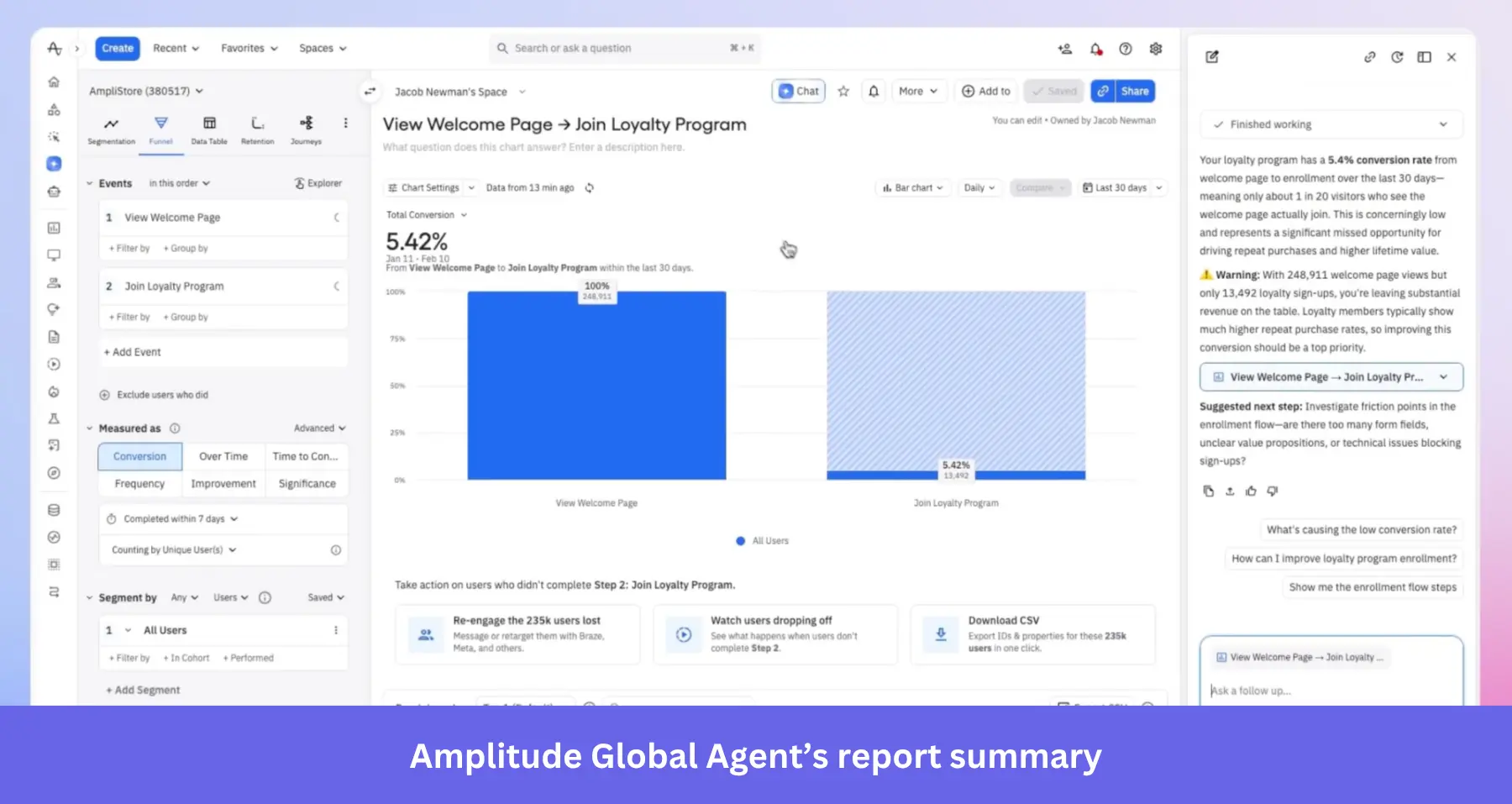
Global Agent’s findings rely on accurate event tracking. If your team hasn’t instrumented onboarding steps or acquisition channels correctly, the agent may draw conclusions from incomplete data.
Pricing: Global Agent is bundled across Amplitude pricing tiers, but the total cost is based on your plan and usage (monthly event/monthly tracked (MTU) volume).
What users say about Global Agent
One G2 reviewer appreciates the ability to create charts/dashboards on the go:
The design is quite intuitive, specially the new AI feature that creates charts/dashboards on the go rather than spending longer times for building the same things.
Another finds its responses insufficiently detailed for more complex questions:
The Inbuilt AI felt quite limited when it comes to giving detailed and informed responses.
Userpilot Lia: Best for turning product insights into action
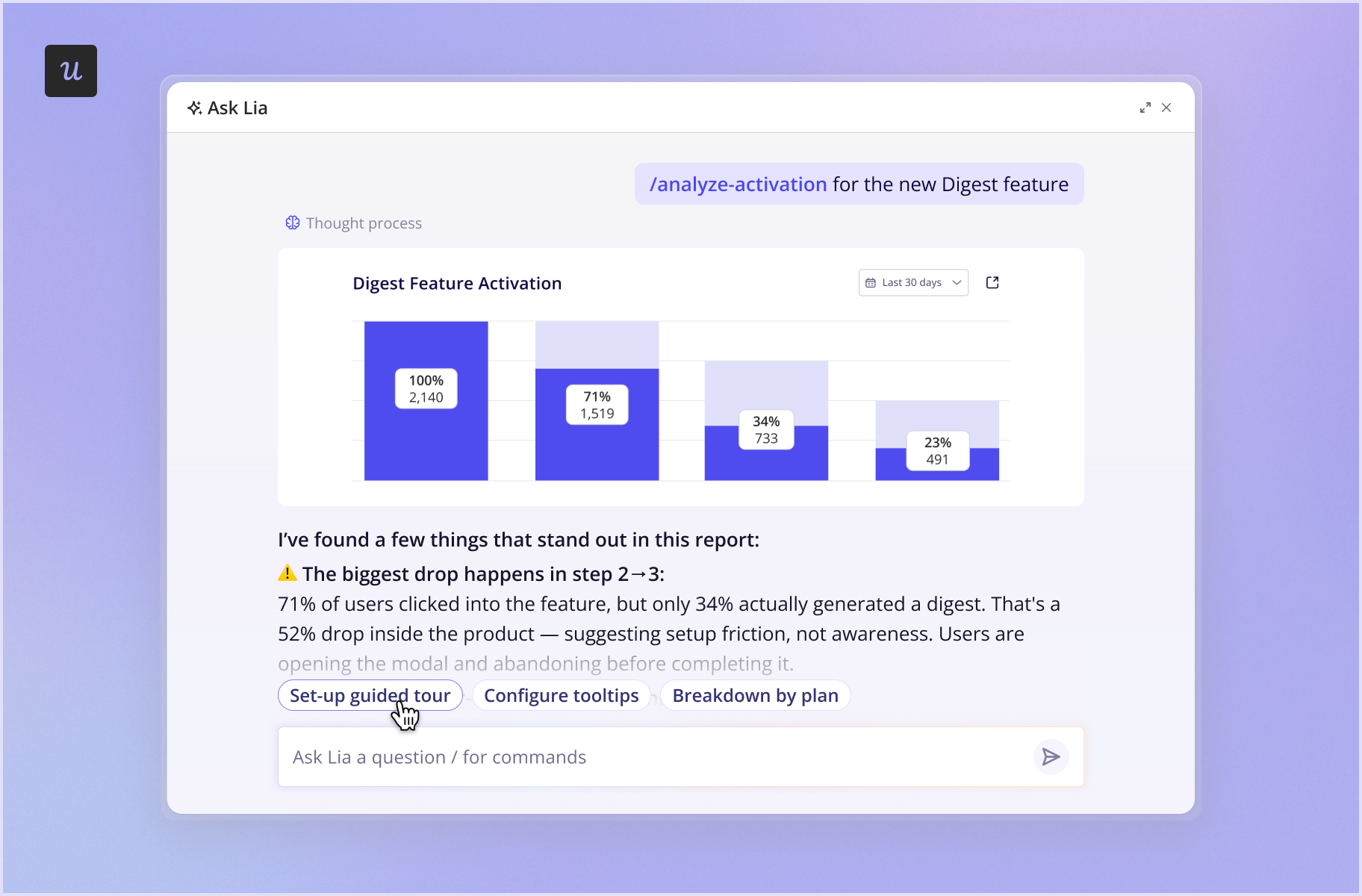
Userpilot is the agentic product adoption platform that combines Product Analytics and In-App Engagement. At the center of this experience is Lia, our AI agent, which helps product teams understand user behavior and act on what they learn without switching platforms.
Lia analyzes data across Userpilot, including product usage, user segments, NPS scores, surveys, in-app content engagement, and error logs. Then, she uses this context to answer product questions and recommends ways to improve adoption. For example:
- Analyze: Lia examines usage data for a new feature, reviews its adoption funnel, and considers relevant user feedback to identify where users struggle.
- Advise: She summarizes her findings, explaining the likely friction points. She also recommends next steps, such as fixing an instrumentation issue, improving the product experience, or creating targeted surveys or guides.
- Act: When an in-app experience is the right response, Lia drafts the flow, tooltip, or survey. You review and edit it in the Userpilot Builder Chrome extension, publish it, and then track whether it changed the behavior you wanted to improve.
However, Lia still has limitations. She can’t analyze session replay recordings today to see what users actually did on the screen.
If you need deep analysis for a data team and handle engagement elsewhere, Amplitude fits better.
How Amplemarket connects product insights to action with in-app guides
Amplemarket, one of our customers, struggled to get users to adopt newly released features. To address this, the team introduced targeted in-app guides to help users discover and understand features.
No-code tracking allowed them to label events in five minutes and start tracking in-app behavior without submitting a ticket. By zooming in on product behavior, they responded to adoption-related problems with guidance at the point where users needed it.
According to Awni Shamah, Staff Product Manager at Amplemarket:
With our wide offering, it’s very hard to introduce a new feature and assume it’s going to be used for something. Adding a Userpilot guide boosts feature adoption by 5-10 times for every single new release.”*
Pricing: Lia is included on every plan. Growth and Enterprise plans include $20 in free Lia credits each month, while Starter and Legacy plans can purchase credits separately.
* These results reflect Userpilot’s broader platform, not Lia alone.
What users say about Userpilot’s advanced features
Some G2-verified users find it overwhelming at first:
Onboarding to the tool is little hard on initial parts. Once you get used to UI it is best.
Meanwhile, one reviewer highlights Userpilot’s quick, knowledgeable CS support:
Whenever I face a technical issue or get stuck, they are quick to respond. It’s refreshing to talk to support staff who actually understand the product and provide practical solutions right away
PostHog AI: Best for connecting product analytics with development
PostHog AI helps product and engineering teams move from spotting a problem to understanding what caused it and testing a solution. It summarizes recordings and answers questions about them.
For example, if a product manager notices users dropping off during onboarding, they can use PostHog AI to investigate the relevant events and identify where the drop-off occurs. They can then review session recordings to inspect what happened during those sessions. Based on those findings, the team can adjust the onboarding flow and use feature flags or A/B tests to evaluate the change.
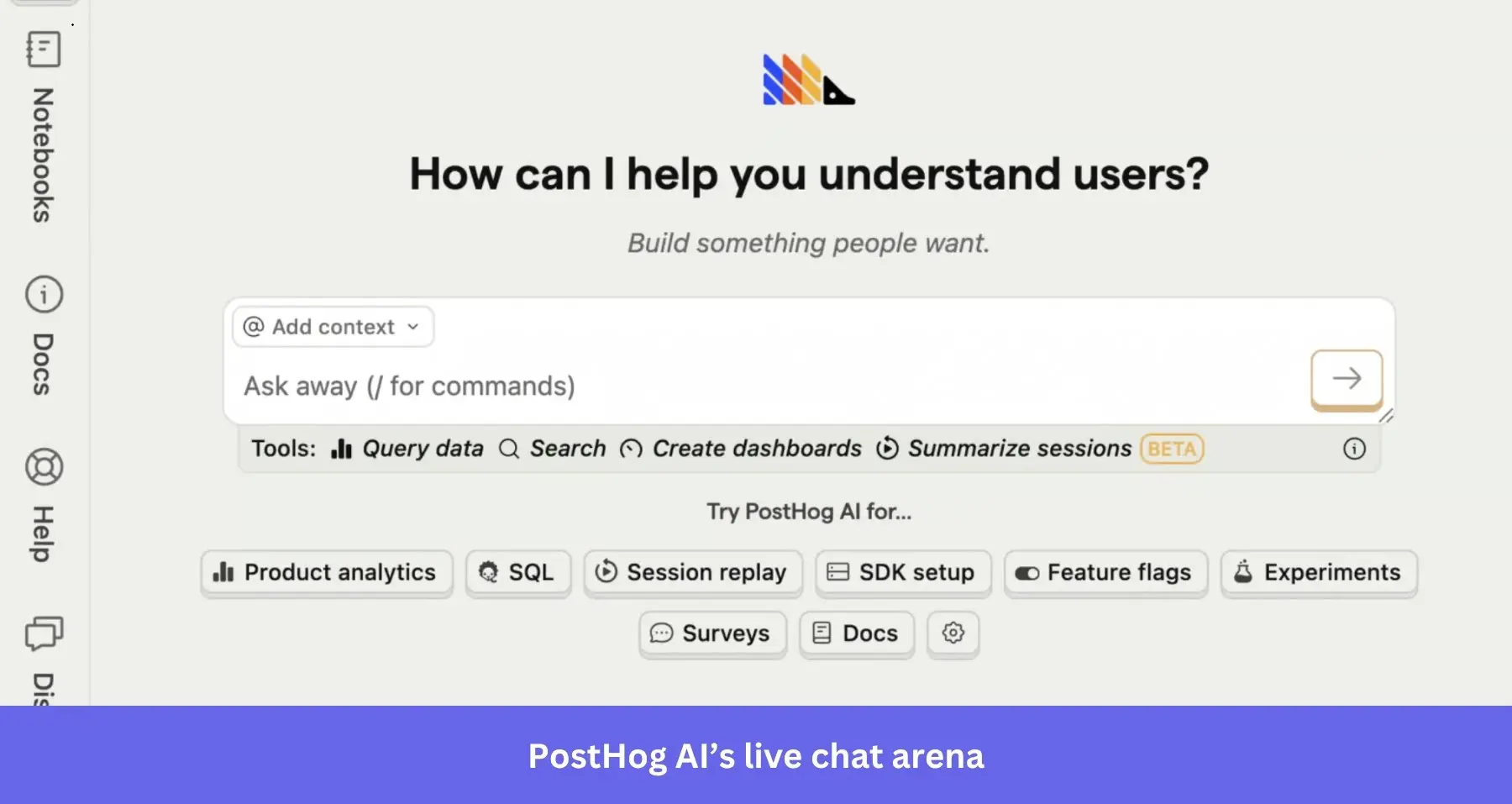
PostHog AI can also help diagnose errors and analyze error-tracking data, but it can’t inspect your source code or repair bugs in your codebase. It also can’t combine data from multiple PostHog projects to answer a single query or browse the wider web beyond PostHog’s documentation.
Pricing: PostHog’s analytics product includes a free monthly allowance of 1 million events. Users on all pricing tiers also receive 500 AI credits (worth $5) per month. Additional AI usage costs $0.01 per credit, separate from usage charges for analytics and other PostHog products.
What users say about PostHog AI
One G2 reviewer claims:
The new AI features make it easier to build dashboards. Love the opiniated UI.
Another voices their thoughts on PostHog’s documentation:
It’s good to get you started but not helpful to solve advanced problems. Since the AI consults the same docs, for advanced questions the AI bot isn’t that helpful either.
Best AI tools for business intelligence
AI tools for business intelligence turn complex numbers into reports, charts, and summaries, making it easier to assess operational and financial performance without always relying on an analyst.
Microsoft Power BI Copilot: Best for AI-assisted business reporting
Microsoft Power BI Copilot is designed for organizations already working within the Microsoft ecosystem and have the resources to prepare its data models. Target users include business analysts, sales teams, marketers, and executives.
If you’re preparing a quarterly review, you can ask Copilot to compare customer acquisition costs with revenue by product line. Use the generated visuals to see which product lines have become less efficient and probe the underlying figures.
Power BI also uses Copilot in Power Query to help users create or explain transformations. Power Query uses the M language to connect, combine, and transform data before it enters a report.
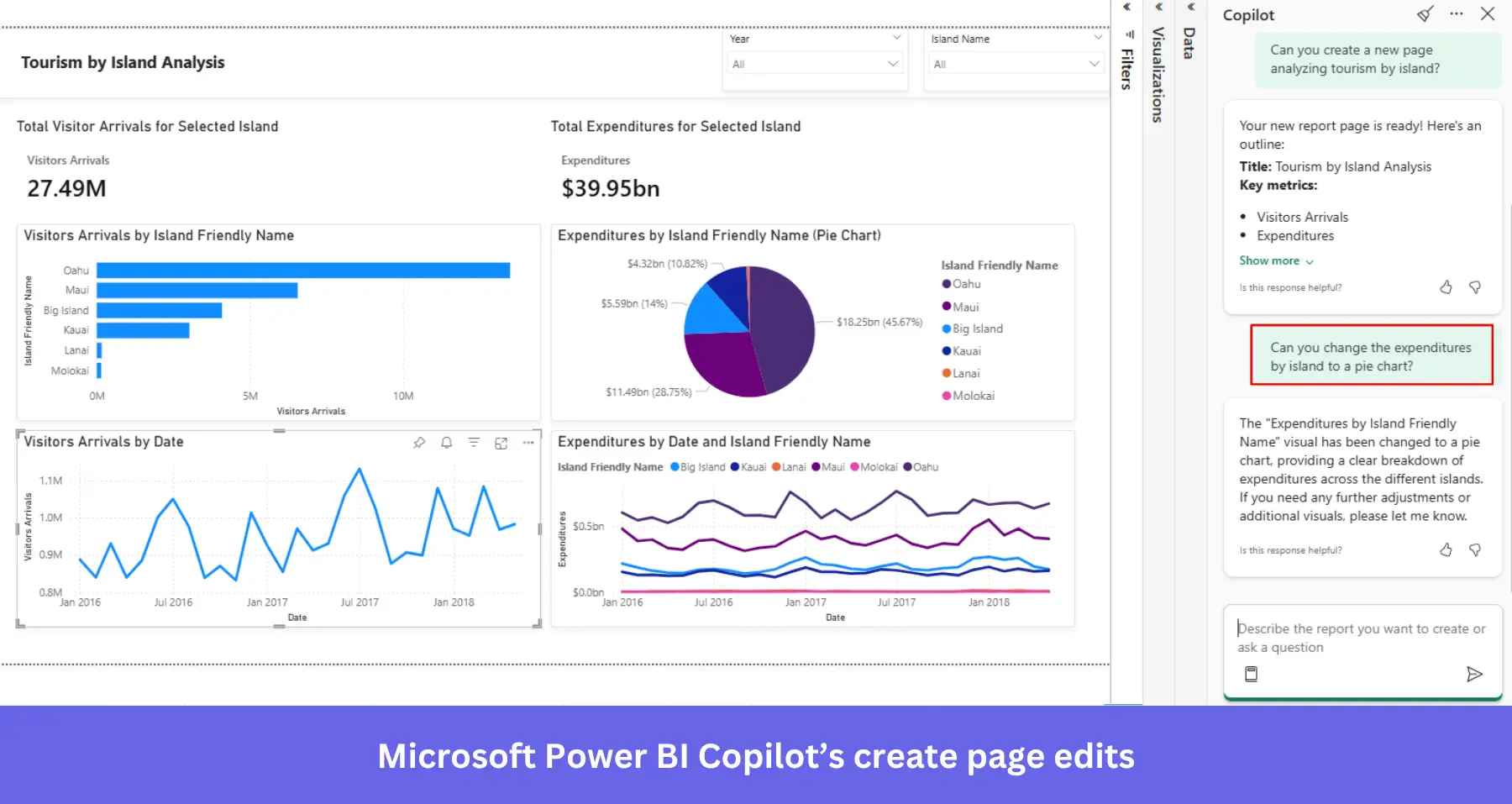
Microsoft recommends preparing semantic models with business context, including clear metric definitions, so Copilot can interpret fields and measures correctly.
Pricing: Power BI Pro costs $14 per user/month, while Premium Per User costs $24 per user/month, both billed annually.
Your organization also needs eligible paid Microsoft Fabric capacity (F2 or higher) or Power BI Premium capacity (P1 or higher), along with the required admin settings. Factor in these additional costs when calculating the total cost of adoption.
What users say about Microsoft Power BI Copilot
Copilot integrations get praise from this G2 reviewer:
[I like] the possibility of integrating all my systems under an integrated dashboard, thus allowing a user-friendly and analytical view of all my indicators from all the company’s systems, now with the new copilot integrations that assist in development with tools and as a guide within the app.
But this reviewer points out that AI support doesn’t eliminate the need for technical skills:
Analysts need to know M-query and DAX measures language to be able to create scalable reports…. The integration of AI/Copilot is not that helpful and can be very superficial at best.
Tableau Agent: Best for AI-assisted visual analytics
Tableau Agent helps analysts monitor business performance through conversational prompts. Business users can also explore interactive dashboards and ask questions about governed metrics through Tableau Pulse.
How Tableau Agent assists visual analytics:
- Prepare data: Clean and organize data before analysis.
- Create calculations: Generate or explain calculations using natural-language instructions.
- Build data visualization: Create charts to compare metrics and identify trends.
- Explore dashboards: Ask questions about existing dashboards and get summaries of key findings.
Say a sales manager investigating a revenue drop can ask Tableau Agent in Pulse which product lines contributed most to the decline. The agent analyzes governed metrics and provides an insight brief, visualizations, and links to the underlying data for further investigation.
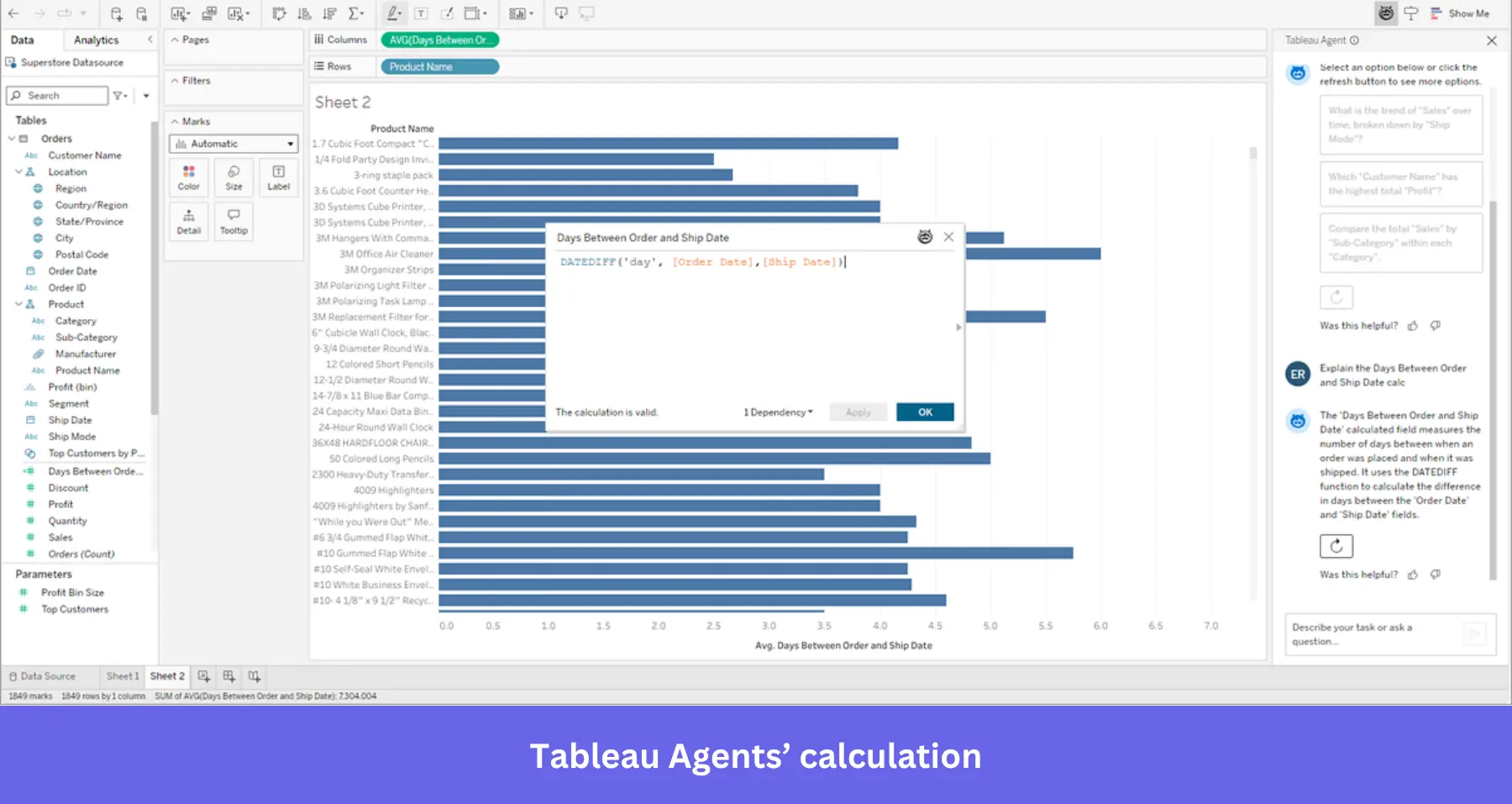
Pricing: Tableau Standard starts at $15 per user/month, billed annually, and includes Tableau Agent in Authoring and Prep. Tableau Enterprise starts at $35 per user/month, billed annually.
Tableau Cloud and Tableau Pulse also offer access to Tableau Agent, but pricing requires a sales quote. Every deployment requires at least one Creator license, with other user licenses depending on the license mix.
What users say about Tableau Agent
One G2 user says, “Tableau Agent is simple to use and have given fast development advantage“.
But others feel like it “doesn’t handle complex tasks well” and is “behind other AI tools.”
Enterprise AI analytics platforms
These platforms bring AI-powered analysis to complex enterprise data, including customer data.
Databricks AI/BI Genie: Best for analyzing governed enterprise data
Databricks AI/BI Genie allows business teams to query governed enterprise data and investigate business performance without writing every query themselves. It’s a good fit for organizations that already use Databricks and Unity Catalog to manage their data and have the technical resources to maintain data quality and govern access.
Databricks offers three AI tools for different tasks:
- Genie One: Lets users ask questions about company data using plain language, without having to write SQL queries.
- Genie Agents: Give data teams a way to configure domain-specific agents with business rules, key metrics, example questions, and verified answers. These provide additional context for more reliable responses.
- Genie Code: Assists technical teams with writing code, building data pipelines, and creating analytics dashboards.
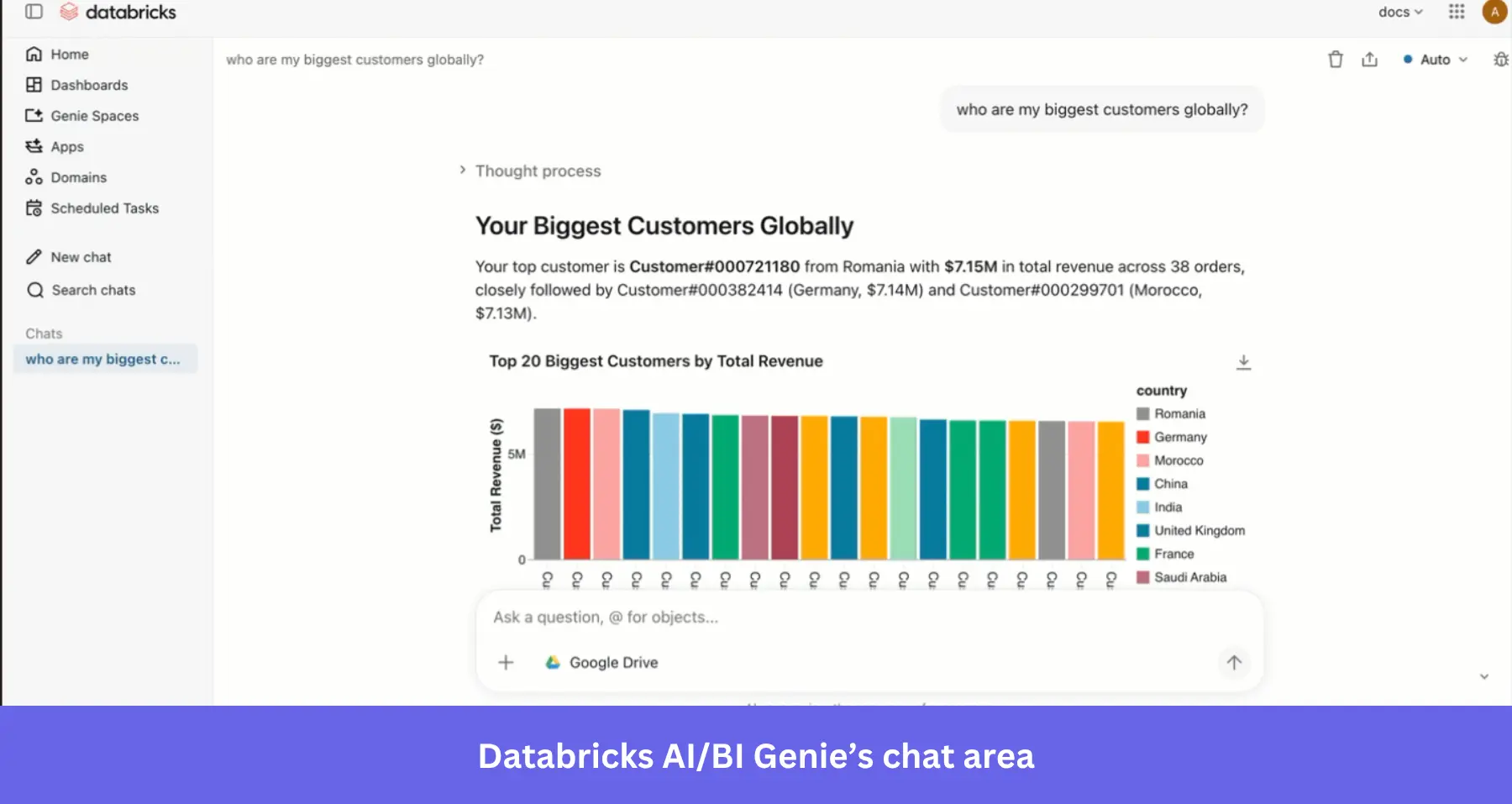
However, Genie isn’t plug-and-play. Business users depend on well-prepared data and clear business context to get reliable answers. Data teams must configure the underlying datasets, metadata, and access permissions. Genie Agents also require data registered in Unity Catalog and a supported SQL warehouse.
Teams can review query history and agent activity to understand how users interact with Genie and investigate the queries behind specific results.
Pricing: Genie One and Genie Agents are free for individual users through January 31, 2027. Genie Code has separate pay-as-you-go pricing, with 150 free Databricks Units (DBUs) per user each month and a 25% promotional discount on additional usage through the same date.
What users say about Databricks Genie
According to a G2 reviewer, Genie AI is useful for:
… investigating pipeline failures, checking job runtimes, and debugging issues much faster.
Another mentions a drawback:
Genie works well for standard queries but struggles with complex multi-table logic or domain-specific terminology without significant fine-tuning.
Snowflake Cortex Agents: Best for analyzing data across business sources
Cortex Agents work for organizations that already house data in Snowflake. The agents connect structured sources, such as sales tables, with unstructured information, including reports and company documentation.
This allows teams to connect quantitative results with internal context when answering business questions. For instance, your sales team can use Cortex Agent with two tools:
- Cortex Analyst: Turns plain-language questions into SQL queries to analyze structured data. It uses semantic views to define business terms and metrics.
- Cortex Search: Retrieves relevant support tickets or reports.
Cortex Agent combines both to explain the trend, with source references for users to verify.
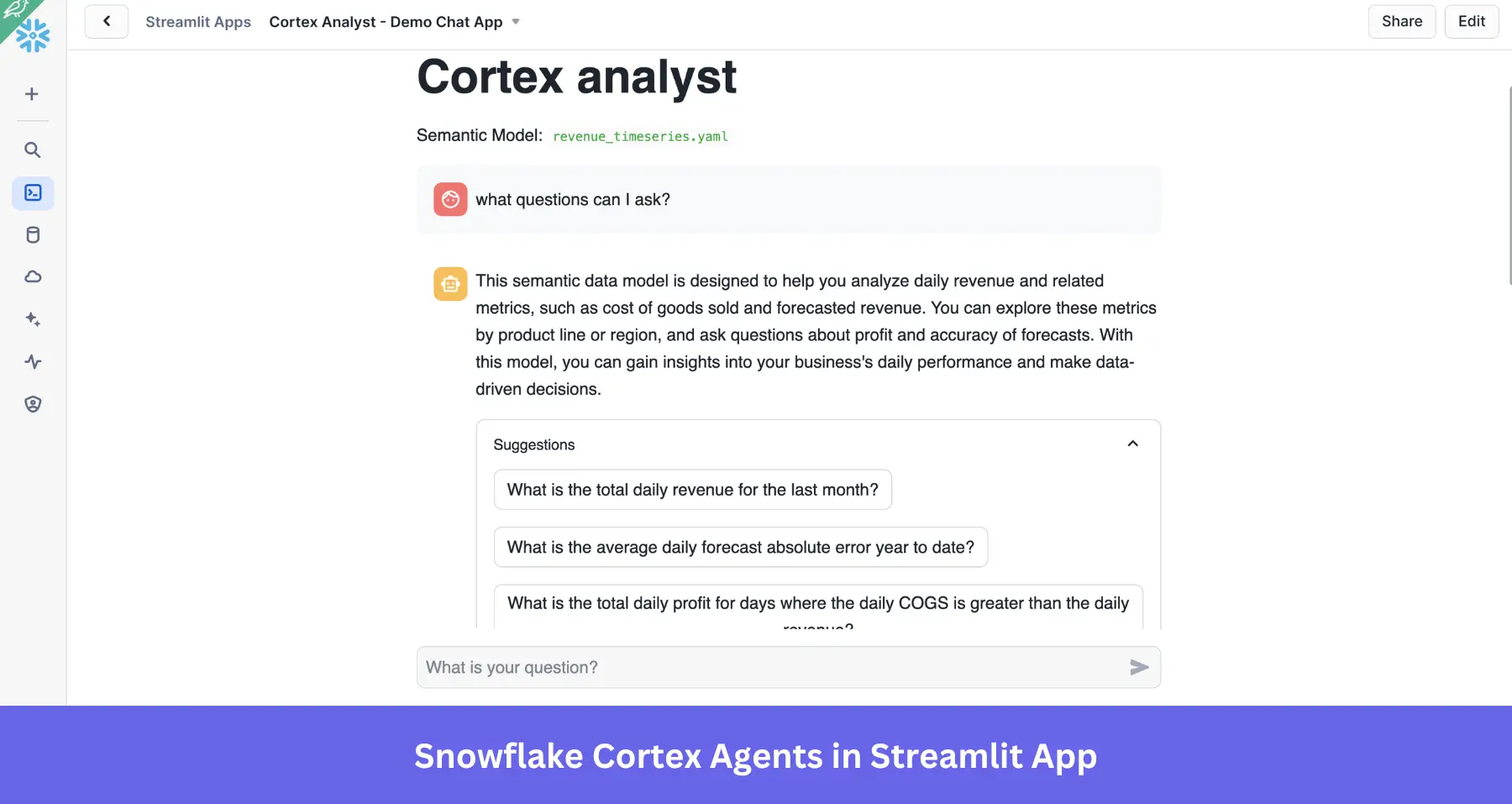
However, implementation requires technical work. Teams must configure the relevant tools, semantic views, and search services. Generated SQL queries, responses, and citations also need validation before teams rely on them.
Pricing: Snowflake charges for Cortex Agents using AI Credits, billed per million tokens processed. AI Credits cost $2 each with global routing or $2.20 with regional routing.
Agents can also incur additional charges for underlying services, including Cortex Analyst and Cortex Search. Warehouse computing and storage use separate Platform Credits.
What users say about Cortex Agents
One user complains that:
Sometimes they hallucinate and gets a little frustrating. Also I think Cortex Analyst was pretty expensive so cost sometimes is a downside.
But some non-technical users find Cortex Agents:
…helpful for everyday tasks and for wide use across the workplace. Overall, Snowflake supports database cost management and integration needs.
DataRobot AI Platform: Best for predicting business outcomes
DataRobot AI Platform is built for data science and analytics teams that need to develop and deploy predictive models. Typical applications include forecasting sales, estimating customer churn risk, and predicting future demand.
A data analyst developing a churn model can use historical product activity and customer tenure to identify patterns associated with cancellation. DataRobot supports automated data prep and machine learning model development, allowing data science teams to compare model performance before deployment.
Once the model is running, customer success teams can use its predictions to prioritize accounts with higher churn risk.
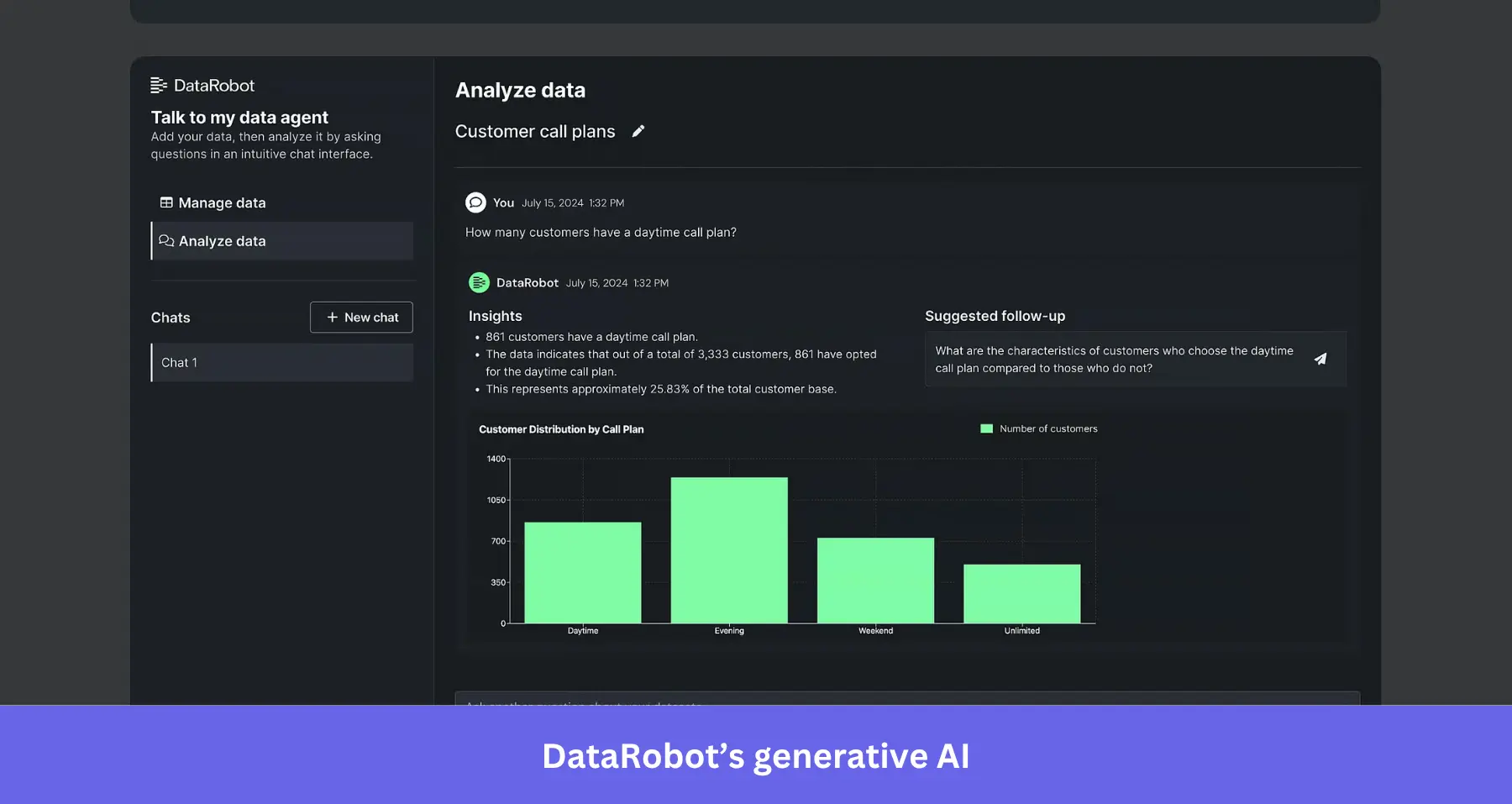
The platform requires clean input data and a clearly defined prediction goal. Data scientists must also evaluate model performance and monitor predictions over time, as changes in customer behavior can reduce accuracy.
DataRobot also provides audit trails that help organizations track model activity and support compliance requirements, particularly in regulated industries.
Pricing: DataRobot uses custom enterprise pricing, with costs depending on deployment requirements and usage. Vendr reports annual contract values ranging from around $100,000 for smaller deployments to more than $600,000 for larger enterprise implementations.
What users say about DataRobot AI
G2 reviewers recognize DataRobot’s automated model-building tools, with one commenting:
What I like most about DataRobot is how it automates key parts of the machine learning workflow, such as data preparation, feature engineering, model training, and evaluation.
But another also points to its learning curve, saying the platform:
… can feel complex for beginners, especially when exploring its advanced features and configuration options. Some features may also require time to learn properly, and the overall platform can feel overwhelming when first getting started.
Best conversational analytics tools for faster insights
These AI analytics tools are excellent for when you need quick answers from a spreadsheet, survey, or report. They can calculate metrics and generate charts, but their findings depend on the files and connected data sources available to them.
Claude: Best for quick, on-demand natural-language data analysis
Claude suits analysts who need to investigate existing datasets without building dashboards or writing SQL queries.
Claude can execute code to analyze uploaded files, calculate metrics, compare segments, and generate charts or reports. It can also connect to external tools through supported Model Context Protocol (MCP) integrations.
For example, a product team can export a feature adoption report from Google Sheets and upload it to Claude for exploratory analysis.
The analysis still depends on the information Claude can access. Uploaded files may not reflect recent changes, and connected tools only provide the data and permissions available to them. Claude can also produce inaccurate calculations or interpretations, so check important findings against the original data.
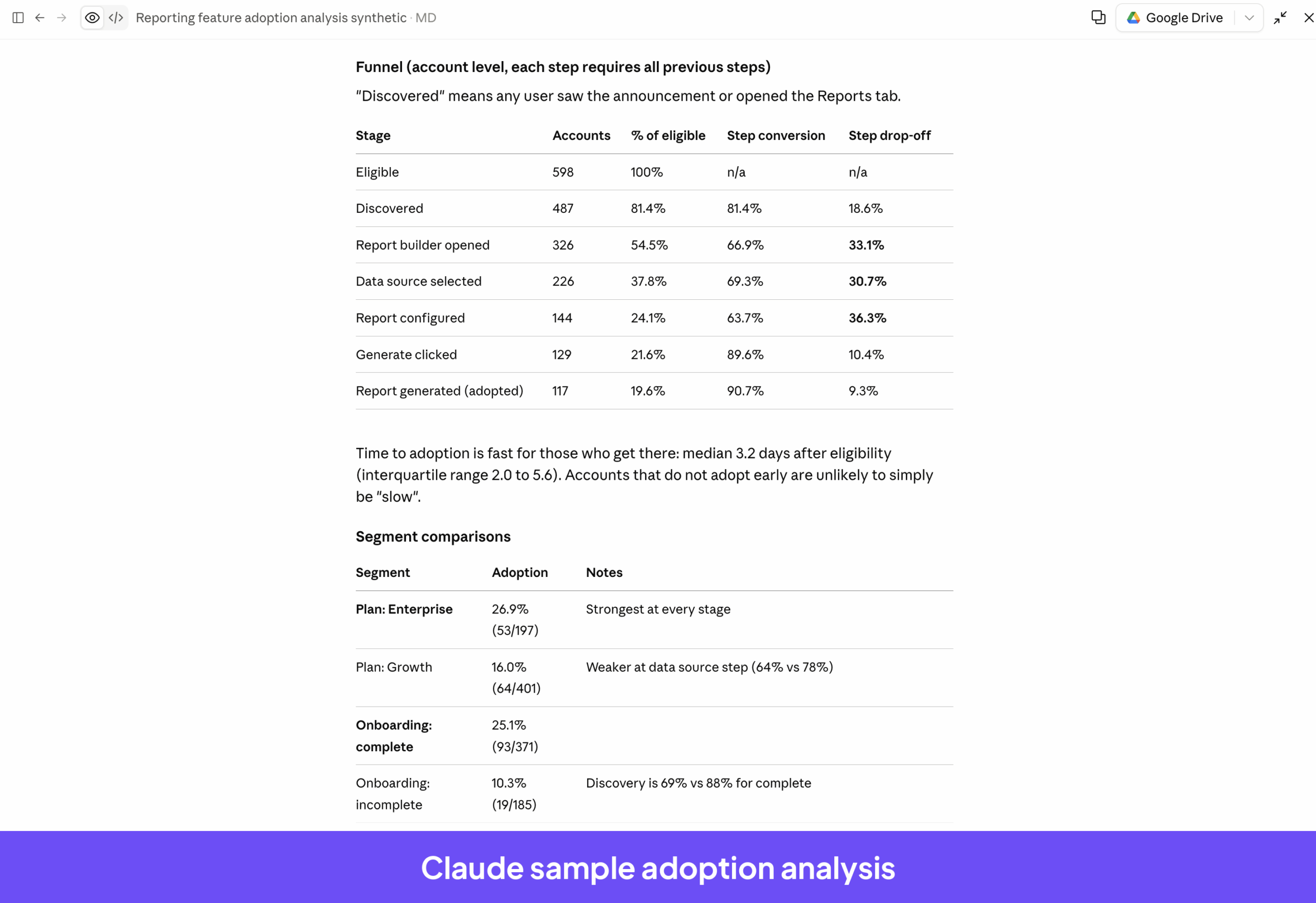
Pricing: Claude offers a Free plan with limited usage. Pro costs $20 per month or $200 per year with annual billing (equivalent to approximately $17 per month). Max plans start at $100 per month and offer higher usage allowances.
Limits still apply, and how quickly you reach them depends on the model, conversation length, and file sizes.
What users say about Claude
G2 reviews highlight its ease of use, reasoning, and ability to handle fairly complex tasks:
What I appreciate most about Claude is how it helps me augment my own skills rather than replace my thinking. I use it to challenge my assumptions, sharpen my analytical skills, explore different perspectives, and improve the quality of my work.
Some report restrictive usage limits during heavier workloads, such as this reviewer:
The primary downside for our team at GKS Partners is managing usage caps during heavy research cycles. When running deep due diligence across lengthy filings and unstructured datasets, we can hit message limits faster than expected.
ChatGPT: Best for conversational data analysis
ChatGPT is a practical choice for product and growth teams that want to explore datasets, calculate metrics, and create visualizations. You can ask follow-up questions and refine an analysis without building a dedicated reporting workflow.
Say you upload a marketing campaign performance report and ask ChatGPT to compare cost per lead across acquisition channels. After reviewing the results, request a chart or probe whether certain campaigns performed differently across customer segments.
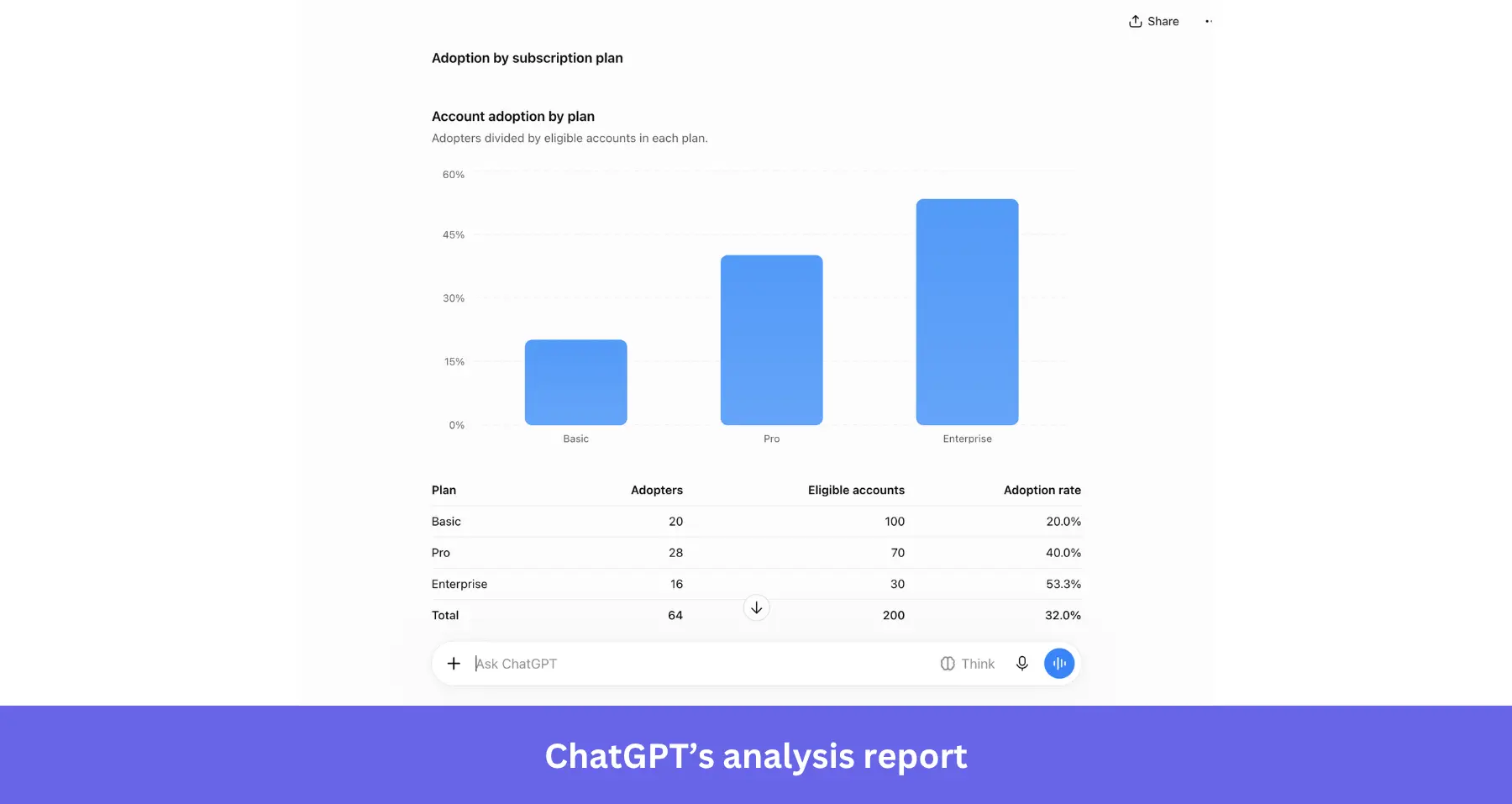
File-based analysis has a freshness limitation: an uploaded report won’t reflect activity that occurred after its export. Connected sources can provide additional context, but ChatGPT may still misinterpret data or produce inaccurate calculations.
Verify important findings before using them to make business decisions.
Pricing: ChatGPT offers Free and paid plans, with file uploads and data analysis allowances varying by subscription. ChatGPT Go provides expanded access to file uploads and advanced data analysis, while Plus costs $20 per month.
For organizations, ChatGPT Business Standard seats cost $25 per user/month or $20 per user/month with annual billing. Business workspaces generally require at least two paid seats.
What users say about ChatGPT
One of the most recurring complaints about ChatGPT is that it can “confidently make up facts (AI hallucinations).”
On the other hand, its flexibility and simplicity make it the go-to everyday AI assistant for many:
I like the versatility that ChatGPT provides. I like how it fits in my day-to-day life. Its simple interface makes it easy to use, and its ability to understand context, analyze files, and provide useful suggestions help me with research, documentation, and technical tasks.
Pro tip: If your product team uses Userpilot, you can connect its data to Claude or ChatGPT through the Userpilot Headless. This lets teams ask questions about product adoption, examine user segments, and work with product usage data directly from either AI assistant.
As Yazan Sehwail, Userpilot’s CEO, puts it, you get your answer “without having to go to Userpilot, without having to pull data and upload it to someone.”
Turn product analytics into action with Userpilot!
Finding an adoption problem is only part of the work. Product teams also need to understand which users are affected and decide how to address the friction.
Userpilot brings Product Analytics and In-App Engagement together in one agentic product adoption platform. You can track user behavior, understand feature adoption, and identify accounts where usage has stalled.
With Lia, you can investigate why adoption has slowed, examine relevant user behavior and feedback, and identify potential friction points. Lia can then recommend targeted in-app experiences, such as a guide to help users discover or understand an underused feature. You can edit the suggested content before publishing it, then measure how users respond.
Want to find out why usage has changed in your product? Book a demo to see how Lia can help you analyze your own adoption data.
Disclaimer: Userpilot strives to provide accurate information to help businesses determine the best solution for their particular needs. Due to the dynamic nature of the industry, the features offered by Userpilot and others often change over time. The statements made in this article are accurate to the best of Userpilot’s knowledge as of its publication/most recent update on November 12, 2026.
About the author