PostHog Features in 2026: What’s Free, What’s Cloud-Only, and What Changed



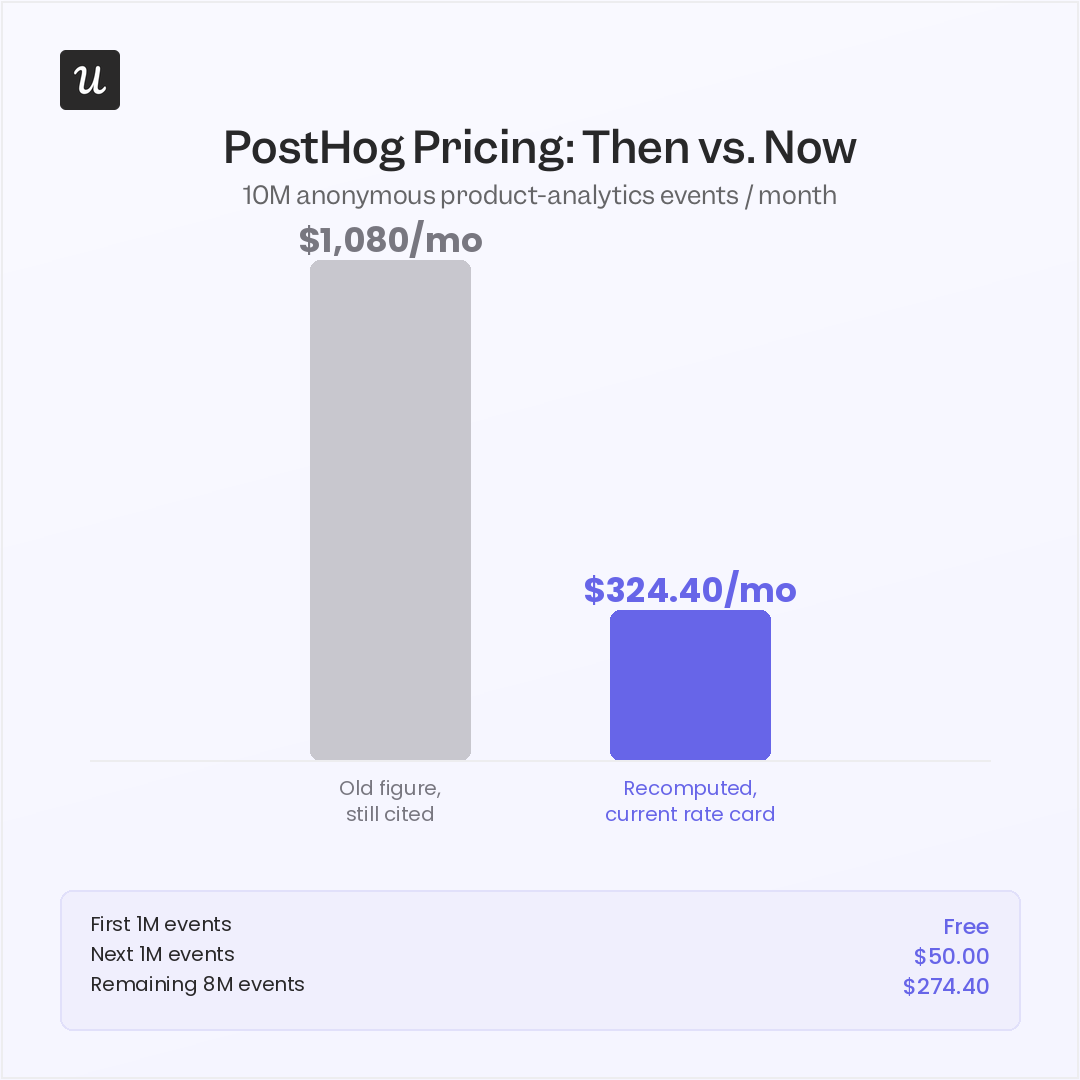
PostHog features can look considerably cheaper on the pricing page than they do in articles about the platform. I ran PostHog’s calculator for 10 million anonymous events and got roughly $324 per month. The $1,080 figure still circulating is off by a wide margin, and getting it wrong can throw off your product analytics budget at scale.
Several new features have landed since PostHog’s early reviews: CUPED, holdout groups, mobile session replay, and mobile surveys, adding to an already broad set of product tools. Even with that wider toolkit, your team still has to configure, maintain, and use those features effectively.
I’ll explain what PostHog’s open-source model requires from your team, examine how far its analytics, experimentation, and qualitative research tools go, and break down its current pricing with realistic usage examples.
| Product area | What it includes | What teams use it for |
|---|---|---|
| Product and web analytics | Funnels, trends, retention, paths, cohorts, lifecycle reports, dashboards, autocapture, group analytics, and website metrics. | Understanding how users and accounts discover, adopt, and return to the product. |
| Session replay and heatmaps | Web and mobile recordings, console logs, network activity, replay filters, privacy controls, AI summaries, and click or scroll heatmaps. | Investigating the sessions behind funnel drop-offs, errors, and confusing user behavior. |
| Feature flags and experiments | Boolean and multivariate flags, gradual rollouts, kill switches, A/B tests, holdouts, redirect tests, and no-code website experiments. | Releasing changes safely and measuring whether they improve the target behavior. |
| Surveys and workflows | In-app surveys, NPS and CSAT survey templates, conditional questions, email workflows, audience splits, delays, and campaign experiments. | Collecting user feedback and automating messages based on product behavior. |
| Engineering observability | Error tracking, stack traces, issue grouping, releases, logs, distributed traces, AI and LLM monitoring, and replay linked to errors. | Diagnosing technical failures and connecting the user experience to the underlying issue. |
| Data infrastructure | Data warehouse connections, SQL and HogQL, transformations, batch exports, real-time destinations, webhooks, and query endpoints. | Combining PostHog data with the wider company data stack and sending it to other systems. |
| AI and developer tools | PostHog AI, natural-language queries, replay summaries, SQL generation, MCP, CLI tools, and AI-assisted setup and debugging. | Querying PostHog data and managing parts of the platform from AI assistants or developer environments. |
The breadth is one of PostHog’s main advantages, especially for technical teams that want to keep analytics, experimentation, and engineering data in one ecosystem. However, most products have their own usage limits and pricing dimensions, so adopting more of the platform can make both implementation and cost management more demanding.

What is PostHog, and what does its open-source label mean?
PostHog is an open-source developer platform that helps product and engineering teams understand user behavior analytics and build, test, and improve digital products. It combines product and web analytics, session replay, feature flags, experiments, and event tracking into a single platform, reducing the need to stitch together separate tools. The wider suite also includes a data warehouse, data pipelines, error tracking, and AI observability. These products share the same underlying data stack, though certain capabilities and managed services are available only through PostHog Cloud.
Instead of PostHog Cloud, you can choose self-hosting, which means running the repository on your own infrastructure and requires specific advanced capabilities within each product. For example, when you self-host surveys, you lose multi-question logic, custom HTML, and event-based triggers.
In practice, self-hosting means everything runs on a single machine, and a self-hosted PostHog is unlikely to scale beyond a couple hundred thousand events without significant engineering effort. PostHog even recommends Cloud for most companies.
When you run the open-source version, you take on:
- Provisioning the infrastructure
- Managing the deployment
- Handling scaling yourself
There’s no tagged release built specifically for self-hosters, and PostHog offers no guarantees about how it behaves on infrastructure it doesn’t control.
Ibby Syed, founder of the ops-automation company Cotera, documented what self-hosting looks like in practice for a healthcare SaaS company in a detailed write-up. Their DevOps engineer, Tomas, deployed PostHog self-hosted in 9 days and spends roughly 6-8 hours a month maintaining it, mostly for upgrades and ClickHouse housekeeping. Add his time to the infrastructure bill, and the savings against PostHog Cloud shrink to about $100-$200 per month.
For Tomas’s company, that gap didn’t matter. Compliance was the reason to self-host, and cost savings were beside the point. He advises:
Start with Cloud. Deploy self-hosted in staging. Run both for a month. If the compliance team says you need self-hosted, migrate. If they don’t, stay on Cloud and spend your ops budget on something that actually needs it.
PostHog’s open-source nature means you can consider self-hosting when compliance specifically requires that analytics data never leave infrastructure you control. Outside of that, the case for choosing self-hosting purely to save money rarely holds up.
How deep does PostHog’s product analytics go?
PostHog automatically captures user interactions like clicks, pageviews, and form submissions through autocapture, without requiring you to predefine a schema, so you can start understanding user behavior before you’ve mapped out a tracking plan. You can retroactively turn those raw events into a named action, even if you forgot to track something important. Funnels, user paths, and cohort retention analysis all sit atop the same event stream, alongside a growth-accounting view that separates new, returning, and dormant users in a single trend graph, surfacing deep insights into product usage metrics over time.
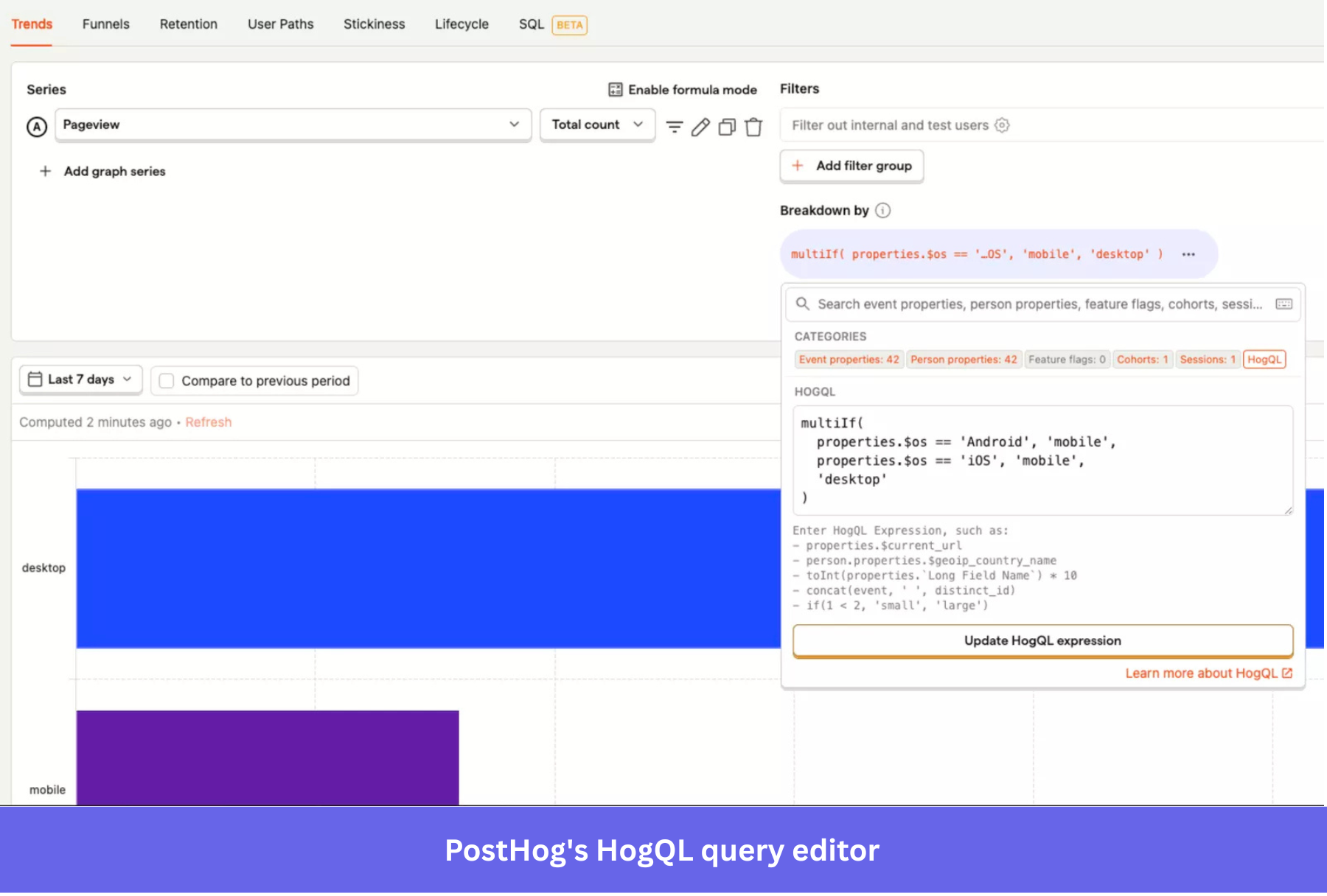
You can query each report directly with HogQL, PostHog’s SQL dialect, built for complex queries that a simple dashboard filter can’t answer, or access the same data via the API when you want to work outside the UI. The data warehouse can sync data from more than 150 external data sources, from Stripe and Salesforce to raw Postgres and Snowflake connections, so a HogQL query can join product events with billing or customer data in one place.
PostHog Cloud’s generous free tier gives you 1 million analytics events a month, 5 alerts, and 5 dashboard subscriptions, all of which reset monthly and carry over even after you add a credit card. Self-hosting caps you at 2 alerts instead, even on a free plan. Group analytics is a separate paid add-on with its own per-event rate, capped at five group types per project, and it aggregates events at the account level.
If you’re on the free tier, you can retain data for 1 year. It extends to 7 years on any paid Cloud plan. Besides the data retention plan, the free-tier limits mean a busy month can quietly burn through your alert or event budget before anyone notices.
Analytics is PostHog’s deepest product, but it also has one of the highest technical ceilings. You may not need a developer for the initial installation, but you’re more likely to need engineering backgrounds and technical resources once event definitions, advanced queries, or custom analysis stand between you and actionable insights. For a closer look, see our dedicated deep-dive of PostHog analytics.
You do need to be at least a bit tech-literate to use it comfortably. Otherwise, it can feel overwhelming at first.
— G2 review by Daniel A.
What about PostHog’s qualitative side, replay, surveys, and heatmaps?
PostHog records sessions on web and mobile, with dedicated SDKs for iOS, Android, React Native, and Flutter that treat mobile as a first-class citizen. Each recording includes a DevTools-style timeline of console logs, network requests, and errors alongside the visual playback.
PostHog’s web and mobile session replays run on separate meters, and mobile costs roughly twice as much as web at every tier. Privacy controls also differ by SDK: native iOS and Android default to a wireframe view for masking, while React Native and Flutter default to full screenshots. This fidelity gap between mobile platforms matters if you’re deciding which one to ship first.
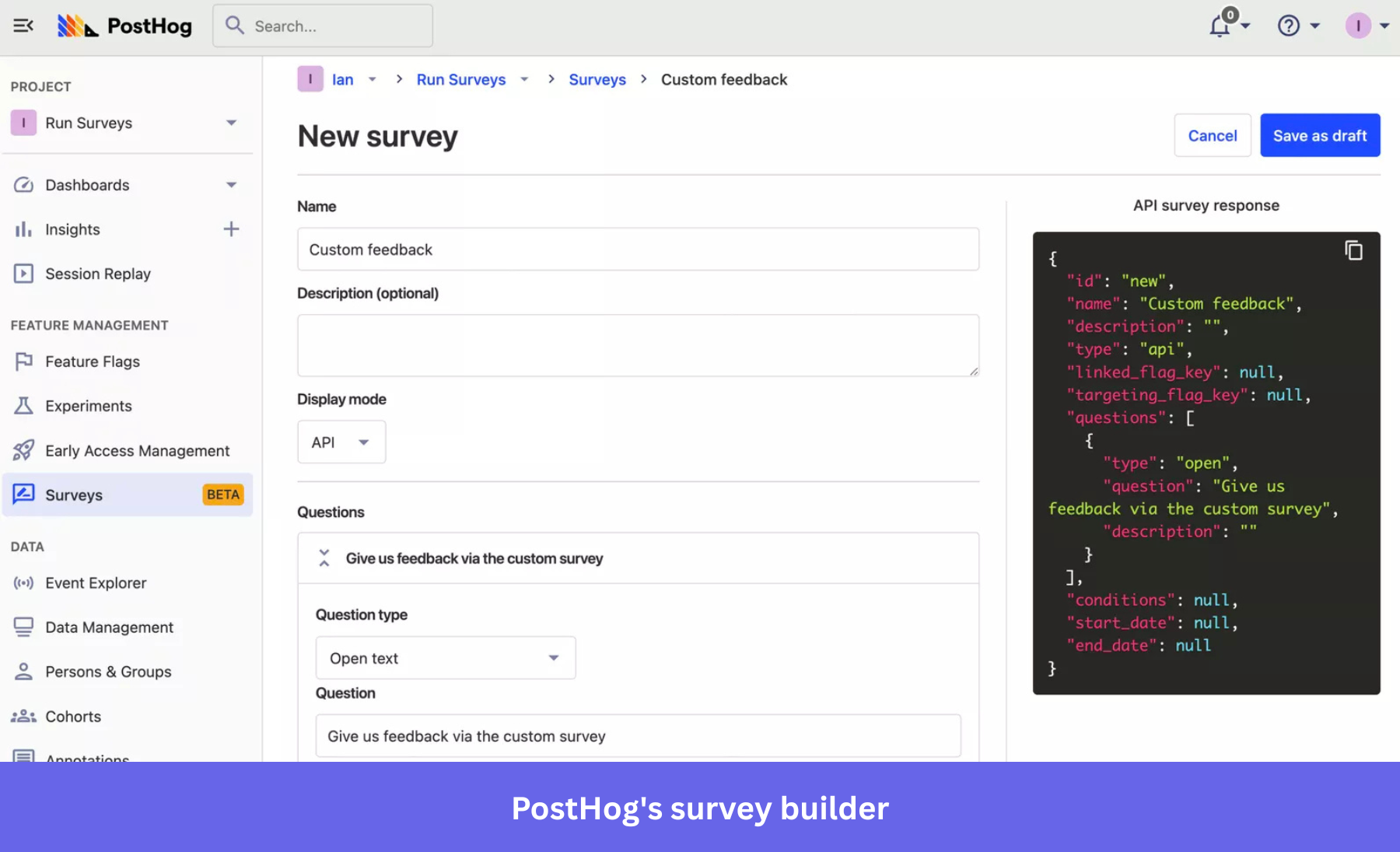
Surveys carry mobile SDKs across React Native, iOS, Android, and Flutter, with web still the most complete implementation of the four, all built through a no-code survey builder to collect direct feedback. Multi-question surveys and event-triggered display are both available on Cloud. However, those two features disappear entirely in self-hosting, along with custom colors, positioning, and custom HTML.
Heatmaps aren’t on by default, so you have to enable them in project settings. Also, PostHog needs autocapture enabled for click maps and pageleave events to capture scroll depth. The in-app heatmap viewer is still in beta, so you can use your browser toolbar instead while it matures.
Is PostHog’s experimentation stack credible now?
Yes, and CUPED (Controlled-experiment Using Pre-Experiment Data) is the clearest reason why. CUPED is a configurable variance-reduction method, set at the project level or overridden per experiment, that uses a participant’s pre-exposure behavior to reduce noise in their post-exposure metric.
In other words, PostHog can do variance reduction. It also walks through when it helps, i.e., when pre-exposure behavior predicts the metric you’re testing, like revenue or usage volume.
Holdout groups replace the old “no MutEx” complaint, though the two aren’t quite the same thing. A holdout is a randomly assigned group of users excluded from an experiment, or from every experiment, and PostHog treats it as its own variant in the results so you can check whether an early win holds up three months later. Holdouts don’t provide built-in mutual exclusion between simultaneous experiments, so if you’re running two tests that could interact, you’ll handle the overlap manually.
PostHog’s native feature flags let you select users by person properties or by static cohorts you’ve already built. They can’t evaluate a live, dynamic user-behavior cohort in real time because such a query against fast-changing behavioral data is too slow to run at flag-evaluation speed. The workaround is to first duplicate your behavioral segment into a static cohort, then target that. Experiments run on top of feature flags, technically and financially. An experiment is a multivariate flag under the hood, and PostHog bills experiment traffic the same way it bills flag requests, so there’s no separate line item to track.
Between CUPED, holdouts, and flags that can target real segments, PostHog’s experimentation stack earns the label “credible”. It still asks you to know the difference between a holdout and a mutual-exclusion rule, which is a fair ask for an engineering-led team and a rough one for a product marketer running their tests.
PostHog’s trade-offs and what it costs
PostHog’s trade-offs include its technical bar, setup time, and the discipline it takes to manage usage costs before they catch you off guard, all separate from whether the features exist.
Here’s the math for 10 million anonymous product-analytics events in a month, using PostHog’s pricing calculator. The first 1 million events are free, the next 1 million cost $0.00005 each, and the remaining 8 million cost $0.0000343 each.
That works out to $324.40 a month, although several older posts still quote $1,080. Identified events cost more, starting at $0.000248 each after the first 1 million are free, so the total climbs quickly for products where most traffic comes from logged-in users.
Regarding the data pipelines, batch exports are free for the first million rows, then $0.000015 per row, dropping to $0.00000125 per row after 100 million rows. Real-time destinations are metered separately, with 10,000 free trigger events, then as low as $0.000025 per trigger at the highest volume.
Boost, Scale, and Enterprise are PostHog’s platform packages, add-ons layered on top of the Free or Pay-as-you-go plan for things like dedicated support, RBAC, and SSO enforcement. Boost runs $250 a month, and Scale runs $750 a month. Enterprise pricing is custom, so you’d have to talk to the sales team.
Vendr’s marketplace data puts the median PostHog contract at $54,425 a year. If you’re weighing that figure against a specific competitor’s contract size, check our pricing comparison of Posthog against Mixpanel, where the two pricing models differ enough that the raw numbers alone don’t settle it.
When Userpilot makes more sense
Keep PostHog if your product engineers have the time to run it, need raw SQL access, and want to own the infrastructure end-to-end. However, look at Userpilot alongside it, or in place of it, when the people who need the answers are marketers building segments, product managers checking feature adoption metrics, or customer success monitoring account health without having to file a ticket first.
Without Userpilot, you’d have to ask an engineer to pull a list of users for every campaign, and by the time the export landed in your inbox, the segment could be stale. Userpilot helps you build the segment yourself, in real time, and you can see how it’s performing without a second tool in the loop.
We’ve also released the Userpilot MCP server, so you can access that product data from ChatGPT, Claude, Cursor, Copilot, or any other MCP-compatible tool. Instead of opening another dashboard or waiting for someone to pull a report, you can ask about feature adoption, retention, survey feedback, or at-risk accounts from the AI workspace you already use.
Book a demo to see how Userpilot skips the query and lets you build the segment, the survey, or interactive walkthroughs directly, without an engineer as the bottleneck, using engagement tools built for non-technical teams.
Disclaimer: Userpilot strives to provide accurate information to help businesses determine the best solution for their particular needs. Due to the dynamic nature of the industry, the features offered by Userpilot and others often change over time. The statements made in this article are accurate to the best of Userpilot’s knowledge as of its publication/most recent update on July 31, 2026.
FAQ
Is PostHog free?
Yes, up to the free-tier limits: 1 million analytics events, 5,000 session recordings, and 1,500 survey responses a month, all resetting automatically, with full API access included from the free tier up. Past those limits, PostHog switches to usage-based pricing.
Can you self-host PostHog for compliance?
Yes, and it’s one of the few good reasons to do it. Self-hosting keeps analytics data inside infrastructure you control, which matters for healthcare, fintech, and other regulated industries with contracts that specify where data lives.
Does PostHog have session replay for mobile?
Yes, across iOS, Android, React Native, and Flutter SDKs. Mobile replay runs on its own pricing meter at roughly twice the web rate, and masking fidelity differs by SDK.
Does PostHog support A/B testing without a data team?
PostHog’s feature flags and experiments are built to be usable without a dedicated data team, including CUPED variance reduction and holdout groups for longer-term checks. The real bar is HogQL and general SQL comfort for deeper analysis, separate from the experimentation tools themselves.
About the author