How to Use Analytics to Improve Customer Engagement in the AI Era


Customer engagement analytics in SaaS has a timing problem, and most teams are still running it on a monthly review cycle. Picture the account that’s still logging in every day but hasn’t made real progress in weeks — the exact kind of account a friction point report won’t catch until the renewal conversation is already underway.
That’s how it used to work: pull usage numbers from one dashboard, NPS from another, session data from a third, then paste it all into a spreadsheet and hope the numbers agree. The data wasn’t wrong. It was just too slow to matter by the time anyone read it.
Now there’s a second pressure stacked on top of the first. Product teams ship faster than any quarterly review can track, so a report on feature adoption often describes a product that’s already moved on. Waiting for the next scheduled check-in isn’t a data problem anymore — it’s a timing problem.
AI agents close that gap by watching the same events, NPS, and session data around the clock, and answering plain-language questions about them the moment something breaks.
I wanted to write something more useful than another list of metrics to track. So this post covers:
- How AI agents replaced the manual spreadsheet-stitching process.
- The engagement metrics actually worth watching, and where NPS or CSAT alone can mislead you.
- Five concrete ways teams use an agent like Lia to catch problems before they become churn.
- Why analysis without a way to act on it in the same platform doesn’t move the needle.

How did product teams measure customer engagement in the past?
Product teams measured engagement by manually stitching together fragmented data from separate tools into spreadsheets. This slow, specialist-heavy process relied on delayed reports like NPS surveys and session logs rather than real-time user behavior.
It used to mean logging into three or four separate reports before starting to ask questions. You’d have to pull product usage numbers from one dashboard, NPS results from another, and session data from a third, then paste all of it into a spreadsheet just to see if the numbers agreed with each other.
Even once you had clean data, you’d still have to brainstorm what to do about it with two or three teammates in a meeting. Diving deep enough to find the actual cause of a metric change made the process slower. In a nutshell, this method worked but was incredibly slow because every step needed a specialist to move things forward.
What has changed in measuring customer engagement with the emergence of AI?
AI agents have revolutionized customer engagement analytics by making it faster and more accessible. Here’s what it does:
-
Instant, plain-language querying: Instead of building complex reports across multiple dashboards, you can ask direct questions in natural language to receive instant, consolidated insights.
-
Democratized data access: Non-technical team members can access deep behavioral metrics and find root causes without relying on dedicated data analysts.
-
Continuous monitoring: AI agents act as an always-on watcher that tracks engagement metrics around the clock, catching anomalies like sudden NPS drops or stalled onboarding the moment they happen.
-
Faster response times: Proactive monitoring eliminates the lag of traditional monthly or quarterly reviews, allowing you to fix friction points immediately.
-
Cross-platform workflow: You can access product insights directly from AI tools like ChatGPT or Claude through Model Context Protocol (MCP) servers.
For instance, instead of opening four dashboards, you can just ask Lia, Userpilot’s AI agent, a question in plain language and get an answer built from the same events, NPS, and session data you used to reconcile by hand. Lia also monitors your engagement metrics all the time, so you can spot drops and fix them rapidly.
The metrics Lia keeps an eye on cover the whole engagement picture, such as:
- Customer Satisfaction Score (CSAT): Measures satisfaction right after a specific interaction.
- Net Promoter Score (NPS): Gauges long-term brand sentiment on a 0-10 scale. (Gauge your brand sentiment using our NPS calculator)
- Customer Lifetime Value (CLV): Estimates total revenue from a customer relationship.
- Churn rate: Shows the percentage of customers who stop using the product.
- Feature adoption: Shows which features customers actually keep using.
- Product stickiness: How regularly users keep returning to your product.
Additionally, with the Userpilot MCP server, you don’t even need to navigate to Userpilot to access these insights. Here’s what Yazan Sehwail, Userpilot’s CEO, had to say about it:
“If you as a marketer wanted to see, using session replay, NPS data, survey data, and product usage data, you’re able to get your answer without having to go to Userpilot, without having to pull data and upload it to someone. So this is why MCP is gonna be a game changer.”
Strategies to improve customer engagement with AI agents
Let’s now try to understand how you can use AI agents like Lia to improve your customer engagement.
Spot and eliminate activation bottlenecks
It’s necessary to get users to reach the activation point quickly to help them unlock value.
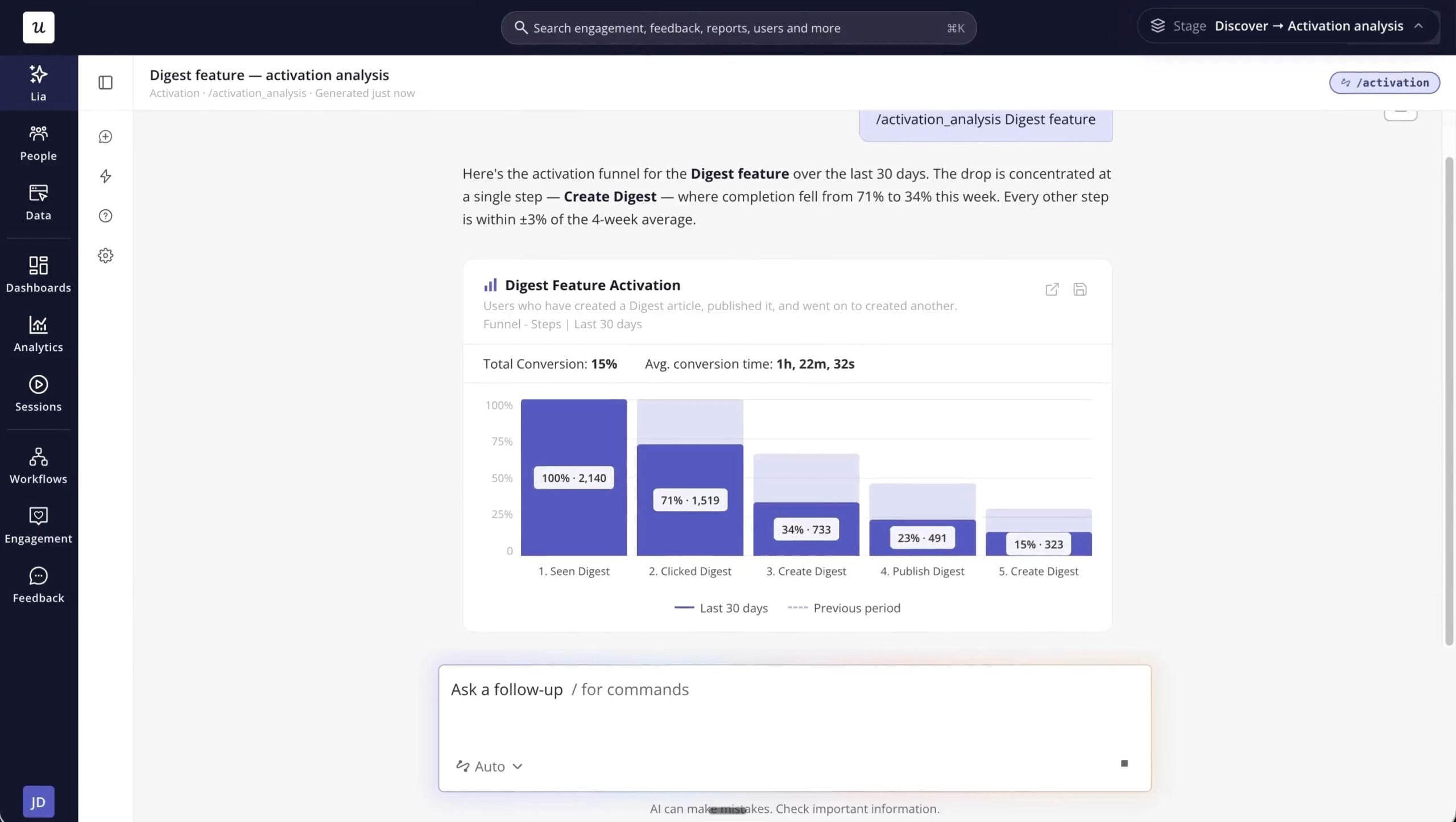
AI agents can continuously analyze behavior patterns to uncover precisely where new users stall during onboarding. By pinpointing these friction points in real time, you can trigger tailored context guides or UX fixes that help them reach their core value moment much faster. You can use Lia’s ready-to-use activation analysis skill for this.
Track feature adoption to drive continuous product value
Monitoring adoption curves, stickiness, and usage across user segments reveals which capabilities build habit and which go ignored.
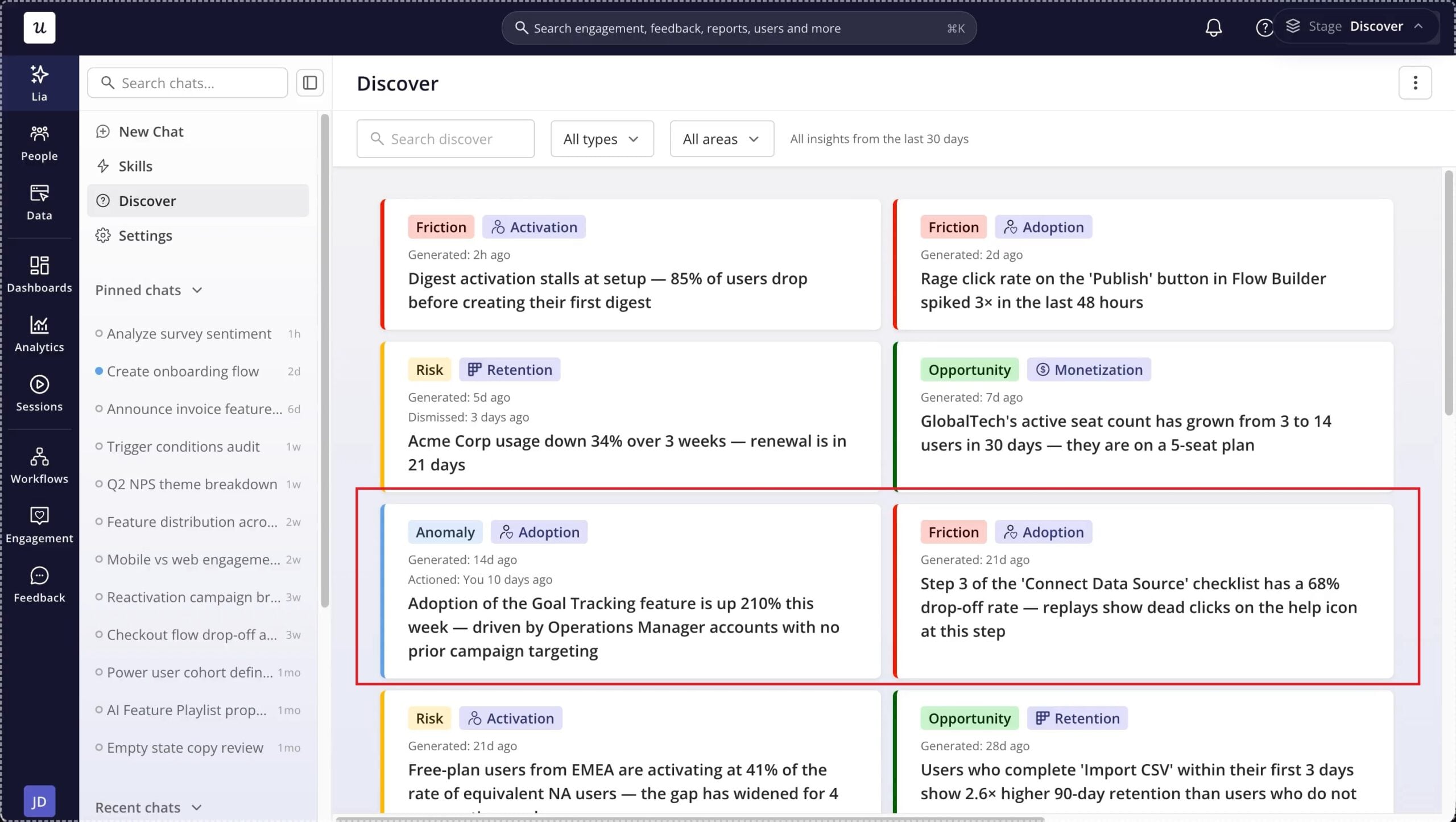
With an AI agent, you can find the underutilized product features and launch targeted in-app prompts for each segment to boost overall feature discovery. Likewise, agents like Lia can highlight any anomalies in adoption, such as unexpected spikes so you can investigate the causes behind them.
It wouldn’t be possible to observe these in a passive monthly or quarterly report.
Find and eliminate product friction
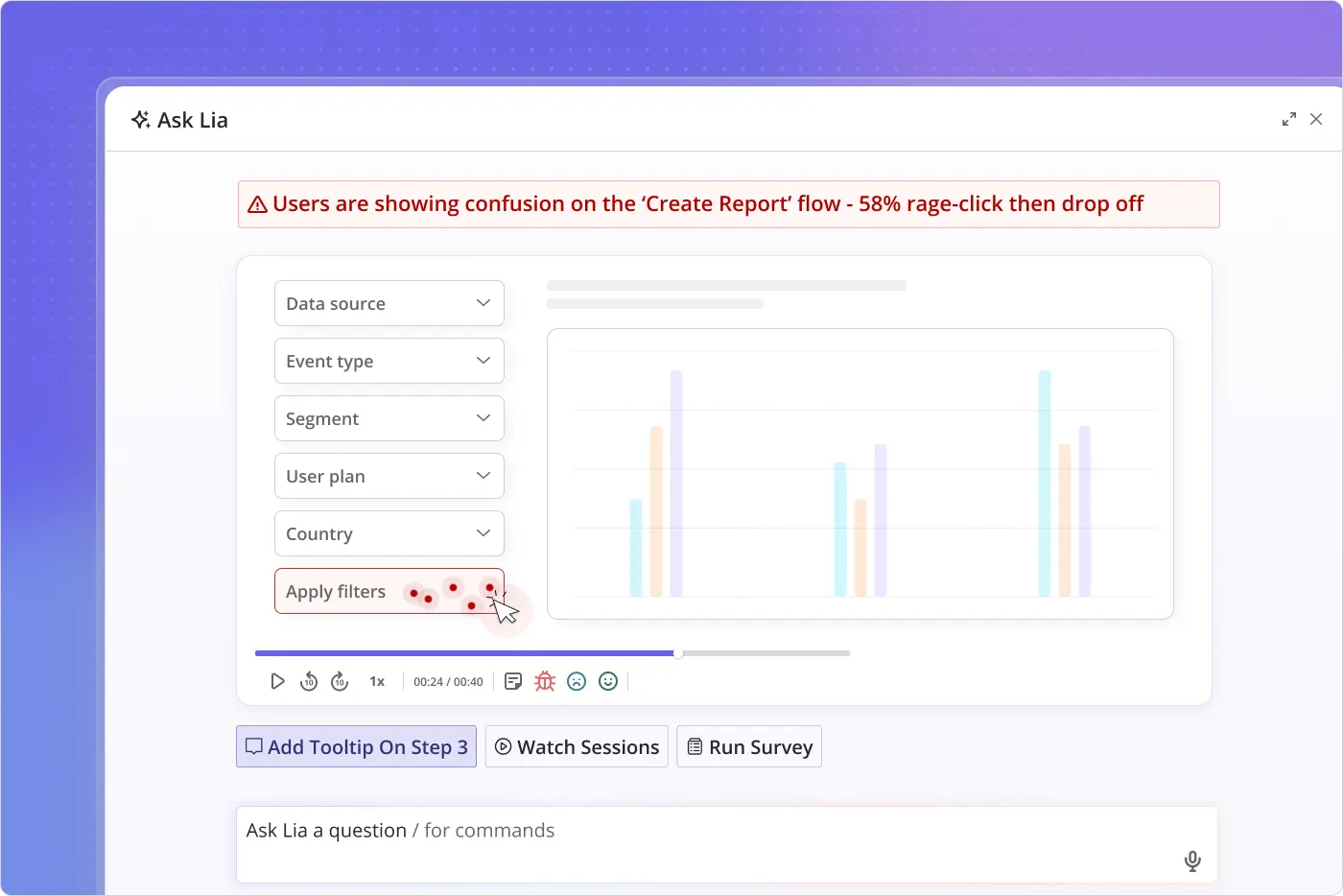
By combining event data, feature usage, survey responses, and session replays into one layer, AI agents spot the exact UX flaws causing users to abandon a flow. The always-on monitoring means the agent can alert you whenever there’s a sudden increase in bounces, dead clicks, or rage clicks.
In the example below, Lia detected user confusion through rage-click clusters and outlines concrete fixes to resolve the issue.
Spot at-risk accounts before they churn
Waiting for quarterly reviews to check account health is a recipe for churn.
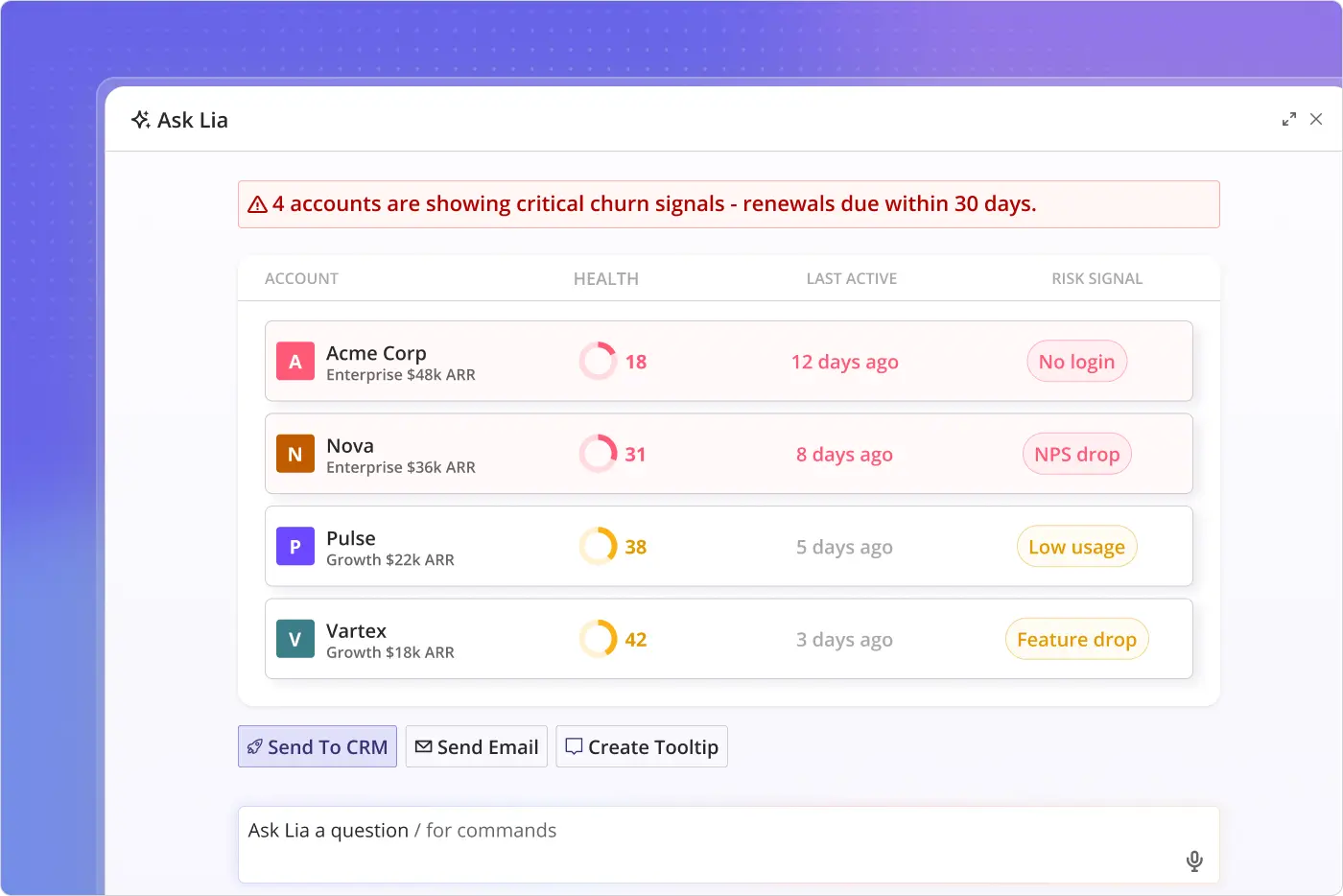
AI agents monitor week-over-week usage drops and cross-reference them with upcoming renewal dates, NPS scores, and CSAT feedback. This gives Customer Success teams early visibility into declining health scores and risk signals, making it possible to step in and save at-risk accounts long before contract renewal.
For instance, note how Lia has come up with health scores for each at-risk account and provided the related risk signals and suggested fixes too.
Track initial traction for new feature launches
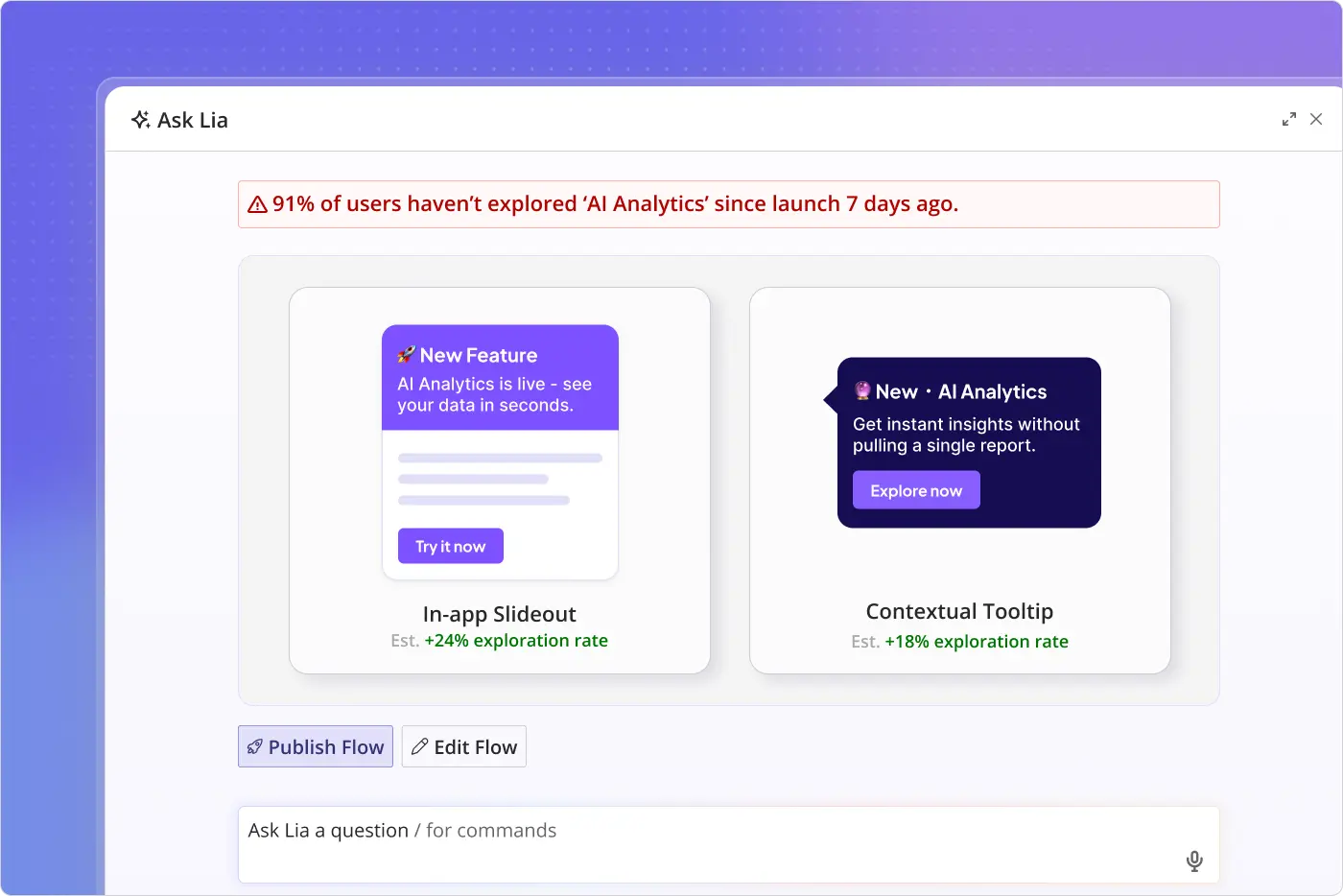
By automatically tracking user engagement with product features, AI agents can find whether a new feature you launched is getting the traction it needs. This insight can help you figure out whether your existing promotional strategies are working or the feature requires better in-app presence.
For example, Lia found that most users hadn’t explored the newly launched AI analytics feature. It suggested publishing a slideout or tooltip to give the feature greater visibility.
Why customer engagement analytics without action doesn’t change anything
Analytics is just one part of the puzzle. You need to act on the insights you gather to improve your user engagement.
As mentioned earlier, this step requires brainstorming. But with AI agents, that bit disappears too.
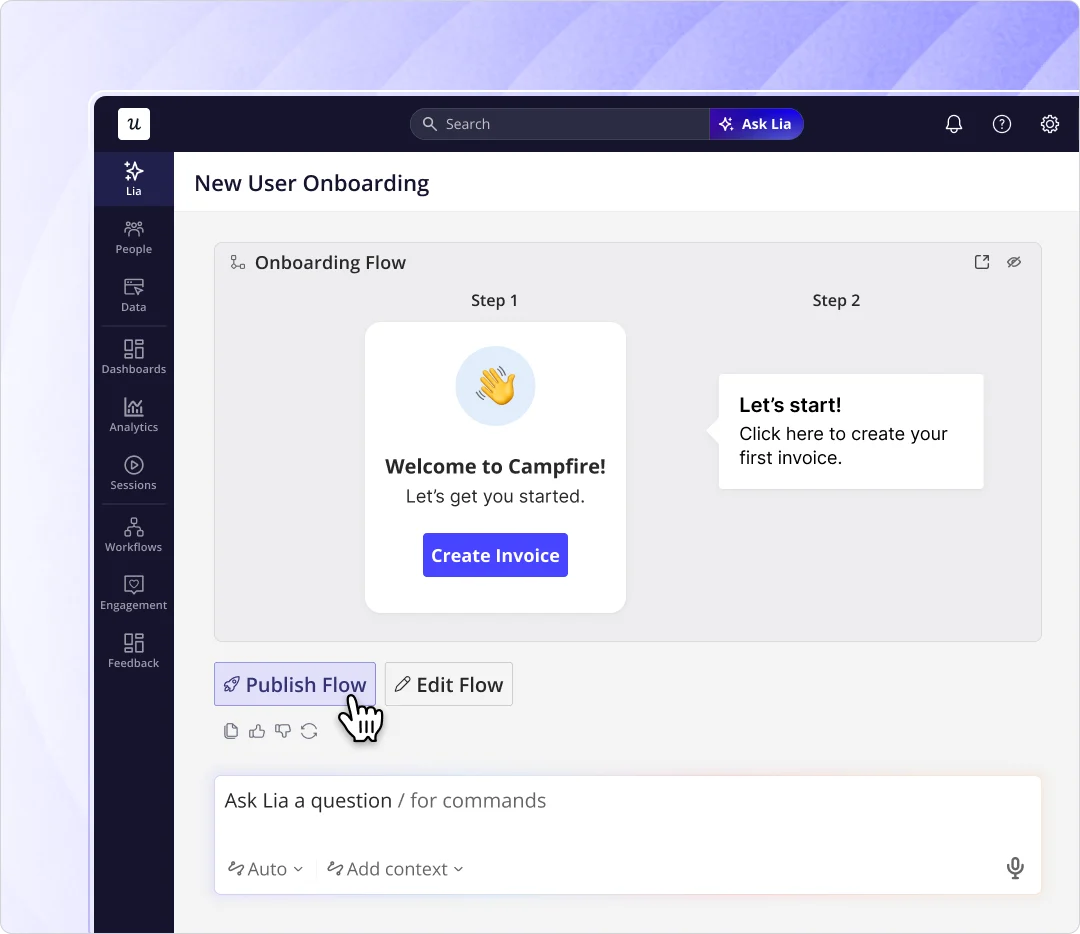
For instance, Lia suggests potential fixes that you can deploy to improve customer engagement. It also provides buttons that you can click to start working on the actions. You still decide what ships, but you no longer start from a blank whiteboard.
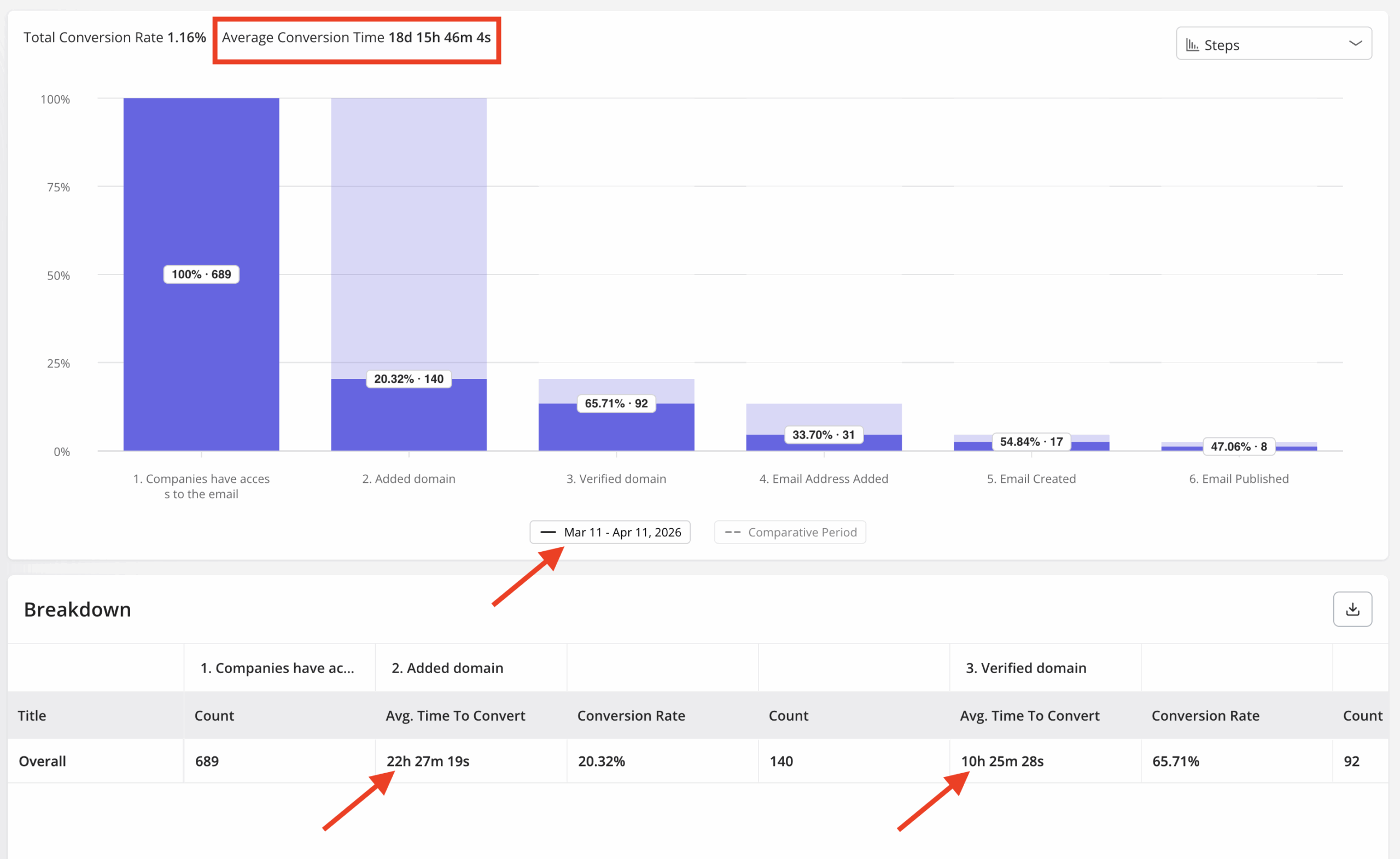
But none of this matters if analysis and action live in two different tools. When Userpilot’s email feature shipped, our funnel tracking showed a sharp drop-off right at the domain verification step. Fixing Userpilot feature would have ideally needed an engineering ticket.
Instead, I decided to build a targeting tooltip inside Userpilot the same afternoon, highlighting exactly what users needed to do at that step. The drop-off closed within days, without a single line of code or a spot on anyone’s sprint board.
Note how the average conversion time dropped significantly.
That’s the part of customer engagement analytics that dashboards alone never solved. Finding the friction point was only ever half the job. Fixing it in the same platform, on the same day, is what actually changes customer engagement.
Customer engagement analytics, minus the busywork
Customer engagement analytics used to mean pulling reports, reconciling spreadsheets, and brainstorming fixes alone before anything actually changed for a user. That process is what AI agents removed. Not the judgment calls, just the busywork standing in front of them.
Userpilot brings the analysis and the fix into the same place. Lia reads the customer engagement data, explains what it means, and can suggest the next action with one click, whether that’s a tooltip, a checklist edit, or a new segment worth targeting. You still make the call, but no longer spend a week gathering the information to make it.
If you want to see what that looks like on your own product data, book a Userpilot demo and we’ll walk you through it.
FAQ
What's the difference between customer engagement analytics and customer satisfaction analytics?
Customer engagement analytics tracks ongoing behavior, like feature usage and session frequency, across the entire relationship. Satisfaction, measured by CSAT, is a snapshot of one specific interaction, not a trend. You need both, since CSAT tells you how one moment went while engagement data tells you whether the relationship is actually growing.
What metrics should I actually track for customer engagement?
Four numbers cover most of it. Net Promoter Score gauges long-term sentiment on a 0 to 10 scale, Customer Lifetime Value estimates total revenue from a customer relationship, churn rate shows the percentage of customers who stop using the product, and feature adoption shows which features customers actually keep using. Track them together, since any one of them alone can mislead you.
Can AI agents replace a data analyst for customer engagement analytics?
No. AI agents remove the repetitive parts of the job, like pulling reports, reconciling dashboards, and tagging survey responses, so analysts and product managers can spend their time on judgment calls the software can’t make. The best setups pair the agent with a person instead of swapping one for the other.
About the author