Whatfix Pricing in 2026: What It Actually Costs


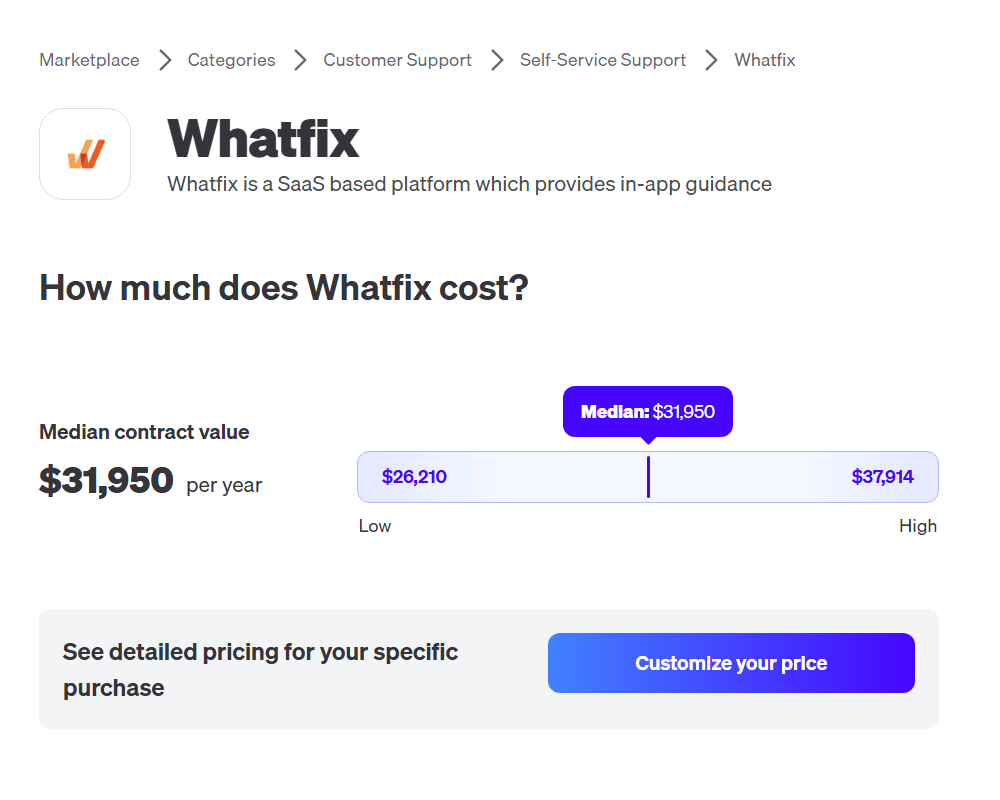
Whatfix’s pricing model has never been public, which trips up potential buyers who click through the three plan tiers only for every single one to show its “Get a Demo” or “Talk to Sales” button at the bottom. Vendr’s most recent contract data puts the median Whatfix deal at $31,950/year, but that doesn’t even come close to telling the full story of what individual contracts cost or which factors influence that price.
This pricing guide will go over what customers actually pay for Whatfix, how each plan tier differs, and whether it’s possible to negotiate your subscription cost.

Whatfix pricing: What customers actually pay
Because Whatfix doesn’t publish its pricing publicly, the best evidence we have comes from aggregated contract data on pricing analysis websites. Vendr’s latest data shows that the median cost of a Whatfix contract is $31,950/year, with a range of $26,210 on the low end and $37,914 on the high end. This is further complicated by the fact that Whatfix operates three separate products with their own pricing.
Its core product is the Digital Adoption Platform for in-app guidance, but it also has Whatfix Product Analytics for behavioral data and Whatfix Mirror for sandbox training environments. Each of these products are then split further into Standard, Premium, and Enterprise tiers. As if all that wasn’t enough, there are also add-ons that are priced separately from the base subscription. These include extra upfront or ongoing costs for On-Premise Authoring, 24/7 Customer Support, Professional Services, Digital Adoption Assistants, and a Digital Adoption Program Manager.
The complicated multi-level pricing model combined with a lack of any officially published rate cards makes Whatfix pricing incredibly unpredictable for prospective customers.
What each Whatfix subscription tier unlocks
Standard, Premium, and Enterprise are Whatfix’s three main subscription tiers across its product family but what does each one actually offer?
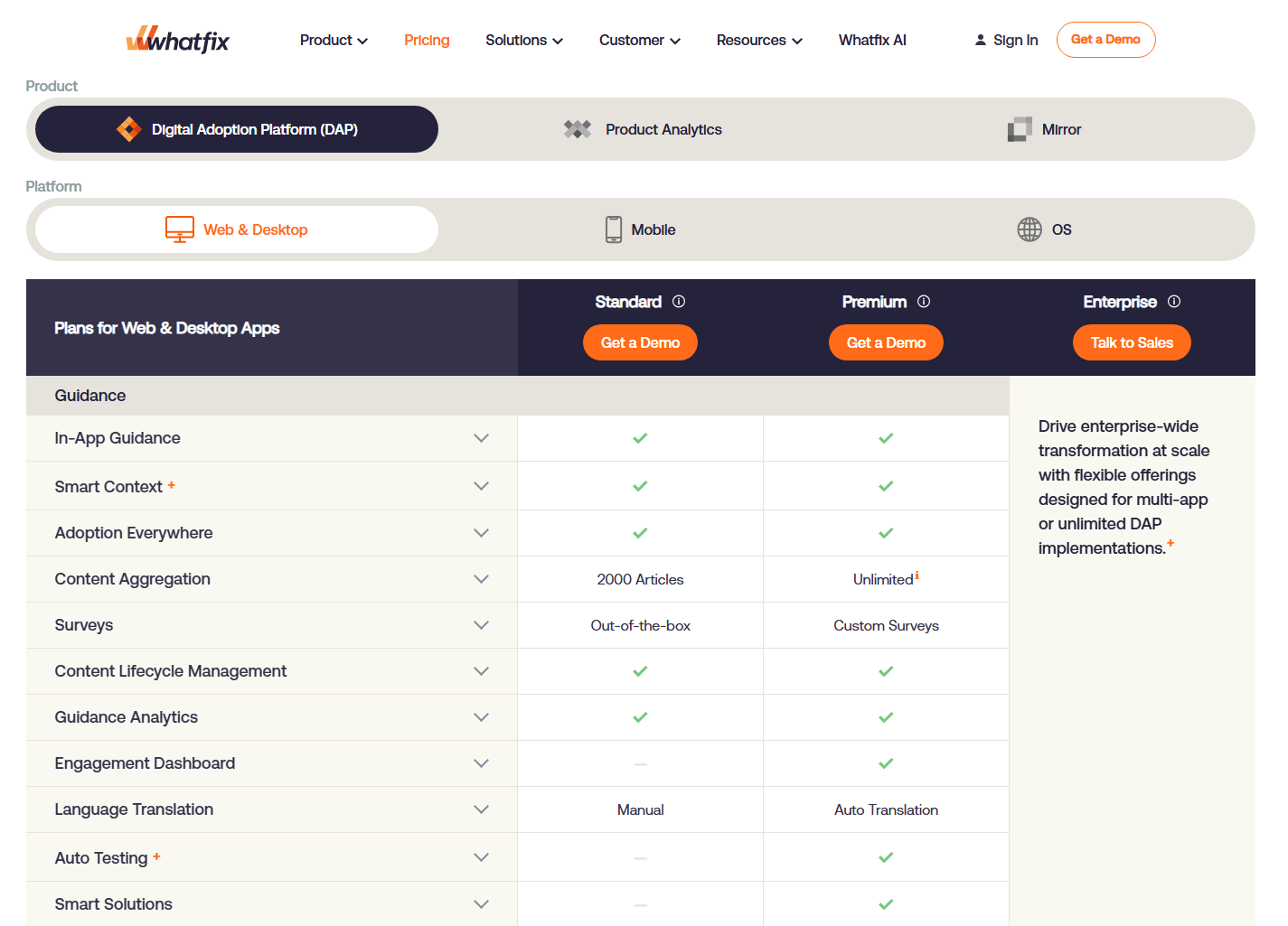
While prices of the tiers aren’t listed, the features and inclusions are as follows:
| Standard | Premium | Enterprise | |
|---|---|---|---|
| Scope | Single app | Single app | Multi-app |
| Integrations | 2 integrations | Unlimited | Unlimited |
| Knowledgebase | 2,000 articles | 50,000 articles | 50,000 articles |
| Surveys | Out-of-the-box only | Custom surveys | Custom surveys |
| Analytics | Basic usage analytics | Advanced analytics | Enterprise reporting |
| Translation | Manual | Auto-translation | Auto-translation |
| Flow auto-testing | Not included | Included | Included |
| Virtual desktops* | Not included | Not included | Included |
| Support | 24×5 w/CSM | 24×5 w/ CSM | 24×5 w/CSM |
*Virtual desktops are only available on the Whatfix Mirror product
There are certainly many inclusions to consider adding onto your base Whatfix subscription, but how big of an impact will they have on your annual contract price?
Five things that influence your Whatfix bill
Five variables affect the final Whatfix quote more than anything else:
- Platform: Supporting web, desktop (Windows/Mac), and mobile through separate SDKs multiplies your setup cost (especially for cross-platform apps).
- Plan tier: Moving from Standard to Premium extends the help article cap, unlocks custom surveys, enables auto-translation, and unlocks advanced analytics.
- User volume: Tracked as total licensed users for employee-facing apps or monthly active users for customer-facing ones. Either way, cost scales with volume.
- Integrations: Standard limits you to two integrations, while the more expensive Premium and Enterprise plans offer unlimited integrations for your application(s).
- Add-ons: On-Premise Authoring, White-Labeling, 24/7 Support, the Digital Adoption Assistant, or a dedicated Digital Adoption Program Manager all increase the cost.
It’s also worth considering how quickly these costs can scale if you need to support additional platforms, upgrade plans, hire new employees, acquire more users, or want more integrations and add-ons. The sticker shock of your initial quote isn’t the end of the story when your annual subscription cost can continue to climb as you hit new milestones and need to expand the scope of your Whatfix implementation.
When you combine all five, even the Standard plan can quickly exceed its $31,950 median, while Enterprise implementations could easily surpass $100,000 annually.
Is Whatfix pricing negotiable?
Like most quote-based enterprise SaaS contracts, Whatfix pricing is indeed negotiable. The fact that there’s a flat platform fee, per-user licenses, and three separate products means there are multiple negotiation areas to bring up during contract signing or renewal. Pulling on these levers can help you shave a few percentage points off your contract value and offset some of the add-on costs that are charged on top of the base subscription.
There are a few best practices you can employ when negotiating your Whatfix contract pricing:
- Bring competitor quotes: Coming equipped with comparable pricing from another vendor will put you in a better position to negotiate towards price parity.
- Secure bulk user discounts: Create room for your contract to grow, with per-user license fees dropping as total usage scales to ensure a sustainable path forward.
- Strip auto-renewal clauses: An annual review tied to product outcomes lets you reassess the ROI before renewing your contract instead of after it’s already been billed.
- Push back on automatic uplifts: Set transparent budget limits and mention cheaper alternatives with comparable capabilities to keep prices from spiraling out of control.
- Negotiate waived security add-ons: If SSO, audit logs, or data residency require an upgrade, ask for the fee to be waived since several competitors bundle these in core plans.
That being said, negotiation comes at the cost of adding 2-3 months to your buying cycle. As such, teams with an immovable implementation deadline will have less leverage and may end up settling for less than they wanted in the interest of keeping everything on schedule. If you’re considering going with Whatfix, leave a quarter of buffer time to account for any delays that may be caused by the lengthy negotiation process (not to mention another quarter for onboarding), which significantly extends your time to value.
When does Whatfix stop making sense for you
Once your priorities shift from employee training to product-led growth, it could be time to start comparing Whatfix alternatives. Setting up and maintaining in-app guidance within Whatfix often requires assistance from the IT department. This prevents product teams from iterating independently without months of training to overcome the technical learning curve. Flows can also become brittle as UI changes and UX redesigns update the placement or location of interface elements.
Alternatively, if you’re scaling your employee headcount or user base rapidly then you might want to get ahead of the impending rate hikes by getting quotes from other vendors who offer growth-friendly pricing. Most platforms have bulk plans that get cheaper as the number of monthly active users or employees being trained grows. While migrating away from Whatfix and switching to a new platform can be a painful process, that short-term pain can create worthwhile long-term cost savings.
An honest comparison of Userpilot vs Whatfix
| Feature | Userpilot | Whatfix |
|---|---|---|
| Best for | Product teams driving onboarding and adoption in their own product | Large enterprises training employees |
| Ease of use | No-code, built for product managers to use themselves | Steep learning curve, often needs CSS/JS |
| Session replay | Built-in session replays that record in-app navigation | Available on product analytics plan |
| Event capture | Retroactive autocapture from day one | Autocapture only tracks URL and page data |
| Analytics reports | Ready-made templates for activation, product adoption, retention | No templates, mostly built from scratch |
| Pricing model | Transparent and affordable | Hidden and complex |
Userpilot is best for product teams who want a no-code experience, native session replays, retroactive autocapture, plentiful templates, and transparent pricing. Whatfix is best for large enterprises with employee training, developer support, large budgets, and the patience to negotiate a good deal. If you find yourself somewhere in between then you can always request demos with both products to see which platform has the features you need and a price you can afford.
Userpilot pricing vs Whatfix pricing
In addition to publishing transparent pricing, Userpilot’s entry-level and mid-tier plans also cost significantly less than the median cost of an annual Whatfix subscription.
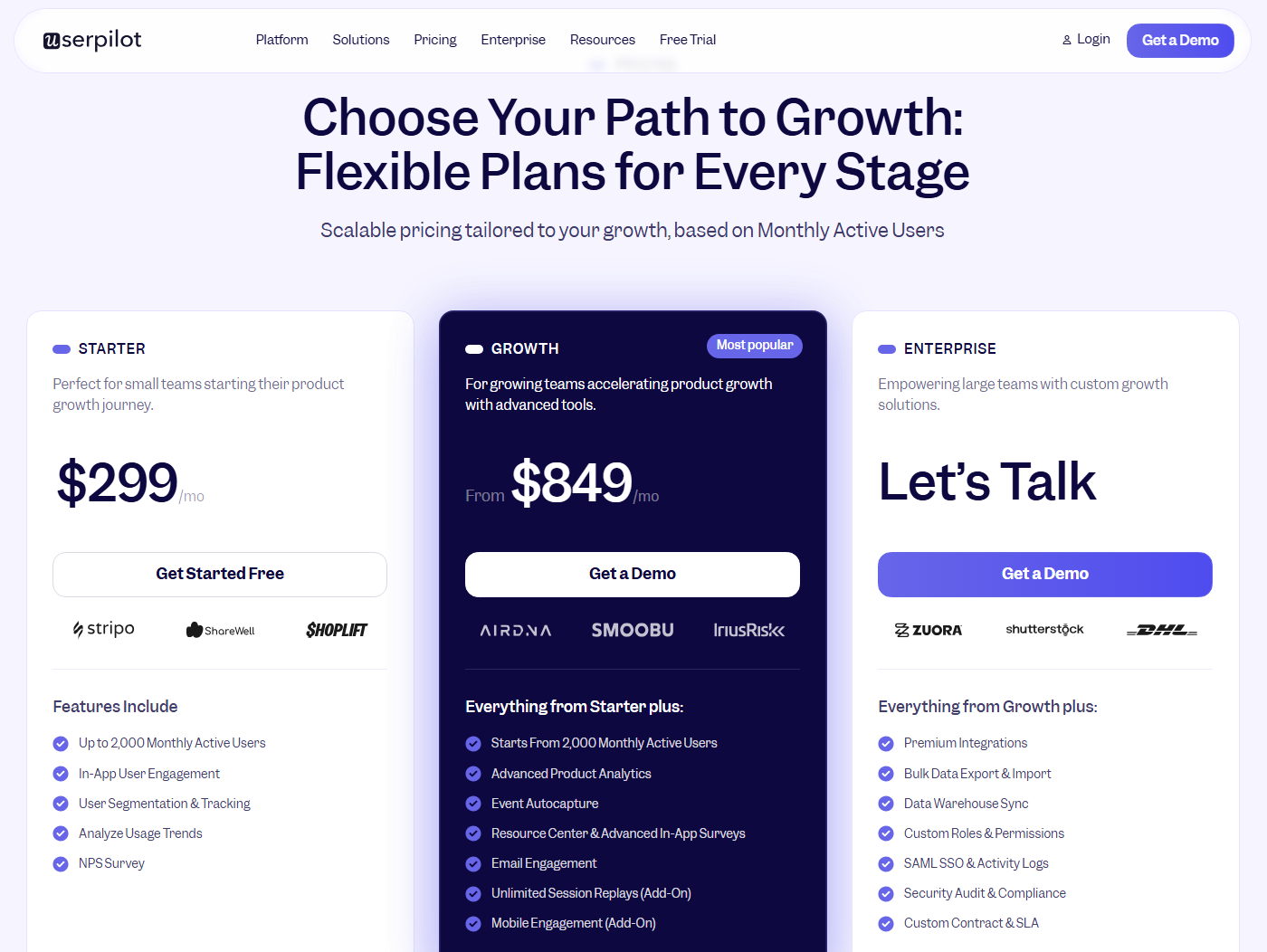
Userpilot’s pricing starts at $299/month for the Starter plan, increases to $849/month for Growth, and offers custom quotes for Enterprise customers:
| Starter | Growth | Enterprise | |
|---|---|---|---|
| Price | $299/month | $849/month | Custom quote |
| MAU cap | Up to 2,000 | Set by your own MAU number on the pricing page | Custom |
| In-app experiences | Unlimited | Unlimited | Unlimited |
| Analytics | Core analytics | Advanced product analytics, event autocapture | Advanced product analytics, event autocapture |
| Feedback | NPS | NPS | NPS |
| Engagement channels | Not included | Resource center, email engagement | Resource center, email engagement |
| Integrations | Standard | Standard | Premium integrations |
| Security and admin | Not included | Not included | SAML SSO, custom roles |
| Support | Not specified | Not specified | Dedicated CSM |
This puts the entry-level price for a Userpilot subscription at $3,588/year compared to the median annual cost of Whatfix at $31,950/year. In addition to being 89% cheaper, Userpilot’s pricing model is also far more straightforward and grows alongside the number of paying customers your SaaS product has. This inherently means that it will always provide an ROI because the price only increases if you’re getting more value out of our product and acquiring or retaining more customers as a result.
Pricing should be transparent, not complicated
If you don’t want to go through the headache of parsing Whatfix’s pricing model, booking sales calls, and negotiating renewal prices then no one would fault you for going with alternatives. Large enterprises with an abundance of time and money do get a lot of value out of Whatfix. It’s just that the sheer effort, learning curve, and investment amount needed to reach that point is usually far too impractical for all but the biggest clients.
Mid-market SaaS companies would benefit far more from an easy-to-use and affordable platform like Userpilot. Book a demo to see how a lightweight tool can offer transparent subscriptions, extensive features, and advanced analytics all on the same platform without resorting to confusing pricing!
Disclaimer: Userpilot strives to provide accurate information to help businesses determine the best solution for their particular needs. Due to the dynamic nature of the industry, the features offered by Userpilot and others often change over time. The statements made in this article are accurate to the best of Userpilot’s knowledge as of its publication/most recent update on July 26, 2026.
About the author