Userpilot vs Pendo: What You Get and What Pays Off Long-Term



Pendo and Userpilot used to compete mainly on helping product teams understand user behavior. Both platforms have since added to the package, so you now have to compare plans.
Pendo has expanded its offerings, with capabilities like Session Replay, Sentiment, and Orchestrate included in higher-tier plans or available as paid add-ons.
Userpilot is the agentic product adoption platform. Its Growth plan starts at $849/month and includes Product Analytics reports, In-App Engagement, and Session Replay. Some capabilities, such as Agent Analytics and MCP Analytics, are paid add-ons.
Price is only one part of the total cost of ownership, though. Use-case fit, implementation, maintenance, and support also shape the value you get. In this Userpilot vs Pendo comparison, I’ll look at each factor to help you decide which platform is the better long-term investment.
Executive summary
- Choose Pendo if you run several enterprise applications and have a dedicated analytics owner who can maintain tagging and cross-app reporting.
- Choose Userpilot if your team wants to act on usage data without a separate tagging project. Engineering can install it once. Product, growth, and customer success (CS) teams can then build flows and surveys on the same data.
- Compare cost by package, not plan name. Pendo is free up to 500 MAUs and quotes its paid plans. Userpilot’s Growth plan starts at $849/month (billed annually). Vendr reports that the median contract value for Pendo is $48,598/year, while Userpilot’s is at $18,000/year.
Userpilot vs Pendo at a glance
The table below summarizes the key differences, while the sections after it compare Pendo and Userpilot AI, analytics, onboarding, feedback collection/friction analysis, setup, and pricing in more detail.
| Pendo | Userpilot | |
|---|---|---|
| Category | Intelligent analytics and digital adoption platform | The agentic product adoption platform |
| AI capabilities | Leo on every plan.
Predict and Agent Analytics priced separately. Novus is a free standalone beta. |
Lia and Userpilot Headless on every plan.
Agent Analytics and MCP Analytics available as paid add-ons for Growth and Enterprise. |
| Product analytics | Deep retroactive analytics on tagged pages and features, including cross-app reporting.
Reports like funnels, paths, workflows, and retention. |
Product Analytics with autocapture and retroactive labeling: funnels, paths, retention, and ready-made dashboards. |
| User onboarding | Overlay guides, embedded guides, branching, and A/B testing. | In-App Engagement: flows, checklists, spotlights, banners, and experiments. |
| Feedback and friction analysis | Session replay on Core and Ultimate.
Sentiment and Listen come with Ultimate. Sentiment is also an add-on on Base and Core. |
Session replays, plus in-app and NPS surveys.
AI Session Summaries, AI Suggested Replays (both coming soon), AI Feedback Summaries, and AI Sentiment & Thematic Analysis available on Growth and Enterprise. |
| Implementation | Pages and features need tagging, and custom events need a developer. | Engineering installs once. Teams then create and manage in-app experiences with a no-code Chrome extension. |
| Pricing | Free up to 500 MAUs and paid plans quoted, with a median annual contract value of $48,598 per Vendr. | Starter from $299/month, Growth from $849/month (both billed annually), and Enterprise quoted, with a median annual contract value of $18,000 per Vendr. |
| Best fit | Large organizations managing multiple apps, with dedicated analytics owners and needs across product, IT, operations, HR, and customer success. | Product, growth, and CS teams that want to act on usage data in the same place they find it. |

What is Pendo, and what does it offer?
Pendo can track how employees adopt vendor tools like Salesforce and Workday. Product teams can turn to Pendo Listen to collect and prioritize product roadmap ideas, while customer success teams can use Predict to identify accounts at risk of churning.
This gives Pendo a broader role in larger organizations that run multiple applications for employees and customers.
What is Userpilot, and what does it offer?
Userpilot helps product teams analyze user behavior and act on those insights to drive adoption and retention. Alongside growth and CS teams, you can create onboarding flows, deliver in-app guidance, collect customer feedback, and see whether those changes worked. Lia, our AI agent, helps you investigate product questions and draft in-app experiences you can edit in Userpilot.
Userpilot focuses on the product your team owns, covering onboarding, feature adoption, and retention.
Pendo AI vs Userpilot AI: Which AI suite helps teams make smarter product decisions?
Both platforms have AI agents, Leo and Lia, and ways to work with external AI tools. They also measure the agents you ship. Lia works from the same data you use to act on it. Pendo splits AI across Leo, Predict, and Novus, which suits larger, more technical teams.
Comparing AI agent workflows
Leo and Lia answer plain-language questions and turn a finding into a guide draft. Lia also runs packaged analyses from a slash command. The clearest difference is how each one handles a drop in usage.
Pendo’s Leo uses Signals, which surfaces automatically generated insights (beta). If Leo finds a segment that’s logging in less often, a PM can prompt it to build a guide that encourages those users to return.
When activation drops, Lia runs the /analyze-activation skill. She scans segments, Product Analytics, user feedback, content engagement, and session replays to find where users drop off. Then she explains what she found and drafts an in-app guide for the dropped-off segment.
Comparing both platforms’ AI suite
Pendo offers more AI products for engineering-led and customer success teams, such as Novus and Predict. Userpilot adds MCP Analytics for measuring external agents.
- Working from your own AI tools: Pendo has an MCP server and Userpilot has Userpilot Headless. Both let you ask questions about your product and create segments or reports from an external AI tool.
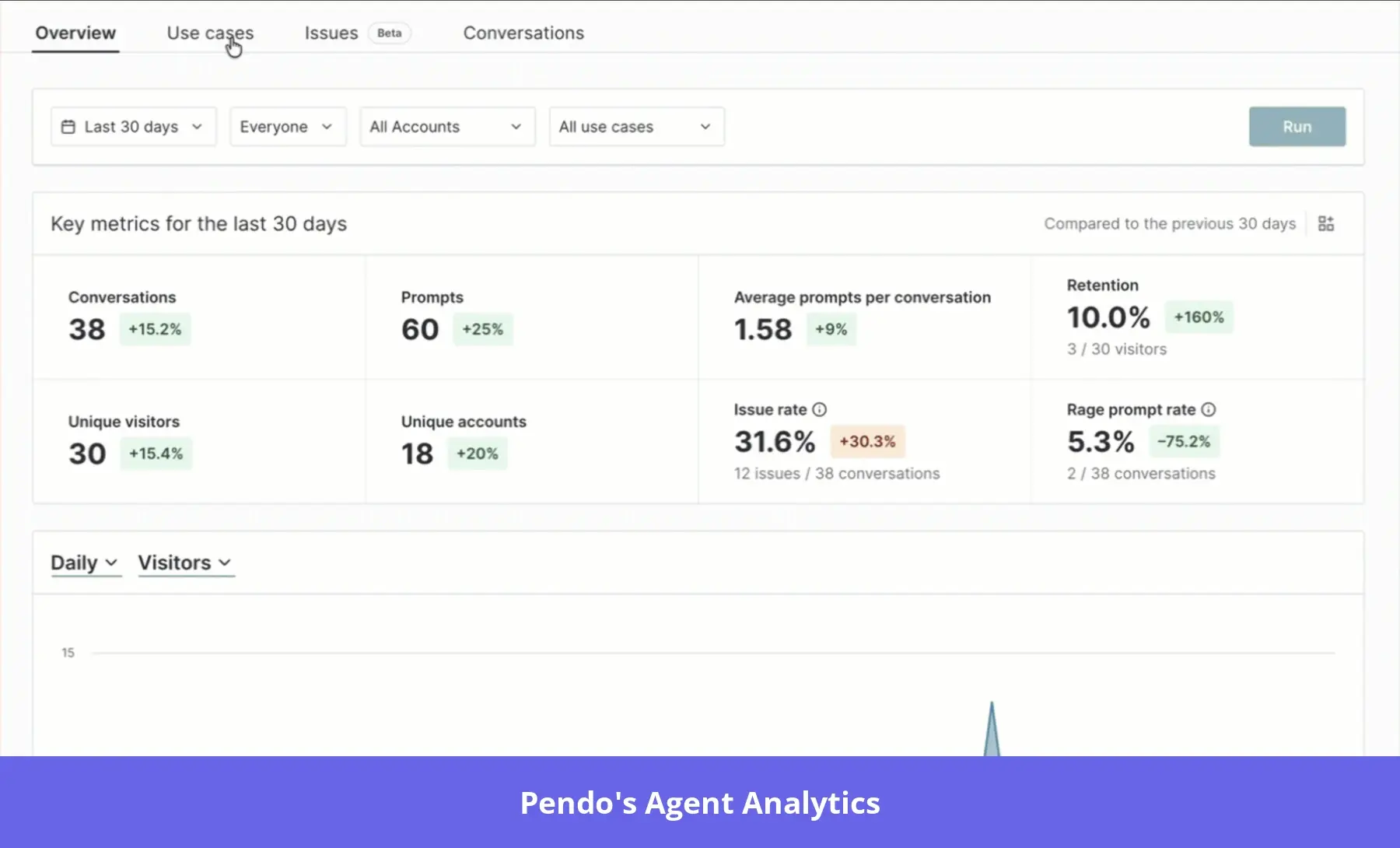
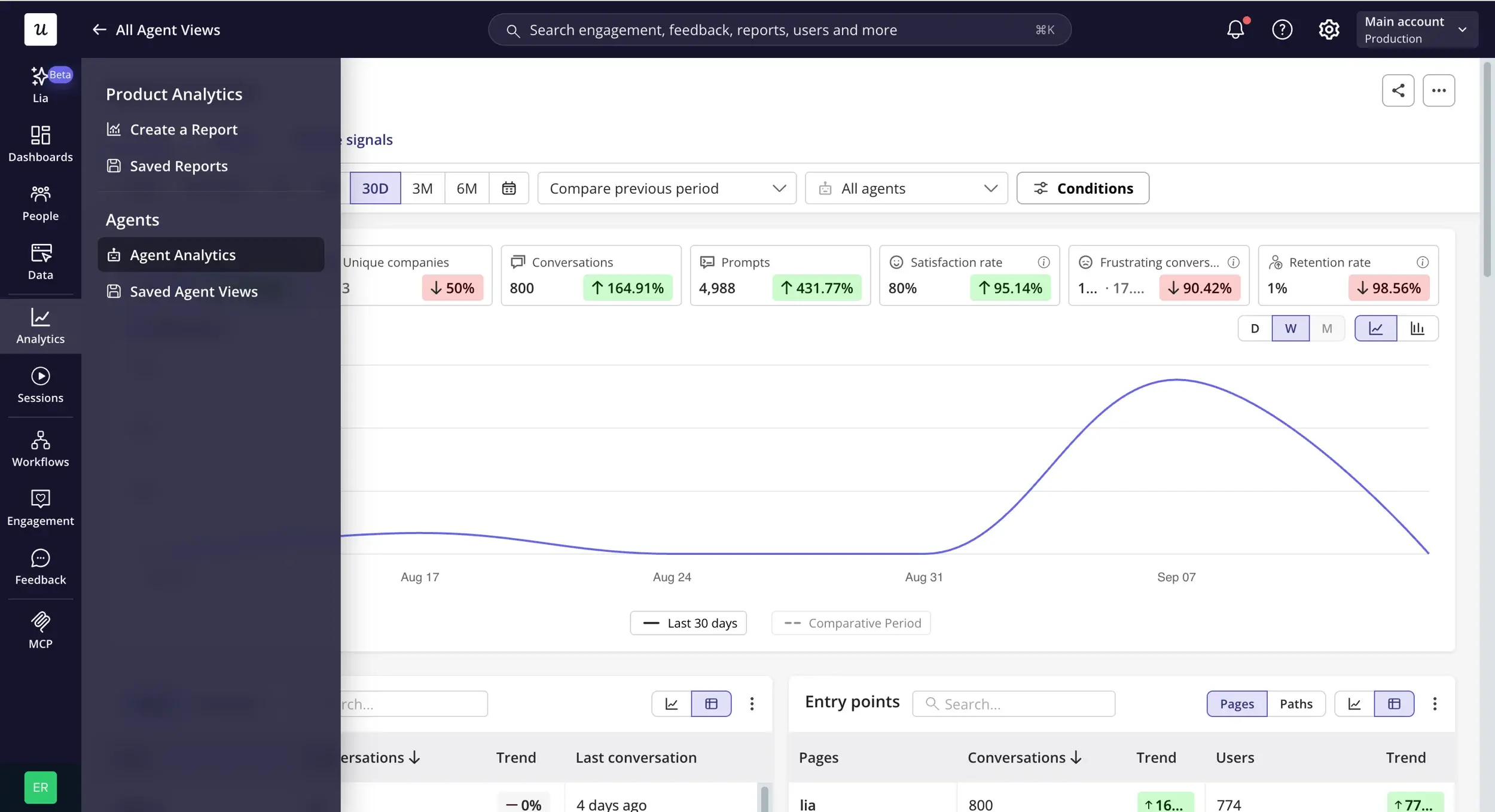
- Agent analytics: Each platform measures how users interact with the AI agent in your product. Userpilot’s Agent Analytics lets you see what users ask, where the agent fails them (including escalations to a human), and whether agent users retain better. Pendo’s Agent Analytics also enables you to understand users, catch failures early, and prove value. Userpilot’s MCP Analytics is a separate tool that measures external agents’ activity through MCP.
- AI instrumentation: Pendo’s Novus (beta) connects to your codebase and opens pull requests (PRs) to add tracking. In Userpilot, you label front-end events without changing your code, and Lia drafts those labels for you to review. Meanwhile, back-end events still need engineering today.
- Churn prediction: Pendo Predict is a standalone product for customer success managers. It predicts churn likelihood from product usage and CRM data and suggests next steps for high-risk accounts. In Userpilot, Lia works from your product data, flags accounts with declining usage, and traces the drop to the features they stopped using.
Who’s better at analyzing product adoption and retention?
Pendo and Userpilot cover the core reports: funnels, paths, and retention. But Pendo’s advanced analytics span several applications, while Userpilot’s Product Analytics sits next to In-App Engagement, so you can act on a finding in the same place.
Pendo for product analytics
- Retroactive data: Pendo collects some raw events from installation. You can then analyze that data retroactively by tagging features and pages.
- Journey reports: Paths, conversion funnels, and workflows show where users go and where they drop off, even across apps. An Insights dashboard collects patterns Pendo’s AI discovers.
- Retention and engagement: Cohort retention shows which user groups stay. The Product Engagement Score (PES) combines adoption, stickiness, and growth into one product score.
- Visitors and accounts: Pendo builds profiles for individual visitors and for accounts, which are visitors grouped by company.
- Custom reporting: Data Explorer lets you combine reports and segments, with advanced filters and formulas.
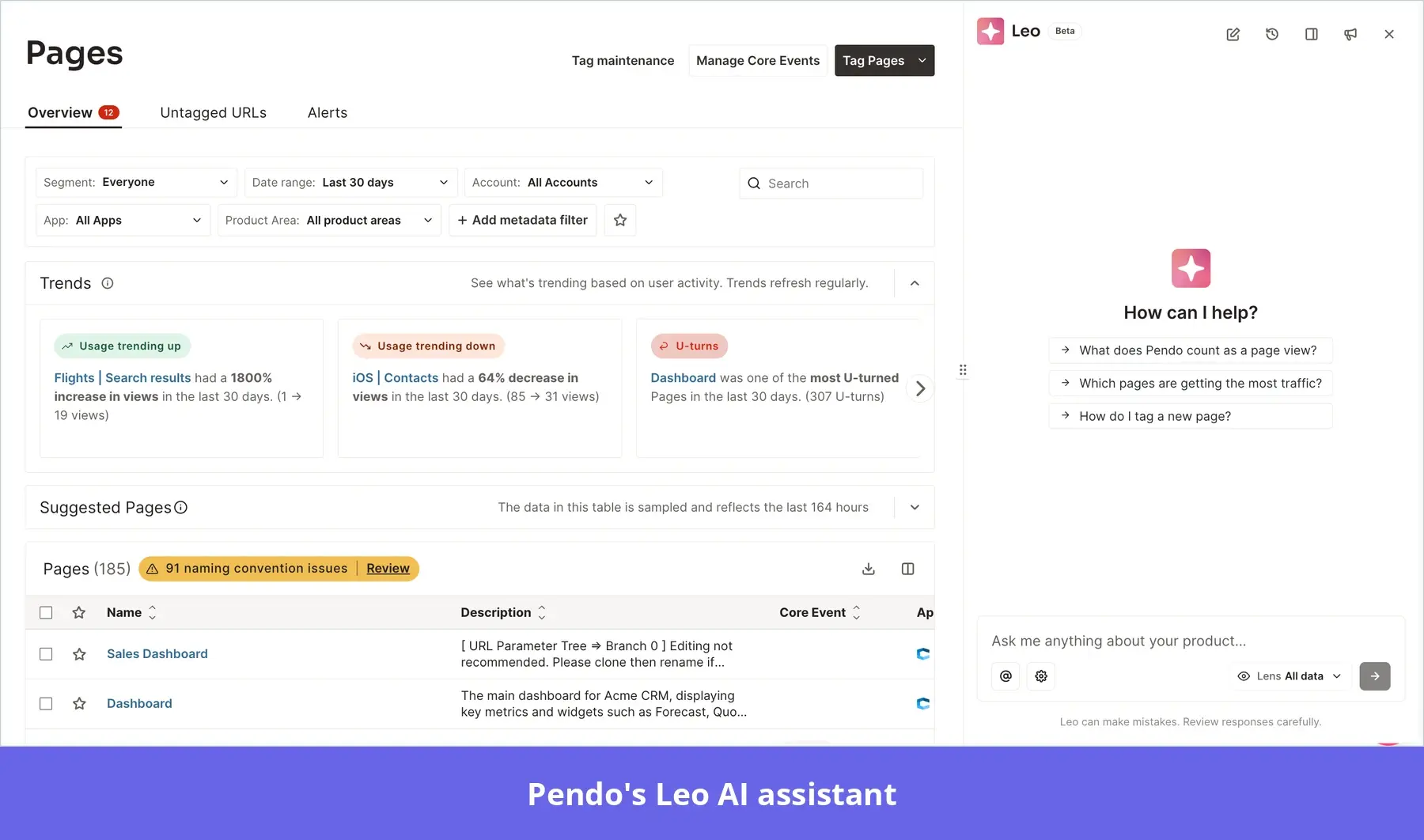
To compare SMB and enterprise retention, a PM defines feature click events and asks Leo to analyze both segments in a Data Explorer report.
The report shows that SMB users activate less, so the PM opens a path chart from signup to see where those users leave. The PM can then share these reports with leadership.
Userpilot for product analytics
- Retroactive analytics: Autocapture tracks clicks, inputs, and form submissions once you turn it on. You can then label events without code changes to analyze all historical data in reports.
- Product experience reports: Trends, funnels, paths, retention, and workflow performance, with advanced filters. The upcoming correlation analysis chart also lets you identify which events are associated with conversion, adoption, and activation.
- Dashboards: Pre-made dashboards for activation, feature engagement, retention, and free-to-paid conversion. You can also create custom dashboards.
- Users and accounts: Profiles for individual users and for accounts, with survey responses, segments, and session history in one place.
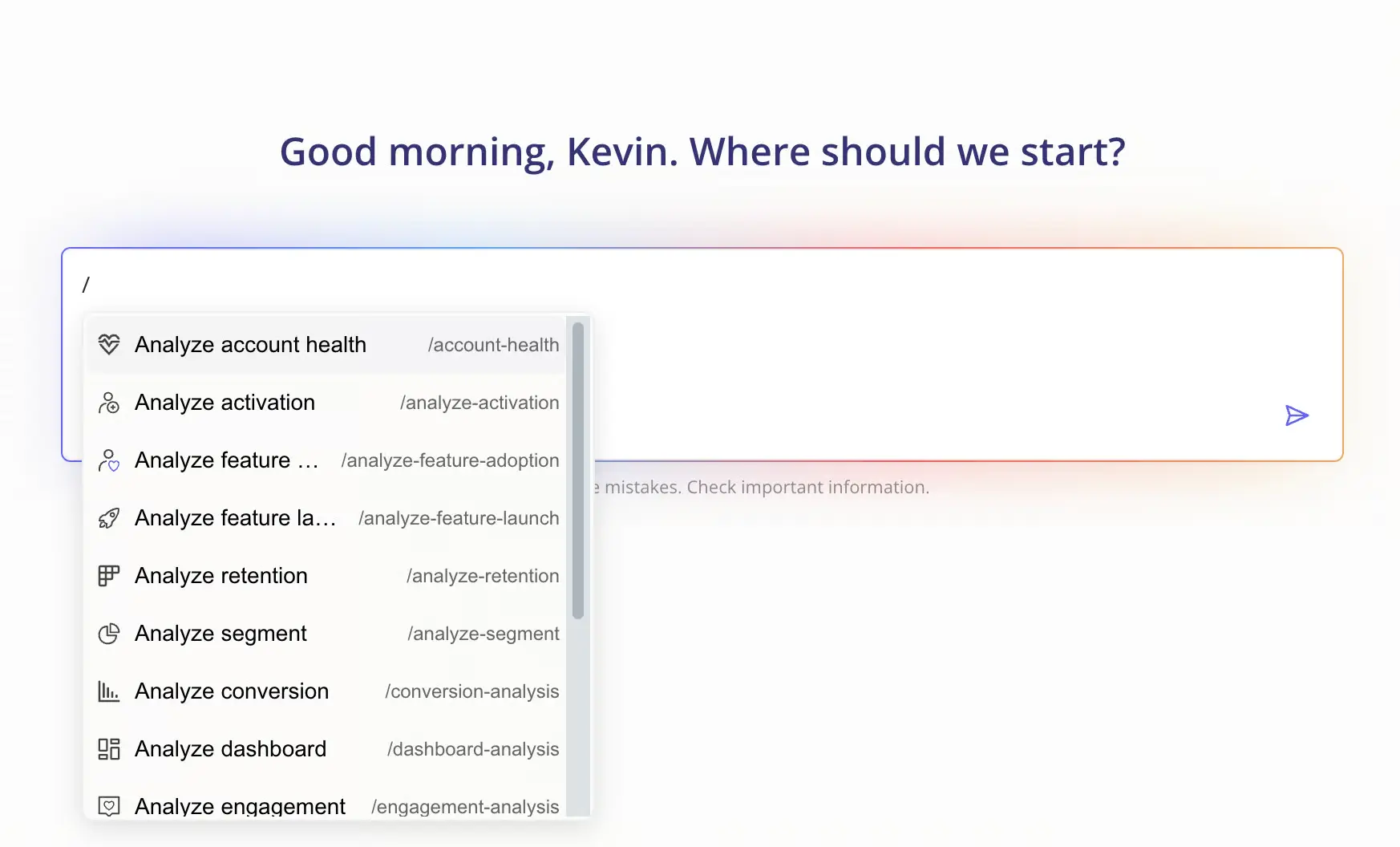
A CSM uses Lia’s retention skill and finds that users who connect an integration in their first week retain better. That’s a correlation, so the CSM tests it.
They show a tutorial to users who haven’t connected an integration and keep a control group. The retention gap between the two groups shows whether the tutorial helped.
Which platform delivers better user onboarding and feature adoption?
The two platforms support user onboarding and feature adoption, with in-app guides, targeting, and guide analytics.
Pendo guides activate on pages, badges, and tagged elements, and its themes cover most styling. Userpilot flows can also trigger on any labeled event, so you can target a flow at users who did (or didn’t) do something.
Pendo for onboarding users
Pendo’s guides are no-code, but matching your app’s design may take custom CSS themes, and embedded guides may need engineering to align with your UI.
- Guide formats: Overlays (lightboxes, banners, and tooltips) and embedded guides. Polls and checklists are content building blocks.
- Advanced options: Guide logic, embedded guides, and A/B tests need Guides Pro, which you request through Pendo sales. Cross-channel journeys need Orchestrate, included in Ultimate or sold as an add-on.
- Targeting: Guides trigger on page visits, badge clicks, or interactions with tagged features and UI elements. They can also target segments built from tagged pages, feature clicks, and metadata.
- AI help: Leo drafts a guide from a prompt (Guides Pro feature), and you review and publish it.
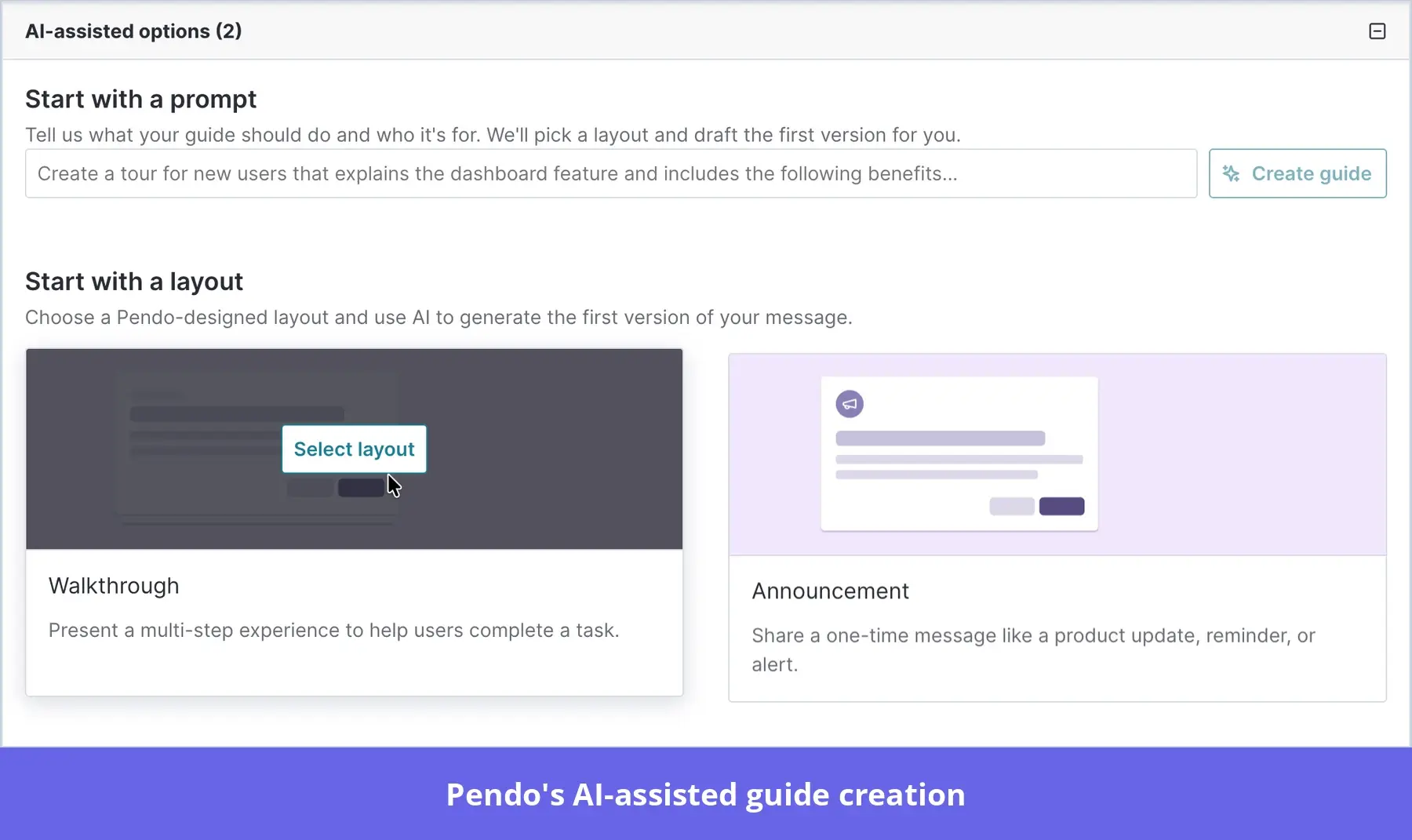
- Guide metrics: Views, element clicks, time on guides, step completions, closed guides, and snoozes.
After launching a reporting feature, the team tags the “Save report” button and triggers an interactive walkthrough when new users first visit the page. Guide analytics then track how many go on to save a report.
Userpilot for onboarding users
In Userpilot, you build flows with the Chrome extension, directly on your app’s pages, and style them with built-in styling tools.
Flows can trigger on events, so you can show different flows to different personas. Cuvama, one of our customers, found it hard to build company-specific flows in Pendo.
Leyre Iniguez, Lead Product Manager at Cuvama, said:
With Pendo, I could not do, or at least I didn’t know how to easily do, specific flows for specific companies.
- Flow types: Onboarding flows with modals, tooltips, slideouts, and driven actions (tooltips that wait for the user to take an action). Branching logic and skip steps are included.
- Checklists and spotlights: Checklists, hotspots, native tooltips, banners, and embedded cards.
- Targeting: Flows trigger on pages and events. You can also trigger them manually through other Userpilot content, permalinks, or a JavaScript snippet, and target specific segments.
- Agentic AI: Lia drafts onboarding flows from a prompt, using your user data and analytics as context. You edit the draft in Userpilot.
- Flow analytics: Flows shown, completed, and dismissed, average time to complete, and goal tracking, with customizable filters, performance trends, and step-by-step breakdowns.
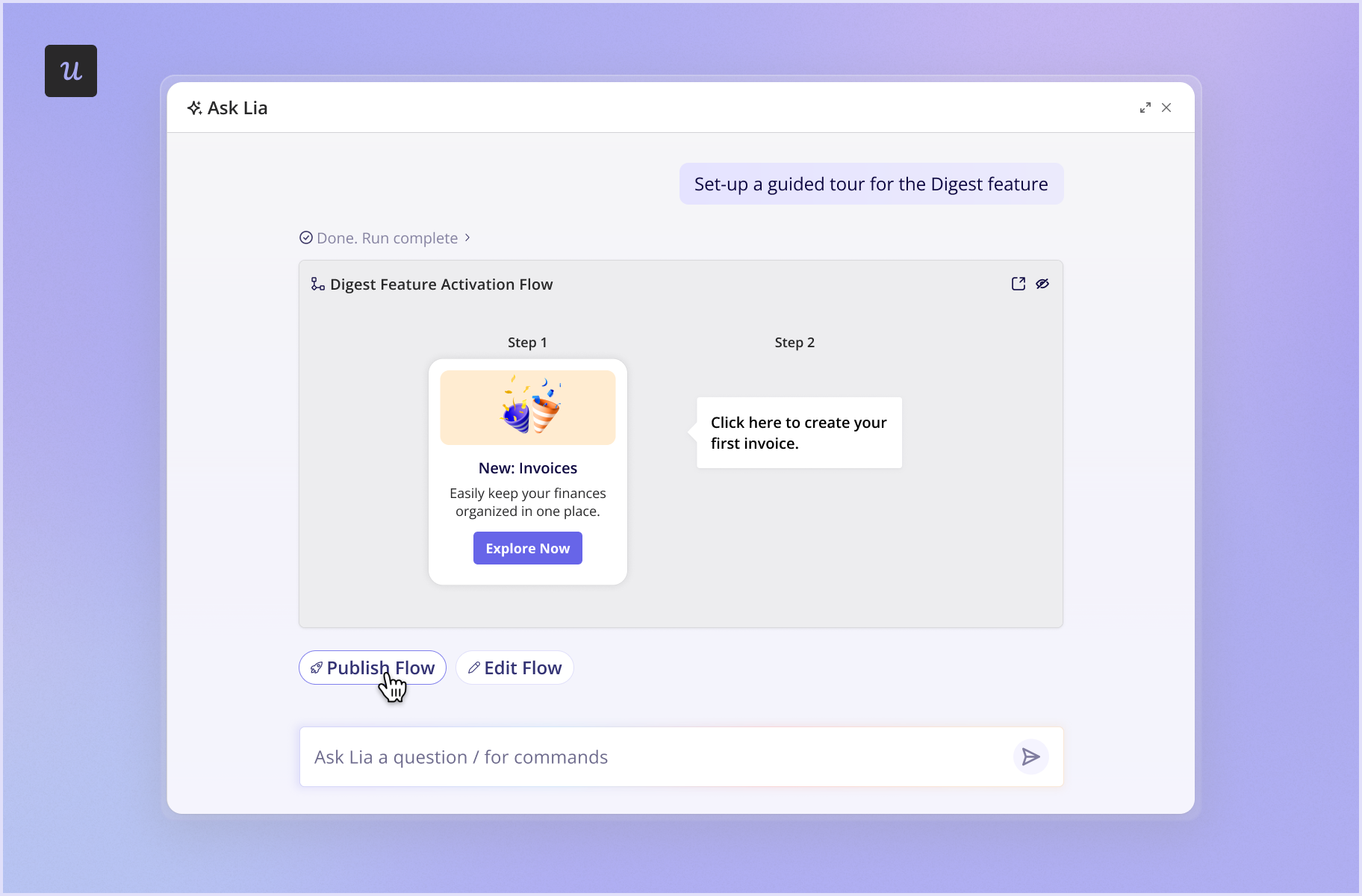
For example, your feature engagement dashboard shows that new accounts rarely create invoices.
You show a short tooltip flow to users who visited “Invoices” without sending one and test it against a control group. Lia then shows you whether invoice creation went up in the group that saw the flow.
Who’s better at uncovering friction before customers churn?
Pendo and Userpilot each offer in-app surveys and session replays. However, Pendo splits feedback across separate modules and plans. Userpilot runs surveys and session replays on the same user data.
Pendo for uncovering user friction
- Polls: Customizable surveys you add to Guides.
- Sentiment: Templates for NPS, CSAT, PMF, and UX-Lite surveys. Sentiment (available on Ultimate or as an add-on) triggers surveys automatically or on a schedule. It also calculates user sentiment scores, which polls don’t.
- Listen: Collects user feedback and feature requests; comes with Ultimate.
- Session Replay: Filters for rage clicks, error clicks, and U-turns. It’s included on Core and Ultimate, and as an add-on on Base.
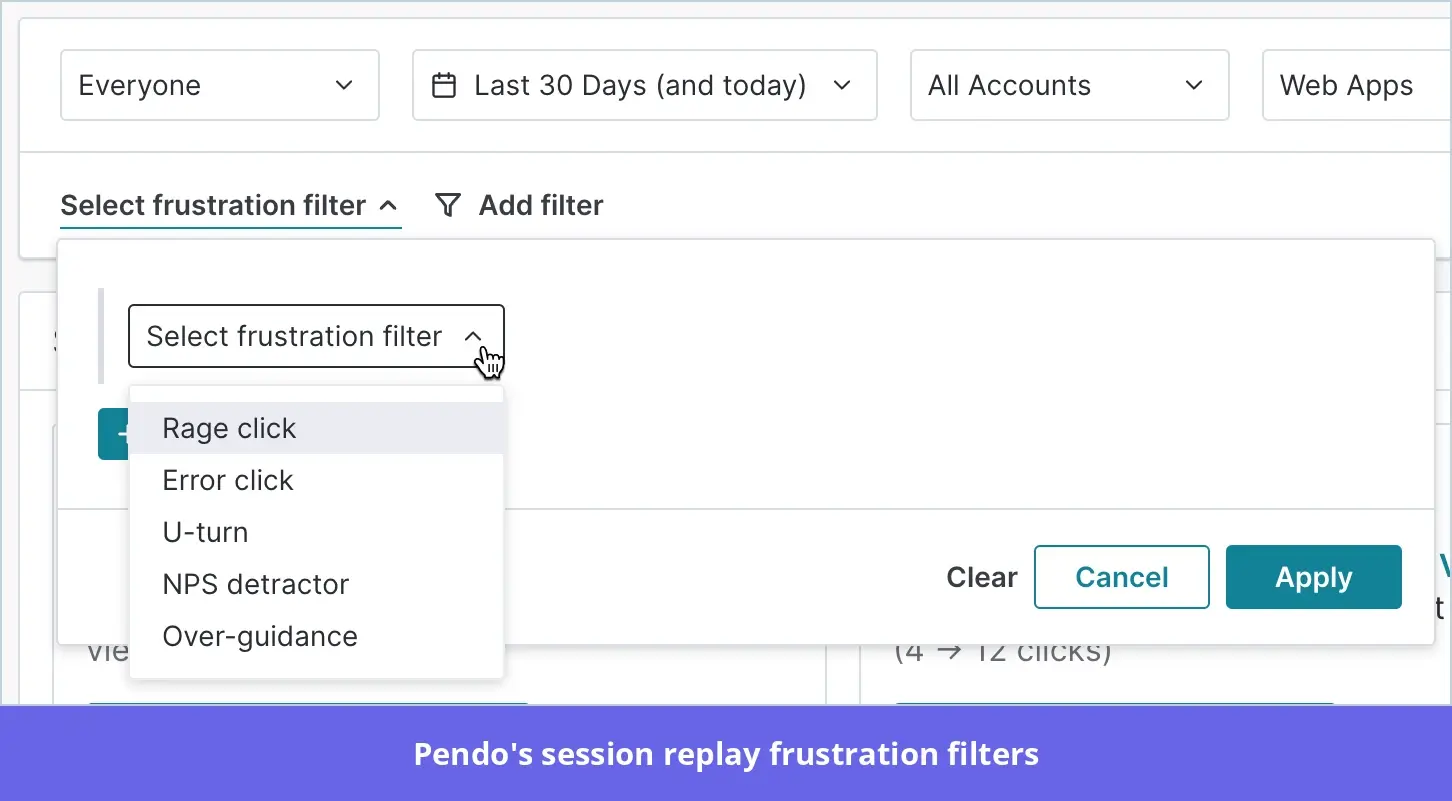
During account setup, users repeatedly click a disabled “Invite” button at the permissions step. A rage-click filter in Session Replay helps the team spot the issue.
A short survey confirms users don’t know how to invite teammates. The team then adds a tooltip to help users set up their account while they fix the button.
Userpilot for uncovering user friction
- Session Replay: Five frustration signals (rage, dead, and error clicks, U-turns, and form abandonment), three performance signals, and an “Errors & Frustrations” overview. You can also skip idle time and watch sessions from users who dropped off after a survey.
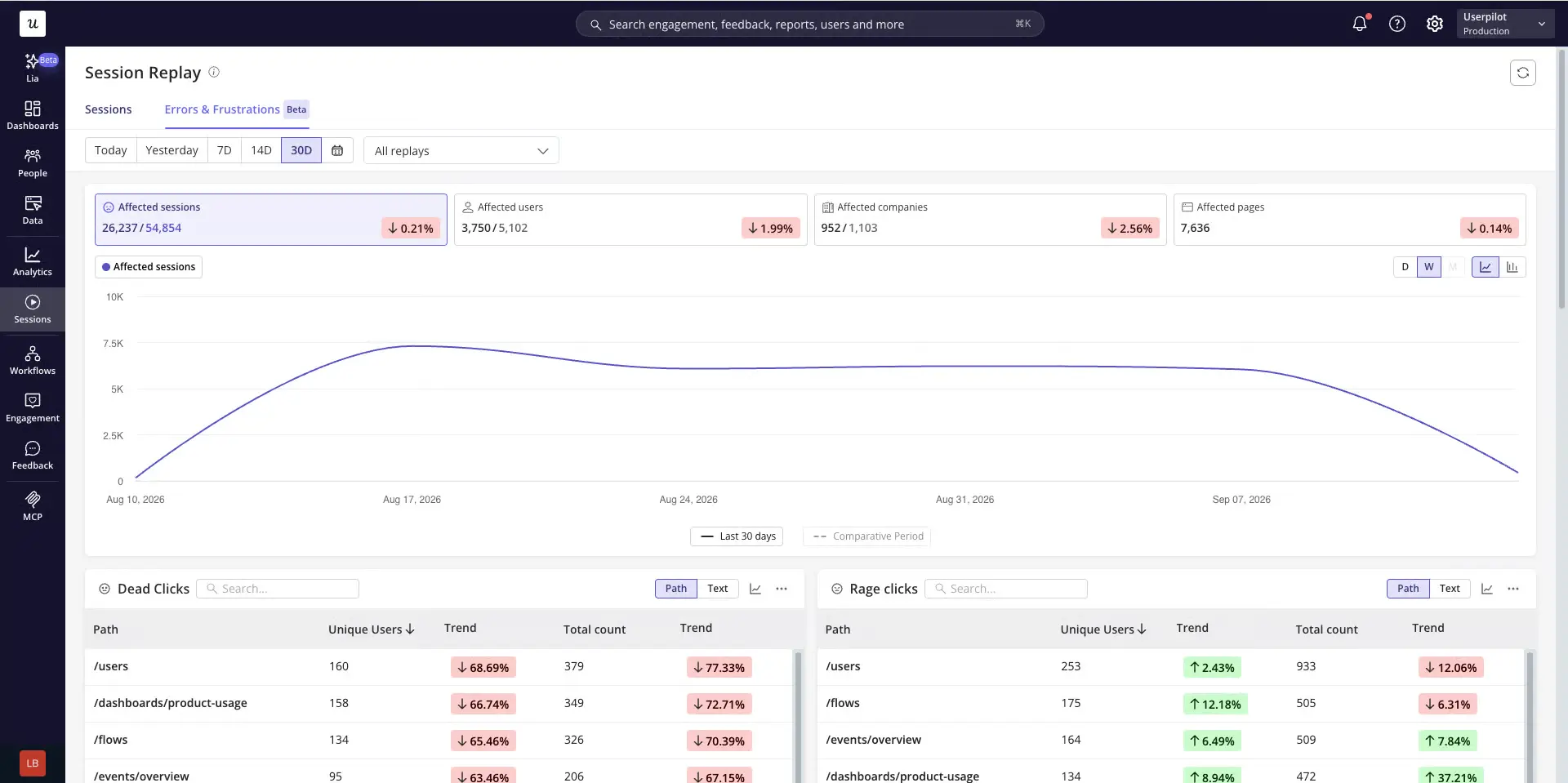
- Surveys and NPS: In-app surveys with styling options and 30+ templates, with follow-up questions that depend on the user’s answer. Surveys can trigger on events, so users answer right after they hit the problem.
- AI Feedback: AI summaries of responses, plus tags for common themes and issues, so you can segment detractors and target win-back campaigns.
For example, a funnel report shows half of new users abandon the onboarding flow at step three. You filter session replays to those users and watch them trigger a visual bug. You collect feedback from a one-question survey to confirm the roadblock.
Then, you add a tooltip that steers users around the bug while engineering fixes it, and A/B test it against a control group to see whether the drop-offs fall.
Katie Kelly, a UX Researcher at Userpilot, said this has helped her find gaps based on evidence:
I do find myself sometimes having assumptions based on the data, and I do have to catch myself. That’s where the behavioral data really comes in handy, because you’re filling in the gaps rather than using your own mental models.
Which platform’s pricing provides long-term business value?
Pendo and Userpilot differ in how you buy and in what the quote includes. Pendo has a free plan of up to 500 MAUs, and sales quotes its paid plans.
Userpilot publishes its starting prices, although it quotes Enterprise and some add-ons. Vendr’s median annual contract is $48,598 for Pendo and $18,000 for Userpilot.
Because add-ons change the total, ask each vendor to quote the package you would actually use.
| Pendo | Userpilot | |
|---|---|---|
| Pricing model | Free plan, paid plans quoted by sales | Published Starter and Growth prices, Enterprise quoted |
| Entry-level plan | Free, up to 500 MAUs | Starter at $299/month, up to 2,000 MAUs |
| Entry plan includes | Product analytics on every plan | Trends on Starter, full reports and Labeled Events on Growth |
| Pricing metric | MAUs plus modules | MAUs plus add-ons |
| Add-ons to check in a quote | Predict, Agent Analytics, Guides Pro, Orchestrate, Sentiment, Listen, Session Replay on Base | Agent Analytics, MCP Analytics |
| Scaling cost | Rises with MAUs and each module | Rises with MAU tiers |
| Vendr median annual contract | $48,598/year | $18,000/year |
Pendo’s price makes sense when you use its cross-app reporting and modules like Predict and Orchestrate.
Here’s Rachel J., a Pendo enterprise customer appreciating its AI-powered insights:
Thanks to Pendo, we can see where client pain points are and where they are succeeding. We can see what is and is not working in their experience, all powered by AI…
We see when they go in circles trying to find the right path for their journey and when they are able to quickly locate the options they want. Pendo uses AI to auto-suggest improvements and to perform baseline data analytics for us, allowing us to do a deeper dive on the information we need.
Userpilot fits better if you need analytics, in-app engagement, and feedback in one platform and want to see a starting price before you talk to sales.
Joanne R., a product marketing specialist in human resources, shares all they can do with Userpilot:
Userpilot is an easy-to-use solution and flexible enough to create experiences tailored to our branding and different targets. We use it to design personalized onboarding flows, deliver in-app communications during launches, conduct surveys, and measure satisfaction via NPS.
Behavioral data also allows us to better understand usage, identify friction points, and adapt our journeys. The connection with HubSpot is particularly useful for transmitting engagement information to our sales teams and improving account tracking.
Either way, compare the cost over your contract term, including MAU growth and renewal, not just the first-year quote.
Pendo vs Userpilot: What matters for your decision
Three more things to consider besides cost:
- Migration and support: A Userpilot specialist recreates your Pendo guides and surveys. Ask each vendor who owns the work after the launch.
- Ease of use: Ask who will build and update guides and surveys week to week. In Userpilot, product, CS, and marketing teams can do it after engineering installs the platform.
- Time to value: In a UserEvidence survey of customers who switched from Pendo, respondents reported reaching ROI in about two months, on average.In the same survey, 56% said they made better product decisions and 44% said onboarding became more effective.
Our customer Shelterluv had Userpilot running within one to two weeks. Senior Customer Solutions Manager Matthew Brown recalls:
One of the biggest feedback the team had about Pendo was like, we just don’t know how to use it. And it’s hard to figure out. We don’t have the time to just like, sit and read through everything to figure out how to use it.
Go from usage data to in-app action with Userpilot!
Pendo vs Userpilot comes down to the work your team does every week. If that work is finding where users stall and changing what they see, Userpilot is built for it.
Userpilot is the agentic product adoption platform, with Product Analytics, Session Replay, and In-App Engagement running on the same user data. A funnel drop-off leads to the sessions behind it and then to a flow for the affected users.
Lia reviews the funnel and feedback, flags the affected segment, and drafts the in-app experience for you to edit.
If you need cross-app reporting or churn scores that sync to your CRM, Pendo is still the stronger fit. Otherwise, book a demo and we’ll show you how Userpilot covers what your team uses in Pendo today.
Disclaimer: Userpilot strives to provide accurate information to help businesses determine the best solution for their particular needs. Due to the dynamic nature of the industry, the features offered by Userpilot and others often change over time. The statements made in this article are accurate to the best of Userpilot’s knowledge as of its publication/most recent update on November 10, 2026.
FAQ
Is Pendo or Userpilot better for product analytics?
Pendo suits enterprise analytics teams that need cross-app reporting and Data Explorer. Userpilot works best for teams that want to act on findings, with funnels, paths, retention, and in-app flows in one place.
How much does Pendo cost compared with Userpilot?
Pendo is free up to 500 MAUs, and its paid plans are quoted through sales. Userpilot Starter costs $299/month and Growth starts at $849/month. Vendr’s median annual contracts are $48,598 for Pendo and $18,000 for Userpilot.
How do Pendo and Userpilot compare on AI capabilities?
Pendo’s Leo answers questions in plain language, Signals (beta) surfaces insights, Predict scores churn risk, and Novus (beta) handles instrumentation. Userpilot’s Lia analyzes product data, creates segments, reports, and survey drafts, and drafts editable in-app experiences.
Pendo has MCP Server and Userpilot has Userpilot Headless. Both sell Agent Analytics as an add-on, with Userpilot adding MCP Analytics.
Is Userpilot a good alternative to Pendo?
Yes, if your main jobs are onboarding, feature adoption, feedback, and product analytics. Pendo remains the stronger option for cross-app analytics or churn scores that sync to your CRM.
How difficult is it to switch from Pendo to Userpilot?
Userpilot includes migration at no extra cost. A dedicated specialist imports your historical events and recreates your Pendo guides and surveys 1:1.
You keep full Userpilot access until your Pendo contract expires, so you can run both during the switch. Most teams are live within a few weeks, and Shelterluv had Userpilot running in one to two weeks.
About the author