A PM Guide to AI Product Analytics: From Data to Decisions


AI product analytics is about using AI to analyze product usage data, understand user behavior, and make better product decisions. But from what I’ve observed, most product teams aren’t handing their analytics over to autonomous agents just yet.
As Head of Product at Userpilot, I get to see this from both sides. We build analytics tools for product teams, and we use them ourselves to understand how people interact with our product. I was curious how other teams were approaching AI, so I looked at patterns in our internal data and joined Reddit discussions where fellow PMs and analysts shared their experiences.
What I found was a fairly practical mix of use cases: query and code generation (41.8%), reporting (35.8%), automation (28.4%), conversational analytics (22.4%), and insight discovery (17.9%).
So I’ll share what I’ve learned about where AI is useful and how to incorporate it into your workflow.
Executive summary
- Most product teams use AI to speed up existing analytics tasks, not to hand the entire process over to autonomous agents. The most common use cases I found are query and code generation (41.8%) and reporting (35.8%).
- AI can help you in cases like answering product questions, building analyses, explaining findings, investigating changes, and monitoring product health.
- The bigger opportunity is using AI beyond reactive analysis. Once you understand what happened and why, AI can help predict potential issues, recommend next steps, implement solutions, and measure their impact.
- AI still needs human judgment and reliable data. You need to validate its analyses and recommendations, and make sure important product events are tracked.
- At Userpilot, our MCP lets you query product data in external AI tools, Lia helps investigate insights and act on them, and Agent Analytics helps you understand and improve AI agent experiences.

How product teams are using AI for product analytics
In my opinion, AI product analytics has four layers. Descriptive analytics tells us what happened, diagnostic analytics helps us understand why, predictive analytics anticipates what might happen next, and prescriptive analytics recommends what to do about it.
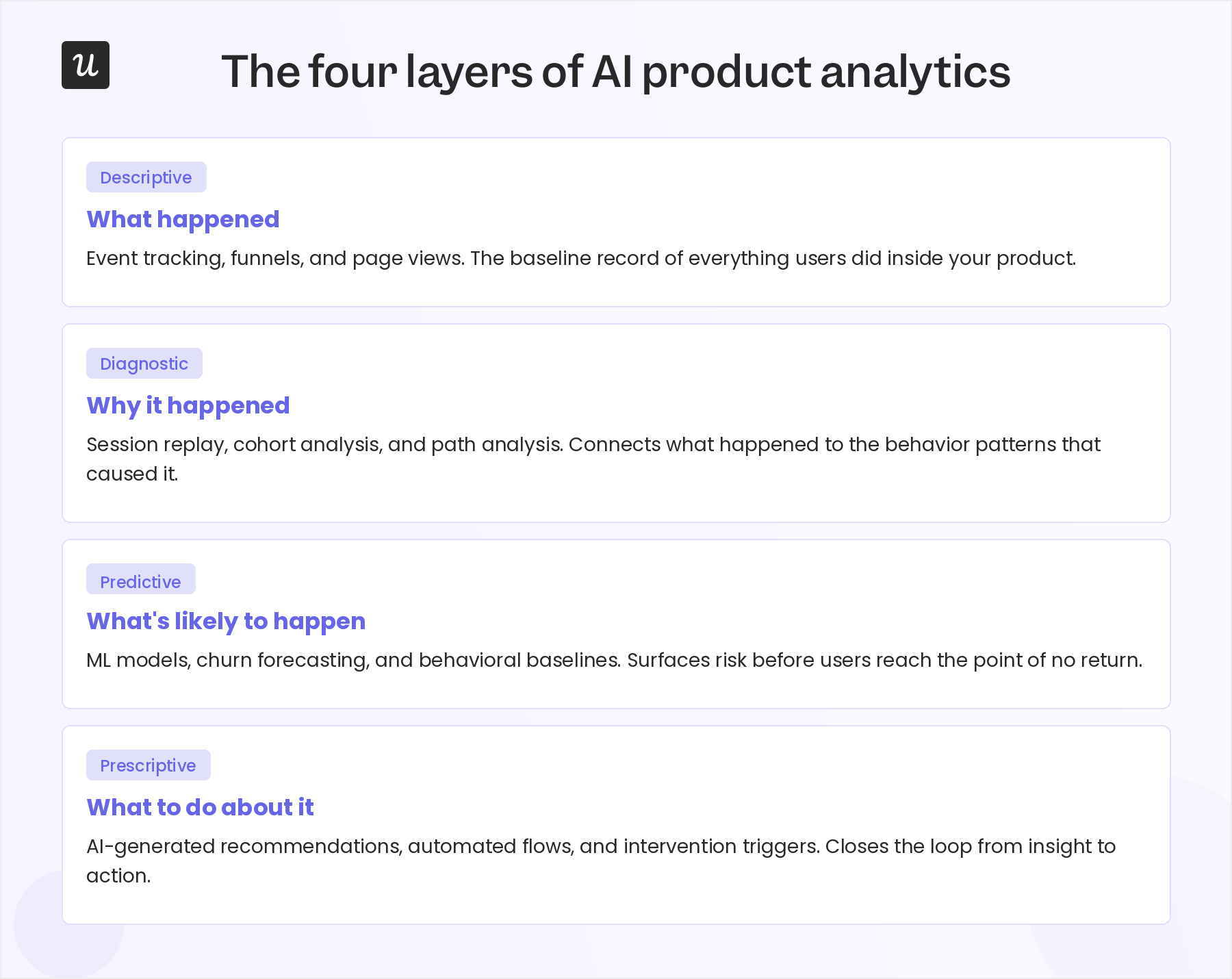
From what I’ve observed, most product teams are still operating in the first two layers. They’re mainly using AI to analyze historical data and understand product performance. That translates into five common jobs:
- Getting answers from product data.
- Building analyses.
- Making sense of the findings.
- Investigating changes.
- Monitoring performance over time.
But there’s a bigger opportunity in the last two layers. As AI analytics products mature, we can increasingly use them to predict potential issues, recommend what to do next, and sometimes even take action on those recommendations.
That’s also the direction we’re working toward with Lia, our AI agent at Userpilot. As we continue developing Lia, we’re keeping this bigger picture in mind to help product teams move beyond understanding their data to making and acting on better decisions.
Now let’s look at the five ways product teams are using AI for analytics today.
1. Ask product questions in natural language
This is a great job to begin with because it’s straightforward. Just ask a question about product usage in plain language, and let AI dig into the data to find the answer.
Instead of figuring out which report to build, selecting events, applying filters, and choosing the right segments, you can just ask:
- “Where do users drop off during onboarding?”
- “How does retention differ by persona?”
- “Did the new onboarding flow improve activation?”
- “Where in the user journey are new users getting stuck?”
- “Which user segment is likely to have the lowest activation rate?”
Our product team is already seeing the benefits of this new-and-improved workflow, as my fellow product manager at Userpilot puts it:
“I no longer need to spend hours jumping between dashboards or cross-referencing feature usage just to understand why user activation dropped. I can just ask AI.” — Abrar Abutouq, Product Manager, Userpilot
Conversational analytics changed how I work, too. I used to put many product questions and hunches on the back burner because I just didn’t have the time to investigate them. Now, I can follow those threads without holding up other work.
But the benefits extend far beyond product teams and become especially apparent with non-technical team members.
Sales, marketing, GTM, and leadership, for example, can now increasingly answer product questions themselves.
So the friction disappears on both sides. PMs can investigate more of their own questions, while everyone else has less reason to wait on them or the resident data analyst.

There are a couple of ways this can work with a digital analytics platform:
- Native AI chat: Some product analytics platforms are building AI assistants directly into the product, so you can ask questions without leaving the platform.
- MCP integrations: Other platforms let you connect your analytics data to AI tools you already use, like ChatGPT, Claude, or Cursor, through MCP (Model Context Protocol). That means you’re posing questions to an external AI tool rather than the analytics platform directly.
Userpilot offers both models, but let me exemplify with our MCP.
The MCP makes Userpilot product data available in AI tools, so you can easily ask questions about it in a new or existing chat.
For example, you could ask Claude mid-conversation: “How many users have adopted our new chat feature?”
The MCP finds the relevant data, runs the analysis, gives you the answer, and even creates the underlying Userpilot report for further exploration. So you get the answer quickly but can still dig into the detailed data when you need to.
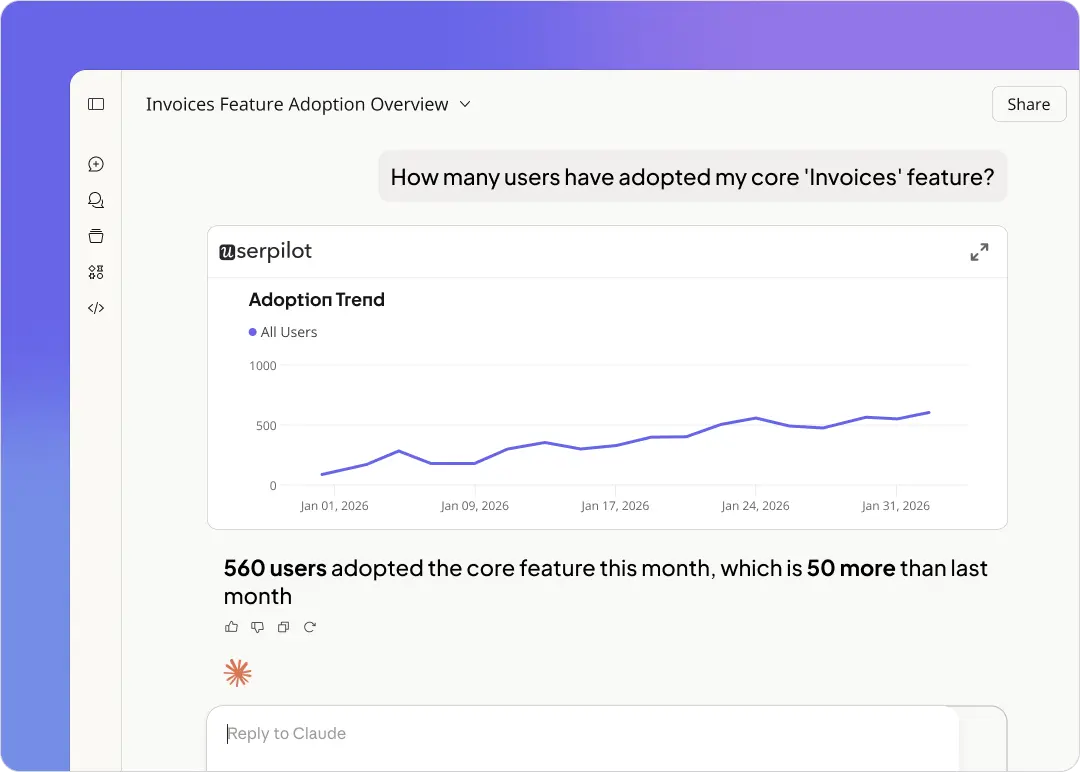
You don’t need to know whether your question requires a funnel, trend, retention report, or segment comparison. Just ask the question, and the AI will handle the mechanics.
To try this yourself, connect your analytics source to a native AI interface or MCP integration. Then start with the same questions you’d normally turn into an ad hoc report.
That said, the goal isn’t to replace product dashboards altogether. They’re still my go-to for recurring metrics.
But for everything else, it’s better to ask first and build the report only if you need it.
2. Build analyses faster
My research showed that query and code generation is the most common use case, showing up in almost half of examples (41.8%). For product teams, that job is often part of a bigger workflow: building analyses.
Teams love using AI to accelerate this process. They often use it to write SQL and Python, prep raw data, query events, and create funnels, analytics charts, and dashboards.
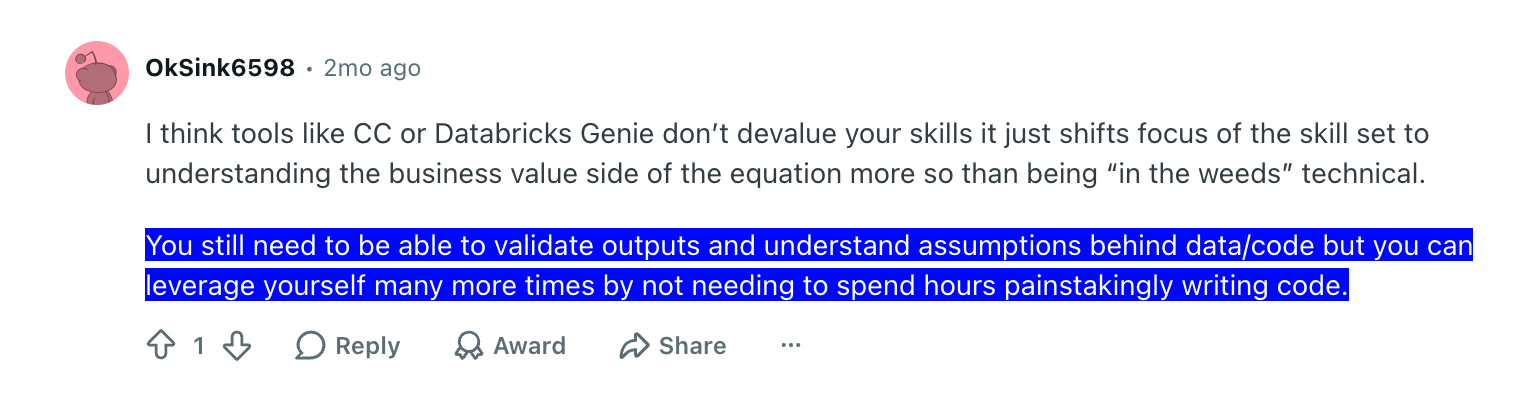
The caveat is that this only works when you know how to validate AI’s processes and outputs. If you wouldn’t know whether the SQL is wrong or the analysis makes sense, getting it generated faster isn’t necessarily going to help.
In short, AI won’t turn your team into data scientists or replace real data science expertise, but it can help handle routine analysis work well.
Analytics folks seem to agree:
We built Lia, our AI agent in Userpilot, on that idea. Lia isn’t meant to replace your judgment or do all of the thinking for you. It’s there to help you get to actionable insights faster and without tool-hopping.
It works with your product data from Userpilot, along with customer data you bring in from CRMs like HubSpot and Salesforce through our bi-directional Userpilot integrations.
You can ask it to analyze data, surface insights, make recommendations, and even build and test solutions like surveys or tooltips.
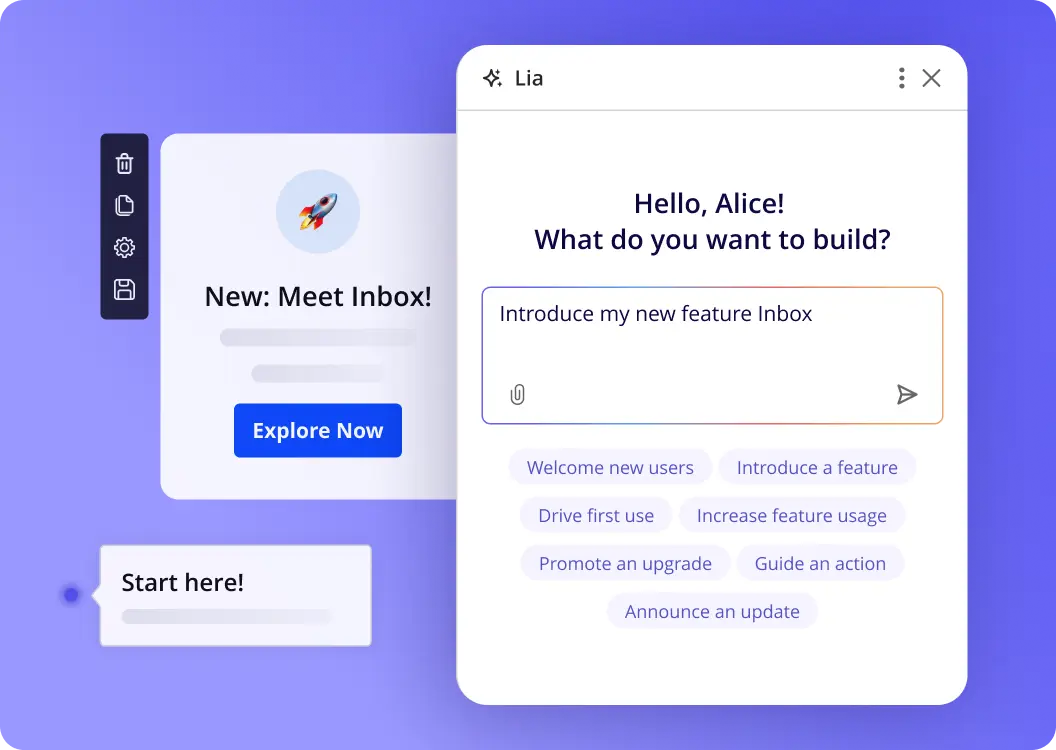
If you want to try this yourself, start with the repetitive parts of data analysis you already know how to check. Then you can let Lia analyze the data and propose a next step, then validate it yourself. Try Lia out!
3. Explain what the data means
Product people need to make sense of the data for themselves, but also often turn those insights into something others can understand, too. So they spend a lot of time creating dashboard summaries, weekly reports, stakeholder updates, and various documentation.
Personally, I’m relieved that I can now outsource this job to AI.
I find this especially useful with qualitative data, like survey responses, support tickets, and NPS comments. Traditionally, that data was mainly analyzed manually because legacy product analytics tools couldn’t really handle unstructured text.
AI, however, understands language, and that makes it pretty good at qualitative analytics. It can extract meaning, categorize responses by theme, analyze sentiment, and surface recurring patterns.
Say you collect 800 NPS responses. Instead of reading them one by one, you could use AI to pull out the top complaints, rank the themes, and attach representative comments to each one.
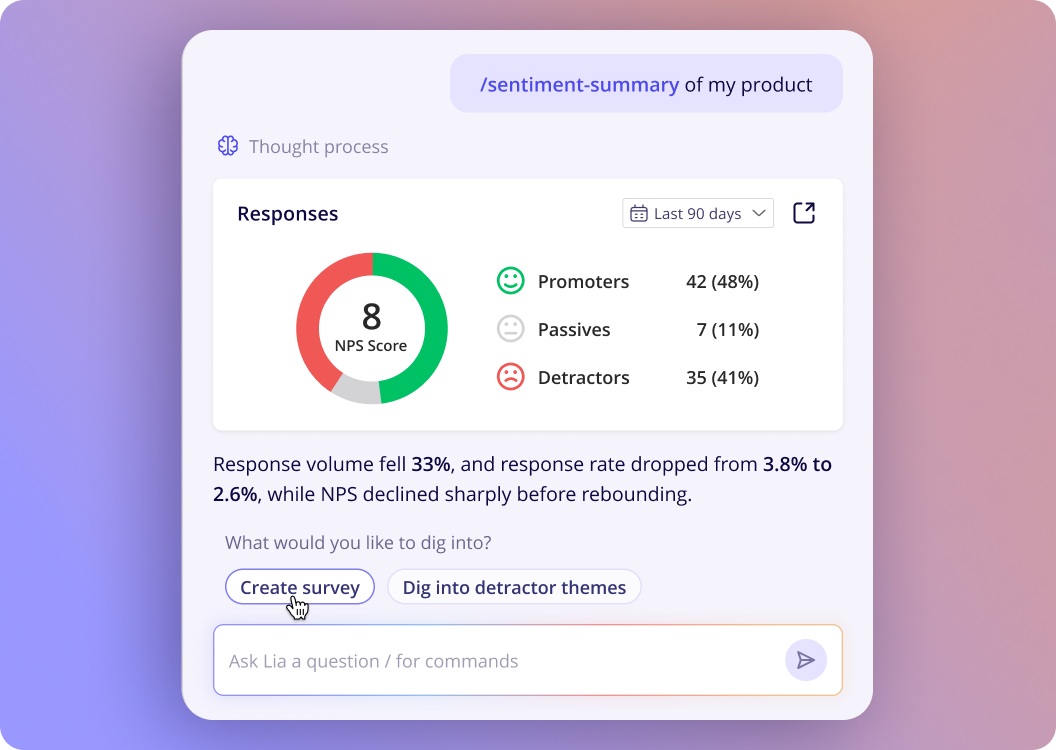
And this can have a real impact on product decisions. For example, one person said AI helped surface demand for a feature that ended up influencing the product roadmap:

Of course, AI can help with quantitative data, too. For example, it can turn charts that might mean little to stakeholders into a short report with key takeaways.
That’s how behavioral data becomes useful business intelligence.
4. Investigate why something changed
The hardest part of the job is often figuring out why a metric changed.
Say activation drops 12% after a new onboarding flow goes live. You might start by slicing the data by persona, acquisition source, device, or plan, then jump into session replays to see how users interact with the product. After that, you might also check user feedback.
That’s a lot of ground to cover just to interpret a single shift in user behavior.
AI can do a lot of that first-pass investigation for you. It can compare segments, spot anomalies and correlations, and pull together clues from product data and qualitative user feedback. And it can do it fast.
One founder puts it neatly:
“It can spot anomalies and even suggest hypotheses faster than I can scroll.” — Aanchal Gupta, Founder, NouriScan.ai
Maybe AI finds that the drop is concentrated among mobile users, and those same users are repeatedly getting stuck on one new step.
That doesn’t prove causation, so you may not be able to make data-driven decisions immediately. But it gives you a much better place to start than “something’s down.”
So, next time a metric moves unexpectedly, I suggest letting AI narrow down where to look first. That gives you a much clearer starting point for understanding the customer behavior driving the change.
5. Monitor product health automatically
Another job most PMs will happily hand off is remembering to check whether the product is working as it should.
Product health spans things like activation, adoption, retention, account health, monthly active users, launches, and more. AI can watch those signals continuously and flag meaningful changes as they happen.
Machine learning algorithms are particularly useful here because they can spot patterns and anomalies across large volumes of product data.
We’ve seen the value of this firsthand at Userpilot. During our email feature launch, our funnel analysis flagged a sharp drop-off at domain verification during the setup flow. Unlike before, we didn’t need a week to review the data and notice there was an issue. Our AI caught it immediately, and we had a solution in place in a matter of hours.
Before you put this into practice, remember that monitoring heavily depends on proper data collection. If an important event isn’t tracked, AI can’t flag it. It can’t catch what it can’t see.
This is something we’ve tried to make easier with Userpilot’s autocapture. Once enabled, it automatically collects interactions like clicks, text inputs, and form submissions. You can then label the important events without writing code. For backend milestones, such as successful domain verification, you’ll still need explicit event tracking.
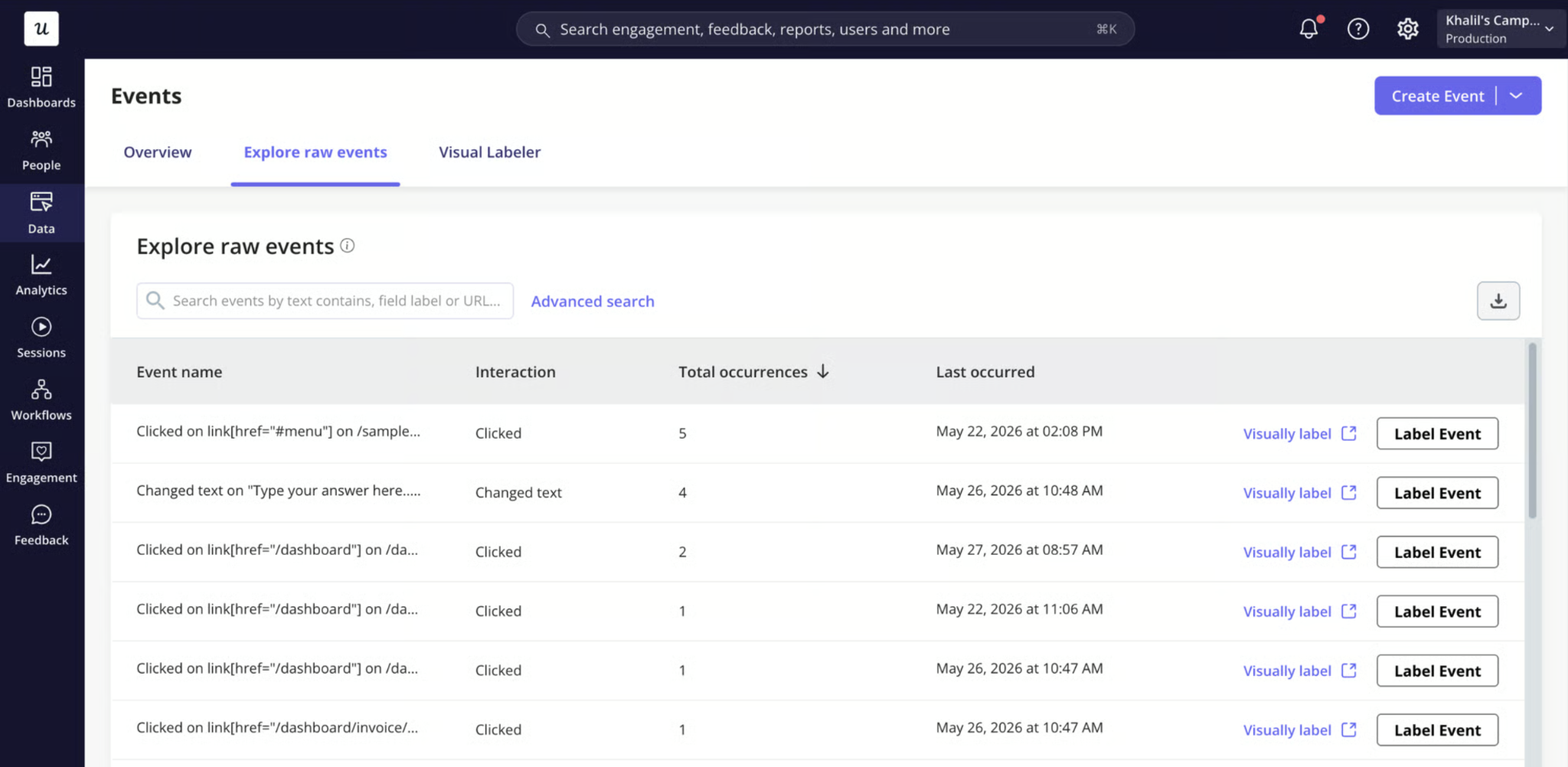
Then pick a few key performance indicators (KPIs) and let AI monitor them for meaningful changes. Set up alerts, too, so you can jump on important changes as soon as they happen.
What AI product analytics looks like in practice for me at Userpilot
As Head of Product, I need to get from insights to decisions quickly, without spending hours digging through dashboards. That’s why I often start with our MCP. I’m already working in AI tools throughout the day, so it’s convenient to pull Userpilot data into an existing conversation.
If something catches my attention, I’ll move to Lia to investigate further and figure out what to do about it. Because Lia works directly inside Userpilot, I can stay focused on the product data without distractions.
I often ask her to do three things:
- Check what’s currently happening with our product.
- Check which users or cohorts are affected.
- Recommend what we should do next.
When this warrants a solution, like an in-app survey or flow, I also ask Lia to build and deploy it. And as we continue developing Lia, we’re working toward making more of these interventions proactive.
Of course, not every investigation starts the same way.
When I’m looking specifically at how users interact with our AI agents, I might start with Agent Analytics instead.
It’s a dedicated analytics stream that captures why users turn to an agent, where the experience breaks down, and whether the agent is helping. We keep this data separate from the rest of the product analytics, so we can isolate and analyze agentic experiences when needed.
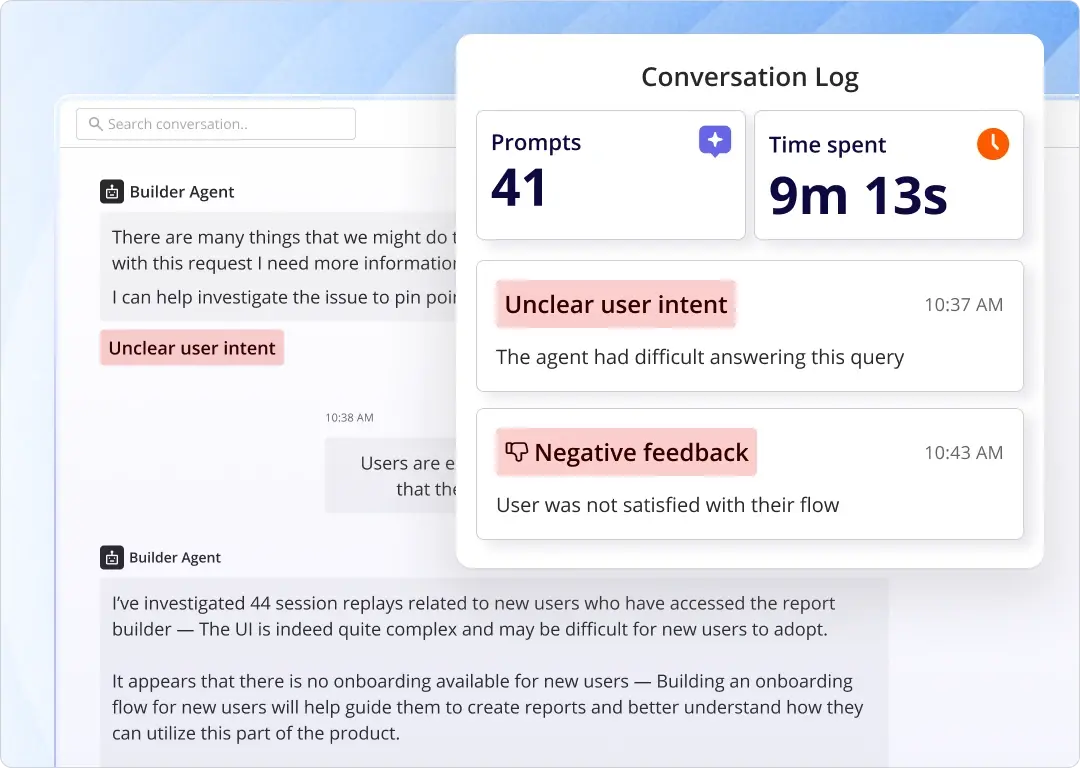
Other work and special circumstances might require a different flow. Whatever it is, Userpilot can support it.
Let’s say you added a new AI assistant to your product:
- Start with Agent Analytics: See where the agent is failing. Maybe it’s giving contradictory answers or just not completing the tasks the users ask it to. Whatever the issue might be, you can investigate it here.
- Move to Lia to investigate further: Lia can dig into the surrounding product data, help narrow down the causes, suggest what to change, and build the solution for you.
- Check whether the fix worked: Once you make the change, use the same AI suite to see whether metrics like failure signals or user frustration changed. For deeper analysis, work in Userpilot; for quick, ad hoc checks, use the MCP.
That loop is probably the best example of how I see AI product analytics. I’m not using AI just to get answers faster. I’m using it throughout the process: to identify what’s worth investigating, understand it, decide what to do, act on it, and check whether things have improved.
Try AI product analytics inside Userpilot!
AI product analytics gives you a faster way to move from questions to answers and from answers to action. Across the workflow, AI can help query data, build analyses, explain findings, investigate changes, and monitor product health.
At Userpilot, the MCP, Lia, and Agent Analytics support that entire workflow. Together, they help you access product data, investigate issues more deeply, act on what you find, and measure whether those changes worked. Plus, you can decide whether that happens in Userpilot or another AI tool of your choice.
For me, that’s what AI product analytics is all about: spending less time on the mechanics and more time improving the product.
If that’s your goal too, I’m confident that Userpilot can help you get there.
Want to see how it works with your own product data? Book a demo and check it out live.
About the author