Best Open Source User Onboarding Software in 2026: Honest Reviews for Product Teams



People are increasingly looking for open-source user onboarding software to gain full control over the user experience, avoid vendor lock-in, and reduce SaaS costs.
For many teams, especially engineering-led ones, onboarding isn’t something they want to manage through another external tool. They prefer to build and control it within their own codebase to ensure flexibility, customization, and the ability to self-host.
At its core, the question is simple: can you build an onboarding experience that drives adoption without relying on a paid platform?
Nearly two-thirds (63%) of customers say onboarding is crucial in deciding whether to subscribe. So if your onboarding process fails to help users reach value fast, you can lose them before they reach activation.
I evaluated open-source user onboarding software by balancing flexibility and control against the realities of maintenance, security, and community support, while looking closely at onboarding features, ease of implementation, project health, and the ability to extend analytics without relying on a vendor.
I split these tools into two categories:
- Product onboarding: These are typically lightweight JavaScript or TypeScript libraries that plug directly into your app to create product tours, tooltips, checklists, and interactive guidance.
- Employee onboarding: They help you organize HR workflows, documentation, and compliance tracking. Plus, you can host or deploy them in cloud environments for full control over your data.
To summarize:
- Intro.js: Best for quick, low-cost tours on a tight timeline.
- Shepherd.js: Best for teams that need accessibility compliance and deep customization.
- UserTour: Best for teams that want a full onboarding platform with a visual builder.
- React Joyride: Best free option for React apps with simple tour requirements.
- TourGuide JS: Best for lightweight TypeScript tours without framework dependencies.
- Onborda: Best for Next.js projects already using Tailwind CSS and shadcn/ui.
- Driver.js: Best for spotlight-style highlighting with zero dependencies.
- GuideChimp: Best for plugin-extensible tours with built-in localization.
- OnboardJS: Best for teams that want full UI control through a headless architecture.
- ChiefOnboarding: Best for Slack-integrated HR onboarding workflows.
- Horilla HRMS: Best for all-in-one HRMS with a dedicated onboarding module.
What is open source user onboarding software?
Open-source user onboarding software includes freely accessible, customizable tools and libraries that help guide new users through software applications or simplify employee onboarding processes. These solutions let organizations modify the source code, self-host for better data privacy, and avoid recurring licensing costs, giving developers the freedom to create tailored tutorials, checklists, and workflow experiences.
Product teams can customize and extend the code to fit unique product interfaces, avoiding vendor lock-in, while many solutions allow self-hosting to keep sensitive data secure and compliant. Most tools are free or low-cost, making them ideal for development teams seeking to reduce subscription expenses, with some offering optional commercial licenses for additional features.
These tools are commonly used for creating interactive in-app product tours, managing employee onboarding tasks and training workflows, and building internal tools or customized workflows.
Why consider open source for user onboarding?
I’d reach for open source onboarding first because of:
- Cost-effectiveness: Most open source tools have no direct licensing cost, which makes them attractive when budgets are tight. That said, you’ll still pay in engineering time for setup, QA, and ongoing maintenance.
- Customization and flexibility: Full access to the source code allows you to customize step logic. So you can style, target, and design how feature tours react to app state. This means better personalized onboarding experiences for your users, provided you have the engineering resources to invest.
- Community and collaboration: Popular open source platforms attract communities of contributors who ship bug fixes, add features, and respond to issues. When you hit a compatibility problem or an edge case, there’s usually someone in the community who’s solved it before.
- Transparency and security: With access to the source code, security reviews are straightforward. Your team can validate how data flows through the tool, confirm there are no hidden behaviors, and verify alignment with internal standards.
- Vendor independence: You own the code, which means no lock-in. If your needs change or a vendor shuts down, you can fork, migrate, or modify the code without starting from scratch.
Best free open source product onboarding software
|
Tool |
Type |
License |
Self-hostable |
Framework |
Last release |
Best for |
| Intro.js | JS Library | AGPL-3.0 / Commercial | Embedded | Framework-agnostic | July 2025 | Quick, low-cost tours with broad framework support |
| Shepherd.js | JS Library | AGPL-3.0 / Commercial | Embedded | Framework-agnostic | March 2026 | Customizable tours with strong accessibility support |
| Usertour | Platform | MIT / Commercial (enterprise) | Yes (Docker) | Framework-agnostic | March 2026 | Full onboarding platform with visual builder and analytics |
| React Joyride | JS Library | MIT | Embedded | React only | November 2024 | React teams that need a free, zero-restriction tour library |
| TourGuide JS | JS Library | MIT | Embedded | Framework-agnostic | May 2025 | Lightweight, framework-agnostic tours with TypeScript support |
| Onborda | JS Library | MIT | Embedded | Next.js only | December 2024 | Next.js teams using Tailwind and shadcn/ui |
| Driver.js | JS Library | MIT | Embedded | Framework-agnostic | November 2025 | Spotlight and tour library with minimal bundle impact |
| GuideChimp | JS Library | EUPL-1.2 / Commercial | Embedded | Framework-agnostic | March 2026 | Plugin-extensible tours with localization support |
| OnboardJS | Headless Engine | MIT | Embedded | React / Next.js | February 2026 | Full UI control over onboarding flows |
Intro.js: Lightweight step-by-step tours
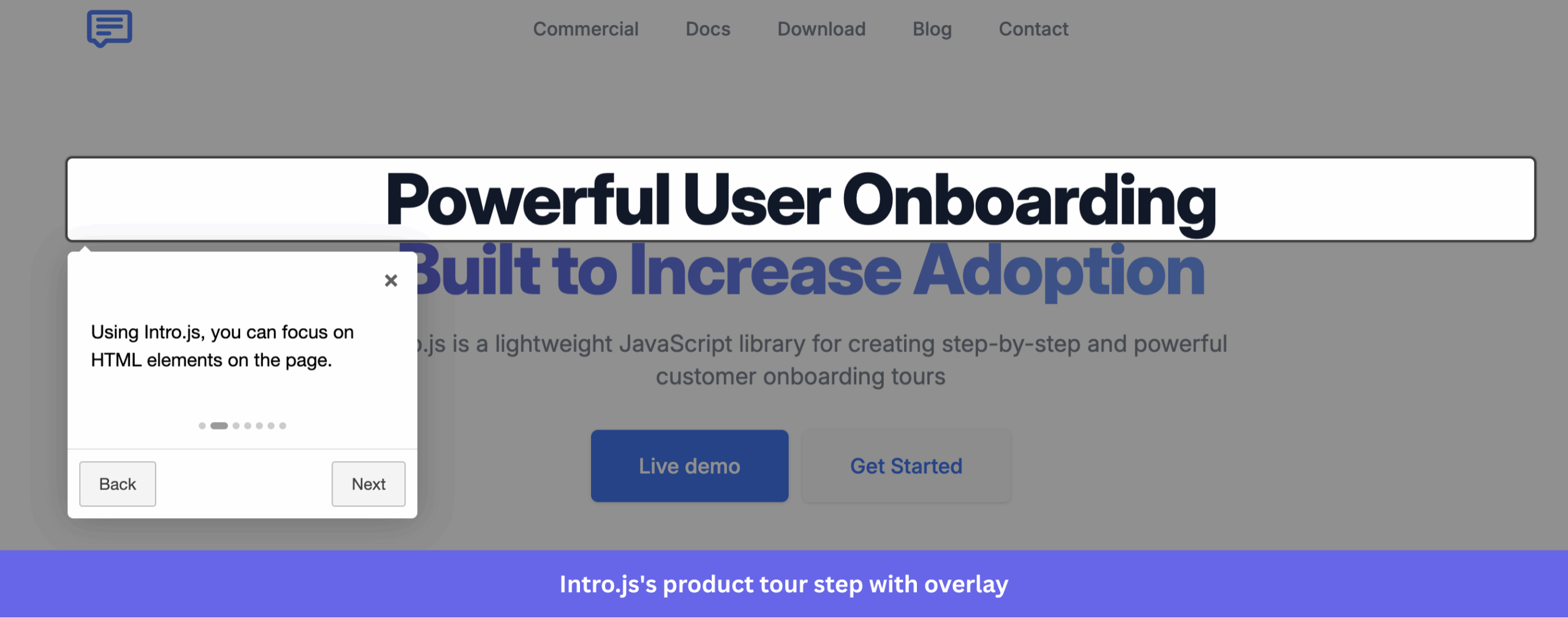
Intro.js has been around since 2013 and remains one of the most widely used open source libraries for building step-by-step product tours. At about 10 KB with no external dependencies, it’s easy to drop into your stack and quickly get a guided walkthrough running.
Key features:
- Step-by-step product tours with overlay: Intro.js highlights target elements with a dimmed backdrop and displays a tooltip with “Back,” “Next,” and “Skip” buttons. This keeps your users focused on one UI element at a time and reduces overwhelm during their first session.
- Progress indicators: You can add a dot or progress bar UI to multi-step tours, so users always know where they are in the flow and how much is left.
- Framework wrappers: Intro.js provides wrappers for frameworks such as React, Angular, Vue, R, Dart, and Blazor. This means you don’t need to rebuild integrations from scratch for your existing stack.
- Hints: Users can click on them to get contextual help without triggering a full walkthrough. It’s useful for complex interfaces with many optional features.
- Simple API: With no external dependencies, Intro.js setup is just a JS and CSS file. The API lets you define steps, customize design, and add programmatic controls (pause, restart, exit) without pulling in additional packages.
- Multiple preset themes: Intro.js includes six ready-made themes that are installable via NPM or a CDN. They give your tours a polished baseline appearance without writing CSS from scratch. However, you’d still customize fine-grained adjustments like button colors or typography.
Licensing and pricing:
Intro.js uses a dual-licensing model. The AGPL version is available to anyone, including commercial users, but requires source disclosure under copyleft terms. Teams that want to keep their codebase private can purchase a commercial license instead. For commercial use, you need a one-time lifetime commercial license:
- Starter: $9.99. Includes 1 project and no support.
- Business: $49.99. Includes 5 projects, 1 month support, and 1 custom theme.
- Premium: $299.99. Includes unlimited projects, 6 months support, 3 custom themes, and 24/7 priority support.
What to consider:
✅ Intro.js’s biggest strength is longevity. It’s backward-compatible across versions, works with every major framework, and has more third-party tutorials and Stack Overflow answers than almost any other tour library. It’s easiest to find a solution if you hit a wall during implementation.
✅ The commercial license tiers are also among the cheapest in this space, making it a low-risk entry point for teams that just need a simple, proven solution.
❌ Intro.js’s latest release (v8.3.2) was in July 2025, and new feature development appears to have shifted toward maintenance and bug fixes. If your project needs fast security patches, you can consider a more frequently updated alternative.
❌ Intro.js ships with its own CSS, and overriding it with Tailwind often means you have to write some code to force a specific style rule to take precedence over all others. Tours are also fragile when selectors change. Any significant UI update can break your entire flow without warning, and maintenance falls entirely on your team.
❌ You’ll need to set up your own tracking to see where users drop off in a tour because there are no built-in analytics.
Shepherd.js: Framework-friendly tour library
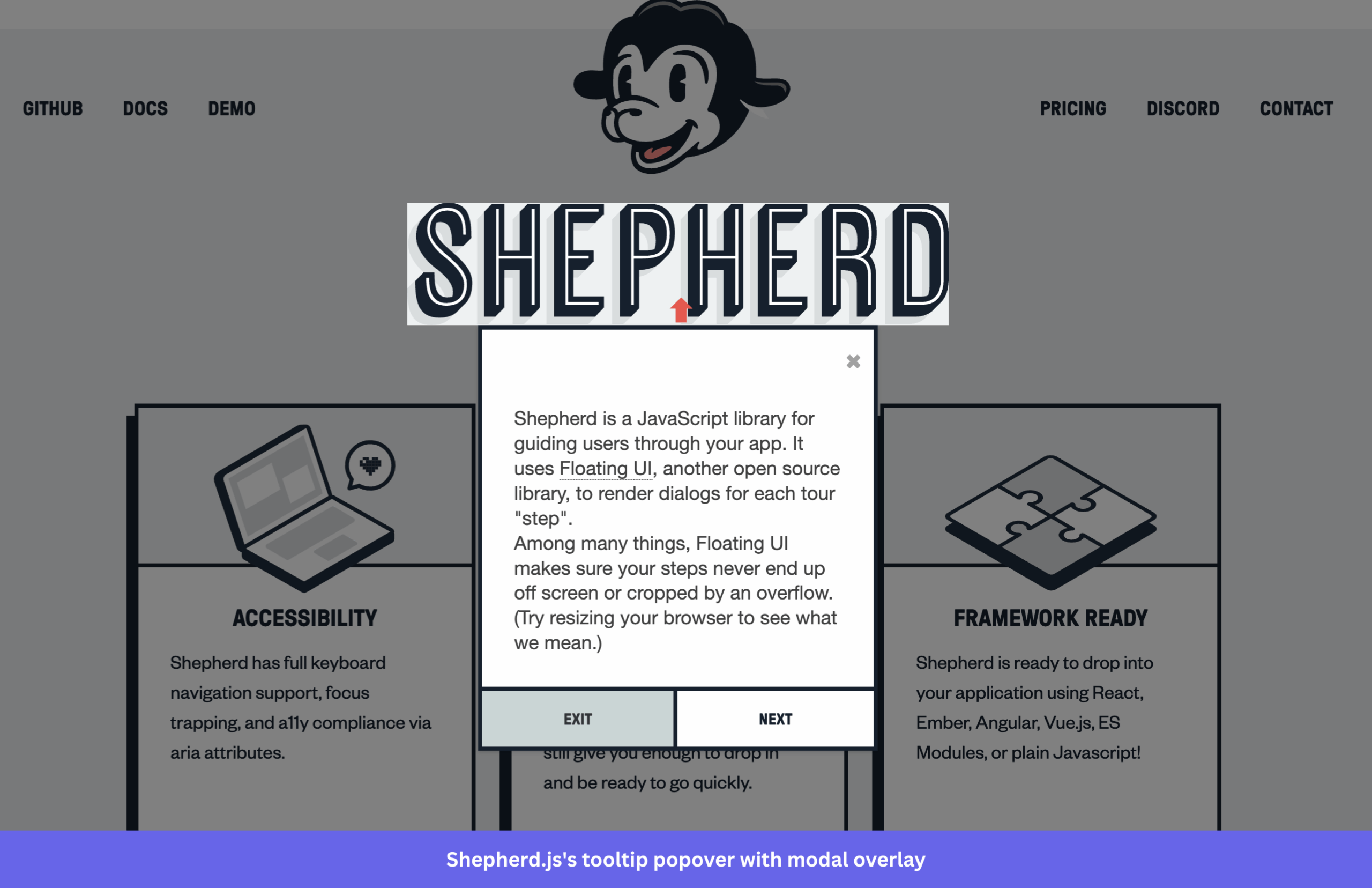
Shepherd.js is a framework-friendly product tour library built by Ship Shape and backed by one of the most active GitHub communities in this space. With 170+ releases, 100+ contributors, and its latest release in March 2026, it’s genuinely well-maintained. It also has a dedicated Discord server for community support.
Key features:
- Step-by-step product tours with modal overlay: Shepherd.js renders popovers attached to specific UI elements, with an SVG-based backdrop that can spotlight one or multiple elements simultaneously. This is useful when you want to draw attention to related UI components within the same step, without triggering separate tour steps for each.
- Floating UI positioning: This means tooltips stay correctly anchored even on long pages, in nested layouts, and on elements near the viewport edges, without manual positioning workarounds.
- Framework wrappers: Shepherd.js has official wrappers for React, Vue, Angular, and Ember, as well as support for plain JavaScript and ES Modules. You can integrate it idiomatically into whichever stack you’re already using.
- Accessibility built in: Shepherd.js includes full keyboard navigation, focus trapping, and ARIA attribute compliance out of the box. This matters if your product serves enterprise or regulated markets that require accessibility.
- Highly customizable styling: Default styles are intentionally minimal, so you’re not fighting the library’s CSS to match your design system. You can apply custom class names, override the CSS file, or build on top of existing component libraries without writing forced overrides.
- BeforeShowPromise for async steps: You can delay a step from rendering until a condition is met. For example, waiting for an API response or a dynamic element to appear in the DOM. This is critical for single-page applications (SPAs) where content loads asynchronously.
Licensing and pricing:
Shepherd.js is available under the AGPL-3.0 license, which allows commercial use but requires you to make your modified source code publicly available. Commercial projects require a one-time lifetime license:
- Business: $50. Includes up to 5 projects, 1 month support, and regular updates.
- Enterprise: $300. Includes unlimited projects, 6 months of support, and prioritized GitHub issues
You can also contact their team for a custom quote tailored to your needs.
What to consider:
✅ Shepherd.js has frequent releases, an active Discord, and a responsive maintenance team, which means you’re less likely to hit an unresolved bug and wait months for a fix. With fewer than 35 open issues across over 13k stars, the issue-to-adoption ratio looks healthy.
✅ The minimal styling approach is a strength for teams with a design system already in place. You’re building on a clean foundation rather than undoing someone else’s aesthetic choices.
❌ You’ll need to work with HTML strings rather than JSX for anything beyond basic tooltips (formatted text, step progress indicators, conditional logic).
❌ There’s also no built-in analytics, so drop-off tracking requires user analytics tools.
Usertour: Comprehensive self-hostable platform
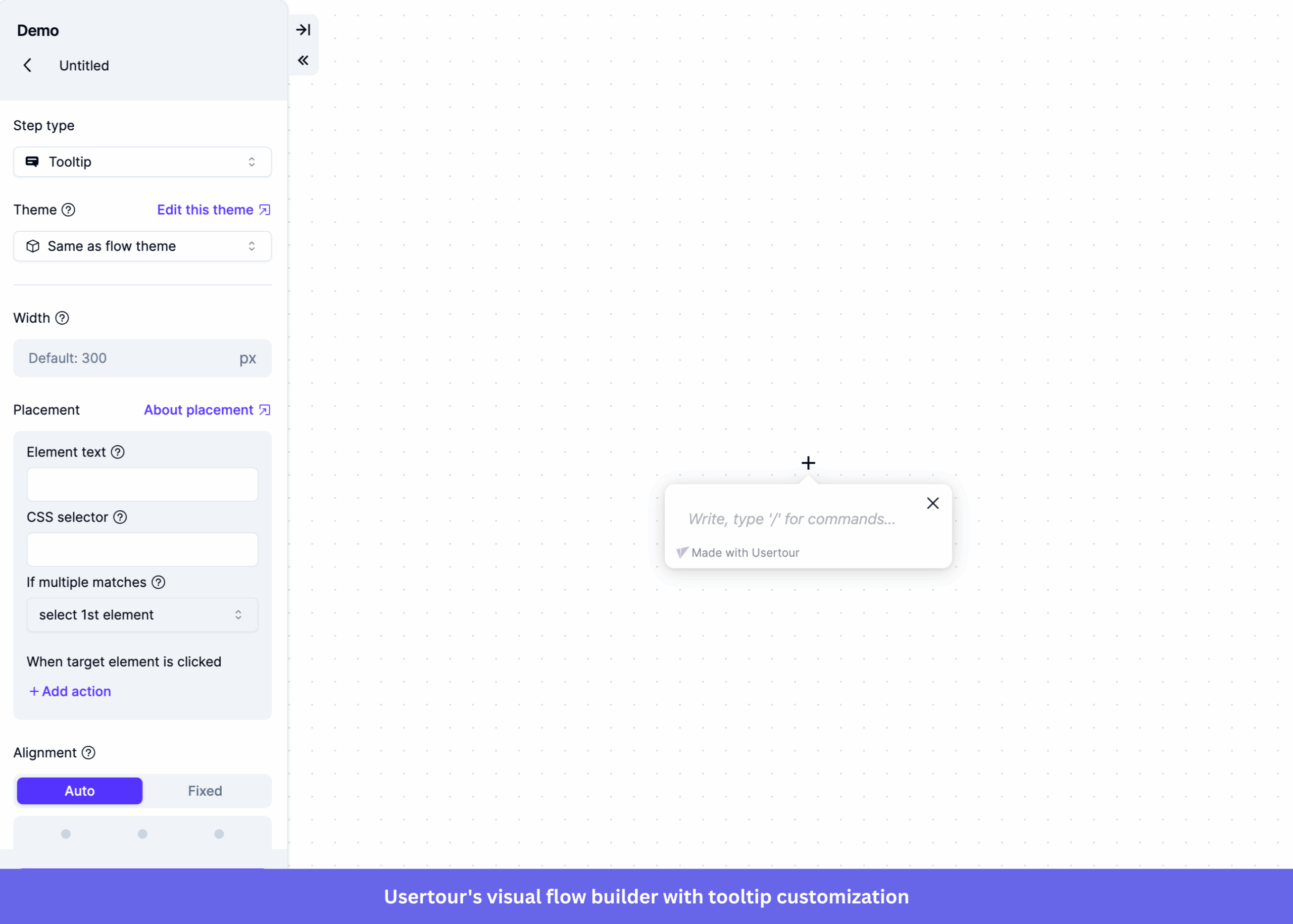
Usertour is an open-source, self-hostable onboarding platform that goes well beyond a JavaScript library. It provides a visual builder, analytics, targeting, and multiple content types, all deployable on your infrastructure via Docker.
Key features:
- WYSIWYG visual builder: Usertour includes a no-code editor for building and customizing product tours, onboarding checklists, surveys, launchers, and banners. Create and update onboarding flows without a developer being involved in every change.
- Advanced user targeting: You can define custom user attributes and track events to segment users and automatically trigger personalized onboarding flows based on their role, plan, or in-app behavior.
- Flow analytics: Usertour tracks view counts and completion rates for each flow and highlights the steps where users drop off. This gives you enough signal to identify friction points in your onboarding process and prioritize fixes without wiring up external analytics.
- Multiple themes: You can create separate themes for different flows and adjust button colors, font family, and size to match your product’s branding.
- Version control and multi-environment management: Every change to a flow is logged to show who made it and when. You can also manage Production and Staging environments within the same account, which makes it easier to test onboarding changes before pushing them live.
- Multi-page and all-framework support: Usertour integrates with any browser-based framework and works across both single-page and multi-page applications. There’s no framework-specific wrapper required.
Licensing and pricing:
Usertour uses a split-license model: most of the core code is MIT-licensed, while enterprise components fall under a separate commercial license.
Self-hosting for business or organizational use requires a commercial license ($4,999/year).
Cloud plans are available at:
- Hobby: Free. Includes 5,000 sessions/month, 1 team member, and 1 year data retention.
- Starter: $59/month. Includes 50,000 sessions/month, 3 team members, and 3 years of data retention.
- Growth: $119/month. Includes 100,000 sessions/month, 10 team members, and 5 years of data retention.
- Business: $249/month. Includes 200,000 sessions/month, unlimited team members, and 7 years of data retention.
What to consider:
✅ Usertour is the most capable open source onboarding tool on this list in terms of feature breadth. The visual builder, targeting, and analytics put it closer to proprietary tools like Appcues or Userpilot than to a JavaScript library.
❌ The small contributor base (six contributors and 1.9k stars) is a real consideration. If the core maintainers deprioritize the project or a critical bug surfaces, resolution timelines are less predictable than with a larger community.
❌ Cloud pricing scales with sessions, not users, which means a high-traffic product can hit session limits faster than expected on lower tiers. If you’re approaching 5,000 monthly sessions on the free Hobby plan, you’ll need to upgrade or self-host to avoid interruption.
❌ Self-hosting requires Docker setup and ongoing infrastructure maintenance, which adds engineering overhead that partly offsets the licensing savings.
React Joyride: React-first tour solution
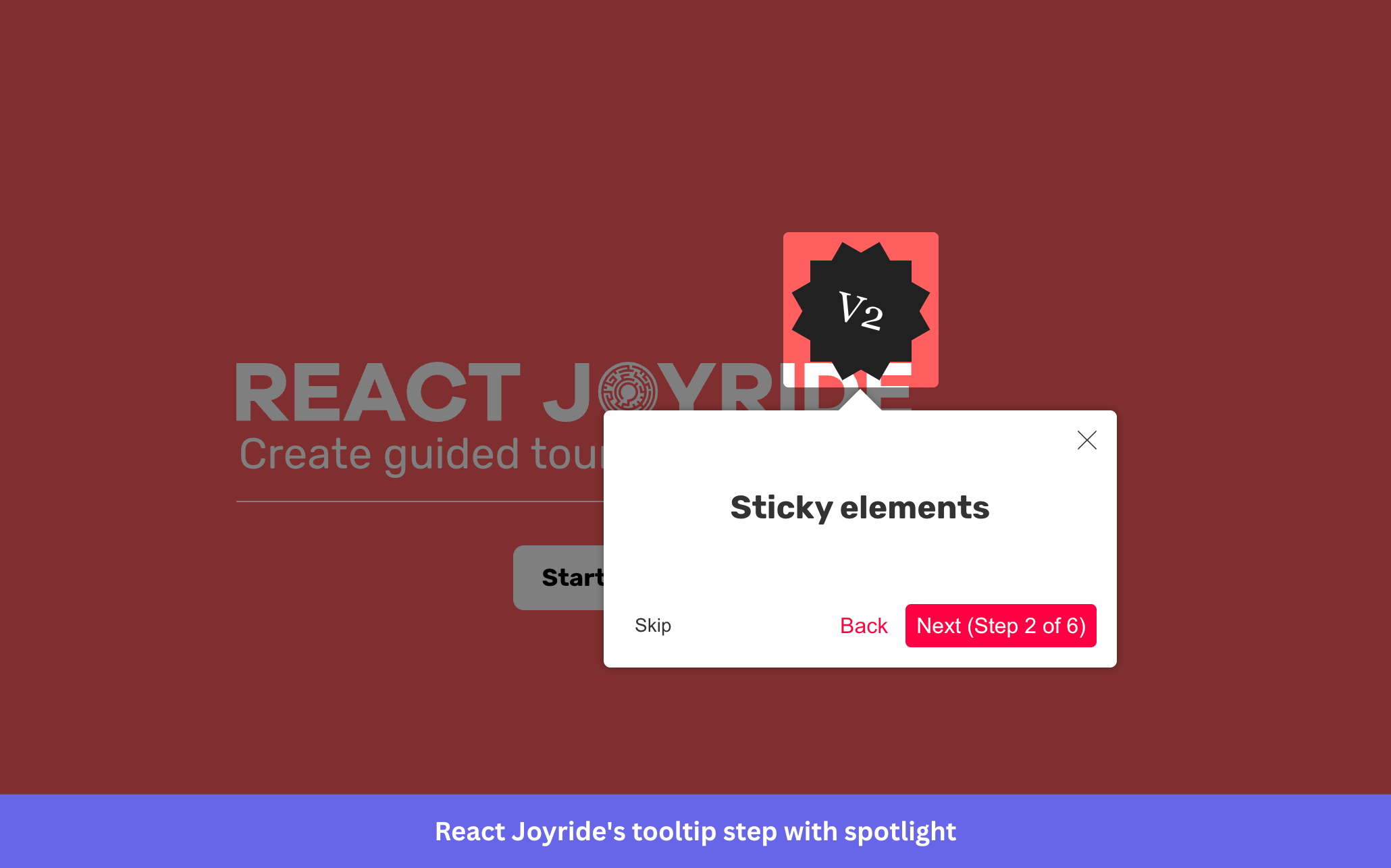
React Joyride is a React-first library for building step-by-step product tours, purpose-built for React rather than wrapped around a vanilla JS core. With 7.6k stars, 44 contributors, and 11k+ dependent projects, it has one of the largest adoption footprints among React-specific tour libraries.
Key features:
- Step-by-step tours with spotlight overlay: React Joyride highlights target elements by dimming the rest of the page and renders a tooltip with progress controls. The spotlight keeps users focused on one element at a time, reducing visual noise during onboarding.
- Progress tracking: Displays step count inline in the Next button (e.g., “Next 2/5”) without a separate progress bar component.
- Localization: You can customize button labels via a locale property, making it straightforward to support multiple languages.
- Custom styling: React Joyride accepts a property with a nested options object to adjust elements such as colors, spacing, and overlay opacity. You can also override individual components to suit your design system.
- Controlled mode: Let users interact with your own components through the spotlight. This allows users to engage with elements mid-tour without exiting the flow.
Licensing and pricing:
React Joyride is MIT-licensed. It’s free for both personal and commercial use with no paid tiers.
What to consider:
✅ React Joyride’s MIT license and React-native integration make it the lowest-friction option for React teams that need a quick, cost-free tour library. There are no license fees, no commercial restrictions, and no framework wrapper overhead.
❌ React Joyride uses inline styles throughout, so custom class names are not supported unless you override the default components. If your team uses Tailwind or SCSS, this creates friction that Shepherd.js (with its CSS file approach) avoids.
❌ There’s also no built-in handling for async elements. If a tour step targets an element that loads after an API call, you’ll need to manage that timing in your own state logic.
⚠️ The spotlight effect is implemented using a CSS property, which breaks in dark mode and when your page has a subtly branded backdrop color. Worth testing thoroughly if your product supports dark mode.
TourGuide JS: Lightweight and framework-agnostic
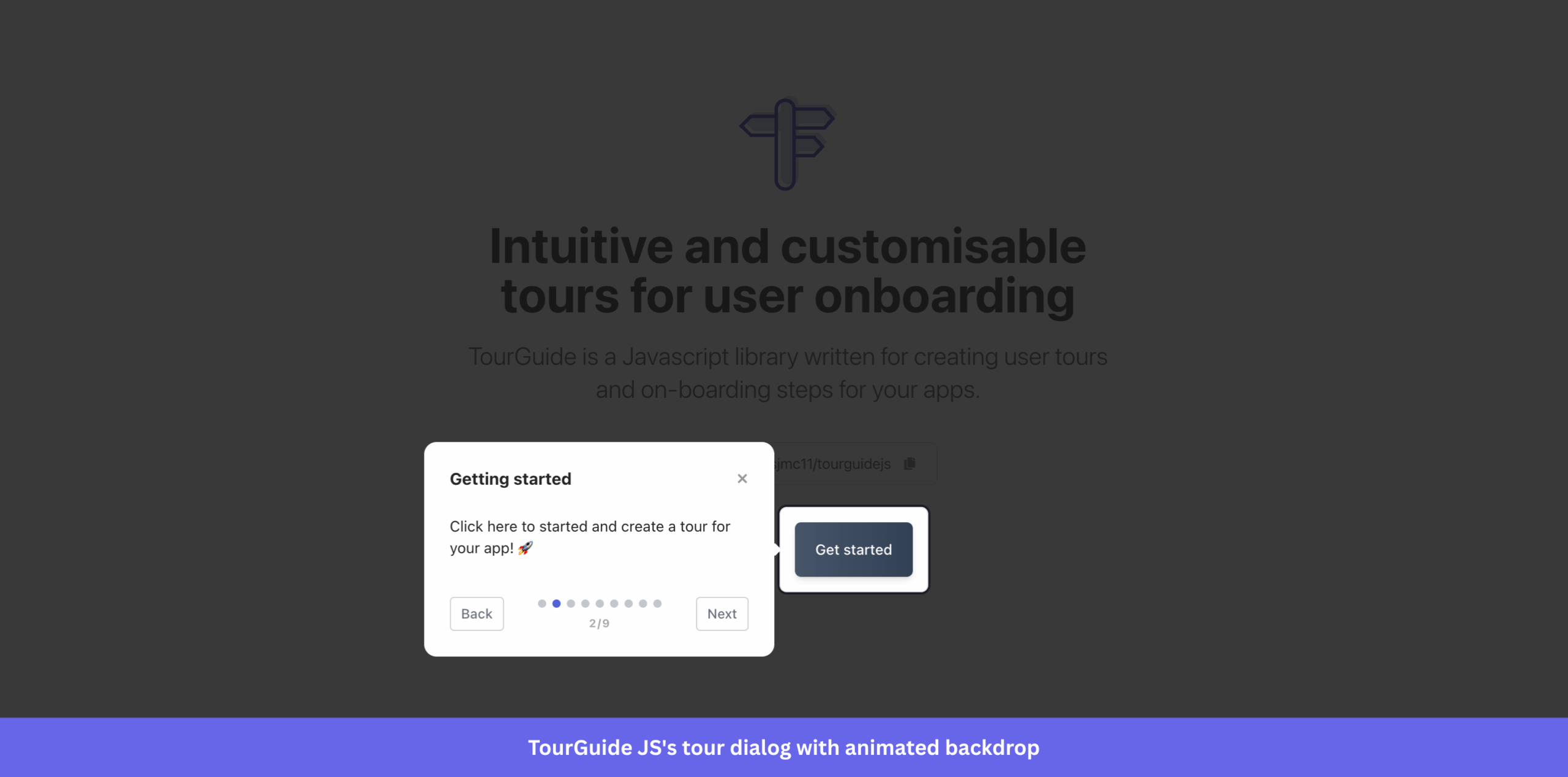
TourGuide JS is a lightweight, framework-agnostic onboarding library written in TypeScript for building product tours in any web app. It’s installable via NPM or CDN and works with vanilla JS, React, Vue, Angular, or any browser-based stack.
Key features:
- Product tours with animated backdrop: TourGuide JS highlights target elements with an animated backdrop and renders a dialog with customizable buttons. The backdrop animation draws attention to the active element smoothly and reduces the abrupt feel of static overlays.
- Floating UI positioning: Tooltip and dialog placement are handled by Floating UI, which is pre-bundled with the library. This keeps tooltips correctly anchored across layouts and viewport edges without additional configuration.
- TypeScript types: The full API is typed, so your IDE auto-completes available options and catches configuration errors during development rather than at runtime.
- Custom HTML content: Step content supports custom HTML. This means you can embed images, links, or styled elements directly into your product tour’s steps to create richer contextual guidance without building a separate UI layer.
- Grouped tours: You can tag elements and pass a group name to run only a subset of steps. This is useful for products with multiple user roles or onboarding paths that share the same codebase.
- Promise-driven methods and callbacks: TourGuide JS exposes async methods and event callbacks so you can hook into tour progression. For example, triggering an API call or updating app state when a step completes.
- Highly customizable styling: You can configure backdrop color (RGBA), dialog width, padding, z-index, animation toggles, and button labels via the options object. You can also pass custom CSS classes to the backdrop and dialog elements for deeper styling control.
Licensing and pricing:
TourGuide JS is MIT-licensed.
What to consider:
✅ TourGuide JS’s main appeal is its combination of MIT licensing, Floating UI positioning, TypeScript support, and zero additional dependencies to install separately. If you need a clean, framework-agnostic library that you can drop into any stack without license concerns, it’s a practical option.
❌ Its alpha status (v0.0.27-alpha) can be a constraint. The versioning suggests the API may still change, and with 700+ stars, 10 contributors, and 13 open issues, community resources are minimal compared to more established libraries on this list. There’s no guarantee of fast resolution if something breaks in your stack.
❌ There’s also no documented built-in analytics, segmentation, or multi-page tour support. For anything beyond single-page guided tours, you’ll need to build the surrounding logic yourself.
Onborda: Modern Next.js-based platform
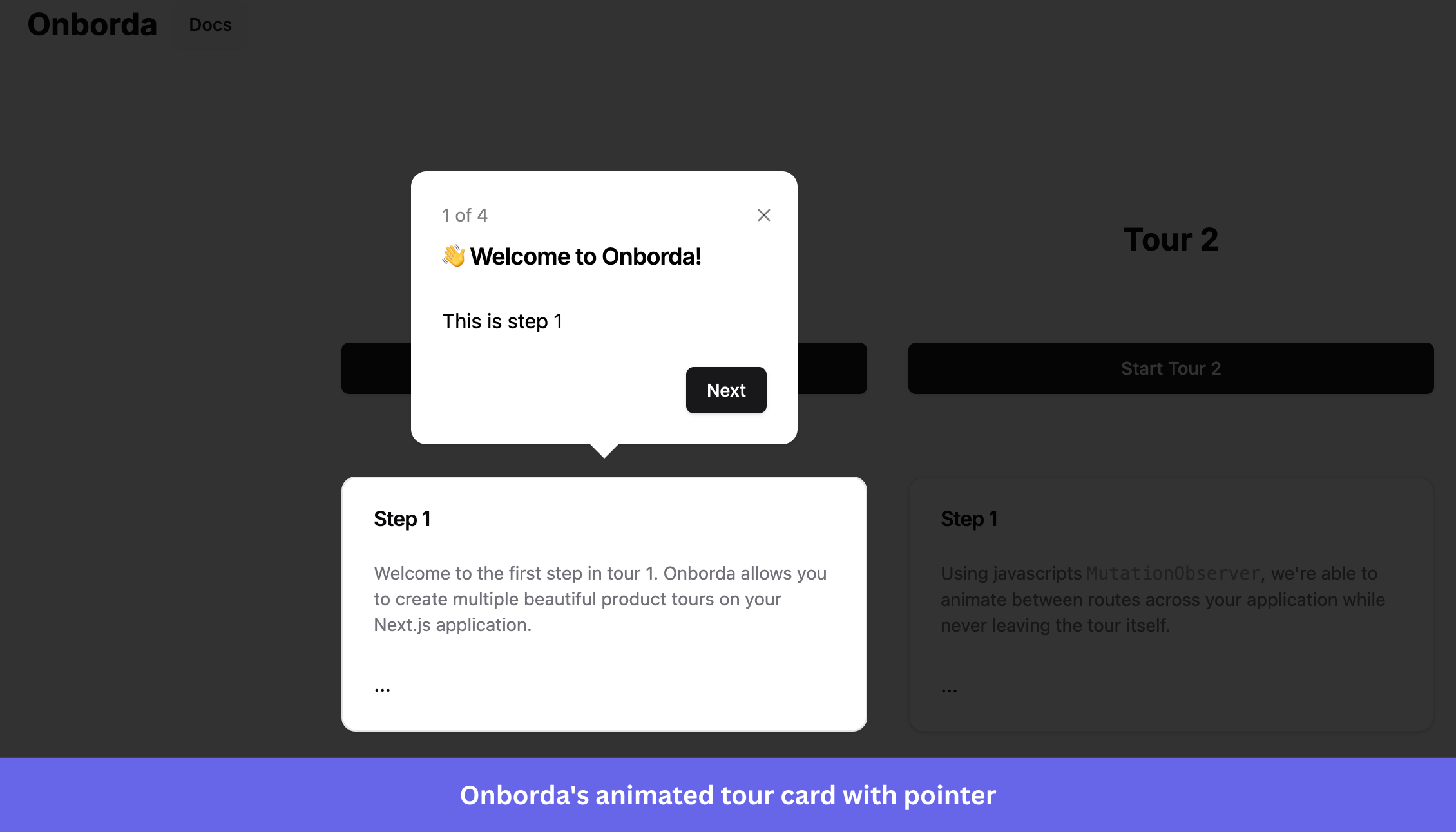
Onborda is a Next.js-specific onboarding library that builds animated product tours using Framer Motion for transitions and Tailwind CSS for styling. If your stack is Next.js with Tailwind and shadcn/ui, Onborda fits in with very little configuration overhead.
Key features:
- Framer Motion animated tours: Tour step transitions are powered by Framer Motion, which provides smooth entrance and exit animations for tooltips. You can configure the transition type and duration.
- Multiple tour support: Onborda supports defining multiple named tours in a single implementation. Each tour has its own steps array, so you can run different onboarding paths for different user roles or feature areas without duplicating the setup.
- Multi-page navigation: Each step supports properties that trigger Next.js navigation when the user moves between steps. This makes it straightforward to build tours that span multiple pages of your app. Although there’s a hardcoded 500ms delay on route transitions, this may cause issues on slower-loading pages.
- Custom card components: Onborda ships with a default Tailwind-styled tooltip card, but you can swap it entirely with your React component. The custom card enables properties that give you full control over layout, content, and CTA design.
- Interactive overlay: Allows users to click through the overlay and interact with elements beneath it during the tour. This is useful for guided walkthroughs that require users to perform real actions, rather than just reading tooltips.
- Shadow and overlay customization: You can set custom RGB values and opacity for the shadow surrounding the highlighted target element. It gives you control over how prominent the spotlight effect is relative to your app’s color scheme.
Licensing and pricing:
Onborda is MIT-licensed.
What to consider:
✅ If you’re building a Next.js app with Tailwind and shadcn/ui, you get a tour library that integrates naturally with your existing stack. No style conflicts, no framework mismatch, and Framer Motion animations out of the box.
⚠️ Outside of that stack, the library makes less sense. Framer Motion and Tailwind CSS are required dependencies, which add meaningful bundle weight for teams not already using them. And since Onborda targets Next.js specifically, it won’t work in React apps without the App Router or in other frameworks.
❌ The last release being in December 2024, is also a flag. With 15 open issues and a small contributor base, there’s no guarantee of timely fixes if something breaks after a Next.js update.
Driver.js: Spotlight and animation focus
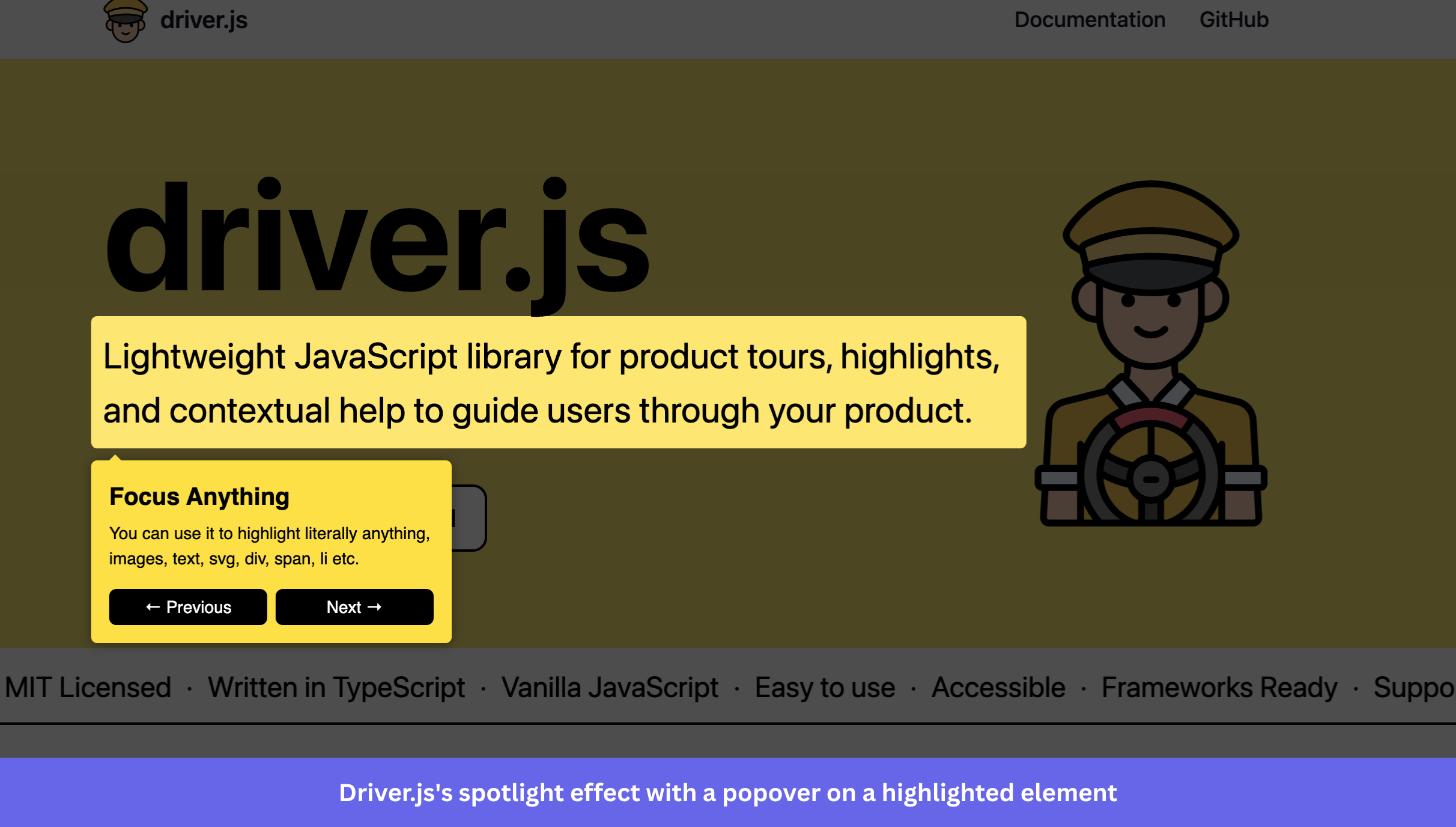
Driver.js is a lightweight, dependency-free JavaScript library for spotlighting elements and running animated product tours. At approximately 5 KB when compressed, with zero external dependencies, it’s the smallest library in this list.
Key features:
- Spotlight and overlay: Driver.js dims the entire page and cuts out a spotlight around the target element to draw user focus. You can configure the overlay color, opacity, cutout padding, and corner radius to match spotlight shapes to your UI’s design language.
- Product tours: You define an array with target elements and popover content, then run a multi-step tour. Each step supports its own popover configuration, so title, description, button labels, and positioning can vary per step without global overrides.
- Single-element highlighting: Driver.js can spotlight a single element on demand. This makes it useful outside of onboarding. For example, drawing attention to a new feature after a page interaction, or dimming the background while a user fills a form.
- Rich lifecycle hooks: Driver.js exposes several callbacks at the global and per-step level. This gives you precise control over what happens at every transition, and you can override button navigation to implement custom step logic.
- Async tour support: Enables you to configure steps with async logic. This way, you can wait for dynamic content to finish loading before the next step renders.
- Progress tracking: Adds a progress label to the popover. The template is fully customizable using placeholders, so you can render it as “Step 2 of 5”, “2/5”, or any format that fits your UI.
- Keyboard navigation: By default, it allows users to move through steps without using the mouse. You can disable it if your tour requires strict sequential interaction.
Licensing and pricing:
Driver.js is MIT-licensed.
What to consider:
✅ Driver.js is the strongest general-purpose option in this list for teams that want a framework-agnostic, zero-dependency spotlight library with a rich API and genuine production adoption. The 5 KB gzipped size means it won’t meaningfully affect page performance, and the MIT license removes any commercial friction.
✅ The hooks system allows you to intercept every transition, override button behavior, and wire tour progression to your own app state without fighting the library’s abstractions.
❌ The main constraint is that Driver.js has no built-in analytics, segmentation, or checklist support. It’s strictly a tour and spotlight library. You’ll also need to handle multi-page tour logic, as it doesn’t have a built-in route navigation like Onborda’s.
⚠️ With 91 open issues across 25.5k stars, the ratio is slightly higher than Shepherd.js, but still reasonable for a project of this scale. It’s worth reviewing open issues to see if any affect your specific stack before committing.
Guidechimp: Plugin-extensible tour library for any stack
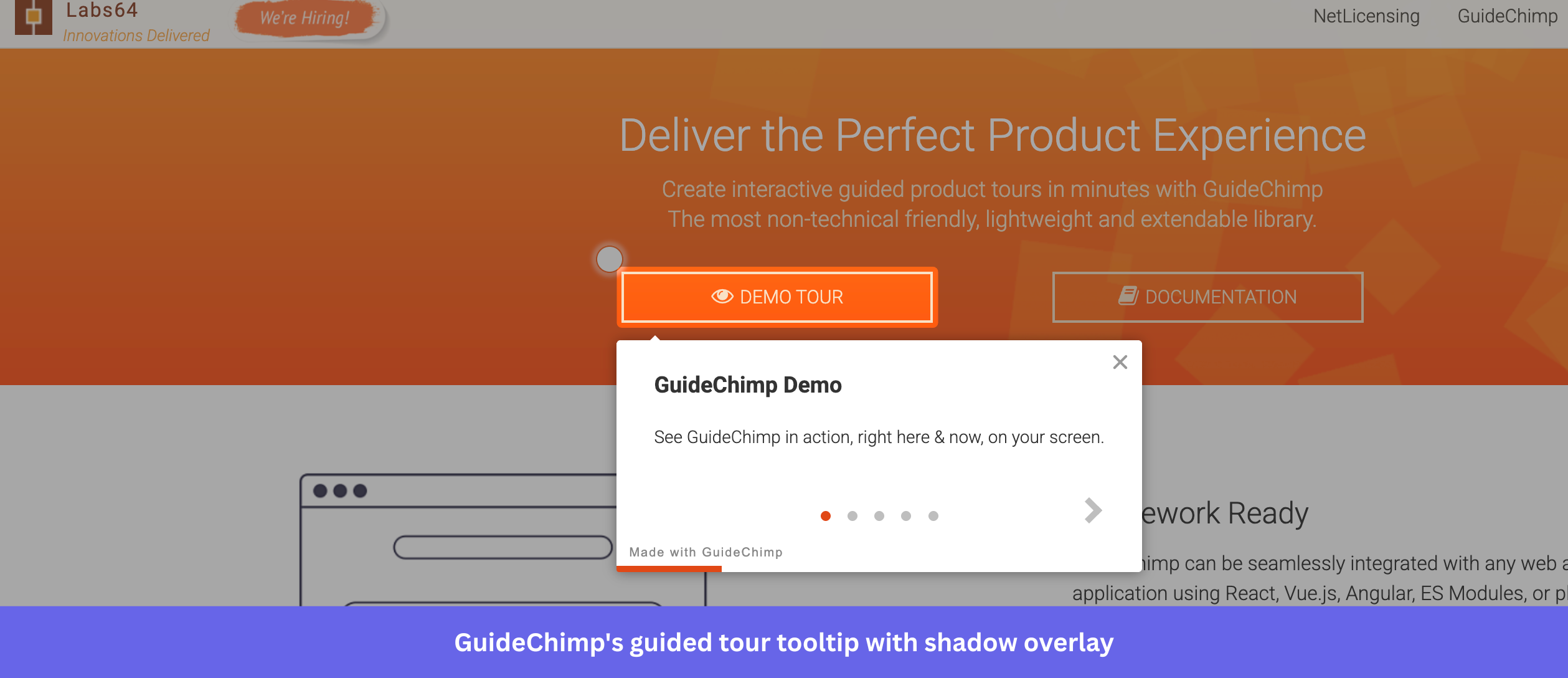
GuideChimp is a lightweight, framework-agnostic JavaScript library for building product tours, maintained by Labs64. With 99 releases and its latest version in March 2026, it’s one of the most actively maintained libraries in this list. It works with React, Vue.js, Angular, and plain JavaScript, and is installable via NPM, CDN, or ES6 import.
Key features:
- Product tours with tooltip auto-positioning: GuideChimp renders tooltips that automatically position relative to target elements. You can define product tour steps in two ways: via HTML data attributes directly on elements, or as JavaScript object properties.
- Beacons and hotspots: GuideChimp supports beacon markers on page elements that draw user attention to specific UI areas before a tour is triggered. It’s useful for highlighting optional guidance without automatically launching a full walkthrough.
- Plugin system: GuideChimp ships with a built-in plugin architecture. Free plugins include Google Analytics integration for tracking tour events, multi-page navigation, lazy-loading for delayed elements in SPAs, and a Triggers plugin for firing tour events on DOM interactions. Some plugins (including the Remove Attribution and offline licensing plugins) require a paid commercial plan.
- Internationalization (i18n): GuideChimp includes built-in localization support. This lets you define tour content in multiple languages and switch based on your users’ location.
- Event callbacks: You can set callback functions at the per-step level, which gives you hooks to run custom logic before or after each step transition. For example, triggering an API call or updating app state mid-tour.
- Chrome extension: GuideChimp has a Chrome Extension that lets you enable tours on any website with zero code. This is useful for quickly prototyping tours or enabling guidance on third-party tools without modifying their source.
Licensing and pricing:
GuideChimp is dual-licensed under EUPL-1.2 and a commercial license. Three plans are available:
- Open Source: Free. Includes commercial use (under EUPL-1.2 terms), open source and community plugins only, and 1 domain. You must release your source code if you distribute software that includes GuideChimp.
- Commercial: €60/year. Includes commercial use, full extensions and plugins access, remove attribution, and up to 3 domains. Source code disclosure not required.
- Enterprise: €200/year. Includes everything in Commercial, plus customization support, dedicated support, and unlimited domains.
The free Open Source plan allows commercial use under EUPL-1.2, but the source code disclosure requirement is the key trade-off. If keeping your codebase proprietary matters, the Commercial plan at €60/year is the minimum viable option.
What to consider:
✅ GuideChimp stands out for its active maintenance cadence. The plugin architecture is also broader than most alternatives, covering analytics, lazy-loading, multi-page support, and more without requiring custom builds.
⚠️ The EUPL-1.2 license is the primary consideration before adopting it. Teams that need to keep their codebase proprietary will need the commercial license.
⚠️ The community is also small, with 231 stars and 11 open issues. GuideChimp is backed by Labs64 rather than a solo developer, which adds some maintenance stability, but its adoption footprint is far smaller than that of Driver.js or Intro.js.
OnboardJS: Headless Engine for React/Next.js
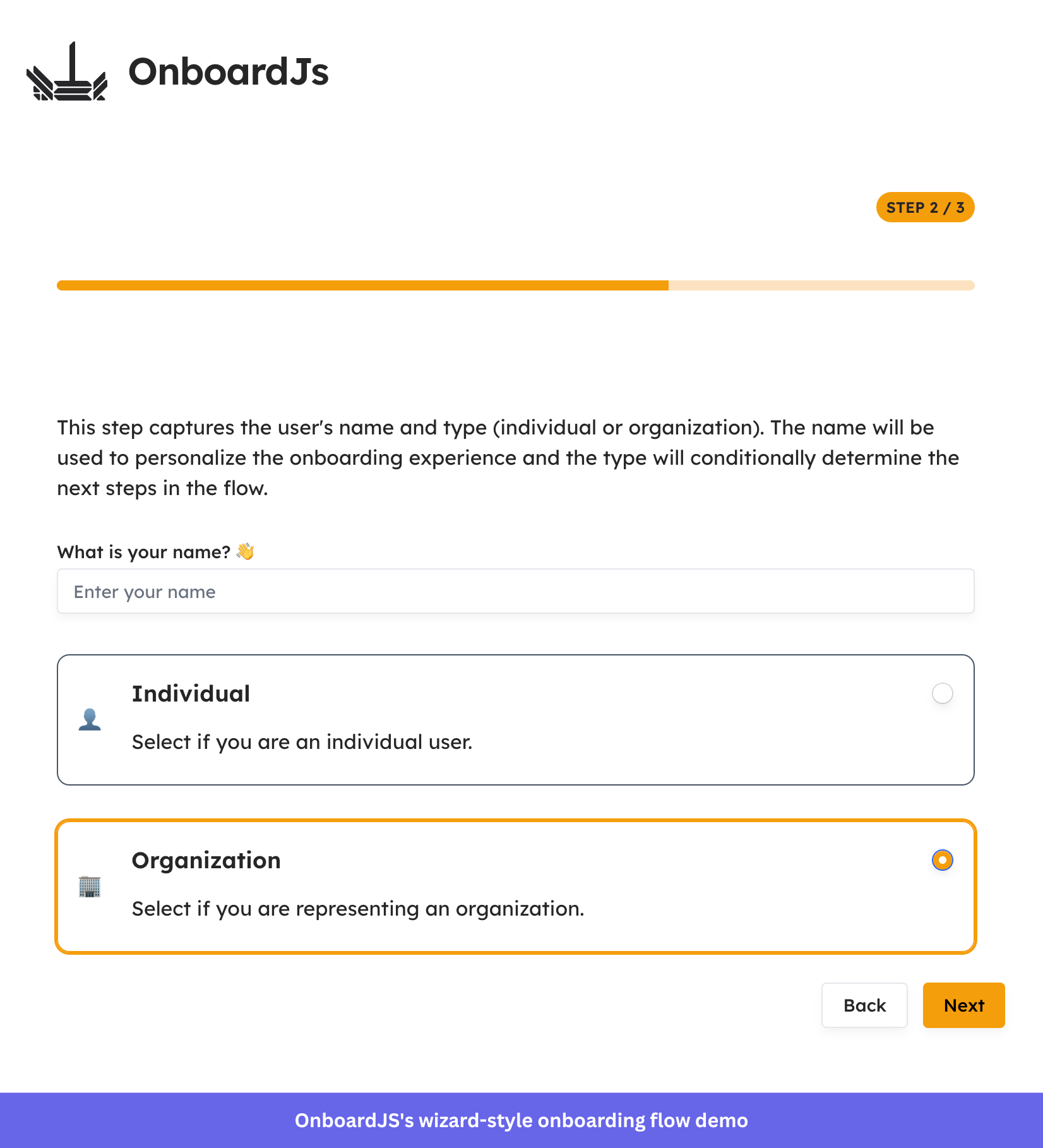
OnboardJS is a headless onboarding engine for React and Next.js. Unlike every other library in this list, it doesn’t render tooltips or spotlight elements. Rather, it manages the state and logic of multi-step onboarding flows, while you handle the UI.
Key features:
- Headless architecture: OnboardJS handles the logic of your onboarding flow but renders nothing itself. You define your React components for each step and map them to step types. This gives you control over the visual experience without fighting a library’s default styles.
- Conditional logic and dynamic flows: Steps support a property that evaluates at runtime to include, skip, or branch to a different step based on context. For example, skipping a profile setup step if the user’s data already exists.
- Built-in progress persistence: OnboardJS automatically saves and loads user progress, allowing users to close the browser and resume exactly where they left off.
- TypeScript-first: The entire API is typed, including step definitions, context, and hook return values. Your IDE autocompletes available options and catches configuration mismatches at development time.
- Analytics integrations: OnboardJS has dedicated plugins for PostHog and Supabase, making it straightforward to track step completion, drop-off, and activation events without building custom tracking infrastructure.
- Step types out of the box: The engine ships with various step types, plus a custom component for anything beyond those. This gives you a structured starting point without locking you into a fixed UI pattern.
Licensing and pricing:
OnboardJS is MIT-licensed.
What to consider:
✅ OnboardJS’s headless approach is its clearest strength and its biggest constraint. If your team has React developers and needs full UI control, OnboardJS gives you that without compromise.
❌ If you’re looking for a drop-in tour library with default styles, tooltips, and spotlight effects, OnboardJS isn’t an ideal option. There are no tooltips, overlays, or visual elements out of the box. Every pixel of the onboarding UI is yours to build.
✅ With 49 stars and 5 contributors, OnboardJS is still a small, early-stage project. That said, the maintainer has been active in 2026, opening multiple features and documentation issues in January, so there’s continued development momentum. There’s also a Discord server for community support.
Best free open source employee onboarding software
|
Tool |
Type |
License |
Self-hostable |
Framework |
Last release |
Best for |
| ChiefOnboarding | Platform | AGPL-3.0 | Yes (Docker) | Web-based | February 2026 | Slack-integrated HR onboarding for remote and hybrid teams |
| Horilla HRMS | Platform | LGPL-2.1 | Yes (Docker/manual) | Web-based | January 2026 | All-in-one HRMS covering the full employee lifecycle |
ChiefOnboarding: Slack-integrated HR platform
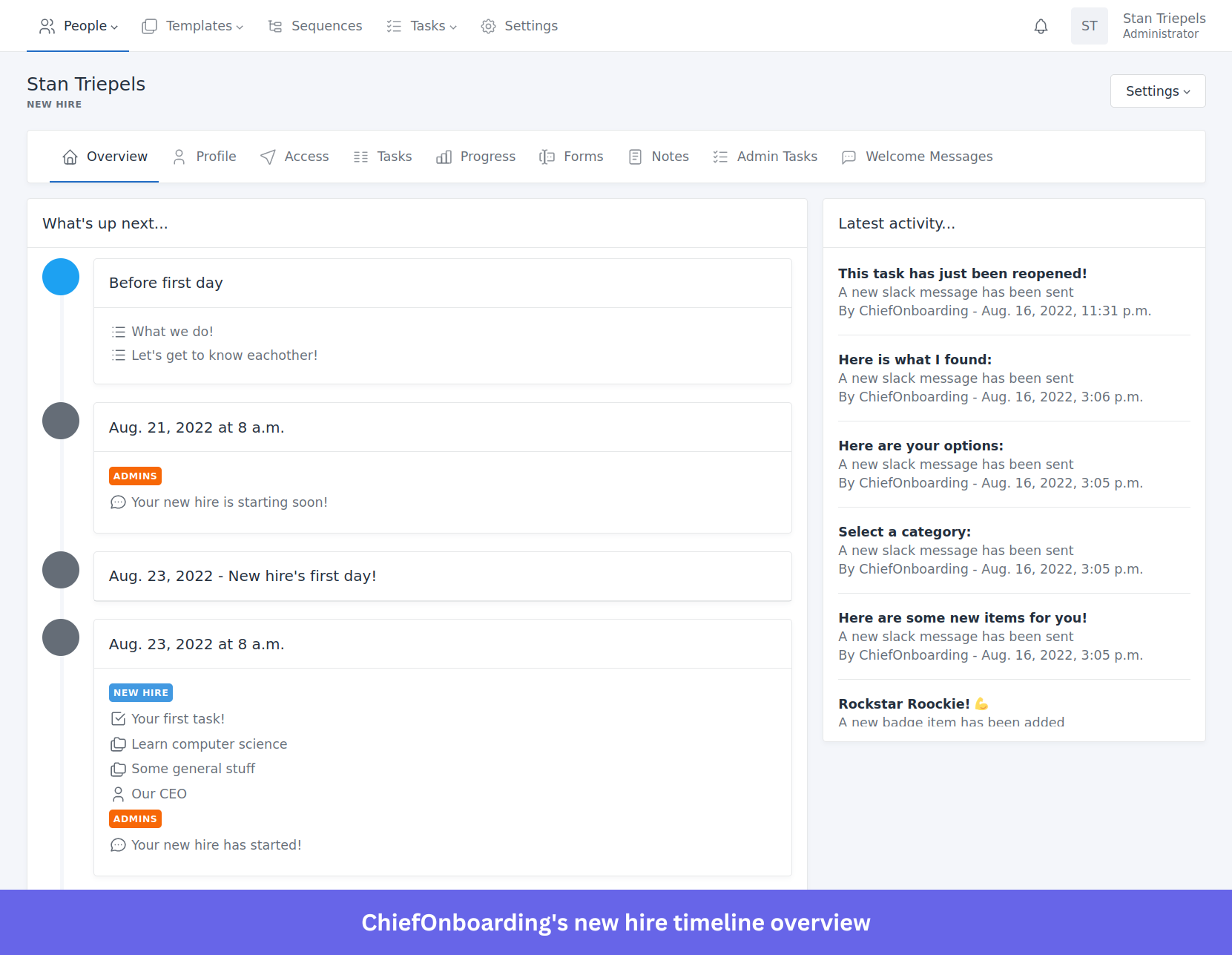
ChiefOnboarding is a free, open-source employee onboarding platform built for HR and operations teams. Unlike the product tour libraries earlier in this article, it focuses entirely on the HR side of onboarding: structured workflows for new hires, task management, account provisioning, and Slack integration.
Key features:
- Slack bot and web dashboard: New hires can complete their onboarding entirely through Slack or the web portal (both provide full feature access and can be used standalone). The Slack bot sends reminders, pings colleagues to complete tasks on the new hire’s behalf, and keeps the process moving without manual follow-up from HR.
- Pre-boarding pages: You can build pre-boarding pages with information, pictures, files, and lists to welcome new hires before their first day.
- Sequences and drip-fed tasks: Instead of dumping all tasks on a new hire at once, sequences let you drip-feed to-do items over time or trigger them based on the completion of a previous task. This reduces the overwhelming feeling among new hires.
- Automated account provisioning: ChiefOnboarding integrates with third-party tools to automatically create user accounts (Slack, Google, Asana, GitHub, and more) on a schedule. This removes the back-and-forth with IT during onboarding and ensures access is ready when the new hire needs it.
- Knowledge base and courses: New hires can search a resource library and complete courses to get up to speed at their own pace, reducing the need for repeated one-on-one explanations from colleagues.
- Badges and gamification: You can reward new hires with badges for completing tasks. It’s a small but documented way to maintain motivation during the first weeks when progress can feel invisible.
- Multilingual support: ChiefOnboarding supports English, Dutch, Portuguese, German, Turkish, French, Spanish, and Japanese out of the box. You can request additional languages.
Licensing and pricing:
ChiefOnboarding is licensed under AGPLv3 and free to self-host. Two plans are available:
- Free: €0/month. Self-hosted, community support via GitHub issues only.
- Support: €249/month (billed annually, excluding VAT). Self-hosted with priority email support, generally with a response time of under 2 hours.
What to consider:
✅ ChiefOnboarding’s Slack integration is genuinely useful for remote or hybrid teams. Also, its sequence/drip-feed model for task delivery is a thoughtful design choice that separates it from simpler task-list tools.
⚠️ Under the AGPL-3.0 license, the same source disclosure requirement applies: deploying modified versions means making your source code publicly available. It’s worth a legal review if you plan to distribute software that includes ChiefOnboarding.
⚠️ The support tier at €249/month is relatively steep for a self-hosted tool. It’s positioned for teams that want control over their data but can’t afford outages or slow bug resolution. If your team has strong DevOps capabilities, the free self-hosted tier, along with community support, may be sufficient.
Horilla HRMS: Manage new hire data, documents, and workflows
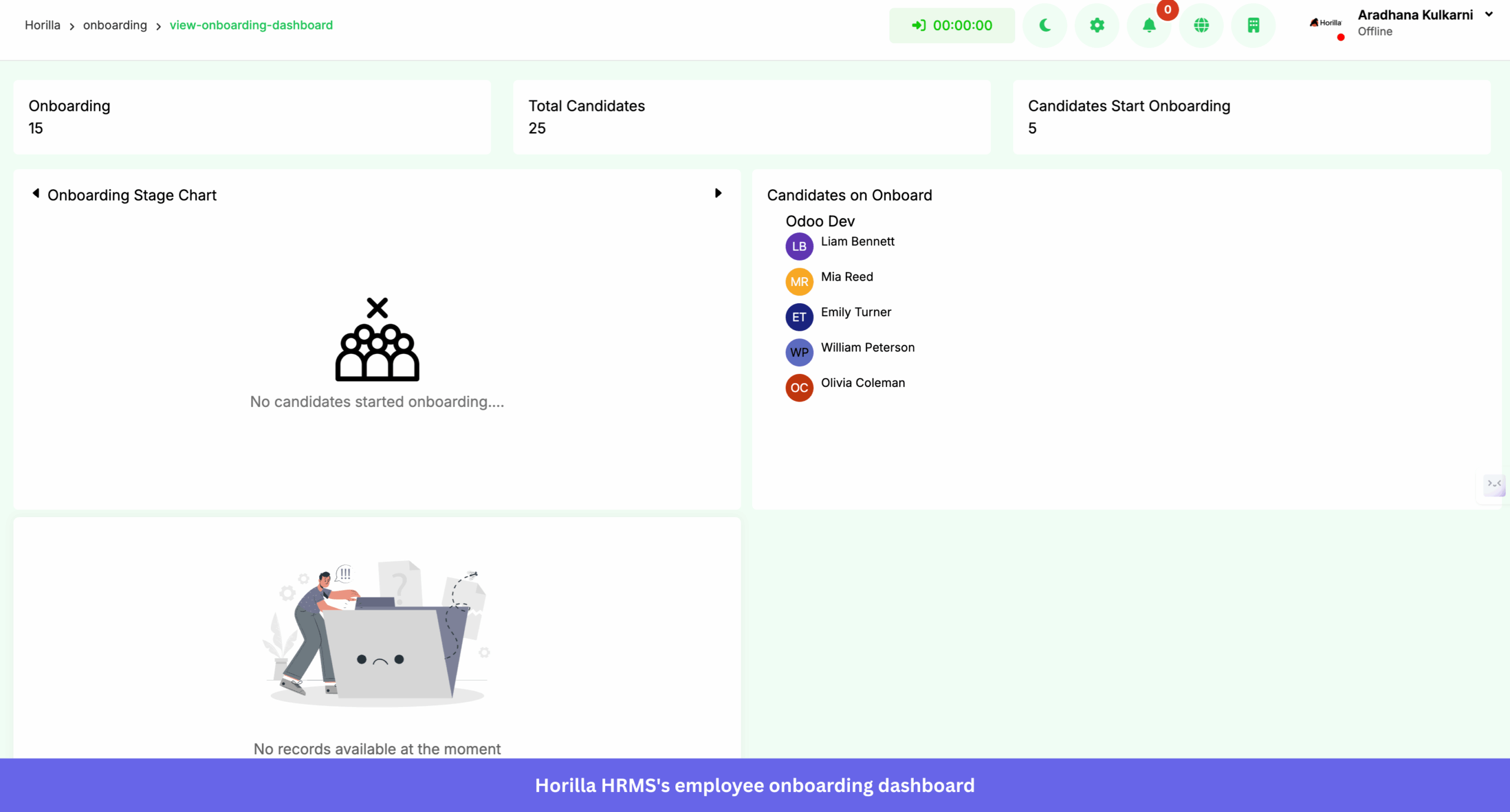
Horilla is a free, open-source HRMS built with Python and Django, developed by Cybrosys Technologies. It covers the full employee lifecycle, including recruitment through onboarding, attendance, payroll, and offboarding, in a single self-hosted platform.
Key features:
- Dedicated onboarding module: Horilla has a standalone onboarding module that guides new hires from recruitment through integration. It handles the transition from candidate to active employee, keeping onboarding data connected to the recruitment record without manual re-entry.
- Employee management: Its dashboard centralizes employee profiles, roles, departments, hierarchies, and statuses. This provides a full view of the workforce without juggling separate tools for each data type.
- Attendance tracking: Track check-ins and check-outs, calculate overtime, and flag late arrivals and early departures. Horilla also supports biometric device integration for hardware-based attendance verification.
- Leave management: Enables your employees to apply for leave through the platform, and managers to approve or reject requests. Horilla handles leave balance tracking, accruals, and policy enforcement automatically.
- Payroll processing: The payroll module manages contracts, allowances, deductions, and tax calculations, and generates payslips. It’s a better alternative to handling your payroll in spreadsheets.
- Performance management: Horilla supports OKRs and 360-degree feedback, giving you a structured way to run performance reviews without a separate tool.
- Offboarding: Includes customizable offboarding workflows for resignations, retirements, and terminations. It helps you cover task assignment, documentation, and exit interviews within a single flow.
Licensing and pricing:
Horilla is licensed under LGPL-2.1 and is completely free to self-host. However, two categories of optional paid services are available if you need hands-on help:
Support packages (for ongoing help post-deployment):
- Basic: $900 for 25 hours.
- Standard: $1,700 for 50 hours.
- Advance: $3,200 for 100 hours.
Implementation packages (for initial setup and go-live):
- Starter: $1,999. Includes setup, SSL, mail config, up to 4 hours consultation and training, 1-week duration.
- Professional: $3,999. Adds data migration assistance, up to 40 hours of workflow customization, and a 1-month duration.
- Enterprise: $7,999. Includes full data migration, up to 80 hours customization, 12 hours training, and a 2-month duration.
The software itself costs nothing. These services are entirely optional for teams that want expert guidance rather than a DIY setup.
What to consider:
✅ If your HR team needs onboarding, payroll, attendance, and performance management on one platform, Horilla eliminates the need to integrate separate tools for each function.
✅ The LGPL-2.1 license is more permissive than AGPL-3.0, as it doesn’t require you to release your source code if you simply use the software. This makes it a cleaner option for commercial organizations than tools licensed under AGPL.
❌ Setup requires Python, Django, and PostgreSQL: a higher technical bar than ChiefOnboarding’s Docker-first approach. With 113 open issues across 1k stars, there’s also a higher issue-to-adoption ratio than ChiefOnboarding, which is worth reviewing before committing.
Key features to look for in user onboarding tools
Strong onboarding tools share a core set of capabilities. Before committing to one, it’s best to evaluate how deeply it implements the following features:
- Product tour capabilities: Look for multi-step walkthroughs with progress indicators, overlay controls, and step-level navigation. The key differentiator between libraries is how they handle edge cases, such as when a target element hasn’t loaded yet or when a user navigates mid-tour.
- Tooltips and hotspots: Tooltips and hotspots should appear contextually without blocking critical UI. Evaluate the reliability of their placement across different screen sizes and nested layouts.
- Checklists and progress tracking: Checklists drive user activation by showing what remains to be completed. They work best when you tie them to real in-app events rather than manually ticked off. If a tool only supports static checklists, you’ll need to wire up your event tracking so they’re meaningful.
- Customization options: Evaluate whether the tool supports custom CSS, component-level overrides, and theming without requiring forced workarounds. Libraries with minimal default styles give you a cleaner starting point than those with opinionated CSS you’ll need to undo.
- WYSIWYG editor: For teams where product managers or customer success own onboarding content, a no-code visual builder is ideal. This is where platforms like Usertour pull ahead of pure JS libraries, as non-developers can iterate on flows without engineering involvement.
- Mobile responsiveness: Touch-friendly controls and adaptive positioning vary significantly across libraries, and broken mobile tours create a worse first impression than no tour at all.
- User segmentation: Help you show different onboarding flows to different users based on role, plan, or behavior. Without segmentation, every user gets the same experience regardless of their needs, reducing relevance and completion rates.
- Analytics and tracking: The right tools help you identify time-on-step, skip rates, and correlation with downstream activation events. If your tool doesn’t include analytics, plan for the additional work of connecting it to your existing analytics stack.
- Localization support: If your product serves multiple regions, check for language pack support, RTL layout handling, and region-aware formatting. Some tools treat localization as a first-class feature; others require you to manage translated content manually and swap it in via configuration.
- Accessibility: Keyboard navigation, focus management, and ARIA labeling are non-negotiable for products serving enterprise or regulated markets. Shepherd.js handles this well out of the box; many lighter libraries don’t. Test with a screen reader before launching any onboarding flow to a broad audience.
💡Pro tip: Map these features to your product’s complexity and your team’s capacity. A simple single-persona SaaS product may only need tours and tooltips. A multi-persona enterprise app with global users will likely need user segmentation, analytics, localization, and accessibility from day one.
How to implement open source onboarding automation software
Proper implementation shortens time to value and reduces breakage when you make app changes. Treat onboarding content with the same discipline you’d apply to production code. Version it, test it, and iterate changes to improve it.
![[Custom image rec] The 8-step process for implementing open source onboarding software.](https://blog-static.userpilot.com/blog/wp-content/uploads/2026/03/e4ffcbbc-e0cf-45a3-b248-a8152da6275c.jpg)
- 1. Install
- For JS libraries: use npm or yarn (e.g., npm install shepherd.js).
- For self-hosted platforms (Usertour, Guidefox): follow Docker image setup, database initialization, and environment variable configuration in the official docs.
- Document the system requirements and dependencies in your README so future contributors don’t have to start from scratch.
2. Integrate
- Load CSS and JS assets in the correct order, then initialize after your app has rendered the target elements.
- Use framework wrappers (React, Vue, Angular) where available for idiomatic integration.
- Design element selectors that stay stable across UI changes to avoid brittle selectors, which typically cause broken tours after a product update.
3. Configure
- Define steps, content, and triggers in code or through a visual editor.
- Store configuration in separate files or JSON to make versioning and future updates easier.
- Document your naming conventions for steps and selectors. This pays off the first time someone else has to edit a flow.
4. Test
- Verify tooltip placement, copy, and navigation across Chrome, Firefox, Safari, and Edge.
- Check behavior on iOS and Android across varied screen sizes.
- Cover edge cases: step skipping, route changes mid-tour, missing target elements, and interrupted sessions.
5. Deploy
- Validate all changes in a staging environment before pushing to production.
- Gate new flows behind feature flags for controlled rollouts so you can quickly disable them if something breaks.
- Bundle only what you need to limit performance impact on page load.
6. Version control
- Track onboarding content in Git alongside your product code.
- Use branches for experiments and tag releases when changing copy or layouts, so you can correlate shifts in analytics with specific changes.
7. Maintain
- Subscribe to GitHub release notes and security advisories for your chosen libraries.
- Schedule content reviews after every significant UI change or feature launch.
- Assign clear ownership because onboarding drifts and breaks when no one is responsible for it.
8. Secure
- For self-hosted platforms: keep Docker images patched, restrict access controls, and review logs regularly.
- Audit any source code modifications for privacy implications, especially if you handle user data within onboarding flows.
Where open source falls short for onboarding
While open source offers many advantages, it’s important to acknowledge its limitations. Let’s explore where open source onboarding software often falls short.
- Heavy coding and dev time: Even with simple libraries, you still have to wire events, handle routing edge cases, style tooltips, and perform QA across browsers. This requires engineering time, which undermines the benefit of using open source licenses.
- Heavy reliance on developers: Even small changes like text edits, step reordering, and selector updates flow through code, testing, and deployment. Product and customer success teams can’t ship onboarding improvements independently, creating a persistent handoff bottleneck between the teams.
- Maintenance burden: Open-source tools aren’t “set it and forget it.” They need framework updates, router changes, design refreshes, and continuous adjustments as your product evolves. If a library gets abandoned, it eventually becomes too outdated for your stack, and the migration cost can fall entirely on your team.
- Limited out-of-the-box capability: Most of these platforms don’t go beyond in-app onboarding guides. There’s no built-in segmentation, A/B testing, deep product analytics, or omnichannel engagement tools. You’ll need to build separate tracking mechanisms, connect external analytics tools, and stitch the data together.
- Advanced targeting is manual: Role, behavior, and context-driven logic is technically feasible but code-heavy. Every additional personalization layer multiplies complexity and adds to the engineering burden.
- Lack of omnichannel orchestration: Most libraries focus exclusively on in-app guidance. If you want onboarding across email, SMS, and push notifications, you have to integrate and maintain separate tools.
- No dedicated support: When something breaks, or you need help with a complex use case, you’re often left to community forums or your own team’s troubleshooting. In most cases, there’s no dedicated support team to lean on, which can be a huge time sink if the community isn’t active.
- Feature velocity: Roadmaps depend on volunteer energy. Features you need may arrive slowly, get deprioritized indefinitely, or never ship at all. This is more likely to happen if you’re building on a library with a small contributor base.
- Scaling complexity: As your user base grows and your product evolves (across multiple roles, environments, locales, and feature flags), open-source solutions become increasingly hard to manage. Maintaining consistency across different versions of your app or setting up dynamic content demands careful architecture and constant upkeep that proprietary platforms handle for you.
💡 Set expectations early: If speed, analytics depth, and non-technical ownership are must-haves, plan for added engineering time. Or consider proprietary platforms for those parts of the stack.
Open source software vs no-code onboarding tools: When to choose what
Given the open source software limitations we’ve covered, it’s crucial to understand the differences between these tools and proprietary solutions to help you pick the right fit.
|
Decision factor |
Open source |
No-code/proprietary |
| Team ownership | Engineering-led | Product or customer success-led |
| Time to first flow | Days to weeks | Hours to days |
| Customization | Unlimited, code-required | High, within platform constraints |
| Analytics depth | Basic (requires external tools) | Built-in funnels, cohorts, retention |
| A/B testing | Manual build required | Native |
| Omnichannel | Requires separate integrations | Often included |
| Data residency | Full control (self-hosted) | Vendor-dependent |
| Support | Community only | Dedicated, SLA-backed |
| Cost | Free (engineering time not free) | Subscription-based |
| Maintenance | Your team’s responsibility | Vendor-managed |
Choose open source software when:
- Your engineering team has the capacity to build, maintain, and iterate on onboarding without creating a bottleneck for other product work.
- Your onboarding needs are either straightforward (basic tours and tooltips) or highly custom in ways commercial vendors can’t support. For example, deep integration with your app’s state management or a non-standard UI framework.
- You require self-hosting or data residency due to compliance requirements, security policies, or geographic regulations.
- You have budget constraints that outweigh the benefits of a managed service, and your team can handle the engineering overhead.
Choose no-code/proprietary platforms when:
- You need to ship onboarding flows quickly and iterate frequently without opening pull requests for every content change.
- Your non-technical teams (product managers, customer success, growth) need to own onboarding content and run experiments independently.
- You need analytics depth, A/B testing, or omnichannel messaging (email, push, in-app) available immediately, without having to build infrastructure to support them.
- Predictable support, uptime guarantees, and vendor accountability matter to your organization.
What I recommend: Start with open source tools to move fast at low cost, then migrate to a proprietary platform once user onboarding becomes a growth-critical workflow that non-technical teams need to own. Revisit the decision when your team structure or scale changes.
About the author