Session Recording: Mapping User Behavior in the Agentic Era


Session recording has been one of the most prominent features in product analytics tools.
The premise is simple: watch what real users actually do in your product, not just what the numbers say they do. In 2026, that premise is still intact. But the way it works is quickly changing.
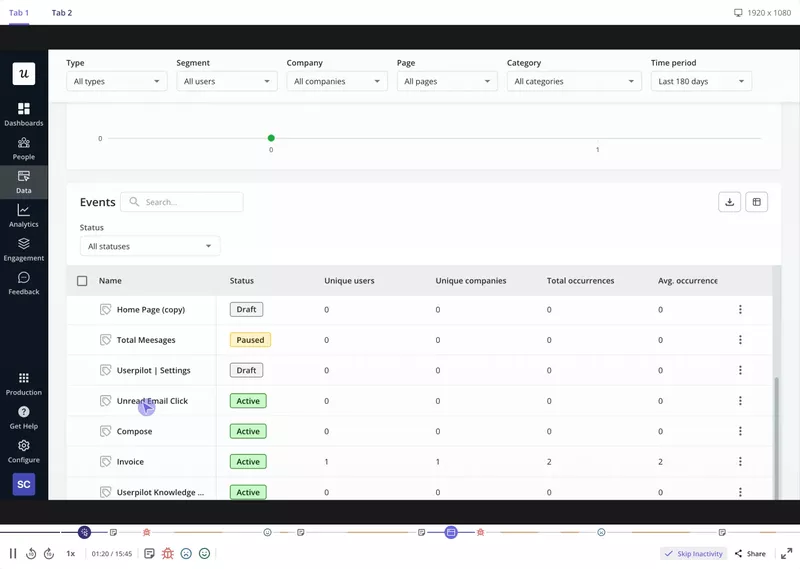
For the longest time, your workflow probably followed a predictable pattern. You would notice a steep drop off rate in the funnel, filter down to the affected user sessions, and dive into the recordings to find the friction. It was a reliable system. Session replays were invaluable because they allowed you to watch real user activity and make completely invisible frustrations visible.
But things started changing with AI.
AI transformed the analysis side, making it possible to skip the manual review entirely. At the same time, AI agents started operating inside SaaS products directly via tools like MCP. These agents don’t leave traces the way humans do. No scroll, click, or hover. It renders session recordings useless.
In this article, I’ll run through the various aspects of session recordings and how it can still be used in 2026.

What session recording software actually captures
The most common misconception about session recordings is that the tool saves a video file of the user’s screen, something like an MP4 sitting on a server. It does not, and understanding why matters for how you think about what the data can do.
When a user uses your app, a JavaScript snippet (or mobile SDK) captures two streams of data: DOM mutations and interaction events. DOM mutations are structural changes to the page, such as elements added, removed, or updated in the HTML as the user uses it. Likewise, interaction events cover click tracking and the user’s other mouse movements: scrolls, taps, text inputs, and form submissions. Each comes with a timestamp and a coordinate.
During playback, the session recording tool reconstructs the session dynamically by replaying those events against a snapshot of the page structure. What you see looks like a video, but it’s a live re-rendering from event data. This is why file sizes stay small, why session recording doesn’t cause page lag, and why the data is queryable.
What this means in practice: session replay data is structured behavioral data, not footage. The best session recording tools in 2026 treat it that way, with AI analysis, filtering, and segmentation built on event based analytics rather than a video scrubbing interface.
How AI changed session recordings
A few years ago, working with session replays meant sitting down and watching recordings. You built filters to narrow the set, worked through one session at a time, and looked for patterns. It was a slow process, I agree. But it worked.
The 2026 standard is different. Modern session recording tools now run machine learning models over the event stream to generate an automated Friction Score for each session.
The models detect micro-movements that correlate with user frustration: erratic cursor hovering over unresponsive elements, back-and-forth scrolling within the same section, unusually long pauses before submitting a form, and rage clicks on non-interactive elements. The score surfaces the highest-friction sessions automatically, without requiring you to know what to look for in advance.
Natural language querying has changed the day-to-day workflow just as much. Instead of building multi-step filter stacks, you can ask questions in plain language. For instance, you could ask, “Show me sessions where users encountered an error during checkout” or “Find recordings where mobile users dropped off on the pricing page.” Quantum Metric, Mixpanel, and Amplitude all shipped versions of this through 2025, and the time saving is significant for anyone who previously built those filters manually.
AI summaries make this even simpler. Instead of watching a full session recording, you read a short summary of what happened and watch only when you need to verify something specific. For instance, Datadog’s session replay now generates smart chapters and AI summaries that substantially reduce manual review time, with Amplitude and Mixpanel offering similar features.
This is where Userpilot’s direction extends the idea further. Our CEO, Yazan Sehwail, has been building toward a model where session replay, NPS data, survey data, and product usage metrics all become accessible through a single natural language interface:
“If you as a marketer wanted to see, using session replay, NPS data, survey data, and product usage data, you’re able to get your answer without having to go to Userpilot, without having to pull data and upload it to someone. So this is why MCP is gonna be a game changer.”
Lia, Userpilot’s AI agent, is the product execution of that vision. Rather than navigating to the session recording section and building filter stacks manually, you can ask Lia what happened with a specific user segment and get an answer that draws on session data alongside other behavioral signals. It removes the context-switching that most product managers experience when they need to triangulate across multiple analytics tools.
The teams already seeing the value of regular session recording review are instructive. Anna Sobiak, Product Designer at Cleeng (see the full Cleeng case study) described what happened when their team changed their navigation layout:
“Session replays were super useful when we changed the navigation. We could see what exactly the users were clicking and if they were visiting the pages we want them to visit.”
Awni Shamah, Staff Product Manager at Amplemarket (see the Amplemarket case study) built weekly session recording reviews into his team’s process after seeing how much they were missing without it:
“We release a lot of new features and improvements every week. Without a way to see what’s happening with the product, things simply break. Session replays are a huge lifesaver. Whenever a new feature is released, we watch 10-15 session replays to understand how it works. It made our product designers 80-90% more confident in developing new solutions.”
The blind spot: What session recording can’t see in 2026
Session recording was built to capture user behavior. Specifically, the signals produced by users using a computer, such as mouse movements, clicks, scrolls, and more.
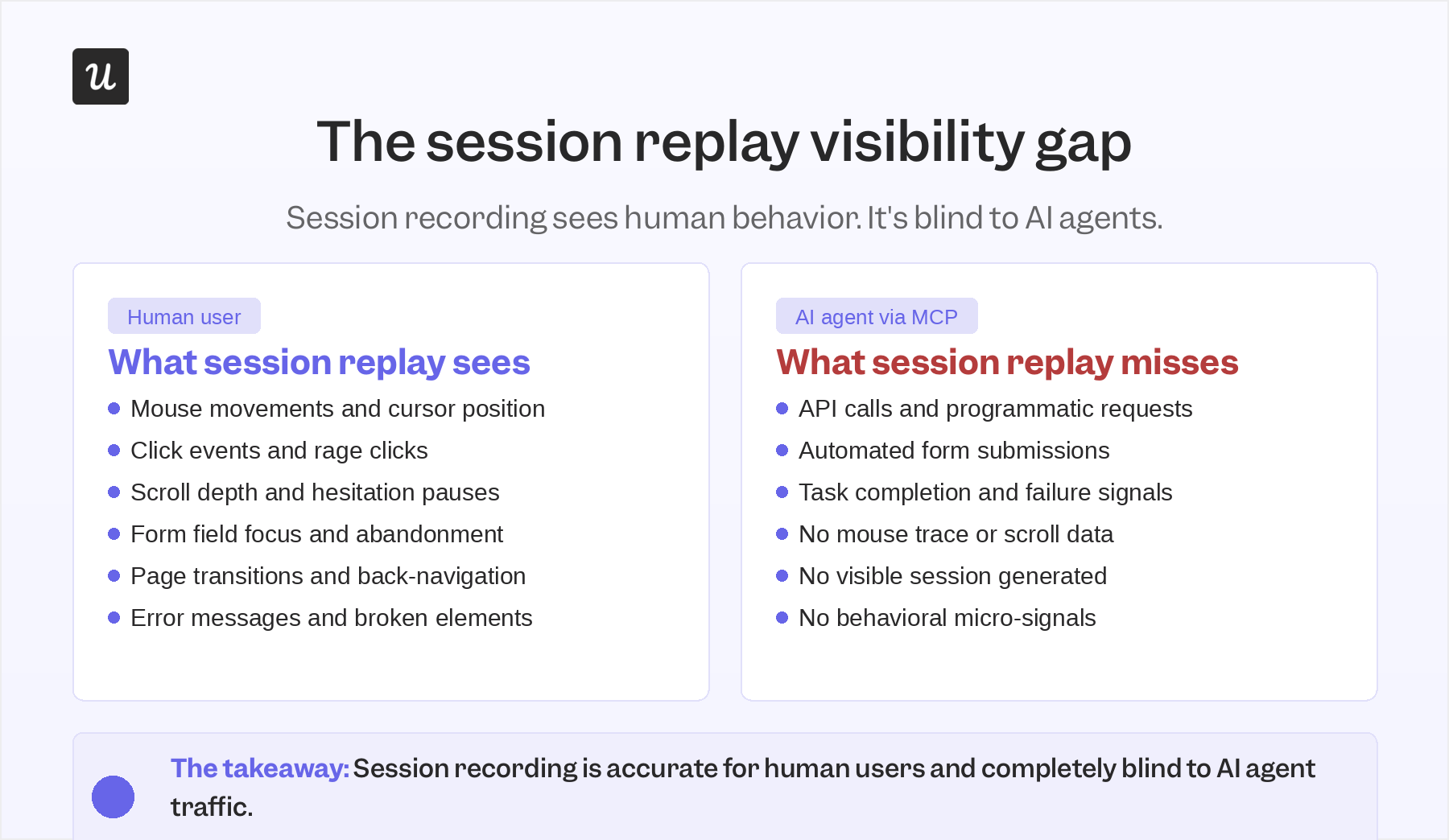
AI agents tend to operate via MCP servers, executing tasks within your product without using a mouse, like a human would. Let me explain how it works.
They call your APIs, submit forms, and complete workflows directly through programmatic interactions. As a result, there’s no visual trace that session recording tools can identify. They’re essentially blind to agentic traffic.
This matters because agent traffic in SaaS is growing. If your product exposes integrations via MCP or other programmatic interfaces, a meaningful share of your product interactions may already be coming from agents. Sessions those agents generate, if they appear in your recording dashboard at all, show up as empty screens with no interaction data. The friction they encounter, the steps where they fail, and the workflows they abandon leave no trace in session replay.
And what does that mean for product teams?
The user behavior analytics picture you get from session recordings in 2026 is accurate for human users and completely blind to agent users. Agentic observability is a separate discipline from session replay, and the two need to run alongside each other. Session recording tells you how your human users experience the product; agent-level analytics (MCP logs, task completion rates, failure signals) tells you how your AI users do. Neither replaces the other.
Session recordings and privacy risk
Session recording involves user behavior tracking and data capture. This opens up the possibility of exposing sensitive data. And in 2026, the legal risk is high in that regard.
There’s been a recent surge in lawsuits targeting website wiretapping, which includes session replays.
The core issue in most cases?
Session recording tools captured behavioral data that qualified as personal data under GDPR’s broad definition, without a clear legal basis or user consent in place.
The European Commission’s proposed GDPR amendments in Q4 2025 will add further complexity. The amendments:
- Address cookie consent requirements.
- Introduce AI processing obligations for tools that use behavioral data to train models.
- Add data residency considerations for tools hosted outside the EU.
Most major session replay platforms use US-based infrastructure, meaning that when sensitive information crosses that border, the transfer needs to be covered by a valid legal mechanism.
Here’s what you should do to comply with these regulations:
- Enable automatic PII masking in your session replay tool so passwords, credit card fields, and personally identifiable information are never captured.
- Define a data retention period and enforce it. A period of 30 to 90 days is sufficient and legally defensible.
- Confirm that your tool honors Global Privacy Control and browser-level opt-out mechanisms.
If you operate in the EU, verify where your session replay vendor processes and stores data, since EU data residency is increasingly the safer default under the Q4 2025 amendment proposals.
How to analyze session recordings without drowning in data
The biggest practical mistake I see with session recording is treating it like a surveillance feed. Teams that record everything and watch randomly get noise.
On the flip side, those who watch with a specific question get signal. The question you start with matters the most.
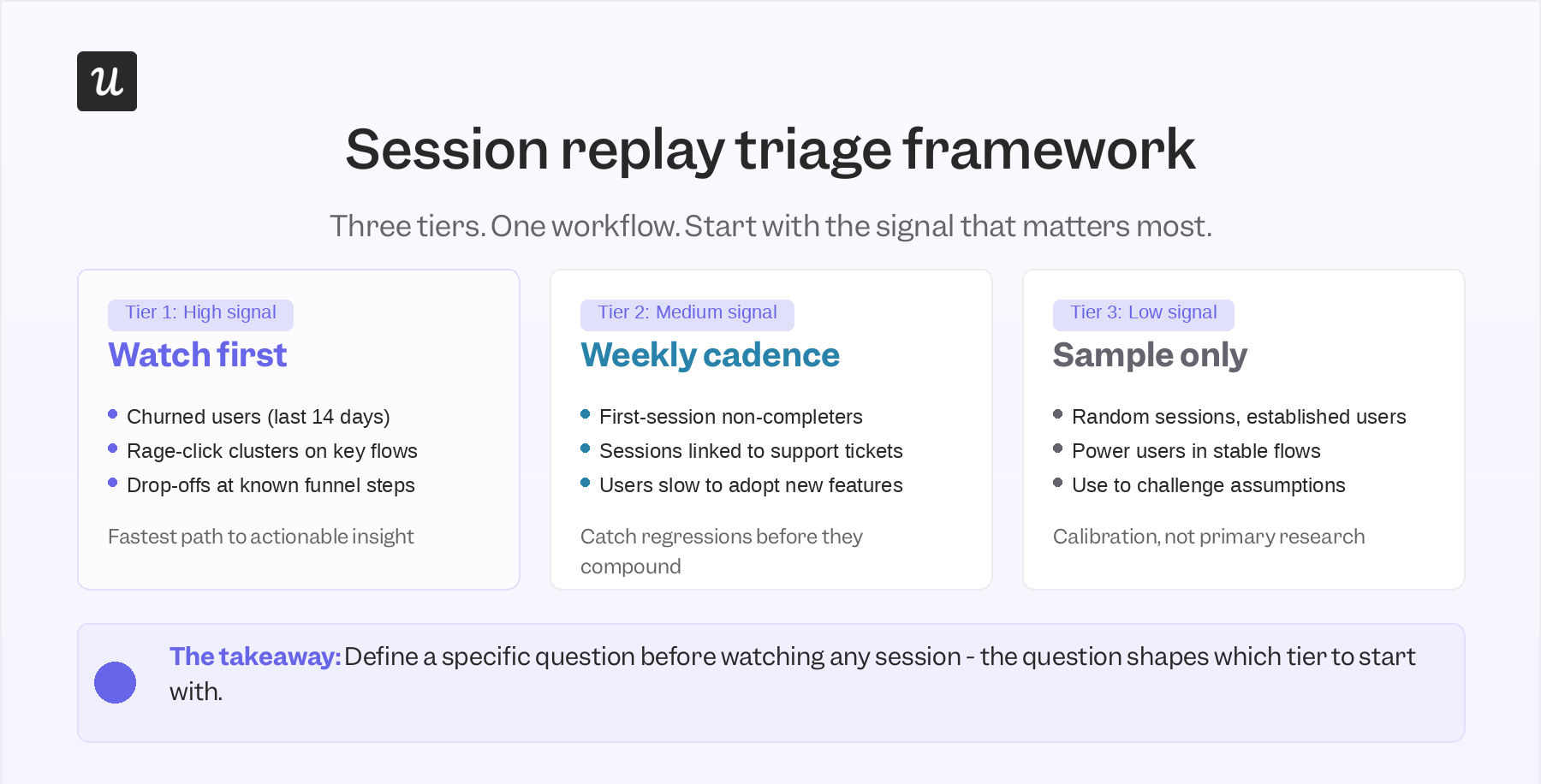
The session replay triage framework is a tactic I’ve found most useful. Here’s what it looks like:
- The first tier is the highest-signal work: Look at the sessions tied to customer churn in the past 14 days, those with rage clicks on key conversion flows, and ones from users who dropped off at a funnel step you already know has a problem. Watching these first gets you to actionable insight fastest.
- The second tier involves regular reviews: Watch sessions of first-time users who didn’t complete onboarding, sessions linked to support tickets or negative user surveys, and users who haven’t adopted a new feature after seven days.
- The final tier is all about opportunistic sampling: You pick random sessions from established users and power users in flows you consider stable. Use these to challenge your assumptions about what’s working. Don’t use them as your primary research method though.
On segmentation: not all user sessions are equally relevant in a given context. If you are building accounting software and just shipped automated bank reconciliation, watch the sessions of accountants setting it up for their customers, not your entire user base. The narrower and more targeted your segment, the faster you reach a finding you can act on.
Integrating session replay with your analytics stack
Session recordings answer the question “what did this specific user actually do.” But using them in isolation doesn’t help deliver conclusive answers.
I recommend starting with conversion funnel analysis. Run the funnel, identify the drop-off step, and then look at session recordings to find the “why.”
The funnel tells you where the problem is; the recording tells you what the problem looks like from the user’s perspective. Using them together gives you a more holistic picture.
Apart from funnel analytics, you can also use heatmaps. Heatmaps show where users collectively click, scroll, and ignore; session recordings show the individual journeys behind the aggregate. When a heatmap reveals a dead click on a non-interactive element, filter to recordings of users clicking that element to understand what they expected to happen.
A/B tests can be just as handy. While product experimentation helps you find out which variant delivers better results, session recordings take things a step forward. Pairing A/B tests with session recordings can show you what users actually did differently across variants. It enables you to go beyond numbers. You’ll know exactly which strategies drive results.
Userpilot supports A/B testing for in-app flows along with session replay, so you can get all the insights on a single platform.
User feedback and survey data can be paired with session recordings as well.
When a user submits negative survey feedback, their corresponding session recording provides the behavioral context behind the sentiment. The combination of qualitative data from the recording and quantitative data from your funnel analytics gives you both the what and the why in a single workflow. Userpilot’s session replay connects directly to user feedback and survey data in the same platform, so the pairing does not require a manual data export.
Choosing the right session recording tool
The right session replay tool for your SaaS in 2026 depends less on basic recording capabilities, which mattered until AI agents entered the picture. Now, it comes down to these three questions:
1. How does it handle AI-powered analysis?
Look for automated Friction Scoring, natural language querying, and AI session summaries specifically. Tools that require fully manual review are not obsolete, but they require substantially more analyst time to reach the same output as platforms with those capabilities built in.
2. Does the tool offer session recordings for mobiles? And if so, how does it fare?
Mobile app tracking captures taps, swipes, and pinch gestures via SDK rather than mouse events. So, it’s important that the tool captures them well. If a significant share of your user sessions happen on mobile, verify that the tool captures and reconstructs mobile interactions usefully before committing.
3. How does it handle privacy and compliance?
It should offer features like automatic PII masking to protect sensitive user data. Also, you should get EU data residency options and explicit Global Privacy Control support.
Userpilot’s session recording feature, for instance, integrates with product analytics, user feedback, A/B testing, and in-app engagement in a single platform. The raw events auto-capture feature collects clicks, text inputs, and form submissions automatically from the moment the SDK is installed, with no additional event configuration required. You also get Lia, our AI assistant, who helps you uncover insights quickly.
Session recordings best practices for 2026
Let’s now take a look at some of the best tactics for using session recordings.
- Review session recordings regularly: Most teams turn to session replay reactively, when a metric drops or a customer complains. However, the better practice is to do build a regular review practice. Pair it up with events like feature releases, current product priorities, or the top of the support queue. Block time weekly to watch a defined set of recordings, rather than opening the tool only in response to incidents.
- Look for patterns, not just interesting individual sessions: Individual user behavior inside the product can be fascinating and completely unrepresentative. The fact that a few users scroll back and forth on a page or seem stuck on a step does not mean there is a systemic issue worth addressing. To make product decisions from session recording data, look for recurring behavior patterns across multiple sessions from the same segment. A single user behaving oddly is noise; ten users from the same onboarding cohort behaving the same way is a finding.
- Use session recordings to validate fixes: Session recordings are useful for finding root causes of problems. But their applications go far beyond that. In fact, you can use them to see how your fixes are faring too. After shipping a UX redesign or onboarding update, watch sessions from the same user segment you analyzed before the change. Did the redesigned flow reduce the hesitation and backtracking you saw previously? Are users completing the step that was causing abandonment? Skipping this validation step means you are guessing about whether your changes landed.
- Combine with other data sources: Session recordings are qualitative and individual. They show you what happened in specific sessions, but not what’s happening across all sessions. To get the full picture, you must pair them with other product analytics tools. It can help you figure out which sessions are worth watching, with survey data to understand why users feel the way they do, and with heat map analysis to distinguish individual behavior from collective patterns. Session replay on its own is a starting point; the insight comes from connecting what you see to the broader behavioral picture.
Get session recordings right
Session recording in 2026 is still the most direct way to understand how real users experience your product. The tools are significantly smarter at surfacing friction automatically, summarizing what happened without manual review, and answering questions in plain language. The agent blind spot is real and growing, but it is a reason to add agentic observability alongside session replay, not to abandon session replay for your human users.
If you want to see how Userpilot’s session recording works alongside product analytics, user feedback, and Lia, you can get a demo here.
FAQ
What's the difference between session recordings vs. other tools for UX research?
Session replays vs heatmaps
While both heatmaps and session recordings shed light on user interactions, they provide different insights.
A session recording is like a video playback of an individual user’s interactions, capturing every click, scroll, and keystroke across multiple pages. This level of detail is invaluable for troubleshooting specific issues and understanding user journeys on a granular level.
In contrast, heatmaps collect user interactions across many sessions, giving a high-level view of common engagement areas on a single page. They reveal patterns in user attention, for example, where they click or how far they scroll. They shine when you want to optimize your page layout and UI design.
For optimal results, use both tools: heatmaps to spot patterns in what users do collectively and session recordings to investigate the ‘why’ behind those patterns.
Session replays vs. traditional web analytics
Tools like Google Analytics provide broad quantitative metrics: page views, bounce rates, time on site, and conversion metrics. They are excellent for identifying trends and the scale of issues, like a high drop-off rate on a particular page in your user funnel.
However, traditional web analytics don’t explain why users are bouncing or dropping off, nor the reason behind unexpected user behaviors.
Session recordings bridge this gap by providing the visual context, allowing you to observe specific user behavior patterns that directly contribute to those metrics, offering a rich narrative that quantitative data lacks.
Session replays vs. usability testing
Usability testing involves observing a small group of users in a controlled environment as they complete specific tasks. It’s fantastic for getting direct feedback and spotting major usability issues early.
However, usability testing can be costly, time-consuming, and the “test subject” environment might not fully reflect real-world usage. Session recordings, in contrast, capture the behavior of real users in their natural environment, providing a much larger and more diverse set of interactions.
With session playback, you can uncover unexpected issues you’d miss in a lab setting, offering scale and authenticity that complements the depth of usability testing. It’s the difference between asking someone to perform a task versus watching them perform it unprompted.
About the author