Mixpanel Session Replay: How AI Is Changing It [+ Alternative]



Mixpanel session replay is a powerful feature that product managers can use to understand how users interact with and find friction points in their product. However, as with any other tool, this process is extremely slow (or at least, it used to be).
You’d have to watch individual recordings to find significant events. And that process took hours with all session replay tools, including Mixpanel.
But AI has started changing that.
You don’t need to sit and watch long session recordings. Instead, you can gain insights from them on autopilot and make product improvements before friction points lead to major churn. Here’s a straight look at where Mixpanel’s session replay tool stands in 2026.

How has Mixpanel’s session replay feature changed?
The biggest shift in Mixpanel’s session replay feature comes from its coverage. Web, iOS, and Android have supported session replay for a while, and Mixpanel added React Native support in March 2026, closing a real gap for teams shipping the same product across frameworks. Electron desktop apps are supported too, through the same client-side SDK you’d install for web.
It’s also possible to watch session replays in different ways:
- You can browse the Session Replay tab directly and filter by event or property, click into a funnel, event, or user profile chart and select “View Replays” to see the sessions behind that exact data point, or open a user’s profile and watch their history.
- Or, skip the player entirely using AI. Just ask a natural language question to Mixpanel Agent and get an answer without having to watch the recording itself.
Pricing changed too, and this is where the old advice to skip Mixpanel session replay unless you’re on Enterprise stops being true.
- Free plan: Includes 10,000 replays a month alongside 1 million events.
- Growth plan: Adds 20,000 free replays a month, customizable up to 500,000, on top of $0.28 per 1,000 events once you pass the first million free.
Enterprise still exists for teams that need retention customized anywhere from 7 to 360 days, but it’s no longer the only door in.
How do Mixpanel’s AI session replays help?
Mixpanel now generates AI summaries at both the individual replay level and across a whole playlist. So instead of scrubbing through 40 recordings, you get a written account of what happened and where the friction was.
A step further than the summary is Mixpanel Agent’s Root Cause Analysis, which pulls together the replays connected to a metric change, analyzes them alongside your event data, and surfaces the moments that explain a drop. That’s a task that used to take days and now takes minutes.
You also get an MCP server that lets you use AI platforms like Claude and ChatGPT to converse with Mixpanel’s AI agent without having to open the platform. However, if you’re evaluating other tools for product analytics, explore these Mixpanel alternatives to compare platforms based on their capabilities and use cases.
The privacy side of this is worth a beat too. Mixpanel runs its AI features through Zero-Data-Retention agreements with its third-party model providers, on top of the privacy controls (masking, do-not-track, custom retention) already built into session replay itself. Admins can also turn the whole AI layer off from organization settings if that’s the safer default for their team.
Userpilot: The alternative that watches with you and then builds the fix
Mixpanel’s session replay feature is powerful for product analysis. You gain insights into your product on demand, and its rage-click and dead-click detection flags friction points automatically as they happen.
Userpilot’s session replay tool does the same core job: you can watch individual recordings and ask an AI agent to summarize what happened in them, just like you can in Mixpanel. At that layer, the two are basically interchangeable.
The real split happens after that summary appears, in what you’re actually able to do with it.
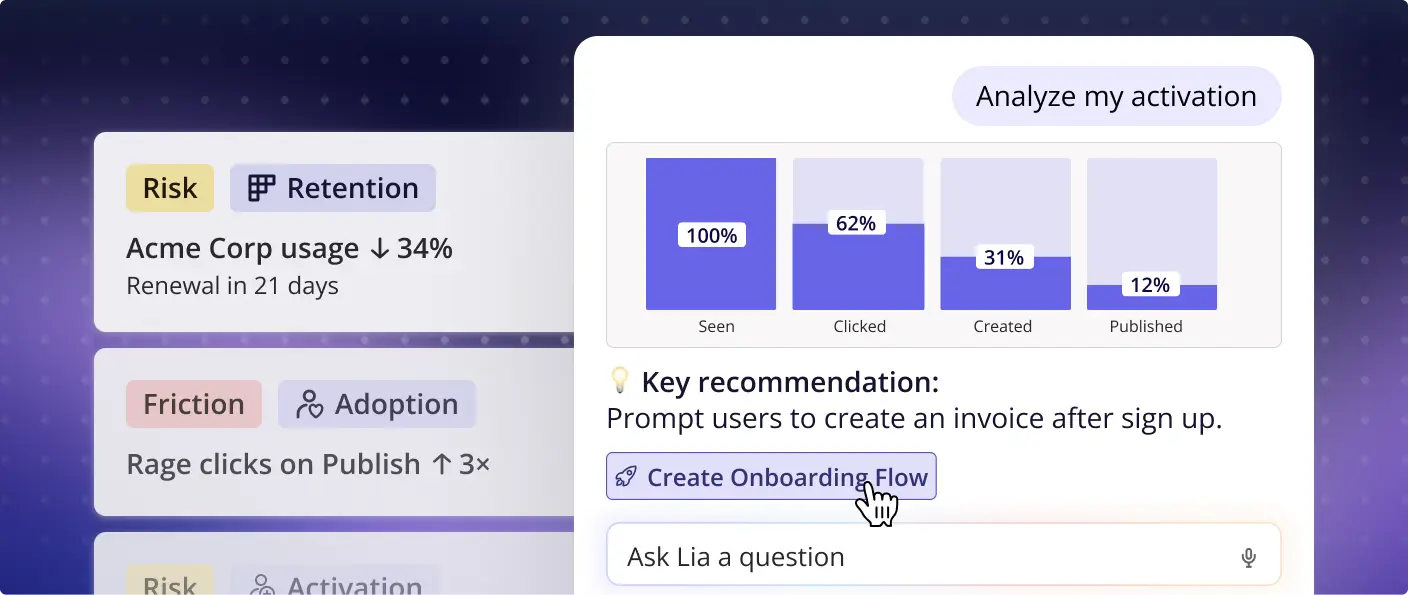
Lia, Userpilot’s AI agent, answers natural queries related to the session recordings, much like Mixpanel Agent. Lia already analyzes session replays, drop-off patterns, and behavioral signals as part of its always-on monitoring, cross-referencing what it sees against NPS and survey data rather than treating replay as an island. Ask it a question the way you’d ask a colleague, and it comes back with the pattern already grouped.
Meanwhile, Userpilot’s MCP server lets you access product insights without having to open Userpilot. Yazan Sehwail, Userpilot’s CEO, has pointed to this as one of the bigger shifts MCP makes possible for people outside the product team, since they no longer need to go through a teammate to pull the answer themselves.
These features are all built into one unified platform rather than a replay tool bolted onto an analytics tool. So a drop-off in a funnel chart opens the exact sessions behind it in one click, with six frustration signals (rage click, dead click, error click, u-turn, thrashing, form abandonment) flagged automatically as they happen. And you can then act on them.
Mixpanel vs Userpilot session replay: from analysis to action
Mixpanel’s job ends with diagnosis, and that’s a legitimate thing to optimize for if your job is the diagnosis itself. It’s built for data and analytics teams whose work is done once the root cause is named.
Userpilot surfaces insights from the analytics and connects them to the in-app experience. After Lia flags the friction pattern, it proposes the fix and can build the tooltip, checklist, or flow directly from the chat interface. As a result, product, growth, and customer success teams can close the loop themselves rather than file a ticket.
This gap between analysis and action makes the tools suitable for different teams. Here’s how the two actually stack up:
| Category | Mixpanel | Userpilot |
|---|---|---|
| Platforms recorded | Web, iOS, Android, React Native, Electron | Web today; mobile session replay is coming soon |
| Ways to reach a replay | Replay tab, funnel/event/profile charts, MCP query | Session Replay tab, one click from a product analytics drop-off, MCP query |
| AI on top of the recording | AI-generated summaries, Root Cause Analysis agent, MCP natural-language queries | Automatic friction detection, Lia’s cross-signal analysis, MCP natural-language queries |
| Can it act on what it finds? | No, you export the insight and build the fix somewhere else | Yes, Lia suggests the fix and can also build it directly |
| Entry pricing | Free (10K replays/mo) up to custom Enterprise | $299/mo Starter, replay included, up to custom Enterprise |
That gap isn’t just theoretical. I’ve seen it play out on our team when we launched our email feature.
Abrar Abutouq, one of our product managers, spotted a drop-off within the first two steps through Product Analytics, Session Replay, and User Feedback. Instead of filing an engineering ticket, Abrar built a targeting tooltip and a checklist directly inside Userpilot to guide people through the correct steps.
Within a few hours, I just created a targeting tooltip and showed it to users, and highlighted the correct steps for them to make it clear what to do next. That helped a lot in reducing friction and supporting users in real time without involving our dev team.
Uncover issues and turn them into fixes, fast
Mixpanel and Userpilot’s session replay features are more similar than they used to be, and both now do a genuinely good job of showing you what happened and why. If all you need is the recording and the explanation behind it, you can’t go wrong with either one.
Where they split is what happens next: Mixpanel hands you the diagnosis, and Userpilot hands you the diagnosis plus a way to fix it.
If that second part is what you’re actually after, try Userpilot free and watch your first replay-to-fix loop close in the same afternoon.
Disclaimer: Userpilot strives to provide accurate information to help businesses determine the best solution for their particular needs. Due to the dynamic nature of the industry, the features offered by Userpilot and others often change over time. The statements made in this article are accurate to the best of Userpilot’s knowledge as of its publication/most recent update on August 17, 2026.
FAQ
How much does Mixpanel session replay cost?
Free, Growth, and Enterprise all include session replay. Free gives you 10,000 replays a month, Growth adds 20,000 free and lets you scale up to 500,000, and Enterprise customizes both volume and retention (7 to 360 days). That’s a real change from when this feature first launched as Enterprise-only.
Does Mixpanel's AI actually watch replays for me?
It watches a lot of the way there. AI-generated summaries and the Root Cause Analysis agent will surface the pattern and the affected sessions, but Mixpanel’s own compliance documentation is upfront that outputs are probabilistic and should be reviewed before you rely on them. You’re still the one deciding what to do about it.
What's a good alternative to Mixpanel session replay?
Userpilot is a reliable alternative to Mixpanel’s session replay if you want the same replay-plus-analytics combination but with the ability to act on a finding inside the same tool. It’s worth comparing both on your own funnel data before you decide, since the recording quality itself is close.
Can I actually implement a fix based on what a session replay shows me?
Not inside Mixpanel. You’d export the insight and build the change in whichever onboarding, messaging, or engineering tool your team already uses. However, product analytics and onboarding software like Userpilot can: for example, Lia, its AI agent, can build the tooltip, checklist, or in-app flow directly from the session it just analyzed.
About the author