Session replays can show users rage clicking through your checkout flows and confirm that something went wrong. But the replays cannot tell you who the user was, what triggered that frustration, and whether this pattern affects your enterprise accounts.
To influence the user journey, you need to connect visual data from session replays to your tech stack. Fullstory is a context engine that feeds the required data into every tool that’s driving product management decisions.
Below, I’ll walk you through the essential Fullstory integrations required to turn passive observation into active product growth.
Try Userpilot Now
See Why 1,000+ Teams Choose Userpilot
Fullstory and its integration landscape: Quick summary
Fullstory is a digital experience analytics platform capturing every user interaction through session replays, heatmaps, and automated event tracking. Companies use it to debug issues, understand user behavior, and identify friction points across web and mobile applications.
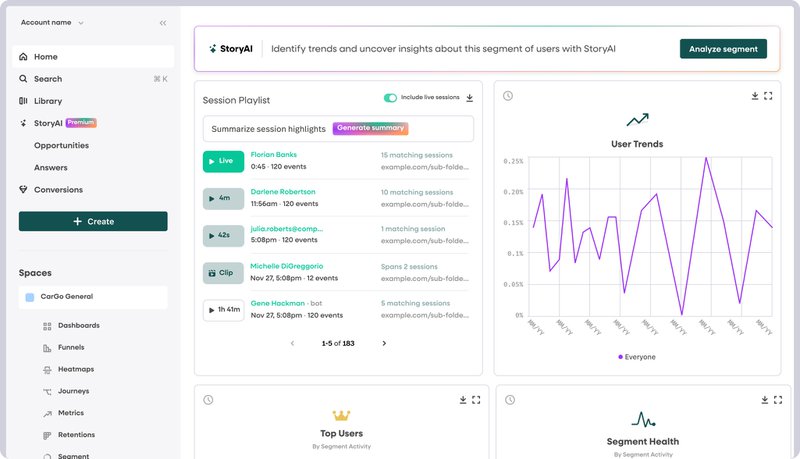
The platform’s strength lies not just in what it can record, but how it connects that data to your existing tools. Fullstory maintains a rich integration directory spanning customer data platforms, analytics tools, support systems, project management software, and experimentation platforms.
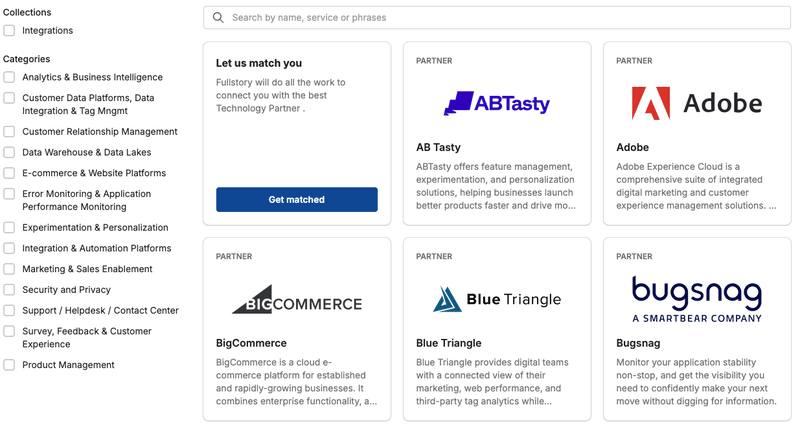
You can use these integrations to pipe behavioral data into Segment, sync session URLs with Intercom tickets, or trigger Jira issues when users encounter errors.
Apart from native integrations, Fullstory offers custom integration via code snippets, REST APIs for custom workflows, and webhook support for real-time event triggering. Below, I’ll walk you through the integration ecosystem, mainly the native ones, along with the use cases for each integration.

Replace Expensive Fullstory Sessions with Integrated Userpilot Growth

The “middleman” integrations: Customer Data Platforms (CDP)
If you are installing integrations one by one, you are doing it the hard way. I prefer using a Customer Data Platform (CDP) to act as the central nervous system for data.
Segment
Segment is the “glue” that holds data stacks together.
Instead of writing custom code to send data from your app to Fullstory, and then to Google Analytics, and again to your email tool, you can send it to Segment all at once.
When you integrate Fullstory with Segment, you create two-way communication:
- Inbound: You can pass custom events (like “Plan Upgraded” or “Report Created”) from Segment into Fullstory so you can filter your session replays by specific user actions.
- Outbound: You can send the Fullstory session URL back to Segment, which then populates it across your CRM and analytics tools.
Because you’re already tracking event data for other tools through Segment, that same data pushes to Fullstory automatically.
Even if you spend just an hour a day, you’re saving around 20 hours every quarter, about three full workdays to work on your roadmap instead of maintenance.
Tealium
Tealium works similarly to Segment as a tag management system.
You can deploy the Fullstory snippet without touching your codebase and sync your data layer attributes directly to Fullstory sessions. Many organizations like Cathay Pacific Airways and Vodafone use Tealium to manage their analytics infrastructure, getting centralized control over which data flows to Fullstory.
Google Tag Manager (GTM)
If you aren’t using Segment or Tealium, you’re most likely using Google Tag Manager. You can integrate Fullstory with GTM in minutes without needing a developer.
Just add the Fullstory JavaScript snippet through GTM. Then, configure which data layer variables you want to ingest into Fullstory.
For instance, if GTM is tracking cart_value, error_code, and subscription_tier, those become searchable custom attributes in Fullstory. Your support team can filter replays by something like “cart_value exceeded $500 AND error_code = ‘payment_declined'” instead of manually digging through sessions.
Analytics integrations: Adding extra data layers
Fullstory integrates with analytics tools to correlate different data sources. The combination gives you both the “what” from quantitative tools and the “why” from qualitative research.
Google Analytics (GA)
Almost every website I can think of has Google Analytics installed. With this integration, the Fullstory Session ID is passed as a custom dimension into GA.
Here’s where this comes in handy: You notice in GA that your “Checkout” page has a high bounce rate on mobile devices. Because you integrated GA and Fullstory, you can click on that specific user segment in GA and jump straight to the Fullstory replays for those specific mobile sessions.
You may notice that a pop-up is uncloseable on smaller screens (something you’d never catch just by looking at the bounce rate percentage).
Mixpanel
While GA has a whole host of data, it often isn’t enough for advanced product teams who need deep product usage analytics.
Mixpanel excels at event-based tracking and cohort analysis. When you integrate Fullstory with Mixpanel, you can sync behavioral cohorts. Simply create a cohort in Mixpanel of “Power Users who churned in the last 30 days,” push that cohort to Fullstory, and watch their final sessions. This is how you perform root cause analysis on churn.
I used this integration to discover that some of our churned users tried accessing a feature we’d moved in a navigation update. Mixpanel showed a 30% drop in usage. Session replays revealed users were looking for the feature in the old location repeatedly. So, we added tooltips with Userpilot and recovered most of the lost engagement within two weeks.
Voice of Customer (VoC) and support integrations
There’s nothing more frustrating for a support agent (of a product manager) than a ticket that says, “It didn’t work.” Without context, you email the user back, ask for screenshots, and wait while users expect you to know what happened.
Integration with support platforms can help uncover this context easily, granting customer success professionals access to user data.
Intercom, Zendesk, and Help Scout
When you integrate Fullstory with support tools like Intercom or Zendesk, it attaches the session replay link directly to the support ticket.
If a user complains about a bug, your support agents can click the link and watch the user’s session that led to the complaint. They can see exactly what the user clicked, what errors popped up in the console, and what browser they were using.
Fullstory also supports rage click detection with Intercom Messenger. When a user clicks rapidly in frustration, Fullstory can trigger an Intercom chat offering proactive help. This drastically reduces the time to resolution. It also helps you identify customer friction points that might not be bugs, but are just bad UX design.
Qualtrics and Survicate
User surveys are a great way to collect qualitative data, but users don’t always tell the whole truth or provide full context. For example, a user might give you a low NPS score and say, “The interface is confusing.” That’s helpful, but vague.
But by connecting your survey tool with Fullstory, you can watch the session where the user gave that score and know exactly which part of the interface confused them.
Project management and communication integrations
Once you identify a problem using Fullstory, you need to fix it. This usually involves communicating with your engineering team.
Jira
The Jira integration allows you to create a bug ticket directly from the Fullstory interface. The ticket automatically includes the session link, the timestamp of the error, console logs, and browser details.
This specificity turns vague bug reports into documented, reproducible issues that speed up your product management process because there’s no translation required between “customer complained” and “fix implemented.”
And, you earn goodwill with your engineering team for detailed reports. Win-win.
Slack and Microsoft Teams
You can set up alerts to send specific Fullstory sessions to a Slack channel. I currently use this for rage click detection.
If Fullstory notices a user frustratedly clicking a specific element on a page, it automatically posts the session link to a dedicated channel. My team then watches the session, determines the severity, and routes the request to the engineering or design team.
Optimization and experimentation (CRO)
Insights from analytics tools like Fullstory allow you to iterate on your A/B testing examples much faster than if you were just guessing based on conversion rates.
Optimizely
Let’s say you use Optimizely to test a new landing page. Variant B performs worse than Variant A. The numbers tell you that it’s failing, but not why.
Once you integrate with Fullstory, you can filter sessions by experiment variation and watch the sessions of users who saw Variant B to understand why it failed. Maybe you notice that the new “Sign Up” button renders a little off-screen on tablets, or that the new copy confuses users, causing them to hesitate and leave.
That’s the insight you can gather from combining Optimizely and Fullstory.
Custom integrations: When native isn’t enough
Sometimes the out-of-the-box integrations don’t cut it. You may have a proprietary internal tool or a niche CRM that lacks a native Fullstory plugin.
Fullstory offers an open API that allows you to identify users and pass custom events programmatically.
Your developers can use the FS.identify API to pass user variables like plan_tier, total_spend, or onboarding_status. This API allows you to search Fullstory for “Sessions where user plan is Enterprise.”
Apart from the API, you can use webhooks to trigger actions in other systems when a specific event is recorded in Fullstory.
Pros and cons of using Fullstory and its integrations
Fullstory is a highly regarded analytics tool with a rich integration stack and strong reviews on G2 (4.5/5 stars), but it has drawbacks you should consider before investing.
Pros of Fullstory
- Complete analytics ecosystem: Fullstory is a comprehensive analytics platform that is further enhanced by integrating with analytics tools, making it a complete data powerhouse.
- Multiple native integrations: The directory currently includes 50+ technology partners spanning analytics, support, project management, marketing automation, and data warehousing.
- State-of-the-art session replays: Fullstory pioneered high-fidelity session replay. Rage click detection and frustration signals add automated quality control that surfaces problems without manual review.
Cons of Fullstory: When to consider an alternative?
Fullstory is powerful, but it’s focused on data analytics only. Integrations are necessary to create a full product management loop, and that comes with some risks. Here are a few of Fullstory’s drawbacks:
- Lack of actionability: Data is most valuable when we can fix things based on it. Fullstory integrates with project management tools for bug flagging, but it doesn’t offer advanced features for user engagement tools to set up onboarding and walkthroughs. Until the November 2024 acquisition of Usetiful, Fullstory had zero capabilities for in-app guidance.
- Blurred data visibility: The more data sources we have, the greater the risk that the data gets scattered between dashboards. If you integrate Fullstory, Mixpanel, and Intercom, you’d be jumping around three tools to piece together one user’s story. The context switching alone kills your analysis time.
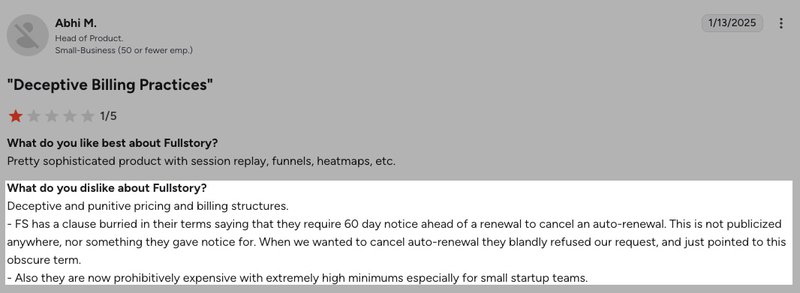
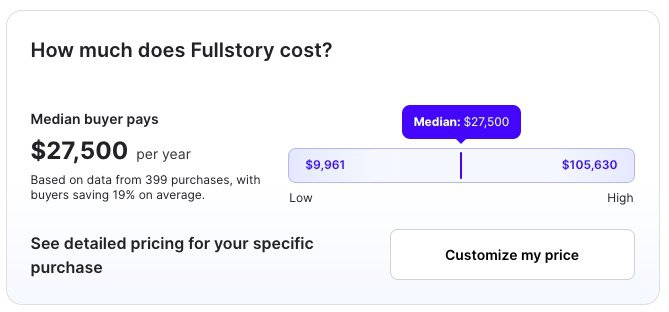
- Opaque, ramping-up costs: Fullstory pricing is undisclosed publicly, but the median annual cost is $27,500 according to Vendr data (range: $9,961 to $105,630). That’s expensive for analytics alone, and if you start stacking tools on top, the cost grows quickly. Many reviews mention that the pricing is unclear and unscalable. The Fullstory pricing model is session-based, meaning high-engagement products get penalized for user activity.

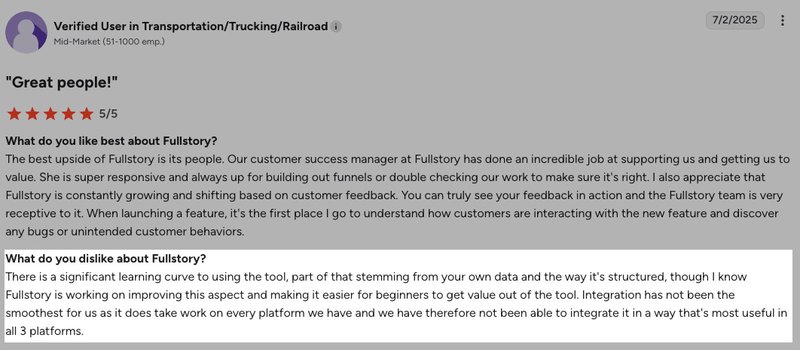
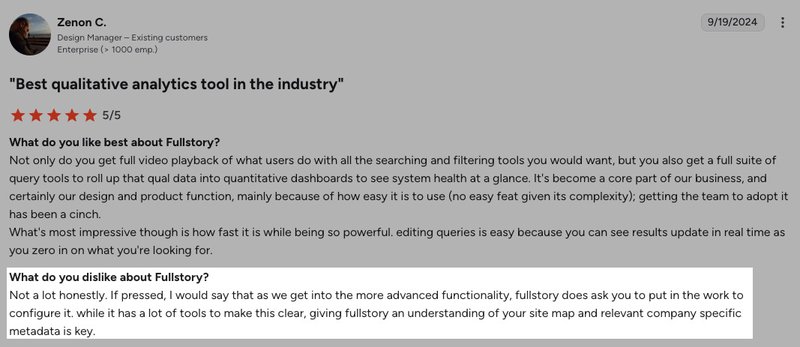
- Usage complexity: Fullstory is difficult to set up and master. Users mention a steep learning curve. G2 reviews highlight that there’s a learning curve and “The interface can be overwhelming or unintuitive at first.”
- Data privacy concerns: The more integrations you have, the more tools have access to data. Mixpanel had a data exposure incident. Drift suffered a 2025 security breach. Adding Fullstory as another node in your data flow increases your attack surface.
Userpilot: An all-in-one product analytics and user engagement alternative
Now, Fullstory is a powerful analytics tool with state-of-the art session replays. But Fullstoru only helps you see the problem. You still need to document the problem and use another platform to actually build walkthroughs or solutions. And between tool switching, the context gets lost, and building the solution takes days.
This is where Userpilot (that’s us!) wins.
Userpilot is a product growth platform that combines product analytics, user engagement tools, and feedback collection in one system. Unlike Fullstory’s analytics-only approach, Userpilot lets you both identify problems and deploy solutions without switching tools.

What Userpilot offers:
- Predictable MAU-based pricing: Fullstory’s session-based pricing penalizes high engagement. Userpilot prices on monthly active users (MAUs). When users log in 100 times monthly because you built a sticky product, you only pay for the number of active users, not how many times they log in.
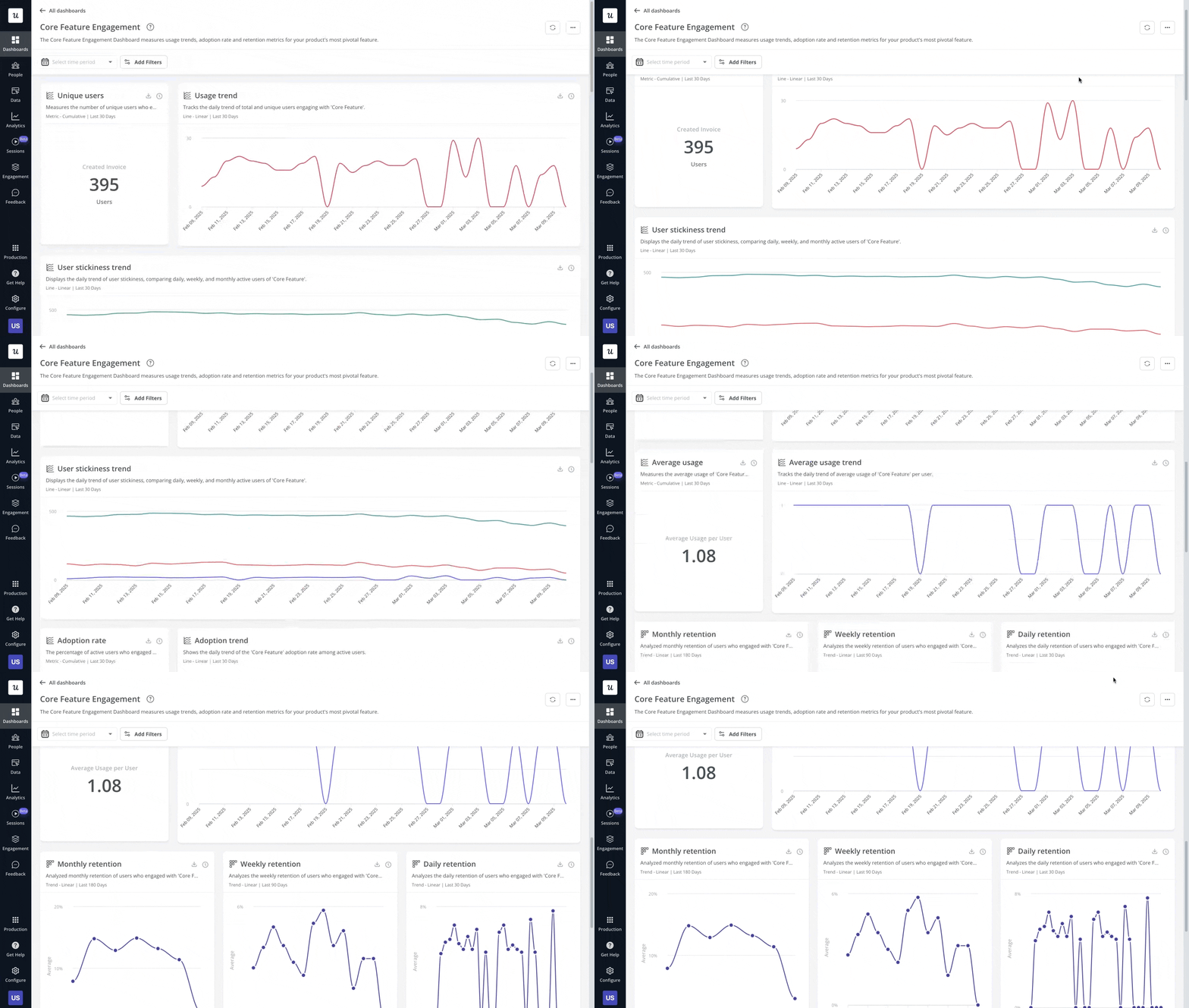
- Complete product analytics: Just like Fullstory, Userpilot offers integrated analytics, session replays, funnel analysis, and retention reports. You also have unlimited custom event tracking with autocapture, can create feature tags for UI element tracking, and analyze user cohorts. Segment users by behavior, then trigger targeted in-app experiences for that exact segment. The feedback loop closes in one platform.
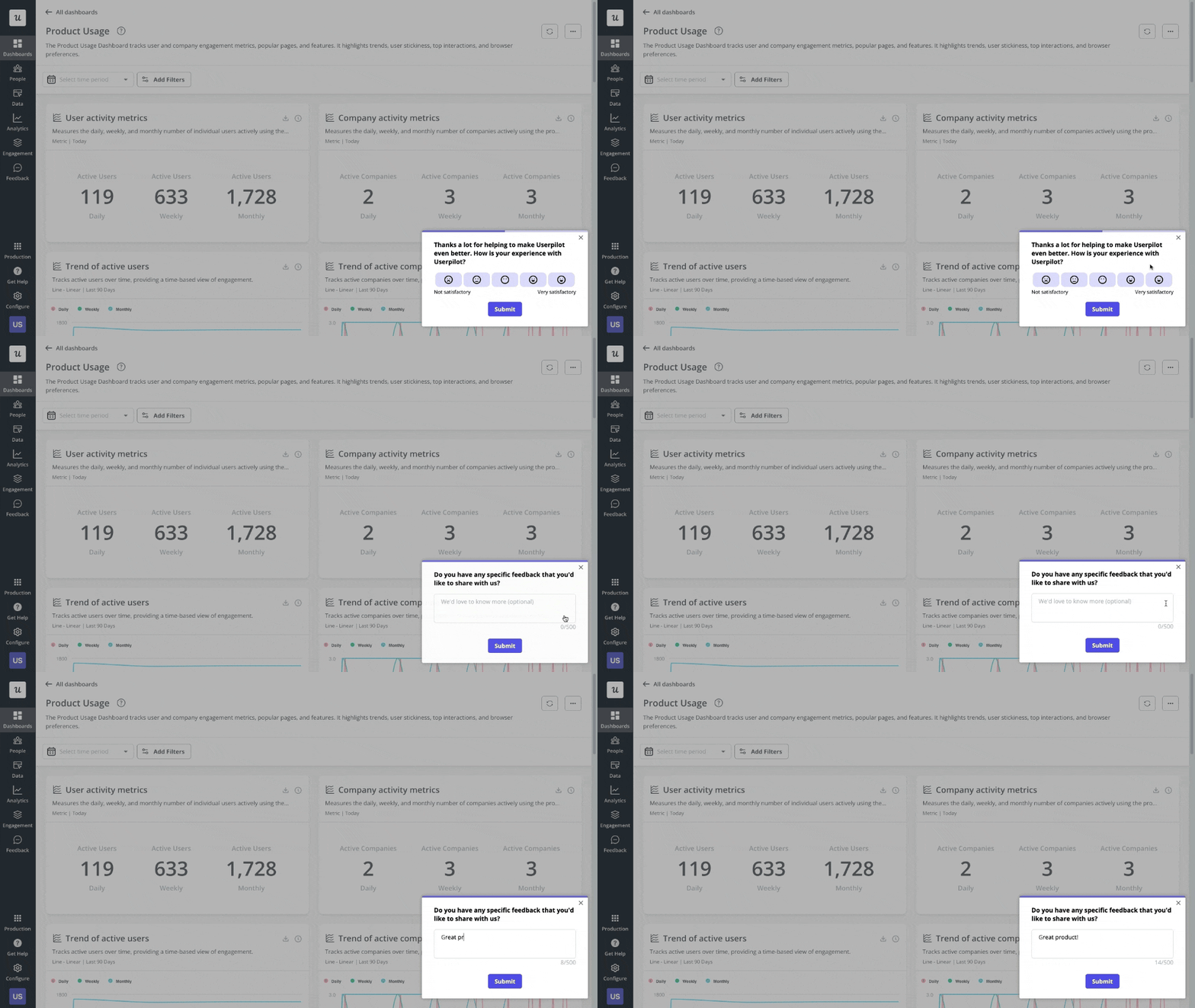
- Built-in qualitative layer: Userpilot offers native NPS and microsurveys. For Fullstory, you’d have to integrate Qualtrics or Survicate separately. Userpilot also helps you deploy surveys contextually, for instance, after a user completes onboarding, when they use a new feature, or when they show signs of churn risk.
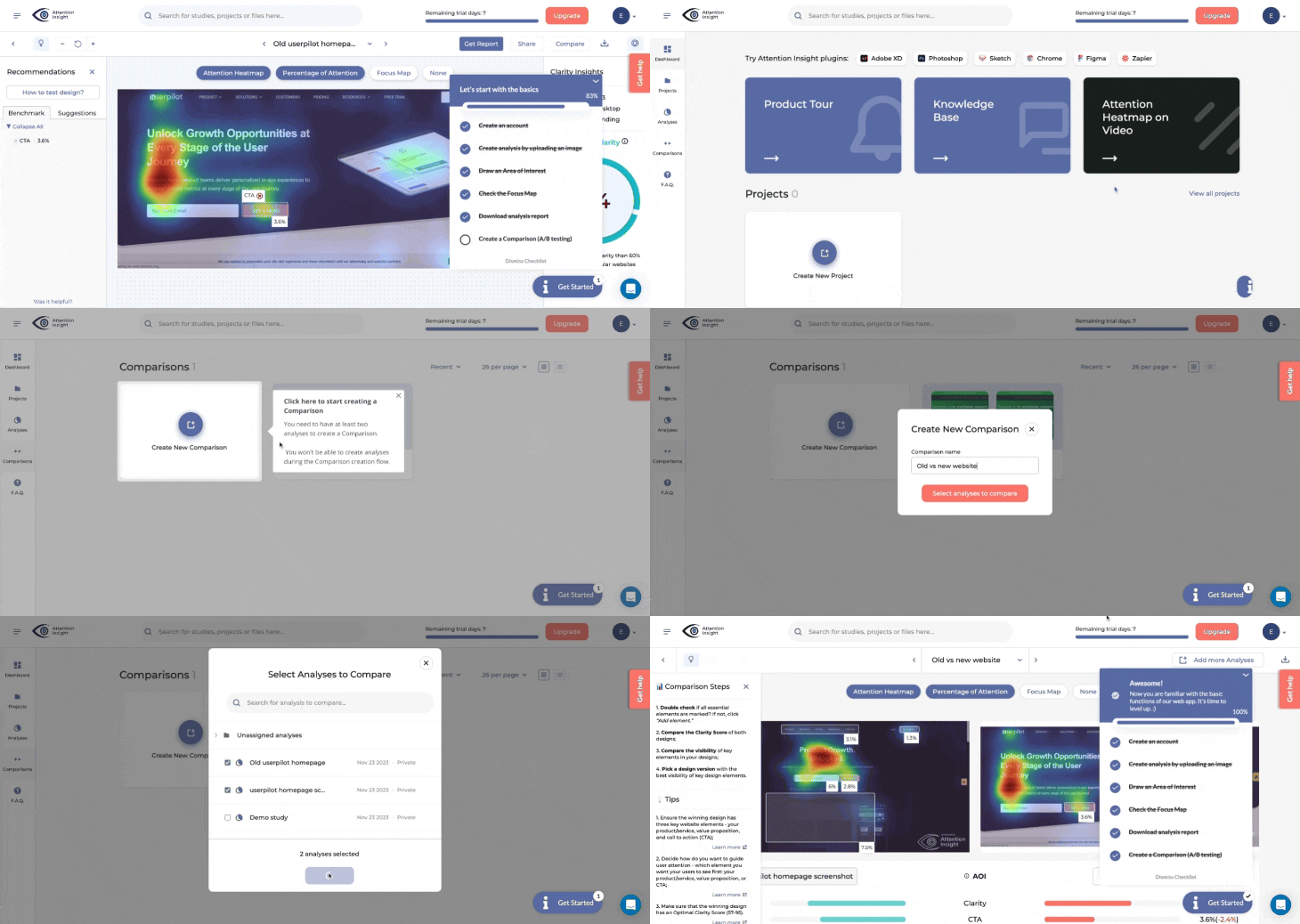
- User engagement features: Userpilot offers tools to set up onboarding and product walkthroughs so you can turn insights into in-app action. Create multi-step product tours, onboarding checklists with gamification, contextual tooltips, and modals, and interactive slideouts. Attention Insight increased activation from 47% to 69% using Userpilot walkthroughs and checklists with no engineering support.
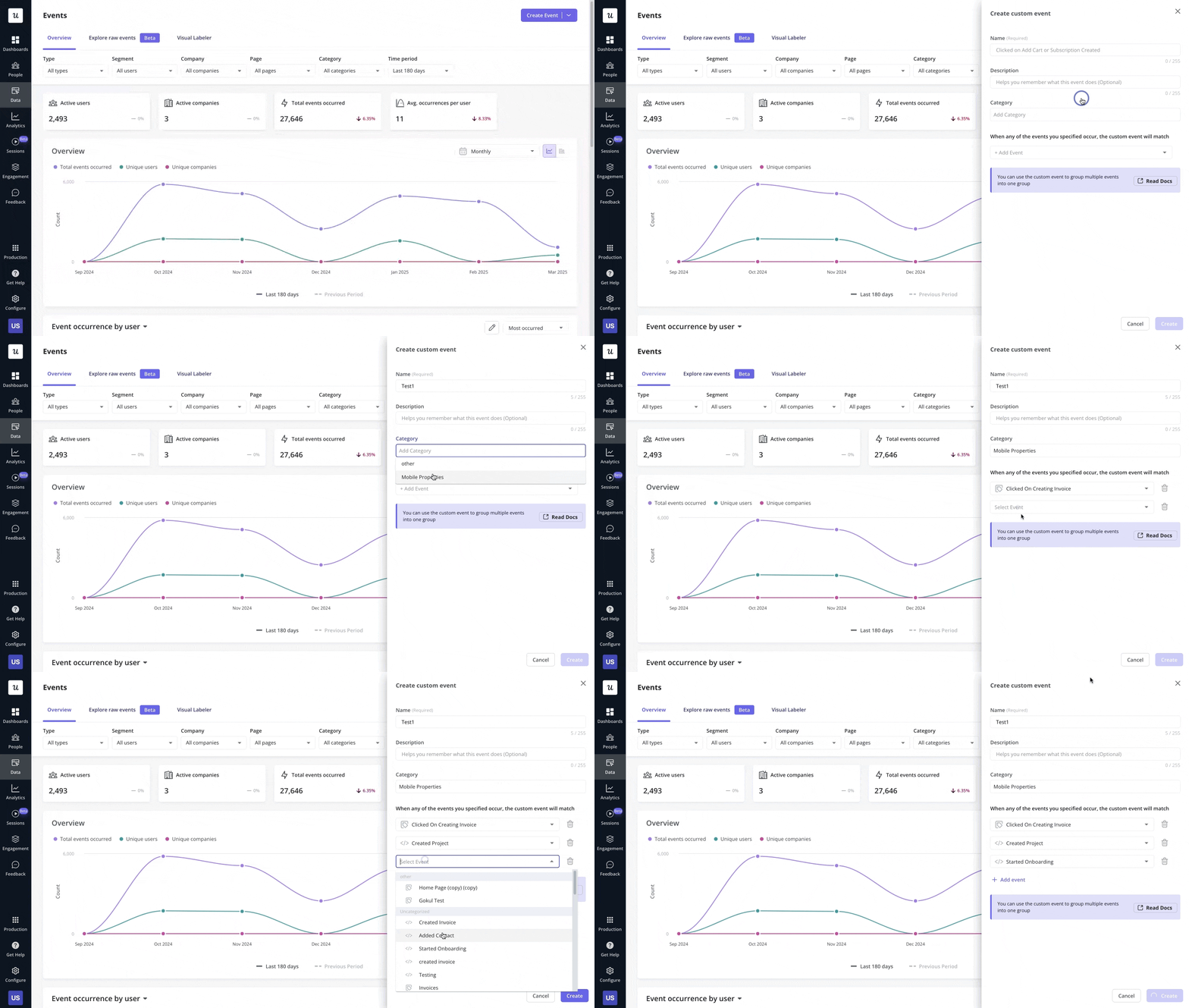
- Fully no-code: Both tools have autocapture, but Userpilot lets non-technical teams create custom events through visual tagging in just a couple of minutes. Use our Chrome extension to tag any UI element, define interactions, and create custom events visually. You click the button you want to track, give it a name, and publish. Done. Fullstory needs developer support to instrument custom events properly through the FS.event API calls.
- All-in-one platform: An integrated platform demands fewer integrations and data migrations, meaning less risk with user data. You reduce your attack surface by consolidating tools. One login, permission structure, and data governance policy. And most importantly, a single predictable invoice.
How to ensure data hygiene while managing integrations
Whether you choose a best-of-breed stack of tools with Fullstory or an all-in-one platform like Userpilot, the goal remains the same: knowing your user. The faster you bridge the gap between “what happened” and “why it happened,” the quicker you can build a product that people actually love to use.
- Define your identifiers: Make sure you’re passing consistent User IDs across all platforms. If Segment sends an email address but Fullstory expects a UUID, your integration will fail. Read up on user identification methods to get this right from the start. I prefer using a stable, immutable identifier like a database ID rather than email addresses that users can change.
- Map your events: Don’t try to track everything. Identify your “North Star” metrics and the key events that lead to them. Then name them consistently across your analytics and replay tools. For example: “checkout_completed” in Segment should be the same in Fullstory and Google Analytics.
- Automate the handoff: You should not be manually exporting CSVs in 2025. Use webhooks or native integrations to push data automatically. For instance, if your team spends 10 hours per week copying data between tools, investing two hours on integration setup can save you 520 hours annually.
- Audit regularly: Integrations break, and APIs change, so set a reminder to audit your data flow every quarter.
For those looking to deepen their understanding of how to drive growth through these insights, I recommend exploring product growth strategies that use behavioral data to inform your roadmap. Afterall, the tools you choose are just the medium. Your end goal is to create a better product.
How to choose the right tool for your infrastructure
If you’re already deeply committed to a specific stack (for example, your enterprise relies heavily on Adobe Analytics and Salesforce), then using Fullstory’s robust integration directory makes sense. You need to pull that qualitative data into your existing systems of record.
However, if you’re building a modern SaaS product and you want to move fast, question whether you need five different tools to do the job of one. A comprehensive product growth platform can often provide 80% of the functionality of specialized tools with 0% of the integration headache.
Ready to compare how an integrated platform performs against a multi-tool stack? Book a demo with Userpilot and see product analytics plus user engagement working together in a single system.
Userpilot strives to provide accurate information to help businesses determine the best solution for their particular needs. Due to the dynamic nature of the industry, the features offered by Userpilot and others often change over time. The statements made in this article are accurate to the best of Userpilot’s knowledge as of its publication/most recent update on January 29, 2026.
Replace Complex Fullstory Integrations with Simple Userpilot Action
About the author