I Analyzed 40+ Session Replay Tools. Here Are The Top 11



Whenever I’m asked what the best session replay tool is, I always answer with, “Best for whom?”
Because different teams need different capabilities.
Product, UX, and growth teams diagnosing customer journey friction points need replay wired to product analytics, heatmaps, and surveys. Engineering teams reproducing bugs need console logs, network calls, and stack traces alongside the replay.
Which is why I’ve divided this article into two sections: best session replay tools for product teams and best session replay tools for engineering teams.
Executive summary
- Session replay software shows you how users interact with your product in a video-like playback. They capture all clicks, scrolls, and mouse movements, so you see the exact sequence of actions behind a funnel drop-off or a bug.
- The choice of the right session replay tool depends on who’s using it. Product, growth, or customer support teams need different features from technical teams.
- Userpilot is the best session replay tool for product teams who need recordings tied to product analytics and surveys, and tools to act on them.
- LogRocket, PostHog, Sentry, OpenReplay, and Datadog are the best session replay tools for engineering teams who need console, network, and stack-trace context besides the recording.
- Before buying, check session quotas and retention limits. Thirty-day retention and bot-depleted quotas are common issues.

Best session replay software tools and how I shortlisted them
With so many session replay tools on the market, I used two filters to narrow down my choices: jobs to be done and users’ technical knowledge.
Specifically, I looked for tools for product teams with limited technical expertise who need session replays to diagnose why users drop off and engineering teams tracking down bugs.
After researching 40+ different session replay solutions, many of which I’ve used as a UX researcher at Userpilot, 11 made the shortlist:
| Tool | Use cases | Session replay capabilities | Price |
|---|---|---|---|
| Userpilot | Diagnose friction, then fix it with in-app guidance |
|
From $299/mo, 14-day free trial |
| FullStory | Enterprise UX analysis across web and mobile |
|
Free tier (30,000 sessions/mo); median annual contract value $28k (Vendr) |
| Heap | Explain funnel and journey drop-offs |
|
Add-on on Pro and Premier; median annual contract value $41k (Vendr); 14-day trial |
| Mouseflow | Conversion friction on websites and signup flows |
|
Free (500 sessions/mo); Essential from about $25/mo billed annually |
| Lucky Orange | Website and store conversion optimization |
|
From $32/mo billed annually; 7-day trial |
| UXCam | Mobile app UX friction and crash reproduction |
|
Free (3,000 sessions/mo); paid by quote; 14-day trial |
| LogRocket | Frontend bug reproduction |
|
From $176/mo at 25,000 sessions; 14-day trial |
| Sentry | Debugging errors and crashes in context |
|
Free (50 replays/mo); pay-as-you-go from $0.0019 per replay |
| OpenReplay | Self-hosted replay and debugging |
|
Free self-hosted; cloud free tier (1,000 sessions/mo); Dedicated from $199/mo |
| Datadog | Frontend performance and errors with backend traces |
|
$2.50 per 1,000 sessions/mo on top of RUM SKUs; 14-day trial |
| PostHog | Replay tied to the product development cycle |
|
Free (5,000 web recordings/mo); then $0.0050 per web recording |
Best session replay tools for product teams
Here’s how session replay works across these six tools. Each one:
- Masks sensitive user data.
- Automatically tags sessions with frustration signals, like rage clicks, and lets you jump from another report, say a funnel, into the session replay, so your product team can quickly find relevant sessions.
- Has an AI layer that speeds up user behavior analysis.
- Requires no coding skills once you install the script or SDK, so the product, UX, or growth teams can analyze user behavior without developer support.
Userpilot for connecting session replay insights to product analytics and in-app action
- Best for: SaaS product teams that want to identify and fix friction with targeted in-app engagement.
- G2 rating: 4.6/5.
- Price starts at: $299/mo. 14-day free trial.
- Shareable session replay: Yes. Internally and externally.
- Supported devices: Web. Mobile session replay is coming soon.
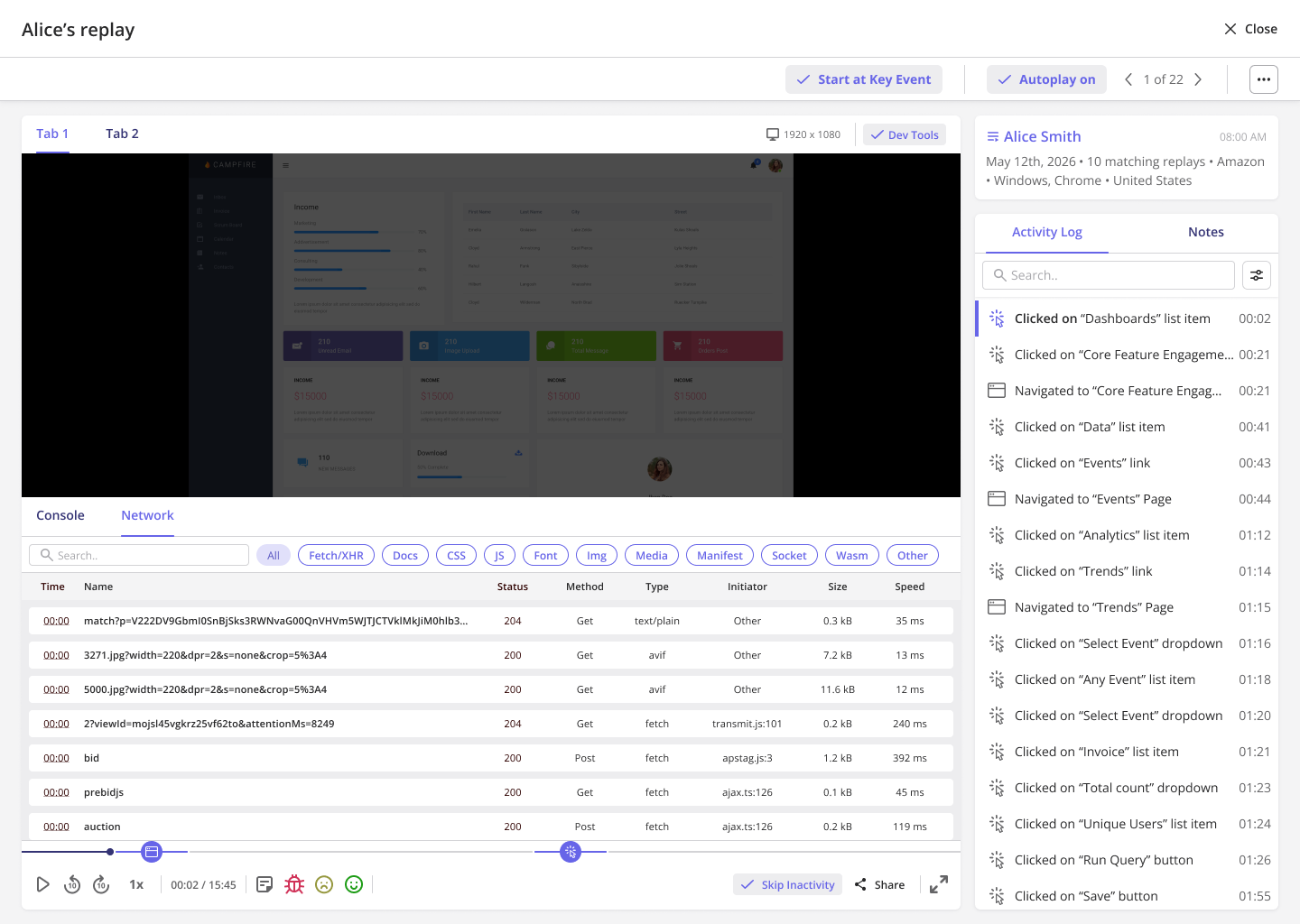
Userpilot is an AI-powered product growth platform that connects session replays to product analytics, user feedback, segmentation, and in-app engagement (flows, checklists, tooltips, banners, resource centers).
So, unlike standalone replay tools, it lets you find and diagnose a behavioral problem and act on the insights without switching between tools.
For example, one of our customers, , uses Userpilot replays to validate design decisions and understand user interactions with new features:
“We release a lot of new features and improvements every week. Without a way to see what’s happening with the product, things simply break. Session replays are a huge lifesaver. Whenever a new feature is released, we watch 10-15 session replays to understand how it works. It made our product designers 80-90% more confident in developing new solutions.” — Awni Shamah, Staff Product Manager at Amplemarket
Key features:
- Replay-powered analytics: See where users drop off in a funnel or path, then open the sessions behind that step in one click.
- Automatic friction and error detection: Rage clicks, dead clicks, form abandonment, console errors, network errors, and other key moments are flagged on the event timeline.
- Session insights inside your AI tools through Userpilot MCP: The MCP server lets you analyze the session data directly with Claude, ChatGPT, Gemini, and other MCP-capable assistants.
- AI-assisted analysis with Lia: Lia, Userpilot’s AI assistant, analyzes session replay data alongside usage data, feedback, and customer context, combining qualitative and quantitative data into one picture.
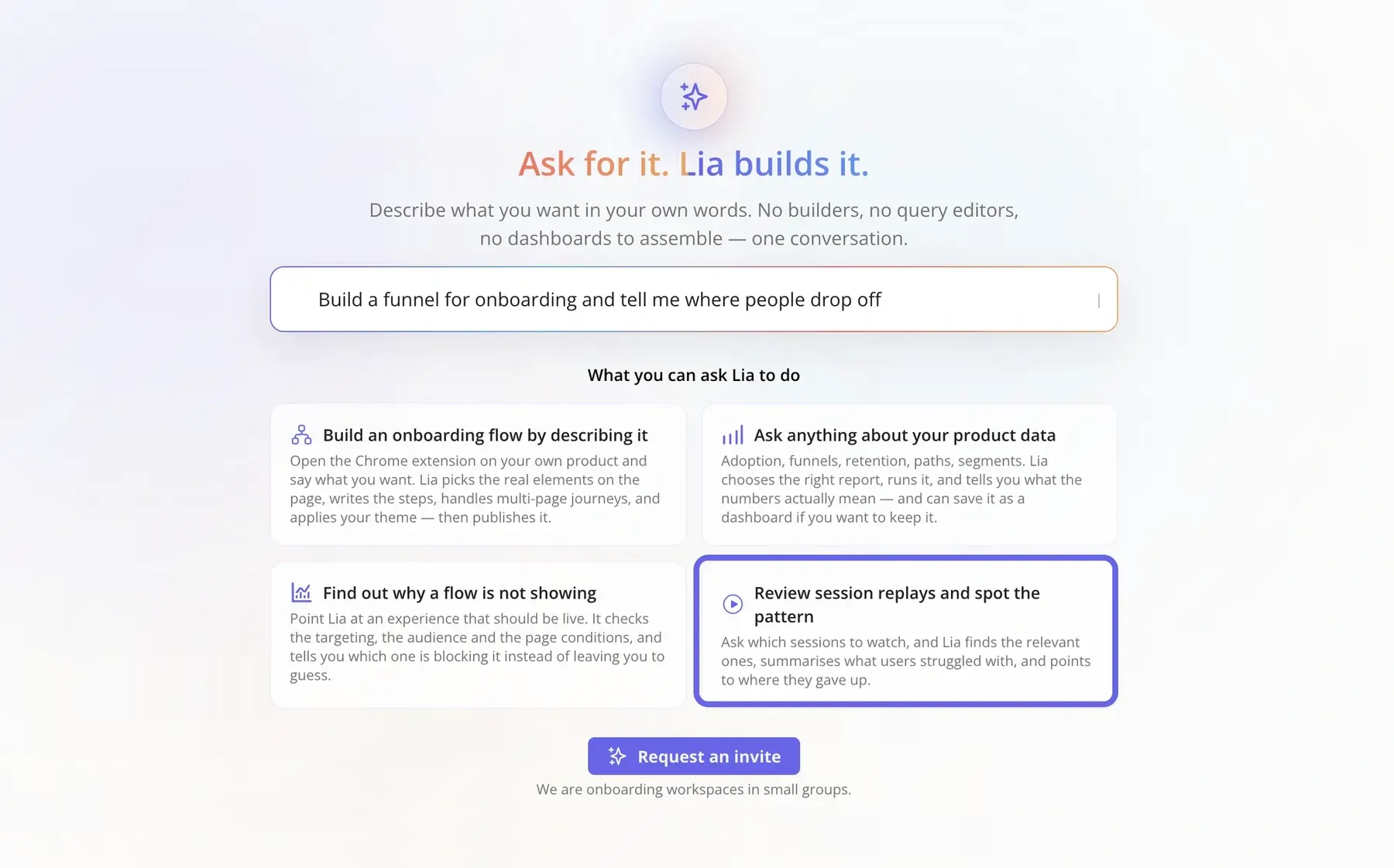
- Collaboration and action: Add notes, build playlists, share externally, and filter replays by segment. Then follow up with in-app guidance or a survey targeted to the affected users.
- What’s coming next: AI Session Summaries and AI Suggested Replays.
I’d say ease of use is another advantage of ours. That lines up with our customer feedback, as they find the platform “super easy and intuitive operation“.
The only caveat is that our session replays are a part of a wider product adoption suite, so if you’re looking for a standalone tool, this might not be the best fit.
Want to see how that workflow looks in practice? Explore Userpilot session replay and see how friction signals, key moments, and behavioral context come together. You can try the interactive replay without signing up.
FullStory for uncovering UX friction across complex customer journeys
- Best for: Enterprise product teams that want replay inside a product analytics suite.
- G2 rating: 4.5/5.
- Price starts at: Custom pricing for paid tiers. The median annual contract value is $28,240 (Vendr). The free tier includes 30,000 sessions a month with 12 months of retention. No paid plan trial.
- Shareable session replay: Yes. Internally and externally.
- Supported devices: Web via a JavaScript snippet. iOS, Android, Flutter, and React Native through a paid mobile add-on.
FullStory pairs session replay technology with product analytics, heatmaps, and conversion analysis for customer journeys across pages, devices, and sessions at an enterprise price point.
Key features:
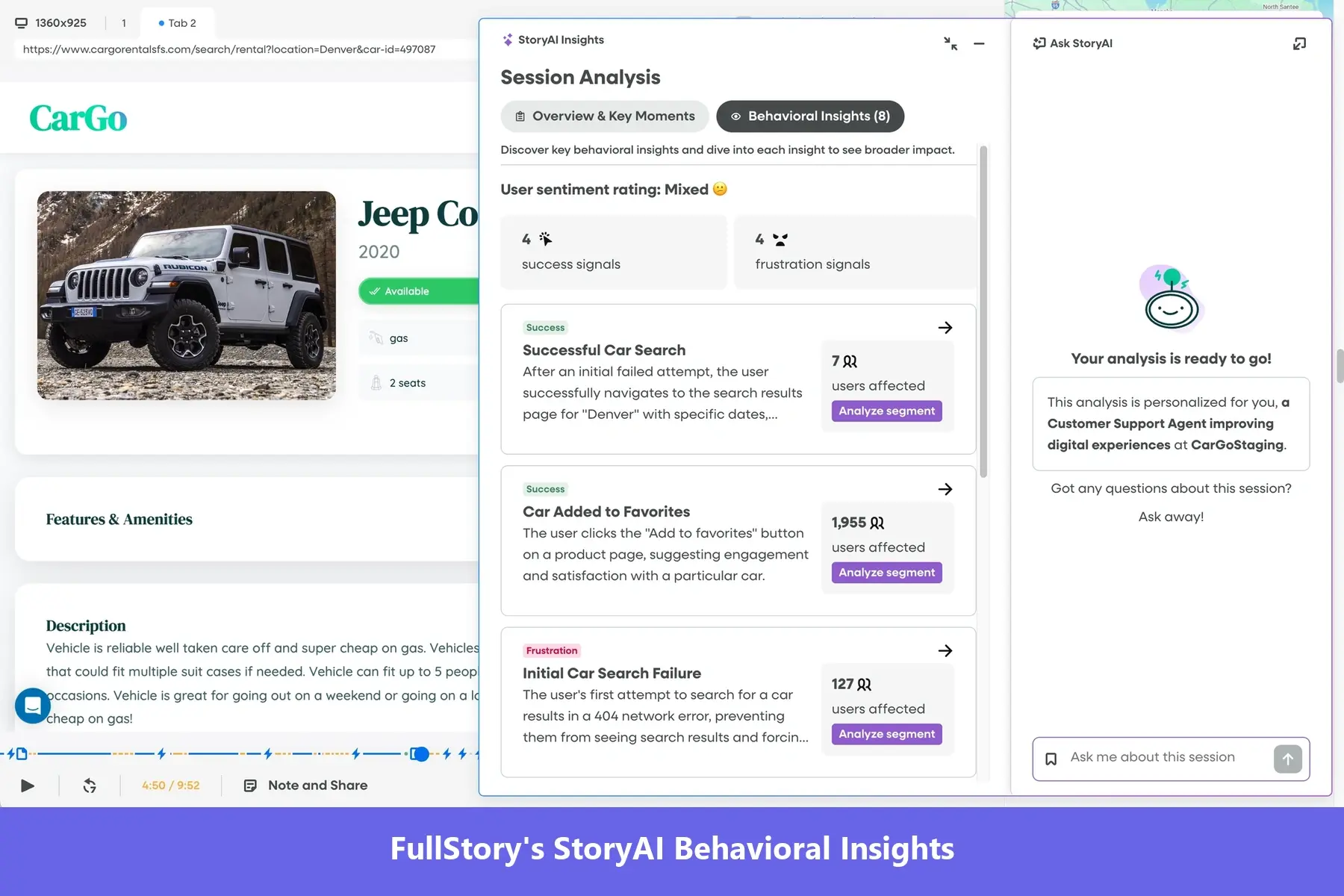
- Frustration signals: Automatically detects Rage Click, Dead Click, Error Click, Thrashed Cursor, and rolls them into a Frustrated Sessions ranking.
- Ask StoryAI in Session Replay: The AI analyzes the session, flags key moments and frustration events, and can find every user who behaved in a similar way.
- Hand-off to engineering: Sends a session into a Jira ticket with the playback link and device details attached, or into Slack.
The common complaint is that relevant FullStory replays get harder to find as session volume grows. Federico M., a senior product manager at a mid-market company, wrote in April 2026 that “the sheer volume of data generated by FullStory can be overwhelming. Users sometimes find it challenging to sift through all the information to find actionable insights.”
And then there’s price. According to Vendr, mid-market deployments range from $30k-$70k per year, and enterprises pay as much as $200k a year.
Because FullStory can get expensive at higher session volumes, you may need to cap how many sessions you capture. That helps control spend, but it also means potentially missing valuable sessions and insights once you hit the limit.
Heap for explaining funnel drop-offs with auto-captured behavioral data
- Best for: Teams that already analyze funnels, user journeys, and heatmaps in Heap and want replays linked to those reports.
- G2 rating: 4.4/5.
- Price starts at: Session replay is an add-on on the Pro and Premier plans (both the add-on and the paid plans are quote-only; Vendr puts the median annual Heap contract value at $41,220); 14-day trial.
- Shareable session replay: Yes, internally only.
- Supported devices: Web, iOS, Android, React Native, and Flutter.
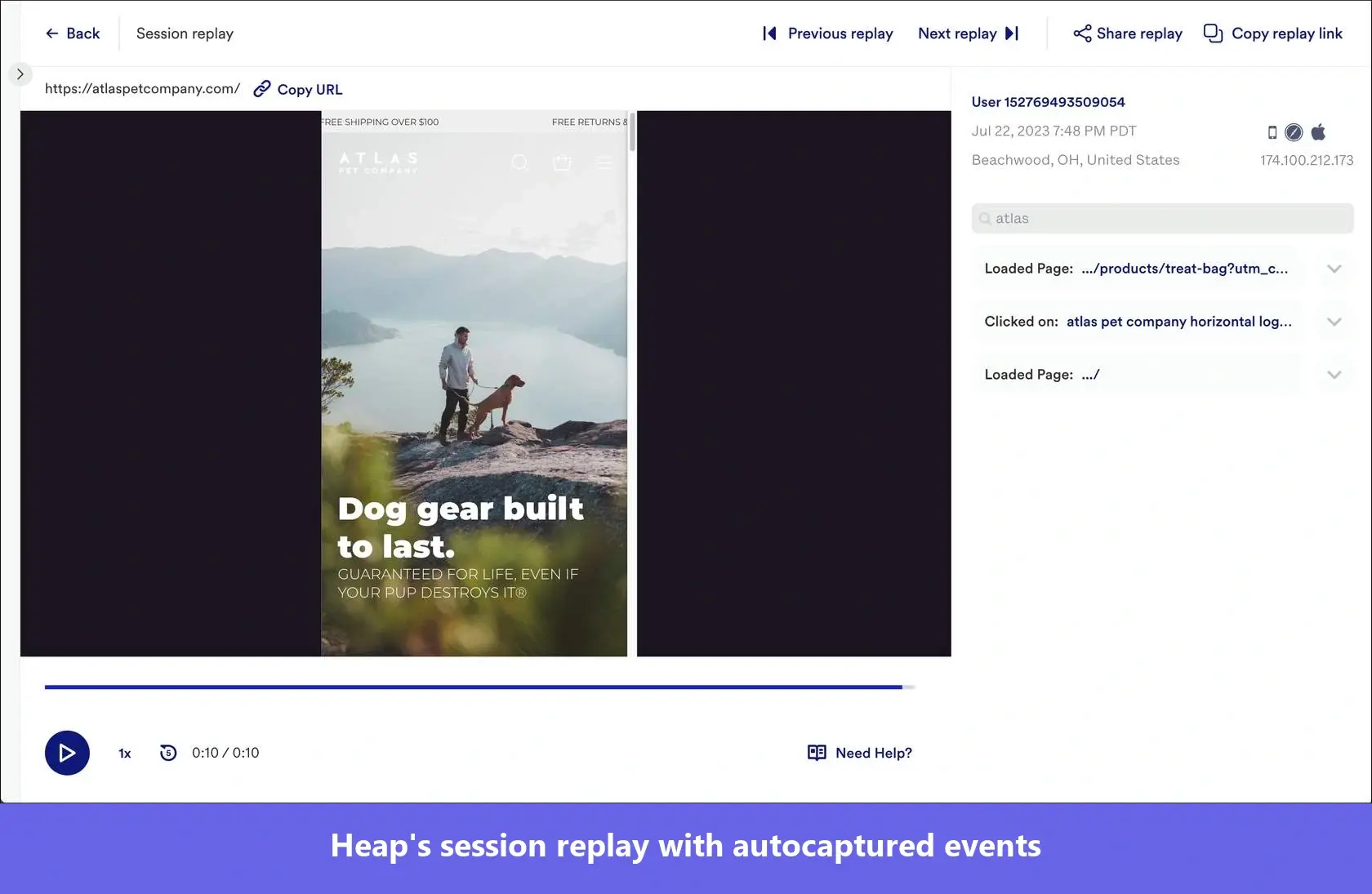
Heap is a product analytics tool that Contentsquare acquired in 2023 that automatically captures all user interactions and lets you access replays from a funnel step, a journey branch, or a heatmap.
Key features:
- Cued entry points: Open pre-filtered replays from Funnels, Journeys, Heatmaps, Top Events, and Usage over time.
- AI Session Replay Summaries: Summarize one session replay or up to 100 at once and ask follow-up questions through Sense chat.
- Error tracking: Captures JavaScript errors, API errors, and native crashes as events you can track via other reports.
Any downsides of Heap session replays? There are a few limitations that you should be aware of:
- No form input visibility: Heap does not capture text entered into form fields, so you can see where users struggle, but not what they typed.
- Sampling may hide useful sessions: Because sampling is set upfront, some sessions you later want to investigate may never have been recorded.
In the only recent review mentioning the feature, Milos D., a product design manager at an enterprise company, wrote in January 2026: “The sessions feature is very buggy at the moment it seems and can be quite slow.” And retention is only 30 days by default on every tier.
Mouseflow for diagnosing friction in signup, onboarding, and conversion flows
- Best for: Marketing, CRO, and growth teams diagnosing visitor friction on websites without engineering support.
- G2 rating: 4.6/5.
- Price starts at: Free plan with 500 sessions per month. Paid plans from $25/mo billed annually. 14-day free trial.
- Shareable session replay: Yes. Internally and externally.
- Supported devices: Web only, including mobile web. No native app SDK.
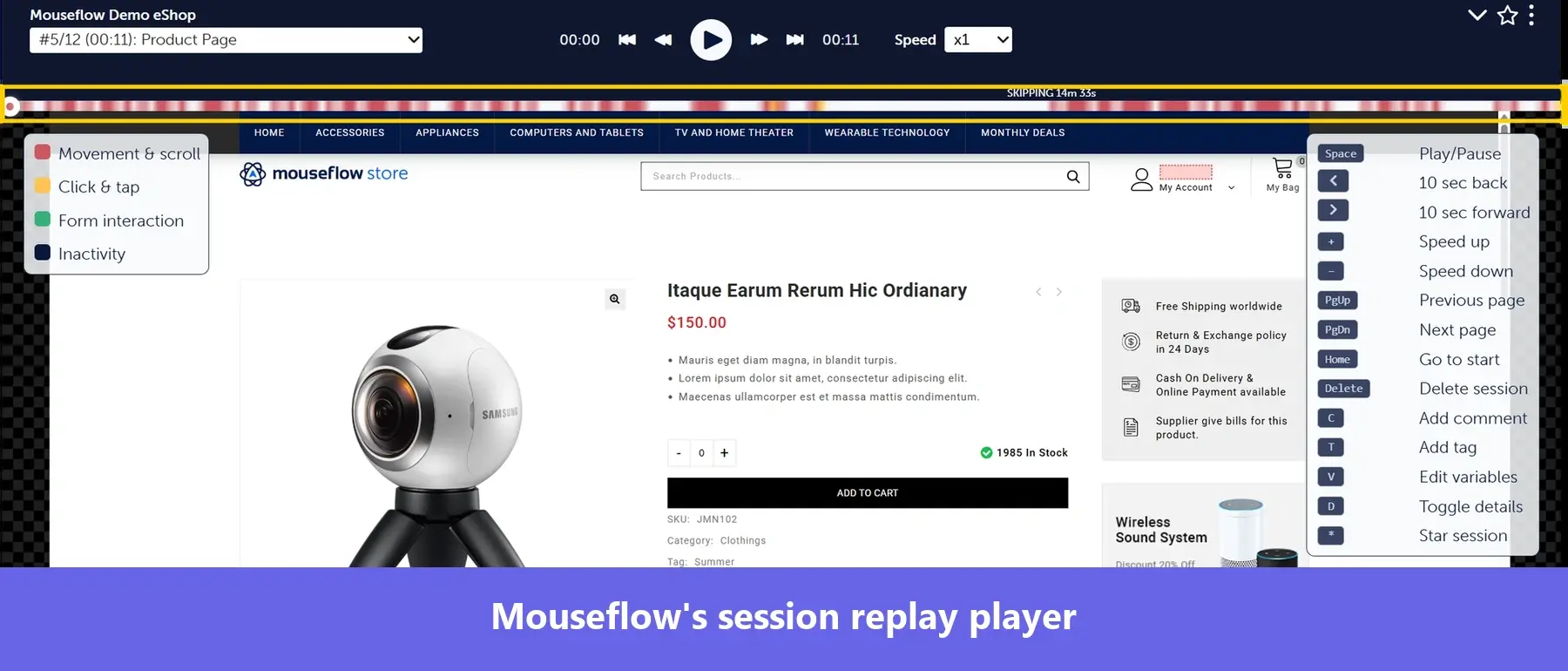
Mouseflow is a behavior analytics platform for marketing and CRO teams, with session replays integrated directly with heatmaps, funnels, form analytics, and feedback tools.
Key features:
- Auto-tagged friction: Rage clicks, dead clicks, click errors, 404s, bounces, and speed browsing appear as filters in the session list.
- Funnel and form paths to replay: Jump from a funnel drop-off or an abandoned form field to the sessions where it happened.
- Mina AI and an MCP server: Query session replay data in natural language, inside Mouseflow or from an AI assistant.
Mouseflow users raise concerns about its reliability. Devaraj P., a marketing lead, wrote in April 2026: “Sometimes the replay isn’t clear, and it ends halfway through. On top of that, some sessions don’t get tracked at all, so we have to rely on another platform to fill in the gaps.”
Lucky Orange for finding and fixing website conversion friction
- Best for: Small and mid-sized marketing, CRO, and ecommerce teams that want recordings, heatmaps, funnels, forms, and live chat in one self-serve platform.
- G2 rating: 4.6/5.
- Price starts at: $32/mo billed annually for 3,500 sessions. 7-day free trial. No free-forever plan.
- Shareable session replay: Yes, internal only.
- Supported devices: Web and mobile web. No native iOS or Android SDK.
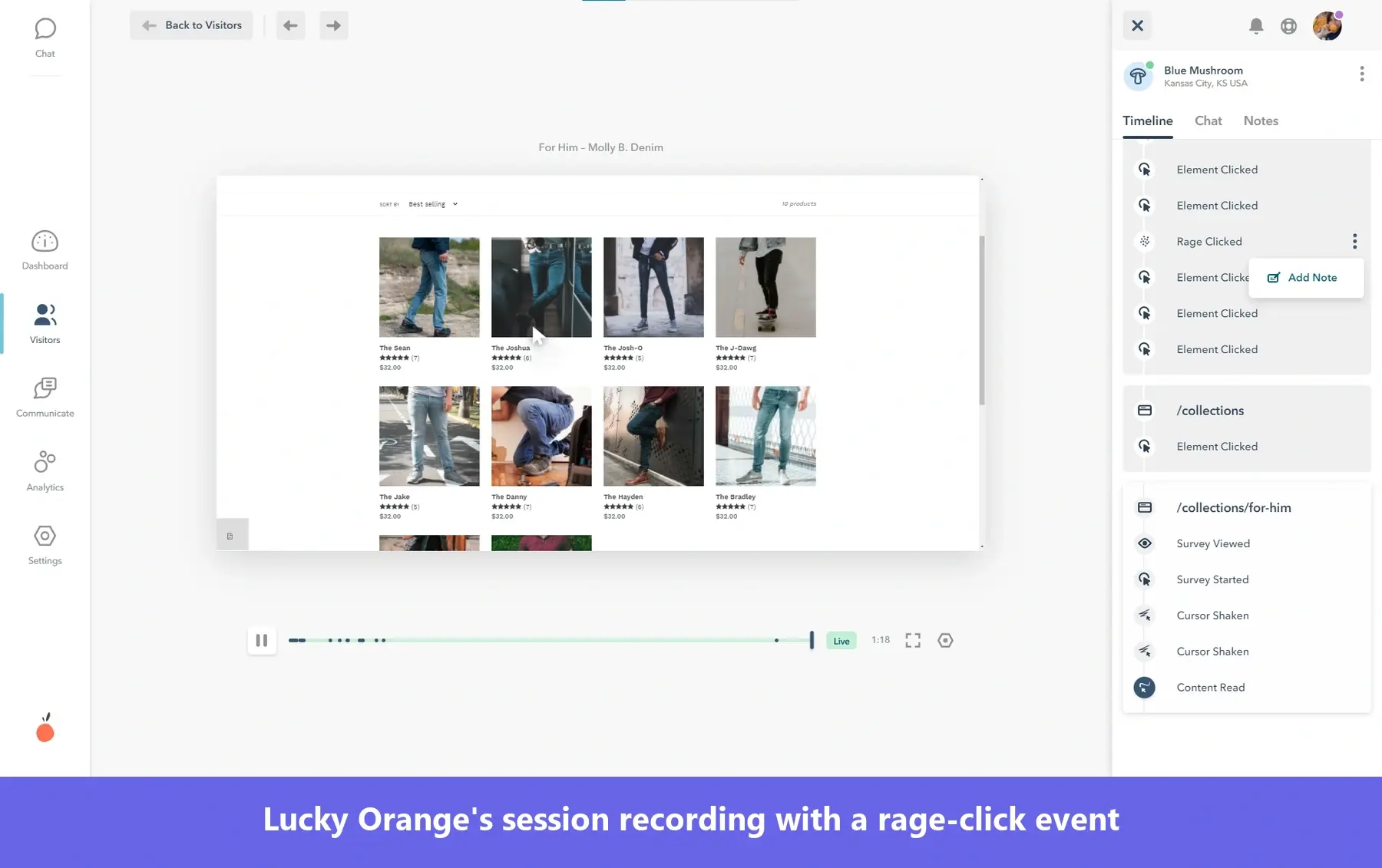
Lucky Orange is a self-serve website optimization suite that integrates with ecommerce platforms (Shopify, WordPress, BigCommerce, and Magento) and lets you monitor and engage website visitors in real time via live chat and announcements.
Key features:
- Optimizable Segments: Pre-built groups such as Frustrated, Confused, and Engaged surface problem sessions with no filter setup.
- Discovery AI: Ask AI questions about recordings, heatmaps, funnel reports, and forms.
- Overage handling: Records every tracked session up to your quota; selecting “Keep Me Tracking” enables tracking without a hard cutoff.
The Lucky Orange session quota, and specifically bots eating it up, is an issue. A small-business reviewer wrote in September 2026 that “it counted the bot sessions as views too and sometimes with surges in bot traffic Lucky Orange would record all of their sessions (which are usually between 3-5 seconds long) and as a result would use up the whole plan.”
UXCam for understanding mobile UX friction
- Best for: Mobile-first product teams that want replay, funnels, heatmaps, and crash analytics in the same platform.
- G2 rating: 4.6/5.
- Price starts at: Custom pricing by session volume; free plan includes 3,000 sessions per month; 14-day free trial.
- Shareable session replay: Yes. Internally and externally. Sessions download as video.
- Supported devices: Both. Mobile is the core, with SDKs for iOS, Android, React Native, Flutter, Xamarin, and Cordova. A separate web product launched in March 2025.
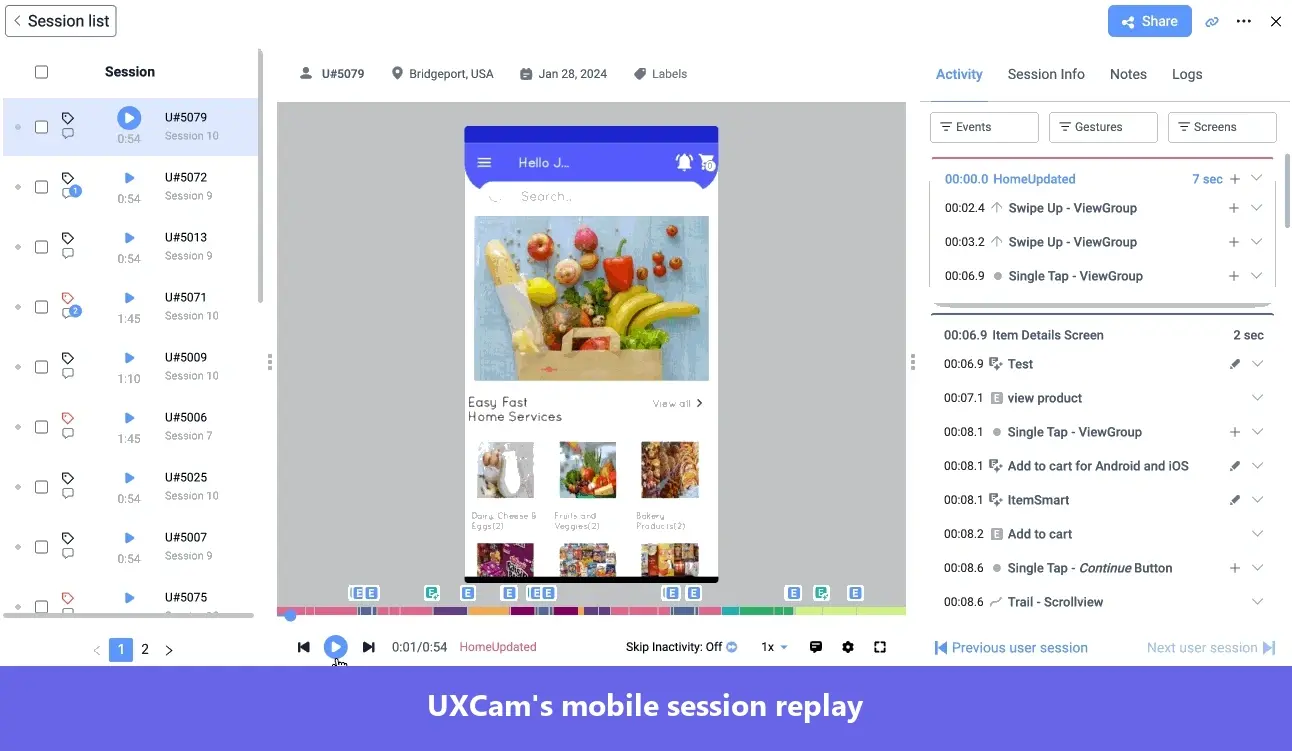
UXCam is a mobile app analytics platform built around session replay, with funnels, screen flows, and crash reports for mobile users, all routing into recordings.
Key features:
- Tara: An AI product analyst that watches sessions and answers “why” questions.
- Native mobile heatmaps: Tap, gesture, and scroll heatmaps across every supported framework.
The main downside reviewers mention is that you have to wait for user session recordings to show up in your dashboard. An enterprise operations associate wrote in December 2025 that “There are some delays in uploading recorded session replays.”
Best session replay tools for engineering teams
The 5 session replay software platforms in this section help engineering teams monitor and optimize software performance and fix errors.
In addition to the user session recording, they capture technical telemetry such as JavaScript errors, console logs, network requests, stack traces, performance metrics, application state, and backend traces, so engineers can reproduce and fix bugs faster.
LogRocket for reproducing and debugging frontend issues with technical context
- Best for: Engineering and product teams that need the console, network, errors, and application state next to the replay.
- G2 rating: 4.6/5.
- Price starts at: $176/mo at 25,000 sessions per month; 14-day free trial.
- Shareable session replay: Yes. Internally and externally.
- Supported devices: Web, iOS, Android, React Native, and Flutter.
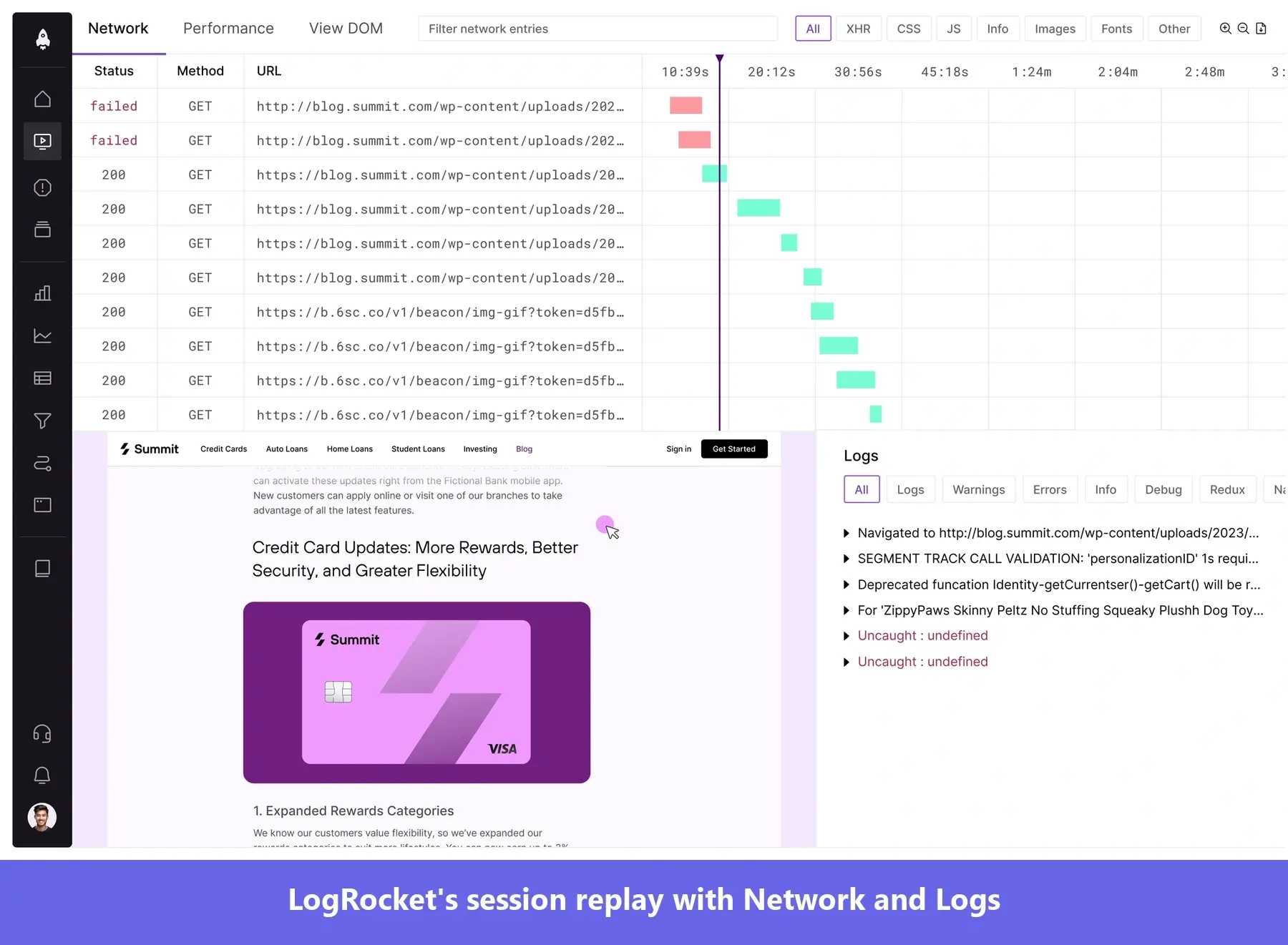
LogRocket is a frontend monitoring platform for web and mobile apps that combines session replay with product analytics, error tracking, and performance monitoring.
Key features:
- Galileo AI: Session highlights, AI chatbot, root-cause analysis, and Auto-Dispatch, which hands a detected issue to a coding agent. Plus, an MCP server for AI clients.
- Funnel Issue Impact: Connect quantitative drop-off data to the sessions and errors that explain them.
- Deployment options: A self-hosted option for regulated industries.
One thing to pay attention to is that LogRocket captures network requests by default, and masking text in an input field doesn’t automatically remove that same data from the request body.
If you handle sensitive customer data, I’d configure and test network redaction before rolling it out.
Cost can also become an issue at scale. Rezso Z., an Engineering Lead, says his team is “constantly struggling with our session recording quota” and notes that LogRocket can get expensive for high-traffic applications.
Sentry for debugging errors and crashes from the user’s perspective
- Best for: Engineering teams already on Sentry for error and crash monitoring who want replay synced to stack traces and logs.
- G2 rating: 4.5/5.
- Price starts at: Free Developer plan with 50 replays a month and 30-day retention; paid plans add pay-as-you-go replays from $0.003 each; 14-day Business trial.
- Shareable session replay: Yes, internally.
- Supported devices: Web, iOS, Android, React Native, and Flutter.
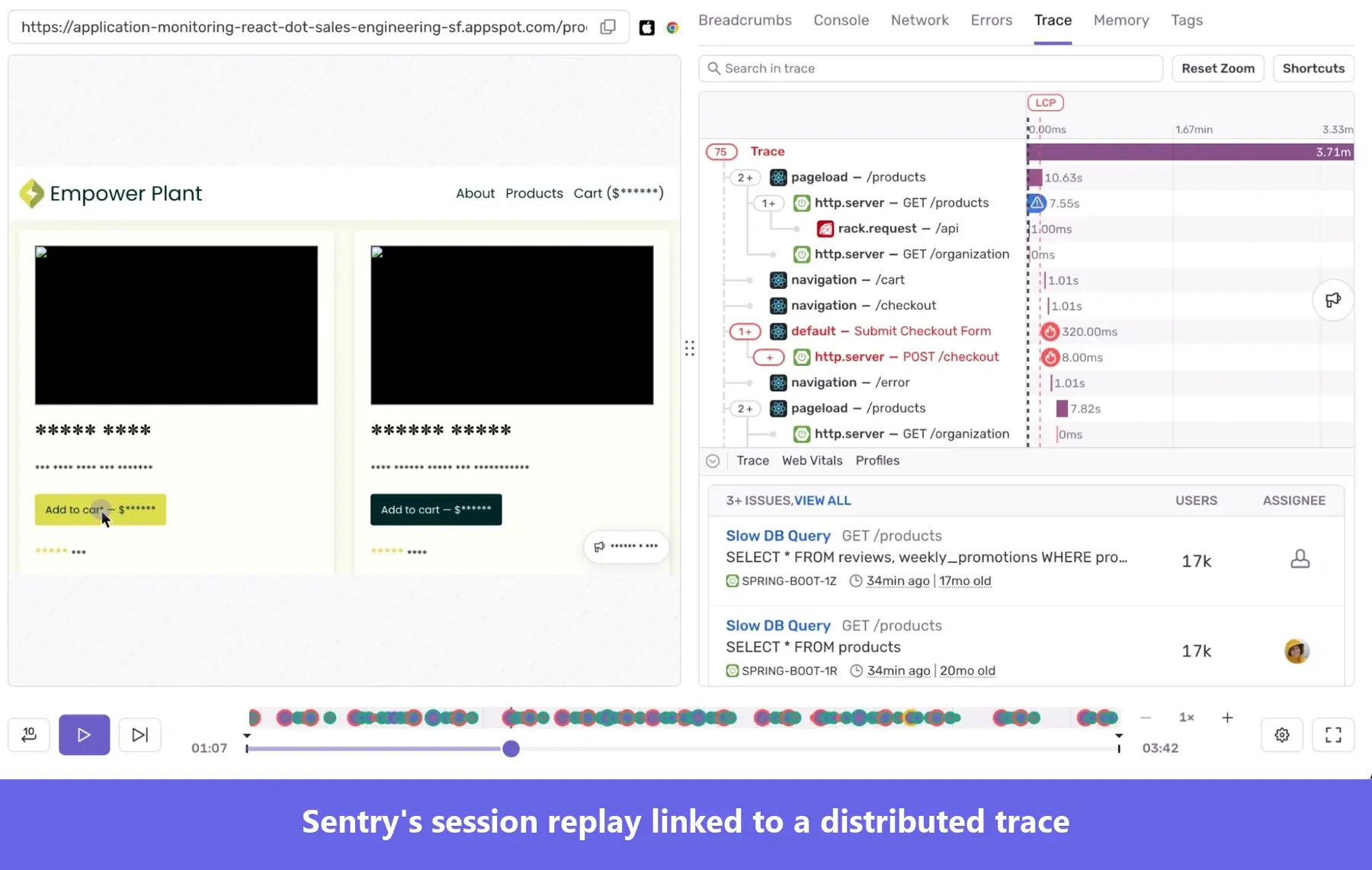
Sentry is a developer-first application monitoring platform with SDKs for the major browser frameworks and a self-hosted version you can run on your own servers. Session Replay is one product in that suite, alongside tracing, profiling, logs, and cron monitoring.
Key features:
- Frustration signals as issues: Detects rage clicks, dead clicks, and React hydration errors, and turns them into Sentry issues with alert rules.
- Easy transition between a replay and its distributed trace, with linked logs and DOM reconstruction you can inspect for every element.
- AI Replay Summaries with clickable chapters that let you skip forward to the relevant moment.
Reviewers find Sentry UI cluttered and its learning curve steep. A small-business reviewer in financial services wrote in July 2026: “As Sentry adds features like Session Replay, Profiling, and Crons, the sidebar and overall navigation have started to feel cluttered, and it can be hard for new team members to locate specific settings without a steep learning curve.”
OpenReplay for self-hosting session replay and debugging data
- Best for: Engineering teams that need full data control on their own infrastructure.
- G2 rating: The profile is unclaimed with zero reviews.
- Price starts at: Free as open-source self-hosted software. The cloud free tier includes 1,000 sessions a month; the Dedicated plan starts at $199/mo with a 7-day trial.
- Shareable session replay: Partial. Highlights and segments, by link, internally only.
- Supported devices: Web via JavaScript, with iOS, Android, and React Native SDKs in beta. No Flutter SDK.
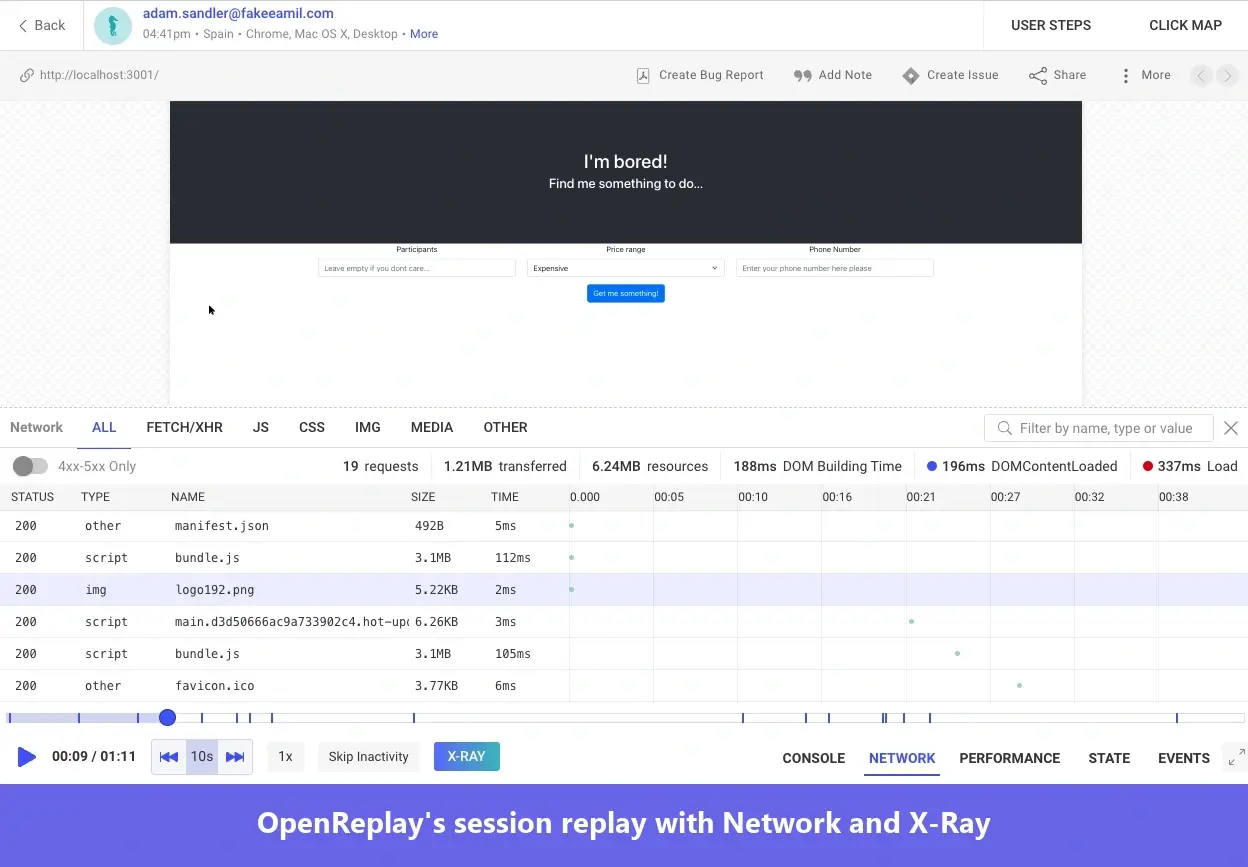
OpenReplay is an open-source session replay and product analytics suite, distributed as a GitHub project you deploy with Docker or Kubernetes or use as a hosted cloud service.
Key features:
- DevTools context syncs with the recording, including Redux, Vuex, MobX, NgRx, Pinia, or Zustand state.
- Frustration signals: Rage Click, Dead Click, and Excessive Scrolling
- Multi-layer privacy controls: Mask sensitive data with Private Mode, HTML data attributes, a custom sanitizer function, and network and state sanitizers.
With no G2 reviews, I read GitHub issues, the community forum, and Hacker News instead, where I found recurring comments about install and upgrade failures and data collection reliability (March 2025 through August 2026). summed it up in October 2025: “Things like OpenReplay will just crash and not restart themselves… You go back to Sentry, etc.”
Datadog for debugging frontend performance and errors with full-stack context
- Best for: Engineering teams already on Datadog who want replay next to frontend errors, backend APM traces, logs, and product analytics.
- G2 rating: 4.4/5.
- Price starts at: Session Replay is $2.50 per 1,000 sessions a month billed annually, on top of RUM Measure at $0.15 and RUM Investigate at $3.00 per 1,000 sessions. 14-day free trial.
- Shareable session replay: Yes, internally.
- Supported devices: Browser, iOS, and Android natively.
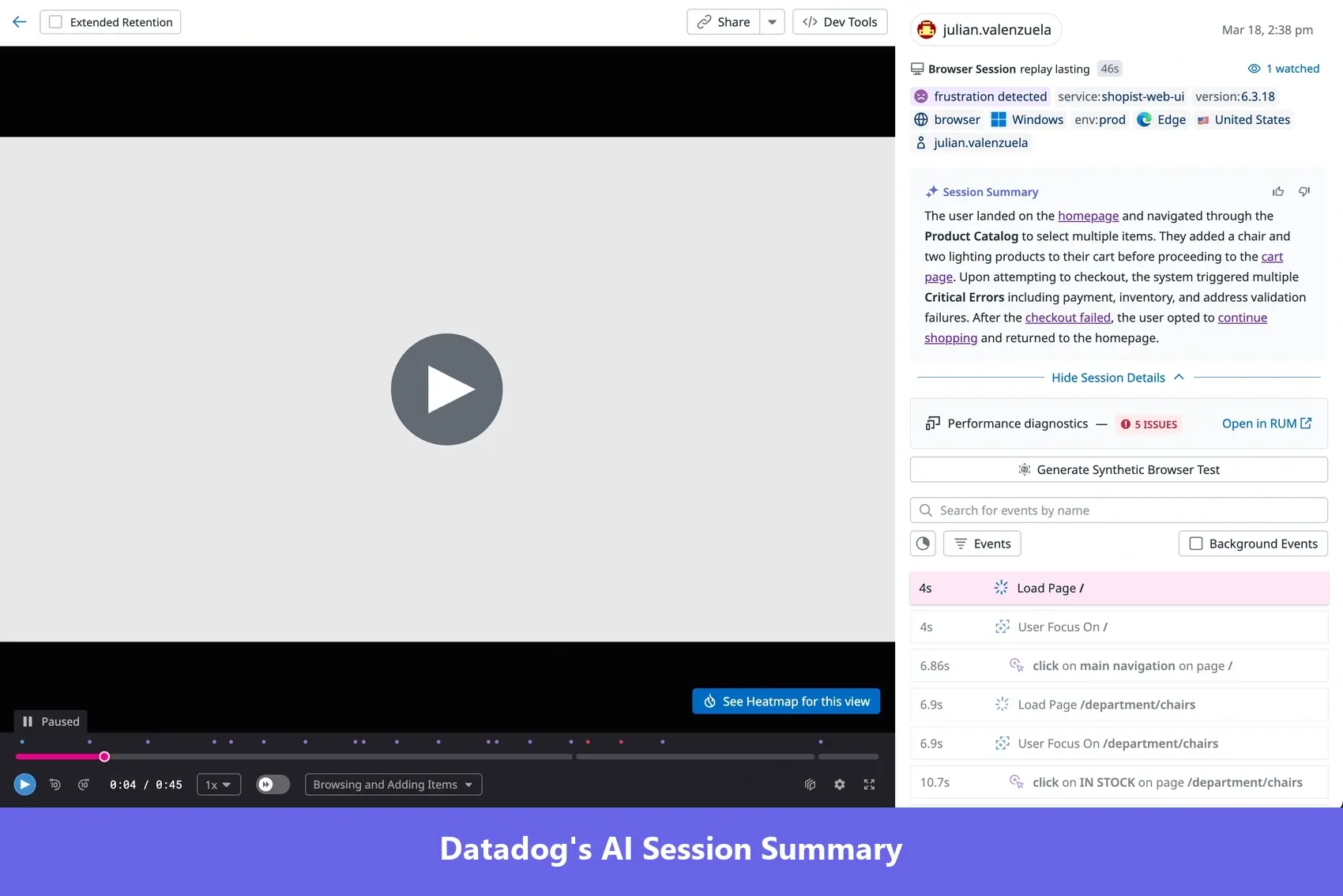
Datadog is a cloud observability and security platform. Session Replay is a capability inside its Real User Monitoring and Product Analytics products.
Key features:
- Replay to trace: A single click moves you from a session to the full APM trace behind a slow request, with rage, dead, and error clicks on the timeline by default.
- AI summaries: Gives a one-sentence session summary and flags the session outcome.
- Collaboration: Timestamped comments with @mentions and “Launches,” which compares replays across feature-flag rollouts.
I feel like Datadog’s user interface feels rather dated, as one SRE mentioned: “I wish the UI had a more modern look, as it currently feels like I’m using an old inventory management system from the 2000s.” (December 2025)
PostHog for connecting session replay to the product development cycle
- Best for: Engineering-led product teams that want replay wired into product analytics, feature flags, experiments, surveys, and error tracking.
- G2 rating: 4.5/5.
- Price starts at: Free, with 5,000 web and 2,500 mobile recordings a month; then $0.0050 per web recording and $0.0100 per mobile recording.
- Shareable session replay: Yes. Internally and externally.
- Supported devices: Web, Android, iOS.
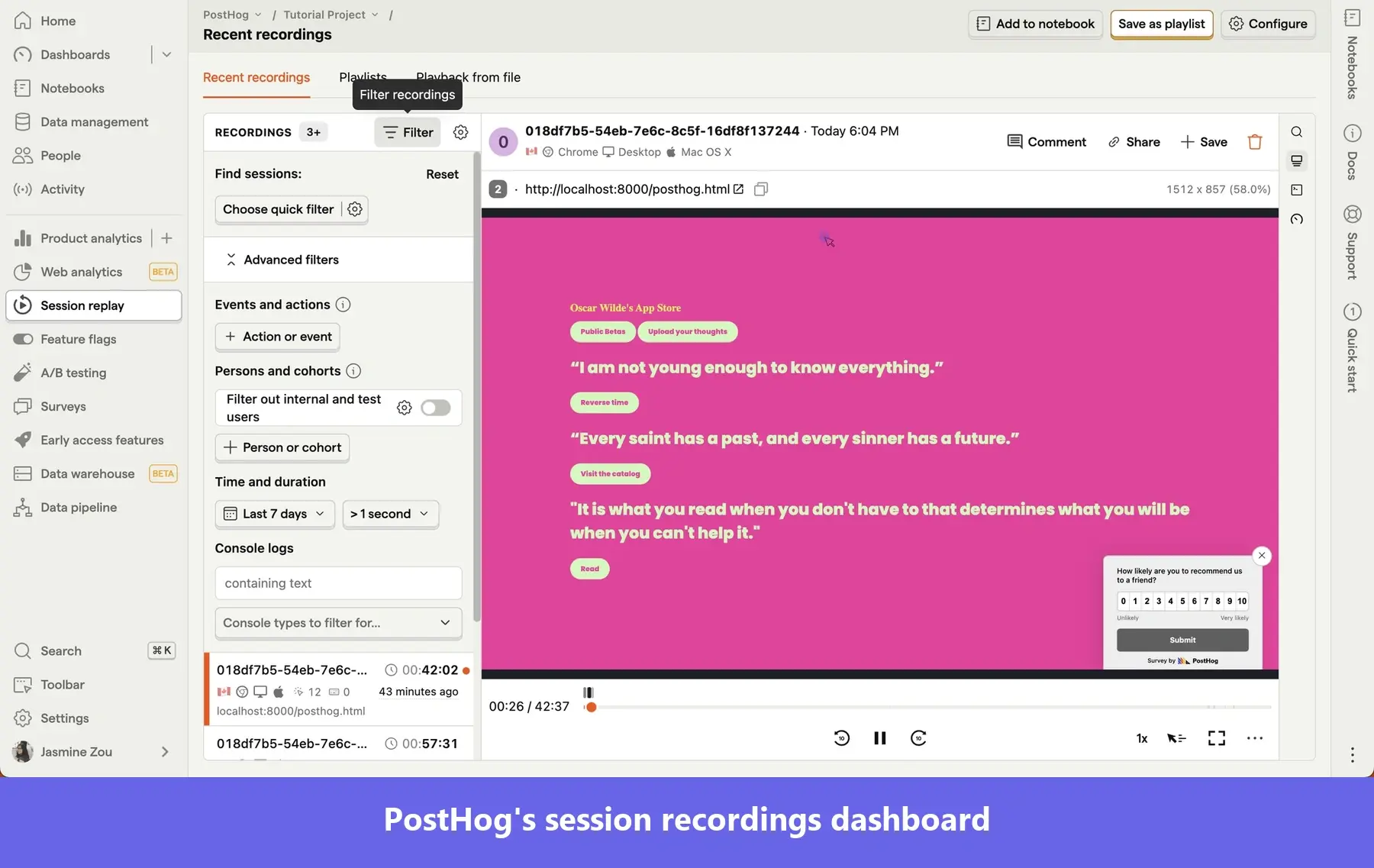
PostHog is an MIT-licensed, open-source product platform built for engineers, available as a hosted service or self-hosted.
Key features:
- Replay Vision: An AI layer that analyzes the rendered session video and flags issues.
- Debugging context in the player: Shows console logs, a network waterfall, exception stack traces, and Core Web Vitals.
- Trigger-based recording rules: Record only on a URL, a specific user event, or a flag condition, including only when a specific error happens.
One thing to bear in mind about PostHog’s session recordings: Five of the ten most recent G2 reviews describe it as overwhelming. Natanael G., a senior software engineer, wrote in May 2026 that “One downside is that parts of the UI and navigation can start to feel overwhelming as you adopt more PostHog features over time… it can sometimes take too many clicks or a bit of context switching to get to exactly what you’re looking for.
Turn session replay insights into product improvements with Userpilot!
When choosing a session replay tool for your team, start with who will use it.
For engineers, pick one that offers a console and network context beside the recording. For product teams, choose one that links recordings to other analytics reports and surveys, and lets them act on the insights.
Userpilot perfectly fits into the second category. It lets you find where users struggle or drop off with product analytics, collect feedback via on-site surveys, watch the recordings behind every user session or survey response, and help them succeed with personalized in-app guidance.
to see how a replay finding turns into an in-app fix in Userpilot.
About the author