Appcues vs Pendo: An Honest Comparison + A Better Alternative



If you’re weighing Appcues vs Pendo for your SaaS product, both user onboarding solutions offer in-app guidance, analytics, and AI assistance. The deciding factors are how much depth you need, how easily your team can use it, and what the full package costs.
Appcues suits teams that prioritize in-app engagement and have straightforward analytics needs, while Pendo offers deeper behavioral analysis and broader enterprise capabilities.
This comparison examines their AI features, product analytics, engagement tools, and plan inclusions to help you assess those trade-offs. We’ll also explore when Userpilot offers a better balance of functionality and cost.
Executive summary
- Appcues has expanded beyond onboarding, although Pendo retains greater depth in product analytics.
- AI now plays a larger role in how Appcues and Pendo help teams create experiences and analyze behavior.
- Custom pricing makes feature packaging and potential add-ons central to the buying decision.
- Userpilot offers SaaS teams a compelling alternative through usability, bundled capabilities, and pricing transparency.
Appcues vs. Pendo vs. Userpilot: Key differences at a glance
| Feature | Pendo | Appcues | Userpilot |
|---|---|---|---|
| Primary use case | Enterprise product analytics and adoption | User onboarding and in-app engagement for web and mobile applications | Product analytics and in-app engagement for product teams, with surveys, session replay, and an AI agent |
| Target audience | Enterprise and mid-market SaaS | Mid-market and growth-stage SaaS | Mid-market and growth-stage SaaS |
| Setup time | Under 6 weeks | 1–2 weeks | Days |
| Ease of use | No-code builder; governance complexity at scale | No-code builder; technical help may be needed for setup and advanced customization | No-code builder for nontechnical teams |
| In-app engagement | Guides and embeds; resource center checklists; web activation through pages, UI elements, or API | Flows, banners, pins, embeds, standalone checklists, and Launchpads; one event trigger per Flow or Embed | Flows, spotlights, embeds, standalone checklists, and resource centers; individual or grouped event triggers |
| Analytics | Paths, funnels, retention, retroactive autocapture, session replay, and AI querying | Event and experience analytics, funnels, paths, retention, custom dashboards, and AI querying | Paths, funnels, retention, autocapture, session replay, custom dashboards, and AI querying |
| Retention analysis | Yes | Yes | Yes |
| Data retention / reporting history | 7-year raw-event retention; reporting access varies by plan. | Reporting history: 12 months (Start), 24 months (Grow), 36 months (Enterprise). | 3 years (Growth); custom (Enterprise) |
| AI | Leo (beta), Model Context Protocol (MCP) server; Agent Analytics and Predict add-ons; Novus as a separate product in free beta. | Appcues AI assistant and MCP | Lia, MCP; Agent Analytics available as an add-on on Growth and Enterprise. |
| Pricing (annual) | Median approximately $48,500/year (Vendr). | Median approximately $15,000/year (Vendr). | Growth from $849/month ($10,188 annualized). |
| Pricing transparency | Custom pricing; sales conversation required | Custom pricing; prices not published | Growth starting price published; Enterprise pricing custom |
Appcues vs. Pendo: AI assistants and analytics
I’d start the Appcues vs. Pendo comparison with AI. Both platforms have significantly expanded their AI capabilities over the past few months, with overlapping features that help you create in-app content and analyze product data. These capabilities also influence the engagement, analytics, and feedback features we’ll compare next.
Both offer an MCP server, which lets you work with their data through external AI tools like Claude and ChatGPT. MCP availability alone isn’t a major differentiator here, so let’s focus on the assistants inside each platform and what they help you accomplish.
Appcues AI features
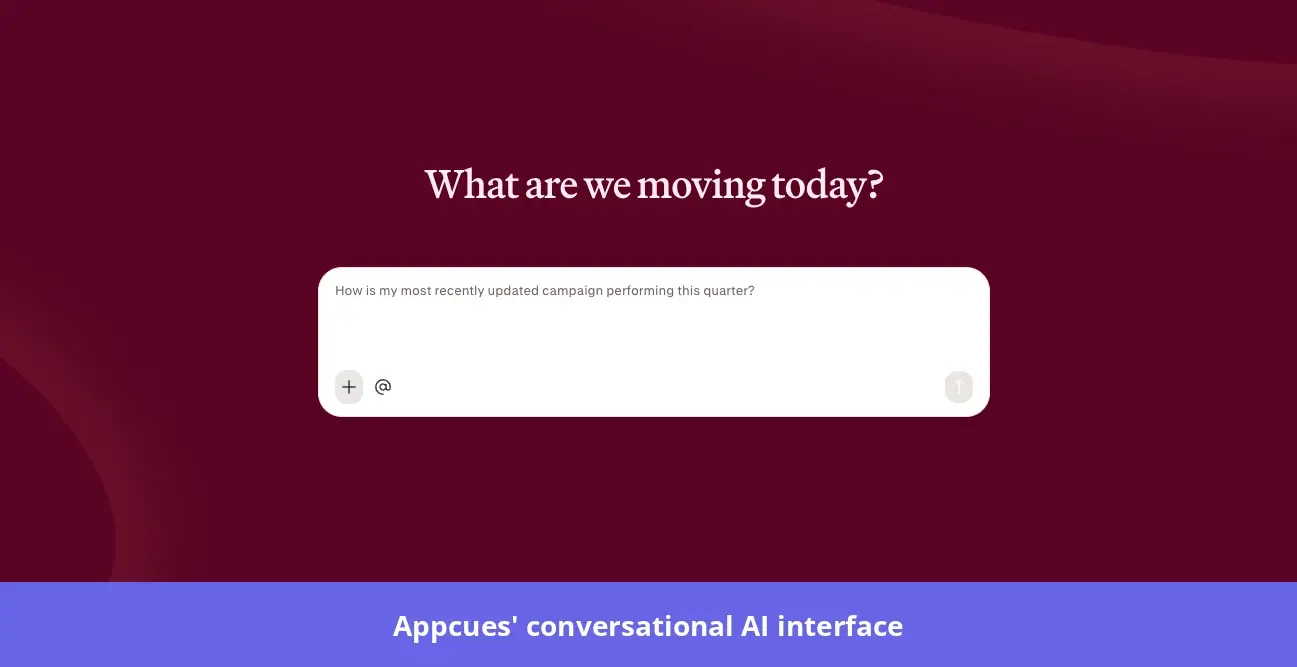
Appcues introduced Captain AI in 2025 as an in-app coach that answered onboarding questions and offered engagement advice. In July 2026, the company began rolling out a redesigned platform with AI integrated into campaign planning, experience creation, and analytics.
You can use it to turn a product goal into a campaign. For example, describe an activation problem, and the assistant will ask questions about your audience and desired outcome before proposing tactics and drafting experiences. It can also connect the campaign to a tracked event so you have a way to measure success.
The assistant also helps with analysis. You can ask it to explain a chart or create a saved dashboard containing metrics, funnels, and retention reports, giving you a way to monitor results beyond the conversation itself. This makes Appcues AI useful for both building campaigns and investigating the behavior those campaigns aim to change.
Pendo AI features
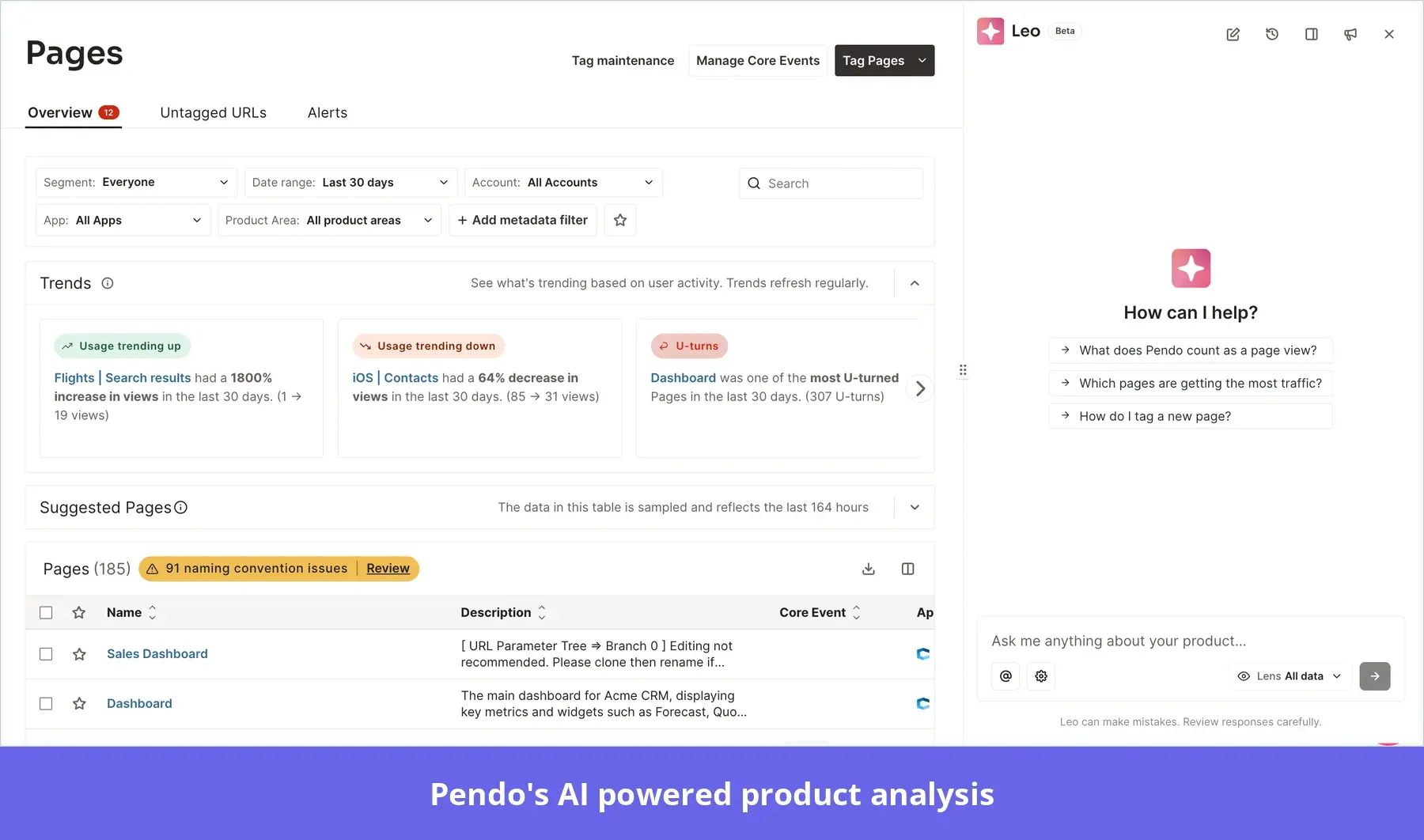
Pendo’s built-in assistant, Leo (beta), offers similar content creation capabilities. You can describe an onboarding walkthrough or feature announcement, and Leo will draft a guide for you to review, refine, and launch in the Visual Design Studio.
Analytical scope is where Pendo becomes more compelling. Leo can explore product usage, account activity, feedback, and configured business objects, with guided workflows for tasks such as reviewing account health or investigating feature adoption. You can also save “lenses” that restrict its analysis to particular applications, product areas, segments, and dates, which I’d find especially useful when evaluating it for an enterprise managing several products.
Pendo also extends its AI offering beyond the assistant:
- Agent Analytics measures the AI agents in your own product. It identifies conversation patterns and failures, tracks adoption, and connects agent interactions to outcomes such as task completion and retention.
- Pendo Predict combines product usage with CRM and BI data to predict churn and identify upsell opportunities.
- Novus, a separate product from Pendo, connects to your code repository to automate analytics instrumentation and deliver proactive product insights.
Appcues vs. Pendo: User engagement layer
Our 2025 benchmark report found an average activation rate of 37.5% across 62 B2B SaaS companies. On average, more than half of new users in these companies hadn’t reached their first value milestone. Of course, activation and engagement don’t depend entirely on the digital adoption platform you use, but from my experience, the tool matters a lot.
Here’s how Appcues and Pendo compare in this regard.
Appcues features for user engagement
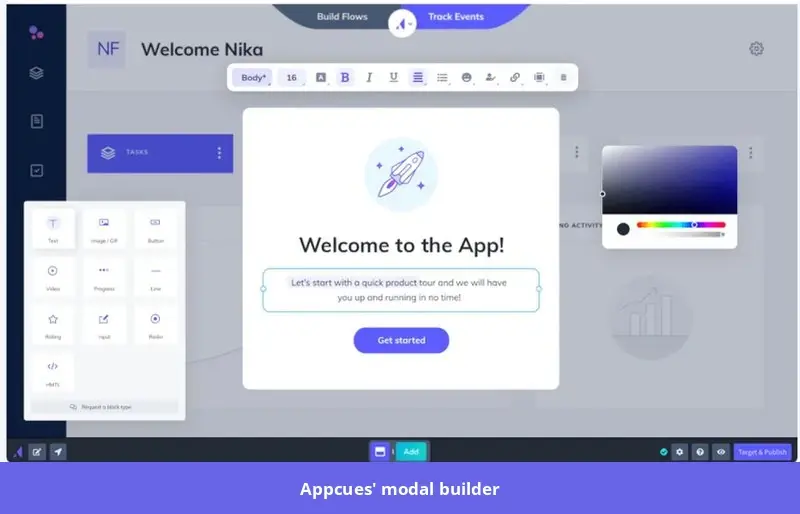
Appcues offers modals, tooltips, banners, pins, and embeds, with hotspots and slideouts still available in the legacy builder. You can either use them as standalone in-app messages to announce new features and provide contextual guidance or combine them into product tours.
The builder also gives marketers control over their publishing schedule.
“As a marketer, I can design, test, and publish flows entirely on my own timeline.” — Appcues user on G2
In addition to all these, Appcues lets you upload a mockup or screenshot, or provide a public URL, and ask Appcues AI to generate a draft experience. From there, you can refine it through follow-up prompts or make adjustments in the builder. And if you want manual customization, Appcues lets you do that through its visual builder and themes, with custom CSS available when you need more control over the design.
Finally, the platform offers self-service support through Launchpads, its in-app resource centers. These give users on-demand access to product tours and links to resources such as help articles, FAQs, and video tutorials.
Pendo features for user engagement
Similar to Appcues, Pendo offers in-app guides, self-service support, and onboarding checklists to help users get more value from your product.
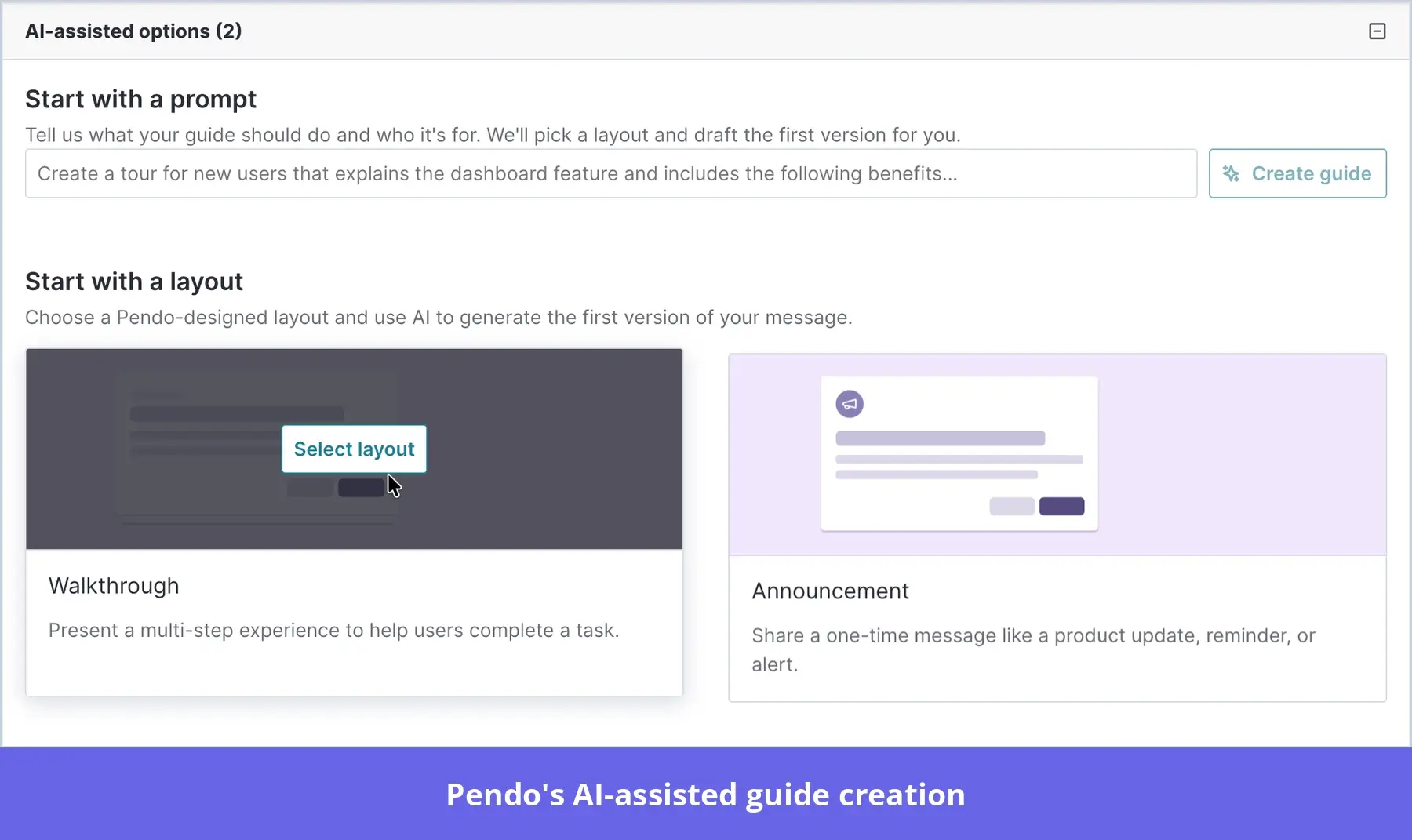
If you’re not looking to design onboarding flows from scratch, the platform provides customizable pre-built layouts. You can also ask Leo to draft a guide from a plain-language description, then review and refine it in the Visual Design Studio.
Like Appcues, Pendo’s resource center gives users on-demand access to in-app tutorials, announcements, onboarding checklists, and external support content.
One useful difference from Appcues is how checklist completion works. Pendo’s Task List tracks completion of linked guides, while Appcues lets you mark items complete when a tracked event occurs, or a user property meets a condition. That gives Appcues more flexibility when your checklist needs to confirm actions such as inviting a teammate or completing a profile.
Appcues vs. Pendo: Product analytics tools
One of the biggest recent updates in both platforms is conversational analysis: their AI assistants can answer plain-language questions and generate charts and analyses, reducing the need to configure every report manually.
Here’s how their analytics capabilities compare:
- Appcues: Goes beyond flow and checklist reporting with custom analytics dashboards, funnels, retention analysis, and user journeys. Some reporting options remain narrower than Pendo’s. For example, its journey reports show movement between pages but don’t trace the individual actions users take within those pages.
- Pendo: Provides deeper behavioral analysis, including paths that combine page views, feature clicks, custom events, and guide interactions across applications. You also get funnels, visitor- and account-level retention reports, and custom dashboards, with session replay available when included in your subscription.
Appcues for product analytics
Appcues combines analytics for your in-app experiences with reports on product usage, conversion, and retention.
Here are its main analytics features:
- Custom dashboards and AI: Create dashboards to monitor active users, feature adoption, and account engagement. Appcues AI can build these dashboards from plain-language requests and explain individual charts.
- Funnels and retention analysis: Funnels show where users drop off between actions, such as signup and first project creation. Retention reports show whether users return and repeat a selected action over time, so you can distinguish initial adoption from continued use.
- Event tracking: Appcues’ Click-to-Track lets you define events visually without code. For actions that need confirmation from your application, such as successful project creation rather than a click on the “Create project” button, you’ll need code-based tracking or an integration that sends those events to Appcues.
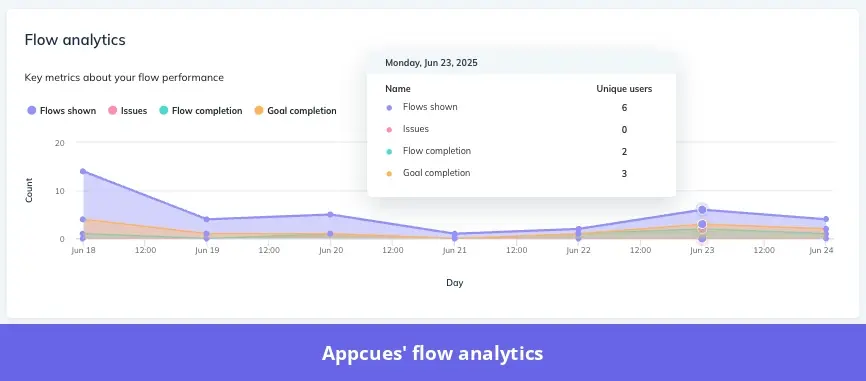
- Flow and checklist analytics: Flow reports show views, completion rates, and drop-off at individual steps, while checklist reports show reach, completions, and skips for each item.
Pendo for product analytics
Pendo’s product analytics tools help product teams investigate user behavior, identify friction, and monitor adoption at both the user and account level.
Key features include:
- Autocapture and AI tagging: Pendo automatically collects page views and clicks, which you can analyze retroactively after you define the relevant tags. Its AI tagging feature (currently in beta) scans your application and suggests page and feature tags for you to review and approve. Actions outside those automatically captured interactions still require custom Track Events.
- Behavioral reports: Funnels show where users drop off, paths reveal the actions they take before or after a specific event, and retention reports measure whether users or accounts return.
- Pendo Predict: This paid add-on combines product usage and CRM data to predict churn risk and identify expansion opportunities. It explains the signals behind its predictions and can send alerts to Salesforce or Slack, so your customer success team can prioritize accounts that need attention.
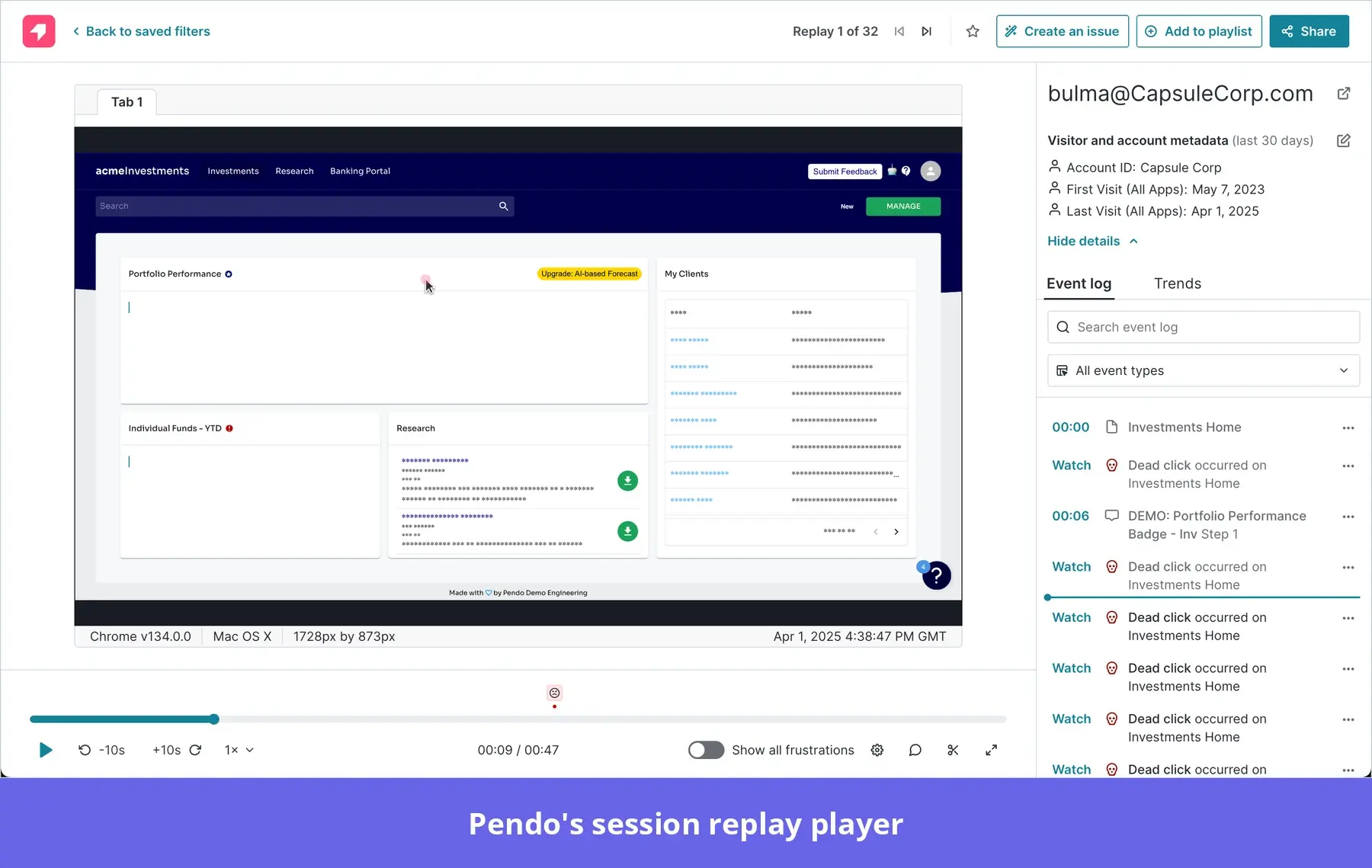
- Session replay: You can watch playbacks of user sessions to examine the behavior behind your metrics. For example, you could open replays from a funnel to investigate why users abandon your project setup process.
Appcues vs. Pendo: Customer feedback collection
Collecting user feedback is the key to identifying gaps in the user experience and improving your product.
Let’s find out what Appcues and Pendo offer in this regard.
Appcues features for user feedback
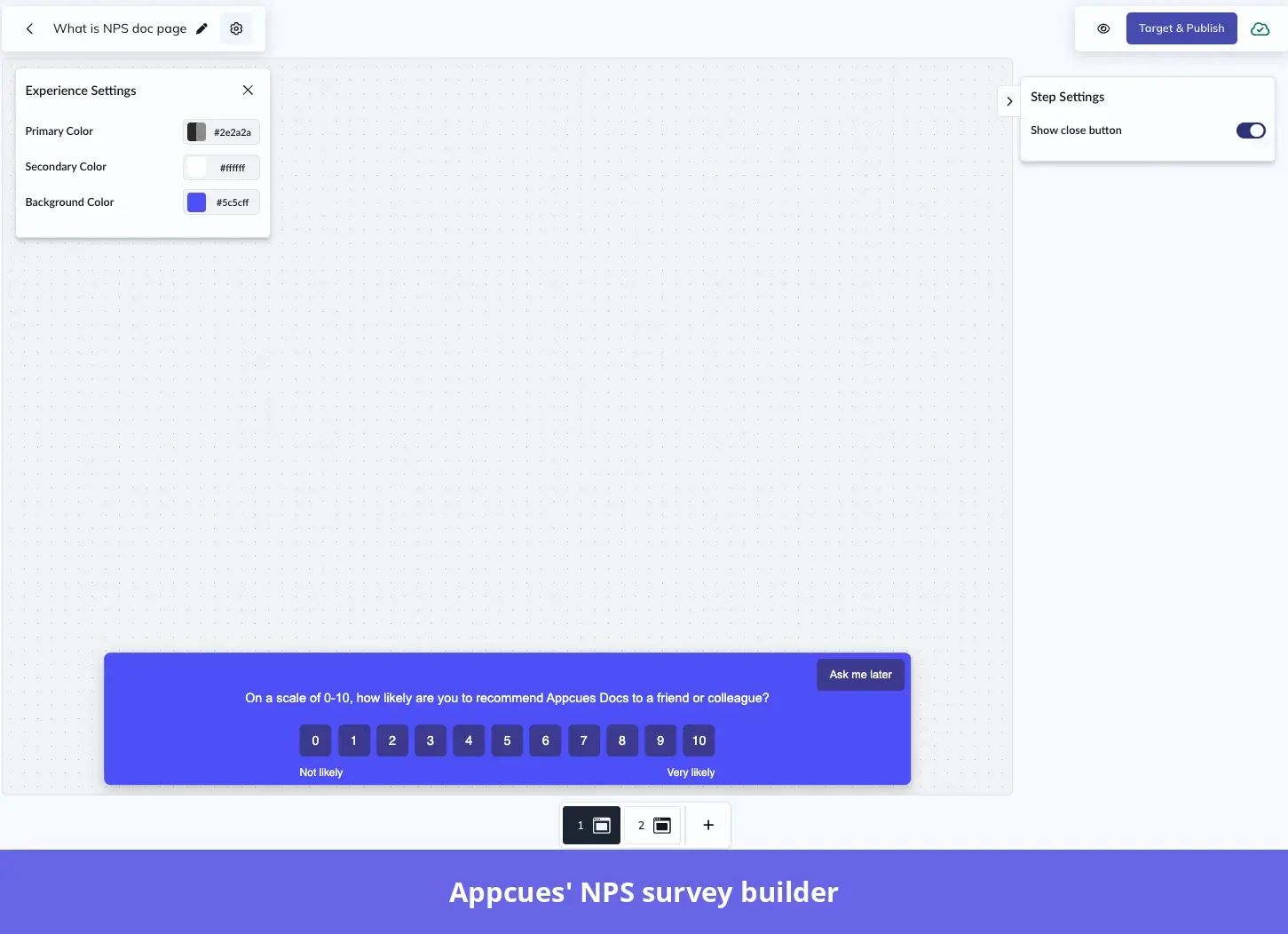
Appcues supports Net Promoter Score (NPS) surveys and custom in-app surveys with rating scales, multiple-choice questions, and open-text fields. You can use these to collect onboarding feedback, assess satisfaction with a feature, or learn where users need more help.
You can customize your survey appearance and follow-up questions, then segment users based on their scores. For instance, you can encourage NPS promoters to review your product and invite detractors to share more feedback or connect with your team.
Appcues AI also helps you interpret qualitative feedback. For example, you could ask it to summarize feedback on a recently launched feature and identify the issues users mention most often.
Pendo features for user feedback
Pendo’s user feedback capabilities are more extensive than those of Appcues. For starters, you can conduct NPS surveys both in-app and via email. You can also use in-app prompts to collect qualitative feedback and even conduct polls.
Plus, Pendo integrates with tools like Salesforce and Zendesk and lets you consolidate feedback collected across different platforms. You even have the option to test different product ideas and ask users about their experience.
The best part is that Pendo uses AI algorithms to extract actionable insights from survey data. You can also choose to create custom feedback views where you only see responses from specific user segments or product areas.
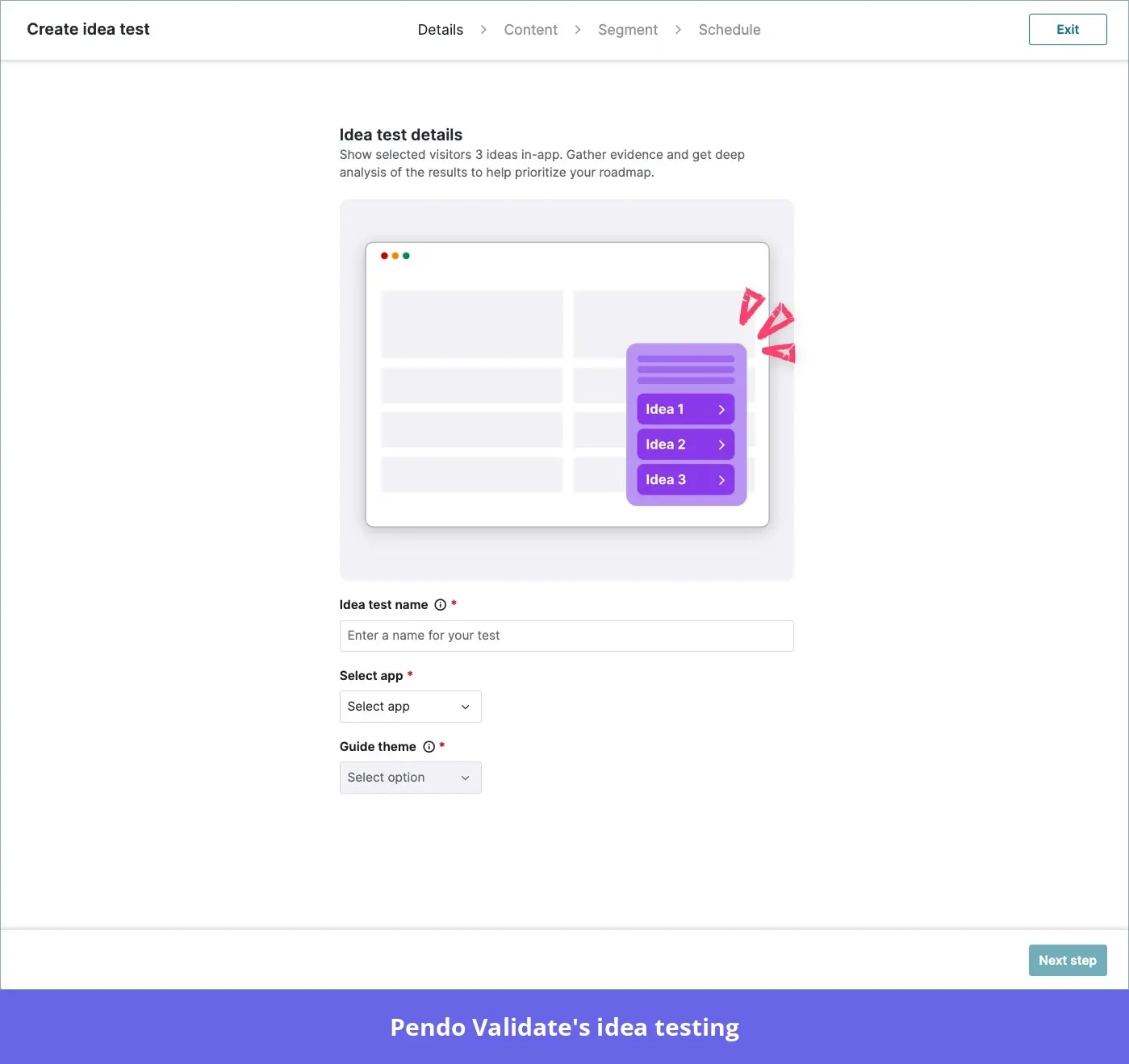
Feature idea validation at scale is also feasible with Pendo Validate. With it, you can create idea tests, display them to customer segments, and collect quantitative user feedback to understand if they strike a chord with them.
Pendo vs. Appcues: Integrations
Third-party integrations let your product adoption platform share data with the tools your sales, support, and product teams already use. Here’s how Appcues and Pendo compare:
Appcues integrations
Appcues connects with analytics tools such as Mixpanel, Amplitude, and Google Analytics, as well as CRM and marketing platforms such as Salesforce, HubSpot, and Marketo. These connections help you personalize in-app experiences with customer data and share engagement results across your team.
For tools outside its native integrations, Appcues offers Zapier connections, APIs, and webhooks. Connections such as Jira fall under its API and webhook options, so the setup differs from a native integration.
Pendo integrations
Pendo supports integrations with Salesforce, HubSpot, Segment, Zendesk, and Jira. You can use the platform’s API to connect with tools like Workato and Zapier.
Pendo’s Agent Toolkit also works with Fin, Decagon, Sierra, and custom-built AI agents. It supplies those agents with users’ product activity and relevant Pendo guides, while event triggers can prompt help after signs of friction.
Pendo vs. Appcues: Pricing
Both tools use custom pricing for their standard paid plans. Pendo bases its quotes on monthly active users (MAUs) and selected functionality, while Appcues also factors in installations and published experiences. To compare costs fairly, you’ll need quotes that cover the same audience size and capabilities.
Pendo pricing
Pendo offers a forever-free plan for up to 500 MAUs, with product analytics, in-app guides, and Pendo-branded roadmaps and NPS surveys. For more functionality or a larger audience, you can choose from three paid plans:
- Base: Includes product analytics and in-app guides. Session Replay and Sentiment, which covers NPS and other surveys, are available as add-ons.
- Core: Includes everything in Base, plus Session Replay. Sentiment remains an add-on.
- Ultimate: Includes everything in Core, plus NPS, product-market fit (PMF), and customer satisfaction (CSAT) surveys; journey orchestration through Orchestrate; product discovery through Listen; and Data Sync.
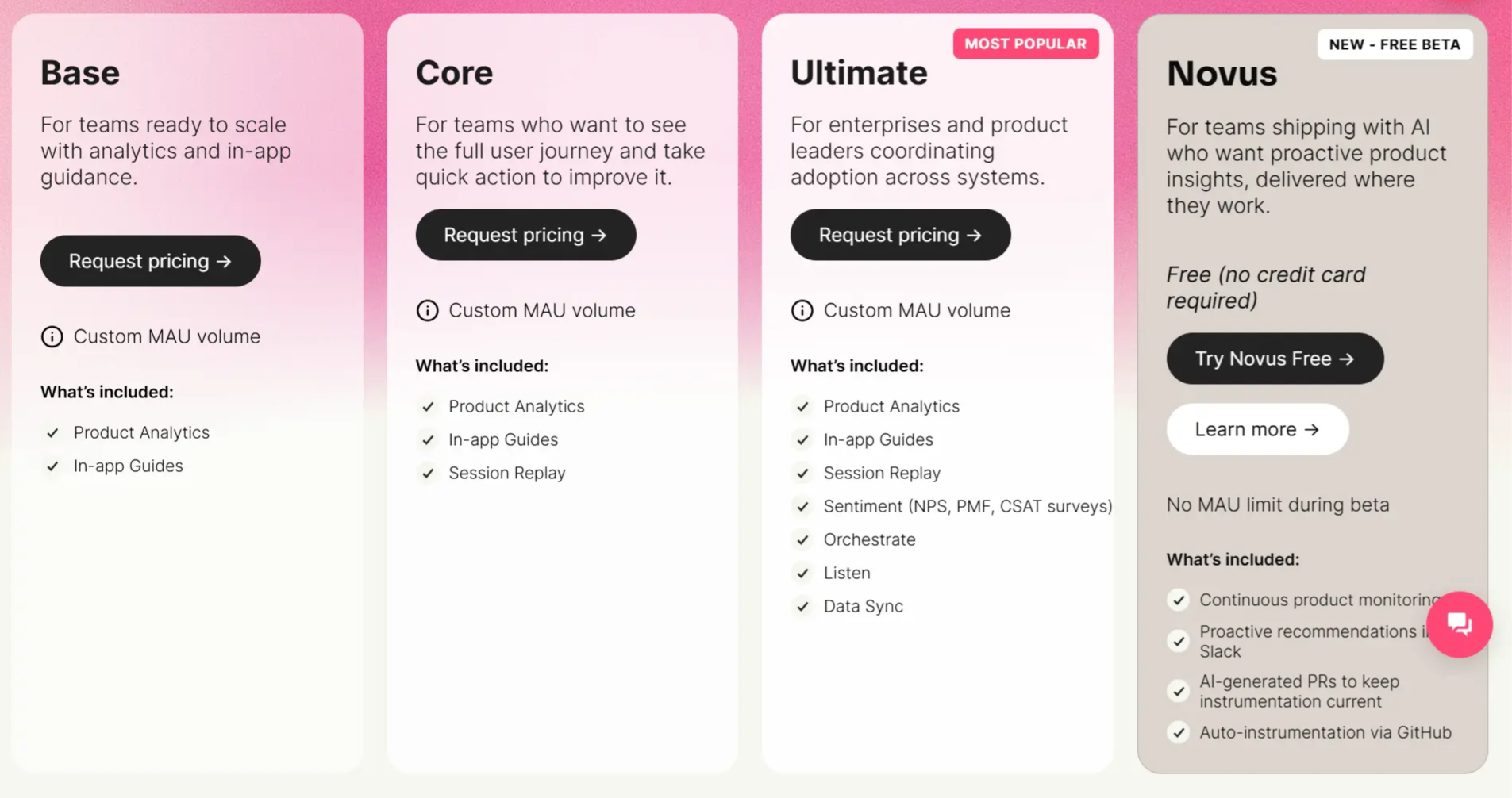
Since the platform doesn’t publish prices for its paid plans, I checked Vendr for a cost benchmark. It reports a median annual cost of around $48,500 across customer purchases, with prices getting as high as $150,000 per annum for high-end deals.
“Pendo is pricey and the add-ons only make it more expensive.” — Pendo user on G2.
Appcues pricing
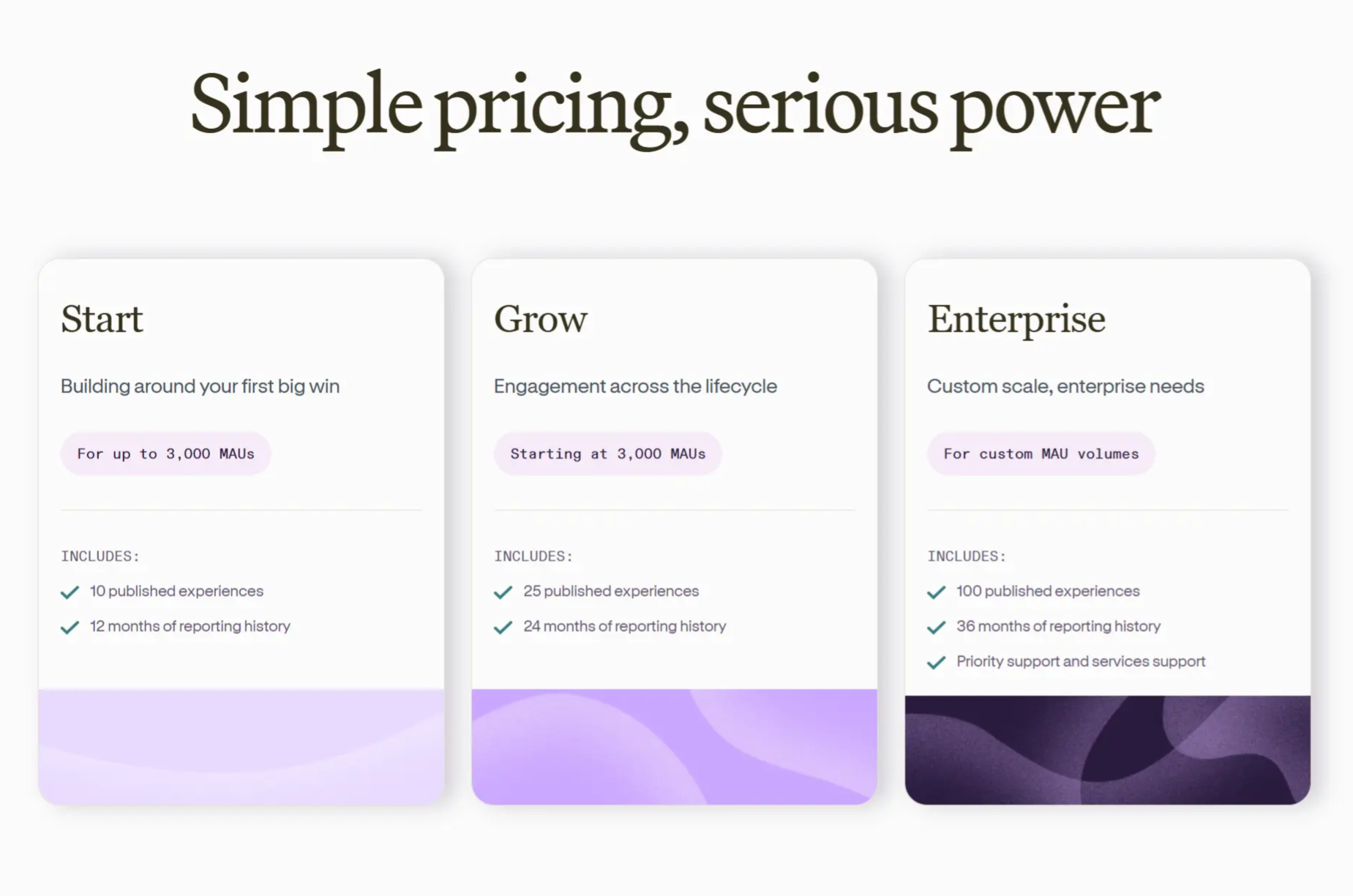
Appcues offers three paid plans, all custom priced:
- Start: Supports up to 3,000 MAUs, with 10 published experiences and 12 months of reporting history.
- Grow: Starts at 3,000 MAUs, with 25 published experiences and 24 months of reporting history.
- Enterprise: Supports custom MAU volumes, with 100 published experiences, 36 months of reporting history, and priority support.
They also offer a special plan for teams of 25 or fewer that gets you 1,000 MAUs for $3,600 a year plus a $250 implementation fee.
For a cost benchmark, Vendr reports a median annual cost of $15,000 across customer purchases. Your quote may differ based on your usage requirements and contract terms.
Pendo vs. Appcues: Customer support
Pendo offers a help center, a Support Bot, and the Pendo Connect Slack community. Paid customers can contact technical support through email or the in-app resource center and escalate issues to a support engineer. Premium support adds live chat, priority phone support, and a named Technical Success Engineer.
With Appcues, you can contact support by email and book meetings with your customer success manager. Its current plans cover implementation services, onboarding support, and a dedicated experience manager for every customer. Enterprise customers also get priority support.
Userpilot: A better alternative to Appcues and Pendo
Userpilot is built for product teams that want detailed product analytics and a straightforward way to act on their findings. It allows you to investigate conversion, retention, and feature adoption, then build targeted in-app experiences without a development task for every change.
For example, Doppler reported around 90% less reliance on developers once its product team could tag events and build in-app guidance in Userpilot.
The Growth plan starts at $849/month and includes advanced analytics, in-app engagement, surveys, a resource center, and 5,000 session replays per month. That gives you a published starting price and clear allowances for capabilities that would require add-ons to Pendo’s Base plan.
Notable features of Userpilot include:
- AI suite: Lia analyzes product data, recommends next steps, and creates reports, dashboards, segments, and draft surveys. The MCP server lets you use Claude, ChatGPT, or Cursor to query your product data, create segments and reports, and draft surveys. Agent Analytics, available as an add-on for Growth and Enterprise, tracks agent usage, conversation topics, failures, and how agent interactions relate to adoption and retention.
- Autocapture: Userpilot automatically captures supported interactions such as clicks, form submissions, and text input changes. You can then label the interactions that matter without code and use those events in reports, segments, and content triggers.
- In-app engagement and self-service support: Build flows, tooltips, and checklists for users who need help at specific points in their journey. A searchable resource center gives them access to tutorials, help articles, videos, and product updates whenever they need guidance.
- In-app surveys: Collect NPS, CSAT, customer effort score (CES), and open-ended feedback, with targeting based on user attributes and behavior. For example, you could ask users who abandon workspace setup which step they found confusing, then use their answers to improve the guidance.
- User and company profiles: Review account attributes, sessions, events, visited pages, and individual users’ survey responses. This context helps your team understand the people behind a drop-off and tailor follow-up experiences to their needs.
“Having onboarding, announcements, and session replays in one tool means product, CS, and engineering all work from the same view of what users are doing.” — User on G2.
Why choose Userpilot over Appcues
Userpilot is a stronger choice for teams seeking detailed behavioral analytics alongside in-app engagement. Its path analysis follows feature interactions and custom events, while Appcues’ User Journeys report follows pages within a session.
The difference is important when you need to assess whether users are making progress. Two users can open the same project board, but only one creates and assigns a task on that page. Their page-level paths can look identical even though only one has reached that setup milestone.
As Userpilot’s Head of Customer Success, James Mitchinson, explains, the questions that matter are “how much is a user engaged with this particular feature, and have they reached this milestone?” Userpilot lets you trace those actions within the user’s path.
Appcues may be the better fit if your priority is AI-assisted campaign planning. You can describe an activation or adoption goal, then have its AI propose tactics and draft the in-app experiences to support it.
Here’s more detail on how Userpilot and Appcues compare:
| Capability | Userpilot | Appcues |
|---|---|---|
| In-app engagement | No-code flows, tooltips, checklists, and behavioral targeting. Event-based triggers are included in Growth and Enterprise. | No-code flows, tooltips, checklists, and behavioral targeting. |
| Product analytics | Trends, session replays, and custom dashboards, across events and pages. Funnels, paths, and retention on Growth and Enterprise. | Custom dashboards, funnels, retention analysis, trends and paths, and experience reporting. User Journeys maps page navigation within individual sessions. |
| Autocapture | Browse automatically captured interactions and label them for historical reports, segmentation, and content triggers. | Background event recording supplies historical activity when you define supported Click-to-Track events. |
| AI assistant and MCP | Lia answers analytics questions and creates reports, dashboards, segments, and survey drafts. An MCP server connects external AI tools. | Appcues AI helps create experiences, campaigns, and analytics reports. An MCP server connects external AI tools. |
| Agent analytics | Tracks AI agent usage, conversation topics, failures, and relationships with adoption and retention. Available as an add-on for Growth and Enterprise. | No equivalent dedicated agent analytics module documented in its current public materials. |
| User feedback | NPS, CSAT, CES, and custom surveys, with behavioral targeting and branching. | NPS and custom surveys within in-app experiences, including ratings, multiple-choice questions, and open-text responses. |
| Customer support | Email and live chat on all plans, plus a dedicated customer success manager and a 90-day implementation plan on Growth and Enterprise. | Email support, implementation services, onboarding support, and a dedicated experience manager. Enterprise adds priority support. |
| Pricing | Growth starts at $849/month, with 2,000 MAUs included. Enterprise pricing is custom. | Besides the plan for small teams, custom quotes are available based on MAUs, installations, and published experiences. No standard paid-plan prices are published. |
Why choose Userpilot over Pendo
Userpilot is the better option if you want event-level analytics and in-app engagement without a long rollout. Most teams launch their first in-app flow within a day, and our migration data indicates that teams moving from Pendo typically reduce contract value by about 40%, while still covering onboarding, product adoption, feedback, and analytics.
Here’s how Userpilot and Pendo compare:
| Capability | Userpilot | Pendo |
|---|---|---|
| Analytics setup | After installation, teams can use autocapture, visual event labeling, and no-code reports. Custom application events may still require code. | Autocapture with visual or AI-assisted page and feature tagging after installation. Custom Track Events require developer setup. |
| Analytics access | Growth includes funnels, paths, retention analysis, and 5,000 session replays per month. | Core analytics are included in Base. Session Replay costs extra on Base and is included in Core and Ultimate. |
| Onboarding checklists | Dedicated standalone checklists with configurable tasks, completion conditions, and audience targeting. | Resource center checklists or Task List blocks within guides. Task List blocks require Guides Pro, and each task represents a guide. |
| User feedback | Growth includes standalone surveys, NPS, CSAT, CES, and branching logic. | Guide polls plus Sentiment for NPS, PMF, and CSAT surveys. Sentiment costs extra on Base/Core and is included in Ultimate. |
| Resource center | A searchable resource center for guides, help content, videos, and product updates, included in Growth. | A modular resource center for guides, onboarding checklists, announcements, external content, and feedback portals. |
| AI capabilities | Lia for conversational analysis and content creation, plus an MCP server. Agent Analytics is an add-on for Growth and Enterprise. | Leo for analysis and guide creation, plus an MCP server. Predict and Agent Analytics are additional purchases; Novus is separate and free during open beta. |
| Support | Email and live chat, plus a dedicated customer success manager and a 90-day implementation plan on Growth and Enterprise. | Standard ticket-based support. Premium support adds live chat, priority phone support, and a named technical success engineer. |
| Pricing | Growth starts at $849/month, with 2,000 MAUs included. Enterprise pricing is custom. | Free for up to 500 MAUs, custom quotes for Base, Core, and Ultimate, based on MAUs and selected capabilities. |
Get product analytics and in-app engagement on one plan with Userpilot
Appcues suits teams that prioritize in-app engagement and have straightforward analytics needs. Pendo offers deeper analytics and broader enterprise capabilities, but additional modules can raise the cost.
For SaaS teams that want strong analytics and in-app engagement with less complexity, Userpilot is a better fit. Its Growth plan combines those capabilities with AI assistance and a published starting price.
Schedule a Userpilot demo to see how you can identify an onboarding drop-off and build a targeted in-app flow to address it.
Disclaimer: Userpilot strives to provide accurate information to help businesses determine the best solution for their particular needs. Due to the dynamic nature of the industry, the features offered by Userpilot and others often change over time. The statements made in this article are accurate to the best of Userpilot’s knowledge as of its publication/most recent update on October 18, 2026.
About the author